warning AUDI A8 2011 Owner's Guide
[x] Cancel search | Manufacturer: AUDI, Model Year: 2011, Model line: A8, Model: AUDI A8 2011Pages: 302, PDF Size: 76.07 MB
Page 43 of 302
Vehicles with a glass panel sunroof: the sun
shade can be opened and closed by hand
when the sunroof is closed.
Vehicles w ith a so lar panel s unroof*: the
closed sunshade opens automatica lly when
the sunroof opens.
A WARNING
Pay careful attention when closing the
sliding/tilting sunroof - otherwise serious
injury cou ld result! Nehmen Sie deshalb
beim Verlassen des Fahrzeugs stets den
Zi.indschli.issel mit .
(D Note
Always close your sliding/tilting sunroof
when leaving your vehicle. Sudden rain can
cause damage to the interior equipment of
your veh icle, particu larly the electronic
equipment .
(D Tips
Information regarding the solar roof*
Qpage 77.
Emergency closing of the sliding/tilting
sunroof
If th e sun roof detects an object in its path
when it is closing, it will open again automati
cally. In this case, you can close the roof with
the power emergency closing function.
.. Within
five seconds after the sunroof opens
automatically, pull the switch until the roof
closes .
Opening and closing 41
Panoramic sunroof
Opening/closing the roof
Applies to vehicles: with panoramic sunroof
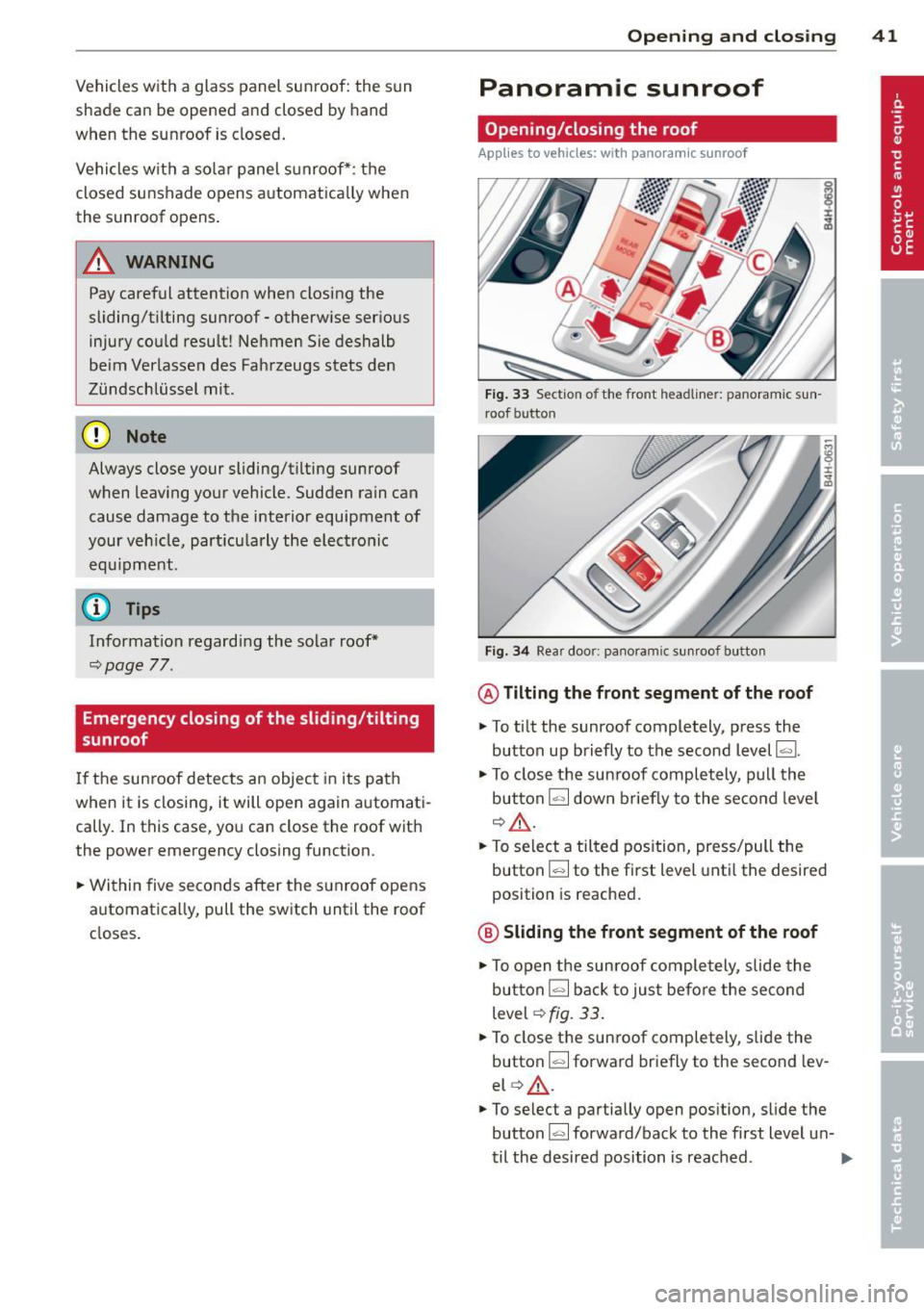
Fig. 33 Section of the front headliner: panora mic sun
roof button
Fig. 34 Rear door: pa noramic sunro of butto n
@Tilting the front segment of the roof
.. To tilt the sunroof completely, press the
button up briefly to the second level~-
.,. To close the sun roof completely, pull the
button
~ down briefly to the second leve l
Q.&. .
.. To select a tilted position, press/pull the
button[;] to the first level until the desired
position is reached.
@ Sliding the front segment of the roof
.,. To open the sunroof completely, slide the
button [;] back to jus t before the second
level
Q fig. 33 .
.. To close the sunroof completely, slide the
button
~ forward briefly to the second lev
el
q .&_ .
.. To select a partially open position, slide the
button[;] forward/back to the first level un-
til the desired position is reached . .,.
Page 44 of 302
42 Opening and closing
Tilting the rear segment of the roof
The rear segment of the roof can be operated
both from the cockpit and from the rear seat.
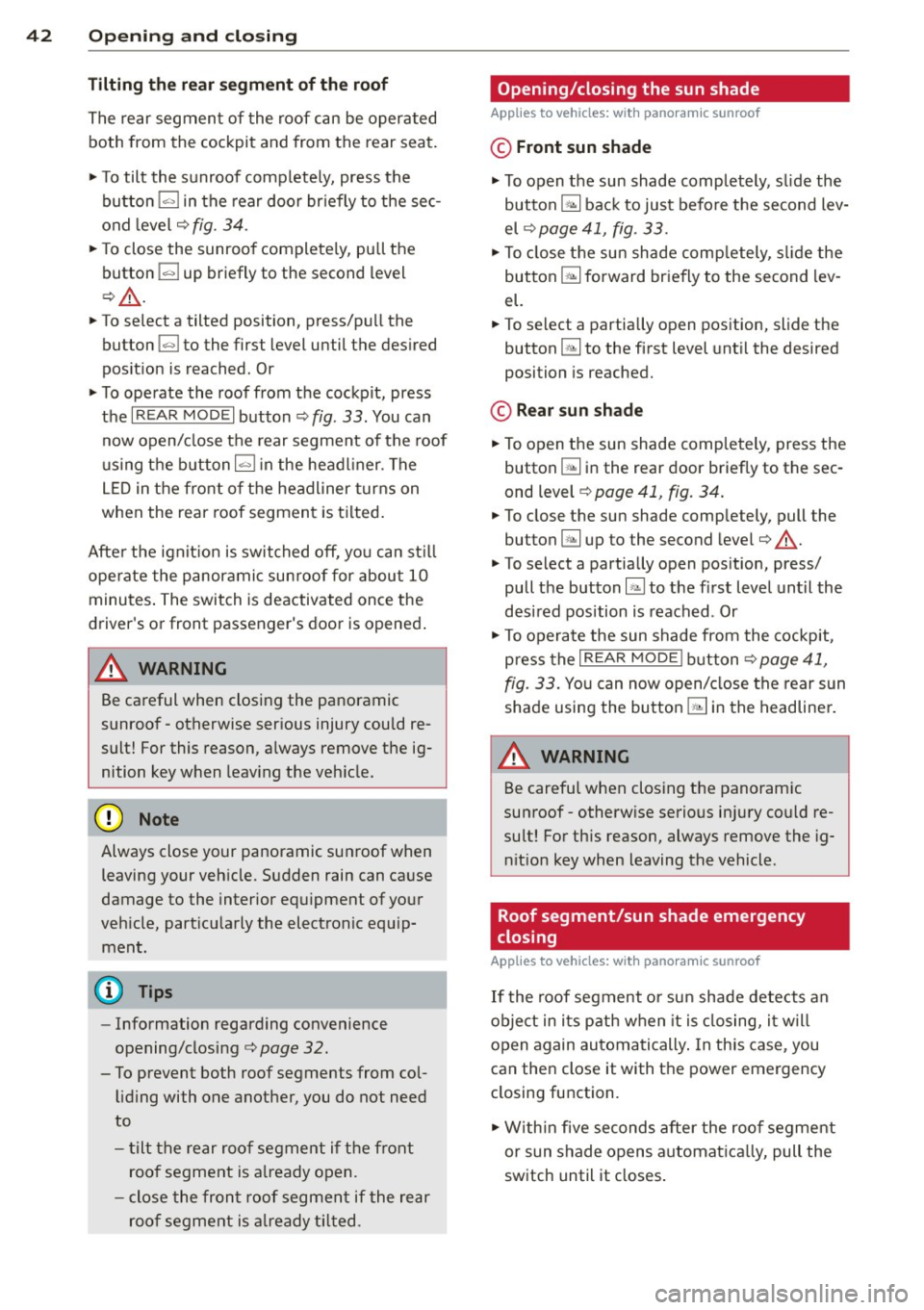
,. To tilt the sunroof complete ly, press the
button
!«>I in the rear door br iefly to the sec
ond level ¢
fig. 34.
,. To close the sunroo f completely, pu ll the
button ~ up briefly to the second level
¢A .
,. To select a tilted position, press/pull the
button
!«>I to the first level until the desired
pos it ion is reached . Or
,. To operate the roof from the cockpit, press
the
I REAR MODE! button ¢ fig. 33. You can
now open/close the rear segment of the roof
using the button~ in the headl iner. The
LED in the front of the headliner turns on
when the rear roof segment is tilted .
After the ignit ion is switched off, you can st ill
ope rate the panoramic sun roof for about
10
minutes . The switch is deactivated once the
driver's or front passenger's door is opened .
& WARNING
Be careful when closing the panoramic
sunroof - otherwise serious injury could re
sult! For this reason, always remove the ig
nition key when leaving the vehicle.
{[) Note
Always close your panoramic sunroof when
leaving your vehicle. Sudden rain can cause
damage to the interior equ ipment of your
veh icle, part icularly the electronic equ ip
ment.
(D Tips
- Information regarding convenience
opening/closing ¢
page 32.
- To prevent both roof segments from col
liding with one another, you do not need
to
- tilt the rear roof segment if the front
roof segment is already open.
- close the front roof segment if the rear
roof segment is already tilted.
Opening/closing the sun shade
Applies to vehicles: with panoramic sunroof
© Front sun shade
"'To open the sun shade completely, slide the
button
G;l back to just before the second lev
el ¢
page 41, fig. 33 .
,. To close the sun shade comp letely, slide the
button ~ forward briefly to the second lev
el.
,,, To select a partially open position, slide the
button ~ to the first level until the desired
position is reached.
© Rear sun shade
,. To open the sun shade completely, press the
button ~ in the rear door briefly to the sec
ond level ¢
page 41, fig. 34.
,. To close the sun shade completely, pull the
button ~ up to the second level¢
A.
,. To select a partially open pos ition, press/
pull the button~ to the first level until the
desired position is reached . Or
,. To operate the sun shade from the cockpit,
press the
I REA R MODE! button¢ page 41,
fig. 33. You can now open/close the rear sun
shade using the button~ in the headliner.
A WARNING
--
Be carefu l when closing the panoramic
sunroof- otherw ise serious in jury could re
sult! For th is reason, always remove the ig
nition key when leaving the vehicle.
Roof segment/sun shade emergency
closing
Applies to vehicles: with panoramic sunroof
If the roof segment or sun shade detects an
object in its path when it is closing, it will
open again automatically . In this case, you
can then close it with the power emergency
closing function.
,. Within five seconds after the roof segment
or sun shade opens automatica lly, pull the
switch until it closes.
Page 46 of 302
44 Clear vision
Highway light function*
(vehicles with LED
headlights) -this function adapts the lighting
for highway driving based on vehicle speed.
.&_ WARNING
- Automatic headlights are only intended
to assist the driver . They do not relieve
the driver of his responsibility to check the headlights and to turn them on man
ually according to the current light and
visibility conditions . For example, fog
cannot be detected by the light sensors.
So always switch on the headlights §,0
under these weather conditions and
when driving in the dark.
- Crashes can happen when you cannot see the road ahead and when you cannot be seen by other motorists. Always turn on
the headlights so that you can see ahead
and so that others can see your car from
the back .
(D Note
The rear fog lights should only be turned
on in accordance with traffic regulation, as
the lights are bright for following traffic.
(D Tips
- In the event of a light sensor malfunc
tion, the driver is notified in the instru
ment cluster display
q page 21 .
-You will hear a warning tone if you open
the driver door when the exterior lights
are switched on.
- Please observe legal regulations when
using the lighting systems described .
Emergency flasher
The emergency flasher makes other motorists
aware that you or your vehicle ore in on emer
gency situation .
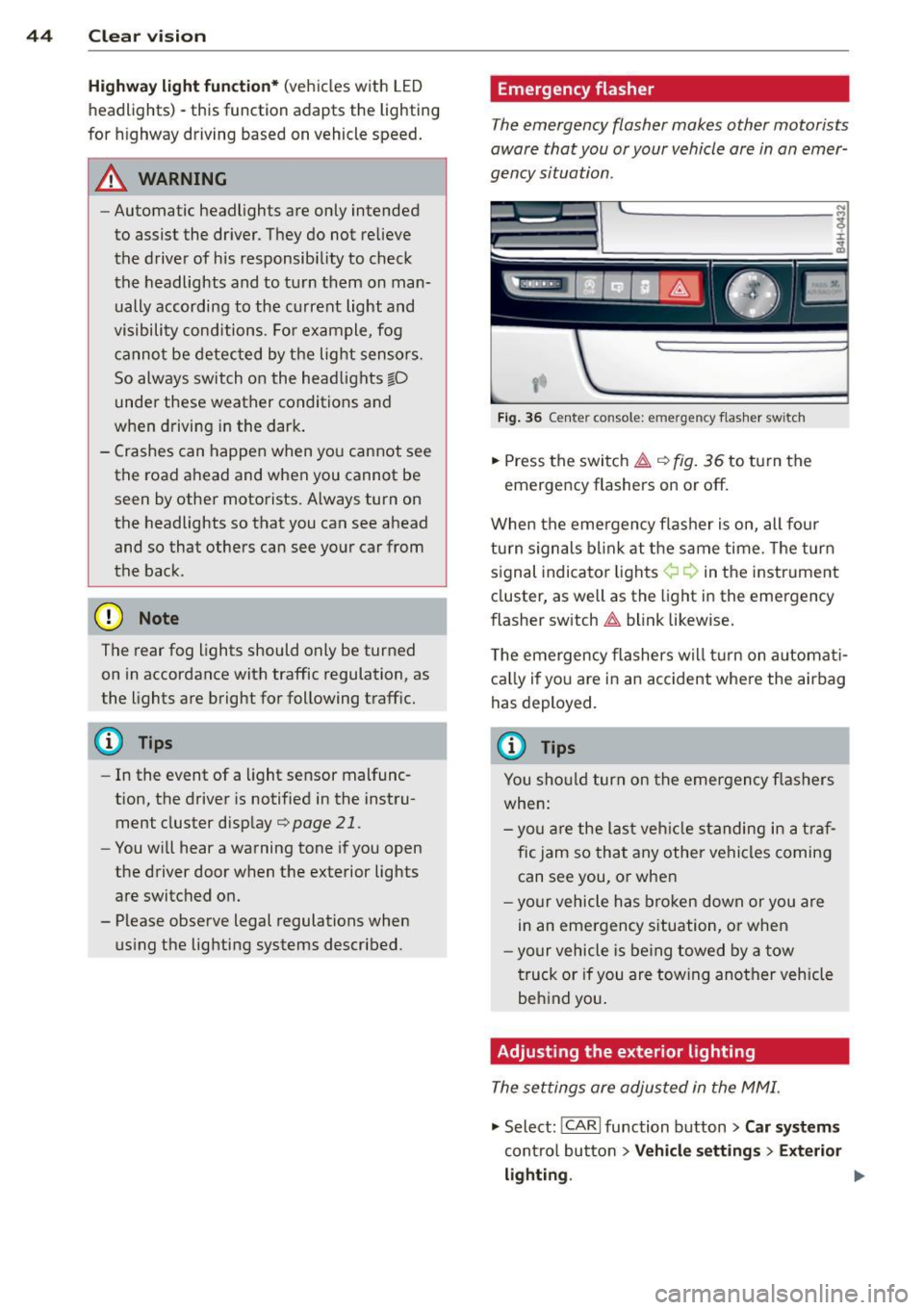
Fig. 36 Ce nte r co nso le: em erg en cy flash er sw itch
.,. Press the switch~ c:> fig. 36 to turn the
emergency flashers on or off.
When the emergency flasher is on, all four
turn signals blink at the same time. The turn
signal indicator lights¢¢ in the instrument
cluster, as well as the light in the emergency
flasher switch
~ blink likewise.
The emergency flashers will turn on automati
cally if you are in an accident where the airbag
has deployed.
@ Tips
You should turn on the emergency flashers
when:
- you are the last vehicle standing in a traf
fic jam so that any other vehicles coming
can see you, or when
- your vehicle has broken down or you are
in an emergency situation, or when
-your vehicle is being towed by a tow
truck or if you are towing another vehicle
behind you.
Adjusting the exterior lighting
The settings ore adjusted in the MMI.
"'Select: !CARI function button> Car systems
control button > Vehicle settings > Exterior
lighting. ""
Page 50 of 302

48 Clear vis ion
Extending /retracting th e rear window
sh ad e*
• To extend or retract the sun shade fr om the
cockpit ,
press the~ button in the center
console
¢ fig . 42 .
• To extend or retract the sun shade
from th e
r e ar of th e vehicle,
press the liiil button in
the door
¢ fig . 43 .
Extending the rear door sun shade s
• Close the window in the rear door.
• To extend the sun shade
from the d riv er 's
s eat ,
pull the left/right rear power window
switch ~ in the dr iver's door .
• To extend the sun shade from the
rear of
th e v ehi cle,
pull the power window sw itch
~ i n the left/right rear door.
Retr acting the re ar doo r sun shades*
• To retract the sun shade from th e dri ver 's
sea t,
press the left/right rear power window
switch~ in the driver's door.
• To retract the sun shade from the
re ar of the
vehicle ,
press the power window switch~
in the left/right rear door.
You can adj ust the settings for the rear sun
sh ade so the shade ret ra cts automatica lly
when you selec t the reve rse gear. Select:
CAR
function button > Ca r sys tems control button
> Vehicle settings > Automatic rear blind >
On. T he sett ings are automat ica lly stored and
assigned to the remote control key. The sun
shade extends again as soon as the vehicle be
g ins traveling forward at a speed greater than
9 mph (1S km/h), as long as the ignition has
not been switched off in the meantime .
& WARNING
When lowe ring or raisi ng the sunshade,
make s ure there is no thing in its way a nd
t ha t it has a free path to trave l. This could
cause personal injury.
{D) Tips
- If the sun shade is operated repeatedly
wi thin a sho rt time, the bui lt-in overload
protection circui t may be tr ipped. If this occurs, you will have to wait briefly be
fore yo u can operate the shade again.
- Because of the decrease in the f lexibility
of the shade materia l at temperatures
below freezing, the electrica l circuit
which operates the shade shuts off when
the temperature in the vehicle falls be
low
14 °F ( - 10 °C). The shade cannot be
operated until the passenger compart
ment warms up above this temperature.
Vanity mirror in the rear
App lies to veh icles: w ith vanity mir rors in th e rea r
Fig. 44 Rear headliner : van ity mirro r
• Press the button to fold the mirror open.
The mirror light ing turns on automatically.
• To change the mirror's ang le, move it for
ward/back w ith your hand .
Wiper and washer
system
Switching the windshield wipers on
F ig . 4 5 Winds hield w iper lever
Move the windshie ld w iper lever to the corre
sponding position:
@ -Windshield wipe rs off
Page 51 of 302

(!)-Rain s ensor mode. The windshield wipers
switch on once the vehicle speed exceeds ap proximately 2 mph (4 km/h) and it is raining.
The higher the rain sensor sensitivity is set (switch @to the right), the earlier the wind
shield wipers react to moisture on the wind
shield. You can deactivate ra in sensor mode in
the MMI, which will then activate intermittent mode. Select:
ICARI function button> Car sys
tems
control button > Driver assist > Rain
se nsor
> Off. In intermittent mode, you can
adjust the interval time using the switch @.
@-Slow wiping
®-Fast wiping
@ -Single wipe. If you hold the lever in this
position longer, the wipers switch from slow
wiping to fast wiping.
® -Clean the windshield. The wipers wipe
one time after several seconds of driving to
remove water droplets. You can switch this
f unction
off by moving the lever to position ®
within 10 seconds after the afterwipe . The af
terwipe function is reactivated the next time
you switch the ignition on .
Cleaning the headlights. The headlight wash
er system* only functions when the lights are
switched on. The headlights and the night vi
sion system camera* are cleaned automatical ly the first time the lever is press in position
® and every 8 times it is pressed after that.
They are also cleaned every time you hold the lever in position ® for longer than 8 seconds.
A WARNING
-The rain sensor is only designed to assist
and support the driver. It remains entire
ly the driver's responsibility to monitor
outside weather conditions and to man
ually activate the wipers as soon as rain
or drizzle reduces visibility through the
windshield .
- The windshield must not be treated with
water-repellent materials . They can in
crease glare under poor visibility condi
tions such as wetness, darkness, or when
the sun is low on the horizon. In addi-
Clear vision 49
tion, they can cause the windshield wip
ers to chatter.
- Properly functioning windshield wiper
blades are required for a clear view and
safe driving
c:::> page SO, Replacing
windshield wiper blades.
([) Note
-In the case of frost, check whether the
windshield wiper blades are frozen to
the windshield. Switching on the wind
shield wipers can damage the wiper
blades!
- Prior to using a car wash, the windshield
wiper system must be switched
off (lever
in position 0) . This helps to prevent unin
tentional switching on and damage to
the windshield wiper system.
- Do not use the wipers to clear a frosted
window. Using the wipers as a conven ient ice scraper will destroy the wiper
blades .
(D Tips
- The windshield wipers are switched off
when the ignition is off. Activate the
windshield wipers after the ignition is
switched back on by moving the wind
shield wiper lever to any position.
- Worn or dirty windshield wiper blades
result in streaking. This can affect the
rain sensor function . Check your wind
shield wiper blades regularly .
- The washer fluid nozzles of the wind
shield washer system are heated at low
temperatures when the ignition is on.
- When stopping temporarily, e.g. at a
traffic light, the set speed of the wind
shield wipers is automatically reduced by
one speed.
Page 52 of 302
50 Clear vision
Replacing windshield wiper blades
Wiper blades in good condition help keep the
windshield clear .
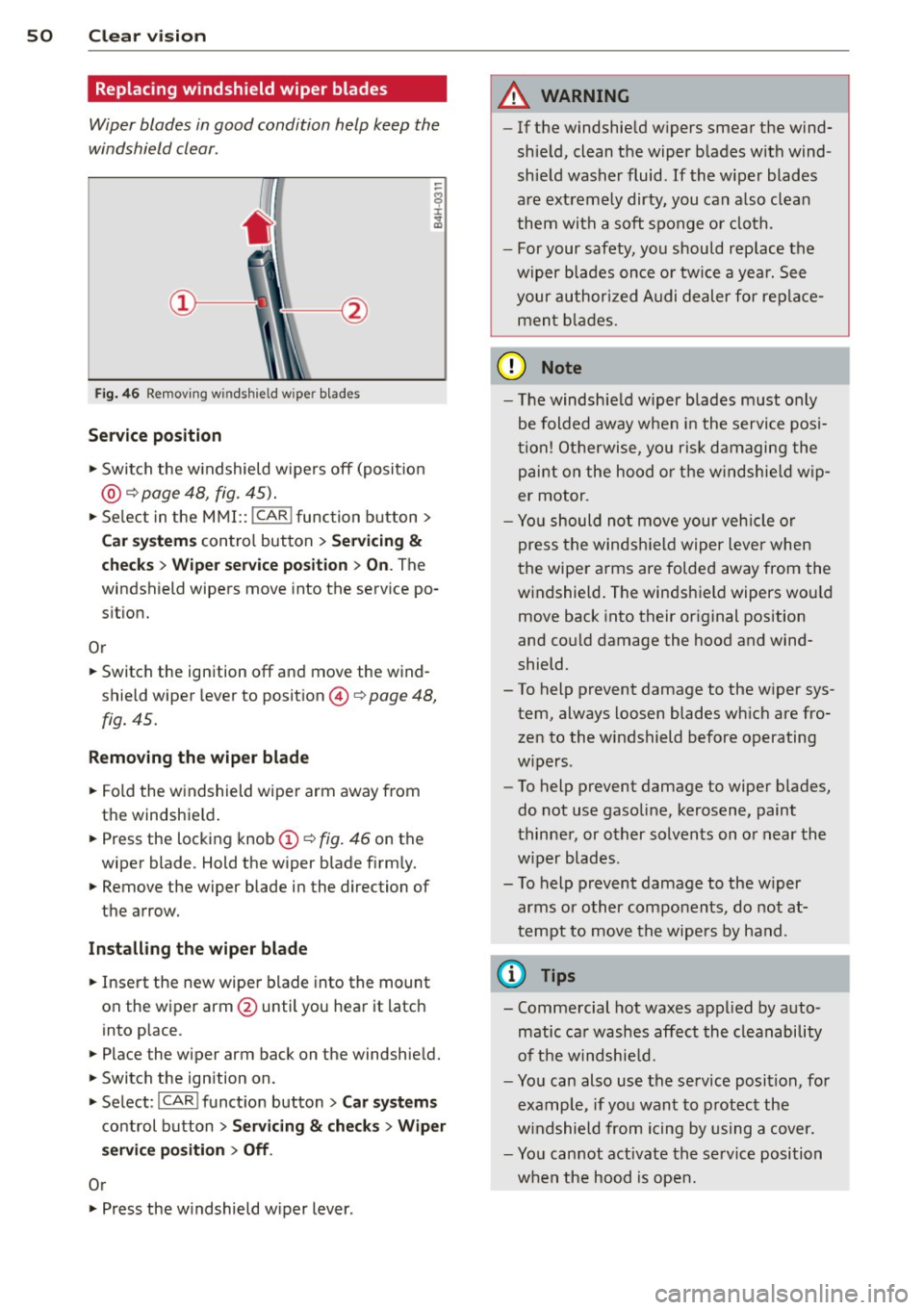
Fig. 46 Remov ing wi nds hield w ipe r blade s
Serv ice p osition
""Switch the windshield wipers off (posit io n
@ ~ page 48, fig . 45).
""Select in the MMI:: !CAR !function button>
Car system s control button > Servici ng &
checks > Wip er se rv ice po sition > On . The
windshield wipers move into the service po
s it ion.
O r
"" Switch the ignition off and move the wind
shield wiper lever to position ©~
page 48,
fig. 45.
R emoving the wip er blad e
""Fold the windshield wiper arm away from
the windshie ld .
"" Press the locking knob
@ ~fig. 46 on the
wiper blade . Hold the wiper blade firm ly.
"" Remove the wiper blade in the direction of
the arrow.
In sta ll ing th e wip er blad e
""Insert the new wiper blade into the mount
on the wiper arm @until you hear it latch
into place .
"" Place the wiper arm back on the windshield.
"" Switch the ignition on .
""Select : ICAR !funct ion button>
Car sy stem s
control button > Servicing & ch eck s > W iper
se rvic e po sition
> Off .
Or
""Press the windshield w iper lever .
A WARNING
-If the windshie ld w ipers smear the wind
sh ie ld, clean the wiper b lades with wind
shie ld washer fluid .
If the wiper blades
are extremely dirty, you can a lso clean
them with a soft sponge o r cloth.
- For your safety, you should replace the
wiper blades once o r twice a year. See
your author ized Audi dealer for replace
men t bla des.
([) Note
-The windshield wiper blades must only
be folded away when in the service posi
tion! Otherwise, you ris k damaging the
paint on the hood o r the windshie ld w ip
er motor.
- Yo u should not move your veh icle or
press the windsh ie ld wiper lever when
t he wipe r arms are folded away from the
w indshield. The windshield wipers wou ld
move back into their or iginal position
and could damage the hood and wind
shield.
- To help prevent damage to the w iper sys
tem, always loosen blades wh ich are fro
zen to the windshield before operating
w ipers .
- To help prevent damage to wiper blades,
do not use gasoline, kerosene, paint
thinne r, or other solvents on o r near the
w iper blades .
- To help prevent damage to the w iper
arms or other components, do not at
tempt to move the wipe rs by hand .
(j) Tips
- Comme rcial hot waxes appl ied by auto
matic ca r washes affect the cleanability
of t he windshie ld.
- You can also use the service position, for
example, if you want to p rotect the
w indshield from icing by using a cover.
- You cannot activate the se rv ice position
when the hood is ope n.
Page 53 of 302
Mirrors
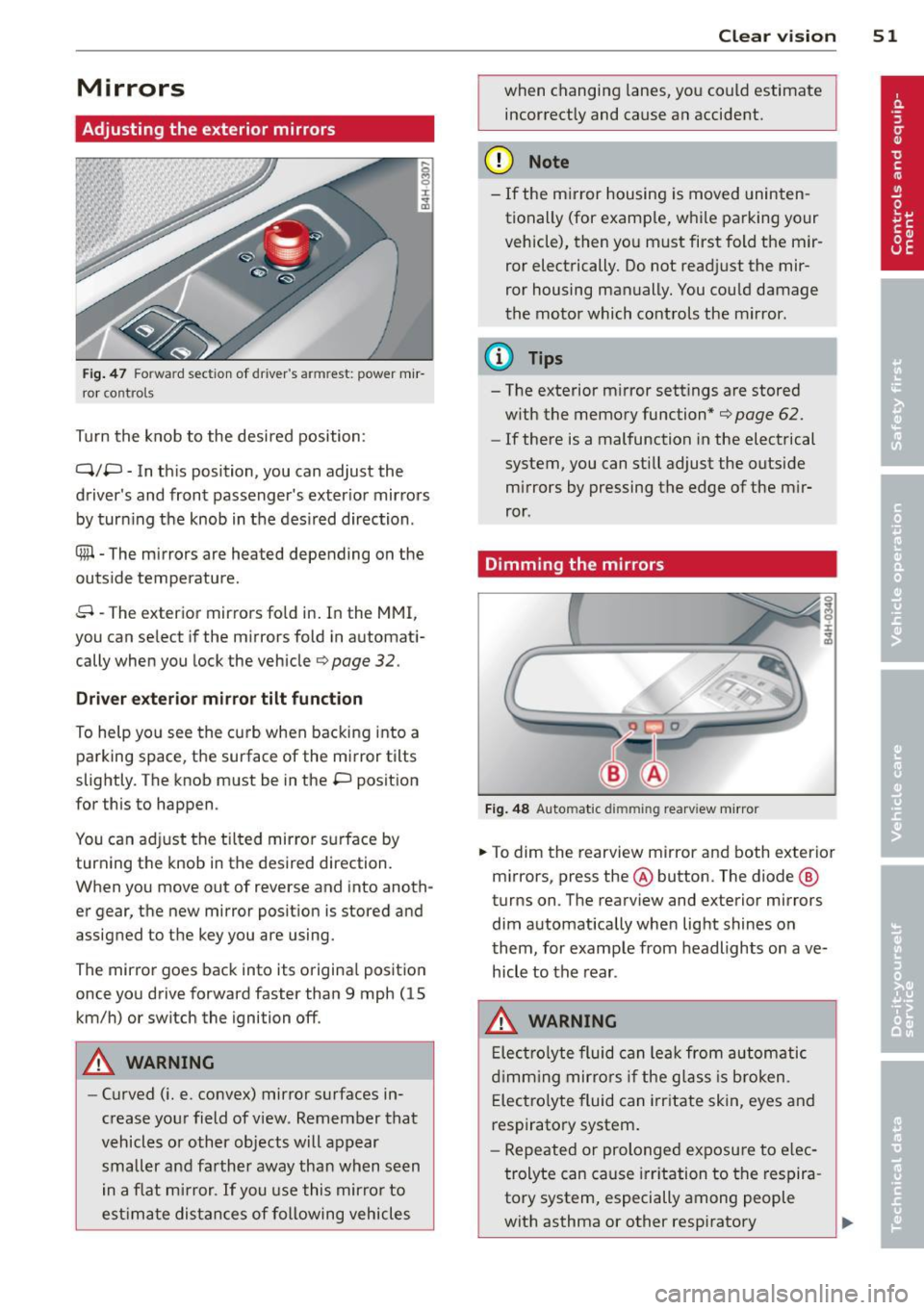
Adjusting the exterior mirrors
Fig . 47 Fo rw ar d section of driver's armrest: powe r m ir
r or co nt rols
Turn the knob to the desi red position :
Q/P -In th is position, you can adjust the
driver's and front passenger's exter ior mir rors
by turn ing the knob in t he des ired direction .
® -The m irrors are heated depending on the
out side temperature .
8 -The exterior mirrors fo ld in. In the MMI,
you c an se lect if the m irro rs fold in automat i
cally when you lock the vehicle
¢ page 32 .
Driver exter io r mi rro r tilt funct ion
To help yo u see the curb when backing into a
parking space, the surface of the mirror tilts
slightly. The knob must be in the P position
for this to happen .
You can ad just the tilted mirror s urface by
turning the knob in the desired direction.
When you move out of reverse and into anoth
er gear, the new mirror position is stored and
assigned to the key you a re using.
The mirror goes back into its origina l posit io n
once yo u dr ive forward faster than 9 mph (15
km/h) or switch the ignition off .
A WARNING
-Curved ( i.e. convex) mirror s urfaces in
crease your field of view . Remember that
vehicles or other objects will appear
small er and farther away than when seen
in a f lat m irror .
If you use this mirro r to
est imate distances of following vehicles
.
Clear vi sion 51
when changing lanes, you co uld estimate
incor rectly and cause an accident.
(D Note
- If the m irror housing is moved uninten
tionally (for examp le, w hile pa rking your
vehicle), then yo u must first fold the mir
ror electrically. Do not read just the mir
ror housing man ually. You cou ld damage
the motor which controls the mirror.
(D Tips
- The exterior m irror settings are stored
w ith the memory function*
¢ page 62.
- If there is a malfunction in the electrical
system, you can still adjust the outside
mi rrors by pressing the edge of the m ir
ror .
Dimming the mirrors
Fig . 48 Automatic dimming rearview mirro r
.. To dim the re arview mirror and both exterior
m irrors, press the@ button . The diode ®
turns on. T he rearv iew and exterior mirrors
dim automatically whe n light shines o n
t hem, for examp le from headlights on ave
hicle to the rear .
A WARNING
Elect ro lyte fluid can lea k from au to matic
d imm ing mir rors if the g lass is b roken .
E lec tro lyte fluid can irr itate skin, eyes and
respiratory system.
- Repeated or prolonged exposu re to e lec
trolyte can cause irritation to the respira
tory system, especially among people
with asthma or other resp iratory
.
Page 55 of 302

Clear vision 5 3
Adjusting the magnetic zone
Applies to vehicles: with digital compass
The magnetic zone must be adjusted correctly for the compass to read accurately.
Fig. SO Magnet ic zone map
~ Press and ho ld the button @ ¢page 52,
fig . 49
until the number of the magnetic
zone appears in the rearview mirror .
~ Press the button@repeated ly to select the
correct magnetic zone. The select ion mode
turns off after a few seconds .
Calibrating the compass
Applies to vehicles: with digital compass
You must recalibrate the compass if it does
not display the correct direction .
~ Press and hold the button @unti l a C ap
pears in the rearview mirror.
~ Drive in a c ircle at about 6 mph (10 km/h)
until a direction is disp layed in the rearview
mirror .
A WARNING
-
To avoid endangering yourself and other
drivers, calibrate the compass in an area
where there is no traffic.
0 co
co
0 ' I ~ co
-
Page 56 of 302
54 Seat s a nd s tor ag e
Seats and storage
General recommen
dations
Why is your seat adjustment so
important?
The safety belts and the airbag system can
only provide maximum protection if the front
seats are correctly adjusted.
There are various ways of adjust ing the front
seats to provide safe and comfortable support
for the driver and the front passenger. Adjust
you r seat prope rly so that :
- you can easily and quick ly reach all the
switches and controls in the instrument
panel
-your body is prope rly supported thus reduc
ing physical stress and fatigue
- the safety be lts and airbag system can offe r
maximum protection
¢ page 145 .
In the following sec tions, you will see exactly
how you can best adjust you r seats .
There are special regulations and instructions
for insta lling a child seat on the front pas
senger's seat. Always fo llow the information
regarding child safety provided in
q page 169, Child Safety .
A WARNING
Incorrect seating position of the driver and
all other passengers can result in serious
personal injury.
- Always keep your feet on the floor when
the vehicle is in motion -never p ut your
feet on top of the instrument panel, out
of the w indow or on top of the seat cush
ion . Th is app lies especially to the passen
gers .
If your seating position is incorrect,
you increase the r isk of injury in the case
of sudden braking or an acc ident.
If the
airbag infla tes and the seating position
is incorrect, this could resul t in personal
injury or even death.
- It is important for bo th the driver and
front passenger to keep a distance of at least 10 inches (25 cm) between them
selves and the steering wheel and/or in
strument panel. If you're s itting any
closer than th is, the a irbag system can
not protect you properly . In addition, the
front seats and head restraints must be
adjusted to your body height so that they
can give you max imum protect ion.
- Always try to keep as much distance as
pos sible between yourself and the steer
ing wheel o r instrument panel.
- Do not adjust the driver's o r front pas
senger's seat whi le the vehicle is moving.
Your sea t may move unexpected ly, caus
ing sudden loss of vehicle control and
personal injury . If you adjust yo ur seat
while the veh icle is moving, yo u are out
of posit ion.
Driver's seat '
The correct seat position is important for safe
and relaxed driving.
We recommend tha t you adjus t the dr iver's
seat in the fo llowing manner :
"' Adjust th e seat in fore and aft direction so
t ha t you can eas ily push the peda ls to the
floor wh ile keeping your knees sl igh tly bent
q A in Why is your seat adjustment so im
portant? on page 54.
"' Adjust the backrest so that when you sit
w ith your back agains t th e backrest, you can
still g rasp the top of the steering wheel.
"' Adjust the head restraint so the upper edge
is as even as poss ible with the top of your
head . If that is not poss ible , try to adjust
the head restraint so that it is as close to
t his pos it ion as possib le
q page 61.
A WARNING
Neve r place any objects in the dr iver's foot
well. An object could get into the pedal
area and interfere with pedal function . In
case of sudden braking or an acc ident, you
would not be able to brake or accelerate .
Page 57 of 302
Front passenger's seat
Always move the front passenger seat into the rearmost position .
To avoid contact with the airbag while it is de
ploying, do not sit any closer to the instru
ment panel than necessary and always wear
the three-point safety belt provided adjusted
correctly . We recommend that you adjust the
passenger's seat in the following manner:
" Move the front passenger seat into the rear
most position of the fore and aft adjustment
range
¢ .&. in Why is your seat adjustment
so important? on page 54.
"Br ing the backrest up to an (almost) upright
position.
Do not ride with the seat reclined.
" Adjust the head restraint so the upper edge
is as even as possible with the top of your
head . If that is not possible, try to adjust
the head restraint so that it is as close to
th is position as possible ¢
page 61.
.. Place your feet on the floor in front of the
passenger's seat .
Front seats
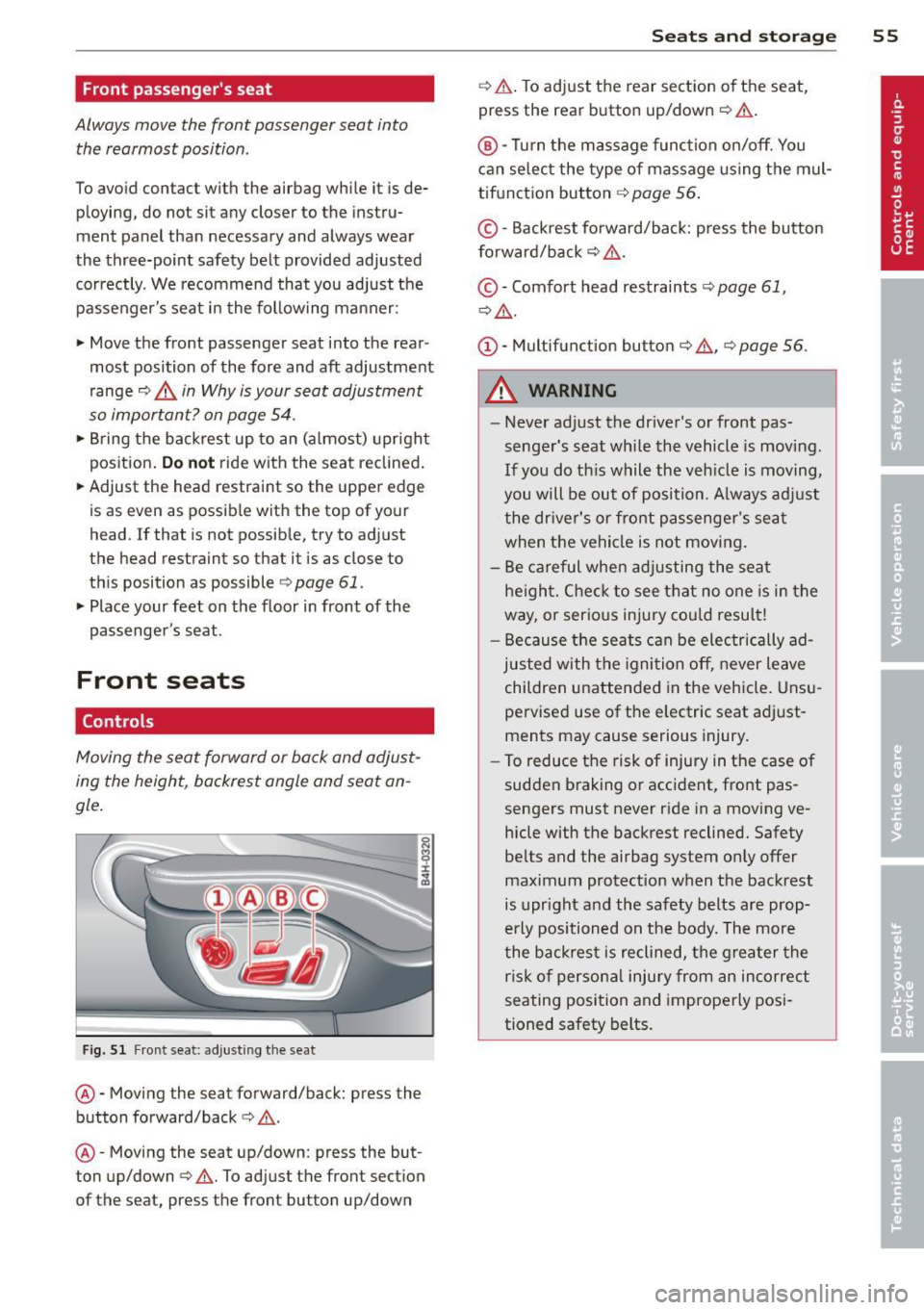
Controls
Moving the seat forward or back and adjust
ing the height, backrest angle and seat an
gle .
Fig. Sl Front se at: adjusting the seat
@-Moving the seat forward/back: press the
button forward/back ¢ .&. .
@ -Moving the seat up/down : press the but
ton up/down ¢&. . To adjust the front sec tion
of the seat, press the front button up/down
Seats and storage 55
¢.&. .To adjust the rear section of the seat,
press the rear button up/down ¢&. .
@ -Turn the massage function on/off. You
can select the type of massage using the mul
tifunction button¢
page 56.
© -Backrest forward/back: p ress the button
forward/back ¢
_&..
© -Comfort head restraints ¢ page 61,
¢_&. .
(D -Multifunction button¢ &., ¢ page 56.
A WARNING
-
- Never adjust the driver's or front pas
senger's seat while the vehicle is moving.
If you do this while the veh icle is moving,
you will be out of position . A lways adjust
the driver's or front passenger's sea t
when the vehicle is not moving.
- Be careful when adjusting the seat
height. Check to see that no one is in the
way, or serio us injury could result!
- Because the seats can be electrically ad
justed with the ignition off, never leave
children unattended in the vehicle. Unsu
pervised use of the e lectric seat adj ust
ments may cause serious injury.
- To reduce the risk of injury in the case of
sudden braking or accident, front pas
sengers must never ride in a moving ve
hicle with the backrest reclined. Safety
belts and the airbag system only offer
maximum protection when the backrest
is upright and the safety belts are prop
erly positioned on the body. The more
the backrest is reclined, the greater the
ris k of personal injury from an incorrect
seating position and improperly posi
tioned safety belts.