warning AUDI A8 2011 Workshop Manual
[x] Cancel search | Manufacturer: AUDI, Model Year: 2011, Model line: A8, Model: AUDI A8 2011Pages: 302, PDF Size: 76.07 MB
Page 71 of 302
-Never exceed the maximum permissible
load carry ing capacity of the roof of your
vehicle, the perm issible axle weights and
the permiss ible total weight of your veh i
cle
~ page 2 79, Weights .
-Always drive slowly, avoid sudden brak
ing and maneuvers when transporting
cargo on the roof of your vehicle .
@) For the sake of the environment
Sometimes it may be easier to leave a roof
rack installed even though you are not us
ing it. Due to the increased a ir resistance
your vehicle will unnecessarily use more
fuel. Remove the roof rack if you are not
going to use it.
12-volt sockets
App lies to vehicles: 12-volt sockets
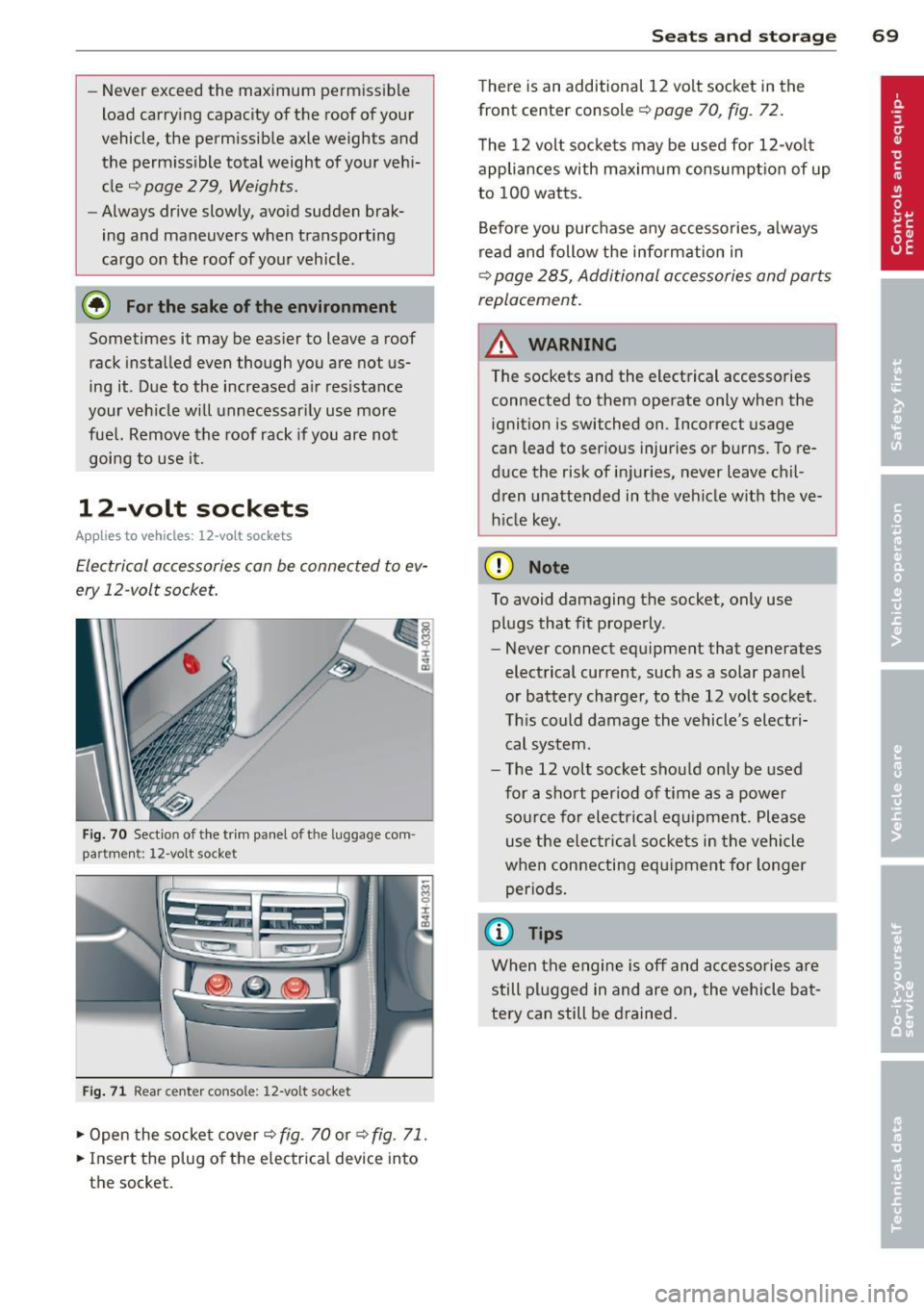
Electrical accessories can be connected to ev
ery 12 -volt socket.
Fig. 70 Sect io n of the trim panel of t he luggage com
p ar tm en t: 12 -v ol t so cke t
Fig . 71 R ear cente r c ons ole : 12 -vo lt s ocket
~ Open the socket cover ~ fig . 70 or ~ fig. 71.
~ Inse rt the plug o f the el ectrical device into
t h e socket.
S ea ts a nd s to rage 69
There is an additional 12 volt socket in the
front center console~
page 70, fig . 72.
T he 12 volt socke ts may be used for 12-volt
appliances with maximum consumpt ion of up
to 100 watts.
Before you purchase any accessories, always
read and follow the info rmation in
~ page 285 , Additional accessories and parts
replacement.
A WARNING
The sockets and the electrical accessories
connected to them operate only when the
ignition is switched on .1ncorrect usage
can lead to ser ious injuries or burns . To re
duce the risk of injuries, never leave chil
dren unattended in the vehicle w ith the ve
h icle key.
(D Note
To avoid damaging the socket, only use
plugs that fit properly .
- Never connect eq uipment that generates
electrical current, such as a solar panel
or battery charger, to the 12 volt socket .
Th is could damage the vehicle 's electri
cal system.
- The 12 volt socket sho uld only be used
for a short per iod of t i me as a powe r
so urce for electrical equipme nt. Please
use the elec trical sockets in the vehicle
when connecting equ ipment for longer
periods .
(D Tips
When the engine is off and ac ce ssories are
still plugged in and are on , the vehicle ba t
tery can still be drained .
Page 72 of 302

70 Seats and st o ra ge
Storage
(upholder
Fig . 72 Center conso le: front cupholder
Fig. 73 Section of the rear bench seat: rear cupholder
Fr ont cuphold er
., To open the cupholder, tap the cover
¢ fig. 72, ~ &_ .
Rear cupholder
., To open the cupholder, tap the front strip
¢fig. 73, ~ &_.
In vehicles with a full-length center console in
the rear, the cupholder is located at @
~page 63, fig. 62.
A WARNING
Spilled hot liquid can cause an accident
and personal inj ury .
- Never carry any beverage containers with hot liquids, s uch as hot coffee or hot tea,
in the veh icle while it is mov ing. In case
of an accident, sudden braking or other
vehicle movement, hot liquid could spill,
causing scalding burns. Spilled hot liquid
can also cause an accident and personal injury. -
Use on ly soft cups in the cupholder. Hard
cups and glasses can cause injury in an
accident.
(D Note
Only drink containers with lids should be
carried in the cupholder. Liquid could spill
out and damage your vehicle's electronic
equipment or stain the upholstery, etc.
Cooled glove compartment
The cooled glove compartment only functions
when the AIC system is switched on.
Fig. 74 Glove compartme nt: sw itching cool ing mode
on/off
., Turn the knob@ counterclockwise to sw itch
cooling on. The symbols on the knob indi
cate the correct pos ition
q fig. 74 .
., Turn the knob @clockwise to switch cooling
off.
The glove compartment cooling mode only
funct ions when the vehicle A/C system is
switched on. If the heat ing is sw itched on,
switching the glove compartment cooling mode off is recommended.
(@ Tips
The glove compartment can be locked us
i ng t he mechanical key
¢page 30.
Storage area behind the rear seat
You can place light art icles of clothing on the
rear w indow shelf behind the backrest.
Page 73 of 302

A WARNING ,~ ~
When driving, do not leave any hard ob
jects on the rear w indow shel f or allow
your pet to s it on the shelf. They could be
come a hazard for veh icle occupants in the
event of sudden braking or a crash.
([) Note
Make sure abrasive objects do not damage
the heating w ires for the rear window de
fogger.
{1) Tips
- A vent slot is located between the shelf
and the rear window. Do not b lock the
vent with any items you may place on the
rear w indow shelf.
- Do not place bulky items on the rear w in
dow shelf as they could restrict o r block
the driver's vis ion in the rear view mirro r.
Additional storage
There are a variety of storage compartments
and fasteners in various places in the vehicle.
- Storage compartments in the doors
- Net in the front passenger footwell
- Eyeglasses compartment in the headliner
(near the rearview m irror)
- Storage compartments under the center
armrests
- Compartments* on the back of the front
seat backrests
- Garment hooks over the rear doors
- Compartment in the center console with
pass-through)* (rear)
- Compartment behind the rear center arm
rest (in vehicles without the pass-through*
or refr igerator*)
- Bag hooks in the luggage compartment
A WARNING
-
- Always remove objects from the instru
ment panel. Any items not stored could
slide arou nd inside the vehicle while driv
ing or when accelerating or when apply-
S eat s an d sto rage 71
ing the brakes or when driving around a
corner.
- When you are driving make sure that
anyth ing you may have placed in the cen
ter conso le or other storage locations
cannot fall out into the footwells. In case
of sudden braking you would not be able
to b ra ke or accelerate .
- Any art icles of clothing that you have
hung up must not inte rfere wit h the dr iv
er's view. The coat hooks are des ign ed
only fo r ligh twe ight clot hing. Neve r hang
any cloth ing wi th hard, po in ted o r heavy
objects in the po ckets on the coat hoo ks .
During s udden braking or in an accident -
especia lly if the airbag is deployed -
these objects co uld inj ure any passen
gers inside the vehicle.
- To reduce the risk of perso nal inju ry in an
accident or s udden stop, always keep the
glove compartment closed wh ile driving.
- Read and follow a ll WARNINGS
c::> page 165 , Important safety instruc
tions on the side airbag system.
- Hang clothes in such a way that they do
not impair the driver's vision.
- The coat hooks must only be used for
lightweight clothing. Do not leave any
heavy or sharp edged objects in the pock
ets which may interfere with the s ide cur
tain airbag deployment and can ca use
pe rsonal injury in a crash .
- Do not use coat hangers for hanging cloth ing on the coat hooks as th is can in
terfere with prope r deployment of the
side curta in a irbags in an acc ident.
- Do not hang heavy objects on the coat
hooks, as they co uld cause perso nal i n
ju ry in a sudden stop.
(D Note
Objects located on the rear shelf that rub
against the rea r window could damage the
heating wires for the rear window defog
ger.
Page 74 of 302
7 2 Seats and st o ra ge
Cooler
Introduction
Applies to vehicles: with cooler
Please clean the cooler before using it for the
first time~
page 216.
You can only switch on the cooler if
- the temperature in the luggage compart
ment is below 131 °F (55 °C). The cooler
switches off automatically if the tempera
ture in the luggage compartment exceeds 131 °F (55 °C) . Once the temperature falls
below 131 °F (55 °C) again, the cooler
swit ches on aga in automatically.
- the battery is adequately charged. The cool
er switches off automatically if the vehicle
ba ttery voltage fal ls below a minimum lev
el. This prevents the battery from d ischarg
i ng. The cooler switches back on again auto
matically when the battery voltage increases
again (e.g. after starting the engine).
The cooler coo ls to 42 .8
° F ( + 6 °c) and the
freezer cools to 2 1.2 °F (- 6 °C) in optimum
cooling cond itions. The cooling performance
is affected by the temperature in the luggage
compartment. The temperature inside the
cooler will be higher if the luggage compart
ment is hot.
.,&. WARNING
To avoid putting the occupa nts at any r isk,
please observe the following safety ru les:
- The maximum capacity is 2.5 kg (5 .5
lbs.).
- Never overload the cooler. This could cause injury in the event of a co llision o r
s u dden bra king.
- The coo le r li d must always be kept closed
wh ile you are driv ing. Make sure the re
taining catch is sec urely engaged . The
c o ntents of the coo le r could be thrown
forwar d into the passe nger comp art
ment in the event of a collision or u nder
s udden braking -risk of inj ury!
- Inflammable liq uids, g as canisters, etc.
must not be store d in the cooler -risk of explos
ion! This also includes any prod
ucts that might em it volati le or inflam
mable gases.
- Liquids w ill freeze at temperatures at or
be low 32 °F (0 °C) and may cause glass
bottles to burst!
(D Note
- The venti lation openings for the cooler
are located on the back pane l trim in the
luggage compartment and
must be kept
clear at a ll times.
- If the coo ler is not functioning properly,
switch it off to prevent furt her damage.
Have it checked by a qualified works hop.
Operation
Applies to vehicles: with coo ler
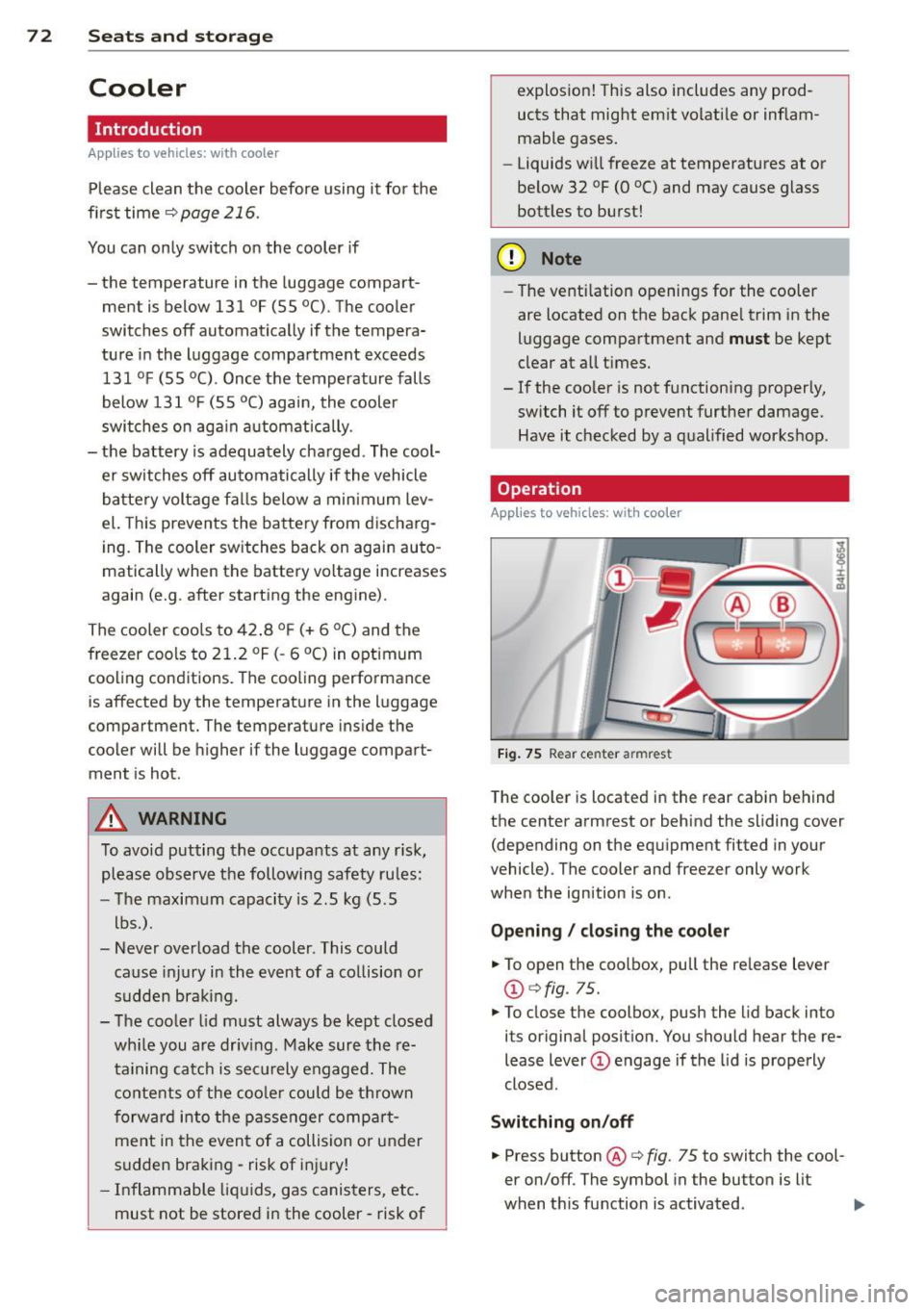
Fig. 75 Rear center armrest
The cooler is located in the rear cabi n behind
the center armrest or behind the sliding cover
(depending on the equipment fitted in your
vehicle). The cooler and freezer only work
when the ignition is on .
Opening / clos ing the co oler
.,. To open the coolbox, pull the re lease lever
@ qfig. 75.
.,. To close the coolbox, push the lid back into
its original position. You should hear the re
lease lever
(D engage if the lid is properly
closed.
Switching on /off
.,. Press button @ q fig. 75 to switch the cool
er on/off. The symbol in the button is lit
when t his function is activated. .,,_
Page 76 of 302
7 4 Warm and cold
Warm and cold Climate controls
Description
The climate control system warms, cools and
adds humidity to the air in the vehicle interior.
It is the most effect ive when the windows and
sunroof* are closed . If the temperature inside
the parked vehicle becomes very warm, open ing the window briefly will speed up the cool
ing process.
I n all heating mode functions except
defrost,
the blower on ly switches to a higher speed
once the engine coolant has reached a certain
temperature.
Condensation from the cooling system can
drip and form a puddle of water under the ve
hicle. This is normal and does not mean there
is a leak.
Pollutant filter
The pollutant filter removes pollutants such
as dust and po llen from the air.
The air pollutants filter must be changed at
the intervals spec ified in you r Warranty
&
Maintenance booklet, so that the air condi
tioner can properly work.
I f you drive your vehicle in an a rea with high
a ir po llution, the filter may need to be
changed more frequent ly than specified in
your Aud i Warranty
& Maintenance booklet. If
in doubt, ask your authorized Audi Service Ad
visor for advice .
Key coded settings
The climate control settings are a utomat ically
stored and assigned to the remote control key
that is in use.
A WARNING
Reduced visibility is dangerous and can
cause accidents. -
- For safe driving it is very important that
all windows be free of ice, snow and con
densation.
- Comp letely familiarize yourself with the
proper use and function of the heating
and ventilation system and especially how to defog and defrost the windows.
- Never use the windshield wiper/washer
system in freez ing weather unt il you
have warmed the windshield first, using
the heating and ventilation system. The
washer solution may freeze on the wind sh ie ld and reduce visib ility.
(D Note
- If you suspect that the air conditioner has been damaged, switch the system
off to avoid further damage and have it
inspected by a qualified dealership.
- Repairs to the Audi air conditioner re
quire special technical knowledge and
special tools. Contact an authorized Aud i
dea ler fo r assistance.
@ For the sake of the environment
By reducing the amount of fuel you use,
you also reduce the amount of pollutants
emitted into the air.
(D Tips
- Keep the air intake s lots (in fro nt of the
w indshield) free from ice, snow and de
bris in order to maintain the proper func
tion of the climate control system.
- T he energy management system may
switch the seat heating* or rear window
defroster off temporari Ly . These systems
are available again as soon as the energy
balance has been restored.
- Air escapes through vents under the rear
window. When placing items of clothing on the luggage compartment cover, en
sure that the openings are not covered.
Page 78 of 302

76 Warm and cold
airflow and air distribution are controlled au
tomatically.
Adjusting the temperature
Temperatures between 60 °F (+16 °() and
84 °F (+28 °C) can be set. Outside of this
range,
lo or hi wi ll appear in the climate con
trol system disp lay. At both of these settings,
the climate control system runs continuously
at maximum cooling or heating power. There
is no temperature regu lation.
~ Adjusting the airflow
You can adjust the airflow manually to suit
your needs. To have the airf low regulated au
tomatically, press the
! AUTO ! button.
~ Adjusting the air distribution
You can manually se lect the vents where the
air will flow. To have the air distribution regu
lated automatically, press the
IAUTOI button .
~ I lil* Adjusting Seat heating/
ventilation*
Pressing the button switches the seat heat
ing/ventilation on at the highest setting ( level
3). The L EDs indicate the temperature leve l.
To reduce the temperature, press the button
again. To switch the seat heating/ventilation
off, press the button repeatedly until the LED
turns off.
After 10 minutes, the seat heating/venti lation
automatically switches from level 3 to level 2.
I n vehicles without the four zone automatic
climate conrol *, buttons in the rear center
console control the seat heating for both out
er rear seats*.
~ Switch the defroster on/off
The winds hield and s ide windows are defrost
ed or cleared o f condensation as quickly as
possible. The maximum amo unt of air flows
mainly from the vents below the windshield.
Recirculation mode switches off. The tempera
ture is controlled automat ically.
The
IAUTOI button switches the defroster off.
~ Switching rear window heater on/off
T he rear window heater only operates when
the engine is running. It switches off auto
matically after 10 to 20 minutes, depending
on the outside temperature.
T o prevent the rear window heater from
switching off automatically , press and hold
the~ button for more than 3 seconds. This
r ema ins stored until the ignition is switched
off.
I SYNCI Synchronization*
When synchronization is switched on, the
same settings are applied to both the driver
and front passenger, except for the seat heat
ing/ventilation*. The rear seat is a lso
synchronized in vehicles with the four zone
automat ic climate conro l*. Synchron ization
switches off when the settings for the front
passenger side or rear* are adjusted.
You can also switch synchronization on by pressing and holding a dial. For example, if
you press and hold the dial on the front pas
senger side, the settings for that s ide are
transferred to the driver side. The same ap
plies to the rea r*.
Air vents
You can open or close the center and rear
vents in the cockpit and the vents in the rear
center console and door pillars using the
ridged thumbwheels. The levers adjust the di
rection of the airflow from the vents.
,&. WARNING
Do not use this setting for extended peri
ods of time. The windows could fog up
since no fresh air can enter the vehicle. If
the windows fog up, press the air recircula
tion button aga in immediately to switch
off the a ir recirculation function or select
defrost.
(D Note
To avoid damage to the heating elements
in the seats, do not kneel on the seats or
-
Page 80 of 302
78 On the road
On the road
Steering
Adjusting steering wheel position
The steering wheel position can be adjusted
for height and reach .
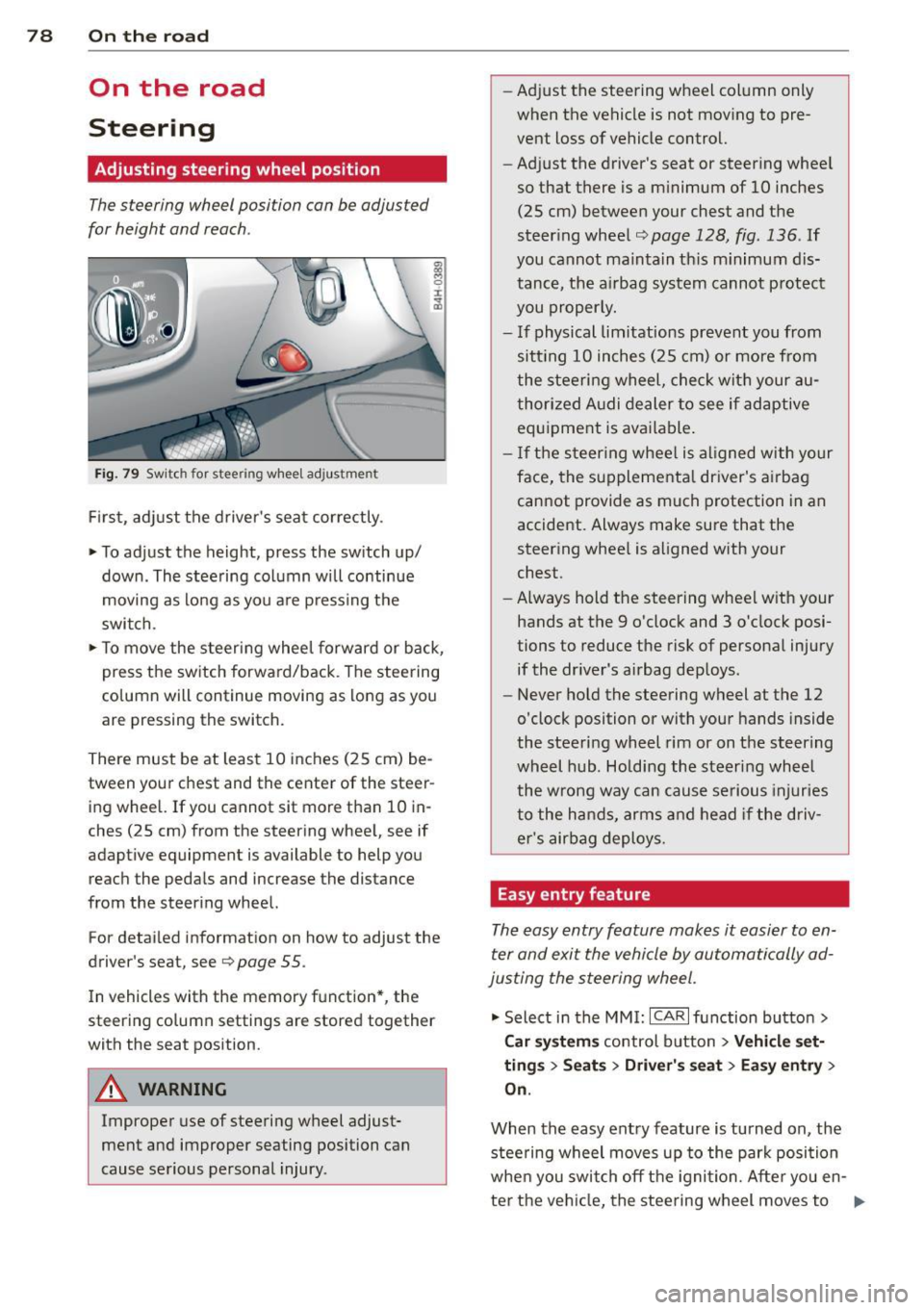
Fig. 79 Switch for steer ing wheel adjustment
First , adjust the driver's seat correctly .
• To adjust the height, press the switch up/
down. The steering column will continue
moving as long as you are pressing the
switch.
• To move the steering wheel forward or back,
press the switch forward/back . The steering
column will continue moving as long as you
are pressing the switch.
There must be at least 10 inches (25 cm) be
tween your chest and the center of the steer ing wheel. If you cannot sit more than 10 in
ches (25 cm) from the steering wheel, see if
adaptive equipment is available to help you
reach the pedals and increase the distance
from the steering wheel.
For detailed information on how to adjust the
driver's seat, see
Q page 55.
In vehicles with the memory function* , the
steering column settings are stored together
with the seat position.
A WARNING
Improper use of steering wheel adjust
ment and improper seating position can
cause serious personal injury. -
Adjust the steering wheel column only
when the vehicle is not moving to pre
vent loss of vehicle control.
- Adjust the driver's seat or steering wheel
so that there is a minimum of 10 inches
(25 cm) between your chest and the
steering wheel
Q page 128, fig . 136 . If
you cannot maintain this minimum dis
tance, the airbag system cannot protect
you properly.
- If physical limitations prevent you from
sitt ing 10 inches (25 cm) or more from
the steering wheel, check with your au
thorized Audi dealer to see if adaptive equipment is available.
- If the steering wheel is aligned with your
face, the supplemental driver's airbag
cannot provide as much protection in an
accident. Always make sure that the
steering wheel is aligned with your
chest.
- Always hold the steering wheel with your
hands at the 9 o'clock and 3 o'clock posi
tions to reduce the risk of personal injury
if the driver's airbag deploys.
- Never hold the steering wheel at the 12
o'clock position or with your hands inside
the steering wheel rim or on the steering
wheel hub. Holding the steering wheel
the wrong way can cause serious injuries
to the hands, arms and head if the driv
er's airbag deploys.
Easy entry feature
The easy entry feature makes it easier to en
ter and exit the vehicle by automatically ad
justing the steering wheel.
• Select in the MMI: ICARlfunction button>
Car systems control button > Vehicle set·
tings > Seats > Driver's seat> Easy entry >
On.
When the easy entry feature is turned on, the
steering wheel moves up to the park position
when you switch off the ignition. After you en-
ter the vehicle, the steering wheel moves to .,..
Page 81 of 302

the stored position as soon as you switch on
the ignition.
Starting and stopping
the engine
Starting the engine
This button switches on the ignition and
starts the engine.
Fig. 80 Center console: S TART ENGINE S TOP b utton
" Step on the brake pedal¢&_ .
.. Press on the !START ENGINE STOP I button
¢ fig. 80 -the engine w ill start .
By pressing the
I START ENGINE STOP I button
without depressing the brake pedal, the igni tion is on and switched off by pressing it
again.
After a cold engine is started, there may be a
brief period of increased noise because oil
pressure must first build up in the hydraulic
valve adjusters. This is normal and not a cause
for concern.
If the engine should not start immediately,
the starting process is automatically stopped
after a short time. Repeat starting procedure.
Driver message in the instrument cluster
display
Press brake pedal to start engine
This message appears if you press the
I START ENGINE S TOP I button to start the en
gine and do not depress the brake pedal. The
engine can only be started if the brake pedal is depressed.
!! Convenience key: Is key not in the vehi
cle?
On the road 79
This message appears along with thee sym
bol if the master key is removed from the ve
hicle with the eng ine running.
It is intended
to remind you (e.g . when changing drivers)
not to continue the journey without the mas
ter key.
If the master key is no longer in the veh icle,
you cannot switch on the ignition after stop
ping the engine and you also cannot start the
engine again . Moreover, you cannot lock the
vehicle from the outside with the key.
Shift to P, otherwise vehicle can roll away.
Doors do not lock if lever is not in
P.
This message appears for safety reasons
along with an audible warning tone if the
P
selector lever position is not engaged when
stopping the engine with the
I START ENGINE STOP I button. Select the P se
lector lever position . Otherwise the vehicle
cou ld roll and it cannot be locked .
Key not recognised. Hold back of key against
marked area . See owner's manual.
If the indicator light turns on and this mes
sage appears, there is a malfunction
¢ page 80.
Steering lock
The steering locks when you turn the engine
off using the
I START ENGINE STOP I button
and open the driver's door. The locked steer ing helps prevent vehicle theft.
A WARNING
- Never allow the engine to run in confined
spaces - danger of asphyx iation.
- Never turn off the engine until the vehi
cle has come to a complete stop.
- The brake booster and power steering
only work when the engine is running. If
the engine is off, you have to use more
force when steering or braking. Because
you cannot steer and brake as you usual
ly would, this could lead to crashes and
serious injuries.
Page 82 of 302
80 On the road
(D Note
-Avoid hig h engine rpm, fu ll throttle and
heavy engine loads unti l the engine has
reached operating temperat ure -other
wise you risk eng ine damage.
- The engine cannot be started by pushing
or towing the vehicle.
- If the engine has been under heavy load
for an extended period, heat b uilds up in
the engine compartment after the en
gine is switched off - there is a risk of
damaging the engine . Allow the eng ine
to run at idle for about 2 minutes before
switching it off.
@ Tips
If you open the driver's door with the igni
tion on, a buzzer sounds and the message
Igniti on is on appears in the instrument
cluster display. Sw itch the ignition off .
Stopping the engine
• Bring your vehicle to a complete stop.
.. Move the se lector lever to the
P or N pos i
t ion .
.. Pre ss the I STAR T ENGINE ST OP I button
r:> page 79, fig. 80 .
Emergency off
If necessary, the engine can be switched off
with the selector lever in the
R , D or S posi
tions . The engine stops if you press the
I S TAR T ENGINE ST OP ! button at speeds be low
6 mph (10 km/h).
A WARNING
- Never turn off the eng ine unti l the vehi
cle has come to a complete stop.
- The brake booster and power steer ing
only work when the engine is runn ing .
If
the engine is off, you have to use more
force when steering or braking. Because
you cannot steer and brake as you usua l
ly wo uld, this could lead to crashes and
serious injuries. -
For safety reasons, you should a lways
park your vehicle w ith the selector lever
in P . Otherwise, the vehicle could inad
vertently roll away .
- After the engine has been switched off,
the radiator fan can cont inue to run for
up to 10 minutes -even with the ignition
sw itched off. It can also sw itch on again
after some time if the coolant tempera
ture rises as the result ofa heat bu ildup
or if the engine is hot and the engine
compartment is additionally heated by
the sun's rays .
(D Note
Do not stop the eng ine immedia tely after
hard o r extended driving. Keep the engine
running for approximate ly two minutes to
prevent excessive heat bui ld-up.
Starting the engine if there is a
malfunction
It may not be possible to start the engine un
der certain circumstances, for example if the
battery in the vehicle key is drained, if inter
ference is affected the key or if there is a sys
tem malfunction.
"' ij
:c
-- --- -~
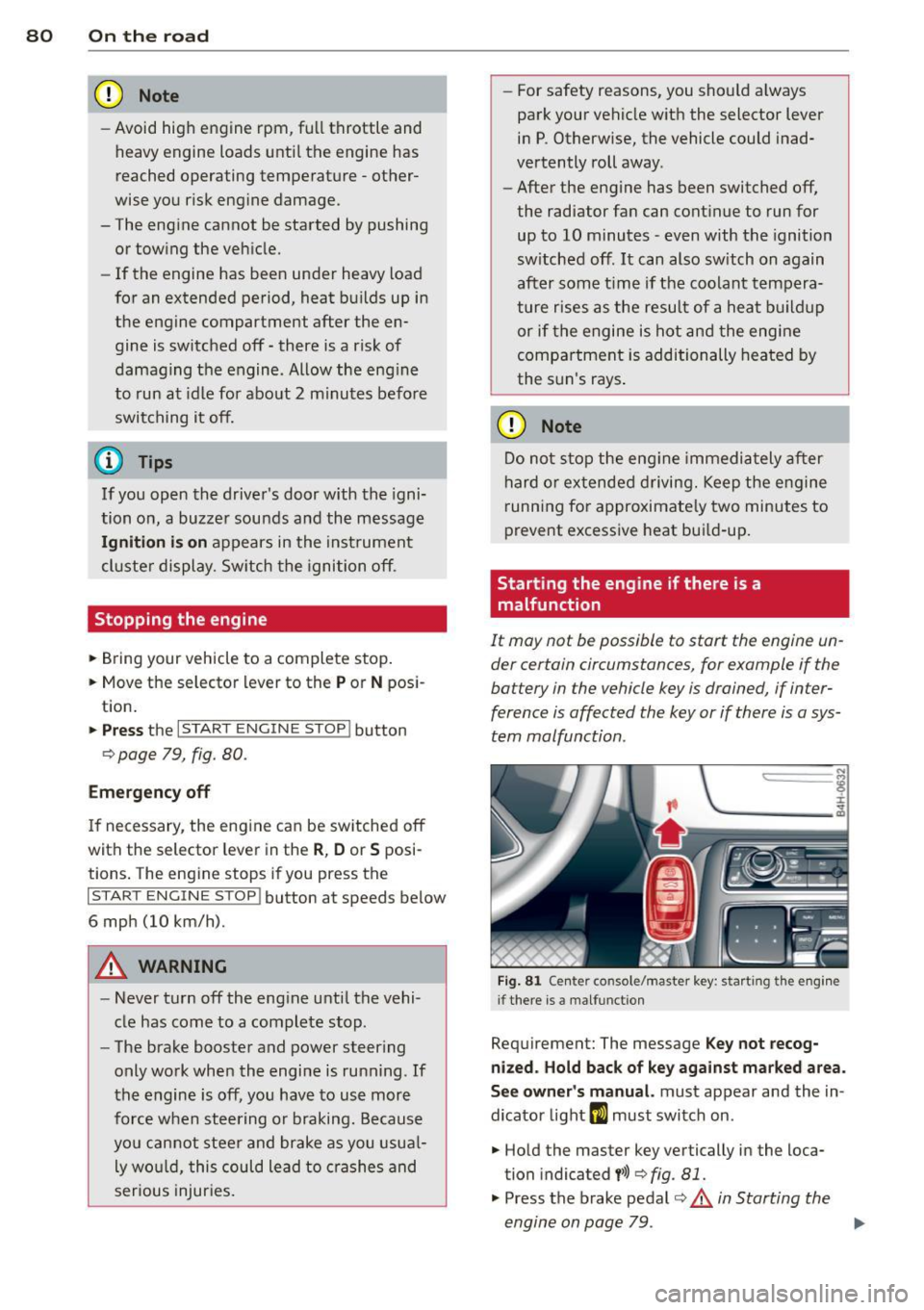
Fig . 81 Ce nter co nsole/master key: start ing the e ngin e
i f there is a malfunct ion
Requirement: The message K ey not recog
niz ed . Hold back of ke y again st ma rked are a.
See o wner's manual.
must appear and the in
dicator light
m must switch on .
.. Hold the master key vertically in the loca
tion indicated
y >>) <=> fig . 81.
• Press the brake pedal r=> & in Starting the
engine on page 79 .
IJ>,
Page 83 of 302

.. Press the !START ENGINE STOPI button. The
engine will start.
.. Drive to your author ized Audi dealer imme
diately to have the malfunction corrected .
@ Tips
You can view the message again by press
ing the
! START ENGINE STOPI button.
Electromechanical
parking brake
Operation
The electromechanical parking brake replaces
the hand brake.
Fig. 82 Center console: Park ing brake
.. Pull on the switch<®> c> fig . 82 @to apply
the parking brake. The indicator light in the
switch illuminates.
.. Step on the brake pedal or the accelerator
pedal and press the switch <®> at the same
t ime to release the parking brake. The indi
cator light in the switch goes out.
Your vehicle is equipped with an electrome
chan ical parking brake. The parking brake is
designed to prevent the vehicle from roll ing
un intent ionally and replaces the hand brake.
In addition to the normal functions of a tradi
tional hand brake, the electromechanical parking brake provides various convenience
and safety functions.
When starting from rest
-The integral starting assist helps you when
driving by automatically releasing the park
i ng brake
c> page 82, Starting from rest.
On the road 81
- When start ing on inclines, the starting as
sist prevents the vehicle from unintentional
ly rolling back. The braking force of the
parking brake is not released until sufficient
driving force has been built up at the
wheels.
Emergency brake function
An emergency brake ensures that the vehicle
can be slowed down even if the
normal brakes
fail
c> page 83, Emergency braking.
Indicator lights
-If the parking brake is closed with the igni
tion
switched on the indicator lights come
on - (USA mode ls)/ . (Canada models)
in the instrument cluster and the switch.
- If the parking brake is closed with the igni
tion
switched off the indicator lights come
on - (USA models)/ . (Canada models)
in the instrument cluster and the switch for
about 20 seconds .
A WARNING
Do not press the accelerator pedal inadver
tently if the veh icle is stationary but the
engine is running and a gear is selected .
Otherwise the vehi cle w ill start to move
immediately and could result in a crash.
(D Note
If the symbol . in the display or the indi
cator light
11111 (USA models)/ . (Cana
da models) in the instrument cluster flash
es, there is a malfunction in the brake sys
tem. Please refer to the detailed descrip
tion of the indicator lights
c>page 14.
- If the indicator light -(USA mod-
els)/ . (Canada models) or
Im turns
on, there may be a malfunction in the
parking brake
c> page 15.
{I) Tips
-Yo u can app ly the parking brake at any
time -even with the ignition switched
off. The ignition must be on in order to
release the parking brake.