park assist AUDI A8 2014 User Guide
[x] Cancel search | Manufacturer: AUDI, Model Year: 2014, Model line: A8, Model: AUDI A8 2014Pages: 314, PDF Size: 78.47 MB
Page 126 of 314
124 Parking systems
If the distance to an obstacle remains con
stant, the volume of the distance warning
gradually drops after about four seconds (this
does not apply in the continuous tone range).
Rear view camera
The rear view camera is located above the rear
license plate bracket. Make sure that the lens
for the parking system¢
fig. 131 is not cov
ered by deposits or any other obstructions be
cause this can affect the function of the park
ing system. For information on cleaning, refer
to
¢ page 216.
The rear view camera coverage area includes
(D ¢ fig. 130. Only this area is shown in the
Infotainment display. Objects that are outside
of this area@are not displayed.
The accuracy of the orientation lines and the blue surfaces is reduced if the adaptive air
suspension" is faulty, if the vehicle is lifted or
if the
dynamic mode is activated¢ page 110.
A WARNING
-Always read and follow the applicable
warnings¢ .&.
in General information on
page 122.
- If the position and the installation angle
of the rear view camera was changed, for
example, after a collision, do not contin
ue to use the system for safety reasons.
Have it checked by your authorized Audi
dealership or authorized repair facility.
- Only use the rear view camera to assist
you if it shows a good, clear picture. For
example, the image may be affected by
the sun shining into the lens, dirt on the
lens or if there is a system fault.
- Use the rear view camera only if the lug
gage compartment lid is completely
closed. Make sure any objects you may
have mounted on the luggage compart
ment lid do not block the rear view cam
era .
- The camera lens enlarges and distorts
the field of vision. The object appears both altered and inaccurate on the
screen. -
In certain situations, people or objects in
the display appear closer or further
away:
- objects that do not touch the ground,
such as the bumper of a parked vehicle,
a trailer hitch or the rear of a truck. Do
not use the help lines in this case.
- If driven from a level surface onto an
incline, or a downward slope.
- If driven toward protruding objects.
-If the vehicle is carrying too much load
in the rear.
{[) Note
-Always read and follow the applicable
warnings
c::> (D in General information on
page 122.
- The orange colored orientation lines in
the Infotainment display show the vehi
cle path depending on the steering
wheel angle. The front of the vehicle
front swings out more than the rear of
the vehicle. Maintain plenty of distance
so that your outside mirror or a corner of
your vehicle does not collide with any ob stacles.
Page 131 of 314
Corner view (front/rear)
Applies to vehicles: with top view camera system and cor
ner view (front/rear) mode
Fig. 1 42 Infotainment : corner view (front) mode
Fig. 1 43 Infota inment : co m er view (rear) mode
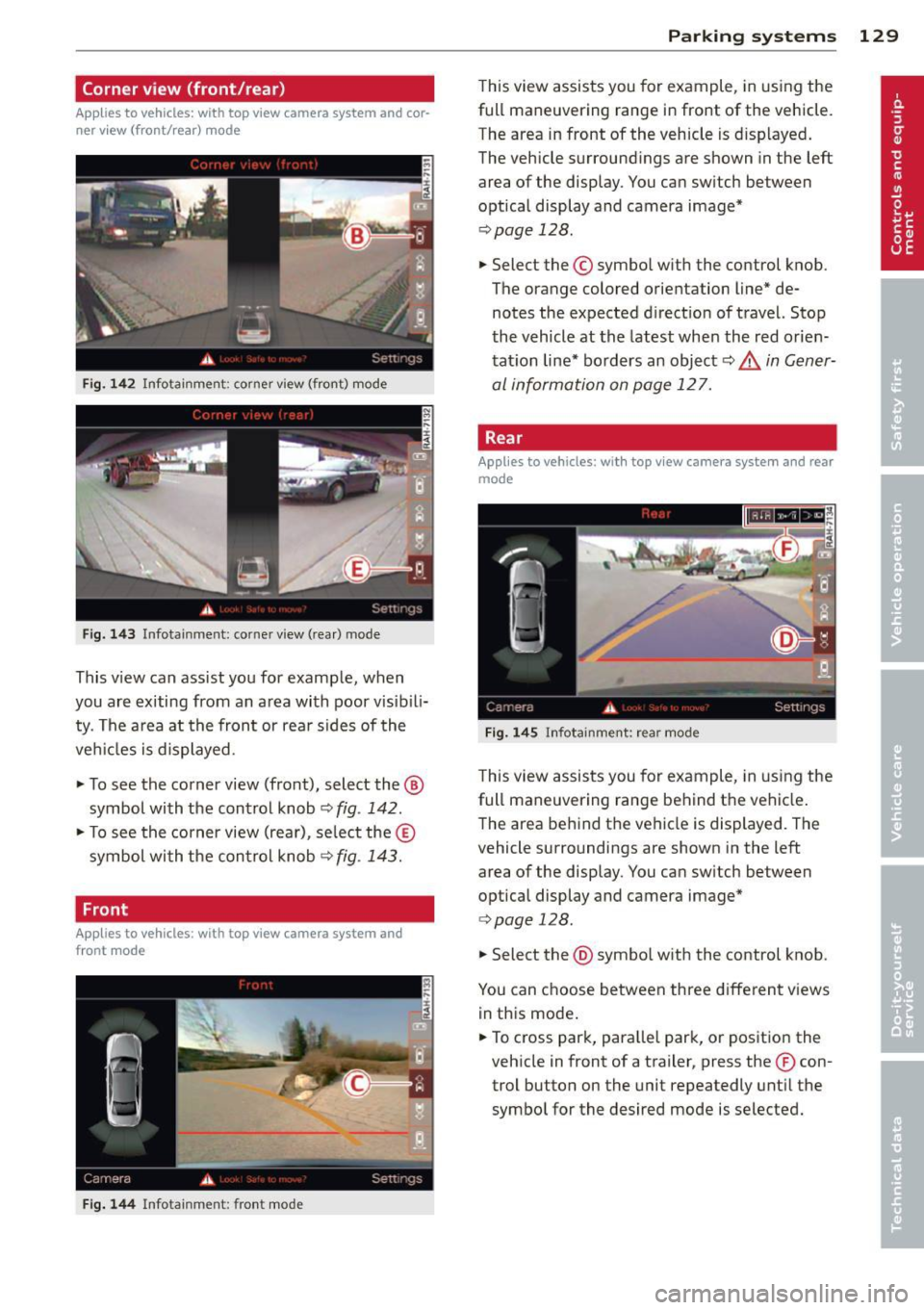
This v iew can ass ist you for examp le, when
you are exiting from an a rea with poor visib ili
ty. The a rea at the front or rea r sides of the
ve hicles is displayed.
.. To see the corner view (front), select the ®
symbol with the control knob
~ fig . 142 .
.. To see the corner view (rear), se lect the ®
symbol wi th the con trol knob~
fig. 143.
Front
Applies to vehicles: with top view camera system and
front mode
Fig. 144 In fo ta inm ent: fr ont mode
P arking systems 129
This view assists you for example, in us ing the
full maneuvering range in front of the vehicle.
The area in front of the vehicle is d isplayed .
The vehicle surround ings are shown in the left
area of the display. You can sw itch between
optical display and camera image*
~ page 128 .
.. Select the © symbo l with the control knob.
The orange colored orientation line* de notes the expected d irect ion of travel. Stop
the vehicle at the latest whe n the red orien
tat ion line* bo rders an object
c::> ..&, in Gener
al information on page 127.
, Rear
Applies to vehicles: with top view camera system and rear
mode
Fig . 14 5 Infota inm ent: r ear mod e
This view assists you for example, in us ing the
full maneuvering range behind the vehicle .
The area be hind the vehicle is displayed . The
vehicle surroundings are shown in the left
area of the display. You can sw itch between
optical display and camera image*
<=> page 128 .
.. Select the @symbo l w ith the control knob.
You can choose between three different v iews
in th is mode .
.. To cross park, para llel park, or pos ition the
veh icle in front of a trailer, press the ® con
trol button on the unit repeatedly unt il the
symbo l for the desired mode is selected.
Page 133 of 314

vehicle or on the parking space line ¢ & in
General information on page 127,
¢@ in
General information on page 127 .
The blue
area represents an extension of the vehicle's
outline by approx imately 16
ft (5 m) to the
rear . The long side of the blue area should
be o n the curb. The enti re blue area must fit
into the parking space.
~ Wi th the veh icle stopped, turn t he steer ing
whee l to the r ight as far as it w ill go.
~ Back into the park ing space until the b lue
curve¢
page 126, fig . 137 touches the curb
¢ & in General information on page 127,
¢ @ in General information on page 127.
Stop the vehicle.
~ With the vehicle stopped, turn the steering
whee l to the left as far as it will go .
~ Continue to back into the pa rk ing space un
t il the vehicle is par ked pa ra ll el to th e curb
¢ & in General information on page 12 7,
¢(i) in General information on page 127.
@ marks the rear bumper. Stop the veh icle,
at the latest, when the red orientation line
@ borders an object. Keep an eye on the
front of your vehicle wh ile doing this.
Parking n ext to obstacles
When the re is an obs ta cl e (such as a wall)
nex t to the pa rk ing space, choose a space with
more space on the sides. Position the long
side of the b lue area so that there is sufficient
space from the curb. The area must not be on
the curb. You w ill also need to start turning
the steering wheel much earlier . There should
be a suffic ient amount of space between the
curb and the b lue c urve, and the blue curve
¢ page 126, fig. 137 must not touch the cu rb.
@ Tips
The left or right orientation li nes and sur
faces w ill be displayed, depend ing o n the
turn signa l bei ng used.
P arking systems 131
Trailer view
App lies to vehicles: wit h top v iew camera system and
t railer hitch
This view assists you in positioning the vehicle
in front of a trailer.
Fi g. 150 Infotainment: rear mode
Requ irement: the trailer mode is selected
¢page 129.
~ Now yo u can position your veh icle in front of
the trailer ¢
& in General information on
page 127,
¢ (i) in General information on
page 127.
The orange colored orientation
line denotes the expected path towa rd the
trailer hitch . Use the blue lines to help you
es timate the distan ce to the trailer hitch.
Setting the mode
A pp lies to vehicles: wi th top v iew came ra sys te m
~ Select: !CAR ! func tion b utton> C ar system s
contro l butto n > Driver a ssis t > Parking aid
> Change to front /rear > Auto or Manual.
Auto -
This view beh ind the vehicle ( Rear
mode) is displayed au tomatica lly when you
shift into reverse. T his view in front of the ve
hicle
( Front mode) is displayed automatica lly
when you shift into the forward gears.
Manual -This view behind the vehicle (Rear
mode) is always displayed when you turn on
the system .
Page 134 of 314

132 Parking systems
Adjusting the display and the warning tones
App lies to vehicles: with advanced park ing system wit h
rea r view camera/top v iew camera syste m
The display and warning tones can be adjust
ed in the Infotainment.
.. Se lect : ICAR !function button> Car systems
control button > Driver assist> Parking aid.
Display
On* -
optical display is shown for the parking
system plus, rear view camera image is shown
for parking system plus with rear view cam
era*.
Off -when the park ing system is switched off,
on ly audible signa ls are given.
Warning tones
Front volume -
Volume for the fro nt area
Rear volume -Volume for the rear area
Front frequency -Frequency for the front area
Rear frequency -Frequency for the rear area
Music volume while parking -When the park
ing system is turned on, the volume of the au
d io/v ideo source is lowered .
The newly adjusted value is briefly heard from
the signal generator .
(D Tips
-The warning tones can a lso be adjusted
directly from the visual display or the
rear view camera* image . S imply press
the
Settings cont rol button .
- Changed settings are activated when the
parking system is switched on again.
- The settings are automatically stored
and ass igned to the remote control key
that is in use .
Error messages
App lies to vehicles: with advanced park ing system with
rea r view camera/top v iew camera syste m
There is an error in the system if the LED in
the
P •1A b utton is blinking and you hear a con- t
in uous alarm for a few seconds after switch
ing on the parking system or when the park
ing system is already activated. If the error is
not corrected before you switch off the ign i
t ion, the LED in the
P' "A button will blink the
next t ime you sw itch on the parking system by
shifting into reverse .
If a sensor is faulty, the!¾ symbol will appear
in front of/behind the vehicle in the Infota in
ment display . If a rear sensor is faulty, only
obstacles that are in the front detection a rea
are shown . If a front sensor is fau lty, on ly ob
stacles that are in the rear area are shown.
Peripheral cameras*
There is also a system error if:
- the
'(l.Q ,, symbol appears i n the display and
the corresponding display area is shown in
blue. The camera is not work ing in this area.
- all segments around the vehicles are red or
if no segments are displayed.
Drive to your authorized A udi dealer or au
thorized repair facility immediately to have
the malfunction corrected .
Trailer hitch
Applies to vehicles: with adva nced parking sys te m with
rear view camera/top view camera system
For vehicles us ing the trailer socket, the park
ing system rear sensors do not turn on when
yo u shift into reverse gear or when you press
the
P 1JA button. This results in the following re
strictions:
T he re is no distance warning for the rear. The
front sensors remain activated. The visua l dis
play switches to the trailer towing mode . The
rear view camera image will not show the ori
entation lines and the blue surfaces.
(D Tips
Trailer hitches that are not installed at the
factory may ca use the parking system to
malfunction or they may restrict its func
tion.
Page 205 of 314

Clean off accumulated salt coating from
brake discs and pads with a few careful
brake applicat ions .
-If you damage the front spoiler, or if you
install a different spoiler, be sure the air
flow to the front brakes is not obstruct ed . Otherwise the brake system could
overheat reducing the effectiveness of
the ent ire brake system.
- Failure of one brake c ircuit will impair
the braking capability resulting in an in
cr eased stopp ing distance. Avoid driv ing
the vehicle and have it towed to the near est Aud i dea ler or q ualified wor kshop .
- Never let the vehicle rol l to a stop w ith
t he engine shu t off.
- If the brake booster is not work ing, the
brake pedal must be pressed conside ra
bly harder to make up for the lac k of
booster assistance.
Brake booster
The brake booster adds extra braking power.
The brake booster works w ith vacuum pres
sure which is created only when the engine is
ru nning
9 ,&. .
,&. WARNING
-Never le t the vehicle ro ll to a stop w ith
t he engine shu t off.
- If the brake booster is not work ing, fo r
ex ample when towing your ve hicl e, or
because the b rake booste r has somehow
been damaged, the brake pedal must be
pressed considerab ly harder to make up
for the lack of booster assistance.
Servotronic - advanced
power steering system
-
The power steering systems use the power of
the running engine to allow precise steering
with little effort.
The advanced Servotronic power steering sys
tem senses the road speed and electron ically
ad ju sts powe r ass istance to provide comfor ta-
Int ellig ent technolog y 203
ble and safe steering response exactly match
ed to th e vehicle speed .
Power steer ing will not work if the engine is
off . As a result, the steering wheel will be h ard
to tu rn.
T he powe r stee ring fluid level is checked d ur
i ng t he sched uled maintena nce services.
(D Note
If there is an e lectronic malfunction, ser
votronic
will s till fu nction like a conven
tiona l powe r steering system, providing a
constant steering s upport force tha t is no
l onge r proportionate to the vehicle speed.
This is most noticeab le when t urni ng the
steering wheel at low speeds (for example
when parking), -more effort w ill be re
quired than usual.
- Be aware of the different than usual steering response and adjust your steer
ing force accordingly.
- Have the problem checked and set right by an Audi dealer as soon as possible.
(D Tips
-When the engine is running, never hold
the steering wheel turned all the way to
the right or to the left for longer than 15
seconds . The power steering pump will
overheat the hydraulic fluid if yo u keep
holding the stee ring wheel turned all the
way. This is likely to damage the power
steering sys tem.
- If the powe r stee ring system should fa il
entire ly, o r if t he engine is not runn ing
(for example, wh ile be ing towed), you
w ill still be able to steer the veh icle .
However,
considerably more effort will
be required to do so .
- If the powe r steering system sho uld
have a leak, or is not functioning proper
ly, contact your author ized Audi dealer
immediately.
- The power steering system req uires a
specially formu lated hydraulic fluid. The
power steering fluid reservoir is located
in the engine compartment
9 page 233. IJJ,,
•
•
Page 300 of 314
298 Index
Operation . . . . . . . . . . . . . . . . . . . . . . . . . 80
Setup ..... ................ ..... .. 82
Automatic climate control system
synchron izing .......... .. .. .. .. .. .. 81
Automatic transmission . .. .. .. .. .. .. . 116
Automatic transmission (tiptronic) Emergency mode . . . . . . . . . . . . . . . . . . 120
Kick -down . . . . . . . . . . . . . . . . . . . . . . . . 119
Manual shifting .......... .. .. .. .. . 119
Parking lock emergency release . .. .. . 121
Selector lever positions . . . . . . . . . . . . . 116
Automatic wipers .................. .. S3
Auto Safety Hotline . . . . . . . . . . . . . . . . . 143
Average consumption ........... .. .. .. 25
Average speed . . . . . . . . . . . . . . . . . . . . . . . 25
Avoid damaging the vehicle ...... .. .. . 209
B
Battery . . . . . . . . . . . . . . . . . . . . . . . . . . . 243
Charging . .. ................ ... .. . 245
I mportant warnings .......... .. .. . 243
L ocat ion . . . . . . . . . . . . . . . . . . . . . . . . . 243
low ... .. .. .. . .......... .. .. .. .. . 204
Replacing the battery . . . . . . . . . . . . . . 246
State of charge ............ ... .... . 204
Winter operation .......... ... .... . 243
Working on the battery .... .. .. .. .. . 243
Before driving ........... .. .. .. .. .. . 135
Blended gasoline . ...... ... .... .. .. . 222
Blower (automatic climate control) . ... .. 81
Booster seats .............. ... .. ... 185
Brake fluid Changing the brake fluid ... .. .. .. .. . 242
Check ing the brake fluid level ... .. .. . 242
What is the correct brake fluid level? .. 242
What should I do if the brake fluid warn-
ing light comes on? ..... .. .. .. .. .. . 242
Brake system Anti-lock braking system ... .. .. .. .. . . 19
Brake assist system ......... .. .. ... 199
Brake booster . .. ...... .... ... .. .. . 203
Brake fluid .............. .... ..... 242
Brake fluid spec ificat ions for refill and re
p la cement . . . . . . . . . . . . . . . . . . . . . . . 242
Brake light defective ....... ... .... . . 22
Brake pads ............... ... .... . 207
Electromechanica l parking brake .. .. . . 86 Fluid
reservoir ... ................ . 242
How does moisture or road salt affect the
brakes? .......................... 201
Warning/indicator lights ........ .... . 14
Worn brake pads symbol . . . . . . . . . . . . . 20
braking guard Messages ..... .. ............. .... 101
Braking guard . .. .. ... .......... .. .. . 94
Settings .. .... ............... .... 101
Break-in period .. .. ... .......... .. .. 207
Brake pads .. .. .. .......... ... .. .. 207
Tires ...... ... .. .. ........ ... .. .. 207
Bul bs .. .... .... ................... 282
C
California Proposition 65 Warning ..... 232
Battery specific . . . . . . . . . . . . . . . . . . . 24S
Capacities .. .. .. . .............. .. .. 290
Engine oil ..... .. ... .......... .. .. 234
Carbon parts Cleaning . . . . . . . . . . . . . . . . . . . . 218,219
Car carrier Transporting your vehicle ....... .... 287
Care ... .... .... ............... .... 216
Cargo area
refer to Luggage compartment . .. .. .. 141
Catalytic converter . ................. 208
Center armrest
Cockpit ........................... 61
Rear ............................. 68
Central locking .. .. ... ........... ... . 33
Emergency locking .. ........... .... . 37
Certification .. .. .. ............. .. .. 29S
Changing a wheel .. ............. .... 272
Chang ing engine oil ....... ...... .. .. 238
Checking Engine coolant level . ........... .. .. 240
Tire pressure .................... .. 254
Child restraints Danger of using child restraints in the
front seat . ................... .... 15S
Where can I get additional information
about child restraints and their use? .. 196
Child restraint system anchors ..... ... 190
Page 302 of 314
300 Index
Defrosting (windows) ......... .. .... .. 81
Deluxe automatic climate control . . . . . . . 80
Determining co rrect load limit ... ..... 257
D iese l fue l ..... ........... .... .... . 223
Diesel particulate filter . . . . . . . . . . 21,208
Digita l compass ............ ... .... .. 56
Dimensions .... ............. .. .... . 290
Dimming the rearview mirror .. .. ...... 56
Disp lays
C leaning ... ................ ..... . 218
Distance
. ... .......... ...... ... .. .. 25
Door/rear lid warning . . . . . . . . . . . . . . . . .
24
Doors
Mechanical child safety lock . ..... .. .. 41
Power child safety lock ........ .... . . 41
Driver information system
CD/radio display . . . . . . . . . . . . . . . . . . . . 24
Door/rear lid warning . . . . . . . . . . . . . . . 24
Efficiency program . . . . . . . . . . . . . . . . . . 26
Exterior temperature display ..... .. .. 24
On-board computer . . . . . . . . . . . . . . . . . 25
Driver seating position
drive select
adaptive air suspension/sport ... .. .. .
Ad . d
apt,ve ampers ......... ... .. .. .
Curve light . ... . ...... ... .. .. .. .. .
D . t . ynam,c s eering ....... .. .. .. .. .. .
Eng ine sound ............ .. .. .. .. .
Safety belt tensioner ....... ... .... .
Sport differential .......... ... .... .
Drive select .. ... .. ..... ... .. .. .. .. .
Driving safely .. ........... .. .. .... . 136
110
110
110
110
110
110
110
110
135
Driving through water ........ .. .. .. . 209
Driving time . . . . . . . . . . . . . . . . . . . . . . . . 25
Duplicate key . . . . . . . . . . . . . . . . . . . . . . . 31
Dust filter
refer to Pol lutant filter (automatic A/C
system) .... ................ ..... .. 79
Dynamic steering . . . . . . . . . . . . . . . 22, 110
E
Easy entry feature ............ .. .... .. 83
EDL
refer to E lectronic differentia l lock ... . 199 Efficiency
program . . . . . . . . . . . . . . . . . . . 26
Fuel economy messages . . . . . . . . . . . . . 26
Other equ ipment ................. .. 26
E lectr ica l accessories (sockets) . . . . . 68, 74
Electromechanical parking brake Emergency braking ............... .. 88
Operation . . . . . . . . . . . . . . . . . . . . . . . . . 86
Parking ... .. .. .. .. ........... .. .. . 87
Re leas ing and closing .............. . 86
Starting assist ... ............. .. .. . 87
Starting from rest ................ .. 87
Starting
off with a trailer ............. 88
Warning/indicator lights ........ ... .. 15
E lectronic differential lock .......... .. 199
Warning/ind icator lights ........ .... . 18
Electronic differential lock (EDL)
Warning/ind icator lights . ............ 19
E lectronic immobilizer . . . . . . . . . . . . 27, 32
E lectronic power control (EPC)
warning/indicator light . . . . . . . . . . . . . . 20
Electronic speed limiter ............. .. 30
E lectronic Stabilization Contro l (ESC) . .. 199
Warning/indicator lights ............ . 18
Emergency actuat ion
Doors ........ .. ............. ... .. 37
Luggage compartment lid .......... .. 40
Parking lock ..... ................ . 121
Power sunroof .................. .. . 44
Emergency brak ing . ... .......... .. .. . 88
Emergency flasher . ................ .. 47
Warning/ind icator lights ..... ... .. .. . 23
Emergency operation
Panoramic sunroof ............. .. .. . 45
Sun shade (roof) .............. .... . 4S
Emergency starting ................ . 283
Emergency towing ...... ........... . 285
Emergency warn ing triangle ...... .... 269
Energy management
Engine 204
Compartment .. .. ..... ........... . 233
Coolant ...... ... .. .............. . 239
Data ....... .. .. .. ........... .... 291
Start-Stop-System ............. .. .. . 88
starting ....... .. .. .............. .. 84
Starting with jumper cables ...... ... 283
St .
opping .. .... .. .. .............. .. 84