Head AUDI A8 2014 Owner's Manual
[x] Cancel search | Manufacturer: AUDI, Model Year: 2014, Model line: A8, Model: AUDI A8 2014Pages: 314, PDF Size: 78.47 MB
Page 65 of 314

@-Folding the leg support up/down
@-Leg support steeper/flatter
©-Leg support forward/back
@ -Adjusting the display
Operating the reclining rear seat
Applies to vehicles: with reclining rear seat
Fig. 59 Rear center conso le: seat adjustment buttons
Reclining position on/off
@ -Adjusting the reclining position: press
and hold the button @c>
page 62, fig. 58 un
til your seat and the front passenger's seat
reach their end positions c>
page 62, fig. 58.
Depending on the last setting, the leg support
may fold out at the same time. The front pas
senger seat's can no longer be used in the re
clining position c>
&.
@ -Adjusting the standard position: press
and hold the button@ until the front pas
senger's seat reaches its end position and its
head restraint is upright. The leg support
folds in at the same time c>
&.
You can adjust the leg support or fold the dis
play forward in the reclining position:
Adjusting the leg support
@ -Folding the leg support out/in: press and
hold the left/right button @c>
fig. 59 until
the leg support reaches the desired position .
@-Leg support steeper/flatter: Activate
front passenger's seat adjustment with the
button
(f) . To adjust the front passenger's
seat backrest and the leg support, press the
button ® forward/back.
Seats and storage 63
© -Leg support forward/back: Activate front
passenger 's seat adjustment with the button
(f) . To adjust the front passenger's seat and
leg support forward/back, press the button @
forward/back.
Adjusting the display
@-Tilting the display forward/back : press
and hold the left/right button@ until the dis
play reaches the desired position .
You can fold the display forward so that you
have a clear view of the roadway . With the
seat in the reclining position, press and hold
the right button @ unti l the display is folded
forward. Make sure the driver has a clear v iew
of the exterior mirrors. If so, confirm the quest ion in the MMI with Yes. If you answer
No or do not respond to the question, the dis
play will return to the upright position.
Adjusting the front passenger's seat
(f)-Make sure that the front passenger's seat
adjustment is switched on in the Infotain ment system
c> page 64. Activate the front
passenger's seat adjustment with the button
(f) . You can now adjust the passenger's seat
forward/back and the backrest using the but
tons @) and @. With buttons @/@ , you can
adjust the passenger's seat to the reclin ing/
upright position. If you do not adjust the pas
senger's seat, the button
(f) will deactivate
automat ica lly after about 10 seconds.
_.& WARNING
Do not use the front passenger's seat for
seating when it is in the reclining position.
This increases the risk of serious injury or
death .
- Never adjust the reclining posit ion when
the front passenger's seat is occupied.
This increases the risk of injury.
- Do not t ilt the display if the driver's view
of the right exterior mirror will be ob
structed.
- Make sure the area between the leg sup
port and the front passenger's seat back
rest is clear befo re folding the leg sup
port in so that you are not pinched .
Page 67 of 314
Head restraints
Adjusting the head restraints
Head restraints that are adjusted according
to body size, along with the safety belt, offer
effective protection.
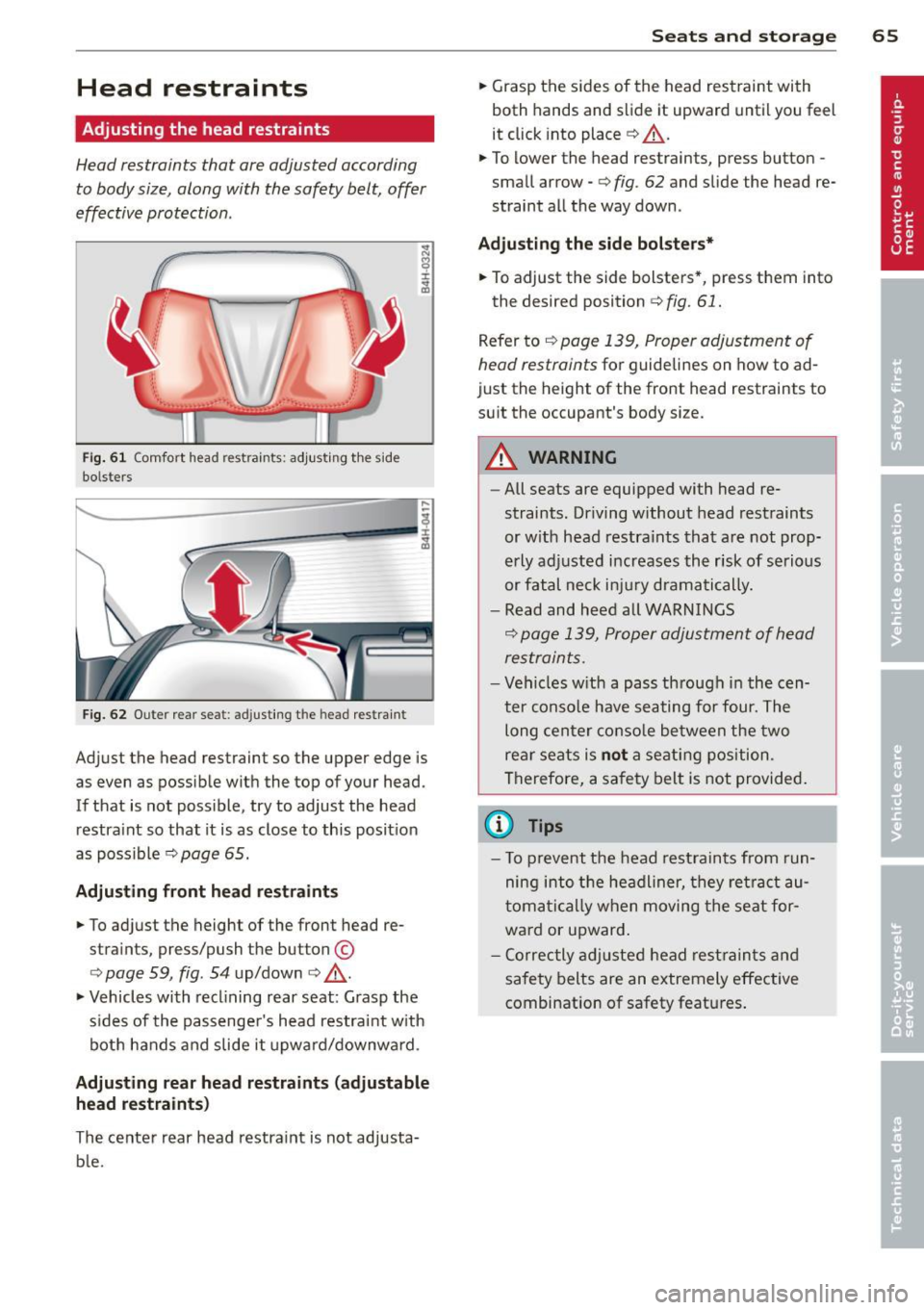
Fig. 61 Comfort head restraints: adjusting the side
bolsters
Fig. 62 Outer rear seat: ad justing th e head restraint
Adjust the head restraint so the upper edge is
as even as possible with the top of your head.
If that is not possible, try to adjust the head
restra int so that it is as close to this position
as possible
r=:>page 65.
Adjusting front head restraints
• To adjust the height of the front head re
straints, press/push the button ©
opage 59, fig . 54 up/down o _& .
• Vehicles with reclining rear seat: Grasp the
s ides of the passenger's head restraint with
both hands and slide it upward/downward.
Adjusting rear head restraints (adjustable
head restraints)
The center rear head restraint is not adjusta
b le.
Seats and storage 65
• Grasp the sides of the head restraint with
both hands and slide it upward until you feel
it click into place r=:>
A.
• To lower the head restraints, press button -
small arrow -
o fig. 62 and slide the head re
straint all the way down .
Adjusting the side bolsters*
• To adjust the side bolsters *, press them into
the desired position
c:> fig. 61.
Refer to¢ page 139, Proper adjustment of
head restraints
for guidelines on how to ad
just the height of the front head restraints to
suit the occupant's body size.
&_ WARNING
-
- All seats are equipped with head re-
straints. Dr iving without head restraints
or with head restraints that are not prop
erly adjusted increases the risk of serious
or fatal neck injury dramatically.
- Read and heed all WARNINGS
o page 139, Proper adjustment of head
restraints.
- Vehicles with a pass through in the cen
ter conso le have seating for four. The
long center console between the two
rear seats is
not a seating position.
Therefore, a safety belt is not provided.
(D Tips
- T o prevent the head restraints from run
ning into the headliner, they retract au
tomatically when moving the seat for
ward or upward.
- Correctly adjusted head restraints and
safety belts are an extremely effective
combination of safety features.
Page 68 of 314

66 Seats and storage
Seat memory
Description
Applies to vehicles: wit h memory fu nctio n
The memory function allows you to quickly
and eas ily store and recall personal seating
p rofiles for the dr iver, front passenger and
outer rear seats*. The memory function is op
erated through the master key and the memo ry buttons in the driver's/front passenger's
doors and the rear doors*.
The driver's seating profi le is stored and as
signed to the master key each time the vehicle
is locked . The seating profile is recalled auto
matically when the vehicle is unlocked. If two
Remote control
master key
Driver
Seat X
Head restraint X
Steering wheel* X
Safety belt* X
Both exterior rear-X
view mirrors*
There are two additional buttons in the rea r
doors* that can be used to recall two stored
seating profiles
r:=;,page 67.
Remote control key
Appl ies to vehicles: with memory function
To assign the driver's seat settings to the re
mote contro l key when locking the vehicle, the
function must be switched on .
.. Se lect :
I CAR I function button > Car systems
control button > Vehicle settings > Seats >
Driver seat > Remote control key> On.
@ Tips
If you do not want another driver's set
tings to be assigned to the remote control
key, switch off the memory function using
the MMI or the
! OF F! button r:=;, page 67. people
use one vehicle, it is recommended
that each person always uses "their own"
master key.
Two seating profiles can be stored in each of
the driver's/front passenger's doors and one
seat ing profile in each of the rear doors*.
Once stored, these seat ing profiles can be re
ca lled at any time.
T he following sett ings are stored:
Memory button
Driver Front passenger Outer rear seats*
X
X X
X X
X
X
X
X
Page 78 of 314

76 Seats and stor age
Addit ional storage
There are a variety of storage compartments
and fasteners in various places in the vehicle.
- Storage compartments in the doors
- Net in the front passenger footwell
- Eyeglasses compartment in the headliner (near the rearview mirror)
- Storage compartments under the center
armrests
- Compartments* on the back of the front
seat backrests
- Garment hooks over the rear doors
- Compartment in the center console with
pass-through)* (rear)
- Compartment behind the rear center arm
rest (in vehicles without the pass-through*
or cooler*)
- Bag hooks in the luggage compartment
A WARNING
-When driving, do not leave any hard ob
jects on the rear window shelf or allow
your pet to sit on the shelf. They could
become a hazard for vehicle occupants in
the event of sudden braking or a crash .
- Always remove objects from the instru
ment panel. Any items not stored could
slide around inside the vehicle while driv
ing or when accelerating or when apply
ing the brakes or when driving around a
corner.
- When you are driving make sure that
anything you may have placed in the cen
ter console or other storage locat ions
cannot fall out into the footwells. In case
of sudden braking you would not be able
to brake or accelerate.
- Any articles of clothing that you have
hung up must not interfere with the driv
er's view. The coat hooks are designed
only for lightweight clothing. Never hang
any clothing with hard, pointed or heavy
objects in the pockets on the coat hooks.
During sudden braking or in an accident -
especially if the airbag is deployed - these objects could injure any passen
gers
inside the vehicle.
- To reduce the risk of personal injury in an
accident or sudden stop, always keep the
glove compartment closed while driving.
- Read and follow all WARNINGS
c:> page 173, Important safety instruc
tions on the side airbag system.
- Hang clothes in such a way that they do
not impair the driver's vision.
- The coat hooks must only be used for
lightweight clothing. Do not leave any
heavy or sharp edged objects in the pock
ets which may interfere with the side cur
tain airbag deployment and can cause personal injury in a crash.
- Do not use coat hangers for hanging clothing on the coat hooks as this can in
terfere with proper deployment of the
side curta in airbags in an acc ident.
- Do not hang heavy objects on the coat
hooks, as they could cause personal in
jury in a sudden stop.
@ Note
Objects located on the rear shelf that rub
against the rear window could damage the
heating wires for the rear window defog
ger .
(D Tips
-A vent slot is located between the shelf
and the rear window. Do not block the
vent with any items you may place on the
rear window she lf.
- Do not place bulky items on the rear win
dow shelf as they could restrict or block
the driver's vision in the rear view mirror.
Cooler
Introduction
App lies to vehicles: wit h coo ler
Please clean the cooler before using it for the
first time
c:> table on page 218 .
You can only switch on the cooler if ...
Page 85 of 314
On the road
Steering
Adjusting steering wheel position
The steering wheel position can be adjusted
for height and reach .
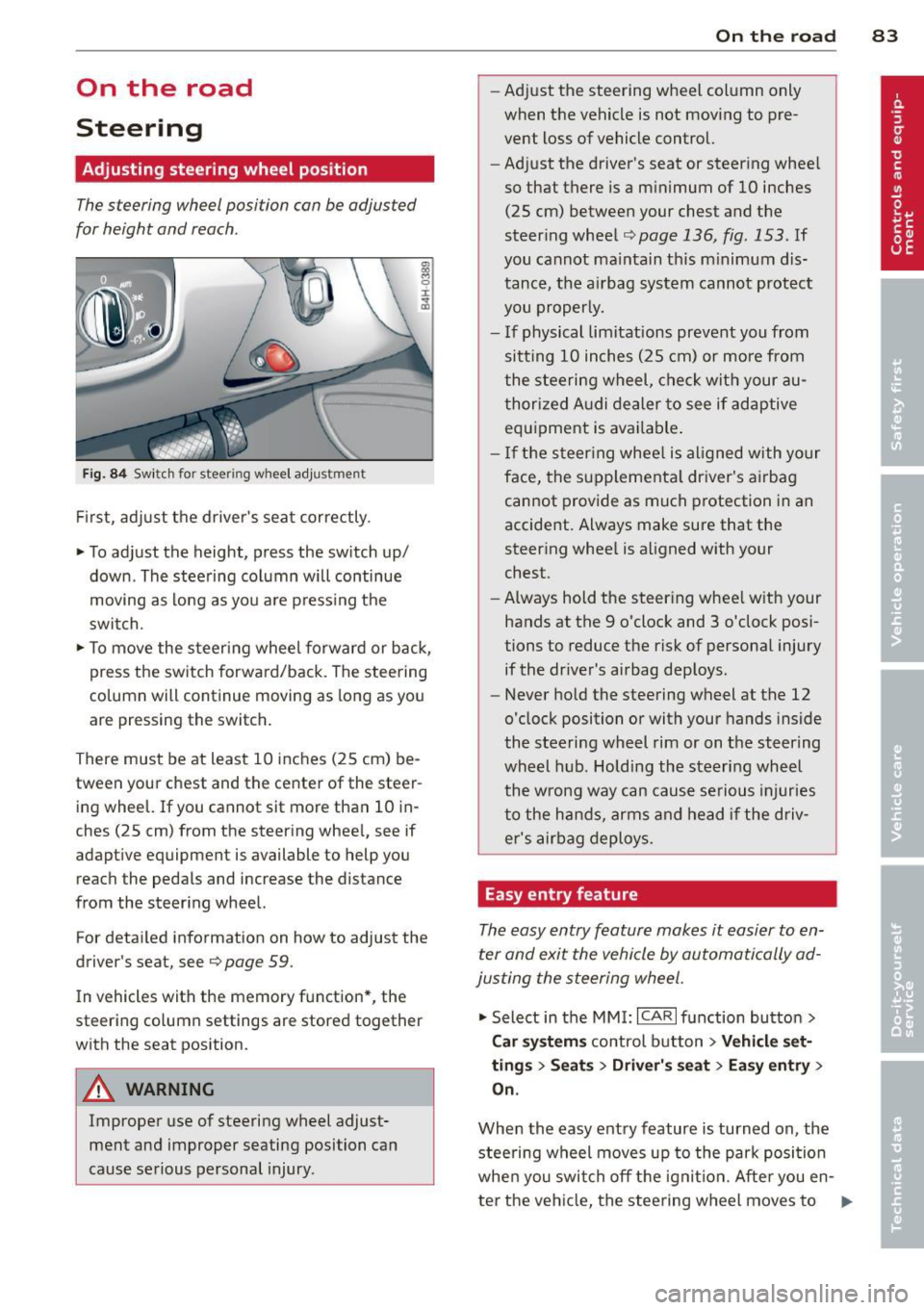
Fig. 84 Switch for steer ing w heel adjustment
First, adjust the driver's seat correctly.
• To adjust the height, press the switch up/
down . The steering column will continue
moving as long as you are pressing the
switch.
• To move the steering wheel forward or back,
press the switch forward/back . The steering
column will continue moving as long as you
are pressing the switch.
There must be at least 10 inches (25 cm) be tween your chest and the center of the steer
ing wheel. If you cannot sit more than 10 in
ches (25 cm) from the steering wheel, see if
adaptive equipment is available to help you
reach the pedals and increase the distance
from the steering wheel.
For detailed information on how to adjust the
driver's sea t, see
Q page 59 .
In vehicles with the memory function*, the
steering column settings are stored together
with the seat position .
A WARNING
Improper use of steering wheel adjust
ment and improper seating position can
cause serious personal injury.
-
On the road 83
-Adjust the steering wheel column only
when the vehicle is not moving to pre
vent loss of vehicle control.
- Adjust the driver 's seat or steering wheel
so that there is a minimum of 10 inches (25 cm) between your chest and the
steering wheel
~ page 136, fig . 153 . If
you cannot maintain th is m inimum dis
tance, the airbag system cannot protect
you properly.
- If physical limitations prevent you from
sitt ing 10 inches (25 cm) or more from
the steering wheel, check with your au
thorized Audi dealer to see if adaptive
equipment is available .
- If the steering wheel is al igned with yo ur
face, the supplementa l driver's airbag
cannot provide as much protection in an
accident. Always make sure that the
steering whee l is aligned with your
chest.
- Always hold the steering whee l with your
hands at the 9 o'clock and 3 o'clock posi
tions to reduce the risk of personal injury
if the driver's airbag deploys.
- Never hold the steering wheel at the 12
o'clock position or with your hands inside
the steering wheel rim or on the steering
wheel hub. Holding the steering wheel
the wrong way can cause serious injuries
to the hands, arms and head if the driv
er's airbag deploys.
Easy entry feature
The easy entry feature makes it easier to en
ter and exit the vehicle by automatically ad
justing the steering wheel.
• Select in the MMI: ICARI function button >
Car systems control button > Vehicle set
tings > Seats > Driver' s seat > Easy entry>
On.
When the easy entry feature is turned on , the
stee ring wheel moves up to the park position
when you swit ch off the ignition. After you en -
ter the vehicle, the steering wheel moves to ..,..
Page 96 of 314
94 Audi adapti ve cruise control and bra king gu ard
Audi adaptive cruise
control and braking
guard
Introduction
App lies to vehicles: with Audi adaptive cruise co ntrol
The adaptive cruise control system assists the
driver by regu lat ing vehicle speed and helping
to maintain a set distance to the vehicle
ahead, within the limits of the system.
If the
system detects a moving vehicle up ahead,
adaptive cruise control can brake and then ac
celerate your vehicle. This helps to make driv
ing more comfortable both on long highway
stretches and in stop-and-go traffic.
The braking guard system can warn you about
an impending collision and initiate braking
maneuvers¢
page 100.
Adaptive cruise control and braking guard
have technical limitations that you must
know, so please read this section carefully, un
derstand how the system works and use them
properly at all times.
General information
General information
Applies to vehicles: with Audi adaptive cruise control
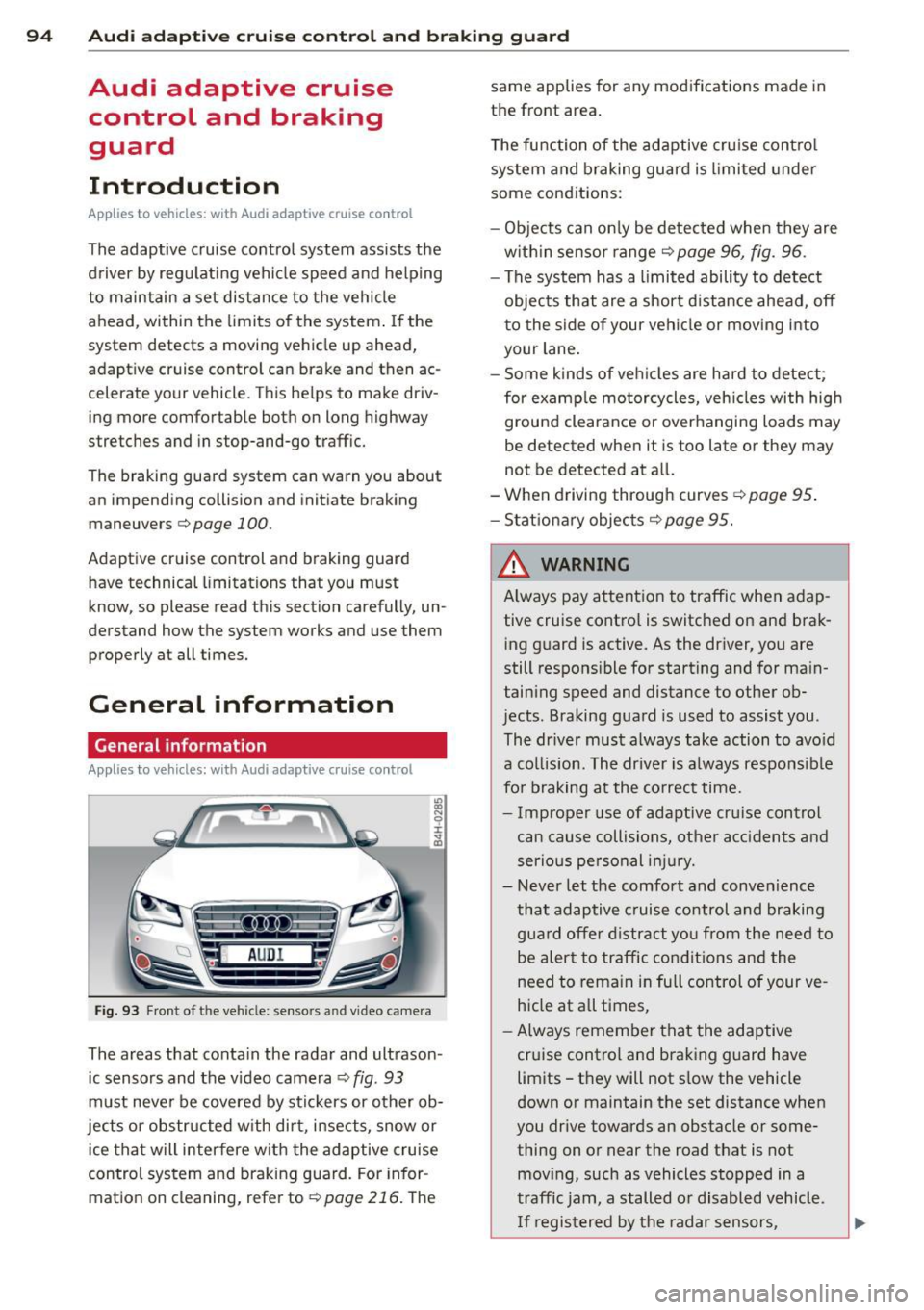
Fig. 93 Front of th e veh icle: senso rs and video camera
The areas that conta in the radar and ultrason
ic sensors and the v ideo camera ¢
fig. 93
must never be covered by stic kers or other ob
jects or obstructed w ith dirt, insects, snow or
i ce that will interfere with the adaptive cruise
control system and braking guard. For infor
mation on cleaning, refer to¢
page 216. The same applies for any modifications made in
the front area.
T he function of the adaptive cru ise contro l
system and braking guard is limited under
some cond itions:
- Objects can only be de tected when they are
w ith in sensor range¢
page 96, fig. 96.
- The system has a limited ability to detect
objects that are a short d istance ahead, off
to the side of your vehi cle or mov ing into
your lane.
- Some kinds of ve hicles are hard to detect;
for examp le motorcycles, veh icles with high
ground clearance or overhanging loads may
be detected when it is too late or they may
not be detected at all.
-When driving through curves
¢page 95 .
-Stat ionary objec ts ¢page 95.
& WARNING
A lways pay attention to traffic when adap
tive cruise contro l is switched on and brak
ing g uard is active. As the dr iver, you are
still respons ible for starting and for main
taining speed and distance to other ob
jects. Braking guard is used to assist you .
The dr iver must a lways take action to avo id
a collis ion . The driver is a lways respons ible
for braking a t the co rrec t time.
- Imp roper use of adaptive cru ise control
can cause collisions, other acc idents and
serious pe rsonal in jury.
- Never let the comfort and convenience
that adaptive cruise control and braking gua rd offer d istract you from the need to
be alert to traffic condit ions and the
need to rema in in fu ll control of your ve
h icle at a ll times,
- Always remember that the adaptive
cruise control and braking guard have
limits -they will not s low the vehicle
down or maintain the set distance when
you drive towards an obstacle or some
thing on or near the road that is not
mov ing, such as vehicles stopped in a
traffic jam, a stalled o r disabled vehicle.
I f registered by the radar sensors,
Page 98 of 314
96 Audi adaptive cruise control and braking guard
@ is located in front of that vehicle, the sys
tem will not react to the stationary vehicl e.
Audi adaptive cruise
control
Description
Applies to vehicles: with Audi adaptive cruise control
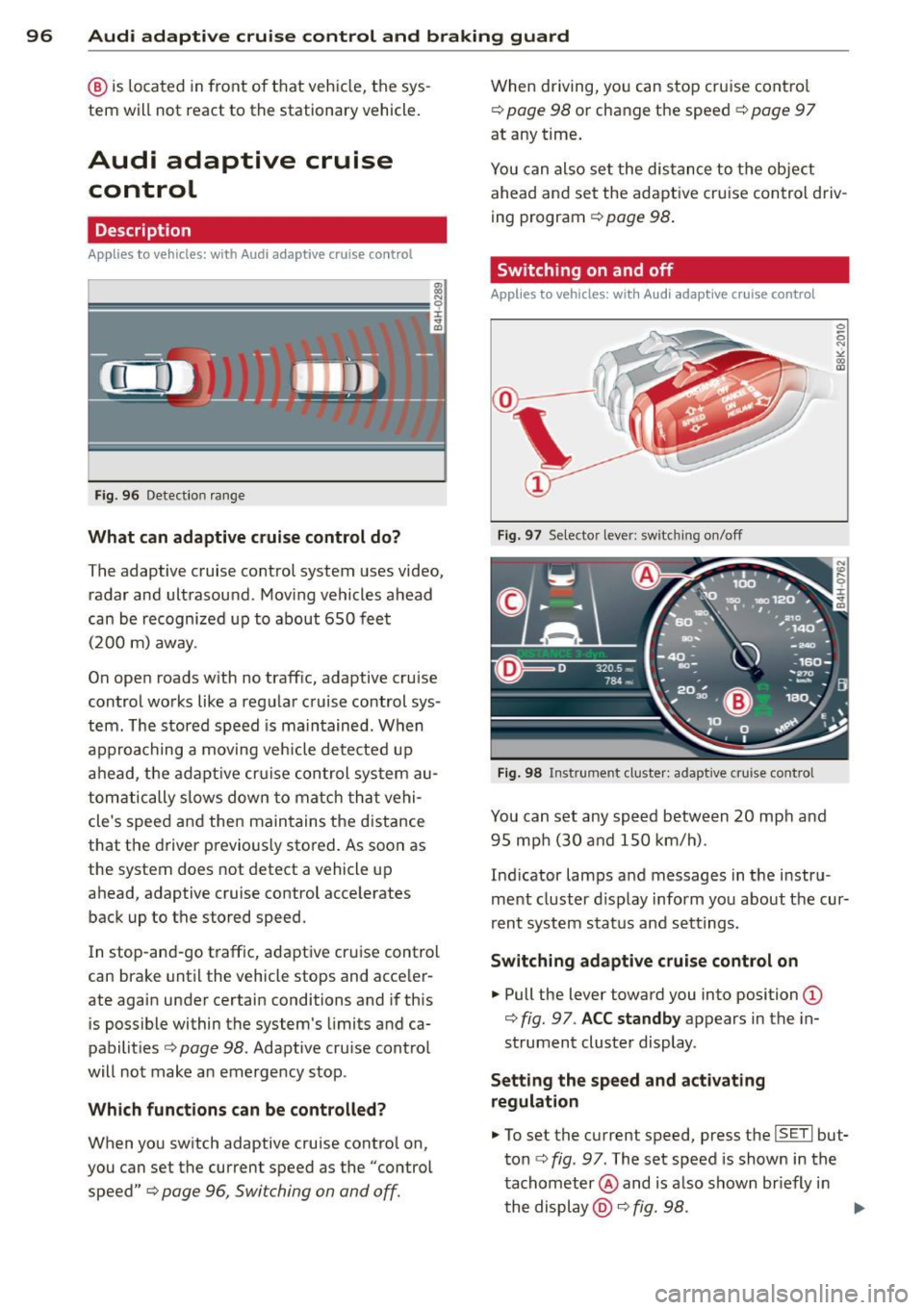
Fig. 96 Detectio n range
What can adaptive cruise control do?
The adaptive cruise control system uses video,
radar and ultrasou nd . Moving vehicles ahead
can be recognized up to about 650 feet (200 m) away.
On open roads w ith no traffic, adaptive cruise
control works like a regular cruise control sys
tem . The stored speed is maintained . When
approaching a moving vehicle detected up
ahead, the adaptive cruise control system au
tomatically s lows down to match that vehi
cle's speed and then maintains the distance
that the driver previous ly stored. As soon as
the system does not detect a vehicle up
ahead, adaptive cruise control accelerates
back up to the stored speed.
In stop-and-go traffic, adapt ive cru ise control
can brake until the vehicle stops and acceler
ate again under certain conditions and if this
is possible within the system's limits and ca
pabilities ¢
page 98. Adaptive cru ise control
will not make an emergency stop .
Which functions can be controlled?
When you switch adaptive cruise contro l on,
you can set the current speed as the "control speed" ¢
page 96, Swi tching on and off.
When driving, you can stop cruise control
¢
poge 98 or change the speed¢ page 97
at any time .
You can also set the distance to the object
ahead and set the adaptive cruise control driv
ing program ¢
page 98.
Switching on and off
Applies to vehicles: with Audi adaptive cruise control
Fig. 97 Se le cto r lever: swit chin g on /off
Fig. 98 Instrume nt cl uste r: adapt ive cruis e cont rol
You can set any speed between 20 mph and
95 mp h (30 and 150 km/h) .
Ind icator lamps and messages in the instru
ment cluster d isplay inform you about the cur
rent system status and settings .
Switching adaptive cruise control on
... Pull the leve r toward you into position (D
¢ fig. 97 . ACC standby appears in the in
strument cluster display .
Setting the speed and activating
regulation
... To set the current speed, press the ISETI bu t
ton ¢
fig. 97. T he set speed is shown in the
tachometer @and is a lso shown br iefly in
the display @¢
fig. 98 . ...,
Page 99 of 314
Audi adaptive cruise control and braking guard 97
.. You must also press the b rake pedal when
the vehicle is stopped.
Switching adaptive cruise control off
.. Push the lever away from you into position
@ until it clicks into place. The message
ACC off appears.
@ Indicator lights
fl -Adaptive cruise control is switched on. No
vehicles are detected up ahead . The stored
speed is ma intained.
I -A moving vehicle is detected up ahead .
The adaptive cruise control system regulates
the speed and distance to the moving vehicle
ahead and acce lerates/brakes automatica lly.
f¥i -Adaptive cruise control is switched on. A
mov ing vehicle up ahead was detected . Your
veh icle remains stopped .
I· When automatic braking is not able to
keep enough distance to a previously detected
mov ing vehicle up ahead, you must take con
trol and brake
c:::> page 99, Prompt for driver
intervention.
© Display
If adaptive cruise control is not shown in the
d isplay, you can call it up with the multifunc
tion steering wheel buttons¢
page 24 .
Based on the symbols in the display, you can
determine if the system is maintaining a dis
tance to the vehicle ahead and what that dis
tance is.
No vehicle -No vehicle ahead was detected.
White vehicle -A vehicle ahead was detected.
Red vehicle -Prompt for the driver to take ac
tion
c:::> page 99.
Both
arrows o n the scale © indicate the dis
tance to the vehicle ahead . No arrow appears
when the vehicle is on an open road and there
is no object ahead.
If an object is detected
ahead, the arrow moves on the scale.
The green zone on the scale shows the stored
distance. For information on changing the stored distance, refer to
c:::> page 98
. If the
distance selected is too close or may soon be
come too close, the arrows move into the red
z one on the sca le .
A WARNING
Improper use of the adaptive cruise con
trol can cause collisions, other accidents
and serious personal injuries.
- Pressing the
!SET ! button when driv ing at
speeds below 20 mph (30 km/h), w ill au
tomatically accelerate the vehicle to 20
mph (30 km/h), which is the minimum
speed that can be set.
@ Tips
-If you switch the ignit ion or the adaptive
cruise control off, the set speed is erased
from the system memory.
- You cannot switch the Electronic Stabili
zation Control (ESC) to the SPORT mode
when adaptive cruise control is switched
on.
Changing the speed
App lies to veh icles: w it h A ud i ada ptive c ruise co ntrol
0
f
• 0
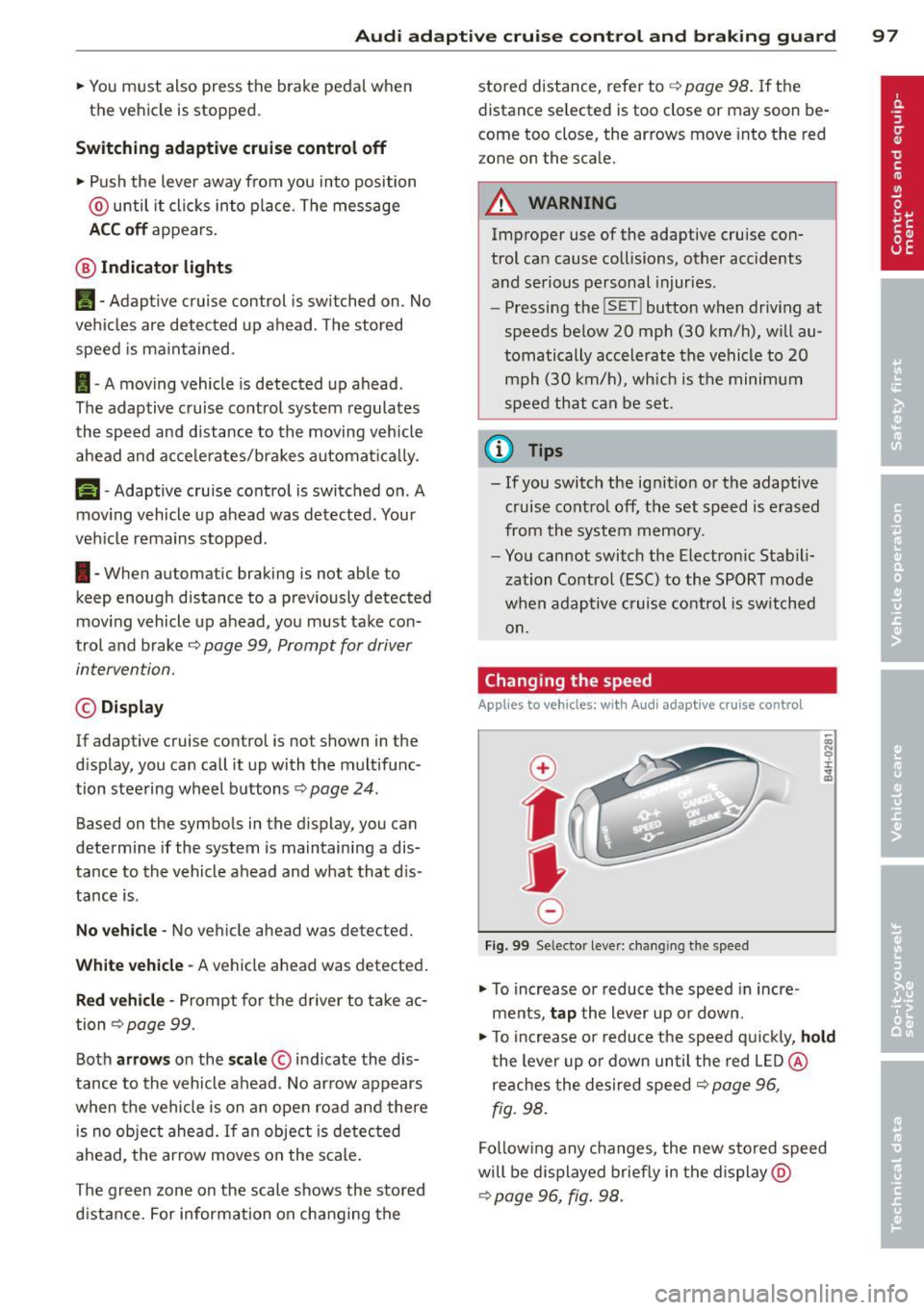
Fig. 99 Selector lever: changing the speed
.. To increase or reduce the speed in incre
ments,
tap the lever up or down.
.,. To increase or reduce the speed q uickly,
hold
the lever up or down until the red LED @
reaches the desired speed
c:::> page 96,
fig. 98.
Follow ing any changes, the new stored speed
will be displayed briefly in the display @
c:::> page 96, fig. 98.
Page 100 of 314

98 Audi adaptive cruise control and braking guard
Driv ing in stop-and-go traff ic
A pplies to vehicles: with Audi adaptive cruise control
The adaptive cruise co ntro l system a lso as
sis ts you in stop- and -go traff ic. If a previo us
detec ted veh icle ahead s tops, yo ur vehicle will
brake to a stop, within the limits o f the sys
tem .
,,. To res ume dr iv ing wi th adap tive cruise con
t ro l, tap the accelerator pe dal or
,,. Pull the lever toward yo u into posit ion @
¢page 98 , fig. 100.
@ Tips
-If ada ptive cruise con trol is a ctive an d
you r vehicle does not start driving as ex
pected after pulling the lever once, you
can start out aga in by tapp ing the accel
erato r pedal.
- If an obstacle is detected when yo ur ve
h icle starts dr iv ing, the system w ill
prompt you to take over
¢ page 99.
Your veh icle w ill drive more s low ly when
star ting . This may a lso happe n in some
s ituation s whe n no obstacle is apparent.
Interrupting cruise control
Applies to vehicles: with Audi adaptive cruise co ntrol
Fi g. 100 Selecto r lever
Requ irement : adaptive cruise control must be
sw itched on .
Overriding crui se control
,,. To accelerate ma nually, pull the lever to
ward you into position @and hold it there .
The message
ACC override appears . Or
,,. press th e accelerator peda l. ,,.
To resume cruise cont ro l, re lease the lever
or take your foot off the accelerato r pedal.
Canceling cruise control while driving
,,. Move the lever in to posi tion @. T he mes
sa ge
ACC standby ap pears. Or
,,. press the brake pedal.
,,. To resume the stored speed, move the lever
into position @.
Canceling cruise control when stopped
,,. Push the lever away from you i nto posit io n
@ . Th e message
ACC standby appe ars.
,,. To resume cruise contro l, press the brake
pedal an d pu ll the lever toward you into po
sition @.
A WARNING
• -
Never resume the stored speed if the
sp eed is too high for p revailing r oad, traf
f ic or weat her condit io ns.
Setting the distance
App lies to vehicles: wit h Audi ada ptive c ruise contro l
Fig. 101 Selector lever: setting t he dista nce
,,. Tap the switch to display the current set dis
tance
r::!> fig. 101 .
,,. To increase or reduce the d istance by incre
ments, tap the switch again to the left or
r ight. The d istance between the two vehicles
w ill change in the instrument cluste r dis
p lay .
When approach ing a mov ing vehicle up ahead,
the adaptive cruise control system automati ca lly brakes to match that object's speed and
Ill>
Page 101 of 314
Audi adaptive cruise control and braking guard 99
then maintains the stored distance. If the ve
hicle ahead accelerates, adaptive cr uise con
trol will also accelerate up to the stored
speed.
The higher the speed, the greater the distance
in yards (meters) ¢.&. . The
Distance 3 setting
is recommended .
The distances prov ided are spec ified values.
Depending on the driving situation and the
how the vehicle ahead is driving, the actual
d istance may be more or less than these tar
get distances.
The various symbols for the time increments
appear briefly in the information line @
¢ page 96, fig. 98 when you change the set
tings.
~ -~ --- Distance 1: This setting corre
sponds to a distance of 92 feet/28 meters
when traveling at 62 mph (100 km/h), or a
time interva l of
l second.
~ -- ~-- Distance 2: This setting corre
sponds to a distance of 118 feet/36 meters
when traveling at 62 mph (100 km/h), or a
time interva l of 1.3 seconds .
~--- ~-Distance 3: This setting corre
sponds to a distance of 164 feet/SO meters
when traveling at 62 mph (100 km/h), or a
time interva l of 1.8 seconds .
~---- ~ Distance 4: This setting corre
sponds to a distance of 210 feet/64 meters
when traveling at 62 mph (100 km/h), or a
time interva l of 2.3 seconds .
A WARNING
Following other vehicles too closely in
creases the risk of collisions and serious
personal injury.
- Setting short distances to the traffic
ahead reduces the time and distance
available to br ing your vehicle to a safe
stop and makes it even more necessary
to pay close attention to traffic.
- Always obey applicable traffic laws, use
good judgment, and select a safe follow- ing distance
for the traffic, road and
weather conditions.
@ Tips
- Distance 3 is set automatically each time
you switch the ignition on.
- Your standard settings are automatically
stored and assigned to the remote con
tro l key being used.
Selecting the driving mode
Applies to vehicles: with Aud i adapt ive c ruise contro l
.,. Select the desired driving mode in drive se
lect¢
page 110.
(0 Tips
Your settings are automat ica lly stored and
assigned to the remote control key being
used.
Prompt for driver intervention
Applies to vehicles: with Audi adapt ive cru ise contro l
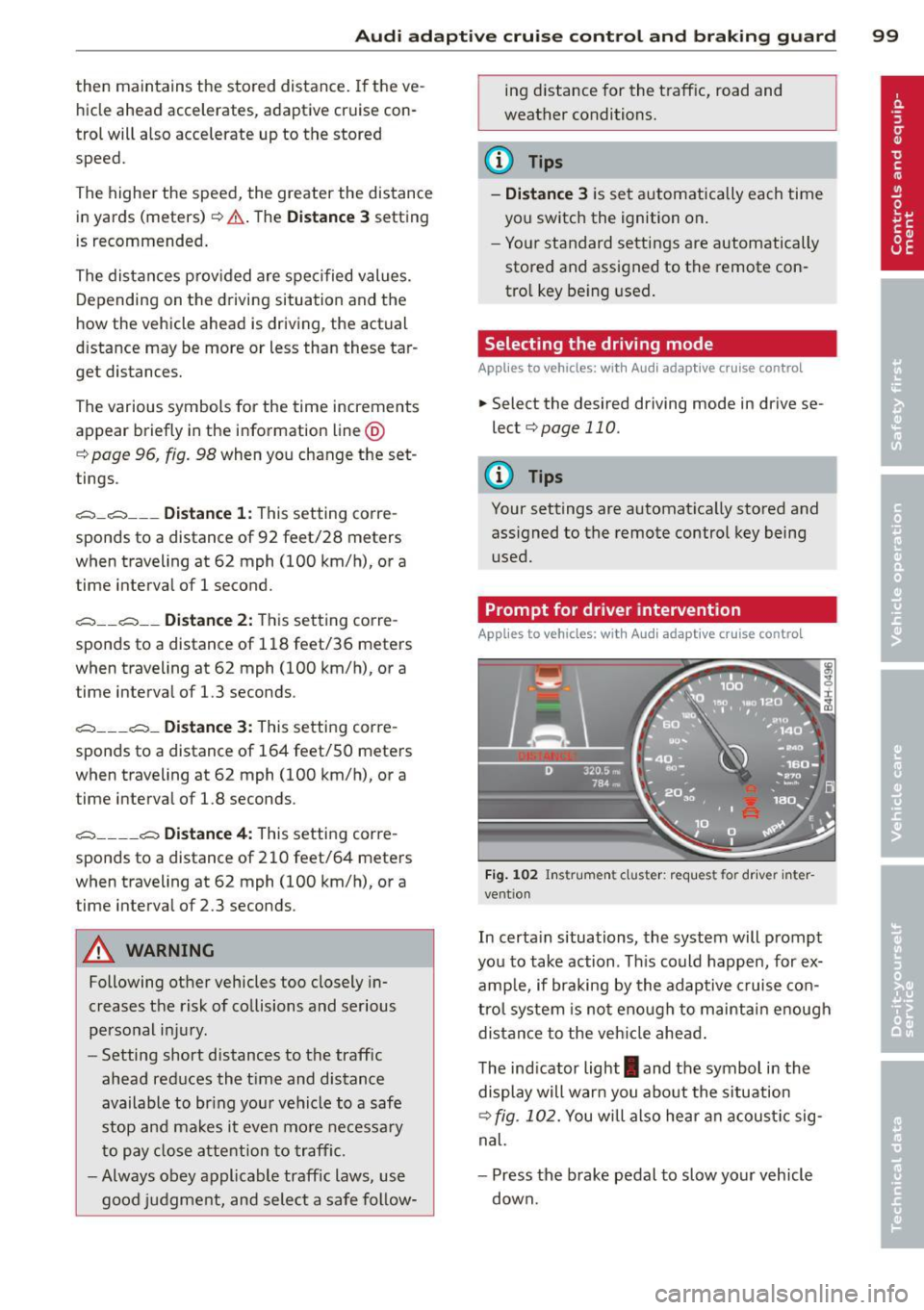
Fig. 102 Instrument cluster: request fo r drive r in ter
vent ion
In certa in situations, the system will prompt
you to take action . Th is could happen, for ex
amp le, if braking by the adaptive cruise con
trol system is not enough to maintain enough
distance to the vehicle ahead.
The indicator light
I and the symbol in the
display will warn you about the situation
¢ fig. 102. You will also hea r an acoustic sig
nal.
- Press the brake pedal to slow your vehicle
down.