lock AUDI A8 2015 User Guide
[x] Cancel search | Manufacturer: AUDI, Model Year: 2015, Model line: A8, Model: AUDI A8 2015Pages: 312, PDF Size: 79.18 MB
Page 35 of 312

@ Tips
-The vehi cle cannot be started if an unau
thorized key is used. The vehicle may not
start if another radio device such as a key
for anot her vehicle or a transponder is
l ocated on the key ring.
- For Declarat ion of Compliance to United
States FCC and Industry Canada regula
tions ¢
page 293 .
Power locking system
General description
The power l ocking system locks or unlocks all
doors and the luggage compar tment lid si
multaneously.
You ca n lock and un lock the vehicle cent rally.
You have the following choices:
- Remote maste r key
¢ page 35,
-Door handles with convenience key *
<=>page 35,
-Lock cylinder at the dr iver 's door
¢ page 36, or
- Power locking switc h inside ¢
page 36.
Selective unlocking
When you loc k the vehicle, the powe r locking
system wi ll lock the doors and the l uggage
compa rtment lid. When unlocking, you can
set in the MMI whet her only the driver 's door
or the entire vehicle s houl d be unlocked
¢ page 34.
Automatic locking
The automatic loc kin g feat ure locks all t he ve
h icle doors and the luggage compartment lid
when you drive faster than 9 mph (15 km/h) .
The car is un locke d again , when the opening
f u nction in the power locking system sw itch
or at one of the door leve rs is actuated. The
Auto Lock function can be turned on and off in
.... N the MMI ¢ page 34. .... N
0 J:
'SI: .... \!) ..,.,
.... ..,., ....
Opening and clo sin g 33
Anti-theft alarm warning system
If the an ti-t heft ala rm warning sys tem de
tects a b reak -in in to the vehicle , acous tic and
vis ual war ning signals a re triggere d.
T he anti-theft wa rning sys tem is a ctiv ated au
t omat ic all y when you lock t he ve hicl e. It is de
activated when unlocking using the remote key, with the mecha nica l key, an d when yo u
switc h the ignition on.
T he al arm also turns off w hen t he al arm cy cle
has expired .
Turn signals
When you un lock the veh icle, the turn signals
flash twice. When you lock the veh icle once,
the turn sig nals flash once.
If th ey do no t
f lash, one o f th e doors, the luggage com part
ment lid or the hood is no t locked .
Unintentionally locking yourself out
In the fo llow ing cases there safeg ua rds to
preve nt yo u locki ng you r remo te mas ter key in
t h e ve hicl e:
- The vehicle does not lock w ith the cent ral
loc king switch <=>
page 36 if the drive r's
door is open.
- On veh ides with convenience key*, if the
most recently used master key is in the lug
gage com pa rtment, the l uggage compa rt
ment lid is a utomat ic al ly unlocked again af
t er it is closed .
Do not lock your veh icle w ith the
r e mote mas
ter key or convenienc e key * unti l all doors
and t he luggage com partment lid are closed.
In this way you avoid locking yo urse lf o ut acci
dentally .
Power side door closer*
The veh icle doo rs a re equipped w it h a powe r
s ide door closer . W hen clo sing a doo r, you on
l y h ave to le t it fall light ly in to the la tc h . The
doo r will then automatically close by itself
¢ & . ~
Page 36 of 312

34 Openin g and clo sing
A WARNING
- When you lock your ve hicle from outside,
nobody -especially children -should re
ma in ins ide th e veh icl e. Rememb er,
when you lock the ve hicle from the out
side the windows cannot be opened from
the inside .
- When you leave the vehicle, always take
the ignition key with you. This will pre
vent passengers (ch ildren, for example)
from accidentally being locked in the ve
hicle should they accidentally press the
power locking switch in the doors.
- Do not leave children inside the vehicle
unsupervised . In an emergency it would
be impossible to open the doors from
the outside w ithout the key.
- Applies to vehicles with power side door
closer*:
- When closing a door, make sure noth
ing can interfere w ith the doo r. T his
could cause ser ious personal in jury.
- You can stop the door from clos ing at
any time by pulling on the inside or
outside door handle.
@ Tips
- In the event of a crash with airbag de
ployment all locked doors will be auto
matically unlocked to g ive access to t he
vehicle occupants from the outside.
- If the power lock ing system should ma l
funct ion, you can lock the dr iver's door
u sing the mechanical key
~ page 3 7.
- If the power lock ing system should fail,
you can still open the fue l tank flap in an
emergency<=>
page 224 .
-You are we ll advised no t to keep valua
bles insi de an unattended vehicle, visib le
or not. Even a properly locked vehicle
cannot provide the sec urity of a safe.
- If the L ED in the upper edge of the d riv
er's door panel comes on fo r abo ut 30
seconds afte r the vehicle is locked, there
i s a ma lfunction in the power locking or
the anti-theft warning system. Have the malfunction corrected by an author ized Audi dealership or qualified repair facili
ty
.
Setting power locking
The driver can determine the functions for
power locking in the MMI.
.,. Select: I CAR I function button > Car sy ste m s
contro l bu tton > Vehicle setting s > (Central
locking ).
Lock wh en driving -
If you sele ct On, the vehi
cle locks automa tica lly when driv ing. A ll of
the doors and luggage compartment lid lock.
Central locking
Unlock door s -
You can dec ide if All doo rs or
o n ly the
Driver shou ld unloc k. The l uggage
compartment lid a lso un locks when
All is se
l ected. If you sele ct
Driv er in a ve hicle w it h a
convenience key* , on ly the door whose handle
you pull will un lock.
If you se lect Driver , all t he doors and luggage
compartment lid will un loc k if you press the@
button on the remote con trol master key
twice.
L ock exterior trunk handle -If you select On ,
the luggage compar tment lid handle is
locked. In this case the luggage compar tment
lid can be opened with the button
e:5 on the
master key or with the
e:5 b utton * in the driv
er's door. In ve hicles w ith a convenience key*,
you can st ill open the luggage compartment
lid using the handle if an authorized master
key is near the proxim ity sensor .
Fold mirrors* -If you select On, the exterior
rearview mirrors fold in automatically when
you press the
ffJ button o n the remote control
master key or touch the sensor * in the handle.
Tone when locking -When you select On, a
confirmat ion tone sounds when you lock the
vehicle .
Page 37 of 312

.... N .... N
0 J:
""'. .... I.O
"' ....
"' ....
Locking and unlocking the vehicle with
the remote control
F ig. 2 1 Remo te control: function buttons
Either the dr iver's door only or the entire veh i
cle will unlock when the unlock button
en is
p ressed once, depending on the settings in
the MMI
r::}page 34.
.. Press button @ to unlock the veh icle
¢ fig . 21 .
.. Press b utton @to lock the vehicle ¢.&. in
General description on page 34 .
.. Press b utton C::5 briefly to unlock the lug
gage compartment lid .
.. Push the red
I PANIC I button to activate the
panic function. The horn sounds and the
turn signals flash. Push the red
I PANIC ! but
ton again to deactivate the panic function.
If the vehicle is unlocked and no door, the lug
gage compartment lid or the hood is opened
within 60 seconds, the vehicle locks itself
again automatically. This feature prevents the
vehicle from be ing acc identally left unlocked
over a long period of t ime.
It depends on the settings in the MMI wheth
er the entire veh icle is unlocked or only cer
tain doors
c:> page 34 .
A WARNING
Read and follow all WARNINGS¢.&. in
General description on page 34.
@ Tips
- In order to make sure the locking func
tion is working, you s hou ld always keep
your eye on the vehicle to make sure it is
properly locked.
Op enin g an d clos ing 35
-Do not use the remote cont rol if you are
inside the car, otherwise you may unin
tentionally lock the vehicle, and then you
would set
off the anti-theft alarm when
you try to start the engine or open a door . In case this happens anyhow, push
the unlock button
en.
- The veh icle can only be locked when the
selector lever is in the P position .
- Use the panic function only if you are in
an eme rgency situation .
Locking and unlocking with convenience
key
Applies to vehicles: wit h convenience key
The doors and the luggage compartment lid
can be unlocked and locked without operat
ing the master key.
Fi g. 22 Co nvenience key: Lock ing the vehicle
Unlocking veh icle
.. Take ho ld of the door handle. The door is un-
locked automatically .
.. Pull the hand le to open the door.
L o cking vehicle
.. Select the P selec tor lever posit ion. Other
w ise the vehicle cannot be locked .
.. To lock the vehicle, close the door and touch
the sensor in the door handle
on ce c:> fig . 22 .
Do not reach inside the door handle .
T he vehicle can be locked and un locked at any
doo r. The master key must be within a range
of about 1.5 m from the appropriate door or
the luggage compartment lid . It makes no dif
ference whether the master key is in your jack-
et pocket or in your brief case . ..,.
Page 38 of 312
36 Opening and clo sing
It is not possible to re-open the door for a
brief period direct ly after closing it. This al
l ows you to ensure that the doors are properly
locked.
I t depends on the se ttings in the MMI wheth
er the entire vehicle is unlocked or one of the
doors ¢
page 34.
A WARNING
Read and follow a ll WARNINGS c:> & in
General description on page 34.
(D Tips -
If you
r vehicle has been stand ing fo r an ex
tended period, please note the fo ll ow ing:
- The proximity sensors are deactivated af-
te r a few days to save powe r. Yo u then
have to pull on the door handle once to
unlock the ve hicle and a second time to
open the veh icle.
- To prevent the battery from draining and to preserve your vehicle's ability to start
fo r as long as possib le, the energy man
age men t sys tem grad ual ly sw itches off
u nn ece ssary conven ience f unct io ns.
It is
p ossi ble tha t you w ill not be able to un
l ock your ve hicl e using these conven
i en ce f unct io ns.
- Fo r De clarat ion of Com pliance to Uni ted
St ates FCC an d Indus try C anada regu la
tions¢
page 293.
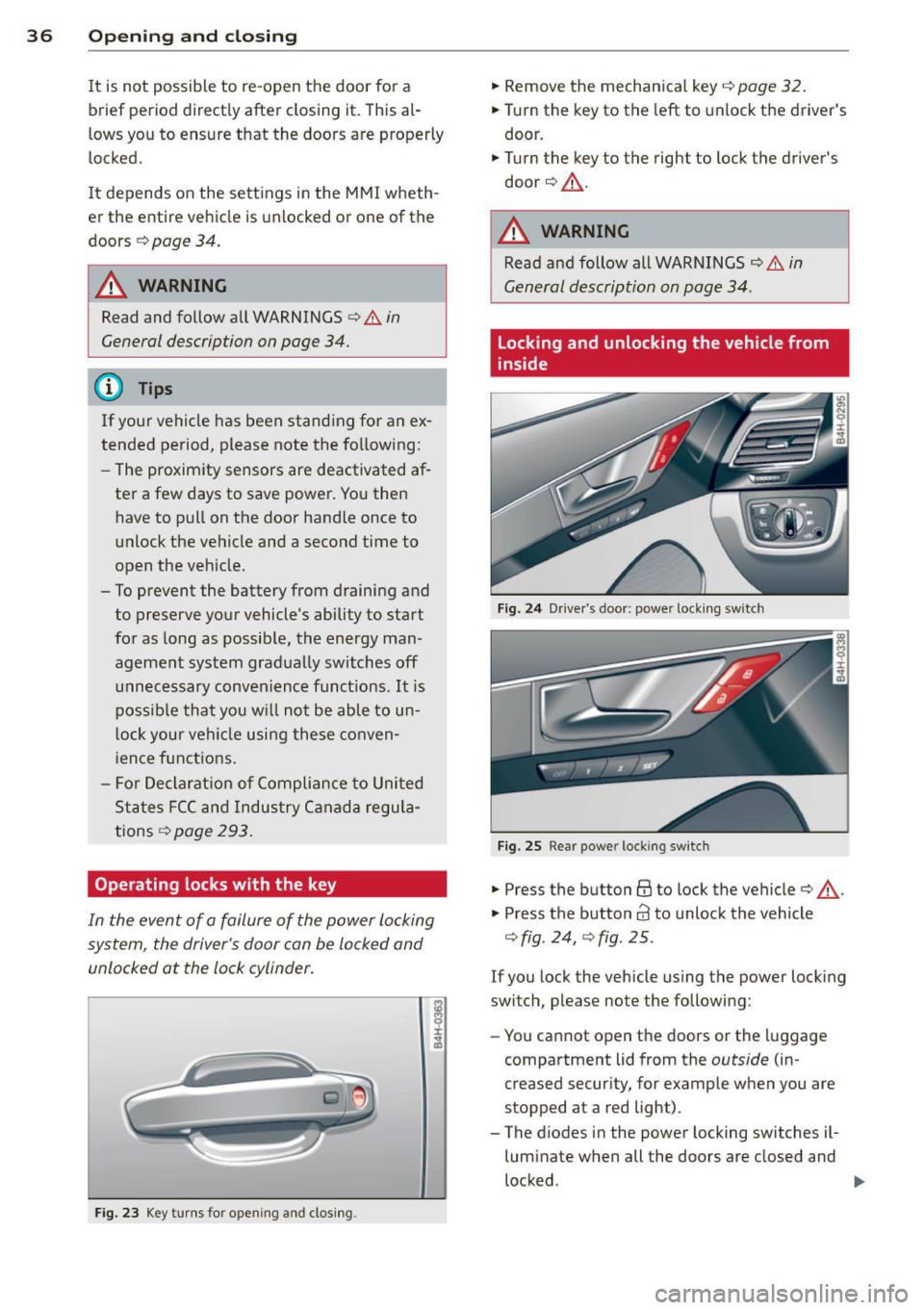
Operating locks with the key
In the event of a failure of the power locking
system, the driver's door con be locked and
unlocked at the lock cylinder.
F ig . 2 3 Key tu rns for ope ning and clos ing .
.,. Remove the mechan ica l key i=;, page 32.
.,. Tur n the key to the left to unlock the driver's
door .
.,. Turn the key to the right to lock the driver's
door c:>.&, .
A WARNING
Read and follow all WARNI NGS Q & in
General description on page 34 .
Locking and unlocking the vehicle from
inside
Fig. 24 Dr ive r's door: power lock ing sw it ch
Fig . 25 Rear power lock ing sw itc h
.,. Press the button@ to lock the vehicle c:> .&, .
"' Press the button
63 to unlock the vehicle
Q fig . 24, Q fig . 25 .
If you lock the vehicle using the power locking
switch, p lease note the following:
- You cannot open t he doors or the luggage
compartment lid from the
outside (in
creased secur ity, for example when you are
stopped at a red light) .
- The diodes in the powe r locking switches il
luminate when all the doors are closed and
locked .
~
Page 39 of 312

.... N .... N
0 J:
"". .... I.O
"' ....
"' ....
-Front doors: you can un lock and open the
doors from the inside by pulling on the door
handle.
- Rear doors: pu ll the door handle
once to re
lease the lock. Pull the hand le
again to open
the doo r.
- If you have a crash and the airbag is activat
e d, the doors automatically unlock .
,&. WARNING
- The power locking switch works with the
ignition off and automatically locks the
entire vehicle whe n it is actuated .
- On a vehicle locked from the outside the
power locking system switch is inopera
tive.
- Locked doors make it more difficult for
emergency workers to get into the vehi
cle, which puts lives at risk . Do not leave
anyone behi nd in the veh icle, especially
children.
@ Tips
Your vehicle is locked automatically at a speed of 9 mph (15 km/h)
~ page 33. You
can unlock the vehicle again using the
open ing function in the power locking sys
tem switch .
Emergency locking
Each door must be locked separately if the
power locking system fails.
Fig. 26 Doo r: Emer gen cy lock ing
An emergency lock is located on the front end
of the passenger 's door and the rear doors
(on ly visible when door is open) .
"' Remove the mechanical key~
page 32.
Opening and closing 3 7
... Pull the cover cap out of the opening
~ fig. 26.
... Insert the key in the inside slot and turn it
all the way to the right (right door) or left
(left door) .
Once the door has been closed, it can no lon
ger be opened from the outside. The door can
be opened from the inside by pulling the door
handle .
If the child safety lock in a rear door is
activated, you must first pull the door handle
on the inside . Then you can open the door
from the outside.
Luggage compartment
Lid
Opening/closing the luggage
compartment lid
Fig. 27 Driver 's doo r: remote luggage comp art m en t lid
re lea se
t'FID
A U Li ...
Fig. 28 Pos it ion of lock and handle in the l uggage com
part men t lid
Opening the luggage compartment lid
... Press the c::s button on the remote control
master key briefly. The luggage compart
ment lid will unlock .
... To open the luggage compartment lid, press
and hold the
c::s button on the remote con-
trol master key for at least one second . Or
IJJ,,
Page 40 of 312

38 Openin g and clo sing
• Pull the button cs in the driver's door
¢
fig. 2 7 brief ly . Or
• Press the handle in the luggage compart
ment lid ¢
fig. 28.
Clos ing th e lug gag e co mpartm en t lid
• Pull the luggage compartment lid down and
allow it to drop gently. The lid is then closed
automatically¢
A .
The settings in the MM I determ ine if the lug
gage compartment lid can be opened using
the handle¢
page 34 .
A WARNING
-After closing the luggage compartment
lid, a lways pull up on it to make sure that
it is properly closed. Otherwise it could
open suddenly when the veh icle is mov
ing.
- To help prevent po isonous exhaust gas
from being drawn into the vehicle, al
ways keep the luggage compartment lid closed while driving. Never transpo rt ob
jects larger than those which fit com
ple tely i nto the luggage area, because
then the luggage compartment lid can
not be fully closed.
- Never leave your vehicle unattended es
pecially with the luggage compartment
lid left open. A child cou ld crawl into the
car thro ugh the luggage compartment
and pull the lid shut, becoming trapped
and unable to get out. To reduce the risk
of personal injury, never let ch ild ren play
in or around your vehicle. Always keep
the luggage compartment lid as we ll as
the vehicle doors closed when not in use.
(D Tips
When the veh icle is locked, the luggage
compartment lid can be unlocked sepa
rately by pressing the button
cs on the
maste r key. When the luggage compart
men t lid is clo sed ag ain, i t locks automati
cally.
Power opening/closing luggage
compartment lid
Applies to vehicles: with power opening/closing luggage
compartment lid
The luggage compartment lid can open and
close electrically .
Fig. 29 Clos ing button in the luggage co mpartment lid
Fig. 30 Closing and lock ing button in the luggage com·
partment lid (vehicles w ith convenience key•)
O pening th e luggage compartment lid
• Press and hold the button cs on the remote
contro l master key for at least one second.
Or
• Pull the button
cs in the driver's door
¢ page 37, fig. 28 briefly. Or
• Press the handle in the luggage compart
ment lid
¢page 37, fig. 28.
Closing the lugg age compa rtment lid
.,. Pull and hold the button cs in the driver's
door until the luggage compartment lid is
closed ¢.&_ . Or
• Press the b utton
e:5 in the luggage com
pa rtment lid¢
fig. 29. The luggage com
pa rtment lid moves to the closed pos ition
by i tself and soft close lo cks it automatically
¢ A . Or .,..
Page 41 of 312

...... N ...... N
0 J:
'SI: ...... \!) 1.1'1
...... 1.1'1 ,....,
~ Press and hold the button e:> on the master
key until the rear lid is closed (veh icles with
convenience key*)
¢ &, . Or
~ Press the@ button in the luggage compart
ment lid
¢ fig. 30 (vehicles with conven
ience key*) . The vehicle key must not be
more than approximately 4 feet (1.5 me
ters) away from the luggage compartment and must not be inside the vehicle. The lug
gage compartment lid will automatically
close and lock¢
A, . The vehicle locks. Or
~ Pull down on the luggage compartment lid
lightly using the handle. The closing proce
dure finishes automatically.
Opening/closing will be stopped immediately
when:
- You pull/release thee:> button in the driv
er's door, or
- You press/release thee:> button on the re
mote control key (vehicles with convenience
key*) , or
- You press thee:> or
0 (vehicles with conven
ience key*) button in the luggage compart
ment lid, or
- You push the handle in the luggage com
partment lid, or
- You push on the luggage compartment lid
with your hand opposite the direction it is
moving, or
- When something blocks the luggage com
partment lid or makes it difficult for the lid
to move.
If you press the handle or one of thee:> or@
(vehicles with convenience key*) buttons then,
the luggage compartment lid will either open
or close, depending on how far it was open.
&_ WARNING
-Read and follow all WARNINGS ¢.&. in
General description on page
34.
- After closing the luggage compartment
lid, always pull up on it to make sure that
it is properly closed. Otherwise it could
open suddenly when the vehicle is mov
ing .
-
Opening and closing 39
- To help prevent poisonous exhaust gas
from being drawn into the vehicle, al
ways keep the luggage compartment lid closed while driving . Never transport ob
jects larger than those which fit com
pletely into the luggage area, because
then the luggage compartment lid can
not be fully closed.
- Never leave your vehicle unattended es
pecially with the luggage compartment
lid left open . A child could crawl into the
car through the luggage compartment
and pull the lid shut, becoming trapped
and unable to get out. To reduce the risk
of personal injury, never let children play
in or around your vehicle . Always keep
the luggage compartment lid as well as
the vehicle doors closed when not in use.
- Never close the luggage compartment
lid inattentively or without checking
first. Although the closing force of the
luggage compartment lid is limited, you
can still seriously injure yourself or oth
ers.
- Always ensure that no one is within
range of the luggage compartment lid
when it is moving, in particular close to
the hinges and the upper and lower
edges -fingers or hands can be pinched.
- Never try to interfere with the luggage
compartment lid or help it when it is be
ing opened or closed automatically.
@ Tips
- The settings in the MMI determine if the
luggage compartment lid can be opened
using the handle ¢
page 34
- If there is a mechanical problem with au
tomatic closing for the luggage compart
ment lid or there is an obstruction, it
opens again immediately. Check to see
why the luggage compartment lid could
not be closed before attempting to close
it again .
- The following applies to vehicles equip-
ped with the Convenience key* feature: if .,..
Page 42 of 312

40 Opening and closing
the remote control key is left in the lug
gage compartment, luggage compart
ment will automatically unlock itself af
ter you lock the vehicle. This prevents
you from unintentionally locking your key in the luggage compartment.
- When the vehicle is locked, the luggage
compartment lid can be unlocked sepa rately by pressing the button<=:> on the
master key . When the luggage compart
ment lid is closed again, it locks auto
matically.
- If the vehicle battery charge drops be
low a certain level, you can still open or
close the luggage compartment lid man ually, however, you will need to apply
more force to close it.
Luggage compartment with movement
activated opening
Applies to vehicles: with conven ience key and sensor-con
trolled luggage compart ment lid
Fig. 31 Rear of ve hicle: foot move men t
Requirements : You must be carrying your ve
hicle key with you . You must be standing at
the center behind the luggage compartment
lid. The distance to the rear of the vehicle
must be at least 8 inches (20 cm). The igni
tion must be switched off. Make sure you have
firm footing.
.. Swing your foot forth and back below the
bumper ~
fig. 31. Do not touch the bumper.
Once the system recognizes the movement,
the luggage compartment lid will open .
The luggage compartment lid will only open if
you make the movement as described. Th is
prevents the luggage compartment lid from
opening due to simila r movements such as when you walk between the rear of the vehicle
and your garage door.
General information
In some situations, the function is limited or
temporarily unavailable. This may happen if:
- the luggage compartment lid was just
closed .
- you park close to a hedge and the branches move back and forth under the vehicle for a
long period of time.
-you clean your vehicle, for example with a
pressure washer or in a car wash.
- there is heavy rain .
- the bumper is very dirty, for example after
driving on salted roads.
- there is interference to the radio signal from
the vehicle key, such as from cell phones or remote controls .
Luggage compartment lid emergency
, release
If the central locking system fails, the lug
gage compartment lid can be opened at the
lock cylinder.
(111)
A UC, ,.
Fig. 32 Lu gga ge compart men t lid: mec ha nic al key in
the lock cylinder
.. Remove the mechanical key~ page 32.
.. Insert the key in the lock cylinder aspic
tured .
.. Turn the key approximately 45° to the right
~ fig. 32. The luggage compartment lid
opens.
In this position the key cannot be pulled out
of the lock cylinder.
Page 43 of 312

.... N .... N
0 J:
"". .... I.O
"' ....
"' ....
Child safety lock
Mechanical child safety lock in the rear
doors
The child safety lock prevents the rear doors
from being opened from the inside.
Fig. 33 Rear doors: child safety lock
The child safety lock is visible only when the
door is open.
• Remove the mechanical key<>
page 32.
• To switch on the child safety lock, turn the
key in the direction of the arrow .
• To switch
off the child safety lock, turn the
key in the opposite direction to the arrow.
When the child safety locks are activated, the
inside door handl es do not work and the doors
can only be opened from the outside .
Power child safety lock for the rear
doors
Applies to vehicles: with power c hild safety lock in the
rea r doo rs
The power child safety lock t prevents the
rear doors from being opened from the in
side.
Fig. 34 Section from driver's door: co ntrols
Opening and closing 41
• To activate the child safety lock for the left/
right rear door, press the left/right button
t
in the driver's door r=> fig. 34. T he light in the
button will turn on .
• To deactivate the child safety lock for the
left/right rear door, press the left/right but
ton
t in the driver's door. The light in the
button turns
off.
The following features are switched off:
- The interior door handles in the rear doors,
- The power windows in the rear doors,
- The buttons for the sun shade* in the rear
window,
- The buttons for the power sun shades* in
the side windows,
- The front passenger power seat adjust
ment* button (by pressing the right button
Ii]).
In order to activate the ch ild safety lock on
the left and the right side, press the two safe
ty buttons
I!] in succession .
Power windows
Controls
The driver can control all power windows.
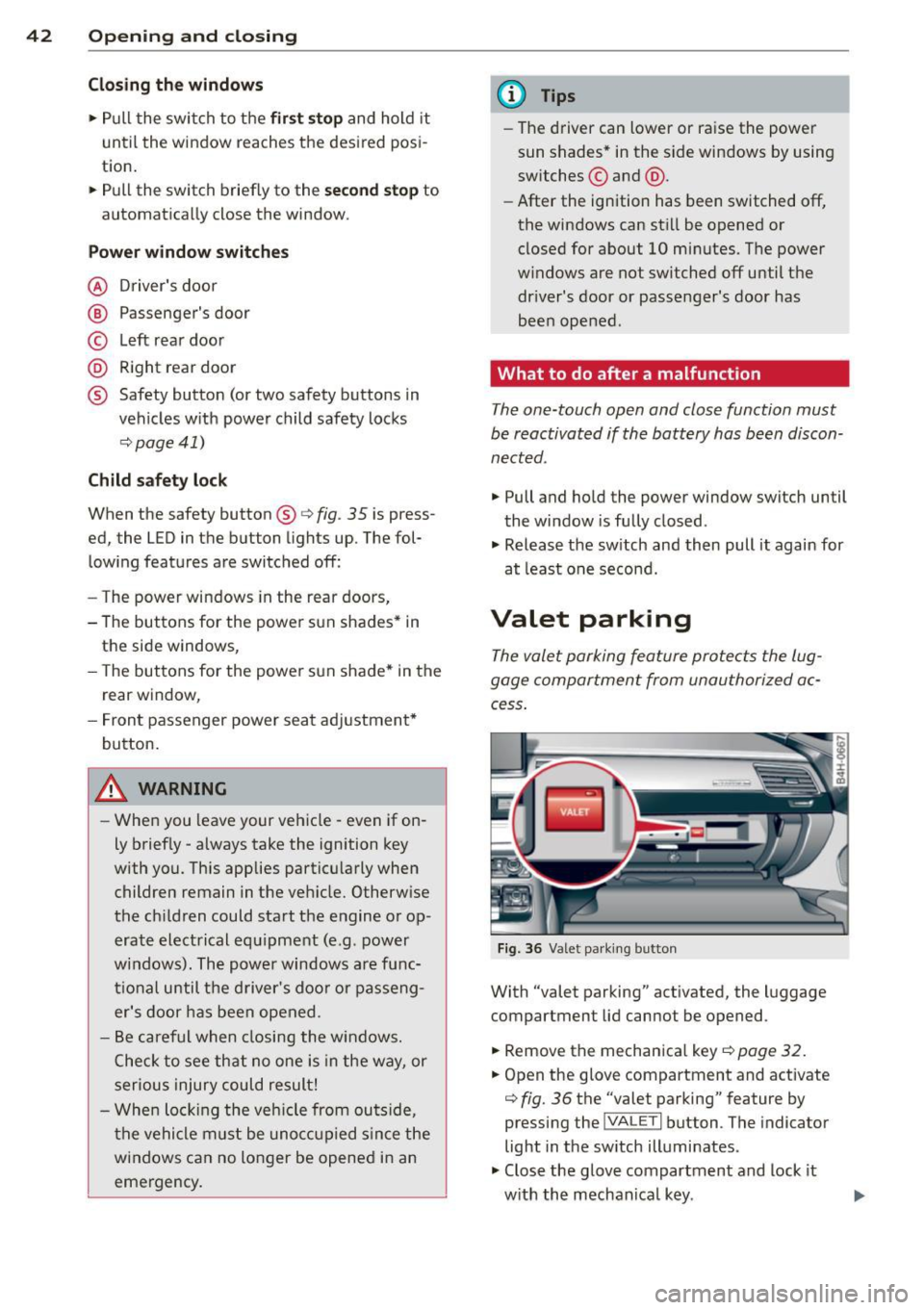
Fig. 35 Section of the driver's door: Controls
All power window switches are provided with
a two-position function :
Opening the windows
• Press the switch to the first stop and ho ld it
until the window reaches the desired posi
tion.
• Press the switch briefly to the
second stop
to automatically open the window. Ill-
Page 44 of 312
42 Opening and closing
Closing the windows
.,. Pull the switch to the first stop and hold it
until the window reaches the desired posi
tion .
.,. Pull the switch briefly to the
second stop to
automatically close the window.
Power window switches
@ Driver's door
@ Passenger's door
© Left rear door
@ Right rear door
® Safety button (or two safety buttons in
vehicles w ith power child safety locks
r::!) page 41)
Child safety lock
When the safety button®¢ fig. 35 is press
ed, the LED in the button lights up. The fol
lowing features are switched off:
- The power windows in the rear doors,
- The buttons for the power sun shades * in
the side windows,
- The buttons for the power sun shade* in the
rear window,
- Front passenger power seat adjustment*
button.
&_ WARNING
- When you leave your veh icle - even if on
ly brief ly - always take the ignition key
with you. This applies particularly when children remain in the veh icle. Otherwise
the chi ldren could start the engine or op
erate electrical equipment (e.g. power
w indows). The power windows are func
tional until the driver's door or passeng
er's door has been opened .
- Be careful when closing the windows.
C heck to see that no one is in the way, or
serious injury could result!
- When locking the vehicle from outside,
the vehicle must be unoccupied since the
windows can no longer be opened in an
emergency.
(D Tips
- The driver can lower or raise the power
sun shades* in the s ide windows by using
switches © and @.
- After the ignition has been switched
off,
the windows can sti ll be opened or
closed for about 10 minutes. The power
w indows are not switched off until the
dr iver's door or passenger's door has
been opened .
What to do after a malfunction
The one-touch open and close function must
be reactivated if the battery has been discon
nected .
.,. Pull and hold the power window switch until
the window is fully closed .
.,. Release the sw itch and then pull it again for
at least one second.
Valet parking
The valet parking feature protects the lug
gage compartment from unauthorized ac
cess .
Fig. 36 Valet parking button
With "valet parking" activated , the luggage
compartment lid cannot be opened .
.,. Remove the mechanica l key
¢ page 32.
.,. Open the glove compartment and activate
¢ fig. 36 the "valet parking" feature by
pressing the
j VA LETi button . The indicator
light in the sw itch illuminates .
.,. Close the glove compartment and lock it
w ith the mechanical key . .,.