lock AUDI A8 2015 Owner's Guide
[x] Cancel search | Manufacturer: AUDI, Model Year: 2015, Model line: A8, Model: AUDI A8 2015Pages: 312, PDF Size: 79.18 MB
Page 77 of 312

Front cupholder
• To open the cupholder, tap the cover
¢ fig. 80, ¢ _&.
Rear cupholder
• To open the cupholder, tap the front strip
¢fig. 81, ¢ _&.
In vehicles with a full-length center console in
the rear, the cupholder is located at@
¢ page 68, fig . 68.
_& WARNING
Spilled hot liquid can cause an accident
and personal injur y.
- Never carry any beverage containe rs with
hot liquids, such as hot coffee or hot tea,
in the vehicle while it is moving . In case
of an accident, sudden braking or other
vehicle movement, hot liqu id could spill,
caus ing scald ing burns . Spill ed hot liquid
can also cause an accident and personal
injury.
- Use only soft cups in the cupholder. Hard
cups and glasses can cause injury in an
acc ident.
(D Note
On ly drink containers with lids should be
carried in the cupho lder. Liquid could spill
out and damage your veh icle's electronic
equ ipment or sta in the upholstery, etc.
Cooled glove compartment
The cooled glove compartment only functions
when the A/C system is switched on.
Fig. 82 Glove compa rtment: switc hing cooling mode
on/off
Seats and storage 75
• Turn the knob @counterclockwise to switch
cooling on. The symbols on the knob indi
cate the correct pos ition
<=> fig. 82.
• Turn the knob@clockwise to switch cooling
off.
The glove compartment cooling mode only
functions when the vehicle A/C system is
switc hed on. If the heating is switched on,
switc hing the glove compartment cooling
mode off is recommended .
_& WARNING
Always leave the lid on the glove compart
ment cover closed while dr iving to reduce
the risk of injury.
© Tips
The glove compartment can be locked us
in g the mechanical key
¢page 32.
Additional storage
There are a var iety of storage compartmen ts
and fasteners in various places in the veh icle.
- Storage compartments in the doo rs
- Net in the front passenger footwell
- Eyeglasses compartment in the headliner
(near the rearview mirror)
- Storage compartments under the center
armrests
- Compartments* on the back of the front
seat backrests
- Garment hooks over the rear doors
- Compartment in the center console with
pass-through)* (rear)
- Compartment behind the rear center arm
rest (in vehicles without the pass-through*
or cooler *)
- Cell phone holder* in the right rear door
- Bag hoo ks in the luggage compartment
_& WARNING
-=
-When driving, do not leave any hard ob-
jects on the rear w indow shelf or allow
your pet to sit on the she lf . They cou ld
Page 78 of 312
76 Seats and storage
become a hazard for vehicle occupants in
the event of sudden braking or a crash.
- Always remove objects from the instru
ment panel. Any items not stored could
slide around inside the vehicle while driv
ing or when accelerating or when apply
ing the brakes or when driving around a
corner.
- When you are driving make sure that
anything you may have placed in the cen
ter console or other storage locations cannot fall out into the footwells. In case
of sudden braking you would not be able
to brake or accelerate.
- Any articles of clothing that you have
hung up must not interfere with the driv
er's view. The coat hooks are designed
only for lightweight clothing. Never hang
any clothing with hard, pointed or heavy
objects in the pockets on the coat hooks.
During sudden braking or in an accident -
especially if the airbag is deployed -
these objects could injure any passen gers inside the vehicle .
- To reduce the risk of personal injury in an
accident or sudden stop, always keep the
glove compartment closed while driving .
- Read and follow all WARNINGS
¢ page 170, Important safety instruc
tions on the side airbag system.
- Hang clothes in such a way that they do
not impair the driver's vision.
- The coat hooks must only be used for lightweight clothing . Do not leave any
heavy or sharp edged objects in the pock
ets which may interfere with the side cur
tain airbag deployment and can cause
personal injury in a crash.
- Do not use coat hangers for hanging
clothing on the coat hooks as this can in
terfere with proper deployment of the
side curtain airbags in an accident.
- Do not hang heavy objects on the coat
hooks, as they could cause personal in
jury in a sudden stop.
(D Note
Objects located on the rear shelf that rub
against the rear window could damage the
heating wires for the rear window defog
ger.
@ Tips
- A vent slot is located between the shelf
and the rear window. Do not block the
vent with any items you may place on the
rear window shelf.
- Do not place bulky items on the rear win
dow shelf as they could restrict or block
the driver's vision in the rear view mirror.
Cooler
Introduction
Applies to vehicles: wi th coo ler
Please clean the cooler before using it for the
first time ¢
table on page 216.
You can only switch on the cooler if
- the temperature in the luggage compart
ment is below 131 °F (55 °C). The cooler
switches off automatically if the tempera
ture in the luggage compartment exceeds
131 °F (55 °C). Once the temperature falls
below 131 °F (55 °C) again, the cooler
switches on again automatically.
- the battery is adequately charged. The cool
er switches off automatically if the vehicle
battery voltage falls below a minimum lev
el. This prevents the battery from discharg ing. The cooler switches back on again auto
matically when the battery voltage increases
again (e .g. after starting the engine).
The cooler cools to 42.8 °F
(+ 6 °C) and the
freezer cools to 21.2 °F (-6 °C) in optimum
cooling conditions. The cooling performance
is affected by the temperature in the luggage
compartment . The temperature inside the
cooler will be higher if the luggage compart-
ment is hot. .,.
Page 81 of 312

.... N .... N
0 J:
"". .... I.O
"' ....
"' ....
Warm and cold 79
Operation
We recommend pressing the
I AUTO I button and setting the temperature to 72 °F (22 °C) .
Fig. 84 Cockpit controls
Fig. 85 fou r zone auto matic cli mate control: rear con
trols
Press the buttons to turn the functions on or
off . Use the dials to adj ust the temperature,
the blower speed and the a ir distribution. The
LED in a button w ill light up when the func
tion is sw itched on. The settings are shown in
the climate control display and are a lso shown
in the MMI display for a few seconds. The driv
e r and front passenger sett ings can be adj ust
in g separately.
You can also adjust the rear left and right
sides in the four zone automat ic climate con
trol*
~ fig . 85 .
IOFF I Switching the climate control
system on/off
The IOFFI button switches the climate control
system on or off .
It also switches on when you
turn the dial or press any button . Airflow from outside is
blocked when the climate control
system is switched off.
You can acti vate the residual heat functi on
whe n the ignition is off by pressing and hold
ing the ~ button . The residual heat from the
coolant is used to heat the vehicle i nterior.
The residua l heat function switches off auto
matically after about 30 minutes.
IAIC ! Switching cooling mode on/off
The air is not coo led and hum idity is not re
moved when cooling mode is switched off.
This can cause fog on the windows. Cooling
mode switches off automatically when the
outside temperature is be low zero.
1- 1 Switching recirculation mode on/off
In recircu lation mode, the air inside the vehi
cle is circulated and filtered. This prevents the
unfiltered air outside the vehicle from enter
ing the vehicle interior. We recommend
switching recirculation mode on when driving
through a tunnel or when sitting in traffic
¢ ,&. .
The
! AUTO I button or~ button switches reci r
cu lation mode off .
IAUTO! Switching automatic mode on
Automatic mode maintains a cons tant tem
perature inside the vehicle. Air temperature,
~
Page 84 of 312

82 On the road
On the road
Steering
Adjusting steering wheel position
The steering wheel position can be adjusted
for height and reach .
Fig. 87 Switch for steering whee l adjustment
F irst, adjust the driver's seat correctly.
• To adjust the height, press the sw itch up/
down. The stee ring column will continue
moving as long as you a re pressing the
switch.
• To move the steering wheel forward or back,
press the switch forwa rd/back. The steering
column will continue moving as long as you
are pressing the switch.
There must be at least 10 inches (25 cm) be
tween your chest and the center of the steer ing wheel. If you cannot sit more than 10 in
ches (25 cm) from the steering wheel, see if
adaptive equipment is available to help you
reac h the pedals and increase the distance
from the steering wheel.
For detai led informat ion on how to adjust the
driver's seat, see
Qpage 59.
In vehicles with the memory function*, the
steering column settings are stored together
with the seat position.
A WARNING
Improper use of steering wheel adjust
ment and improper seating position can
cause serious personal injury . -
Adjust the steering wheel col umn only
when the vehicle is not mov ing to pre
vent loss of vehicle control.
- Adj ust the driver's seat or steering whee l
so that there is a minimum of 10 inches
(25 cm) between your chest and the
steer ing wheel
Q page 134, fig . 153 . If
you cannot mainta in th is m inimum dis
tance, the airbag system cannot p rotect
you properly.
- If physical limitations prevent you from sitt ing 10 inches (25 cm) or more from
the steering wheel, check wit h your au
thorized A udi dealer to see if adaptive
equipment is available .
- I f the steering wheel is al igned with your
face, the supplementa l driver's airbag
cannot provide as much protection in an
accident. Always make sure that the
steering whee l is aligned with your
chest.
- Always hold the steering wheel w ith your
hands at the 9 o'clock and 3 o'clock posi
tions to reduce the risk of persona l injury
if the dr iver's airbag dep loys.
- Never hold the steering wheel at the 12
o'clock position or with your hands inside
the steeri ng wheel rim or on t he steering
wheel hub. Holding the steer ing wheel
the wrong way can cause serious injuries
to the hands, arms and head if the driv
er's airbag deploys.
Easy entry feature
The easy entry feature makes it easier to en
ter and exit the vehicle by automatically ad
justing the steering wheel.
• Select in the MMI: ICAR lfunction button>
Car sy st e m s control button > Vehi cle set·
tin gs > Se ats > Dri ver 's s eat > Ea sy entr y>
On .
When the easy entry feature is turned on, the
steering wheel moves up to the park position
whe n you switch off the igni tion. Afte r you en-
ter the ve hicl e, the steering wheel moves to .,..
Page 85 of 312
the stored position as soon as you switch on
the ignition.
Starting and stopping
the engine
Starting the engine
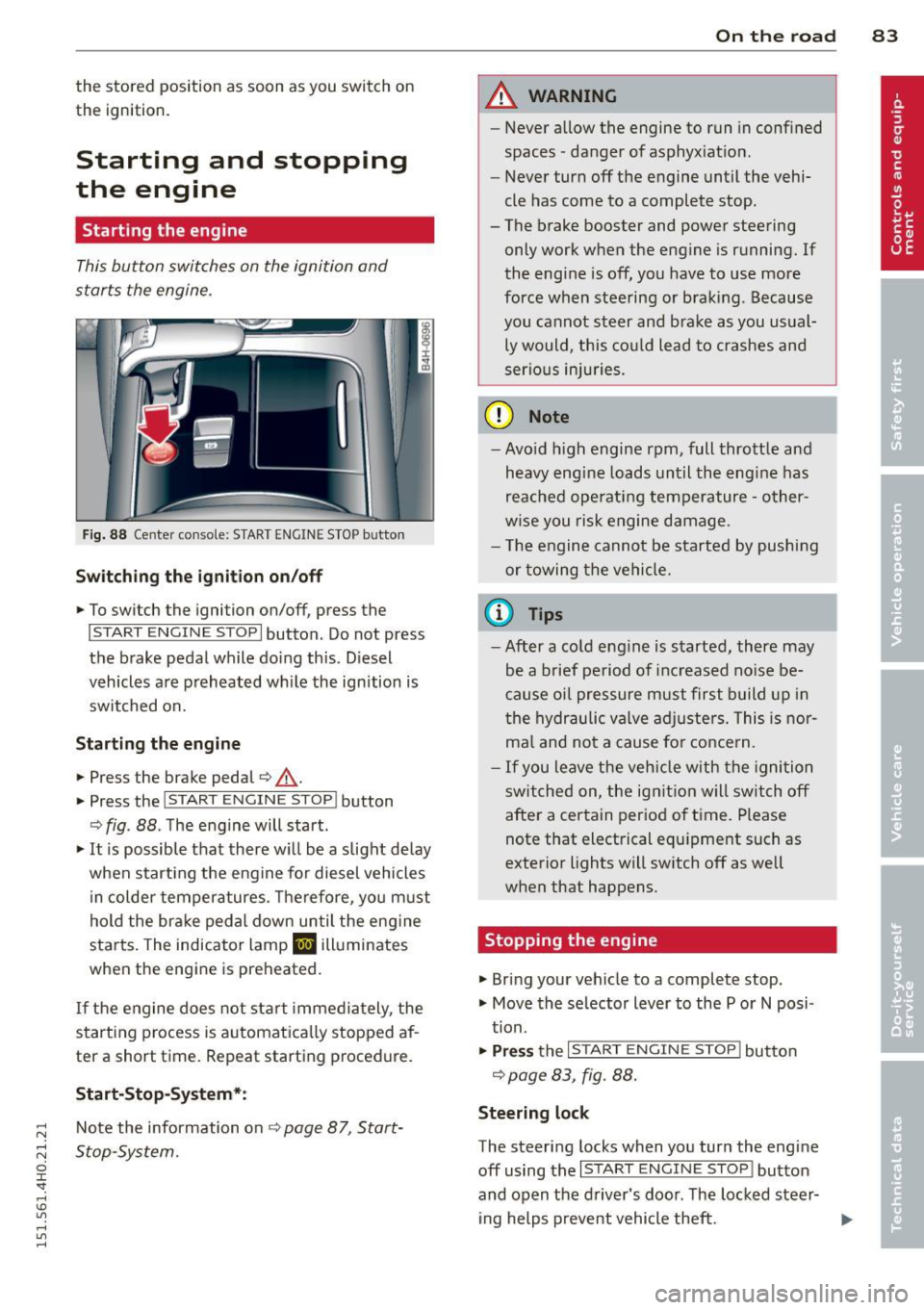
This button switches on the ignition and
starts the engine .
Fig. 88 Cente r console: S TART ENGINE S TOP b utto n
Swi tc hin g the i gni tion on/off
• To switch the ignition on/off, press the
I START ENGINE STOPI button . Do not press
the brake pedal while doing this . D iesel
vehicles are preheated wh ile the ignition is
switched on.
St art in g the engine
• Press the brake pedal~,&. .
• Press the
!START E NGINE STOPI button
~ fig . 88 . The engine will start.
• It is possible that there w ill be a slight delay
when start ing the engine for diesel vehicles
in colder temperatures. Therefore, you must
hold the brake peda l down until the eng ine
starts. The indicator lamp
II illuminates
when the engine is preheated.
If the engine does not start immediately , the
starting process is automatica lly stopped af
ter a short time . Repeat starting procedure.
Start -Stop -System *:
Note the information on ¢ page 87, Start
Stop-System.
On th e road 83
A WARNING
- Never allow the engine to run in confined
spaces -danger of asphyxiat ion.
- Never turn off the engine until the vehi
cle has come to a complete stop.
- The brake booster and power steering
only work when the engine is running. If
the engine is off, you have to use more
force when steering or braking . Because
you cannot steer and brake as you usual ly would, this could lead to crashes and
serious injuries.
(D Note
- Avo id h igh engine rpm, full throttle and
heavy engine loads until the eng ine has
reached operating temperature -other
w ise you risk engine damage .
- T he engine cannot be started by pushing
or towing the vehicle.
(0 Tips
- After a co ld eng ine is started, there may
be a brief period of inc reased no ise be
cause oil pressure must first build up i n
the hydraulic valve adjusters. This is nor
ma l and not a cause for conce rn.
- If you leave the veh icle with the ignition
switched on , the ign ition w ill switch off
after a certain period of time . Please
note that electrical equ ipment such as
exterior lights will sw itch off as well
when that happens.
Stopping the engine
• Bring your vehicle to a complete stop.
• Move the selector lever to the P or
N posi
tion.
• Pr ess the I START ENGINE STO P I button
¢ page 83 , fig. 88.
Steerin g lock
The steering locks when you turn the engine
off using the
I START ENGINE STOP I button
and open the d river's door. The locked steer-
ing helps prevent vehicle theft.
11-
Page 86 of 312

84 On th e road
Emerg ency off
If necessary, the engine can be sw itched off
with the selector lever in the R, Dor S posi
tions . The engine stops if you press the
I START ENGINE STOP ! button at speeds below
6 mph (10 km/h).
A WARNING
- Never turn off the eng ine before the ve
hicle has come to a complete stop . The
full function of the brake booster and the
power steering is not quaranteed. You
must use more force to turn or brake if
necessary. Because you cannot steer and
brake as you usual ly would, this could
lead to crashes and serious injur ies.
- For safety reasons, you should always
park your vehicle with the se lector lever
in P. Otherwise, the vehicle co uld inad
vertent ly roll away .
- After the engine has been switched off, the radiator fan can continue to run for
up to 10 min utes - even with the ign it ion
switched off. It can a lso switch on aga in
after some time if the coolant tempera
ture rises as the result of a heat buildup or if the engine is hot and the engine
compartment is addit ionally heated by
the sun's rays.
(D Note
Do not stop the engine immed iate ly afte r
ha rd or extended dr iving. Keep the engine
r u nning for approx imately two m inutes to
prevent excessive heat build-up.
Driver message in the instrument
cluster display
T urn off ignition before le aving car
This message appears and a war ning tone
sounds if you open the driver's door when the
ignitio n is switched on.
Pr ess brake p edal t o start engin e
This message appears if you press the
I STAR T ENGINE S TOP ! button to start the en- gine and do not depress the brake pedal.
The
engine can only be started if the brake pedal
is depressed.
Ill I s key in th e vehi cle?
If the indicato r light turns on and the mes
sage appears, the remote control key was re
moved from the vehicle whi le the engine was
runn ing .
If the igni tion key is not in the veh i
cle you will not be able to switch on the igni
tion or restart the engine after it has been switched off. You will a lso not be able to lock
the vehicle from the outs ide.
Shift to P, othe rwi se vehicle can roll away.
Door s do not lock if lever i s not in P.
T h is dr iver message appears for safety rea
sons if the transmission has not been shifted
to the P position when you switch the ignition
off. Move the selector lever to the P position.
Otherwise the vehicle is not protected from
ro lling and cannot be locked.
II Key i s not recognized . Hold b ack of key
again st m arked are a. See ow ner' s m anual.
If the indicator l ight turns on and this mes
sage appe ars, there is a ma lfunct ion
¢ page 85.
Tu rn off i gnition before leaving car. Ba ttery
i s di sc harging
Th is message appears if the driver's door is
opened wh ile the ignition is switched on. Al
ways switch off the ign it ion if you a re leav ing
the vehi cle. See also
¢page 89 .
Shift to P and turn off ignition before l eav
ing car, otherwi se vehicle c an roll away
This message appears if the driver's door is
opened wh ile the ignition is switched on and
the selecto r lever is not in the P position. Shift
the selector lever into the P pos ition and
switch off the ignit ion when you exit the vehi
cl e. Otherw ise the vehicle cou ld rol l. See also
¢page 89.
Page 88 of 312

86 On the road
driving force has been built up at the
wheels.
E mergency brake function
An emergency brake ensures t hat the vehicle
can be slowed down even if the
normal brakes
fail
c::> page 87, Emergency braking .
&_ WARNING
Do not press the accelerator peda l inadver
tently if the vehicle is stationary but the
engine is running and a gear is selected.
Otherw ise the vehicle will start to move
immediately and could result in a crash.
- If the parking brake is applied with the
ignition switched off, the indicator lights
in the sw itch and . (USA models) .
(Canada models) in the instrument clus
ter will go out after a certain per iod of
time.
- Occas iona l noises when the park ing
brake is applied and released are normal
and are not a cause for concern.
- When the vehicle is parked, the parking brake goes through a self-test cycle at
regular intervals. Any assoc iated noises
are no rma l.
Parking
.. Press the bra ke peda l to stop the vehicle .
.. Pull the switch© to set the parking brake .
.. Se lect the P selector lever position
c::> page 114.
.. Turn the eng ine off c::> ,& .
.. When on incl ines or declines, turn the steer
ing wheel so that your vehicle will roll into
the curb if it begins to move.
&_ WARNING
- When you leave your veh icle - even if on
ly b riefly - always take the ignition key
with you. This applies par tic u larly when
children remain in the veh icle . Otherw ise
the chi ldren could start the engine, re-
'
lease the parking brake or operate elec
tr ica l equipment (e.g. power windows).
There is the r isk of an accident.
- When the veh icle is locked, no one - par
ticularly not children should rema in in
the vehicle. Locked doors make it more difficult for emergency workers to get in
to the vehicle - putting lives at risk.
Starting from rest
The starting assist function ensures that the
parking brake is released automatically upon
starting.
Stopping and applying par king brake
.. Pull the sw itch<®> to apply the parking
brake.
Sta rting and automaticall y rel easing the
park ing bra ke
.. When you start to drive as usual, the park
ing brake is automat ically released and your
veh icle beg ins to move.
When stopping at a traffic signal or stopping in city traffic, the parking brake can be ap
plied . The vehicle does not have to be held
with the footbrake. The parking brake elimi nates the tendency to creep w ith a dr ive range
engaged . As soon as you drive off as usual,
t h e pa rking brake is re leased automatically
and the vehicle s tarts to move .
Sta rting on slopes
When starting on inclines, the starting assist
prevents the vehicle from u nintent ionally roll
i ng back. The braking force of the parki ng
brake is not re leased unti l suffic ient d riving
force has been built up at the w heels.
(D Tips
Fo r safety reasons, the pa rking brake is re
l eased automatically on ly when the d riv
er's safety belt is engaged in the buckle.
Page 89 of 312

,....,
N ,....,
N
0 J:
'SI: ,...., \!) 1.1'1 ,...., 1.1'1 ,....,
Starting off with a trailer
To prevent rolling back unintentionally on an
incline, do the following:
11-Keep the switch© pulled and depress the
accelerator. The parking brake stays applied
and prevents the vehicle from rolling back
ward .
11-You can release the switch<®> once you are
su re that you a re develop ing enough for
ward momentum at the wheels as you de
press the accelerator.
D epending on the weight of the r ig (vehicle
and tra ile r) and the severi ty of the incl ine, you
may roll backwards as you start. Yo u can pre
vent rolling backwards by holding the parking brake switch<®) p ulled out and acce lerating -
just as you would when starting on a hill with
a conventional hand brake.
Emergency braking
In the event that the conventional brake sys
tem fails or locks.
11-In an emergency, pull the switch(®) and
contin ue to p ull it to slow your vehicle down
with the parking brake.
11-As soon as you release the switch (®) or ac-
ce lerate, the braking process stops.
If you pull the switch<®> and hold it above a
speed of about 5 mph (8 km/h), the emergen
cy braking function is initiated. The vehicle is
braked at all four wheels by activating the hy
draulic brake system. Th e brake performance
i s similar to making an emergency stop
~ &..
In order not to activate the emergency brak
ing by m istake, an audible warning tone (buz
ze r) sou nds when the switch C®> is pulled. As
soon as the switch(®) is released, or the accel
e rator pedal is dep ressed, emergency b ra ki ng
stops.
_& WARNING
Emergency braking should only be used i n
an emergency, when the normal foot brake
has failed or the brake pedal is obstructed .
On the ro ad 87
Using the parking b rake to pe rform emer
gency brak ing will slow your vehicle down
as if you had made a full brake application.
The laws of physics cannot be suspended
even with ESC and i ts associated compo
nents (ABS, ASR, EDL). In corners and
when road o r weathe r cond itions are bad,
a full brake appl ication can ca use the vehi
cle to sk id or the re ar end to break away -
risking an acciden t.
Start-Stop-System
' Description
Applies to vehicles: wit h Start -Stop-System
The Start-Stop-System can help increase fuel
economy and reduce CO2 emissions .
In the Start-Stop-mode, the engine shuts off
automat ica lly w hen the vehicle is stopped,
such as at a traffic light. The ignition remains
switched on du ring this stop phase. The en
gine wi ll be automat ica lly restarted when
needed.
The last Start-Stop-System sett ing (on/off us
ing the button
I O\l ~I) will be restored when the
i gnition is turned on. The L ED in the
1(7() .. 1 but
ton turns on when the Star t-Stop-System is
swi tched off man ually.
Basic requirements for the Start -Stop
mode
- The d rive r's doo r is closed.
- The d river ' seat belt is latched .
- The hood is closed .
- The vehicle must have been driven faster
than
2.5 mph (4 km/h) since the last stop.
- A trailer is not hitched to the vehicle.
_& WARNING
-Never let the vehicle roll with the eng ine
sw itched off. You cou ld lose control over
the vehicle. Th is can lead to a collision
and serio us in ju ries.
- The brake booster and the steering sup port do not work while the engine is
Page 91 of 312

The@j indicator light appears in the informa
tion line in the instrument cluster display
<:!)fig. 92 .
Engine automatically restarts
The stop phase is interrupted in the following
situations, for examp le. The engi ne restarts
without any action by the driver.
- Th e interior temperature varies from the
temperatu re selected in the A/C system.
- The windshield is being defrosted
r::!) page 81 .
-The brake pedal is pressed several times in a
row.
- The battery charge level becomes too low.
- High power consumption .
Switching the ignition off automatically
To prevent the battery from draining, the igni
tion will switch off
automatically when all of
the following conditions have been met:
- The vehicle has al ready been driven.
- The eng ine has been turned off by the Start-
Stop-System*.
- The driver's door is opened.
- The driver's seat belt is removed .
- The brake pedal is not pressed down.
- The vehicle is stationary .
In this case, the activated low beam will be re
placed by the side marker lights. The side
marker lights will switch off after approxi
mately 30 minutes or when you lock the vehi
cle .
If the Start-Stop System has
not turned off
the engine or if you have switched the Start
Stop system off manually, the ignition w ill
not
be automatically switched off and the engine
will cont inue to run
r::!) .&. .
A WARNING
Never allow the engine to run in confined
spaces - danger of asphyxiation.
(D Tips
If you shift into the D, N or S positions af
ter shift ing into reverse, the veh icle must
On the road 89
be driven faster than 6 mph (10 km/h) in
order for the engine to switch off again.
Switching the Start-Stop-System on/off
manually
App lies to vehicles: wit h Start -Stop -System
If you do not wish to use the system, you can
switch it off manually.
Fig. 93 Center console: Start -Stop -System button
.,. To switch the Sta rt-Stop-System off/on
manually, p ress the
ICA.> ••I button. The L ED in
the button turns on when the system is
sw itched off.
(D Tips
If you switch the system off during a stop
phase, the engine will start again auto
ma tically .
Messages in the instrument cluster
display
Applies to vehicles: wit h Start-Stop-Syste m
Start-Stop system deactivated: Please re
start engine manually
This message appears when specific condi
tions are not met during a stop phase and the
Start-Stop-System will
not be able to restart
the engine. If the Dor R selector lever posi
tions were engaged, P will be selected auto
matically . The engine must be started with
the
I START ENGINE ST OP ! button.
Start-Stop system: System fault! Function
unavailable
There is a malfunction in the Start-Stop-Sys
tem. Drive the vehicle to an authorized repair .,.
Page 116 of 312

114 Automatic Transmission
Automatic
Transmission
tiptronic (8-speed
transmission)
Introduction
Your vehicle is equipped with an electronically controlled 8-speed automatic transmission .
Upshifting and downshifting occurs automati
cally and is controlled electronically. The driv
ing style continuously influences the selection
of the driving program .
When a
moderate driving style is used, the
transmission selects the most economical
driving mode. It will then change up early and
delay the downsh ifts to give better fuel econ
omy .
The transmission switches to a sporty mode
after a kick-down or when the driver uses a
sporty driving style characterized by quick ac
celerator pedal movements, heavy accelera
tion, frequent changes in speed and traveling at the maximum speed.
If desired, the driver can also select the gears
manually (ti ptronic mode) ¢ page 117 .
Indicator in the display
Fig. 123 Display: selector lever posit io n
@ -The current selector lever position is dis
played continuously. The gear is also dis
played in manual mode M.
@ -This indicator appears temporarily if you
change the selector lever position or if you
press the button on the selector lever ¢
page 114, fig. 124
. The current selector
lever position is shown with a white back
ground.
Selecting a selector lever position
Fig. 124 Selector lever
---p--- ---1
--- R--- --1
--- N--- --t
-D/S--
Fig. 125 Pressing the button o n the selector leve r
The current selector lever position is displayed
on the selector lever¢
fig. 124.
.. You may need to release the se lector lever
lock depending on which selector lever posi
tion is selected and which one you would
like to select¢
page 115, Selector lever
lock .
.. To engage the nearest selector lever posi
tion, move the selector lever forward/back
until you fee l the first pressure point. The
selector lever will return to its original posi
tion .
.. To skip over one (or two) selector lever posi
tions, move the selector lever past the first
(and second) pressure point into the desired
position. The selector lever will return to its
original position.
For example, to move directly from the D se
lector lever position to P when stopping the
vehicle, you can shift past the N and R selector lever positions. ..,_