warning light AUDI A8 2015 Owner's Manual
[x] Cancel search | Manufacturer: AUDI, Model Year: 2015, Model line: A8, Model: AUDI A8 2015Pages: 312, PDF Size: 79.18 MB
Page 31 of 312
Instrument s and warning /indicator lights 29
(D Note
To prevent sc ratches on the g lass covering
the Head-up Disp lay, do not place any ob
jects i n the projection opening.
(D} Tips
- Sunglasses with polarizat ion fi lters and
u nfavo rable lighting condit ions can af
fect the display.
- A specia l windshield is needed for the
Head-up Display funct ion .
- Fo r information on cleaning, refe r to
c:!) table on page 216.
Open door/hood/rear lid warning
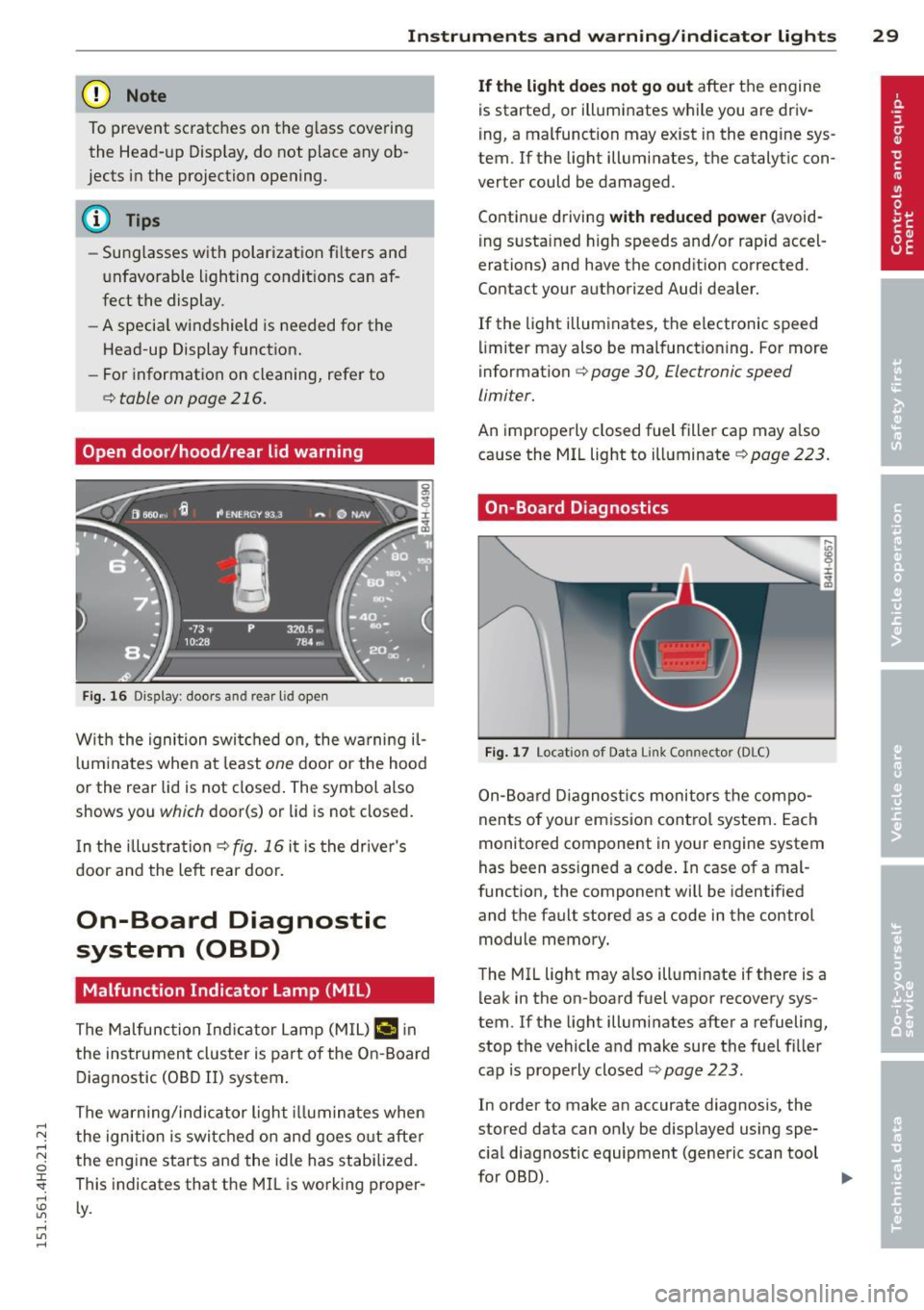
Fig. 16 Dis play: door s and rear lid o pe n
W ith the ignition swi tched on , the w arning il
l um ina tes when at le ast
one d oor or the hood
or the rear lid is not closed . The symbol also
shows you
which door(s) or lid is not closed.
I n the illus trati on
Q fig. 16 it i s the drive r's
door and the left rear door.
On-Board Diagnostic
system (OBD)
Malfunction Indicator Lamp (MIL)
The Malfunction In dica tor Lamp (M IL) ¢..ifl in
the ins trument clus ter is part of the On-B oard
D iagnostic (OB D II) system .
The warning/ind icator l ight illum ina tes when
the ign ition is switc hed o n and goes o ut afte r
the eng ine starts and the idle has stabilized.
This indicates that t he MIL is working proper ·
Ly .
If the light does not go out afte r th e engine
is starte d, or illumi nates while you are driv
i ng , a mal function may e xist in the eng ine sys
tem .
If the light illumi nate s, the catalytic con
verter could be d amaged .
Contin ue d riving
with reduced power (avo id
i ng s usta ined h igh speeds and/or rapid accel
erations) and have the cond ition corrected .
Contact your authori zed Audi dea ler.
If the light illuminates, the electronic speed
li miter may also be malfunct ioning. For more
i nformation
Q page 30, Elec tronic speed
limiter.
An imprope rly closed fuel fille r cap may a lso
ca use the MIL light to ill uminate
~ page 223.
On-Board Diagnostics
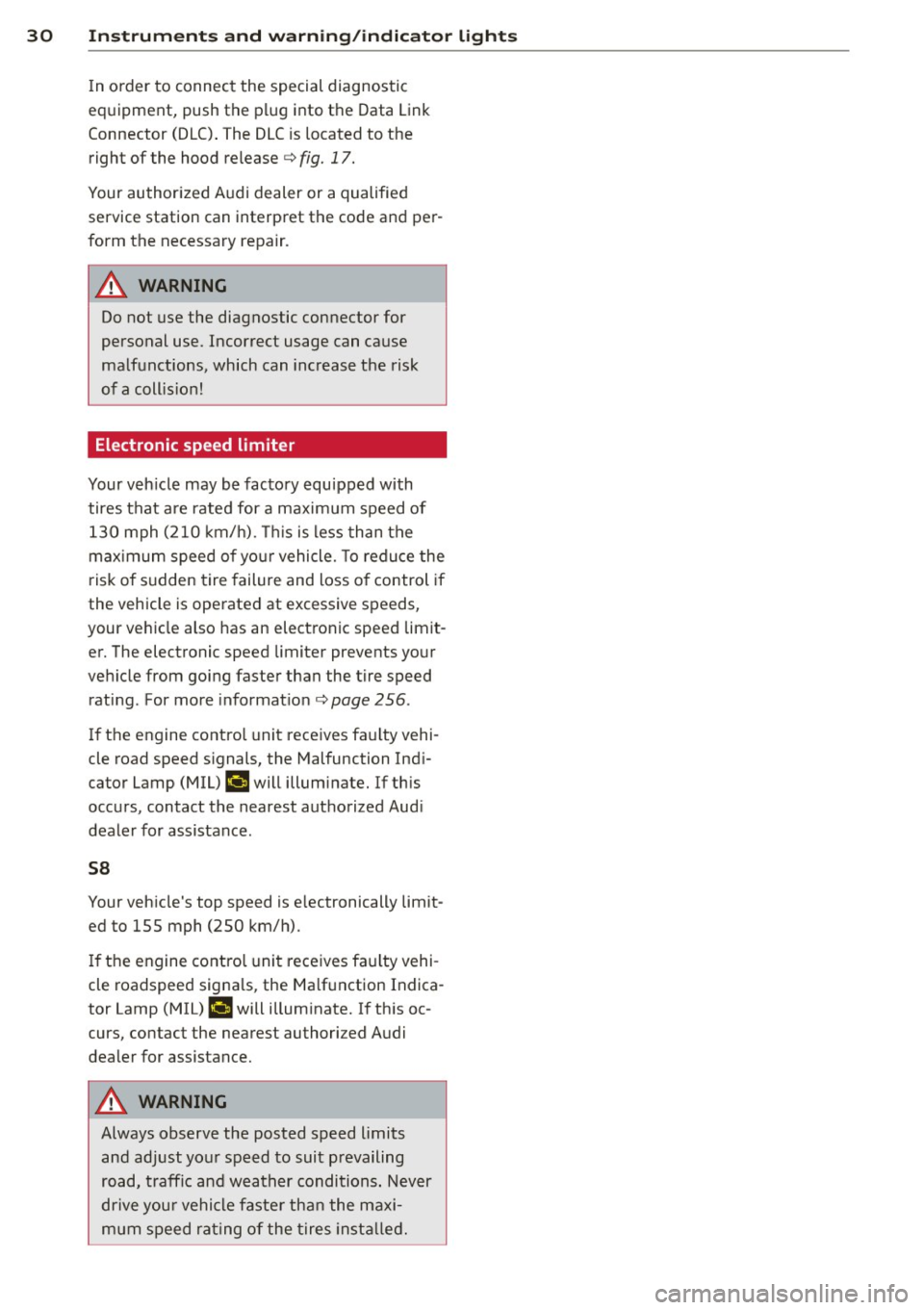
Fig. 17 Locat io n of Data Link Co nn ector (D LC)
On- Boa rd Diagnost ics monitors the compo
nents of your emiss ion cont ro l s ystem. Each
monitored component in your eng ine system
has been ass igned a code . In case of a mal
funct ion, the component will be identified
and the fault stored as a code in the control
module memory.
T he MIL light may also illuminate if there is a
leak in the on -board fuel vapor recovery sys
tem. If the lig ht illuminates after a refueling,
stop the vehicle a nd make sure the fuel fi ller
cap is prope rly closed
c:!) page 223.
In order to make an accurate diagnosis, the
stored data can on ly be displayed using spe
c ia l diagnostic equipment (generic scan tool
furOBru.
~
Page 32 of 312
30 Instruments and warning /indicator lights
In order to connect the special diagnostic
equipment, push the plug into the Data Link
Connector (DLC) . The DLC is located to the
right of the hood release<=>
fig. 17.
Your authorized Audi dealer or a qualified
service station can interpret the code and per
form the necessary repa ir .
.&_ WARNING
Do not use the diagnostic connector for
personal use. Incorrect usage can cause
malfunctions, which can increase the risk
of a coll is ion!
Electronic speed limiter -
Your veh
icle may be factory equipped with
tires that are rated for a maximum speed of
130 mph (210 km/h). Thi s is less than the
maximum speed of your vehicle. To reduce the
risk of sudden tire failure and loss of control if
the vehicle is operated at excessive speeds,
your vehicle also has an electronic speed limit
er. The electronic speed limiter prevents your
vehicle from going faster than the tire speed
rating. For more information
c> page 256.
If the engine control unit receives faulty vehi
cle road speed signals, the Malfunction Indi
cator Lamp (MIU
¢'4 will illuminate. If this
occurs, contact the nearest authorized Aud i
dealer for assistance .
S8
Your vehicle's top speed is e lectronically limit
ed to 155 mph (250 km/h).
If the engine control unit receives faulty vehi
cle roadspeed signals, the Malfunction Indica
tor Lamp (MIU
¢'4 will illuminate. If this oc
curs, contact the nearest authori zed Audi
dealer for assistance .
.&_ WARNING
-
Always observe the posted speed limits
and adjust your speed to suit prevailing
road, traffic and weather conditions. Never
dr ive you r vehicle faster than the maxi
mum speed rating of the tires installed.
Page 33 of 312
.... N .... N
0 J:
"". .... I.O
"' ....
"' ....
Opening and closing Keys
Key set
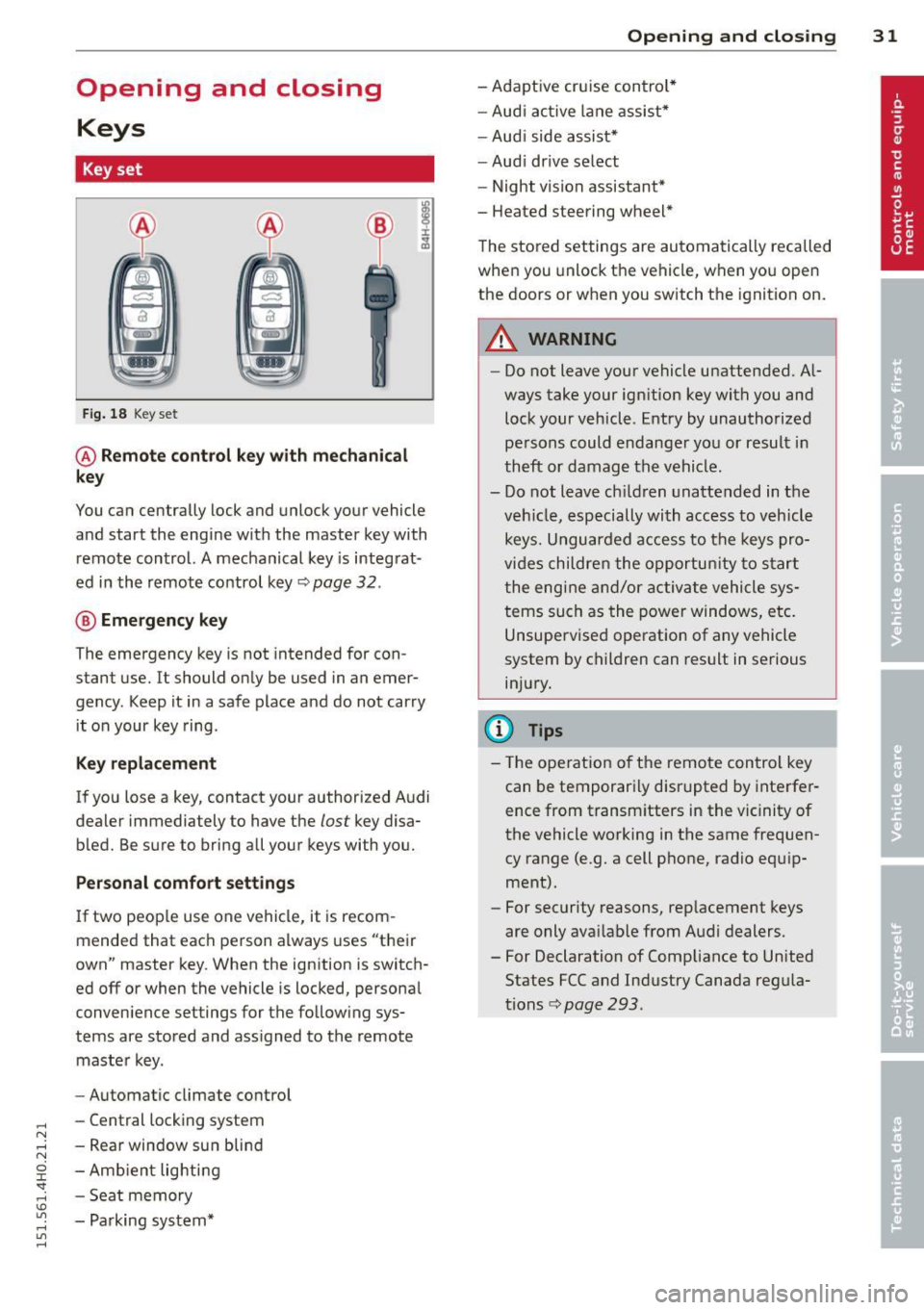
Fig. 18 Key set
@ Remote control key with mechanical
key
You can centrally lock and unlock your vehicle
and start the engine with the master key with
remote control. A mechanical key is integrat
ed in the remote control key¢
page 32.
® Emergency key
The emergency key is not intended for con
stant use.
It should only be used in an emer
gency. Keep it in a safe place and do not carry
it on your key ring .
Key replacement
If you lose a key, contact your authorized Audi
dealer immed iately to have the
lost key disa
bled. Be sure to bring all your keys with you.
Personal comfort settings
If two peop le use one vehicle, it is recom
mended that each person always uses "their
own" master key. When the ignition is switch
ed
off or when the vehicle is locked, personal
conven ience settings for the following sys
tems are stored and ass igned to the remote
master key.
- Automatic climate control
- Central locking system
- Rear window sun blind
- Amb ient lighting
- Seat memory
- Parking system*
Opening and closing 31
- Adaptive cruise control*
- Audi active lane assist*
-Audi side assist*
-Audi drive select
- Night vision assistant*
- Heated steering wheel*
The stored settings are automatically recalled
when you unlock the vehicle, when you open
the doors or when you switch the ignition on.
A WARNING
---Do not leave your vehicle unattended. Al-
ways take your ignition key with you and
lock your vehicle . Entry by unauthorized
persons could endanger you or result in
theft or damage the vehicle.
- Do not leave ch ildren unattended in the
veh icle, especially with access to vehicle
keys. Unguarded access to the keys pro
vides children the opportun ity to start
the engine and/or activate vehicle sys
tems such as the power windows, etc.
Unsupervised operation of any vehicle
system by children can result in serious
injury.
(!} Tips
- Th e operation of the remote control key
can be temporarily disrupted by interfer
ence from transm itters in the vic inity of
the vehicle working in the same frequen
cy range (e.g. a cell phone, radio equip
ment).
- For security reasons, replacement keys
are only ava ilable from Audi dealers.
- For Declaration of Compliance to United States FCC and Industry Canada regula
tions ¢
page 293.
Page 34 of 312

32 Opening and clo sing
Remov ing the mechanical key
Fig. 19 Remote control master key : removing the me
chanical key
.. Press the release button@r=>.> fig. 19.
• Pull the mecha nica l key @ out of the master
key.
Using the mechan ica l key, you can:
- lock and unlock* the storage compartment
on the passenger's side c::>
page 75.
-lock and unlock the vehicle manually
<=>page 36.
-lock the front and rear passenger doors me
chanically
c::> page 37.
- unlock the luggage compartment lid man
ually
c::> page 40.
Check light and battery in the master
key
Fig. 20 Remote master key: Removing the battery
holder
Check light in the master ke y
The check light@c::> fig. 20 in the master key
prov ides informat ion about d ifferent cond i
tions.
• The check light turns on briefly once when a
button is pressed, and dur ing an "inquiry"
by the convenience key system. •
If the check light does not come on, the bat
tery is dead and has to be replaced. In addi
tion, when the battery is dead the
!I indi
cator light appears in the instrument cluster
display as well as the message
Pl ease
chang e th e ke y b attery .
Ma ster key batter y replacement
• Remove the mechanica l key c::> page 32.
• Press the release button@¢ fig. 20 on the
battery holder and at the same time pull the
battery holder out of the master key in the
direction of the arrow .
.. Install the new battery CR 2032 with the
"+" sign facing down.
.. Push the battery holder carefu lly into the
maste r key.
• Insta ll the mechanical key .
@ For the sake of the environment
Dis p ose of dead batteries prope rly so as
not to poll ute the environment.
{D Tips
The replacement battery mus t be the
same specification as the o rigina l.
Electronic immobilizer
The immobilizer helps to prevent unauthor
ized use of your vehicle .
A computer chip ins ide your key automatically
deact ivates the elect ron ic immobilizer when
the key is ins ide the veh icle. When you remove
the key from the vehicle, the elect ron ic immo
bilizer is au tomatically activa ted once aga in.
& WARNING -
A lways take the key w ith you when you
l eave the vehicle. The key can disarm the
e lectronic engine immobilizer and permit
an una uthorized person to start the engine
and enable operation of the vehicle sys
tems such as power w indow or power sun-
r oof leading to se rious pe rsonal injury.
~
Page 35 of 312

@ Tips
-The vehi cle cannot be started if an unau
thorized key is used. The vehicle may not
start if another radio device such as a key
for anot her vehicle or a transponder is
l ocated on the key ring.
- For Declarat ion of Compliance to United
States FCC and Industry Canada regula
tions ¢
page 293 .
Power locking system
General description
The power l ocking system locks or unlocks all
doors and the luggage compar tment lid si
multaneously.
You ca n lock and un lock the vehicle cent rally.
You have the following choices:
- Remote maste r key
¢ page 35,
-Door handles with convenience key *
<=>page 35,
-Lock cylinder at the dr iver 's door
¢ page 36, or
- Power locking switc h inside ¢
page 36.
Selective unlocking
When you loc k the vehicle, the powe r locking
system wi ll lock the doors and the l uggage
compa rtment lid. When unlocking, you can
set in the MMI whet her only the driver 's door
or the entire vehicle s houl d be unlocked
¢ page 34.
Automatic locking
The automatic loc kin g feat ure locks all t he ve
h icle doors and the luggage compartment lid
when you drive faster than 9 mph (15 km/h) .
The car is un locke d again , when the opening
f u nction in the power locking system sw itch
or at one of the door leve rs is actuated. The
Auto Lock function can be turned on and off in
.... N the MMI ¢ page 34. .... N
0 J:
'SI: .... \!) ..,.,
.... ..,., ....
Opening and clo sin g 33
Anti-theft alarm warning system
If the an ti-t heft ala rm warning sys tem de
tects a b reak -in in to the vehicle , acous tic and
vis ual war ning signals a re triggere d.
T he anti-theft wa rning sys tem is a ctiv ated au
t omat ic all y when you lock t he ve hicl e. It is de
activated when unlocking using the remote key, with the mecha nica l key, an d when yo u
switc h the ignition on.
T he al arm also turns off w hen t he al arm cy cle
has expired .
Turn signals
When you un lock the veh icle, the turn signals
flash twice. When you lock the veh icle once,
the turn sig nals flash once.
If th ey do no t
f lash, one o f th e doors, the luggage com part
ment lid or the hood is no t locked .
Unintentionally locking yourself out
In the fo llow ing cases there safeg ua rds to
preve nt yo u locki ng you r remo te mas ter key in
t h e ve hicl e:
- The vehicle does not lock w ith the cent ral
loc king switch <=>
page 36 if the drive r's
door is open.
- On veh ides with convenience key*, if the
most recently used master key is in the lug
gage com pa rtment, the l uggage compa rt
ment lid is a utomat ic al ly unlocked again af
t er it is closed .
Do not lock your veh icle w ith the
r e mote mas
ter key or convenienc e key * unti l all doors
and t he luggage com partment lid are closed.
In this way you avoid locking yo urse lf o ut acci
dentally .
Power side door closer*
The veh icle doo rs a re equipped w it h a powe r
s ide door closer . W hen clo sing a doo r, you on
l y h ave to le t it fall light ly in to the la tc h . The
doo r will then automatically close by itself
¢ & . ~
Page 38 of 312
36 Opening and clo sing
It is not possible to re-open the door for a
brief period direct ly after closing it. This al
l ows you to ensure that the doors are properly
locked.
I t depends on the se ttings in the MMI wheth
er the entire vehicle is unlocked or one of the
doors ¢
page 34.
A WARNING
Read and follow a ll WARNINGS c:> & in
General description on page 34.
(D Tips -
If you
r vehicle has been stand ing fo r an ex
tended period, please note the fo ll ow ing:
- The proximity sensors are deactivated af-
te r a few days to save powe r. Yo u then
have to pull on the door handle once to
unlock the ve hicle and a second time to
open the veh icle.
- To prevent the battery from draining and to preserve your vehicle's ability to start
fo r as long as possib le, the energy man
age men t sys tem grad ual ly sw itches off
u nn ece ssary conven ience f unct io ns.
It is
p ossi ble tha t you w ill not be able to un
l ock your ve hicl e using these conven
i en ce f unct io ns.
- Fo r De clarat ion of Com pliance to Uni ted
St ates FCC an d Indus try C anada regu la
tions¢
page 293.
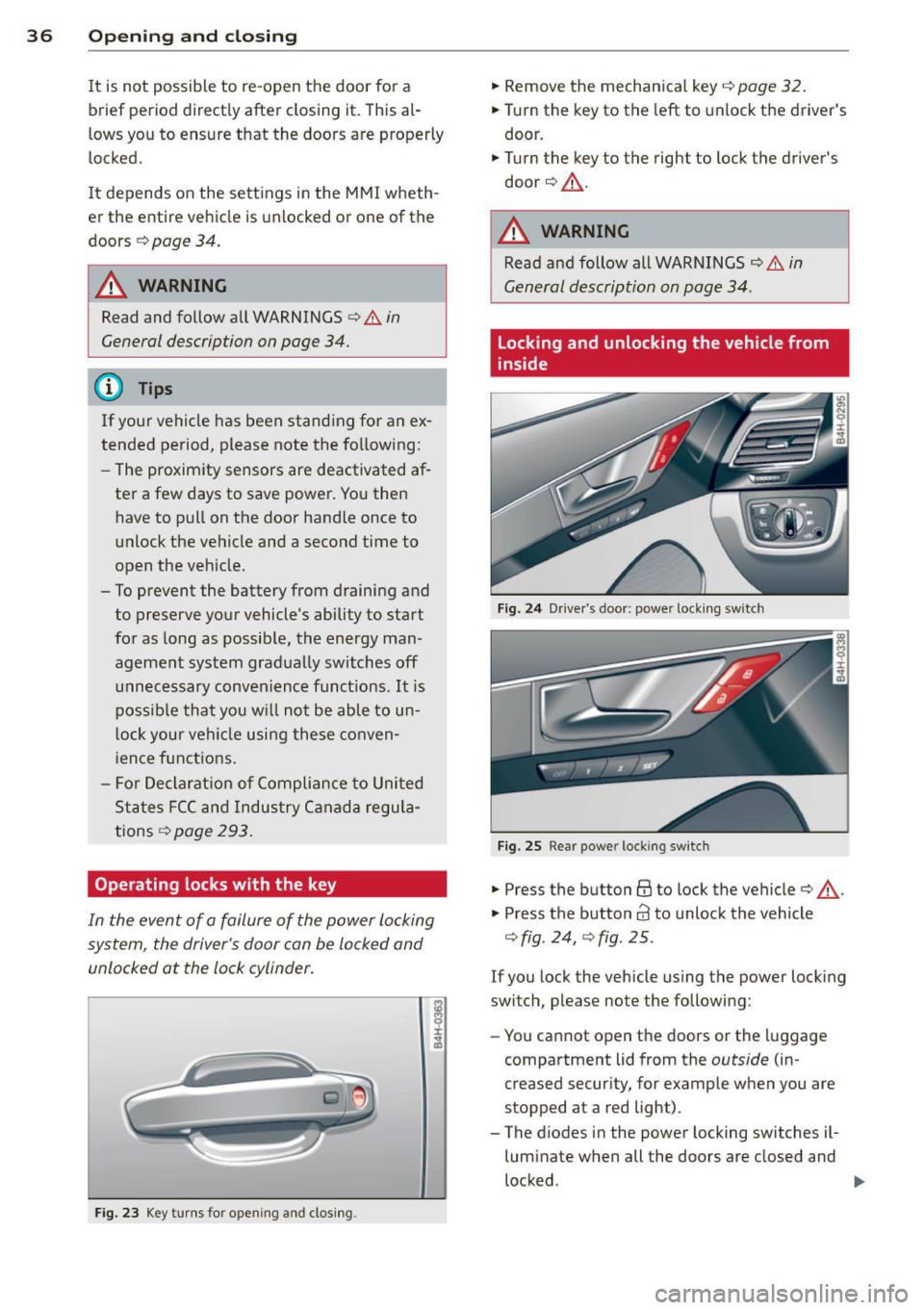
Operating locks with the key
In the event of a failure of the power locking
system, the driver's door con be locked and
unlocked at the lock cylinder.
F ig . 2 3 Key tu rns for ope ning and clos ing .
.,. Remove the mechan ica l key i=;, page 32.
.,. Tur n the key to the left to unlock the driver's
door .
.,. Turn the key to the right to lock the driver's
door c:>.&, .
A WARNING
Read and follow all WARNI NGS Q & in
General description on page 34 .
Locking and unlocking the vehicle from
inside
Fig. 24 Dr ive r's door: power lock ing sw it ch
Fig . 25 Rear power lock ing sw itc h
.,. Press the button@ to lock the vehicle c:> .&, .
"' Press the button
63 to unlock the vehicle
Q fig . 24, Q fig . 25 .
If you lock the vehicle using the power locking
switch, p lease note the following:
- You cannot open t he doors or the luggage
compartment lid from the
outside (in
creased secur ity, for example when you are
stopped at a red light) .
- The diodes in the powe r locking switches il
luminate when all the doors are closed and
locked .
~
Page 41 of 312

...... N ...... N
0 J:
'SI: ...... \!) 1.1'1
...... 1.1'1 ,....,
~ Press and hold the button e:> on the master
key until the rear lid is closed (veh icles with
convenience key*)
¢ &, . Or
~ Press the@ button in the luggage compart
ment lid
¢ fig. 30 (vehicles with conven
ience key*) . The vehicle key must not be
more than approximately 4 feet (1.5 me
ters) away from the luggage compartment and must not be inside the vehicle. The lug
gage compartment lid will automatically
close and lock¢
A, . The vehicle locks. Or
~ Pull down on the luggage compartment lid
lightly using the handle. The closing proce
dure finishes automatically.
Opening/closing will be stopped immediately
when:
- You pull/release thee:> button in the driv
er's door, or
- You press/release thee:> button on the re
mote control key (vehicles with convenience
key*) , or
- You press thee:> or
0 (vehicles with conven
ience key*) button in the luggage compart
ment lid, or
- You push the handle in the luggage com
partment lid, or
- You push on the luggage compartment lid
with your hand opposite the direction it is
moving, or
- When something blocks the luggage com
partment lid or makes it difficult for the lid
to move.
If you press the handle or one of thee:> or@
(vehicles with convenience key*) buttons then,
the luggage compartment lid will either open
or close, depending on how far it was open.
&_ WARNING
-Read and follow all WARNINGS ¢.&. in
General description on page
34.
- After closing the luggage compartment
lid, always pull up on it to make sure that
it is properly closed. Otherwise it could
open suddenly when the vehicle is mov
ing .
-
Opening and closing 39
- To help prevent poisonous exhaust gas
from being drawn into the vehicle, al
ways keep the luggage compartment lid closed while driving . Never transport ob
jects larger than those which fit com
pletely into the luggage area, because
then the luggage compartment lid can
not be fully closed.
- Never leave your vehicle unattended es
pecially with the luggage compartment
lid left open . A child could crawl into the
car through the luggage compartment
and pull the lid shut, becoming trapped
and unable to get out. To reduce the risk
of personal injury, never let children play
in or around your vehicle . Always keep
the luggage compartment lid as well as
the vehicle doors closed when not in use.
- Never close the luggage compartment
lid inattentively or without checking
first. Although the closing force of the
luggage compartment lid is limited, you
can still seriously injure yourself or oth
ers.
- Always ensure that no one is within
range of the luggage compartment lid
when it is moving, in particular close to
the hinges and the upper and lower
edges -fingers or hands can be pinched.
- Never try to interfere with the luggage
compartment lid or help it when it is be
ing opened or closed automatically.
@ Tips
- The settings in the MMI determine if the
luggage compartment lid can be opened
using the handle ¢
page 34
- If there is a mechanical problem with au
tomatic closing for the luggage compart
ment lid or there is an obstruction, it
opens again immediately. Check to see
why the luggage compartment lid could
not be closed before attempting to close
it again .
- The following applies to vehicles equip-
ped with the Convenience key* feature: if .,..
Page 44 of 312
42 Opening and closing
Closing the windows
.,. Pull the switch to the first stop and hold it
until the window reaches the desired posi
tion .
.,. Pull the switch briefly to the
second stop to
automatically close the window.
Power window switches
@ Driver's door
@ Passenger's door
© Left rear door
@ Right rear door
® Safety button (or two safety buttons in
vehicles w ith power child safety locks
r::!) page 41)
Child safety lock
When the safety button®¢ fig. 35 is press
ed, the LED in the button lights up. The fol
lowing features are switched off:
- The power windows in the rear doors,
- The buttons for the power sun shades * in
the side windows,
- The buttons for the power sun shade* in the
rear window,
- Front passenger power seat adjustment*
button.
&_ WARNING
- When you leave your veh icle - even if on
ly brief ly - always take the ignition key
with you. This applies particularly when children remain in the veh icle. Otherwise
the chi ldren could start the engine or op
erate electrical equipment (e.g. power
w indows). The power windows are func
tional until the driver's door or passeng
er's door has been opened .
- Be careful when closing the windows.
C heck to see that no one is in the way, or
serious injury could result!
- When locking the vehicle from outside,
the vehicle must be unoccupied since the
windows can no longer be opened in an
emergency.
(D Tips
- The driver can lower or raise the power
sun shades* in the s ide windows by using
switches © and @.
- After the ignition has been switched
off,
the windows can sti ll be opened or
closed for about 10 minutes. The power
w indows are not switched off until the
dr iver's door or passenger's door has
been opened .
What to do after a malfunction
The one-touch open and close function must
be reactivated if the battery has been discon
nected .
.,. Pull and hold the power window switch until
the window is fully closed .
.,. Release the sw itch and then pull it again for
at least one second.
Valet parking
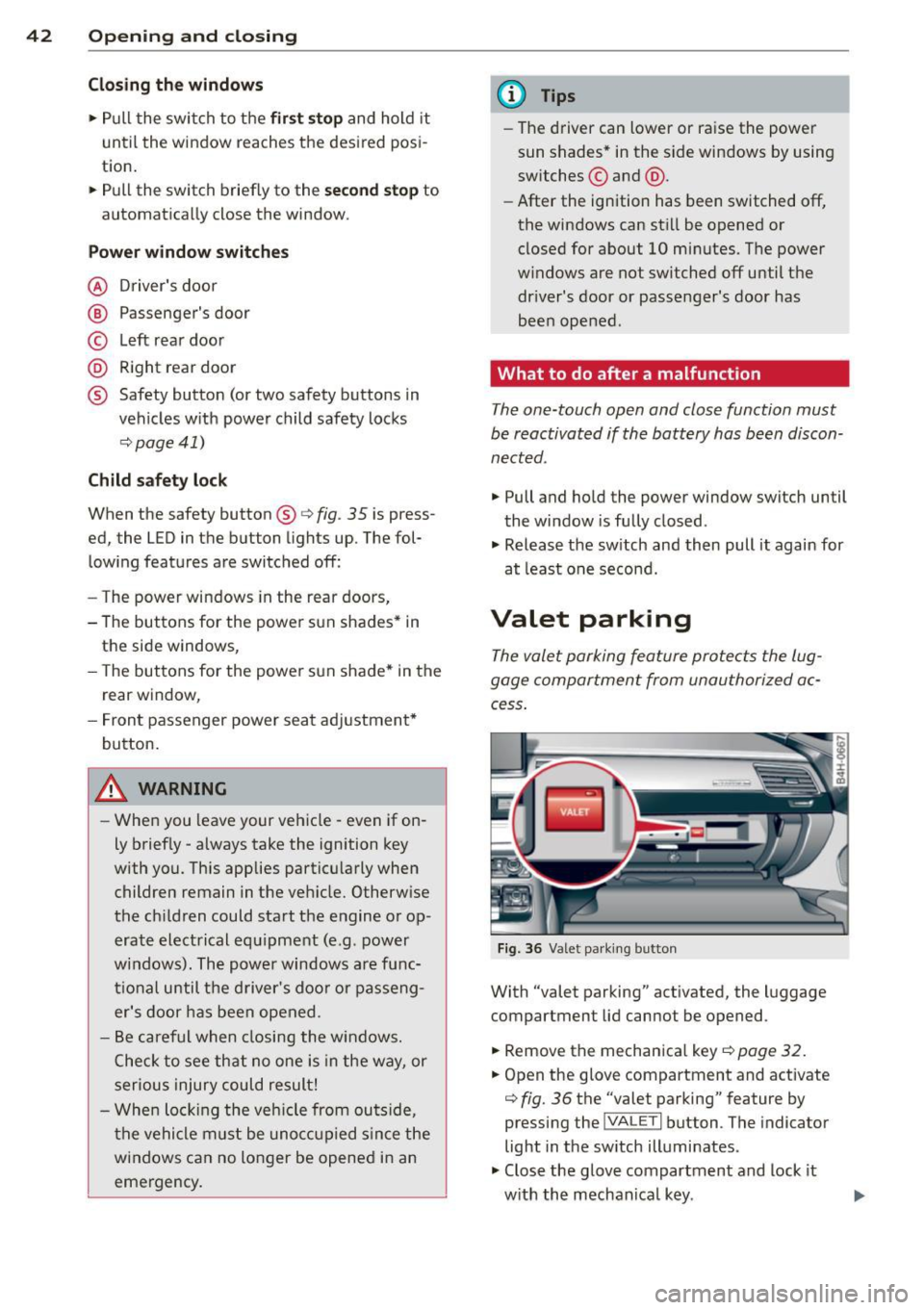
The valet parking feature protects the lug
gage compartment from unauthorized ac
cess .
Fig. 36 Valet parking button
With "valet parking" activated , the luggage
compartment lid cannot be opened .
.,. Remove the mechanica l key
¢ page 32.
.,. Open the glove compartment and activate
¢ fig. 36 the "valet parking" feature by
pressing the
j VA LETi button . The indicator
light in the sw itch illuminates .
.,. Close the glove compartment and lock it
w ith the mechanical key . .,.
Page 49 of 312

_& WARNING
-Automatic headlights are only intended
to assist the driver . They do not relieve
the driver of his responsibility to check
the headlights and to turn them on man
ually according to the current light and
visibility conditions. For example, fog
cannot be detected by the light sensors.
So always switch on the headlights
io
under these weather conditions and
when driving in the dark.
- Crashes can happen when you cannot see
the road ahead and when you cannot be
seen by other motorists. Always turn on
the headlights so that you can see ahead
and so that others can see your car from
the back.
- Please observe legal regulations when
using the lighting systems described.
(D Note
The rear fog lights should only be turned
on in accordance with traffic regulation, as
the lights are bright for following traffic.
(D Tips
- The light sensor* for automatic dynamic
headlight range control* is located in the
rear view mirror mount. You should
therefore not apply any stickers to the
windshield in this area in order to pre
vent malfunctions or failures.
- In the event of a light sensor malfunc
tion, the driver is notified in the instru
ment cluster display ~
page 22.
- You will hear a warning tone if you open
the driver door when the exterior lights
are switched on.
- In cool or damp weather, the inside of
the headlights, turn signals and tail
lights can fog over due to the tempera
ture difference between the inside and
outside. They will clear shortly after
switching them on. This does not affect
the service life of the lighting. Clear vision 4
7
Emergency flasher
The emergency flasher makes other motorists
aware that you or your vehicle are in an emer
gency situation .
Fig. 41 Center consol e: eme rge ncy flash er sw itc h
.,. Press the switch&..~ fig. 41 to turn the
emergency flashers on or off.
When the emergency flasher is on, all four
turn signals blink at the same time. The turn
signal indicator lights
B DI in the instru
ment cluster, as well as the light in the emer
gency flasher switch &.. blink likewise. The
emergency flasher also works when the igni
tion is turned off.
The emergency flashers will turn on automati
cally if you are in an accident where the airbag
has deployed.
@ Tips
You should turn on the emergency flashers
when:
- you a re the last vehicle standing in a traf
fic jam so that any other vehicles coming
can see you, or when
- your vehicle has broken down or you are
in an emergency situation, or when
- your vehicle is being towed by a tow
truck or if you are towing another vehicle
behind you.
Adjusting the exterior lighting
The settings ore adjusted in the MMI.
.,. Select: !CAR ! function button> Car systems
control button > Vehicle settings > Exterior
lighting. ..,.
Page 51 of 312

,....,
N ,....,
N
0 J:
'SI: ,...., \!) 1.1'1 ,...., 1.1'1 ,....,
-The high beam works only when the head
lights are on. The indicator light
II in the
instrument cluster ill uminates when the
high beams are on.
- The
headlight flasher works only as long as
you hold the lever -even if there are no
lights turned on. The indicator light
II in
the instrument cluster illum inates when you
use the head light flasher .
A WARNING
Do not use the high beam o r headlight
flasher if you know t hat these could blind
on coming traffic.
High beam assist
A ppl ies to vehicles : wit h high bea m ass ist
-
The high beam assist automatically switches
the high beams on or off, depending on the
surroundings and traffic conditions.
F ig. 4 3 Tu rn signa l an d h igh beam lever: Turning on
and off t he h igh beam ass ist
Activating high beam a ssist
Requirement : The light sw itch must be in the
AUTO position, the low beam headlights must
be on and the high beam assist must be
sw itched on in the Infotainment~
page 47.
.. Press the lever forwards (Din order to acti-
vate the high beam ass ist. The indicator
light
IIJ turns on in the inst rument cluste r
display and the high beams switch on or off
automati ca lly. The indica to r ligh t
Iii turns
on if the high be ams were switched on.
Switching the high beams on /off
manually
R equi rement : Hig h beam ass ist is activated.
Clear v is ion 49
If the high beams d id not swi tch on/off auto
matically when expected, you may instead
switch them on/off manually:
.. To swi tch the high beams on manually, press
the lever forwa rds (D. The indicato r light
Bl
turns on.
.. To switch the high beams off manually, pull
the lever backwards @. The high beam as
sist is deactivated .
Operating the headlight fla sher
.. To operate the flashe rs while the high beam
assist is active and the high beams are
sw itched off, pull the lever into posit ion @.
The high beam assist will remain active.
Messag es in the instrument cluster
di splay
Headlight ass ist: System fault
Drive to your authorized A udi dealer immedi
ate ly to have the ma lfunction corrected. Yo u
can still switch the high beams on or off man
u ally.
Headlight assi st: Unavailable . No camera
view
T he came ra v iew is b locked, for example by a
sticker o r debr is.
The sensor is loca ted between the inter io r
r earvi ew mirror and the w indshield . There
fo re, do not p lace a ny s tick ers i n this a rea on
t h e windsh ie ld.
Service setting
There is a different sensit iv ity sett ing for serv
ic ing . T hi s sett ing can be activated by pressing
and holding the b utton on the int erio r r ear
view m irror for more tha n 18 seconds. The
L E D next to the button blinks th ree times.
If
yo u have accidentally se lec ted this service
function, the origi nal sensitivity will be auto
matically restored the next t ime yo u sw itch
the ignit ion on.
IJ>,