light AUDI A8 2015 Workshop Manual
[x] Cancel search | Manufacturer: AUDI, Model Year: 2015, Model line: A8, Model: AUDI A8 2015Pages: 312, PDF Size: 79.18 MB
Page 83 of 312

(D Note
To avoid damage to the heating elements in the seats, do not kneel on the seats or
place heavy loads on a small area of the
seat.
Setup
The climate control system setup is accessed
through the MMI.
• Select: I CARI function button> Car systems
control button > A/C.
Rear cabin settings*
When this function is selected, all sett ings for
the rear can be adjusted through the climate
control system in the cockpit . The climate
control system settings cannot be adjusted in
the rear seat at the same time. This function
switches off after a certain period of time or
when one of the dials in the cockp it is press
ed .
Auto recirculation*
Warm and cold 81
Solar roof*
Parking ventilation is controlled automatically
in the
auto setting .
When the ignition is off, solar-powered park
in g ven tilat ion may switch on, as long as
- there is sufficient sunlight,
- the outside temperature is not too low,
- the sunroof is closed or tilted and
-auto (MMI) is selected .
~ Steering wheel heating
Applies to vehicles : wi th hea ted stee ring wheel
The steering wheel rim can be heated .
Fig. 86 Steering col umn: steering w hee l h eating but-
The sensitivity level of the automatic recircu-ton
lation mode can be set at various levels from
off to sensitive . The recirculation mode l""" I is
controlled on automatically. You must press
the~ button if fog forms on the w indows .
Footwell temperature
You can adjust the footwe ll temperature so
that it is cooler or warmer.
Windshield heat*
When the defroster~ is switched on and the
Auto setting is selected, the windshie ld de
froster is controlled automatically .
Supplementary heater*
The supplementary heater warms the inter ior
of vehicles with diesel engines* more quickly.
The supplementary heater is controlled auto
mat ica lly in the
Auto setting. •
Press the
lj] button to switc h steer ing wheel
he ating on/off. The message
Steering wheel
heating on!/Steering wheel heating off!
appears in the instrument cluster display.
T he temperature is maintained at a constant
level when steering wheel heating is switched
on.
The steering wheel heating settings are stor
ed automatically and assigned to the remote
control key that is in us e.
Page 85 of 312
the stored position as soon as you switch on
the ignition.
Starting and stopping
the engine
Starting the engine
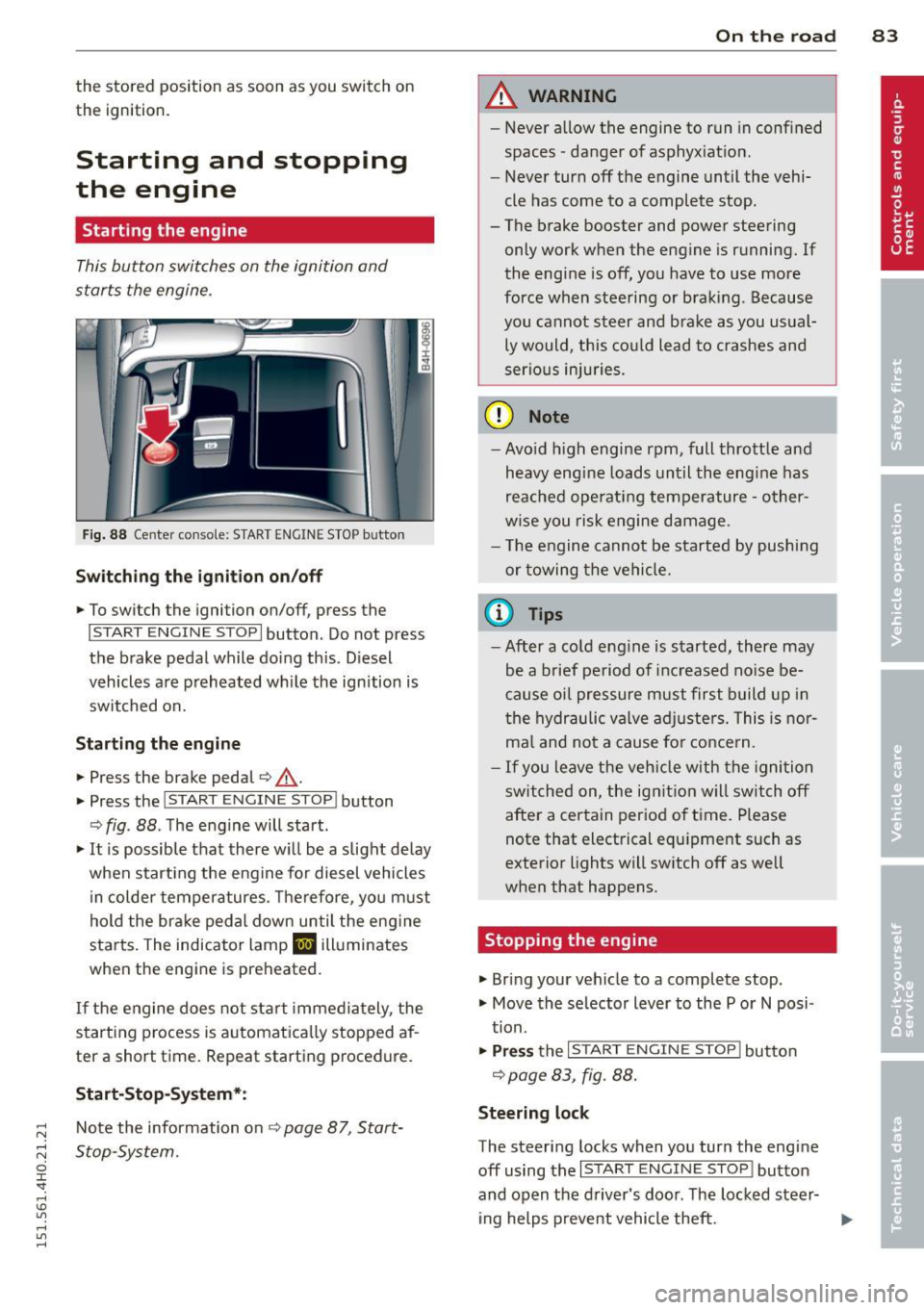
This button switches on the ignition and
starts the engine .
Fig. 88 Cente r console: S TART ENGINE S TOP b utto n
Swi tc hin g the i gni tion on/off
• To switch the ignition on/off, press the
I START ENGINE STOPI button . Do not press
the brake pedal while doing this . D iesel
vehicles are preheated wh ile the ignition is
switched on.
St art in g the engine
• Press the brake pedal~,&. .
• Press the
!START E NGINE STOPI button
~ fig . 88 . The engine will start.
• It is possible that there w ill be a slight delay
when start ing the engine for diesel vehicles
in colder temperatures. Therefore, you must
hold the brake peda l down until the eng ine
starts. The indicator lamp
II illuminates
when the engine is preheated.
If the engine does not start immediately , the
starting process is automatica lly stopped af
ter a short time . Repeat starting procedure.
Start -Stop -System *:
Note the information on ¢ page 87, Start
Stop-System.
On th e road 83
A WARNING
- Never allow the engine to run in confined
spaces -danger of asphyxiat ion.
- Never turn off the engine until the vehi
cle has come to a complete stop.
- The brake booster and power steering
only work when the engine is running. If
the engine is off, you have to use more
force when steering or braking . Because
you cannot steer and brake as you usual ly would, this could lead to crashes and
serious injuries.
(D Note
- Avo id h igh engine rpm, full throttle and
heavy engine loads until the eng ine has
reached operating temperature -other
w ise you risk engine damage .
- T he engine cannot be started by pushing
or towing the vehicle.
(0 Tips
- After a co ld eng ine is started, there may
be a brief period of inc reased no ise be
cause oil pressure must first build up i n
the hydraulic valve adjusters. This is nor
ma l and not a cause for conce rn.
- If you leave the veh icle with the ignition
switched on , the ign ition w ill switch off
after a certain period of time . Please
note that electrical equ ipment such as
exterior lights will sw itch off as well
when that happens.
Stopping the engine
• Bring your vehicle to a complete stop.
• Move the selector lever to the P or
N posi
tion.
• Pr ess the I START ENGINE STO P I button
¢ page 83 , fig. 88.
Steerin g lock
The steering locks when you turn the engine
off using the
I START ENGINE STOP I button
and open the d river's door. The locked steer-
ing helps prevent vehicle theft.
11-
Page 86 of 312

84 On th e road
Emerg ency off
If necessary, the engine can be sw itched off
with the selector lever in the R, Dor S posi
tions . The engine stops if you press the
I START ENGINE STOP ! button at speeds below
6 mph (10 km/h).
A WARNING
- Never turn off the eng ine before the ve
hicle has come to a complete stop . The
full function of the brake booster and the
power steering is not quaranteed. You
must use more force to turn or brake if
necessary. Because you cannot steer and
brake as you usual ly would, this could
lead to crashes and serious injur ies.
- For safety reasons, you should always
park your vehicle with the se lector lever
in P. Otherwise, the vehicle co uld inad
vertent ly roll away .
- After the engine has been switched off, the radiator fan can continue to run for
up to 10 min utes - even with the ign it ion
switched off. It can a lso switch on aga in
after some time if the coolant tempera
ture rises as the result of a heat buildup or if the engine is hot and the engine
compartment is addit ionally heated by
the sun's rays.
(D Note
Do not stop the engine immed iate ly afte r
ha rd or extended dr iving. Keep the engine
r u nning for approx imately two m inutes to
prevent excessive heat build-up.
Driver message in the instrument
cluster display
T urn off ignition before le aving car
This message appears and a war ning tone
sounds if you open the driver's door when the
ignitio n is switched on.
Pr ess brake p edal t o start engin e
This message appears if you press the
I STAR T ENGINE S TOP ! button to start the en- gine and do not depress the brake pedal.
The
engine can only be started if the brake pedal
is depressed.
Ill I s key in th e vehi cle?
If the indicato r light turns on and the mes
sage appears, the remote control key was re
moved from the vehicle whi le the engine was
runn ing .
If the igni tion key is not in the veh i
cle you will not be able to switch on the igni
tion or restart the engine after it has been switched off. You will a lso not be able to lock
the vehicle from the outs ide.
Shift to P, othe rwi se vehicle can roll away.
Door s do not lock if lever i s not in P.
T h is dr iver message appears for safety rea
sons if the transmission has not been shifted
to the P position when you switch the ignition
off. Move the selector lever to the P position.
Otherwise the vehicle is not protected from
ro lling and cannot be locked.
II Key i s not recognized . Hold b ack of key
again st m arked are a. See ow ner' s m anual.
If the indicator l ight turns on and this mes
sage appe ars, there is a ma lfunct ion
¢ page 85.
Tu rn off i gnition before leaving car. Ba ttery
i s di sc harging
Th is message appears if the driver's door is
opened wh ile the ignition is switched on. Al
ways switch off the ign it ion if you a re leav ing
the vehi cle. See also
¢page 89 .
Shift to P and turn off ignition before l eav
ing car, otherwi se vehicle c an roll away
This message appears if the driver's door is
opened wh ile the ignition is switched on and
the selecto r lever is not in the P position. Shift
the selector lever into the P pos ition and
switch off the ignit ion when you exit the vehi
cl e. Otherw ise the vehicle cou ld rol l. See also
¢page 89.
Page 87 of 312

Starting the engine if there is a
malfunction
It may not be possible to start the engine un
der certain circumstances , for example if the
battery in the vehicle key is drained , if inter
ference hos affected the key or if there is a
system malfunction.
i :c _ ____ ;&
Fig. 89 Center console/master key : starting the engine
if th ere is a m alfunction
Requirement : The message Key not re cog
nized. Hold b ack of key against marked area.
See owner's manual.
must appear and the in
dicator light
II must switch on .
"' Hold the master key vert ica lly in the loca
tion indicated
y >>) c::> fig. 89.
"' Press the brake pedal i=:> A in Starting the
engine on page 83 .
"'Press the j ~s_T_A_R_T_E_N_G _I_N _E_ S_T_O_P~I button . The
engine will start .
"' Drive to your au thor ized Audi dealer imme
diately to have the malfunct ion corrected .
(D Tips
You can view the message again by press
ing the
! START ENGINE STOP I button.
On the road 85
Electromechanical
parking brake
Operation
The electromechanical parking broke replaces
the hand broke.
Fig. 90 Center co nsole: Parking b rake
"' Pull on the switch © i=:> fig. 90 ® to apply
the parking brake. The indicator lights in the
switch and. (USA models)/ . (Cana-
da models) in the instrument cluster illumi
nate .
"' With the ignition switched on, step on the
brake peda l or the accelerator pedal and
press the switch <®lat the same time to re
lease the parking brake . The indicator lights
in the switch and. (USA mode ls)/ . (Can
ada models) in the instrument cluster go
out .
Your vehicle is equipped with an electrome
chanical parking brake. The parking brake is
designed to prevent the vehicle from rolling unintentionally and replaces the hand brake.
In addit ion to the normal functions of a tradi
tiona l hand brake, the electromechanical
parking brake provides vario us convenience
and safety functions .
When starting from rest
-The integral start ing assist helps you when
driving by automatically re leasing the park
i ng brake
i=:> page 86, Starting from rest.
- When start ing on inclines , the starting as-
sist prevents the vehicle from unintentiona l-
ly rolling back. The braking force of the
parking brake is not re leased until sufficient
111>
Page 88 of 312

86 On the road
driving force has been built up at the
wheels.
E mergency brake function
An emergency brake ensures t hat the vehicle
can be slowed down even if the
normal brakes
fail
c::> page 87, Emergency braking .
&_ WARNING
Do not press the accelerator peda l inadver
tently if the vehicle is stationary but the
engine is running and a gear is selected.
Otherw ise the vehicle will start to move
immediately and could result in a crash.
- If the parking brake is applied with the
ignition switched off, the indicator lights
in the sw itch and . (USA models) .
(Canada models) in the instrument clus
ter will go out after a certain per iod of
time.
- Occas iona l noises when the park ing
brake is applied and released are normal
and are not a cause for concern.
- When the vehicle is parked, the parking brake goes through a self-test cycle at
regular intervals. Any assoc iated noises
are no rma l.
Parking
.. Press the bra ke peda l to stop the vehicle .
.. Pull the switch© to set the parking brake .
.. Se lect the P selector lever position
c::> page 114.
.. Turn the eng ine off c::> ,& .
.. When on incl ines or declines, turn the steer
ing wheel so that your vehicle will roll into
the curb if it begins to move.
&_ WARNING
- When you leave your veh icle - even if on
ly b riefly - always take the ignition key
with you. This applies par tic u larly when
children remain in the veh icle . Otherw ise
the chi ldren could start the engine, re-
'
lease the parking brake or operate elec
tr ica l equipment (e.g. power windows).
There is the r isk of an accident.
- When the veh icle is locked, no one - par
ticularly not children should rema in in
the vehicle. Locked doors make it more difficult for emergency workers to get in
to the vehicle - putting lives at risk.
Starting from rest
The starting assist function ensures that the
parking brake is released automatically upon
starting.
Stopping and applying par king brake
.. Pull the sw itch<®> to apply the parking
brake.
Sta rting and automaticall y rel easing the
park ing bra ke
.. When you start to drive as usual, the park
ing brake is automat ically released and your
veh icle beg ins to move.
When stopping at a traffic signal or stopping in city traffic, the parking brake can be ap
plied . The vehicle does not have to be held
with the footbrake. The parking brake elimi nates the tendency to creep w ith a dr ive range
engaged . As soon as you drive off as usual,
t h e pa rking brake is re leased automatically
and the vehicle s tarts to move .
Sta rting on slopes
When starting on inclines, the starting assist
prevents the vehicle from u nintent ionally roll
i ng back. The braking force of the parki ng
brake is not re leased unti l suffic ient d riving
force has been built up at the w heels.
(D Tips
Fo r safety reasons, the pa rking brake is re
l eased automatically on ly when the d riv
er's safety belt is engaged in the buckle.
Page 89 of 312

,....,
N ,....,
N
0 J:
'SI: ,...., \!) 1.1'1 ,...., 1.1'1 ,....,
Starting off with a trailer
To prevent rolling back unintentionally on an
incline, do the following:
11-Keep the switch© pulled and depress the
accelerator. The parking brake stays applied
and prevents the vehicle from rolling back
ward .
11-You can release the switch<®> once you are
su re that you a re develop ing enough for
ward momentum at the wheels as you de
press the accelerator.
D epending on the weight of the r ig (vehicle
and tra ile r) and the severi ty of the incl ine, you
may roll backwards as you start. Yo u can pre
vent rolling backwards by holding the parking brake switch<®) p ulled out and acce lerating -
just as you would when starting on a hill with
a conventional hand brake.
Emergency braking
In the event that the conventional brake sys
tem fails or locks.
11-In an emergency, pull the switch(®) and
contin ue to p ull it to slow your vehicle down
with the parking brake.
11-As soon as you release the switch (®) or ac-
ce lerate, the braking process stops.
If you pull the switch<®> and hold it above a
speed of about 5 mph (8 km/h), the emergen
cy braking function is initiated. The vehicle is
braked at all four wheels by activating the hy
draulic brake system. Th e brake performance
i s similar to making an emergency stop
~ &..
In order not to activate the emergency brak
ing by m istake, an audible warning tone (buz
ze r) sou nds when the switch C®> is pulled. As
soon as the switch(®) is released, or the accel
e rator pedal is dep ressed, emergency b ra ki ng
stops.
_& WARNING
Emergency braking should only be used i n
an emergency, when the normal foot brake
has failed or the brake pedal is obstructed .
On the ro ad 87
Using the parking b rake to pe rform emer
gency brak ing will slow your vehicle down
as if you had made a full brake application.
The laws of physics cannot be suspended
even with ESC and i ts associated compo
nents (ABS, ASR, EDL). In corners and
when road o r weathe r cond itions are bad,
a full brake appl ication can ca use the vehi
cle to sk id or the re ar end to break away -
risking an acciden t.
Start-Stop-System
' Description
Applies to vehicles: wit h Start -Stop-System
The Start-Stop-System can help increase fuel
economy and reduce CO2 emissions .
In the Start-Stop-mode, the engine shuts off
automat ica lly w hen the vehicle is stopped,
such as at a traffic light. The ignition remains
switched on du ring this stop phase. The en
gine wi ll be automat ica lly restarted when
needed.
The last Start-Stop-System sett ing (on/off us
ing the button
I O\l ~I) will be restored when the
i gnition is turned on. The L ED in the
1(7() .. 1 but
ton turns on when the Star t-Stop-System is
swi tched off man ually.
Basic requirements for the Start -Stop
mode
- The d rive r's doo r is closed.
- The d river ' seat belt is latched .
- The hood is closed .
- The vehicle must have been driven faster
than
2.5 mph (4 km/h) since the last stop.
- A trailer is not hitched to the vehicle.
_& WARNING
-Never let the vehicle roll with the eng ine
sw itched off. You cou ld lose control over
the vehicle. Th is can lead to a collision
and serio us in ju ries.
- The brake booster and the steering sup port do not work while the engine is
Page 90 of 312

88 On the road
switched off. More force is required to
stop and to steer the vehicle.
- To reduce the risk of injuries, make sure
that the Start-Stop-System is turned off
when working in the engine compart
me nt¢
page 89.
(D Note
Always switch off the Start-Stop -System
when driving through water ¢
page 89.
Starting/stopping the engine
Applies to vehicles: with Start-Stop-System
Fig . 91 In strument duster : eng ine switc hed off (stop
phase)
~ Slow the vehicle to a stop using the brake
and keep pressing the brake pedal. The en
gine w ill switch off. The
11] indicator light
appears in the information line in the instru
ment cluster display.
~ When you take your foot off the brake ped
al, the engine restarts . The ind icator light
turns off.
Additional information
The engine w ill switch off in the P, D, N and S
positions as well as in manua l mode. In the P
position, the e ngine will also remain off if you
take your foot off the brake pedal. The engine
starts again when you select another se lector
lever position and take your foot off the brake
pedal.
If you select the R position during a Stop
phase, the engine will start again .
Shift from D to P quickly to prevent the engine
from starting unintentionally when shifting
through R. You
can determine for yourself if the engine
will stop or not by reducing or increasing the
amount of force you use to press the brake
pedal. For example, if you only lightly press
on the brake pedal in stop-and and-go traffic
or when turning, the engine will not switch off
when the vehicle is stationary. As soon as you
press the brake down harder, the engine wi ll
switch off.
General information
Applies to vehicles: with Start-Stop-System
The standard Start-Stop-mode can be cancel
led for different system-related reasons.
Fig. 92 Instrument cluster: eng ine -Stop temporarily
unavailable
Engine will not switch off
Before each stop phase, the system checks if
certain conditions have been met. For exam
ple, the eng ine will
not be switched off in the
following situations:
- The engine has not reached the minimum
requ ired temperature for Start-Stop-mode.
- The interior temperature selected by the A/C
system has not been reached.
- The outside temperature is extremely high/
low.
- The windshield is being defrosted
¢page 81.
-The parking system* is switched on.
- The battery charge level is too low.
- The steering wheel is sharply turned or
there is a steering movement.
- After engaging the reverse gear.
- On sharp incl ines.
Page 91 of 312

The@j indicator light appears in the informa
tion line in the instrument cluster display
<:!)fig. 92 .
Engine automatically restarts
The stop phase is interrupted in the following
situations, for examp le. The engi ne restarts
without any action by the driver.
- Th e interior temperature varies from the
temperatu re selected in the A/C system.
- The windshield is being defrosted
r::!) page 81 .
-The brake pedal is pressed several times in a
row.
- The battery charge level becomes too low.
- High power consumption .
Switching the ignition off automatically
To prevent the battery from draining, the igni
tion will switch off
automatically when all of
the following conditions have been met:
- The vehicle has al ready been driven.
- The eng ine has been turned off by the Start-
Stop-System*.
- The driver's door is opened.
- The driver's seat belt is removed .
- The brake pedal is not pressed down.
- The vehicle is stationary .
In this case, the activated low beam will be re
placed by the side marker lights. The side
marker lights will switch off after approxi
mately 30 minutes or when you lock the vehi
cle .
If the Start-Stop System has
not turned off
the engine or if you have switched the Start
Stop system off manually, the ignition w ill
not
be automatically switched off and the engine
will cont inue to run
r::!) .&. .
A WARNING
Never allow the engine to run in confined
spaces - danger of asphyxiation.
(D Tips
If you shift into the D, N or S positions af
ter shift ing into reverse, the veh icle must
On the road 89
be driven faster than 6 mph (10 km/h) in
order for the engine to switch off again.
Switching the Start-Stop-System on/off
manually
App lies to vehicles: wit h Start -Stop -System
If you do not wish to use the system, you can
switch it off manually.
Fig. 93 Center console: Start -Stop -System button
.,. To switch the Sta rt-Stop-System off/on
manually, p ress the
ICA.> ••I button. The L ED in
the button turns on when the system is
sw itched off.
(D Tips
If you switch the system off during a stop
phase, the engine will start again auto
ma tically .
Messages in the instrument cluster
display
Applies to vehicles: wit h Start-Stop-Syste m
Start-Stop system deactivated: Please re
start engine manually
This message appears when specific condi
tions are not met during a stop phase and the
Start-Stop-System will
not be able to restart
the engine. If the Dor R selector lever posi
tions were engaged, P will be selected auto
matically . The engine must be started with
the
I START ENGINE ST OP ! button.
Start-Stop system: System fault! Function
unavailable
There is a malfunction in the Start-Stop-Sys
tem. Drive the vehicle to an authorized repair .,.
Page 92 of 312
90 On the road
facility for servicing as soon as possib le to
correct the malfunction.
Speed warning system
Introduction
The speed warning system helps you to stay
under a specified maximum speed.
The speed warning system warns you if you
are exceeding the maximum speed that you
have set . You will hear a warn ing tone when
your speed exceeds the stored value by ap proximately 3 mph (3 km/h). An indicator
light. (USA models) . (Canada models) in
the instrument cluster display also turns on at
the same time. The indicator light./.
turns off when the speed decreases below the
stored maximum speed.
Sett ing a threshold is recommended if you
wo uld like to be reminded when you reach a
certain maximum speed . Situations where you
may want to do so include driving in a country
with a general speed limit or if there is a
specif ied maximum speed for winter tires.
@ Tips
Even though your vehicle is equipped with
a speed warning system, you should still
watch the speedometer to make sure you
are not driving faster than the speed lim it.
Setting the threshold
You can set, change and delete the threshold
in the MMI.
.. Se lect : ICAR lfunction button> Car systems
control button > Driver assist > Speed warn
ing.
You can set any threshold between 20 mph
(30 km/h) and 150 mph (240 km/h). Settings
can each be adjusted in increments of S mph
(10 km/h).
Cruise control
Switching on
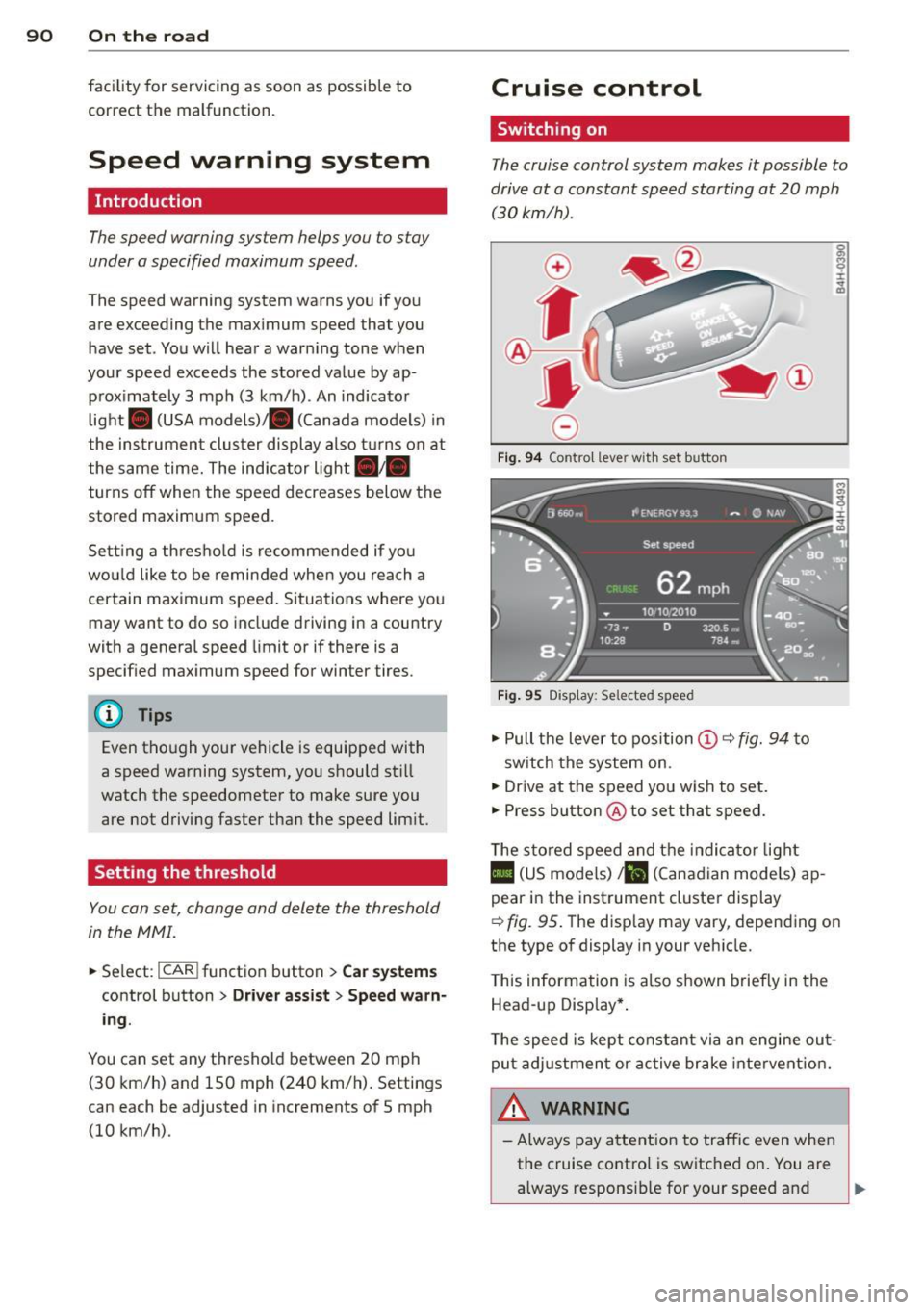
The cruise control system makes it possible to
drive at a constant speed starting at 20 mph (30kmlh) .
0
•
~
0
Fig. 94 Control leve r with set b utton
Fig. 95 Display: Se lected speed
.. Pull the lever to position (D c::> fig. 94 to
sw itch the system on.
.. Drive at the speed you wish to set.
.. Press button @ to set that speed.
T he stored speed and the indicator light
II (US models) ;El (Canadian mode ls) ap
pear in the instrument cluster display
c::> fig. 95 . The display may vary, depending on
the type of display in your veh icle .
T his information is also shown briefly in the
Head-up Display*.
Th e speed is kept constant via an engine out
put adjustment or active brake intervent ion.
WARNING
-Always pay attention to traffic even when
the cruise control is switched on. You are
a.lways respons ible for your speed and
Ill-
Page 93 of 312

,....,
N ,....,
N
0 J:
'SI: ,...., \!) ..,.,
,...., ..,., ,....,
the distance between your vehicle and
other vehicles.
- For safety reasons, the cruise control
should not be used in the city, in stop
and-go traffic, on twisting roads and
when road conditions are poor (such as
ice, fog, grave l, heavy rain and hydro
planing) -risk of acc ident .
- Turn off the cruise control temporari ly
when entering turn lanes, highway exit lanes or in construction zones .
- Please note that inadvertent ly "rest ing"
yo ur foot on the accelerator peda l causes
the cruise control not to brake. This is
because t he cr uise con trol is overr idden
by the driver's acce le rat ion.
- If a brake system malfunction such as
overheat ing occurs when the cruise con
t ro l system is sw itched on, the braking
f unction in the system may be switched
off. The other cr uise control f unctions re
main active as long as the indicator light
II (US models) !Iii (Canadian mode ls)
is on.
The brake lights illuminate as soon as the brakes decelerate automat ica lly.
Changing speed
.,. To increase/decrease the speed in incre
ments, tap the lever in the
010 d irection
i=> page 90, fig . 94 .
... To increase/dec rease the speed qu ickly, hold
the leve r in the
G) /0 direction unt il the de
s ired speed is d isplayed.
You can also press the accelerato r pedal down
to increase your speed, e .g . if you want to
pass someone. The speed yo u saved earlier
will resume as soon as yo u release the acceler
ator peda l.
I f, however, you exceed your saved speed by
6 mp h (1 0 km/h) fo r longe r th an 5 mi nutes,
the cruise cont ro l will tu rn off tempor arily.
The green symbo l
II (US models) !Iii i n the
On th e ro ad 91
display is rep laced w ith a wh ite symbo l. The
saved speed remains the same .
' Presetting your speed
You can preset your desired speed while the
vehicle is not moving .
.,. Switch o n the ign ition.
.,. Pull lever into posi tion
(D c:> page 90,
fig. 94 .
... Press the leve r in the 0 or 0 direction to
increase or decrease your speed.
.,. Release the lever to save that speed.
This function makes it possib le, for examp le,
to save the speed you want before driving on
the h ighway. Once on the highway, activate
the cru ise control by pulling the lever toward
(D.
' Switching the system off
Temporary deactivation
.,. Press the brake pedal, or
... Press the leve r in to position @(not clicked
into place)
~ page 90, fig . 94, or
.,. Dr ive fo r longe r than 5 mi nutes at mo re
t han 5 mph (10 km/h) above the stored
speed.
Switching off completely
.,. Press lever into position @(clicked into
place), or
.,. Switch t he ignit ion off.
T he system retains the saved speed if you de
activate the c ruise control temporar ily. To re
sume t he saved speed, re lease the brake ped
al and p ull the leve r to po sition
(D .
Swi tch ing the ignit ion off e rases the saved
speed.
A WARNING
You sho uld only ret urn to the saved speed
if it is not too fast for the cur rent traffic
conditions -ris k of an accident!