lock AUDI A8 2016 User Guide
[x] Cancel search | Manufacturer: AUDI, Model Year: 2016, Model line: A8, Model: AUDI A8 2016Pages: 302, PDF Size: 75.68 MB
Page 35 of 302

they accidentally press the power locking
switch in the doors.
- Do not leave children inside the vehicle un
supervised. In an emergency it wou ld be im
possible to open the doors from the outside
without the key.
- Applies to vehicles with power side door closer*:
- When closing a door, make sure nothing
can interfere w ith the door. This could
cause serious persona l injury .
- You can stop the door from closing at any
time by pulling on the inside or outside
door handle .
@ Tips
-In the event of a crash with airbag deploy
ment all locked doors w ill be a utomatically
unlocked to give access to the vehicle occu
pants from the outside.
-If the power lockin g system should ma l
function, you can lock the driver's door us
i ng the mechanical key¢
page 36 .
-If the power locking system should fail, you
can still open the fuel tank flap in an emer
gency
¢ page 216.
-You are well advised not to keep valuables
ins ide an unattended vehicle, vis ible or not.
Even a properly locked vehicle cannot pro
vide the secur ity of a safe .
- If the LED in the upper edge of the driver 's
door panel comes on for about 30 seconds
after the vehicle is locked, there is a mal
funct ion in the power locking or the anti
theft warning system. Have the malfunction
corrected by an authorized Audi dealership
or qualified repair facility.
Setting power locking
The driver can determine the functions for power
locking in the
fvlfv/J .
• Select : I CARI function button > Car systems
contro l button > Vehicle settings > (Central
locking ).
Open ing and closing
Lock when driving -If you select On, the vehicle
locks automatically when driving . All of the doors
and luggage compartment lid lock .
Central locking
Unlock door s -
You ca n decide if All doors or on ly
the
Driver should unlock. The luggage compa rt
ment lid a lso unlocks when
All is se lected. If you
select
Driver in a vehicle with a convenience key *,
only the door whose hand le you pull will unlock .
If you se lect
Driver , all the doors and luggage
compartment lid will unlock if you p ress the
CD
button on the remote control master key twice.
Lock exterior trunk handle -If you select On , the
luggage compartment lid handle is locked. In
this case the luggage compartment lid can be
opened with the button
CJ on the master key or
with the
c:5 button* in the driver's door. In
vehicles with a convenience key*, you can still
open the luggage compartment lid using the
handle if an authorized master key is near the
prox imity sensor .
Fold mirrors* -If you select On, the exterior rear
view m irrors fold in automatically when you press
the
CD button on the remote control master key
or touch the sensor* in the handle.
Tone when locking -When you select On, a con
firmation tone sounds when you lock the vehicle.
Locking and unlocking the vehicle with the
remote control
Fig. 21 Remote control: functio n butto ns
E ither the driver's door only or the entire vehicle
will unlock when the unlock button
CD is pressed
once, depending on the settings in the MMI
¢page 33. .,.
33
Page 36 of 302

Opening and clo sin g
• Press button@ to unlock the vehicle¢ fig. 21.
• Press button ffl to lock the vehicle ¢ A in Gen
eral description on page 32 .
• Press button C:$ briefly to unlock the luggage
compartment lid.
• Push the red
I PANIC I button to activate the
panic funct ion . The horn sounds and the turn
s ignals flash. Push the red
! PANIC I button again
to deactivate the pan ic function .
If the vehicle is unlocked and no door, the lug
gage compartment lid or the hood is opened
with in 60 seconds, the vehicle locks itself agai n
automatically. This feature prevents the vehicle
from being accidentally left unlocked over a long
period of time.
It depends o n the settings in the MMI whethe r
the entire veh icle is unlocked or only certa in
doors¢
page 33 .
& WARNING
Read and follow all WARN INGS ¢ & in Gener
al description on page 32 .
@ Tips
-In orde r to make s ure the locking function is
working, you s hou ld always keep your eye
on the vehicle to make sure it is properly
l ocked.
- Do not use the remote contro l if you are in
side the car, otherwise you may uninten
tiona lly lock the vehicle, and then yo u wou ld
set off the anti-theft alarm when you try to
start the engine or open a door. In case this happens anyhow, push the unlock button@.
- The vehicle can only be locked when these lector lever is in the P position.
- Use the panic funct ion only if you are in an
emergency s ituation.
34 Locking and unlocking with convenience
key
Applies to:
vehicles with convenience key
The doors and the luggage compartment lid can
be unlocked and locked without operating the
master key.
Fig. 22 Co nve nience key : locking t he ve hicle
Unlocking vehicle
• Take hold of the door hand le . The door is un-
locked automatically.
• Pull the handle to open the door .
Locking vehicle
• Sele ct the P selector lever positio n. Otherwise
the vehicle cannot be locked .
• To lock the vehicle, close the door and touch
the sensor in the door handle
once ¢ fig. 22. Do
not reach inside the door handle .
The vehicle can be locked and unlocked at any
door. The master key must be within a range of
about 1.5 m from the appropriate door or the
l uggage compartment lid. It makes no difference
whether the maste r key is in your jacket pocket or
i n your brief case .
It is not possib le to re-open the door for a brief
per iod direct ly after closing it . Th is allows you to
ensure that the doors are properly locked .
It depends on the settings in the MMI whether
the entire vehicle is unlocked or one of the doors
¢ page 33 .
& WARNING
Read and follow all WARNINGS ¢ & in Gener
al description on page 32 .
Page 37 of 302
@ Tips
If your vehicle has been standing for an ex
tended period, please note the follow ing:
- The proximity sensors are deactivated after
a few days to save power . You then have to
pull on the door handle once to unlock the
vehicle and a second time to open the vehi
cle.
- To prevent the battery from draining and to
preserve your vehicle's ability to start for as
long as poss ible, the energy management
system gradually switches off unnecessary
convenience funct ions. It is possible that
you wi ll not be able to unlock your veh icle
us ing these convenience functions .
- Fo r De claration of Comp liance to Un ited
States FCC and Industry Canada regulations
c>page284.
Operating locks with the key
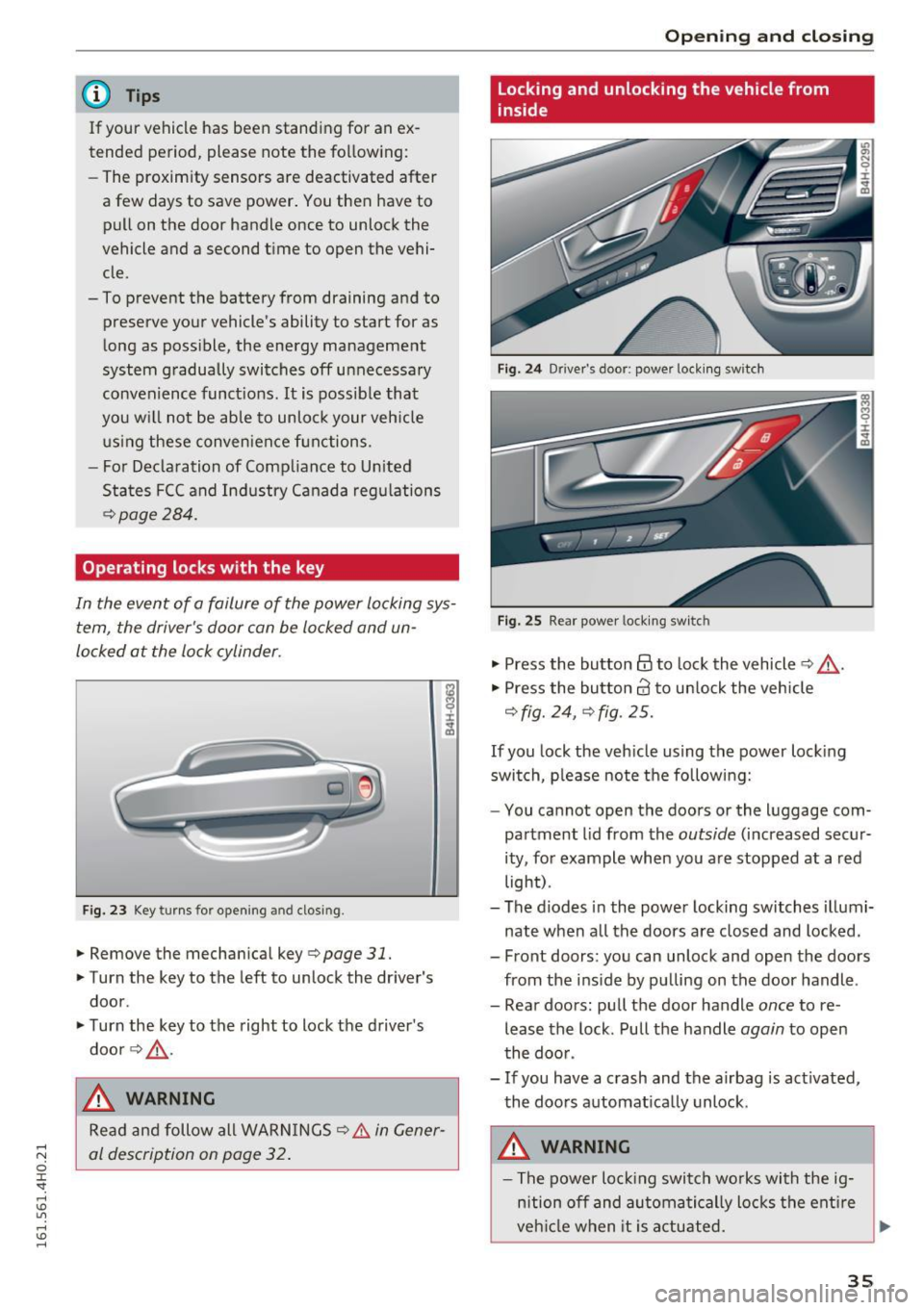
In the event of a failure of the power locking sys tem , the driver's door can be locked and un
locked at the lock cylinder.
F ig. 23 Key turns for opening and closing.
• Remove the mechan ical key c> page 31.
• Turn the key to the left to unlock the dr iver's
door .
• Turn the key to the right to lock the driver 's
door c>
,&.
& WARNING
Read and follow all WARN INGS c> .&. in Gener
al description on page 32 .
Openin g an d clos ing
Locking and unlocking the vehicle from
inside
Fig. 2 4 Driver's door; power lock ing switch
Fig. 25 Rear power lock ing switc h
"' Press the button @to lock the vehicle c> &,,.
"' Press the bu tton crl to un lock the vehicle
c> fig. 24, c> fig . 25.
If you lock the veh icle using the power lock ing
switch, please note the following:
- You cannot open the doors or the luggage com
partment lid from the
outside (increased secur
ity, for example when you a re stopped at a red
light) .
- The diodes in the power locking switches illumi
nate when a ll the doors are closed and locked.
- Front doors: you can unlock and open the doors from the ins ide by pu lling on the door handle .
- Rear doors : pu ll the door handle
once to re
lease the lock . Pull the handle
again to open
the doo r.
- If you have a crash and the airbag is act ivated,
the doors automat ically unlock.
& WARNING
- The power lock ing switch wo rks with the ig
n ition off and au toma tically lo cks the ent ire
veh icle when it is a ctuated.
~
3 5
Page 38 of 302
Opening and clo sin g
- On a vehicle locked from the outside the
power locking system switc h is inoperat ive.
- Locked doors make it more difficult for
emergency workers to get into the vehicle,
wh ich puts lives at risk. Do not leave anyone
behind i n the vehicle, especially children.
(D Tips
Your vehicle is locked automatical ly at a
speed of 9 mph (15 km/h)¢
page 32. You can
unlock the vehicle again using the opening
function in the power locking system switch.
Emergency locking
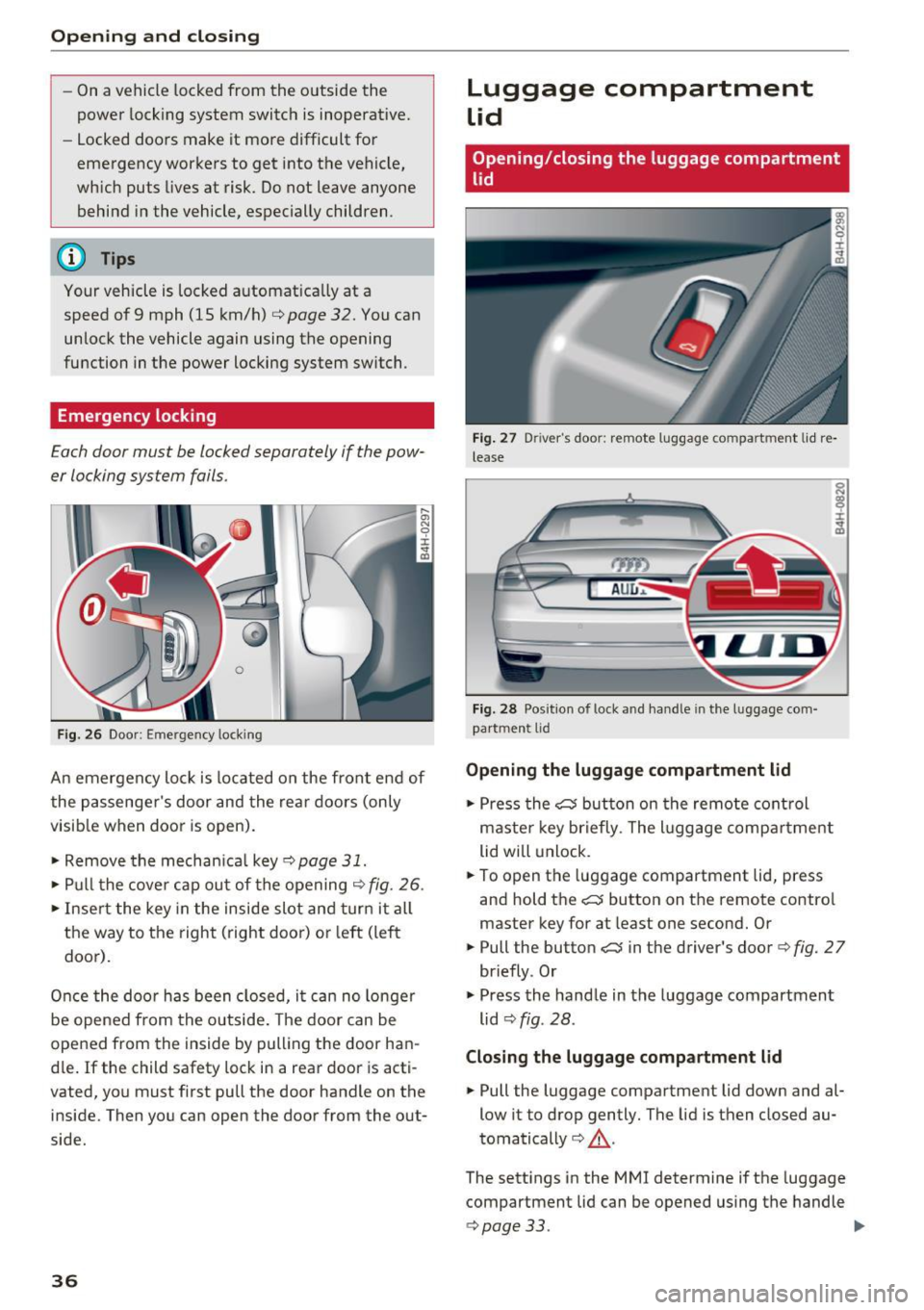
Each door must be locked separately if the pow
er locking system fails.
F ig. 26 Door: Emergency locking
An emergency lock is located on the front end of
the passenger's door and the rea r doors (only
visib le when door is open).
• Remove the mechan ica l key ¢
page 31.
• Pull the cove r cap out of the opening ¢ fig. 26.
• Inse rt the key in the inside slot and turn it a ll
the way to the right (right door) or left (left
door).
Once the door has been closed, i t can no longer
be opened from the outside. The door can be
opened from the inside by pulling the door han
d le. If the child safety lock in a rear door is acti
vated, you must first pu ll the door handle on the
inside. Then you can open the door from the out
side.
36
Luggage compartment
Lid
Opening /closing the luggage compartment
lid
Fig . 27 Driver's door: remote luggage compartment lid re
lease
t7TI)
A U L, ..
Fig. 28 Posit ion of lock and handle in the lu ggage com
partment lid
Opening the luggage compartment lid
• Press the C:5 button on the remote cont rol
maste r key briefly . The l uggage compa rtment
lid will unlock.
• To open the luggage compartment lid, press
and hold the
C:5 button on the remote contro l
master key for at least one second. Or
• Pull the button
C:5 in the driver's door¢ fig. 27
briefly . Or
• Press the hand le in the luggage compartment
lid ¢
fig. 28 .
Clo sing the luggage compartm ent lid
• Pull the luggage compartment lid down and al
low it to drop gently. The lid is then closed au
tomatically¢ &_.
The sett ings in the MMI determine if the luggage
compartment lid can be opened using the handle
.:> page 33 . ll>-
Page 39 of 302
_&. WARNING
-After closing the luggage compartment lid,
always pull up on it to make sure that it is
properly closed. Otherwise it could open
suddenly when the vehicle is moving.
- To help prevent poisonous exhaust gas from
being drawn into the vehicle, always keep
the luggage compartment lid closed while
driving. Never transport objects larger than those which fit completely into the luggage
area , because then the luggage compart
ment lid cannot be fully closed.
- Never leave your vehicle unattended espe
c ially w ith the luggage compartment lid left
open. A chi ld could crawl into the car
through the luggage compartment and pull
the lid shut, becoming trapped and unable
to get out. To reduce the risk of personal in
jury, never let children p lay in or around
your vehicle. Always keep the luggage com
partment lid as well as the vehicle doors
closed when not in use.
@ Tips
When the vehicle is locked, the luggage com
partment lid can be unlocked separately by
pressing the button
c:$ on the master key.
When the luggage compartment lid is closed
aga in, it locks automatically .
Power opening/closing luggage
compartment lid
Applies to: vehicles with power opening/clos ing luggage com
partment lid
The luggage compartment lid can open and
close electrically.
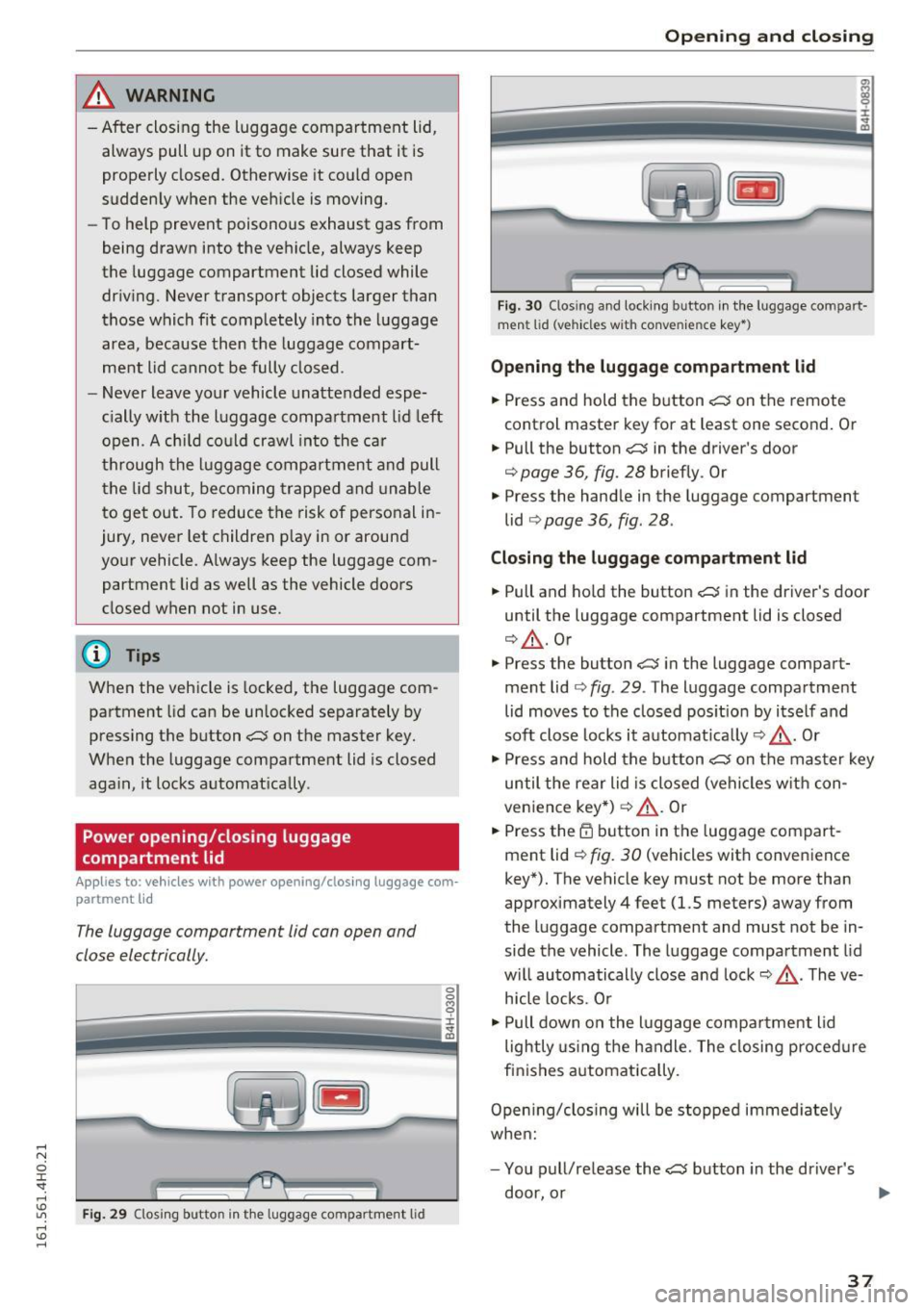
Fig. 29 Closing button in th e luggage compartment lid
Opening and closing
Fig. 30 Closing and locking button in the luggage compart·
m ent lid (veh icles w it h conven ience key•)
Opening the luggage compartment lid
.. Press and hold the button c:$ on the remote
control master key for at least one second. Or
.,. Pull the button
c:$ in the driver 's door
¢
page 36, fig. 28 briefly . Or
" Press the handle in the luggage compartment
lid
¢ page 36, fig . 28 .
Closing the luggage compartment lid
.. Pull and ho ld the button c:$ in the driver's door
until the luggage compartment lid is closed
¢ &_ .Or
" Press the button
c:$ in the luggage compart
ment lid¢
fig. 29. The luggage compartment
lid moves to the closed pos it ion by itself and
soft close locks it automat ica lly ¢ &_ . Or
" Press and hold the button
c:$ on the master key
until the rear lid is closed (vehicles with con
venience key*)¢&_ . Or
.. Press the
tfl button in the luggage compart
ment lid¢
fig. 30 (vehicles with conven ience
key*). The vehicle key must not be more than
approximately 4 feet (1.5 meters) away from
the luggage compartment and must not be in
side the vehicle . The luggage compartment lid
w ill automatically close and lock¢&_ . The ve
hicle locks. Or
" Pull down on the luggage compa rtment lid
lightly using the handle. The closing procedure
finishes automatica lly .
Opening/closing will be stopped immed iate ly
when:
- You pull/release the
c:$ button in the driver's
door, or ..,.
37
Page 40 of 302
Opening and closin g
- You press/release the~ button on the remote
contro l key (vehicles with convenience key*), or
- You press the~ or
CD (vehicles with conven
ience key*) button in the luggage compartment
lid , or
- You push the hand le in the luggage compart
ment lid, or
- You push on the luggage compartment lid with
your hand opposite the direction it is moving,
or
- When something b locks the luggage compart
ment lid or makes it difficu lt for the lid to
move .
I f you press the hand le or one of the~ or
CD
(vehicles with convenience key*) buttons then,
the luggage compartment lid will either open or
close, depending on how far it was open.
A WARNING
- Read and follow all WARNINGS c> A in Gen
eral description on page 32.
- After closing the luggage compartment lid,
always pull up on it to make sure that it is
properly closed . Otherwise
it cou ld open
suddenly when the veh icle is moving .
- To help prevent poisonous exhaust gas from
being drawn into the veh icle, always keep
the luggage compartment lid closed while dr iv ing . Neve r transport objects larger than
those which fit completely into the luggage
area, because then the luggage compart
ment lid c annot be fully closed .
- Never leave yo ur vehicle unattended espe
c ially w ith the l uggage comp artment l id left
open. A child co ul d crawl into the ca r
through the luggage compartment and pull
the lid shut, becoming trapped and unable
to get out. To reduce the risk of personal in
jury, never let children p lay in or around
you r vehicle. A lways keep the luggage com
partment lid as well as the vehicle doors
closed when not in use .
- Never close the luggage compartment lid
inatten tively or without check ing first . Al
though the clos ing fo rce of the l uggage
c ompartment lid is limited, yo u can st ill se
riously injure yourse lf or others.
38
- Always ensure that no one is within range of
the luggage compartment lid when it is
mov ing, in particular close to the hinges and
the upper and lower edges - fingers or
hands can be pinched.
- Never try to interfere with the luggage com
partment lid or help it when it is be ing
opened or closed a utomat ically.
(D Tips
- The settings in the MMI determine if the
luggage compartment lid can be opened us
ing the handle
c> page 33
- If there is a mechanical problem with auto
matic closing for the l uggage compartment
lid or the re is an obs truction, it opens again
immediately . Check to see why the luggage
compartment lid could not be closed before
a ttempting to close it again.
- The following applies to vehicles equ ipped
with the Convenience key* feature: if the re
mote contro l key is left in the lugg age com
partment, luggage compartmen t will auto
matically unlock itself after you lock the ve
hicle. This prevents you from unintentiona l
ly lock ing you r key in the l uggage compart
ment.
- When the vehicle is locked, the luggage
compartment lid can be unlocked separately
by pressing the button~ on the master
key. When t he luggage compartment lid is
closed aga in, it locks automat ica lly .
- If the vehicle battery charge drops below a
certain level, you can still open or close the
luggage compa rtment lid manually, howev
er, you will need to apply mo re force to
close i t.
Page 41 of 302

Luggage compartment with movement
activated opening
Applies to: vehicles with convenience key and sensor-control·
led luggage compartment lid
Fig. 31 Rear of vehicle: foot movement
Requirements: You must be carrying your vehicle
key with you. You must be standing at the center
behind the luggage compartment lid. The d is
tance to the rear of the vehicle must be at least
8 inches (20 cm) . The ignition must be switched
off. Make sure you have firm footing.
.. Swing your foot forth and back below the
bumper
r=) fig . 31. Do not touch the bumper.
Once the system recognizes the movement, the
luggage compartment lid will open.
The luggage compartment lid will only open if
you make the movement as described. This pre
vents the luggage compartment lid from opening
due to similar movements such as when you walk
between the rear of the vehicle and your garage
door.
General information
In some s ituations, the function is limited or
temporarily unavailable. This may happen if:
- the luggage compartment lid was just closed .
- you park close to a hedge and the branches
move back and forth under the vehicle for a
long period of time .
- you clean your vehicle, for example with a pres
s ure washer or in a car wash .
- there is heavy rain.
- the bumper is very dirty, for example after driv-
ing on salted roads.
- there is interference to the radio signal from
the vehicle key, such as from cell phones or re
mote controls.
Open ing and closing
Luggage compartment lid emergency
release
If the central locking system fails, the luggage
compartment lid can be opened at the lock cylin
der.
A U D ,.
Fig. 32 Luggage compartment lid : mechan ica l key in the
l ock cyli nder
.. Remove the mechanical key Q page 31.
.. Insert the key in the lock cylinder as p ictured.
.. Turn the key approximately 45° to the right
r=) fig. 32. The luggage compartment lid opens .
In this position the key cannot be pulled out of
the lock cylinder.
Parental control
Mechanical child safety lock in the rear
doors
The child safety lock prevents the rear doors
from being opened from the inside.
Fig. 33 Rear doors: chil d safety lock
The child safety lock is visible only when the door
is open.
.. Remove the mechanical key
Qpage 31.
.,. To switch on the child safety lock, turn the key
in the direction of the arrow.
39
Page 42 of 302
Opening and closing
• To switch off the child safety lock, turn the key
in the opposite direction to the arrow.
When the child safety locks are activated, the in
side door handles do not work and the doors can
only be opened from the outs ide.
Power child safety lock for the rear doors
A pp lies to: ve hicles w ith power c hild safe ty lock in the rea r
do ors
The power child safety lock i prevents the rear
doors from being opened from the inside.
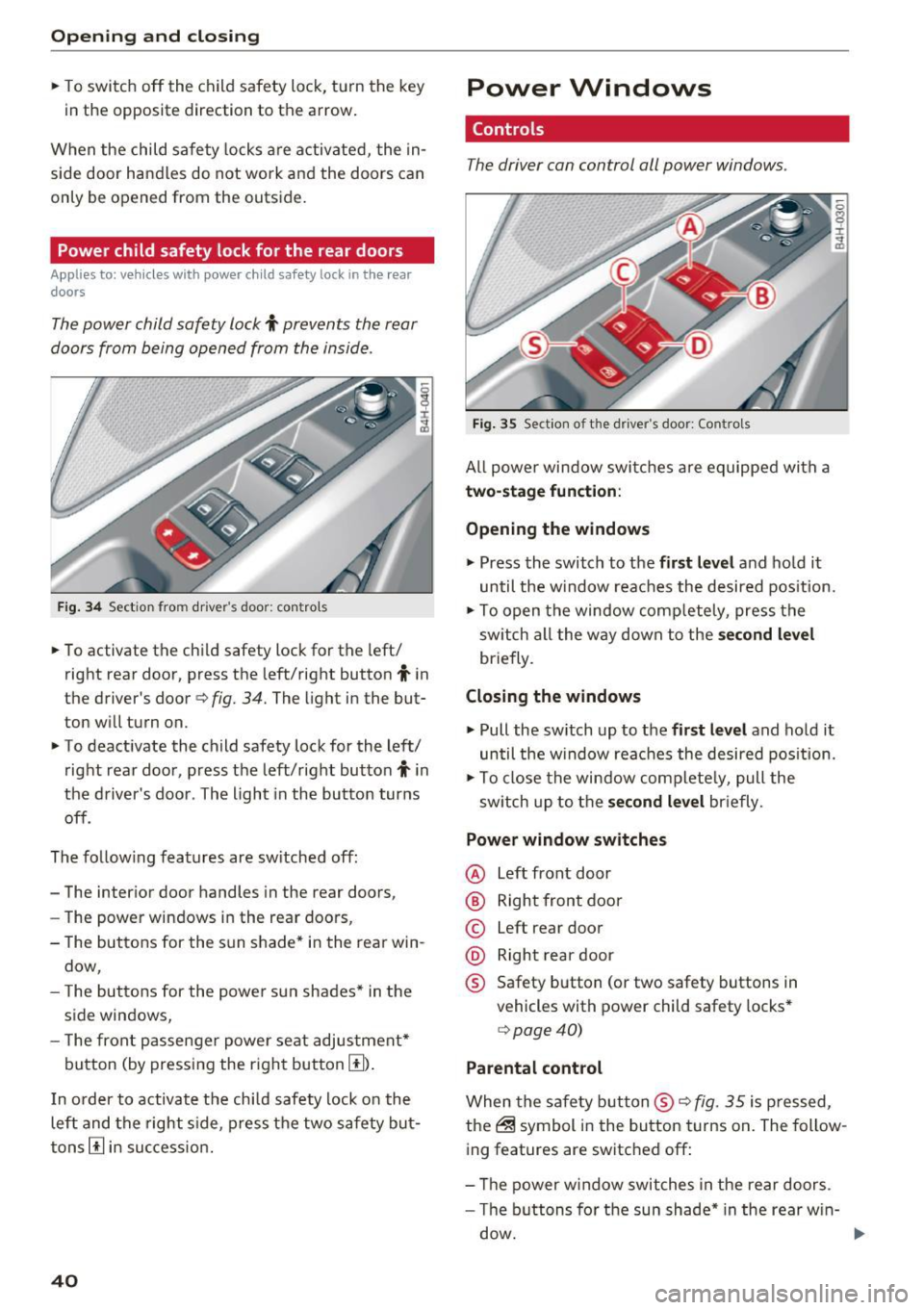
Fig . 34 Sect ion from drive r's doo r: contro ls
• To activate the child safety lock for the left/
right rear door, press the left/right button
i in
the driver's door
Q fig. 34. The light in the but
ton will turn on.
• To deactivate the child safety lock for the left/
right rear door, press the left/right button
i in
the driver's door . The light in the button turns
off.
The fo llow ing features are sw itched off:
- The interior door handles in the rear doors,
- The power windows in the rear doors,
- The buttons for the sun shade* in the rear win-
dow,
- The buttons for the power sun shades* in the
side windows,
- The front passenger powe r seat adjustment*
button (by pressing the right button
[I) .
In order to activate the ch ild safety lock on the
left and the right s ide, press the two safety but
tons
[I in success ion.
40
Power Windows
Controls
The driver can control all power windows.
Fig. 35 Section of t he driver 's doo r: Contro ls
All power window switches are equipped with a
two-stage function :
Opening the windows
• Press the switch to the first level and hold it
until the w indow reaches the desired pos ition.
• To open the window comp letely, press the
sw itch all the way down to the
second level
briefly.
Closing the windows
• Pull the sw itch up to the first level and hold it
until the window reaches the desired position.
• To close the window complete ly, pull the
sw itch up to the
second level briefly.
Power window switches
@ Left front door
@ Right front door
© Left rear door
@ Right rear door
® Safety button (or two safety buttons in
vehicles with power child safety locks*
Q page40)
Parental control
When the safety button ® Q fig. 35 is pressed,
the@ symbol in the button turns on. The follow
ing features are switched off:
- Th e power window switches in the rear doors .
- The buttons for the sun shade* in the rear w in-
dow.
Page 43 of 302

-The buttons for the power sun shades * in the
side windows.
- The button for the front passenger's seat ad
justment*.
A WARNING 1=
- Always take the vehicle key with you when
leaving the vehicle, even for a short period
of time. This applies particularly when chil
dren rema in in the vehicle . Otherwise the
children could start the engine or operate
electrical equipment such as power win
dows. The power windows a re functional un
ti l the driver's door or passenge r's door has
been opened.
- Pay ca reful attention when closing the win
dows.
It could cause injury by pinching.
- When locking the veh icle from outside, the
vehicle must be unoccupied since the win dows can no longer be opened in an emer
gency.
@ Tips
- Using the switches © and @, the driver can
also operate the power sunshades* in the
side windows.
- After tu rning the ignition off you can st ill
open and close the w indows for app roxi
ma tely 10 minutes. The powe r windows are
not switched off until the driver's door or
passenger's door has been opened.
What to do after a malfunction
-
The one -touch open and close function must be
reactivated if the battery has been disconnected .
.,. Pull and hold the power w indow switch unt il
the window is fully closed.
.,. Release the switch and then pull it again for at
least one second.
Openin g an d clos ing
Valet parking
The valet parking feature protects the luggage
compartment from unauthorized access.
Fig. 36 Valet parking button
With "valet parking" act ivated, the luggage com
partment lid cannot be opened .
.,. Remove the mechanical key
c::> page 31.
.,. Open the glove compartment and activate
c::> fig. 36 the "valet parking" feature by press
ing the
!VA LE T I button. The indicator light in
the switch illumina tes.
.,. Close the glove compartment and lock it with
the mechanical key.
.,. Leave the master key with the service personnel
for parking and keep the mechanical key with
you .
When the "valet parking" feature is activated:
- the unlocking button fo r the luggage compart
ment lid~ in the driver's door is inactive
- the button~ on the master key is inactive
- the opening handle in the luggage compart-
ment lid is inactive.
The vehicle can be driven and locked and un
locked with the master key . Access to the lug
gage compartment is b locked.
When the valet parking function is switched on,
the message
V ale t p arki ng activat ed appears in
the instrument cluster d isp lay when you switch
the ignition on.
4 1
Page 50 of 302
Lights and Vision
Autom atic headli ghts
You can adjust the follow ing settings in the Au
tomatic headlight s
menu:
Headlights activation time -You can adjust if the
headligh ts switch on
Early , M ed . or Late accord
i n g to the sensitivity of the light se nsor.
Audi adaptive light * -You can switch adaptive
light
On and Off .
Autom atic high beams *
You can switch the high beam ass ist on and off .
Daytime running lights
USA models:
You can switch the daytime r unning
lights
on and off .
Canada m odels:
The function ca nnot be tu rned
off.
It is activ ated au tomatically each time the ig
n ition is switched on . This menu item is shown
"greyed out" .
Coming home, Leaving home
The com ing home func tion illum ina tes the area
ou tside the ve hicle when yo u sw itch the igni tion
off and ope n the driver's door . To tu rn the f unc
t ion on, select
Lights when leaving car > On .
The leav ing home function illuminates the area
ou tside the ve hicl e when yo u un lock the vehicle .
T o tur n the function on, select
Lights when un
locking car > On.
The com ing home and le aving home f unctions
only operate w hen it is dark and the lig ht sw itch
is in t he
AUTO position.
48
Turn signal and high beam lever
The lever on the left side of the steering column
is used to operate the turn signals and the high
beam as well as the headlight flasher .
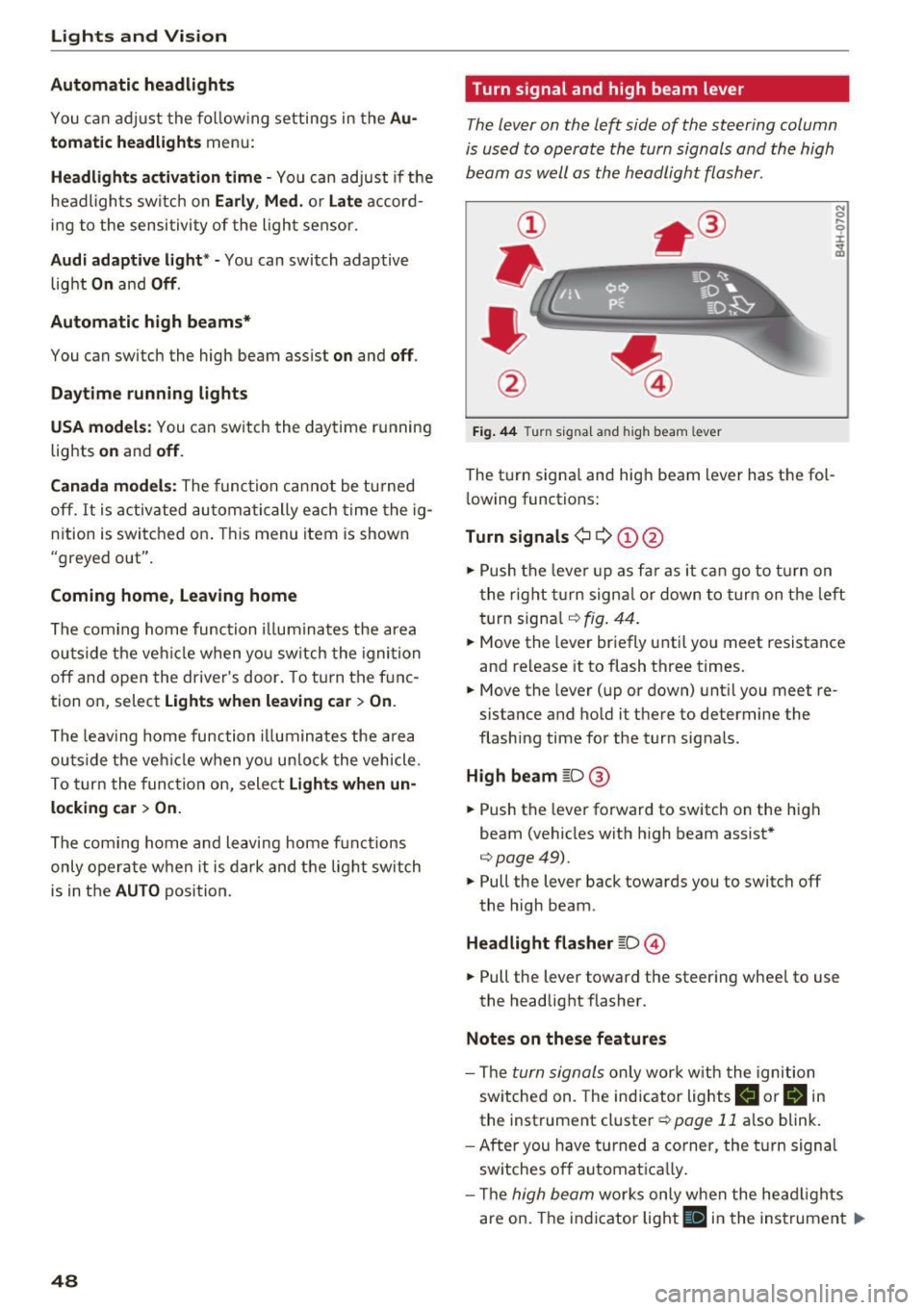
Fig. 44 T urn signa l an d hi gh beam lev er
The turn signa l and hig h beam lever has the fol
l owing functions:
Turn signals¢ Q ©@
N 0
9 :I:
~
.,. Push the leve r up as f ar as it ca n go to t urn on
t he rig ht tu rn signa l or down to tur n on t he left
turn signa l
r:!>fig. 44 .
.,. Move th e lever br ie fly u ntil yo u meet r esistance
and release it to flash three times.
.,. Move the lever (up or down) unt il y ou meet re
sistance and ho ld it there to determine the
flashing time for the turn sig nals .
High beam gD@
.,. Push the lever fo rward to sw itch on the high
beam (vehicles wit h high beam assist*
r:!> page49).
.,. Pull the lever back towards you to switch off
the high beam .
Headlight fla sher gD ©
.,. Pull the lever toward the steering whee l to use
the headlight flasher.
Notes on these features
- The turn signals on ly wor k w it h the ignition
sw itc hed on. The ind icator lights
II or H in
the instrument cluster ¢ page 11 also blink.
- After you h ave t urned a corner, the turn signa l
sw itches o ff automat ica lly.
- Th e
high beam works only when the head ligh ts
are on. The ind icator light
Bl in the instrumen t Iii>