lock AUDI A8 2016 Owner's Manual
[x] Cancel search | Manufacturer: AUDI, Model Year: 2016, Model line: A8, Model: AUDI A8 2016Pages: 302, PDF Size: 75.68 MB
Page 51 of 302

.... N
cluster illuminates when the high beams are
on.
- The
headlight flash er works only as long as you
hold the lever -even if there are no lights
turned on. The indicator light
& in the instru
ment cluster illum inates when you use the
headlight flasher.
A WARNING
Do not use the high beam or headlight flasher
if you know that these could bl ind oncoming
traffic.
High beam assist
App lies to: vehicles with high beam assist
The high beam assist automatically switches the
high beams on or off, depending on the sur
roundings and traffic conditions.
Fig. 45 Turn s ignal and h igh bea m lever : Turning on and
off the high beam assist
Activating high beam assist g
,.._ 0 ± .,. a,
Requirement:
The light switch must be in the AU
TO pos ition, the low beam headlights must be on
and the high beam assist must be switched on in
the Infota inment ~
page 47 .
.. Press the lever forwards (Din order to activate
the high beam assist. The indicator light
II
turns on in the instrument cluster display and
the high beams switch on or off automatically.
T he ind icator light
B turns on if the high
beams were switched on.
Switching the high beams on/off manually
a Requirement: High beam ass ist is activated . J:
'SI: ....
If the high beams did not switch on/off automat
ica lly when expected, you may instead switch
them on/off manually:
.. To switch the high beams on manually, press
the lever forwards (D. The indicator light
II
turns on.
.. To switch the high beams off manually, pull the
lever backwards @. The high beam assist is de
activated.
Operating the headlight flasher
.. To operate the flashers while the high beam as
sist is active and the high beams are switched
off, pull the lever into position@. The high
beam ass ist will remain active.
Messages in the instrument cluster display
Headlight assist: System fault
Drive to your authorized Audi dealer immediate ly
to have the malfunction corrected. You can still
switch the high beams on or off manually .
Headlight assist: Unavailable . No camera view
The camera view is blocked, for example by a
sticker or debris.
The sensor is located between the interior rear
view m irror and the windshield. Therefore, do not
place any stickers in this area on the windshield .
Service setting
There is a different sensitivity setting for servic
ing. This setting can be activated by pressing and
ho lding the button on the interior rearview mir
ror for more than 18 seconds. The LED next to
the button blinks three times. If you have acci dentally selected th is service function, the origi
nal sens itiv ity will be automat ically restored the
next t ime you sw itch the ignition on.
A WARNING
High beam assist is only intended to assist
the driver. The driver is still responsible for
controlling the headlights and switching the
high beams on and off manua lly depending
on traffic, lighting and visibility conditions.
Fail ure to intervene manually may lead to r isk
Ill>-
49
Page 53 of 302
Adjusting the brightness
You can adj ust the brigh tness for the four zones
Front top , Front f ootwell , Rea r top and Rear
footwell
or for All area s at the same time.
Selecting a color profile
You can se lect from the Ivory , Polar and Rub y/
Polar
color profi les.
@ Tips
The settings are automatically stored and as
sig ned to the remo te control key that is in
use .
Instrument illumination
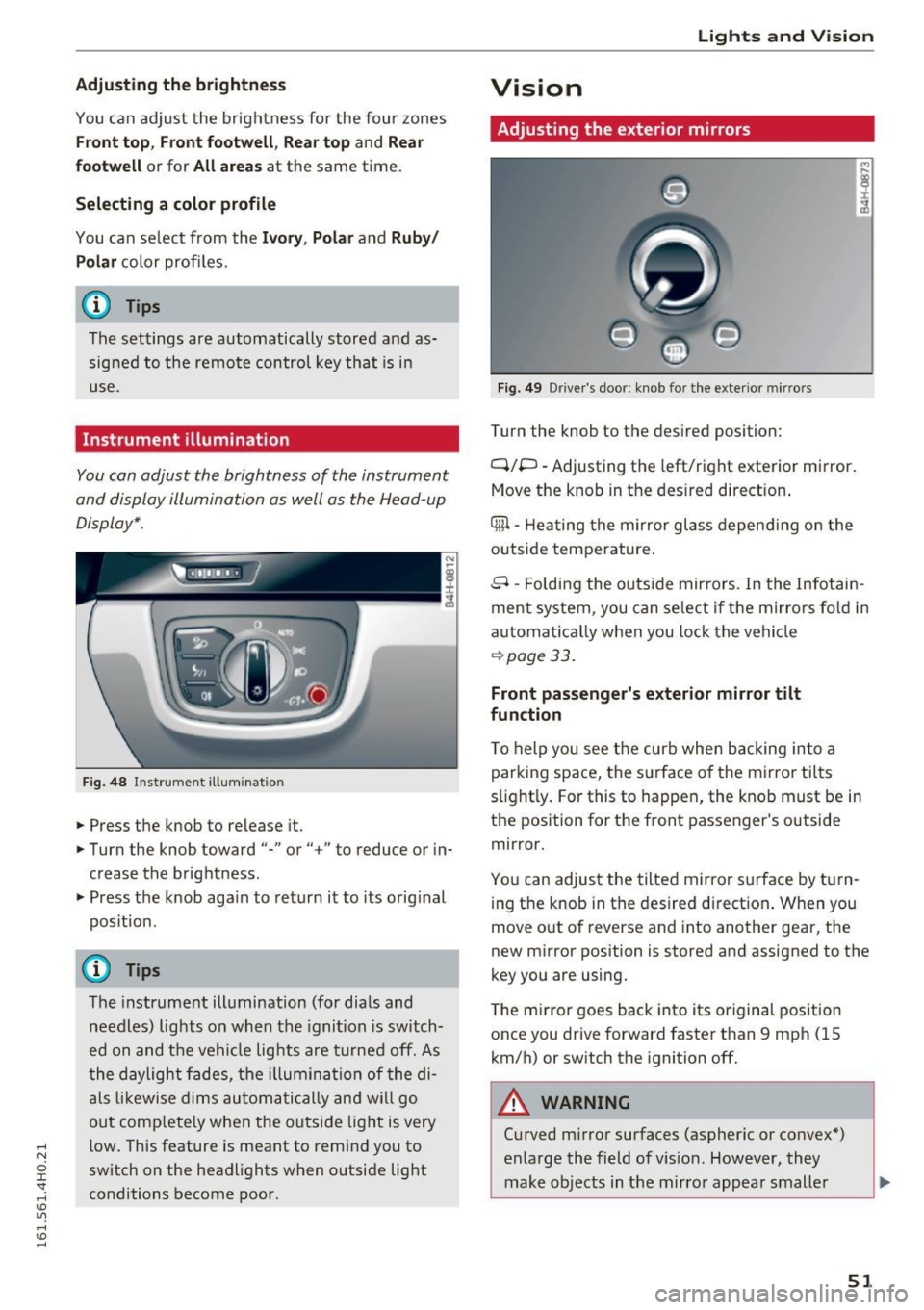
You can adjust the brightness of the instrument
and display illumination as well as the Head-up
Display* .
Fig . 4 8 Instr ument ill um ination
.. Press the knob to release it.
.. Turn the knob toward"-" or"+" to reduce or in
crease the brightness .
.. Press the knob aga in to return it to its orig inal
pos itio n.
(D Tips
The instrument ill umination (for dia ls and
needles) lights o n when the igni tion is switch
ed on and t he ve hicle lights are tu rned off. As
t he daylight fade s, the illum ina tion of the di
a ls likewi se dims au tom atic ally a nd w ill go
ou t comp lete ly when the outsi de light is very
low. This feature is meant to rem ind you to
sw itch on the head lights when o utside light
conditions become poor.
Lights and V ision
Vision
Adjusting the exterior mirrors
Fig. 4 9 Driver 's doo r: knob fo r the exte rio r mirr ors
Turn the knob to the des ired position:
Q/P -Adjusting the left/right e xterior mirror.
Move the knob in t he des ired direct ion .
Qill -Hea ting the mir ror glass depend ing o n the
outside tempe rature .
8 -Foldi ng the o utside mir ro rs . In the Infotai n
ment system , you can se le ct if t he m irro rs fo ld in
a utomat ically when you lock the vehi cle
~ page 33.
Front passenger 's exterior mirror tilt
function
T o help you see the curb when backing into a
parking space, the su rface o f the mirro r tilts
s li ght ly . For this to happen, the knob must be in
the position for the front passenger's outside
mirror .
Yo u can adjus t the tilted mir ro r sur face by turn
i ng the knob in the desired d irect ion . When you
move out of reverse and into another gea r, the
new m irror position is stored and assigned to the
key you are using.
T he m irror goes back into its or iginal pos ition
once you drive forward faster t han 9 mph (15
km/h) or sw itch the ignition off.
A WARNING
-Cu rved m irror surfaces (aspher ic or convex *)
enlarge the field of v is ion . However, they
make objects in the mirro r appea r small er
51
Page 57 of 302
..... N
0 J:
'SI: .....
the windshield wipers to chatter.
- Properly functioning windshield wiper
blades are required for a clear view and safe
driving
c=> page 55, Replacing windshield
wiper blades.
- In the case of frost, check whether the
windshield wiper blades are frozen to the
windshield. Switching on the windshield
wipers can damage the wiper blades!
- Prior to using a car wash, the windshield wiper system must be switched off (lever in
position @). This helps to prevent uninten
tional switching on and damage to the
windsh ield wiper system.
- Do not use the wipers to clear a frosted win dow . Using the wipers as a convenient ice
scraper will destroy the wiper blades.
@ Tips
- The windshield wipers are switched off
when the ignition is off. Activate the w ind
sh ield wipers afte r the ignit ion is switched
back on by moving the windshield wiper lev
er to any position.
- Worn or dirty windshield wipe r blades result
in streaking . This can affect the rain sensor
function. Check your windshield wipe r
blades regu larly .
- The washer fluid nozzles of the windshield
washer system are heated at low tempera
tures when the ignition is on.
- When stopping temporarily, e.g. at a traffic
light, the set speed of the windshield wipers
is automatically reduced by one speed.
Cleaning windshield wiper blades
Clean the windshield wiper blades when they be
gin to leave streaks. Use a soft cloth and glass
cleaner to clean the windshield wiper blades.
.,. Place the windshield wiper arms in the service
position. Refer to
c=> page 55.
.,. lift the wiper arm away from the front window .
Lights and Vision
A WARNING
Dirty windshield wiper blades can impair your
view. This can lead to accidents .
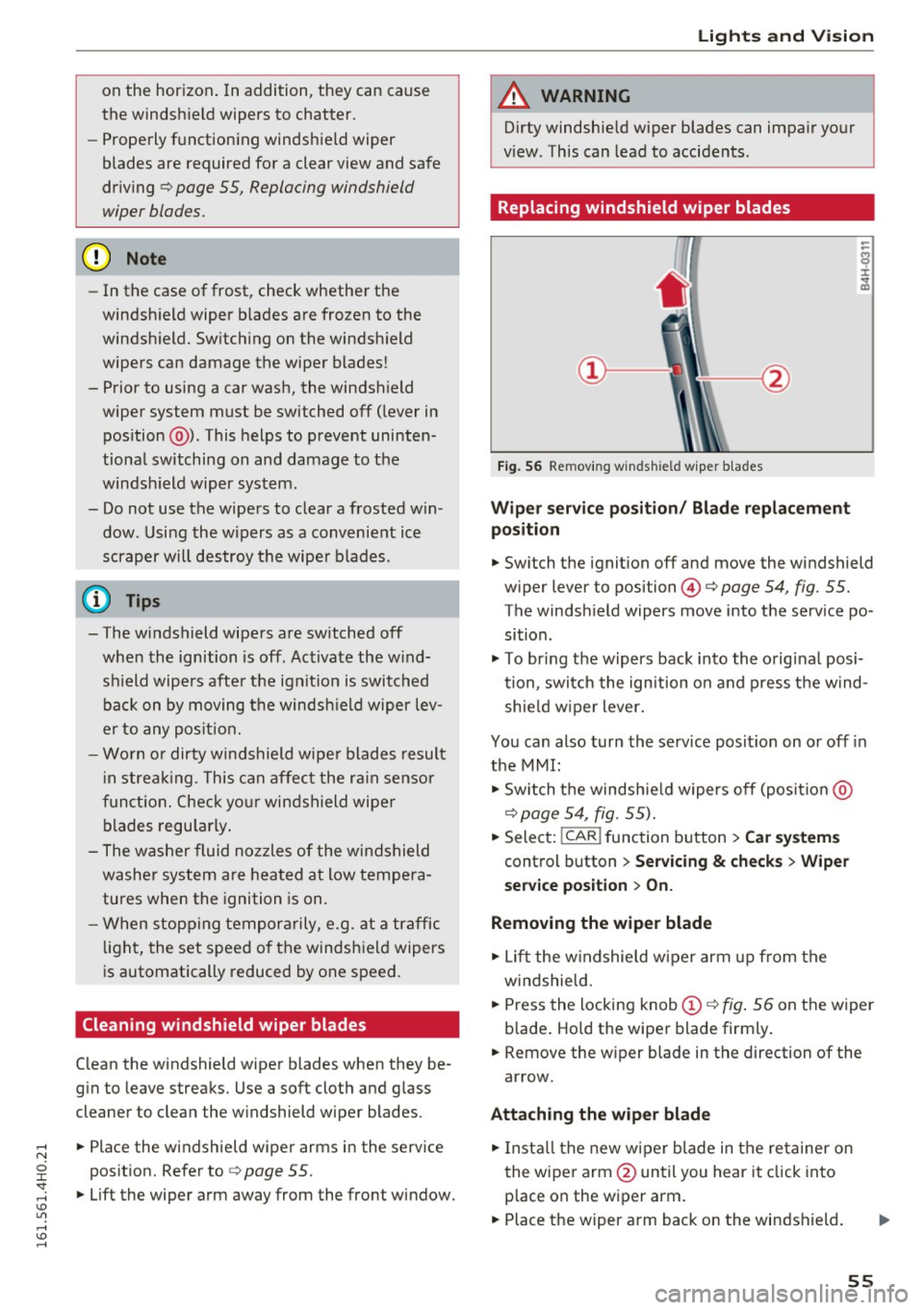
Replacing windshield wiper blades
Fig. 56 Remov ing w indsh ield wiper blades
Wiper service position/ Blade replacement
position
.,. Switch the ignition off and move the windshield
wiper lever to position@¢
page 54, fig. 55.
The windsh ield wipers move into the service po
sition .
.,. To bring the wipers back into the original posi
tion, switch the ignition on and press the wind
shie ld wiper lever.
You can also turn the service posit ion on or off in
the MMI:
.,. Switch the windshie ld wipers off (posit io n @
c=> page 54, fig. 55).
.,. Select: !CAR ! function button > Car systems
control button > Servicing & checks > Wiper
service position > On.
Removing the wiper blade
.,. Lift the windshie ld wiper arm up from the
w indshie ld .
.,. Press the locking knob
(D c=> fig. 56 on the wiper
b lade . Hold the wiper blade firmly .
.,. Remove the w iper blade in the direction of the
arrow.
Attaching the wiper blade
.,. Install the new wiper blade in the re tainer on
the wiper arm @until you hear it click into
p lace on the wiper arm .
.,. Place the wiper arm back on the windshield. ..,.
55
Page 65 of 302
-Vehicles with a pass through in the center
console have seating for four. The long cen
ter console between the two rear seats is
not a seating position . Therefore, a safety
belt is not provided .
- Applies to vehicles with reclining rear seat*:
- Do not use the front passenger's seat for
seating when it is in the reclining position.
This increases the risk of serious injury or
death .
- Never adjust the reclining position when
the front passenger 's seat is occupied .
This increases the risk of injury.
- Do not tilt the display if the driver's view
of the right exterior mirror will be ob
structed .
- Make sure the area between the leg sup
port and the front passenger's seat back
rest is clear before folding the leg support in so that you are not pinched.
(D Note
If a child seat is attached to one of the rear
seats, this seat must not be adjusted using
the power controls under any circumstances.
The easy entry function for this seat must also
be deactivated in the MMI
c:> page 64. The
child seat as well as the rear seat can be dam
aged by the adjustment process .
(!) Tips
The massage function switches off automati
cally after approximately
10 minutes .
- If you cannot move the front passenger seat
or the reclining rear seat, it may be because
- the front passenger's seat memory func
tion is switched off¢
page 66 or
- the child safety lock is switched on (the~
button ¢
page 40 or the right T button
c::> page 40 lights up in the driver's door),
or
- the front passenger seat adjustment is
switched off in the MMI
c:> page 64.
Seats and storage
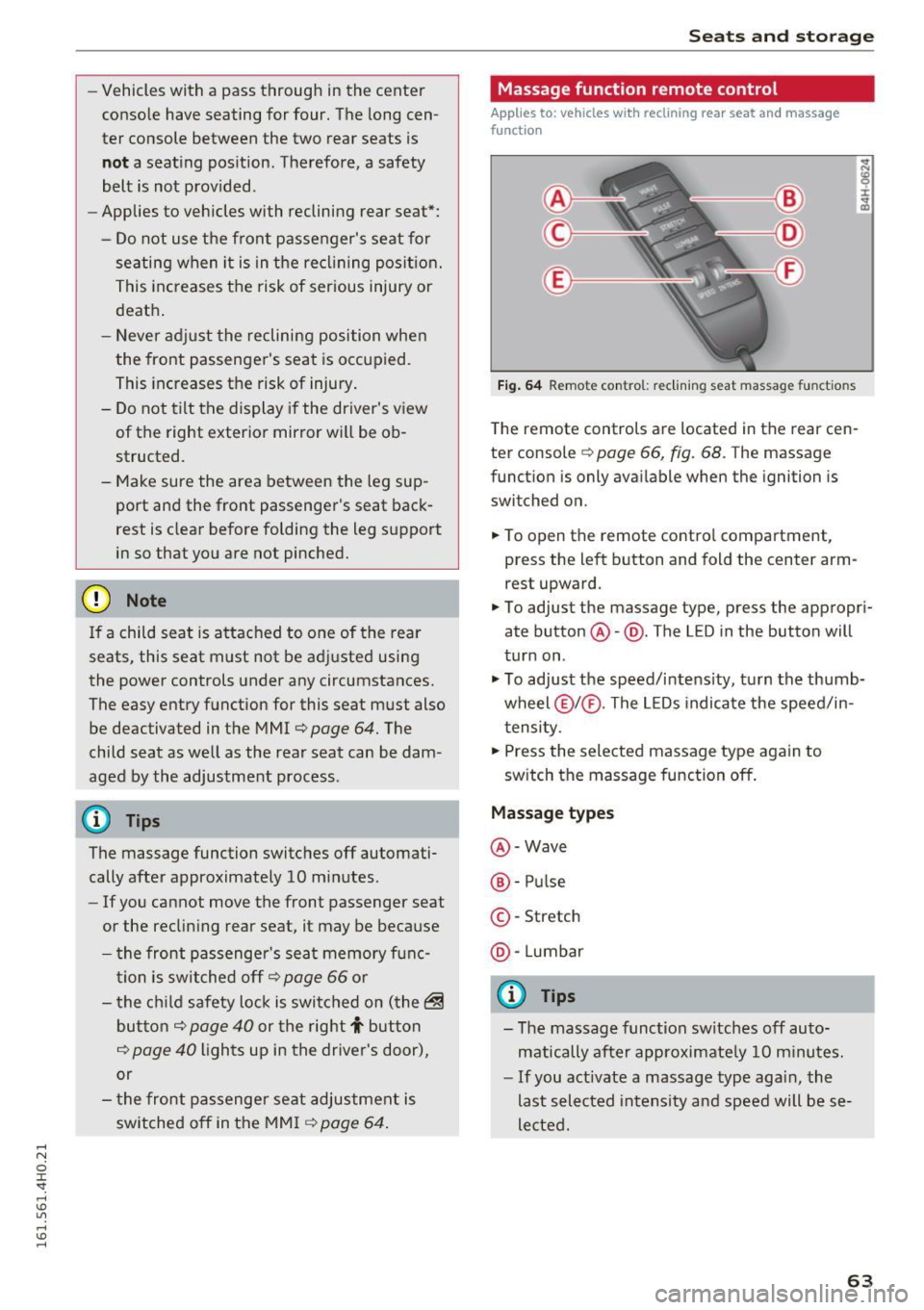
Massage function remote control
Applies to: vehicles with reclining rear seat and massage
functio n
Fig. 64 Remote con trol: re clining seat massag e functions
The remote controls are located in the rear cen
ter console
c::> page 66, fig. 68. T he massage
function is only available when the ignition is
switched on.
.,. To open the remote control compartment,
press the left button and fold the center arm rest upward.
.,. To adjust the massage type, press the appropri
ate button @-@ . The L ED in the button will
turn on .
.,. To adjust the speed/intensity, turn the thumb
wheel @I® . The LEDs indicate the speed/in
tensity.
.,. Press the selected massage type again to
switch the massage function off.
Massage types
@-Wave
®-Pulse
©-Stretch
@ -Lumbar
@ Tips
- The massage function switches off auto
matically after approximate ly
10 minutes.
- If you act ivate a massage type again, the
last selected intensity and speed will be se
lected.
63
Page 67 of 302
restraints that are not properly adjusted in
creases the risk of ser ious or fatal neck in
jury dramatically.
- Read and heed all WARNINGS
¢page 132,
Proper adjustment of head restraints.
- Vehicles with a pass through in the center
console have seating for four. The long cen
ter console between the two rear seats is
Memory function
Description
Applies to: vehicles with memory function
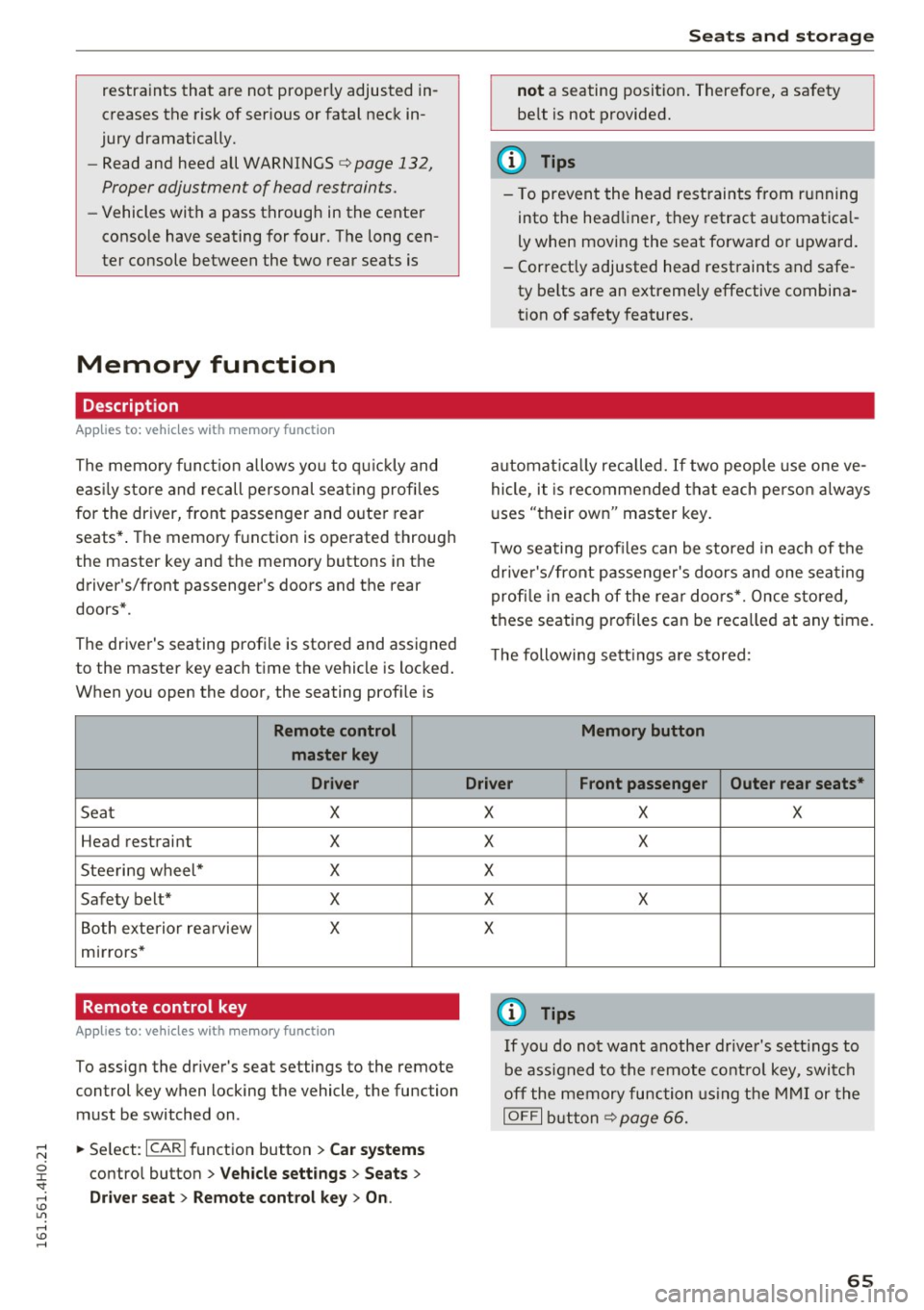
The memory functio n allows you to quickly and
eas ily store and recall personal seating profi les
for the driver, front passenger and outer rear
seats* . The memory function is operated through
the master key and the memory buttons in the
driver's/front passenger's doors and the rear
doors".
The driver's seating profi le is stored and assigned
to the master key each time the vehicle is locked.
When you open the door, the seating profile is
Remote control
master key
Driver
Seat X
Head restraint X
Steering wheel* X
Safety belt* X
Both exterior rea rview X
mirrors*
Remote control key
Applies to: veh icles with memory function
To assign the driver's seat settings to the remote
control key when locking the vehicle, the function
must be switched on .
~ Select: I CARI function button > Car systems
control button > Vehicle settings > Seats >
Driver seat > Remote control key > On .
Seats and storage
not a seating position. Therefore, a safety
be lt is not provided.
(D Tips
-To prevent the head restraints from running
into the headliner, they retract automatica l
ly when moving the seat forward or upward.
- Correctly adjusted head restraints and safe
ty be lts are an extremely effective combina
tion of safety features.
automat ically recalled. If two people use one ve
hicle, it is recommended that each person always
uses "their own" master key .
T wo seating profiles can be stored in eac h of the
drive r's/front passenger's doors and one seating
profi le in each of the rear doors*. Once stored,
these seating p rofiles can be reca lled at any time.
Th e following sett ings are stored:
Memory button
Driver Front passenger Outer rear seats*
X
X
X
X
X X
X
X
X
@ Tips
If you do not want another driver's settings to
be assigned to the remote control key, switch
off the memory function using the MMI or the
IOFF I button ¢p age 66.
65
Page 70 of 302
Sea ts and stor age
- Some equ ipment may work properly be
cause of the reduced power (wattage), avail
able from the socket .
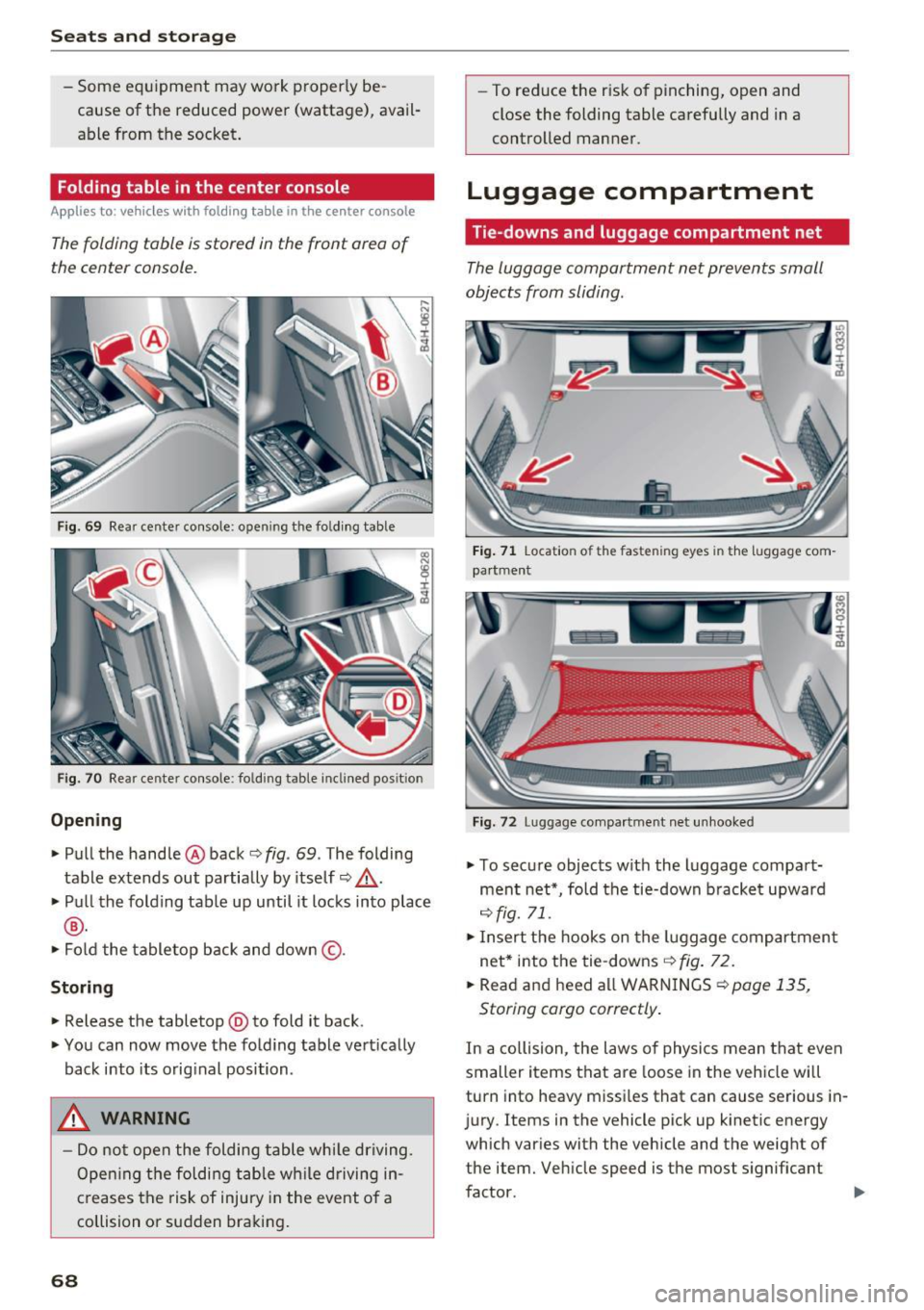
Folding table in the center console
App lies to: ve hicles w ith fol ding ta bl e in the ce nter console
The folding table is stored in the front area of
the center console.
F ig . 69 Rear center console: open ing the folding table
Fig . 70 Rear cente r co nsole: folding table inclined pos it ion
Opening
• Pull the hand le @ back c:> fig. 69 . The folding
table extends out partially by itself
c:> _& .
• Pull the folding table up until it locks into p lace
® ·
• Fold the tabletop back and down @ .
Storing
• Release the tabletop @to fold it back .
• You can now move the fo ld ing table vertica lly
back into its orig inal position.
_& WARNING
- Do not open the folding table whi le driving.
Ope ning the folding table wh ile driving in
creases the risk of injury in the event of a
collision or sudden braking.
68
- To reduce the r isk of pinching, open and
close the folding table carefully and in a
controlled manner.
Luggage compartment
Tie -downs and luggage compartment net
The luggage compartment net prevents small
objects from sliding .
Fig . 71 Location of t he fas ten ing eyes in the luggage com
pa rtment
F ig. 72 Luggage compartment net unhooked
• To secure objects w it h the l uggage compart
ment net*, fold the tie-down b racket upward
<=>fig. 71.
• Insert the hooks on the luggage compartment
net* into the tie -downs
c:> fig. 72.
• Read and heed a ll WARNINGS <=> page 135,
Storing cargo correctly .
In a collision, the laws of physics mean that even
smaller items that are loose in the vehicle will
turn into heavy missi les that can cause serious in
j ury . Items in the vehicle pick up k inetic energy
which var ies with the vehicle and the weight of
the item. Veh icle speed is the most s ignificant
fuctor .
~
Page 75 of 302
Storage
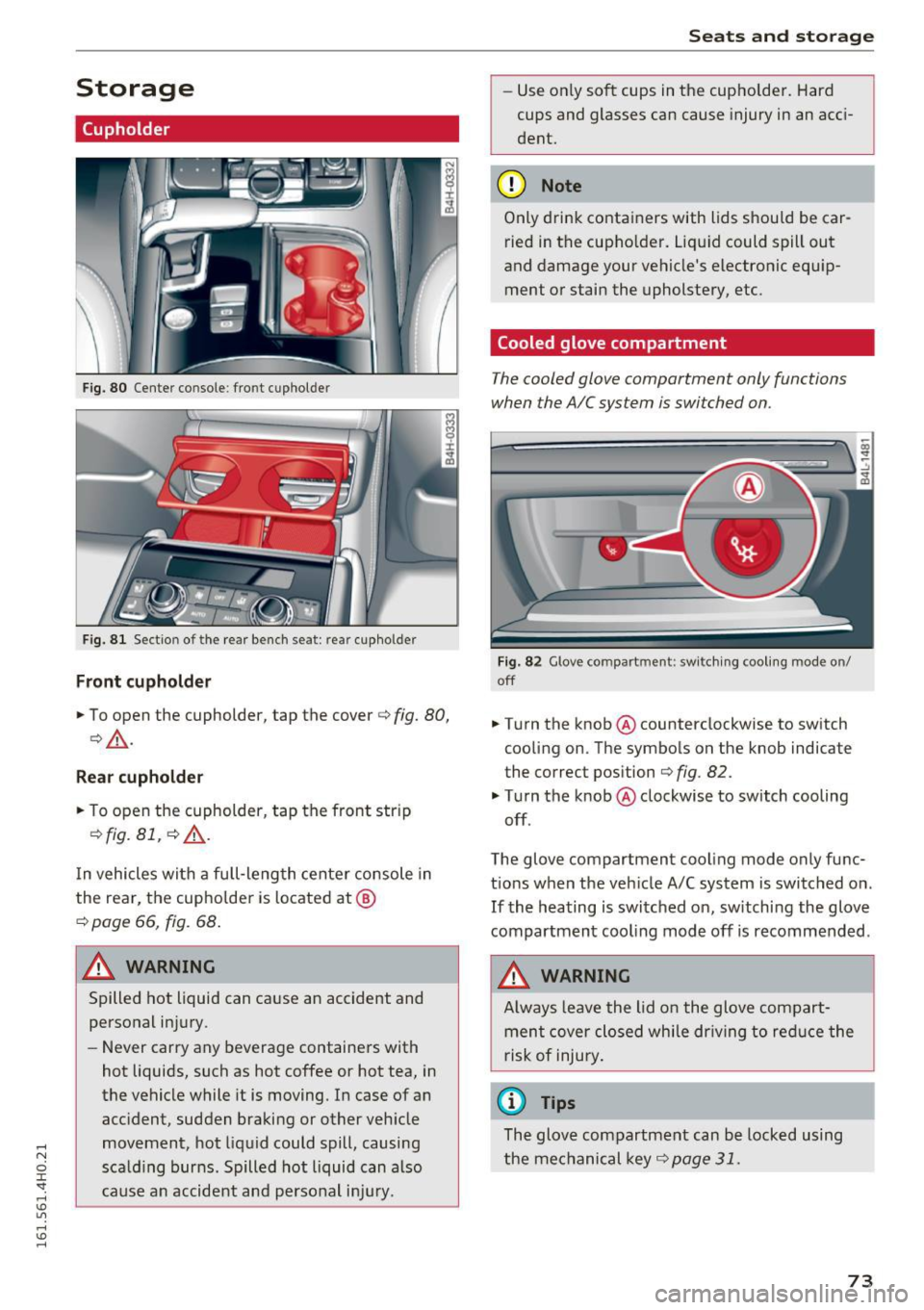
Cupholder
Fig. 80 Center console : fro nt c uphol der
F ig. 8 1 Sect io n of t he rear bench se at: r ear cupho lde r
Front cupholder
.,. To open the cupholder, tap the cover c:> fig. 80,
c:>& .
Rea r cupho lder
.,. To open the cupholder, tap the front strip
¢ fig. 81, c::> &.
In vehicles with a full-length center console in
the rear, the cupho lder is located at @
c:> page 66, fig. 68.
A WARNING
Spilled hot liquid can cause an accident and
personal in jury .
- Never carry any beverage containers with
hot liquids, such as hot coffee or hot tea, in
the vehicle while it is moving. In case of an
acc ident , sudden braking or other veh icle
movement, hot liquid could spill, causing
scald ing burns. Spilled hot liquid can also
cause an accident and perso nal i njury.
Seats and storag e
-Use on ly soft cups in the cupholder. Hard
cups and glasses can cause injury in an acc i
dent.
(D Note
Only drink containers with lids should be car
ried in the cupholder. Liq uid could spill out
and damage your vehicle's electronic equ ip
ment or stain the upholstery, etc .
Cooled glove compartment
The cooled glove compartment only functions
when the AIC system i s switched on.
Fig. 82 G love co mpart ment : swit ch ing coo ling mode o n/
off
.,. Turn the knob@ counterclockwise to switch
cooling on . The symbols on the knob indicate
the correct position
c:> fig. 82 .
"Turn the knob @ clockwise to switch cooling
off.
The glove compartment cooling mode only func
tions when the veh icle A/C system is switched o n.
If the heating is switched on, sw itchi ng the glove
compartment coo ling mode off is recommended .
A WARNING
-
Always leave the lid o n the glove compart
ment cover closed while dr iving to re duce the
r isk of injury .
(0 Tips
The glove compartment can be locked using
the mechanical key ¢
page 31.
73
Page 76 of 302
Seats and storage
Additional storage
There are a variety of storage compartments and
fasteners in various places in the vehicle.
- Storage compartments in the doors
- Net in the front passenger footwell
- Eyeglasses compartment in the headliner (near the rearview mirror)
- Storage compartments under the center armr
ests
- Compartments* on the back of the front seat
backrests
- Garment hooks over the rear doors
- Compartment in the center console with pass-
through)* (rear)
- Compartment behind the rear center armrest
(in vehicles without the pass-through* or cool
er*)
- Cell phone holder* in the right rear door
- Bag hooks in the luggage compartment
_& WARNING
-When driving, do not leave any hard objects
on the rear window shelf or allow your pet
to sit on the shelf. They could become a haz ard for vehicle occupants in the event of
sudden braking or a crash.
- Always remove objects from the instrument
panel. Any items not stored could slide
around inside the vehicle while driving or
when accelerating or when applying the
brakes or when driving around a corner.
- When you are driving make sure that any
thing you may have placed in the center con
sole or other storage locations cannot fall
out into the footwells. In case of sudden
braking you would not be able to brake or
accelerate.
- Any articles of clothing that you have hung
up must not interfere with the driver's view.
The coat hooks are designed only for light
weight clothing. Never hang any clothing
with hard, pointed or heavy objects in the
pockets on the coat hooks. During sudden
braking or in an accident -especially if the
airbag is deployed -these objects could in
jure any passengers inside the vehicle.
74
- To reduce the risk of personal injury in an
accident or sudden stop, always keep the
glove compartment closed while driving.
- Read and follow all WARNINGS
¢ page 164, Important safety instructions
on the side airbag system.
- Hang clothes in such a way that they do not
impair the driver's vision.
- The coat hooks must only be used for light
weight clothing. Do not leave any heavy or
sharp edged objects in the pockets which
may interfere with the side curtain airbag
deployment and can cause personal injury in
a crash.
- Do not use coat hangers for hanging cloth
ing on the coat hooks as this can interfere
with proper deployment of the side curtain
airbags in an accident.
- Do not hang heavy objects on the coat
hooks, as they could cause personal injury in
a sudden stop.
(D Note
Objects located on the rear shelf that rub
against the rear window could damage the
heating wires for the rear window defogger .
(D Tips
-A vent slot is located between the shelf and
the rear window. Do not block the vent with
any items you may place on the rear window
shelf .
'
-Do not place bulky items on the rear window
shelf as they could restrict or block the driv
er's vision in the rear view mirror.
Refrigerator
Introduction
Applies to: vehicles wit h cooler
Please clean the cooler before using it for the
first time ¢
table on page 208 .
You can only switch on the cooler if
- the temperature in the luggage compartment
is below 131 °F (5 5 °C). The cooler switches off
automatically if the temperature in the luggage .,._
Page 79 of 302
Warm and cold
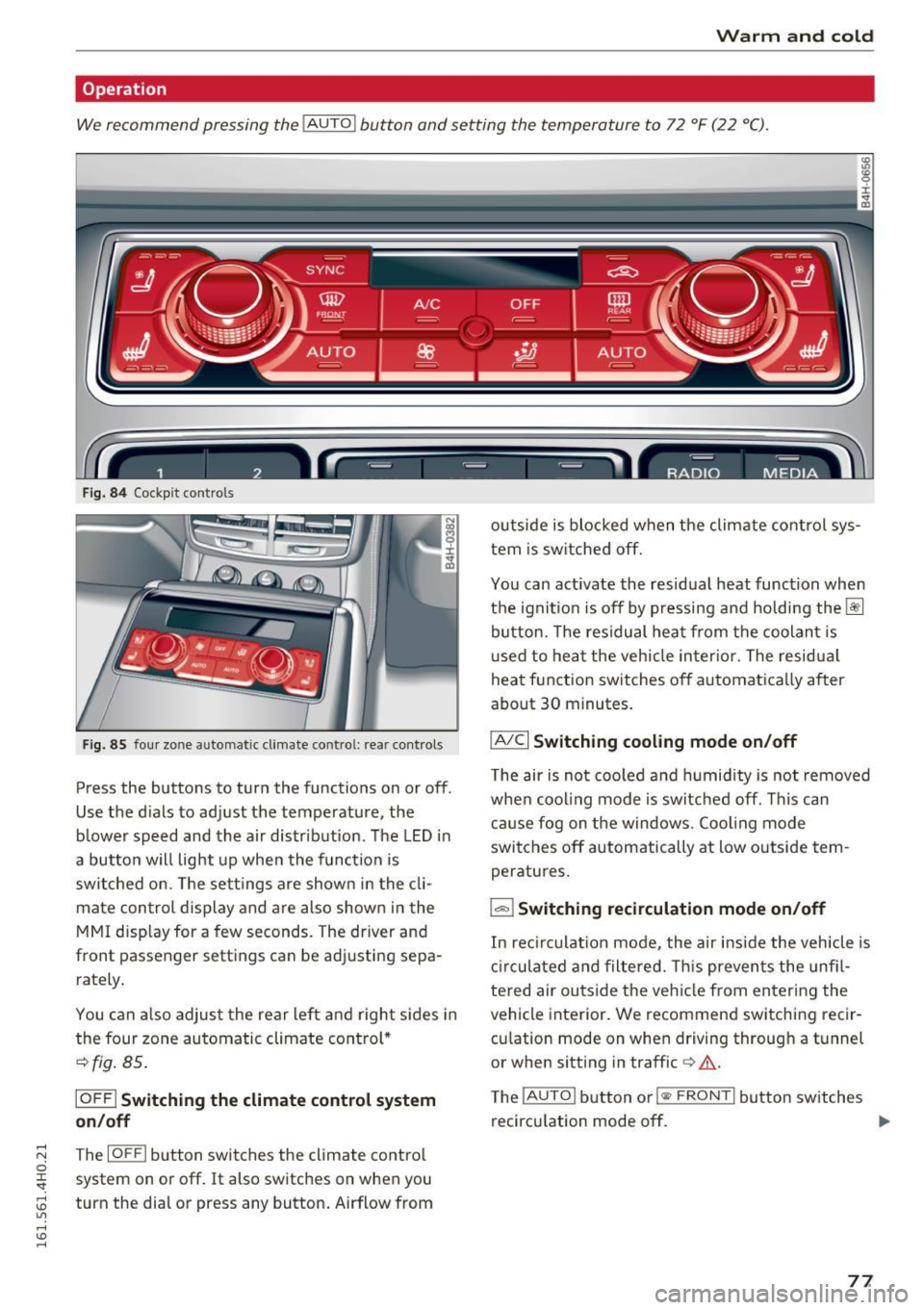
Operation
We recommend pressing the
! AUTO ! button and setting the temperature to 72 °F (22 °C).
Fig. 84 Cockpit con trols
Fig. 85 four zone automatic climate control: rear controls
Press the buttons to turn the functions on or off .
Use the dials to adjust the temperature, the
b lower speed and the air distr ibut ion. The LED in
a butto n will light up when the function is
switched on. The settings a re shown in the cli
mate con trol display and are also shown in the
MMI disp lay for a few seconds. The driver and
front passenger settings can be adj usting sepa
rately .
You can also adjus t the rear left and right sides in
the four zone automatic climate control*
¢fig. 85 .
IOFF I Switching the climate control system
on/off
~ The IOFFI button switches the climate control 0
~ system on or off. It also switches on when you
~ turn the dial or press any button. Airflow from U"I ,...., \!) ,....,
outside is blocked when the climate control sys
tem is switched off.
You can act ivate the residual heat function when
the ignit io n i s off by pressing and holding the~
button. The residual heat from the coolant is
u sed to heat the veh icle inter ior. The residua l
heat function switches off automatica lly after
about 30 minutes .
IA/Cl Switching cooling mode on/off
The air is not cooled and humidity is not removed
when cooling mode is switched off. This can
cause fog on the windows. Coo ling mode
switches off automatically at low outside tem
peratures.
1 .,.,,1 Switching recirculation mode on/off
In rec irculat ion mode, the air inside the vehicle is
circulated and filtered. This prevents the unfi l
tered air outside the vehicle from entering the
vehicle interior. We recommend switching recir
cu lation mode on when driving through a tunnel
or when sitting in traffic
c> &.
The !AUTO I button or I
recircu lation mode off. ..,.
77
Page 82 of 302
Driving
Driving
Steering
Adjusting steering wheel position
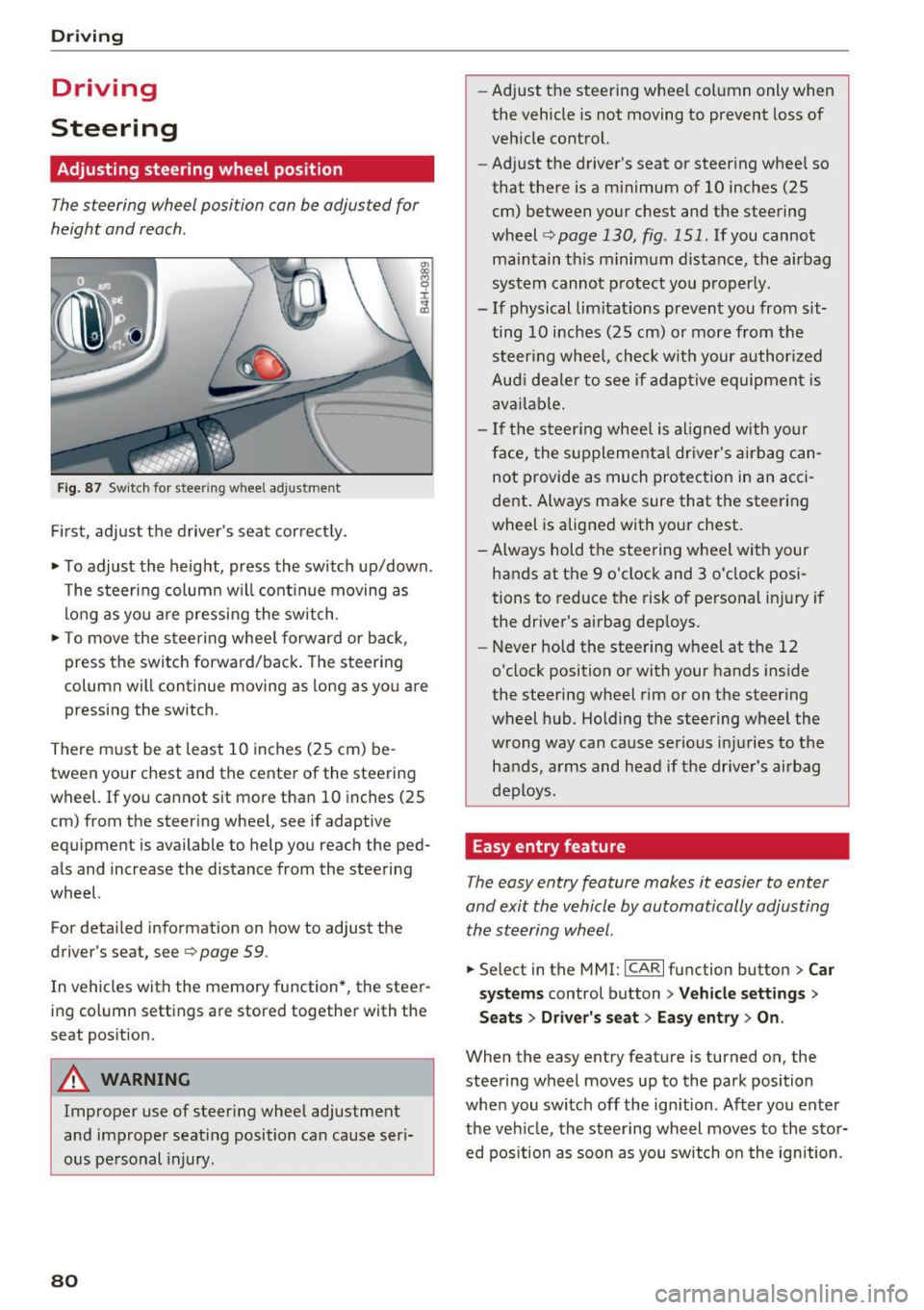
The steering wheel position can be adjusted for
height and reach .
Fig. 87 Sw it ch for steering wheel adjustme nt
Fi rst, adjust t he driver 's seat cor rect ly.
• To adjust the height, press the switch up/down.
The steer ing column w ill cont inue moving as
lo ng as yo u are pressing the sw itch .
• To move the steering whee l forward or back,
press the switch forward/back. The steering
column will continue moving as long as you are pressing the switch .
There m ust be at least 10 inches (25 cm) be
tween your chest and the center of the steering
wheel. If you cannot sit more than 10 inches (25
cm) from the steering whee l, see if adaptive
equipment is available to help you reach the ped
als and increase the distance from the steering
wheel.
For detai led information on how to adjust the
driver's seat, see
9 page 59 .
In vehicles with the memory function*, the steer
ing column settings are stored together with the
seat pos ition.
A WARNING
Improper use of steer ing whee l adjustment
and improper seating position can cause seri
ous personal injury.
80
-
- Ad just the steering wheel col umn only when
the vehicle is not moving to prevent loss of
vehicle control.
- Adjust the driver's seat or steering whee l so
that there is a minimum of 10 inches (25
cm) between your chest and the steering
wheel <=>
page 130, fig . 151. If you cannot
maintain th is minimum distance, the airbag
sys tem cannot p rotect yo u properly.
- If physical limitations prevent you from sit
ting 10 inches (25 cm) o r more from the
steer ing whee l, che ck wit h your author ized
Aud i dea le r to see if adap tive equipmen t is
ava ilable.
- If the steer ing whee l is aligned w ith yo ur
face, the s upplementa l dr iver's a irbag can
not provide as much protection in an acci
dent . Always make sure that the steering
wheel is alig ned with your chest.
- Always hold the steering wheel with your
hands at the 9 o'clock and 3 o'clock posi
tions to reduce the risk of personal in jury if
the dr iver's airbag dep loys.
- Never hold the stee ring wheel at the 12
o'clock position or with your hands inside
the steering wheel rim or on the steering
wheel hub . Holding the steering wheel the
wrong way can cause serious inj uries to the
hands, a rms and head if the drive r's airbag
deploys.
Easy entry feature
The easy entry feature makes it easier to enter
and exit the vehicle by automatically adjusting the ste ering wheel.
• Select in the MMI: ICAR lfu nction button> Car
s ys tems
control button > Vehicle settings >
Seats> Driver 's seat > Easy entr y> On.
When the easy entry feature is turned on, the
steering wheel moves up to the park position
whe n you switch off the ign ition . Af ter you enter
the veh icle, the steering wheel moves to the stor
ed pos ition as soon as you switch o n the ignition .