ECU AUDI A8 2017 User Guide
[x] Cancel search | Manufacturer: AUDI, Model Year: 2017, Model line: A8, Model: AUDI A8 2017Pages: 354, PDF Size: 88.68 MB
Page 91 of 354
C) C0 ....
"' " "' .... 0 0 :r
Gen eral information
Your Audi was designed primarily for passenger
transportation .
If you plan to tow a trailer, please remember that
the additional load will affect durability, econo
my and performance .
T ra iler towing not only p laces more stress on the
vehicle, it a lso calls for more concentration from
the driver.
For this reason, always follow the operating and
driving instr uctions provided and use common
sense.
(D Note
If you are going to tow a trailer, you must ac
tivate the tra iler operation mode
<=> page 89, Operating instructions.
Technical requirements
Tr ailer hitch
Use a weight-carrying hitch conforming to the
gross tra iler weight. The h itch must be suitab le
for your vehicle and tra iler and must be mounted
securely on the vehicle's chassis at a
technically
sound
location . Use on ly a trailer hitch with a re
movable ba ll mount . Always chec k w ith the t rail
er hitch manufac turer to make sure that you are
using the correct hitch .
Do not u se a bumper hitch .
The hitch must be installed in such a way that it
does not interfere with the impact -absorbing
bumper system . No mod ifications should be
made to the vehicle exhaust and b rake systems .
Fr om t ime to t ime, check that al l hitch mo un ting
bol ts rem ain securely fastened.
When you are not towing a trailer, remove the tra iler hi tch ba ll mount . This preven ts the hitch
from causing damage shou ld your vehicle be
struck from beh ind
C? _&. .
Tr ailer mod e
Trailer brakes
If your trai ler is equ ipped with a b raking system,
check to be sure that it conforms to a ll regu la
tions.
T he trai ler hydra ulic bra ke sys tem must not be
directly connected to the vehicle's hydra ulic
brake system.
Safety chains
Always use safety chains between your vehicle and the tra iler .
Tra iler lights
Trailer lights must meet all regulations. Be sure
to check w ith your Audi dealer for correct wir ing,
switches and relays .
Mirror s
If you are unable to see the traffic behind you us
ing the regular outside mirrors, then you
must in
stall extended mirrors . It is important that you
always have clear vision to the rear .
A WARNING ,~ -Afte r remov ing the tra ile r hitch, do not sto re
i t in you r vehicle. In case of sudden brak ing,
t he hitch could fly fo rward and inju re you or
your passengers.
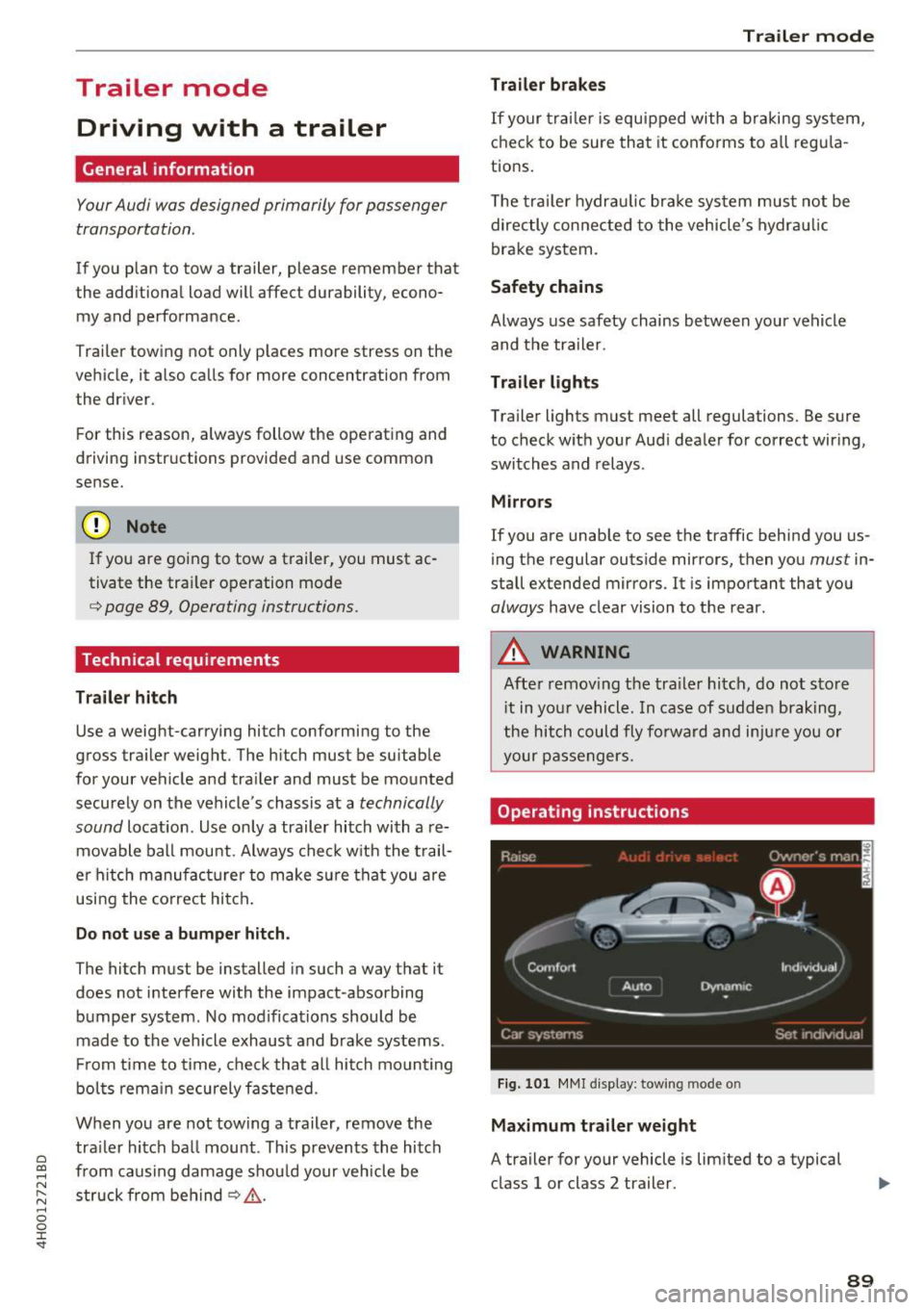
Operating instruction s
Fig. 10 1 M MI displ ay: towing mode o n
Maximum tra iler weight
A trailer for your vehicle is lim ited to a typical
class 1 or class 2 trailer.
89
Page 92 of 354

Trailer mode
Trailer load distribution
Be s ure the load in the trailer is held securely in
p lace to prevent it from shifting forward, back
ward or sideways .
Never allow a passenger to ride in a trailer¢.&.
in Driving instructions on page 91.
Engine cooling system
Towing a trailer makes the eng ine work harder . It
is important that the cooling system's perform
ance is up to the additional load. Make sure that
the cooling system has eno ugh fluid.
Tire pressure
When tow ing a tra iler, inflate the tires of your
veh icle to the tire pressure listed under "Full
load " on the label ¢
page 293 . Inflate trailer
tires to trailer and tir e manufacturers' specifica
tions.
Lights
Check to make sure both vehicle and trailer lights
are working properly .
Safety chains
Be sure trailer safety chains are properly connect
ed from the trailer to the hitch on the vehicle. Leave enough slack in the chains to permit turn
ing corners . When you install safety cha ins, make
sure they w ill not drag on the road when you are
driving.
The chains should cross under the trailer tongue to prevent it from dropping in case of separation
from the hitch.
Adjusting the Audi drive select
Make sure the vehicle is on a level surface before
hitching up the trailer and before adjust ing the
tongue weight. The vehicle must be in
auto or
comfort driving mode and not raised
o:,;, page 110, o:,;, 0 .
Make sure that the vehicle is lowered. In Info
tainment, select:
ICARI function button> Lower
control button.
90
If you must drive under poor road conditions, you
can raise the vehicle
after coupling the trailer or
after adjust ing the tongue we ight ¢ page 112.
([) Note
-Changes in temperature or load can affect
the height of the vehicle.
- Always select auto or comfort mode. Other
wise, the tongue load specified for your ve
hicle will no longer be app licab le .
Driving instructions
Driving with a trailer always requires extra care
and consideration.
Weight distribution
Towing a loaded trailer with an empty car results
i n a high ly unstable distribution of we ight . If this
cannot be avoided, drive at very low speeds only
to avoid t he risk of losing steering contro l.
A "balanced " rig is easier to operate and control.
This means that the tow vehicle should be loaded
to the extent possible and permissib le, wh ile
keeping the trailer as light as possible under the
circumstances. Whenever possible, transfer
some cargo to the luggage compartment of the
tow veh icle while observing tongue load require
ments and vehicle loading considerations.
Speed
The higher the speed, the more difficult it be
comes for the driver to control the rig . Do not
drive at the maximum permissible speed. Reduce
your speed even more if load, weather or wind cond it ions are unfavorable - particularly when
go ing downh ill.
Reduce vehicle speed
immediately if the trailer
shows the slightest sign of sway ing.
Do not try
to stop the swaying by accelerating.
Observe speed limits. In some areas, speeds for
vehicles towing trailers are lower than for regular
vehicles.
Always apply brakes early. When driving down
hill, shift into a lower gear to use the engine
braking effect to slow the vehicle. Use of the
brakes alone can cause them to overheat and fail. ..,.
Page 102 of 354
Ass is t
at a high speed and approaching an object that is
moving more slowly. The braking guard does not
react if it cannot detect the s ituation.
The sys tem advises you of various dangerous si t
uations :
- T he
distan ce warning occurs if you drive too
closely to t he object ahead for a long period of
time . If the ob je ct ahead b rakes strongly, you
would not be able to avoid a collis ion . The .
indicator light appears as an indication for this.
- T he
app roach wa rning occurs when an object
ahead is traveling more slow ly or brakes
strongly . When this warning occurs, it may on ly
be possib le to avoid a co llision by swerv ing or
braking strong ly. The danger is indicated by the
• indicator light
c> fig. 113. An audio signal
will also sound.
If you do not react early enough or at a ll to a dan
gerous situation, the braking guard supports you
with a brak ing intervention. The approach warn
ing indicators and the message
Braking guard :
e n gaged
also appear .
- If a collision is imminent, the system will first
provide an
ac ute wa rni ng by braking sharply.
- If you do not react to the acute warning, the braking guard can increase the braking force
within the limits of the system. This reduces
the vehicle speed in the event of a co llision.
- The system can init iate comp lete deceleration
sho rtly before a collision
ll . Full decele ration at
high speeds occurs only in vehicles with adap
tive cru ise cont rol and s ide assist (pre sense
pl us).
- If the braking guard determines that you are
not brak ing strongly enough when there is an
impending co llision, it can increase the bra king
f o rce .
- T he pre se nse functions also engage when
the re is an impend ing collision
c:> page 216.
Which functions can be controll ed ?
You can switch the braking guard and the dis
tance/approach warn ing on or off in the lnfotain-
l ) Ma rket -spe cific
100
ment system c:> page 101, Settings in the Info
tainment system.
A WARNING
Lack of attent ion can cause collisions, other
accidents and ser ious personal inju ries. The
braking guard is an assist system and cannot
p revent a collision by itself . The driver must
a lways inte rvene . The driver is always respon
sib le for braking at the co rrect t ime .
- Always pay close attention to traffic, even when the b raking guard is sw itched on. Be
ready to intervene and be ready to take
comp lete contro l whenever ne cessa ry . Al
ways keep the sa fe and legal dist ance be
t ween your vehi cle and veh icles up ahead .
- Br ak ing g uard works w ithin limits and will
no t respond o utside the system limits, for
examp le when approaching a stopped vehi
cle or stationary obstacle (en d of a traffic
jam or vehicle that has broken down in traf
fic).
- Always remember that the radar sensor for
the brak ing g uard works only within def ined
detection and range limits that may prevent
the prope r detection o f other vehicles.
- The radar sensor 's function and range can
be reduced by rain, snow and heavy spray.
Moving vehicles up ahead may not be
promptly detected or may not be detected
at al l.
- Reflective surfaces including crash barr iers
or tunnel entrances may impair the function
of the radar sensor.
(D Tips
- You can cancel the braking with increas ing
force that is initiated by the system by bra k
ing yourself, by acce le ra ting not iceably or
by swerving.
- Keep in mind that braking gua rd can brake
unexpectedly. Always secure any cargo or
objects tha t you are transpo rting to redu ce
t h e risk of damage or injury.
Page 113 of 354
0 co .... N ,..... N .... 0 0 :c '
movements, the driver's braking and accelera
tion, and as the road surface, vehicle speed and load. A sporty setting is generally used in vehicles
with adaptive air suspension sport*.
The vehicle ground clearance depends on the
mode selected and the speed. When you are in
the auto or dynamic mode, the highway setting is
activated when you drive above 75 mph (120 km/
h) for more than 30 seconds. The ground clear
ance is increased automatically if the speed
drops below 44 mph (70 km/h) for more than 120 seconds .
Steering
The power steering adapts. Indirect steering that
moves easily as in comfort mode is especially
suited to long drives on a highway. The dynamic
mode provides sporty, direct steering .
Applies to: vehicles with dynamic steering
The steering ratio changes based on vehicle
speed in order to maintain optimum steering ef
fort for the driver at all times . This sets the steer
ing to be less sensitive at higher speeds in order
to provide improved vehicle control. At reduced
speeds, steering is more direct in order to keep
the steering effort as minimal as possible when
the driver is maneuvering the vehicle. At low and
average speeds, dynamic steering* additionally
provides more responsive steering performance.
Sport differential*
As a component of the all wheel drive system
(quattro)
~ page 130, the sport differential dis
tributes the driving power to the rear axle de
pending on the situation. The distribution of
power varies from balanced (comfort) to sporty
(dynamic) depending on the selected mode. The
goal is a high level of agility and ability to accel
erate on curves. The vehicle is very responsive to
steering .
Cornering light*
The cornering light adapts the high beams to the
direction of the curve depending on the speed.
The pivoting action and the lighting also adapt to
the mode .
Assist
Adaptive cruise control*
The behavior when accelerating can be adjusted
from comfortable to sporty, depending on the
drive select mode. Adaptive cruise control also
responds to the driving behavior of the vehicle
ahead in a more conservative or sporty manner.
Engine sound*
The engine sound adapts to the current mode
and can be subtle to sporty.
(D Note
- Make sure there is enough clearance above
and below the vehicle when parking. The
height of the vehicle can change once it is
parked due to temperature fluctuations,
changes to the load conditions and changes
to the driving modes, which can affect clear
ance.
- When transporting the vehicle on a car car
rier, train, ship or by other means, only tie
the vehicle down at the running surface of
the tires, which is the outer circumference.
Securing the vehicle at the axle compo
nents, suspension struts or towing eyes is
not permitted because the pressure in the
air suspension struts can change during
transport. The vehicle may not be secured
sufficiently if this happens.
@ Tips
- In some models, the maximum vehicle
speed can only be reached in the auto and
dynamic modes.
- The S selector lever position automatically
engages if the dynamic mode is selected.
- In vehicles that have dynamic steering*, op
erating noise is heard when starting or stop
ping the engine. This does not indicate a
problem.
111
Page 162 of 354
Audi connect
- Destination setup in your MMI using your
myAudi A cco unt ¢ page 167 or online map
v iew
¢ page 171.
-Traffic inf orm ation (Sir ius ): rece ive informa
tion about accidents, road construction and
other incidents
¢ page 175
Audi connect services on the phone
App lies to: ve hicles w ith Audi co nnect
The fo llow ing Audi connect services are currently
ava ilable :
- Storing contacts on your computer using your
m yAudi Acco unt and loading the contacts into
the MMI directory
¢ page 153
Wi-Fi hotspot
Appl ies to: ve hicles w ith Audi co nnect
You can use the MMI as a Wi-Fi hotspot to con
nect up to eight wireless devices to the Internet. While driving, restricted use of non-secured,
light, small wireless devices is only possible from the rear of the vehicle.
.,. Select: the (fa) button > Setting s control but-
ton
> W i-Fi setting s.
The follow ing settings can be modified in the Wi
Fi setting s
menu:
Wi-Fi acti ve
The MMI Wi -Fi hotspot is deactivated at the fac
tory. Your Wi-Fi hotspot must be activated and
visible to establish a connection between your ve h icle and your wireless device.
- Off : the MMI Wi-Fi hotspot is deactivated. An
Internet connection is not possib le.
- Vis ible : the MMI Wi-Fi hotspot is active and can
be used to connect to the Internet.
- In visi ble: the MMI Wi -Fi hotspot is active but
not visible to other devices. A connection can
not be established with a new w ireless device.
The Wi -Fi connection between your vehicle and
your wireless device ( laptop, cell phone) is en
crypted . To establish a connection, you must en
ter the following settings when setting up your
wire less device. You can change them if necessa
ry.
1 6 0 -
Netwo rk ID (SSID ):
name o f the Wi -Fi net
work .
-Enc ryption t ype : WEP, WPA or WPA2
- Pa ssword : depending on the encryp tion type, a
passwo rd may be generated in the MMI that is
used to encrypt the wireless connection. The
password can be changed . Be sure to se lect a
secure password. For the WEP encrypt ion type,
the password must be exactly 13 characters.
For the WPA or the WPA2 encrypt ion types, the
password must be at least
8 (maximum of 63)
characters .
-Apply sett ings : the modified settings are ap
plied to the MMI. You must then update the
changes in your mob ile w ireless device .
A WARNING
-As the d river, do not allow usage of the Wi
Fi hotspot to distract yo u from driv ing , as
this could increase the r isk of an accide nt.
- It is o nly safe to use laptops and similar mo
bi le devices when the veh icle is stationary
because, like a ll loose objects, they cou ld be
thrown around the inside of the vehicle in a
crash and cause serious injuries . Store these
types of devices securely while driving.
- Do not use any wire less devices on the front
seats within range of the airbags while dr iv
ing. Also read the warnings in the chapter
¢page 207.
(D Note
-Under some conditions, certain mobile devi
ces and ope rating systems may automati
cally sw itch from your vehicle's Wi-Fi hot
spot to the device's mobile data connection.
I n that event, standard text and data usage
rates would apply while the device's mobile
data connection is in use. Please refer to
doc umentation provided by your mobile de
vice's manufacture and your data car rier for
d etails, related te rms and pr iva cy sta te
ment .
- Yo u ar e responsib le for all precautions ta k
en for data pro te ct ion, anti-virus protection
and protection against loss of data on mo
bile devices that are used to access the In-
ternet through the Wi-Fi hotspot. ..,.
Page 163 of 354
C) C0 ....
"' " "' .... 0 0 :r
-In vehicles without Audi connect*, the use
of the Wi-Fi hotspot is only possible for the
Wi-Fi audio p layer*. A data connection to
the Internet cannot be established.
- A separate, paid mobile subscription may be
needed to use the Wi-Fi hotspot. You can
obtain more information from your cell
phone service provider .
- Depending on your cell phone plan, receiv
ing data packages through the Wi-Fi hot
spot may result in additional charges, par
ticularly when in another country. The use
of a flat rate data plan is highly recom
mended. You can obtain more information
from your cell pho ne service provider.
Configuring a data
connection
Applies to: vehicles with Audi connect
To use Audi connect services through a phone in
the vehicle, a data connection must be config
ured .
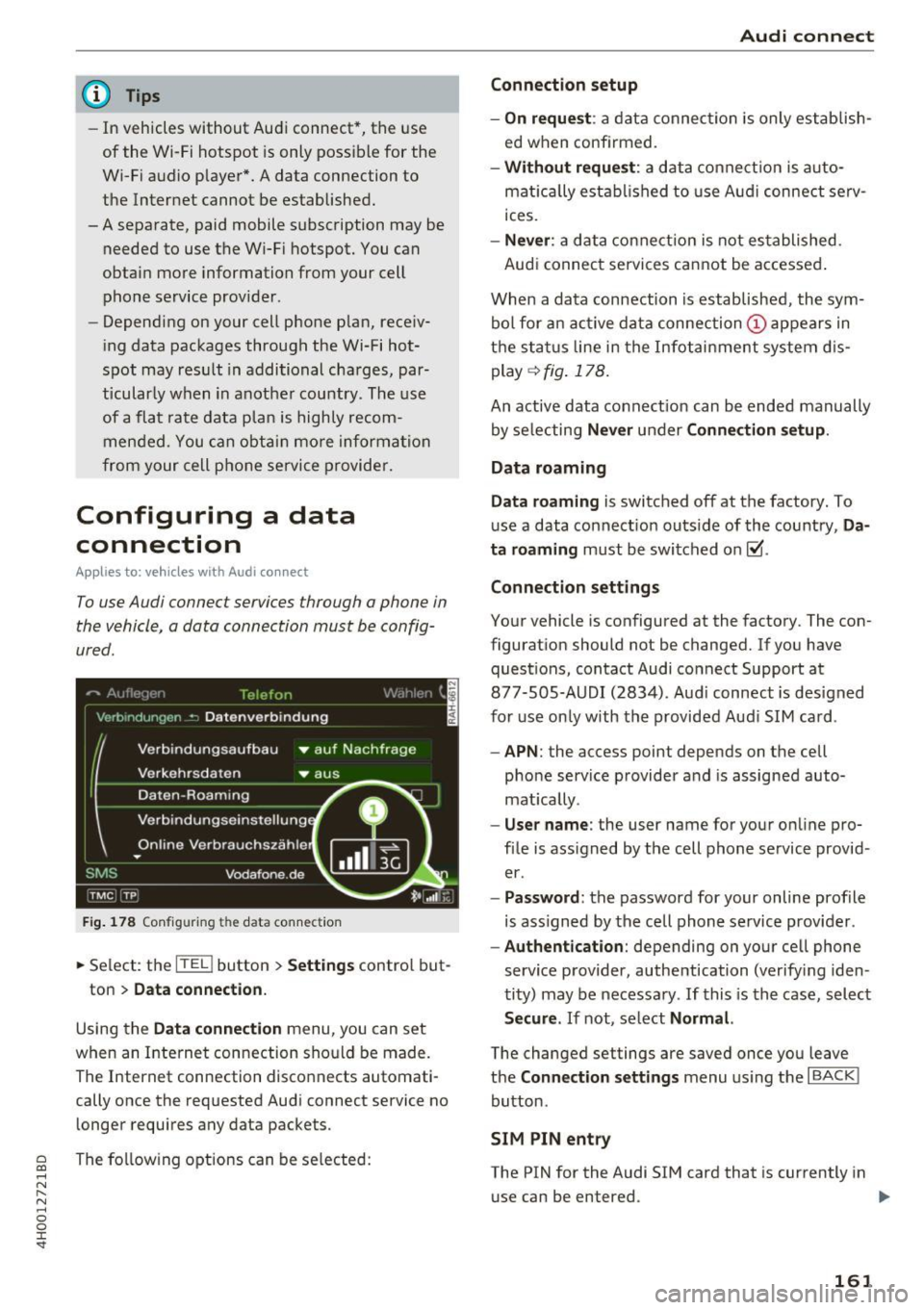
Fig. 178 Configu ring th e da ta conne ction
.,. Select : the [fa] button > Settings control but -
ton
> Data connection.
Using the Data connection menu, you can set
when an Internet connection should be made.
The Internet connection disconn ects automati
cally once the requested Audi connect service no longer requires any data packets .
The following options can be selected:
Audi connect
Connection setup
- On request :
a data connection is only establish
ed when confirmed.
- Without request: a data connection is auto
matically established to use Audi connect se rv
ices .
-Never : a data connection is not established .
Audi connect services cannot be accessed .
When a data connection is established, the sym
bol for an active data connection
(D appears in
the status line in the Infotainment system dis
play
<=> fig. 178.
An active data connect ion can be ended manually
by selecting
Never under Connection setup.
Data roaming
Data roaming
is switched off at the factory. To
use a data connection outs ide of the country,
Da
ta roaming
must be switched on~-
Connection settings
Your vehicle is configured at the factory. The con
figuration should not be changed. If you have quest ions, contact Audi connect Support at
877-505-AUDI (2834). Aud i connect is designed
for use only with the provided Audi SIM card .
-APN: the access point depends on the cell
phone service provider and is assigned auto
mat ically .
-User name : the user name for your on line pro
file is assigned by the cell phone service provid
er .
- Password : the password for your on line profile
is ass igned by the cell phone service provider .
-Authentication: depending on your cell phone
service provider, authentication (verifying iden
tity) may be necessary . If this is the case, select
Secure. If not, se lect Normal.
The changed settings are saved once you leave
the
Connection settings menu using the I BACK I
button.
SIM PIN entry
The PIN for the Audi SIM card that is cu rrently in
use can be entered . ..,.
161
Page 165 of 354
0 co .... N ,..._
N .... 0 0 :c '
and costs of services may vary depending on
the country, model, model year, end device
and rates. Additional information can be
found under
www.audiusa.com/audicon
nect.
- An initial registration/activation on the
myAudi platform at my.audiusa.com is nec
essary to use individual services. You can
contact an authorized Audi dealer or Audi
connect Support at 877-505-AUDI (2834)
to receive information on options for ex panding your usage and any costs that may
result.
- It is only possible to use Audi connect serv
ices with a valid Audi SIM card.
- To ensure all of the Audi connect features
work correctly , Audi recommends setting up
a data service and Wi-Fi package with your
cell phone service provider. Your cell phone
service provider can be authorized by law,
through a judicial order or other lawful in
structions, to disclose the position of your
vehicle. Additional information on your cell
phone service provider's privacy policies can
be found in their Terms of Use .
- The availability of Audi connect services,
such as weather information, depends on
the cell phone service provider .
- You can specify when the MMI establishes
an online connection
¢ page 161 . The Inter
net connection ends automatically when the
Audi connect service in use no longer re
quires any data packets.
- The Audi connect services are a Wi-Fi/Inter
net-based system.
If the system does not
function correctly even though all of the re
quirements are met, please try again later
or contact Audi connect Support at
877-505-AUDI (2834).
- For detailed information on Audi connect
and the Terms of Use, visit
www.audiusa.com/audiconnect.
Audi connect
Privacy protection
App lies to : vehicles wi th Audi connect
{I) Tips
- Your privacy is important to us.
- AUDI AG collects, processes, shares and
transmits your personal information in ac
cordance with legal regulations in order to
ensure proper function and availability of
the individual Audi connect services. You
can view the complete, current and valid
Audi connect data protection policy in your MMI. The my Audi website is available for to
you to activate additional Audi connect serv ices and to transfer data with your vehicle,
among other services. A one-time registra
tion is required to establish a connection to
your vehicle. For this purpose, AUDI AG col
lects, processes, transmits and uses your re
quired personal information as required for
you to use the services provided by AUDI
AG. Your information is not distributed to
third parties. Using your cell phone with the
help of your myAudi platform, you can
transfer information for Audi connect serv
ices functions to your vehicle and allow spe
cific information to be transmitted from
your vehicle .
- By activating special information services
that are part of your Audi connect portfolio,
you can use these functions directly in your
vehicle by entering data to confirm your
identity (to use social networks, for exam
ple). To do this, the identification informa
tion you provided is forwarded with the re
quest to the respective service provider .
Then you can access your personal content
using a secure connection. This content is
displayed in the vehicle for your use. Your
personal content is not stored within Audi
AG . The necessary connection information is
processed and used for providing services
and the proper function of the services in
accordance with applicable legal guidelines.
- By providing Audi connect services , Audi of
America is authorized to collect, process,
transmit and transfer information about
163
Page 182 of 354
Media drive s and conn ections
Media drives and
connections
Introduction
There are various media drives and connections
ava ilable in the MMI. For example, you can play
aud io/video* f iles through the Jukebox, or you
can connect a portable device to the Audi music i n terface* a nd ope rate it through the MM I.
Notes
General information
Med ia and format restrictions :
the MMI (includ
ing the SD card reader and the USB storage de
vice connect ion*) was tested w ith a var iety of
p roducts and media on the market . However ,
there may be cases where ind iv idual devices or
media and audio/video* files may not be recog
n iz ed, may play on ly w ith restrict ions or may no t
p lay at a ll.
The MM I media dr ives do not suppo rt Windows
Media Audio 9 Vo ice, Windows Media Audio 9
L oss less and Windows Media
9 Profess ional for
mats .
Digital Right s Managem ent : please note that
the audio/v ideo* files are subjec t to copyright
p rotection .
The med ia drives do not play f iles that are pro
tected by ORM and that are ident ified with the
symbo l~ -
Data s ecurity : Never store important data on the
memory cards, the Jukebox, CDs/DVDs or porta
b le aud io devices . A udi is not responsib le for
damaged or lost files and med ia.
Lo ad ing t imes : the more files/folders/playlists
that a re on a storage medium, the longer it w ill
take to load the audio/v ideo* fi les . Audi recom
mends using storage media that on ly conta in au
d io/video files*. To decrease the t ime it takes to
load audio/video fi les*, create subfo lders (for ex
ample, for the artist or album). The loading time
will also increase when importing files.
A dditional information : when playing, audio
fi les are automatically displayed with any addi-
180
tiona l information that is stored (such as the ar
tist, track and album cover) . If this information is
not avai lab le on the storage medium, the MMI
will check Gracenote . However, in some cases,
the addit ional information may not be d isplayed .
Restri cted functionalit y: if functionality is re
stricted, reset the
Media setting s to the factory
default settings
c> page 206.
Reset the Jukebox to the factory defau lt settings
if functiona lity is restricted
c> page 206.
Fo r information abo ut the propert ies of s upport
ed med ia and fi le formats, see
c> page 186 .
(D Note
Always fo llow the information found in c> (D in
Wi-Fi
hotspot on page 160.
CD/DVD operation
CD /DVD and fo rmat re striction s:
the functionali
ty of individua l storage media may be limited due
to the variety of b lank CDs/DVDs available and
the various capacities . Aud io CDs or video DVDs
with copy protection, CDs/DVDs that do not con
form to the standard and mult isess ion CDs may
have l imited playback or may not play at all. Audi
r ecommends finaliz ing the recording process
whe n creat ing mult isess io n CDs . Mult isess ion is
not supported for DVDs .
Handling CDs/DVDs and th e DV D dri ve: To en
sure good, h igh-quality sound reproduction and
to prevent damage to the dr ive or disc reading er
r ors, always store CDs/DVDs in a protective
s leeve and do not expose them to direct s unlight.
Do
not u se:
- Damaged, dirty or sc ratched CDs/DVDs
- Single CDs/DVDs (3 inch/8 cm diameter)
- CD/DVDs that are not round
- CDs/DVDs w ith labels
- Protective rings
- Clean ing CDs
Thermal protection switch : CD/DVD playback
may be tempora rily unavailable if o utside tem
peratures a re extremely hot or co ld. A thermal
Page 200 of 354
Rear Seat Entertainment
Labeling the wireless headphones
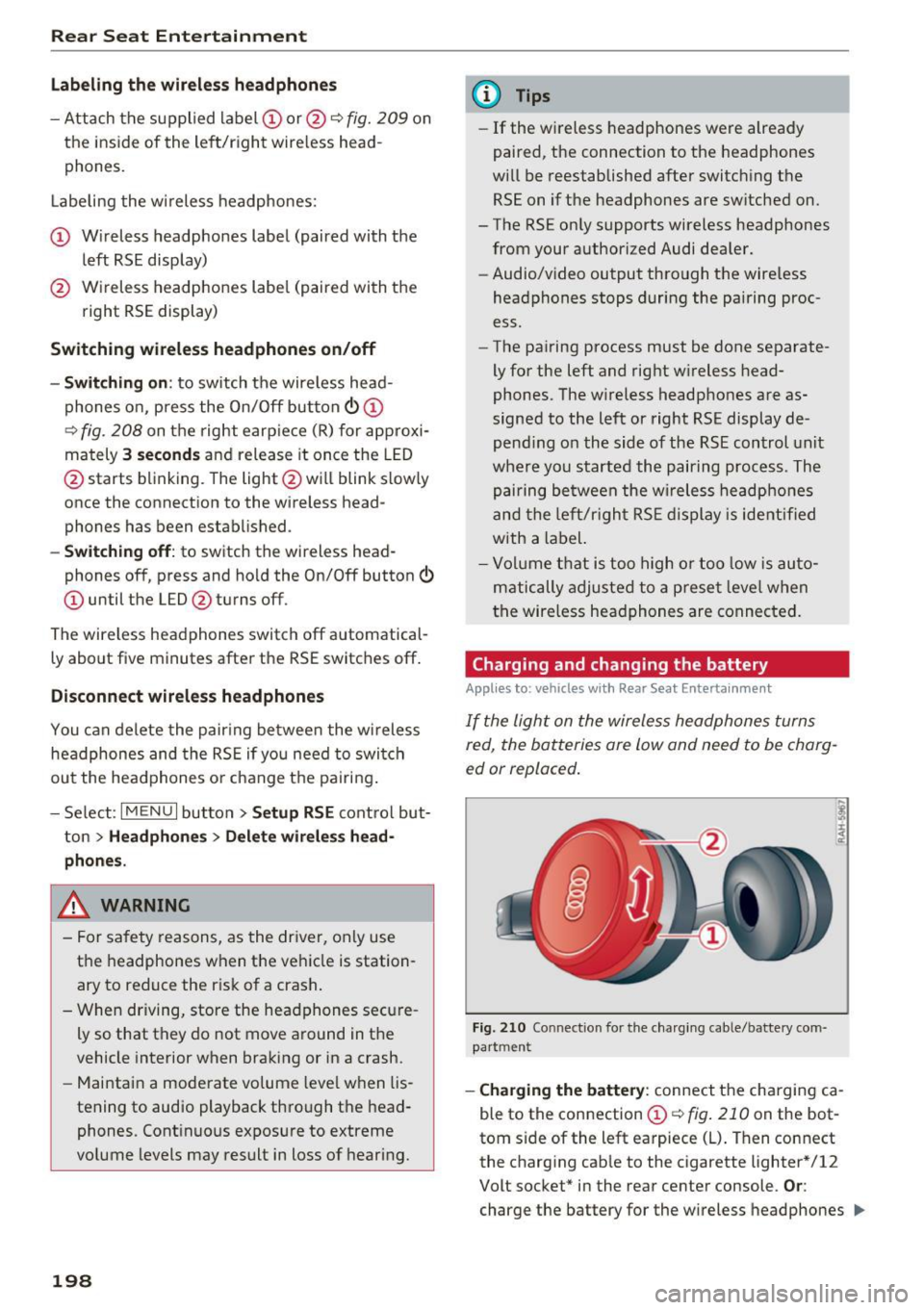
-Attach the supplied label CD or@ c::> fig. 209 on
the inside of the left/right wire less head
phones.
La beling the w ireless headphones:
CD Wireless headphones label (paired with the
left RSE display)
@ Wireless headphones label (paired with the
right RSE display)
Switching wireless headphones on/off
- Switching on:
to switch the wire less head
phones on, press the On/Off button
CD
9 fig. 208 on the right earpiece (R) for approxi
mately
3 seconds and release it once the LED
@ starts blinking . The light @will blink s lowly
once the connection to the wireless head phones has been established.
- Switching off : to switch the wireless head
phones off, press and hold the On/Off button
CD until the LED @turns off.
The wireless headphones switch off automatical ly about five minutes after the RSE switches off.
Disconnect wireless headphones
You can delete the pairing between the wireless
headphones and the RSE if yo u need to switch
out the headphones o r change the pairing .
- Select:
I M ENU I button> Setup RSE control but
ton
> Headphones > Delete wireless head
phones.
A WARNING
- For safety reasons, as the driver, only use
the headphones when the vehicle is station
ary to reduce the r isk of a crash .
- When driving, store the headphones secure
ly so that they do not move around in the
vehicle interior when braking or in a crash.
- Maintain a moderate volume leve l when lis
tening to audio playback through the head
phones. Continuous exposure to extreme
volume levels may result in loss of hearing.
198
-
@ Tips
-If the wire less headphones were already
paired, the connection to the headphones
will be reestablished after switching the
RSE on if the headphones are sw itched on.
- The RSE only supports wireless headphones
from your authorized Audi dealer.
- Audio/video output through the wire less
headphones stops during the pairing proc
ess.
- The pairing process must be done separate
ly for the left and right w ireless head
phones. The wireless headphones are as
signed to the left or right RSE display de
pend ing on the side of the RSE control unit
where you started the pairing process. The
pairing between the wireless headphones
and the lef t/r ight RSE display is ide ntifi ed
with a label.
- Volume that is too high or too low is auto
matically adjusted to a preset leve l when
the wireless headphones are connected.
Charging and changing the battery
Applies to: vehicles with Rear Seat Entertainment
If the light on the wireless headphones turns
red the batteries are low and need to be charg-
,
ed or replaced .
Fig. 210 Connec tion for the charg ing cable/battery com
partm ent
-Charging the battery : connect the charging ca
ble to the connection
CD c::> fig . 210 on the bot
tom side of the left earpiece (L) . Then connect
the charging cable to the cigarette lighter * /12
Volt socket* in the rear center console.
Or:
charge the battery for the wireless headphones .,.
Page 209 of 354
Driving safety
Basics
Safe driving habits
Please remember -safety first!
This chapter contains important information,
tips, instructions and warnings that you need to
read and observe for your own safety, the safety
of your passengers and others . We have summar
ized here what you need to know about safety
belts, airbags, child restraints as well as child
safety. Your safety is for us
priority number 1. Al
ways observe the information and warnings in
this section - for your own safety as well as that
of your passengers.
The information in this section applies to all
model versions of your vehicle. Some of the fea
tures descr ibed in this sections may be standard
equipment on some models, or may be optional
equipment on others. If you are not sure, ask
your authorized Audi dealer.
A WARNING
- Always make sure that you follow the in
structions and heed the WARNINGS in this
Manual. It is in your interest and in the in
terest of your passengers .
-
-Always keep the complete Owner's Litera
ture in your Audi when you lend or sell your
vehicle so that this important information
will always be available to the driver and
passengers.
- Always keep the Owner's literature handy so
that you can find it easily if you have ques
tions.
Safety equipment
The safety features are part of the occupant re
straint system and work together to help reduce the risk of injury in a wide variety of accident sit
uations.
~ Your safety and the safety of your passengers
~ should not be left to chance. Advances in tech-,..._
~ nology have made a var iety of features available 0
~ to help reduce the risk of injury in an accident. '
The following is a list of just a few of the safety
features in your Audi:
- sophisticated safety belts for driver and all pas-
senger seat ing pos itions,
- safety belt pretensioners,
- safety belt force limiters for the front seats,
- safety belt height adjustment systems for the
front seats,
- front airbags,
- knee airbags for the front seats
- side airbags in the front seats and outer rear
seats,
- side curtain airbags,
- special LATCH anchorages for child restraints,
- head restraints for each seating position,
- adjustable steering column.
These individual safety features, can work to gether as a system to help protect you and your
passengers in a w ide range of accidents . These
features cannot work as a system if they are not
always correctly adjusted and correctly used.
Safety is everybody's responsibility!
Important things to do before driving
Safety is everybody 's job! Vehicle and occupant
safety always depends on the informed and care
ful driver .
For your safety and the safety of your passen
gers,
before driving always:
.,. Make sure that all lights and signals are operat
ing correctly .
.,. Make sure that the tire pressure is correct.
.,. Make sure that all windows are clean and afford
good visibility to the outside .
.,. Secure all luggage and other items carefully
c:c.> page 65, c:c.> page 63 .
.,. Make sure that nothing can interfere with the
pedals.
.,. Adjust front seat, head restraint and mirrors
correctly for your height.
.,. Instruct passengers to adjust the head re
straints according to their height.
.,. Make sure to use the right child restraint cor
rectly to protect children
¢ page 248, Child
safety. ..,.
207