change time AUDI A8 2017 User Guide
[x] Cancel search | Manufacturer: AUDI, Model Year: 2017, Model line: A8, Model: AUDI A8 2017Pages: 354, PDF Size: 88.68 MB
Page 108 of 354
Ass is t
system may have detected a vehicle in another
lane that is not adjacent to your current lane.
- If you are driving through a curve. Side assist may react to a vehicle that is one lane over
from th e adjacent lane .
- If s ide assist reacts to other objects (such as
high or d isplaced guard ra ils).
- In poor weather condit ions. The side assist
functions are limited.
Do not cover the radar sensors <=>
fig. 121 with
stickers, deposits, bicycle wheels o r othe r ob
jects, beca use they wi ll impair the function. Do
not use side ass ist when towing a trailer. For in
formation on cleaning, see <=>
page 306.
A WARNING
-Always pay attention to traffic and to the
area around your vehicle. Side assist cannot
rep lace a driver's attention. The driver alone
is a lways responsible for lane changes and
similar d riving maneuvers .
- In some situat ions, the system may not
func tion or its funct ion may be limited . For
example :
- if vehicles are approaching or being left
behind very quickly. The display may not
turn on in t ime .
- In poor weather conditions such as heavy
rain, snow or heavy mist .
- On very wide lanes, in tight curves, or i f
there is a rise in the road surface. Vehicles
in the adjacent lane may not be detected
because they are outs ide of the sensor
range.
- Audi side ass ist cannot detect a ll vehicles
under a ll condit ions, which can increase the
risk of accidents.
- Please note that side assist only displays ap proaching vehicles or vehicles in your blind
spot if your vehicle is traveling at least
19 mph (30 km/h) .
- In certain situations, the system may not
work or its function may be limited. For ex
amp le:
- The display may not turn on at the rig ht
time if veh ides are approaching or passing
very q uick ly .
106
-
- In poor weather conditions, such as heavy
rain, snow or fog .
- In very wide lanes , in tight c urves or when
there are slopes in the roadway, vehicles
i n the ne ighboring lanes may not be de
tected because they a re outside of the
sensor range .
(D Note
The sensors can be d isplaced by impacts or
damage to the bumper, wheel housing and underbody. This can impair the system. Have
an authorized Audi dealer or author ized Audi
Service Fac ility check their f unct io n.
@ Tips
- If the w indow glass in the dr iver's door or
front passenge r's door has been tinted, the
display in t he exterior mirror may be incor
rect .
- For an explanat ion on co nfo rm ity w ith the
FCC regulations in the Un ited States and the
Indust ry Canada regulatio ns, see
~page 339.
Switching on/off
Applies to: vehicles wi th A ud i side assist
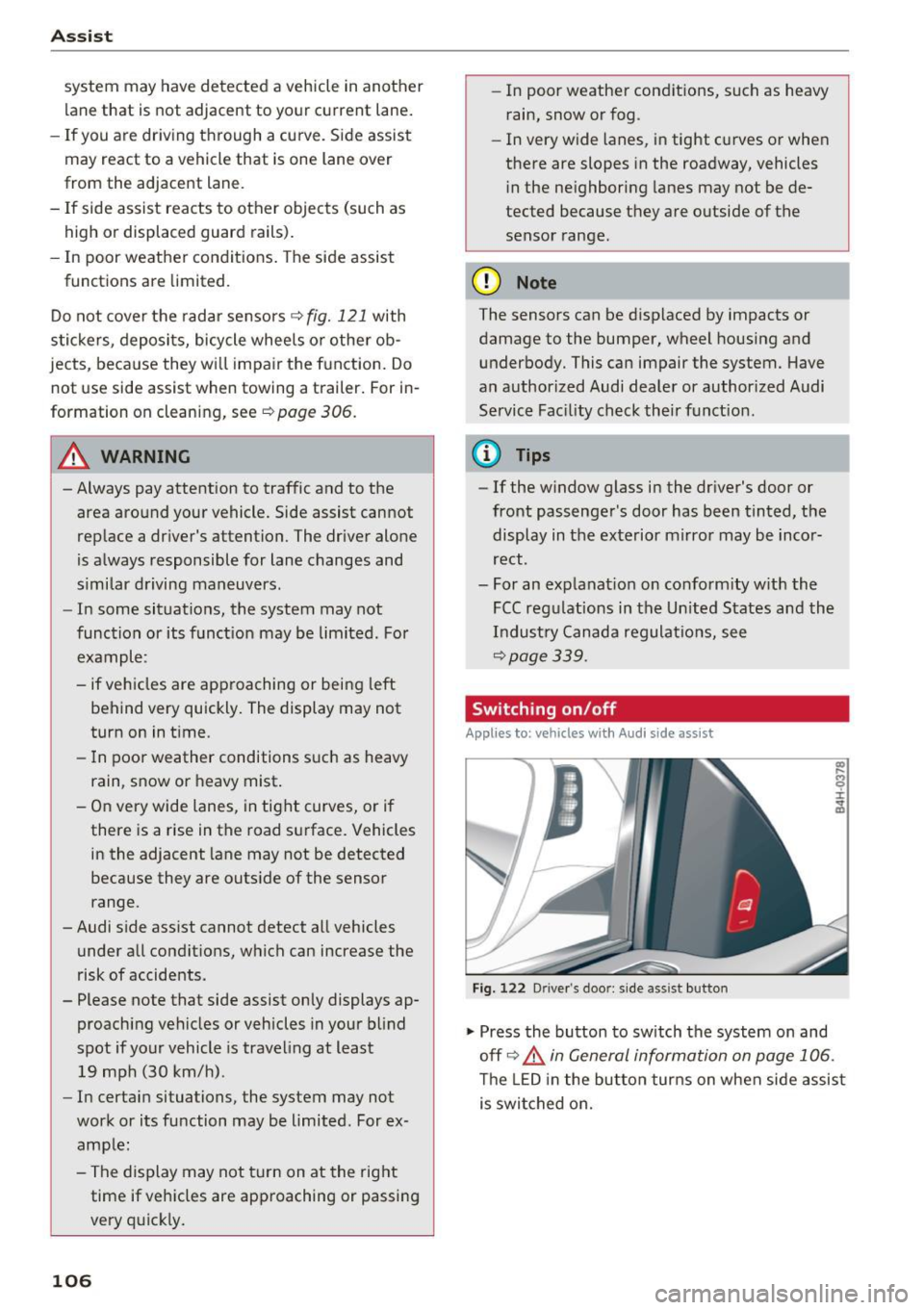
F ig . 122 D river 's doo r: side as sist but ton
.,. Press the button to sw itch the system on and
off <=>.&
in General information on page 106 .
The LED in the button tur ns on when side assis t
is swi tched on.
Page 109 of 354
0 co .... N ,..... N .... 0 0 :c '
Appl ies to: ve hicles with Audi side assist
The display brightness can be adjusted in the In
fotainment system.
.. Se lect : the I CAR I function button > Car systems
contro l button > Driver ass ist > Audi side as
sist .
The display brightness ad justs automat ica lly to
the br ightness of the surroundings, both in the
i n formation and in the warning stage . In very
dark or very bright sur roundings, the automatic
ad ju stment will set t he d isp lay to the m inimum
or maxim um level. In such cases, you may no tice
no change when adjus ting the b rightness, o r the
change may only be no tic eable once the s ur
r o undings change .
Ad just the b rig ht ness to a level where the d isp lay
in t he inform ation stage wi ll no t dis rup t your
view ahead. If you change the bright ness, the dis
p lay in the ex terior mirror will brief ly show the
b rightness level in the information stage . The
brightness of the warning stage is linked to the
brightness in the informat ion stage and is ad just
ed along w ith the information stage.
(D Tips
- Side assist is not active wh ile you are ma k
i ng the ad justment.
- Your settings are automatically store d and
ass igned to the remote control key being
used.
Messages
A ppl ies to: ve hicles with Audi side assist
If s ide ass ist switches off by itself, the LED in the
button turns off and a message will appear in the
i nstr ument cluster d is pl ay :
Audi side assist: Currently unavailable . No
sensor vision
The rada r senso rs' vision is affected . Do not cover
the area in front of the senso rs with bike wheels ,
sticke rs, dirt o r othe r objects . Clean t he a rea in
fr on t of the senso rs , if necess ary
c> page 105,
fig. 1 21 .
Assist
Audi side assist: currently unavailable
S id e assist c annot be sw itched on at this time be
ca use there is a ma lfunction ( for example, the
battery c harge leve l may be too low).
Audi side assist: System fault!
T he system canno t gua rantee that it will detect
vehicle s cor rec tly and it has switc hed off. The
senso rs have been moved or are f aulty. H ave the
system checked by an au thorized Audi dealer o r
autho rized Audi Serv ice Facility soon.
Audi side assist: Unavailable when towing
S ide ass ist swit ches off automatically when a fac
tory -inst alled tra ile r hi tch is con necte d to the
electrical connec tor on the t rai ler . There is no
guarantee the system will switch off when using
a retrofitted trailer hitch. Do not use side assist
when towing a trai ler.
Night vision assist with
pedestrian and wild
animal detection
Description
App lies to : vehicles wit h night vision assist
The night vision assist can detect, highlight and,
if necessary, warn about pedestrians and large wild animals.
N ight v ision assist w ith pedestrian and w ild ani
mal detection assists you at nig ht by using an in
frared camera to monitor the a rea in front of
your vehicle, within the limits of the system. It can d isplay objects up to a distance of approxi
mately 1000 feet (300 m) . The thermal image
de te cted by the camera is show n in the inst ru
ment cluster d is pla y. Warm areas appear lighter
and co ld areas appear d arker.
107
Page 113 of 354
0 co .... N ,..... N .... 0 0 :c '
movements, the driver's braking and accelera
tion, and as the road surface, vehicle speed and load. A sporty setting is generally used in vehicles
with adaptive air suspension sport*.
The vehicle ground clearance depends on the
mode selected and the speed. When you are in
the auto or dynamic mode, the highway setting is
activated when you drive above 75 mph (120 km/
h) for more than 30 seconds. The ground clear
ance is increased automatically if the speed
drops below 44 mph (70 km/h) for more than 120 seconds .
Steering
The power steering adapts. Indirect steering that
moves easily as in comfort mode is especially
suited to long drives on a highway. The dynamic
mode provides sporty, direct steering .
Applies to: vehicles with dynamic steering
The steering ratio changes based on vehicle
speed in order to maintain optimum steering ef
fort for the driver at all times . This sets the steer
ing to be less sensitive at higher speeds in order
to provide improved vehicle control. At reduced
speeds, steering is more direct in order to keep
the steering effort as minimal as possible when
the driver is maneuvering the vehicle. At low and
average speeds, dynamic steering* additionally
provides more responsive steering performance.
Sport differential*
As a component of the all wheel drive system
(quattro)
~ page 130, the sport differential dis
tributes the driving power to the rear axle de
pending on the situation. The distribution of
power varies from balanced (comfort) to sporty
(dynamic) depending on the selected mode. The
goal is a high level of agility and ability to accel
erate on curves. The vehicle is very responsive to
steering .
Cornering light*
The cornering light adapts the high beams to the
direction of the curve depending on the speed.
The pivoting action and the lighting also adapt to
the mode .
Assist
Adaptive cruise control*
The behavior when accelerating can be adjusted
from comfortable to sporty, depending on the
drive select mode. Adaptive cruise control also
responds to the driving behavior of the vehicle
ahead in a more conservative or sporty manner.
Engine sound*
The engine sound adapts to the current mode
and can be subtle to sporty.
(D Note
- Make sure there is enough clearance above
and below the vehicle when parking. The
height of the vehicle can change once it is
parked due to temperature fluctuations,
changes to the load conditions and changes
to the driving modes, which can affect clear
ance.
- When transporting the vehicle on a car car
rier, train, ship or by other means, only tie
the vehicle down at the running surface of
the tires, which is the outer circumference.
Securing the vehicle at the axle compo
nents, suspension struts or towing eyes is
not permitted because the pressure in the
air suspension struts can change during
transport. The vehicle may not be secured
sufficiently if this happens.
@ Tips
- In some models, the maximum vehicle
speed can only be reached in the auto and
dynamic modes.
- The S selector lever position automatically
engages if the dynamic mode is selected.
- In vehicles that have dynamic steering*, op
erating noise is heard when starting or stop
ping the engine. This does not indicate a
problem.
111
Page 116 of 354

Parking systems
Parking systems
General information
Applies to: vehicles with parking system plus/rearview cam
era/peripheral camera
Depending on your vehicle's equipment , various
parking aids will help you when parking and ma
neuvering.
The
parking system plus assists you when park
ing by audibly and visually indicating objects de
tected in front of and behind the vehicle
¢page 115.
The rearview camera shows the area behind the
vehicle in the Infotainment system display. This
display assists you when you are cross or parallel parking
¢ page 116. The parking system plus
functions are also available
¢ page 115.
The peripheral cameras give various views to
help you when parking or maneuvering
¢ page 119. The parking system plus functions
are also available
¢page 115.
& WARNING
-Always look for traffic and check the area
around your vehicle by looking at it directly
as well. The parking system cannot replace
the driver's attention. The driver is always
responsible when entering or leaving a park
ing space and during similar maneuvers .
- Please note that some surfaces , such as
clothing, are not detected by the system .
- Sensors and cameras have blind spots in
which people and objects cannot be detect
ed . Be especially cautious of small children
and animals .
- The sensors can be displaced by impacts or
damage to the radiator gr ille, bumper,
wheel housing and the underbody . The park
ing system may be impaired as a result.
Have an authorized Audi dealer or author
ized Audi Service Facility check their func
tion .
- Make sure the sensors are not obstructed by
stickers, deposits or other materials. If they
are, the sensor function could be impaired.
For additional information on cleaning, see
c:> page 306.
114
(D Note
-Some objects are not detected or displayed
by the system under certain circumstances:
- Objects such as barrier chains, trailer draw
bars, vertical poles or fences
- Objects above the sensors such as wall ex
tensions
- Objects with certain surfaces or structures
such as chain link fences or powder snow
- If you continue driving closer to a low ob
ject, it may disappear from the sensor range. Note that you will no longer be
warned about th is obstacle.
(D Tips
- The system may provide a warning even
though there are no obstacles in the cover
age area in some situations, such as:
- certain road surfaces or when there is tall
grass.
- external ultrasonic sources such as from cleaning vehicles .
- in heavy rain, snow, or thick vehicle ex
haust.
- We recommend that you practice parking in
a traffic -free location or parking lot to be
come familiar with the system . When doing
this, there should be good light and weath
er conditions.
- You can change the volume and pitch of the
signals as well as the display¢
page 124.
-Please refer to the instructions for towing a
trailer located in
¢page 124.
-What appears in the infotainment display is
somewhat time-delayed.
- The sensors must be kept clean and free of
snow and ice for park aid to operate .
Page 126 of 354

Parking systems
Adjusting the display
and the warning tones
Applies to: vehicl es with parking system plus/rearview cam
era/per ipheral came ra
The display and warning tones can be adjusted in
the Infotainment.
~ Select: the ICARI function button > Car systems
control button > Driver assist > Parking aid.
Display
On* -
An optical display is shown for the parking
system plus, a rearview camera image is shown
for the rearview camera*.
Off -When the parking system is switched off,
only audib le signals are given.
Signal tones
Front volume -
volume for the front area
Rear volume -volume for the rear area
Front frequency -frequency for the front area
Rear frequency -frequency for the rear area
Entertainment volume -when the parking sys
tem is turned on, the volume of the audio/video
source is lowered.
The new ly selected level is demonstrated briefly
by the sound generator.
{!) Tips
- The warning tones can also be adjusted di
rectly by the v isual disp lay or the picture
from the camera. Simply press the
Settings
contro l button .
- Changed settings are act ivated when the
parking system is switched on aga in.
- The settings for volume and frequency are automat ically saved and assigned to the re
mote control key being used.
Error messages
Applies to: ve hicles w ith parking system plus/rearview cam
era/peripheral came ra
There is an error in the system if the LED in the
P,YA button is blinking and you hear a continuous
alarm for a few seconds after switching on the
124
parking system or when the pa rking system is al
ready activated . If the error is not corrected be
fore you switch off the ignition, the LED in the
P wA
button will blink the next time you switch on the
parking system by shifting into reverse.
Parking system plus*
If a sensor is faulty, the~ symbol will appear in
front of/behind the vehicle in the Infotainment display. If a rear sensor is faulty, on ly obstacles
that are in areas @and @ are displayed
c>page 115, fig . 130. If a front sensor is faulty,
only obstacles that are in areas © and @are dis
played. There is a lso a system malfunction if all
segments around the vehicle are red or if no seg
ments are disp layed.
Peripheral cameras*
There is a system malfunc tion if the ~· symbol
appears and the corresponding display area is
shown in blue. The camera is not working in this
a rea.
Drive to an authorized Audi dealer or authorized
Audi Service Facility immediately to have the
malfunction corrected .
Trailer hitch
Applies to: vehicles with parking system plus/rearv iew cam
era/peripheral cameras and t ra iler hitc h
For vehicles using the trailer socket, the parking
system rear sensors are not activated when you
shift into reverse gear or when you press the P
1
1.A
button . This results in the following restrictions .
Parking system plus*
There is no distance warning for the rear. The
front sensors remain activated. The visual display
switches to trailer mode.
Rearview camera* /Peripheral cameras*
There is no distance warning for the rear. The
front senso rs remain activated . The visua l display
switches to trailer mode . The rearview camera
image will not show the orientation lines and the
blue surfaces .
Ill-
Page 154 of 354
Telephone
Using contacts
Applies to: ve hicles w ith telep hone
Fig. 171 Calling a contac t
Fig. 172 Selec ting a des tina tion
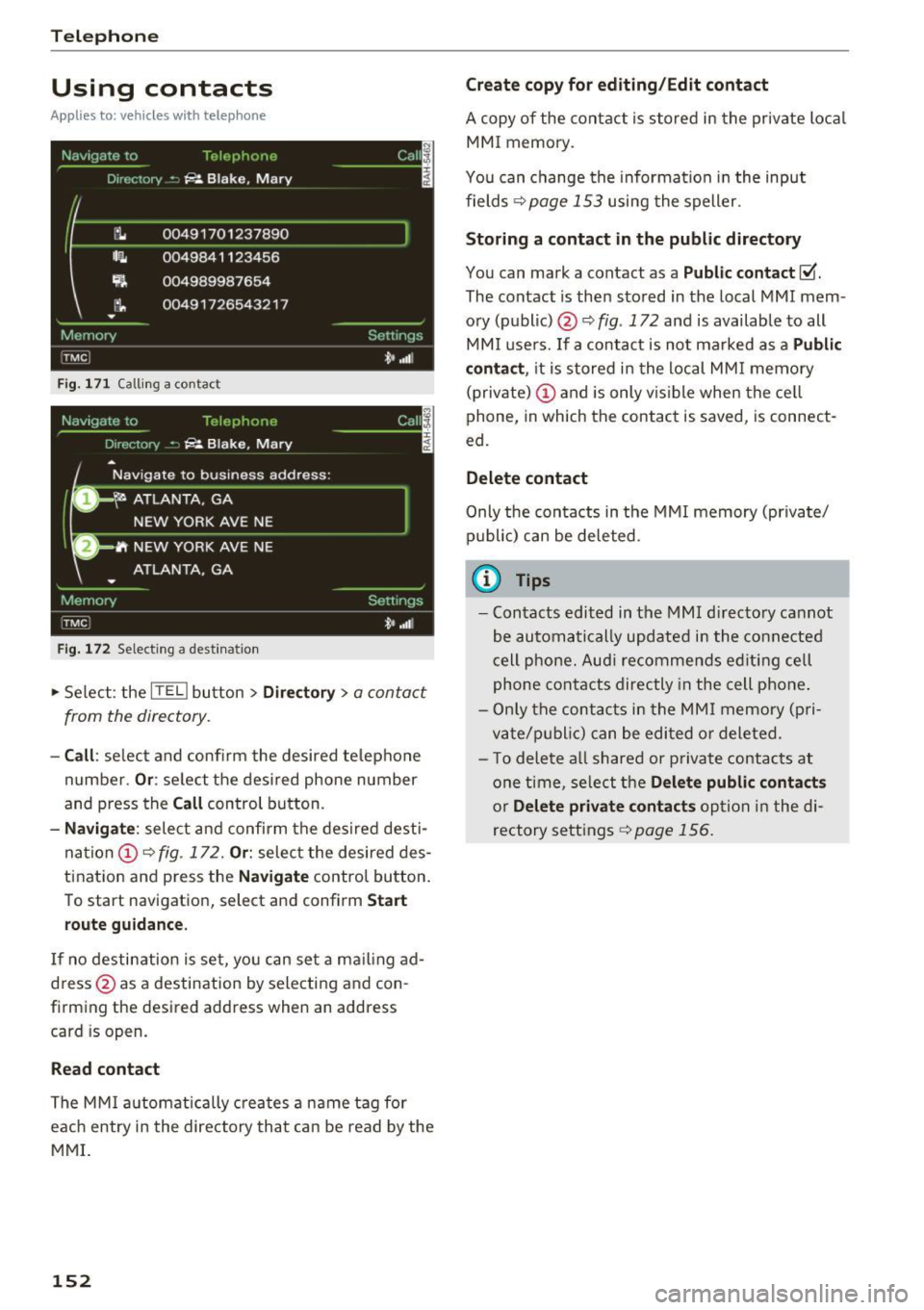
.,. Select : the ITEL) button > Directory > a contact
from the directory .
-Call: se lect and confirm the desired telephone
number .
Or: select the desired phone number
and press the
Call control button.
-Navigate : select and confirm the desired desti
nation
(D ¢ fig . 172. Or: select the desired des
tination and p ress the
Navigate control button.
To start navigation, select and confirm
Start
route guidance.
If no destination is set, you can set a ma iling ad
dress @as a destination by selecting and con
firming the desired address when an address
card is op en.
Read contact
The MMI automatically creates a name tag for
each entry i n the directory that can be read by the
MMI.
152
Create copy for editing/Edit contact
A copy of the contact is stored in the private local
MMI memory.
You can change the information in the input
fields ¢
page 153 using the speller.
Storing a contact in the public directory
You can mark a cont act as a Public contact ~
The contact is then stored in the local MMI mem
ory (public) @¢
fig. 172 and is available to all
MMI users . If a contact is not ma rked as a
Public
contact ,
it is stored in the local MMI memory
(private)
(D and is only vis ib le when the cell
phone, in which the contact is saved, is connect
ed.
Delete contact
Only the contacts in the MMI memory (private/
public) can be deleted.
{!) Tips
-Contacts edited in the MMI directory cannot
be automatically updated in the connected
cell phone. Audi re commends ed iting cell
phone contacts directly in the cell phone .
- Only the contacts in the MMI memory (p ri
vate/p ublic ) can be edited or deleted .
- T o delete a ll shared or p rivate contacts at
one time, select the
Delete public contacts
or Delete private contacts option in the di
rectory settings
¢ page 156.
Page 167 of 354
C) C0 ....
"' " "' .... 0 0 :r
Opening navigation
Applies to: vehicles with navigation system
The navigation system directs you to your desti
nation, around traffic incidents and on alterna tive routes,
if desired.
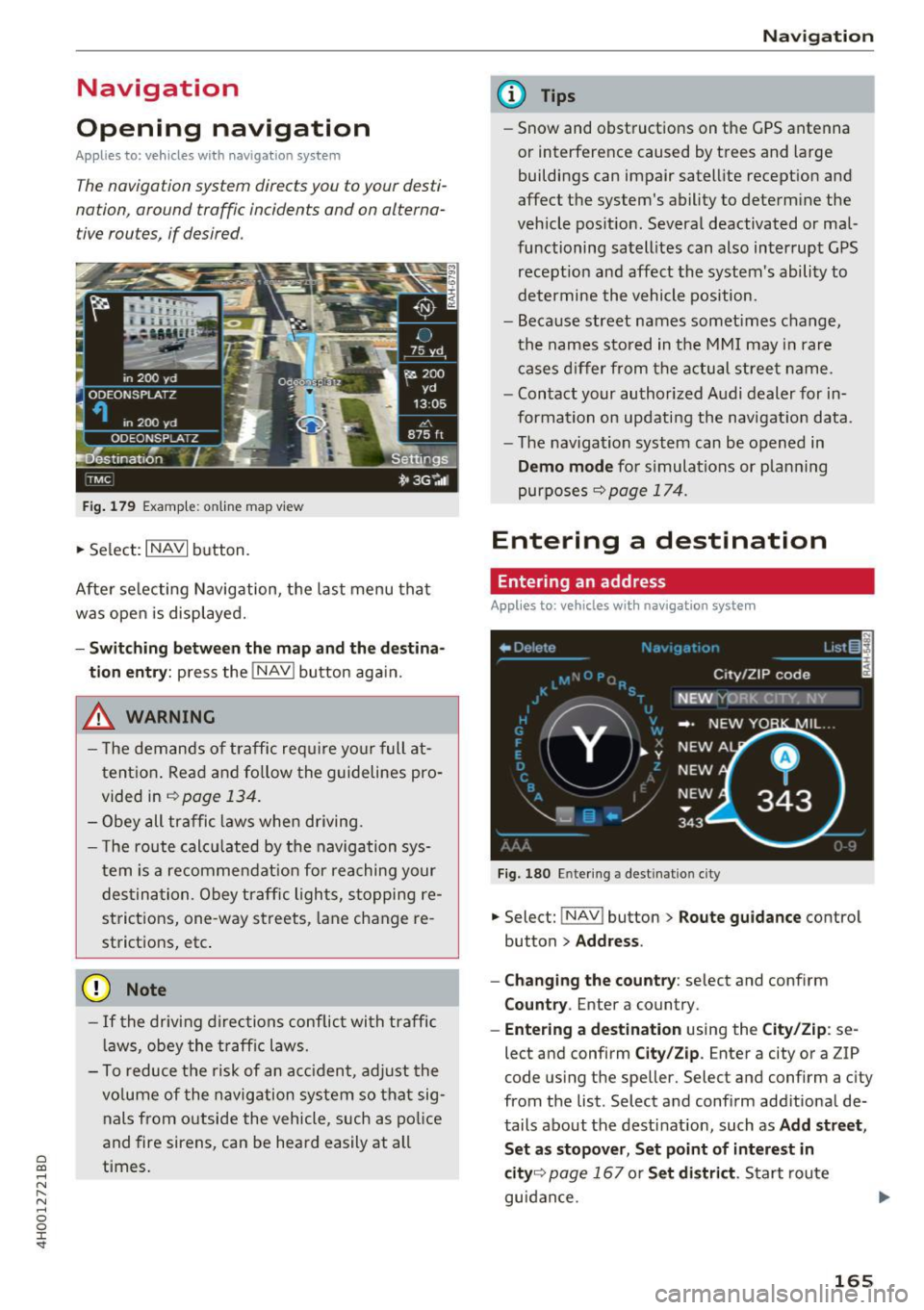
Fig . 179 Examp le: online map view
• Select: INAVI button.
After se lecting Navigation, the last menu that
was open is displayed.
- Sw itc hin g bet ween the m ap and th e dest ina
t io n entr y:
press the !NAV ! button aga in.
,& WARNING
- T he demands of traffic require yo ur full at
tent ion. Read and fo llow the guidelines pro
vided in
~ page 134.
- Obey all traffic laws whe n driving.
- T he route calcu lated by the navigation sys-
tem is a recommendat ion for reaching your
des tination. Obey traffic lights, stopping re
strictions, one -way streets, lane change re
strictions, etc .
(D Note
- If the driving directions conflict with traffic
l aws, obey the traff ic laws.
- To reduce the risk of an ac cident, adjust the
vo lume of the navigation system so that sig
nals from outside the vehicle, such as po lice
and fire sirens, can be heard easily at all
times.
Na vigat ion
(D Tips
-Snow and obstructions on the GPS antenna
or interference caused by trees and large
buildings can impair satellite reception and
affect the system's ability to determine the
vehicle position. Several deactivated or mal
functioning satell ites can also interrupt GPS
recept ion and affect the system's ability to
determine the vehicle position.
- Because street names somet imes change,
the names stored in the MMI may in rare
cases d iffer from the actual street name.
- Contact your authorized Audi dealer for in
formation on updating the navigation data.
- The navigation system can be opened in
Dem o m od e for s imulations or p lanning
purposes
9 page 174.
Entering a destination
Entering an address
Applies to : vehicles wit h navig ation system
Fig. 180 Entering a destination city
• Select: !NAV ! button> Route guida nce control
button
> Addr ess .
- Chan ging the c ount ry :
select and conf irm
C ount ry. Enter a country.
-Ent ering a d estin ation using the C ity/Zi p: se
lect and confirm
City/Zi p. Enter a city or a ZIP
code using the speller. Select and confirm a city
from the list . Select and confirm additional de
tails about the destinat ion, such as
Add str ee t,
S et as s topo ver, Set po int of int eres t in
cit y9
page 167 or S et di str ict. Start route
guidance .
165
Page 176 of 354
Navig ation
Rout e info
When the function is switched On , the three up
coming turns and the calcu lated distance and ar
rival time are shown in the Infotainment display
during route guidance@¢
page 170, fig. 185 .
The cu rrent st reet traveled, upcoming maneu
vers, traffic in formation or points of interest on
the current ro ute are a lso displayed.
The next turn is d isp layed at the bottom of the
table.
Autom atic zoom
On : the map scale is adapted automatically de
pending on the type of road being traveled on
(expressway, highway, other roads) so that yo u
always have an optima l overv iew of the road
a h ead. When there are upcom ing mane uvers, t he
scale is automatically reduced to provide a better
detai led view.
Inters ection : when route gu idance is active, the
map tempora rily zooms in to a detailed scale
when there are upcoming mane uvers so that you
can see the route better.
Off : the map scale yo u have chosen is kept in
stead.
Gas station message
When th is function is sw itched On , a message
appears when the fue l gauge goes below the re
serve mar king. Confirm ing this message displays
a list of gas stations in the area. When a gas sta
tion is selected, route guidance from the current
vehicle position is calcu lated .
Speed limit display*1>
The max imum speed limits for expressways,
h ighways and ma in streets can be swit ched
On-/
Off if they are stored i n the navigation data .
Voice guidance
The voice guidance prompts can be Complete or
Compact . When Off is selected, no voice gu id
ance is given.
l ) O nly app lies to vehicles w ithout camera -based speed limit
dis play .
174 Nav
igation prompts can be g iven by pressing the
Ill b utton.
Voice guidance on during call
Nav igation p rompts can be switched on~ or off
during a phone call.
Delete recent destinations
The destinations you have entered last are auto
matically sto red. They can be deleted ind iv idually
or a ll at once .
Present ation mode
The Demo mode helps you to effectively plan and
display a route by showing map contents or route
c riter ia . You ca n
Set starting location when you
would like to calculate a route start ing from a lo
cation other than t he ve hicle position. Start
Demo mode to sim ulate the route g uidance .
(D Tips
The route s imulation in presentation mode is
deact ivated while driving fo r safety reasons.
' Route settings
App lies to: vehicles with navigation system
.,. Select: !NAV ! button> Rout e control b utton.
Route list
The route list is v is ible only when route guidance
i s active and contai ns info rmation regard ing the
r oute, the names of the streets and the length of
the route sect io ns. On longer route sec tions, ad
dit ional info rmation may be disp layed such as
possib le i nterchanges when driving on exp ress
ways.
Avoid route from here
D etermin ing th e le ngth of the rout e to be
avoided :
turn the contro l knob to t he left o r
r ight.
When route guidance is active and the
Standard
¢ page 170 map v iew is switched on, the ca lcu
l ated route is avo ided fo r the d ista nce you have ...
Page 184 of 354
Media drive s and conn ections
DVD changer
Applies to: vehicles w ith DVD changer
The DVD changer is located in the glove com
partment.
@
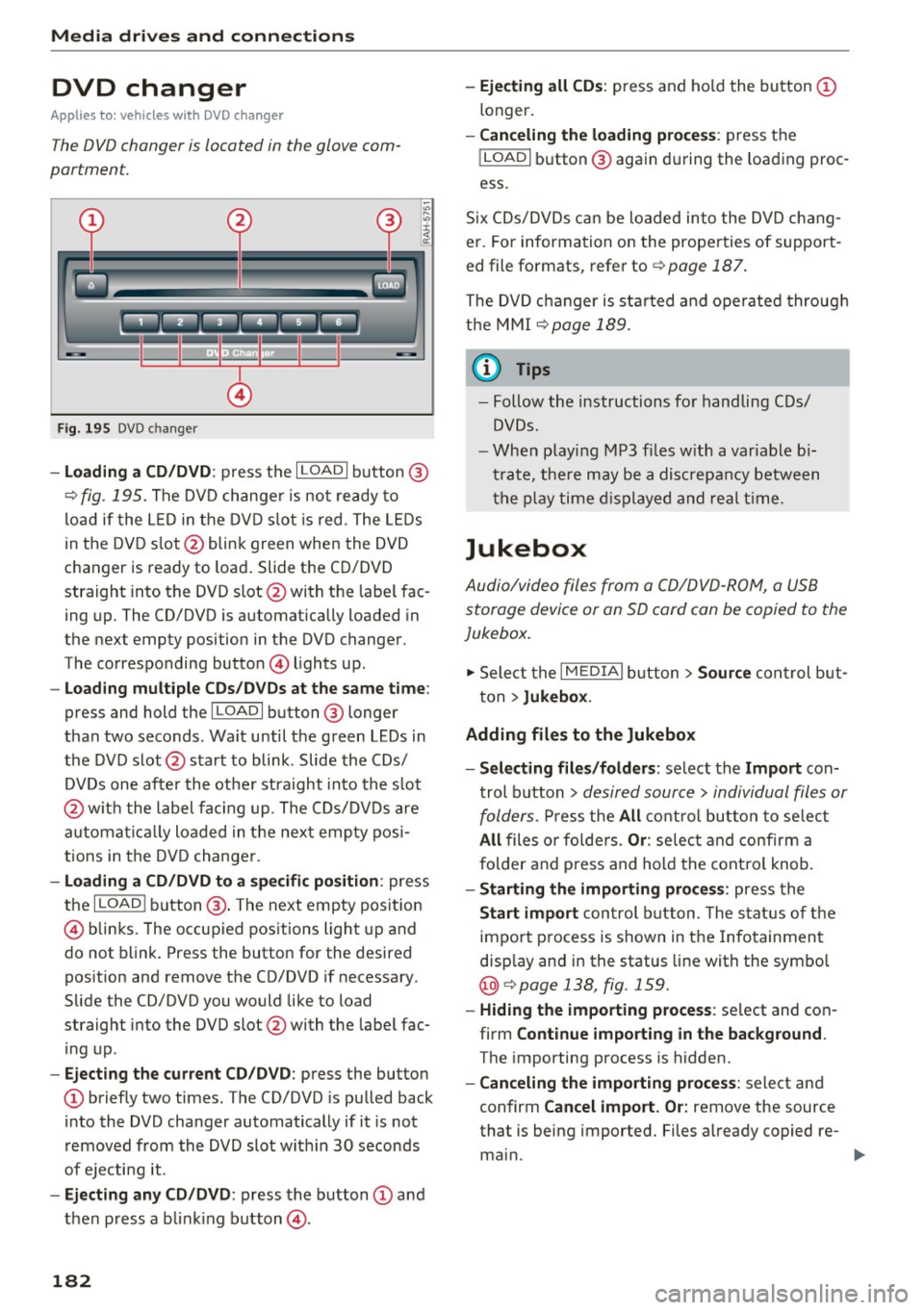
F ig . 195 DVD c hanger
- Loading a CD /DVD : press the I LOADI button @
¢
fig. 195. The DVD change r is not ready to
load if the L ED in the DVD slot is red . The LEDs
in the DVD s lot @ blink green when the DVD
changer is ready to load . Slide the CD/DVD
straight into the DVD slot @with the labe l fac
ing up. The CD/DVD is automat ica lly loaded in
the next empty position in the DVD changer .
The corresponding button © lights up .
-Loading mul tiple CD s/ DV Ds at the same t ime :
press and hold the I LOAD I button @ longer
than two seconds . Wait until the green LEDs in
the DVD slot @start to blink . Slide the CDs/
DVDs one after the othe r straight into the s lot
@ wit h the label facing up. The CDs/DVDs are
a utomat ica lly loaded in the nex t empty posi
tions in the DVD changer .
-Loading a CD /DVD to a specific position : press
the
I L OAD I button @. The next empty pos it ion
© blinks. The occupied positions light up and
do not b link . Press the button for the desired
position and remove the CD/DVD if necessary .
Slide the CD/DVD you would like to load
straight into the DVD slot @with the labe l fac
ing up .
-Ejecting the current CD/DVD : press the button
CD briefly two times. The CD/DVD is pu lled back
i nto the DVD changer automatically if it is not
removed from the DVD slot w ith in 30 seconds
of ejecting it .
-Ejecting any CD /DVD : press the b utton CD and
then press a blink ing button @.
182
-Ejecting all CD s: press and ho ld the button CD
longer .
-Canceling the load ing pro ce ss: press the
!LOAD I button @ again d uring the loading proc
ess.
S ix CDs/DVDs can be loaded into the DVD chang
er. For information on the properties of support
ed file fo rmats, refer to ¢
page 187.
The DVD c hanger is sta rted and oper ated throug h
the MMI
¢ page 189.
(1} Tips
-Follow the instructions fo r handling C Ds/
DVDs.
- Whe n playi ng MP3 f iles w ith a variable b i
t rate, t he re may be a disc repancy between
t h e p lay time d isplayed and real t ime.
Jukebox
Audio/video files from a CD/DVD -ROM, a USB
storage device or an SD card can be copied to the
Jukebox.
... Select the I MEDIAi button> Source con trol b ut
ton >
Jukebox.
Adding fil es to the Jukebox
- Select ing files /fold ers :
select the Import con
trol b utton >
desired source > individual files or
folders.
P ress the All c o ntro l butto n to se lec t
All files o r fo lde rs. Or : selec t and confirm a
folder and press and hold the contro l knob.
- Starting the importing proc ess: press the
Start import con trol b utton . T he stat us o f the
import p rocess is shown in the Infotainment
disp lay and in the status line with the symbo l
@¢page 138, fig . 159.
- Hid ing the importing proce ss: se lect and con
firm
Continue importing in the background .
The importing process is hidden.
- Canceling the impo rt ing process : select and
confirm
Can cel import. Or : remove the source
that is being imported. Files a lready copied re-
ma in.
Ill>-
Page 194 of 354
Playing med ia
Parent al control
Req uirement: a video DVD must be p laying and
the password must be entered (the password set
at the factory is "1234 ").
Playback of v ideo DVDs can be rest ric ted us ing
pa rental control. Se lect and confirm the content
rating (such as
Le vel 5 ). Eight diffe rent Content
rating s
can be set fo r parenta l control. For exam
p le, if you select Level S* for the parental contro l
level, all DVDs from level 1-5 can be played. Vid
eo DVDs with a higher level will not play. All re
str ictions are canceled when the function is
sw itched
O ff .
You can change the current password using the
Change pa ssword function.
(D Tips
- Not all video DVDs have parental control.
- The
Repeat option s and Random playback
functions switch off automatically when the
source changes in the
Media menu.
- Password entry will be locked for approxi
mately one m inute if you enter the incorrect
password three times in a row. On ly your
authorized Audi dea ler can reset the paren
tal contro l password .
- The
Tra ck displ ay function is not available
for the Jukebox or a connected iPod
<=:> page 191.
- The DVD drive only supports the DTS (D igi
tal Theater Systems) audio format.
192