change time AUDI A8 2017 Owner's Manual
[x] Cancel search | Manufacturer: AUDI, Model Year: 2017, Model line: A8, Model: AUDI A8 2017Pages: 354, PDF Size: 88.68 MB
Page 195 of 354
C) C0 ....
"' " "' .... 0 0 :r
RSE components
overview
A ppl ies to: ve hicl es w ith Re ar Seat E nte rtainment
The Rear Seat Entertainment, abbreviated RSE ,
combines different entertainment systems . The
RSE control panel is located in the rear center
console .
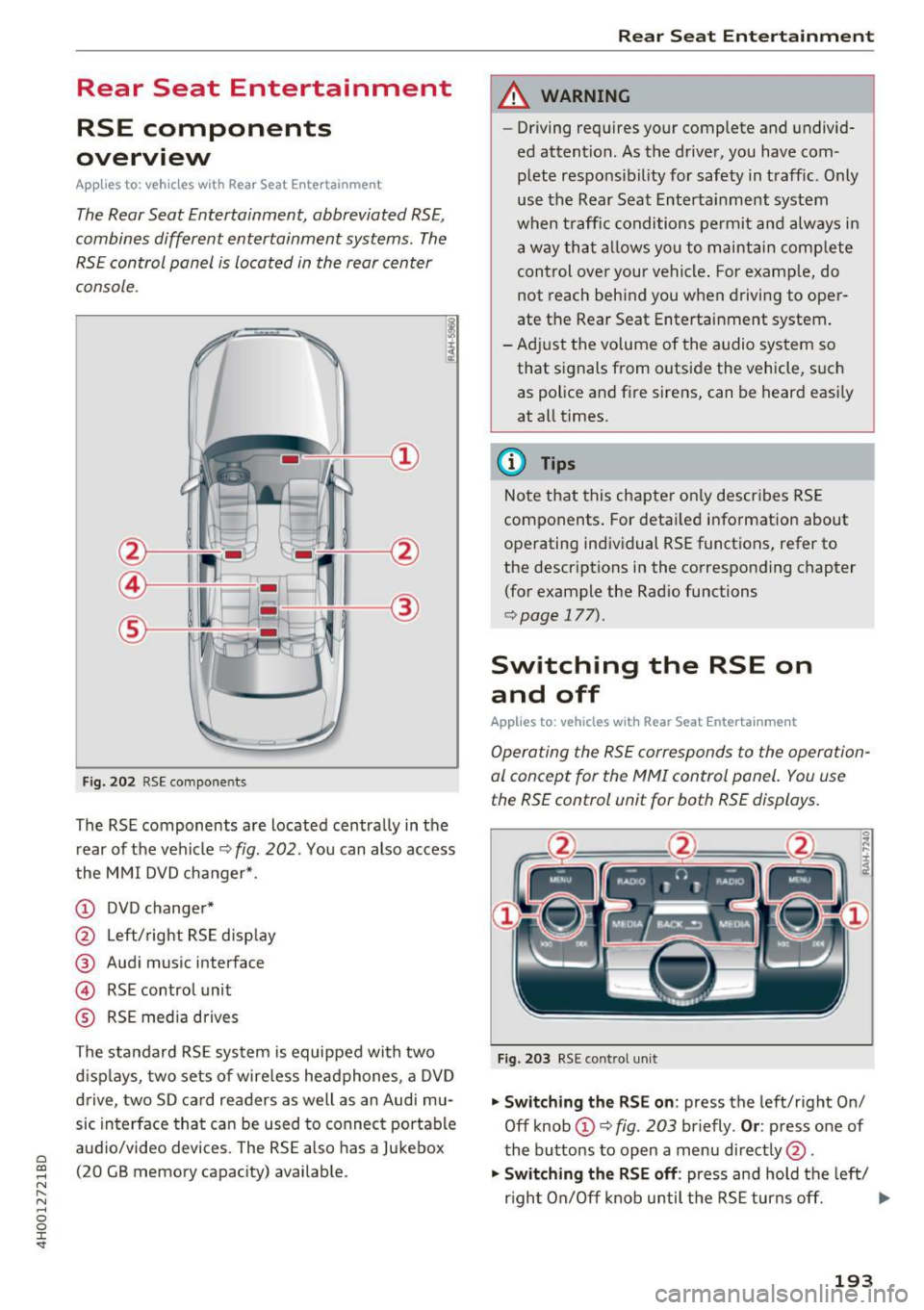
Fig . 202 RSE compo nen ts
The RSE components are located centra lly in the
rear of t he vehicle
9 fig. 202 . You can also access
the MMI DVD changer* .
CD DVD changer*
@ Left/right RS E disp lay
® Audi music interface
© RSE control unit
® RSE media drives
The standard RSE sys tem is equipped with two
d isp lays, two sets of wire less headphones, a DVD
drive, two SD card readers as well as an Audi mu
sic interface that can be used to connect portable
audio/video devices . The RSE also has a Jukebox
(20 GB memory capacity) available.
Rear Seat Entertainment
A WARNING
-- Driving requires your complete and undivid-
ed attention. As the drive r, you have com
plete responsib ility for safety in traff ic. Only
use the Rear Seat Entertainment system
when t raff ic conditions permit and always in
a way tha t allows you to maintain comp lete
control over your vehicle . For examp le, do
not reach behind you when driving to oper
ate the Rear Seat Entertainment system .
-Adj ust the volume of the audio system so
that signals from outside the vehicle, suc h
as police and fire sirens, can be heard easi ly
at all times.
(D Tips
Note that this chapte r on ly describes RSE
components . For deta iled information about
operating indiv idual RSE funct ions, refer to
the descriptions in the corresponding chapter
(for example the Radio functions
¢ page 177).
Switching the RSE on
and off
Applies to : vehicles wit h Rear Seat Enterta inment
Operating the RS E corresponds to the operation
al conc ept for the MMI control pan el. You us e
the RSE control unit for both RSE displays.
F ig . 203 RS E cont ro l un it
.,. Swit ching the RS E on : press the left/right On/
Off knob
CD ¢ fig . 203 briefly . Or: press one of
the buttons to open a menu direct ly @ .
"" Swit ching the R SE off : press and hold the left/
r igh t On/Off knob until the RSE turns off.
IJ,,
193
Page 198 of 354

Rear Seat Entertainment
Restarting the RSE
(reset)
Applies to: ve hicles w ith Rear Seat Ente rta inment
F ig. 207 Button combination to restart th e system
... Press and hold the control knob (D , the upper
right control button @and the
righ t!MENUI
button ® c:::> fig. 207 at the same time for a
brief moment and then release the buttons .
@ Tips
The MMI and RSE use some components at
the same time. Because of this, Audi recom
mends restarting both systems.
Display settings
Applies to: vehicles with Rear Seat Enterta inment
... Se lect: I MENU I button > Display control button.
Turning off the display
The display switches off.
The active aud io/video source does not pause
when yo u switch the RSE display off . You can still
change the stat ion or track for the selected au
dio/video source using the arrow buttons.
Switching display on
Press any button on the MMI control panel.
Display brightness
You can adjust the display brightness by turning
the control knob .
196
Parental control
Applies to: ve hicles with Rear Seat Entertainment
Selected RSE functions can be restricted or deac
tivated in the MMI.
... Select: I MEN u I fu nction button > Setup MMI
control button > Rear Seat Entertainment.
System
When the function is switched On, the RSE is en
abled for use. When the function is switched
Off,
the RSE is switched off and the RSE control panel
i s locked.
Vehicle speakers
Audio output
through the vehicle speakers in the
rear can be set to
Vehicle speakers or Head
phones only.
Operation
You can set whether all of the RSE functions (All)
or the Volume only can be adjusted through the
RSE.
Navigation destinations*
You can Apply the navigation destination auto
matically for active route guidance in the MMI or
Confirm the navigation dest ination before trans
ferring to the MMI.
Other settings
App lies to: vehicles with Rear Seat Enterta inment
.,. Select: the I MENU I button> Setup RSE control
button.
Factory default settings
You can reset the following functions to the fac
tory default settings:
- Sound settings
- Radio
- Media settings
-Jukebox
- Navigation settings*
You can select the desired functions individually
or all at once with the option
Select all entries.
Select and confirm Yes . .,,.
Page 201 of 354

0 co .... N ,..... N .... 0 0 :c '
Audi music interface ¢
page 185.
-Ch angin g th e batt erie s: turn the cover @
¢ fig. 210 on the left earpiece (L) to the left/
right and change the batteries as labeled in the
battery compartment. Then attach the cover
back on to the left earpiece (L).
You can identify the charge status of the battery
¢
table on page 199 based on the blinking
speed
of the L ED in the charging cable connec
tion ©¢
fig. 210 .
Blinking fre- Charge status
quency
Blinking The batteries are charging.
Remains on The batteries are charged.
Blinking An error occurred while charg-
quickly ing .
..&, WARNING
-Do not use damaged rechargeable batteries.
T h is increases the r isk of an explos ion.
- T he headphones can become warm when
the batteries a re charg ing and increase the
risk of inj ury.
- Do not cha rge standard batteries with the
charg ing cable. This increases the risk of an
exp losion .
- Be careful when using the c igarette lighter.
Inattentive or unsupervised use of the c iga
ret te lighter can cause burns.
- T he cigarette lighter/sockets and any elec
trical accessories connected to them func
tion only when the ignition is switched on .
Using the cigarette lighter/sockets or elec
trical accessories incorrectly can lead to se rious injur ies or cause a f ire. To reduce the
risk of injuries, never leave children unat
tended in the vehicle with the vehicle key.
(D Note
- Do not charge the batteries in the wireless
headphones when the engine is not run
ning. This w ill dra in the vehicle battery.
- For wireless headphones, only use batteries
that are approved for that type of device,
for example NiMH batteries with a min i-
R ear S eat Ent ertainm ent
mum capacity of 550 mAh in AAA size that
are suitable for quick charging.
~ For the sa ke of the environment
Batter ies contain polluting substances. They
must be disposed of using methods that wi ll
not harm the environment. Do not dispose of
them in househo ld trash .
(D Tips
The charging time for the included rechargea
ble batteries is approximate ly three to four
hours and may increase by approximately 25
percent if the batteries are in use while charg
ing .
Headphones connected by cable
App lies to: vehicles wit h Rear Seat Enterta inmen t
The headphone connections ore located on the
RS£ control uni t.
Fig. 211 Conn ecting w ired headphones
"'I nsert th e headphone connecto r into the left or
r ight jack ©¢
fig. 211 on the RSE control pan
el.
The unit is equ ipped w ith 3.5 mm stereo jacks .
The w ireless headphones sw itch off automatical
ly about five minutes after the cable headphones
are connected .
(D Tips
Volume that is too high or too low is auto matically ad justed to a preset level when the
wired headphones are connected .
199
Page 204 of 354
Rear Seat Entertainment
The radio functions match those in the MMI. For
more information on the Radio menu, refer to
c::>page 177.
You can store a separate presets list in the RSE
that may contain up to SO stations from all fre
quency bands. You can a lso display the station
name for the selected radio stat ion or change the
station sorting separately in both RSE disp lays.
Playing media
A pp lies to: ve hicles w ith Rea r Seat E nte rtainment
.,. Select : I MEDIAi button .
The media functions match those in the MMI to a
large extent. For more information on the Media
menu, refer to
c::> page 189.
Possible sources are:
(D Jukebox
@ SD card reader
® DVD drive
@ DVD changer*
® Audi music interface (such as iPod, USB or ex
ternal audio/video input)
Different functions are available depending on
the active source and the medium inserted.
(D Tips
- The Album browser function is not available
in the RSE .
- The copy and delete process cannot be
started simultaneous ly when accessing the
Jukebox from both systems at the same
time.
Video playback information
Playback combinations
A pp lies to: ve hicles w ith Rea r Seat E nte rtainment
When se lecting the same video source, both
sound and picture w ill play through both RSE dis
plays.
202
If different video sou rces are started on both RSE
displays, only certain picture/sound playback
combinations are poss ible and they depend on
the selected video sources.
Complete output format (sound and video
image) on both RSE displays
Se lect a video DVD as the first video source in the
DVD drive and then the following source:
- DVD changer*
- Aud i music interface with AV adapter cable*/
iPod adapter cab le plus*
Playing only sound on the second RSE
display
There is only sound output for the second v ideo
source if you:
- Start a video DVD in the DVD drive as the first
source and sele ct a video file from the Jukebox
or the SD card as the second source.
- Sta rt a video file from the Juke box as the first
source, and select a video file from the SD card
or from the Aud i music interface using an AV
adapter cable* /USB adap ter cable" /iPod adapt
er cable plus * as the second sou rce and vice
versa .
- Start a video DVD/video fi le in the DVD chang
er * as the first source, and select a video file
from the Jukebox, SD card or from the Audi mu
sic interface using an AV adapter cable*/USB
adapter cable*/iPod adapter cable plus* as the
second source.
No picture/sound playback on the second
RSE display
If a video file from the Jukebox, from an SD card
or from the Audi music interface w ith the USB
adapter cable* is already play ing o n one RSE dis
play, playback of a video DVD in the DVD drive on
the other RSE display is not possible.
Page 218 of 354
Audi pre sense
Audi pre sense Preventative passenger
protection
A pp lies to: ve hicles w ith Audi p re se nse
Pre sense can initiate steps to protect vehicle oc
cupants in certain dangerous situations. The
fu nctions described a re available depending on
ve hicle equi pment:
Audi pre sense basic
The fo llow ing funct ions can be triggered in cer
tain driving situations:
- Tighten ing of the safety belts (for examp le,
during heavy braking): the front safety belts
have reversible belt tensioners. If a coll is ion
does not occur, the safety belts loosen slightly
and are ready to trigger again.
- Closing the w indows and the sunroof*
The function of the pre sense basic is activated at
a speed of 20 mp h (30 km/h) or higher. The de
p loyment time is adapted in the drive select dy
namic mode.
Audi pre sense front (vehicles with adaptive
cru ise control*)
Pre sense front contains the f unctions of pre
sense basic. In add ition, the likelihood of a rear
end collis ion with the vehicle ahead is also calcu
lated, withi n the limits of the system. If the risk
of a collision is detected, the following functions
can t rigge r:
- Audi braking gua rd¢
page 99
- Tensioning of the safety belts
- Closing the windows and the sunroof *
Audi pre sense rear (vehicles with side
a ss ist* )
Pre sense rear contains the functions of p re sense
basic. In addition, the li ke lihood of a rear-end
col lision from the vehicle be hind is a lso ca lculat
ed, w ith in the lim its of the system .
If the risk of a
collis ion is detected, the following functions can
tr igger:
- Tens ioning of the safety be lts
- Closing the windows and the sunroof *
216
- Adjusting the seats: the settings for the powe r
head restrains, the upper sections of the backr
ests and the pne umatic side bolsters* change
on the front seats and the outer rear seats*. If
a collision does not occur, the seat sett ings
that were previously used are restored .
Audi pre sen se plus
Pre sense plus contains the f unctions of p re
sense front and pre sense rear.
Error message
Audi pre sense : Unavailable
Preventative passenger protection is not ava ila
ble. Drive to yo ur autho rized Aud i dea le r o r au
t h ori zed Aud i Service Facility immedia tely to have
t h e malfunct ion corre cte d.
.&_ WARNING
Pr e sense canno t overcome natura l phys ica l
l aws . It is a system designed to assist and it
cannot prevent a co llision. Do not let t he in
creased sa fety provided tempt you into tak ing
risks . T his could inc rease your ris k of a colli
sion.
- The system can dep loy inco rrectly.
- Please note that the sensors do not always
detect a ll objects. Th is increases the r is k of
a co llision.
- Pre sense does not react to peop le or ani
mals or objects that a re c rossing the vehi
cle's path or are difficu lt to detect
¢page 94.
- Ref lective objects such as gua rd ra ils o r the
entrance to a tunne l, heavy rain and ice can
affect the funct io n of the radar sensors a nd
t he system 's ability to de tect a collision risk.
(D Note
The sensors can be d isplaced by impacts or
damage to the bumper , wheel housing a nd
underbody . Pre sense can be impaired by this .
Have an autho rized Aud i deale r or autho rized
A udi Service Fac ility ch eck their f unct io n. .,..
Page 226 of 354
Safety belt s
A WARNING
Always read and heed all WARNINGS and oth
er important informat ion
c:> page 220 .
(D Tips
You can also adjust the height of the front
seats to change the position of the safety
belts.
Improperly worn safety belts
Incorrectly posit ioned safety belts can cause se
vere injuries.
Wearing safety belts imprope rly can cause seri
ous injury or death. Safety belts can on ly work
when they a re correctly positioned on the body.
Improper seating positions reduce the effect ive
ness of safety belts and wi ll even increase the
ris k of injury and deat h by mov ing the safety bel t
to cr it ica l areas of the body . Imp roper seating
posi tions a lso increase the risk of serio us in jury
an d deat h when an air bag deploys and strikes an
oc cupan t who is no t in the co rrect seating pos i
tion. A d river is responsib le for the safety of a ll
ve hicle occupants and especia lly for children.
Therefo re:
... Neve r permit anyone to ass ume an in co rrect
s itting position in the vehicle w hil e trave ling
c:> & .
A WARNING
Improperly worn safety belts increase t he risk
of se rious personal injury and deat h wheneve r
a vehicle is being used.
- Always make sure that all vehicle occupants
are correctly restra ined and stay in a correct
seat ing pos ition whenever the veh icle is be
ing used.
- Always read a nd heed all WARNINGS and
othe r important information
c:> pag e 220.
224
Belt tensioners
' How safety belt pretensioners work
In front, side and rear-end collisions above a
particular sev erity and in a rollover, safety b elts
are tensioned automatically.
Rever sible safety belt tensioners
The safety belts on the front seats a re equipped
with power revers ible tensione rs. The following
funct ions are available whe n the drive r's/front
passenger 's safety belts are faste ned:
- Automatic tens ione rs: at the start of a drive,
the safety belts automat ically adjust to t he
passe nger after a certain time period or ve hicle
speed. To switch t he automatic tensioners off,
select the follow ing in the MMI :
!CARI fu nction
but to n
> Car systems > Vehicle setting s >
Seats > Driver's seat or Passenger's seat > Au
tomatic belt tensioner
> Off .
-In ce rta in dr iving situ ations , the safe ty belts
may tighten w ith a reve rsib le tensioning func
t ion
c:> page 216 .
- Th e safety be lts may also tighten with this re -
vers ible te nsion ing f un ct ion in m ino r collisions.
Pyrotechnic safety belt pretensioners
The safety belts are eq uipped w ith safety bel t
p retens ione rs . The system is activa ted by sensors
i n front, side a nd rear-e nd coll is ions of grea t se
verity and in a ro llover. This tig htens the bel t and
t ak es up belt sla ck
c:> .&. in Service an d disposal of
safety belt pretensioner on page 225.
Taking up
the slack he lps to reduce forward occupant
movement during a collision.
A WARNING
- It is poss ible for the pretensioners to dep loy
incor rect ly.
- The pyrotechnic system can only p rovide
protection for one collision. If t he py rotech
nic pretens io ners deploy, the pretensioning
sys tem must be replaced .
(1) Tips
The pyrotechnic sa fety belt pretensioners can
on ly dep loy once . ..,_
Page 241 of 354
0 co .... N ,..._
N .... 0 0 :c '
whenever the ignition is switched on.
A WARNING
- If the PASSENGER AIR BAG OFF light does
not go out when an adult is sitting on the
front passenger seat after taking the steps described above, make sure the adult is
properly seated and restrained at one of the
rear seating positions.
- Have the airbag system inspected by your
Audi dealer before transporting anyone on
the front passenger seat.
{D) Tips
If the weight-sensing mat in the front passen
ger seat detects an empty seat, the front air
bag on the passenger side will be turned off,
and the
PASSENGER AIR BAG OFF light will
stay on.
Repair, care and disposal of the airbags
Parts of the airbag system are installed at many
different places on your Audi. Installing, remov
ing, servicing or repairing a part in an area of the
vehicle can damage a part of an airbag system
and prevent that system from working properly in a collision .
There are some important things you have to
know to make sure that the effectiveness of the
system will not be impaired and that discarded
components do not cause injury or pollute the
environment.
A WARNING
Improper care, servicing and repair proce
dures can increase the risk of personal injury
and death by preventing an airbag from de
ploying when needed or deploying an airbag
unexpectedly:
- Never cover, obstruct, or change the steer
ing wheel horn pad or airbag cover or the in
strument panel or modify them in any way.
- Never attach any objects such as cup holders
or telephone mountings to the surfaces cov
ering the airbag units.
Airbag system
-For cleaning the horn pad or instrument
panel, use only a soft, dry cloth or one mois
tened with plain water. Solvents or cleaners
could damage the airbag cover or change
the stiffness or strength of the material so
that the airbag cannot deploy and protect properly.
- Never repair, adjust, or change any parts of
the airbag system.
-All work on the steering wheel, instrument panel, front seats or electrical system (in
cluding the installation of audio equipment,
cellular telephones and CB radios, etc.) must be performed by a qualified technician
who has the training and special equipment
necessary.
- For any work on the airbag system, we
strongly recommend that you see your au
thorized Audi dealer or qualified workshop.
- Never modify the front bumper or parts of
the vehicle body.
- Always make sure that the side airbag can
inflate without interference:
- Never install seat covers or replacement
upholstery over the front seatbacks that
have not been specifically approved by
Audi.
- Never use additional seat cushions that
cover the areas where the side airbags in
flate.
- Damage to the original seat covers or to
the seam in the area of the side airbag
module must always be repaired immedi
ately by an authorized Audi dealer.
- The airbag system can be activated only
once. After an airbag has inflated, it must
be replaced by an authorized Audi dealer or
qualified technician who has the technical
information, training and special equipment
necessary.
- The airbag system can be deployed only
once. After an airbag has been deployed, it
must be replaced with new replacement
parts designed and approved especially for
your Audi model version. Replacement of complete airbag systems or airbag components must be performed by qualified work-
shops only. Make sure that any airbag
Ill-
239
Page 276 of 354
Checking and Filling
Engine compartment overview
The most important check points.
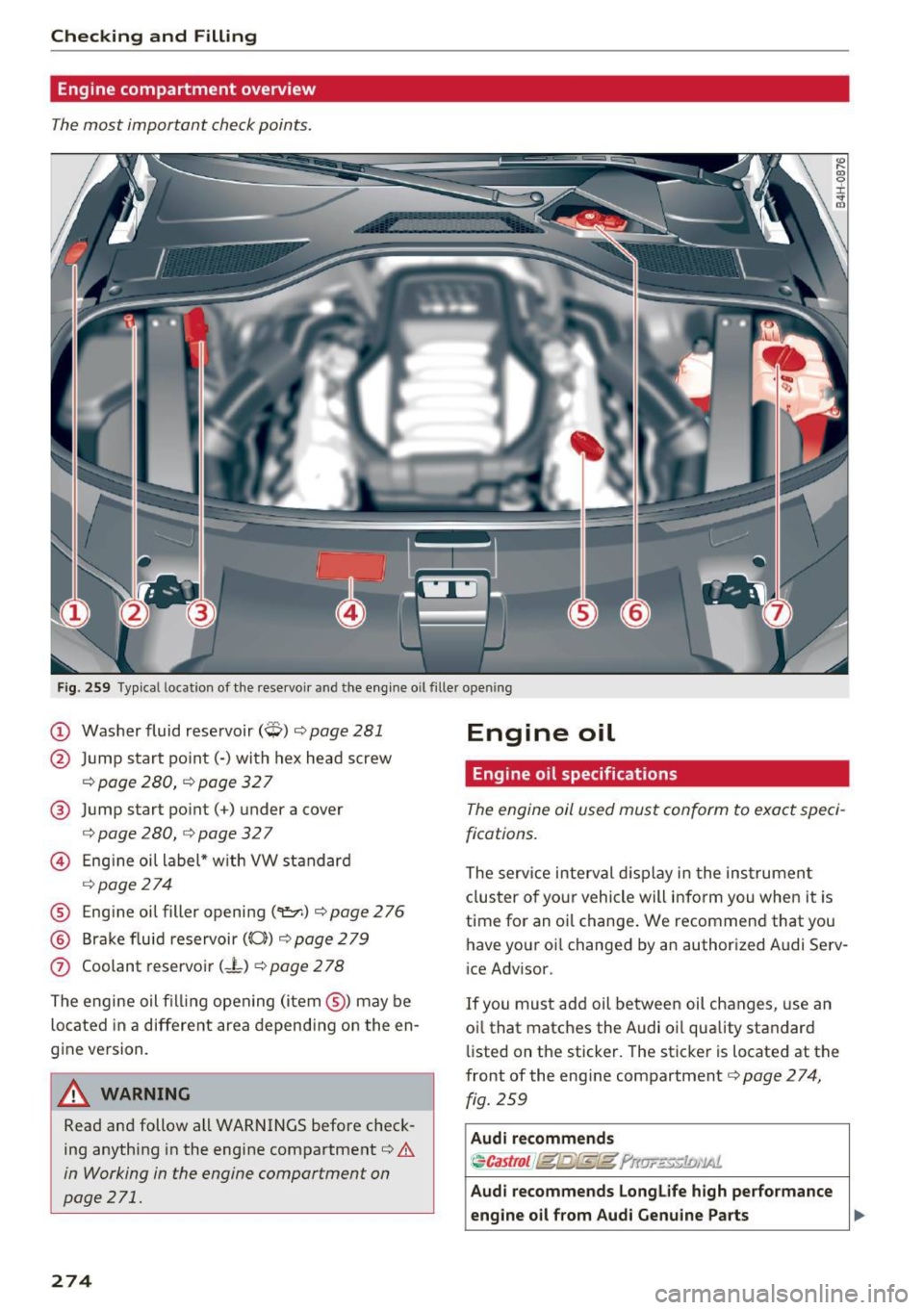
Fig. 259 Typical location of the rese rvoir and the engine o il fil le r open ing
(D Washer fluid reservoir (Q) c::> page 281
@ Jump start point(-) with hex head screw
c::> page 280, c::> page 32 7
@ Jump start point( +) under a cover
c> page 280, c::> page 32 7
@ Engine oil label* with VW standard
c> page 274
® Eng ine oil filler opening(~) c> page 276
@ Brake fluid reservoir((()}) c::> page 2 79
(j) Coolant reservoir (-L) c::> page 2 78
The engine oil fill ing opening (item@) may be
located in a different area depending on the en
gine version.
A WARNING
Read and follow all WARNINGS before check
ing anything in the engine compartment
c::> &.
in Working in the engine compartment on
page 271.
274
Engine oil
Engine oil specifications
The engine oil used must conform to exact speci
fications.
The service interval display in the instrumen t
cluster of your vehicle will inform you when it is
time for an o il change. We recommend that you
have your oi l changed by an authorized Audi Se rv
ice Advisor.
If you must add oil between oil changes, use an
oi l that matches the Audi oil quality standard
listed on the sticker. The sticker is located at the
front of the eng ine compartment
c::> page 274,
fig. 259
Audi recommends
~ Castrol /fg/j;Sf.g;fg f'r
engine oil from Aud i Genuine Parts
liJI,
Page 277 of 354

0 co .... N ,..._
N .... 0 0 :c '
functionality and service life of the engine. Your
engine was factory-filled with a high -quality oil
which can usually be used throughout the entire
year.
Note
Your Limited New Vehicle Warranty does not cover damage or malfunctions due to failure
to follow recommended maintenance and use
requirements as set forth in the Audi Owner's Manual and Warranty & Maintenance booklet.
- Use only a high quality engine oil that ex-
pressly complies with the Aud i oil quality
standard specified for your vehicle's engine.
Using any o ther oil can cause serious engine
damage.
- Do not mix any lubricants o r other additives
into the engine oil. Doing so can cause en
gine damage.
@ Tips
If you need to add oil and there is none availa
ble that meets the Audi o il quality standard
your eng ine requ ires, you may add a total of
no more than 0 .5 quart/li ter of a h igh-quality
"synthet ic"oil that meets the following speci
fications.
- Vehicles with gasoline eng ine: ACEA A3 o r
API SM with a viscosity grade of SAE OW-30,
SAE SW-30 or SAE SW-40.
- For more information about engine oil that has been approved for your vehicle, please
contact e ither your authorized Audi dea ler
or A udi Customer Relat ions at
1 (800) 822-2834 or visit our web site at
www.audiusa.com or www.aud icanada .ca.
Engine oil consumption
The engine in your vehicle depends on an ade
quate amount of oil to lubricate and cool all of
its moving parts .
In order to provide effective lubr ication and coo l
ing of internal engine components, all internal
combustion engines consume a certain amount
of oil. Oil consumption varies from engine to en
g ine and may change significant ly over the life of
Ch eck ing and Filling
the engine. Typ ica lly, engines with a specified
break-in period (see ¢
page 73) consume more
o il during the break -in per iod than they consume
after oil consumption has stabili zed.
Under normal cond itions, the rate of oil con
sumption depends on the quality and viscosity of
the oil, the RPM (revo lutions per minute) at
which the engine is operated, the amb ient tem
perature and road condit ions. Further factors are
the amount of o il dilution from water condensa
t ion or fuel residue a nd the oxidat ion level of the
o il. As any engine is subject to wear as mileage
builds up, the oil consumption may increase ove r
t ime unt il repla cement of worn components may
become necessary .
With a ll these variab les coming into play, no
sta ndard rate of o il cons umption can be estab
l is h ed or spec ified. The re is no alternative to reg
u lar and frequent checking of the oi l level, see
Note .
If the yellow engine o il leve l warning symbo l in
t h e instr ume nt cl uster
II lights up, yo u should
check the o il level as soon as possible
¢ page 2 76 . Top off the o il at your earliest con
venience
¢ page 276.
A WARNING
-Before you check anyth ing in the engine com-
partment, always read and heed all WARN
INGS
¢ .& in Working in the engine compart
ment on page 271 .
@ Note
Driving with an insufficient oil level is likely to
cause severe damage to the eng ine.
(D Tips
- The oil pressu re warning display. is not
an indicator of the o il le vel. Do not rely on
i t. Instead, check the oil level in you r en
g ine at regular inter vals, preferabl y each
time you refuel, and alw ays before go ing
on a long trip .
-If you have the impression your engine con
sumes excessive amou nts of oil, we recom-
mend that you consult your Aud i dea le r to .,,.
275
Page 279 of 354

0 co .... N ,..... N .... 0 0 :c '
Changing the engine oil
We recommend that have your oil changed by an
authorized Audi dealer or a qualified service sta
tion .
Before you check anyth ing in the eng ine compart
ment,
a lways rea d and heed all WARNINGS¢ &
in Working in the engine compartment on
page 271.
The engine oil must be changed according to the intervals specified in your Warranty
& Mainte
nance booklet . This is very important because the
lubricat ing propert ies of oil diminish gradually
during normal vehicle use.
Under some circumstances the engine oi l should
be changed more frequently. Change oil more of
ten if you drive mostly short distances, operate
the vehicle in dusty areas or under predominantly
stop-and-go traffic condit ions, or have your vehi
cle where temperatures remain below freezing
for extended periods .
Detergent additives in the oil will make fresh oil
look dark after the engine has been running for a
short time . This is normal and is not a reason to
change the oil more often than recommended .
Because of the problem of proper disposal, along
with the special tools and necessary expertise re
qu ired, we strongly recommend that you have
your oil changed by an authorized
A ud i d ea ler or
a qualified service station .
If y ou choo se to change yo ur o il y o urse lf, please
note the following important information:
A WARNING
To red uce the risk of personal injury if you
must change the engine oil in your veh icle
yourself:
- Wear eye protection .
- To reduce the risk of burns from hot engine
o il, let the eng ine cool down to the touch.
-
- When removing the o il drain plug with your
fingers, stay as far away as poss ible. Always
Ch eck ing and Filling
keep your forearm parallel to the ground to
help prevent hot oil from running down your
arm.
- Drain the oil into a container designed for
this purpose, one large enough to hold at
least the total amount of oil in your engine.
- Engine oil is poisonous. Keep it well out of the reach of children.
- Continuous contact with used engine oil is
harmful to your skin. Always protect your
skin by washing oil off thoroughly with soap
and water .
CI) Note
Never mix oil additives with your engine oil.
These additives can damage your engine and
adversely affect your Audi limited New Vehi
cle Warranty.
® For the sake of the environment
- Before chang ing your oi l, first make sure
you know where you can properly d ispose of
the used oil.
- Always dispose of used engine o il properly.
Do not dump it on garden soil, wooded
areas, into open streams or down sewage
drains.
- Recycle used engine o il by tak ing it to a used
eng ine oil collection fac ility in your area, or
contact a service station .
Cooling system
Coolant
The engine cooling system is filled with a mixture
of purified water and coolant additive at the fac
tory. This coolant must not be not changed .
T he coo lant level is monitored through the. in
dicator light¢
page 20. However, we do recom
mend occasionally checking the coolant leve l
manually.
If you must add coolant, use a mixture of wate r
and coolant additive . Mixing the coolant additive
with dist illed water is recommended.
ll>
277