remote control AUDI A8 2017 User Guide
[x] Cancel search | Manufacturer: AUDI, Model Year: 2017, Model line: A8, Model: AUDI A8 2017Pages: 354, PDF Size: 88.68 MB
Page 54 of 354
Lights and Vision
• Switch the windshield wipers off (position @
¢page 50, fig. 56).
• Select: the ICARI function button > Car systems
control button
> Servicing & checks > Wiper
service position.
> On .
Removing the wiper blade
• Fold the windshield wiper arm away from the
windshield.
• Press the locking knob@c:>
fig. 57 on the wiper
blade . Hold the wiper blade firmly.
• Remove the wiper blade in the direction of the
arrow .
Installing the wiper blade
• Insert the new wiper blade into the mount on
the wiper arm @until it clicks into place.
• Place the wiper arm back on the windshield.
• Turn the service position off.
A WARNING
For safety reasons, the windshield wiper
blades should be replaced once or twice each
year.
(D Note
- The windshield wiper blades must only be
folded away when in the service position!
Otherwise, you risk damaging the paint on
the hood or the windshield wiper motor.
- You should not move your vehicle or press
the windshield wiper lever when the wiper
arms are folded away from the windshield.
The windshield wipers would
move back in
to their original position and could damage
the hood and windshield.
- You can also use the service position, for ex
ample, if you want to protect the windshield
from icing by using a
cover.
- You cannot activate the service position
when the hood is open.
52
Digital compass
Switching the compass on and off
Applies to: vehicles wit h digital com pass
Fig. 58 Inter ior rearview mirror : d ig ital compass activated
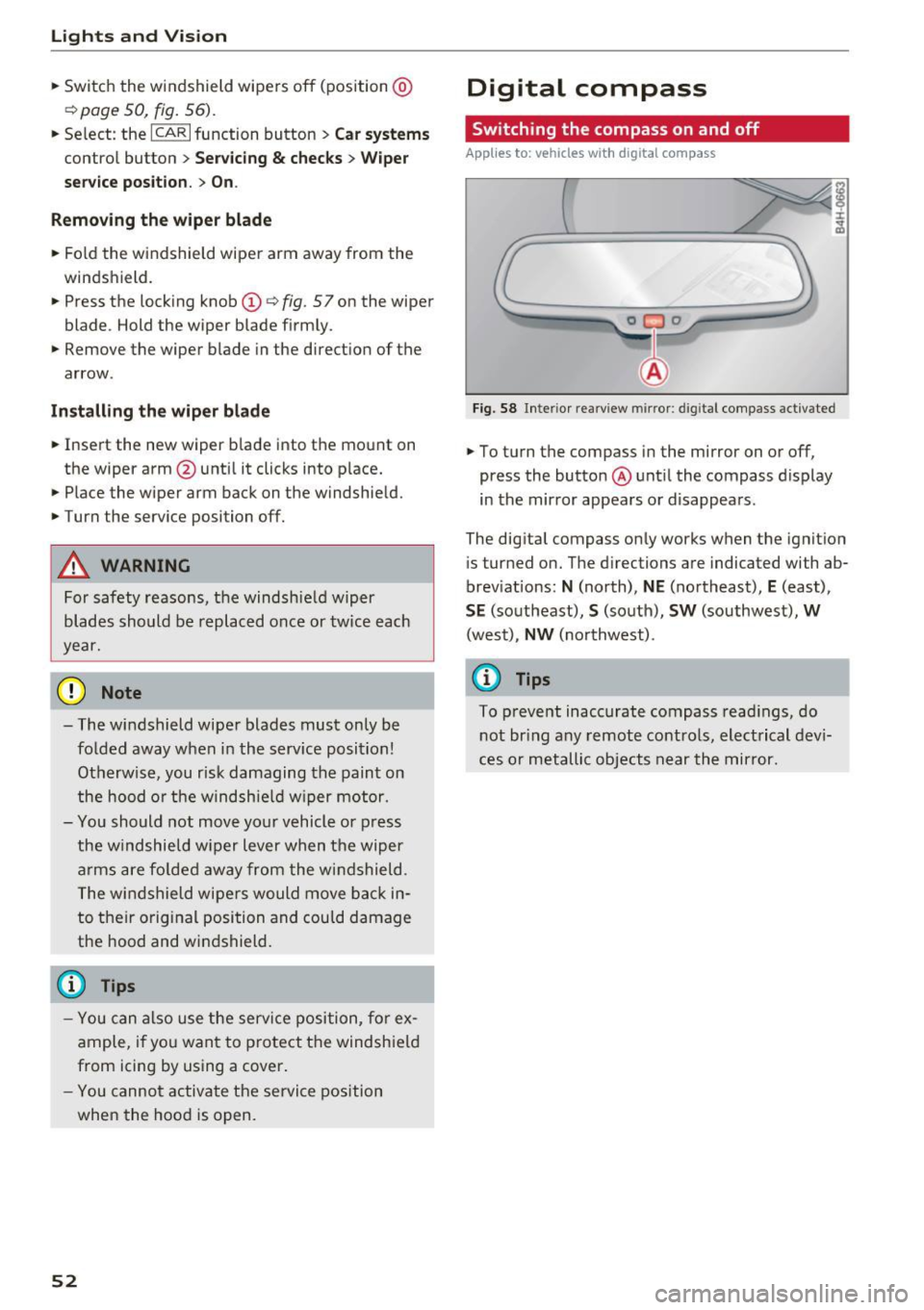
• To turn the compass in the mirror on or off,
press the button @ until the compass display
in the mirror appears or disappears.
The digital compass only works when the ignition
is tur ned on. The directions are indicated with ab
breviations:
N (north), NE (northeast), E (east),
SE (southeast), S (south), SW (southwest), W
(west), NW (northwest).
(D Tips
To prevent inaccurate compass readings, do
not bring any remote controls, electrical devi
ces or metallic objects near the mirror.
Page 59 of 354
C) C0 ....
"' " "' .... 0 0 :r
-The power seats can also be adjusted when
the ignition is switched off. For this reason,
children should never be left unattended in
the vehicle - they could be injured!
- Be careful when ad justing the seat. Unsu
pervised or careless seat adjustment can
pinch fingers o r hands ca using injur ies.
- Applies to vehicles with reclining seat*:
- Do not use the fron t passenger's seat for
seating when it is in the reclining position .
This increases the risk of serious injury or
death.
- Never adjust the reclining position when
the front passenger 's seat is occupied.
This increases the risk of injury.
- Do not tilt the display if the driver's view
of the right exterior mirror w ill be ob
structed .
- Make sure the area between the leg sup
port and the front passenger 's seat back
rest is clear before folding the leg support
in so that you are not pinched.
(D Tips
- The massage function switches off auto
matically after approx imately 10 minutes.
- If you
cannot ad just the reclining seat * or
the front passenger's seat from the rear, it is possible that:
- t he front passenger's seat memory fu nc
t ion is swi tched off~ page
59, or
- the c hild safety lock is switched on (the~
button ~ page 37 or the right
T button
~ page 37 is turned on in the dr iver's
door), o r
- the front passenger seat adjustment is
switched off in the Infotainment system
~ page
SB.
Seats and storag e
Massage function remote control
Applies to: vehicles with reclining seat and massage function
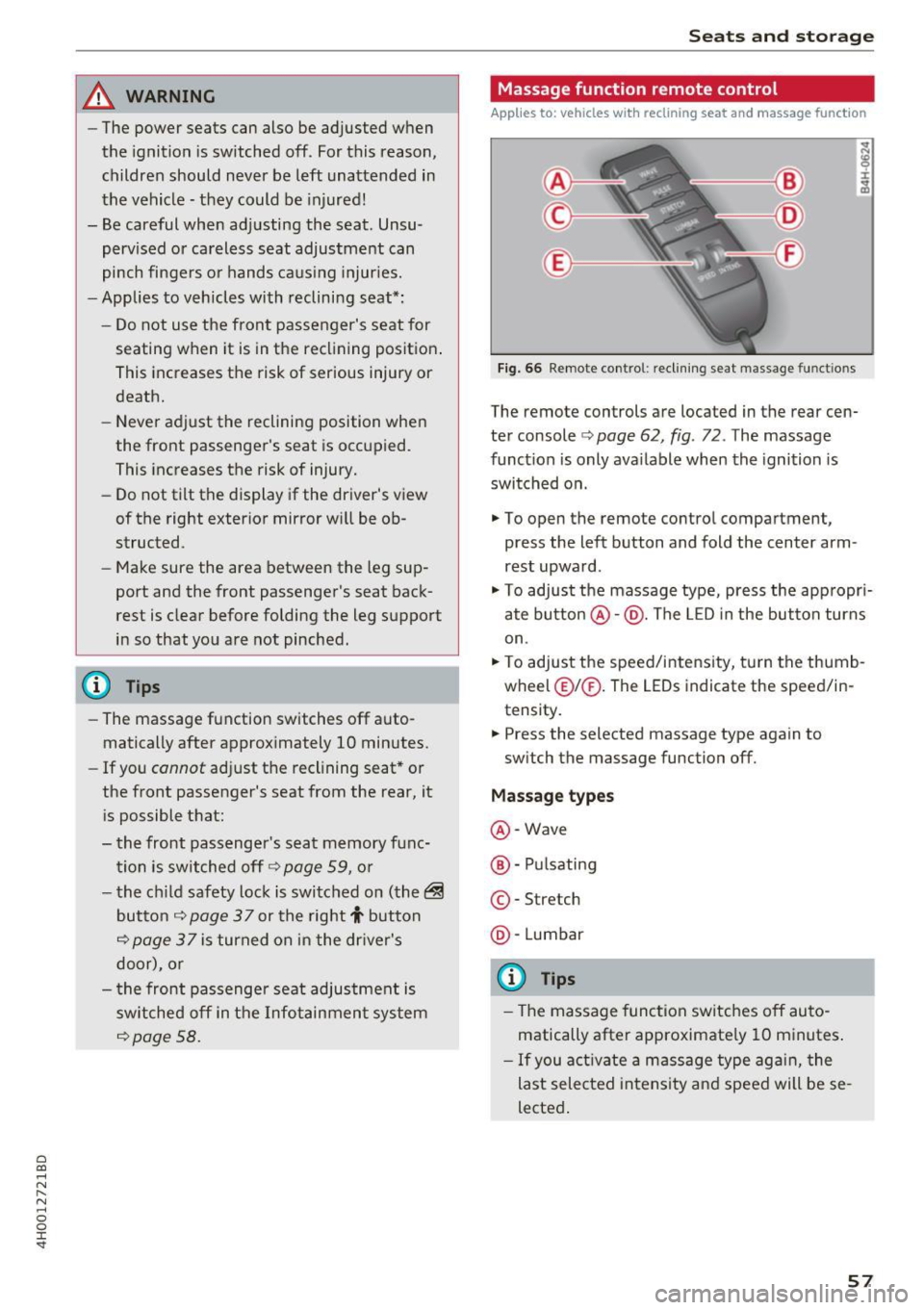
Fig. 66 Remote cont rol: rec lin ing seat massage functions
The remote controls are located in the rear cen
ter console ¢ page 62, fig. 72 . The massage
funct ion is only ava ilable when the ignition is
switched on.
.,. To open the remote control compartment,
press the left button and fold the center arm
rest upward .
.,. To adjust the massage type, press the appropr i
ate button @·@ . The LED in the button turns
on .
.,. To adjust the speed/inte nsity, turn the thumb
wheel @I® . The LEDs indicate the speed/in
tensity.
.. Press the selected massage type again to
sw itch the massage function off.
Massage types
@ -Wave
@ -Pul sating
© -Stretch
@ -Lumbar
(D Tips
- The massage function switches off auto
matically after approximate ly 10 minutes .
- If you activate a massage type aga in, the
last selected intensity and speed will be se
lected .
57
Page 61 of 354
C) C0 ....
"' " "' .... 0 0 :r
To prevent the head restraints from running into the headline, they are automat ically
Memory function
Description
Appl ies to: vehicles wit h memory function
Using the memo ry funct ion, you can q uickly and
eas ily store a pe rsonal seat profile for the driver
and front passenger as we ll as for the o uter rear
seats* and recall the settings. The memory func
tion is controlled using the remote contro l key
and the memory buttons in the driver's/front
passenger's door and in the rear doors*.
The driver's seat profi le is stored again and as
signed to the remote control key each time the
vehicle is locked. When you open the door, the
seat profile is automat ically recalled. If two peo-
Remote control
key
Dr iver
Seat X
Head rest raint X
Steering wheel * X
Safety belt* X
Both exterior mirrors* X
Remote control key
Applies to: vehicles with memory function
The function must be switched on so that the
driver's seat profile will be assigned to the re
mote control key when lock ing the vehicle .
.. Se lect : the
I CAR I function button > C ar sy stem s
control button > Veh icle setting s> Driver' s
s eat > Remote control ke y> On.
(D Tips
If you do not wish to have the seat p rofile for
another driver assigned to the remote control
key, switch the memory function off in the In
fotainment system or using the
IO FFI button
~page 59.
Seats and storag e
moved forward or upward when the seat is
adjusted.
ple use the vehicle, it is recommended that each
person always uses the ir "own" remote control
key .
Two seat profiles can be stored using the memo ry buttons in the d river 's/front passenger 's door
respectively, and one seat profile can be stored in
each of the rear doors *. Once they a re stored,
these seat profi les can be se lected at any time.
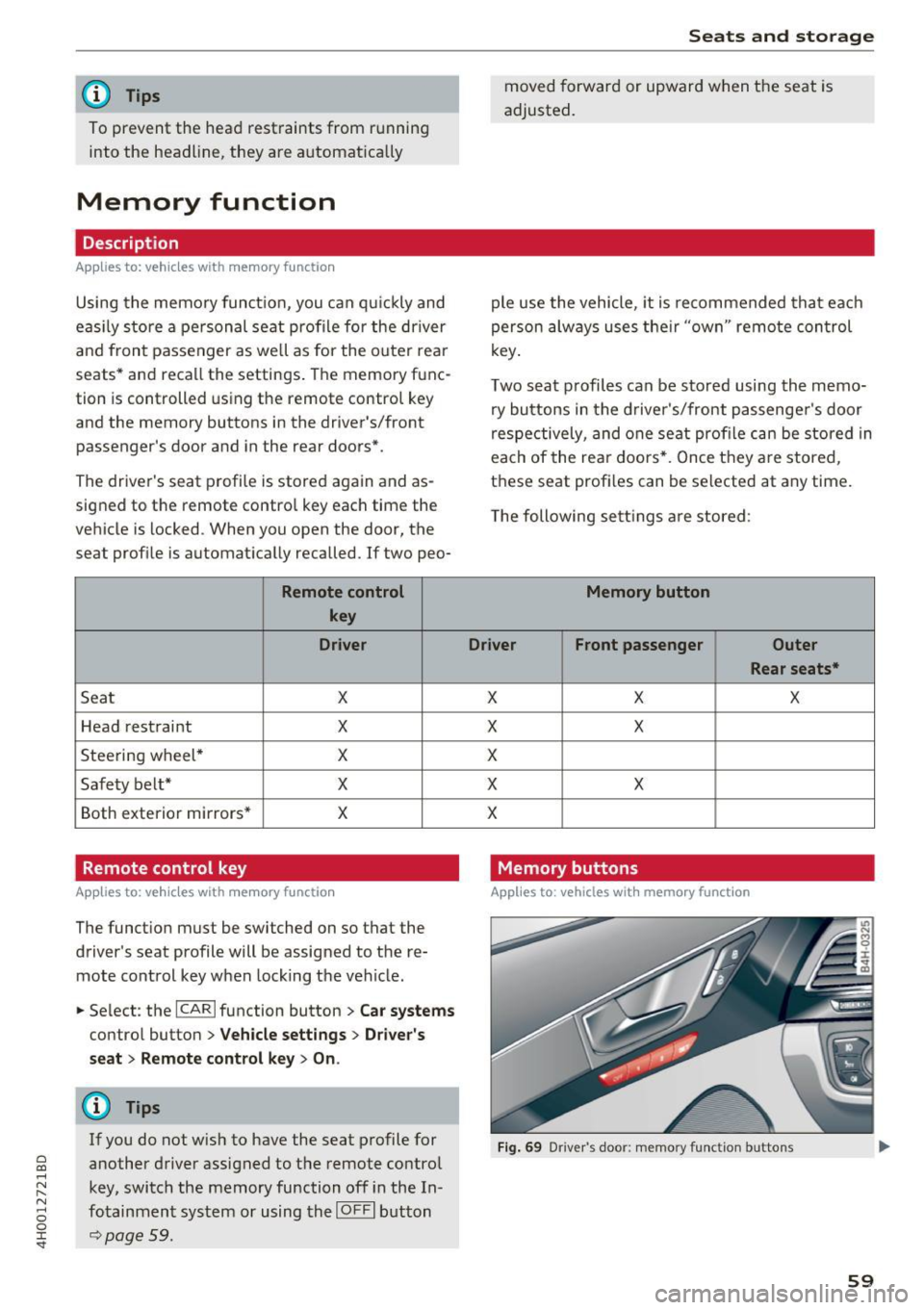
T he following sett ings a re stored :
Memory button
Driver Front passenger Outer
Rear seats*
X X X
X
X
X
X X
X
Memory buttons
Applies to: veh icles w ith memory function
F ig . 69 Dr iver 's door: memory function buttons
59
Page 64 of 354
Sea ts and stor age
- Wit h some power supply units, such as for
l aptops, switching them on disables the in
tegrated overcurrent shutdown . In this
case, disconnect the powe r supply unit from
the electrical equipment and reconnect af
ter approximately 10 seconds.
@ Tips
- Devices that are not shie lded or dev ices near
the rear w indow antenna can cause mal
functions in the radio, TV area or in the vehi
cle elect rical system.
- The functions on some devices may be limit
ed d ue to the low powe r output (wattage) .
Full-length center
console
Overview
A ppl ies to: ve hicles w ith full-le ngth ce nter console
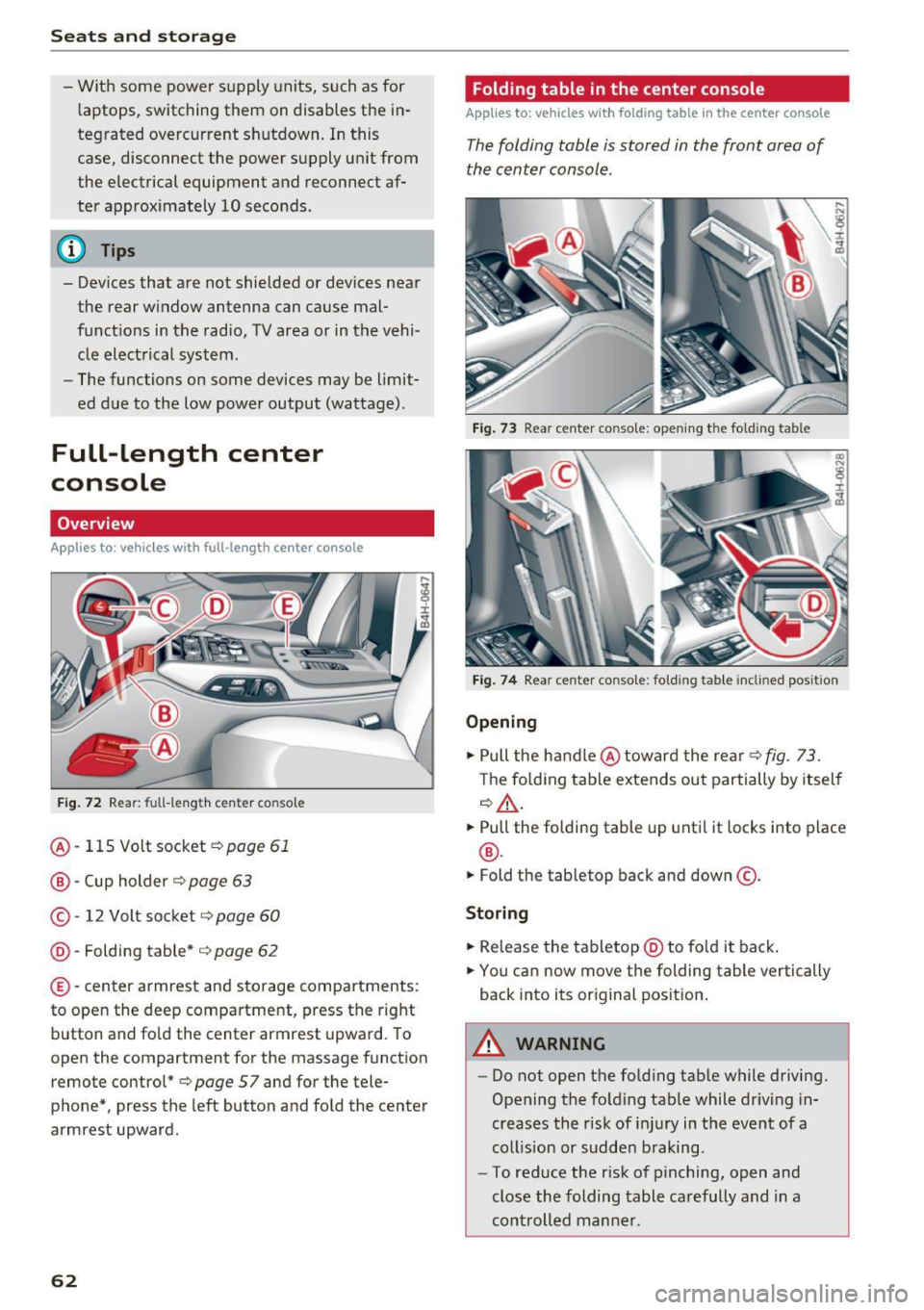
F ig . 72 Rear: fu ll-le ng th ce nte r co nso le
@ -115 Volt socket ¢page 61
@ -Cup holder ¢ page 63
©-12 Volt socket ¢ page 60
® -Fold ing table* ¢ page 62
©-center armrest and sto rage compartments :
to open the deep compa rtment, press the right
button and fo ld the c ent er armrest upward. To
open the compartment for the m assage function
remote control*¢
page 57 and for the tele
phone*, press the left button and fold the center
armrest upward .
62
Folding table in the center console
Applies to : vehicles wi th folding table in the center co nso le
The folding table is stored in the front area of
the center console.
Fig . 73 R ea r cent er co n so le: op ening th e fo ld ing t able
Fig . 74 Rear cent er co nso le: foldi ng tab le inclin ed po sition
Opening
.,. Pull the handle @toward the rear¢ fig . 73.
T he fo lding tab le extends out partially by itself
¢ &, .
.,. Pull the folding table up unti l it locks into p lace
® ·
.,. Fold the table top back and down@.
Storing
.,. Re lease the tabletop @ to fo ld it back .
.,. You can now move the folding table vertically
back into its original pos ition.
A WARNING
-- Do not open the fo ld ing tab le while d riving.
Opening the fo ld ing table while driving in
creases the risk of i njury in the event of a
coll ision or sudden braking .
- To reduce the r isk of pinching, open and
close the folding table carefully and in a
controlled manne r.
Page 101 of 354
C) C0 ....
"' " "' .... 0 0 :r
to a distance of 164
ft (SO m) when traveling at
62 mph (100 km/h), for examp le (time between :
1.8 seconds).
~-- --~ Dist a nce 4: This setting corresponds
to a distance of 210
ft (64 m) when traveling at
62 mph (100 km/h), (time distance of 2.3 sec
onds).
A WARNING
Following other vehicles too closely increases
the risk of coll isions and ser ious personal in
jury.
- Setting short distances to the traffic ahead
reduces the t ime and distance available to
br ing your vehicle to a safe stop and makes
it even mo re necessary to pay close atten
t ion to traffic.
- Always obey applicable traffic laws, use
good j udgment, and select a safe following
distance for the traffic, road and weather
condit ions .
@ Tips
- Di stance 3
is set automatically each time
you switch the ignition on.
- Your settings are automatically stored and
assigned to the remote control key being
used.
Selecting the driving mode
A pp lies to: ve hicles with Audi adaptive cruise co ntrol
.,. Se lect the des ired driving mode in dr ive se lect
c> page 110 .
@ Tips
Your se ttings a re au toma tical ly s to red and as
signed to the remote control key being used.
A ss ist
Driver intervention request
App lies to : vehicles wit h Aud i ada ptive cr uise control
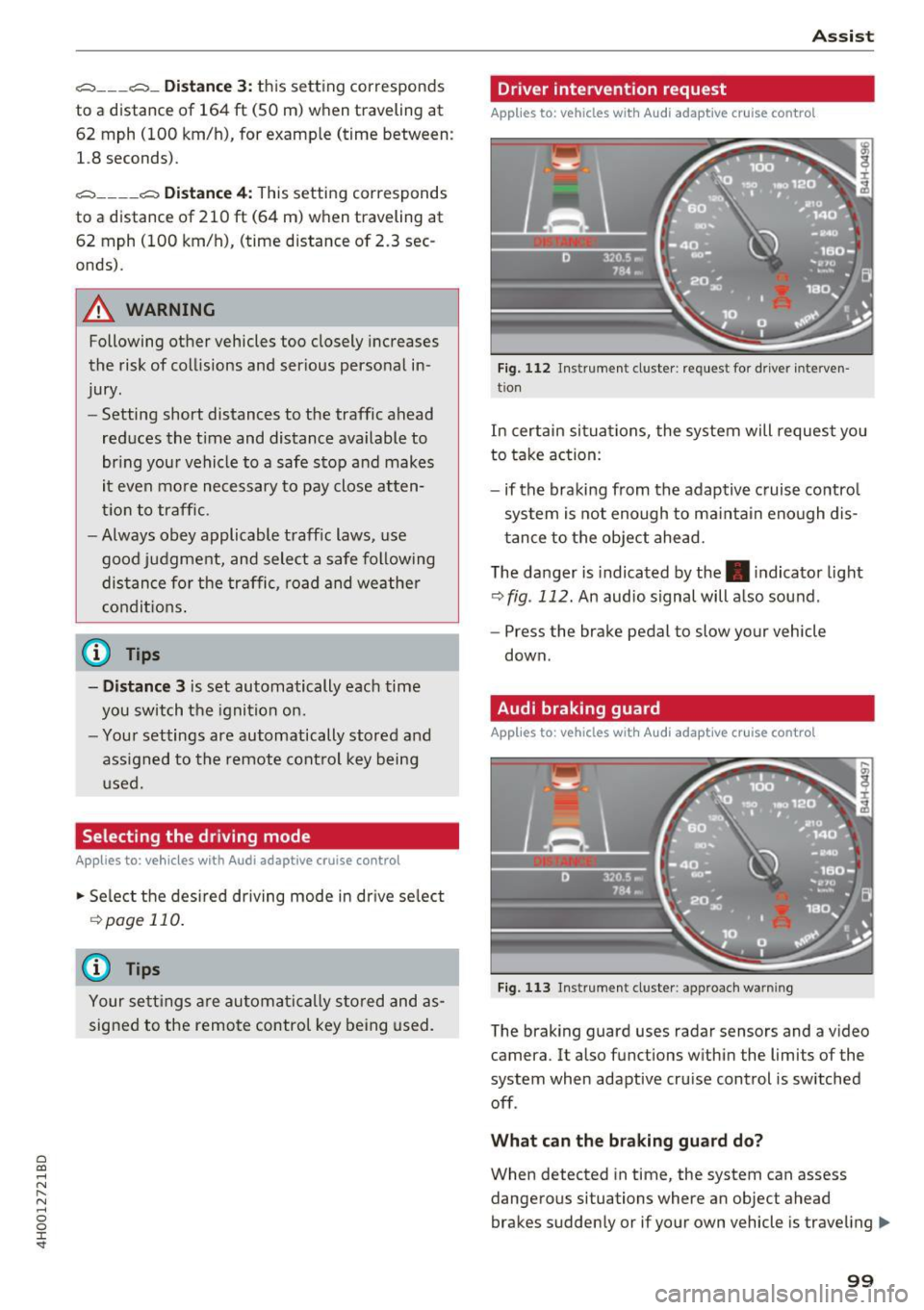
Fig. 112 Instrume nt cl uster : request fo r drive r in terven
tio n
In certain situa tions, the system will request you
to take action:
- if the braking from the adap tive cruise contro l
system is not enough to ma intain eno ugh dis
t ance to the object ahead.
The da nger is indicated by the. indicator light
r:!> fig . 112. An audio signal will a lso sound .
- Press the brake pedal to slow your vehicle
down.
Audi braking guard
Appl ies to: vehicles wit h Audi ada ptive cr uise control
Fig. 113 Instrument cluster : approach wa rnin g
The braking guard uses radar sensors and a v ideo
camera. It also functions within the limits of the
system when adaptive cru ise control is switched
off .
Wh at can the b raking guard do?
When detected in time, the system can assess
dangerous situations where an object ahead
brakes suddenly or if your own vehicle is traveling .,..
99
Page 103 of 354
0 co .... N ,..._
N .... 0 0 :c '
Applies to: vehicles with Audi adaptive cruise contro l
.,. Se lect: t he I CAR I fu nction bu tton > Car systems
co ntro l bu tton > Driver a ssist > Audi braking
guard .
System -
Switch the bra kin g g ua rd On/ Off. When
you swit ch the ig nition on, the message
Braking
guard: Off
appears if t he sys tem is switched o ff.
Early warning -The distance and approac h warn
i ngs i n the display can be sw itched
On/ Off.
@ Tips
- Your settings are automatically stored and
ass igned to the remote cont rol key bei ng
used.
- If you restric t or sw itch off the ESC, the
braking gua rd also sw itches itself off
¢ page 12 7.
- Switch braking guard off when yo u are load
i ng t he ve hicle on to a vehicle ca rr ier, t rain,
shi p or other type o f transportation. This
c a n p reven t undesired w arnings from the
br akin g guard system.
Messages
Applies to: veh icles with Audi adaptive cruise control
Braking guard: Off
This message appea rs if the sys tem is switc hed
off through the In fota inme nt system . Otherwise ,
if the system is tur ned off, the informa tion ap
pears every time shortly after the start of t he
tr ip.
The message also appears if the system is not
avai la bl e d ue to a ma lfunction or if the ESC is
switched off~
page 127. If this is the case, the
system w ill not prov ide warnings about a possi
b le co llision.
Braking guard : engaged
This message appea rs if a sha rp bra ke press ure
was applied due to an ac ute wa rn ing.
ACC: unavailable
ACC and Audi braking guard: Unavailable Assist
T
he system cannot gua rantee that it will detect
objects co rrectly and is sw itched off . The sensors
have been moved or are faulty. The p re sense
funct ions may a lso be affected . D rive to an au
t h ori zed Audi dea ler or authorized Audi Service
Facility immed iate ly to have the malfunction cor
rected .
ACC: Currently unavailable. No sensor vis ion
ACC and Audi braking guard: Cu rrently unavail
able. No sensor vision
Th is mess age appears if the senso r view i s ob
str ucted, for examp le by leaves, snow , heavy
spray or dirt. Clean the sensors¢
page 94 ,
fig . 104.
ACC : Currently unavailabl e. Gradient too steep
The road exceeds the maximum poss ible angle
fo r safe adaptive c ruise cont rol operat io n. Adap
t ive cr uise control is sw itched off.
ACC: only available in D, Sor M
Se lect the D, Sor M selector leve r pos ition.
ACC : Currently unavailable. Parking brake ap •
plied
The ad apt ive cr uise cont rol system sw itches off
a utoma tica lly if the parking brake is se t.
ACC: Currently unavailable . Stability control
( ESC) input .
This message appears if the Electronic Stab iliza
t ion Control (ESC) is taking action to stab ilize the
vehicle . In t his case, adaptive cruise control
switches off automatically .
ACC off: manual control!
This message appears when adaptive cruise con
trol cannot set the parking brake. P ress the brake
pedal to prevent the vehicle from ro lling.
• ••
T h ree white do ts appear if a setting canno t be se
l ecte d w it h t he oper ati ng leve r. For ex ample, this
h appens if a daptive cr uise con trol c annot sta rt
driv ing a utomat ica lly in stop -and -go traff ic be
ca use the dr iver has not fastene d their safety
belt . ..,.
101
Page 109 of 354
0 co .... N ,..... N .... 0 0 :c '
Appl ies to: ve hicles with Audi side assist
The display brightness can be adjusted in the In
fotainment system.
.. Se lect : the I CAR I function button > Car systems
contro l button > Driver ass ist > Audi side as
sist .
The display brightness ad justs automat ica lly to
the br ightness of the surroundings, both in the
i n formation and in the warning stage . In very
dark or very bright sur roundings, the automatic
ad ju stment will set t he d isp lay to the m inimum
or maxim um level. In such cases, you may no tice
no change when adjus ting the b rightness, o r the
change may only be no tic eable once the s ur
r o undings change .
Ad just the b rig ht ness to a level where the d isp lay
in t he inform ation stage wi ll no t dis rup t your
view ahead. If you change the bright ness, the dis
p lay in the ex terior mirror will brief ly show the
b rightness level in the information stage . The
brightness of the warning stage is linked to the
brightness in the informat ion stage and is ad just
ed along w ith the information stage.
(D Tips
- Side assist is not active wh ile you are ma k
i ng the ad justment.
- Your settings are automatically store d and
ass igned to the remote control key being
used.
Messages
A ppl ies to: ve hicles with Audi side assist
If s ide ass ist switches off by itself, the LED in the
button turns off and a message will appear in the
i nstr ument cluster d is pl ay :
Audi side assist: Currently unavailable . No
sensor vision
The rada r senso rs' vision is affected . Do not cover
the area in front of the senso rs with bike wheels ,
sticke rs, dirt o r othe r objects . Clean t he a rea in
fr on t of the senso rs , if necess ary
c> page 105,
fig. 1 21 .
Assist
Audi side assist: currently unavailable
S id e assist c annot be sw itched on at this time be
ca use there is a ma lfunction ( for example, the
battery c harge leve l may be too low).
Audi side assist: System fault!
T he system canno t gua rantee that it will detect
vehicle s cor rec tly and it has switc hed off. The
senso rs have been moved or are f aulty. H ave the
system checked by an au thorized Audi dealer o r
autho rized Audi Serv ice Facility soon.
Audi side assist: Unavailable when towing
S ide ass ist swit ches off automatically when a fac
tory -inst alled tra ile r hi tch is con necte d to the
electrical connec tor on the t rai ler . There is no
guarantee the system will switch off when using
a retrofitted trailer hitch. Do not use side assist
when towing a trai ler.
Night vision assist with
pedestrian and wild
animal detection
Description
App lies to : vehicles wit h night vision assist
The night vision assist can detect, highlight and,
if necessary, warn about pedestrians and large wild animals.
N ight v ision assist w ith pedestrian and w ild ani
mal detection assists you at nig ht by using an in
frared camera to monitor the a rea in front of
your vehicle, within the limits of the system. It can d isplay objects up to a distance of approxi
mately 1000 feet (300 m) . The thermal image
de te cted by the camera is show n in the inst ru
ment cluster d is pla y. Warm areas appear lighter
and co ld areas appear d arker.
107
Page 114 of 354
Ass is t
Selecting the driving mode
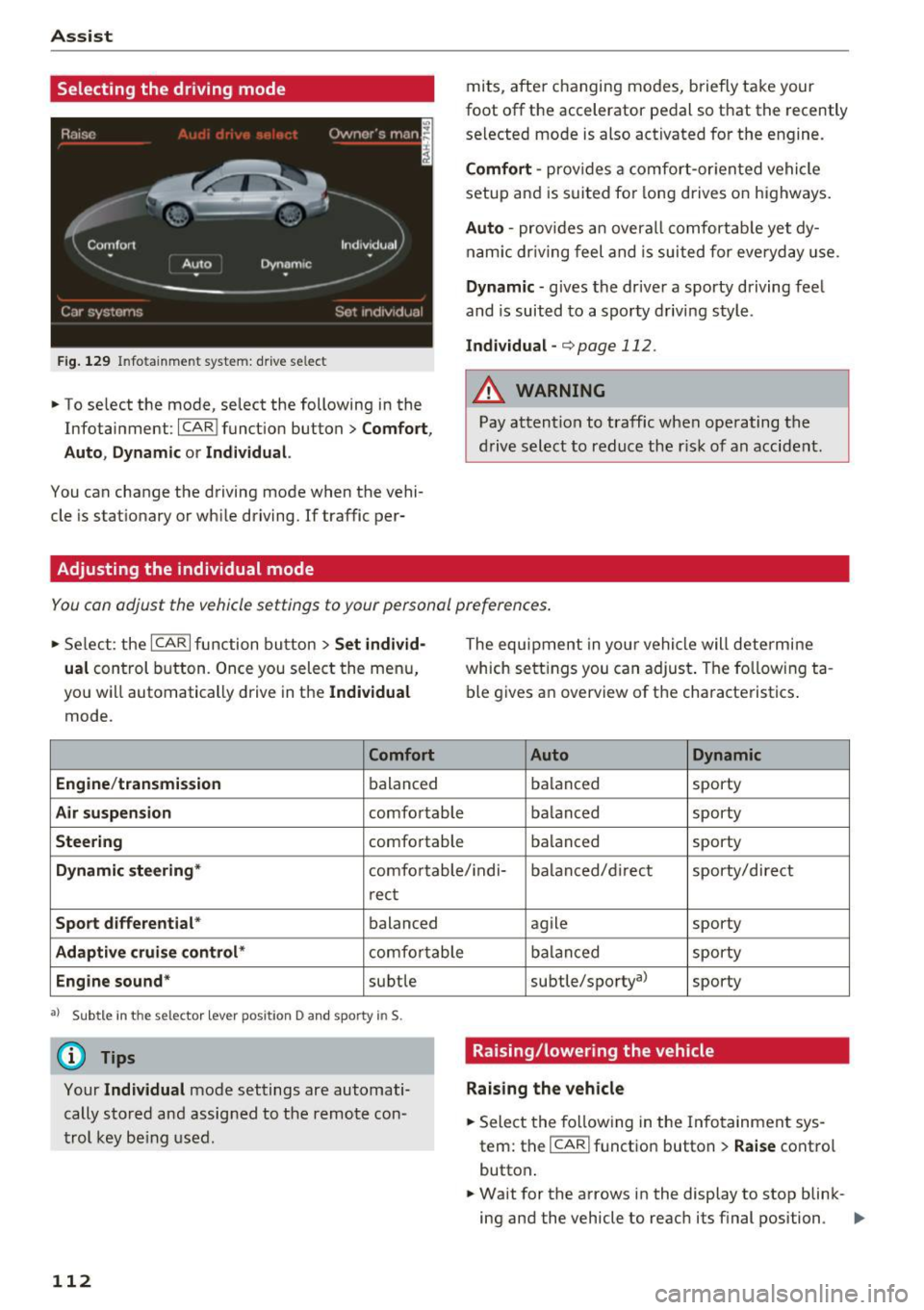
Fig . 129 In fotainme nt system: drive se lect
• To se lect the mode, select the following in the
Infotainment :
ICARI function button> C omfort ,
Auto , Dynam ic
or Individua l.
You can change the driving mode when the vehi
cle is stat ionary or wh ile driving. If traffic per-
Adjusting the individual mode
mits, after changing modes, briefly take your
foot off the accelerator pedal so that the recently
se lected mode is also activated for the engine.
Comf ort -prov ides a comfort-or iented vehicle
setup and is s uited fo r long drives on highways.
Auto -provides an overa ll comfortab le yet dy
nam ic dr iving feel and is suited for everyday use.
Dynamic -gives the dr ive r a sporty driving feel
and is suited to a sporty driving style .
Indivi dual -¢ page 112 .
_& WARNING
Pay attention to traff ic when ope rating the
d rive select to reduce the r isk of an accident .
-
You can adjust the vehicle settings to your personal preferences .
• Se lect : the ICARI function button > Set indi vid·
ual
control button . Once you select the menu,
yo u will automatically drive in the
Individual
mode .
Comfort
Engine /t ransmi ssion
balanced
Air su spension comfo rtable
Steering comfortable The equipment in your vehicle will determine
which sett
ings you can adjust. The fo llowing ta
ble gives an overview of the characteristics .
Auto Dynamic
balanced sporty
balanced sporty
balanced sporty
Dynamic steering
* comfortable/ i ndi- ba la need/d irect sporty/direct
r ect
Spo rt differ ential * balanced
Adaptiv e cruise con trol * comfo rtable
Engine sound* subtle
a l Sub tle in the sele ctor leve r posi tio n D and sp orty in S.
(D Tips
Your Indi vidua l mode settings are automati
cally stored and assig ned to the remote con
trol key be ing used .
112 agile
sporty
balanced sporty
subtle/sportyal sporty
Raising/lowering the vehicle
Raising the vehicle
.. Select the fo llowing in the Info tainment sys
tem: the
ICAR I function button> Raise contro l
button .
.. Wait for the arrows in the display to stop blink-
ing and the vehicle to reach i ts f inal position . ..,.
Page 341 of 354
This will help ensure that vehicle function, per
formance and safety are not impaired¢& .
Attempting to work on e lectronic components
and the so ftware used with them can cause ma l
f u nctions. Because of the way electronic compo
nents are inte rconnected with each other, such
malfunct ions can also have an adve rse affect on
other systems that are not directly involved . This
means that you risk both a substantia l reduction
in the operationa l safety of your veh icle and an
in creased wea r of ve hicle parts¢ .&,.
Author iz ed Audi dealers w ill perform this work in
a profess ional and competent manner or, in spe
cial cases, refer you to a professional company
that spec ializes in such modifications .
A WARNING
Improper repairs and mod ificat ions can
change the way veh icle systems work and
cause damage to the veh icle and ser ious per
sonal injury.
([) Note
If emerg ency r epairs must be pe rformed else
where, have the vehicle examined by an au
t hori zed A udi d ealer as soon as possib le.
Declaration of
Compliance, Telecom munication or Electronic
Systems
Radio Frequency Devices and Radiocommunica
tion Equipment User Manual Notice .
The manufacturer is not respo nsible for any radio
or TV inte rferen ce caused by unauthor ized modi
fications to this equipment .
Devices
The follow ing devices each comp ly w ith FCC Part
15. 19, FCC 15.2 1 and RS S-Gen Issue
1:
- Adaptive cruise control
o -Audi s ide ass ist co ....
~ - Cell phone pac kage
N 8 -Convenience key
0 :c -Electron ic immobilizer '
- Head phones
- Homelink u niversa l remo te cont rol
- Remote cont rol key
- S8 plus : tire pressure monitoring system
FCC Part 15 .19
This device complies with part 15 of the FCC
Rules. Ope ration is subject to the follow ing two
condit ions:
(1) This device may not ca use ha rmf ul interfer
ence, and
(2) this devi ce must accep t any inte rference re
ceived, incl uding interference that may cause un
desired ope ration.
FCC Part 15.21
CAU TION:
Changes or mod ificat io ns not express ly app roved
by the pa rty responsible fo r compliance could
vo id the user's a uth o rit y to ope rate the equ ip
ment.
RSS-Gen Issue 1
Operat io n is subject to the following two cond i
t ions:
(1) this device may not cause inte rference, and
(2) this device must accep t any inte rference, in
cluding interference that may cause undes ired
operation of the dev ice .
339
Page 343 of 354
0 co .... N ,..._
N .... 0 0 :c '
Checking the brake fluid level . . . . . . . . . . 279
Brakes . . . . . . . . . . . . . . . . . . . . . . . . . . . . . . 128
Brake fluid . . . . . . . . . . . . . . . . . . . . . . . . . 2 79
Electromechanical parking brake . . . . . . . . 81
New brake pads . . . . . . . . . . . . . . . . . . . . . 128
Braking Brake assist . . . . . . . . . . . . . . . . . . . . . . . . 126
Emergency braking function . . . . . . . . . . . . 81
Worn brake pads . . . . . . . . . . . . . . . . . . . . . 23
Brak ing guard . . . . . . . . . . . . . . . . . . . . . . 94, 99
Messages . . . . . . . . . . . . . . . . . . . . . . . . . . 101
Break-in period
Tires . . . . . . . . . . . . . . . . . . . . . . . . . . . . . . . 73
B reak ing in
New brake pads . . . . . . . . . . . . . . . . . . . . . 128
N ew engine . . . . . . . . . . . . . . . . . . . . . . . . . 73
Ne w tires . . . . . . . . . . . . . . . . . . . . . . . . . . 290
Browsing through album covers . . . . . . . . . 190
Bulbs . . . . . . . . . . . . . . . . . . . . . . . . . . . . . . . 326
But tons
Mul tifunc tion steering wheel . . . . . . . . . . . 11
C
Cable (Audi music interface)
California Proposition 65 Warning ...... .
Battery specific .............. .. .... .
Call .. .. .. .. .. ............... .. .... . 185
272
280 149
Call list . . . . . . . . . . . . . . . . . . . . . . . . . . . . . 148
Call options . . . . . . . . . . . . . . . . . . . . . . . . . . 155
Capacities Fuel tank. . . . . . . . . . . . . . . . . . . . . . . . . . . 334
Washer fluid reservoir . . . . . . . . . . . . . . . . 334
Car carrier Transporting your vehicle . . . . . . . . . . . . . 330
Care . . . . . . . . . . . . . . . . . . . . . . . . . . . . . . . . 306
Cargo area
refer to Luggage compartment.. .. ..... 213
Caring for and cleaning leathe r . . . . . . . . . . 309
Catalytic converter
CD 271
refer
to Media . . . . . . . . . . . . . . . . . . 180, 189
Ce ll phone
Playing music . . . . . . . . . . . . . . . . . . . . . . . 183
also refer to Telephone . . . . . . . . . . . . . . . 146
Center armrest . . . . . . . . . . . . . . . . . . . . . . . . 55
Index
Center conso le lighting . . . . . . . . . . . . . . . . . 4 7
Central locking . . . . . . . . . . . . . . . . . . . . . . . . 27
Centra l locking sw itch . . . . . . . . . . . . . . . . . 31
Convenience key . . . . . . . . . . . . . . . . . . . . . . 30
Em ergency locking . . . . . . . . . . . . . . . . . . . . 32
Luggag e compartment lid . . . . . . . . . . . . . . 33
Remote contro l key . . . . . . . . . . . . . . . . . . . 30
Setting . . . . . . . . . . . . . . . . . . . . . . . . . . . . . 32
Certification . . . . . . . . . . . . . . . . . . . . . . . . . 339
Chang ing engine oil . . . . . . . . . . . . . . . . . . . 277
Changing the battery . . . . . . . . . . . . . . . . . . 198
Charging and chang ing the battery . . . . . . . 198
Child restraints . . . . . . . . . . . . . . . . . . . . . . . 266
Danger of using child restraints in the front
seat . . . . . . . . . . . . . . . . . . . . . . . . . . . . . . . 227
Child restraint system anchors . . . . . . . . . . 261
Child safety . . . . . . . . . . . . . . . . . . . . . . . . . . 248
Gu idance fixtures for lower anchorages . . 262
Child safety lock . . . . . . . . . . . . . . . . . . . . . . . 36
Child safety seat . . . . . . . . . . . . . . . . . . . . . . 253
Child safety seats Convertib le child seats . . . . . . . . . . . . . . . 255
Infant seats . . . . . . . . . . . . . . . . . . . . . . . . 254
Installing a child restraint using the LATCH
system . . . . . . . . . . . . . . . . . . . . . . . . . . . . 263
LATCH system . . . . . . . . . . . . . . . . . . . . . . 263
Lower anchorages . . . . . . . . . . . . . . . . . . . 262
Mounting and releasing the anchorage
hook . . . . . . . . . . . . . . . . . . . . . . . . . . . . . . 263
Safety instruc tions . . . . . . . . . . . . . . . . . . . 251
Child seats . . . . . . . . . . . . . . . . . . . . . . . . . . 254
Securing ........................... 258
Cleaning . . . . . . . . . . . . . . . . . . . . . . . . . . . . 306
Cleaning/removing ice from windows . . . . . 308
Cl eaning Alcantara . . . . . . . . . . . . . . . . . . . . 309
Cleaning art ificial leather . . . . . . . . . . . . . . . 309
Cleaning carbon parts . . . . . . . . . . . . . 308, 309
Cl eaning controls . . . . . . . . . . . . . . . . . . . . . 308
Cleaning decorative parts and trim . . . . . . . 308
Cleaning displays . . . . . . . . . . . . . . . . . . . . . 308
Cleaning exhaust tail pipes . . . . . . . . . . . . . 308
Cleaning plastic parts . . . . . . . . . . . . . . . . . . 308
Cl eaning tail lights . . . . . . . . . . . . . . . . . . . . 307
Cleaning textiles . . . . . . . . . . . . . . . . . . . . . . 309
Clock . . . . . . . . . . . . . . . . . . . . . . . . . . . . . . . . 16
341