service AUDI A8 2017 User Guide
[x] Cancel search | Manufacturer: AUDI, Model Year: 2017, Model line: A8, Model: AUDI A8 2017Pages: 354, PDF Size: 88.68 MB
Page 27 of 354
0 co .... N ,..._
N .... 0 0 :c '
Audi Service Facility immediately to have the
malfunct ion corrected.
fi. D Light/rain sensor
El Automatic headl ights / automatic wipers :
System fault
The light/ra in sensor is malfunction ing.
The low beams remain switched on at all times
for safety reasons when the light switch is in the
AU TO position. You can continue to turn the
lights on and
off using the light switch . You can
still control all functions that are independent of
the ra in sensor through the windshield w iper lev
er .
Drive to an authori zed Aud i dea ler or authorized
Audi Service Facility immediately to have the malfunct ion corrected.
!-: Sport differential
A ppl ies to: ve hicles with sport differential
Ill Sport differential : System fault
There is a malfunction with the spo rt differentia l.
Dr ive to an authorized Aud i dea le r o r a uthorized
Aud i Service Facility immediately to have the
malfunct ion corrected.
Ill Sport differential : Overheating
The transm ission temperature has increased s ig
ni ficantly due to the sporty driving manne r. D rive
in a less sporty manner until the temperature re
turns to the normal range and the indic ator light
switches of .
& WARNING
-
Contact your authori zed A udi dealer or a
qualified workshop if the sport differentia l is
faulty or malfunctioning. The repair must be
performed by trained personnel using the cor
rect o il in order to ensure safety.
Coc kpit o ve rv iew
¢ Q Turn signals
If the . or B indicator light blinks , the turn
s ignals a re act ivated. If bot h ind icator lights are
blinking, the emergency flashers are activated.
If an ind icator light blinks tw ice as fast as usual,
a turn signal bu lb has fai led. Carefully d rive to an
autho riz e d Aud i dea le r or authorized Aud i Serv ice
F acility immed iate ly to have the ma lfunction co r
rected . The indicator light does not indicate a
malfunction if a turn signal on the trailer or on
the vehicle fa ils in trailer towing mode.
(D Tips
Fo r more information on the turn signa ls, re
fer to<=>
page 44.
On Board Diagnostic
System (OBD)
Malfunction Indicator Lamp (MIL)
The Ma lfunction Indicator Lamp (MI L) ¢,ij in the
inst rument cluster is part of the On-Boa rd Diag
nostic (OBD II) system .
T he wa rning/indicator light ill uminates when the
ignition is sw itched on and goes out after the en
gine starts and the idle has stabilized. This indi
cates that the MIL is working properly.
If the li ght do es not go out after the eng ine is
sta rted, or i lluminates while you are driving, a
malfunction may exist in the engine system. If
the lig ht illuminates, the catalytic converter
could be damaged.
Cont inue driving
with reduced power (avoiding
s ustained high speeds and/o r rapid accelera
tions) and have the condit ion corrected. Contact
your authori zed Aud i dea ler .
If the light i llum inates, the elect ronic speed lim
iter may also be malf unct ion ing. For more infor
mation
c> page 26, Electronic speed limiter .
An improperly closed fue l filler cap may also
ca use the MIL light to illuminate ¢
page 269.
25
Page 28 of 354

Cockpit overview
On-Board Diagnostics
Fig. 19 Location of Data Link Connector (DLC)
On-Board Diagnostics monitors the components
of your emission control system. Each monitored
component in your engine system has been as
signed a code . In case of a malfunction, the com
ponent will be identified and the fault stored as a
code in the control module memory.
The MIL light may also illuminate if there is a
leak in the on-board fuel vapor recovery system.
If the light illuminates after a refueling, stop the
vehicle and make sure the fuel filler cap is prop
erly closed
¢ page 269.
In order to make an accurate diagnosis, the stor
ed data can only be displayed using special diag
nostic equipment (generic scan tool for OBD).
In order to connect the special diagnostic equip ment, push the plug into the Data Link Connector
(DLC). The DLC is located to the right of the hood
release
¢ fig. 19.
Your authorized Audi dealer or a qualified service
station can interpret the code and perform the
necessary repair.
A WARNING
Do not use the diagnostic connector for per
sonal use. Incorrect usage can cause malfunc
tions, which can increase the risk of a colli
sion!
Electronic speed limiter
-
Your vehicle may be factory equipped with tires
that are rated for a maximum speed of 130 mph (210 km/h). This is less than the maximum speed
of your vehicle . To reduce the risk of sudden tire
26
failure and loss of control if the vehicle is operat
ed at excessive speeds, your vehicle also has an
electronic speed limiter. The electronic speed
limiter prevents your vehicle from going faster
than the tire speed rating. For more information
¢ page 290.
If the engine control unit receives faulty vehicle
road speed signals, the Malfunction Indicator
Lamp (MIL)
¢'4 will illuminate. If this occurs,
contact the nearest authorized Audi dealer for
ass istance.
58
Your vehicle's top speed is electronically limited
to 155 mph (250 km/h).
If the engine control unit receives faulty vehicle
roadspeed signals, the Malfunction Indicator
Lamp (MIL)
¢'4 will illuminate. If this occurs,
contact the nearest authorized Audi dealer for
assistance.
A WARNING
Always observe the posted speed limits and
adjust your speed to suit prevailing road, traf
fic and weather conditions. Never drive your vehicle faster than the maximum speed rating
of the ti res installed.
-
Page 30 of 354

Opening and clo sin g
- You can stop the door from closing at any
time by pulling on the inside or outside
door handle.
@ Tips
-Do not leave valuables unattended in the ve
hicle . A locked vehicle is not a safe!
- The LE D in the driver's door rail blinks when
you lock the vehicle . If the LED lights up for
approximately 30 seconds after locking,
there is a malfunction in the central locking
system. Have the problem corrected by an
a uthorized Audi dea ler or authorized Audi
Service Fac ility .
Key set
Fig. 2 0 Your ve hi cle key set
@ Remote control key with integrated
mechanical key
You can unlock and lock your vehicle w ith the re
mote cont rol key . A mechanical key is integrated
i n the remote con trol key ~
page 29.
@ Separate mechanical key
This key is not intended for constant use. It
should only be used in an emergency . Do not car
ry it on your key r ing and do not store it in the ve
h icle .
Replacing a key
If a key is lost, see an authorized Audi dealer or
author ized Audi Service Facility. Have th is key de
activated . It is impo rtant to bring a ll keys with
you .
If a key is lost, you should report it to your
i n surance company.
28
Number of keys
You can chec k the number of keys assigned to
your vehicle i n the I nfota inment system. Se lec t:
the
I CAR I function button > Car systems control
button
> Servicing & c hecks > Programmed
keys .
This way, you can make sure that you have
all the keys when purchasing a used vehicle.
Electronic immobiliz er
The immobilizer p revents unauthorized use of
the ve hicle .
Under certai n circumstances, the vehicle may not
be a ble to start if there is a key from a d ifferen t
vehicle manufacturer on the key chain.
Data in the master key
When dr iving, service and ma intenance-re levant
da ta is cont inuo usly s to red in you r remo te con
tro l key . You r A udi se rvice advisor can read ou t
th is data and tell you abo ut the work yo ur vehicle
needs . This applies also to ve hicles with a con
venience key *.
Personal convenience settings
If two peo ple use one vehicle, it is recommended
that each person alw ays uses their own remote
contro l key. When the ignit ion is turned off or
when the vehicle is locked, personal convenience
settings for the follow ing systems are stored and
ass igned to the remote master key.
- Climate cont rol system
- Ce ntral loc king
- Window and rea r shade*
- Interior lighting*
- Memory function
- Park ing system *
- Adaptive cruise control *
- Ac tive la ne assist*
- Side assist*
- Dr ive se lect
- Night vis ion assist*
- Steering wheel heating*
The stored settings are a utomat ica lly recalled
when you unlock the vehicle, open the doo rs or
turn on the ignition.
II>
Page 46 of 354
Lights and Vision
detected by the light sensors. So always
switch on the headlights gD under these
weather conditions and when driving in the
dark .
- Crashes can happen when you cannot see
the road ahead and when you cannot be
seen by other motorists . Always turn on the
headlights so that you can see ahead and so
that others can see your car from the back.
- The rear fog lights should only be turned on in accordance with traffic regulation, as the
lights are bright for following traffic.
- Please observe legal regulations when using
the lighting systems described .
(D Tips
-The light sensor* for automatic dynamic
headlight range control* is located in the
rear view mirror mount . You should there
fore not apply any stickers to the windshield
in this area in order to prevent malfunctions
or failures .
- In the event of a light sensor malfunction,
the driver is notified in the instrument clus
ter display~
page 25.
- You will hear a warning tone if you open the
driver door when the exterior lights are
switched on.
- In cool or damp weather, the inside of the
headlights, turn signals and tail lights can
fog over due to the temperature difference
between the inside and outside. They will
clear shortly after switching them on. This
does not affect the service life of the light ing .
44
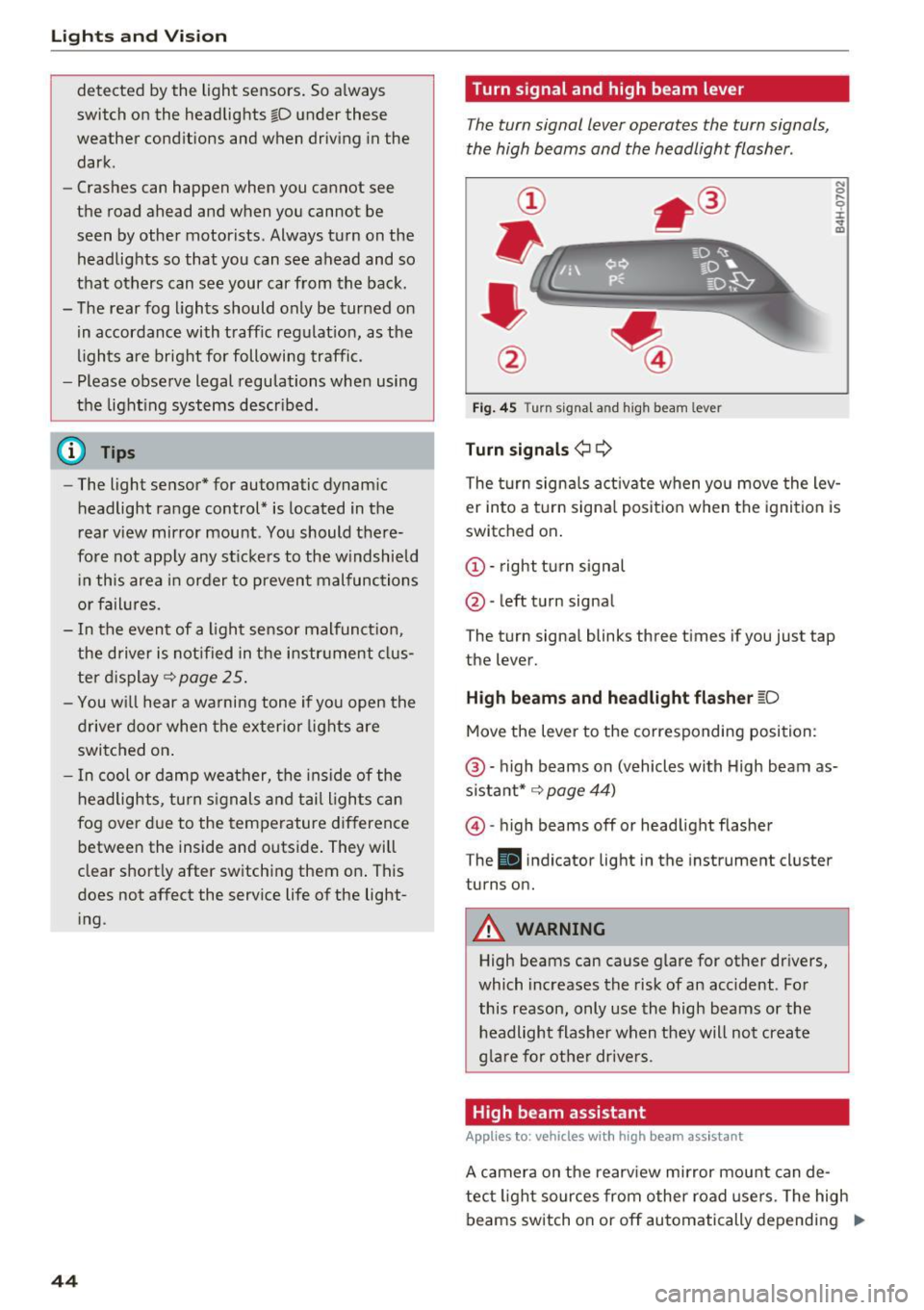
Turn signal and high beam lever
The turn signal lever operates the turn signals,
the high beams and the headlight flasher .
Fig. 45 Turn signal an d high beam leve r
Turn signals¢ Q
N 0 .... 0 :i: .. m
The turn signals activate when you move the lev
er into a turn signal position when the ignition is
switched on.
© -right turn signal
@-left turn signal
The turn signal blinks three times if you just tap
the lever.
High beams and headlight flasher ~D
Move the lever to the corresponding position:
@ -high beams on (vehicles with High beam as
sistant* ~
page 44)
@)-high beams off or headlight flasher
T he
Iii indicator light in the instrument cluster
turns on.
A WARNING
High beams can cause glare for other drivers,
which increases the risk of an accident . For
this reason, only use the high beams or the
headlight flasher when they will not create
glare for other drivers .
High beam assistant
Applies to: vehicles with high beam assistant
A camera on the rearview mirror mount can de-
tect light sources from other road users. The high
beams switch on or off automatically depending
ll>
Page 47 of 354
on the position of vehicles driving ahead and on
coming vehicles, the vehicle speed and other en
vironmental and traffic conditions.
Activating high beam assistant
Requirement: the light switch must be set to the
AUTO position and the high beam assistant must
be switched on in the Infotainment system
¢page 45.
.,. To activate the high beam assistant , tap the
lever forward @. T he
II indicator light ap
pears in the instrument cluster display and the
high beam assistant is switched on/off auto
matically. The
Ill indicator light also turns on if
the high beams are switched on.
Switching the high beams on/off manually
If the high beams did not switch on/off automat
ically as expected, you may switch them on or off
manually instead:
.,. To switch the high beams on manually, tap the
lever forward @. T he indicator light
Ill turns
on .
.,. To switch the high beams off manually, pu ll the
lever back@. The h igh beam assistant is deac
tivated.
Operating the headlight flasher
.,. To operate the headlight flasher when the high
beam assistant is activated and high beams are
switched off, pu ll the lever back @. The high
beam assistant rema ins active.
Messages in the instrument cluster display
Headlight assist: System fault!
Drive to an authorized Aud i dea le r or authorized
Aud i Service Facility immediately to have the
malfunction corrected. You can still switch the
high beams on or off manually.
Headlight assist: Unavailable No camera view
The camera view is blocked, for example by a
sticker or debris.
o The sensor is located between the interior rearco
~ view mirror and the windshield. Do not place any ,..._
~ stickers in this area on the windshield.
0 0 :c '
A WARNING
High beam assistant is only intended to assist
the driver. The driver is still respons ible for
controlling the headlights and switching
them manua lly depending on light and visibi l
it y conditions. It may be necessary to operate
them manually in situations such as:
- I n adverse weather conditions such as fog,
heavy rain, blowing snow or spraying water.
- On roads where oncoming traffic may be
pa rtia lly obscured, such as expressways.
- When there are road users that do not have
sufficient lighting, such as bicyclers or
vehicles with dirty tail lamps .
- I n tight curves and on steep hills.
- In poorly lit areas.
- W ith strong reflectors, such as signs.
- If the area of the w indshield near the sensor
is fogged over, dirty, icy or covered with a
sticker .
Adjusting the exterior lighting
The functions ore adjusted in the Infotainment
system .
.,. Select: !CAR ! function button > Car systems
control button > Vehicle settings > Exterior
lighting .
Automatic headlights
You can adjus t the following settings in the Au
tomatic headlights
menu:
Headlights activation time -you can adjust if the
headlights switch on
Early, Medium or Late ac
cording to the sensitivity of the light sensor.
Headlight assist* -you can switch the h igh beam
ass istant*
On and Off .
Daytime running lights*
USA models :
the daytime running lights can be
switched on/off. Select
On or Off.
Canada models:
this function cannot be switched
off. They activate automatically each time the ig -
nition is switched on .
ll>
45
Page 53 of 354

0 co .... N ,..... N .... 0 0 :c '
on.
C leaning the headlights. The headlight washer
system operates only when the low beam head lights are switched on.
If you move the lever to
position @, the headlights and the night vision
assist camera* are cleaned at intervals.
A WARNING
- The rain sensor is only intended to assist the
driver. The driver may still be responsible
for manually sw itching the wipers on based
on v is ibility conditions .
- The w indshield may not be treated with wa
ter-repelling windsh ield coating agents . Un
favorable conditions, such as wetness, dark ness, and when the sun is low, can cause in
creased g lare, which increases the risk of an
acc ident. W iper blade chatter is a lso poss i
ble.
- Prope rly f unction ing windsh ield wiper
blades are required fo r a clear view and safe
driving
c:> page 51, Replacing the wiper
blades.
(D Note
- If there is frost, make su re t he windshie ld
wiper blades are not fro zen to the wind
shield. Sw itching on the windshield wipers
when the blades are frozen to the wind
shield can damage the wiper blades.
- Prior to using a car wash, the windshield
wiper system must be switched
off (lever in
pos ition
@ ). This prevents the wipers from
switching on un intent ionally and causing
damage to the w indshield w iper system .
- The windshield wipers switch
off when the
i gnition is sw itched off. You can activate the
windsh ield wipers after the ign it ion is
switched back on by moving the winds hield
wiper lever to any posit ion.
- Worn o r dirty windshield wiper blades result
i n streak ing . This can affect the ra in sensor
funct ion. Check you r windshield wiper
blades regu larly.
Light s and Vision
-The washer fluid nozz les for the windshield
washer system are heated at low tempera
t u res when the ign ition is on .
- When stopping tempo rari ly, such as at a
traffic light, the speed of the windshield
w ipers automatically reduces by one level.
Cleaning the wiper blades
Clean the wiper b lades when you see w iper
streaks . Clean the wiper blades with a soft towel
and glass cleane r.
.. Place the windshie ld w iper arms in the service
position
c:> page 51.
.. Fold the windshield w iper arms away from the
w indshield .
A WARNING
Dirty windshie ld wiper b lades can impa ir vi
sion, wh ich increases the ris k of an acciden t.
Replacing the wiper blades
The service position is set in the Infotainment
system .
Fig. 57 Removing winds hield wiper b lades
Wind shi eld wiper se rvice po sition /b lade
r epl ace ment po sit ion
~
~
M 0 :i: ... m
.. Switch the ignition off and move the windshield
w iper lever to position @briefly
c::> page 50,
fig. 56. The windshield wipers move into the
serv ice position .
.. To br ing the wiper b lades back into the original
position, switch the ignition on and ope rate the
w indshield w iper lever.
You can also turn the service posit io n on or off in
the Infotainment system: ..,_
51
Page 54 of 354
Lights and Vision
• Switch the windshield wipers off (position @
¢page 50, fig. 56).
• Select: the ICARI function button > Car systems
control button
> Servicing & checks > Wiper
service position.
> On .
Removing the wiper blade
• Fold the windshield wiper arm away from the
windshield.
• Press the locking knob@c:>
fig. 57 on the wiper
blade . Hold the wiper blade firmly.
• Remove the wiper blade in the direction of the
arrow .
Installing the wiper blade
• Insert the new wiper blade into the mount on
the wiper arm @until it clicks into place.
• Place the wiper arm back on the windshield.
• Turn the service position off.
A WARNING
For safety reasons, the windshield wiper
blades should be replaced once or twice each
year.
(D Note
- The windshield wiper blades must only be
folded away when in the service position!
Otherwise, you risk damaging the paint on
the hood or the windshield wiper motor.
- You should not move your vehicle or press
the windshield wiper lever when the wiper
arms are folded away from the windshield.
The windshield wipers would
move back in
to their original position and could damage
the hood and windshield.
- You can also use the service position, for ex
ample, if you want to protect the windshield
from icing by using a
cover.
- You cannot activate the service position
when the hood is open.
52
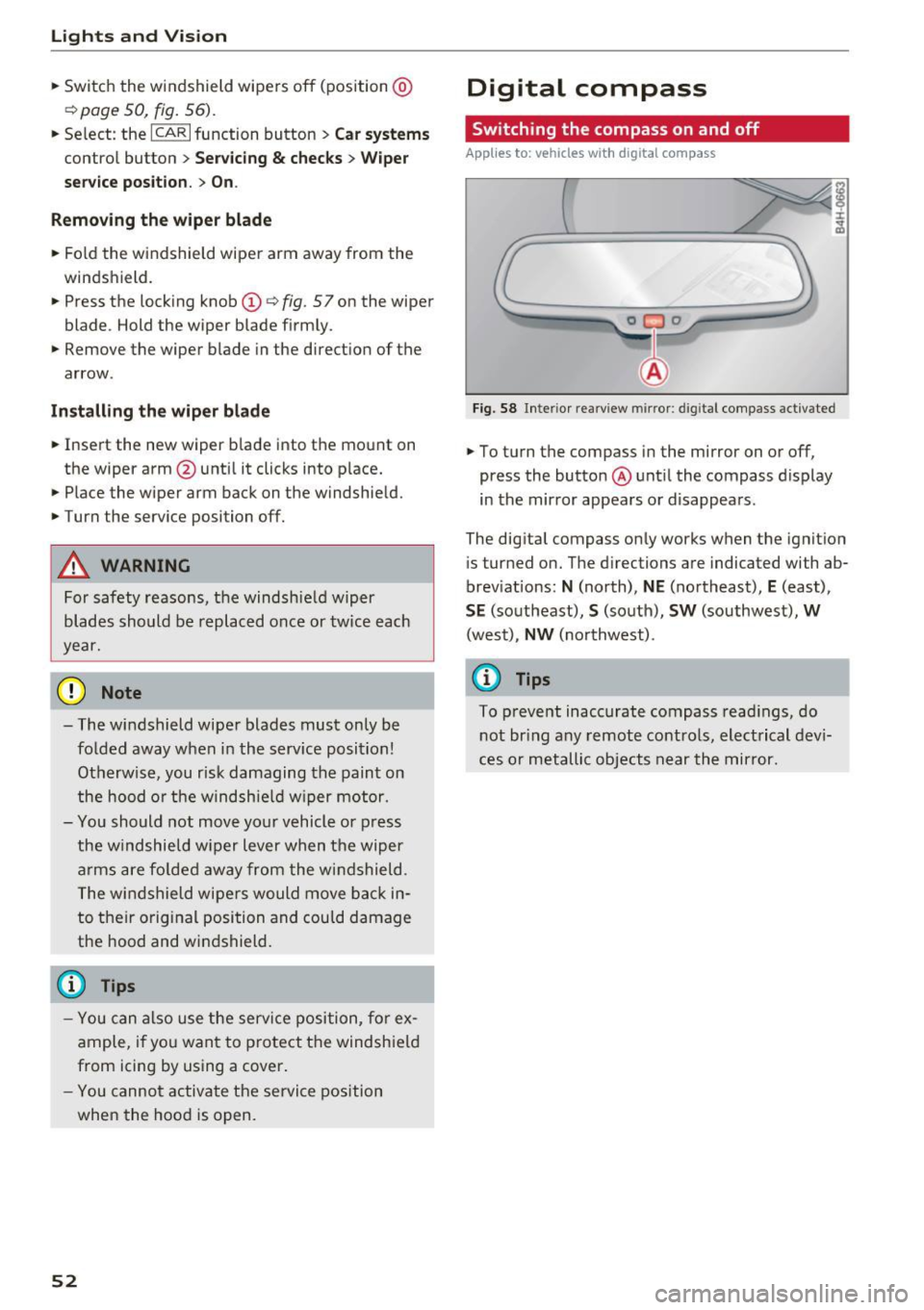
Digital compass
Switching the compass on and off
Applies to: vehicles wit h digital com pass
Fig. 58 Inter ior rearview mirror : d ig ital compass activated
• To turn the compass in the mirror on or off,
press the button @ until the compass display
in the mirror appears or disappears.
The digital compass only works when the ignition
is tur ned on. The directions are indicated with ab
breviations:
N (north), NE (northeast), E (east),
SE (southeast), S (south), SW (southwest), W
(west), NW (northwest).
(D Tips
To prevent inaccurate compass readings, do
not bring any remote controls, electrical devi
ces or metallic objects near the mirror.
Page 69 of 354
C) C0 ....
"' " "' .... 0 0 :r
-Only fold the bag up if it is dry.
- When transporting skis or snowboards,
tighten the securing strap between the
bindings.
- Lay skis in the bag with the points facing
forward and snowboards and ski pole points
facing the rear.
Refrigerator
Introduction
Applies to: vehicles with refrigerator
Clean the refrigerator before the first use ~ table
on page 308.
You can only switch the refrigerator on, if :
- the temperature in the luggage compartment
is less than 131
° F (55 °(). If the refrigerator is
switched on , it will automatically switch off if
the temperature in the luggage compartment
exceeds 131
° F (55 °(). If the temperature
goes back below 131
° F (55 °(), the refrigera
tor will automatically switch on again.
- The charge level of the vehicle battery is suffi.
cient. The refrigerator is automatically switch
ed off if the electrical system voltage falls be
low the spec ified minimum value. This prevents
the vehicle battery from discharging . The re
frigerator automatically switches back on if th e
electrical system voltage increases again, for
example after starting the vehicle.
When the cooling function is working optimally,
the cooling function reaches 43° F
(+6 °C) and
the free zing function reaches 21 ° F
(-6 °C). The
cooling temperature in the refrigerator also de
pends on the luggage compartment tempera
ture. When the temperature in the luggage com
partment is high, there may only be a limited
cooling effect.
.&, WARNING
-
To avoid any injury risks to the passengers
caused by the refrigerator, the following safe
ty precautions must be followed:
Seats and storage
-The maximum load capacity for the freezer
is
5.5 lbs (2 .5 kg).
- Never overload the refrigerator. There is a
risk of injury in the event of a collision or
sudden braking.
- The refrigerator cover must always be
closed and locked while driving. The refrig
erator contents could enter the vehicle inte
rior during a collision or sudden braking ma
neuver, which increases the risk of injury.
- Never store flammable fluids, gas contain
ers and similar objects in the refrigerator
due to the risk of an explosion . This also ap
plies to goods and products that can emit
volatile or flammable gases.
-At temperatures of 32° F
(0 °() and lower,
frozen liquid inside glass containers can
cause the containers to burst.
(D Note
- The ventilation openings for the refrigerator
are at the rear panel trim panel in the lug
gage compartment and must not be cov
ered.
- If the refrigerator is not functioning correct
ly, turn it off to prevent any damage. Have it
checked by an authorized Audi dealer or au
thorized Audi Service Facility.
Operation
Applies to: vehicles with refrigerator
Fig. 85 Rear center armres t
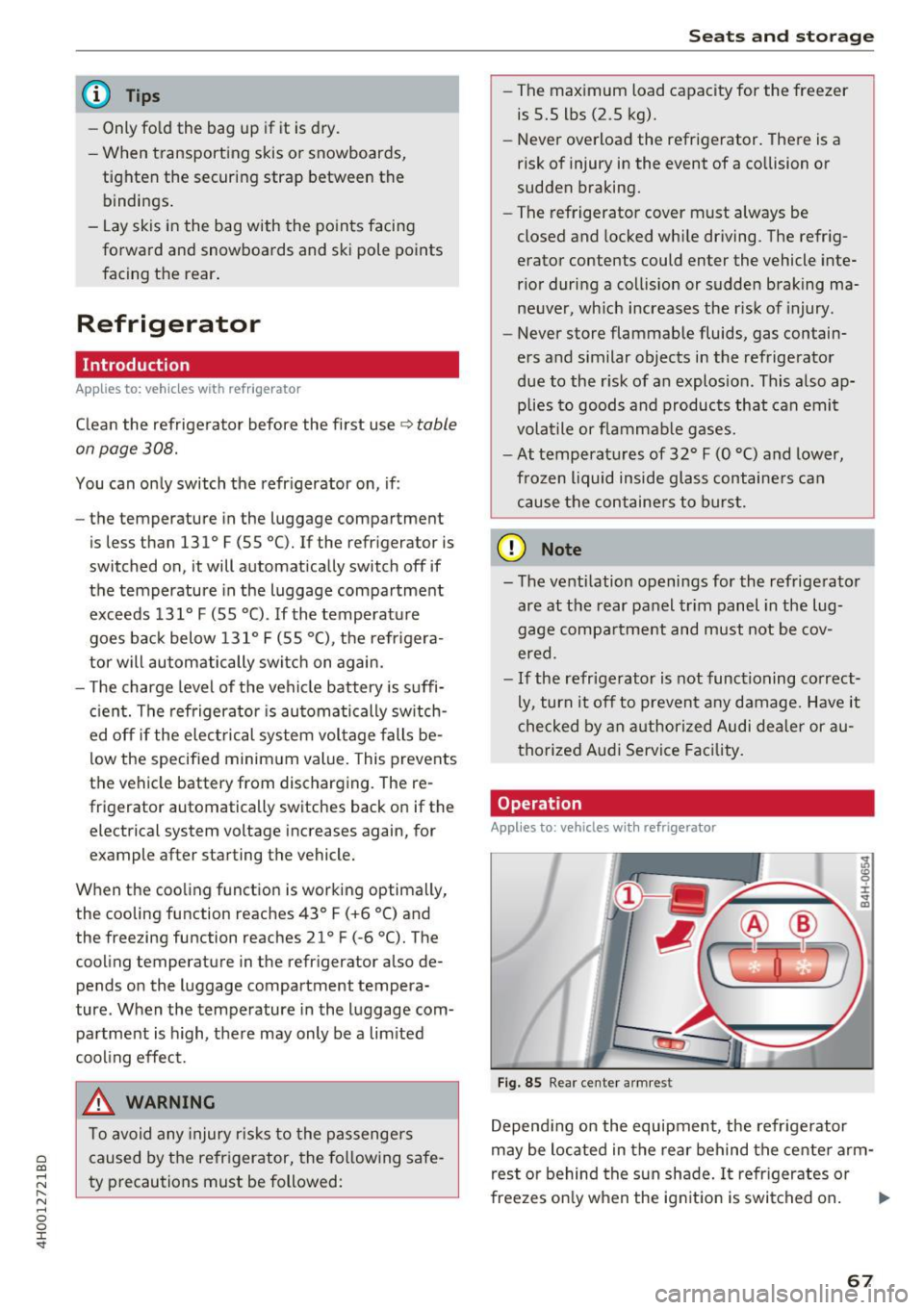
Depending on the equipment , the refrigerator
may be located in the rear behind the center arm
rest or behind the sun shade. It refrigerates or
freezes only when the ignition is switched on. ..,.
67
Page 71 of 354

0 co .... N ,..... N .... 0 0 :c '
climate control
Description
The climate con trol system warms, coo ls and re
moves humidity from the air in the vehicle inte ri
or. It is the most effective when the w indows and
sunroof* are closed. If there is a bu ild-up of heat
i n side the veh icle, ven tilat ion can he lp to speed
up the cooling process .
In a ll heating mode functions, except for defrost,
the blower on ly switches to a higher speed once
the eng ine coolant has reached a sufficient tem
perature.
Pollutant filt er
The po llutant filter removes pollutants such as
d ust and pollen from the air.
Key recognition
The clima te control settings are automatically
s tored and assig ned to th e remo te contro l key
that is in use.
& WARNING
Poo r visibility can lead to accidents.
- For safer d riving, keep all windows free of
ice, snow and fo g.
- B ecome familia r as quickly as possible wi th
the correct use and function of the cl imate
contro l system, especially with the defrost
ing and defogging function.
- When the temperat ure is below freezing,
only use the windsh ield washer system after
Warm and cold
the windshield has been warmed by the cli
mate control system. The washer fluid could
freeze on the windshie ld and impair visib ili
ty .
(D Note
-If you suspect that the climate contro l sys
tem is damaged, switch the system off to
prevent further damage and have it checked
by an authorized Aud i dealer o r authorized
Aud i Serv ice Facility.
- Repa irs to the Aud i climate control system
require special technical know ledge and
special tools . See an autho rized Aud i dea le r
or authorized Audi Service Fac ility.
@ For the sake of the environment
Reducing the amount of fuel used also re
duces the amount of pollu tan ts that enter the
ai r.
@ Tips
- To prevent interference with the heat ing
and coo lin g output and to prevent the wi n
dows from fogging over , the air intake in
fro nt of the windshie ld m ust be free of i ce,
snow o r leave s.
- Condensat ion from the coo ling system c an
dr ip and fo rm a pudd le of w ater un der t he
vehicle. Th is i s n orm al and does not me an
t here is a lea k.
- T he e nergy m anagemen t sy stem may tem
por arily swi tch off cert ain fu nctions, s uch a s
the seat heating * or rear window defogger .
T hese systems are ava ila ble again as soon
as the energy supply has been restored.
69
Page 77 of 354
C) C0 ....
"' " "' .... 0 0 :r
need it. Examples of equipment that use a lot of
energy are a ir blowers at a high setting, the rear
w indow defogger and seat heating*.
CD Note
Do not leave engine idling unattended after
starting . If warning lights should come on to
ind icate improper ope ration, they wou ld go
unheeded. Extended idling also produces
heat, wh ich could result in overheat ing or
other damage to the vehicle or other proper
ty .
CD Note
- Have your vehicle maintained properly and
in accordance with the service recommenda
tions in you r War ranty
& Ma intenance book
l et. Lack of p roper maintena nce as well as
i mproper use of the vehicle will imp air the
funct ion of the emission contro l system and
could lead to damage.
- Do not alter or remove any component of
the Em ission Control System un less ap
proved by the manufacturer .
- Do no t alt er or remove any devi ce, such as
heat shie lds, switches, ignition wires,
valves, which are designed to protect your
vehicle's Em ission Control System and other
i mportant veh icle components .
@ Tips
The consumption estimates as published by E NVIRONMENTAL PROTECTION AGENCY
(EPA) and Transport Canada may not corre
spond to your actual consumption on the
road, which will vary depending upon vehicle
load and speed, road and weather condi tions,
t rip length, etc.
D rivi ng
Steering
Adjusting the steering wheel position
The steering column can be power adjusted up
and down and forward and back.
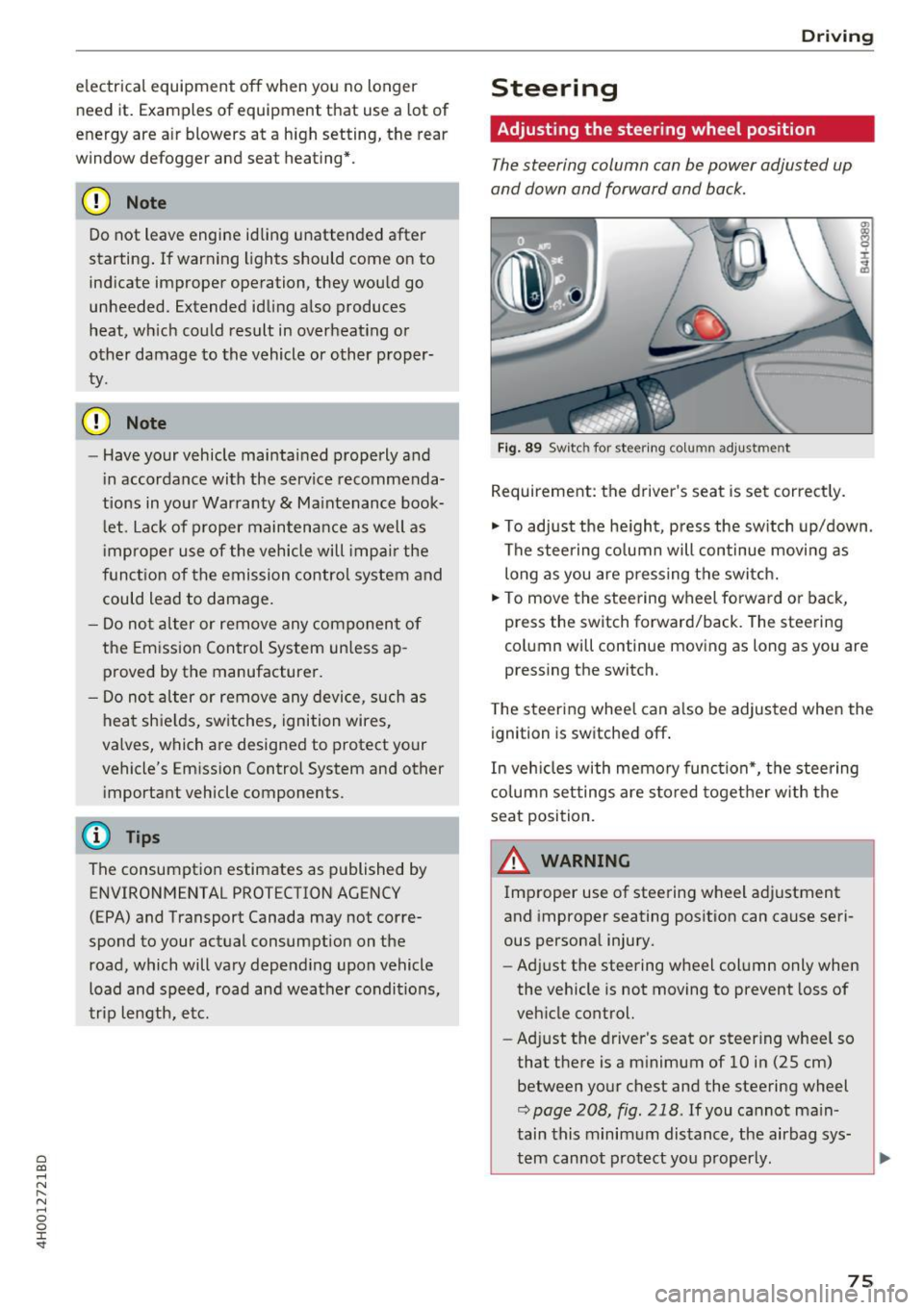
F ig . 89 Switc h for steering co lu mn adjus tme nt
Requirement: the driver's seat is set correct ly.
"' To adjust the he ight, pr ess the sw itch up/down .
The stee ring co lumn will continue movi ng as
long as you are p ressing the switc h.
"' To move the steering wheel forwa rd or back,
press the switch forward/back. The steering
col umn wi ll continue mov ing as long as you are
pressing the switch.
T he steering whee l can a lso be adjusted when the
ignition is switched off .
In veh icles with memory func tion*, the steering
c o lumn set tings are s tored toget her w ith the
seat position.
A WARNING
Improper use of stee ring wheel adjustment
and improper seating posit ion can cause seri
ous persona l injury.
- Ad just the steering wheel column only when
the vehicle is not moving to prevent loss of
veh icle control.
- Adj ust the driver's seat or steer ing whee l so
that the re is a m inimum of 10 in (25 cm)
between yo ur chest and the steering wheel
r::;, page 208, fig . 218 . If you cannot ma in
tain this minimum dis tance, the airbag sys
tem cannot pro tect you p roperly.
-
75