transmission AUDI A8 2017 Owners Manual
[x] Cancel search | Manufacturer: AUDI, Model Year: 2017, Model line: A8, Model: AUDI A8 2017Pages: 354, PDF Size: 88.68 MB
Page 4 of 354
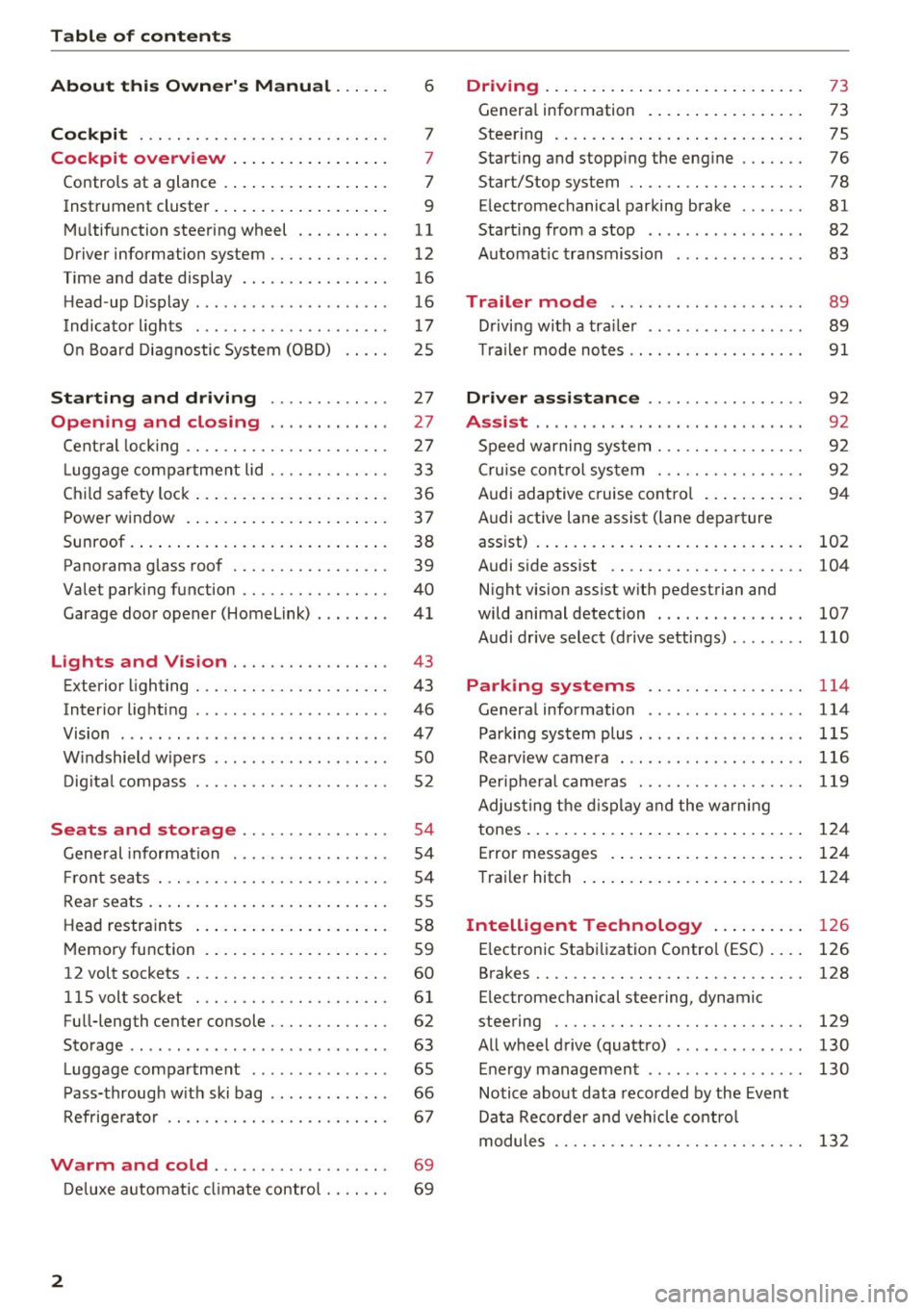
Table of contents
About this Owner's Manual ... .. .
Cockpit ... .. ............... .... .. .
Cockpit overview ................ .
Controls at a glance ... .......... .. .. .
Instrument cluster .. .......... .. .. .. .
Multifunction steering wheel ... .. .. .. .
Driver information system ............ .
Time and date display ...... ... .. .... .
H ead-up Display .... .. .. ..... ... .. .. .
Indicato r lights . ................ ... .
On Board Diagnostic System (OBD) .... .
Starting and driving ............ .
Opening and closing .. .... .... .. .
Central locking .... ........... .... .. .
L uggage compartment lid ...... .... .. .
Child safety lock ........... ..... .. .. . 6
7
7
7
9
11
12
16
16
17
25
27
27
27
33
36
Power
window . . . . . . . . . . . . . . . . . . . . . . 37
Sunroof. .. ... ... .. .......... .. .. .. . 38
Panorama glass roof . . . . . . . . . . . . . . . . . 39
Valet parking function . . . . . . . . . . . . . . . .
40
Garage door opener (Homelink) . . . . . . . . 41
L ights and Vision . . . . . . . . . . . . . . . . . 43
Exterior lighting . . . . . . . . . . . . . . . . . . . . . 43
Interior lighting . . . . . . . . . . . . . . . . . . . . . 46
V1s1on . . . . . . . . . . . . . . . . . . . . . . . . . . . . . 47
Windshield wipers . . . . . . . . . . . . . . . . . . . SO
Digital compass . . . . . . . . . . . . . . . . . . . . . 52
Seats and storage . . . . . . . . . . . . . . . . 54
General information . . . . . . . . . . . . . . . . . 54
Front seats . . . . . . . . . . . . . . . . . . . . . . . . . 54
Rear seats . . . . . . . . . . . . . . . . . . . . . . . . . . 55
Head restraints . . . . . . . . . . . . . . . . . . . . .
58
Memory function . . . . . . . . . . . . . . . . . . . . 59
12 volt sockets . . . . . . . . . . . . . . . . . . . . . . 60
llSvoltsocket .............. .... ... 61
Full-length center console. . . . . . . . . . . . . 62
Sto rage . . . . . . . . . . . . . . . . . . . . . . . . . . . . 63
Luggage compartment . . . . . . . . . . . . . . . 65
Pass-through with ski bag . . . . . . . . . . . . . 66
Refrigerator . . . . . . . . . . . . . . . . . . . . . . . . 67
Warm and cold . . . . . . . . . . . . . . . . . . . 69
Deluxe automatic climate control . . . . . . . 69
2
Driving ..... .. .. .. .. ... .......... . .
General information . .... .......... . .
Steering .......... .. .. . .......... . .
Start ing and stopping the eng ine ..... . .
Start/Stop system .. .. ............. . .
E le ctromechanical parking brake ...... .
Start ing from a stop .. ........ ..... . .
Automat ic transmission
Trailer mode .. .. .. ........ ..... . .
D rivin g with a trailer .. .............. .
T raile r mode notes .. .. ............. . .
Driver assistance .. .............. .
Assist .... .. .. .. .. .. ... .. ... ... .. . .
Speed warning system ... ........... . .
Cruise control system .... .......... . .
Audi adaptive cruise control .......... .
Audi active lane assist (lane departure 73
73
75
76
78
81
82
83
89
89
91
92
92
92
92
94
assist) . . . . . . . . . . . . . . . . . . . . . . . . . . . . . 102
Audi side assist . . . . . . . . . . . . . . . . . . . . . 104
N ight vision assist w ith pedestrian and
wild animal detection . . . . . . . . . . . . . . . .
107
Audi drive select (drive settings) . . . . . . . . 110
Parking systems . . . . . . . . . . . . . . . . . 114
General information . . . . . . . . . . . . . . . . . 114
Parking system plus ........ ....... ... 115
Rearv iew camera . . . . . . . . . . . . . . . . . . . . 116
Peripheral cameras . . . . . . . . . . . . . . . . . . 119
Adjus ting the display and the warning
tones. . . . . . . . . . . . . . . . . . . . . . . . . . . . . .
124
Error messages . . . . . . . . . . . . . . . . . . . . . 124
T railer hitch . . . . . . . . . . . . . . . . . . . . . . . . 124
Intelligent Technology . . . . . . . . . . 126
E lectronic Stabilization Control (ESC) . . . . 126
Brakes . . . . . . . . . . . . . . . . . . . . . . . . . . . . . 128
E lectromechanical steering, dynamic
steering . . . . . . . . . . . . . . . . . . . . . . . . . . .
129
All wheel drive (quattro) . . . . . . . . . . . . . . 130
Energy management . . . . . . . . . . . . . . . . . 130
Notice about data recorded by the Event
Data Recorder and vehicle control
modules . . . . . . . . . . . . . . . . . . . . . . . . . . .
132
Page 20 of 354
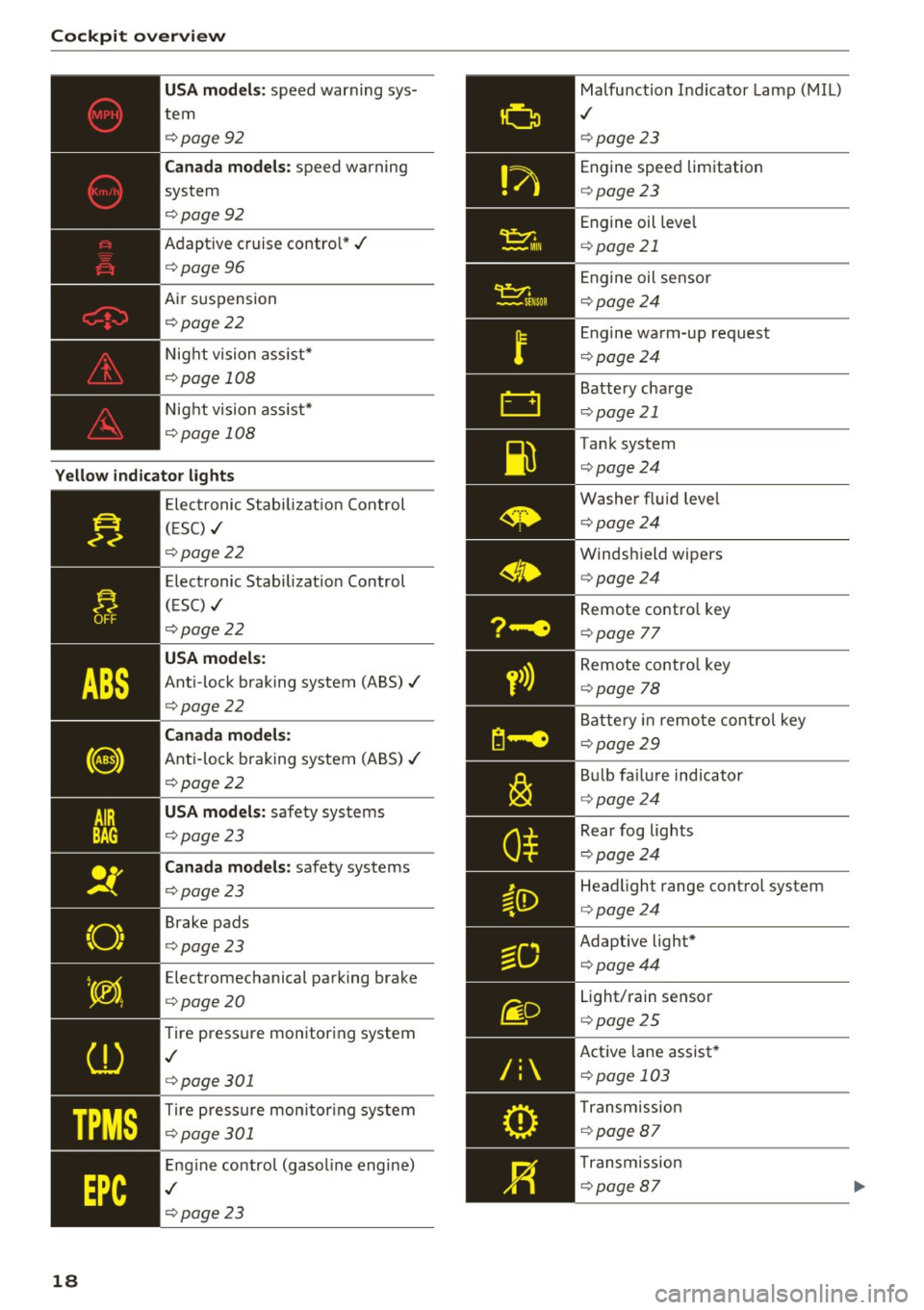
Cockpit over view
US A mode ls: speed warning sys
tem
¢ page92
Can ada m odels: speed warning
system
¢ page92
Adaptive cruise control*../
¢page 96
Air suspension
¢ page22
Night vision ass ist*
¢ page 108
Night vision ass ist*
¢ page 108
Yello w indic ator light s
TPMS
18
-------------Elec tronic Stab ilizat ion Control
( E SC) ../
¢page22
Electronic Stabilizat ion Control
(ESC) ../
¢page22
USA models :
Anti-lock braking system (ABS)../
¢page22
Canada mod els:
Anti-lock braking system (ABS) ../
¢page22
USA models: safety systems
¢ page23
Can ad a mod els : safety systems
¢ page23
Brake pads
¢ page23
Electromechanical parking brake
¢ page20
Tire pressure monitoring system
,I
¢page 301
Tire press ure mon itor ing system
¢ page 301
Engine control (gasol ine engine)
,I
¢ page 23
Malfunction Indicator Lamp (MIL)
,I
¢page 23
Engine speed limitation
¢page23
Engine oil leve l
¢page 21
Engine oil sensor
¢page24
Engine wa rm-up request
¢ page24
Battery charge
¢page 21
Tank system
¢page24
Washer flu id leve l
¢page24
Windshield wipers
¢page24
Remote contro l key
¢ page 77
Remote contro l key
¢ page 78
Battery in remo te control key
¢page29
B ul b fa ilu re indicator
¢ page24
Rear fog lights
¢page24
Headlight range control system
¢page24
Adaptive light*
¢page44
Light/rain sensor
¢page 25
Active lane assist *
¢page 103
Transm ission
¢ page 87
Transmission
¢page 87
Page 75 of 354
0 co .... N ,..... N .... 0 0 :c '
General information
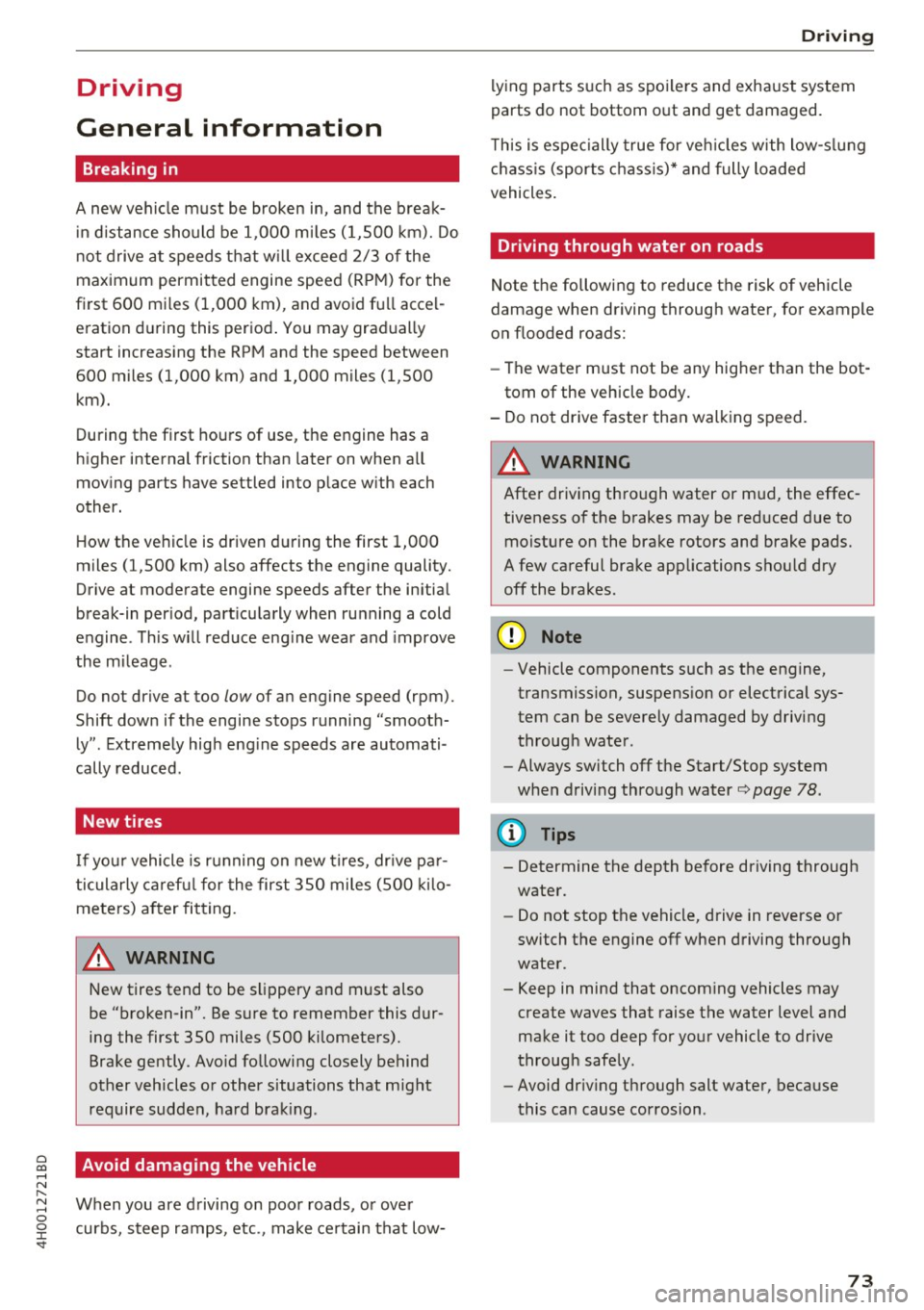
Breaking in
A new vehicle must be broken in, and the break
in distance should be 1,000 mi les ( 1,500 km). Do
not drive at speeds that w ill exceed
2/3 of the
maximum permitted engine speed
(RPM) for the
first 600 miles (1,000 km) , and avoid full accel
eration during this period . You may gradually
start increasing the
RPM and the speed between
600 miles (1,000 km) and 1,000 miles (1,500
km).
During the first hours of use, the engine has a
higher internal friction than later on when all
moving parts have settled into place with each
other.
How the vehicle is driven during the first 1,000
miles (1,500 km) also affects the engine quality.
Drive at moderate engine speeds after the initial
break-in per iod, part icularly when running a cold
engine . This will reduce engine wear and improve
the mileage .
Do not drive at too low of an engine speed (rpm).
Shift down if the engine stops running "smooth
ly" . Extremely high eng ine speeds are automati
cally reduced .
New tires
If your vehicle is running on new tires, drive pa r
ticularly careful for the first 350 miles (500 kilo
meters) after fitting .
.&_ WARNING
-
New tires tend to be slippery and must also
be "broken-in". Be sure to remember this dur
ing the first 350 miles (500 kilometers).
Brake gently . Avo id following closely behind
other vehicles or other situations that might
require sudden, hard brak ing.
Avoid damaging the vehicle
When you are driving on poor roads, or over
curbs, steep ramps, etc., make certain that low-
Driving
lying parts such as spoilers and exhaust system
parts do not bottom out and get damaged .
T h is is espec ially true for veh icles with low-s lung
chass is (sports chassis)* and fully loaded
vehicles .
Driving through water on roads
Note the following to reduce the risk of vehicle
damage when driving through water, for example
on flooded roads:
- The water must not be any higher than the bot
tom of the vehicle body.
- Do not drive faste r than walk ing speed.
.&_ WARNING
=
After driving through water or m ud, the effec-
tiveness of the brakes may be reduced due to moisture on the brake rotors and brake pads.
A few careful brake applications should dry
off the brakes .
(D Note
-Vehicle components such as the engine,
transmission, suspension or electrical sys
tem can be severely damaged by driving
through water.
- Always switch off the Start/Stop system
when driving through water r::;,page
78.
{i) Tips
- Determine the depth before driving through
water.
- Do not stop the vehicle, drive in reverse or
switch the engine off when driving through
water.
- Keep in mind that oncom ing vehicles may
create waves that raise the water level and
make it too deep for your vehicle to drive
through safely.
- Avoid dr iving through salt water, because
this can cause corrosion .
73
Page 80 of 354

Driving
This driver message appears for safety reasons if
the transmission has not be en shifted to the P
position when you switch the ign ition off. Move
the selector lever to the P posit ion. Otherwise the
ve hicle is not protected from ro lling and it cannot
be locked .
II Key is not re cognized. Hold ba ck of ke y
aga inst marked area. See owner's manual
If t he indicator light t urns on and this message
appears, there is a malfunction ~
page 78.
Turn off ignition before leaving car
This message appea rs if the dr iver 's door is
opened while the ignition is switched on . A lways
sw itch off the ignition if you are leaving the vehi
cle.
Shift to P and turn off ignition befor e leaving
car, otherwi se vehicle c an roll away
This message appears if the driver 's door is
ope ned while the ignition is switched on and the
transmission has not been shifted to the P posi
tion . Sh ift the t ransm iss ion into the P posit io n
a nd turn off the ignition if yo u are leav ing the ve
h icle. O therwise t he vehi cle co uld rol l.
Starting the engine when there is a
malfunction
It may not be possible to start the engine under
certain circumstances, for example if the battery
in the vehicle key is drained, if interference is af
fected the key or if there is a system malfunc
tion.
N
c::==== =~
±
- ------- ~
Fig . 9 1 Cente r conso le/ re m ote cont ro l key: sta rt ing the
eng ine if t here is a malf u nction
Requirement: the message K ey is not recog
nized . Hold back of key against marked area.
78
See owner's manual must appear and the II in
dicator light must tu rn on .
.,. Hold the remote cont rol key vertically in the lo
ca tion i ndicated
t1>) ~ fig. 91.
.,. Press the brake pedal.
.,. Press the I S TAR T
ENGINE ST OP I button . The
eng ine will start.
.,. Drive to an authori zed Audi dealer or author
ized Aud i Service Facility immediately to have
the malfu nction corrected .
(D Tips
You can view the message aga in by pressing
the lS TAR T
ENGI NE ST OP I button .
Start/Stop system
Description
Applies to: vehicles with Start/Stop system
The S ta rt/Stop sys tem can help increase fue l
eco nomy and reduce CO2 emissions .
In Sta rt/S top mode, the eng ine s huts off auto
ma tically when the vehicle is stopped, such as a t
a traffic light . The ignition rema ins switched on
duri ng th is stop phase . The engine w ill restart
automat ica lly when needed .
The last Start/S top system setting is restored
when the ignition is sw itched on .
Basic requirements for Start /Stop mode
- Th e driver 's doo r must be closed .
- Th e driver 's seat belt much be fas tened.
- The hood must be closed.
- The vehicle m ust have driven faster than
2.5 mph (4 km/h) since the last t ime it stop
ped.
- A trailer m ust not be hitched to the vehicle .
A WARNING
-Never turn off the engine before the vehicle
has come to a complete stop. The full func
t ion of the bra ke booster and the power
steer ing is not guaranteed. You must use
mo re fo rce to tu rn o r bra ke. Be cause you
canno t stee r and bra ke as y ou usually
Page 85 of 354
C) C0 ....
"' " "' .... 0 0 :r
place on all h ills (for example, if the ground
is slippery or icy).
- To reduce the risk of an accident, always
make sure the vehicle is situated safely
wh ile stat io nary.
Automatic transmission
Introduction
The automat ic transmission is cont rolled e lec
tron ica lly . Power is transferred using a torque
converter.
The transm ission shifts up or down a utomat ica lly
depending on w hich drive program is sele cted.
When a
moderate driving style is used , the
transmission selects the most economical d riving
mode. The t ransm iss ion upsh ifts at a lowe r RPM
a nd downshifts at a highe r RPM to imp rove fuel
effi ciency .
The transm ission sw itches to a spo rty mode after
a ki ck-down or when the drive r uses a
sporty
driving style
c haracterized by quick accelerator
pedal movements, heavy acce leration , freq uent
changes in speed and traveling at the maximum
speed.
If desired , the dr iver can also select the gears
manually (tiptronic mode)
c::> page 86 .
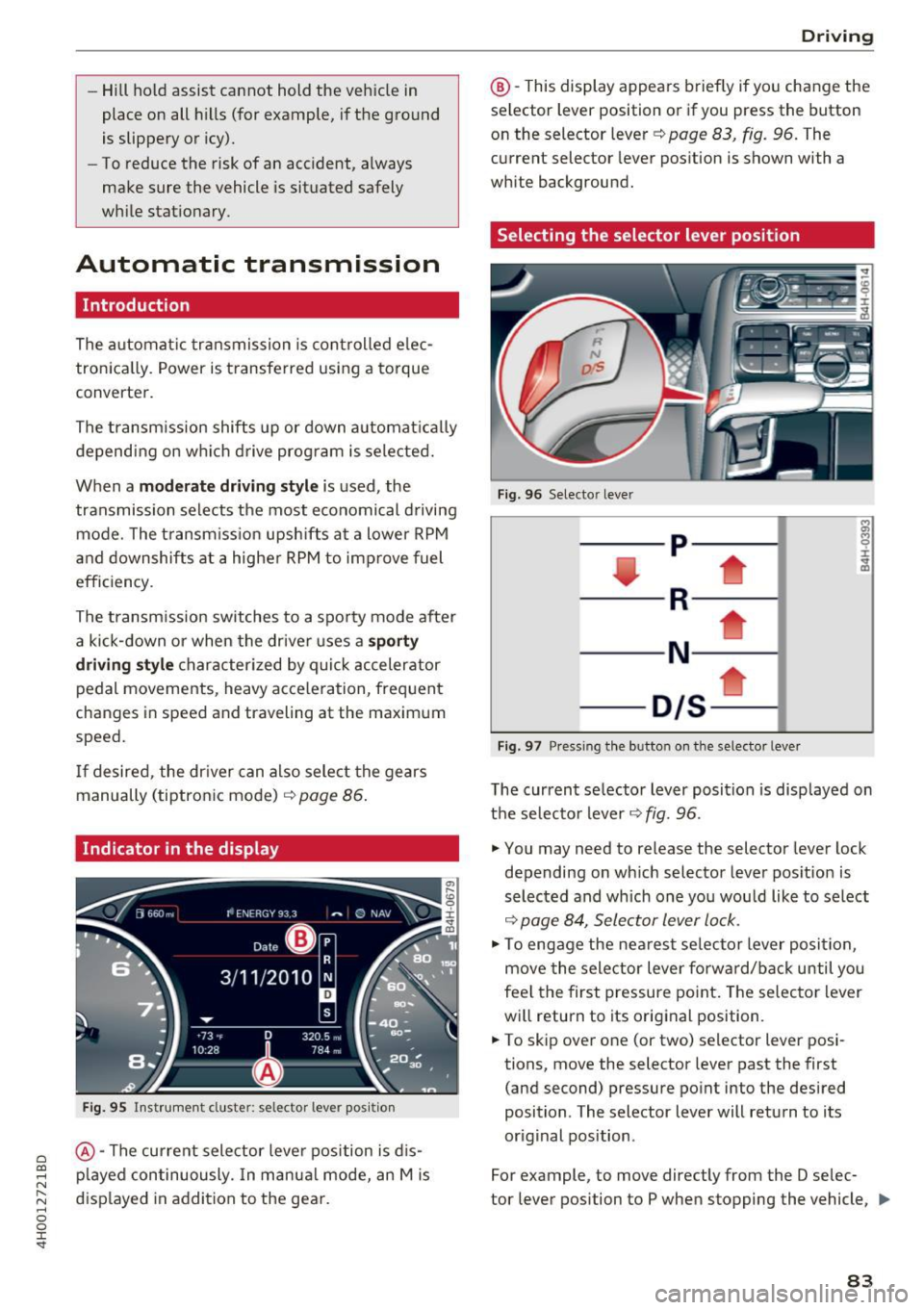
Indicator in the display
Fig . 9 5 Inst rumen t cluste r: s elec to r leve r po sit io n
@ -The current sele ctor leve r position is d is
p layed continuously. In manua l mode, an Mis
d isp layed in addi tion to the gea r.
D rivi ng
@ -This display appea rs brief ly if you change the
sel ector lev er posit ion or if you pr ess the button
on the selector lever
c::> pag e 83 , fig . 96. The
current selector lever pos ition is shown with a
white background.
Selecting the selector lever position
Fi g. 9 6 Selecto r lever
-- p----
----R--- --1
----N - -- ---
- D/S--
Fig . 97 Pres sin g the b utto n on the se lector leve r
The current se lector lever position is disp layed on
t h e se lector lever
c::> fig. 96 .
.,. You may need to release the selector lever lock
depending on wh ich selector lever pos ition is
selected and which one yo u wou ld like to se lect
c::> page 84, Selector lever lock .
.,. To engage the ne arest se lector lever posi tion,
move the selector lever forw ard/back until you
fee l the first pressure po int. The selector lever
wi ll return to its orig inal position .
.,. To skip ove r one (or two) selector lever posi
tions, move the selector lever past the first
(and second) pressure po int into the desired
position . T he selector lever will return to its
or iginal position .
For example, to move directly from the D selec-
tor lever position to P when stopping the vehicle,
ll>
83
Page 86 of 354
Driving
you can shift past the N and R selector lever positions.
Selector lever lock
The selector lever lock prevents you from select ing a position unintentionally, causing the vehicle
to roll. When engaging some selector lever posi
tions, you must press the button on the selector lever ¢
fig. 96 and/or press the brake pedal.
You must press the brake pedal to engage a se lector lever position when the engine is running
and the vehicle is stationary. The arrows ~
fig. 97
indicate when you need to press the button on
the selecto r lever.
The selector lever does not lock if you shift from D to R within one second. This allows you to
"rock" the vehicle to free it when it is stuck.
P - Park
This selector lever position prevents the vehicle
from rolling . Only shift into park when the vehi
cle is stationary ~&. . To engage the P selector
lever position, press the button on the selector
lever and shift into the P position.
You can only shift out of park when the engine is
running and you are pressing the brake pedal. To
release the parking lock. press the button on the
selector lever and select the desired position.
P engages automatically when you switch the en
gine off while D, Sor R is engaged or in manual
mode.
If you switch the engine off when the N position
is selected, the transmission remains in N for ap
proximately 30 minutes and then Pis engaged.
You must use the parking lock emergency release
before towing the vehicle~
page 88.
R- Reverse
The reverse gear is engaged in this position. Only
select reverse gear when the vehicle is stationary
and the engine is running at idle speed ~,&. . To
engage the R selector lever position, press the
button on the selector lever, press the brake ped
al and move the selector lever into the R position.
84
The reverse lights turn on when you select the R
selector lever position while the engine is run
ning.
N -Neutral (idle)
The transmission is in idle in this position. To en
gage the N selector lever position, press the but
ton on the selector lever and shift into the N po
sition.
If you switch the engine off when the N position
is selected, the transmission remains in N for ap
proximately 30 minutes and then Pis engaged .
You cannot select the N position when the igni
tion is switched off. When driving through an au
tomatic car wash, first select the N position and
then turn the engine off¢
page 306.
For safety reasons, the vehicle cannot be locked
when the transmission is in the N position.
DIS -Driving forward
When the transmission is in the D/S position, it
can be operated either in the normal D mode or
in the S sport mode . Move the selector lever back
to engage the S sport mode. You can only select
the S selector lever position when Dis engaged.
To select the D selector lever position again when
S is engaged, move the selector lever back~&. .
To shift from N to D when traveling at speeds be
low 1 mph (2 km/h), press the brake pedal and
shift into the D position ~&. .
In the
normal mode D, the transmission auto
matically selects the suitable gear ratio . It de
pends on engine load , vehicle speed and driving
style.
Select the
sport mode S for sporty driving. The
vehicle makes full use of the engine's power. Shifting may become noticeable when accelerat
ing.
The S selector lever position engages automati
cally when you select dynamic mode in drive se
lect .
_&, WARNING
- The vehicle can roll even if the ignition is
switched off.
-
Page 88 of 354

Driving
-Do not inadvertent ly press the acce lerator
pedal when the vehicle is stationary. Other
wise the vehicle will start to move immedi
ately, eve n if the parking brake is set. This
cou ld resu lt in a crash .
(D Tips
For safety reasons, the parking brake is re
leased automatically only when the dr iver's
safety belt is engaged in the buckle .
Hill descent control
The hill descent control system assists the driver
when driving down hills .
Hill descent control activates when the transmis
sion is in the Dor S pos ition and you press the
brake pedal. The transmiss ion automatically se
lects a gear that is suitable for the hill . H ill de
scent control tries to mainta in the speed ach
ieved at the time of braking, within phys ical and
technical limi tations. If may sti ll be necessary to
adj ust the speed with the b rake pedal.
H ill descent contro l switches off o nce the hill lev
e ls out o r you press the accelerator peda l.
When operating the cruise contro l system
i::> page 92, hill descent control is also activated
when the speed is set.
A WARNING
H ill descent control cannot overcome phys ica l
lim itations, so it may not be able to maintain
a constant speed under all condit ions. Always
be ready to apply the brakes .
86
Manual shifting
The shi~ paddles allow the driver to shift the
gears manually .
Fig. 98 Steer ing whee l: s hifting man ually
.., To shift to a higher or lowe r gear temporari ly,
tap the
0 or 0 shift padd le i::> fig . 98 .
.., To switch manua l mode on , press the~ but
ton. Mand the gear that is currently engaged
@ appear in the instrument cluster display
i::>page 83, fig. 95.
I :i: .. m
.., To shift up one gear, tap the right shift paddle
G) c::>fig . 98.
.., To shift down one gear, tap the left shift pad
dle
Q .
.., To switch manua l mode off, press the ~ but-
ton again, or
.., Move the se lector lever back and re lease it.
When yo u accelerate or reduce the speed, the
transmission au tomatically shifts into the correct
gear shortly before reaching the RPM limit. If yo u
select a lower gear than the one currently shown
in the disp lay, the automatic transmission will
only shift down once there is no dang .er of ex
ceeding the maximum RPM.
The eng ine braking effect increases when you
downshift when going downh ill.
Kick-down
Kick-down enables maximum acceleration.
When yo u press the accelerator pedal down be
yond the res istance point, the automatic trans
mission downshifts into a lower gear and the en
gine ut ilizes its full power, depending on vehicle
speed and engine RPM. It shifts up into the next .,,_
Page 89 of 354
0 co .... N ,..._
N .... 0 0 :c '
R PM is reached.
A WARNING
Please note that the wheels could spin on
slick or slippery roads when kick-down is ac
tive.
Overboost
Applies to: S8 plus
The max imum engine torque is tempo rar ily in
creased in ove rboost . Overboost is activated
when nearing full throttle in the S position and
when the engine is at operat ing temperat ure.
A WARNING
Ple as e note th at the wheel s co uld s pin o n
s lick or sli ppery roads when over boost is ac
t ive.
Transmission malfunction
Transmission: selector lever in drive!
-
If t h e se lec to r l ever is not in the P posi tion when
you o pen t he dr iver's door, the ve hicle could roll.
Selec t the P se lector lever posi tion.
rm Transmission : Please press brake pedal and
select gear again
Press the brake pedal and se lect t he des ired se
lecto r lever pos it io n aga in. You can t hen continue
d riving.
rm Transm ission over heating : Please dr ive con
servatively
The transm ission temperature has increased s ig
n ificantly due to the sporty driving manne r. Drive
in a less sporty manner until the temperature re
turns to the normal range and the ind icator light
sw itches o f.
rm Transmission malfunction: You can continue
driving
There is a system malfunct ion in the t ransmis
sion. Yo u may continue dr iving. D rive to your au
thor iz ed Audi dealer or author ized A udi Service
Faci lity soon to have the ma lfu nction co rrected.
D riving
rm Ii) Transmission malfunct ion: You can con
tinue driving in
D until engine is off
T he re is a syste m malfu ncti on in t he tra ns mis
s io n. The tran sm ission is swi tc hi ng to eme rge ncy
mode . If you tu rn the engine
off , you w ill not be
able to se lect any othe r se lector lever positions
a fter starting the engine a ga in . Drive to an a u
t h ori zed Audi dea le r or a uthori zed Audi Service
Fac ility immed iate ly to have the ma lfunction cor
rected .
rm Transmission malfunction: You can continue
driving with limited functionality
T he re is a system malfunction in t he transmis
s io n. The transmission is switc hing to eme rgency
mode. Th is mode only sh ifts into ce rtain gears or
will no longer shift at a ll. The eng ine may sta ll.
Drive to an authorized A udi dealer or authorized
Audi Service Facility immed iate ly to have the
malfu nction corrected.
rm ffl Transmiss ion malfunction: No reverse
gear. You can continue driv ing
T he re is a system malfunction in the transmis
s io n. The transmission is switc hing to eme rgency
m ode. Th is mode only shifts into ce rtain gears or
will no longer sh ift at a ll. The eng ine may sta ll.
Yo u cannot engage the reve rse gear. Dr ive to an
a utho rized Aud i dea le r o r auth orized Aud i Serv ice
Fac ility immed iate ly to hav e the ma lfunction co r
r ec ted .
[O] Vehicle may roll! Cannot shift to P. Please
apply parking brake
- The parking lock was re leased using the emer
ge ncy release¢
page 88. Or
- The pa rking loc k can no longer be engage d.
Dr ive to an a uth ori zed Audi dea ler or author
ized Aud i Service Fac ility immediately to have
the ma lfu nction corrected .
rm Transmission malfunction: Stop vehicle and
shift to park.
Do not continue dr iving. Select t he P selector lev
er posit io n and contact an authorized A udi dealer
o r authorized Audi Serv ice Facility fo r ass istance.
87
Page 93 of 354

0 co .... N ,..._
N .... 0 0 :c '
When driv ing with a trailer, activate the trailer
mode of the air suspension. Switch the air sus
pension trailer mode on when you are towing a
trailer. This will limit the regulation by the air
suspension while driving. Select in the MMI:
ICARI function button > (Ca r)* systems control
button
> Vehicle settings > Air susp.: towing >
On.
Coolant temperature
The coolant temperature gauge¢ page 9 must
be observed carefully . The coolant temperature
can increase if you drive on long inclines in a low
gear at high engine speeds. Reduce your speed
i mmed iately if the LEDs in the top part of the dis
p lay turn on.
For more information about indicator lights, re
fer to. ¢
page 20.
A WARNING
Anyone not properly restrained in a moving
vehicle is at a much greater risk in an acci
de nt. Never let anyone ride in you r car who is
not properly wearing the restraints p rovided
by Audi.
Trailer mode notes
Important to know -
Your veh
icle handles differently when tow ing a
tra iler because of the additional weight and d if
ferent weight distr ibut ion. Safety, performance
and economy will greatly depend on how careful
ly yo u load you r trailer and operate your rig.
Before you actually tow your trailer, practice
turning, stopp ing and back ing up in a n area away
from traffic. Keep practicing until you have be
come completely fami liar with the way your vehi
cle-trailer comb inat io n behaves and responds.
Backing up is difficult and requires pract ice.
Backing up with a trailer gene rally requires steer
ing action opposite to tha t when backing up your
ve hicl e without a trailer .
Maintain a greater d istance between your vehicle
and the one in front of you . You w ill need more
Trailer mode
room to stop . To compensate for the trailer, you
will need a larger than normal turning radius .
When passing, remember that you cannot accel
erate as fast as you normally wo uld because of
the added load. Make sure you have enough room
to pass. After passing, allow p lenty of room for
your trailer before changing lanes again .
Avo id jerky starts, sharp turns or rapid lane
changes.
(D Tips
- Do not tow a trailer during the break-in peri
od of your veh icle.
-If you tow a trailer, your Audi may requ ire
more frequent maintenance due to the ex
tra load ¢
page 336.
Parking on a slope
Do not park on a slope with a trailer. If it cannot
be avoided, do so only after doing the following:
When parking:
" Apply the foot brake .
" Have someone place chocks under both the ve
hicle and the trailer wheels.
"W ith chocks in place, slowly release the brakes
until the wheel chocks absorb the load.
" Tur n the whee ls towards the curb.
" App ly the parking brake.
" Select the P selector lever position.
When restarting after parking:
"App ly the foot brake.
" Start the engine .
"S elect the D selector lever position .
" Release the parking brake and slowly pull out
and away from the wheel chocks.
" Stop and have someone retrieve the wheel
chocks.
(D Tips
If you move the selector lever of the automat
i c transmission to P before applying the park
in g brake and before blocking the wheels, you
may have to use more force later to move the
lever out of the P posit ion.
91
Page 315 of 354

0 co .... N ,..._
N .... 0 0 :c '
cident.
- The factory-supplied jack is intended only
for your vehicle model. Under no circum
stances should it be used to lift heavy
vehicles or other loads; you r isk injuring
yourself .
- Never start the engine when the vehicle is
ra ised, which could cause an accident.
- Support the veh icle secure ly with appropri
ate stands if work is to be performed under
neath the vehicle; otherwise, there is a po
tent ial risk for injury .
- Never use the jack supplied with your Audi
on anothe r vehicle, particularly on a heav ier
one . The jack is only suitable for use on the
vehicle it came w ith.
(D Tips
The vehicle jack* in your vehicle is mainte
na nee-free.
Replacing wheels
Before changing a wheel
Observe the following precautions for your own
and your passenger's safety when changing a
wheel .
.,. After you experience a tire fail ure, pull the car
well away from moving t raff ic and try to reach
le vel ground before you stop¢,&. .
.,. All passengers should
lea ve the ca r and move
to a safe location (for instance, behind the
guardrail) ¢,&. .
.,. Engage the
parking brake to prevent your vehi
cle from rolling unintentionally¢,&. .
.,. Move
sel ecto r le ve r to pos it ion P ¢ ,&. .
.,. If you a re towing a trailer, unh itch the trailer
from your veh icle.
.,. Take the
jack and the s pare tir e out of the lug
gage compartment
¢ page 312.
WARNING
You or your passengers co uld be injured while
chang ing a wheel if you do not follow these
safety precautions:
Em ergenc y ass is tanc e
-If you have a flat tire, move a safe distance
off the road. Turn off the eng ine, turn the
emergency flashers on and use other warn ing dev ices to alert other motorists .
- Make sure that passengers wait in a safe
p lace away from the vehicle and well away
from the road and traff ic .
- To help prevent the veh icle from moving
suddenly and possib ly slipping off the jack,
always fully set the park ing brake and block
the wheel d iagonally opposi te the wheel be
ing changed. When one front whee l is lifted
off the groun d, p lacing the Automatic
Transmission in "P" (Park) w ill
not prevent
the vehicle from mov ing.
- Before you change a wheel, be sure the
g round is leve l and firm. If necessary, use a
sturdy board under the jack .
- Always s tore the vehicle tool kit, the jack
and the replaced tire in the luggage com
partment
r::> page 213 .
(D Tips
Befo re c hanging the w heel, you must activate
t he jacking mode, so that the a utomat ic co n
tro ls for the Adaptive Air Suspension do not
make it more difficult to lift the vehicle with
the jack
¢ page 315.
Changing a wheel
When you change a wheel, follow the sequence
described below step-by-step and in exactly that
order .
1. Activate the vehicle jack mode ¢ page 315 .
2. Remove the decorative wheel cover *. For
more detai ls see also
r:::> page 314, Decora
tive wheel covers
or ¢ page 314, Wheels
with wheel bolt caps.
3. Loosen the wheel bolts r:=> page 315 .
4. Locate the proper mounting point for the
jack a nd align the jack below that point
r:::> page 315 or ¢page 316.
5. Raise the ca r wi th the jack ¢ page 315 or
r:::> page 316 .
6. Remove the whee l with the flat tire and then
insta ll
the spare r:::>page 318 . IJII>
313