service AUDI A8 2017 Owner's Manual
[x] Cancel search | Manufacturer: AUDI, Model Year: 2017, Model line: A8, Model: AUDI A8 2017Pages: 354, PDF Size: 88.68 MB
Page 80 of 354

Driving
This driver message appears for safety reasons if
the transmission has not be en shifted to the P
position when you switch the ign ition off. Move
the selector lever to the P posit ion. Otherwise the
ve hicle is not protected from ro lling and it cannot
be locked .
II Key is not re cognized. Hold ba ck of ke y
aga inst marked area. See owner's manual
If t he indicator light t urns on and this message
appears, there is a malfunction ~
page 78.
Turn off ignition before leaving car
This message appea rs if the dr iver 's door is
opened while the ignition is switched on . A lways
sw itch off the ignition if you are leaving the vehi
cle.
Shift to P and turn off ignition befor e leaving
car, otherwi se vehicle c an roll away
This message appears if the driver 's door is
ope ned while the ignition is switched on and the
transmission has not been shifted to the P posi
tion . Sh ift the t ransm iss ion into the P posit io n
a nd turn off the ignition if yo u are leav ing the ve
h icle. O therwise t he vehi cle co uld rol l.
Starting the engine when there is a
malfunction
It may not be possible to start the engine under
certain circumstances, for example if the battery
in the vehicle key is drained, if interference is af
fected the key or if there is a system malfunc
tion.
N
c::==== =~
±
- ------- ~
Fig . 9 1 Cente r conso le/ re m ote cont ro l key: sta rt ing the
eng ine if t here is a malf u nction
Requirement: the message K ey is not recog
nized . Hold back of key against marked area.
78
See owner's manual must appear and the II in
dicator light must tu rn on .
.,. Hold the remote cont rol key vertically in the lo
ca tion i ndicated
t1>) ~ fig. 91.
.,. Press the brake pedal.
.,. Press the I S TAR T
ENGINE ST OP I button . The
eng ine will start.
.,. Drive to an authori zed Audi dealer or author
ized Aud i Service Facility immediately to have
the malfu nction corrected .
(D Tips
You can view the message aga in by pressing
the lS TAR T
ENGI NE ST OP I button .
Start/Stop system
Description
Applies to: vehicles with Start/Stop system
The S ta rt/Stop sys tem can help increase fue l
eco nomy and reduce CO2 emissions .
In Sta rt/S top mode, the eng ine s huts off auto
ma tically when the vehicle is stopped, such as a t
a traffic light . The ignition rema ins switched on
duri ng th is stop phase . The engine w ill restart
automat ica lly when needed .
The last Start/S top system setting is restored
when the ignition is sw itched on .
Basic requirements for Start /Stop mode
- Th e driver 's doo r must be closed .
- Th e driver 's seat belt much be fas tened.
- The hood must be closed.
- The vehicle m ust have driven faster than
2.5 mph (4 km/h) since the last t ime it stop
ped.
- A trailer m ust not be hitched to the vehicle .
A WARNING
-Never turn off the engine before the vehicle
has come to a complete stop. The full func
t ion of the bra ke booster and the power
steer ing is not guaranteed. You must use
mo re fo rce to tu rn o r bra ke. Be cause you
canno t stee r and bra ke as y ou usually
Page 84 of 354

Driving
During emergency braking, your vehicle will
brake similar to heavy braking. ESC and the
associated components (ABS, ASR, EDL)
cannot overcome the laws of physics. In cor
ners and when road or weather conditions
are bad, a full brake application can cause
the vehicle to skid or the rear end to swerve,
which increases the risk of an accident.
- If the power supply fails, you cannot set the
parking brake if it is released. In this case,
park the vehicle on level ground and secure
it by placing the selector lever in the P posi
tion. See an authorized Audi dealer or au
thorized Audi Service Facility for assistance.
- Always take the vehicle key with you when leaving your vehicle, even for a short period
of time. This applies particularly when chil
dren remain in the vehicle . Otherwise chil
dren could start the engine, release the
parking brake or operate electrical equip
ment such as power windows, which in
creases the risk of an accident.
- No one should remain in the vehicle when it is locked -especially children. Locked doors
make it more difficult for emergency work
ers to get into the vehicle, which puts lives
at risk.
(D Tips
When stopping at a traffic signal or stopping in city traffic, you can set the parking brake
manually. The vehicle does not have to be
held with the brake pedal. The parking brake
eliminates the tendency to creep when a se
lector lever position is engaged. As soon as
you press the accelerator pedal, the parking brake releases automatically and your vehicle
starts to move
c> page 82.
(D} Tips
-Occasional noises when the parking brake is
set and released are normal and are not a
cause for concern.
- The parking brake goes through a self-test
cycle at regular intervals when the vehicle is
stopped. Any noises associated with this are normal.
82
- If there is a power failure, the parking brake
will not set if it is released, and it will not release if it is set ¢&. . See an authorized
Audi dealer or authorized Audi Service Fa cility for assistance .
Starting from a stop
Various convenience and safety functions may be
available when the vehicle begins driving, de
pending on vehicle equipment .
Starting on hills with the parking brake set
Requirement: the driver 's door must be closed
and the driver's safety belt must be fastened.
.,. To start driving comfortably when on a hill, set
the parking brake and begin driving as usual.
The braking force of the parking brake does not
release automatically until the wheels build up
enough driving force.
Starting on hills with hill hold assist
Hill hold assist makes it easier to start on hills.
Requirement: the driver's door must be closed
and the engine must be running.
.,. To activate hill hold assist, press and hold the
brake pedal for several seconds. The vehicle
must be in an uphill direction of travel.
After releasing the brake pedal, the braking pow
er is maintained for a brief moment
c> &. to pre
vent the vehicle from rolling back when starting.
During this time, you can easily begin to move
your vehicle.
&_ WARNING
A ppl ies to: ve hicles with hill hold assist
- If you do not begin driving immediately or
the engine stalls after releasing the brake
pedal, your vehicle may begin to roll back
ward. Press the brake pedal or set the park
ing brake immediately .
- The intelligen t technology of hill hold assist
cannot overcome the limitations imposed by
natural physical laws. The increased comfort
offered by hill hold assist should not cause
you to take safety risks .
Page 89 of 354
0 co .... N ,..._
N .... 0 0 :c '
R PM is reached.
A WARNING
Please note that the wheels could spin on
slick or slippery roads when kick-down is ac
tive.
Overboost
Applies to: S8 plus
The max imum engine torque is tempo rar ily in
creased in ove rboost . Overboost is activated
when nearing full throttle in the S position and
when the engine is at operat ing temperat ure.
A WARNING
Ple as e note th at the wheel s co uld s pin o n
s lick or sli ppery roads when over boost is ac
t ive.
Transmission malfunction
Transmission: selector lever in drive!
-
If t h e se lec to r l ever is not in the P posi tion when
you o pen t he dr iver's door, the ve hicle could roll.
Selec t the P se lector lever posi tion.
rm Transmission : Please press brake pedal and
select gear again
Press the brake pedal and se lect t he des ired se
lecto r lever pos it io n aga in. You can t hen continue
d riving.
rm Transm ission over heating : Please dr ive con
servatively
The transm ission temperature has increased s ig
n ificantly due to the sporty driving manne r. Drive
in a less sporty manner until the temperature re
turns to the normal range and the ind icator light
sw itches o f.
rm Transmission malfunction: You can continue
driving
There is a system malfunct ion in the t ransmis
sion. Yo u may continue dr iving. D rive to your au
thor iz ed Audi dealer or author ized A udi Service
Faci lity soon to have the ma lfu nction co rrected.
D riving
rm Ii) Transmission malfunct ion: You can con
tinue driving in
D until engine is off
T he re is a syste m malfu ncti on in t he tra ns mis
s io n. The tran sm ission is swi tc hi ng to eme rge ncy
mode . If you tu rn the engine
off , you w ill not be
able to se lect any othe r se lector lever positions
a fter starting the engine a ga in . Drive to an a u
t h ori zed Audi dea le r or a uthori zed Audi Service
Fac ility immed iate ly to have the ma lfunction cor
rected .
rm Transmission malfunction: You can continue
driving with limited functionality
T he re is a system malfunction in t he transmis
s io n. The transmission is switc hing to eme rgency
mode. Th is mode only sh ifts into ce rtain gears or
will no longer shift at a ll. The eng ine may sta ll.
Drive to an authorized A udi dealer or authorized
Audi Service Facility immed iate ly to have the
malfu nction corrected.
rm ffl Transmiss ion malfunction: No reverse
gear. You can continue driv ing
T he re is a system malfunction in the transmis
s io n. The transmission is switc hing to eme rgency
m ode. Th is mode only shifts into ce rtain gears or
will no longer sh ift at a ll. The eng ine may sta ll.
Yo u cannot engage the reve rse gear. Dr ive to an
a utho rized Aud i dea le r o r auth orized Aud i Serv ice
Fac ility immed iate ly to hav e the ma lfunction co r
r ec ted .
[O] Vehicle may roll! Cannot shift to P. Please
apply parking brake
- The parking lock was re leased using the emer
ge ncy release¢
page 88. Or
- The pa rking loc k can no longer be engage d.
Dr ive to an a uth ori zed Audi dea ler or author
ized Aud i Service Fac ility immediately to have
the ma lfu nction corrected .
rm Transmission malfunction: Stop vehicle and
shift to park.
Do not continue dr iving. Select t he P selector lev
er posit io n and contact an authorized A udi dealer
o r authorized Audi Serv ice Facility fo r ass istance.
87
Page 97 of 354
C) C0 ....
"' " "' .... 0 0 :r
A WARNING
Always pay attention to traffic when adapt ive
cruise control is switched on and braking
guard is active . As the dr iver, you are still re
sponsible for starting and for maintaining
speed and d istance to other objects. Braking
guard is used to assist you . The driver must
always take action to avoid a collision . The
driver is always responsib le for brak ing at the
co rrect time .
- For safety reasons, do not use adapt ive
cruise co ntro l when driv ing on ro ads w ith
many curves, when the road su rface is in
poor condit ion and/or in bad weather (s uch
as ice, fog, grave l, heavy rain and hydrop la n
ing). Using the system under these condi
t ions increases the risk of an accident.
- Switch adaptive cruise contro l off tempora
rily when driving in turning lanes, on ex
pressway exits or in construction zones. This
prevents the vehicle from accelerating to
the stored speed when in these situations .
- The adapt ive cru ise control system will not
brake by itself if you put your foot on the ac
celerator pedal. Doing so can overr ide the
speed and distance regulation .
- When approaching stat ionary objects such
as stopped traffic, adapt ive cru ise control
will not respo nd and braking gua rd will have
l imited func tion .
- The adapt ive cru ise control system and
bra king g uard do not react to people, ani
mals, objects crossing the road or oncom ing
objects.
- T he function of the radar sensors can be af
fec ted by reflec tive objects s uch as guard
rai ls, the ent rance to a tunnel, heavy rain or
ice.
& WARNING
- Improper use of adaptive cruise control can cause collisions, other accidents and serious
persona l injury.
- Never let the comfort and convenience that
adaptive cruise cont rol and braking guard
A ss ist
offe r dist ract you from the need to be alert
to traffic cond itions and the need to remain
in full control of your vehicle at all times,
- Always remember that the adaptive cruise
control and braking guard have limits -they
will not slow the vehicle down or maintain
the set distance when you dr ive towa rds an
obstacle or something on or near the road
that is not moving, s uch as vehicles stopped
in a t raff ic jam, a stalled or disab led vehicle.
If r eg istered by the radar sensors, vehicles
or obsta cles that are not moving ca n trigger
a co llision wa rning and if confirmed by the
video came ra, an acute co llision wa rning .
- Never fo llow a vehicle so closely that you
cannot stop your vehicle safely . The adap
tive cruise contro l cannot slow or brake the
veh icle safely w hen you follow another vehi
cle too closely. A lways remember that the
automatic braking function cannot bring the
veh icle to a sudde n or emergency stop u n
der these conditions .
- To prevent unintended operat ion , always
sw itch ACC off when it is not being used .
(D Note
The sensors can be d isplaced by impacts or
damage to the bumper, wheel housing and
underbody. That could affect the adaptive
cruise contro l system and braking gua rd .
Have an au thorized Audi dealer o r autho rized
A udi Service Fac ility check the ir funct ion.
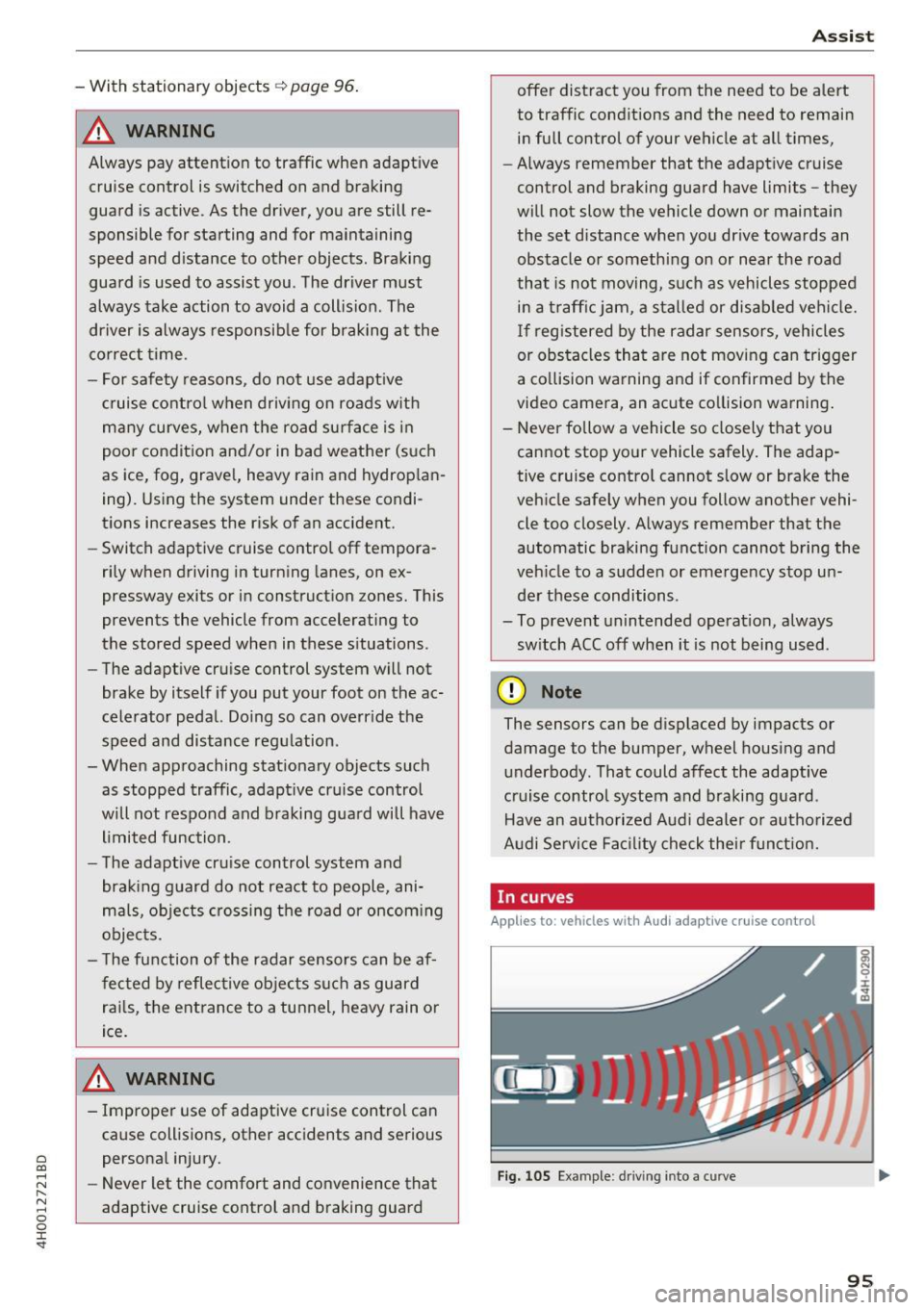
In curves
Applies to: vehicles wit h Aud i ada ptive cru ise control
I
F ig. 105 Example: d rivin g i nto a c urve
95
Page 103 of 354
0 co .... N ,..._
N .... 0 0 :c '
Applies to: vehicles with Audi adaptive cruise contro l
.,. Se lect: t he I CAR I fu nction bu tton > Car systems
co ntro l bu tton > Driver a ssist > Audi braking
guard .
System -
Switch the bra kin g g ua rd On/ Off. When
you swit ch the ig nition on, the message
Braking
guard: Off
appears if t he sys tem is switched o ff.
Early warning -The distance and approac h warn
i ngs i n the display can be sw itched
On/ Off.
@ Tips
- Your settings are automatically stored and
ass igned to the remote cont rol key bei ng
used.
- If you restric t or sw itch off the ESC, the
braking gua rd also sw itches itself off
¢ page 12 7.
- Switch braking guard off when yo u are load
i ng t he ve hicle on to a vehicle ca rr ier, t rain,
shi p or other type o f transportation. This
c a n p reven t undesired w arnings from the
br akin g guard system.
Messages
Applies to: veh icles with Audi adaptive cruise control
Braking guard: Off
This message appea rs if the sys tem is switc hed
off through the In fota inme nt system . Otherwise ,
if the system is tur ned off, the informa tion ap
pears every time shortly after the start of t he
tr ip.
The message also appears if the system is not
avai la bl e d ue to a ma lfunction or if the ESC is
switched off~
page 127. If this is the case, the
system w ill not prov ide warnings about a possi
b le co llision.
Braking guard : engaged
This message appea rs if a sha rp bra ke press ure
was applied due to an ac ute wa rn ing.
ACC: unavailable
ACC and Audi braking guard: Unavailable Assist
T
he system cannot gua rantee that it will detect
objects co rrectly and is sw itched off . The sensors
have been moved or are faulty. The p re sense
funct ions may a lso be affected . D rive to an au
t h ori zed Audi dea ler or authorized Audi Service
Facility immed iate ly to have the malfunction cor
rected .
ACC: Currently unavailable. No sensor vis ion
ACC and Audi braking guard: Cu rrently unavail
able. No sensor vision
Th is mess age appears if the senso r view i s ob
str ucted, for examp le by leaves, snow , heavy
spray or dirt. Clean the sensors¢
page 94 ,
fig . 104.
ACC : Currently unavailabl e. Gradient too steep
The road exceeds the maximum poss ible angle
fo r safe adaptive c ruise cont rol operat io n. Adap
t ive cr uise control is sw itched off.
ACC: only available in D, Sor M
Se lect the D, Sor M selector leve r pos ition.
ACC : Currently unavailable. Parking brake ap •
plied
The ad apt ive cr uise cont rol system sw itches off
a utoma tica lly if the parking brake is se t.
ACC: Currently unavailable . Stability control
( ESC) input .
This message appears if the Electronic Stab iliza
t ion Control (ESC) is taking action to stab ilize the
vehicle . In t his case, adaptive cruise control
switches off automatically .
ACC off: manual control!
This message appears when adaptive cruise con
trol cannot set the parking brake. P ress the brake
pedal to prevent the vehicle from ro lling.
• ••
T h ree white do ts appear if a setting canno t be se
l ecte d w it h t he oper ati ng leve r. For ex ample, this
h appens if a daptive cr uise con trol c annot sta rt
driv ing a utomat ica lly in stop -and -go traff ic be
ca use the dr iver has not fastene d their safety
belt . ..,.
101
Page 108 of 354
Ass is t
system may have detected a vehicle in another
lane that is not adjacent to your current lane.
- If you are driving through a curve. Side assist may react to a vehicle that is one lane over
from th e adjacent lane .
- If s ide assist reacts to other objects (such as
high or d isplaced guard ra ils).
- In poor weather condit ions. The side assist
functions are limited.
Do not cover the radar sensors <=>
fig. 121 with
stickers, deposits, bicycle wheels o r othe r ob
jects, beca use they wi ll impair the function. Do
not use side ass ist when towing a trailer. For in
formation on cleaning, see <=>
page 306.
A WARNING
-Always pay attention to traffic and to the
area around your vehicle. Side assist cannot
rep lace a driver's attention. The driver alone
is a lways responsible for lane changes and
similar d riving maneuvers .
- In some situat ions, the system may not
func tion or its funct ion may be limited . For
example :
- if vehicles are approaching or being left
behind very quickly. The display may not
turn on in t ime .
- In poor weather conditions such as heavy
rain, snow or heavy mist .
- On very wide lanes, in tight curves, or i f
there is a rise in the road surface. Vehicles
in the adjacent lane may not be detected
because they are outs ide of the sensor
range.
- Audi side ass ist cannot detect a ll vehicles
under a ll condit ions, which can increase the
risk of accidents.
- Please note that side assist only displays ap proaching vehicles or vehicles in your blind
spot if your vehicle is traveling at least
19 mph (30 km/h) .
- In certain situations, the system may not
work or its function may be limited. For ex
amp le:
- The display may not turn on at the rig ht
time if veh ides are approaching or passing
very q uick ly .
106
-
- In poor weather conditions, such as heavy
rain, snow or fog .
- In very wide lanes , in tight c urves or when
there are slopes in the roadway, vehicles
i n the ne ighboring lanes may not be de
tected because they a re outside of the
sensor range .
(D Note
The sensors can be d isplaced by impacts or
damage to the bumper, wheel housing and underbody. This can impair the system. Have
an authorized Audi dealer or author ized Audi
Service Fac ility check their f unct io n.
@ Tips
- If the w indow glass in the dr iver's door or
front passenge r's door has been tinted, the
display in t he exterior mirror may be incor
rect .
- For an explanat ion on co nfo rm ity w ith the
FCC regulations in the Un ited States and the
Indust ry Canada regulatio ns, see
~page 339.
Switching on/off
Applies to: vehicles wi th A ud i side assist
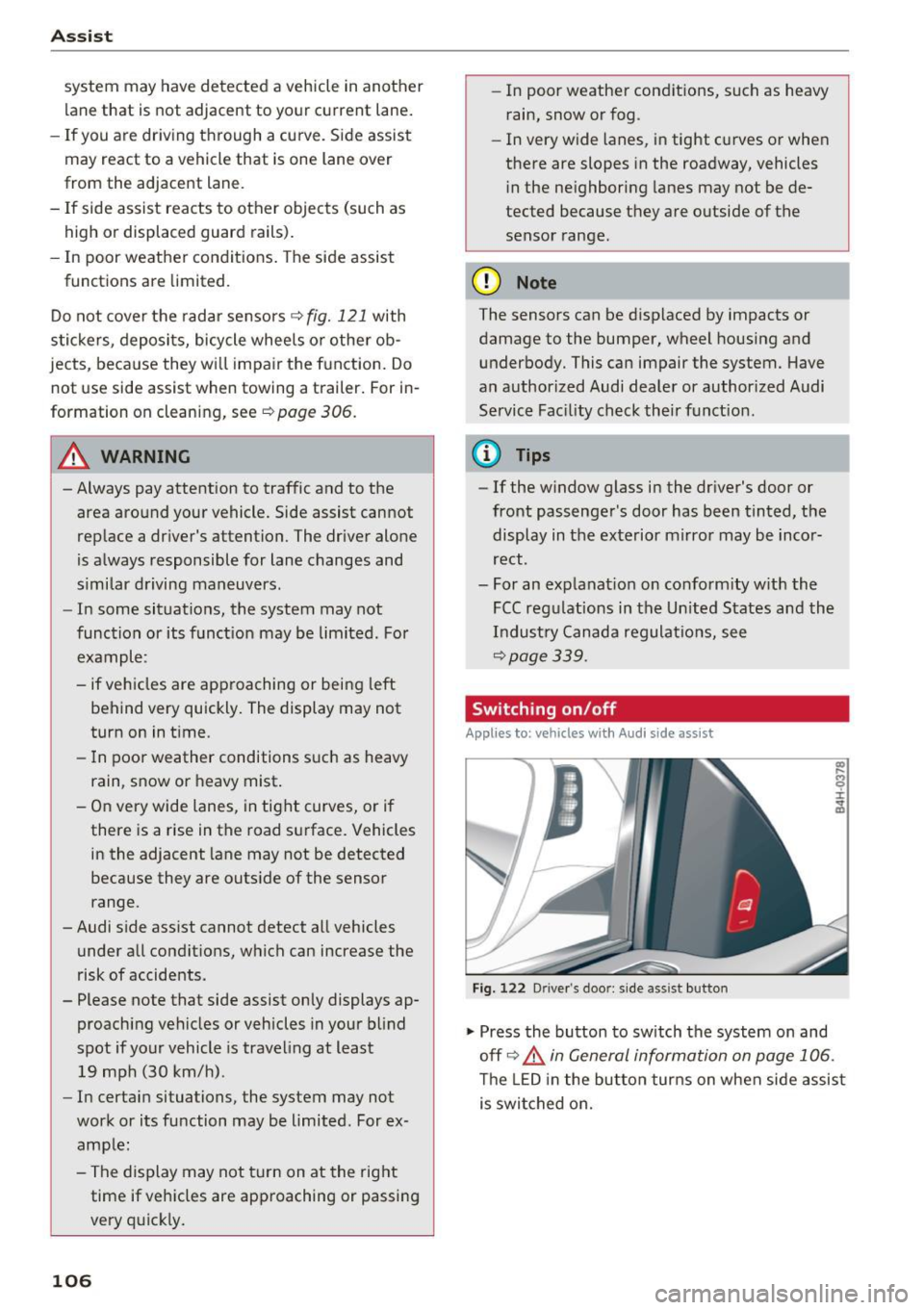
F ig . 122 D river 's doo r: side as sist but ton
.,. Press the button to sw itch the system on and
off <=>.&
in General information on page 106 .
The LED in the button tur ns on when side assis t
is swi tched on.
Page 112 of 354
Ass is t
Switching on /off
Applies to: vehicles with night vision assist
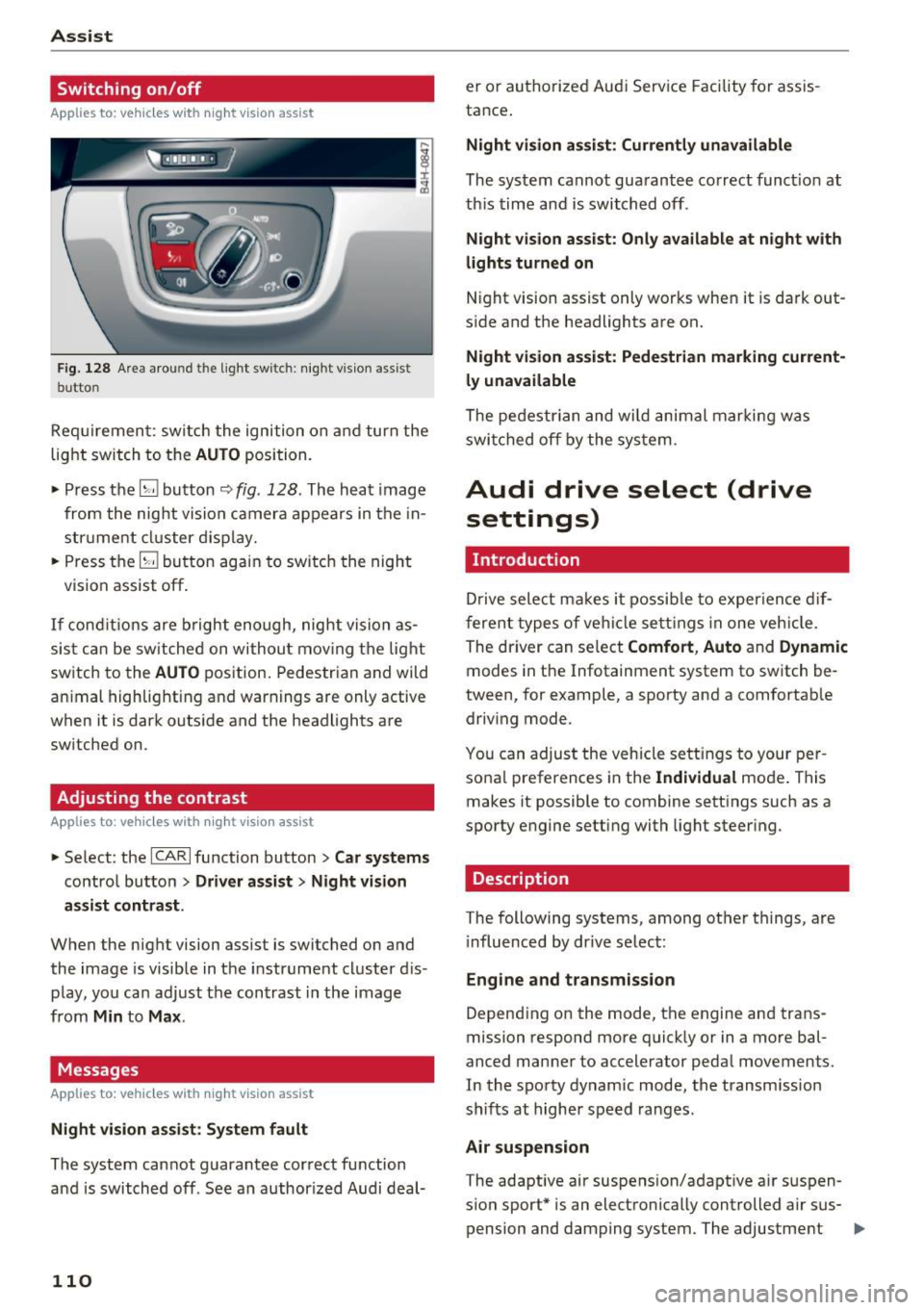
Fig. 128 Area aro und th e light sw itc h: n ight v is ion assist
butto n
Requirement: sw itch the ignition on and turn the
light switch to the
AUTO position.
• Press the
[g button 9 fig . 128 . The heat image
from the nig ht vision camera appears in the in
s t ru me nt cluster d isplay.
• Press the
(g button again to switch the night
vision assist off .
If condit io ns are b right enough, night vision as
sis t can be sw itched on withou t mov ing the light
switch to the
AUTO position. Pedestrian and wild
an imal highlighting and warnings are only active
when it is da rk outs ide and the headlights are
sw itched on .
Adjusting the contrast
Applies to: vehicles with night vision assist
• Select : the ICARI function button > Car systems
contro l button > Driver a ssist > Night vision
a ssi st cont rast .
When the night vision assist is switched on and
the image is visible in the instrument cluster d is
p lay, you can adjust the contrast in the image
from
Min to Ma x.
Messages
Applies to: vehicles with night vision assist
Ni ght vision assist : System fau lt
The system cannot guarantee correct function
and is switched off . See an author ized Audi deal-
110
er or authori zed Aud i Service Facility for assis
tance .
Night vi sion a ssis t: Current ly unavailable
The system cannot guarantee correct funct io n at
th is time and is switched off .
Night vision assist: O nly a vailabl e a t n ight with
lights turned on
N ight vision assist only works whe n it is dark out
s ide and the headlights are on.
Night vis ion a ssist: Pede stri an marking current
l y unavailab le
The pedestrian and wi ld animal marki ng was
swi tched off by the system .
Audi drive select (drive
settings)
Introduction
D rive select makes it possib le to exper ience dif
f erent types of ve hicle settings in one veh icle .
The dr iver can se lect
Comfort , Auto and Dynamic
modes in the Infotainment system to switch be
tween, for example, a sporty and a comfortab le
driv ing mode .
You can adjust the vehicle settings to your per
sona l preferences in the
Ind ividual mode . This
makes it possible to comb ine sett ings su ch as a
sporty engine setting with light steer ing .
Description
The following systems, among ot her things, are
i nfluenced by dr ive select:
Eng ine and tr an smis sion
Depend ing on the mode, th e engine and trans
mission respond more q uick ly or in a more bal
a nced manner to accelerator pedal movements.
In the sporty dynamic mode, the transm ission
shifts at higher speed ranges.
Air suspen sion
T he adaptive air suspens ion/adapt ive a ir suspen
sion sport* is an electronically controlled air sus- pension and damping system . The adjustment ..,
Page 116 of 354

Parking systems
Parking systems
General information
Applies to: vehicles with parking system plus/rearview cam
era/peripheral camera
Depending on your vehicle's equipment , various
parking aids will help you when parking and ma
neuvering.
The
parking system plus assists you when park
ing by audibly and visually indicating objects de
tected in front of and behind the vehicle
¢page 115.
The rearview camera shows the area behind the
vehicle in the Infotainment system display. This
display assists you when you are cross or parallel parking
¢ page 116. The parking system plus
functions are also available
¢ page 115.
The peripheral cameras give various views to
help you when parking or maneuvering
¢ page 119. The parking system plus functions
are also available
¢page 115.
& WARNING
-Always look for traffic and check the area
around your vehicle by looking at it directly
as well. The parking system cannot replace
the driver's attention. The driver is always
responsible when entering or leaving a park
ing space and during similar maneuvers .
- Please note that some surfaces , such as
clothing, are not detected by the system .
- Sensors and cameras have blind spots in
which people and objects cannot be detect
ed . Be especially cautious of small children
and animals .
- The sensors can be displaced by impacts or
damage to the radiator gr ille, bumper,
wheel housing and the underbody . The park
ing system may be impaired as a result.
Have an authorized Audi dealer or author
ized Audi Service Facility check their func
tion .
- Make sure the sensors are not obstructed by
stickers, deposits or other materials. If they
are, the sensor function could be impaired.
For additional information on cleaning, see
c:> page 306.
114
(D Note
-Some objects are not detected or displayed
by the system under certain circumstances:
- Objects such as barrier chains, trailer draw
bars, vertical poles or fences
- Objects above the sensors such as wall ex
tensions
- Objects with certain surfaces or structures
such as chain link fences or powder snow
- If you continue driving closer to a low ob
ject, it may disappear from the sensor range. Note that you will no longer be
warned about th is obstacle.
(D Tips
- The system may provide a warning even
though there are no obstacles in the cover
age area in some situations, such as:
- certain road surfaces or when there is tall
grass.
- external ultrasonic sources such as from cleaning vehicles .
- in heavy rain, snow, or thick vehicle ex
haust.
- We recommend that you practice parking in
a traffic -free location or parking lot to be
come familiar with the system . When doing
this, there should be good light and weath
er conditions.
- You can change the volume and pitch of the
signals as well as the display¢
page 124.
-Please refer to the instructions for towing a
trailer located in
¢page 124.
-What appears in the infotainment display is
somewhat time-delayed.
- The sensors must be kept clean and free of
snow and ice for park aid to operate .
Page 118 of 354
Parking system s
Rearview camera
Introduction
Applies to: vehicles with rearview camera
, I
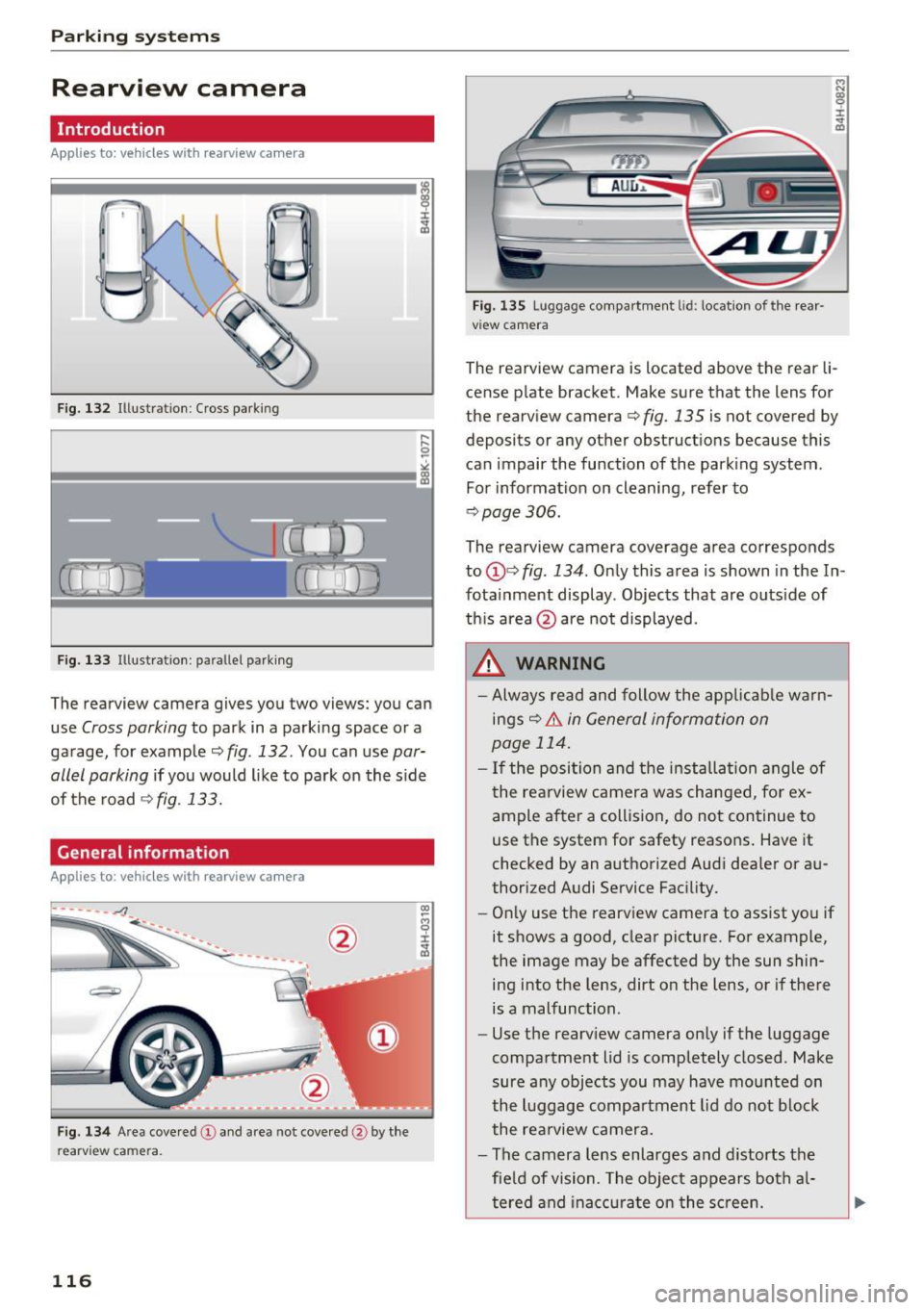
F ig. 132 Illustration : Cross parking
Fig. 133 Illustration : pa rallel parking
The rearview camera gives you two views: you can
use
Cross parking to park in a parking space or a
ga rage, for example ¢
fig. 132 . You can use par
allel parking
i f you would l ike to park on the s ide
of the road
¢ fig. 133.
General information
Applies to: vehicles with rearview camera
Fig . 134 Area cove red @ and area not cove red @ by the
r earv ie w ca mera .
116
rym
AU l:J ,.
Fig. 135 Lu ggage compa rtmen t lid : locatio n of the rear
v iew camera
The rearview camera is located above the rear li
cense p late bracket. Make sure that the lens for
the rearview camera ¢
fig. 135 is not covered by
deposits or any other obstructions because this
can impair the function of the parking system .
For information on cleaning, refer to
¢ page 306.
The rearview camera coverage area corresponds
to
(j)¢ fig . 134 . Only this area is shown in the In
fota inment display . Objects that are outside of
th is area @are not displayed.
A WARNING
- Always read and follow the app licab le warn
ings ¢&.
in General information on
page 114 .
- If the position and the installa tion angle of
the rearview camera was changed, fo r ex
ample after a collision, do not con tinue to
use the system for safety reasons . Have it
checked by an authorized Aud i dea ler or au
thorized Audi Service Fac ility.
- On ly use the rearv iew camera to ass ist you if
it shows a good, clear picture . For example ,
the image may be affected by the sun shin ing into the lens, dirt on the lens, or if there
is a malfunction .
- Use the rearv iew camera on ly if the luggage
compartment lid is completely closed . Make
sure a ny objects you may have mo unted on
the l uggage compa rtment lid do not b lock
the re arview camera.
- The camera lens enlarges and distorts the
fie ld of vision . The object appears bot h al
tered and inac curate o n the screen.
Page 126 of 354

Parking systems
Adjusting the display
and the warning tones
Applies to: vehicl es with parking system plus/rearview cam
era/per ipheral came ra
The display and warning tones can be adjusted in
the Infotainment.
~ Select: the ICARI function button > Car systems
control button > Driver assist > Parking aid.
Display
On* -
An optical display is shown for the parking
system plus, a rearview camera image is shown
for the rearview camera*.
Off -When the parking system is switched off,
only audib le signals are given.
Signal tones
Front volume -
volume for the front area
Rear volume -volume for the rear area
Front frequency -frequency for the front area
Rear frequency -frequency for the rear area
Entertainment volume -when the parking sys
tem is turned on, the volume of the audio/video
source is lowered.
The new ly selected level is demonstrated briefly
by the sound generator.
{!) Tips
- The warning tones can also be adjusted di
rectly by the v isual disp lay or the picture
from the camera. Simply press the
Settings
contro l button .
- Changed settings are act ivated when the
parking system is switched on aga in.
- The settings for volume and frequency are automat ically saved and assigned to the re
mote control key being used.
Error messages
Applies to: ve hicles w ith parking system plus/rearview cam
era/peripheral came ra
There is an error in the system if the LED in the
P,YA button is blinking and you hear a continuous
alarm for a few seconds after switching on the
124
parking system or when the pa rking system is al
ready activated . If the error is not corrected be
fore you switch off the ignition, the LED in the
P wA
button will blink the next time you switch on the
parking system by shifting into reverse.
Parking system plus*
If a sensor is faulty, the~ symbol will appear in
front of/behind the vehicle in the Infotainment display. If a rear sensor is faulty, on ly obstacles
that are in areas @and @ are displayed
c>page 115, fig . 130. If a front sensor is faulty,
only obstacles that are in areas © and @are dis
played. There is a lso a system malfunction if all
segments around the vehicle are red or if no seg
ments are disp layed.
Peripheral cameras*
There is a system malfunc tion if the ~· symbol
appears and the corresponding display area is
shown in blue. The camera is not working in this
a rea.
Drive to an authorized Audi dealer or authorized
Audi Service Facility immediately to have the
malfunction corrected .
Trailer hitch
Applies to: vehicles with parking system plus/rearv iew cam
era/peripheral cameras and t ra iler hitc h
For vehicles using the trailer socket, the parking
system rear sensors are not activated when you
shift into reverse gear or when you press the P
1
1.A
button . This results in the following restrictions .
Parking system plus*
There is no distance warning for the rear. The
front sensors remain activated. The visual display
switches to trailer mode.
Rearview camera* /Peripheral cameras*
There is no distance warning for the rear. The
front senso rs remain activated . The visua l display
switches to trailer mode . The rearview camera
image will not show the orientation lines and the
blue surfaces .
Ill-