window AUDI A8 2017 User Guide
[x] Cancel search | Manufacturer: AUDI, Model Year: 2017, Model line: A8, Model: AUDI A8 2017Pages: 354, PDF Size: 88.68 MB
Page 71 of 354

0 co .... N ,..... N .... 0 0 :c '
climate control
Description
The climate con trol system warms, coo ls and re
moves humidity from the air in the vehicle inte ri
or. It is the most effective when the w indows and
sunroof* are closed. If there is a bu ild-up of heat
i n side the veh icle, ven tilat ion can he lp to speed
up the cooling process .
In a ll heating mode functions, except for defrost,
the blower on ly switches to a higher speed once
the eng ine coolant has reached a sufficient tem
perature.
Pollutant filt er
The po llutant filter removes pollutants such as
d ust and pollen from the air.
Key recognition
The clima te control settings are automatically
s tored and assig ned to th e remo te contro l key
that is in use.
& WARNING
Poo r visibility can lead to accidents.
- For safer d riving, keep all windows free of
ice, snow and fo g.
- B ecome familia r as quickly as possible wi th
the correct use and function of the cl imate
contro l system, especially with the defrost
ing and defogging function.
- When the temperat ure is below freezing,
only use the windsh ield washer system after
Warm and cold
the windshield has been warmed by the cli
mate control system. The washer fluid could
freeze on the windshie ld and impair visib ili
ty .
(D Note
-If you suspect that the climate contro l sys
tem is damaged, switch the system off to
prevent further damage and have it checked
by an authorized Aud i dealer o r authorized
Aud i Serv ice Facility.
- Repa irs to the Aud i climate control system
require special technical know ledge and
special tools . See an autho rized Aud i dea le r
or authorized Audi Service Fac ility.
@ For the sake of the environment
Reducing the amount of fuel used also re
duces the amount of pollu tan ts that enter the
ai r.
@ Tips
- To prevent interference with the heat ing
and coo lin g output and to prevent the wi n
dows from fogging over , the air intake in
fro nt of the windshie ld m ust be free of i ce,
snow o r leave s.
- Condensat ion from the coo ling system c an
dr ip and fo rm a pudd le of w ater un der t he
vehicle. Th is i s n orm al and does not me an
t here is a lea k.
- T he e nergy m anagemen t sy stem may tem
por arily swi tch off cert ain fu nctions, s uch a s
the seat heating * or rear window defogger .
T hese systems are ava ila ble again as soon
as the energy supply has been restored.
69
Page 72 of 354

Warm and cold
Operation
We recommend pressing the !AUTOI button and setting the temperature to 72 °F (22 °C) .
Fig . 8 6 Cockp it con trols
F ig . 87 Re ar contro ls: 4 -zone de luxe auto matic cl imate
con tro l
Press the bu ttons to turn the func tions on or off .
The LED in a button will light up when the func
tion is sw itched on. Use the knob to adjust the
temperature, the blower speed and the air distri bution*. The driver and front passenger settings
can be adjusted separate ly.
Applies to: vehicles with 4-zone del uxe automatic climate
cont rol
You can adj ust the rea r left and r igh t sides using
the rea r contro ls ¢
fig . 87 .
IOFF ! Switching the climate cont rol system
on /off
The IO FFI button switches the cl imate co ntro l
system on or off . It also sw itches on whe n you
p ress the knob . The
!OFF I button in the rear only
sw itches the A/C system on/off in the rear of the
70
vehicle . A irflow from outside is blocked w hen the
cl imate control system is switched off.
IAIC I Switching cooling mode on and off
The air is not coo led and h umid ity is not removed
whe n coo ling mode is sw itched off . This can
c a use fog on the windows. The coo ling mode
swi tches off automatically whe n there a re cold
outside temperatures.
I""' ! Switching recirculation mode on and off
In recirculat ion mode , the air inside the vehicle is
c ir culated and filtered . Th is prevents the unfi l
te red air ou ts ide the ve hicle from en teri ng the
vehicle interior. We recommend sw itching recir
cu lation mode on whe n driving through a t unnel
or when sitting in traffic¢& .
The
! AU TO I button o r I@ FRON TI bu tton switches
recircu lation mode off .
IAUTO I Switching automatic mode on
Automat ic mode maintains a constant tempera
ture inside the vehicle. Air temperature , a irflow
and air distrib ution are controlled automatica lly .
If press and hold the button longer, 72 °F (22
°()
will be set . .,,.
Page 73 of 354

Adjusting the temperature
Temperatures between 60 °F ( +16 °C) and 84 °F
(+28 °C) can be set . Outside of this range,
LO or
HI will appear in the climate control system dis
p lay . At both of these settings, the climate con
trol system runs continuously at maximum cool
ing or heating power. There is no temperature
regulation.
~ Adjusting the amount of air
You can adjust the airf low manually to su it your
needs. The blower should always run at a low set
ting to prevent the windows from fogging and to
ensure a continuous exchange of air inside the
vehicle. To have the airflow regulated automat i
cally, press the
IAUTO I button.
~ Adjusting the air distribution
You can manually select the vents where the air
will flow. To have the a ir distribution regu lated
automatically, press the
IAUTO ! button.
[il /~*Adjusting seat heating/ventilation*
Pressing the button switches the seat heating/
venti lation on at the highest setting (level 3). The
LEDs indicate the temperature level. To reduce
the temperature, press the button aga in. To
sw itch the seat heating/venti lation off, press the
button repeatedly until the LED turns off.
After 10 minutes, the seat heating/ventilation
automatically switches from level 3 to level 2.
l
or cleared of condensation as quickly as possible.
The maximum amount of air flows mainly from
the vents below the windshield. Recirculation
mode switches off. The temperature should be
set to approximately 72 °F (22 °().
The
IAUTO I button switches the defroster off .
IQiil R EARI Switching the rear window defogger
on and off
The rear window defogger only operates when
~ the engine is running. It switches off automati-....
~ cally after 10 to 20 minutes, depending on the N
8 outside temperature. 0 :c '
To prevent the rear window defogger from
switching off automatica lly, press and hold the
llliil REAR ! button for more than three seconds .
This is stored until the ignition is switched off.
I SYNC! Synchronization*
When synchron ization is switched on, the set
tings for the driver's side are applied to the front
passenger's side (except for seat heating/ventila
t ion*). The rear is also synchronized in vehicles
with the 4- zone deluxe automatic climate control
system*. Synchronization switches off if the set
t in gs are adjusted on the front passenger's side
or in the rear*.
You can synchronize the sett ings in a row by
pressing and holding a knob. For example, to ap
ply the sett ings for the front passenger's side to
the driver's side, press and hold the knob on the
front passenger 's side .
Vents
You can open or close the center and rear vents in
the cockpit and the vents in the rear center con
sole and door pillars using the ridged thumb
wheels. The levers adjust the direction of the air
flow from the vents.
Residual heat
You can act ivate the residual heat function when
the ignition is switched off by pressing and hold
i ng the ~ button. The residual heat from the
coolant is used to heat the vehicle interior . T he
residual heat function switches off automatically
after about 30 minutes.
_&. WARNING
- You should not use the recirculation mode
for an extended period of time since no
fresh air is drawn in. With the air-condition
ing switched off, the windows can fog up,
which increases the risk of an acc ident.
- Individuals with reduced sensit ivity to pain
or temperature could develop burns when
using the seat heating function. To reduce
the risk of injury, these individua ls should
not use seat heating .
71
Page 79 of 354

0 co .... N ,..._
N .... 0 0 :c '
-Some noise after starting the engine is nor
mal and is no cause for concern.
- If you leave the vehicle with the ignition
switched on, the ignition will switch off af
ter a certain amount of time. Make sure that
electrical equipment such as the exterior
lights are switched off.
Stopping the engine
"'Bring the vehicle to a full stop.
"'Select the P or N selector lever position.
"'Press the
I START ENGINE STOPI button
r::?v page 76, fig. 90.
Steering lock
The steering locks when you turn the engine off
using the
I START ENGINE STOPI button and
open the driver's door. The locked steering helps
prevent vehicle theft.
Emergency off function
If it is absolutely necessary, the engine can also
be turned off while driving in the R, Dor S selec
tor lever position at speeds below 6 mph (10 km/
h). To stop the engine, press and hold the
I START ENGINE STOPI button and also press the
brake pedal.
& WARNING
-Never turn off the engine before the vehicle
has come to a complete stop. The full func
tion of the brake booster and the power
steering is not guaranteed. You must use
more force to turn or brake. Because you
cannot steer and brake as you usually
would, this could lead to accidents and seri
ous injuries .
- Always take the key with you whenever you
leave your vehicle. Otherwise, the engine
could be started or electrical equipment
such as the power windows could be operat
ed. This can lead to serious injury.
- For safety reasons, always park the vehicle
with the selector lever in the P position.
Driving
Otherwise, there is the risk that the vehicle
could roll unintentionally.
@ Note
If the engine has been under heavy load for
an extended period of time, heat builds up in
the engine compartment after the engine is
switched off and there is a risk of damaging
the engine. For this reason, let the engine run
at idle for approximately two minutes before
shutting it off.
(D Tips
After the engine has been switched off, the
radiator fan can continue to run for up to 10
minutes -even with the ignition switched off .
It can also switch on again after some time if
the coolant temperature rises as the result of
heat buildup or if the engine is already warm
and the engine compartment is also heated
by the sun's rays.
Messages in the instrument cluster display
Turn off ignition before leaving car
This message appears and a warning tone sounds
if you open the driver's door when the ignition is
switched on.
Press brake pedal to start engine
This message appears when you press the
I START ENGIN E STOP ! button to start the engine
and do not press the brake pedal while doing so .
The engine can only be started when the brake
pedal is pressed.
= Key not in vehicle?
This indicator light turns on and this message ap
pears if the ignition key was removed from the
vehicle when the engine was running. If the igni
tion key is no longer in the vehicle, you cannot switch on the ignition or start the engine once
you stop it. You also cannot lock the vehicle from
the outside.
Shift to P, otherwise vehicle can roll away.
Doors do not lock if lever is not in P.
77
Page 84 of 354

Driving
During emergency braking, your vehicle will
brake similar to heavy braking. ESC and the
associated components (ABS, ASR, EDL)
cannot overcome the laws of physics. In cor
ners and when road or weather conditions
are bad, a full brake application can cause
the vehicle to skid or the rear end to swerve,
which increases the risk of an accident.
- If the power supply fails, you cannot set the
parking brake if it is released. In this case,
park the vehicle on level ground and secure
it by placing the selector lever in the P posi
tion. See an authorized Audi dealer or au
thorized Audi Service Facility for assistance.
- Always take the vehicle key with you when leaving your vehicle, even for a short period
of time. This applies particularly when chil
dren remain in the vehicle . Otherwise chil
dren could start the engine, release the
parking brake or operate electrical equip
ment such as power windows, which in
creases the risk of an accident.
- No one should remain in the vehicle when it is locked -especially children. Locked doors
make it more difficult for emergency work
ers to get into the vehicle, which puts lives
at risk.
(D Tips
When stopping at a traffic signal or stopping in city traffic, you can set the parking brake
manually. The vehicle does not have to be
held with the brake pedal. The parking brake
eliminates the tendency to creep when a se
lector lever position is engaged. As soon as
you press the accelerator pedal, the parking brake releases automatically and your vehicle
starts to move
c> page 82.
(D} Tips
-Occasional noises when the parking brake is
set and released are normal and are not a
cause for concern.
- The parking brake goes through a self-test
cycle at regular intervals when the vehicle is
stopped. Any noises associated with this are normal.
82
- If there is a power failure, the parking brake
will not set if it is released, and it will not release if it is set ¢&. . See an authorized
Audi dealer or authorized Audi Service Fa cility for assistance .
Starting from a stop
Various convenience and safety functions may be
available when the vehicle begins driving, de
pending on vehicle equipment .
Starting on hills with the parking brake set
Requirement: the driver 's door must be closed
and the driver's safety belt must be fastened.
.,. To start driving comfortably when on a hill, set
the parking brake and begin driving as usual.
The braking force of the parking brake does not
release automatically until the wheels build up
enough driving force.
Starting on hills with hill hold assist
Hill hold assist makes it easier to start on hills.
Requirement: the driver's door must be closed
and the engine must be running.
.,. To activate hill hold assist, press and hold the
brake pedal for several seconds. The vehicle
must be in an uphill direction of travel.
After releasing the brake pedal, the braking pow
er is maintained for a brief moment
c> &. to pre
vent the vehicle from rolling back when starting.
During this time, you can easily begin to move
your vehicle.
&_ WARNING
A ppl ies to: ve hicles with hill hold assist
- If you do not begin driving immediately or
the engine stalls after releasing the brake
pedal, your vehicle may begin to roll back
ward. Press the brake pedal or set the park
ing brake immediately .
- The intelligen t technology of hill hold assist
cannot overcome the limitations imposed by
natural physical laws. The increased comfort
offered by hill hold assist should not cause
you to take safety risks .
Page 105 of 354
C)
Switching on/off
A ppl ies to: ve hicles with Audi active lane assist
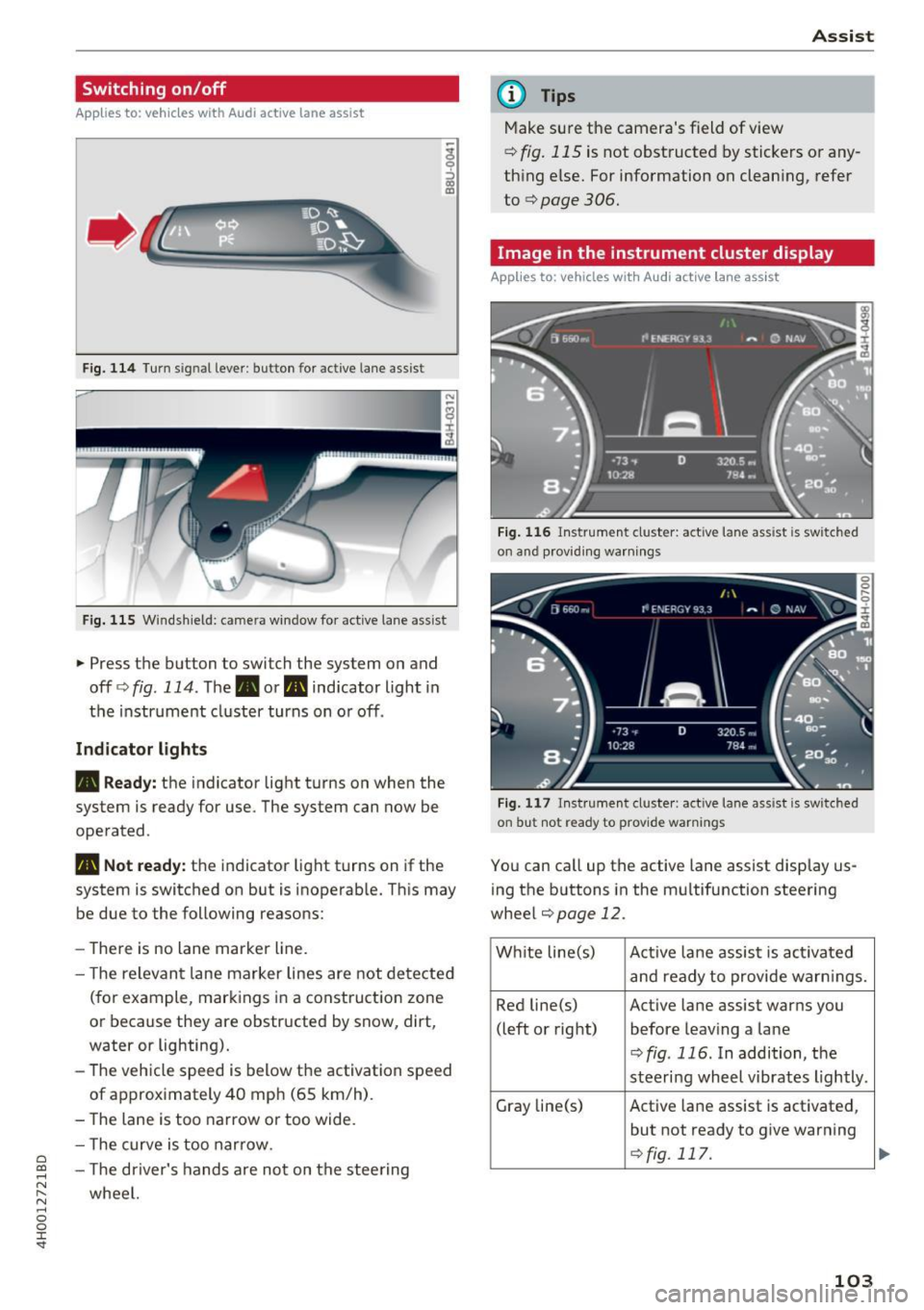
Fig. 114 Turn s ig n al lever: button for active lane ass ist
F ig. 115 Windsh ield: camera window fo r ac tive lane assist
... Press the button to switch the system on and
off ¢
fig. 114 . The. or. indicator light in
the instrument cluster turns on o r off .
Indicator lights
• Ready:
the indicator light turns on when the
system is ready for use. The system can now be
operated .
., Not ready: the indicator light turns on if the
system is switched on but is inoperab le. Th is may
be due to the following reasons:
- The re is no lane marker line.
- T he relevan t lane marker lines are not detected
(for example, mark ings in a construction zone
or because they are obstructed by snow, dirt,
water or lighting).
- The vehicle speed is below the activation speed
of approx imately 40 mph (65 km/h) .
- The lane is too narrow or too wide.
- The curve is too narrow.
~ - The driver's hands are not on the stee ring
"' ,.... wheel.
"' ...... 0 0 :r
(D Tips
Make sure the camera's field of view
¢
fig. 115 is not obstructed by stickers or any
thing else. For information on clean ing, refer
to
¢ page 306.
Image in the instrument cluster display
App lies to: vehicles with Audi active la ne ass ist
Fig. 116 Instrument cluster: active lane ass ist is sw itc hed
on and providing warnings
Fig. 117 Instrument cluste r: act ive lane ass ist is sw itc hed
on b ut not ready to provide warnings
You can call up the active lane assist display us
ing the b uttons in the mu ltifunction steering
wheel
¢page 12 .
White line(s)
Active lane assist is activated
and ready to provide warn ings.
Red line(s) Active lane assist warns you
(left or right) before leav ing a lane
¢fig . 116. In addition, the
steeri ng wheel vibrates lightly.
Gray line(s)
Active lane assist is activated,
but not ready to give warning
¢fig. 117.
103
...
Page 134 of 354

Intelligent Technology
To restore the balance of energy, components
that require large amounts of energy are tempo
rarily scaled back or switched off. Heating sys
tems in particular require a great deal of energy .
If you notice, for example, that the seat heating"
or rear window defogger is not working, then it has been temporarily reduced or switched off .
These systems are available again as soon as the
energy supply has been restored.
In addition, you may notice that the idle speed
has slightly increased. That is normal and no
cause for concern . By increasing the idling speed,
the additional requ ired energy will be generated
and the vehicle battery will be charged.
Notice about data
recorded by the Event
Data Recorder and
vehicle control modules
Event Data Recorder
This vehicle is equipped with an Event Data Re
corder (EDR). The main purpose of an EDR is to
record, in certain crash or near crash-like situa
tions , such as an airbag deployment o r hitting a
road obstacle, data that will assist in understand
ing how a vehicle 's systems performed. The EDR
is designed to record data related to vehicle dy
namics and safety systems for a short period of
time, typically 30 seconds or less. The EDR in this
vehicle is designed to record such data as :
- How various systems in your vehicle were oper
ating;
- Whether or not the driver and passenger safety
belts were buckled/fastened;
- How far (if at all) the driver was depressing the
accelerator and/or brake pedal; and,
- How fast the vehicle was traveling.
These data can help prov ide a better understand
ing of the circumstances in which crashes and in
juries occur. NOTE: EDR data are recorded by your
vehicle only if a non-trivial crash situation occurs ;
no data are recorded by the EDR under normal
driving conditions and no personal data (e .g.,
name, gender, age, and crash location) are re
corded. However, other parties, such as law en-
132
forcement, could combine the EDR data with the
type of personally identifying data routinely ac
quired during a crash investigation.
To read data recorded by an EDR, special equ ip
ment is required, and access to the vehicle or the
EDR is needed . In addition to the vehicle manu
facturer, other part ies, such as law enforcement,
that have the special equipment, can read the in
formation if they have access to the vehicle or the
EDR .
Some state laws restrict the retrieval or down
loading of data stored by ED Rs installed in a vehi
cle for the express purpose of retrieving data af
ter an accident or crash event without the own
er 's consent .
Audi will not access the EDR and/or simi lar data
or give it to others -
- unless the vehicle owner (or lessee if the vehi
cle has been leased) agrees; or
- upon the official request by the police; or
- upon the order of a court of law or a govern-
ment agency; or
- for the defense of a lawsuit through the judicial
discovery process.
- Audi may also use the data for research about
veh icle operation and safety performance or
provide the data to a third party for research
purposes without identifying the specific vehi
cle or information about the identity of its own
er or lessee and only after the recorded vehicle
data has been accessed.
Vehicle control modules
Your vehicle is also equipped with a number of
electronic control modules for various vehicle
systems, such as engine management, emission control, airbags, and safety belts.
These electronic control modules record data during normal vehicle operation that may be
needed by trained technicians for diagnostic and
repair purposes. The recording capability of these
modules is limited to data (no sound is record
ed) . Only a small amount of data is actually re
corded over a very limited period of time, or stor
ed when a system fault is detected by a contro l
module . Some of the data stored may relate to .,._
Page 143 of 354
0 co .... N ,..... N .... 0 0 :c '
Appl ies to: vehicles with vo ice recog nitio n system
You con operate many Infotainment functions
conveniently by speaking .
Requirement: the ignition and the MM I must be
switched on~
page 134 , there must be no phone
call in progress and the parking system m ust not
be active .
~ Switching on : briefly press the~ button @
~ page 11, fig. 7 on the m ultif unction steering
whee l* and say the desired command after the
Beep .
~ Switching off : press and hold the l2;J button .
Or: press any button on the MMI control panel.
~ Canceling : press the 10, I button and say a new
command.
Or : say the command Canc el.
Input as sistance
The system gu ides you through the input with
visua l and audio feedback .
-Vi su al input a ssistance : after turning on voice
recognition, a d isplay with a select ion of possi
ble commands appears in the Infotainment dis
play . The command d isplay can be turned on or
off in the ma in menu using the
S etup MMI con
t rol button.
- Aud io input assi stance : to have the possible
commands read, turn the voice recognition sys
tem o n and say
Help .
For the system to underst and you:
Speak clearly and distinct ly at a normal volume.
Speak louder when driving faster.
Emphasize the words in the commands even ly
and do not leave long pauses .
D o not speak a command when the voice recogni
tion system is mak ing an anno uncement.
C lose the doors, the windows a nd the sunroof* to
reduce background noise . Make su re that passen
gers are not speaking when you are giving a voice
command.
Voice recognition system
Do not d irect the air vents toward the hands free
microphone, which is on the roof headliner near
the front inte rior lights .
Only use the system from the dr iver's seat be
ca use the hands free microphone is directed to
ward that seat .
Additional settings
Additional settings, such as individual speech
training
based on yo ur voice, the Command dis
play
or the prompt volume , can be adjusted in
the main men u using the
Setup MMI control but
ton
~ page 205.
A WARNING
--Direct your full attention to dr iv ing. As the
driver, you have complete responsibility for
safety in traff ic. Only use the functions in
such a way that you a lways maintain com
plete control over your vehicle in all traffic
situa tions.
- Do not use the voice recognition system in
emergencies beca use your voice may change
in stressfu l situations. It may ta ke longe r to
dia l the numbe r or the sys tem may not be
a ble to dia l it at all. Dia l the emergency
number manually.
@ Tips
- The d ialog pauses w hen the re is a n incom
ing phone call and will con tinue if yo u ig
nore the cal l. T he d ia log ends if you answer
the ca ll.
- Yo u can select an item in the list using ei
ther the vo ice recogn it io n sys tem or the
cont rol knob.
Command overview
information
Applies to: vehicles with voice recogn it ion system
The following overv iews describe the commands
that can be used to operate the MMI using the
vo ice recognit io n system .
Alternative commands are separated by a
" I", for
example, say:
Telephone I (or) Na vigation I (or)
Rad io . .,..
141
Page 180 of 354
Radio
Radio functions
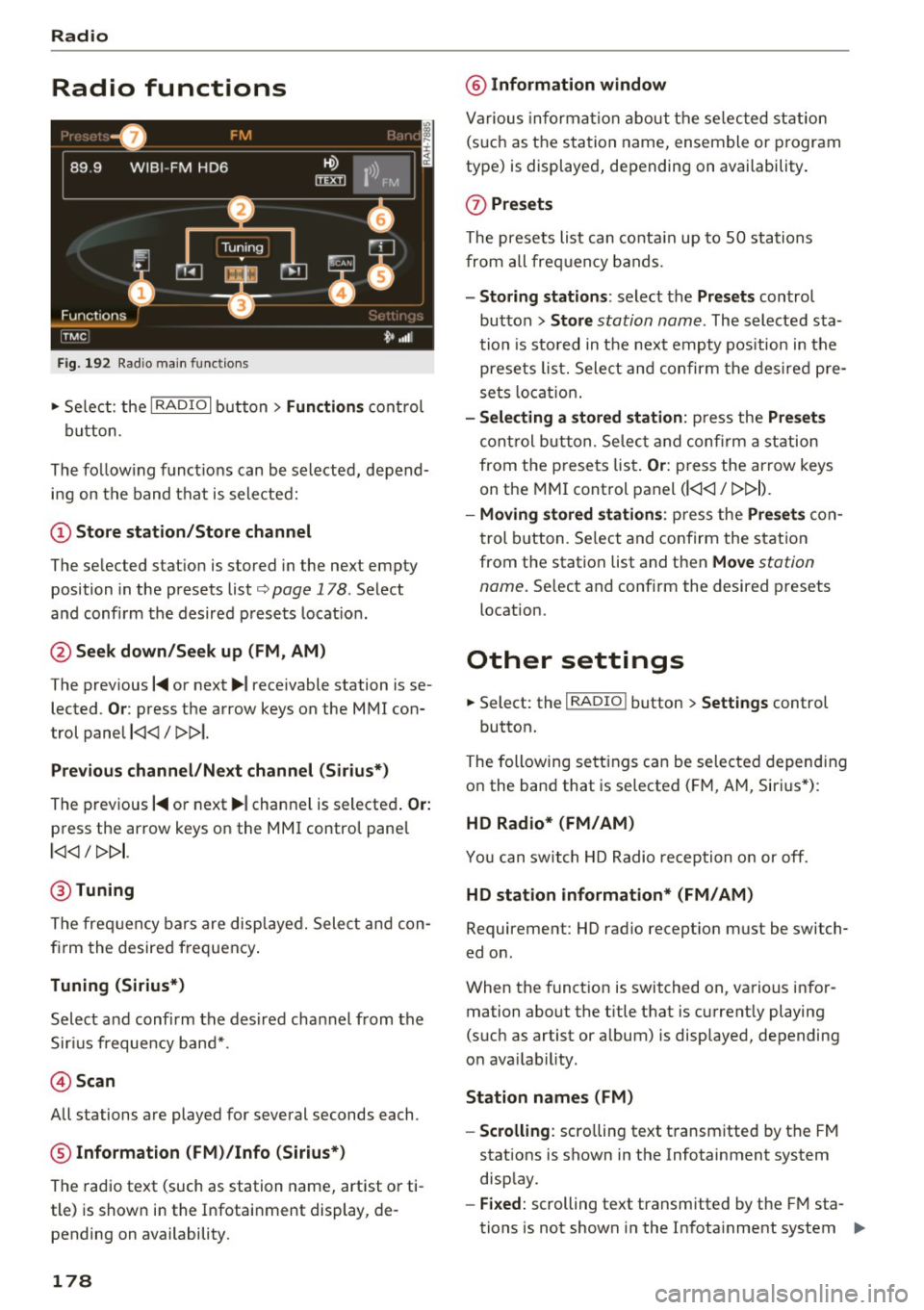
Fig . 192 Radio mai n functio n s
.. Se lect: the I RADIO I b utton> Functions cont rol
button.
The fo llow ing f unct io ns can be selected, depend
i n g on the band that is se le cted:
(!) Store station /Store channel
The se lected stat ion is stored in the next empty
position in the presets list
c:, page 178 . Select
a nd confi rm the desired p rese ts loca tion.
@ Seek down/Seek up (FM , AM)
The prev ious
I~ or next ~I receivable station is se
lected.
Or : press the arrow keys on the MMI con
trol pane l
l
Previou s channel /Next channel (Si rius*)
The prev ious I~ or next ~ I channel is selecte d. Or:
press the arrow keys on the MMI control pane l
l
@ Tuning
The frequ ency bars are disp laye d. Sele ct and con
fi rm the desired frequen cy .
Tuning (Sirius*)
Select a nd confirm the des ired channel from the
S ir iu s frequency ban d*.
@ Scan
All stations are played for several seconds each.
® Information (FM )/Info (Sirius*)
The radio text (such as station name, artist o r ti
tle) is show n in the Infotai nment display, de
pending on availability.
178
@ Information window
Va rious in forma tion about th e se lected st ation
(s uch as the sta tion name, ensemble or p rogram
type) is displaye d, depending on availability.
(J) Presets
The prese ts lis t can co nta in up to 50 sta tions
fro m al l frequency bands.
- Storing stations : select the Presets control
bu tton >
Store station name. The selected sta
tion is sto red in t he nex t emp ty pos ition in the
presets list. Sele ct and confir m th e des ired pre
se ts lo cati on .
- Selecting a stored station : press the Presets
control b utton. Selec t and con firm a st atio n
from t he p rese ts lis t.
Or: press the arrow keys
on the MMI cont rol panel
(l
-Moving stored station s: press the Presets con
t rol b utt on. Se lect and confirm the s tat ion
from the station list and then
Move station
name.
Se lect and conf irm the desired presets
location.
Other settings
.. Select: the I RADIO I button > Settings control
button.
The following se tt ings can be sele cte d d epend ing
o n the band that is selected ( FM, A M, Siri us*) :
HD Radio* (FM/AM)
Yo u can swit ch HD Radio reception o n or off.
HD station information* (FM/AM)
Requirement: HD radio recept io n must be switch
ed on .
When the funct ion is switched on, va rious i nfor
mation abo ut the t itle t hat is c urrent ly playing
(such as artist or album) is displayed, depending
o n ava ilab ility.
Station names (FM )
- Scrolling:
scro lling text t ransm itted by the FM
stat ions is shown in the Infotainment system
disp lay.
- Fixed : scrolling text transmitted by the FM sta
tions is not shown in the In fota inment system .,,.
Page 181 of 354
0 co .... N ,..... N .... 0 0 :c '
ing text displayed.
-Off: scrolling text transmitted by the FM sta
tions is not shown in the Infotainment display.
Scro lling text from HD stations is shown in the
Infotainment display.
Channel info (Sirius*)
If track informat ion is available for the current ti
tle (such as artist or album), it will be displayed
in a pop-up window if this function is activated.
Station sorting (Sirius*)
-Channel number : the stations are sorted in as
c ending order a ccording to their station num
ber.
- Channel name : the stations are listed in alpha
betical order.
- Category and channel number : the stations are
sorted according to their category and then ac
cording to their channel number.
- Category and channel name : the stations are
so rted according to their category and then ac
cording to their station name.
Troubleshooting
Problem Solution
Radio
Category filter (Sirius*)
The stations shown in the station list can be fil
tered by yo ur personal preferences and by pro
gram type . The program categories that you can
select depend on what is offered by your provid
er. Select the
Deactivate category filter option to
deact ivate all filter opt ions and disp lay all availa
ble stations in the satell ite stat ion list.
Receiver serial number (Sirius*)
The electronic seria l number (ESN) is d isp layed.
The number is required when logging in to Sir
ius*.
Deleting presets
Requirement: a station must be stored in the
presets list¢
page 178 .
Stored stations can be deleted Individually or All
at once .
A station with poor reception is no Store the station ahead of time and then select it from the pre-
longer disp layed in the station list sets list later
(z) ¢ page 178, fig. 192.
once you switch to a different sta-
t ion.
179