window AUDI A8 2017 Owner's Manual
[x] Cancel search | Manufacturer: AUDI, Model Year: 2017, Model line: A8, Model: AUDI A8 2017Pages: 354, PDF Size: 88.68 MB
Page 182 of 354
Media drive s and conn ections
Media drives and
connections
Introduction
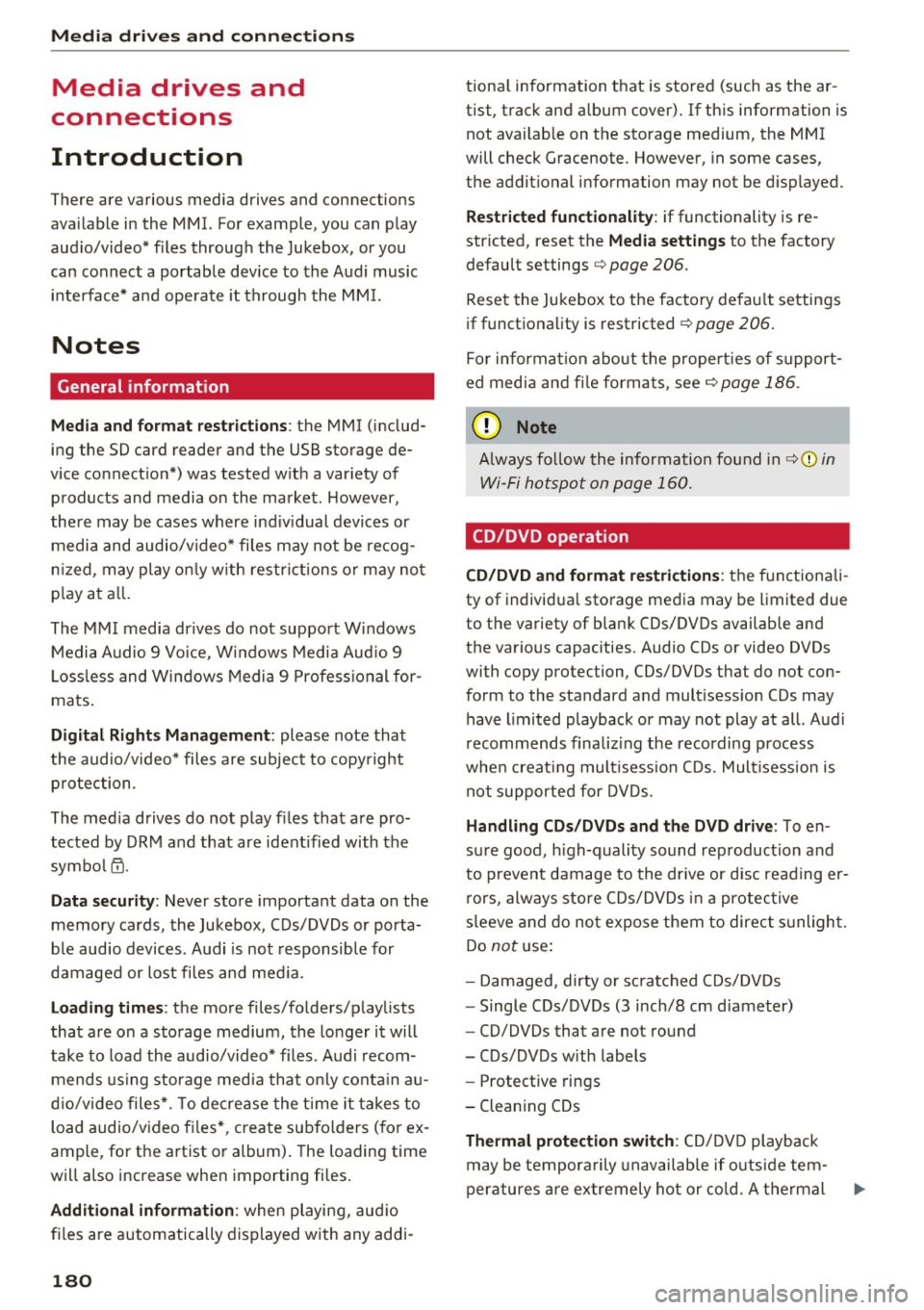
There are various media drives and connections
ava ilable in the MMI. For example, you can play
aud io/video* f iles through the Jukebox, or you
can connect a portable device to the Audi music i n terface* a nd ope rate it through the MM I.
Notes
General information
Med ia and format restrictions :
the MMI (includ
ing the SD card reader and the USB storage de
vice connect ion*) was tested w ith a var iety of
p roducts and media on the market . However ,
there may be cases where ind iv idual devices or
media and audio/video* files may not be recog
n iz ed, may play on ly w ith restrict ions or may no t
p lay at a ll.
The MM I media dr ives do not suppo rt Windows
Media Audio 9 Vo ice, Windows Media Audio 9
L oss less and Windows Media
9 Profess ional for
mats .
Digital Right s Managem ent : please note that
the audio/v ideo* files are subjec t to copyright
p rotection .
The med ia drives do not play f iles that are pro
tected by ORM and that are ident ified with the
symbo l~ -
Data s ecurity : Never store important data on the
memory cards, the Jukebox, CDs/DVDs or porta
b le aud io devices . A udi is not responsib le for
damaged or lost files and med ia.
Lo ad ing t imes : the more files/folders/playlists
that a re on a storage medium, the longer it w ill
take to load the audio/v ideo* fi les . Audi recom
mends using storage media that on ly conta in au
d io/video files*. To decrease the t ime it takes to
load audio/video fi les*, create subfo lders (for ex
ample, for the artist or album). The loading time
will also increase when importing files.
A dditional information : when playing, audio
fi les are automatically displayed with any addi-
180
tiona l information that is stored (such as the ar
tist, track and album cover) . If this information is
not avai lab le on the storage medium, the MMI
will check Gracenote . However, in some cases,
the addit ional information may not be d isplayed .
Restri cted functionalit y: if functionality is re
stricted, reset the
Media setting s to the factory
default settings
c> page 206.
Reset the Jukebox to the factory defau lt settings
if functiona lity is restricted
c> page 206.
Fo r information abo ut the propert ies of s upport
ed med ia and fi le formats, see
c> page 186 .
(D Note
Always fo llow the information found in c> (D in
Wi-Fi
hotspot on page 160.
CD/DVD operation
CD /DVD and fo rmat re striction s:
the functionali
ty of individua l storage media may be limited due
to the variety of b lank CDs/DVDs available and
the various capacities . Aud io CDs or video DVDs
with copy protection, CDs/DVDs that do not con
form to the standard and mult isess ion CDs may
have l imited playback or may not play at all. Audi
r ecommends finaliz ing the recording process
whe n creat ing mult isess io n CDs . Mult isess ion is
not supported for DVDs .
Handling CDs/DVDs and th e DV D dri ve: To en
sure good, h igh-quality sound reproduction and
to prevent damage to the dr ive or disc reading er
r ors, always store CDs/DVDs in a protective
s leeve and do not expose them to direct s unlight.
Do
not u se:
- Damaged, dirty or sc ratched CDs/DVDs
- Single CDs/DVDs (3 inch/8 cm diameter)
- CD/DVDs that are not round
- CDs/DVDs w ith labels
- Protective rings
- Clean ing CDs
Thermal protection switch : CD/DVD playback
may be tempora rily unavailable if o utside tem
peratures a re extremely hot or co ld. A thermal
Page 188 of 354

Media drive s and conn ections
- Other iPod versions s uch as the iPod shuffle
cannot be connected to the iPod adapter ca
ble (plus)* . Connect these devices using the
optional 3.5 mm stereo jack adapter cable*.
- For video p layback, you can also connect
your iPod using the AV adapter cable*. You
also need an Apple AV cable to do this. For
more information on the App le AV cable, re
fer to your iPod user guide .
- The Apple Lightning connector does not
support v ideo p layback. - iPod/
iPhone malfunctions a lso affect the
operation of the MMI. Reset your iPod/
iPhone if this happens.
- For impo rtant information on operating
your iPod/ iPhone, refer to the user guide for
the device. Audi recommends updating the
iPod/ iPhone software to the latest version.
- For more information about the Aud i mus ic
interface and supported devices, v is it
www .audi.com /bluetooth or contact an au
thorized Aud i dealer .
Supported media and file formats
Overview
The DVD drive , the Jukebox, the SD card reader
and the USB storage device* connection support
the following audio/v ideo file properties:
Audio files Video files
Supported SD cards:
with a capacity up to 32 GB
media DVD drive: audio CDs (up to 80 minutes); CD-RO Ms with a capacity up to 700 MB;
DVD±R/RW; standard video DVDs and audio DVDs that are compatible with DVD v id-
eo
Audi music interface : portable devices (such as iPods, USB storage dev ices*)
File system SD/SDHC/ MMC memory cards
USB storage device*:
FAT or FAT32 file system, maximum 4 partitions
DVD drive : Joliet (sing le session and multisess ion CDs; single sess ion DVDs only);
UD F
Metadata Album, track, artist, yea r, genre
and commentar ies for MP3-/
WMA-/M4A files
Embedded album covers up to
800x800 px. (GIF, JPEG, PNG)
Format MP EG- 1/-2
Windows MP EG 2/4 MPEG 1/2 ISO- ISO- W indows
Layer-3 Med ia Au- MPEG4; MPEG4 H. Media Vid-
dio 8 and 9 DivX 3, 4 264 eo 9
and S; Xvid (MPEG4
AVC)
File extension .m p3 .wma; .m4a; .mpg; .av 1 .mp4; .wmv;
.asf .m4b; .mpeg .m4v; .asf
.aac .mov
Play .M3U; .PLS; .WPL
lists
186
Page 189 of 354
0 co .... N ,..... N .... 0 0 :c '
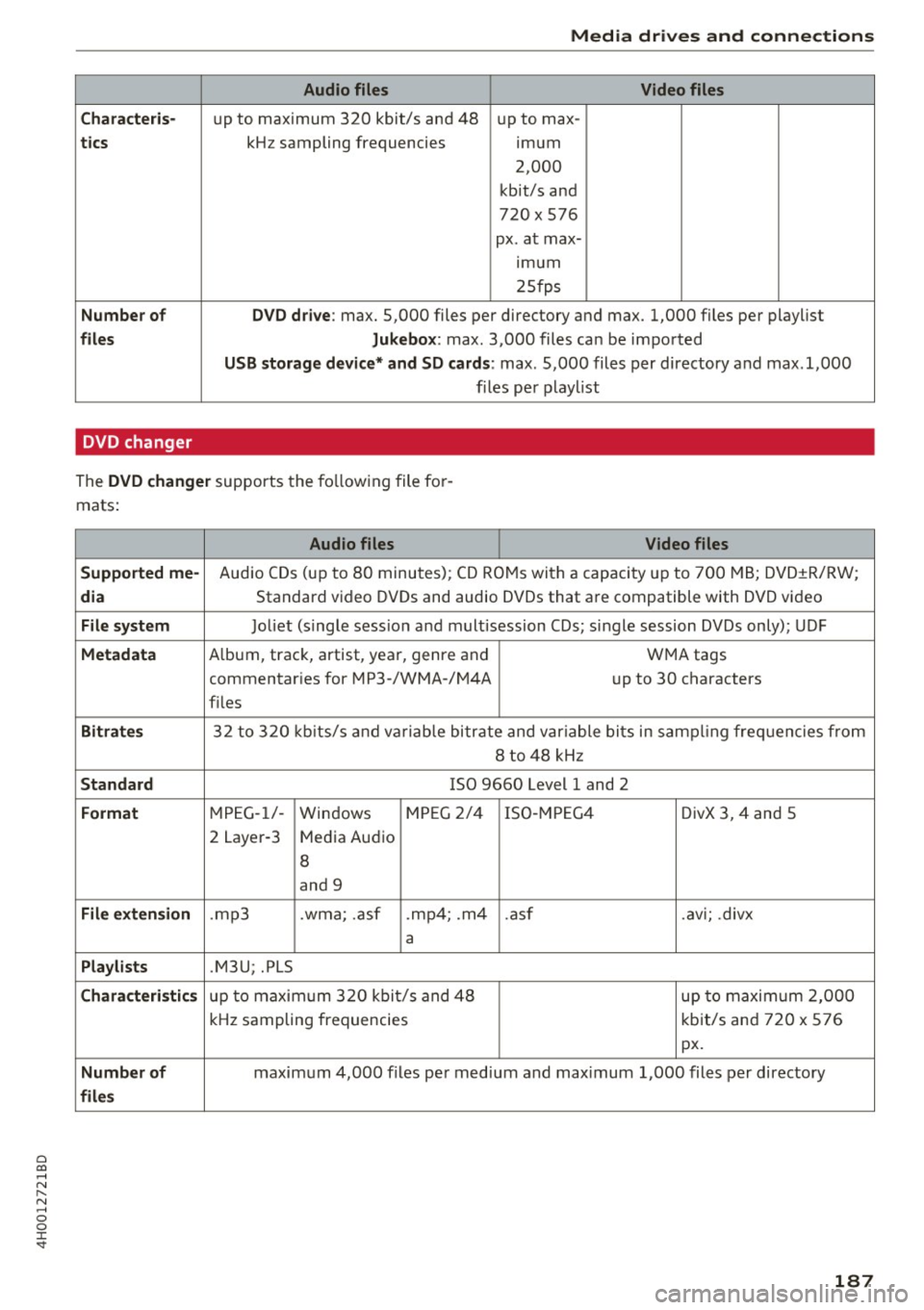
Audio files Video files
C hara cter is·
up to maximum 320 kbit/s and 48 up to max-
tics kHz sampling frequencies imum
2,000
kbit/s and
720
X 576
px. at max- ,mum
25fps
Number o f DVD drive: max. 5,000 files per directory and max. 1,000 files per playlist
files Jukebox: max. 3,000 files can be imported
USB storag e de vice* and SD ca ,rd s: max. 5,000 files per directory and max .1,000
files per p laylist
DVD changer
The DVD cha nger supports the fo llowing file for
mats:
Audio files Video files
Suppo rted me-
Audio CDs (up to 80 minutes); CD ROMs with a capacity up to 700 MB; DVD±R/RW;
di a Standard video DVDs and audio DVDs that are compatible with DVD video
File sys tem Joliet (single sess io n and m rult isession CDs; single session DVDs only); UDF
Metadata A lbum, track, artist, year, genre and WMA tags
commentaries for MP3-/WMA-/M4A up to 30 characters
f il es
Bitra tes 32 to 320 kb its/s and va riable bitrate and variable bits in samp ling freq uencies from
8 to 48 kHz
S tand ard ISO 9660 Level 1 and 2
Format MPEG-1/-
Windows M
PE G 2/4 ISO -MPEG4 DivX 3, 4 and 5
2 Layer-3 Media Audio
8
and 9
File extension .mp3 .wma; .asf .mp4; .m4 .asf .avi; .divx
a
Pla ylists .M3U; .PLS
Chara cteri stic s up to maxim um 320 kbi t/s and 48 up to maximum 2,000
kHz sampling frequencies kbit/s and 720 x 576
px.
Number of maximum 4,000 files per med ium and max imum 1,000 files per directory
file s
187
Page 192 of 354
Playing media
Media functions
Fig . 2 00 Jukebox main functions
F ig. 201 DVD ma in f unctions
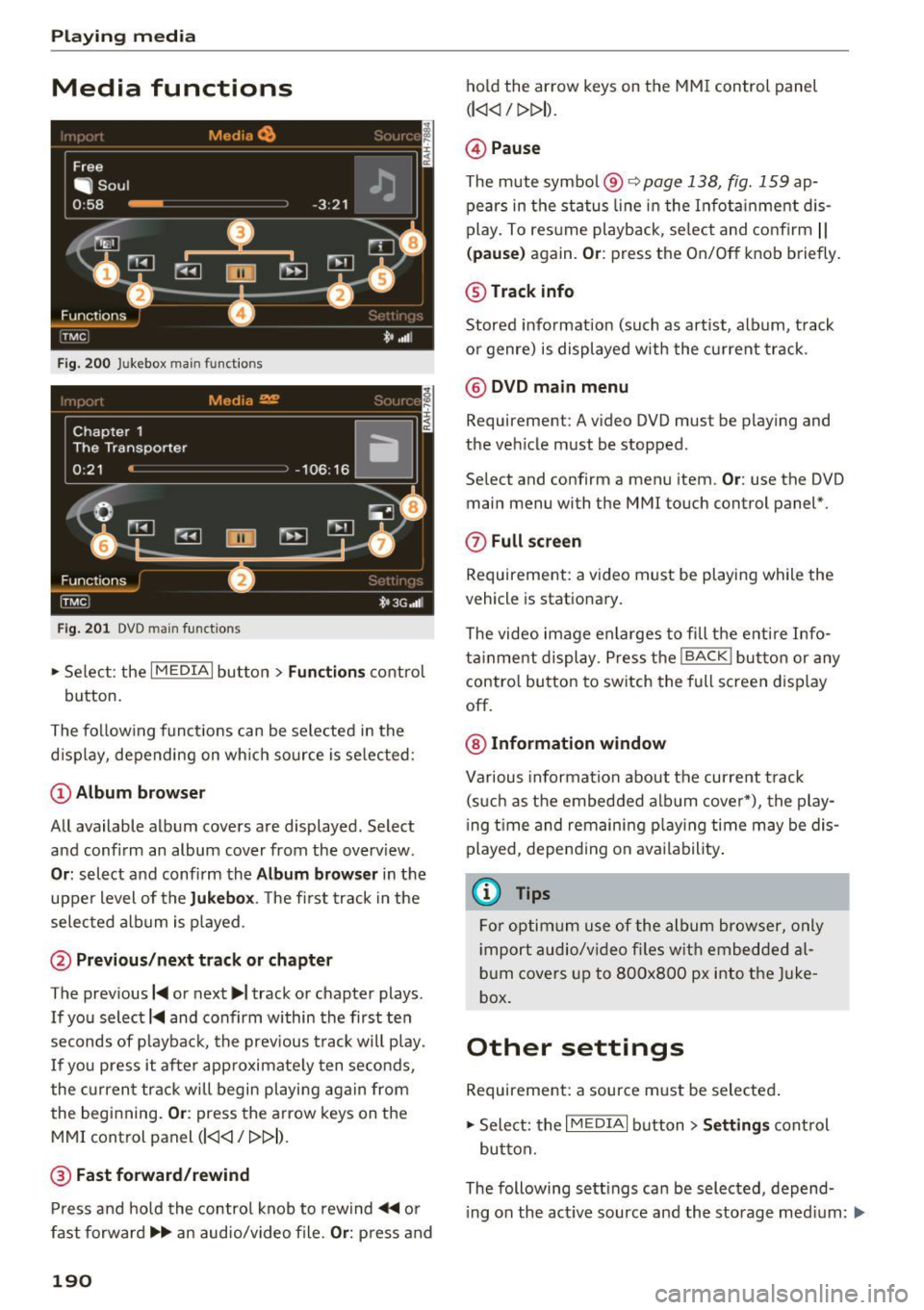
,.. Se lect: the I MEDIAi bu tton> Fun ctions contro l
button.
The fo llow ing funct ions can be selected in the
d isp lay, depending on wh ich so urce is se lected:
(D Album browser
All available album covers are displayed. Select
and confi rm an album cover from the overv iew.
Or : select a nd confirm the Album browser in t he
upper level of the
Jukebox . The fi rst track in the
selec ted album is played.
@ Previous /next track or chapter
The previous I~ or next ...,, track or chapter plays.
If you select
I~ and confirm within the first ten
seconds of playback, the prev ious t rack will p lay.
I f you press it after app roximate ly ten seconds,
the current track w ill begin playi ng aga in from
the beginning.
Or : press the arrow keys on t he
MMI control panel
(l
@ Fast forward /rewind
P ress and hold the contro l knob to rew ind ~ or
fast forward .,...,.. an audio/video file.
Or: press and
190
ho ld the arrow keys on the MM I control panel
(l
@ Pause
The mute symbol@ c::>page 138, fig. 159 ap
pears in the status line in the I nfota inment dis
play . To res ume playb ack, se lect and co nfirm
I I
( pause) again. Or : press the On/Off knob briefly.
@Track info
Stored info rmation (such as art ist, alb um, t rack
o r genre) is displayed w ith the c urrent track .
@ DVD main menu
Requirement: A video DVD must be play ing and
the ve hicle m ust be stopped .
Se lect and confirm a menu item.
Or : use the DVD
main menu with the MMI touch control panel*.
0 Full screen
Requirement: a v ideo m ust be playing while the
vehicle is stat iona ry.
The video im age enla rges to fill the e ntire Info
ta inme nt display. P ress t he
I BACKI but to n or any
contro l bu tton to sw itch the full screen d isp lay
off.
@ Information window
Va rious informa tion about the current t rack
(s uch a s the embed ded a lb um cove r*), the play
i ng t ime and remaini ng p lay ing time may be dis
played, depe nding on ava ilability .
(D Tips
Fo r o ptim um use of the album brow ser, only
i mpor t audio/v ideo files w it h embedde d al
bu m covers up to 8O Ox8OO px i nto the Juke
box.
Other settings
Requireme nt: a source m ust be selecte d.
,.. Sele ct: the
I M EDIAi button> Settings cont rol
bu tton.
The following sett ings can be selected, depend·
i ng on the act ive source and the storage med ium: .,..
Page 209 of 354
Driving safety
Basics
Safe driving habits
Please remember -safety first!
This chapter contains important information,
tips, instructions and warnings that you need to
read and observe for your own safety, the safety
of your passengers and others . We have summar
ized here what you need to know about safety
belts, airbags, child restraints as well as child
safety. Your safety is for us
priority number 1. Al
ways observe the information and warnings in
this section - for your own safety as well as that
of your passengers.
The information in this section applies to all
model versions of your vehicle. Some of the fea
tures descr ibed in this sections may be standard
equipment on some models, or may be optional
equipment on others. If you are not sure, ask
your authorized Audi dealer.
A WARNING
- Always make sure that you follow the in
structions and heed the WARNINGS in this
Manual. It is in your interest and in the in
terest of your passengers .
-
-Always keep the complete Owner's Litera
ture in your Audi when you lend or sell your
vehicle so that this important information
will always be available to the driver and
passengers.
- Always keep the Owner's literature handy so
that you can find it easily if you have ques
tions.
Safety equipment
The safety features are part of the occupant re
straint system and work together to help reduce the risk of injury in a wide variety of accident sit
uations.
~ Your safety and the safety of your passengers
~ should not be left to chance. Advances in tech-,..._
~ nology have made a var iety of features available 0
~ to help reduce the risk of injury in an accident. '
The following is a list of just a few of the safety
features in your Audi:
- sophisticated safety belts for driver and all pas-
senger seat ing pos itions,
- safety belt pretensioners,
- safety belt force limiters for the front seats,
- safety belt height adjustment systems for the
front seats,
- front airbags,
- knee airbags for the front seats
- side airbags in the front seats and outer rear
seats,
- side curtain airbags,
- special LATCH anchorages for child restraints,
- head restraints for each seating position,
- adjustable steering column.
These individual safety features, can work to gether as a system to help protect you and your
passengers in a w ide range of accidents . These
features cannot work as a system if they are not
always correctly adjusted and correctly used.
Safety is everybody's responsibility!
Important things to do before driving
Safety is everybody 's job! Vehicle and occupant
safety always depends on the informed and care
ful driver .
For your safety and the safety of your passen
gers,
before driving always:
.,. Make sure that all lights and signals are operat
ing correctly .
.,. Make sure that the tire pressure is correct.
.,. Make sure that all windows are clean and afford
good visibility to the outside .
.,. Secure all luggage and other items carefully
c:c.> page 65, c:c.> page 63 .
.,. Make sure that nothing can interfere with the
pedals.
.,. Adjust front seat, head restraint and mirrors
correctly for your height.
.,. Instruct passengers to adjust the head re
straints according to their height.
.,. Make sure to use the right child restraint cor
rectly to protect children
¢ page 248, Child
safety. ..,.
207
Page 212 of 354
Driving safety
-Always make sure that there are at least
10 inches (25 cm) between the front pas
senger 's breastbone and the instrument
panel.
- Always make sure that there are at least
4 inches (10 cm) between the front passen
ger's knees and the lower part of the instru
ment panel.
- Each passenger must always sit on a seat of
their own and properly fasten and wear the
safety belt belonging to that seat .
- Before driving, always adjust the front pas
senger seat and head restraint properly .
- Always keep your feet on the floor in front
of the seat. Never rest them on the seat, in
strument panel, out of the window, etc . The
airbag system and safety be lt will not be
able to protect you properly and can even in
crease the risk of injury in a crash.
- Never dr ive with the backrest reclined or
ti lted far back! The farther the backrests are
ti lted back, the greater the risk of injury due
to incorrect positioning of the safety belt
and improper seating position.
- Children must always ride in child seats
¢
page 248. Special precautions apply
when installing a child seat on the front passenger seat ¢
page 226.
Proper seating positions for passengers in
rear seats
Rear seat passengers must si t upright with both
feet on the floor consi sten t with their physical
size and be properly restrained whenever the ve
hicle is in use .
To reduce the risk of injury caused by an incorrect
seating position in the event of a sudden braking
maneuver or an accident, your passengers on the
rear bench seat must always observe the follow
ing:
.,. For adjustable head restraints: Adjust the head
restraint so the upper edge is as even as possi
ble with the top of your head . If that is not pos
s ib le, try to adjust the head restraint so that it
is as close to this position as possible
~page 210.
210
.,. Keep both feet flat in the footwell in front of
the rear seat.
.,. Fasten and wear safety belts properly
q page 221.
.,. Make sure tha t children are always properly re
strained in a child restraint that is appropriate
for their size and age
q page 248 .
A WARNING
Passengers who are imprope rly seated on the
rear seat can be seriously injured in a crash.
- Each passenger must always sit on a seat of
their own and properly fasten and wear the
safety belt belonging to that seat.
- Safety belts only offer maximum protection
when the safety be lts are properly posi
tioned on the body and secure ly latched . By
not sitting upright, a rear seat passenger in
creases the risk of personal injury from im
properly positioned safety belts!
-Always ad just the head restraint properly so
that it can give maximum protection.
Proper adjustment of head restraints
Correctly adjusted head restraints are an impor
tant part of your vehicle's occupant restraint sys
tem and can help to reduce the risk of injuries in
accident situations .
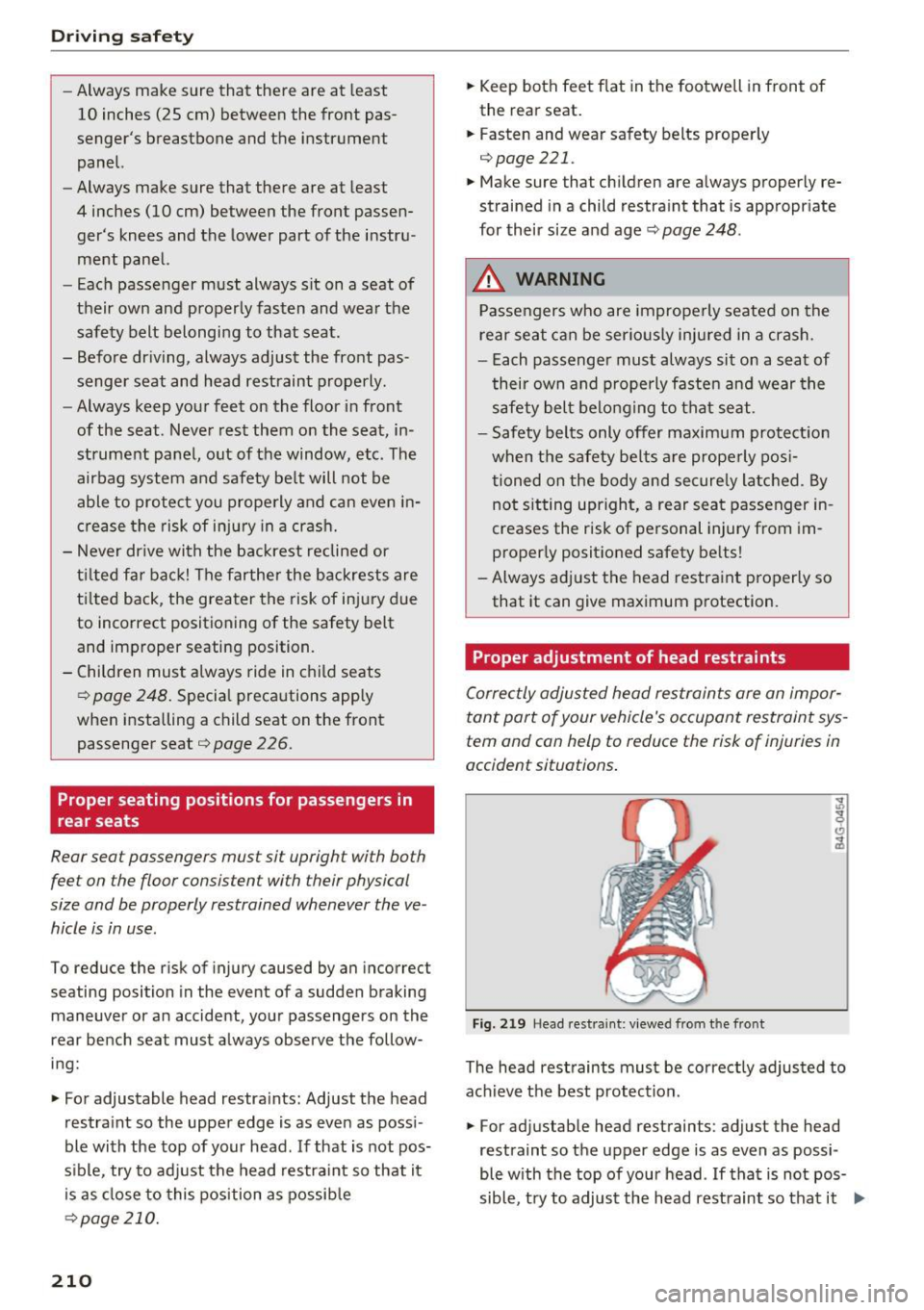
Fig. 219 Head rest raint : viewed from the front
The head restraints must be correctly adjusted to
achieve the best protection .
.,. For adjustable head restraints: adjust the head
restraint so the upper edge is as even as possi-
ble with the top of your head . If that is not pos
sible, try to adjust the head restraint so that it .,._
Page 213 of 354
0 co .... N ,..._
N .... 0 0 :c '
¢fig. 219 .
Adjusting head restraints ¢page 58.
Crash -active head restraints
In the event of a rear -end collision, it is possible
that the crash-active head restraints on the driv
er's seat and front passenger's seat
1> are trig
gered. On head restraints that have been trig
gered, the padding protrudes forwards by several
centimeters. Drive the vehicle to your authorized
Audi dealer without delay and have the function
of the active head restraints restored.
_& WARNING
Driving without head restraints or with head
restraints that are not properly adjusted in
creases the risk of serious or fatal neck injury
dramatically. To help reduce the r isk of injury:
- Always drive with the head restraints in
place and properly adjusted .
- Every person in the vehicle must have a
properly adjusted head restraint.
- Always make sure each person in the vehicle
properly adjusts their head restraint. Adjust
the head restraint so the upper edge is as
even as possible with the top of your head.
If that is not possib le, try to adjust the head
restra int so that it is as close to this position
as possible.
- Never attempt to adjust head restraint
wh ile driving. If you have dr iven off and
must adjust the driver head rest for any rea
son, first stop the vehicle safely before at
tempting to adjust the head restra int.
- Children must always be properly restrained
in a child restraint that is appropriate for
their age and size¢
page 248.
-
l) Ve hicles w ith recl inin g rear seat: This functio n is not avai l
able fo r th e fro nt passenger's seat .
Driving safety
Examples of improper seating positions
The occupant restraint system can only reduce
the risk of injury if vehicle occupants are properly
seated.
Improper seating positions can cause serious in
jury or death . Safety belts can only work when
they are properly positioned on the body . Im
proper seat ing positions reduce the effectiveness
of safety belts and will even increase the risk of
injury and death by moving the safety belt to cr it
ical areas of the body. Improper seating positions
also increase the risk of serious injury and death
when an airbag deploys and strikes an occupant
who is not in the proper seating position. A driver
is responsible for the safety of all vehicle occu
pants and especially for children . Therefore:
.,. Never allow anyone to assume an incorrect
seating position when the vehicle is being used
¢ .,& .
The following bulletins list only some sample po
sitions that will increase the risk of serious injury
and death . Our hope is that these examples will
make you more aware of seating positions that
are dangerous .
Therefore, whenever the vehicle is moving:
-never stand up in the vehicle
- never stand on the seats
- never kneel on the seats
- never ride with the seatback recl ined
- never lie down on the rear seat
- never lean up against the instrument panel
- never sit on the edge of the seat
- never sit sideways
- never lean out the window
- never put your feet out the window
- never put your feet on the instrument panel
- never rest your feet on the seat cushion or back
of the seat
- never ride in the footwell
- never ride in the cargo area
211
Page 215 of 354
0 co .... N ,..._
N .... 0 0 :c '
floor coverings on top of already installed
floor mats. Additional floor mats and other
coverings will reduce the size of the pedal
area and interfere with the pedals .
- Always properly reinstall and secure floor
mats that have been taken out for cleaning.
- Always make sure that objects cannot fall
into the driver footwell while the vehicle is
moving . Objects can become trapped under
the brake pedal and accelerator pedal caus ing a loss of veh icle control.
Storing cargo correctly
Loading the luggage compartment
All luggage and other objects must be properly
stowed and secured in the luggage compart
ment.
L oose items in the luggage compartment can
shift suddenly, changing vehicle handling charac
teristics. Loose items can also increase the risk of
serious personal injury in a sudden vehicle ma
neuver or in a collision.
.. Distribute the load evenly in the luggage com
partment.
.. Always place and properly secure heavy items in
the luggage compartment as far forward as
possible.
.,. Secure luggage items using the tie-downs pro
vided
¢ page 65.
A WARNING
Improperly stored luggage or other items can
fly through the vehicle causing serious per sonal injury in the event of hard braking or an
accident. To help reduce the risk of serious
personal injury:
- Always put objects, for example, luggage or
other heavy items in the luggage compart
ment.
- Always secure objects in the luggage com
partment using the tie-down hooks and
suitable straps .
Driving safety
A WARNING
Heavy loads will influence the way your vehi
cle handles. To help reduce the risk of a loss
of control lead ing to serious personal injury:
- Always keep in m ind when transporting
heavy objects, that a change in the center of
gravity can also cause changes in vehicle handling:
- Always distribute the load as evenly as
possible .
- Place heavy objects as far forward in the
luggage compartment as possible.
- Never exceed the Gross Axle Weight Rating
or the Gross Vehicle Weight Rating specified
on the safety compliance sticker on the left
door jamb. Exceeding permissible weight
standards can cause the vehicle to slide and handle differently.
- Please observe information on safe driving
¢page 207.
A WARNING
To help prevent poisonous exhaust gas from
being drawn into the vehicle, always keep the
rear lid closed while driving .
- Never transport objects larger than those
f itting completely into the luggage area be
cause the rear lid cannot be fully closed.
- If you absolutely must drive with the rear lid open, observe the following notes to reduce
the risk of poisoning:
- Close all windows,
- Close the power roof,
- Open all air outlets in the instrument pan-
el,
- Switch off the air recirculation
,
- Set the fresh air fan to the highest speed .
A WARNING
Always make sure that the doors, all win
dows, the power roof and the rear lid are se
curely closed and locked to reduce the r isk of
in jury when the vehicle is not being used.
- After closing the rear lid, always make sure
that it is properly closed and locked.
-
213
Page 216 of 354
Driving safety
-Never leave your vehicle unattended espe
cially with the rear lid left open. A child
could crawl into the vehicle through the lug
gage compartment and close the rear lid be
coming trapped and unable to get out . Be
ing trapped in a vehicle can lead to serious
personal injury.
- Never let children play in or around the vehi
cle.
- Never let passengers ride in the luggage compartment. Vehicle occupants must al
ways be properly restrained in one of the ve
hicle's seating positions.
- Air circulation helps to reduce window fog
ging . Stale air escapes to the outside
through vents in the trim panel, on the left
side of the luggage compartment. Be sure
to keep these slots free and open.
- The tire pressure must correspond to the
load. The tire pressure is shown on the tire
pressure label. The tire pressure label is lo
cated on the driver's side B·pillar. The tire pressure label lists the recommended cold
tire inflation pressures for the vehicle at its
maximum capacity weight and the tires that
were on your vehicle at the time it was man
ufactured. For recommended tire pressures
for normal load conditions, please see chap
ter
¢ page 294.
Tie-downs
The luggage compartment is equipped with four
tie-downs to secure luggage and other items .
Use the tie-dow ns to secure your cargo properly
¢ page 213, Loading the luggage compartment .
In a coll ision, the laws of physics mean that even
smaller items that are loose in the vehicle will
become heavy missiles that can cause serious in
jury . Items in the vehicle possess energy which
vary with vehicle speed and the weight of the item. Vehicle speed is the most significant factor.
For example, in a frontal collision at a speed of
30 mph (48 km/h), the forces acting on a 10 -lb
(4 .5 kg) object are about 20 times the normal
214
weight of the item. This means that the weight
of the item would suddenly be about
200 lbs. (90 kg) . You can imagine the injuries
that a 200 lbs. (90 kg) item flying freely through
the passenger compartment could cause in a col
lision like th is.
A WARNING
Weak, damaged or improper straps used to
secure items to tie-downs can fail during hard
braking or in a collision and cause serious per
sonal injury.
- Always use suitable mounting straps and
properly secure items to the tie-downs in
the luggage compartment to help prevent items from shifting or flying forward as dan
gerous missiles.
- Never attach a child safety seat tether strap
to a tie-down.
-
Reporting Safety Defects
Applicable to U.S.A.
If you believe that your vehicle
has a defect which could cause a
crash or could cause injury or
death, you should immediately in
form the National Highway Traffic Safety Administration (NHTSA) in
addition to notifying Audi of
America, Inc.
If NHTSA receives similar complaints, it may open an investiga
tion, and if it finds that a safety
defects exists in a group of
vehicles, it may order a recall and remedy campaign. However,
NHTSA cannot become involved in
individual problems between you,
11>
Page 218 of 354
Audi pre sense
Audi pre sense Preventative passenger
protection
A pp lies to: ve hicles w ith Audi p re se nse
Pre sense can initiate steps to protect vehicle oc
cupants in certain dangerous situations. The
fu nctions described a re available depending on
ve hicle equi pment:
Audi pre sense basic
The fo llow ing funct ions can be triggered in cer
tain driving situations:
- Tighten ing of the safety belts (for examp le,
during heavy braking): the front safety belts
have reversible belt tensioners. If a coll is ion
does not occur, the safety belts loosen slightly
and are ready to trigger again.
- Closing the w indows and the sunroof*
The function of the pre sense basic is activated at
a speed of 20 mp h (30 km/h) or higher. The de
p loyment time is adapted in the drive select dy
namic mode.
Audi pre sense front (vehicles with adaptive
cru ise control*)
Pre sense front contains the f unctions of pre
sense basic. In add ition, the likelihood of a rear
end collis ion with the vehicle ahead is also calcu
lated, withi n the limits of the system. If the risk
of a collision is detected, the following functions
can t rigge r:
- Audi braking gua rd¢
page 99
- Tensioning of the safety belts
- Closing the windows and the sunroof *
Audi pre sense rear (vehicles with side
a ss ist* )
Pre sense rear contains the functions of p re sense
basic. In addition, the li ke lihood of a rear-end
col lision from the vehicle be hind is a lso ca lculat
ed, w ith in the lim its of the system .
If the risk of a
collis ion is detected, the following functions can
tr igger:
- Tens ioning of the safety be lts
- Closing the windows and the sunroof *
216
- Adjusting the seats: the settings for the powe r
head restrains, the upper sections of the backr
ests and the pne umatic side bolsters* change
on the front seats and the outer rear seats*. If
a collision does not occur, the seat sett ings
that were previously used are restored .
Audi pre sen se plus
Pre sense plus contains the f unctions of p re
sense front and pre sense rear.
Error message
Audi pre sense : Unavailable
Preventative passenger protection is not ava ila
ble. Drive to yo ur autho rized Aud i dea le r o r au
t h ori zed Aud i Service Facility immedia tely to have
t h e malfunct ion corre cte d.
.&_ WARNING
Pr e sense canno t overcome natura l phys ica l
l aws . It is a system designed to assist and it
cannot prevent a co llision. Do not let t he in
creased sa fety provided tempt you into tak ing
risks . T his could inc rease your ris k of a colli
sion.
- The system can dep loy inco rrectly.
- Please note that the sensors do not always
detect a ll objects. Th is increases the r is k of
a co llision.
- Pre sense does not react to peop le or ani
mals or objects that a re c rossing the vehi
cle's path or are difficu lt to detect
¢page 94.
- Ref lective objects such as gua rd ra ils o r the
entrance to a tunne l, heavy rain and ice can
affect the funct io n of the radar sensors a nd
t he system 's ability to de tect a collision risk.
(D Note
The sensors can be d isplaced by impacts or
damage to the bumper , wheel housing a nd
underbody . Pre sense can be impaired by this .
Have an autho rized Aud i deale r or autho rized
A udi Service Fac ility ch eck their f unct io n. .,..