ignition AUDI A8 2017 Owner's Manual
[x] Cancel search | Manufacturer: AUDI, Model Year: 2017, Model line: A8, Model: AUDI A8 2017Pages: 354, PDF Size: 88.68 MB
Page 52 of 354

Lights and Vision
Retracting the rear door sun sh ades*
.. To re trac t the sun shade from the drive r's s eat ,
press the left/right rear powe r window switc h
~ in the driver's door .
.. To retract the sun shade from the
rear of the
vehicle ,
press the power window switch Q;;; in
the left/right rear door .
You can adjust the settings for the rear sun shade so the shade retracts automatically when you se
lect the reverse gear. Select:
CAR function button
> Car sy stem s control button > Vehicle settings
> Automatic rear blind > On. The settings are au
tomatically sto red and assigned to the remote
con trol key. The sun shade is extended again as
soon as the vehicle is trave ling fo rwa rd a t a speed
g rea ter than 9 mph (15 km/h) if the ignition has
not been swi tched o ff in the mean time .
.&_ WARNING
Always pay caref ul attention when closing the
sunshades . Pinching could ca use serio us inju
r ies.
@ Tips
- Pressing the l~•~ l b utton several t imes in a
r ow can trigger the overload protection. The
su n shade can only be extended/retracted
again after a br ief waiting period.
- The rear win dow sun shade on ly functions
when the vehicle interior is warmer than
14°F (-10°().
Vanity mirror in the rear
App lies to: veh icles with vanity mirrors in the rear
Fig. 55 Rea r head liner: va nity m irro r
50
.. Press the button to fold the mirror o pen . The
mirror lighting turns on automatically .
.. To change the mir ror's angle, move it forward/
back with your hand.
Windshield wipers
Switching the windshield wipers on
Fig. 56 W indsh ield w iper lever
Move the w indshie ld w iper lever to the co rre
sponding posi tion:
@ -wipers off
@-Rain sensor mode. The windshield wi pe rs
switch on once the vehicle speed exceeds appro x
i mately 2 mph (4 km/h) and it is raining. The
higher the rain sensor sensit iv ity is set (switch @
to t he right), the earlier the windshield wipers re
act to moisture on the windsh ie ld . You can deac
tivate the rain sensor mode in the I nfota inment
system, which swi tches the intermitten t mo de
o n. Sele ct:
!CARI function button> Car sy stem s
contro l bu tto n > Driver as sist > Rain sensor >
Off . In inte rmitten t mode, you can adjus t the in
te rval time using the switch @.
@-slow w iping
@ -fast w iping
@ -single wipe If you hold the lever in this pos i
t ion longer, the wipers switch from slow wiping
to fast wiping.
® -clean the wi ndshield The w ipers w ipe one
time a fter several seconds of driving to remove
water droplets. You can sw itch this function off
by moving the leve r to posit ion ® within
10 sec
o nds of the a fterwipe . The afterwipe function is ..,_
Page 53 of 354

0 co .... N ,..... N .... 0 0 :c '
on.
C leaning the headlights. The headlight washer
system operates only when the low beam head lights are switched on.
If you move the lever to
position @, the headlights and the night vision
assist camera* are cleaned at intervals.
A WARNING
- The rain sensor is only intended to assist the
driver. The driver may still be responsible
for manually sw itching the wipers on based
on v is ibility conditions .
- The w indshield may not be treated with wa
ter-repelling windsh ield coating agents . Un
favorable conditions, such as wetness, dark ness, and when the sun is low, can cause in
creased g lare, which increases the risk of an
acc ident. W iper blade chatter is a lso poss i
ble.
- Prope rly f unction ing windsh ield wiper
blades are required fo r a clear view and safe
driving
c:> page 51, Replacing the wiper
blades.
(D Note
- If there is frost, make su re t he windshie ld
wiper blades are not fro zen to the wind
shield. Sw itching on the windshield wipers
when the blades are frozen to the wind
shield can damage the wiper blades.
- Prior to using a car wash, the windshield
wiper system must be switched
off (lever in
pos ition
@ ). This prevents the wipers from
switching on un intent ionally and causing
damage to the w indshield w iper system .
- The windshield wipers switch
off when the
i gnition is sw itched off. You can activate the
windsh ield wipers after the ign it ion is
switched back on by moving the winds hield
wiper lever to any posit ion.
- Worn o r dirty windshield wiper blades result
i n streak ing . This can affect the ra in sensor
funct ion. Check you r windshield wiper
blades regu larly.
Light s and Vision
-The washer fluid nozz les for the windshield
washer system are heated at low tempera
t u res when the ign ition is on .
- When stopping tempo rari ly, such as at a
traffic light, the speed of the windshield
w ipers automatically reduces by one level.
Cleaning the wiper blades
Clean the wiper b lades when you see w iper
streaks . Clean the wiper blades with a soft towel
and glass cleane r.
.. Place the windshie ld w iper arms in the service
position
c:> page 51.
.. Fold the windshield w iper arms away from the
w indshield .
A WARNING
Dirty windshie ld wiper b lades can impa ir vi
sion, wh ich increases the ris k of an acciden t.
Replacing the wiper blades
The service position is set in the Infotainment
system .
Fig. 57 Removing winds hield wiper b lades
Wind shi eld wiper se rvice po sition /b lade
r epl ace ment po sit ion
~
~
M 0 :i: ... m
.. Switch the ignition off and move the windshield
w iper lever to position @briefly
c::> page 50,
fig. 56. The windshield wipers move into the
serv ice position .
.. To br ing the wiper b lades back into the original
position, switch the ignition on and ope rate the
w indshield w iper lever.
You can also turn the service posit io n on or off in
the Infotainment system: ..,_
51
Page 54 of 354
Lights and Vision
• Switch the windshield wipers off (position @
¢page 50, fig. 56).
• Select: the ICARI function button > Car systems
control button
> Servicing & checks > Wiper
service position.
> On .
Removing the wiper blade
• Fold the windshield wiper arm away from the
windshield.
• Press the locking knob@c:>
fig. 57 on the wiper
blade . Hold the wiper blade firmly.
• Remove the wiper blade in the direction of the
arrow .
Installing the wiper blade
• Insert the new wiper blade into the mount on
the wiper arm @until it clicks into place.
• Place the wiper arm back on the windshield.
• Turn the service position off.
A WARNING
For safety reasons, the windshield wiper
blades should be replaced once or twice each
year.
(D Note
- The windshield wiper blades must only be
folded away when in the service position!
Otherwise, you risk damaging the paint on
the hood or the windshield wiper motor.
- You should not move your vehicle or press
the windshield wiper lever when the wiper
arms are folded away from the windshield.
The windshield wipers would
move back in
to their original position and could damage
the hood and windshield.
- You can also use the service position, for ex
ample, if you want to protect the windshield
from icing by using a
cover.
- You cannot activate the service position
when the hood is open.
52
Digital compass
Switching the compass on and off
Applies to: vehicles wit h digital com pass
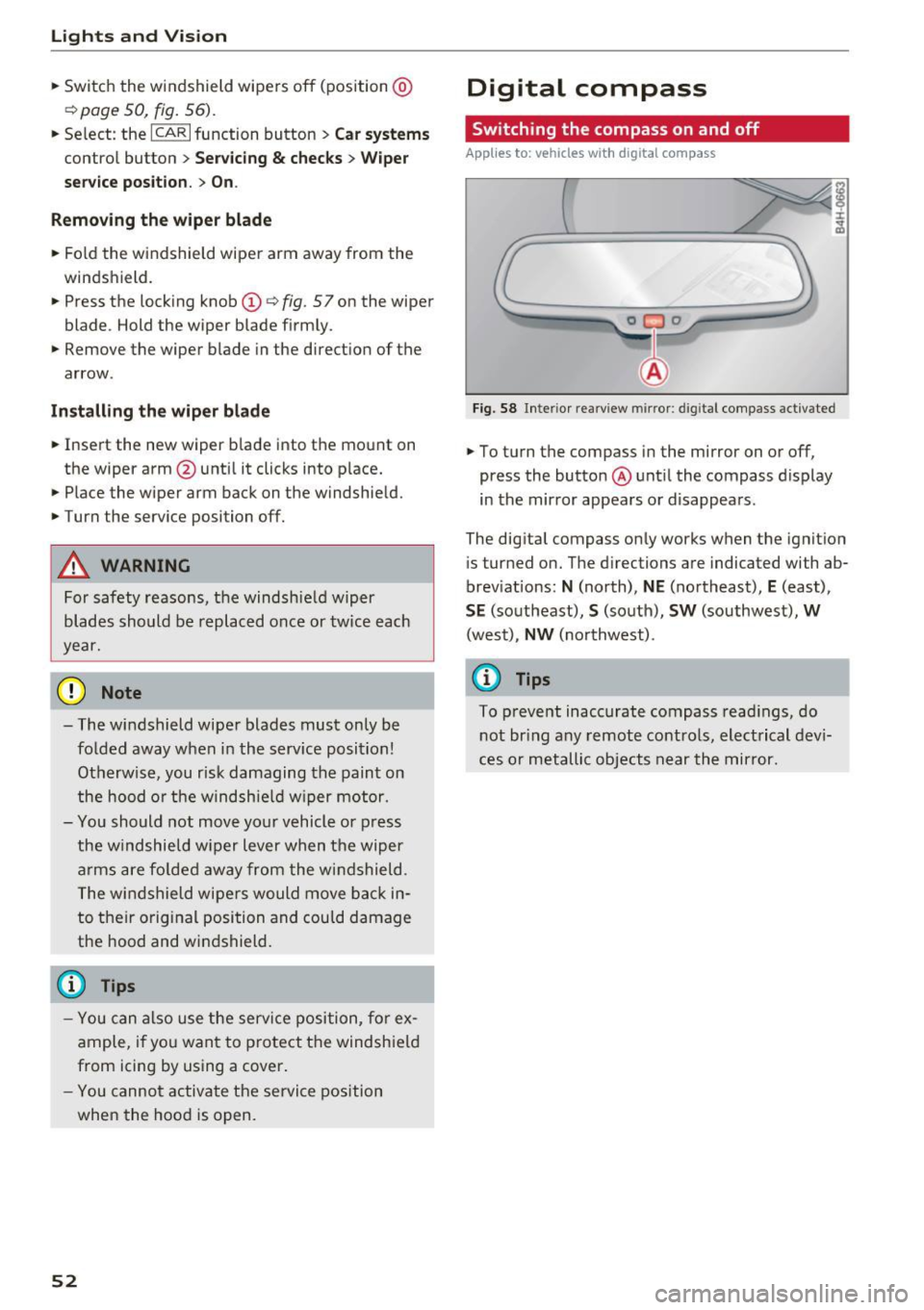
Fig. 58 Inter ior rearview mirror : d ig ital compass activated
• To turn the compass in the mirror on or off,
press the button @ until the compass display
in the mirror appears or disappears.
The digital compass only works when the ignition
is tur ned on. The directions are indicated with ab
breviations:
N (north), NE (northeast), E (east),
SE (southeast), S (south), SW (southwest), W
(west), NW (northwest).
(D Tips
To prevent inaccurate compass readings, do
not bring any remote controls, electrical devi
ces or metallic objects near the mirror.
Page 59 of 354
C) C0 ....
"' " "' .... 0 0 :r
-The power seats can also be adjusted when
the ignition is switched off. For this reason,
children should never be left unattended in
the vehicle - they could be injured!
- Be careful when ad justing the seat. Unsu
pervised or careless seat adjustment can
pinch fingers o r hands ca using injur ies.
- Applies to vehicles with reclining seat*:
- Do not use the fron t passenger's seat for
seating when it is in the reclining position .
This increases the risk of serious injury or
death.
- Never adjust the reclining position when
the front passenger 's seat is occupied.
This increases the risk of injury.
- Do not tilt the display if the driver's view
of the right exterior mirror w ill be ob
structed .
- Make sure the area between the leg sup
port and the front passenger 's seat back
rest is clear before folding the leg support
in so that you are not pinched.
(D Tips
- The massage function switches off auto
matically after approx imately 10 minutes.
- If you
cannot ad just the reclining seat * or
the front passenger's seat from the rear, it is possible that:
- t he front passenger's seat memory fu nc
t ion is swi tched off~ page
59, or
- the c hild safety lock is switched on (the~
button ~ page 37 or the right
T button
~ page 37 is turned on in the dr iver's
door), o r
- the front passenger seat adjustment is
switched off in the Infotainment system
~ page
SB.
Seats and storag e
Massage function remote control
Applies to: vehicles with reclining seat and massage function
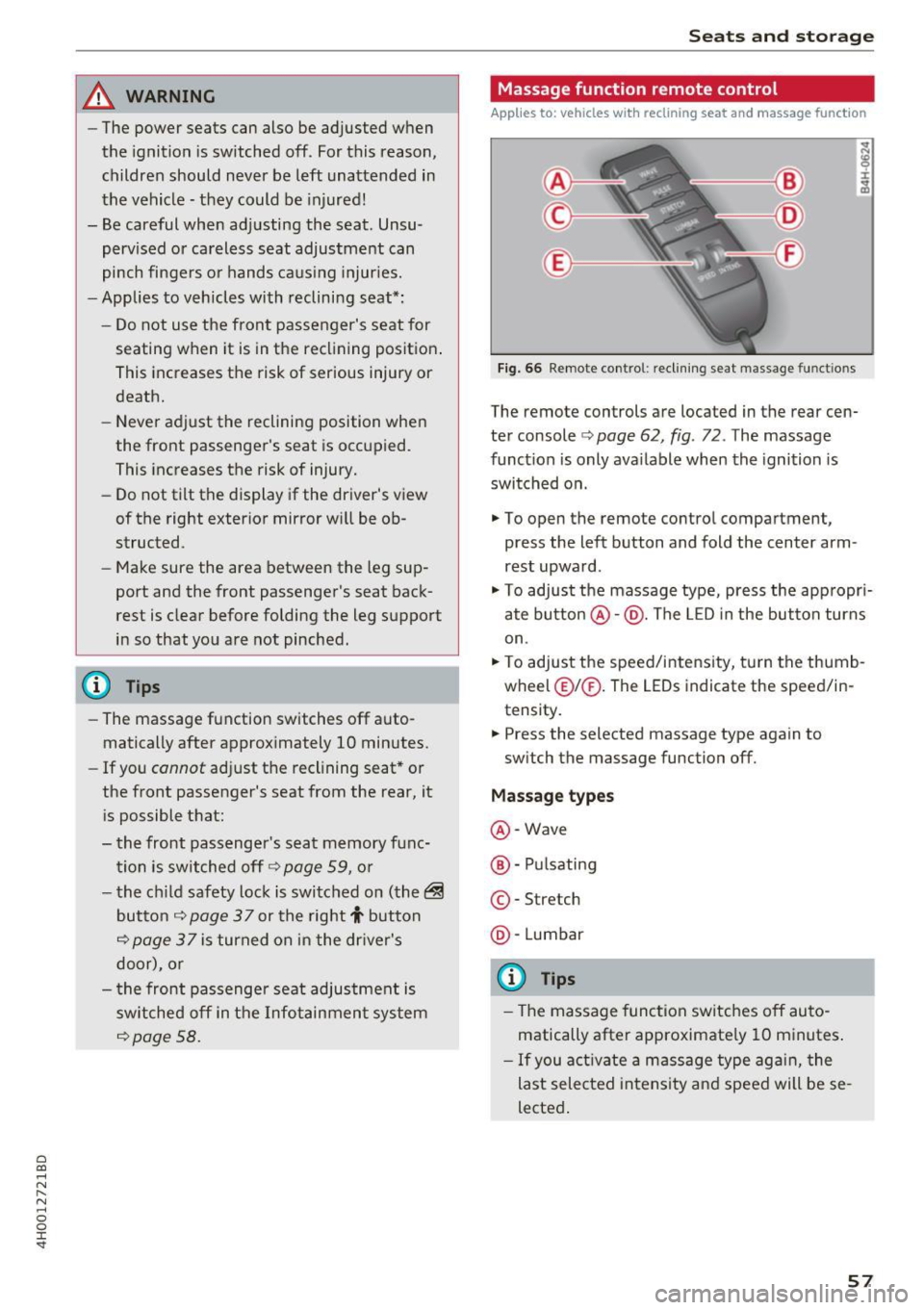
Fig. 66 Remote cont rol: rec lin ing seat massage functions
The remote controls are located in the rear cen
ter console ¢ page 62, fig. 72 . The massage
funct ion is only ava ilable when the ignition is
switched on.
.,. To open the remote control compartment,
press the left button and fold the center arm
rest upward .
.,. To adjust the massage type, press the appropr i
ate button @·@ . The LED in the button turns
on .
.,. To adjust the speed/inte nsity, turn the thumb
wheel @I® . The LEDs indicate the speed/in
tensity.
.. Press the selected massage type again to
sw itch the massage function off.
Massage types
@ -Wave
@ -Pul sating
© -Stretch
@ -Lumbar
(D Tips
- The massage function switches off auto
matically after approximate ly 10 minutes .
- If you activate a massage type aga in, the
last selected intensity and speed will be se
lected .
57
Page 62 of 354
Sea ts and stor age
The memo ry buttons are located in the driver's
door, front passenger's door and in the rear
doors*.
Sw itch ing the mem ory function on /off
• Press the IOFF I button to switch the memory
funct ion on/off. The LE D in the button tu rns on
when the memory function is
off. Seat profiles
are neither stored nor recalled.
Storing a seat pr ofi le
• Press the ISE TI button. When the wo rd S ET
ligh ts up, the memory is ready to store set
tings .
• Now press a memory button briefly . A tone
confirms that the settings were stored .
Accessing a seat profile
• If the drive r's door is open and the ig nit ion is
swi tched off, press the memory b utton .
• If the driver's door is closed or the ignition is
switched on , press and ho ld the memory but
ton until the seat adjustment is comp lete.
A WARNING
- For safety reasons, the seat setting can only
be recalled when the vehicle is stationary,
otherw ise there is a risk of an accide nt.
- If necessary, you can stop the recall process
by pressing the
I OFF! button or any memory
button.
Adjusting the front passenger 's seat in the
Infotainment system
Applies to: vehicles with memory function
The driver can move the front passenger's seat
into various positions .
Adjusting the front p assenge r's seat from
th e drive r's s eat
• Select : the ICARI function button> C ar s ystem s
contro l button > Veh icle sett ing s > Seats >
Pas senger's seat > Adju st seat po sition .
• You can now adjust the front passenger's seat
u sing the driver's seat but tons
c=;, page 54,
fig . 60.
60
Align with driver's seat
• To transfer the settings from the dr iver's seat
to the front passenge r's seat , se lect: the
!CAR I
function button > Car s ystems cont rol button >
Vehicle settings > Se ats > Pa ssenger 's sea t >
Align with dri ver 's s eat .
• Press and hold the control knob until the ad
justing process is comp lete.
@ Tips
The lumbar support and upper thigh support
settings are not transferred when aligning
the front passenger's seat with the driver's
seat.
12 volt sockets
Applies to: vehicles with sockets
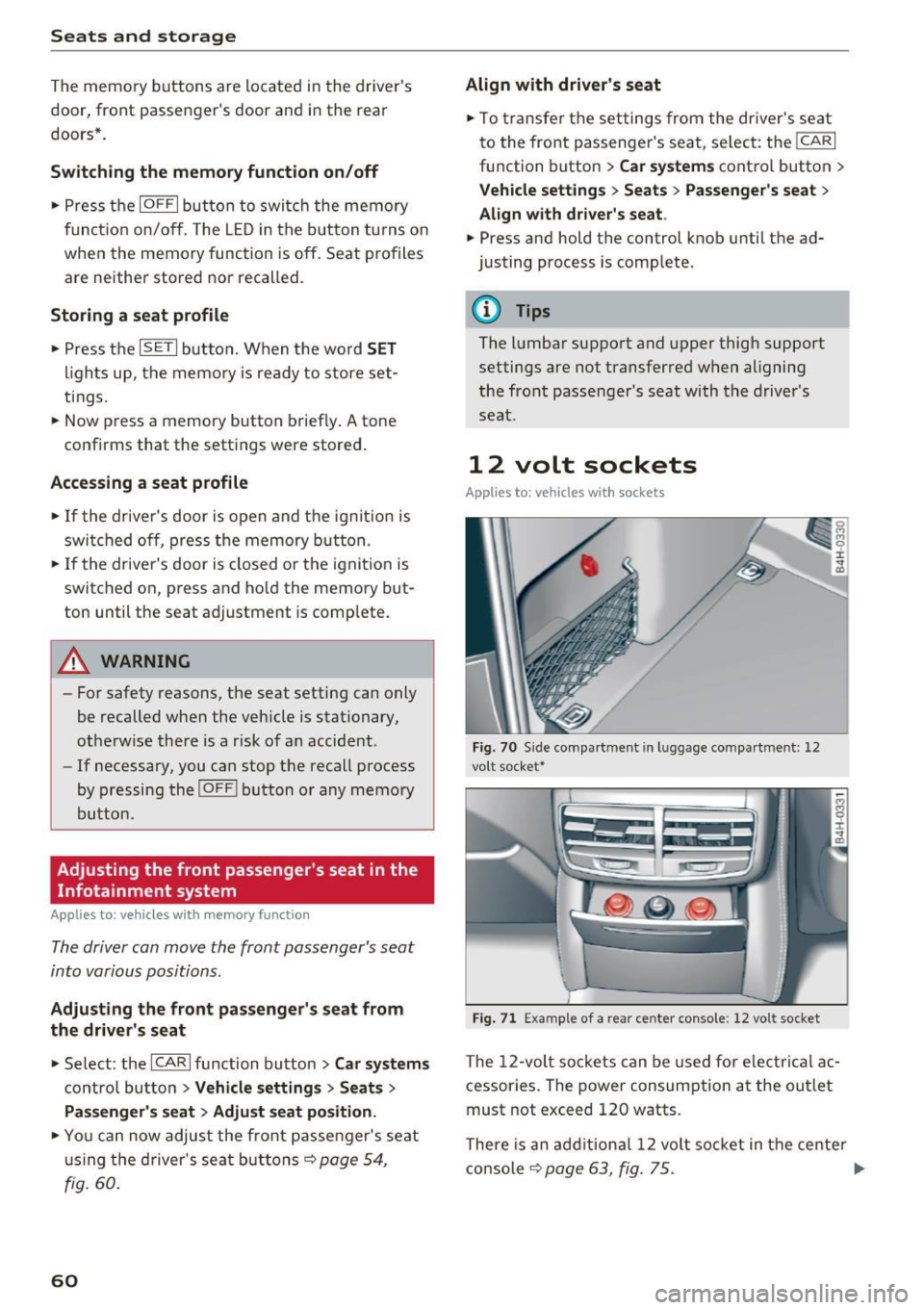
Fi g. 70 S ide compart ment in l ugg age compartment: 12
vo lt soc ket•
Fig . 71 Exa mple of a rear ce nter con so le: 12 vol t socket
The 12-vol t sockets can be used for e lectr ica l ac
cessories . The power consumption at the out let
must not exceed 120 watts.
There is an add itional 12 volt so cket in the center
console
c=;, page 63, fig. 75 . ..,.
Page 63 of 354
0 co .... N ,..... N .... 0 0 :c '
The sockets and the electrical accessories con
nected to them only function when the igni
tion is switched on . Incorrect usage can lead
to serious injuries or burns. To reduce the risk
of injur ies, never leave children unattended in
the vehicle with the vehicle key.
0 Note
- Never connect any accessories that provide
power (such as solar panels or battery
charger for the vehicle battery) to the ciga rette lighter. They can damage the vehicle
electrical system.
- To reduce the risk of damage to the sockets,
only use plugs that fit correctly.
115 volt socket
Appl ies to: vehicles with 115 volt socket
The 115 volt socket can be used when the igni
tion is switched on
c::> ,& . When you push the con
nector all the way into the socket, the child safe
ty mechanism releases and current flows through
the socket .
Connectable devices
Elect rical devices can be connected to the 115
volt socket in the vehicle. The device connected
to the socket must not use more than 150 watts
of power (300 watts peak power). Check the
power usage of the connected device on the type
label.
LED on the socket
- Th e socket is ready for use when the LED is
green.
- There is a malfunction if the LED is blinking red.
The socket will switch off automatically due to
overcurrent or overheating. The socket will
switch on again automatically after a cool
down period. Any devices that are connected
and switched on will activate again automati
cally
c::> .&. .
Seats and storage
A WARNING
-The sockets and the electrical accessories
connected to them only function when the
ignition is switched on. Incorrect usage can
lead to serious injuries or burns. To reduce
the risk of injuries, never leave children un
attended in the vehicle with the vehicle key.
- If devices or connectors that are heavy (for
example a power supply unit) are attached
directly to the socket, the holder can be
come damaged, which increases the risk of inj ury.
- To reduce the risk of fatal injury, store all
connected devices securely when driving so
that they do not move around inside the ve
hicle when braking or if involved a crash.
- To reduce the risk of fatal injury, do not spill
any fluids on the socket. Should any mois
ture enter the socket, make sure that it has
dried out completely before using the sock
et again.
- Devices connected to the vehicle behave dif
ferently than when they are connected to a
regular power supply. Therefore, connected
devices can become hot during operation,
which can increase the risk of injury.
- There is a risk of injury when using adapters and extension cords, because the child safe
ty on the socket is switched off and the
socket is powered with current.
- To reduce the risk of fatal injury, do not in
sert any conductive objects, such as knitting
needles, into the contacts on the socket.
- To reduce the risk of injury, switch off any
connected electrical devices if the socket has switched off due to overheating.
0 Note
-Also read the operating manuals for the
connected devices.
- Do not connect any lamps that contain neon
tubes. Due to technical reasons, this can
cause malfunctions in the lamp.
- Do not connect any 230 volt devices to the
115 volt socket . The device can be dam
aged. Check the permitted voltage of the
device according to the type label.
-
61
Page 69 of 354
C) C0 ....
"' " "' .... 0 0 :r
-Only fold the bag up if it is dry.
- When transporting skis or snowboards,
tighten the securing strap between the
bindings.
- Lay skis in the bag with the points facing
forward and snowboards and ski pole points
facing the rear.
Refrigerator
Introduction
Applies to: vehicles with refrigerator
Clean the refrigerator before the first use ~ table
on page 308.
You can only switch the refrigerator on, if :
- the temperature in the luggage compartment
is less than 131
° F (55 °(). If the refrigerator is
switched on , it will automatically switch off if
the temperature in the luggage compartment
exceeds 131
° F (55 °(). If the temperature
goes back below 131
° F (55 °(), the refrigera
tor will automatically switch on again.
- The charge level of the vehicle battery is suffi.
cient. The refrigerator is automatically switch
ed off if the electrical system voltage falls be
low the spec ified minimum value. This prevents
the vehicle battery from discharging . The re
frigerator automatically switches back on if th e
electrical system voltage increases again, for
example after starting the vehicle.
When the cooling function is working optimally,
the cooling function reaches 43° F
(+6 °C) and
the free zing function reaches 21 ° F
(-6 °C). The
cooling temperature in the refrigerator also de
pends on the luggage compartment tempera
ture. When the temperature in the luggage com
partment is high, there may only be a limited
cooling effect.
.&, WARNING
-
To avoid any injury risks to the passengers
caused by the refrigerator, the following safe
ty precautions must be followed:
Seats and storage
-The maximum load capacity for the freezer
is
5.5 lbs (2 .5 kg).
- Never overload the refrigerator. There is a
risk of injury in the event of a collision or
sudden braking.
- The refrigerator cover must always be
closed and locked while driving. The refrig
erator contents could enter the vehicle inte
rior during a collision or sudden braking ma
neuver, which increases the risk of injury.
- Never store flammable fluids, gas contain
ers and similar objects in the refrigerator
due to the risk of an explosion . This also ap
plies to goods and products that can emit
volatile or flammable gases.
-At temperatures of 32° F
(0 °() and lower,
frozen liquid inside glass containers can
cause the containers to burst.
(D Note
- The ventilation openings for the refrigerator
are at the rear panel trim panel in the lug
gage compartment and must not be cov
ered.
- If the refrigerator is not functioning correct
ly, turn it off to prevent any damage. Have it
checked by an authorized Audi dealer or au
thorized Audi Service Facility.
Operation
Applies to: vehicles with refrigerator
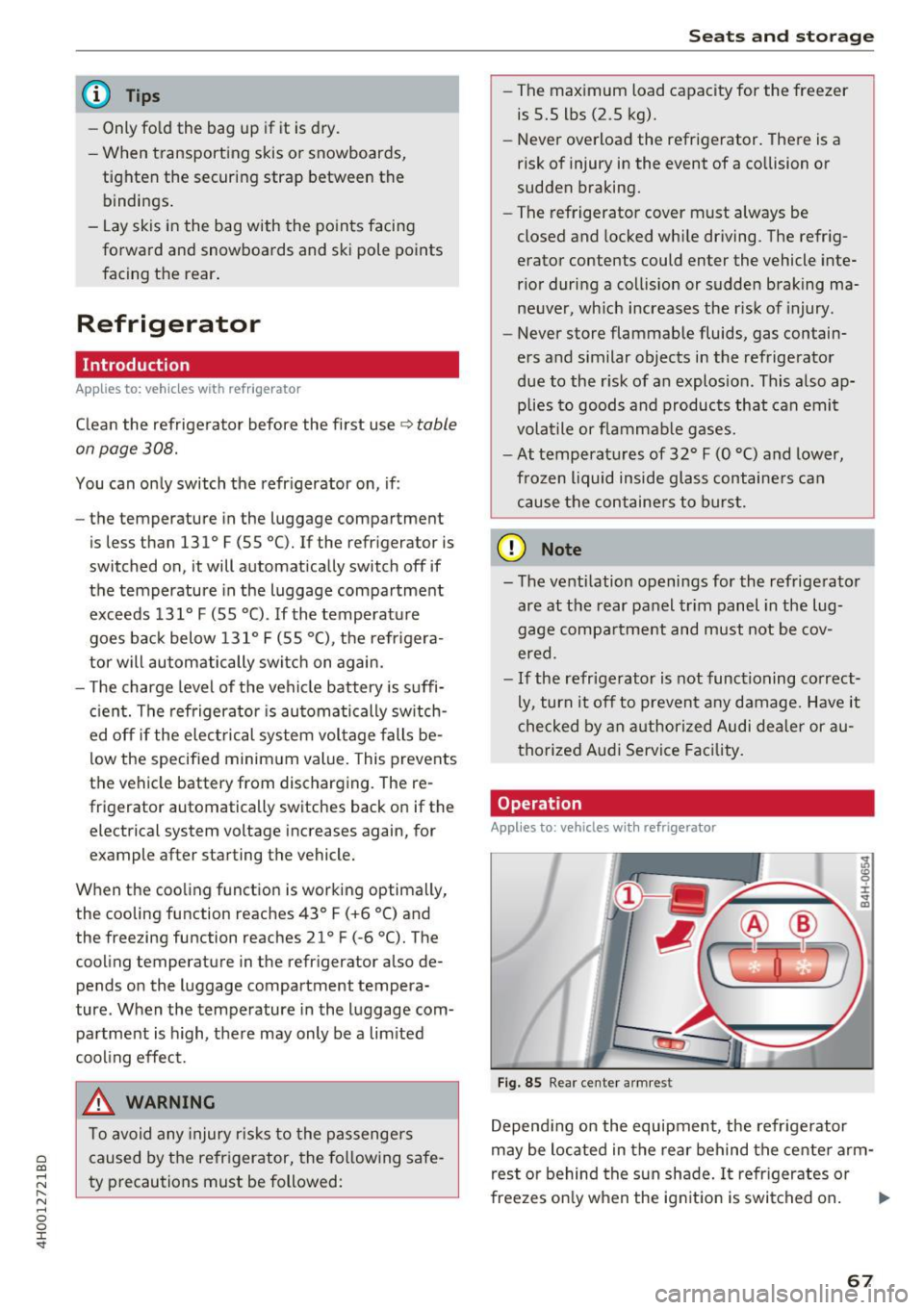
Fig. 85 Rear center armres t
Depending on the equipment , the refrigerator
may be located in the rear behind the center arm
rest or behind the sun shade. It refrigerates or
freezes only when the ignition is switched on. ..,.
67
Page 73 of 354

Adjusting the temperature
Temperatures between 60 °F ( +16 °C) and 84 °F
(+28 °C) can be set . Outside of this range,
LO or
HI will appear in the climate control system dis
p lay . At both of these settings, the climate con
trol system runs continuously at maximum cool
ing or heating power. There is no temperature
regulation.
~ Adjusting the amount of air
You can adjust the airf low manually to su it your
needs. The blower should always run at a low set
ting to prevent the windows from fogging and to
ensure a continuous exchange of air inside the
vehicle. To have the airflow regulated automat i
cally, press the
IAUTO I button.
~ Adjusting the air distribution
You can manually select the vents where the air
will flow. To have the a ir distribution regu lated
automatically, press the
IAUTO ! button.
[il /~*Adjusting seat heating/ventilation*
Pressing the button switches the seat heating/
venti lation on at the highest setting (level 3). The
LEDs indicate the temperature level. To reduce
the temperature, press the button aga in. To
sw itch the seat heating/venti lation off, press the
button repeatedly until the LED turns off.
After 10 minutes, the seat heating/ventilation
automatically switches from level 3 to level 2.
l
or cleared of condensation as quickly as possible.
The maximum amount of air flows mainly from
the vents below the windshield. Recirculation
mode switches off. The temperature should be
set to approximately 72 °F (22 °().
The
IAUTO I button switches the defroster off .
IQiil R EARI Switching the rear window defogger
on and off
The rear window defogger only operates when
~ the engine is running. It switches off automati-....
~ cally after 10 to 20 minutes, depending on the N
8 outside temperature. 0 :c '
To prevent the rear window defogger from
switching off automatica lly, press and hold the
llliil REAR ! button for more than three seconds .
This is stored until the ignition is switched off.
I SYNC! Synchronization*
When synchron ization is switched on, the set
tings for the driver's side are applied to the front
passenger's side (except for seat heating/ventila
t ion*). The rear is also synchronized in vehicles
with the 4- zone deluxe automatic climate control
system*. Synchronization switches off if the set
t in gs are adjusted on the front passenger's side
or in the rear*.
You can synchronize the sett ings in a row by
pressing and holding a knob. For example, to ap
ply the sett ings for the front passenger's side to
the driver's side, press and hold the knob on the
front passenger 's side .
Vents
You can open or close the center and rear vents in
the cockpit and the vents in the rear center con
sole and door pillars using the ridged thumb
wheels. The levers adjust the direction of the air
flow from the vents.
Residual heat
You can act ivate the residual heat function when
the ignition is switched off by pressing and hold
i ng the ~ button. The residual heat from the
coolant is used to heat the vehicle interior . T he
residual heat function switches off automatically
after about 30 minutes.
_&. WARNING
- You should not use the recirculation mode
for an extended period of time since no
fresh air is drawn in. With the air-condition
ing switched off, the windows can fog up,
which increases the risk of an acc ident.
- Individuals with reduced sensit ivity to pain
or temperature could develop burns when
using the seat heating function. To reduce
the risk of injury, these individua ls should
not use seat heating .
71
Page 77 of 354
C) C0 ....
"' " "' .... 0 0 :r
need it. Examples of equipment that use a lot of
energy are a ir blowers at a high setting, the rear
w indow defogger and seat heating*.
CD Note
Do not leave engine idling unattended after
starting . If warning lights should come on to
ind icate improper ope ration, they wou ld go
unheeded. Extended idling also produces
heat, wh ich could result in overheat ing or
other damage to the vehicle or other proper
ty .
CD Note
- Have your vehicle maintained properly and
in accordance with the service recommenda
tions in you r War ranty
& Ma intenance book
l et. Lack of p roper maintena nce as well as
i mproper use of the vehicle will imp air the
funct ion of the emission contro l system and
could lead to damage.
- Do not alter or remove any component of
the Em ission Control System un less ap
proved by the manufacturer .
- Do no t alt er or remove any devi ce, such as
heat shie lds, switches, ignition wires,
valves, which are designed to protect your
vehicle's Em ission Control System and other
i mportant veh icle components .
@ Tips
The consumption estimates as published by E NVIRONMENTAL PROTECTION AGENCY
(EPA) and Transport Canada may not corre
spond to your actual consumption on the
road, which will vary depending upon vehicle
load and speed, road and weather condi tions,
t rip length, etc.
D rivi ng
Steering
Adjusting the steering wheel position
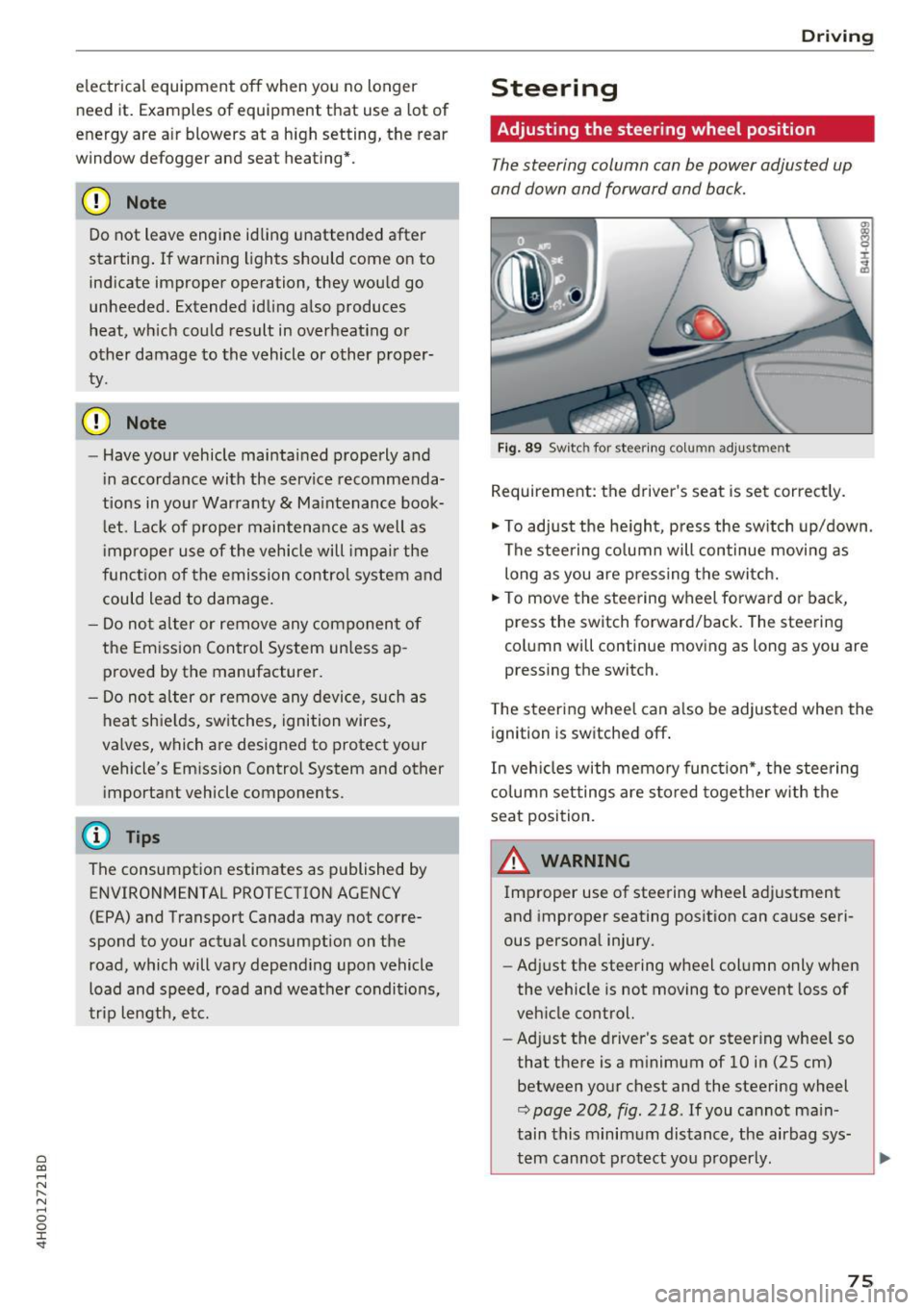
The steering column can be power adjusted up
and down and forward and back.
F ig . 89 Switc h for steering co lu mn adjus tme nt
Requirement: the driver's seat is set correct ly.
"' To adjust the he ight, pr ess the sw itch up/down .
The stee ring co lumn will continue movi ng as
long as you are p ressing the switc h.
"' To move the steering wheel forwa rd or back,
press the switch forward/back. The steering
col umn wi ll continue mov ing as long as you are
pressing the switch.
T he steering whee l can a lso be adjusted when the
ignition is switched off .
In veh icles with memory func tion*, the steering
c o lumn set tings are s tored toget her w ith the
seat position.
A WARNING
Improper use of stee ring wheel adjustment
and improper seating posit ion can cause seri
ous persona l injury.
- Ad just the steering wheel column only when
the vehicle is not moving to prevent loss of
veh icle control.
- Adj ust the driver's seat or steer ing whee l so
that the re is a m inimum of 10 in (25 cm)
between yo ur chest and the steering wheel
r::;, page 208, fig . 218 . If you cannot ma in
tain this minimum dis tance, the airbag sys
tem cannot pro tect you p roperly.
-
75
Page 78 of 354

Driving
-If physical limitations prevent you from sit
ting 10 in (25 cm) or more from the steer
ing wheel, check with your authorized Audi
dealer to see if adaptive equipment is avail
able .
- If the steering wheel is aligned with your
face, the supplemental driver's airbag can
not prov ide as much protection in an acci
dent. Always make sure that the steering
wheel is aligned with your chest.
-Always hold the steering wheel with your
hands at the 9 o'clock and 3 o'clock posi
tions to reduce the risk of personal injury if
the driver's airbag deploys.
- Never hold the steer ing wheel at the 12
o'clock position or with your hands inside
the steering wheel rim or on the steering
wheel hub . Holding the steering wheel the
wrong way can cause serious injuries to the hands, arms and head if the driver's airbag
deploys.
Entry assistance
Easy seat entry makes it easier to enter and exit the vehicle by adjusting the steering column au
tomatically.
• In the Infotainment system, select the !CAR I
function button > Car systems control button >
Vehicle settings> Seats> Driver's seat> Easy
seat entry> On.
When easy seat entry is switched on, the steering
column goes back up into the park position when
the ignition is switched off. After entering the ve
hicle, the steering column returns to the stored position once the ignition is switched on .
76
Starting and stopping
the engine
Starting the engine
The ! S TAR T ENGINE S T OPI button switches the
ignition on and starts the engine .
Fig. 90 Cente r conso le: START ENGINE STOP but ton
Switching the ignition on/off
• To switch the ignit ion on or off, press the
!START ENGINE STOPI button . Do not press the
brake pedal while doing this.
Starting the engine
• Press the brake pedal¢.&_.
• Press the
I START ENGINE STOP I button
¢
fig . 90 . The engine will start .
If the engine does not start immediately, the
starting procedure stops automatically after a
short time . Repeat the starting process .
Start/Stop system
Read the information in¢ page 78 , Start/Stop
system.
A WARNING
To reduce the risk of poisoning, never allow
the engine to run in confined spaces .
(D Note
Avoid high engine speed, full throttle, and
heavy engine load if the engine has not
reached operating temperature yet. You could
-
damage the engine. .,..