ignition AUDI A8 2017 Owner's Guide
[x] Cancel search | Manufacturer: AUDI, Model Year: 2017, Model line: A8, Model: AUDI A8 2017Pages: 354, PDF Size: 88.68 MB
Page 79 of 354

0 co .... N ,..._
N .... 0 0 :c '
-Some noise after starting the engine is nor
mal and is no cause for concern.
- If you leave the vehicle with the ignition
switched on, the ignition will switch off af
ter a certain amount of time. Make sure that
electrical equipment such as the exterior
lights are switched off.
Stopping the engine
"'Bring the vehicle to a full stop.
"'Select the P or N selector lever position.
"'Press the
I START ENGINE STOPI button
r::?v page 76, fig. 90.
Steering lock
The steering locks when you turn the engine off
using the
I START ENGINE STOPI button and
open the driver's door. The locked steering helps
prevent vehicle theft.
Emergency off function
If it is absolutely necessary, the engine can also
be turned off while driving in the R, Dor S selec
tor lever position at speeds below 6 mph (10 km/
h). To stop the engine, press and hold the
I START ENGINE STOPI button and also press the
brake pedal.
& WARNING
-Never turn off the engine before the vehicle
has come to a complete stop. The full func
tion of the brake booster and the power
steering is not guaranteed. You must use
more force to turn or brake. Because you
cannot steer and brake as you usually
would, this could lead to accidents and seri
ous injuries .
- Always take the key with you whenever you
leave your vehicle. Otherwise, the engine
could be started or electrical equipment
such as the power windows could be operat
ed. This can lead to serious injury.
- For safety reasons, always park the vehicle
with the selector lever in the P position.
Driving
Otherwise, there is the risk that the vehicle
could roll unintentionally.
@ Note
If the engine has been under heavy load for
an extended period of time, heat builds up in
the engine compartment after the engine is
switched off and there is a risk of damaging
the engine. For this reason, let the engine run
at idle for approximately two minutes before
shutting it off.
(D Tips
After the engine has been switched off, the
radiator fan can continue to run for up to 10
minutes -even with the ignition switched off .
It can also switch on again after some time if
the coolant temperature rises as the result of
heat buildup or if the engine is already warm
and the engine compartment is also heated
by the sun's rays.
Messages in the instrument cluster display
Turn off ignition before leaving car
This message appears and a warning tone sounds
if you open the driver's door when the ignition is
switched on.
Press brake pedal to start engine
This message appears when you press the
I START ENGIN E STOP ! button to start the engine
and do not press the brake pedal while doing so .
The engine can only be started when the brake
pedal is pressed.
= Key not in vehicle?
This indicator light turns on and this message ap
pears if the ignition key was removed from the
vehicle when the engine was running. If the igni
tion key is no longer in the vehicle, you cannot switch on the ignition or start the engine once
you stop it. You also cannot lock the vehicle from
the outside.
Shift to P, otherwise vehicle can roll away.
Doors do not lock if lever is not in P.
77
Page 80 of 354

Driving
This driver message appears for safety reasons if
the transmission has not be en shifted to the P
position when you switch the ign ition off. Move
the selector lever to the P posit ion. Otherwise the
ve hicle is not protected from ro lling and it cannot
be locked .
II Key is not re cognized. Hold ba ck of ke y
aga inst marked area. See owner's manual
If t he indicator light t urns on and this message
appears, there is a malfunction ~
page 78.
Turn off ignition before leaving car
This message appea rs if the dr iver 's door is
opened while the ignition is switched on . A lways
sw itch off the ignition if you are leaving the vehi
cle.
Shift to P and turn off ignition befor e leaving
car, otherwi se vehicle c an roll away
This message appears if the driver 's door is
ope ned while the ignition is switched on and the
transmission has not been shifted to the P posi
tion . Sh ift the t ransm iss ion into the P posit io n
a nd turn off the ignition if yo u are leav ing the ve
h icle. O therwise t he vehi cle co uld rol l.
Starting the engine when there is a
malfunction
It may not be possible to start the engine under
certain circumstances, for example if the battery
in the vehicle key is drained, if interference is af
fected the key or if there is a system malfunc
tion.
N
c::==== =~
±
- ------- ~
Fig . 9 1 Cente r conso le/ re m ote cont ro l key: sta rt ing the
eng ine if t here is a malf u nction
Requirement: the message K ey is not recog
nized . Hold back of key against marked area.
78
See owner's manual must appear and the II in
dicator light must tu rn on .
.,. Hold the remote cont rol key vertically in the lo
ca tion i ndicated
t1>) ~ fig. 91.
.,. Press the brake pedal.
.,. Press the I S TAR T
ENGINE ST OP I button . The
eng ine will start.
.,. Drive to an authori zed Audi dealer or author
ized Aud i Service Facility immediately to have
the malfu nction corrected .
(D Tips
You can view the message aga in by pressing
the lS TAR T
ENGI NE ST OP I button .
Start/Stop system
Description
Applies to: vehicles with Start/Stop system
The S ta rt/Stop sys tem can help increase fue l
eco nomy and reduce CO2 emissions .
In Sta rt/S top mode, the eng ine s huts off auto
ma tically when the vehicle is stopped, such as a t
a traffic light . The ignition rema ins switched on
duri ng th is stop phase . The engine w ill restart
automat ica lly when needed .
The last Start/S top system setting is restored
when the ignition is sw itched on .
Basic requirements for Start /Stop mode
- Th e driver 's doo r must be closed .
- Th e driver 's seat belt much be fas tened.
- The hood must be closed.
- The vehicle m ust have driven faster than
2.5 mph (4 km/h) since the last t ime it stop
ped.
- A trailer m ust not be hitched to the vehicle .
A WARNING
-Never turn off the engine before the vehicle
has come to a complete stop. The full func
t ion of the bra ke booster and the power
steer ing is not guaranteed. You must use
mo re fo rce to tu rn o r bra ke. Be cause you
canno t stee r and bra ke as y ou usually
Page 82 of 354

Driving
-The interior temperature differs from the tem
perature se lected in the A/C system.
- The windshield is being defrosted~
page 71.
-The brake pedal is pressed seve ral t imes in a
row.
- The vehicle ba tte ry charge leve l is too low.
- Power consumption is high .
Ignition is switched off automaticall y
To prevent the veh icle battery from drain ing, the
ignit ion will switch off
automatically under the
following conditions:
- The vehicle must have already been driven.
- The Start/Stop system has stopped the engine.
- T he driver's door must be open .
- T he driver's safety be lt mus t be unb uck led.
- The brake pedal must not be p ressed .
- The vehicle must be stationary .
In this case, the activated low beam is replaced
by the parking light. The parking lights will
sw itch off after app roximately 30 minutes or
when you lock the vehicle .
If the Start/Stop system has not turned off the
engine or if you have sw itched the Start/Stop sys
tem off manually, the ignition will not be auto mat ically switched off and the engine w ill conti n
ue to ru n ~ & .
A WARNING
To red uce the risk of poisoning, neve r allow
t he engine to r un i n confined s paces.
(D Tips
If you select the D, N or S selector lever posi
tion after shifting into reverse, the vehicle
m ust be driven faste r than 6 mph (10 km/h)
in orde r fo r the engine to switch off again.
80
-
Manually switching the Start /Stop system
off /on
Appl ies to : vehicles wi th Start/Stop sys te m
If you do not wish to us e th e system, you con
switch i t off manually.
Fig . 93 Ce nte r console: Start/Stop system butto n
.,. To switch the Start/Stop-System off/on man
ually, press the
l (A) ~I button. The LED in the but
ton turns on when the system is switched off.
0) Tips
If yo u switch the system off d uring a stop
phase, the engine will start aga in automati
cally .
Messages in the instrument cluster display
Applies to : vehicles wit h Start/Stop syste m
Start-stop system deactivated: Please restart
engine manually
This message appears w hen spec ific cond itions
are not me t during a stop phase. The S tart/S top
system will
not b e a ble to re sta rt the eng ine. If
the D or R se lector lever positions were engaged,
P will be selected a utomat ically . The eng ine must
be started with the
I START ENGI NE STOPI but
ton.
Start -stop system: System fault! Currently
unavailable
There is a ma lfunction in the Start/Stop system.
Drive the vehicle to an authorized Audi dealer or
aut horized Serv ice Facility as soon as possible to
have the malfunction corrected .
Page 86 of 354
Driving
you can shift past the N and R selector lever positions.
Selector lever lock
The selector lever lock prevents you from select ing a position unintentionally, causing the vehicle
to roll. When engaging some selector lever posi
tions, you must press the button on the selector lever ¢
fig. 96 and/or press the brake pedal.
You must press the brake pedal to engage a se lector lever position when the engine is running
and the vehicle is stationary. The arrows ~
fig. 97
indicate when you need to press the button on
the selecto r lever.
The selector lever does not lock if you shift from D to R within one second. This allows you to
"rock" the vehicle to free it when it is stuck.
P - Park
This selector lever position prevents the vehicle
from rolling . Only shift into park when the vehi
cle is stationary ~&. . To engage the P selector
lever position, press the button on the selector
lever and shift into the P position.
You can only shift out of park when the engine is
running and you are pressing the brake pedal. To
release the parking lock. press the button on the
selector lever and select the desired position.
P engages automatically when you switch the en
gine off while D, Sor R is engaged or in manual
mode.
If you switch the engine off when the N position
is selected, the transmission remains in N for ap
proximately 30 minutes and then Pis engaged.
You must use the parking lock emergency release
before towing the vehicle~
page 88.
R- Reverse
The reverse gear is engaged in this position. Only
select reverse gear when the vehicle is stationary
and the engine is running at idle speed ~,&. . To
engage the R selector lever position, press the
button on the selector lever, press the brake ped
al and move the selector lever into the R position.
84
The reverse lights turn on when you select the R
selector lever position while the engine is run
ning.
N -Neutral (idle)
The transmission is in idle in this position. To en
gage the N selector lever position, press the but
ton on the selector lever and shift into the N po
sition.
If you switch the engine off when the N position
is selected, the transmission remains in N for ap
proximately 30 minutes and then Pis engaged .
You cannot select the N position when the igni
tion is switched off. When driving through an au
tomatic car wash, first select the N position and
then turn the engine off¢
page 306.
For safety reasons, the vehicle cannot be locked
when the transmission is in the N position.
DIS -Driving forward
When the transmission is in the D/S position, it
can be operated either in the normal D mode or
in the S sport mode . Move the selector lever back
to engage the S sport mode. You can only select
the S selector lever position when Dis engaged.
To select the D selector lever position again when
S is engaged, move the selector lever back~&. .
To shift from N to D when traveling at speeds be
low 1 mph (2 km/h), press the brake pedal and
shift into the D position ~&. .
In the
normal mode D, the transmission auto
matically selects the suitable gear ratio . It de
pends on engine load , vehicle speed and driving
style.
Select the
sport mode S for sporty driving. The
vehicle makes full use of the engine's power. Shifting may become noticeable when accelerat
ing.
The S selector lever position engages automati
cally when you select dynamic mode in drive se
lect .
_&, WARNING
- The vehicle can roll even if the ignition is
switched off.
-
Page 95 of 354
0 co .... N ,..... N .... 0 0 :c '
your foot on the accelerator pedal prevents
the cruise control from braking. This is be
cause pressing the accelerator pedal over
rides the cruise control system .
- If a brake system malfunction such as over
heating occurs when the cruise control sys
tem is switched on, the braking function in
the system may be switched off. The rest of
the cruise control system functions remain
active as long as the
(tj;(IM@ (USA models) /
ii (Canada models) indicator light is on.
@ Tips
The brake lights turn on when the brakes are
applied automat ically .
Changing the speed
.. To increase or decrease the speed in incre
ments, tap the lever toward
010 q page 92,
fig . 102.
.. To increase or decrease the speed quickly, hold
the lever in the
010 direction until the de
sired speed is displayed.
You can a lso press the accelerator pedal down to
increase your speed, for example if you want to
pass someone. The speed you set earlier will re
sume as soon as you release the accelerator ped
al.
However, if you exceed your saved speed by 5
mph (10 km/h) for longer than 6 minutes, the
cru ise control system turns off temporarily .
The green
ltj;(i )~i@ (USA models) 1 '11 (Canada mod
els) indicator light in the speedometer turns off
and the stored speed is maintained.
Preselecting a speed
You can pre-select your desired speed when the
vehicle is stationary.
.. Switch on the ignition .
.. Pull the lever into position
(D q page 92,
fig. 102.
.. To increase or decrease the speed, push the lev
er toward
010 .
Assist
.. To store the speed displayed, release the lever.
T his function makes it possible, for example , to
save the speed you want before driving on the
highway. Once on the highway , activate the
cruise control by pulling the lever toward @.
Switching off
Temporary deactivation
.. Press the brake pedal, or
.. Press the lever into position @ (not clicked into
place)
9 page 92, fig. 102, or
.. Drive for longer than S minutes faster than 5
mph (10 km/h) above the stored speed .
Switching off completely
.. Press the lever into position @(clicked into
place), or
.. Switch the ignition off .
The speed you stored will be maintained if the
cruise contro l has been switched off temporarily .
To resume the stored speed, release the brake
pedal and pull the lever into posi tion (D .
Switching the ignition off will erase the stored
speed.
A WARNING
- -
You should only resume the stored speed if it
is not too high for existing traffic conditions.
Otherw ise you can increase the risk of an acci
dent .
93
Page 99 of 354
C) C0 ....
"' " "' .... 0 0 :r
object ahead was detected. Your vehicle remains
stopped and will not start dr iv ing automat ically.
• -T he automatic braking is not enough to
maintain a sufficient distance to an object ahead.
You must intervene
c:> page 99, Driver interven
tion request .
© Instrument clu ster di spla y
If adaptive cruise control is not shown in the in
strument cluster display, yo u can call it up using
the mu ltifunction stee ring wheel buttons
<=:> page 12.
Based on the graphics in the d isplay, you can de
termine if the system is ma inta ining a distance to
the object ahead and what that distance is.
No v ehi cle -No object ahead was detected.
Whit e ve hicle -An object ahead was detected .
Red vehicl e -Request for driver intervention
c:>page 99.
Both arrows on the s cale © indicate the distance
to the object ahead. No arrow appears when the
vehicle is on an open road and there is no object
ahead. If an object is detected ahead, the arrow
moves on the scale.
The green zone on the scale indicates the store
distance. For information on changing the dis
tance, refer to
c:> page 98. If the distance se
lected is exceeded or not reached, the arrow
moves into the red zone on the scale.
A WARNING
~=-:---
If you press the ISETI b utton when driving at
speeds be low 20 mph (30 km/h), the vehicle
accelerates automatica lly up to 20 mph (30
km/h), which is the m in imum speed that can
be set .
(D Tips
-If you switch the ignition o r the adapt ive
cruise contro l system off, the set speed is
erased for safety reasons.
- The elect ronic stab ilization cont rol (ESC)
and the a nti -slip-reg ulation (ASR) a re au to-
A ss ist
matically switched on when the adaptive
cruise control is switched on .
Changing the speed
Applies to: vehicles with Audi adaptive cruise control
0
f
•
0
Fig . 1 09 Operat ing lever : c h an gi ng the speed
co N 0 :i: ~ m
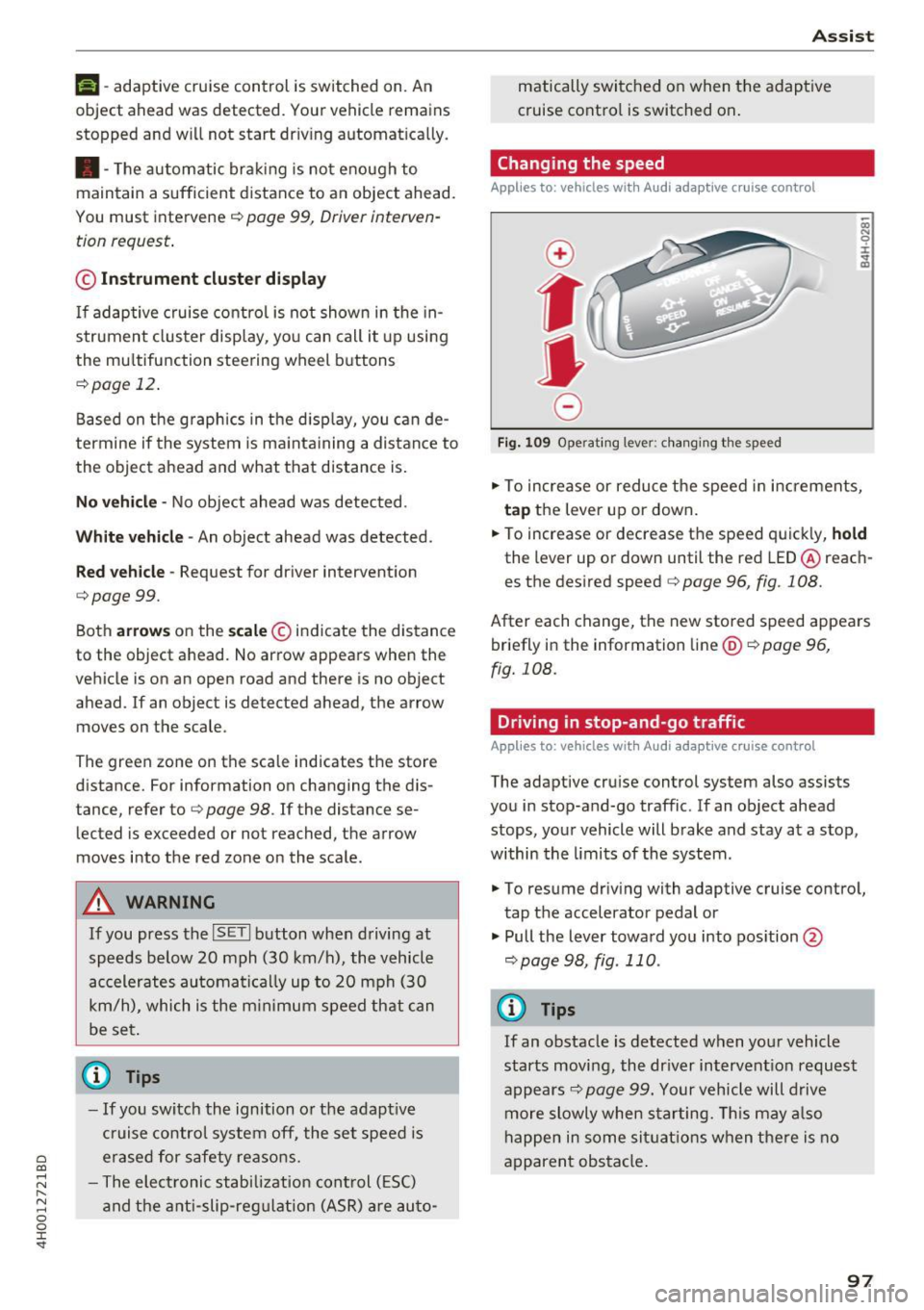
.. To increase or reduce the speed in increments,
ta p the lever up or down .
.. To increase or decrease the speed quickly,
h o ld
the lever up or down until the red LED@reach
es the desired speed
c:> page 96, fig. 108.
After each change, the new stored speed appears
briefly in the information line@
c:> page 96,
fig. 108.
Driving in stop-and-go traffic
Applies to: vehicles with Audi adaptive cruise control
The adaptive cruise control system also assists
you in stop-and-go traffic . If an ob ject ahead
stops, your vehicle will brake and stay at a stop,
within the limits of the system.
.. To resume driving with adaptive cruise control,
tap the accelerator pedal or
.,. Pull the lever toward you into pos ition @
c:> page 98, fig . 110 .
a) Tips
If an obstacle is detected when your vehicle
starts moving, the dr iver intervent ion request
appears
c:> page 99. Your vehicle will drive
more slowly when starting. This may a lso
happen in some si tuatio ns when the re is no
apparent obstacle .
97
Page 101 of 354
C) C0 ....
"' " "' .... 0 0 :r
to a distance of 164
ft (SO m) when traveling at
62 mph (100 km/h), for examp le (time between :
1.8 seconds).
~-- --~ Dist a nce 4: This setting corresponds
to a distance of 210
ft (64 m) when traveling at
62 mph (100 km/h), (time distance of 2.3 sec
onds).
A WARNING
Following other vehicles too closely increases
the risk of coll isions and ser ious personal in
jury.
- Setting short distances to the traffic ahead
reduces the t ime and distance available to
br ing your vehicle to a safe stop and makes
it even mo re necessary to pay close atten
t ion to traffic.
- Always obey applicable traffic laws, use
good j udgment, and select a safe following
distance for the traffic, road and weather
condit ions .
@ Tips
- Di stance 3
is set automatically each time
you switch the ignition on.
- Your settings are automatically stored and
assigned to the remote control key being
used.
Selecting the driving mode
A pp lies to: ve hicles with Audi adaptive cruise co ntrol
.,. Se lect the des ired driving mode in dr ive se lect
c> page 110 .
@ Tips
Your se ttings a re au toma tical ly s to red and as
signed to the remote control key being used.
A ss ist
Driver intervention request
App lies to : vehicles wit h Aud i ada ptive cr uise control
Fig. 112 Instrume nt cl uster : request fo r drive r in terven
tio n
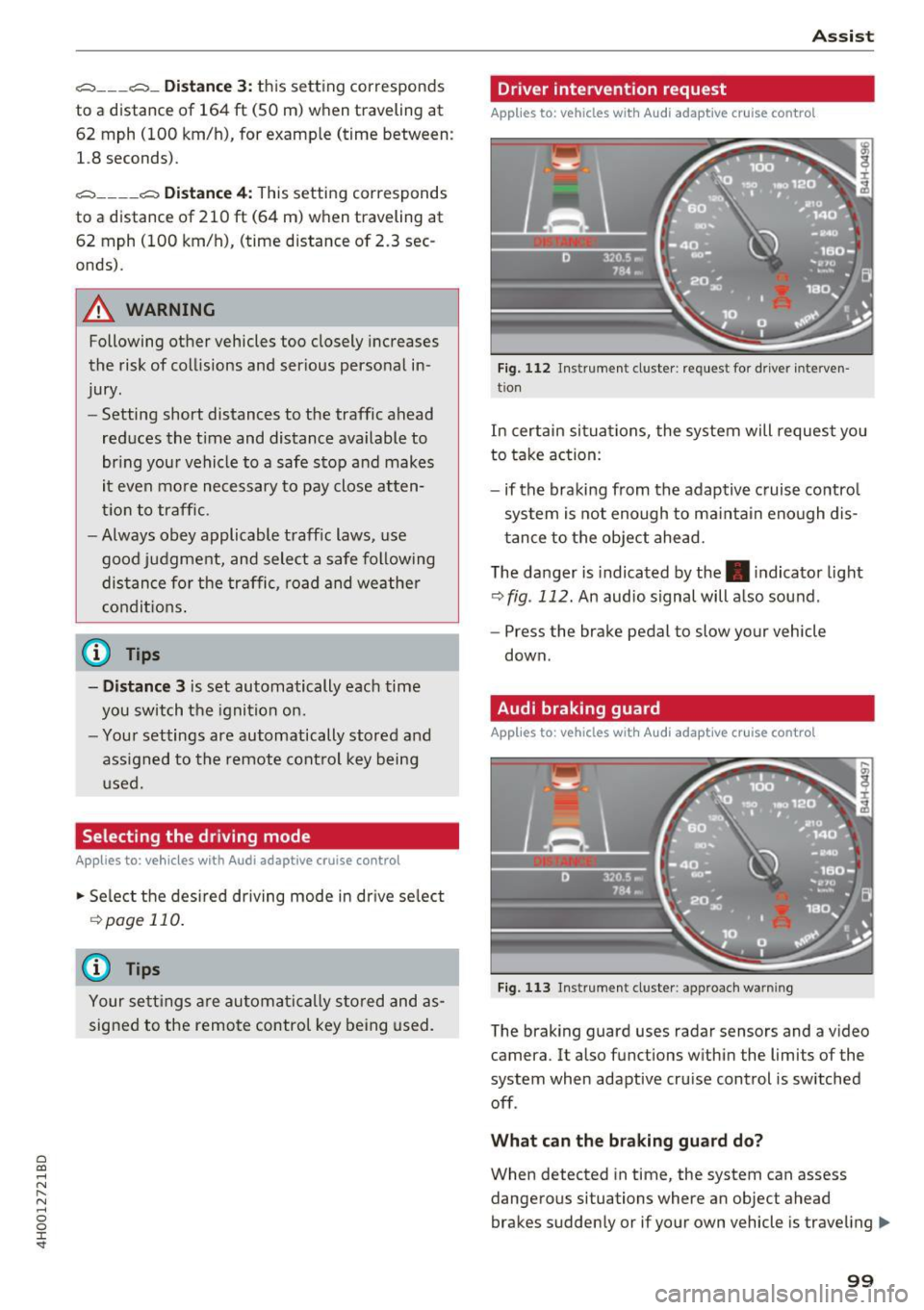
In certain situa tions, the system will request you
to take action:
- if the braking from the adap tive cruise contro l
system is not enough to ma intain eno ugh dis
t ance to the object ahead.
The da nger is indicated by the. indicator light
r:!> fig . 112. An audio signal will a lso sound .
- Press the brake pedal to slow your vehicle
down.
Audi braking guard
Appl ies to: vehicles wit h Audi ada ptive cr uise control
Fig. 113 Instrument cluster : approach wa rnin g
The braking guard uses radar sensors and a v ideo
camera. It also functions within the limits of the
system when adaptive cru ise control is switched
off .
Wh at can the b raking guard do?
When detected in time, the system can assess
dangerous situations where an object ahead
brakes suddenly or if your own vehicle is traveling .,..
99
Page 112 of 354
Ass is t
Switching on /off
Applies to: vehicles with night vision assist
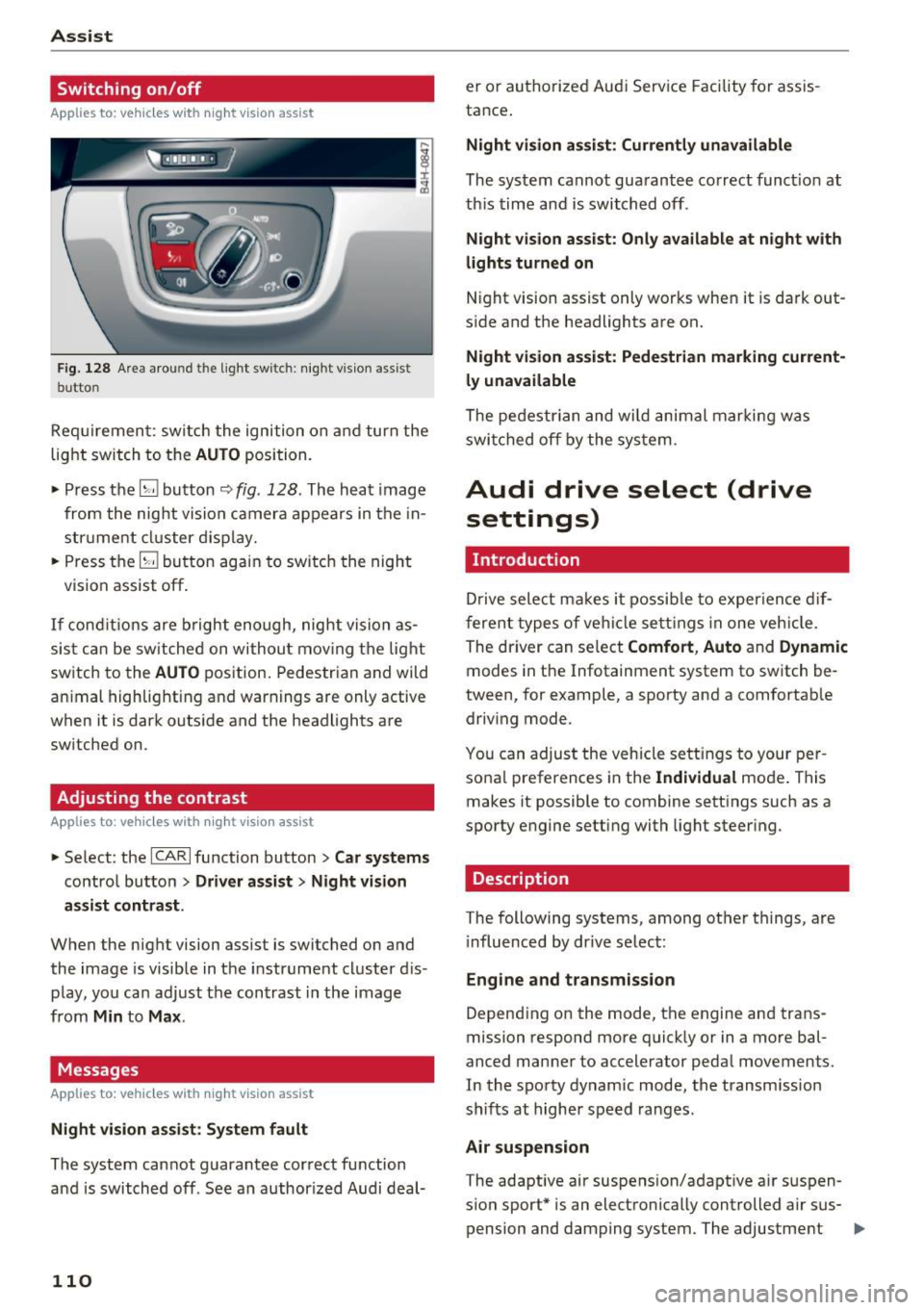
Fig. 128 Area aro und th e light sw itc h: n ight v is ion assist
butto n
Requirement: sw itch the ignition on and turn the
light switch to the
AUTO position.
• Press the
[g button 9 fig . 128 . The heat image
from the nig ht vision camera appears in the in
s t ru me nt cluster d isplay.
• Press the
(g button again to switch the night
vision assist off .
If condit io ns are b right enough, night vision as
sis t can be sw itched on withou t mov ing the light
switch to the
AUTO position. Pedestrian and wild
an imal highlighting and warnings are only active
when it is da rk outs ide and the headlights are
sw itched on .
Adjusting the contrast
Applies to: vehicles with night vision assist
• Select : the ICARI function button > Car systems
contro l button > Driver a ssist > Night vision
a ssi st cont rast .
When the night vision assist is switched on and
the image is visible in the instrument cluster d is
p lay, you can adjust the contrast in the image
from
Min to Ma x.
Messages
Applies to: vehicles with night vision assist
Ni ght vision assist : System fau lt
The system cannot guarantee correct function
and is switched off . See an author ized Audi deal-
110
er or authori zed Aud i Service Facility for assis
tance .
Night vi sion a ssis t: Current ly unavailable
The system cannot guarantee correct funct io n at
th is time and is switched off .
Night vision assist: O nly a vailabl e a t n ight with
lights turned on
N ight vision assist only works whe n it is dark out
s ide and the headlights are on.
Night vis ion a ssist: Pede stri an marking current
l y unavailab le
The pedestrian and wi ld animal marki ng was
swi tched off by the system .
Audi drive select (drive
settings)
Introduction
D rive select makes it possib le to exper ience dif
f erent types of ve hicle settings in one veh icle .
The dr iver can se lect
Comfort , Auto and Dynamic
modes in the Infotainment system to switch be
tween, for example, a sporty and a comfortab le
driv ing mode .
You can adjust the vehicle settings to your per
sona l preferences in the
Ind ividual mode . This
makes it possible to comb ine sett ings su ch as a
sporty engine setting with light steer ing .
Description
The following systems, among ot her things, are
i nfluenced by dr ive select:
Eng ine and tr an smis sion
Depend ing on the mode, th e engine and trans
mission respond more q uick ly or in a more bal
a nced manner to accelerator pedal movements.
In the sporty dynamic mode, the transm ission
shifts at higher speed ranges.
Air suspen sion
T he adaptive air suspens ion/adapt ive a ir suspen
sion sport* is an electronically controlled air sus- pension and damping system . The adjustment ..,
Page 119 of 354
C) C0 ....
"' " "' .... 0 0 :r
the display appear closer or farther away:
- For objects that do not touch the ground,
such as the bumper of a parked vehicle, a
trailer hitch or the rear of a truck. Do not
use the orientation lines in this case.
- If driven from a level surface onto an in
cline, or a downward slope.
- If driven toward protruding objects.
- If the vehicle is carrying too much load in
the rear.
- The accuracy of the orientation lines and
blue surfaces decreases when the vehicle is
raised/lowered ¢
page 110.
(D Note
-Always read and follow the applicable warn
ings
c:> © in General information on
page 114 .
-The orange-colored orientation lines in the
Infotainment display show the vehicle path based on the steering wheel angle . The
front of the vehicle swings out more than
the rear of the vehicle. Maintain plenty of
distance so that an exterior mirror or a cor
ner of the vehicle does not collide with any
obstacles.
Switching on/off
Applies to: vehicles with rearv1ew camera
Switching on
"'Shif t into reverse, or
"' Press the
p,,,A button in the center console
c:>page 115, fig. 131. A short conf irmation
tone sounds and the LED in the button turns
on.
Switching between the rearview camera and
optical display
"' Press the Graphic contro l button ®
c:, page 117, fig. 136 to see the optical display .
"' Press the
Rear view control button to see the
. . rearv,ew camera image.
Switching off
"'Drive faster than 6 mph (10 km/h), or
"' Press the
P'"A button, or
Parking systems
"'Sw itch the ignition off.
@ Tips
- The visual display in the left part of the dis
play should help you detect the critical vehi
cle areas.
- You can change the volume and pitch of the
signals as well as the display ¢
page 124.
Perpendicular parking
Applies to: vehicles with rearview camera
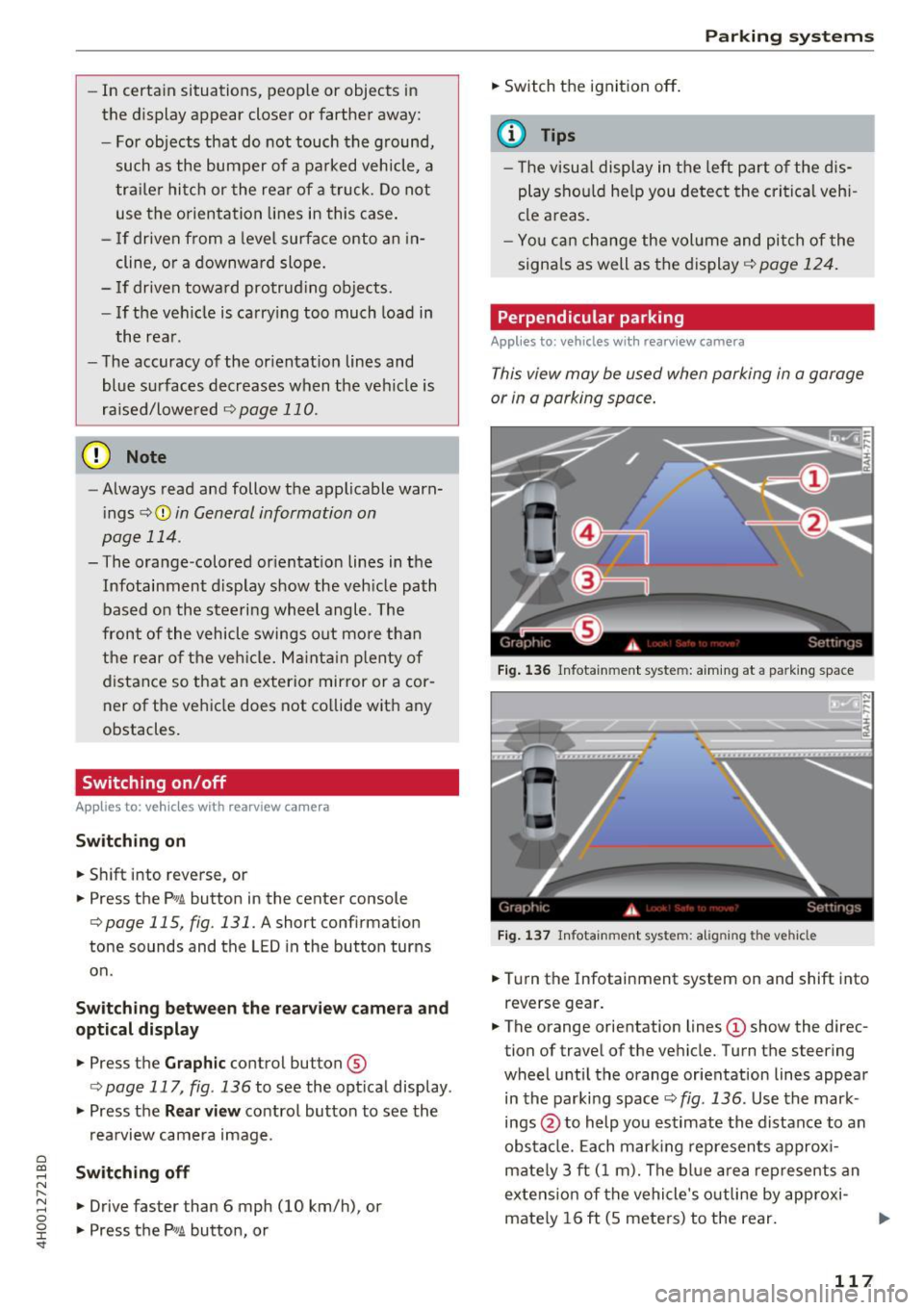
This view may be used when parking in a garage
or in a parking space.
Fig. 136 Infota inment system: a iming at a park ing space
Fig. 137 Infotainment system: aligning the vehicle
"'Turn the Infotainment system on and shift into
reverse gear.
"' The orange orientation lines
(D show the direc
tion of travel of the ve hicle. Turn the steering
wheel until the orange orientation lines appear
in the parking space
c:> fig. 136. Use the mark
ings @to help you estimate the distance to an
obstacle. Each marking represents approxi
mately 3 ft (1 m). The blue area represents an
extension of the vehicle's outline by approxi
mately 16 ft (S meters) to the rear.
117
Page 126 of 354

Parking systems
Adjusting the display
and the warning tones
Applies to: vehicl es with parking system plus/rearview cam
era/per ipheral came ra
The display and warning tones can be adjusted in
the Infotainment.
~ Select: the ICARI function button > Car systems
control button > Driver assist > Parking aid.
Display
On* -
An optical display is shown for the parking
system plus, a rearview camera image is shown
for the rearview camera*.
Off -When the parking system is switched off,
only audib le signals are given.
Signal tones
Front volume -
volume for the front area
Rear volume -volume for the rear area
Front frequency -frequency for the front area
Rear frequency -frequency for the rear area
Entertainment volume -when the parking sys
tem is turned on, the volume of the audio/video
source is lowered.
The new ly selected level is demonstrated briefly
by the sound generator.
{!) Tips
- The warning tones can also be adjusted di
rectly by the v isual disp lay or the picture
from the camera. Simply press the
Settings
contro l button .
- Changed settings are act ivated when the
parking system is switched on aga in.
- The settings for volume and frequency are automat ically saved and assigned to the re
mote control key being used.
Error messages
Applies to: ve hicles w ith parking system plus/rearview cam
era/peripheral came ra
There is an error in the system if the LED in the
P,YA button is blinking and you hear a continuous
alarm for a few seconds after switching on the
124
parking system or when the pa rking system is al
ready activated . If the error is not corrected be
fore you switch off the ignition, the LED in the
P wA
button will blink the next time you switch on the
parking system by shifting into reverse.
Parking system plus*
If a sensor is faulty, the~ symbol will appear in
front of/behind the vehicle in the Infotainment display. If a rear sensor is faulty, on ly obstacles
that are in areas @and @ are displayed
c>page 115, fig . 130. If a front sensor is faulty,
only obstacles that are in areas © and @are dis
played. There is a lso a system malfunction if all
segments around the vehicle are red or if no seg
ments are disp layed.
Peripheral cameras*
There is a system malfunc tion if the ~· symbol
appears and the corresponding display area is
shown in blue. The camera is not working in this
a rea.
Drive to an authorized Audi dealer or authorized
Audi Service Facility immediately to have the
malfunction corrected .
Trailer hitch
Applies to: vehicles with parking system plus/rearv iew cam
era/peripheral cameras and t ra iler hitc h
For vehicles using the trailer socket, the parking
system rear sensors are not activated when you
shift into reverse gear or when you press the P
1
1.A
button . This results in the following restrictions .
Parking system plus*
There is no distance warning for the rear. The
front sensors remain activated. The visual display
switches to trailer mode.
Rearview camera* /Peripheral cameras*
There is no distance warning for the rear. The
front senso rs remain activated . The visua l display
switches to trailer mode . The rearview camera
image will not show the orientation lines and the
blue surfaces .
Ill-