phone AUDI A8 2017 Workshop Manual
[x] Cancel search | Manufacturer: AUDI, Model Year: 2017, Model line: A8, Model: AUDI A8 2017Pages: 354, PDF Size: 88.68 MB
Page 205 of 354
0 co .... N ,..... N .... 0 0 :c '
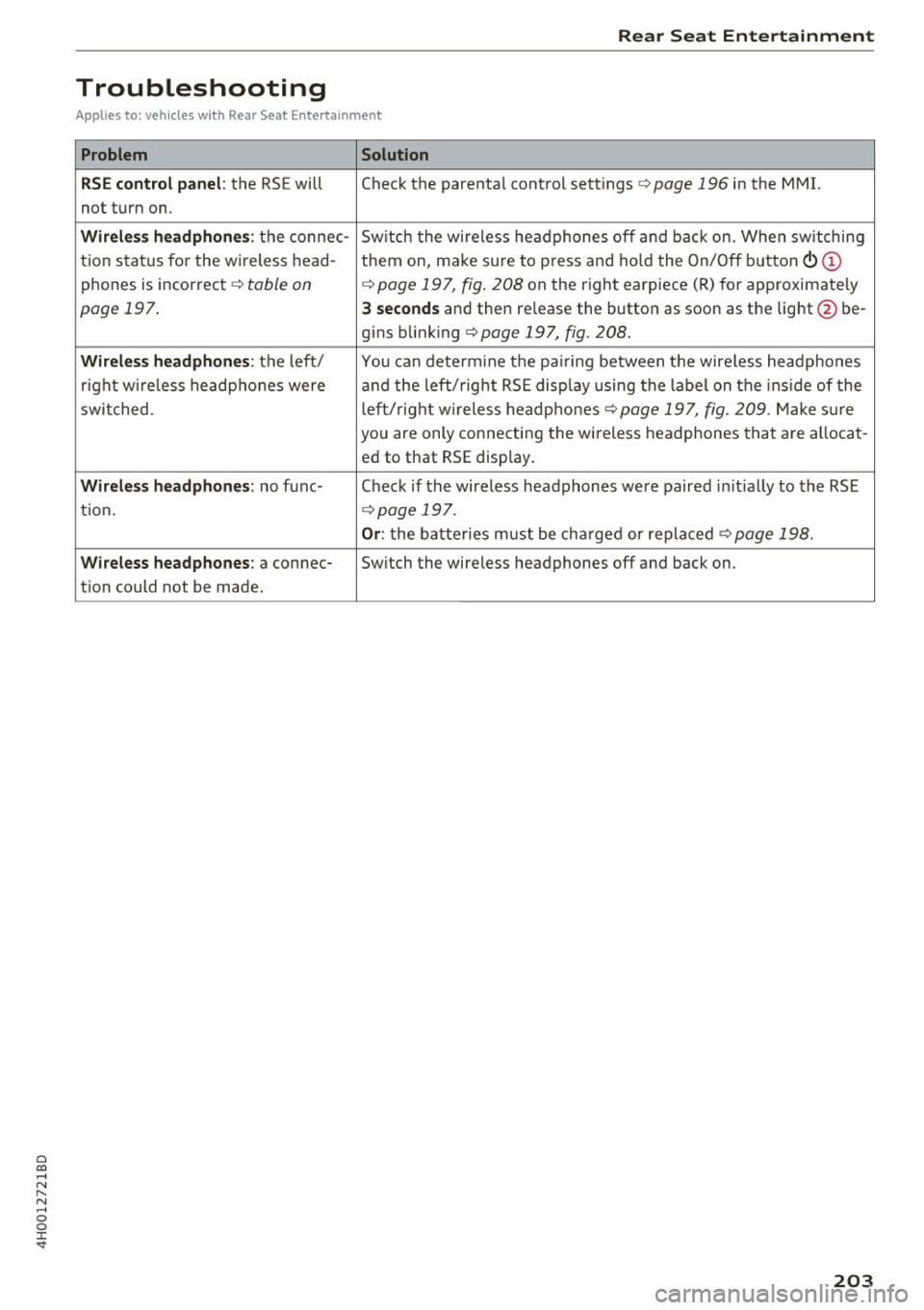
Troubleshooting
Applies to: ve hicles with Rea r Seat E ntertainment
Problem Solution
RSE control panel :
the RSE will Check the parenta l control settings ¢ page 196 in the MMI.
not turn on.
Wirele ss headphone s: the connec- Sw itch the wireless he adphones off and ba ck on. When sw itching
t ion s ta tu s for the w ireless head-
them on, make sure to p ress and ho ld the On/Off button
(D
phones is inco rrec t ¢ table on ¢ page 197, fig . 208 on the right earpiece (R) for approximate ly
page 197 . 3 seconds and then re lease the button as soon as the lig ht @ be-
g ins b link ing
¢ page 197, fig. 208.
Wirele ss headphone s: th e left/ You can dete rm ine t he pa iring between t he wire less headphones
right w ireless headp hone s were and the left/ right RS E disp lay using the label on the ins ide of the
swit ched. left/right w ireless headpho nes ¢
page 197, fig. 209. Make s ure
you are only connecting the wi reless headphones that a re allocat -
ed to that RS E display.
Wirele ss headphones : no func- Chec k if the wire less headphones were paired in itia lly to the RSE
ti on.
¢ page 197.
Or: the batteries must be c ha rge d or repla ced¢ page 198.
Wi reless headphones : a connec-Switch the wireless headphones off and back on.
t io n could not be made.
203
Page 207 of 354

sound distribu tion)/ Driver (sound dist ribution
aime d toward th e driver) or
All /Front /Rear .
- Surround level* :
you can adjust the vo lume of
t h e sur round effect by tu rning the contro l
kno b.
-AudioPilot (dynamic road noise compensa
tion)* :
select and confirm Active /Inactive.
When the funct io n is act ive, the vo lume is a uto
matically ad justed depending on the leve l of
noise ins ide the ve hicle.
- Sound focus* (adjusting the sound distribu
tion ):
select and conf irm All (symmet rical
sou nd
di stribution)/ Movie (optimal so und dis
t ribution fo r playing a
movie)/ Front/Rear .
- Volume balancing *:
the dynam ic road noise
compensation can be ad justed by t urni ng the
co ntro l knob .
@Subwoofer* I@ Bass/ © Treble
You can a djust the Subwoofer *, Bass and Treble
settings by turning the cont ro l knob. The
changed settings only apply fo r the aud io source
that is active a t the t ime . Th is allows you to ad
just t he sound se tt in gs for eac h aud io source sep
a ra tely .
® Balance/Fader (sound focus)
- Adjusting the sound distribution using the
MMI touch :
move your finger on the MMI touch
contro l pane l in the desir ed di rect io n.
Adjusting the system
volume
.,. Se le ct: th e IMENU J butto n> Tone.
Navigation* control button
Voice guidance volume /Entertainment volume :
volume of navigation prompts du ring act ive
ro ute gui dance. Music vol ume dur ing navigation
p romp ts m eans tha t the vol ume o f aud io p lay
b ack is tem porar ily lowe red w hen the p arking
s ys tem or vo ice g uidan ce is active .
Voice guidance : refer to q pag e 174 .
0 !:! Voice guidance on during call : see c>page 174 .
N ,..._
N ...... 0 0 :c '
Telephone* control button
Ring tone volume /Call volume :
you ca n adjust
t h e se lec ted ring tone vo lume o r cal l vo lume by
tu rnin g the cont ro l knob. The
Call volume can
o nl y be adj usted during a ca ll.
Systems control button
Voice recognition volume. :
you c an adju st the
vo lu m e of the an noun cemen ts by turni ng the
contro l kno b.
MMI touch volume *: the vo lume of the MMI
touch pr om pts ca n be adju sted by tu rn ing the
c on tro l k n ob .
Other settings
.,. Sele ct: the I M ENU I butto n > Setup MMI co ntr ol
bu tton.
Language
The language ca n be changed fo r the Info tain
me nt display, t he d river info rmation sys tem dis
play , voice guida nce* and t he voice re cogn ition
syste m*.
En glish, French an d Spanish are ava ila ble .
Measurement units
The following meas urement u nits can be set in
t h e Infotainment disp lay and d river info rmat ion
system.
- Speed (mph o r km/ h)
- Distance (miles o r kilomete rs)
- Temperature (°Fo r 0
( )
-Fuel consumption (L/1 00k m, mpg ( US) , m pg
(U K) or km/l)
- Volume (lite rs , ga llons ( UK) o r gallons (US))
Voice recognition
Applies to : vehicles wit h voice recog nitio n system
Command display : the display of possible com
mands during vo ice input can be switched
On or
Off .
Short dialogue : prompts in a shorte r fo rmat can
be switched
On o r Off .
Input signal :
the beep inp ut sig na l during a dia -
l og can be switched
On or Off. .,.
205
Page 208 of 354

System settings
Voice recognition volume: you ca n adjust the vol
ume of the announcements by t urning the con
trol knob.
Individual speech training (onl y when the ve hi
cle is s tat io nary): yo u ca n ada pt the voice recog
n ition system to yo ur voice or pro nunciat io n in
or der to im prove the system's ability to reco gnize
your speech. Individua l train ing is comprised of
40 speech e ntries that cons ist of commands and
sequences of numbers . Yo u can delete t he p ro
g ra m med voice tra ining using
Reset speech
training .
Delete all name tags :
all of the name tags that
you have stored (spoke n na mes) a re deleted .
Display brightness
You can a djust the Infotainment display bright
ness by t urning the co ntro l knob .
Factory settings
Yo u can r ese t t he followi ng func tion s to t he fa c
t ory defa ult settin gs:
- Sound settings
- Radio
- Media settings
- Jukebox
- Directory*
- Telephone *
- Bluetooth *
- Navigation settings*
- Navigation and online memory *
- Voice recognition system
You can se lect the des ired functions individua lly
or all at once with the
Select all entries option.
Select an d confirm
Restore factory default set
tings .
If you reset the Jukebox to facto ry setti ngs, all of
the music/video files are deleted and the
Media
settings
are reset.
System update
T he MMI softwa re, s uch a s the navig ation d ata*,
ca n be updated by DV D, USB or S D card usin g t he
system update feature .
206
Fo r more info rmation abou t the System update ,
visit www.audiusa.com/bluetooth or contact an
a uth orize d Aud i dea le r or authorized Aud i Serv ice
Facility.
Data encryption
Yo u can prote ct your pe rsonal dat a, su ch as con
tac ts in the dire ctory, destina tions in navigation*
and name tags with a persona l passwor d. If the
u nit is rep lace d, you can on ly t ransfe r yo ur per
sona l data to t he new MMI unit using your pass
w ord . T he default passwo rd "M MI3G" is valid un
ti l yo u assig n a perso nal passwo rd .
Version information
Info rmation on the software ve rsion of the MMI
and t he nav igation database * is displayed.
Page 210 of 354
Driving safety
• Sit properly in your seat and make sure that
your passengers do the same
c:> page 54, Seats
and storage.
• Fasten your safety belt and wear it properly . Al
so instruct your passengers to fasten their safe
ty belts properly
c:> page 218 .
What impairs driving safety?
Safe driving is directly related to the condition of
the vehicle, the driver as well as the driver 's abili
ty to concentrate on the road without being dis
tracted .
The driver is responsible for the safety of the ve
hicle and all of its occupants. If your ability to
drive is impaired, safety risks for everybody in the
vehicle increase and you also become a hazard to
everyone else on the road
c:> Li').. Therefore :
• Do not let yourself be distracted by passengers
or by using a cellular telephone .
• NEVER drive when your driving ability is im
paired (by medications, alcohol, drugs, etc.).
• Observe all traffic laws, rules of the road and
speed limits and plain common sense.
• ALWAYS adjust your speed to road, traffic and
weather conditions.
• Take frequent breaks on long trips. Do not drive
for more than two hours at a stretch.
• Do NOT drive when you are tired, under pres
sure or when you are stressed.
A WARNING
Impaired driving safety increases the risk of
ser ious personal injury and death whenever a
vehicle is being used.
208
Correct passenger
seating positions
Proper seating position for the driver
The proper driver seating position is important
for safe, relaxed driving.
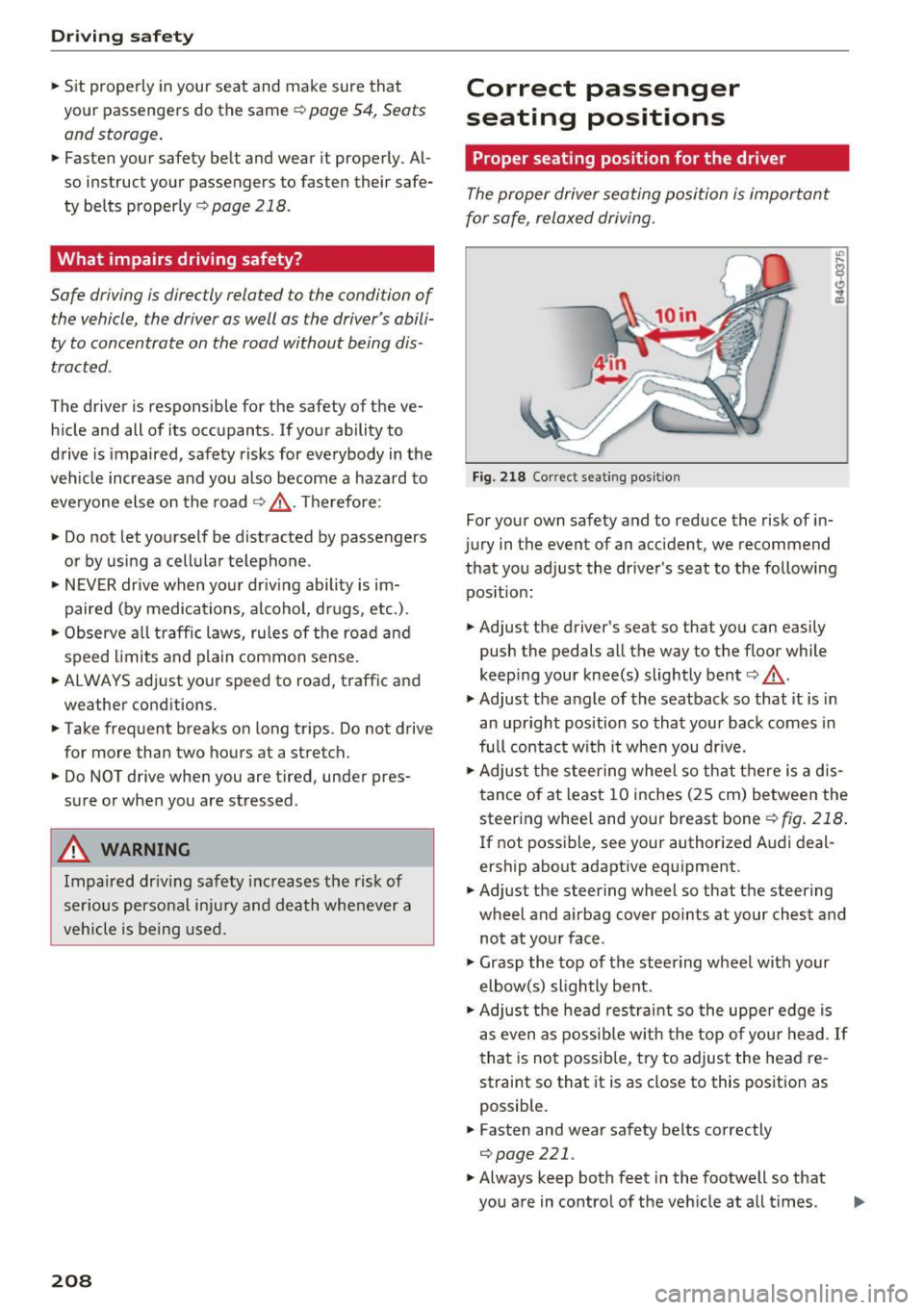
Fig. 218 Correct seating posit ion
For your own safety and to reduce the risk of in
jury in the event of an accident, we recommend
that you adjust the driver's seat to the following position:
• Adjust the driver's seat so that you can easily
push the pedals all the way to the floor while
keeping your knee(s) slightly bent
c:> .&_ .
• Adjust the angle of the seatback so that it is in
an upright position so that your back comes in
full contact with it when you drive.
• Adjust the steering wheel so that there is a d is
tance of at least 10 inches (25 cm) between the
steering wheel and your breast bone
r::!) fig. 218.
If not possible, see your authorized Audi deal
ership about adaptive equipment.
• Adjust the steering wheel so that the steering
wheel and airbag cover points at your chest and
not at your face.
• Grasp the top of the steering wheel with your
elbow(s) slightly bent.
• Adjust the head restraint so the upper edge is
as even as possible with the top of your head .
If
that is not possible, try to adjust the head re
straint so that it is as close to this position as
possible.
• Fasten and wear safety belts correctly
c:>poge 221.
• Always keep both feet in the footwell so that
you are in control of the vehicle at all t imes .
Page 238 of 354
Airbag syste m
-Ne ver t ransport items on or in the area of
t h e fr ont passenger seat. Objects could
m ove into the area of the front airbags dur
ing brak ing or oth er sudden maneuvers and
become dangerous projectiles that can
cause serious pe rsonal injury if the a irbags
inflate.
- Never place or attach accessor ies or other
objects (such as cup holders, te lephone
brackets, large, heavy o r bulky objects) on
the doors, over or ne ar the area marked
"AIRBAG" on the steering wheel, instru
ment pane l, seat bac krests or between
t h ose areas and yourself. These objects
could cause injury in a crash, especially
when the airbags inflate.
- Never recline the front passenge r's seat to
transport objects. Items can also move into
the area of the side airbag o r the front a ir
bag dur ing braking or in a s udden maneu
ver. Objects near the airbags can become
projectiles and cause in ju ry, particularly
when the sea t is re clin ed.
.8, WARNING
The f ine dust create d when airbags deploy can
cause breathing problems for people w ith a
his tory of asthma or o ther breathing condi
tions .
- T o reduce the risk o f brea thing pro blems,
those w ith asthma or o ther respiratory con
ditions should get fresh air right away by
gett ing out of the vehicle o r opening w in
dows o r doors.
- If you are in a collision in which airbags de
ploy, wash your hands and face with mild
soap and water before eat ing.
- Be careful not to get the dust into your eyes,
or into any cuts or scratches.
- If the resid ue should get into your eyes,
flush them with water.
236
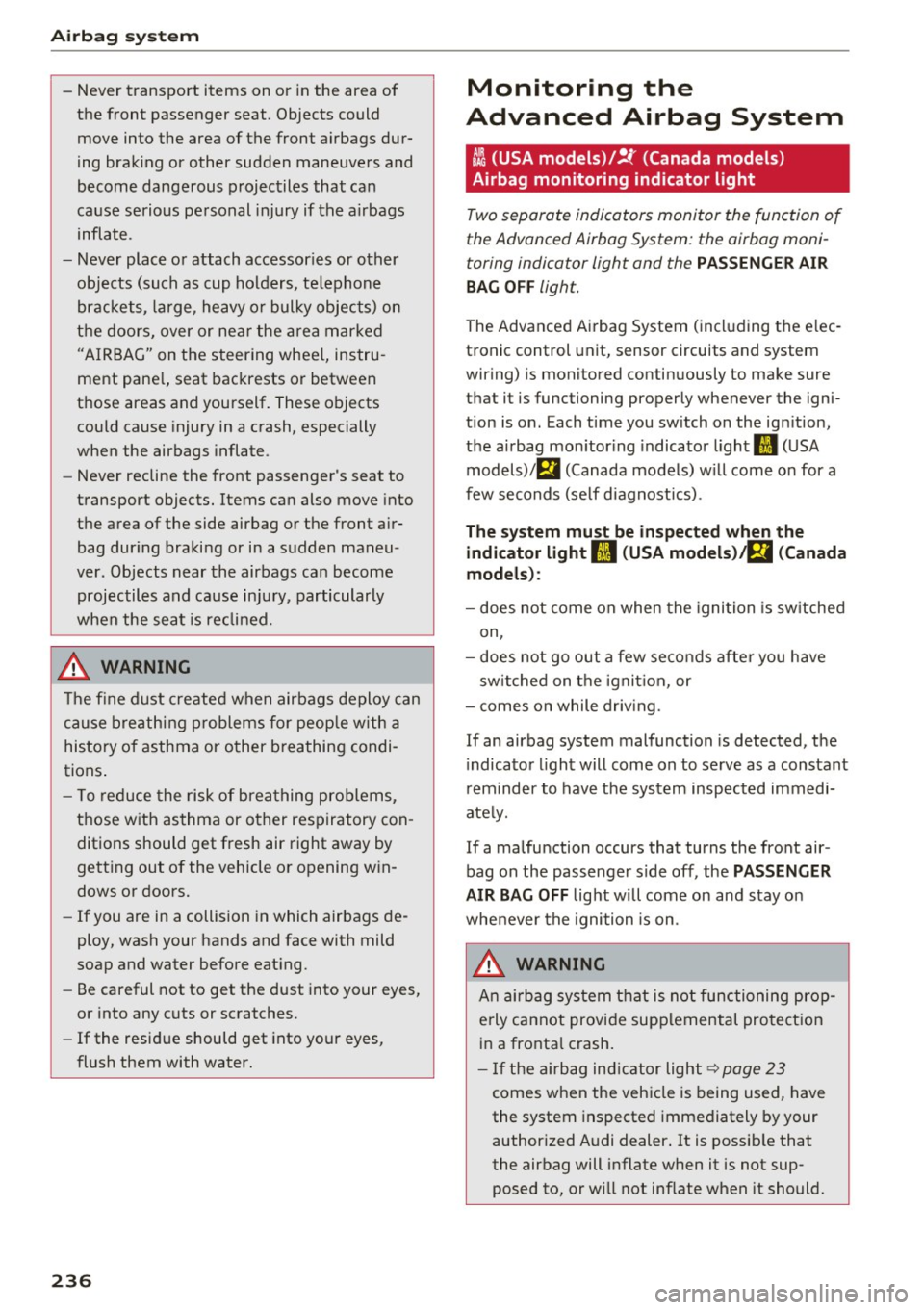
Monitoring the
Advanced Airbag System
tli (USA models )/!{' (Canada model s)
Airbag monitoring indicator light
Two separate indicators monitor the function of
the Advanced Airbag System: the airbag moni
toring indicator light and the
PASSENGER AIR
BAG OFF
light.
The Advanced A irbag System ( including the e lec
tronic control unit, sensor circuits and system
wiring) is monitored continuously to make sure
that it is functioning properly whenever the igni
tion is o n. Each time you sw itch on the ig nition,
the a irbag mo nitor ing indica to r light
II (U SA
models)/ fll (Canada models) w ill come o n for a
few seconds (se lf d iagnost ic s) .
The system must be inspected when the
indicator light
fl (USA models) /E,I (Canada
models) :
-does not come on when the igni tion is sw itched
on,
- does not go out a few se co nd s afte r you h ave
sw itched on the ignit ion, or
- comes on while driv ing.
If an airbag system malfunction is detected, the
i ndica to r light will come on to se rve as a constant
r em inder to have t he system inspected immedi
ate ly.
If a ma lfunction occurs that turns the front air
bag on the passenge r side off, the
PASSENGER
A IR BAG OFF
light w ill come on and stay o n
whe never the ignition is on.
_& WARNING
A n a ir b ag system t hat i s no t functioning prop
e rly cannot provide sup plemental pro te ct ion
in a fronta l crash .
- If the air bag ind icator ligh t<=? page 23
comes when the vehicle i s being u sed, have
the system inspected immediately by your
author ized Audi dealer . It is possib le that
the airbag will inflate when it is not sup posed to, or will not inflate when it should.
Page 241 of 354
0 co .... N ,..._
N .... 0 0 :c '
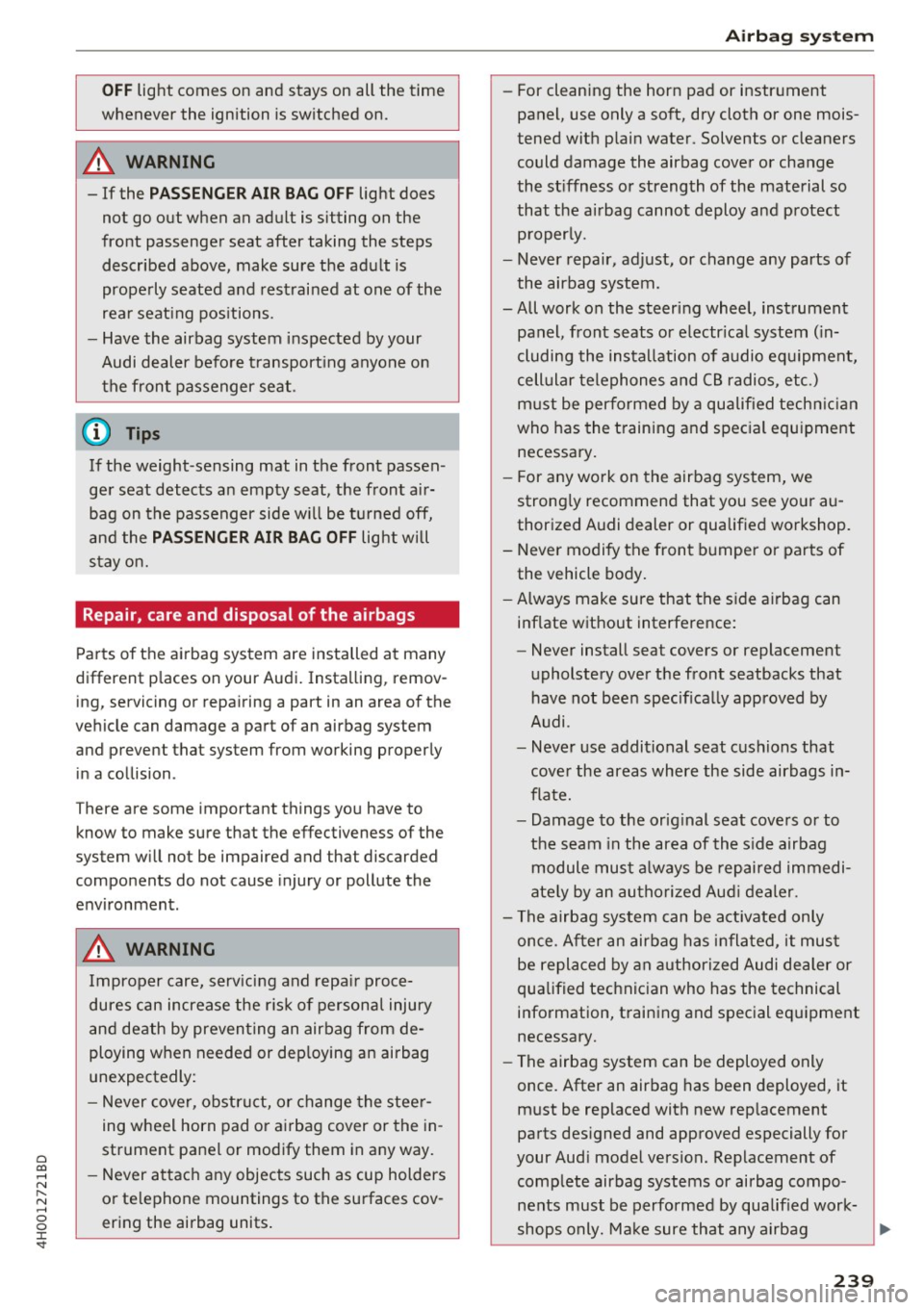
whenever the ignition is switched on.
A WARNING
- If the PASSENGER AIR BAG OFF light does
not go out when an adult is sitting on the
front passenger seat after taking the steps described above, make sure the adult is
properly seated and restrained at one of the
rear seating positions.
- Have the airbag system inspected by your
Audi dealer before transporting anyone on
the front passenger seat.
{D) Tips
If the weight-sensing mat in the front passen
ger seat detects an empty seat, the front air
bag on the passenger side will be turned off,
and the
PASSENGER AIR BAG OFF light will
stay on.
Repair, care and disposal of the airbags
Parts of the airbag system are installed at many
different places on your Audi. Installing, remov
ing, servicing or repairing a part in an area of the
vehicle can damage a part of an airbag system
and prevent that system from working properly in a collision .
There are some important things you have to
know to make sure that the effectiveness of the
system will not be impaired and that discarded
components do not cause injury or pollute the
environment.
A WARNING
Improper care, servicing and repair proce
dures can increase the risk of personal injury
and death by preventing an airbag from de
ploying when needed or deploying an airbag
unexpectedly:
- Never cover, obstruct, or change the steer
ing wheel horn pad or airbag cover or the in
strument panel or modify them in any way.
- Never attach any objects such as cup holders
or telephone mountings to the surfaces cov
ering the airbag units.
Airbag system
-For cleaning the horn pad or instrument
panel, use only a soft, dry cloth or one mois
tened with plain water. Solvents or cleaners
could damage the airbag cover or change
the stiffness or strength of the material so
that the airbag cannot deploy and protect properly.
- Never repair, adjust, or change any parts of
the airbag system.
-All work on the steering wheel, instrument panel, front seats or electrical system (in
cluding the installation of audio equipment,
cellular telephones and CB radios, etc.) must be performed by a qualified technician
who has the training and special equipment
necessary.
- For any work on the airbag system, we
strongly recommend that you see your au
thorized Audi dealer or qualified workshop.
- Never modify the front bumper or parts of
the vehicle body.
- Always make sure that the side airbag can
inflate without interference:
- Never install seat covers or replacement
upholstery over the front seatbacks that
have not been specifically approved by
Audi.
- Never use additional seat cushions that
cover the areas where the side airbags in
flate.
- Damage to the original seat covers or to
the seam in the area of the side airbag
module must always be repaired immedi
ately by an authorized Audi dealer.
- The airbag system can be activated only
once. After an airbag has inflated, it must
be replaced by an authorized Audi dealer or
qualified technician who has the technical
information, training and special equipment
necessary.
- The airbag system can be deployed only
once. After an airbag has been deployed, it
must be replaced with new replacement
parts designed and approved especially for
your Audi model version. Replacement of complete airbag systems or airbag components must be performed by qualified work-
shops only. Make sure that any airbag
Ill-
239
Page 247 of 354
C) C0 ....
"' " "' .... 0 0 :r
cover the areas where the s ide airbags
deploy.
- Damage to the origina l seat covers or to
the seam in the area of the side airbag
module must always be repaired immedi
ately by an authorized Audi dealer.
- Objects between you and the airbag can in
crease the risk of injury in an accide nt by in
terfering w ith the way the a irbag unfolds or
by being pushed into you as the a irbag in
flates.
- Never p lace or attach accessories o r other
objects (such as cup holders, telephone
brackets, or even large, bu lky objects) on
the doors, over or near the area marked
"AIRBAG" on the seat backrests.
- Such objects and accessories can become
dangerous projectiles and cause injury
when the supplemental side airbag de
ploys .
- Never carry any objects or pets in the de
ployment space between them and the
ai rbags or allow ch ildren or other passen
ge rs to travel in this posit ion.
- Always use the bui lt-in coat hooks only for
lightwe ight cloth ing . Neve r leave any heavy
o r sharp-e dged objects in the pockets th at
m ay interfere wit h side ai rbag dep loyment
and can cause pe rsonal injury in an accident .
- Always preven t the side airbags from be ing
d amaged by heavy objects knocking against
or hi tt ing the sides o f the seatbacks.
- T he airbag system can on ly be t rigge red
once . If the ai rbag has been triggere d, the
system must be replaced by an authorized
Audi dealership.
- Dama ge (cracks, deep scratches etc.) to the
original seat covers or to the seam i n the
area of the s ide airbag mod ule m ust always
be repaired immed iate ly by an authorized
Audi dealer.
- If children are seated improper ly, their risk
of injury increases in the case of an accident
i=> page 248, Child safety .
- Never attempt to modify any components of
the airbag system in any way .
Airb ag sys tem
-In a side coll ision, side airbags will not func
tion properly if sensors cannot correctly
measure increasing air pressure inside the
doors when air escapes through larger, un
closed openings in the door panel.
- Never dr ive with inte rior door trim panels
removed.
- Never dr ive when p arts have been re
moved from the inside door pane l and the
openings they leave have not been proper
ly closed .
- Never drive when loudspeakers in the doors have been removed unless the
speaker holes have been properly closed.
- Always make certain that open ings are
covered or filled if additional speakers or
other equipment is installed in the inside
door panels.
- Always have work on the doors done by an
authorized Aud i dea ler o r qualified work
shop.
Side curtain airbags
Description of side curtain airbags
The side curtain airbag system can provide sup
plemental protection to properly restrained oc
cupants.
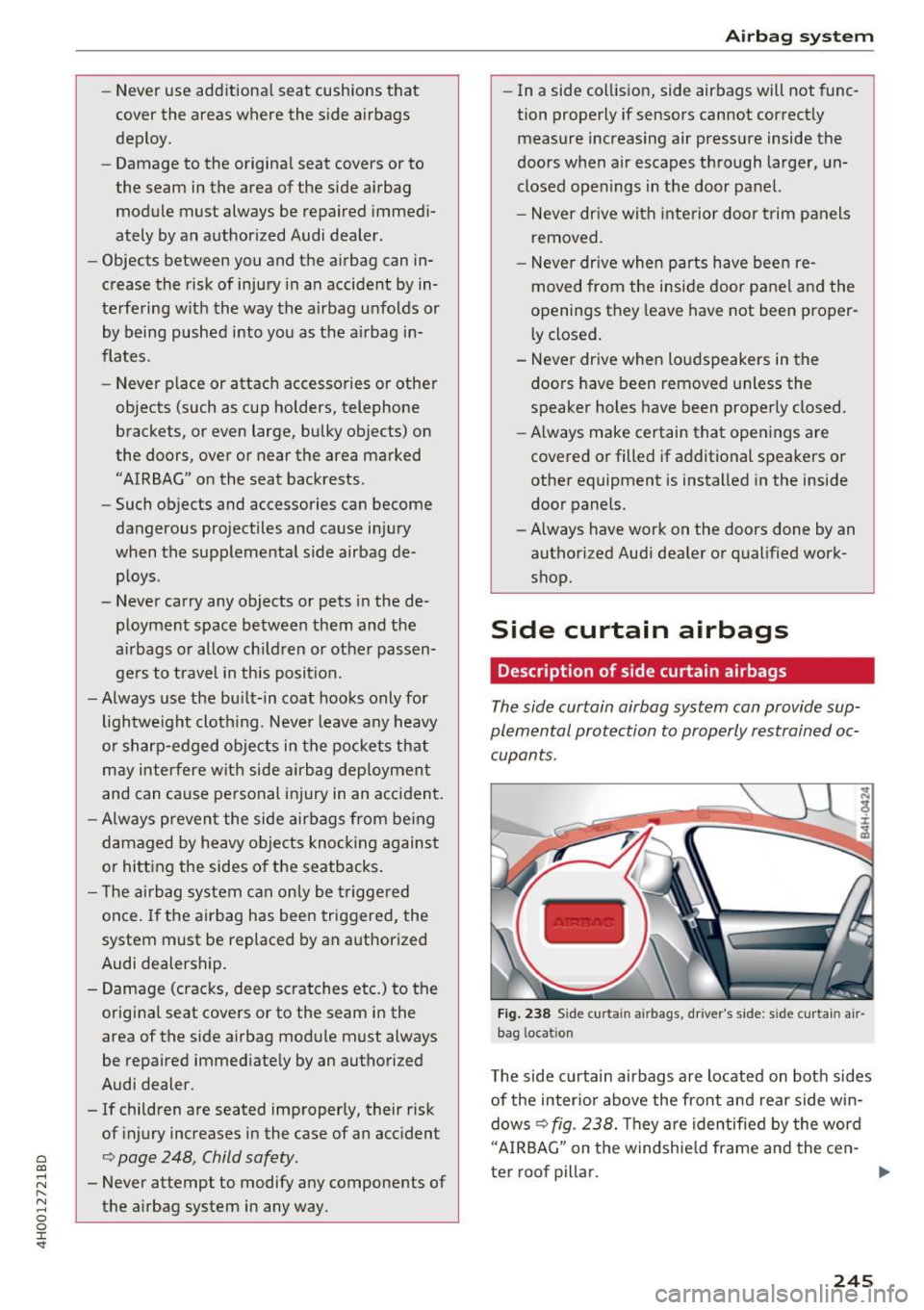
Fig . 238 Sid e curta in airbags, driver's side: side curtai n air
bag locat io n
The side c urtain airbags are located on both sides
of the inter io r above the front and rear side w in
dows
c> fig. 238. T hey are identified by the word
"A IRBAG" on the windshie ld frame and the cen-
ter roof pillar. .,..
245
Page 271 of 354

C) C0 ....
"' ,....
"' .... 0 0 :r
Never drive your vehicle until the fuel tank is
completely empty. The irregular supply of
fuel can cause misfiring. Gasoline could enter
the exhaust system and damage the catalytic
converter.
Fueling procedure
Fig. 253 R ight rear side of the vehicle: opening the fue l
f iller door
Fig. 254 Fu el fil ler door w ith attached fuel cap
The fuel filler door is unlocked or locked by the
central locking system.
Opening the fuel cap
"" Press on the left side of the fuel filler door to
open
c:!;> fig . 2 53.
""Unscrew the tank cap counterclockw ise.
"" Place the cap from above on the open fuel filler
door
c:!;> fig. 254.
Closing the fuel cap
""Screw the tank cap on to the right on the filler
neck until it cannot turn any farther .
""Then press on the left side of the tank door un
ti l it latches .
Checking and Filling
Once the pump nozzle switches off, the fuel tank
is "full". Do not fill the tank more . Otherwise the
expansion space in the tank will be filled.
The correct fuel type for your vehicle can be
found on a label located on the inside of the fuel
filler door. For additional information on fuel,
see
c:!;> page 267.
The fuel tank capacity of your vehicle is listed in
the
Technical Data section c:!;> page 334.
To avo id fuel spilling or evaporat ing from the fuel
tank always close fuel cap properly and com
pletely. An improperly closed fuel filler cap may
also cause the MIL lamp
c:!;> page 25 to come on.
A WARNING
Not paying attention when fueling or han
dling fuel incorrectly can lead to fires, explo
sions or serious injuries.
- Fuel ignites easily and can cause serious
burns and other injuries.
-
-If you do not switch the engine off when fu
eling and/or do not insert the fuel nozzle
completely into the tank opening, fuel can
leak out or run over. Leaked fuel can ignite
and start a fire.
- Do not use the telephone while fueling. The
electromagnetic rays can cause sparks,
which can ignite fuel vapors and start a fire .
- Do not sit in your vehicle while fueling. If
you must make an exception and enter your
veh icle aga in while fueling, close the door
and touch metal to discharge static electric
ity before touching the fuel nozzle. Static
electricity can create sparks, which can ig
nite vapors when fueling.
- Do not smoke or have an open flame in the
area when fueling your vehicle or filling a
fuel container because this increases the
risk of an explosion.
- For your safety, carrying fuel containers in
your vehicle is not recommended. Whether
full or empty, the container can leak and
cause a fire in the event of an accident.
- If you must make an exception and trans
port a fuel container, note the following:
269
Page 307 of 354

Storing new tire pressures
Applies to: S8 plus
Correctly stored tire pressure specifications are
necessary for reliable tire pressure monitoring .
.. Check the tire pressures in all wheels.
1> If necessary, correct the tire pressure according
to the spec ificat ions on the sticker on the driv
er's door ~
page 291 . Only correct the press ure
in tires whose tempera tu re is approx imately
the same as the amb ient temperature.
If the
tempera ture of the tire is highe r than the ambi
ent a ir temperat ure, the tire pressure must be
increased approximately 3 PSI (0,2 bar) above
the va lue on the sticker.
.. Switch the ignition on.
.. Se lect :
I CARI funct ion button > Car systems >
T ire pr essure monitoring > Store tire pres
s ure s.
After stor ing, the tire pressure mon itor
ing system measures the c urrent tire pressures
and stores them as the new specified p res
s ur es .
.. If the changed tire press ures are not displayed
in t he Infotainment system, dr ive the veh icle
for approximate ly 10 minutes so that the sen
sor signal from the whee ls is received again .
During this adap tat ion phase, --,-- is disp layed
for pressure and temperature and the Tire Pres
sure Monitoring System is only partially availa
b le: it only warns you if one or more of the tire
pressures is/are under the m inimum permitted
va lue. If this is the case, the
It] indicator light
appears w ith a message .
A WARNING
Read and follow the important information
and notes
~ page 303.
Malfunctions
Applies to: S8 plus
-
I f t he Tire Pressu re Monito ring System is not
av ail able,
the m ind icator light appe ars in the
driver informat ion system. The
HJ] indi cator light
o a lso blinks for approx imately one m inutes each co
~ time the ignition is switched on . The tire pressure ,.....
~ monitoring system cannot be selected in the In-o 0 :c '
fota inment system. The following are examp les
of situations that cou ld cause a malfunction:
- I f the message appears at t he e nd of the adap
t ation phase, the system cannot detec t the
wheels installed on the veh icle. This may result
from one or more whee ls being installed with
out wheel senso rs or with incompatible whee l
sensors.
- A wheel sensor or another component has
fa iled.
- Using snow chains can affect the function of
the system beca use of the shielding effect of
the chains .
- The tire pressure monitoring system is not
avai lab le due to a ma lf u nction .
- Transmitters with the same frequency, such as
headphones or remote-cont rolled devices, may
cause a temporary system malfunct ion due to
the strong electromagnetic field.
The
fim indicator light t urns off once the Tire
Pressure Monitoring System is availab le aga in . If
you cannot correct the ma lf u nction and
the m
indicator light stays on, drive immediately to an
authorized Aud i dealer or a uthorized Audi Serv ice
Facility to have the malf unct ion repaired .
305
Page 327 of 354
0 co .... N ,..... N .... 0 0 :c '
3
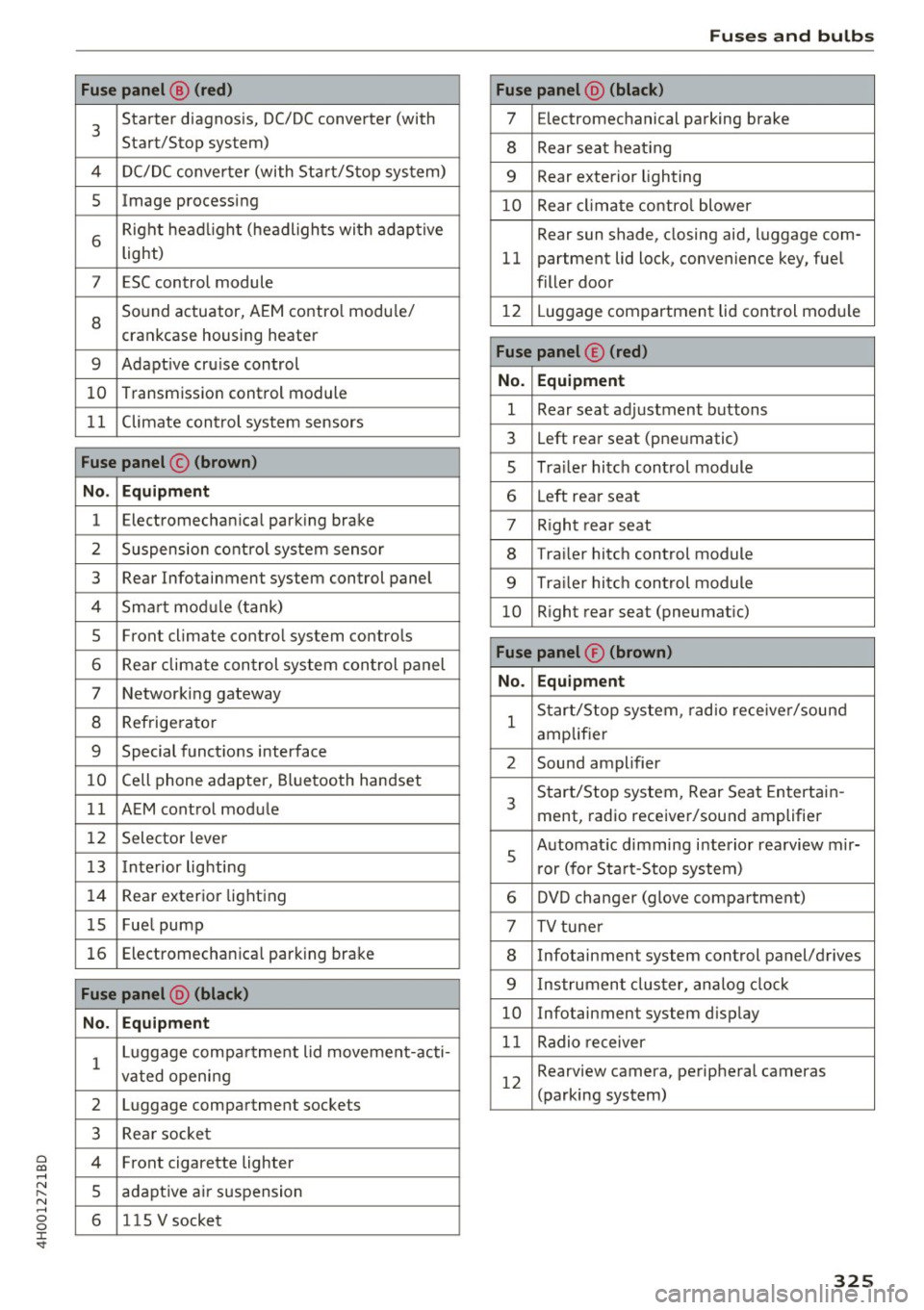
Starter diagnosis, DC/DC converter (with
Start/Stop system)
4 DC/DC converter (with Start/Stop system)
5 Image processing
6
Right headl ight (headlights with adaptive
light)
7 ESC control module
8
Sound actuator, AEM contro l modu le/
crankcase housing heater
9 Adapt ive cru ise control
10 Transmission control module
11 Climate control system sensors
Fuse panel © (brown)
No . Equipment
1 Electromechanical parking brake
2 Suspension control system sensor
3 Rear Infotainment system control panel
4 Smart mod ule (tank)
5 Front climate control system controls
6 Rear climate control system control panel
7 Networking gateway
8 Refrigerator
9 Special functions interface
10 Cell phone adapter, Bluetooth handset
11 AEM control module
12 Selector lever
13 Interior lighting
14 Rear exter ior light ing
15 Fue l pump
16 Electromechan ica l parking brake
Fuse panel @ (black)
No . Equipment
1 Luggage compa
rtment lid movement-acti-
vated opening
2 Luggage compartment sockets
3 Rea r socket
4 Front cigarette lighter
5 adaptive air suspension
6 1 lS V socket
Fuses and bulbs
Fuse panel @ (black)
7 Electromechanical parking brake
8 Rear seat heating
9 Rear exterior lighting
10 Rear climate control blower
Rear sun shade, closing aid, luggage com-
11 partment lid lock, convenience key, fuel
filler door
12 L uggage compartment lid control module
Fuse panel © (red)
No. Equipment
1 Rear seat adjustment buttons
3 Left rear seat (pneumatic)
s Trailer hitch control module
6 Left rear seat
7 R ight rear seat
8 Trailer hitch control module
9 Tra ile r hitch control module
10 Right rear seat (pneumatic)
Fuse panel® (brown)
No. Equipment
1
Start/Stop system, radio receiver/sound
amplifier
2 Sound amplifier
3
Start/Stop system, Rear Seat Entertain-
ment, radio receiver/sound amplifier
s
Automat ic dimming interior rearview mir-
r or (for Start-Stop system)
6 DVD changer (glove compartment)
7 TV tuner
8 Infotainment system control panel/drives
9 Instrument cluster, analog clock
10 Infotainment system display
11 Radio receiver
12
Rearview camera, peripheral cameras
(parking system)
325