phone AUDI A8 2017 User Guide
[x] Cancel search | Manufacturer: AUDI, Model Year: 2017, Model line: A8, Model: AUDI A8 2017Pages: 354, PDF Size: 88.68 MB
Page 138 of 354
Multi Media Interface
MMI touch
Applies to: vehicles with MMI touch cont rol pad
The MMI touch allows you to enter data on the
MMI touch control pod using handwriting recog
ni tion.
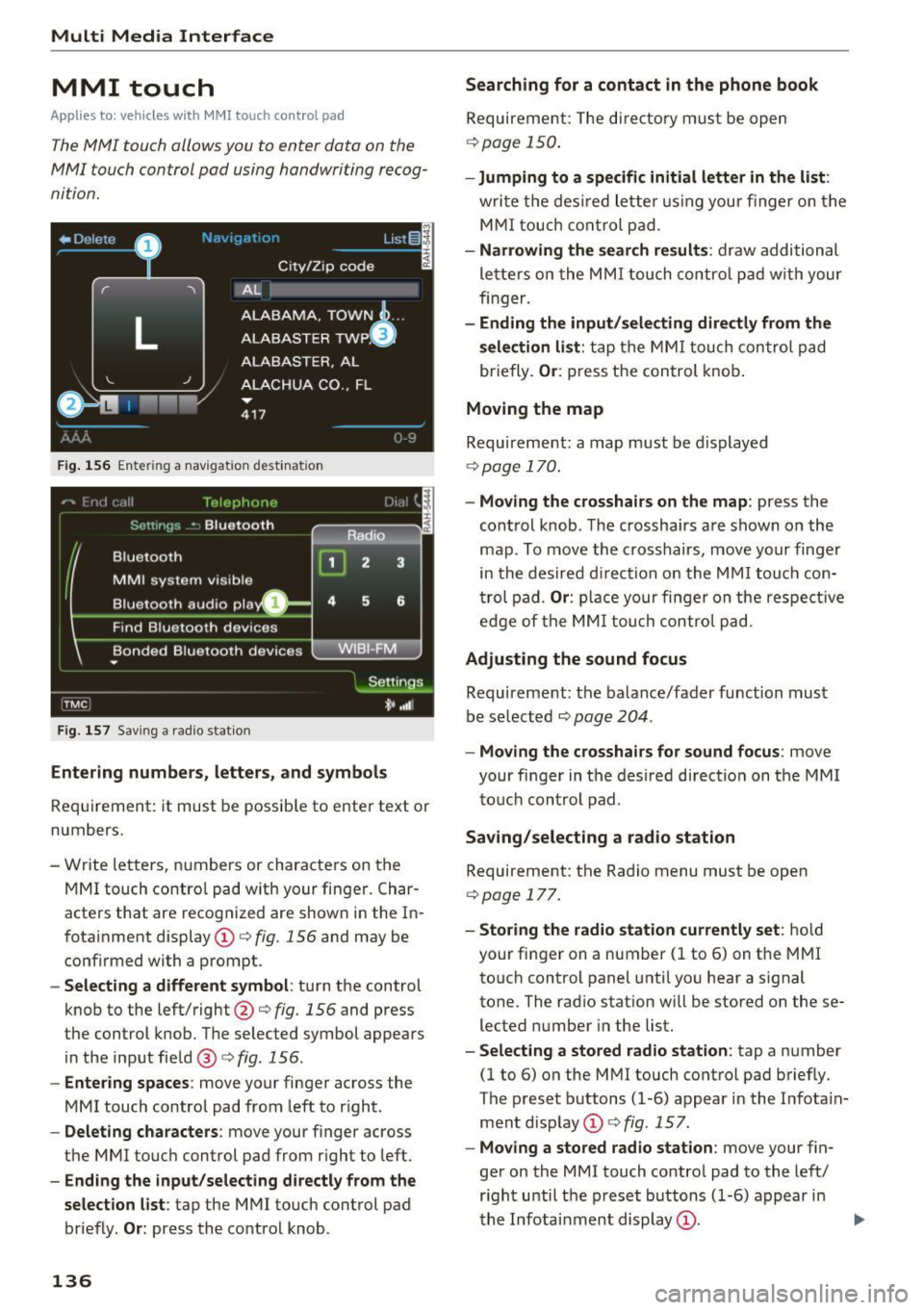
F ig. 1 56 Ente rin g a nav iga tion dest inat ion
F ig . 15 7 Sav ing a rad io st atio n
Entering number s, letters , and symbol s
Requirement: it must b e possib le to enter text or
numbers.
- Write lette rs, numbers or characters on t he
MM I touch contro l pad with your finger. Char
acters that are recog nized are shown i n the In
fotainment display © c:>
fig. 156 and may be
confirmed with a prompt .
-Selecting a different symbol : turn the control
knob to the left/right@c:>
fig. 156 and press
the control knob. T he se lected symbol appear s
in the input fie ld @ c:>
fig. 156 .
-Entering spaces : move your finger ac ross the
MMI touch control pad from left to r ight.
- Delet ing characters : move your finger across
the MMI touc h control pad from r ight to left.
- Ending the input /selecting directly from the
selection list :
tap the MMI touch control pad
briefly.
O r: press the control knob .
136
Searching for a contact in the phone book
Requirement: The di re ctory must be open
c:> poge 150.
-Jumping to a specifi c initial letter in the list :
writ e the des ired lette r using your finger on t he
M MI touch cont rol p ad.
- Narrowing the se a rch result s: draw additional
le tte rs o n the MMI touch co ntro l p ad w it h your
finger.
- Ending the input/selecting directly from the
selection list :
tap the MM I touch control pad
briefly.
Or : press t he control knob .
Moving the map
Requirement: a map must be displayed
c:>
page 1 70.
- Moving the cro sshairs on the map: press the
cont rol knob . T he crossha irs are shown on the
map . To move the crosshairs, move your finger
in the desired d irection on the MM I touch con
t rol pad .
Or : place your fi nger on the respe ct ive
edge of the MM I tou ch control pa d.
Adjusting the sound focus
Requireme nt: the balance/fader function must
be se lected c:>
page 204 .
-Moving the crossha irs for sound focus : move
your finger in the desired d irect ion on the MM I
to uc h control pad .
Saving /selecting a rad io st a tion
Requirement: the Radio menu must be open
c:>
page 177.
- Storing the radio station currently set : hold
your fi nger on a number (1 to 6) on the MMI
to uch control panel unti l you hear a s ignal
tone. The rad io stat ion w ill be stored on these
lected number in the list.
- Select ing a stored radio station : tap a number
(1 to 6) on the M MI touch control pad briefly.
The preset buttons (1-6) appear in the Infota in
ment disp lay © c:>
fig . 157 .
-Moving a stored radio station : move your fin
ger on the MMI touch contro l pad to the left/
r ight unti l th e p reset buttons (1-6) appear i n
the Infota inment display
(D . ..,.
Page 140 of 354
Multi Media Interface
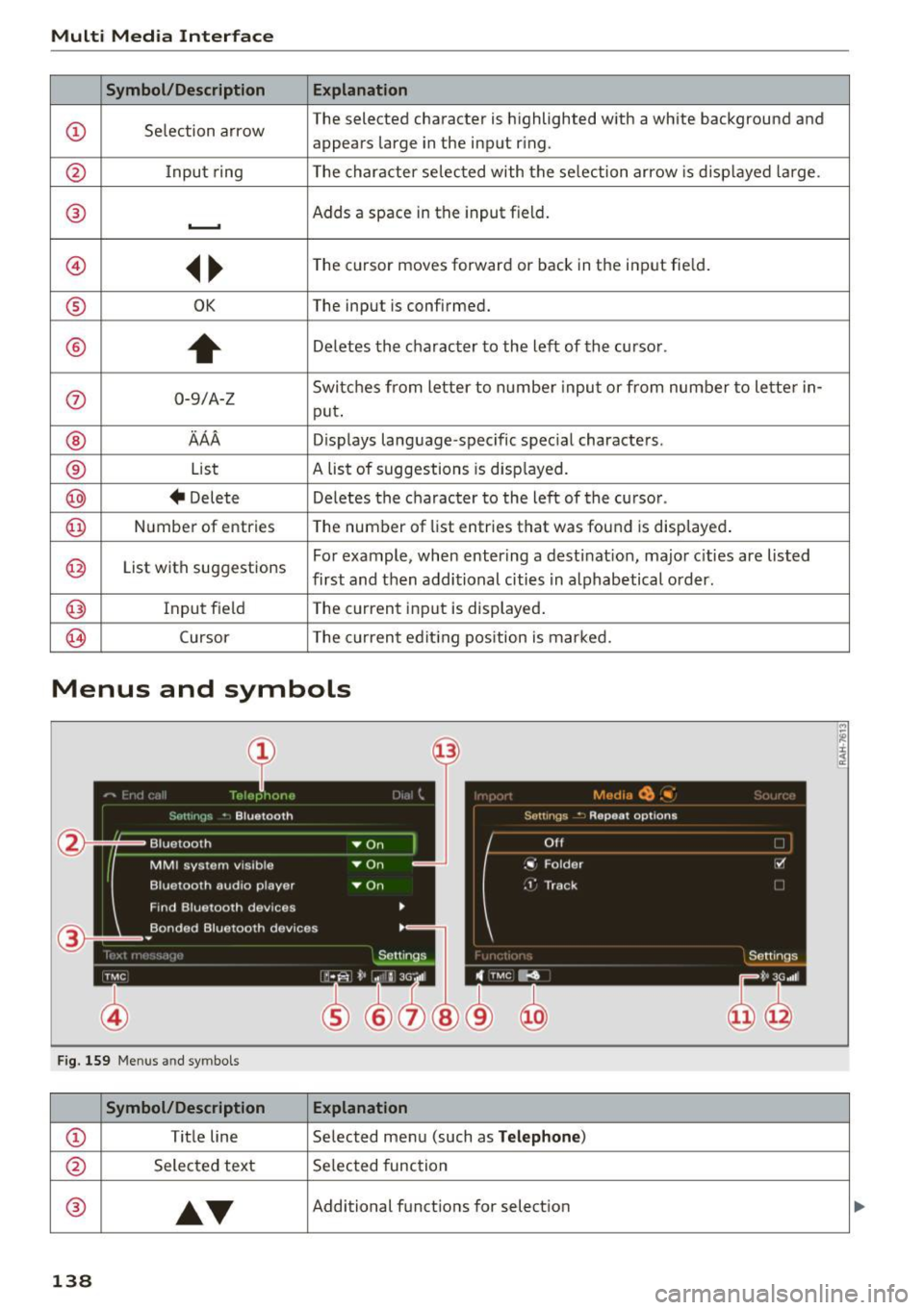
Symbol /Description E xplanation
CD Se lection arrow The selected character is highlighted with a white background and
appears large in the input r
ing .
@ Input ring The character selected with the selection arrow is displayed large .
® Adds a space in the input field . ..........
@ ~~
The cursor moves forward or back in the input fie ld.
® OK The input is confirmed.
®
+
Deletes the character to the left of the cursor .
0 0-9/A-Z Switches from letter to numbe
r input or from number to lette r in-
put .
® AAA Displays language -specific special characters .
® List A list of suggestions
is displayed.
@ + Delete Deletes the character to the left of
the cursor .
@) Number of entries The number of
list entries that was found is displayed .
@ List with suggestions For example, when entering a destinat
ion, major cities are listed
first and then additional cities in alphabetical order.
@ Input field The current input is displayed.
0 Cursor The current editing position is marked.
Menus and symbols
Fig. 159 Men us an d sy mbols
Symbol/Description Explanation
CD Title line Selected menu (such as Telephone)
@ Selected text Se lected function
®
•T
Additional functions for selection ...
138
Page 141 of 354

0 co .... N ,..... N .... 0 0 :c '
®
®
0
®
®
@
@
@
@
Symbol/Description
TMC
Importing process* Cell phone signal
strength bars*
Data connect ion signa l
strength bars *
Arrow Mute
I mport ing p rocess
Bluetooth
2G/3G*
Select ion list
Multi Media Interfac e
Ex planat ion
Reception of TMC traffic reports
Import or update the contacts in the directory or the call lists
Cell phone netw ork signal streng th fo r a connected cell phone
Signal streng th fo r the ac tive data connection, o r
PIN: enter the PIN (SIM)
PUK: enter the PUK
SIM: insert the Aud i SIM card
Submenu w ith add it iona l functions that are accessed by p ressing the
contro l knob
The audio source is muted ¢
page 134
Importing audio/video files to the J ukebox ¢page 182
Bluetoot h dev ice connected
Netwo rk coverage for the active d ata connection
2G : GSM network
3G: UMTS network
Settings for the se lected function that are accessed by press ing the
contro l knob
139
Page 142 of 354
Voice recognition system
• l ELEPHONE
• NAVIGATION
• INFO
• RADIO
• MEDIA
• HELP
• HELP VOICE RECOGNlTION
• HELP TELEPHONE
• HELP NAVIGATION
• HE LP MAP
• HELP INFO
• HELP RADIO
• HELP MEDIA
liEttEPHONE
• ENTER NUMBER
• DIAL
• REPEAT
• CORRECTION
• DE LETE NUMBER
• REDIAL
• CAL L (XV)
(BUSINESS/ PRIVATE/ LAND LINE/ CELL)
• ENTER ADDRESS
• ENTER COUNTRY
• ENT ER ZIP CODE/ CITY
• ENTER STREET
• ENTER HOUSE NUMBER
• ENTER DOWNTOWN
• START/ CANCEL ROUTE GUIDANCE
• NAVIGATE
TO (XV)
• LAST DESTINATIONS
• FAVORITES
• HOME ADDRESS
• SHORT /FAST/ ECONOMY ROUTE
• DYNAMIC ROUTE ON / OFF
• ROUTE UST
• VOICE GUI DANCE ON / OFF
• ROUTE INFO ON/ OFF
• SCALE (XY) MILES / YARDS
I r-.1 F.O
• READ TRAFFIC REPORTS
RADIO
• SET STATION
• STATION (XV)
• SET FREQUE NCY
• SET BAND
• FM / AM/ SIRIUS
• STATION LIST
• READ STATION LIST
• PRESETS
• READ PRESETS
• UPDATE STATIO N LIST
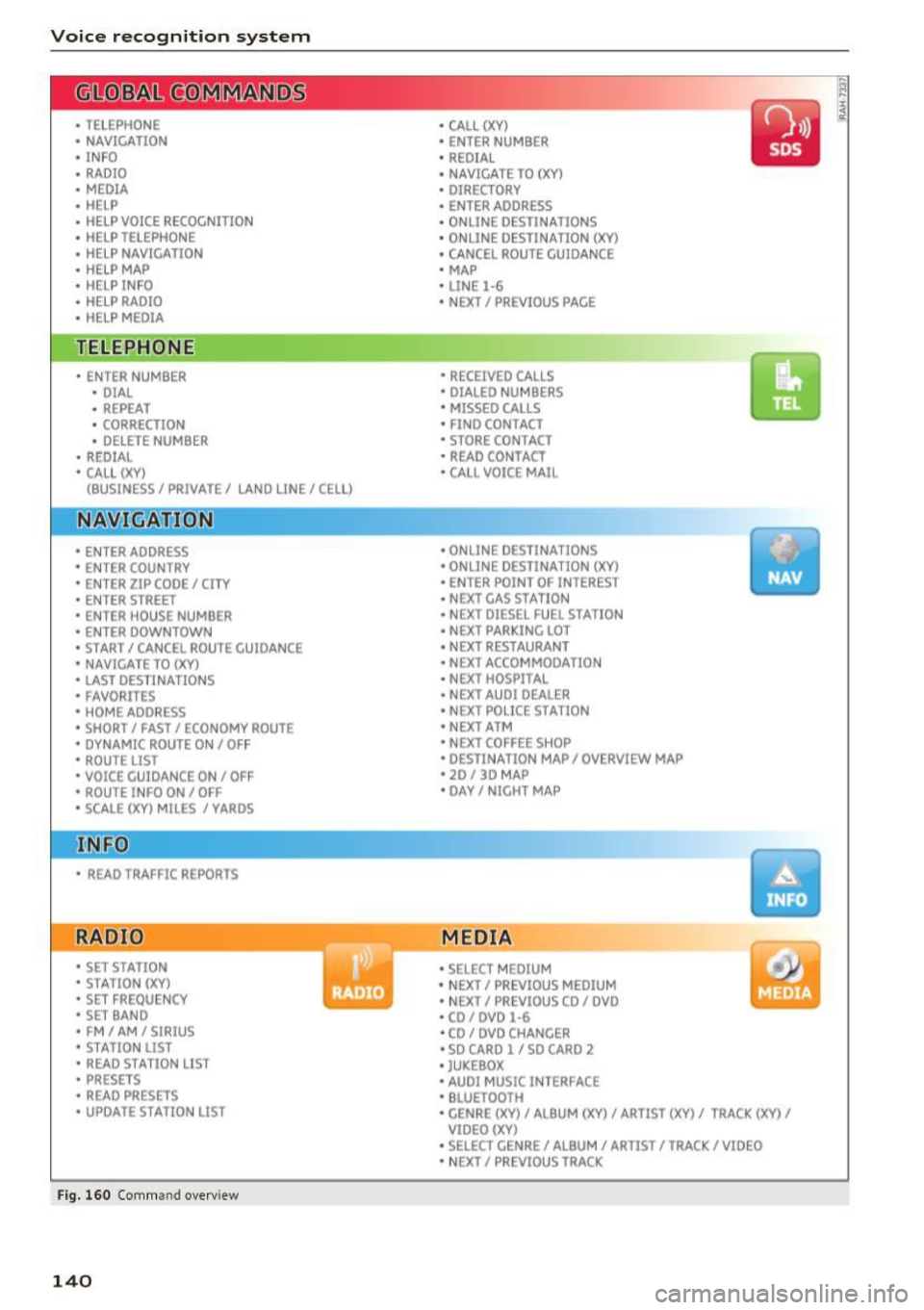
Fig. 160 Com mand overv iew
140
• CALL (XY)
• ENTER NUMBER
• REDIAL
• NAVIGATE TO (XY)
• DIRECTORY
• ENTER ADDRESS
• ON LINE DESTINATIONS
• ONLINE DESTINATION (XV)
• CANCEL ROUTE GUIDANCE
• MAP
• LINE
1·6
• NEXT/ PREVlOUS PAGE
• RECEIVED CALLS
• DIALED NUMBERS
• MISSED CALLS
• FIND CONTACT
• STORE CONTACT
• READ CONTACT
• CALL VOICE MAIL
• ONLINE DESTINATIONS
• ONLINE DESTINATION (XV)
• ENT ER POINT OF INTEREST
• NEXT GAS
ST A TION
• NEXT DIESEL FUEL STATION
• NEXT PARKING LOT
• N EXT RESTAURANT
• NEXT ACCOMMODATION
• NEXT HOSPITAL
• NEXT AUDI DEALER
• NEXT POLICE STATION
• NEXT ATM
• NEXT COFFEE S HOP
• DESTINATION MAP/ OVERVIEW MAP
• 20 / 30 MA P
• DAY/ NICHT MAP
MEDIA
• SELECT MEDIUM
• N EXT/ PREVIOUS MEDIUM
• NEXT/ PREVIOUS CO/ DVD
• CD/ DVD
1·6
• CD / DVD CHANCER
• SD CARD l / SD CARO 2
• JUKEBOX
• AUDI MUSIC INTERFACE
• BLUETOOTH
• CENRE (XV)/ ALB UM (XV)/ ARTIST (XV)/ TRACK (XV)
I
VIDEO (XV)
• SELECT CENRE /ALBUM/ ARTIST/ TRACK/ VIDEO
• NEXT/ PREVIOUS TRACK
Page 143 of 354
0 co .... N ,..... N .... 0 0 :c '
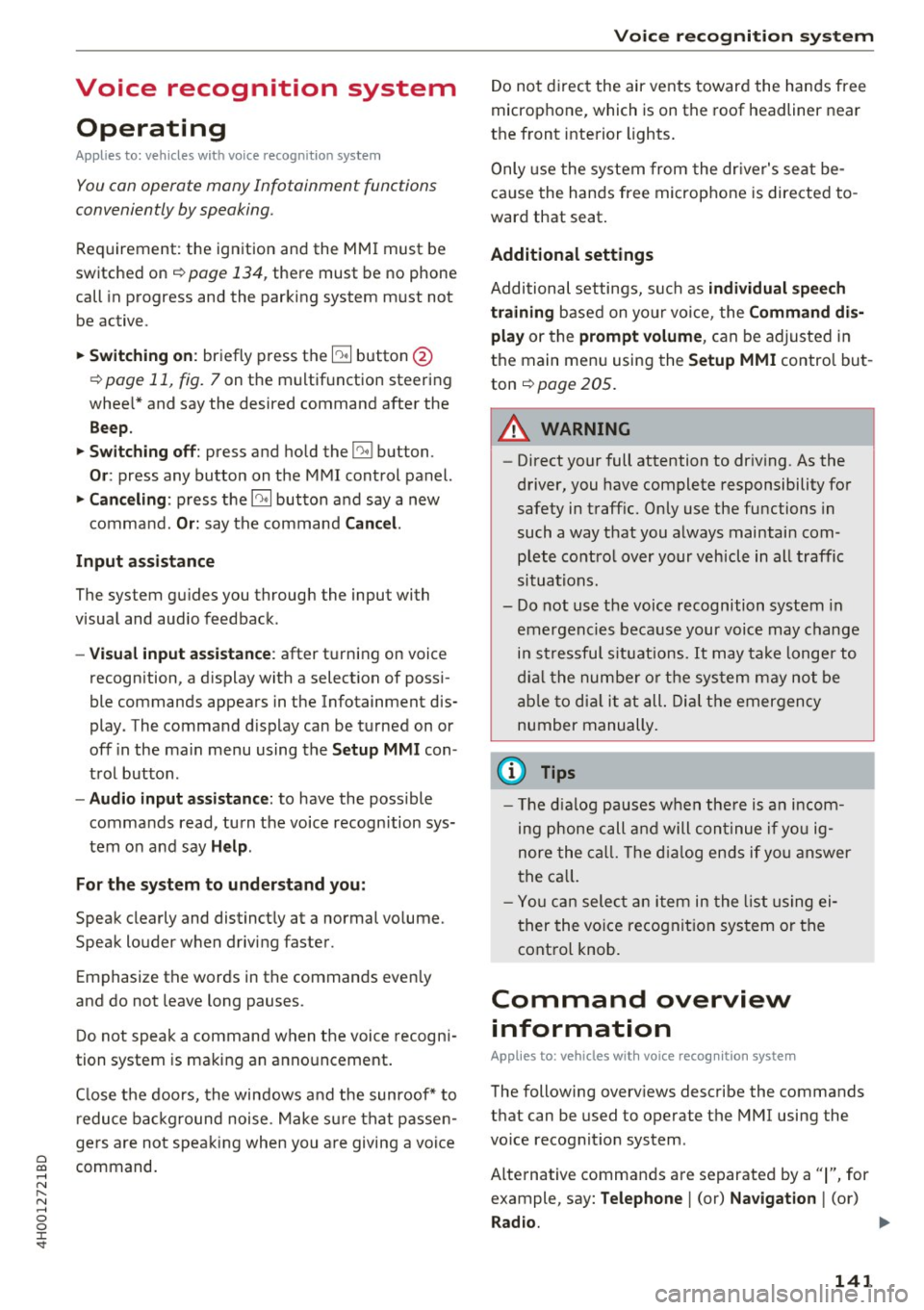
Appl ies to: vehicles with vo ice recog nitio n system
You con operate many Infotainment functions
conveniently by speaking .
Requirement: the ignition and the MM I must be
switched on~
page 134 , there must be no phone
call in progress and the parking system m ust not
be active .
~ Switching on : briefly press the~ button @
~ page 11, fig. 7 on the m ultif unction steering
whee l* and say the desired command after the
Beep .
~ Switching off : press and hold the l2;J button .
Or: press any button on the MMI control panel.
~ Canceling : press the 10, I button and say a new
command.
Or : say the command Canc el.
Input as sistance
The system gu ides you through the input with
visua l and audio feedback .
-Vi su al input a ssistance : after turning on voice
recognition, a d isplay with a select ion of possi
ble commands appears in the Infotainment dis
play . The command d isplay can be turned on or
off in the ma in menu using the
S etup MMI con
t rol button.
- Aud io input assi stance : to have the possible
commands read, turn the voice recognition sys
tem o n and say
Help .
For the system to underst and you:
Speak clearly and distinct ly at a normal volume.
Speak louder when driving faster.
Emphasize the words in the commands even ly
and do not leave long pauses .
D o not speak a command when the voice recogni
tion system is mak ing an anno uncement.
C lose the doors, the windows a nd the sunroof* to
reduce background noise . Make su re that passen
gers are not speaking when you are giving a voice
command.
Voice recognition system
Do not d irect the air vents toward the hands free
microphone, which is on the roof headliner near
the front inte rior lights .
Only use the system from the dr iver's seat be
ca use the hands free microphone is directed to
ward that seat .
Additional settings
Additional settings, such as individual speech
training
based on yo ur voice, the Command dis
play
or the prompt volume , can be adjusted in
the main men u using the
Setup MMI control but
ton
~ page 205.
A WARNING
--Direct your full attention to dr iv ing. As the
driver, you have complete responsibility for
safety in traff ic. Only use the functions in
such a way that you a lways maintain com
plete control over your vehicle in all traffic
situa tions.
- Do not use the voice recognition system in
emergencies beca use your voice may change
in stressfu l situations. It may ta ke longe r to
dia l the numbe r or the sys tem may not be
a ble to dia l it at all. Dia l the emergency
number manually.
@ Tips
- The d ialog pauses w hen the re is a n incom
ing phone call and will con tinue if yo u ig
nore the cal l. T he d ia log ends if you answer
the ca ll.
- Yo u can select an item in the list using ei
ther the vo ice recogn it io n sys tem or the
cont rol knob.
Command overview
information
Applies to: vehicles with voice recogn it ion system
The following overv iews describe the commands
that can be used to operate the MMI using the
vo ice recognit io n system .
Alternative commands are separated by a
" I", for
example, say:
Telephone I (or) Na vigation I (or)
Rad io . .,..
141
Page 144 of 354

Voice recognition system
Sequences of comman ds used to perform an ac
tion are identified with a">", for examp le say: es
. For examp le, for bu siness address , you can
also say
busi ness, work, office or job .
Enter de stination
> (then) Ente r country .
The major ity shown are main comm ands. This
system also recognizes synonyms in certain cas -
Global commands
Applies to: vehicles with voice recognition system
You can always use the global commands, re
gardless of the men u selec ted.
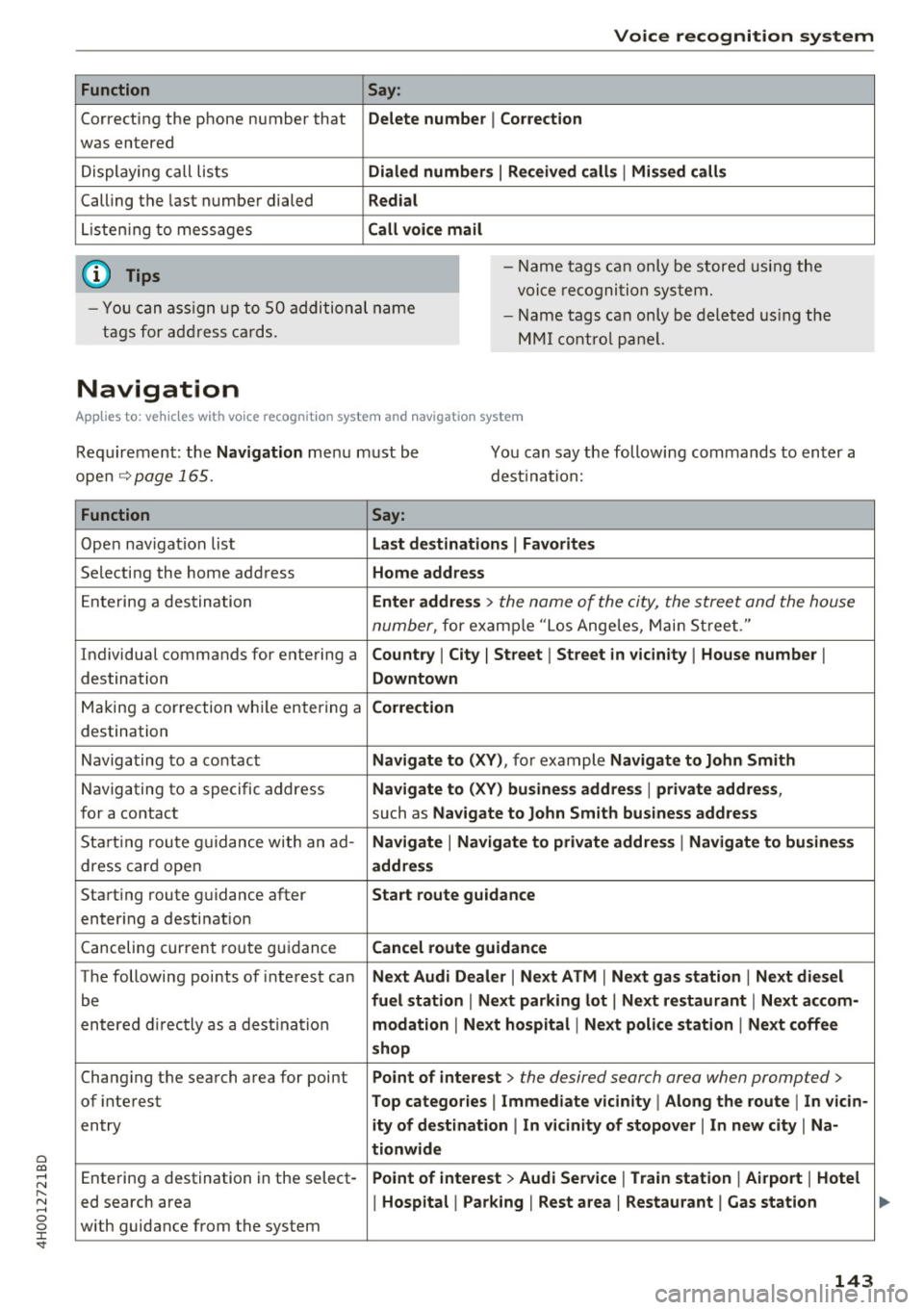
Function Say:
Opening a menu Tel epho ne* I Dire ctory * I Navigation * I Map* I Radio I Media I
Info
Having the possible commands Help I Help voic e recognition I Help Telephon e* I Help Naviga-
read a loud tion * I Help Map* I Help Radio I Help Media I Help Info
Telephone functions* C all (X V) , for example Call John Smith I
Ente r numbe r I Redial I Directory
Navigation funct ions* Navigate to (XY), for examp le Navigate to John Smith I
Enter addre ss I Cancel route guidance I Map
Selecting an entry from a list Line (XV)
Scro lling thro ugh a lis t Next page I Previou s page
Switching the voice recogn ition sys-Cancel
tern off
Telephone
App lies to: veh icles with voice recognition system and telephone
Requirement: a cell phone must be connected to
the MMI
Q page 146 and the Telephone menu
m ust be open
Q page 147.
Function Say:
Call contact from directory Call (XV), for example Call John Smith
Selecting a specific contact number Call (XV ) bu siness I priv ate I land line I cell ,
for example, Call John Smith private
Selecting a phone number w ith a n Call I Call bus iness I Call private I Call l andl ine I Call busines s
address card open mobile
Show contact informat ion Directory I Find contact > the desired contact when prompted,
such as John Smith
Personalizing a contact with a Find contact> the desired contact when prompted, such as John
name tag Smith > Name contact > the personal name tag, such as Uncle
Jo hn
Dialing a phone number Enter number > After being prompted, say the telephone num-
ber in groups of individual numbers,
fo r example. 888 555
1212 > Dial
142
Page 145 of 354
0 co .... N ,..... N .... 0 0 :c '
Correcting the phone number that
was entered
Displaying call lists
Calling the last number dialed
List ening to messages
(D Tips
Voice recognition system
Say :
Delete number
I Correction
Dialed numbers
I Received calls I Missed calls
Redial
Call voice mail
- Name tags can only be stored using the
voi ce recogni tion system.
- You can assign up to SO additional name
tags for address cards. - Name
tags can only be deleted using the
MMI control panel.
Navigation
Applies to: vehicles with voice recognition system and navigation system
Requirement: the Navigation menu must be
open
~ page 165.
You can say the following commands to enter a
dest ination:
Function Say:
Open navigat ion list Last destinations I Favorites
Selecting the home address Home address
Entering a destination Enter address > the name of the city, the street and the house
number,
for examp le "Los Ange les, Main Street ."
Individual commands for entering a
Country I City I Street I Street in vicinity I House number I
destination Downtown
Making a correction while entering a Correction
destination
Navigating to a contact
Navigate to (XV), for example Navigate to John Smith
Navigating to a specific address Navigate to (XV) business address I private address,
for a contact such as Naviigate to John Smith business address
Sta rt ing route guidance with an ad-Navigate I Navigate to private address I Navigate to business
dress card open address
Starting route guidance after Start route guidance
entering a destination
C anceling current route gu idance
Cancel route guidance
The following points of inte res t can Next Audi Dealer I Next ATM I Next gas station I Next diesel
be fuel station I Next parking lot I Next restaurant I Next accom-
entered directly as a destination modation I Next hospital I Next police station I Next coffee
shop
Changing the search area for point Point of interest > the desired search area when prompted>
of interest Top categories I Immediate vicinity I Along the route I In vicin-
entry ity of destination I In vicinity of stopover I In new city I Na-
tionwide
Entering a destination in the select -Point of interest > Audi Service I Train station I Airport I Hotel
ed search area I Hospital I Parking I Rest area I Restaurant I Gas station
with guidance from the system
143
Page 148 of 354

Telephone
Telephone
Introduction
Applies to: vehicles with telephone
To make phone calls in your vehicle using the
f\1/11[, connect your cell phone to the /11/11[ via
8/uetooth.
Hand sfree
With this connection, you use the handsfree sys
tem and operate telephone functions through
the MMI. Phone calls are transmitted through
the antenna on your cell phone.
A WARNING
- Medical experts warn that cell phones can
interfere with the function of pacemakers .
Always mainta in a m inimum d istance of 20
cent imeters between the cell phone anten
na and the pacemaker.
- Do not carry the cell phone in a pocket di
rectly over the pacemaker when the phone
is switched on.
- Sw itch the cell phone off immediately if
you suspect it may be interfering w ith the
pacemaker.
- Do not use the voice recognition system
c:> page 141 in emergencies because your
vo ice may change in stressful situations. It
may take longer to dial the number or the
system may not be able to dial it at al l. Dial
the emergency numbe r manually.
- Switch your cell phone
off in areas where
there is a risk of an exp losion . These loca
tions are not always clea rly mar ked. This
may include gas stations, fuel and chemical
storage fa cilit ies or transpo rt ve hicl es, or lo
cations where fue l vapors (such as propane
or gaso line vapor in vehicles or bui ldings),
chemicals or large quantities of dust parti
cles (such as flour, sawd ust o r metal) may
be present in the air. This also applies to a ll
other locations where you would normally
turn yo ur vehicle engine
off .
-The demands of traffic requ ire your full at
tent ion. Read and follow the guidelines pro
vided in
c:> page 134 .
146
.
(D Note
Always follow the information found in c:> 0 in
Wi-Fi hotspot on page 160.
@ Tips
The B luetooth connection range is limited to
inside the vehicle. It can also be affected by
l ocal cond itions and interference with other
devices.
Setup
Connecting a cell phone using Bluetooth
Applies to: vehicles with telephone
Fig. 16 1 Searching for ce ll phones
Fi g. 162 D isp lay ing the PfN for en teri ng in t he cell p hone
Requirements
The vehicle must be stationary and the ignition
must be sw itched on .
The Bluetooth funct io n and visib ility of the MMI
c:> page 155 a nd cell phone must be sw itched on .
The MMI and the cell phone to be paired must not be actively connected to any other Bluetooth
devices.
IIJ,,
Page 149 of 354

C) C0 ....
"' " "' .... 0 0 :r
• Select the ITEL I button > Sea rc h for new cell
phone
¢ fig . 161 . The avai lab le Bluetooth devi
ces are shown in the Infotainment system dis
play.
Or : search for the MMI using the B lue
tooth device search on your cell phone.
• Select and confirm the desired cell phone from
the list of displayed Bluetooth devices.
.. Select and confirm
Hand sfre e. The MMI gener
ates a PIN for the connection setup¢
fig. 161 .
• Se lect and confirm Y es.
• Ente r th e PI N for connecting on your ce ll
phone.
Or : if the P IN is already d isp layed on
your ce ll phone, confirm it in the cell phone and
in the MMI. The time a llowed for entering the
PIN is limited to approximately 30 seconds .
P ay at ten tion to any additional system prompts
displayed on your cell phone, for example if the
system should connect automatically in the fu
ture . Depending on the cell phone, you may have
to conf irm download ing the directory separately.
After connec ting successfull y
After connecting successfully, the s ignal strength
symbo l® ¢
page 138, fig. 159 and the Blue
tooth symbo l@ appear i n the status line of the
Infotainment disp lay. In addition, the cell phone
contacts are automatically loaded in the MMI di rectory. This process can take several minutes,
depend ing on the number of contacts.
If all of the memory capacity is fi lled, you will be
asked to replace the contacts from one cell phone when connect ing another cell phone. With
the opt ion
Restri cted use of t ele ph one , only con
tacts in the cell phone and the local MMI memory
are available ¢
page 150.
0 Note
Always follow the informat ion found in ¢ (Din
Wi-Fi hotspot on page 160.
(D Tips
- You only have to pair your dev ice one t ime.
Bluetooth dev ices that a re already pa ired
a utomat ically connect to the MMI whe n
t h ey are within range and t he ignit ion is
swi tched on.
Teleph one
- Authoriz ing the MMI connection in your cell
phone wi ll speed up the a utomatic connec
tion .
- Several cell phones can be paired to the
MMI, but only one cell phone can be actively
connected.
- A B luetooth device that is already paired
with the MMI will be d isconnected if anoth
er device is paired .
- When leaving the veh icle, the Bluetooth
connect ion to the cell phone will automati
cally disconnect .
- You can obtain more information from your
cell phone service provider or from yo ur cell
phone user gu ide. For informat ion on us ing
the te lephone , visit
www .aud iusa .com /
bluetooth
or contact your authorized Audi
dea ler or authorized Audi Se rvice Facility .
Opening the telephone
Applies to: vehicles wit h telepho ne
Fig . 163 Telephone functions
Requirement: a ce ll phone must be connected to
the MMI
¢page 146.
.. Select the ITE LI button.
T he last ac tive te lephone menu is s hown in the
Infotainment display . Press the
ITEL ! button in
the
Telephone menu again to access the tele
phone functions .
T he following telephone functions are available
¢ fig. 163:
@ List of received calls .......... .
@ List of missed ca lls .. ... ...... .
@ List of d ialed numbers . .... ... .
@ Directory .... .. .. .. ..... ..... .
148
148
148
150 ..,_
147
Page 150 of 354
Telephone
® Enter number ................ .
@ Assigning a voicemail number or
calling voicemail .... ....... .. .
Dialing a telephone
number
From the directory
Applies to: vehicles with telephone
148
155
You can select a phone number directly from the
directory
c> page 150.
From a list
App lies to: vehicles with telephone
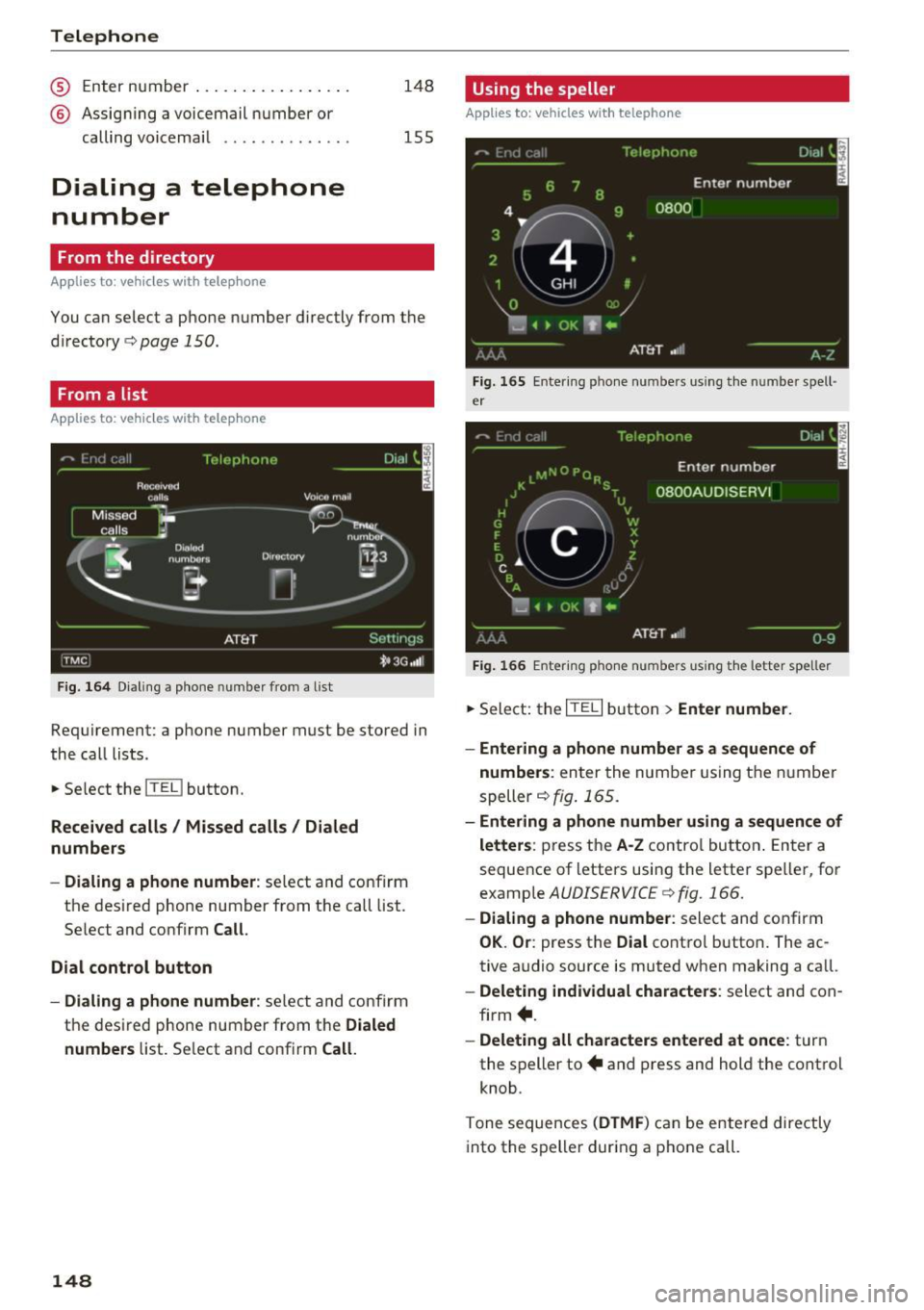
Fig. 164 Dialing a phone number from a list
Requirement: a phone number must be stored in
the call lists.
.. Select the
ITEL I button.
Received calls/ Missed calls/ Dialed
numbers
- Dialing a phone number:
select and confirm
the desired phone number from the call list.
Select and confirm
Call.
Dial control button
- Dialing a phone number:
select and confirm
the desired phone number from the
Dialed
numbers
list. Select and confirm Call.
148
Using the speller
Applies to: vehicles with telephone
Fig. 165 Entering phone numbers using the number spell·
er
Fig. 166 E nter ing phone numbers using the letter speller
.,. Select: the ITE LI button > Enter number.
- Entering a phone number as a sequence of
numbers :
enter the number using the number
speller~
fig. 165.
- Entering a phone number using a sequence of
letters :
press the A·Z contro l button . Enter a
sequence of letters using the letter speller, for
example
AUDISERVICE c> fig. 166.
- Dialing a phone number : select and confirm
OK. Or : press the Dial control button. The ac
tive audio source is muted when making a call.
- Deleting individual characters: select and con
firm +.
-Deleting all characters entered at once: turn
the speller to+ and press and hold the control
knob.
Tone sequences
(DTMF ) can be entered directly
into the speller during a phone call.