phone AUDI A8 2017 Service Manual
[x] Cancel search | Manufacturer: AUDI, Model Year: 2017, Model line: A8, Model: AUDI A8 2017Pages: 354, PDF Size: 88.68 MB
Page 188 of 354

Media drive s and conn ections
- Other iPod versions s uch as the iPod shuffle
cannot be connected to the iPod adapter ca
ble (plus)* . Connect these devices using the
optional 3.5 mm stereo jack adapter cable*.
- For video p layback, you can also connect
your iPod using the AV adapter cable*. You
also need an Apple AV cable to do this. For
more information on the App le AV cable, re
fer to your iPod user guide .
- The Apple Lightning connector does not
support v ideo p layback. - iPod/
iPhone malfunctions a lso affect the
operation of the MMI. Reset your iPod/
iPhone if this happens.
- For impo rtant information on operating
your iPod/ iPhone, refer to the user guide for
the device. Audi recommends updating the
iPod/ iPhone software to the latest version.
- For more information about the Aud i mus ic
interface and supported devices, v is it
www .audi.com /bluetooth or contact an au
thorized Aud i dealer .
Supported media and file formats
Overview
The DVD drive , the Jukebox, the SD card reader
and the USB storage device* connection support
the following audio/v ideo file properties:
Audio files Video files
Supported SD cards:
with a capacity up to 32 GB
media DVD drive: audio CDs (up to 80 minutes); CD-RO Ms with a capacity up to 700 MB;
DVD±R/RW; standard video DVDs and audio DVDs that are compatible with DVD v id-
eo
Audi music interface : portable devices (such as iPods, USB storage dev ices*)
File system SD/SDHC/ MMC memory cards
USB storage device*:
FAT or FAT32 file system, maximum 4 partitions
DVD drive : Joliet (sing le session and multisess ion CDs; single sess ion DVDs only);
UD F
Metadata Album, track, artist, yea r, genre
and commentar ies for MP3-/
WMA-/M4A files
Embedded album covers up to
800x800 px. (GIF, JPEG, PNG)
Format MP EG- 1/-2
Windows MP EG 2/4 MPEG 1/2 ISO- ISO- W indows
Layer-3 Med ia Au- MPEG4; MPEG4 H. Media Vid-
dio 8 and 9 DivX 3, 4 264 eo 9
and S; Xvid (MPEG4
AVC)
File extension .m p3 .wma; .m4a; .mpg; .av 1 .mp4; .wmv;
.asf .m4b; .mpeg .m4v; .asf
.aac .mov
Play .M3U; .PLS; .WPL
lists
186
Page 190 of 354

Media drive s and conn ections
Troubleshooting
Problem Solution
Aud i music inte rface /Blueto oth
Refer to the information on the Audi music interface¢ page 185/
audio pla yer : the portab le aud io Bluetooth audio player*¢ page 183. You can learn about support-
device/Bluetooth aud io player is ed dev ices in the Audi database for mobile devices at
not supported.
www .aud i.com /b lue tooth .
Au di music interface :
When start- Adjust the volume of the portable device to approximate ly 70 per-
ing the p layback through the 3 .5 cent of the maximum output
( Input level )¢ page 190 .
mm stereo jack adapter cable*/AV
adapter cab le*, the volume is too
high.
Audi mu sic inte rface: the porta- F
or many ce ll phones or med ia p layers, playba ck is not possible
ble device is not recognized as a when the battery leve l is too low (less than 5% of its capacity).
source. The portable device will on
ly be recognized as a so urce in the MMI
after connecting if the battery charge is sufficient .
Audi music interface: malfunc- The Audio player function is switched On . Switch th is function Off
t ions du ring audio playback when yo u are not using the Bluetooth aud io player*.
through an iPod/ iPhone.
Aud i music in te rface: there is The Audi music interface source is already selected when connect-
static when connecting or discon- ing or disconnecting . Either mute the portable device or sw itch to
nect ing t he 3 .5 mm stereo jack*/ a nother audio source (such as the rad io
¢ page 177) before con-
AV adapter cable* or when con- necting or disconnecting the po rtable devi ce.
nect ing o r disconnect ing the port-
able device to the 3 .5 mm stereo
jack */AVadapter cable *.
Bluetooth audio pla yer: audio Only one interface should be act ively used at a time to ensure
playback inte rference . problem-free playback .
Jukebox: songs on the imported When importing
playlists, a ll of the files themselves must be im-
playlist are grayed out. ported.
Wi-Fi audio pla yer*: the audio/ To avoid in terruptions d uring aud io/video playback, deactivate the
video playback is inter rupted. power saving function o n the Wi -Fi med ia p layer* or connec t it to
a charger.
Wi-Fi hotspot *: your Wi-Fi device Make sure the network optim izat io n functions are sw itched off in
is d isconnected from the W i-F i the Wi-Fi settings or in the network settings for your W i-F i dev ice.
hotspot . For addit ional info rmation refer to the user guide for your Wi-Fi
dev ice.
188
Page 191 of 354

C)
Playing media
Accessing media
You can start and operat e various media drives
through the fv1fv1I control panel.
Fig. 198 Possible audio/v ideo sources
Fig. 199 Possible audio/v ideo sources
Requirement: a media drive must contain audio/
video files.
~ Select : I MEDIAi button .
The source overview or the last file that was play
ing is displayed after selecting Media.
-Selecting a source: press the Source control
button . Select and confirm a source from the
list .
-Playing audio/video files : select and confirm a
folder, song or chapter. The content of the
folder is displayed or a track or chapter is
played .
-Moving one level up in the folder structure :
press the I BACK I button. Or: select and confirm
Folder up.
~ -Moving to the highest level in the folder struc-
~ ture: press the I MEDIAi button .
...... 0
~ Possible sources are:
(D Jukebox ¢page 182
@ SD card reader ¢page 181
@ DVD drive c!:>page 181
© DVD changer* c!:>page 182
® Audi music interface* (for example, an iPod,
USB or an external audio/video input*)
c!:> page 185
® Bluetooth audio player* c!:> page 183
(!) Wi-Fi audio player* ¢ page 184
(!) Tips
-For safety reasons, the video image is only
displayed when the vehicle is stationary. On
ly the sound from the video plays while driv
ing.
- Video playback through an iPod/iPhone
does not continue after stopping and start
ing the vehicle .
- You can scroll through long lists of folders
or tracks quickly by turning the control knob
quickly . The scrolling speed depends on the
number of folders or tracks.
- When synchronizing a portable device with
"Cloud" services, playlists may display incor
rectly in the MMI. Use the media center in
the device.
- Some DVDs do not allow selections to be
made during playback, for example select
ing an audio track, subtitles or a track or
chapter.
189
Page 195 of 354
C) C0 ....
"' " "' .... 0 0 :r
RSE components
overview
A ppl ies to: ve hicl es w ith Re ar Seat E nte rtainment
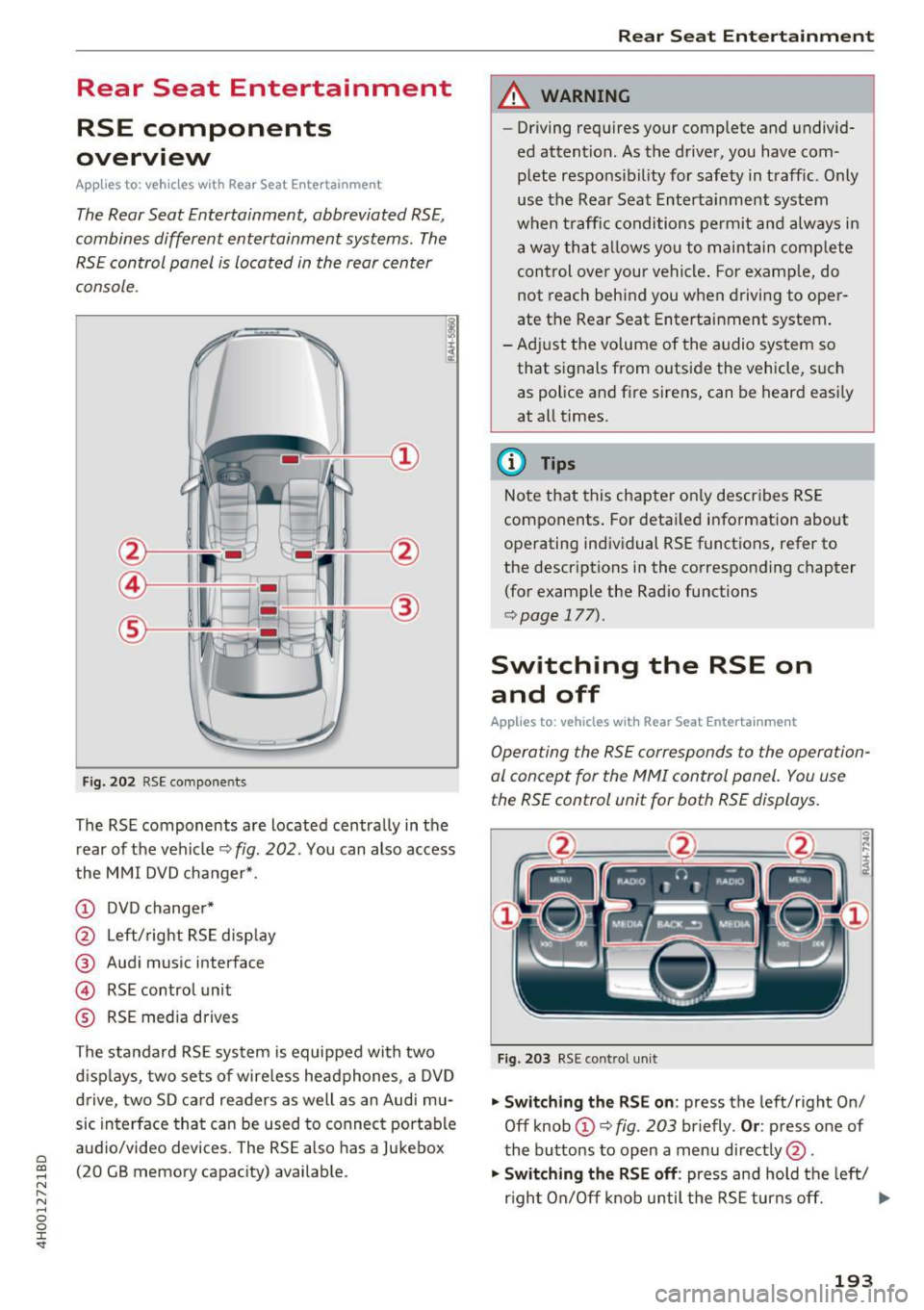
The Rear Seat Entertainment, abbreviated RSE ,
combines different entertainment systems . The
RSE control panel is located in the rear center
console .
Fig . 202 RSE compo nen ts
The RSE components are located centra lly in the
rear of t he vehicle
9 fig. 202 . You can also access
the MMI DVD changer* .
CD DVD changer*
@ Left/right RS E disp lay
® Audi music interface
© RSE control unit
® RSE media drives
The standard RSE sys tem is equipped with two
d isp lays, two sets of wire less headphones, a DVD
drive, two SD card readers as well as an Audi mu
sic interface that can be used to connect portable
audio/video devices . The RSE also has a Jukebox
(20 GB memory capacity) available.
Rear Seat Entertainment
A WARNING
-- Driving requires your complete and undivid-
ed attention. As the drive r, you have com
plete responsib ility for safety in traff ic. Only
use the Rear Seat Entertainment system
when t raff ic conditions permit and always in
a way tha t allows you to maintain comp lete
control over your vehicle . For examp le, do
not reach behind you when driving to oper
ate the Rear Seat Entertainment system .
-Adj ust the volume of the audio system so
that signals from outside the vehicle, suc h
as police and fire sirens, can be heard easi ly
at all times.
(D Tips
Note that this chapte r on ly describes RSE
components . For deta iled information about
operating indiv idual RSE funct ions, refer to
the descriptions in the corresponding chapter
(for example the Radio functions
¢ page 177).
Switching the RSE on
and off
Applies to : vehicles wit h Rear Seat Enterta inment
Operating the RS E corresponds to the operation
al conc ept for the MMI control pan el. You us e
the RSE control unit for both RSE displays.
F ig . 203 RS E cont ro l un it
.,. Swit ching the RS E on : press the left/right On/
Off knob
CD ¢ fig . 203 briefly . Or: press one of
the buttons to open a menu direct ly @ .
"" Swit ching the R SE off : press and hold the left/
r igh t On/Off knob until the RSE turns off.
IJ,,
193
Page 196 of 354

Rear Seat Ente rtainm ent
The last selected menu is disp layed when it is
switched on.
When the ig nition is swit ched off, a message in
d icating that the RSE is in standby mode appears
in the left or right RSE display. The RSE switches
off automatically if you do not press the left or right On/Off knob while the system is in standby
mode.
(D Tips
- The RSE switches off automatica lly if the
engine is not running and the vehicle bat
tery is low.
Symbols
Applies to: vehicles with Rear Seat Entertainment
F ig. 204 RS E display symbo ls
Symbol /Description E xplanation
- If you cannot sw itch the RS E on again, check
the parenta l control settings in the M MI
r=:> page 196.
Adjusting the volume
Applies to: vehicles with Rear Seat Entertainment
.,. Increasing o r decre asing the volume: turn the
On/Off knob to the right or left .
.,. Muting : press the On/Off knob brief ly.
.,. Unmuting: press the On/Off knob briefly or
turn the On/Off knob to the right .
(D Tips
Volume that is too high or too low is auto
matically adjusted to a preset level when the
RSE is sw itched on.
© [t] Active med ia source
@ Headphones Aud
io outp ut throug h headphones that a re wireless or connected
by a cable
® Speaker Aud io output throug h the vehicle's aud io system
@ Importing process
Import ing a udio/v ideo fi les to the Jukebox r=:> page 182
® Time Set time
® Parental control Parental control is switched on r=:>page 196
(J) L/R Display for RSE when RSE cont rol panel is act ive
(D Tips
A headphone or speaker symbol that is
crossed out @ /@ r=;,
fig. 204 indicates that
the active aud io/video sou rce is m uted.
194
Page 197 of 354
C) C0 ....
"' " "' .... 0 0 :r
Applies to: veh icles with Rear Seat Entertainment
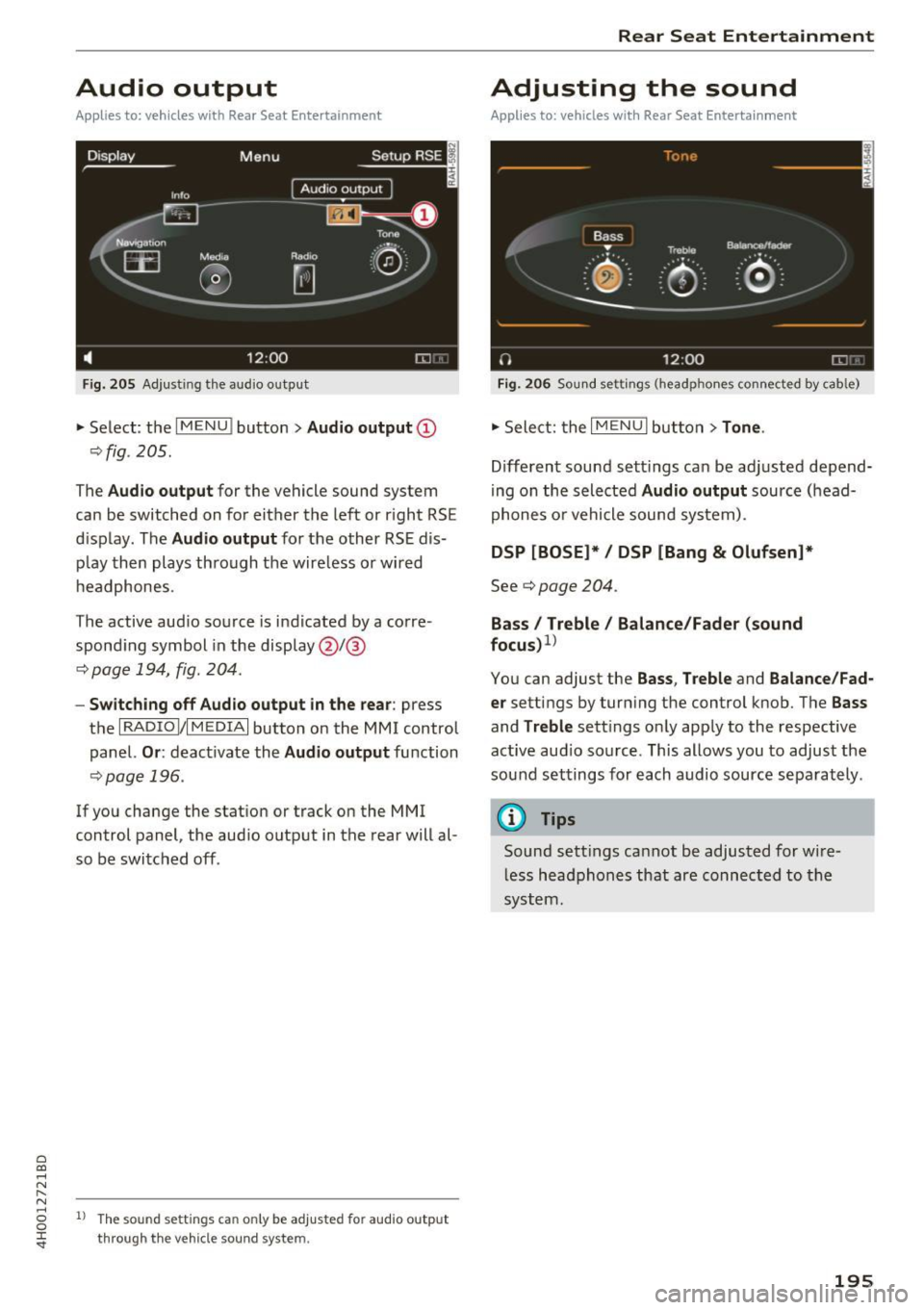
Fig. 205 Adju sting the aud io o utp ut
• Select : the I M ENU ! button > Audio outp ut @
¢ fig . 205.
The Audio outp ut for the vehicle sound sys tem
can be switched on for either the left or r ight RS E
display . The
Audio output for the other RSE dis
p lay then plays through the wire less or wired
h eadphones .
The active aud io source is indicated by a corre
spond ing symbol in the display @/@
¢ page 194, fig . 204 .
-Switching off Aud io output in the rear : press
t h e
I RADIO I/IM EDIA I button on the M MI control
panel.
Or : deactivate the Audio output function
¢page 196 .
If you change the stat ion or track on the MMI
control panel, the aud io outp ut in the rear will al
so be switched off .
1l The so un d sett ing s c an only be adjusted fo r au dio outp ut
thro ugh t he v eh icl e s ound sy ste m.
Rear Seat Entertainment
Adjusting the sound
Applies to: vehicles with Rear Seat Entertainment
Fig. 206 Sou nd set tings (headp ho nes conne cted by cab le)
• Sele ct: the I MENU I but ton > Tone .
Different sound sett ings can be ad justed depend
i ng on the selected
Audio output source (head
phones o r vehicle sound system) .
DSP [BOSE]* / DSP [Bang & Olufsen]*
See¢ page 204 .
Bass I Treble / Balance /Fader (sound
focu s)
1
>
You can adjust the Ba ss , T reble and Balance /Fad
er
settings by turn ing the control knob. The Bas s
and Treble sett ings on ly app ly to the respective
active aud io so urce . This allows you to adjust the
sou nd settings for each audio source sepa rately .
@ Tips
Sound sett ings cannot be adjusted for wi re
l ess headphones that are connected to the
system.
195
Page 198 of 354

Rear Seat Entertainment
Restarting the RSE
(reset)
Applies to: ve hicles w ith Rear Seat Ente rta inment
F ig. 207 Button combination to restart th e system
... Press and hold the control knob (D , the upper
right control button @and the
righ t!MENUI
button ® c:::> fig. 207 at the same time for a
brief moment and then release the buttons .
@ Tips
The MMI and RSE use some components at
the same time. Because of this, Audi recom
mends restarting both systems.
Display settings
Applies to: vehicles with Rear Seat Enterta inment
... Se lect: I MENU I button > Display control button.
Turning off the display
The display switches off.
The active aud io/video source does not pause
when yo u switch the RSE display off . You can still
change the stat ion or track for the selected au
dio/video source using the arrow buttons.
Switching display on
Press any button on the MMI control panel.
Display brightness
You can adjust the display brightness by turning
the control knob .
196
Parental control
Applies to: ve hicles with Rear Seat Entertainment
Selected RSE functions can be restricted or deac
tivated in the MMI.
... Select: I MEN u I fu nction button > Setup MMI
control button > Rear Seat Entertainment.
System
When the function is switched On, the RSE is en
abled for use. When the function is switched
Off,
the RSE is switched off and the RSE control panel
i s locked.
Vehicle speakers
Audio output
through the vehicle speakers in the
rear can be set to
Vehicle speakers or Head
phones only.
Operation
You can set whether all of the RSE functions (All)
or the Volume only can be adjusted through the
RSE.
Navigation destinations*
You can Apply the navigation destination auto
matically for active route guidance in the MMI or
Confirm the navigation dest ination before trans
ferring to the MMI.
Other settings
App lies to: vehicles with Rear Seat Enterta inment
.,. Select: the I MENU I button> Setup RSE control
button.
Factory default settings
You can reset the following functions to the fac
tory default settings:
- Sound settings
- Radio
- Media settings
-Jukebox
- Navigation settings*
You can select the desired functions individually
or all at once with the option
Select all entries.
Select and confirm Yes . .,,.
Page 199 of 354
C) C0 ....
"' " "' .... 0 0 :r
the music/video files are deleted and the
M edi a
setting s
are reset .
Resetting the func tions to the fac tory defau lt
settings does not a ffect the M MI.
System update
The RSE software can be updated by DVD, USB or
SD ca rd using the system update feature.
Contact an author ized Audi dealer or author ized
Aud i Service Facility for additional information
about the
System updat e.
Data encryption
You can protect the list of destinations with a personal password. If the unit is replaced, you
can only transfer your pe rsonal data to the new
RSE un it using your passwo rd . If you do not as
sign a personal passwo rd, "MMI3G" is stored in
the RSE automatically as the password.
Version inform ation
Information on the software version of the RSE
and the navigat ion database is displayed .
Headphones
Wireless headphones
Applies to: vehicles with Rea r Seat Entertainment
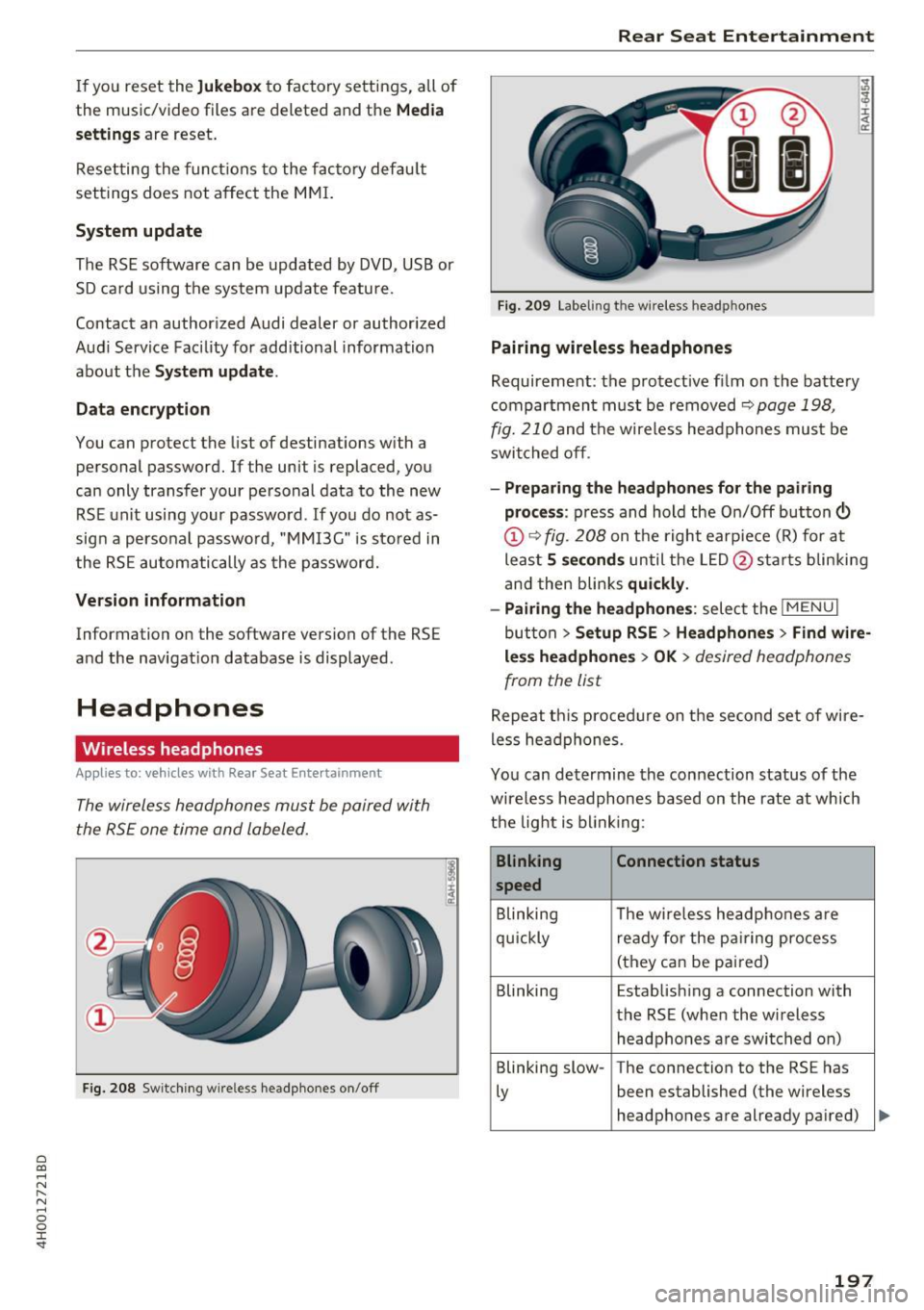
The wireless headphones mus t be paired with
the RSE one time and labeled.
F ig. 208 Switching wire less he adphones on /off
Rear Seat Entertainment
Fig. 20 9 Labeling th e w ireless head phones
Pairing wir eless headphones
Requirement: the protective film on the batte ry
compartment must be removed
~ page 198,
fig. 210
and the wireless headphones mus t be
swit ched off .
-Pr eparing the headphones fo r the pairing
pro ce ss :
press and hold the On/Off button©
@¢ fig . 208 on t he right earp iece (R) for at
leas t
5 seconds until the L ED @ starts b linking
and then blinks
quickl y.
- Pairing th e headphone s:
select the !M ENUI
button > Se tup RSE > Headphone s> Find w ire
le ss headphone s > OK >
desired headphones
from the list
Repeat t his procedure on the second set of wire
less headphones .
You can determine the connection status of the
wireless headphones based on the rate at which
the light is b link ing :
Blinking Connection statu s
speed
B linking The w ireless headphones are
qu ickly ready for the p airing process
(they can be pai red)
Blinking Estab lishing a connection with
the RSE (when the w ireless
headphones a re switched on)
Blinking slow -The connection to the RS E has
Ly been established (the wireless
headphones are already pa ired)
197
Page 200 of 354
Rear Seat Entertainment
Labeling the wireless headphones
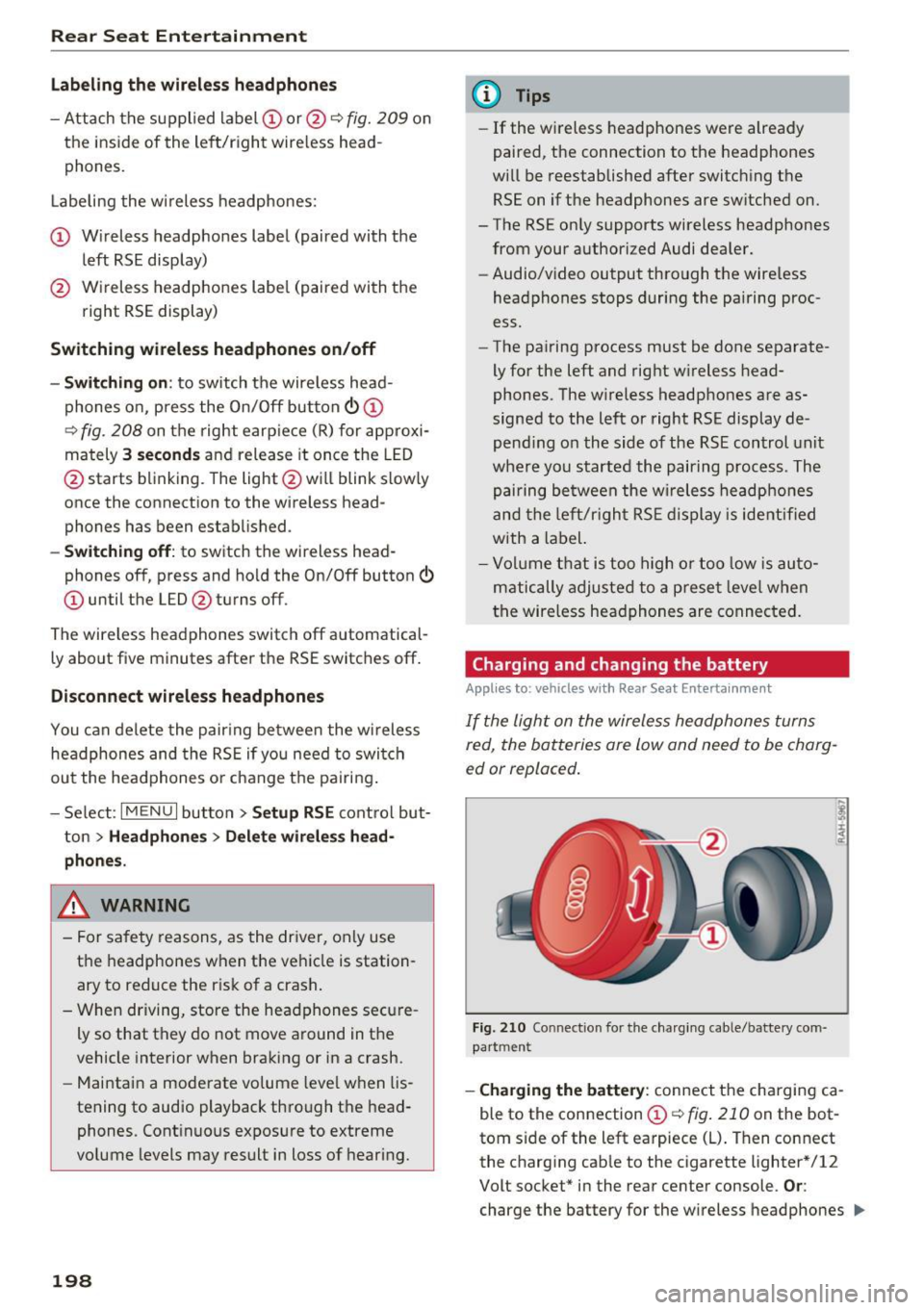
-Attach the supplied label CD or@ c::> fig. 209 on
the inside of the left/right wire less head
phones.
La beling the w ireless headphones:
CD Wireless headphones label (paired with the
left RSE display)
@ Wireless headphones label (paired with the
right RSE display)
Switching wireless headphones on/off
- Switching on:
to switch the wire less head
phones on, press the On/Off button
CD
9 fig. 208 on the right earpiece (R) for approxi
mately
3 seconds and release it once the LED
@ starts blinking . The light @will blink s lowly
once the connection to the wireless head phones has been established.
- Switching off : to switch the wireless head
phones off, press and hold the On/Off button
CD until the LED @turns off.
The wireless headphones switch off automatical ly about five minutes after the RSE switches off.
Disconnect wireless headphones
You can delete the pairing between the wireless
headphones and the RSE if yo u need to switch
out the headphones o r change the pairing .
- Select:
I M ENU I button> Setup RSE control but
ton
> Headphones > Delete wireless head
phones.
A WARNING
- For safety reasons, as the driver, only use
the headphones when the vehicle is station
ary to reduce the r isk of a crash .
- When driving, store the headphones secure
ly so that they do not move around in the
vehicle interior when braking or in a crash.
- Maintain a moderate volume leve l when lis
tening to audio playback through the head
phones. Continuous exposure to extreme
volume levels may result in loss of hearing.
198
-
@ Tips
-If the wire less headphones were already
paired, the connection to the headphones
will be reestablished after switching the
RSE on if the headphones are sw itched on.
- The RSE only supports wireless headphones
from your authorized Audi dealer.
- Audio/video output through the wire less
headphones stops during the pairing proc
ess.
- The pairing process must be done separate
ly for the left and right w ireless head
phones. The wireless headphones are as
signed to the left or right RSE display de
pend ing on the side of the RSE control unit
where you started the pairing process. The
pairing between the wireless headphones
and the lef t/r ight RSE display is ide ntifi ed
with a label.
- Volume that is too high or too low is auto
matically adjusted to a preset leve l when
the wireless headphones are connected.
Charging and changing the battery
Applies to: vehicles with Rear Seat Entertainment
If the light on the wireless headphones turns
red the batteries are low and need to be charg-
,
ed or replaced .
Fig. 210 Connec tion for the charg ing cable/battery com
partm ent
-Charging the battery : connect the charging ca
ble to the connection
CD c::> fig . 210 on the bot
tom side of the left earpiece (L) . Then connect
the charging cable to the cigarette lighter * /12
Volt socket* in the rear center console.
Or:
charge the battery for the wireless headphones .,.
Page 201 of 354

0 co .... N ,..... N .... 0 0 :c '
Audi music interface ¢
page 185.
-Ch angin g th e batt erie s: turn the cover @
¢ fig. 210 on the left earpiece (L) to the left/
right and change the batteries as labeled in the
battery compartment. Then attach the cover
back on to the left earpiece (L).
You can identify the charge status of the battery
¢
table on page 199 based on the blinking
speed
of the L ED in the charging cable connec
tion ©¢
fig. 210 .
Blinking fre- Charge status
quency
Blinking The batteries are charging.
Remains on The batteries are charged.
Blinking An error occurred while charg-
quickly ing .
..&, WARNING
-Do not use damaged rechargeable batteries.
T h is increases the r isk of an explos ion.
- T he headphones can become warm when
the batteries a re charg ing and increase the
risk of inj ury.
- Do not cha rge standard batteries with the
charg ing cable. This increases the risk of an
exp losion .
- Be careful when using the c igarette lighter.
Inattentive or unsupervised use of the c iga
ret te lighter can cause burns.
- T he cigarette lighter/sockets and any elec
trical accessories connected to them func
tion only when the ignition is switched on .
Using the cigarette lighter/sockets or elec
trical accessories incorrectly can lead to se rious injur ies or cause a f ire. To reduce the
risk of injuries, never leave children unat
tended in the vehicle with the vehicle key.
(D Note
- Do not charge the batteries in the wireless
headphones when the engine is not run
ning. This w ill dra in the vehicle battery.
- For wireless headphones, only use batteries
that are approved for that type of device,
for example NiMH batteries with a min i-
R ear S eat Ent ertainm ent
mum capacity of 550 mAh in AAA size that
are suitable for quick charging.
~ For the sa ke of the environment
Batter ies contain polluting substances. They
must be disposed of using methods that wi ll
not harm the environment. Do not dispose of
them in househo ld trash .
(D Tips
The charging time for the included rechargea
ble batteries is approximate ly three to four
hours and may increase by approximately 25
percent if the batteries are in use while charg
ing .
Headphones connected by cable
App lies to: vehicles wit h Rear Seat Enterta inmen t
The headphone connections ore located on the
RS£ control uni t.
Fig. 211 Conn ecting w ired headphones
"'I nsert th e headphone connecto r into the left or
r ight jack ©¢
fig. 211 on the RSE control pan
el.
The unit is equ ipped w ith 3.5 mm stereo jacks .
The w ireless headphones sw itch off automatical
ly about five minutes after the cable headphones
are connected .
(D Tips
Volume that is too high or too low is auto matically ad justed to a preset level when the
wired headphones are connected .
199