warning light AUDI A8 2017 Workshop Manual
[x] Cancel search | Manufacturer: AUDI, Model Year: 2017, Model line: A8, Model: AUDI A8 2017Pages: 354, PDF Size: 88.68 MB
Page 116 of 354

Parking systems
Parking systems
General information
Applies to: vehicles with parking system plus/rearview cam
era/peripheral camera
Depending on your vehicle's equipment , various
parking aids will help you when parking and ma
neuvering.
The
parking system plus assists you when park
ing by audibly and visually indicating objects de
tected in front of and behind the vehicle
¢page 115.
The rearview camera shows the area behind the
vehicle in the Infotainment system display. This
display assists you when you are cross or parallel parking
¢ page 116. The parking system plus
functions are also available
¢ page 115.
The peripheral cameras give various views to
help you when parking or maneuvering
¢ page 119. The parking system plus functions
are also available
¢page 115.
& WARNING
-Always look for traffic and check the area
around your vehicle by looking at it directly
as well. The parking system cannot replace
the driver's attention. The driver is always
responsible when entering or leaving a park
ing space and during similar maneuvers .
- Please note that some surfaces , such as
clothing, are not detected by the system .
- Sensors and cameras have blind spots in
which people and objects cannot be detect
ed . Be especially cautious of small children
and animals .
- The sensors can be displaced by impacts or
damage to the radiator gr ille, bumper,
wheel housing and the underbody . The park
ing system may be impaired as a result.
Have an authorized Audi dealer or author
ized Audi Service Facility check their func
tion .
- Make sure the sensors are not obstructed by
stickers, deposits or other materials. If they
are, the sensor function could be impaired.
For additional information on cleaning, see
c:> page 306.
114
(D Note
-Some objects are not detected or displayed
by the system under certain circumstances:
- Objects such as barrier chains, trailer draw
bars, vertical poles or fences
- Objects above the sensors such as wall ex
tensions
- Objects with certain surfaces or structures
such as chain link fences or powder snow
- If you continue driving closer to a low ob
ject, it may disappear from the sensor range. Note that you will no longer be
warned about th is obstacle.
(D Tips
- The system may provide a warning even
though there are no obstacles in the cover
age area in some situations, such as:
- certain road surfaces or when there is tall
grass.
- external ultrasonic sources such as from cleaning vehicles .
- in heavy rain, snow, or thick vehicle ex
haust.
- We recommend that you practice parking in
a traffic -free location or parking lot to be
come familiar with the system . When doing
this, there should be good light and weath
er conditions.
- You can change the volume and pitch of the
signals as well as the display¢
page 124.
-Please refer to the instructions for towing a
trailer located in
¢page 124.
-What appears in the infotainment display is
somewhat time-delayed.
- The sensors must be kept clean and free of
snow and ice for park aid to operate .
Page 128 of 354
Intelligent Technology
Intelligent Technology
Electronic Stabilization
Control (ESC)
Description
The ESC increases driving safety . It reduces the
risk of s lipping and improves driving stabi lity.
ESC detects critical situations such as when the
veh icle is oversteer ing and understeering or the
wheels are spinning. The vehicle is stabilized by
apply ing the brakes or reducing eng ine torque .
When ESC engages, the
Ji] ind icator light blinks
in the inst rument cluste r.
The fo llow ing systems are integrated in the ESC:
Anti -lock b raking system (ABS)
ABS prevents the whee ls from locking when brak
i n g . The vehicle can sti ll be steered even d uring
hard brak ing. Apply steady press ure to the brake
pedal. Do not pump the pedal. A puls ing in the
brake pedal indicates that the system is acting to
stabilize the vehicle.
Brake a ssi st sy stem
The brake assist system can dec rease braking dis
tance. It increases brak ing power when the driver
presses the brake pedal quick ly in emergency sit
uations . You must press and hold the brake pedal
until the dangerous situat io n is over . In veh icles
w ith adapt ive c ruise control*, the bra ke assis t
system is more sensitive if the distance detected
to the veh icle dr iv ing ahead is too small. On
ve hicles w ith act ivated and functi oni ng night vi
sion assist*, the brake assist system can respond
more sensit ively if there is a warning .
Anti-slip regulation (ASR)
A SR red uces eng ine power when the d rive wheels
begin s pinning and ad apts the force to the road
conditions. This makes it easier to sta rt, acceler
ate and dr ive up hi lls.
Electronic differential lock (EDL )
EDL applies the brakes to a wheel that sta rts
sp inning and t ransfe rs t he d rive powe r to t he
o ther d riving w heels. This f unct ion is not av aila
b le at higher speeds .
126
In extreme cases, ED L automat ically switches off
to keep the b rake on the braked whee l from over
heating. The veh icle is still working correct ly. ED L
will switc h on again automatically when condi
tions have returned to normal.
Steering recommendat ion
The E SC he lps to stabili ze the vehicle by changing
the steering torque.
I n veh icles with dyna mic steer ing*, ESC a lso
helps to sta bilize the s teer ing in cr it ica l situa
tions.
Selective wheel torque control
Se lective wheel to rque cont rol is used when d riv
i ng on curves.
The fro nt wheel on the ins ide of the curve or bo th
whee ls on the inside of the curve are braked se
l ectively as needed. This allows more pre cise d riv
i ng in cu rves. The applicab le system may no t ac ti
vate when dr iv ing in we t or snowy condi tio ns.
Automatic post -collision braking system
The "automat ic post-coll is io n braking system"
can help to reduce the risk of sl iding and of addi
tiona l co llisions after an acc iden t. If the a irbag
c ontro l modu le detects a collision above a cer tain
vehicle speed, the ve hicle is braked by the ESC.
The veh icle does not b rake automatically if:
- the drive r presses the acce lerator pedal, or
- the bra king force generate d by the pressed
brake pedal is greater than the b raking force
that would be in itiated by the system, or
- the ESC, the bra ke system or the vehicle electri
cal system are not functioning.
A WARNING
- The ESC and its integ rated systems can not
overcome the lim its imposed by natura l
p hys ica l laws. Th is is es pec ially impor tan t
on s lippery or wet roads. If the system s be
g in a cting to stabilize yo ur vehicle, you
should immedi ately alte r your speed to
match the road and tra ffi c conditions. Do
not let t he i ncreased safety provi ded tempt
Page 129 of 354
0 co .... N ,..... N .... 0 0 :c '
your risk of a co llision.
- Please note the risk of a co llision increases
when driving fast, especially through curves
and on slippery or wet roads, and when driv
ing too close to objects ahead. The ESC and
its integrated systems cannot always pre
vent collisions - there is still a r is k of acci
dents!
- Press the accelerator pedal carefully whe n
accele rating on even, s lippery surfaces such
as ice and snow. The d rive wheels can spin
Switching on and off
Intellig ent Technology
even when these control systems a re insta l
led and this can affect driving stability and
increase the risk of a collision.
@ Tips
- The ABS and ASR only function correct ly
when a ll four wheels have a simi la r wear
condition. Different tire sizes can lead to a
reduction in engine power.
- You may hear noises when the systems de
scribed are working.
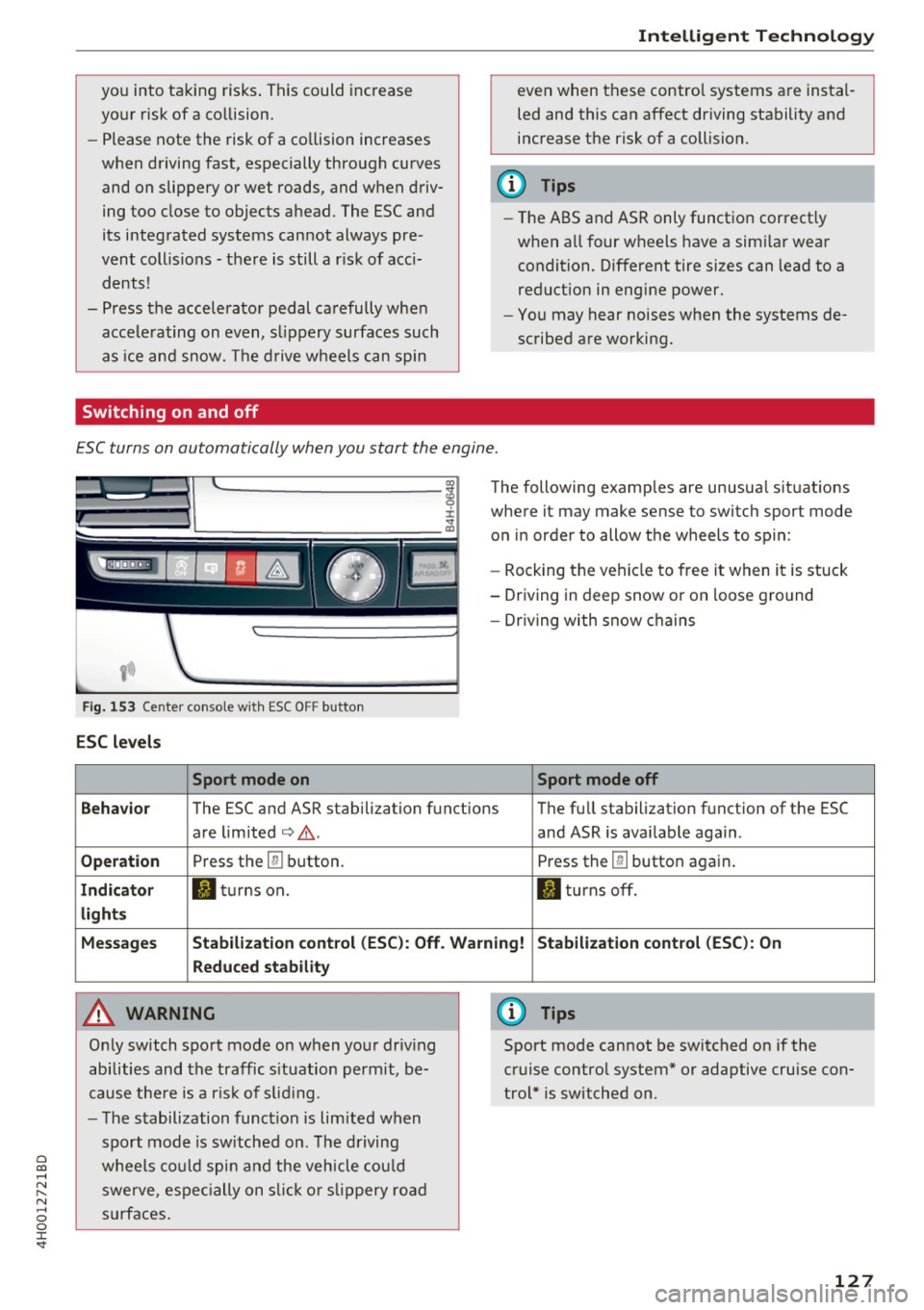
ESC turns on automatically when you start the engine .
Fig. 1 53 Center co nso le w it h ESC O FF button
ESC le vels
Sport mode on
The following examples are unusua l situations
where it may make sense to switch sport mode
on in order to allow the wheels to spin:
- Rock ing the vehicle to free it when it is stuck
- Driving in deep snow o r on loose g round
- Dr iving with snow chains
Sport mode off
Behavior
The ESC and ASR stabilization functions The full stabilization function of the ESC
are lim ited
¢ .&. . and ASR is ava ilable aga in .
Operation Press the [!I button. Press the [!I button again.
Indicator II tu rns on. II turns off .
lights
Messages Stabilization control (ESC ): Off. Warning! Stabilizat ion control (ESC ): On
Reduced stability
A WARNING
On ly switch spo rt mode on when yo ur driv ing
abilities and the traffic s ituation permit, be
cause t he re is a r is k of s lid ing .
- T he stabilization func tion is limited when
spo rt mode is sw itched on. The driving
w heels co uld sp in and the veh icle cou ld
swerve, espec ially on s lick o r slip pery roa d
su rf a ces .
(D Tips
Sport mode cannot be switched on if the
cruise control system* or adaptive cruise con
tro l* is switched on .
127
Page 130 of 354
Intelligent Technology
Brakes
New brake p ads
New b rake pads do no t achieve the ir full b raking
effect during the firs t 250 mi (400 km) . They
m ust be "broken in" first . The b reak -in period can
be considerably longe r for vehicles with ceram ic
brake rotors* . However, you can compensate for
the slightly reduced braking force by pressing
firm ly on the brake pedal. Avo id heavy braking
during the break-in period .
Wear
Brake pad wear depends largely on the way the
veh icle is driven and on operat ing cond itions.
This is especially true if you are driving frequently
in the c ity and on curves or with a sporty driving
style .
Operating noise
Noises may occur when braking depend ing on the
speed, braking force and outs ide cond itions such
as temperature and humidity.
Noises may become more appare nt at lowe r
speeds due to the nature of the materia ls in the
ceramic brake rotors*.
Effect of water and road salt
I n cer tain s ituations, for example a fter driving
through water, in heavy rain, afte r ove rnig ht con
densation or after washing your car, the braking
effect can be red uced by moisture or ice on the
brake rotors and b rake pads . The brakes must be
"dr ied" first w ith a few care ful b rake applica
tions .
At higher speeds and with the windshie ld wipers
turned on, the brake pads press aga inst the brake
rotors for a short amount of time. T his action,
which is no t felt by the driver, happens at regular
i n tervals a nd ensu res a better react ion time for
the bra kes in wet weather.
The braking effect can also be reduced if you are
driving on salted roads a nd you do not apply the
brakes fo r long pe riods of time. The laye r of salt
o n th e brake roto rs and pads mus t be wo rn off
fi rs t when the brakes are app lied.
128
D ue to its s urface, the ce ram ic brake rotor * ab
sorbs moisture in ce rtain situations. The refore,
there will tempora rily be less brak ing fo rce than
whe n the brakes are d ry . You can compensate for
th is by press ing the brake pedal harder.
Corrosion
Leav ing the ve hicl e pa rked for long periods of
time , low mileage and avoiding heavy b raking
can contrib ute to corros ion on the b rake roto rs
and to dirty brake pads.
If you usua lly avoid heavy bra king or if there is
cor rosion p resent, occasiona l heavy brak ing at
high speeds is recommended to clean the brake
rotors and pads
c> ,& .
Brake system malfunction
if you no tic e th at the b rake peda l t ravel has sud
denly
increase d, then a bra ke circuit in the dua l
c ir cuit b rake system may have malfunctioned.
D rive to an authorized A udi dealer or authorized
Audi Service Facility immed iate ly to have the
problem corrected . On the way there, drive w ith
reduced sp eed and keep in m ind that you wilt
need a longe r distance to stop and you will need
to press the b rake peda l ha rder.
Low b rake fluid level
When the brake fluid level is low, malfunctions in
the b rake system may occur . The brake fl uid level
i s e lec tronically moni to red.
Brake booster
The brake booster amp lifies the pressure you ap
ply to the brake pedal. It only wor ks when the en
gine is running.
A WARNING
- On ly app ly the brakes for the purpose of
cleani ng the bra ke sys tem w hen road and
t raffic cond itions permit. You must not en
da nger ot her roa d users . T h is i ncreases the
r isk of an acci den t.
-
- Never le t th e ve hicle roll while t he engi ne is
stop ped bec ause this increa ses the r is k of an
a cciden t. ..,.
Page 132 of 354

Intelligent Technology
The stee ring wheel will be easy to move after
starting the engine . Re-initialization might be
necessary if the steering whee l was moved hard
t o the lef t and right wh ile the vehicle was not
mov ing. The display turns off if the initialization
was successful.
(D Tips
- If the. or
1;:r- ij ind icator light only stays on
for a short time, you may continue driving.
- The dynamic steering stability systems
c> page 126 are not available in the event of
a system ma lfunction.
- For additional informat ion on dynamic
steering, refer to
c> page 110.
All wheel drive (quattro)
In all wheel drive, all four wheels are powered .
General information
In a ll wheel drive, the driving power is divided be
tween a ll four wheels . T his happens automatical
ly depending on your driving behavior as well as
t he current road cond itions. Also see
c> page 126, Electronic Stabilization Control
(ESC) .
With the sport differential*, power distri
bution to the rear whee ls is variable and can be
ad ju sted using the dr ive select
c> page 110.
The all wheel drive concept is designed for h igh
eng ine power. Your ve hicle is exceptionally pow
erful and has excellent driving characterist ics
both under norma l dr iv ing condit ions and on
snow a nd ice. Always read and fo llow safety pre
cautions
c> .&. .
Winter tires
By us ing all w heel d rive , yo ur vehicle has good
forward mot ion w ith standa rd t ires in winter con
d itions . However, in winter we recommend us ing
w in ter o r all season t ires o n all fo ur wheels, be
cause this will improve the b raking effect .
Snow chains
If there are snow chai n laws, snow chains must
a lso be used on vehicles with all w heel d rive
c> page 298, Snow chains .
130 Replacing tires
Fo
r vehicles wi th a ll wheel d rive, o nly wheels with
the same ro ll ing circ umfe rence sho uld be used .
Avo id using tires with different tread depths
c> page 290, New tires or wheels .
Offroad vehicle?
You r A udi is not an off road vehicle -there is not
enough ground clearance. For th is reason, avoid
difficult terrain .
A WARNING
- Also, in ve hicles with all wheel drive, adapt
your driving sty le to the current road and
traffic conditions. Do not let the increased
safety provided tempt you into taking r isks,
because this increases the risk of an acc i
dent.
- The braking ab ility of your vehicle is limited
to the traction of the wheels . In this way, it
is not different from a two wheel d rive vehi
cle. Do not be tempted to accelerate to a high speed when the road is s lippery, be
c a use th is i ncreases the r is k of an accident.
- Note that on wet st reets, the front wheels
c a n " hydroplane " if driv ing at speed s tha t
are too high. Unlike front wheel drive
vehicles, t he engine does not rev higher sud
de nly when the vehicle begins hydroplan ing.
For this reason, adapt yo ur speed to the
road conditions to reduce the risk of an acci
dent.
Energy management
The starting ability is optimized
The energy management system manages the
electrical energy distribution and optimizes the
availability of electrical energy for starting the
engine.
When a vehicle with a conventiona l energy sys
tem is no t drive n for a long t ime, the veh icle bat
te ry is drained by equ ipment (fo r example, the
i mmob ilizer). In certa in circ umstances, there
could may not be enough energy to start the en
gine.
Page 143 of 354
0 co .... N ,..... N .... 0 0 :c '
Appl ies to: vehicles with vo ice recog nitio n system
You con operate many Infotainment functions
conveniently by speaking .
Requirement: the ignition and the MM I must be
switched on~
page 134 , there must be no phone
call in progress and the parking system m ust not
be active .
~ Switching on : briefly press the~ button @
~ page 11, fig. 7 on the m ultif unction steering
whee l* and say the desired command after the
Beep .
~ Switching off : press and hold the l2;J button .
Or: press any button on the MMI control panel.
~ Canceling : press the 10, I button and say a new
command.
Or : say the command Canc el.
Input as sistance
The system gu ides you through the input with
visua l and audio feedback .
-Vi su al input a ssistance : after turning on voice
recognition, a d isplay with a select ion of possi
ble commands appears in the Infotainment dis
play . The command d isplay can be turned on or
off in the ma in menu using the
S etup MMI con
t rol button.
- Aud io input assi stance : to have the possible
commands read, turn the voice recognition sys
tem o n and say
Help .
For the system to underst and you:
Speak clearly and distinct ly at a normal volume.
Speak louder when driving faster.
Emphasize the words in the commands even ly
and do not leave long pauses .
D o not speak a command when the voice recogni
tion system is mak ing an anno uncement.
C lose the doors, the windows a nd the sunroof* to
reduce background noise . Make su re that passen
gers are not speaking when you are giving a voice
command.
Voice recognition system
Do not d irect the air vents toward the hands free
microphone, which is on the roof headliner near
the front inte rior lights .
Only use the system from the dr iver's seat be
ca use the hands free microphone is directed to
ward that seat .
Additional settings
Additional settings, such as individual speech
training
based on yo ur voice, the Command dis
play
or the prompt volume , can be adjusted in
the main men u using the
Setup MMI control but
ton
~ page 205.
A WARNING
--Direct your full attention to dr iv ing. As the
driver, you have complete responsibility for
safety in traff ic. Only use the functions in
such a way that you a lways maintain com
plete control over your vehicle in all traffic
situa tions.
- Do not use the voice recognition system in
emergencies beca use your voice may change
in stressfu l situations. It may ta ke longe r to
dia l the numbe r or the sys tem may not be
a ble to dia l it at all. Dia l the emergency
number manually.
@ Tips
- The d ialog pauses w hen the re is a n incom
ing phone call and will con tinue if yo u ig
nore the cal l. T he d ia log ends if you answer
the ca ll.
- Yo u can select an item in the list using ei
ther the vo ice recogn it io n sys tem or the
cont rol knob.
Command overview
information
Applies to: vehicles with voice recogn it ion system
The following overv iews describe the commands
that can be used to operate the MMI using the
vo ice recognit io n system .
Alternative commands are separated by a
" I", for
example, say:
Telephone I (or) Na vigation I (or)
Rad io . .,..
141
Page 162 of 354
Audi connect
- Destination setup in your MMI using your
myAudi A cco unt ¢ page 167 or online map
v iew
¢ page 171.
-Traffic inf orm ation (Sir ius ): rece ive informa
tion about accidents, road construction and
other incidents
¢ page 175
Audi connect services on the phone
App lies to: ve hicles w ith Audi co nnect
The fo llow ing Audi connect services are currently
ava ilable :
- Storing contacts on your computer using your
m yAudi Acco unt and loading the contacts into
the MMI directory
¢ page 153
Wi-Fi hotspot
Appl ies to: ve hicles w ith Audi co nnect
You can use the MMI as a Wi-Fi hotspot to con
nect up to eight wireless devices to the Internet. While driving, restricted use of non-secured,
light, small wireless devices is only possible from the rear of the vehicle.
.,. Select: the (fa) button > Setting s control but-
ton
> W i-Fi setting s.
The follow ing settings can be modified in the Wi
Fi setting s
menu:
Wi-Fi acti ve
The MMI Wi -Fi hotspot is deactivated at the fac
tory. Your Wi-Fi hotspot must be activated and
visible to establish a connection between your ve h icle and your wireless device.
- Off : the MMI Wi-Fi hotspot is deactivated. An
Internet connection is not possib le.
- Vis ible : the MMI Wi-Fi hotspot is active and can
be used to connect to the Internet.
- In visi ble: the MMI Wi -Fi hotspot is active but
not visible to other devices. A connection can
not be established with a new w ireless device.
The Wi -Fi connection between your vehicle and
your wireless device ( laptop, cell phone) is en
crypted . To establish a connection, you must en
ter the following settings when setting up your
wire less device. You can change them if necessa
ry.
1 6 0 -
Netwo rk ID (SSID ):
name o f the Wi -Fi net
work .
-Enc ryption t ype : WEP, WPA or WPA2
- Pa ssword : depending on the encryp tion type, a
passwo rd may be generated in the MMI that is
used to encrypt the wireless connection. The
password can be changed . Be sure to se lect a
secure password. For the WEP encrypt ion type,
the password must be exactly 13 characters.
For the WPA or the WPA2 encrypt ion types, the
password must be at least
8 (maximum of 63)
characters .
-Apply sett ings : the modified settings are ap
plied to the MMI. You must then update the
changes in your mob ile w ireless device .
A WARNING
-As the d river, do not allow usage of the Wi
Fi hotspot to distract yo u from driv ing , as
this could increase the r isk of an accide nt.
- It is o nly safe to use laptops and similar mo
bi le devices when the veh icle is stationary
because, like a ll loose objects, they cou ld be
thrown around the inside of the vehicle in a
crash and cause serious injuries . Store these
types of devices securely while driving.
- Do not use any wire less devices on the front
seats within range of the airbags while dr iv
ing. Also read the warnings in the chapter
¢page 207.
(D Note
-Under some conditions, certain mobile devi
ces and ope rating systems may automati
cally sw itch from your vehicle's Wi-Fi hot
spot to the device's mobile data connection.
I n that event, standard text and data usage
rates would apply while the device's mobile
data connection is in use. Please refer to
doc umentation provided by your mobile de
vice's manufacture and your data car rier for
d etails, related te rms and pr iva cy sta te
ment .
- Yo u ar e responsib le for all precautions ta k
en for data pro te ct ion, anti-virus protection
and protection against loss of data on mo
bile devices that are used to access the In-
ternet through the Wi-Fi hotspot. ..,.
Page 167 of 354
C) C0 ....
"' " "' .... 0 0 :r
Opening navigation
Applies to: vehicles with navigation system
The navigation system directs you to your desti
nation, around traffic incidents and on alterna tive routes,
if desired.
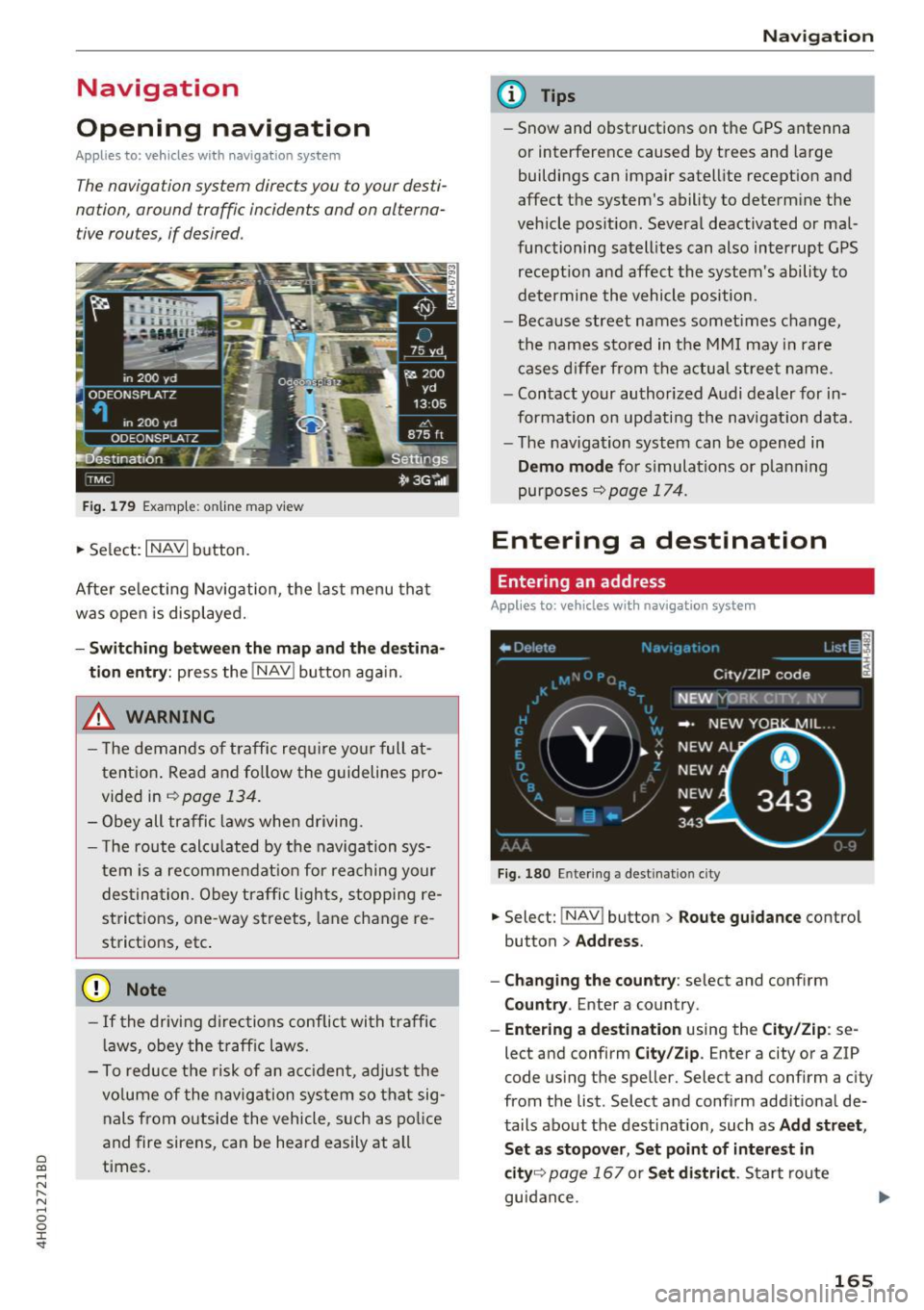
Fig . 179 Examp le: online map view
• Select: INAVI button.
After se lecting Navigation, the last menu that
was open is displayed.
- Sw itc hin g bet ween the m ap and th e dest ina
t io n entr y:
press the !NAV ! button aga in.
,& WARNING
- T he demands of traffic require yo ur full at
tent ion. Read and fo llow the guidelines pro
vided in
~ page 134.
- Obey all traffic laws whe n driving.
- T he route calcu lated by the navigation sys-
tem is a recommendat ion for reaching your
des tination. Obey traffic lights, stopping re
strictions, one -way streets, lane change re
strictions, etc .
(D Note
- If the driving directions conflict with traffic
l aws, obey the traff ic laws.
- To reduce the risk of an ac cident, adjust the
vo lume of the navigation system so that sig
nals from outside the vehicle, such as po lice
and fire sirens, can be heard easily at all
times.
Na vigat ion
(D Tips
-Snow and obstructions on the GPS antenna
or interference caused by trees and large
buildings can impair satellite reception and
affect the system's ability to determine the
vehicle position. Several deactivated or mal
functioning satell ites can also interrupt GPS
recept ion and affect the system's ability to
determine the vehicle position.
- Because street names somet imes change,
the names stored in the MMI may in rare
cases d iffer from the actual street name.
- Contact your authorized Audi dealer for in
formation on updating the navigation data.
- The navigation system can be opened in
Dem o m od e for s imulations or p lanning
purposes
9 page 174.
Entering a destination
Entering an address
Applies to : vehicles wit h navig ation system
Fig. 180 Entering a destination city
• Select: !NAV ! button> Route guida nce control
button
> Addr ess .
- Chan ging the c ount ry :
select and conf irm
C ount ry. Enter a country.
-Ent ering a d estin ation using the C ity/Zi p: se
lect and confirm
City/Zi p. Enter a city or a ZIP
code using the speller. Select and confirm a city
from the list . Select and confirm additional de
tails about the destinat ion, such as
Add str ee t,
S et as s topo ver, Set po int of int eres t in
cit y9
page 167 or S et di str ict. Start route
guidance .
165
Page 200 of 354
Rear Seat Entertainment
Labeling the wireless headphones
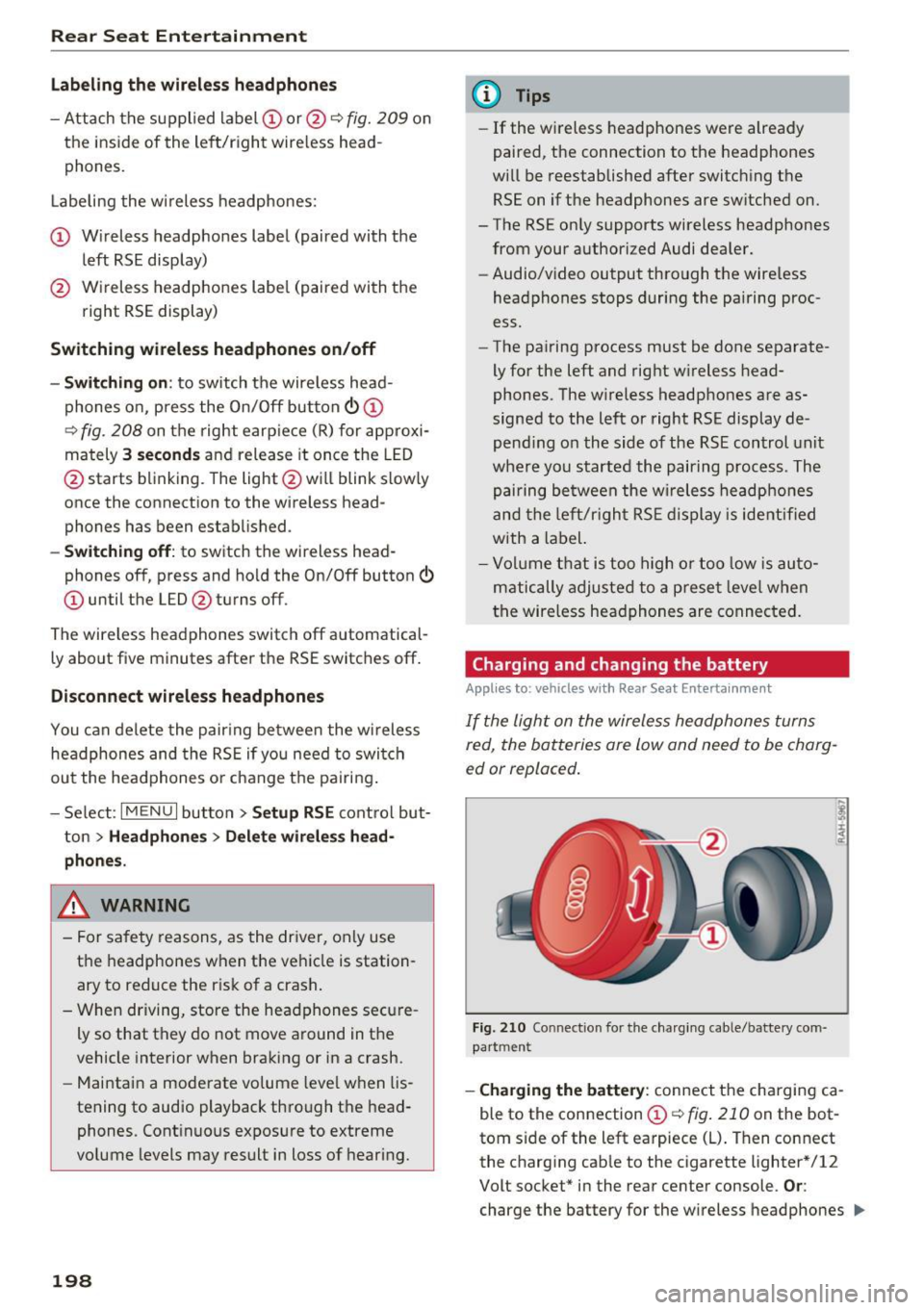
-Attach the supplied label CD or@ c::> fig. 209 on
the inside of the left/right wire less head
phones.
La beling the w ireless headphones:
CD Wireless headphones label (paired with the
left RSE display)
@ Wireless headphones label (paired with the
right RSE display)
Switching wireless headphones on/off
- Switching on:
to switch the wire less head
phones on, press the On/Off button
CD
9 fig. 208 on the right earpiece (R) for approxi
mately
3 seconds and release it once the LED
@ starts blinking . The light @will blink s lowly
once the connection to the wireless head phones has been established.
- Switching off : to switch the wireless head
phones off, press and hold the On/Off button
CD until the LED @turns off.
The wireless headphones switch off automatical ly about five minutes after the RSE switches off.
Disconnect wireless headphones
You can delete the pairing between the wireless
headphones and the RSE if yo u need to switch
out the headphones o r change the pairing .
- Select:
I M ENU I button> Setup RSE control but
ton
> Headphones > Delete wireless head
phones.
A WARNING
- For safety reasons, as the driver, only use
the headphones when the vehicle is station
ary to reduce the r isk of a crash .
- When driving, store the headphones secure
ly so that they do not move around in the
vehicle interior when braking or in a crash.
- Maintain a moderate volume leve l when lis
tening to audio playback through the head
phones. Continuous exposure to extreme
volume levels may result in loss of hearing.
198
-
@ Tips
-If the wire less headphones were already
paired, the connection to the headphones
will be reestablished after switching the
RSE on if the headphones are sw itched on.
- The RSE only supports wireless headphones
from your authorized Audi dealer.
- Audio/video output through the wire less
headphones stops during the pairing proc
ess.
- The pairing process must be done separate
ly for the left and right w ireless head
phones. The wireless headphones are as
signed to the left or right RSE display de
pend ing on the side of the RSE control unit
where you started the pairing process. The
pairing between the wireless headphones
and the lef t/r ight RSE display is ide ntifi ed
with a label.
- Volume that is too high or too low is auto
matically adjusted to a preset leve l when
the wireless headphones are connected.
Charging and changing the battery
Applies to: vehicles with Rear Seat Entertainment
If the light on the wireless headphones turns
red the batteries are low and need to be charg-
,
ed or replaced .
Fig. 210 Connec tion for the charg ing cable/battery com
partm ent
-Charging the battery : connect the charging ca
ble to the connection
CD c::> fig . 210 on the bot
tom side of the left earpiece (L) . Then connect
the charging cable to the cigarette lighter * /12
Volt socket* in the rear center console.
Or:
charge the battery for the wireless headphones .,.
Page 201 of 354

0 co .... N ,..... N .... 0 0 :c '
Audi music interface ¢
page 185.
-Ch angin g th e batt erie s: turn the cover @
¢ fig. 210 on the left earpiece (L) to the left/
right and change the batteries as labeled in the
battery compartment. Then attach the cover
back on to the left earpiece (L).
You can identify the charge status of the battery
¢
table on page 199 based on the blinking
speed
of the L ED in the charging cable connec
tion ©¢
fig. 210 .
Blinking fre- Charge status
quency
Blinking The batteries are charging.
Remains on The batteries are charged.
Blinking An error occurred while charg-
quickly ing .
..&, WARNING
-Do not use damaged rechargeable batteries.
T h is increases the r isk of an explos ion.
- T he headphones can become warm when
the batteries a re charg ing and increase the
risk of inj ury.
- Do not cha rge standard batteries with the
charg ing cable. This increases the risk of an
exp losion .
- Be careful when using the c igarette lighter.
Inattentive or unsupervised use of the c iga
ret te lighter can cause burns.
- T he cigarette lighter/sockets and any elec
trical accessories connected to them func
tion only when the ignition is switched on .
Using the cigarette lighter/sockets or elec
trical accessories incorrectly can lead to se rious injur ies or cause a f ire. To reduce the
risk of injuries, never leave children unat
tended in the vehicle with the vehicle key.
(D Note
- Do not charge the batteries in the wireless
headphones when the engine is not run
ning. This w ill dra in the vehicle battery.
- For wireless headphones, only use batteries
that are approved for that type of device,
for example NiMH batteries with a min i-
R ear S eat Ent ertainm ent
mum capacity of 550 mAh in AAA size that
are suitable for quick charging.
~ For the sa ke of the environment
Batter ies contain polluting substances. They
must be disposed of using methods that wi ll
not harm the environment. Do not dispose of
them in househo ld trash .
(D Tips
The charging time for the included rechargea
ble batteries is approximate ly three to four
hours and may increase by approximately 25
percent if the batteries are in use while charg
ing .
Headphones connected by cable
App lies to: vehicles wit h Rear Seat Enterta inmen t
The headphone connections ore located on the
RS£ control uni t.
Fig. 211 Conn ecting w ired headphones
"'I nsert th e headphone connecto r into the left or
r ight jack ©¢
fig. 211 on the RSE control pan
el.
The unit is equ ipped w ith 3.5 mm stereo jacks .
The w ireless headphones sw itch off automatical
ly about five minutes after the cable headphones
are connected .
(D Tips
Volume that is too high or too low is auto matically ad justed to a preset level when the
wired headphones are connected .
199