95 RON AUDI A8 2018 User Guide
[x] Cancel search | Manufacturer: AUDI, Model Year: 2018, Model line: A8, Model: AUDI A8 2018Pages: 356, PDF Size: 54.71 MB
Page 23 of 356
u. co .... N
" N .... 0 0 :c '
• Electrical system: malfunction! Battery is
not being charged
There is a malfunction in the alternator or the ve
hicle electrical system .
Drive to an autho rized Audi dea ler or authorized
Aud i Service Facility immediately. Because the ve
hi cle battery is discharg ing, turn off all unneces
sary electrical equipment s uch as the radio . See
a n author ized A udi dealer or authorized Audi
Service Facility if the battery charge level is too
l ow .
(•) Low battery charge : Battery will be charged
while driving
The start ing ability may be impaired .
If th is message turns off after a litt le while, the
vehicle battery charged enough wh ile driving.
If the message does not turn off, have an author
ized Audi dealer or authorized Audi Service Facili
ty repair the malfunction.
~ Engine
• Engine stopped: No power steering and
brake support.
There is a malfunction in the engine or in the fue l
supp ly system.
M ore force is needed to steer and brake the mov
ing vehicle when the engine is stopped .
If the ve
hicle is rolling, try to bring it to a stop off to the
side from moving traffic. See an authorized Aud i
dealer or authorized Aud i Serv ice Facility for as
sistance .
A WARNING
-
If the engine stops while driving, you will
need to use more force to brake the vehicle.
This inc reases the risk of an accident. There
will still be power steering if the ignition is
switched on while th e vehicle is rolling and
there is sufficient battery charge. Otherwise,
you must use greater force when steering .
Cockpit overview
"1:::7: Engine oil pressure
• Turn off engine and check oil level
Stop the engine and do not cont inue driving .
Check the eng ine o il level
¢pag e 275.
- If the engine o il level is too low, add engine oil
¢ page 2 76. Only continue driving once the in
dicator light turns off .
-If the engine o il level is correct and the indica
tor light still turns on, turn the engine off and
do not cont inue driving. See an authorized Audi
dealer or authorized Audi Service Facility for as
sistance.
(D Tips
The o il pressure warning is not an oil leve l in
dicator. Always check the oil level regular ly.
~ , Engine oil level
.Please add oil immediately.
Add engine oil immediately ¢page 275.
l'I Add oil max . x qt (l). You may continue driv
ing
Add the displayed amount of oil immediately
¢page 275.
@ -Steering lock
• Do not drive vehicle: Steering defective
The re is a malfunction in the electron ic steer ing
loc k. You canno t turn the ign ition on.
Do
not tow your vehicle because it cannot be
stee red. See an authorized Audi dealer or author
ized Audi Service Facility for assistance.
!I! Steering lock: System fault Please contact
dealer
There is a malfunction in the e lectron ic steering
lock .
Drive to an authorized Audi dealer or authorized
Audi Service Facility immed iate ly to have the
malfunction corrected.
IJ>
21
Page 24 of 356
Cockpit overview
A WARNING
Do not tow your veh icle when there is a mal
function in the electronic steering lock
-this
increases the risk of an accident.
@-Engine start system
-
• Engine start system fault. Please contact
dealer
Do not switch the ignit ion off because you may
not be able to switch it o n aga in .
Drive to an authorized Audi dea ler or authorized
Aud i Serv ice Facility immediately to have the
malfunct io n corrected.
ml Engine start system fault. Please contact
dealer
There is a malfunction in the engine starting sys
tem .
Drive to an authorized Aud i dea le r or authorized
Aud i Service Facility immediately to have the
malfunction corrected .
0 Air suspension
• Air suspension: System fault You can contin
ue driving slowly (max. speed 35 mph)
There is a malfunction that can result in restrict
ed driving stability .
Drive to an autho rized Aud i dea le r or authorized
Aud i Service Facility immediately at a maximum
speed of 35 mph (60 km/h) to have the ma lf unc
tion corrected.
• Air suspension: Service mode. Vehicle can
only be moved with restrictions
Carefully drive to an author ized Audi dealer or
author ized Audi Service Facility immed iate ly to
have the serv ice mode deactivated.
rl Air suspension : System fault
There is a system malfunction that can result in
restricted driving stability or reduced ground
clearance.
22
Drive to an authorized A udi dealer or authorized
Audi Service Facility immediate ly to have the
malfunction corrected.
rl Air suspension: Vehicle too low Ground
clearance reduced
The ground clearance is very low due to a system
malfunction . Wait u ntil the air su spension sys
tem has restored normal gro un d clearance. Oth
erwise, conditions s uch as an uneven road surface
can lead to ve hicle damage.
;;.I C; Electronic Stabilization Control (ESC)
If the bl indicator light blinks while driving, the
ESC or ASR (Anti-Slip Regulation) is act ively regu
lating.
If the
Jjj indicator light turns on, the system has
switched the ESC off. In this case, you can switch
the ignit ion off and then on to switch the ESC on
again. The indicator light turns off when the sys
tem is functioning fully .
If the
II indicator light turns on, the ESC was
switched off using the
Im button Q page 12 7.
Stabilization control (ESC/ ABS): Fault! See
owner's manual
If the bl ind icat or light and the ABS indicato r
li ght
fJ] (U SA mode ls)/ [iJ (Canada models)
turn on and this message appears, there is a mal
function in the ABS system or electronic differen
tia l lock. This also causes the ESC to malfunction .
The brakes still function with their normal power, but ABS is not active .
Drive to an authorized Audi dealer or authorized
Audi Service Facility immediately to have the malfunction corrected.
A WARNING
If the la (USA mode ls) . (Canada mod
els) brake system indicator light turns on to
gethe r with the ABS and ESC indicator lights,
the ABS and ESC r egulating function may
ha ve malfunctioned. Functions that stabilize
the vehicle are no longer available. This could
cause the vehicle to swerve, which increases
Page 25 of 356
u. co .... N
" N .... 0 0 :c '
fully to the nearest a uthorized Audi dea ler or
authorized Audi Service Fac ility and have the
ma lf u nction corrected .
(D Tips
For additional information on ESC and ABS,
re fer to
c:> page 12 7.
i i !i.' Safety systems
The II (USA models)/ m (Canada mode ls) indi
cator l ight monitors the safety systems .
I f the
II (U SA mode ls)/ m (Canada models) in
d icator light turns on or blinks, the re is a mal
function in a safety system such as the airbag or belt tensioner system .
Drive to an autho riz ed Aud i dea le r or a uthori zed
Aud i Service Facility immediately to have the
malfunct ion corrected.
A WARNING
Have the ma lf u nct ion in the safety systems
inspected immediately . O therwise, the re is a
r is k th at the systems may not activate during
a co llision, which increases the risk of serious
injury or deat h.
Lt Brake booster
II Brake ser vo: limited functionalit y. You can
continue driving . Contact workshop
-
There is a malfunc tion in the brake booster. The
b ra ke booster is availab le, bu t its effec tiveness is
r educed. Braking be havior may be different from
h ow it normally functions and the brake peda l
may vibrate.
Dri ve to an autho rize d Aud i de aler o r a uth o rized
Aud i Service Faci lity immediately to have t he
malfunction corrected.
{ 0 } Brake pads
EiJ Brake pads!
The brak e pads are wo rn.
Coc kpit o ver view
Drive to an authori zed A udi dealer or authori zed
Audi Service Facility immediate ly to have the
bra ke pads checked .
Applies to : USA mode ls
T he EiJ indicator light turns on togethe r wi th the
1111 indicator light.
EPC Engine control (gasoline engine)
~ Engine control: system m
alfunction! Reduce speed. Please contact dealer
T he re is an eng ine contro l ma lf u nction.
Immed iate ly dr ive s low ly to an author ized A udi
dealer or au thor ized A udi Se rvice Fa cility to have
t h e mal func tion corrected.
o Malfunction indicator lamp (MIL)
The ma lf u nction indicator lamp ( MIL) is pa rt of
t h e On -Board D iagnost ic System (080 II). The
¢..ij c;ymbo l turns on when the ignition is sw itched
o n and turns off aga in once the engine is started
and run ning at a steady idle speed . This indicates
t h at the MIL is f unction ing cor rectly .
The ind icator light tu rns on if there is a malfunc
t ion in the engine electronics . See an authorized
Audi dealer or author ized A udi Service Fac ility to
have the malfunct ion cor rected . Fo r additional
i nforma tion, see
c:> page 25 .
The ind icator light can a lso turn o n if the fuel fill
er cap is not closed correctly
c:> page 2 70 .
!?' Engine speed limitation
App lies to : vehicles wit h engine speed limitatio n
(m Maximum engine speed XXXX RPM
The eng ine speed is automatically limited to the
RPM shown in the instrument cluster d isplay.
This protects the engi ne from over heat ing .
The eng ine speed limitation deactivates once the
engine is no longe r in the critical temperatu re
range and you have re leased the accelerator ped
al once .
If the engine speed limitation was activated by
an engine cont rol malfunction,
the ~ indicato r ..,
23
Page 27 of 356
u. co .... N
" N .... 0 0 :c '
Audi Service Facility immediately to have t he
mal funct ion corrected.
~ D Light/rain sensor
El Automatic headl ights / automatic wipe rs:
System fault
The light/rain sensor is malfunctioning.
The low beams remain swi tched on at all times
for safety reasons when the light switch is in the
AU TO position. You can continue to turn the
lights on and
off using the light switch . You can
still control all functions that are independent of
the ra in sensor through the w indshie ld w iper lev
er .
Drive to an aut horized Audi dea ler or a uth orized
Aud i Service Facility immediately to have the
malfunct ion corrected.
!-: Sport differential
Applies to: vehicles with sport differential
(I Sport differential : Sy stem fault
T here is a malfunction with the sport differentia l.
Dri ve to an authorized Aud i dea le r o r a uth orized
Audi Service Facility immediately to have t he
malfunction corrected.
I'll Sport differential : Ov erh eating
The transm iss ion temperature has increased s ig
ni ficantly due to the sporty driving manne r. D rive
in a less sporty manner until the temperature re
turns to the normal range and the ind icator ligh t
sw itches of .
A WARNING
Contact an author ized A udi dealer or au tho r
ized Aud i Serv ice Facility if the sport diffe ren
tial is fau lty or mal functioning. The repair
must be performed by tra ined personne l us
ing the correct oi l in order to ens ure safety .
Cockpit o ver view
¢¢Turn signals
If the B or 1B in d icator light blinks , the tur n
s ignals a re act ivated. If bot h ind icator lights are
blinking, the emergency flashers are activa ted.
If an ind icator light blinks tw ice as fast as usual,
a turn signal b ulb has fai led. Carefully d rive to an
a utho riz ed Aud i dea le r or autho rized Aud i Serv ice
F ac ility immed iate ly to have the ma lfunction co r
rected . The indicator light does not indicate a
malfunction if a turn signal on the trailer o r on
the vehicle fa ils in trailer towing mode.
(D Tips
F o r more information on the turn signa ls, re
fer
to~ page 44.
On-Board Diagnostic
System (OBD)
Malfunction Indicator Lamp (MIL)
The Ma lfunction Indicato r Lamp ( MIL) ¢..ijj in the
instrument cluster is part of the On -Board Diag
nostic (OBD II) system .
T he warning/indicator lig ht ill uminates w hen the
ignition is switched on and goes out after the en
gine starts and the id le has stabilized . This indi
cates that the MIL is wor king properly.
If the light doe s not go out after the eng ine is
started, or i lluminates while you are driving, a
malfunction may exist in t he engine system. If
the light ill uminates, the catalytic converter
could be damaged.
Continue driving
w ith reduced powe r (avoiding
s u stained high speeds and/or rapid accelera
tions) and have the condit ion corrected. Contact
your authori zed Aud i dea ler .
If the light i lluminates, the electronic speed lim
iter may also be malf unctioning. For more infor
mation
c> page 26, Electronic speed limiter .
An improperly closed fue l filler cap may also
ca use the M IL light to ill uminate
c> page 2 70.
25
Page 28 of 356
Cockpit overv ie w
On -Board Diagnostics
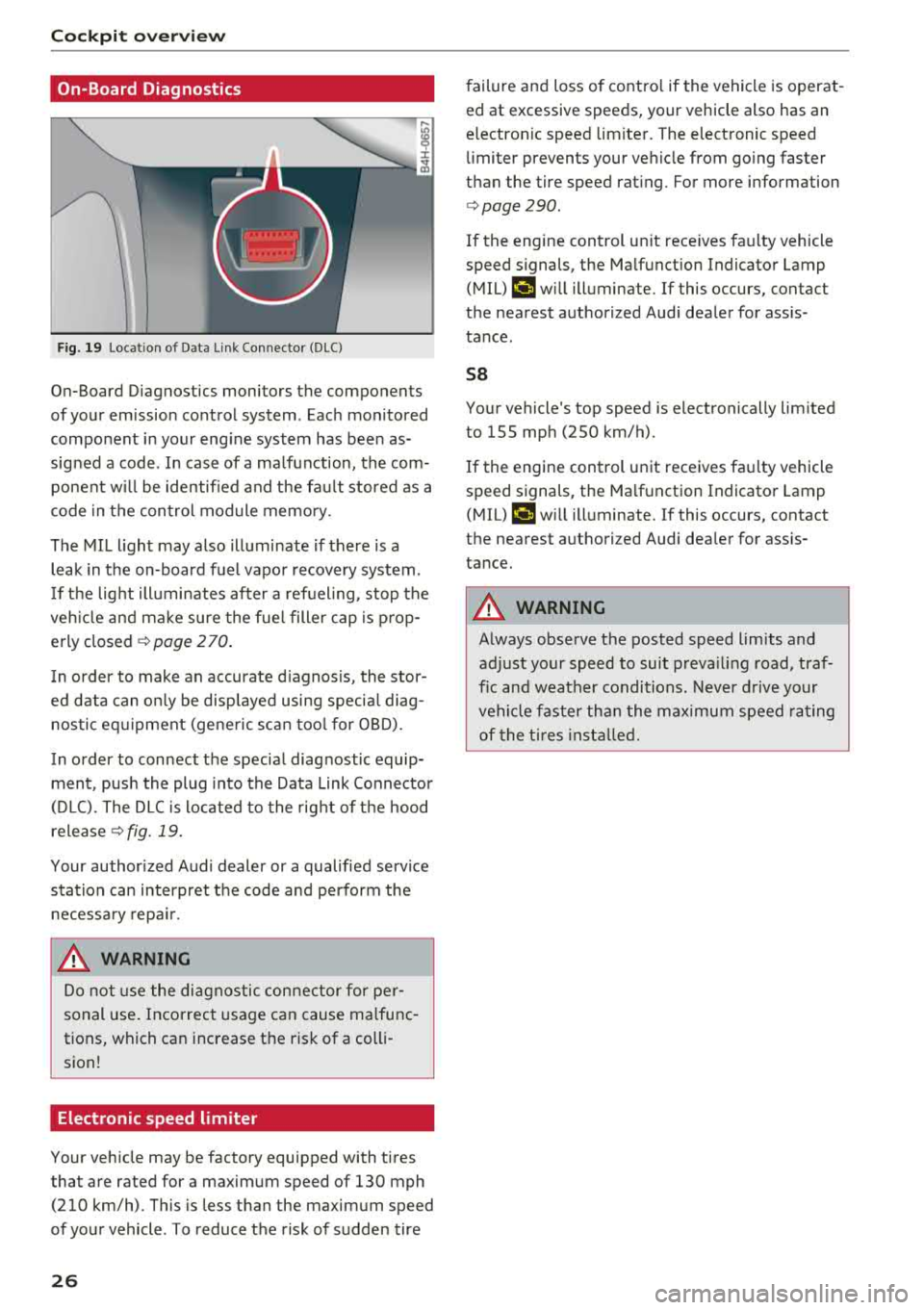
F ig. 19 Loc ation of D ata Link Connec tor (DLC)
On-Board Diagnostics moni tors the components
of your emission control system . Each monitored
component in your eng ine system has bee n as
signed a code . In case of a ma lfunction, the com
ponent w ill be identified and the fa ult stored as a
code in t he control module memo ry.
The MI L light may also illuminate if there is a
leak in the on-board fuel vapor recovery system .
I f t he lig ht ill uminates af ter a ref uel ing, stop the
ve hicle and ma ke sure the fue l filler cap is p rop
erly closed
c> page 2 70 .
In order to make an accurate d iagnosis, the stor
ed data can on ly be disp layed using specia l diag
nos tic eq uipment (gene ric sc an tool for OBD).
In order to connect t he specia l diagnostic equip
ment , push the plug into the Data Link Connector
(D LC). The D LC is located to the rig ht of t he hood
release
c> fig. 19.
Your author ized Audi dealer or a qualified service
s tat ion can interpret the code and perform the
necessa ry repa ir.
A WARNING
Do not use t he di agno stic con nector for pe r
sonal use . Incorrect usag e c an cause ma lfu nc
tions, which can increase the ris k of a colli
sion !
Electronic speed limiter
-
Your veh icle may be factory equipped with ti res
that are rated for a maxim um speed of 130 mph
(210 km/h) . This is less than the maximum speed
of your vehicle . To reduce t he risk of sudden tire
26
failure and loss of contro l if the vehicle is operat
ed at excessive speeds, your vehicle also has an
e lectronic speed limite r. The elect ronic speed
li miter prevents your ve hicle from go ing faster
th an the tire speed rat ing . For more information
c> page 290 .
If the engine cont rol un it rece ives fa ulty vehicle
speed s ignals, the Ma lf u nction Indicator Lamp
( M IL)
¢..ift will illuminate. If this occurs, contact
the nea rest authorized Aud i dea ler for ass is
tance .
58
Your vehicle's top speed is electronically lim ited
to 155 mph (250 km/h).
If the engine control unit receives fa ulty vehicle
speed signals, the Ma lf u nction Indicato r Lamp
(MIL)
¢..ift w ill illuminate. If this occurs, contact
the nea rest authori zed Audi dea ler for ass is
tance.
A WARNING
A lways obse rve t he posted speed limits and
adjust yo ur speed to sui t prevailing road, tra f
fic and weather condit ions. Never d rive your
ve hicl e faster t han the ma ximu m speed rating
of the t i res inst alled .
-
Page 30 of 356
Opening and clo sin g
@ Tips
- Do not leave valuables unattended in t he ve
hicle . A locked vehicle is not a safe!
- The LED in the driver 's door rail blinks when
you lock the vehicle . If the LED lights up for
approximately 30 seconds after locking,
there is a ma lfunction in the central locking
system. Have the problem corrected by an
authorized Audi dealer or authorized Audi
Service Fac ility.
Key set
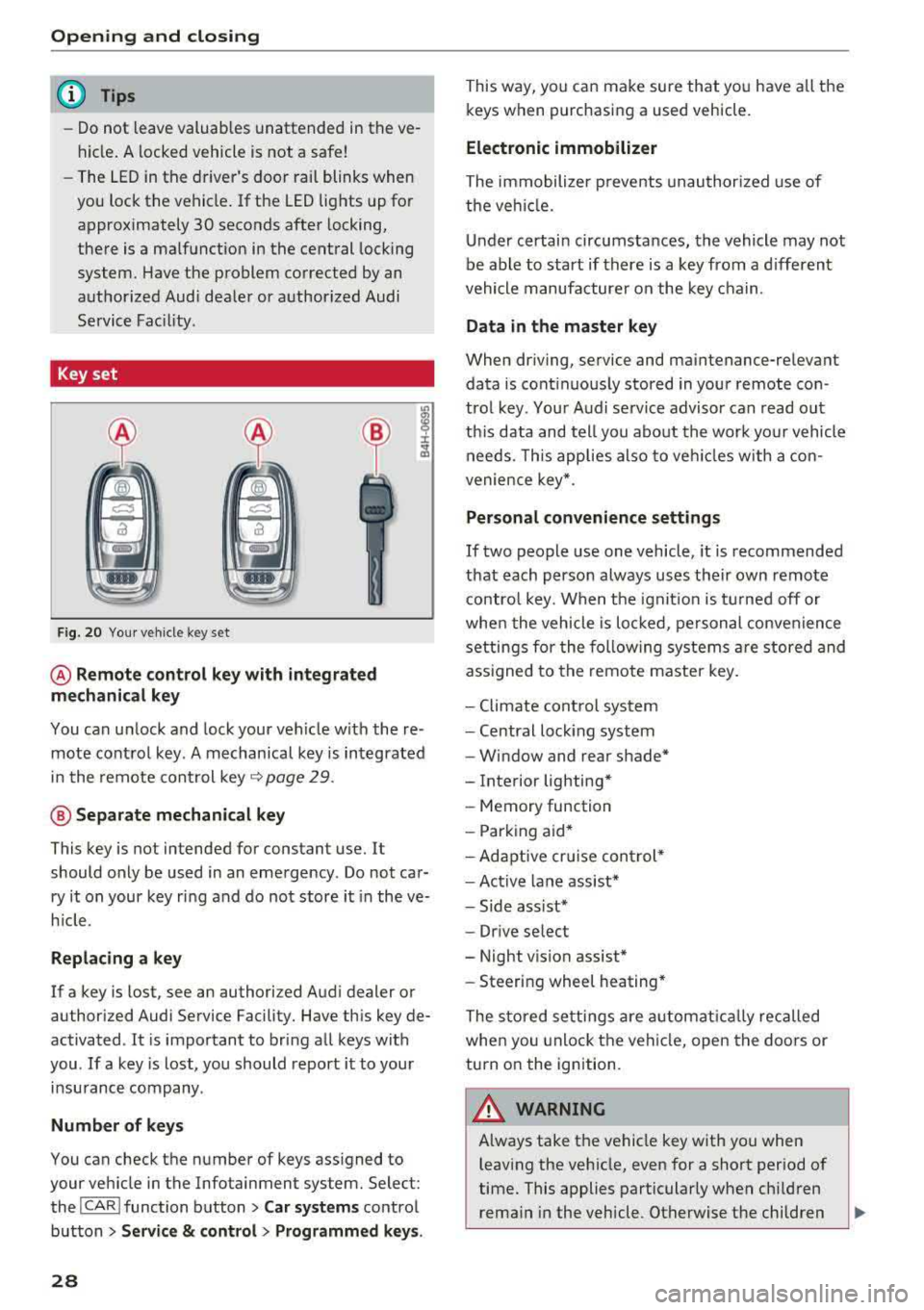
F ig. 20 You r veh icle key set
@ Remote control ke y with integr ated
mechanica l key
You can unlock and lock your vehicle w ith the re
mote control key . A mechanical key is integrated
in the remote control key
Q page 29 .
@ Separate mechanical ke y
This key is not intended for constant use. It
should only be used in an emergency . Do not car
ry it on your key ring and do not store it in the ve
h icle.
Rep lacing a ke y
If a key is lost, see an authorized Audi dealer or
authorized Audi Service Facility. Have this key de
activated . It is important to bring all keys with
you .
If a key is lost, you should report it to your
insurance company .
Number of keys
You can check the number of keys ass igned to
your veh icle in the Infotainment system. Select:
the
I CAR I function button > Car sy st e m s control
button
> Ser vice & cont rol > Pr ogrammed ke ys.
28
This way, you can make sure that you have all the
keys when purchasing a used vehicle.
Electronic immobilizer
The immobilizer p revents unauthorized use of
the ve hicle.
Under certain circumstances, the vehicle may not
be able to start if there is a key from a d ifferent
vehicle manufacturer on the key chain .
Data in the master ke y
When driving, service and maintenance-relevant
data is cont inuous ly stored in your remote con
trol key . Your A udi se rvice advisor can read out
th is data and tell you abo ut the work yo ur vehicle
needs . T his applies also to veh icles w ith a con
venience key *.
Personal convenience sett ings
If two people use one vehicle, it is recommended
that each person always uses their own remote contro l key. When the ignit io n is tu rned off or
whe n the vehicle is lo cked, pe rsonal convenience
settings for the following systems a re stored and
ass igned to the remote master key .
- Climate cont rol system
- Central lock ing system
- Window and rear shade*
- Interior lighting*
- Memory function
- Park ing aid*
- Adaptive cr uise control *
- Ac tive lane assist*
- Side ass ist*
- Dr ive select
- Night vision assist*
- Steeri ng wheel heating*
The stored settings are automat ica lly recalled
when you unlock the vehi cle, open the doors or
turn on the ignition.
A WARNING
A lways take the vehicle key with you when
leaving the vehicle, even for a short period of
time. This applies particularly when child ren
rema in in the vehicle . Otherwise the children
-
Page 31 of 356
lL t:0 ....
"' ......
"' .... 0 0 :c '
equipment such as power windows.
(D Tips
-The operation of the remote control key can
be temporarily disrupted by interference
from transmitters in the vicinity of the vehi
cle work ing in the same frequency range
(such as a cell phone or radio equipment).
-Using the mechanical key, you can:
- Locking/unlocking the glove compartment
,;:;,page 64.
-Manually lock/unlock the vehicle
,;:;,page 32.
-Mechanically lock the doors c:> page 32.
-Unlock the luggage compartment lid us-
ing the emergency release r;;:;, page 36.
-For an explanation on conformity with the
FCC regulations in the United States and the
Industry Canada regulations, see
r;;:;,page 339.
(D Tips
Removing the integrated mechanical key
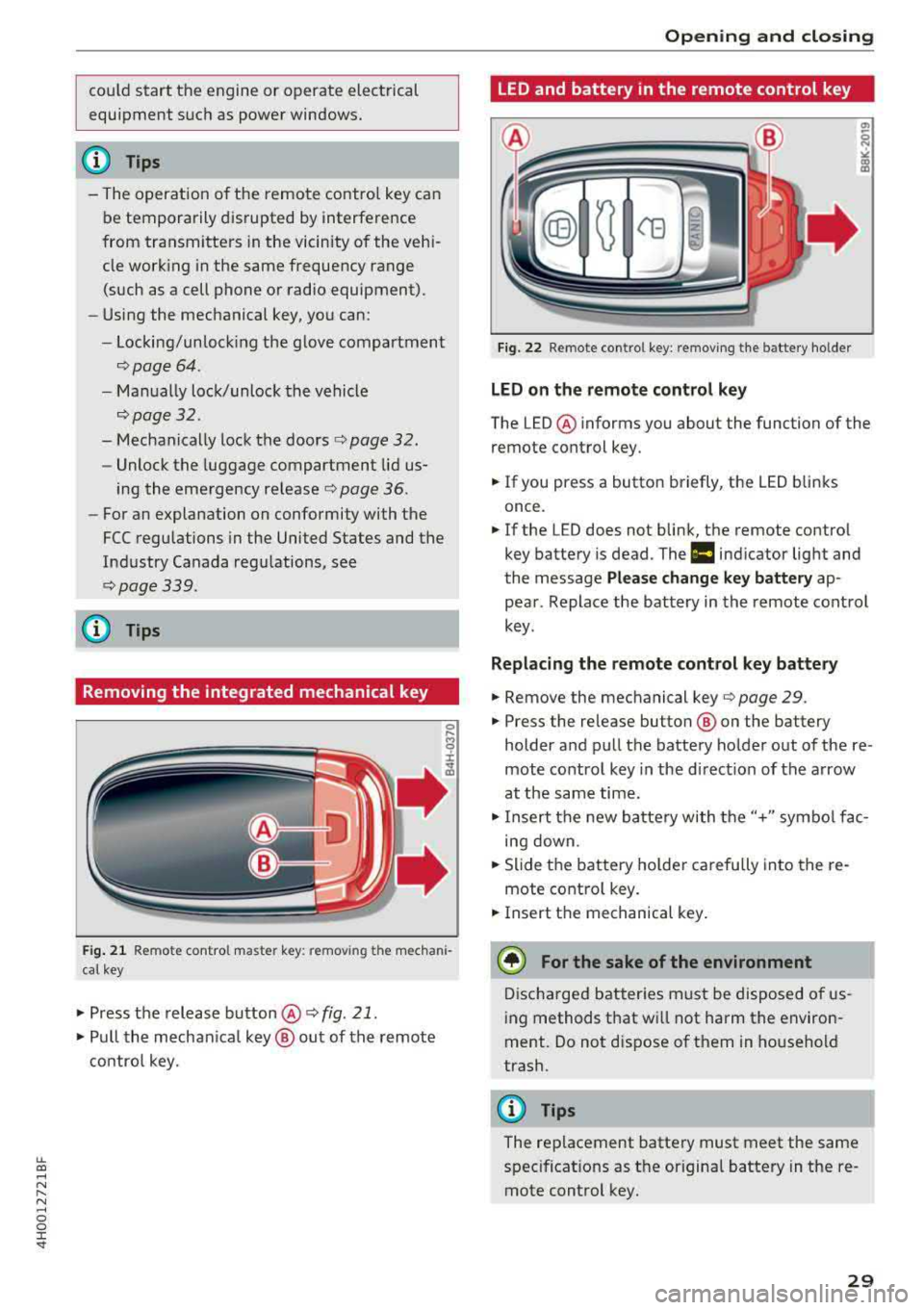
Fig. 21 Remote control master key : remov ing t he mechani
cal key
.,. Press the release button@ r;;:;, fig. 21.
.,. Pull the mechanica l key @ out of the remote
control key.
Opening and closing
LED and battery in the remote control key
Fig. 22 Remote control key: removing the battery holder
LED on the remote control key
The LED @ informs you about the function of the
remote control key.
.. If you press a button briefly, the LED blinks
once.
.. If the LED does not blink, the remote contro l
key battery is dead. The
ml indicator light and
the message
Please change key battery ap
pear . Replace the battery in the remote control
key .
Replacing the remote control key battery
.. Remove the mechanical key r;;:;, page 29 .
.. Press the release button ® on the battery
holder and pull the battery holder out of the
re
mote control key in the d irect ion of the arrow
at the same time .
.,. Insert the new battery with the"+" symbol fac
ing down .
.,. Slide the battery holder carefully into the re
mote contro l key .
.. Insert the mechanical key.
@ For the sake of the environment
Discharged batteries must be disposed of us
ing methods that wi ll not harm the environ
ment. Do not d ispose of them in household
trash.
{!) Tips
The replacement battery must meet the same
spec ificat ions as the origina l battery in the re
mote control key .
29
Page 33 of 356

lL t:0 ....
"' ......
"' .... 0 0 :c '
is unlocked when unlocking the vehicle
c:> page 32.
_&. WARNING
Read and heed all WARNINGS c:> .& in Descrip
tion on page 2 7.
@ Tips
If your vehicle is left standing for a long peri
od of time, note the following:
-The proximity sensor switches off after a
few days to save energy. You then have to
pull once on the door handle to unlock the
vehicle and a second t ime to open it.
-The energy management system gradually
turns off unnecessary convenience functions
to prevent the vehicle battery from draining
and to mainta in the vehicle's ab ility to start
fo r as long as possib le. You may not be able
to unlock your vehicle us ing the convenience
key.
- Fo r an explanation on conformity with the
FCC regulations in the United States and the
Industry Canada reg ulations, see
c:> page 339 .
Central locking switch
Fig. 25 Dr iver 's door: centra l lock ing sw itc h
Op eni ng and clos ing
Fig. 26 Rear doors: central lock ing switch
"To lock the vehicle, press the ffi button c:> fig . 25
or c:> fig. 26, c:> &_ .
.. To unlock the vehicle, press the crl button .
When locking the veh icle with the central lock ing
switch, the following app lies:
-Opening the door and the luggage compart
ment lid from the
outside is not poss ible (for
secur ity reaso ns, such as when stopped at a
light).
- The LED in the central locking sw itch turns on
when all doors are closed and locked.
- Front doors: you can open the doors individual ly from the inside by pulling the door handle .
- Rear doors: to unlock the doors, pull on the
door ha ndle
one time . To open the doors, pull
on the door handle
again .
- In the event of a crash with a irbag deployment,
the doors unlock a utomat ically to allow access
to the vehicle.
_&. WARNING
- The central locking switch a lso works when
the ign ition is switched off and automatica l
ly locks the entire vehicle when the
ffi but
ton is pressed.
- The cent ral locking switch is inope ra tive
when the vehicle is locked from the outside.
- Locked doors ma ke it more diffic ult for
emergency workers to get into the vehicle,
which puts lives at r isk. Do not leave anyone
behind in the vehicle, especially c hildren .
(D Tips
Your vehicle locks automatically when it
reaches a speed of 9 mph (15 km/h) (Auto
Lock)
c:> page 27 . You can unlock the vehicle
31
Page 34 of 356
Opening and clo sin g
again using the ca button in the central lock
ing switch.
Setting the central locking system
In the Infotainment system, you can set which doors the central locking system will unlock.
• Se lect : the ICARI function bu tton> Car system s
contro l bu tton > Vehicl e setting s > (C entral
loc king ).
Lo ck when driving
-if you select On , the entire
ve hicl e w ill lock automatica lly when the speed
reaches 9 mph (15 km/h) . All of the doors and
the luggage compa rtment lid lock .
Centr al lo ckin g sys tem
Door unlo cking
-you can set which doors are un
locked:
- If you select
All and press the 0 button one
time on the remote control key, all of the doors
and the luggage compartment will unlock.
- If you se lect
Dr iver and then press the m button
one time on the remote control key, only the
drive r's door w ill unlock . In veh icles with a con
venience key, on ly the door whose handle you
pull w ill unlock.
If you press the@ button
twice , the entire vehicle w ill unlock.
If you press the
tfl button, the ent ire vehicle will
a lways lock.
Disable ta ilgat e handle -if you select On , the
luggage compartment lid hand le is locked . In
this case, the luggage compartment l id ca n be
opened with the
,c::5 button on the remote con
trol key or w it h the
,c::5 button in the driver's
door. In vehi cles w ith a convenience key*, yo u ca n
s till open the luggage compar tment lid usi ng the
handle if an authorized remote control key is
near the proximity sensor *.
Fold mirror s when lo cking * -if you se lect On ,
the exterior rea rview mirro rs fo ld in automa tical
ly when you press the
tfJ button o n the remote
control key or touch the sensor* in the handle.
T o ne when l ocking -if you select On , a to ne will
sound w hen you lock the vehicle.
32
Emergency locking and unlocking the doors
Each door must be locked separately if the pow
er locking system fails .
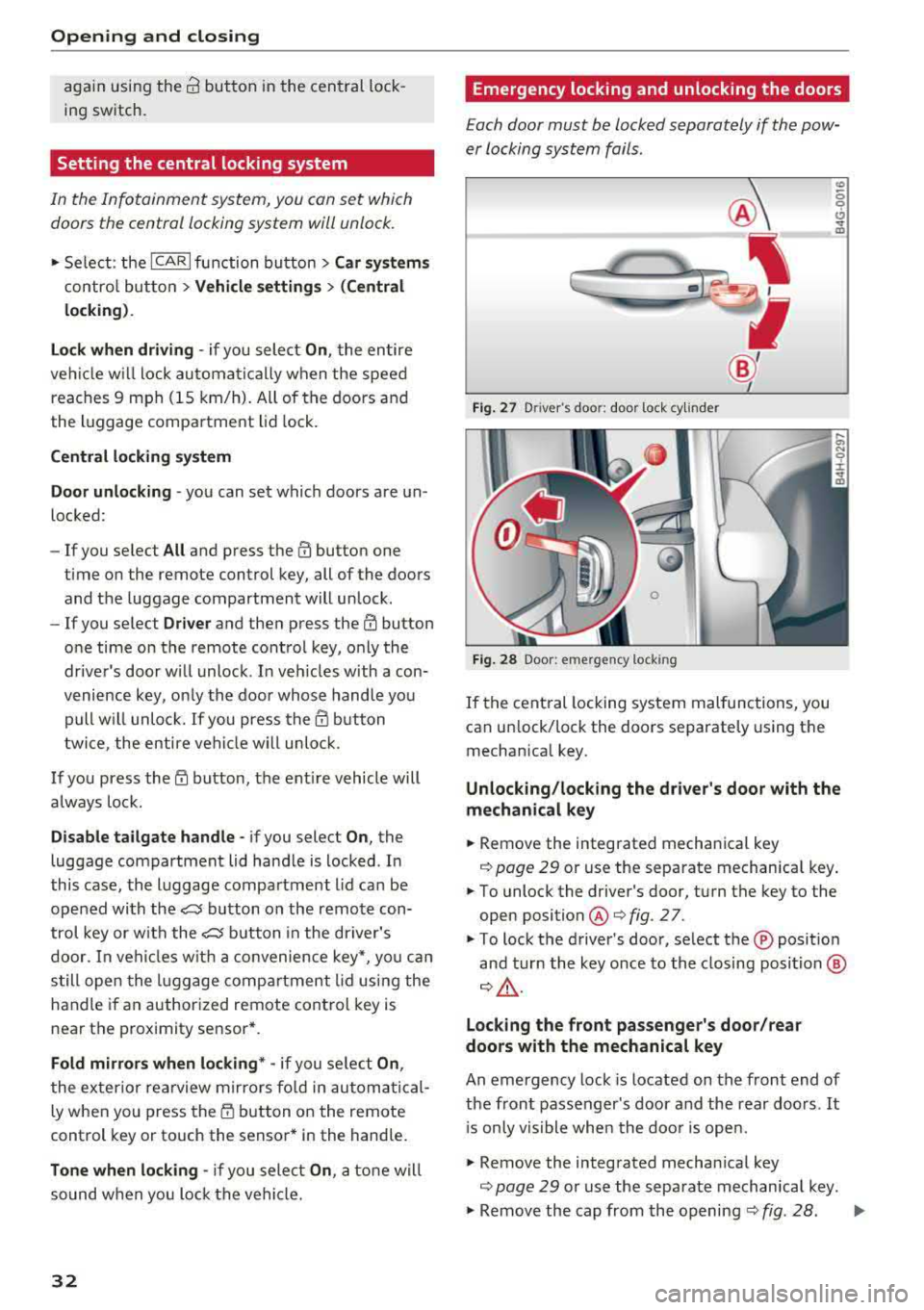
Fig. 27 D river 's doo r: door lock cy linder
F ig . 28 Door : eme rge ncy loc king
If the central locking system malfunctions, you
can un lock/lock the doors separately using the
mechan ica l key.
(0 ~ 0 0
CJ .., m
Unlocking /locking the d river 's door with the
m echanical key
• Remove the integrated mechanical key
c::> page 29 or use the separate mechanical key .
• To unlock the driver's door, turn the key to the
open position @
r::::>fig . 27.
• To lock the driver's door, se lect the ® posit ion
and tur n the key once to the closing posi tion ®
c::> _&..
Locking the front p assenger 's door /rear
doo rs with the mechanical key
An emergency lock is located on the front end of
the front passenger's door and the rear doors . It
i s only vis ible whe n the doo r is open.
• Remove the integrated mechan ical key
c::> page 29 or use the separate mechanica l key .
• Remove the cap from the opening c::> fig. 28 . ..,..
Page 35 of 356
lL t:0 ....
"" ......
"" .... 0 0 :c '
the way to the right (right door) or left (left
door).
Once the front passenger's door/rear doo rs close,
it is no longer possible to open them from the
outside . The door can be opened from the inside
by pulling the door handle. If the child safety
lock in one of the rear doors is activated, you
must first pull the door handle from the ins ide.
Then you can open the door from the outside.
..&_ WARNING
Read and heed all WARNINGS c:> &. in Descrip
tion on page 27.
Anti-theft alarm system
If the anti-theft alarm system detects a vehicle
break-in, audio and v is u al warning signals are
tr iggered. The anti-theft a larm system is activat
ed when the vehicle is locked as usual.
It
switches off when the vehicle is unlocked.
If the a larm is triggered, it w ill shut
off automat
ically after a ce rtain amount of time . Switch the
ignition on or press
the ~ button on the remote
control key to turn
off the alarm.
Luggage compartment
lid
Opening/closing the luggage compartment
lid
Fi g. 29 Driver's door: unlocking the luggage compartment
lid
Op eni ng and clos ing
'YID
AU C,.a.
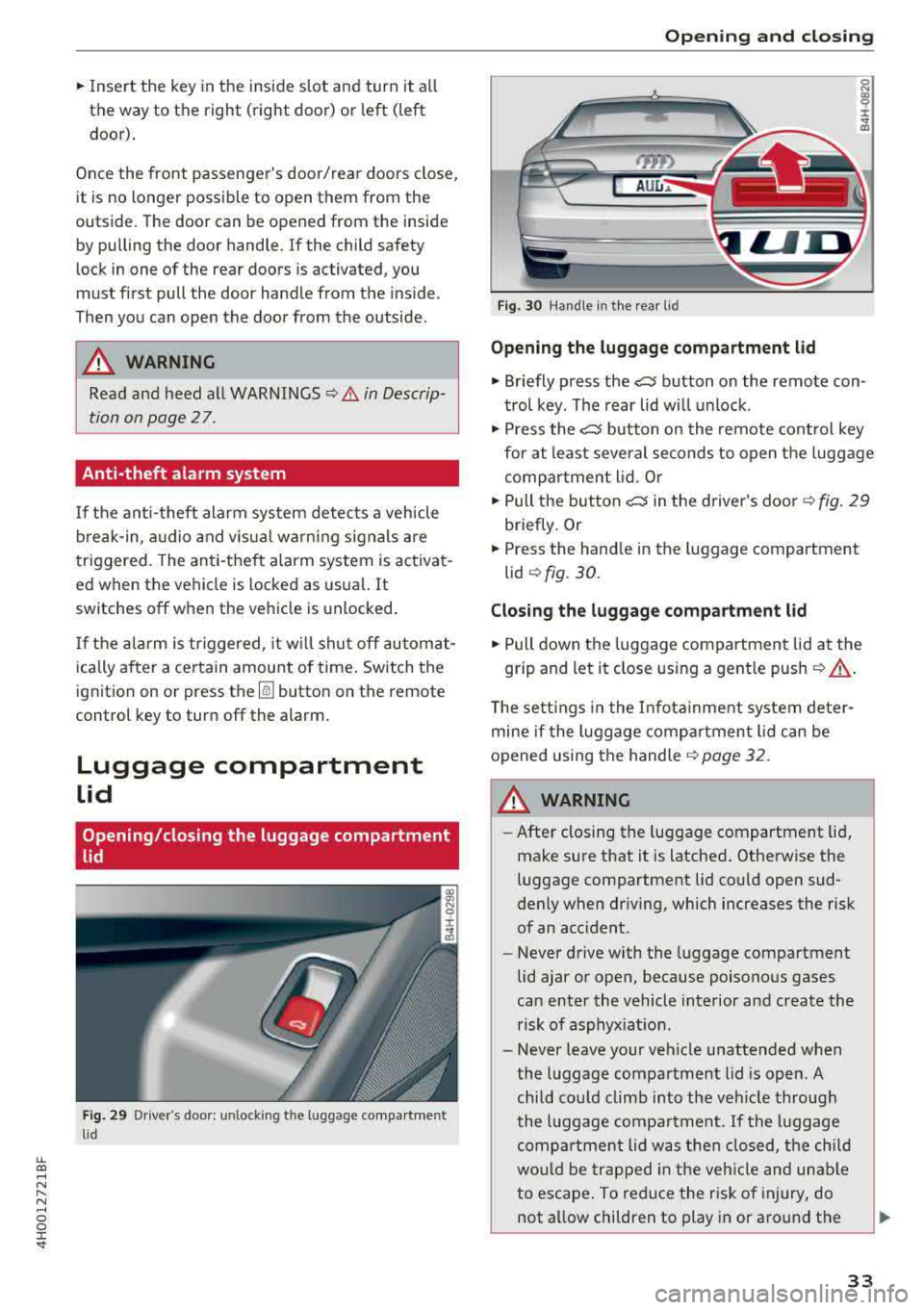
Fig. 30 Handle in the rea r lid
Opening the luggage compartment lid
• Briefly press the~ button on the remote con
trol key . The rear lid wi ll unlock .
• Press the ~ button on the remote cont rol key
for at least several seconds to open the luggage
compar tment lid. Or
• Pull the button~ in the d river's door c:> fig. 29
briefly. Or
• Press the handle in the luggage compartment
lid
<=> fig. 30.
Closing the luggage compartment lid
• Pull down the luggage compartment lid at the
grip and let it close using a gent le push ¢
,A.
The sett ings in the Infota inme nt system de ter
mine if the luggage compartment lid can be
opened using the handle
¢ page 32.
A WARNING
- After closing the luggage compartment lid,
make sure that it is latched . Otherwise the
luggage compartment lid could open sud
denly when driv ing, which increases the risk
of an acc ident.
- Never drive with the luggage compartment
lid ajar or open, because poisonous gases
can enter the vehicle interior and create the
risk of asphyx iation.
- Never leave your veh icle unattended when
the luggage compartment l id is open. A
child cou ld climb into the vehicle through
the l uggage compa rtment. If the l uggage
compa rtment lid was then closed, the child
wou ld be trapped in the veh icle and un ab le
to escape . To reduce the risk of inj ury, do
not a llow children to play in or around the
33