95 RON AUDI A8 2018 Workshop Manual
[x] Cancel search | Manufacturer: AUDI, Model Year: 2018, Model line: A8, Model: AUDI A8 2018Pages: 356, PDF Size: 54.71 MB
Page 85 of 356
lL t:0 ....
"' ......
"' .... 0 0 :c '
place on all h ills (for example, if the ground
is slippery or icy).
- To reduce the risk of an accident, always
make sure the vehicle is situated safely
while stat ionary.
Automatic transmission
Introduction
The automat ic transmission is controlled e lec
tron ica lly. Power is transferred using a torque
converter.
The transm ission shifts up or down automat ically
depending on wh ich drive program is selected.
When a
mod erate driving s tyle is used, the
transmission selects the most e conomical d riving
mode. The t ransm iss ion upsh ifts at a lower RPM
and downshifts at a highe r RPM to imp rove fuel
efficiency.
The transm ission switches to a spor ty mode after
a kick-down or when the driver uses a
sp o rt y
driving style
c haracterized by quick accelerator
pedal movements, heavy acce leration, frequent
changes in speed and traveling at the maximum
speed.
If desired, the dr iver can also select the gears
manually (tiptronic mode)
c::> page 86.
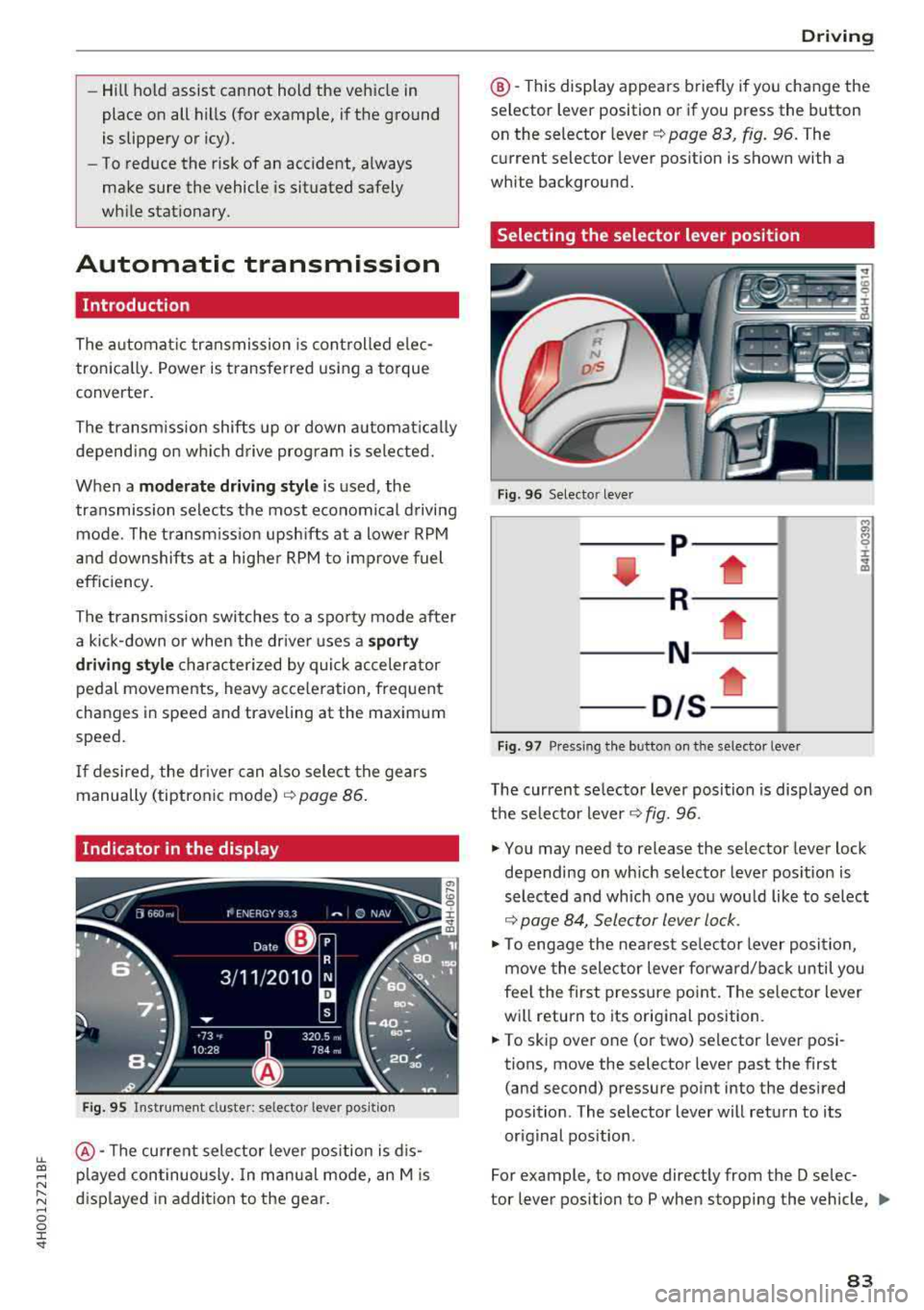
Indicator in the display
F ig . 95 Inst rument cluster: selector lever positio n
@ -The current selector leve r position is d is
p layed continuously. In manua l mode, an Mis
displayed in addition to the gear.
D rivi ng
@ -This display appea rs briefly if you change the
selector lever position or if you press the button
on the selector lever
c::> page 83, fig. 96. The
current selector lever position is shown with a
white background.
Selecting the selector lever position
F ig. 96 Selector lever
-- p- -
----R--- --1
----N--- -i;
-01s*
Fig. 97 Pressing the button on the selector leve r
The current selector lever posit ion is disp layed on
t h e selecto r lever
c::> fig. 96 .
.,. You may need to release the selector lever lock
depending on wh ich selector lever pos ition is
selected and which one you wou ld like to select
c::> page 84, Selector lever lock .
.,. To engage the nearest selector lever position,
move the selector lever forward/back until you
fee l the first pressure point. The selector lever
wi ll return to its original position .
.,. To skip over one (or two) selector lever posi
tions, move the selector lever past the first
(and second) pressure point into the desired
position . The selector lever will return to its
or ig inal position .
For example, to move directly from the D selec-
tor lever position to P when stopping the vehicle,
II>
83
Page 93 of 356
u. co .... N
" N .... 0 0 :c '
When driv ing with a trailer, activate the trailer
mode of the air suspension. Switch the air sus
pension trailer mode on when you are towing a
trailer . This will limit the regulation by the air
suspension while driving. Select in the MMI:
ICARI function button> (Car)* systems control
button >
Vehicle settings > Air susp.: towing >
On.
Coolant temperature
The coolant temperature gauge ¢ page 9 must
be observed carefully . The coolant temperature
can increase if you dr ive on long inclines in a low
gear at h igh engine speeds . Reduce your speed
i mmed iately if the LEDs in the top part of the dis
p lay turn on.
For more information about ind icator lights, re
fer
to . ¢ page 20.
A WARNING
Anyone not properly restrained in a moving
veh icle is at a much greater risk in an acci
de nt. Never let anyone ride in you r car who is
not properly wearing the restraints p rovided
by Audi.
Trailer towing
information
Important to know
-
Your ve hicle handles different ly when towing a
tra ile r because of the additiona l we ight and dif
ferent weight distribution . Safety, performance
and economy wi ll greatly depend on how careful
l y you load your trailer and operate your rig.
Before you actually tow your trailer, practice
turning, stopping and backing up in an area away
from traffic . Keep practicing until you have be
come comp letely familiar with the way your vehi
cle-trailer combination behaves and responds.
Backing up is difficult and requires practice .
Backing up with a trailer generally requires steer
ing action opposite to that when backing up your
vehicle without a trailer.
Trailer towing
Maintain a greater distance between your vehicle
and the one in front of you . You will need more
room to stop . To compensate for the trailer, you
will need a larger than normal turning radius.
When passing, remember that you cannot accel
erate as fast as you normally wou ld because of
the added load. Make sure you have enough room
to pass. After passing, allow p lenty of room for
your trailer before changing lanes again.
Avoid jerky starts, sharp turns or rapid lane
c h anges.
(D Tips
-Do not tow a trailer during the break-in peri
od of your ve hicle.
-If you tow a trailer, your Audi may require
more frequent maintenance due to the ex
tra load
¢ page 336 .
Parking on a slope
Do not park on a slope with a trailer. If it cannot
be avoided, do so only after doing the following:
When parking:
.,. App ly the foot brake.
.,. Have someone place chocks under both the ve
hicle and the trailer wheels .
.,. With chocks in place, slowly release the brakes
until the wheel chocks absorb the load .
.,. Tur n the whee ls towards the curb .
.,. Apply the parking brake .
.,. Select the P selector lever posit ion.
When restarting after parking:
.. App ly the foot brake .
.. Start the engine .
.,. Select the D selector lever position.
.,. Release the parking brake and slowly pull out
and away from the wheel chocks.
.,. Stop and have someone retrieve the wheel
chocks .
(D Tips
If you move the selector lever of the automat
i c transmission to P befo re applying the park-
in g brake and before blocking the wheels, you
.,_
91
Page 97 of 356
lL t:0 ....
'"" ......
'"" .... 0 0 :c '
Description
Applies to: vehicles with Audi adaptive cruise control
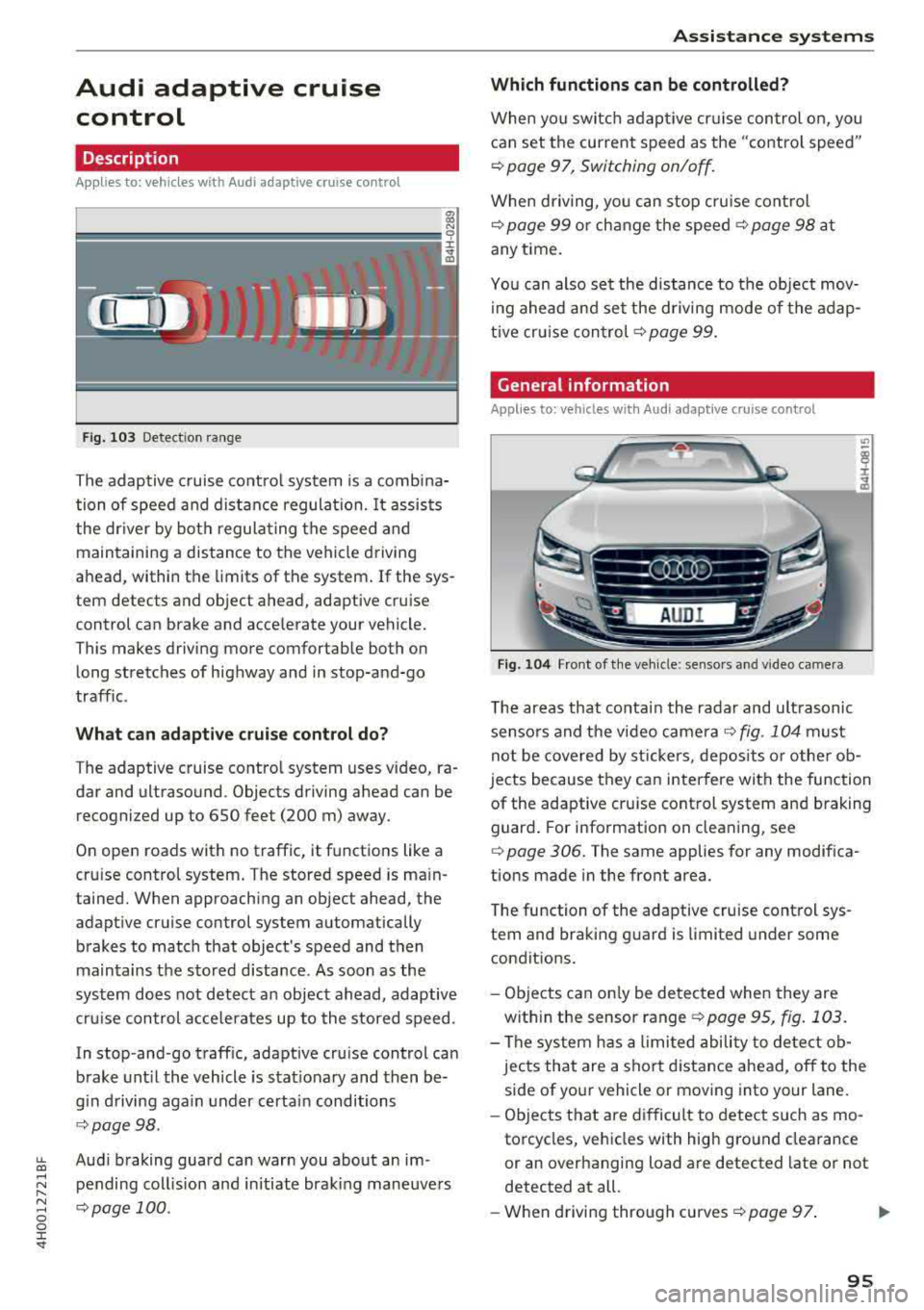
Fig . 1 03 Detect ion range
The adaptive c ruise co ntro l system is a comb ina
tion of speed and d ist ance regula tion. It assists
the dr iver by bot h regula ting the speed and
maintaining a distance to the vehicle driving
ahead , within the limits of the system . If the sys
tem detects and object ahead, adaptiv e cruis e
control can brake and acce lerate your vehicle.
Th is makes driving more comfortable both on
long stretches of highway and in stop-and-go
traffic .
What can adaptive crui se contr ol do?
The adaptive cruise contro l system uses video, ra
dar and ultraso und. Objects driving ahead can be
recogni zed up to 650 feet (200 m) away.
On open roads with no traffic , it functions like a
cru ise control system . T he stored speed is ma in
tained. When approaching an object ahead, the
adapt ive cruise con trol system automatically
brakes to match that object's speed and then
maintains the stored d istance. As soon as the
sys tem does not detect a n object ahead, adaptive
cru ise con trol acce lera tes up to the stored speed .
In stop-and -go traff ic, adaptive cru ise control can
brake unt il the vehicle is s tat io nary and then be
g in d riving aga in under certain conditions
¢ page 98.
Aud i braking guard can warn you about an im
pending col lision and initiate braking maneuve rs
¢ page 100 .
Assi st a nce systems
Which functions can be controlled?
When yo u swi tc h adap tive cr uise control on, you
can set t he current speed as the "contro l speed "
¢page 97, Switching on/off .
When driving, yo u can stop cru ise cont rol
¢ page 99 or ch ange t he speed ¢ page 98 at
any t ime.
Yo u c an also se t the distance to the object mov
i ng ahead and set the d riving mode of the adap
tive cr uise
con trol ¢ page 99.
General information
Applies to: vehicles with Audi adaptive c ruise con trol
Fi g. 10 4 Front of t he ve hicle: se nso rs and v ideo came ra
T he areas that co nta in the radar and ult rasonic
senso rs and the video
came ra¢ fig . 104 must
no t be cove red by st ickers, depos its o r othe r ob
jects because they can inter fere with the function
of the adaptive cru ise control system and braking
guard . For information on clea ning, see
¢ page 306. The same applies for any modifica
tions made in the front area.
T he function of the adaptive cru ise control sys
tem and bra king g uard is limited under some
condit ions.
- Objects can on ly be de tected when they are
w ith in the sensor range
¢ page 95 , fig . 103 .
-The sys tem h as a limited abili ty to detect ob
jec ts that are a shor t distance ahead, off to the
side of yo ur vehicle or mov ing into your lane.
- Ob jects that are difficult to detect such as mo
torcycles, vehicles with high g ro und clea rance
or an overhanging load a re detected late or not
detected at all.
- W hen drivi ng through cu rves
¢ page 97 . .,.
95
Page 100 of 356
Ass is tance sy stem s
Switch ing adaptive cruise control off
.,. Push the lever away from you into position @
until it clicks into place . The message
ACC: off
appears.
@ Indicator lights
It -adaptive cruise cont rol is switched on . No
objects a re detected ahead . T he stored speed is
main tained.
• -an object ahead was detected. The adaptive
cru ise control system regulates the speed and
d istance to the object ahead a nd accelerates/
b rakes a utomatically .
(ii-adaptive cruise control is switched on . An
object ahead was detec ted . Your vehicle rema ins
stopped and w ill not start dr iv ing a utomat ically .
•-The automatic braking is no t enough to
maintain a sufficient distance to an object ahead .
You must
i nte rvene ~ page 100, Driver interven
tion request.
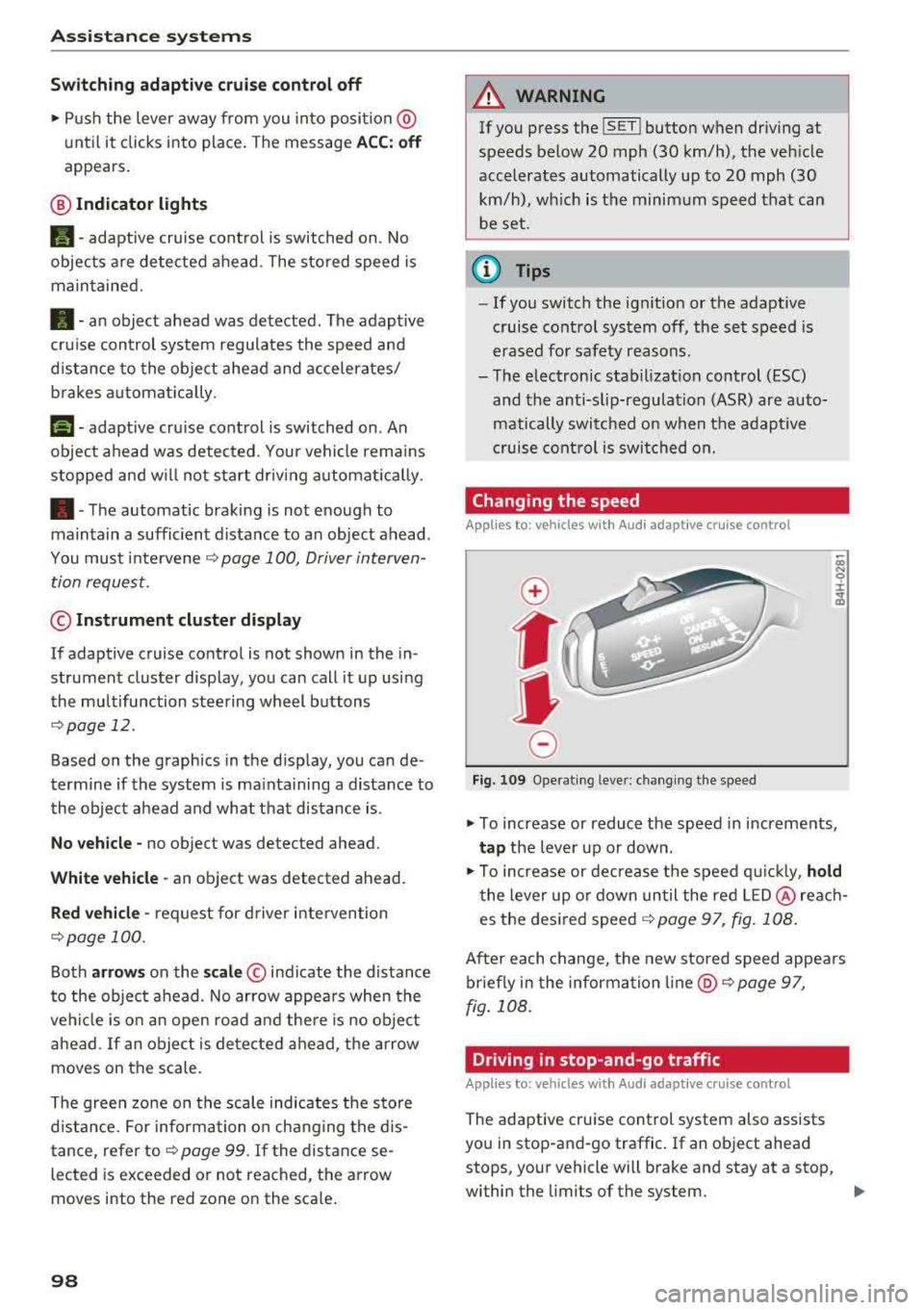
© Instrument cluster display
If adaptive cruise control is not shown in the in
strument cluster display, you can call it up usi ng
the multifunction stee ring wheel b uttons
~ page 12.
Based on the graphics in the d isplay, you can de
termine if the system is ma inta ining a distance to
the object ahead and what that distance is .
No vehicl e -no object was detected ahead.
White vehicle -an ob ject was detected ahead.
Red vehicle -request for driver intervention
~ page 100 .
Both arrow s on the scale © indicate the distance
to the object ahead. No arrow appea rs when the
ve hicl e is o n an open road and there is no obje ct
ahead. If an object is de tected ahead, the arrow
moves on the scale.
The green zo ne on the scale indicates the sto re
d istance. For information o n chang ing the d is
tance, refer to
Q page 99 . If the distan ce se
lected is exceeded or not reached, the a rrow
moves into the red zone on the sca le .
98
A WARNING
If you press the !SET ! button when driving at
speeds below 20 mph (30 km/h), the veh icle
accelerates automatically up to 20 mph (30
km/h), wh ich is the minim um speed that can
be set .
(D Tips
-If you switch the ign it ion or the adaptive
cruise control sys tem off, the set speed is
erased fo r safety reasons .
-The electronic stabilization control (ESC)
and the an ti-slip-regulat ion (ASR) are auto
matically switc hed on when the adaptive
cruise cont rol is swi tched on.
Changing the speed
Applies to: vehicles with Audi adaptive cruise control
0
f
•
0
Fig. 10 9 Operat ing leve r: ch ang ing the speed
.,. To increase or reduce the speed in increments,
ta p the lever up or down .
.,. To increase or decrease t he speed q uickly, hold
t he lever up o r down un til the red LED @ reac h
es the desired
speed ~ page 97, fig. 108 .
After each change, the new stored speed appea rs
briefly in the information
li ne @ ~ page 97,
fig . 108 .
Driving in stop-and-go traffic
Applies to: vehicles with Audi adaptive cruise control
The adapt ive cru ise control system also assists
you in stop-and-go traffic . If an object ahead
stops, your vehicle will brake and stay at a stop,
within the limits of the system.
..
Page 103 of 356
u. co .... N
" N .... 0 0 :c '
When detected in time, the system can assess
dangerous sit uat ions where an object a head
brakes suddenly or if your own vehicle is traveling
at a high speed and approaching an object that is
mov ing more slowly. The brak ing guard does not
react if it cannot detect the situation.
The system advises you of various dangero us sit
uations :
- T he
distan ce warning occurs if you d rive too
closely to the object ahead for a long period o f
time . If the object ahead brakes strongly, you
would not be able to avoid a collision .
The.
indicator light appears as an indication for th is.
- The
app roach wa rning occurs when an object
ahead is traveling more s low ly or brakes
strongly. When th is warning occurs, it may on ly
be poss ible to avoid a co llision by swerving or
braking strongly . The danger is indicated by the
• ind icator light ¢ fig . 113 . An aud io signal
will a lso sound .
If you do not react early enough or at a ll to a dan
ge rous situation, the braking guard suppo rts you
w ith a brak ing intervent ion . T he approach warn
i ng indicators and the message
Braking guard :
e ngaged
also appea r.
- If a co llision is imminent, the system will first
provide a n
acute warning by braking sharply .
- If you do not react to the acute warning, the
brak ing guard can increase the braking force
withi n the l imits of the system . This reduces
the vehicle speed in the event of a co llision.
- T he system can init iate complete decelerat io n
sho rtly befo re a collis ion
l) . Full dece le ration at
high speeds occu rs on ly in vehicles with adap
t ive cr uise con trol and s ide ass ist (pre sense
p lu s) .
-If the bra king g uard determines tha t you are
not brak ing st rongly eno ugh when there is an
impending co llision, i t can increase the brak ing
force.
- T he pre se nse f unctions also engage when
there is an impending collision
¢ page 217 .
ll Mark et-sp ecific
A ss istance systems
Which functions can be controlled?
Yo u can swi tch t he b raking guard and t he d is
tance/approach warning on or
off in the Infotain
ment system
¢ page 102, Settings in the Info
tainment system .
A WARNING
--
Lack of attention can cause collisions, other
accidents and ser ious personal in juries . The
braking guard is a n assist system and cannot
pr event a collision by itself . T he dr iver m ust
a lways inte rvene . The d river is always respon
sib le for b raking at the co rrect t ime .
- Always pay close atten tion to traffic, even
when the b raking gua rd is switched on. Be
ready to in tervene and be rea dy to take
comp lete co ntro l wheneve r ne cess ary. A l
ways keep the sa fe and legal distance be
tween your vehicle a nd ve hicl es up ahead .
- B raki ng g uard works w it hi n limi ts a nd will
not respond o uts ide the system limits, fo r
examp le when approac hing a stopped veh i
cle or stationary obstacle (end of a traff ic
jam or vehicle that has broken down in traf
fic).
- Always remember that the radar sensor for
the brak ing guard works only within def ined
detection and range limits that may prevent
the proper detect ion of other vehicles.
- The radar sensor's function and range can
be reduced by rain, snow and heavy spray.
Mov ing vehicles up ahead may not be
p romptly de tected or may no t be detected
at a ll.
- Reflective surfaces includi ng crash ba rriers
or tunne l entra nces may impair the function
of t he rad ar senso r.
(D Tips
- You can cancel the braking with increas ing
force tha t is initiated by t he sys tem by brak
ing yourse lf, by acce le ra ting not iceably or
by swe rving.
101
Page 104 of 356

Ass is tanc e system s
- Keep in mind that braking guard can brake
unexpected ly. Always secure any cargo or
objects that you are transport ing to reduce
the r isk of damage or in jury.
Settings in the Infotainment system
Applies to: vehicles with Audi adaptive cruise control
.,. Select : the ICARI function button > Ca r sy stems
control button > Dri ver a ssistan ce > Audi bra k
ing guard .
Sy stem
-switches the brak ing guard On /Off .
When you switch the ignition on, the message
Braking guard: Off appears if the system is
sw itched off .
Early warning -the distance and approach warn
ings in the display can be sw itched
On /Off .
(D Tips
- Your settings are automatically stored and
assigned to the remote control key being used.
- If you restrict or sw itch off the ESC, the
braking guard also switches itse lf off
c> page 128.
-Switch braking guard off when you are load
i ng the veh icle onto a vehicle carr ier, train,
sh ip or other type of transportation . This
can prevent undesired warnings from the braking gua rd system.
Messages
Applies to: vehicles with Audi adaptive cruise control
Braking guard : Off
This message appears if the system is sw itc hed
off throug h the Infota inment system . Otherwise ,
if the system is tur ned off, the information ap
pea rs every time shortly after the start of t he
trip .
The message also appears if the system is not
ava ilable d ue to a ma lfunct ion or if the ESC is
sw itched
off ¢ page 128 . If this is the case, the
system wi ll not provide warnings about a possi
b le co llision.
Braking guard : engaged
102
This message appears if a sharp brake pressure
was applied due to an acute warning .
ACC: Unavailable!
ACC and Audi braking guard: Una vailable
The system cannot guarantee that it will detect
objects correctly and is sw itched off. The sensors
have been moved or are faulty . The pre sense
funct ions may also be affected . Drive to an au
t h orized Aud i dea ler or authorized Audi Se rvice
Fac il ity immed iate ly to have the ma lfunction cor
r ec ted .
ACC : Currently unavailable . No sen sor vis ion
AC C and Audi braking gua rd: Curr entl y una vail
able. No sensor vision
This message appears if the sensor view is ob
structed, for examp le by leaves, snow, heavy
spray or dirt. Clean the
sensors ¢ page 95,
fig. 104.
ACC : Cu rrently un avail able . G radient too steep
The road exceeds the maxim um poss ible a ngle
fo r safe adaptive cruise co ntro l opera tion. Ada pa
tive cru ise con trol is switched off.
ACC : Only available in D , Sor M
Se lect the D, Sor M selector lever position .
ACC: Cu rrently un available . Parking br ake ap
plied
The adaptive cru ise con trol system sw itches o ff
automatica lly if the parking brake is set .
ACC: Currently unavailabl e. Stability contr ol
( ES C) inpu t.
This message appears if the electron ic stabiliza
tion cont rol ( ESC) is tak ing action to stabilize the
vehicle. In t his case, adaptive c ruise cont ro l
swi tches off autom atically.
ACC off: Manual control!
This message appears when adaptive cruise con
trol cannot set the parking brake. Press the brake
pedal to prevent the vehicle from rolling .
... ~
Page 108 of 356
Ass is tance sy stem s
Side assist he lps you monitor your blind spot and
traffic behind your vehicle. Within the limits of
the system, it warns you about vehicles that are
coming closer or that are traveling with you with
in sensor
range ©¢ fig. 118: if a lane change is
classified as critical, the display @ in the exter ior
m irror ¢ fig. 119 turns on .
The display in the left exter ior mirror provides as
sistance when making a lane change to the left,
while the display in the right exterior mirror pro
vides assistance whe n mak ing a la ne cha nge to
the right .
Information stage
As long as you do not activate the turn signal,
side assist informs you about vehicles that are
detected and class ified as crit ical. The display in
the mirror turns on, but is dim.
The display remains dim in the information stage so that your view toward the front is not disturbed .
Warning stage
If the disp lay in a mirror blinks brightly when you
activate a turn signal, side assist is warning you
about detected vehicles that it has classified as
cr itical. If this happens, check traffic by glanc ing
i n the exter ior mirrors and over your shoulder
¢ .& in General information on page 107 .
Applies to veh icles with active lane assist
The display in the m irror can also blink if you
have not activated a turn signal : if you are ap
p roaching a detected lane marker line and it ap
pears you w ill be leaving the lane, side assist will
warn you abo ut detected vehicles that it has clas
sified as critical.
(D Tips
- You can adjust the br ightness of the display
i n the exte rior
mi rror @¢ page 108.
- Pl ease refer to the instructions fo r tow ing a
trailer located in
r::;, page 107 .
106
General information
Applies to : vehicles with A udi side assist
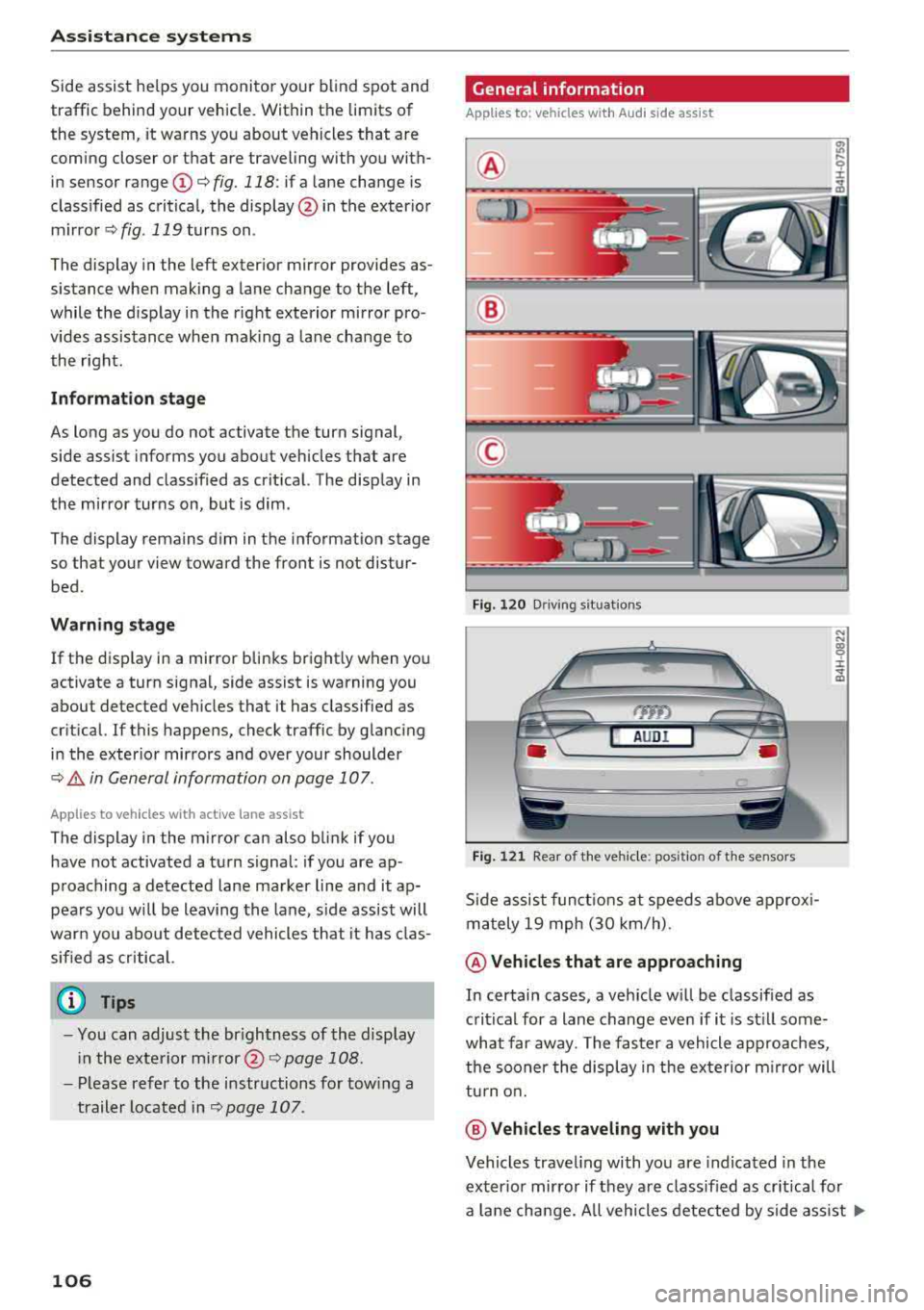
®
®
©
F ig. 12 0 Driving s it u ations
AUDI
Fi g. 12 1 Rear of the ve hicle: position of t he sensors
Side assist f unct ions at speeds above approx i
m ately 19 mph (30 km/h) .
@Vehicl es that are approaching
N N
:8 ± .., a,
In certain cases, a veh icle w ill be classified as
critical for a lane change even if i t is st ill some
what far away. The faster a vehicle approaches,
t h e sooner the display in the ex terior m irro r will
tu rn o n.
@ Vehicles traveling with you
Vehicles traveling with you are indicated in the
exter io r mirror if they are classified as cr it ica l fo r
a lane change. All vehicles detected by side ass ist
..,.
Page 110 of 356
Assistance systems
Switching on/off
Applies to: ve hicles w ith Aud i side ass ist
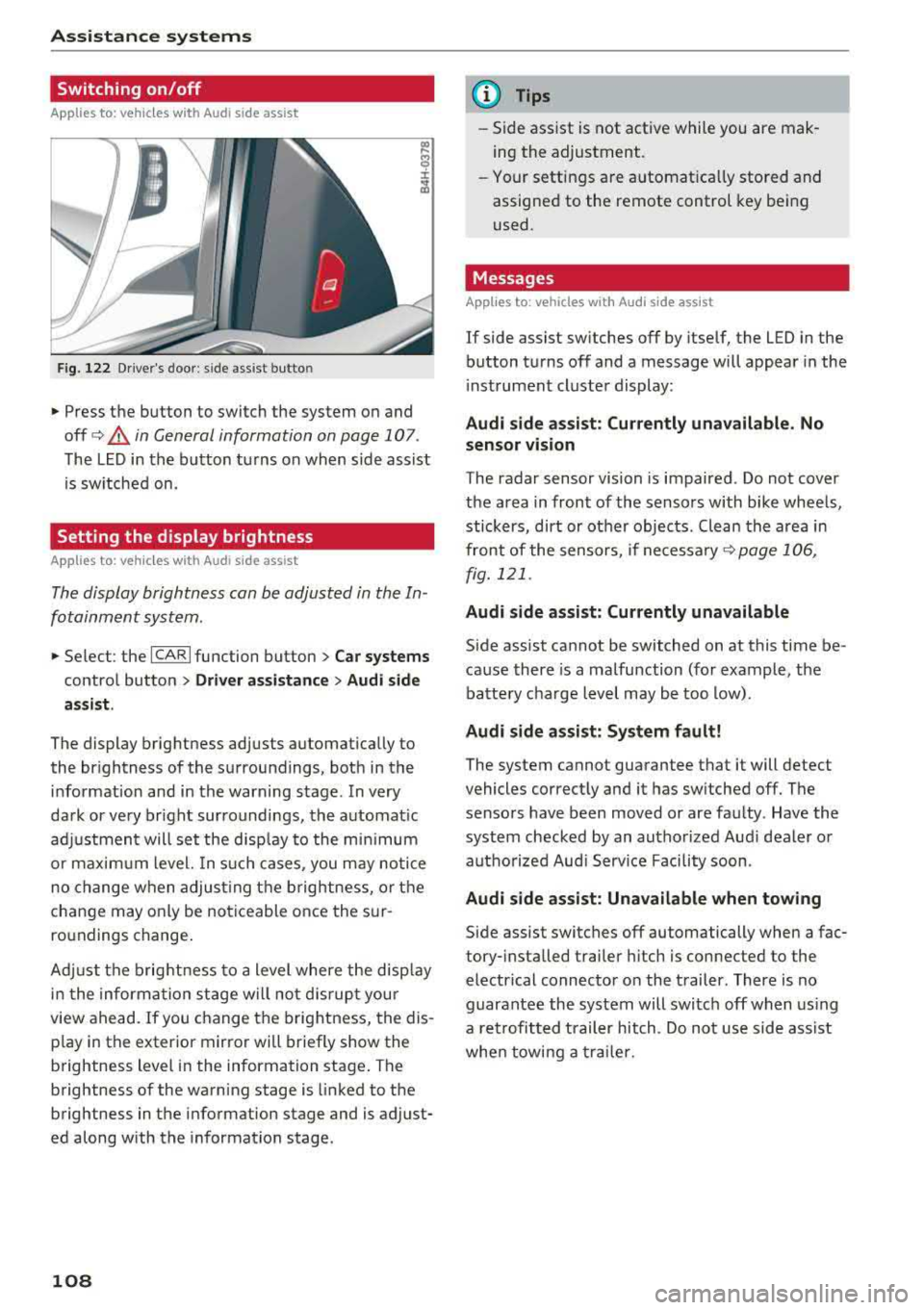
F ig. 122 Driver's door : side ass ist butto n
• Press the button to switch the system on and
off
c> .&, in General information on page 107 .
The LED in the button turns on when side assist
is sw itched on.
Setting the display brightness
App lies to: ve hicles with Aud i side ass is t
The display brightness can be adjusted in the In
fotainment system .
• Select : the ICARI function button > Car systems
control button > Driver assistance > Audi side
assist .
The display brightness adjusts automatically to
the br ightness of the surroundings, both in the
information and in the warning stage . In very
dark or very br ight surroundings, the automat ic
adj ustment will set the disp lay to the minim um
or maximum level. In such cases , you may notic e
no change when adjust ing the brightness, or the
change may only be noticeable once the sur
ro undings change .
Adj ust the brightness to a level where the disp lay
i n the information stage will no t disrupt your
view ahead.
If you change the brightness, the dis
p lay in the exter ior mirror wi ll briefly show the
brightness lev el in the information stage . T he
brightness of the warning stage is linked to the
brightness in the information stage and is adjust
ed along with the information stage.
108
@ Tips
-Side assist is not active while you are mak
ing the adjustment .
- Your settings are automat ica lly stored and
assigned to the remote control key being
used .
Messages
Applies to : vehicles wi th Audi side ass ist
If side assist switches off by itself, the LED in the
button turns off and a message will appear in the
i nstrument cluster display:
Audi side assist: Currently unavailable. No
sensor vision
The radar sensor vision is impaired . Do not cover
the area in front of the sensors with bike wheels,
stickers, dirt or ot her objects . Clean the area in
front of the sensors, if
necessary ¢ page 106,
fig. 121 .
Audi side assist: Currently unavailable
Side assist cannot be switched on at this time be
cause there is a malfunction (for example, the
battery charge level may be too low).
Audi side assist: System fault!
The system cannot guarantee that it will detect
vehicles correctly and it has switched off. The
sensors have been moved or are faulty . Have the
system checked by an authorized Audi dealer or
autho rized Aud i Serv ice Facility soon.
Audi side assist: Unavailable when towing
Side assist switches off automatically when a fac
tory- installed trailer hitch is connected to the
electrical connector on the trailer. There is no
guarantee the system will switch off when using
a retrofitted trailer hitch. Do not use side ass ist
when towing a trailer.
Page 111 of 356
lL t:0 ....
"' ......
"' .... 0 0 :c '
pedestrian and wild
animal detection
Description
Ap plies to: ve hicles with night visio n ass ist
The night vision assist con detect, highlight and,
if necessary, worn about pedestrians and large
wild animals .
Night vision assist with pedestrian and wild ani
mal detection ass ists you at night by us ing an in
frared camera to monitor the area in front of
your veh icle, w ith in the limits of the system. It
can display objects up to a distance of approxi
mately 1000 feet (300 m). The thermal image
detected by the camera is shown in the instru ment cluster display. Warm a reas appear l ighter
and cold areas appear dar ke r.
Highlighting detected pedestrians and wild
animals
Applies to: vehicles with night vision ass ist
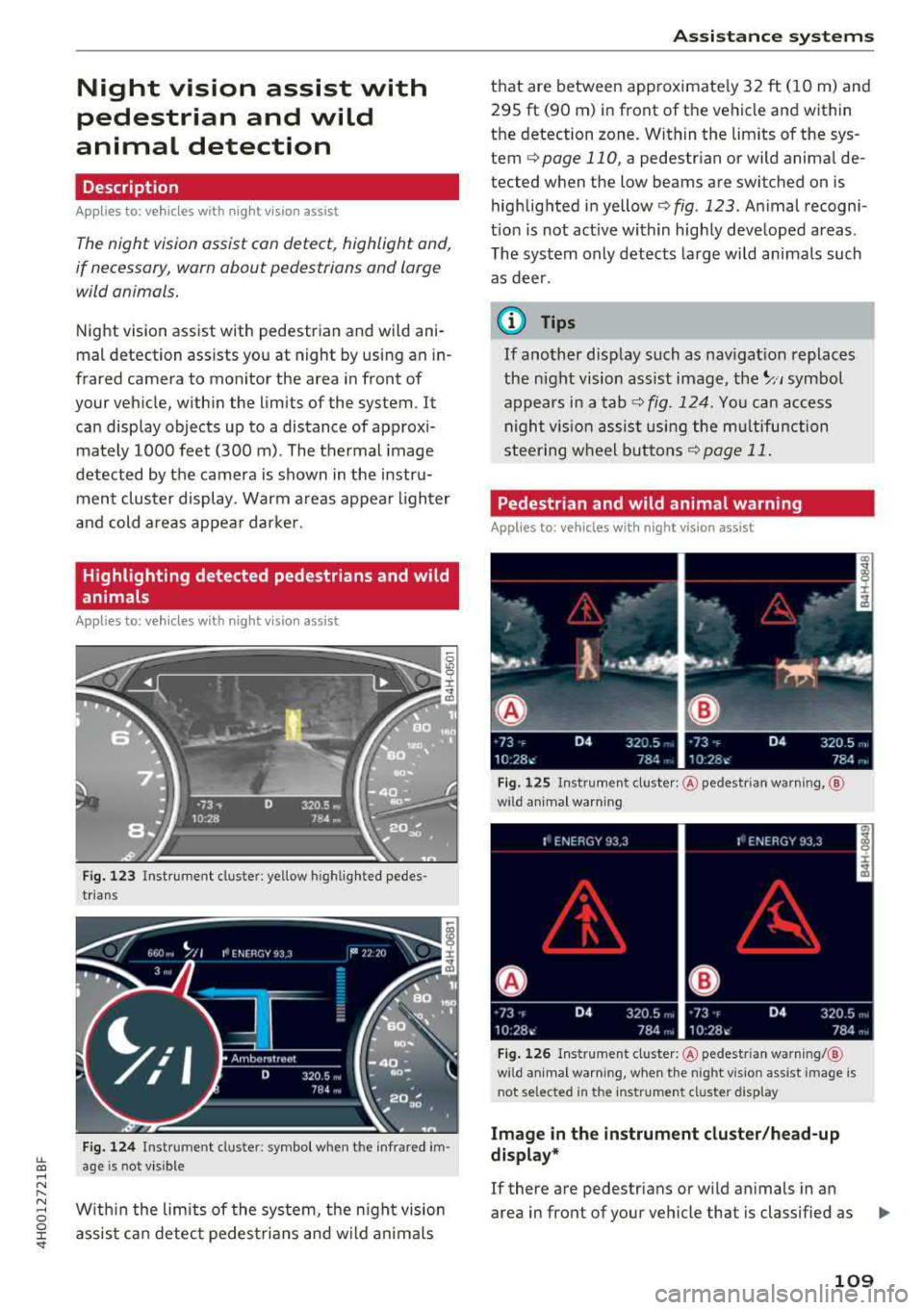
F ig. 12 3 Inst rument cluster: yellow h ighlig hte d pedes
trians
F ig . 124 Ins trumen t cluste r: symbo l when the in frared im
age is not visible
Wit hi n the limits of the system, the n ight vision
assis t can detec t pedes trians and w ild ani mals
Assi st a nce systems
that are between app roximate ly 32 ft ( 1 0 m) and
295 ft (90 m) in front of the vehicle and within
the detection zone. Within the lim its of the sys
tem
Q poge 110, a pedestrian or wild animal de
tected when the low beams are switched on is
highlig hted i n yellow
Q fig . 123. Animal recogni
t io n is not act ive within highly developed areas .
The system only detects large wi ld animals such
as dee r.
¢j) Tips
If another display such as nav igat ion replaces
the n ight vision assist image,
the~ .. , symbo l
appears in a tab
Q fig. 124. Yo u can access
nigh t vis ion assist using the mu ltifunction
stee ring w heel b uttons
Q page 11 .
Pedestrian and wild animal warning
Applies to: vehicles with night vision assist
Fi g. 12 5 In stru men t cluste r: @ pedest rian warning, @
w ild ani ma l warn ing
F ig . 1 26 Instrume nt cluster: @pedestr ia n warni ng/ @
wild an imal warn ing, when th e night vis ion assist image is
n ot selected in the inst rument cluster display
Image in the in strument clu ster /head-up
di splay*
If there are pedestrians or w ild an imals in an
area in front of your vehicle that is classified as
..,_
109
Page 112 of 356
Assistance systems
critical, the system will direct your attention to
this :
- Pedestrians or wild animals are highlighted in
red and the corresponding
symbol . or.
turns on c::> fig. 125.
- There is also an audible signal.
The area classified as critical is based on the vehi
cle speed and the steering wheel angle. Pedes
trian and wild animal warning encourages you to pay more attention.
If the night vision assist image is replaced by an
other display (such as the on-board computer),
the
red . or. indicator light c::> fig. 126 will
appear if there is a pedestrian or wild animal
warning.
If the head-up display* is switched on and the
night vision assist content is activated, .
or.
will appear in the head-up display*.
Marking light*
To direct the driver's attention to a pedestrian,
the headlights can flash on the pedestrian three
times in a row when there is a pedestrian warn
ing.
This occurs at speeds above approximately 35 mph (60 km/h) if you are outside of illuminat
ed areas and no detected vehicles are shown . The
high beam assistant* controls the marking light*
c::> page 44, High beam assistant .
The marking light is not used for wild animals .
General information
Applies to: vehicles with night vision ass ist
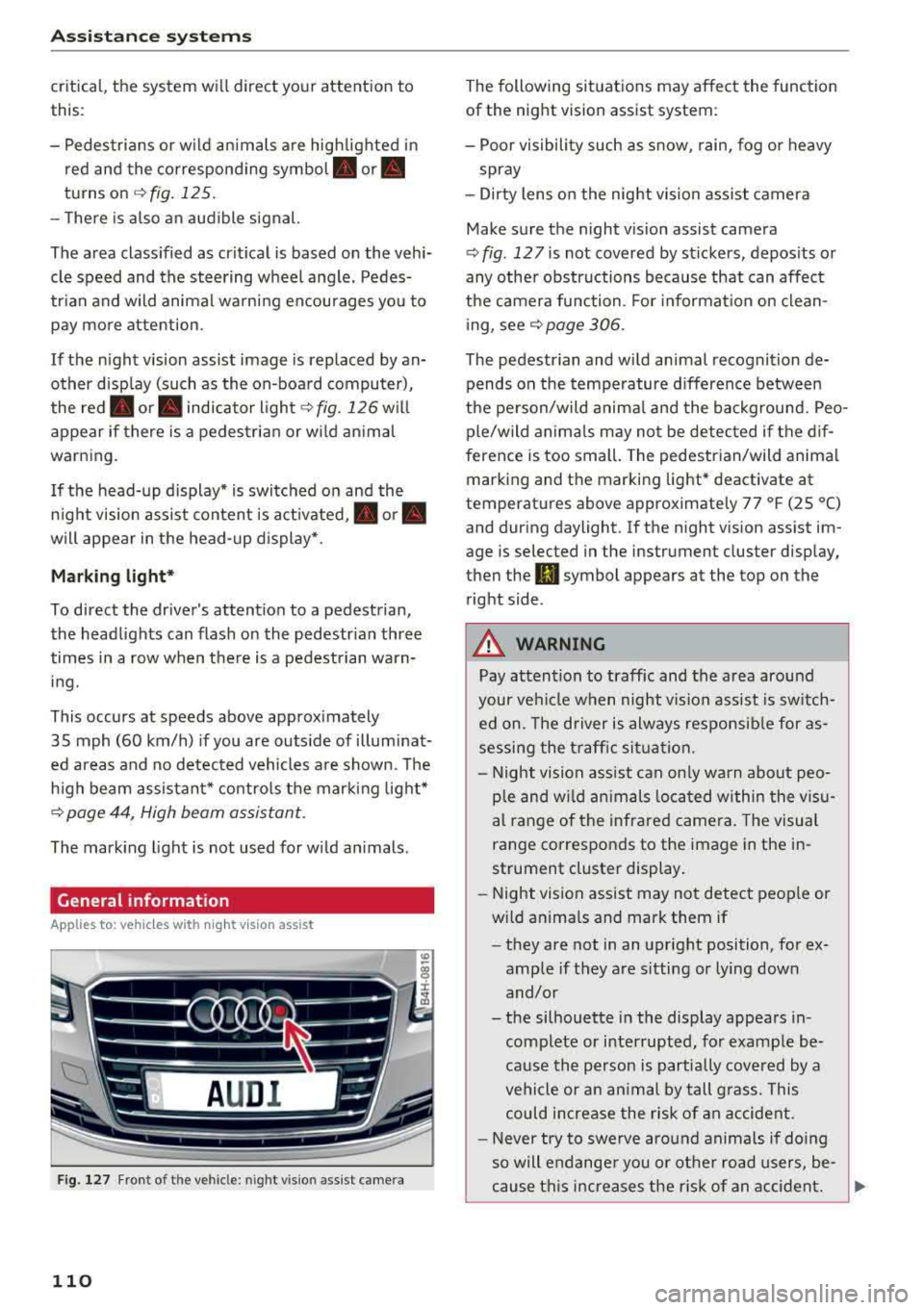
Fig. 127 F ront of th e vehicl e: nigh t visio n as sist c amer a
110
The following situations may affect the function
of the night vision assist system:
- Poor visibility such as snow , rain, fog or heavy
spray
- Dirty lens on the night vision assist camera
Make sure the night vision assist camera
c::> fig . 12 7 is not covered by stickers , deposits or
any other obstructions because that can affect
the camera function . For information on clean
ing, see
c::> page 306.
The pedestrian and wild animal recognition de
pends on the temperature difference between
the person/wild animal and the background. Peo
ple/wild animals may not be detected if the dif
ference is too small. The pedestrian/wild animal
marking and the marking light* deactivate at
temperatures above approximately 77 °F (25 °C)
and during daylight . If the night vision assist im
age is selected in the inst rument cluster display,
then the
II symbol appears a t the top on the
right side .
,& WARNING
,-
Pay attention to traffic and the area around
your vehicle when night vision assist is switch
ed on. The driver is always responsible for as
sessing the traffic situation.
- Night vision assist can only warn about peo
ple and wild animals located within the visu
al range of the infrared camera. The visual
range corresponds to the image in the in
strument cluster display .
- Night vision assist may not detect people or
wild animals and mark them if
- they are not in an upright position, for ex
ample if they are sitting or lying down
and/or
- the silhouette in the display appears in
complete or interrupted, for example be
cause the person is partially covered by a
vehicle or an animal by tall grass . This
could increase the risk of an accident.
- Never try to swerve around animals if doing
so will endanger you or other road users, be
cause this increases the risk of an accident.