ad blue AUDI A8 2018 User Guide
[x] Cancel search | Manufacturer: AUDI, Model Year: 2018, Model line: A8, Model: AUDI A8 2018Pages: 356, PDF Size: 54.71 MB
Page 150 of 356
Telephone
Connecting a cell phone
• Select the ITEL I button > Search for new cell
phone
r=> fig. 160 . The availab le Bluetooth devi
ces are shown in the Infotainment system dis
play.
Or : search for the MMI using the Blue
tooth device search on your cell phone.
• Select and confirm the desired cell phone from
the list of displayed Bluetooth devices .
• Select and confirm Handsfree. The MMI gener
ates a PIN for the connection setup
r=> fig . 160 .
• Select and confirm Yes.
• Enter the PIN for connecting on you r cell
phone .
Or: if the PIN is already disp layed on
your ce ll phone, confirm it in the cell phone and
in the MMI. The time a llowed for entering the
PIN is limited to approximately 30 seconds .
Pay attention to any additional system prompts
dis played on your cell phone, for example if the
system should connect automatica lly in the fu
ture . Depending on the cell phone, you may have
to confirm download ing the d irectory separately .
After connecting successfully
After connecting successfully, the signal strength
symbo l®
r=> page 139, fig. 158 and the Blue
tooth symbo l@ appear in the status line of the
Infotainment disp lay. In addition, the cell phone
contacts are automatically loaded in the MMI di
rectory. This process can take several minutes,
depending on the number of contacts.
If a ll of the memory capacity is fi lled, you will be
asked to replace the contacts from one cell phone when connecting another cell phone. With
the opt ion
Restricted use of telephone , only con
tacts in the cell phone and the local
MMI memory
are available
r=> page 152.
(D Note
Always follow the information found in r=> (D in
Wi-Fi hotspot on page 161 .
(D Tips
-You only have to pair your device one t ime .
Bluetooth devices that are already pa ired
automat ica lly connect to the
MMI when
they are within range and the ignition is
switched on.
148
- Authorizing the MMI connection in your cell
phone will speed up the automatic connec
t ion .
- Several cell phones can be paired to the
MMI, but only one cell phone can be actively
connected.
- A Bluetooth device that is already paired
with the MMI will be disconnected if anoth
er device is paired.
- When leaving the vehicle, the Bluetooth
connect ion to the cell phone will automati
cally disconnect.
- You can obtain more information from your
cell phone service provider or from yo ur cell
phone user guide. For information on using
the te lephone, visit
www.audiusa .com/
bluetooth
or contact an authorized Audi
dea ler or author ized Audi Service Facility.
Opening the telephone
App lies to: vehicles wit h telepho ne
Fig. 162 Telephone functions
Requirement: a cell phone must be connected to
the MMI
r=>page 147 .
• Select the IT ELI button.
The last active telephone menu is shown in the
Infotainment display. Press the
[fEI) button in
the
Telephone menu again to access the tele
phone functions .
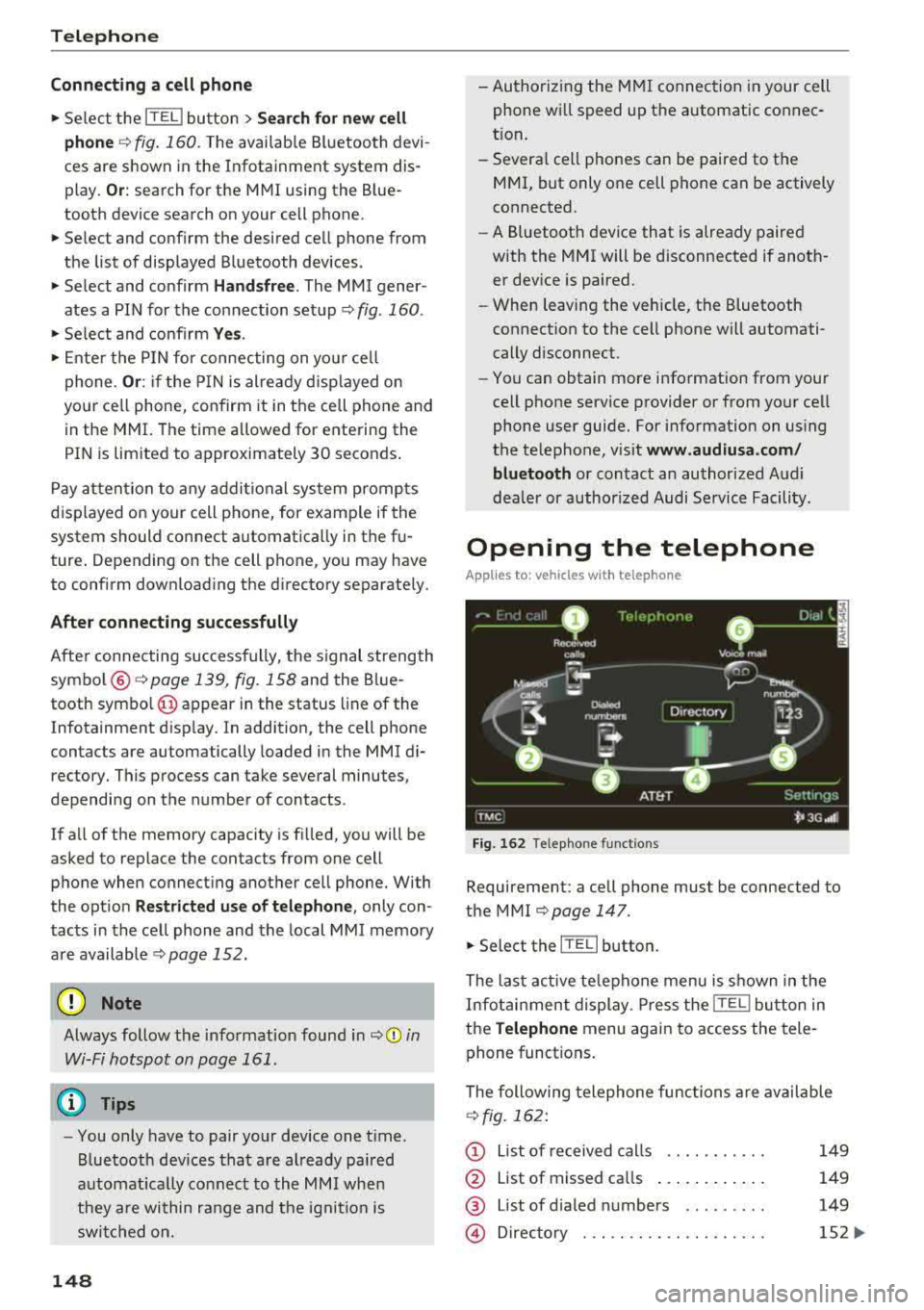
The following telephone func tions are available
r=>fig. 162:
(D List of received calls .... .. .... .
@ List of missed ca lls ...... .... . .
@ List of d ialed numbers ... ..... .
@ Directory ... ... . .. ...... .... .
149
149
149
152 ...
Page 154 of 356
Telephone
Opening the directory
Applies to: vehicles with telephone
After connecting the cell phone, the contacts in
it are automatically imported into the
/\1/\11.
Fig. 169 Contact list
.,. Select: the ITEL! button> Directory .
- Selecting a contact :
select and confirm a con
tact from the directory. The address card is dis
played.
Contacts are displayed in alphabetical order and
can be sorted according to first or last name
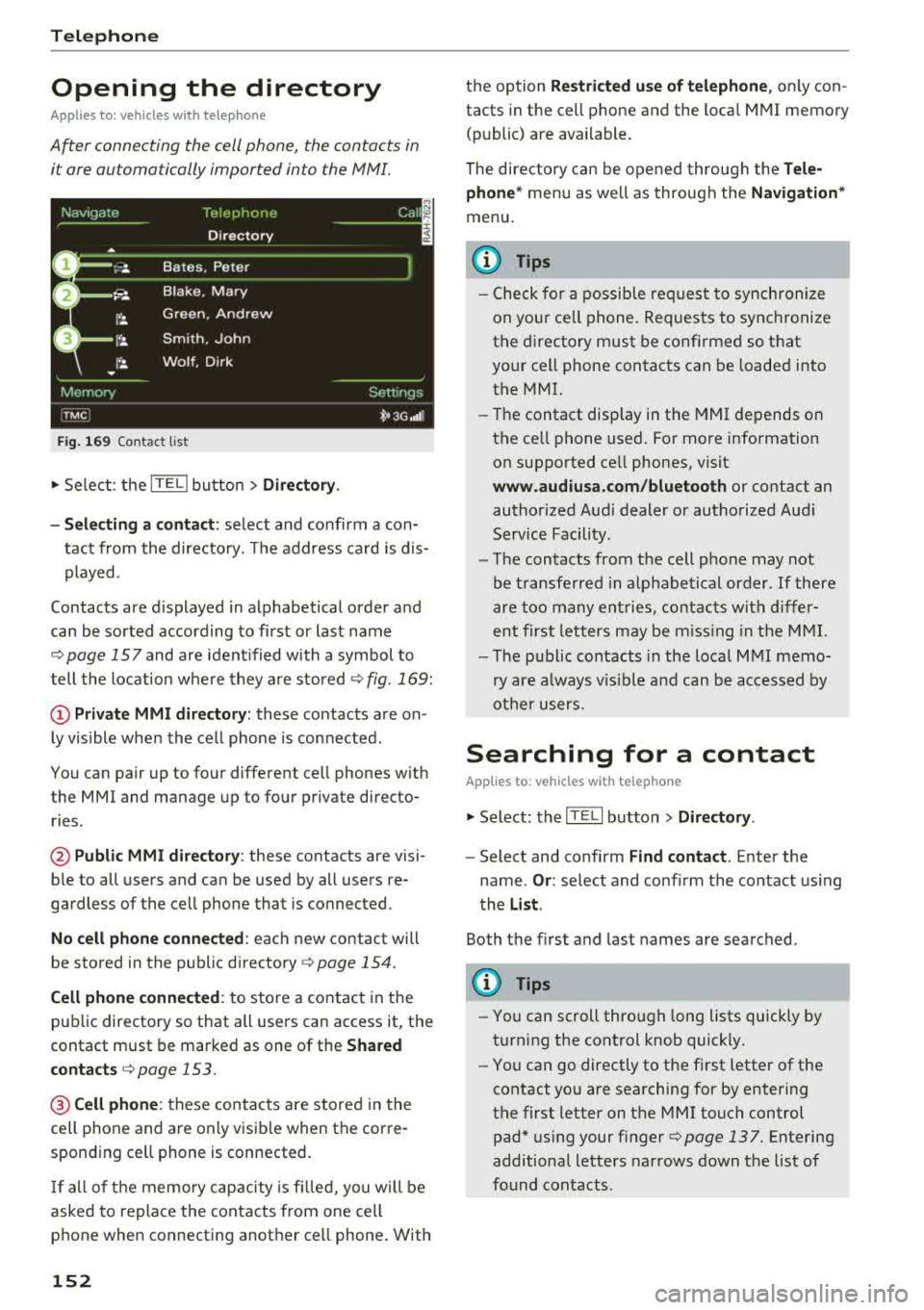
¢page 157 and are ident ified with a symbol to
tell the location where they are stored
¢ fig . 169:
(D Private MMI directory: these contacts are on
ly vis ible when the cell phone is connected .
You can pair up to four different cell phones with
the MMI and manage up to four private directo
ries .
@Public MMI directory: these contacts are visi
ble to all users and can be used by all users re
gardless of the cell phone that is connected.
No cell phone connected : each new contact will
be stored in the public
directory ¢ page 154.
Cell phone connected : to store a contact in the
public directory so that all users can access it, the
contact must be marked as one of the
Shared
contacts
¢ page 153 .
@Cellphone : these contacts are stored in the
cell phone and are only visible when the corre
sponding ce ll phone is connected.
If all of the memory capacity is filled, you will be
asked to replace the contacts from one cell
phone when connecting another ce ll phone . With
152
the option Restricted use of telephone , only con
tacts in the cell phone and the loca l MMI memory
(public) are available.
The directory can be opened through the
Tele
phone*
menu as we ll as through the Navigation*
menu.
(D Tips
- Check for a possib le req uest to synch ronize
on your ce ll phone. Requests to synchronize
the directory must be confirmed so that
your cell phone contacts can be loaded into
the MMI.
- Th e contact disp lay in the MMI depends on
the ce ll phone used. For more information
on supported ce ll phones, visit
www.audiusa.com/bluetooth or contact an
authorized Audi dealer or authorized Audi
Service Facility.
- The contacts from the cell phone may not
be transferred in alphabetical order . If there
are too many entries, contacts with differ
ent first letters may be missing in the MMI.
- The publ ic contacts in the local
MMI memo
ry are always vis ible and can be accessed by
other users.
Searching for a contact
Applies to: vehicles with telephone
.,. Select: the ITELI button > Directory .
-Select and confirm Find contact. Enter the
name .
Or: select and conf irm the contact using
the
List .
Both the first and last names are searched.
(D Tips
- You can scroll through long lists quickly by
turning the control knob quickly.
- You can go directly to the first letter of the
contact you are searching for by entering
the first letter on the MMI touch control
pad* using your
finger¢ page 137. Entering
additional letters narrows down the list of
found contacts .
Page 158 of 356
Telephone
Call options
Automati c redial :
when the func tion is swit che d
On , a phone number w ill be au toma tic ally re
d ia le d up to five times if it is busy. Automatic re
d ia l can be canceled with
End call . The function is
only active when the network gives a b usy signa l.
Auto answer : when the func tion is sw itched On ,
in com ing ca lls are automatically answered afte r
a br ief time.
Three-way conference (GSM)
- On :
you can answe r an incoming call while an
othe r ca ll i s in progress by selecting
Accept.
The fi rst call is put on hold. Using the Hold op
ti on, yo u can a lso put an act ive c all on hold and
sta rt another c all or a conference c all.
-Off : you ca n replace a call w it h an incom ing c all
b y se lec ting
Replace. Yo u can ig no re an in com
i n g ca ll using the
Decline opt ion . You cannot
p ut an active ca ll on ho ld o r sta rt a new ca ll.
Telephone settings
Volume settings
1> : fo r the Ringtone volume /
Phone call volume ,
see ~ page 2 06.
Voicemail number : the voicemail number can be
e nte red o r edi ted in t he
Number input field using
t he speller. Whe n a vo icemail numb er is store d,
t he vo icemail c an b e ac ces se d w ith
the ® sym
bol in the spe ller . T he
Delete voicemail number
function deletes the sto red voicemai l num ber .
Invert call lists : the phone nu mbers i n the call
lis ts ar e sorte d ac cordin g to t he time the call
t oo k place. When the f unc tion is swi tched
On ,
the so rting o rde r is reverse d.
Bluetooth
Bluetooth:
the MMI Bluetoo th fun ctio n can be
sw itche d
On or Off . The Blu etoo th symbol @
~page 139, fig. 15 8 appe ars in t he Infotain
men t displ ay when the f unct ion is swi tched
on.
Visible:
t he visibili ty of the MMI in cell p hones o r
i n Bl ueto oth a udio players can be swit ched
On or
Off . When Auto is sele cted, the MMI will rem ain
visib le for cell phones or a Bluetooth audio player
1> Depen ds on th e co nnecte d cell p ho n e.
156
fo r about five m inu tes when the ve hicle is sta
tiona ry and t he ignition is switched on. The visi
b ility sw itches o ff after that . However, it is still
poss ib le to establish a B luetooth connection with
ce ll phones o r devices that have already been
paired when the vis ibility is switched off . The visi
bility of the MMI automatically swi tc h es
Off
wh en audio fi les a re bei ng played using a con
n ecte d B lueto oth aud io player to avoi d pro ble m s
du rin g pla yb ack .
Bluetooth audio player : th e Bluetooth audio
player
func tion mu st be switche d On to be ab le
to sele ct the
Bluetooth audio player as the
sou rce in t he
Media menu. S w itch the Bluetooth
audio player
f unc tion Off if you are no t usi ng i t
to preven t mal func tions in the
Telephone or Me
dia
men us.
Find Bluetooth devices: the sys te m s ear ches for
and lists Bluetoot h devices tha t ar e with in range .
Bonded Bluetooth devices : the B luetoot h devic e s
co nn ect ed t o the MMI are lis ted. The cur rentl y
c on necte d B luetooth device is la be le d wi th t he
Bl uetoot h sym bol. T o dele te con nect ed Blue
tooth devices in dividua lly, se lect t he dev ice a nd
d elete it with t he
Delete Bluetooth device func
tion. To disconnect or connect pa ired cell phones
i ndivid ua lly, select the B luetooth dev ice and
c h ange the p rofile us ing t he
Connect fu nct ion
wh ile t he vehicle is s tat io na ry . U se
Disconnect to
d isco nnect th e paire d Bluetooth dev ice.
Known Bluetooth devices : up to 50 known devi
ces can be listed . T hese Bluetooth dev ices may no
l onger be in range when search ing to connect .
Bluetooth name : the Bluetooth name of t he M MI
(fo r example, "AUDI MMI 2613") is shown and
can be cha nged .
Delete Bluetooth devices : all connected Blue
tooth devices can be deleted by confirming with
Yes.
Wi-Fi settings
S ee ~ page 161.
Page 159 of 356
u. co .... N
" N .... 0 0 :c '
See ¢page 162.
(QJ) Note
Tele ph on e
Sort order
Yo u can so rt the contacts in your directo ry alpha
be tica lly according to
La st n am e/ Fir st name.
Always follow the info rmat io n found in ¢(@ in
Wi-Fi hotspot on page 161.
Show shared contacts
You can show or hide the public contacts . With
Y es, all the contacts in the local M MI memory
(public) are shown, and with
No , th ey are hidde n. @ Tips
- Several cell phones can be pa ired to the
MM I, but only one cell phone can be act ively
con nected.
Delete priv ate contacts /Delete shared
contacts
You can delete al l pr ivate contacts in the local
memo ry using t he
Del ete private conta ct s fu nc
t ion. Yo u can de lete the p ublic contacts in the lo
ca l memory using the
Dele te shared contacts
function .
-
To de lete all connected Bluetooth devices,
t h e
Bluetooth funct ion can be reset to t he
factory settings¢
page 207.
Directory settings
Applies to: vehicles with telephone
~ Select: th e [fill bu tton > Dir ectory > Settings
contro l button .
Troubleshooting
Applies to: vehicles with telephone
Problem Solution
Pairing
the cell phone to the MMI Check if the Bluetooth visibility on the cell phone and MMI is
failed. switched on. For some cell phones, the visibility turns off auto-
mat ically after a short period.
Or: restart your cell phone.
For more information on this, refer to the user gu ide for your cell
phone.
After pairing,
not all contact s/no Avoid using special characters in names .
contacts are loaded in the MMI. Avoid using contact groups.
Certa in
t e lephon e function s are The te lephone fu nct ions depend o n the cell phone service p rovider
grayed out o r not avai lab le. and the cell p hone you are using. You can ob tain more info rma -
tion from your cell phone se rvice provide r, in your cell phone user
guide or in the database for mobi le devices at
ww w.audiusa.com /
bluetooth .
157
Page 161 of 356
lL t:0 ....
'"" ......
'"" .... 0 0 :c '
connection
type @HJ) ¢ page 139, fig . 158.
You can now use Audi connect.
• Select: the I MENU I button > Audi connect .
• Confirm the prompt ask ing to connect to the
Inte rnet with
Y es.
Remo ving th e Audi SIM c ard
•Presson the Audi SIM card briefly. The card is
released from the slot. Remove the Audi SIM
card .
A WARNING
The card reader must a lways be closed while
driving for safety reasons.
(D Note
-Audi connect is des igned for use only w ith
the provided Audi SIM card. Aud i AG is not
liable for the consequences of using other
S IM cards.
-If a SIM card of a d ifferent size is inserted i n
the SIM card reader instead of an Audi SIM
ca rd, do not under any circumstances re
move th is card yourse lf due to the risk of
damaging the SIM card reader. Contact an
authorized Audi dealer or authorized Audi
Service Facility.
(D Tips
To use your cell phone, you can connect your it through the
Hand sfree Bluetooth profile
¢ page 147 .
-Audi does not provide support for other SIM
cards.
-A udi recommends using only the provided
Audi SIM card.
-You can spec ify when the MMI connects to
the Internet
¢ page 162. The Internet con
nection disconnects automatically once the
requested Audi connect service no longer re
quires any data packets.
-T he data connection for Audi connect serv
ices is preconfigured at the factory . You can
change the data connection at any time if
Audi connec t
you need to adjust the configuration
¢page 162.
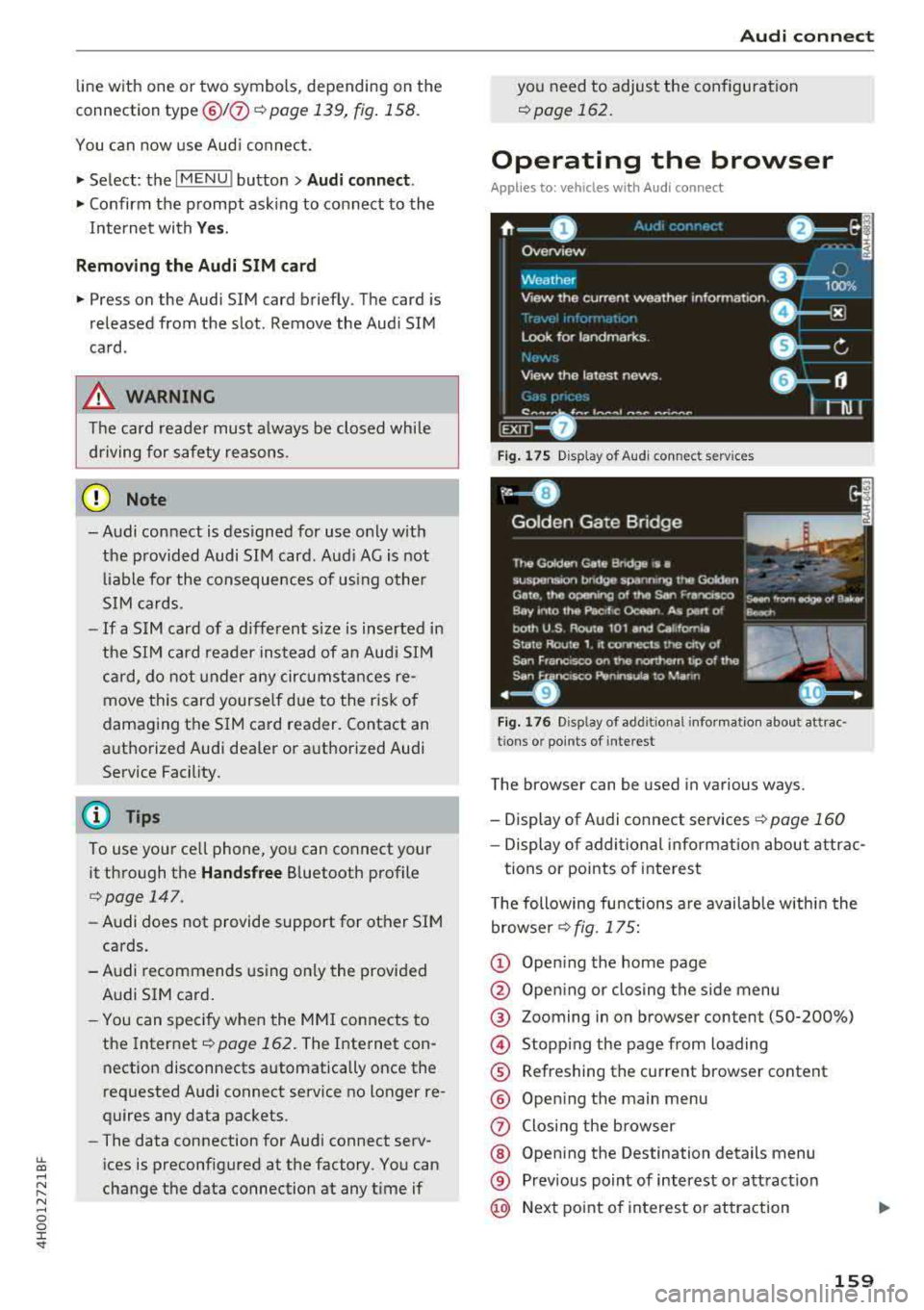
Operating the browser
Applies to: veh icles w ith Aud i connect
F ig . 175 D isp la y of Audi conn ect servi ces
Fig . 1 76 Disp lay o f add it ional infor matio n abou t att rac ·
tion s or po ints of intere st
The browser can be used in various ways .
-Display of Audi connect services <=>page 160
-Display of additional informat ion about attrac-
tions or points of interest
T he following functions are available within the
browser <=> fig. 175:
© Open ing the home page
@ Open ing or closing the side menu
® Zooming in on browser content (50-200%)
© Stopping the page from loading
® Refreshing the current browser content
® Open ing the main menu
(J) Closing the browser
@ Opening the Destination details menu
® Prev ious point of interest or attract ion
@ Next point of interest or attraction
159
Page 186 of 356
Media drive s and conn ection s
Cl earing the Juk ebo x
Req uirement: the J ukebox must con tain audio/
video fi les.
- Sele ctin g fil es/ fo ld ers: se lect the S ettings con
trol button
> Clear Juk ebo x > individual files or
folders.
Press the All control b utton to sele ct
all fi les or folders.
O r: se lect and confirm a
fo lder and press and hold the contro l knob . All
files in the folder are se lected for de leting .
-Delet ing file s and folder s: select the Start de
leting
control b utton > Ye s. The status of the
deleting process is shown in the Infotainment
display. Jukebox playback stops dur ing the de
leting process and starts again automatically
once the deletion is complete .
Showing memo ry cap acit y
Select : Settings control button > Jukebo x memo
r y.
The used/free Jukebox memory as well as the
number of stored tracks appear in the Infotain
ment d isplay.
The Jukebox is started and operated through the MMI
c>poge 190.
@ Note
Do not import audio/video files when the en
gine is turned off because this will drain the
veh icle battery.
(D Tips
- Tracks from audio CDs cannot be imported
to the J ukebox for legal reasons.
- Fil es a lready imported a re recognized and
will be grayed out when setting up a new
import.
- It is no t possib le to play audio/video fi les in
the DVD drive while importing them.
- The Jukebox does no t provide an export
function due to lega l reasons.
- F il es or tracks without s tored information
are listed as
Unknown . Audi recommends
adding additiona l information (s uch as 1D3
tags) to aud io files.
- Reset the Jukebox to the factory defau lt set
tings when sel ling your
vehicle¢ page 207.
184
Bluetooth audio player
App lies to : vehicles wi th Blue toot h int erface
You con ploy music wirelessly from your cell
phone through the
MMI using the Bluetooth au
dio player.
Requirement: the vehicle must be stationary. The
B luetooth function on the portab le aud io player
and the MMI
A ud io player must be switched on
c> poge 156.
.,. Select the I MEDIAi button > Source control but
ton
> Bluetooth audio player > Connect new
Bluetooth audio playe r.
The available Blue
tooth audio players are d isplayed.
.,. Select and confirm the des ired Bluetooth audio
player from the l ist .
.,. Sele ct and confirm Audio pla yer. Th e M MI gen
erates a PIN for the con nection.
.,. Sele ct and confirm Ye s.
.,. Enter the PIN for connecting on your cell
phone .
Or: if the PIN is already displayed on
your cell phone, confirm it in the ce ll phone and
in the MMI. The t ime allowed for entering the
PIN is limited to approximate ly 30 seconds.
The media are started and operated through the
portable device or the M MI, depending on the de
vice be ing used
¢ page 190.
(D Tips
-Be sure to pay attention to any possible con
nection prompts on your Bluetooth audio
player.
- You on ly have to pair your device one time .
Bluetooth devices that are already paired
are automatically connected to the MMI as
soon as they are in range.
- Severa l Bluetooth audio p layers can be con
nected to the MMI, but only one portab le
device can be active.
- Bluetooth A2DP and AVRCP (1.0/1.3) are
supported .
- The supported media functions depend on
the B luetooth aud io player be ing used.
- For more informat ion on the supported de
vices, v isit
www.audiusa .com/bluetooth or
contact an a uthorized Aud i dea ler or author
ized Aud i Serv ice Facility.
Page 189 of 356
u. co ..... N
" N ..... 0 0 :c '
cannot be connected to the iPod adapter
ca
b le (p lus)* . Connect these devices using the
optiona l 3.5 mm stereo jack adapter cable*.
-For video p layback, you ca n also connect
your iPod using the AV adapter cable*. You
also need an App le AV cable to do this. For
more information on the App le AV cable,
re
fer to your iPod user guide .
-The Apple Lightning connector does not
support v ideo p layback.
Media dr ives and conn ection s
-iPod/iPhone malfunctions also affect t he
operation of the MMI. Reset yo ur iPod/
iPhone if this happens.
-For important information on operating
your iPod/iPhone, refe r to the user g uide fo r
the device. A udi recommends updating the
iPod/ iPhone software to the latest version.
-For more in fo rmat io n about the Aud i music
interface and suppo rted devices, v is it
www .audi.com /bluetooth or contact an au
thorized A udi dealer .
Supported media and file formats
Overview
The DVD drive , the Jukebox, the SD card reader
and the USB storage device* connectio n support
the following audio/video file properties:
Audio files Video files
Supported SD cards:
with a capacity up to 32 GB
media DVD drive: audio CDs (up to 80 m inutes); CD -RO Ms w ith a capacity up to 700 MB;
DVD±R/RW; standard video DVDs and audio DVDs that are compatible with DVD v id-
eo
Audi music int erface : portab le devices (such as iPods, USB storage dev ices*)
File system SD/SDHC/ MMC memory card s
USB storage device* :
FAT or FAT32 file system, maximum 4 partitions
DVD drive: Joliet (sing le session and multisess ion CDs; single sess ion DVDs on ly);
UDF
Metadat a Album, tra ck, artis t, ye ar, genre
and commen taries for M P3-/
W MA-/M4A files
Embedded album covers up to
800x800 px. (GIF, JPEG, PNG)
Format M PE G-1 /-2
Windows M PEG 2/4 M PEG 1/ 2 ISO- I SO - W indows
Layer -3 Me dia A u- MPEG4; MPE G4 H. Media Vid -
dio 8 an d 9 DivX 3, 4 264 eo 9
and 5; Xvid (
M PEG4
AVC)
File e xtension .mp3 .wma; .m4a; .mpg; .
av ,
.mp4; .wmv;
.asf .m4b; . mpeg .m 4v; .asf
.aa c .mov
Play .M3U; .PLS; .WPL
lists
187
Page 191 of 356
u. co .... N
" N .... 0 0 :c '
Problem
Audi music interface /Bluetooth
audio player :
the portable aud io
device/Bluetooth audio player is
not supported.
Audi music interface : When start-
ing the playback through the 3.5
mm stereo jack adapter cable*/ AV
adapter cab le", the volume is too
high.
Audi music interface : the porta-
ble device is not recognized as a
source.
Audi music interface : malfunc-
tions during audio playback
through an iPod/iPhone .
Audi music interface : there is
stat ic when connecting or discon -
necting the 3 .5 mm stereo jack*/
AV adapter cable* or when con-
nect ing or disconnecting the port-
able device to the 3.5 mm stereo
jack*/ AV adapter cable*.
Bluetooth audio player : audio
playback interference .
Jukebox: songs on the imported
playlist are grayed out.
Wi-Fi audio player* : the audio/
video playback is inter ru pted.
Wi-Fi hotspot *: your Wi-Fi device
is d isconnected from the Wi-Fi
hotspot .
Media drives and connections
Solution
Refer to the information on the Audi music interface ¢ page 186/
Bluetooth audio
player" ¢ page 184. You can learn about support-
ed dev ices in the Audi database for mobile devices at
www.audi.com/bluetooth .
Adjust the volume of the portable device to approximate ly 70 per-
cent of the maximum output
( Input level )¢ page 191 .
F or many cell phones or media players, playback is not possible
when the battery leve l is too low (less than 5% of its capacity).
The portable device will on ly be recognized as a source in the
MMI
after connecting if the battery charge is sufficient.
The
Audio player function is sw itched On. Switch this function Off
when you are not using the Bluetooth audio player*.
The Audi music interface source is already selected when connect-
ing or disconnecting. Either mute the portable device or switch to
another audio source (such as the
radio¢ page 178) before con-
necting or disconnecting the portable device.
Only
one interface should be act ively used at a time to ensure
problem-free playback.
When importing playlists, all of the fi les themse lves must be im-
ported.
To avoid intenuptions during audio/video playback, deactivate the
power saving func tion on the Wi-Fi media player* or connect it to
a charger.
Make sure the network optim izat ion functions are sw itched off in
the Wi-Fi sett ings or in the network sett ings for your W i-F i dev ice .
For addit ional information refer to the user guide for your Wi-Fi
device.
189
Page 192 of 356
Playing media
Playing media
Accessing media
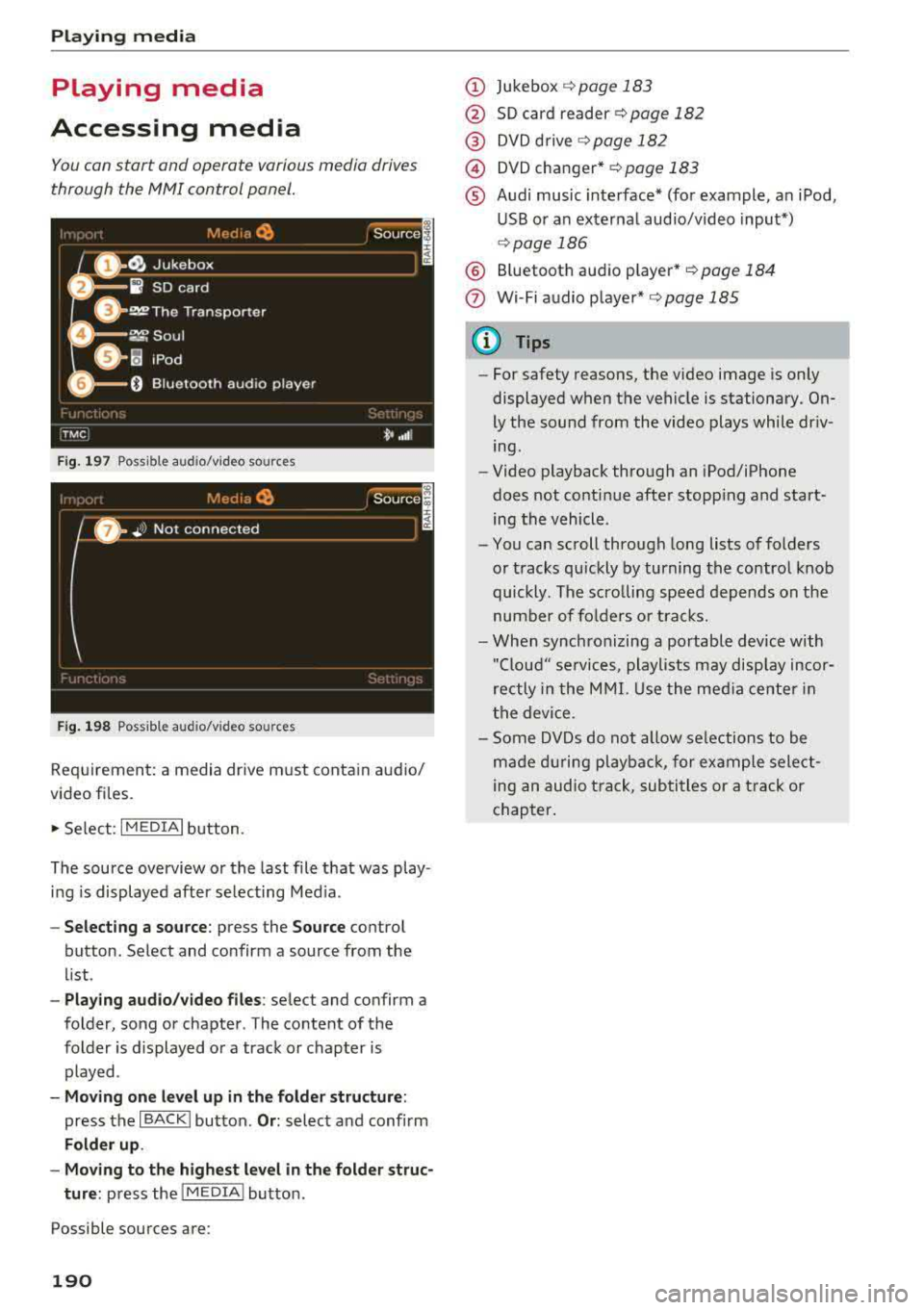
You con start and operate various media drives
through the
fvtfvtl control panel.
F ig. 197 Possible audio/video sources
Fig . 19 8 Possible aud io/video sources
Requirement: a media drive m ust cont ain audio/
video files.
., Select: I MEDIAi button.
The source overview or the last file that was play
i n g is displayed afte r se lecting Med ia .
- Selecting a source : press the Source control
button. Select and confirm a source from the
l ist .
-Play ing audio /video files : select and confirm a
folder, song or chapter. The content of the
folder is displayed or a track or chapter is
played .
-Mo ving one l eve l up in the folder struct ure:
press the I BACKI button. Or : select and confirm
Folder up .
- Movin g to th e highest level in the folder str uc
ture :
press the I MEDIA i button.
Possible sources are:
190
(D Jukebox ¢page 183
@ SD card reader¢ page 182
@ DVD d rive ¢ page 182
@) DVD changer* r::!:>poge 183
® Audi music interface* (for example, an iPod,
USB or an externa l audio/v ideo input*)
¢ page 186
® Bluetooth aud io p layer* <::!; page 184
(!) Wi-Fi audio player*¢ page 185
{!) Tips
-For safety reasons, the video image is only
displayed when the vehicle is stationary.
On
ly the sound from the video plays while dr iv
ing .
- Video playback through an iPod/iPhone
does not conti nue after stopp ing and start
ing the vehicle.
- You can scroll through long lists of folders
or tracks qu ickly by turning the control knob
quickly. The scro lling speed depends on the
number of fo lders o r tracks.
- When synchronizing a portable device w ith
"Clou d" services, playlists may disp lay incor
rectly in the M MI. Use the med ia ce nter in
t h e device.
- Some DVDs do not allow selections to be
ma de d uring playbac k, for ex ample sele ct
ing an audio track, subtitles or a t rack or
chapter .
Page 209 of 356
u. co .... N
" N .... 0 0 :c '
the vo lume of the announcements by turning the
control knob .
Individual voice training (only when the vehicle
i s stat iona ry): you can adap t th e voice recognition
system to your voice or p ronunciation i n order to
i mprove the system 's ability to recognize your
speec h. Individ ua l tra ini ng is comp rised of 40
speec h entr ies that cons ist of commands and se
q uences of numbers . Yo u can delete the p ro
g rammed vo ice tra ining using
Reset voice train
ing .
Delete all name tags :
all of the name tags that
you have stored (s poke n names) a re deleted .
Display brightnes s
You can adjust the Infotainment display brig ht
ness by t urning the cont ro l knob.
Factory settings
You can rese t the following fu nctions to th e fac
tory def ault setti ngs:
- Sound settings
- Radio
- Media sett ings
- Jukebox
- Directory *
- Telephone *
- Bluetooth *
- Navigation settings*
- Navigation and online memory *
- Speech dialog system
You can se lect the desi red functions i ndividually
or all at once with the option
Select all entries .
Select and confi rm Restore factory settings .
If yo u reset the Jukebox to facto ry settings, a ll of
the music/video files are deleted and t he
Media
settings
are reset.
System update
The MMI softwa re, s uch a s th e navig ati on da ta *,
can be upd ate d by DV D, US B or SD c ard using t he
system update feature .
F or more inform ation ab out th e
System update ,
vis it www.audiusa.com/bluetooth o r co nta ct a n
System settings
authori ze d Au di d eale r or auth o rized Au di Serv ice
Fac ility .
Data encryption
You can protect your pe rsonal data, such as con
t ac ts in the dir ectory, desti nations in navig ation*
and n ame tags with a person al passwor d. If th e
u ni t is rep lace d, you ca n on ly t ransfe r yo ur p er
sona l data to the new M MI unit usin g your pass
word . The default password " MMI3G" is valid un
t il you assign a personal passwo rd.
Version information
I nfo rm ation on the so ftwar e ve rsion o f the M MI
and t he navigatio n data base * is disp layed .
207