audio AUDI A8 2018 User Guide
[x] Cancel search | Manufacturer: AUDI, Model Year: 2018, Model line: A8, Model: AUDI A8 2018Pages: 356, PDF Size: 54.71 MB
Page 148 of 356
Voice recognition system
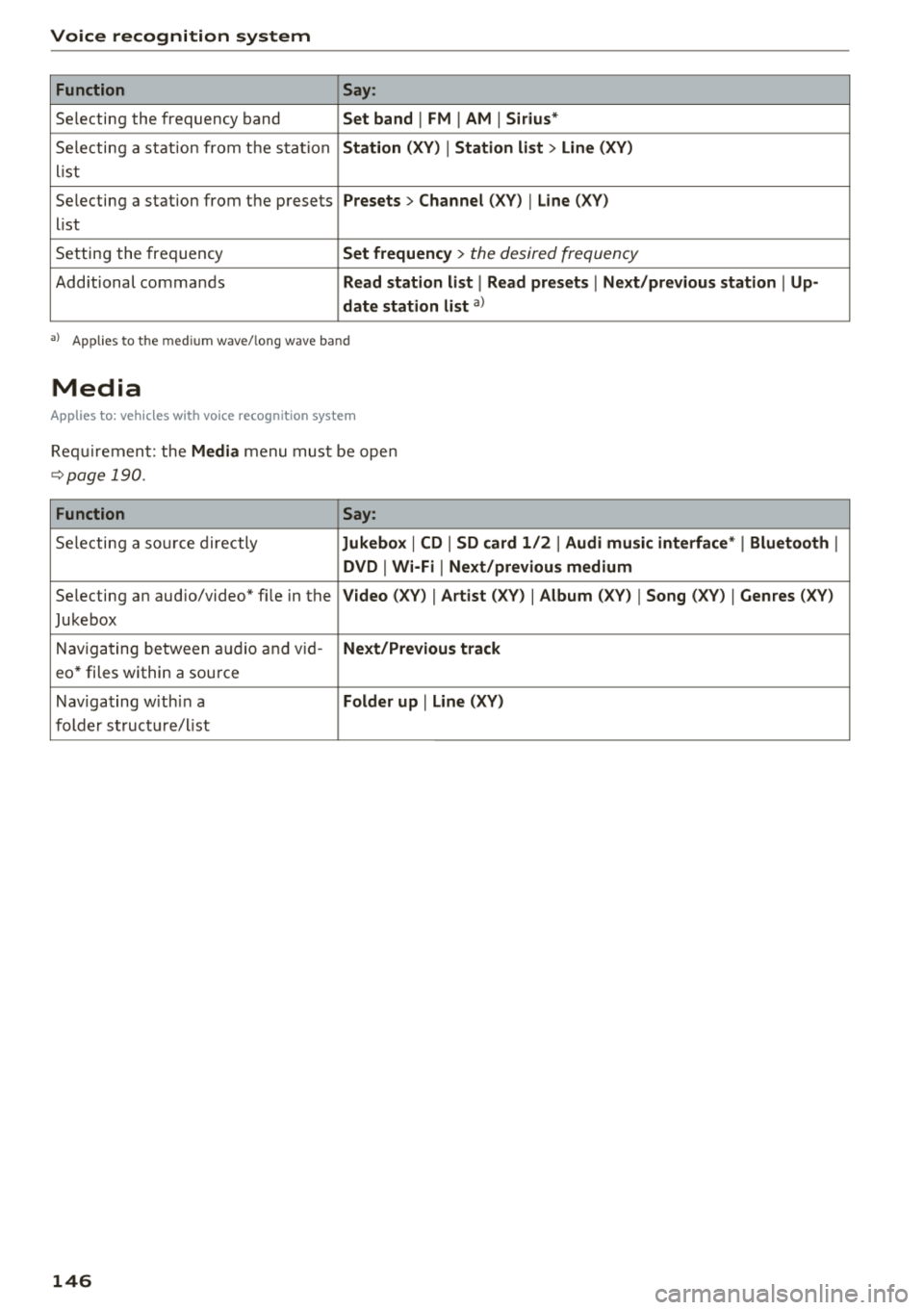
Function Say:
Selecting the frequency band Set band I FM I AM I Sirius*
Selecting a station from the station Station (XV) I Station list > Line (XV)
list
Selecting a station from the presets
Presets > Channel (XV) I Line (XV)
list
Setting the frequency
Set frequency > the desired frequency
Additional commands Read station list I Read presets I Next/previous station I Up-
date station list
a)
• > Ap plies to t he m ed iu m wave/tong wave ba nd
Media
Applies to: vehicles with voice recogn ition system
Requirement: the Media menu must be open
~page 190.
Function Say:
Selecting a sou rce directly Jukebox I CD I SD card 1/2 I Audi music interface* I Bluetooth I
DVD I Wi-Fi I Next/previous medium
Selecting an aud io/video* fi le in the Video (XV) I Artist (XV) I Album (XV) I Song (XV) I Genres (XV)
Jukebox
Navigating
between audio and vid-Next/Previous track
eo* files within a source
Navigating with in a
Folder up I Line (XV)
folder structure/list
146
Page 158 of 356
Telephone
Call options
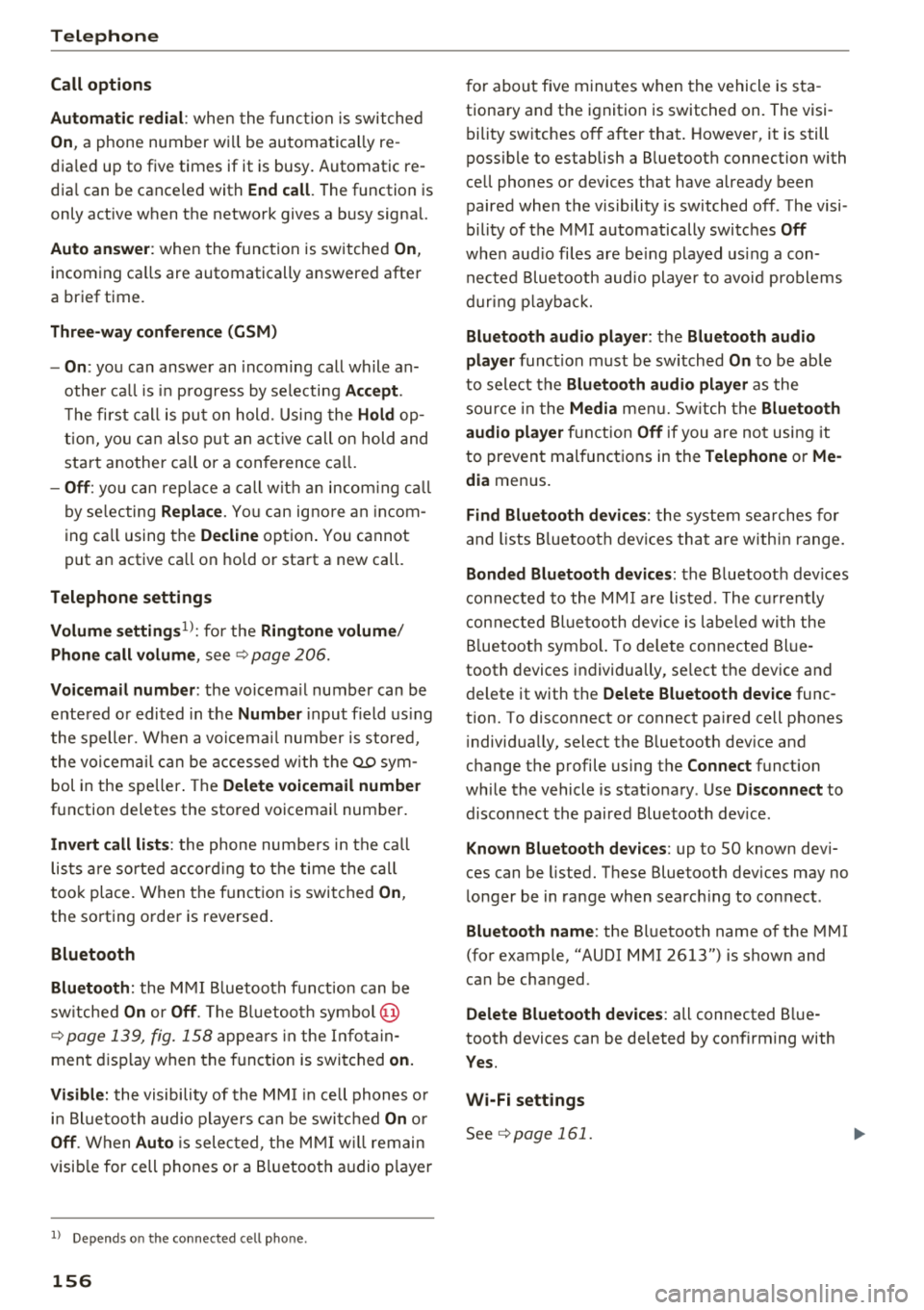
Automati c redial :
when the func tion is swit che d
On , a phone number w ill be au toma tic ally re
d ia le d up to five times if it is busy. Automatic re
d ia l can be canceled with
End call . The function is
only active when the network gives a b usy signa l.
Auto answer : when the func tion is sw itched On ,
in com ing ca lls are automatically answered afte r
a br ief time.
Three-way conference (GSM)
- On :
you can answe r an incoming call while an
othe r ca ll i s in progress by selecting
Accept.
The fi rst call is put on hold. Using the Hold op
ti on, yo u can a lso put an act ive c all on hold and
sta rt another c all or a conference c all.
-Off : you ca n replace a call w it h an incom ing c all
b y se lec ting
Replace. Yo u can ig no re an in com
i n g ca ll using the
Decline opt ion . You cannot
p ut an active ca ll on ho ld o r sta rt a new ca ll.
Telephone settings
Volume settings
1> : fo r the Ringtone volume /
Phone call volume ,
see ~ page 2 06.
Voicemail number : the voicemail number can be
e nte red o r edi ted in t he
Number input field using
t he speller. Whe n a vo icemail numb er is store d,
t he vo icemail c an b e ac ces se d w ith
the ® sym
bol in the spe ller . T he
Delete voicemail number
function deletes the sto red voicemai l num ber .
Invert call lists : the phone nu mbers i n the call
lis ts ar e sorte d ac cordin g to t he time the call
t oo k place. When the f unc tion is swi tched
On ,
the so rting o rde r is reverse d.
Bluetooth
Bluetooth:
the MMI Bluetoo th fun ctio n can be
sw itche d
On or Off . The Blu etoo th symbol @
~page 139, fig. 15 8 appe ars in t he Infotain
men t displ ay when the f unct ion is swi tched
on.
Visible:
t he visibili ty of the MMI in cell p hones o r
i n Bl ueto oth a udio players can be swit ched
On or
Off . When Auto is sele cted, the MMI will rem ain
visib le for cell phones or a Bluetooth audio player
1> Depen ds on th e co nnecte d cell p ho n e.
156
fo r about five m inu tes when the ve hicle is sta
tiona ry and t he ignition is switched on. The visi
b ility sw itches o ff after that . However, it is still
poss ib le to establish a B luetooth connection with
ce ll phones o r devices that have already been
paired when the vis ibility is switched off . The visi
bility of the MMI automatically swi tc h es
Off
wh en audio fi les a re bei ng played using a con
n ecte d B lueto oth aud io player to avoi d pro ble m s
du rin g pla yb ack .
Bluetooth audio player : th e Bluetooth audio
player
func tion mu st be switche d On to be ab le
to sele ct the
Bluetooth audio player as the
sou rce in t he
Media menu. S w itch the Bluetooth
audio player
f unc tion Off if you are no t usi ng i t
to preven t mal func tions in the
Telephone or Me
dia
men us.
Find Bluetooth devices: the sys te m s ear ches for
and lists Bluetoot h devices tha t ar e with in range .
Bonded Bluetooth devices : the B luetoot h devic e s
co nn ect ed t o the MMI are lis ted. The cur rentl y
c on necte d B luetooth device is la be le d wi th t he
Bl uetoot h sym bol. T o dele te con nect ed Blue
tooth devices in dividua lly, se lect t he dev ice a nd
d elete it with t he
Delete Bluetooth device func
tion. To disconnect or connect pa ired cell phones
i ndivid ua lly, select the B luetooth dev ice and
c h ange the p rofile us ing t he
Connect fu nct ion
wh ile t he vehicle is s tat io na ry . U se
Disconnect to
d isco nnect th e paire d Bluetooth dev ice.
Known Bluetooth devices : up to 50 known devi
ces can be listed . T hese Bluetooth dev ices may no
l onger be in range when search ing to connect .
Bluetooth name : the Bluetooth name of t he M MI
(fo r example, "AUDI MMI 2613") is shown and
can be cha nged .
Delete Bluetooth devices : all connected Blue
tooth devices can be deleted by confirming with
Yes.
Wi-Fi settings
S ee ~ page 161.
Page 164 of 356
Audi connect
@ Tips
-In vehicles without Audi connect*, the use
of the Wi-Fi hotspot is only possible for the
Wi-Fi audio player*. A data connection to
the Internet cannot be established.
- A separate, paid mobile subscription may be
needed to use the Wi-Fi hotspot. You can
obtain more information from your cell phone service provider .
- Depending on your cell phone plan, rece iv
i ng data packages through the Wi-Fi hot
spot may result in additional charges, par
ticularly w hen in another country. The use
of a flat rate data plan is highly recom
mended. You can obtain more information
from your cell phone service provider.
Configuring a data
connection
A pp lies to: ve hicles with Aud i co nn ect
To use Audi connect services through a phone in
the vehicle, a data connection must be config
ured.
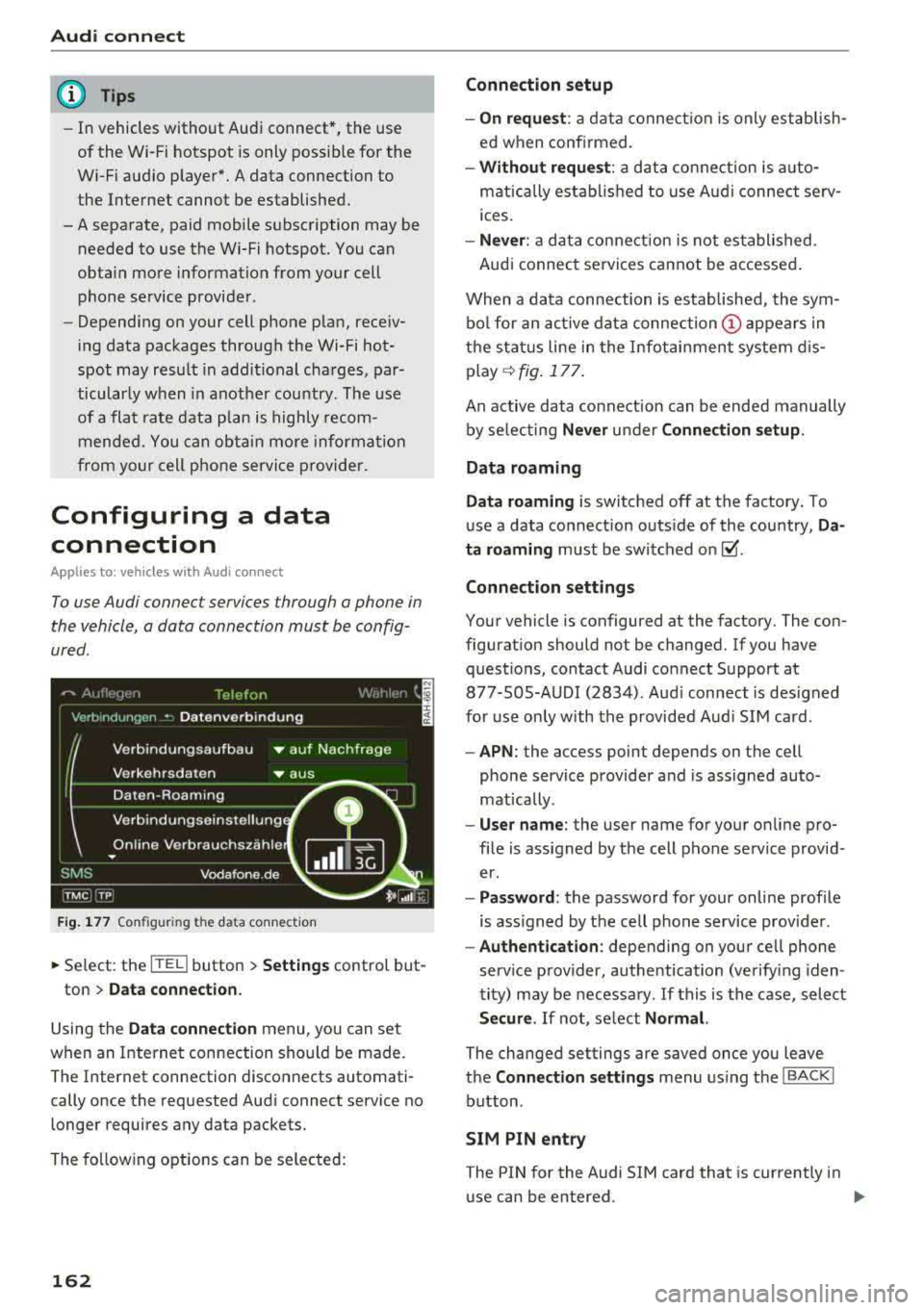
F ig. 177 Configu ring the da ta conne ction
~ Se lect : the [fED button > Settings control but-
ton
> Data connection.
Using the Data connection menu , you can set
when an Internet connection should be made .
The Internet connection disconnects automati
cally once the requested Audi connect service no
longer requires any data packets.
The following options can be selected:
162
Connection setup
- On request :
a data connection is only establish
ed when confirmed.
- Without request: a data connection is auto
matically established to use Audi connect serv
ices.
- Never : a data connection is not established .
Audi connect services cannot be accessed .
When a data connection is established, the sym
bol for an active data
connection (!) appears in
the status line in the Infotainment system dis
play
q fig. 177.
An active data connection can be ended manually
by selecting
Never under Connection setup.
Data roaming
Data roaming
is switched off at the factory. To
use a data connection outs ide of the country,
Da
ta roaming
must be switched on~ -
Connection settings
Your vehicle is configured at the factory. The con
figuration should not be changed. If you have
questions, contact Audi connect Support at 877-S0S-AUDI (2834) . Aud i connect is designed
for use only with the provided Aud i SIM card.
-APN: the access point depends on the cell
phone service provider and is assigned auto
mat ically .
-User name: the user name for your on line pro
file is assigned by the cell phone service provid
er.
- Password : the password for your online profile
is ass igned by the cell phone service provider .
-Authentication : depending on your cell phone
service provider, authentication (verify ing iden
tity) may be necessary .
If this is the case, select
Secure. If not, select Normal.
The changed settings are saved once you leave
the
Connection settings menu using the I BACK !
button.
SIM PIN entry
The PIN for the Audi S IM card that is currently in
use can be entered.
Page 183 of 356
u. co .... N
" N .... 0 0 :c '
connections
Introduction
There are various media drives and connections
ava ilable i n the MMI. For example, you can play
aud io/video* f iles through the Jukebox, or you
can connect a portable device to the Audi music in te rface* a nd ope rate it throug h the MM I.
Notes
General information
Media and format restr ictions :
the MMI (includ
ing the SD card reader and the USB storage de
vice connect ion*) was tested w ith a var iety of
products and media on the market. However,
there may be cases where ind iv idual devices or
media and aud io/video files* may not be recog
niz ed, may play o nly w it h rest rictio ns, o r may no t
p lay at a ll.
The MM I media dr ives do not suppo rt W indows
M edia Audio 9 Vo ice, W indows Media Aud io 9
L oss less and Windows Media
9 Pr ofessional for
mats .
Digital Rights Management : please note that
the audio/v ideo* fi les are subject to copy right
p rotection.
The med ia drives do not play f iles that are pro
tected by DRM and that are ident ified w ith the
symbo l
i'.D.
Data se curity : Never store important data on the
memory cards, the Jukebox, CDs/DVDs or porta
b le aud io devices . Audi is not responsib le for
damaged or lost fi les and med ia.
Loading times : the more files/fo lders/playlists
that are on a storage medium, the longer it will
take to load the aud io/v ideo* fi les . Audi recom
mends us ing storage med ia that o nly conta in a u
d io/video files*. To de cre ase the time it takes to
l oad audio/v ideo f iles*, c reate subfo lders ( for ex
ample, for the a rtist o r album). The loading time
will also increase when importing fi les .
Additional information : when playing, aud io
fi les are a utomatica lly displayed with any addi -
Media drives and conn ection s
tiona l information t hat is stored (such as t he ar
tist, track and a lbum cover) . If this information is
not avai lab le on t he storage medium, the MMI
will check Gracenote . However, in some cases,
the addit ional information may not be d isplayed .
Restricted functionality : if functionality is re
stricted, reset the
Media setting s to the factory
defau lt settings
¢ page 207.
Reset the Jukebox to the factory defa ult settings
if functiona lity is
restricted ¢ page 207.
Fo r i nforma tion abo ut the p roper ties of support
ed med ia an d file forma ts , see
¢ page 187 .
(UJ) Note
Always fo llow the information fo und in ¢ (i} in
Wi -Fi
hot spo t on page 161.
CD/DVD operation
CD /DVD and format re striction s:
the functiona li
ty of individ ua l storage media may be limited due
to the va riety of b lank CDs/DVDs avai lab le and
the various capacities. Audio CDs or video DVDs
with copy protection, CDs/DVDs that do not con
form to the standard and mult i sess ion CDs may
have l imited playback or may not play at all. Audi
r ecommends finaliz ing the reco rding process
whe n creat ing mult isess ion C Ds. Mult isess ion is
not supported for DV Ds.
Handling CD s/DVDs and the DVD drive : to en
su re good, high-quality sound reproduction and
to prevent damage to the dr ive or d isc read ing er
r ors, always s to re CDs/DVDs in a protective
s leeve and do no t expose t hem to direct s unligh t.
Do
not u se :
- Damaged, dirty o r sc ratched CDs/ DVDs
- Single CDs/DVDs (3 inch/8 cm d iame ter)
- CD/DVDs tha t are not round
- CDs/DVDs w ith labe ls
- Protective rings
- Clean ing CDs
Thermal protection switch : CD/DV D playback
may be tempora rily unavai lab le if o uts ide tem
peratu res are extremely hot or co ld . A t hermal
181
Page 184 of 356
Media dri ve s and connection s
protection switch is installed to protect the CD/
DVD and the laser.
L a se r d evice s: laser dev ices are d iv ided into safe
ty classes 1 to 4 in accordance with DIN IEC 76
(CO) 6/VDE 0837 . The various types of audio
equipment installed conform to safety class
1.
The laser uses so little power or is sh ielded so
there is no danger when it is used correctly.
De vice co ver: do not remove the cover from the
device . The device does not contain any parts that
the owner can repair.
SD card reader
The SD cord readers ore located behind the cover
in the center console.
Fig. 192 Inserting the SD card
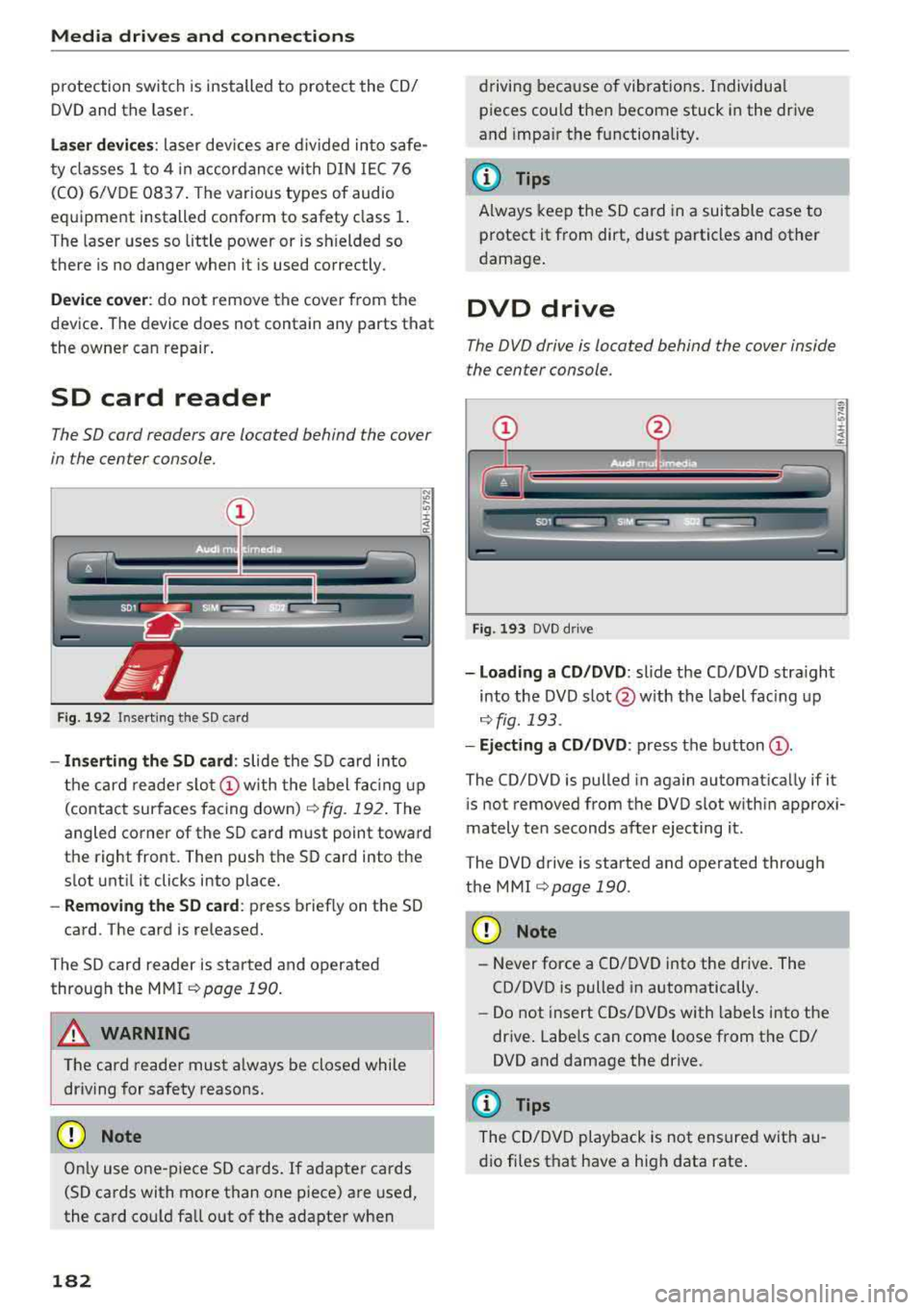
- In serting the SD card : slide the SD card into
the card reade r
slo t(!) w ith the label fac ing up
(contact surfaces facing down)
r:!> fig. 192 . The
angled corner of the SD card must point toward
the right front. Then push the SD card into the
slot unt il it clicks into place.
- Remo ving the SD ca rd: press briefly on the SD
card. The card is re leased.
The S D card reader is started and operated
through the MMI
r::;,poge 190.
A WARNING
The card reader must a lways be closed while
driving for safety reasons.
CD Note
On ly use one-piece SD cards. If adapter cards
(SD cards with more than one piece) are used,
the card could fa ll out of the adapter when
182
driving because of vibrat ions . Individua l
pieces could then become stuck in the drive
and impa ir the functionality.
(D Tips
A lways keep the SD card in a suitable case to
protect it from dirt, dust particles and other
damage .
DVD drive
The DVD drive is located behind the cover inside
the center console.
Fig . 193 DVD d rive
- Loading a CD /DVD : slide the CD/DVD stra ight
into the DVD s lot @ with the label fac ing up
¢ fig. 193 .
-Eject ing a CD /DVD : press the b utton (D .
The CD/DVD is pulled in again automat ica lly if it
is not removed from the DVD slot w ith in approx i
mately ten seconds after ejecting it.
The DVD drive is started and operated through
the MMI
r::;,poge 190 .
CD Note
-Never force a CD/DVD into the drive. The
CD/DVD is pulled in automatically.
- Do not insert CDs/DVDs with labels into the
drive . Labe ls can come loose from the CD/
DVD and damage the drive.
@ Tips
The CD/DVD playback is not ensured with au
dio fi les that have a high data rate .
Page 185 of 356
DVD changer
Applies to: vehicles wit h DVD changer
The DVD changer is located in the glove com
partment.
0
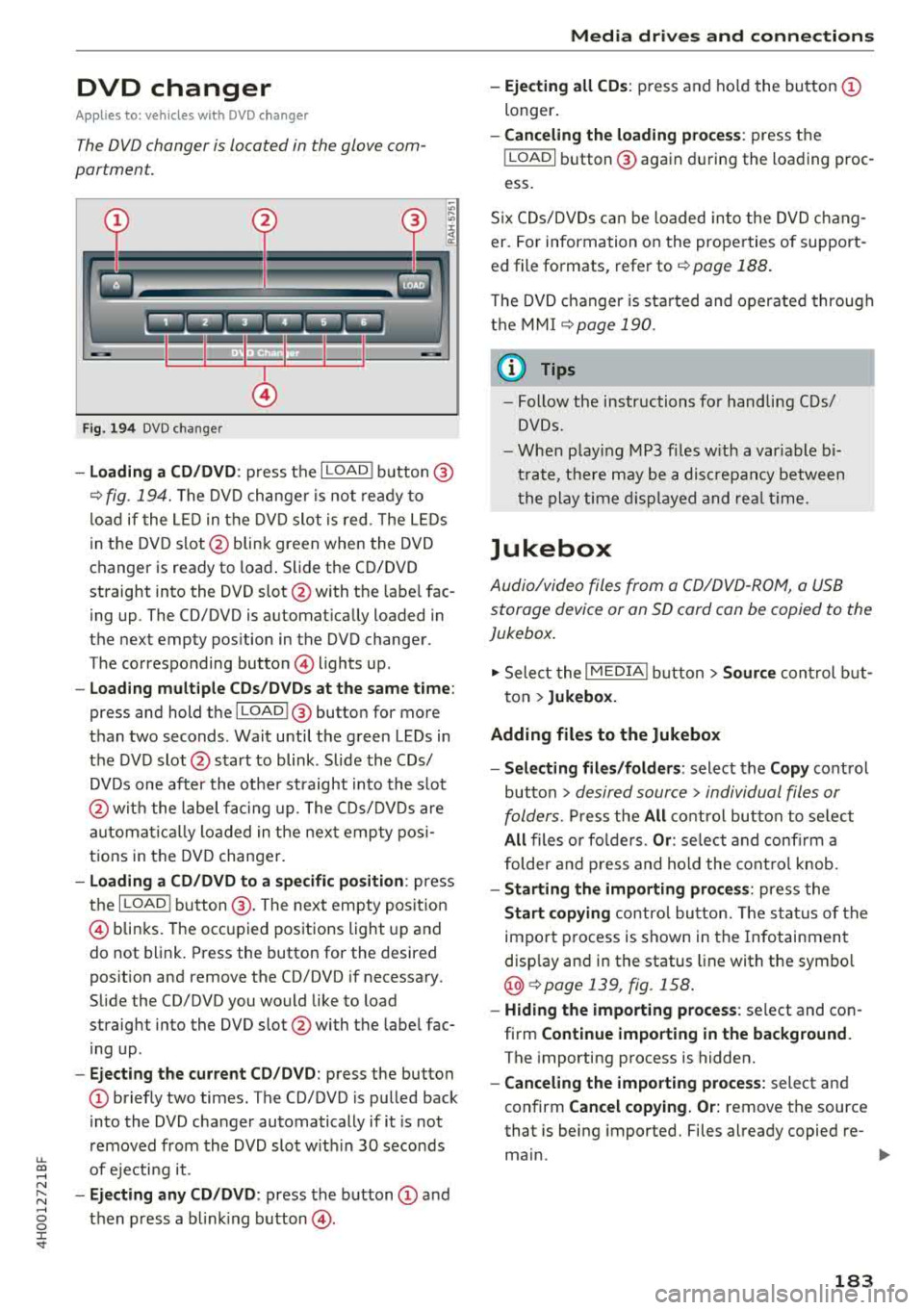
F ig. 194 DVD changer
-Loading a CD/DVD : press the I LOADI button @
¢ fig. 194. The DVD changer is not ready to
load if the LED in the DVD slot is red . T he LEDs
in the DVD slot @ blink green when the DVD
changer is ready to load . Slide the CD/DVD
straight into the DVD slot @with the labe l fac
ing up. The CD/DVD is automat ically loaded in
the next empty pos ition in the DVD changer .
The corresponding button © lights up .
-Load ing mult iple CDs/DVDs at the same time:
press and hold the I LOADl @button for more
than two seconds . Wait until the green LEDs in
the DVD slot@start to blink . Slide the CDs/
DVDs one after the othe r straight into the s lot
@ wit h the label facing up. The CDs/DVDs are
a ut omatica lly loaded in t he next empty posi
tions in the DVD changer.
-Loading a CD/DVD to a specific position: press
the I
L OAD ! button @. The next empty posit ion
© blinks. The occupied positions light up and
do not blink. Press the button for the desired
position and remove the CD/DVD if necessary.
Slide the CD/DVD you would like to load
straight into the DVD slot @with the label fac
ing up .
-Ejecting the current CD/DVD: press the button
CD briefly two times. The CD/DVD is pulled back
i nto the DVD changer automatically if it is not
removed from the DVD slot with in 30 seconds
u.
~ of ejecti ng it .
~ -Ejecting any CD/DVD : press the button CD and
~ then press a blinking button @. 0 :c '
-Ejecting all CDs : press and ho ld the button CD
longer .
-Canceling the loading process : press the
!LOAD! button @ again during the loading proc
ess.
Six CDs/DVDs can be loaded into the DVD chang
er. For information on the properties of support
ed file formats, refer to
¢ page 188.
T he DVD changer is sta rted and operated through
the MMI
¢ page 190.
@ Tips
-Follow the instructions for handling C Ds/
DVDs.
- When playing MP3 files with a variable bi
trate, there may be a disc repancy between
th e play time displayed and rea l time.
Jukebox
Audio/video files from a CD/DVD-ROM, a USB
storage device or an SD card can be copied to the
Jukebox.
.,. Select the I MEDIAi button> Source control but
ton >
Jukebox.
Adding files to the Jukebox
- Selecting files/folders :
select the Copy control
button
> desired source > individual files or
folders.
Press the All control button to select
All files or folders. Or : select and confirm a
folder and press and hold the control knob.
-Starting the importing process : press the
Start copying control button. The status of the
import process is shown in the Infotainment
disp lay and in the status line with the symbo l
@¢page 139, fig . 158.
-Hiding the importing process : select and con
firm
Continue importing in the background.
The importing process is hidden.
-Canceling the importing process: select and
confirm
Cancel copying. Or: remove the source
that is being imported. Files already copied re-
main.
IJI>-
183
Page 186 of 356
Media drive s and conn ection s
Cl earing the Juk ebo x
Req uirement: the J ukebox must con tain audio/
video fi les.
- Sele ctin g fil es/ fo ld ers: se lect the S ettings con
trol button
> Clear Juk ebo x > individual files or
folders.
Press the All control b utton to sele ct
all fi les or folders.
O r: se lect and confirm a
fo lder and press and hold the contro l knob . All
files in the folder are se lected for de leting .
-Delet ing file s and folder s: select the Start de
leting
control b utton > Ye s. The status of the
deleting process is shown in the Infotainment
display. Jukebox playback stops dur ing the de
leting process and starts again automatically
once the deletion is complete .
Showing memo ry cap acit y
Select : Settings control button > Jukebo x memo
r y.
The used/free Jukebox memory as well as the
number of stored tracks appear in the Infotain
ment d isplay.
The Jukebox is started and operated through the MMI
c>poge 190.
@ Note
Do not import audio/video files when the en
gine is turned off because this will drain the
veh icle battery.
(D Tips
- Tracks from audio CDs cannot be imported
to the J ukebox for legal reasons.
- Fil es a lready imported a re recognized and
will be grayed out when setting up a new
import.
- It is no t possib le to play audio/video fi les in
the DVD drive while importing them.
- The Jukebox does no t provide an export
function due to lega l reasons.
- F il es or tracks without s tored information
are listed as
Unknown . Audi recommends
adding additiona l information (s uch as 1D3
tags) to aud io files.
- Reset the Jukebox to the factory defau lt set
tings when sel ling your
vehicle¢ page 207.
184
Bluetooth audio player
App lies to : vehicles wi th Blue toot h int erface
You con ploy music wirelessly from your cell
phone through the
MMI using the Bluetooth au
dio player.
Requirement: the vehicle must be stationary. The
B luetooth function on the portab le aud io player
and the MMI
A ud io player must be switched on
c> poge 156.
.,. Select the I MEDIAi button > Source control but
ton
> Bluetooth audio player > Connect new
Bluetooth audio playe r.
The available Blue
tooth audio players are d isplayed.
.,. Select and confirm the des ired Bluetooth audio
player from the l ist .
.,. Sele ct and confirm Audio pla yer. Th e M MI gen
erates a PIN for the con nection.
.,. Sele ct and confirm Ye s.
.,. Enter the PIN for connecting on your cell
phone .
Or: if the PIN is already displayed on
your cell phone, confirm it in the ce ll phone and
in the MMI. The t ime allowed for entering the
PIN is limited to approximate ly 30 seconds.
The media are started and operated through the
portable device or the M MI, depending on the de
vice be ing used
¢ page 190.
(D Tips
-Be sure to pay attention to any possible con
nection prompts on your Bluetooth audio
player.
- You on ly have to pair your device one time .
Bluetooth devices that are already paired
are automatically connected to the MMI as
soon as they are in range.
- Severa l Bluetooth audio p layers can be con
nected to the MMI, but only one portab le
device can be active.
- Bluetooth A2DP and AVRCP (1.0/1.3) are
supported .
- The supported media functions depend on
the B luetooth aud io player be ing used.
- For more informat ion on the supported de
vices, v isit
www.audiusa .com/bluetooth or
contact an a uthorized Aud i dea ler or author
ized Aud i Serv ice Facility.
Page 187 of 356
u. co ..... N
" N ..... 0 0 :c '
Applies to: vehicles with Wi-Fi audio player
Wireless media players (such as smortphones)
con be connected via Wi-Fi hotspots and control
led with the
MMI. You con access the media cen
ter on your media player using on UPnP server
opp or on UPnPIDLNA server integrated in the
media player .
Requirements: the Wi-Fi function for the media
player and the MMI must be act ivated. A network
connection must be established
¢ page 162 . An
UPnP serve r must be installed on your W i- Fi me
d ia p laye r.
-Connecting the Wi-Fi audio pla yer : select the
I MEDIAi button> Source cont rol button> Wi-Fi
audio
play er(2) ¢poge 190, fig. 197. A mes
sage will appear i n the Infota inment displ ay
say ing there is no W i-Fi aud io player connec ted
to the system . The access data for the Wi -Fi
hotspot is disp layed.
-Se lect the same settings on the w ireless med ia
player that are used for the Wi-Fi hotspot .
-Starting th e Wi •Fi audio pl ayer : start an UPnP
server app or a llow media sharing on your de
vice . The first song in the media center on your
Wi-Fi audio player begins playing .
-Operating the Wi-Fi audio player : the media
player is operated throug h the MMI
¢page 190.
A WARNING
-As the driver, do not allow usage of the Wi
Fi hotspot to distract you from driving, as
this could inc rease the risk of an accident .
-It is only safe to use laptops and simi lar mo
bile devices when the vehicle is stat ionary
because, l ike all loose objects, they could be
t h row n aro und the ins ide of the vehicle in a
cr ash and cause se rious inj uries. Store these
ty pes of dev ices se curely wh ile d riving.
-Do not use any w ireless devices on the front
seats w it hi n range of the a irbags while d riv
ing. Also read the wa rn ings in the chap ter
¢page 208.
Media dr ives and conn ection s
@ Note
Always fo llow the information fo und in ¢ @ in
Wi -Fi hotspot on page
161.
(D Tips
-Read an d follow t he notes abo ut Aud i con
nect before sta rting it¢
page 163.
-Th e W i-Fi connec tion is reconfigure d when
inserting or removing the Audi SI M card in
the SIM card reader. There may be a tempo
ra ry interruption in aud io playback, depend
ing on the media player.
-In ve hicles w ithout Audi con nect*, the use
o f th e W i-F i hotspot is on ly possible for t he
Wi-Fi audio player". A data co nnect ion to
the Internet cannot be estab lished .
-Depending on the w ireless media player,
network or media access may need to be ap
proved on the device or a program may need
t o be sta rted .
-Check for any connection requests on yo ur
w ireless media player.
-To avo id interr upt ions during playback, de
act ivate the powe r sav ing function on the
w ireless media player or connect it to a
charger.
-T he loadi ng times for the audio da ta depend
on the media player used and the numbe r of
files t hat it contains.
-A max imum of 2,000 en tries per d irec tory
are d is pl ayed in the Infota inment disp lay.
-For more informat io n on Wi-Fi audio players
and supported dev ices, visi t
www.audiusa .com or cont act an a uth o rize d
Audi de aler or author ized Audi Se rvice Fa
ci lity.
185
Page 188 of 356
Media dri ve s and connection s
Audi music interface
Introduction
Applies to: vehicles with Audi music interface
You can connect a portable device (such as an
MP3 player) to the Audi music interface using a
special adapter cable* and operate the device through the MMI.
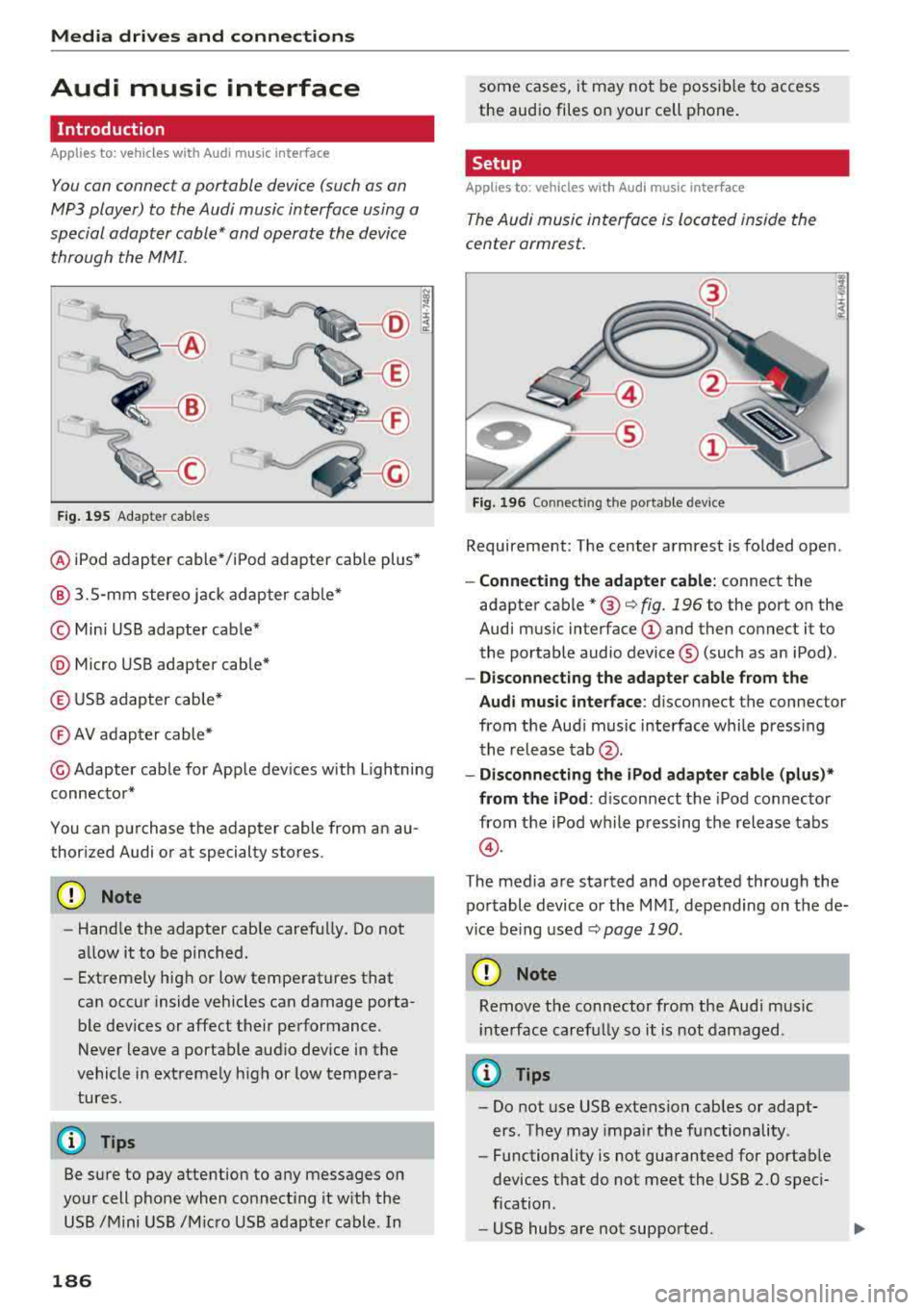
F ig. 195 Adap ter cables
® iPod adapter cable* /iPod adapter cable plus*
@ 3.5-mm stereo jack adapter cable*
© Mini USB adapter cab le*
@ Micro USB adapter cable*
© USB adapter cable*
® AV adapter cable*
@ Adapter cable for Apple dev ices with Lightning
connector*
You can purchase the adapter cable from an au
thorized Audi or at specialty stores.
@ Note
-Handle the adapter cable carefu lly. Do not
allow it to be pinched.
- Extremely high or low temperatures that
can occur inside vehicles can damage porta
ble dev ices or affect their performance .
Never leave a portable audio device in the
vehicle in extremely high or low tempera
tures.
(D Tips
Be sure to pay attention to any messages on
your cell phone when connect ing it w ith the
USB /Mini USB /M icro USB adapter cable. In
186
some cases, it may not be possible to access
the audio files on your cell phone.
Setup
Applies to: vehicles with Audi music interface
The Audi music interface is Located inside the
center armrest.
F ig. 196 Connecting th e portable device
Requirement: The center armrest is folded open .
-Connect ing the ad apter cabl e: connect the
adapter cable
* @ c:> fig . 196 to the port on the
Aud i mus ic interface
(D and then connect it to
the portable audio device ® (such as an iPod).
-Discon necting the adapter c able from the
Aud i m usic i nterf ace :
d isconnect the connector
from the Aud i music interface whi le press ing
the release
tab @.
-Disconne cti ng the iPo d adapter cabl e (plu s)*
from th e iPod :
disconnect the iPod connector
from the iPod while pressing the release tabs
@ .
The media are started and operated through the
portable device or the MMI, depending on the de
vice be ing used
.:;, page 190 .
(D Note
Remove t he connector from the Aud i mus ic
i nte rface carefully so it is not damaged.
@ Tips
- Do not use USB extension cables or adapt
ers . They may impair the functionality .
- Functionality is not guaranteed for portab le
devices t hat do not meet the USB 2.0 speci
fication .
- USB hubs are not supported.
Page 189 of 356
u. co ..... N
" N ..... 0 0 :c '
cannot be connected to the iPod adapter
ca
b le (p lus)* . Connect these devices using the
optiona l 3.5 mm stereo jack adapter cable*.
-For video p layback, you ca n also connect
your iPod using the AV adapter cable*. You
also need an App le AV cable to do this. For
more information on the App le AV cable,
re
fer to your iPod user guide .
-The Apple Lightning connector does not
support v ideo p layback.
Media dr ives and conn ection s
-iPod/iPhone malfunctions also affect t he
operation of the MMI. Reset yo ur iPod/
iPhone if this happens.
-For important information on operating
your iPod/iPhone, refe r to the user g uide fo r
the device. A udi recommends updating the
iPod/ iPhone software to the latest version.
-For more in fo rmat io n about the Aud i music
interface and suppo rted devices, v is it
www .audi.com /bluetooth or contact an au
thorized A udi dealer .
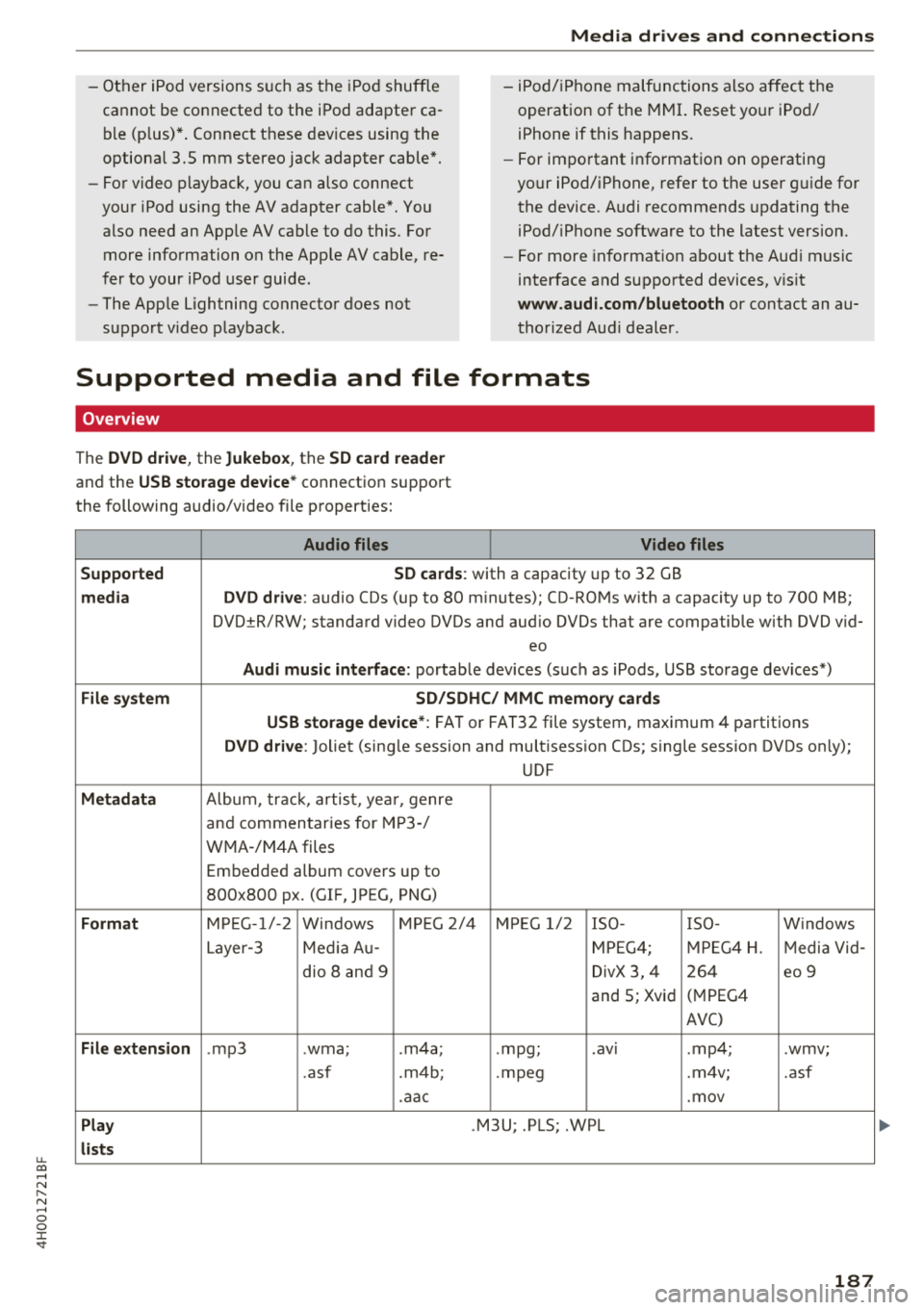
Supported media and file formats
Overview
The DVD drive , the Jukebox, the SD card reader
and the USB storage device* connectio n support
the following audio/video file properties:
Audio files Video files
Supported SD cards:
with a capacity up to 32 GB
media DVD drive: audio CDs (up to 80 m inutes); CD -RO Ms w ith a capacity up to 700 MB;
DVD±R/RW; standard video DVDs and audio DVDs that are compatible with DVD v id-
eo
Audi music int erface : portab le devices (such as iPods, USB storage dev ices*)
File system SD/SDHC/ MMC memory card s
USB storage device* :
FAT or FAT32 file system, maximum 4 partitions
DVD drive: Joliet (sing le session and multisess ion CDs; single sess ion DVDs on ly);
UDF
Metadat a Album, tra ck, artis t, ye ar, genre
and commen taries for M P3-/
W MA-/M4A files
Embedded album covers up to
800x800 px. (GIF, JPEG, PNG)
Format M PE G-1 /-2
Windows M PEG 2/4 M PEG 1/ 2 ISO- I SO - W indows
Layer -3 Me dia A u- MPEG4; MPE G4 H. Media Vid -
dio 8 an d 9 DivX 3, 4 264 eo 9
and 5; Xvid (
M PEG4
AVC)
File e xtension .mp3 .wma; .m4a; .mpg; .
av ,
.mp4; .wmv;
.asf .m4b; . mpeg .m 4v; .asf
.aa c .mov
Play .M3U; .PLS; .WPL
lists
187