cruise control AUDI A8 2018 User Guide
[x] Cancel search | Manufacturer: AUDI, Model Year: 2018, Model line: A8, Model: AUDI A8 2018Pages: 356, PDF Size: 54.71 MB
Page 100 of 356
Ass is tance sy stem s
Switch ing adaptive cruise control off
.,. Push the lever away from you into position @
until it clicks into place . The message
ACC: off
appears.
@ Indicator lights
It -adaptive cruise cont rol is switched on . No
objects a re detected ahead . T he stored speed is
main tained.
• -an object ahead was detected. The adaptive
cru ise control system regulates the speed and
d istance to the object ahead a nd accelerates/
b rakes a utomatically .
(ii-adaptive cruise control is switched on . An
object ahead was detec ted . Your vehicle rema ins
stopped and w ill not start dr iv ing a utomat ically .
•-The automatic braking is no t enough to
maintain a sufficient distance to an object ahead .
You must
i nte rvene ~ page 100, Driver interven
tion request.
© Instrument cluster display
If adaptive cruise control is not shown in the in
strument cluster display, you can call it up usi ng
the multifunction stee ring wheel b uttons
~ page 12.
Based on the graphics in the d isplay, you can de
termine if the system is ma inta ining a distance to
the object ahead and what that distance is .
No vehicl e -no object was detected ahead.
White vehicle -an ob ject was detected ahead.
Red vehicle -request for driver intervention
~ page 100 .
Both arrow s on the scale © indicate the distance
to the object ahead. No arrow appea rs when the
ve hicl e is o n an open road and there is no obje ct
ahead. If an object is de tected ahead, the arrow
moves on the scale.
The green zo ne on the scale indicates the sto re
d istance. For information o n chang ing the d is
tance, refer to
Q page 99 . If the distan ce se
lected is exceeded or not reached, the a rrow
moves into the red zone on the sca le .
98
A WARNING
If you press the !SET ! button when driving at
speeds below 20 mph (30 km/h), the veh icle
accelerates automatically up to 20 mph (30
km/h), wh ich is the minim um speed that can
be set .
(D Tips
-If you switch the ign it ion or the adaptive
cruise control sys tem off, the set speed is
erased fo r safety reasons .
-The electronic stabilization control (ESC)
and the an ti-slip-regulat ion (ASR) are auto
matically switc hed on when the adaptive
cruise cont rol is swi tched on.
Changing the speed
Applies to: vehicles with Audi adaptive cruise control
0
f
•
0
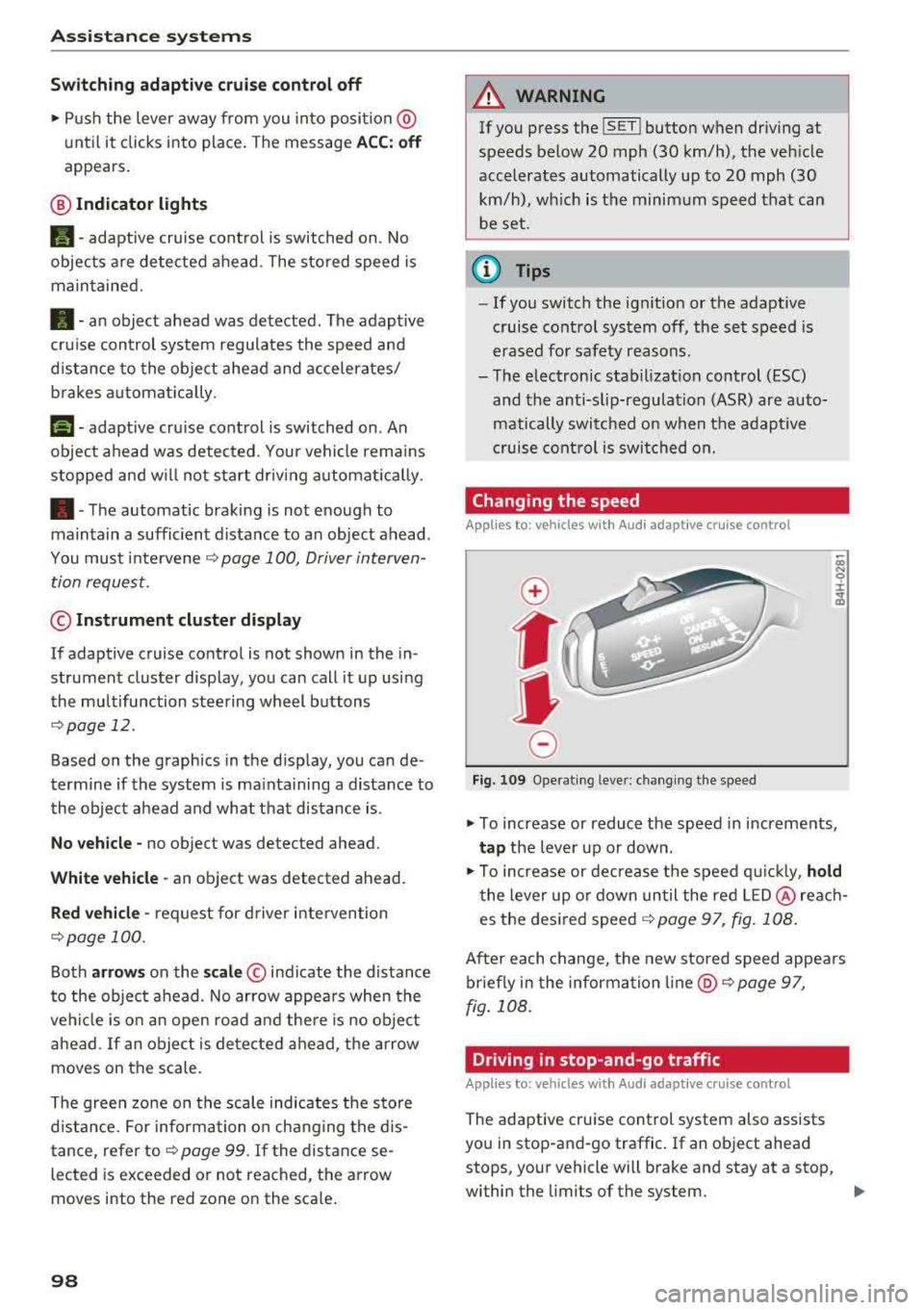
Fig. 10 9 Operat ing leve r: ch ang ing the speed
.,. To increase or reduce the speed in increments,
ta p the lever up or down .
.,. To increase or decrease t he speed q uickly, hold
t he lever up o r down un til the red LED @ reac h
es the desired
speed ~ page 97, fig. 108 .
After each change, the new stored speed appea rs
briefly in the information
li ne @ ~ page 97,
fig . 108 .
Driving in stop-and-go traffic
Applies to: vehicles with Audi adaptive cruise control
The adapt ive cru ise control system also assists
you in stop-and-go traffic . If an object ahead
stops, your vehicle will brake and stay at a stop,
within the limits of the system.
..
Page 101 of 356
lL t:0 ....
"' ......
"' .... 0 0 :c '
tap the accelerator peda l or
• P ull the lever toward you into position @
Qpage 99 , fig. 110 .
@ Tips
If an obstacle is detected when your vehicle
starts moving, the driver intervention request
appears
Q page 100. Your veh icle w ill drive
more s low ly when start ing . This may also
happen in some situations when there is no
apparent obstacle.
Interrupting cruise control
App lies to: veh icles with Audi adaptive cruise contro l
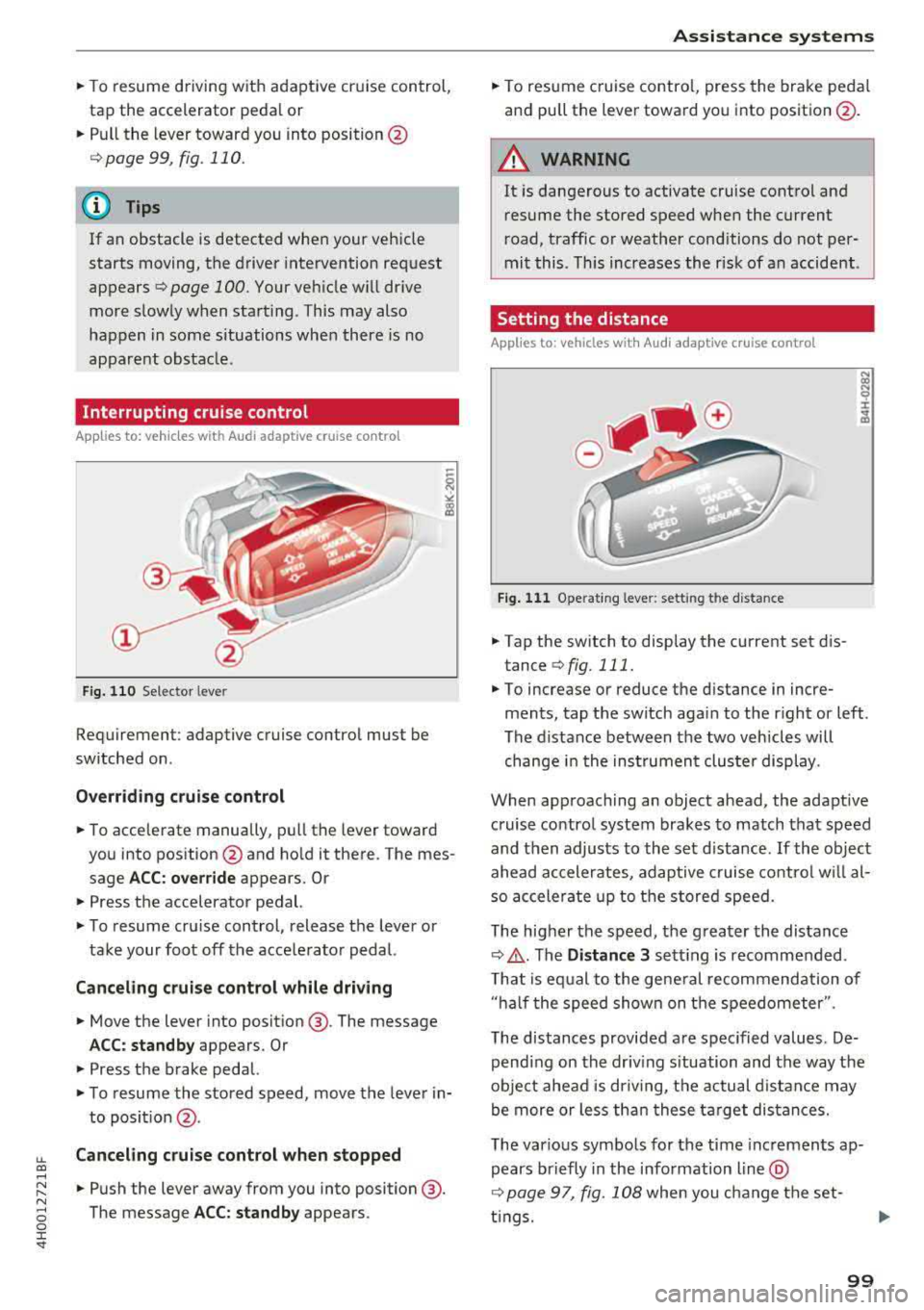
Fig. 1 10 Se lecto r leve r
Requiremen t: adaptive cruise control mus t be
switched on .
Overriding c rui se control
• To accelerate manually, pull the lever toward
you into pos ition @and ho ld it there . The mes
sage
A CC: over rid e appears. O r
• Press the a ccelerator pedal.
• T o resume cru ise control, release the lever or
take your foot off the acce lerator pedal.
Canceling cruise control while driving
• Move the lever into posit ion @. The message
AC C: standb y appears . Or
• Press the brake pedal.
• To resume the stored speed, move the lever in
to posit ion
@ .
Canceling crui se control when stopped
• Push the lever away from you into position @.
The message
A CC: standby appears .
A ssi st a nce systems
• To resume cruise contro l, press the brake peda l
and pu ll the lever toward you into position @.
A WARNING
It is dangerous to activate cruise control and
resume the stored speed when the current
r oad, traffic or weather cond itions do not per
mit this . This increases the risk of an accident .
Setting the distance
Applies to: vehicles with Aud i adaptive cru ise control
F ig . 11 1 Operat ing leve r: sett ing th e d is tan ce
• Tap the switch to display the current set d is
tance
Q fig . 111.
N (X) N 9 :I:
~
• To increase or reduce the d istance in incre
ments, tap the switch aga in to the r ight or left .
The distance between the two vehicles will change i n the inst rumen t cluste r display .
When approaching an object ahead , the adaptive
c ruise contro l system brakes to match that speed
and then adjusts to the set d istance .
If the object
ahead accelerates, adaptive cruise co ntro l w ill al
so accele rate up to the stored speed.
The higher the speed, the g reater the distance
Q ,& . The Distance 3 sett ing is recommended .
T hat is eq ual to the gene ral recommendation of
" ha lf the speed shown on the speedometer ".
The distances provided are spec ified values. De
pending on the driv ing s ituation and the way the
obje ct ahead is dr iv ing, the actual d istance may
be more or less th an these ta rge t distances.
The various symbo ls for the time inc remen ts ap
pears briefly in the info rmation line @
Q page 97, fig. 108 when you change the set-
t ings.
.,.
99
Page 102 of 356
Ass is tance sy stem s
~-~ ---Di sta nce 1: this setting corresponds
to a distance of 92 ft (28 m) when traveling at 62
mph (100 km/h), for example (time between: 1
second) .
~-- ~--Di stan ce 2: this setting corresponds
to a distance of 118
ft (36 m) when traveling at
62 mph (100 km/h), for example (time between:
1.3 seconds) .
~--- ~-Distance 3: this setting corresponds
to a distance of
164 ft (SO m) when traveling at
62 mph (100 km/h), for example (time between:
1.8 seconds) .
~--- -~ Distance 4 : This setting corresponds
to a distance of 210
ft (64 m) when traveling at
62 mph (100 km/h), (time d istance of 2.3 sec
onds).
A WARNING
Following other vehicles too closely increases
the risk of collisions and ser ious personal in
jury .
- Setting short distances to the traffic ahead
reduces the time and distance available to
br ing your vehicle to a safe stop and makes
it eve n mo re necessary to pay close atten
t ion to traffic.
- Always obey applicable traffic laws, use
good judgment, and select a safe following
distance fo r the traffic, road and weather
cond itio ns.
(D Tips
-Distance 3 is set automatically each time
you switch the ignit ion on.
-Your settings are automatically stored and
assigned to the remote control key being
used.
Selecting the driving mode
Applies to: vehicles with Audi adaptive cruise control
.. Se lect the des ired driving mode in dr ive se lect
¢ page 111 .
100
@ Tips
Your settings are automatically stored and as
signed to the remote contro l key being used.
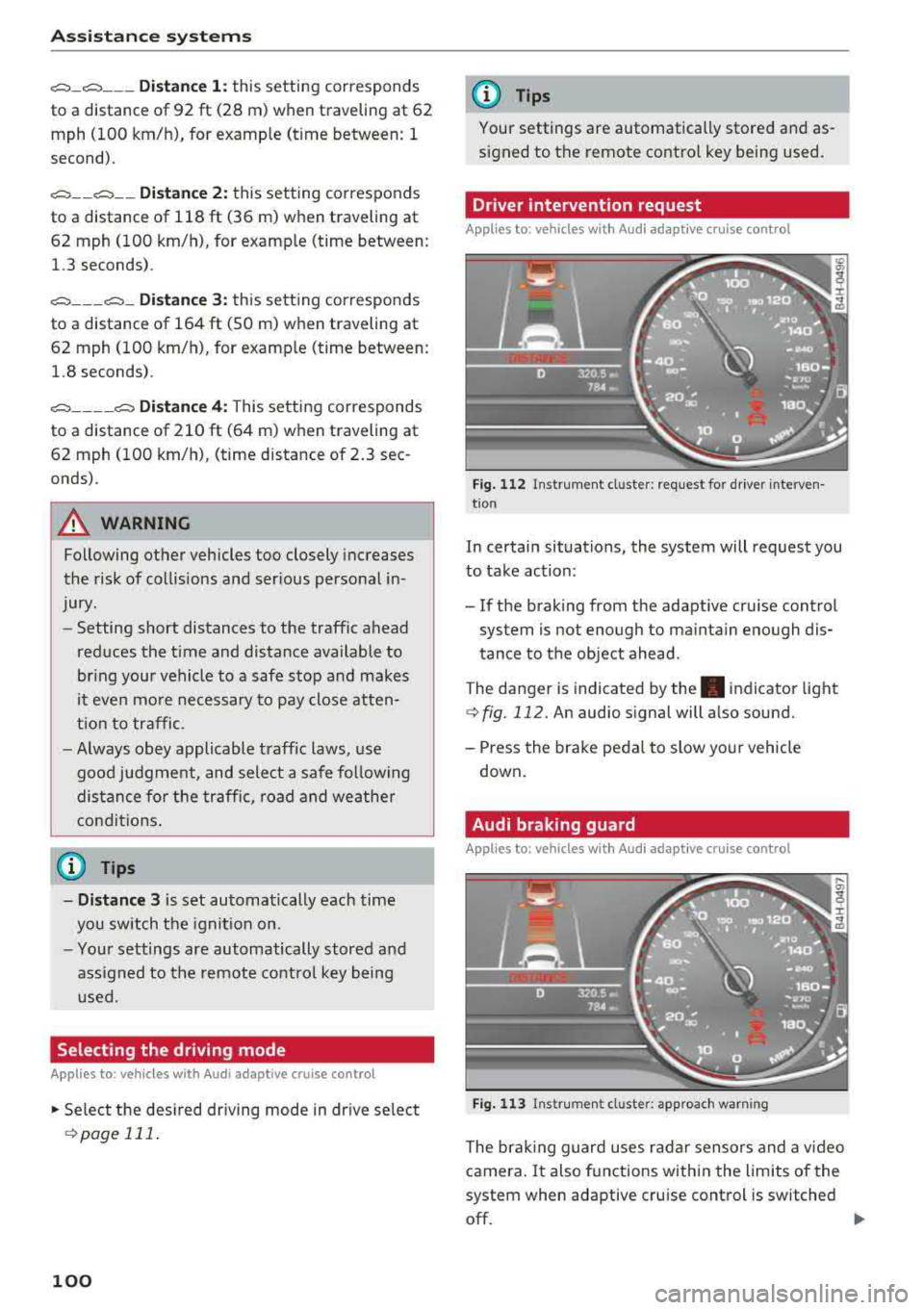
Driver intervention request
Applies to: vehicles with Audi adaptive cruise control
Fig . 112 Instrument cluster : request for driver interven·
t ion
In certain situations, the system will request you
to take action:
- If the braking from the adaptive cru ise control
system is not enough to ma inta in enough dis
tance to the object ahead.
The danger is indicated by
the . indicator light
¢fig. 112. An audio signal will also sound.
- Press the brake peda l to slow yo ur vehicle
down .
Audi braking guard
Applies to: vehicles with Aud i adaptive cruise control
F ig . 113 In strume nt cl us ter: approach warning
The brak ing guard uses radar sensors and a video
camera .
It also functions within the limits of the
system when adaptive cru ise cont rol is switched
off.
IIJ,,
Page 104 of 356

Ass is tanc e system s
- Keep in mind that braking guard can brake
unexpected ly. Always secure any cargo or
objects that you are transport ing to reduce
the r isk of damage or in jury.
Settings in the Infotainment system
Applies to: vehicles with Audi adaptive cruise control
.,. Select : the ICARI function button > Ca r sy stems
control button > Dri ver a ssistan ce > Audi bra k
ing guard .
Sy stem
-switches the brak ing guard On /Off .
When you switch the ignition on, the message
Braking guard: Off appears if the system is
sw itched off .
Early warning -the distance and approach warn
ings in the display can be sw itched
On /Off .
(D Tips
- Your settings are automatically stored and
assigned to the remote control key being used.
- If you restrict or sw itch off the ESC, the
braking guard also switches itse lf off
c> page 128.
-Switch braking guard off when you are load
i ng the veh icle onto a vehicle carr ier, train,
sh ip or other type of transportation . This
can prevent undesired warnings from the braking gua rd system.
Messages
Applies to: vehicles with Audi adaptive cruise control
Braking guard : Off
This message appears if the system is sw itc hed
off throug h the Infota inment system . Otherwise ,
if the system is tur ned off, the information ap
pea rs every time shortly after the start of t he
trip .
The message also appears if the system is not
ava ilable d ue to a ma lfunct ion or if the ESC is
sw itched
off ¢ page 128 . If this is the case, the
system wi ll not provide warnings about a possi
b le co llision.
Braking guard : engaged
102
This message appears if a sharp brake pressure
was applied due to an acute warning .
ACC: Unavailable!
ACC and Audi braking guard: Una vailable
The system cannot guarantee that it will detect
objects correctly and is sw itched off. The sensors
have been moved or are faulty . The pre sense
funct ions may also be affected . Drive to an au
t h orized Aud i dea ler or authorized Audi Se rvice
Fac il ity immed iate ly to have the ma lfunction cor
r ec ted .
ACC : Currently unavailable . No sen sor vis ion
AC C and Audi braking gua rd: Curr entl y una vail
able. No sensor vision
This message appears if the sensor view is ob
structed, for examp le by leaves, snow, heavy
spray or dirt. Clean the
sensors ¢ page 95,
fig. 104.
ACC : Cu rrently un avail able . G radient too steep
The road exceeds the maxim um poss ible a ngle
fo r safe adaptive cruise co ntro l opera tion. Ada pa
tive cru ise con trol is switched off.
ACC : Only available in D , Sor M
Se lect the D, Sor M selector lever position .
ACC: Cu rrently un available . Parking br ake ap
plied
The adaptive cru ise con trol system sw itches o ff
automatica lly if the parking brake is set .
ACC: Currently unavailabl e. Stability contr ol
( ES C) inpu t.
This message appears if the electron ic stabiliza
tion cont rol ( ESC) is tak ing action to stabilize the
vehicle. In t his case, adaptive c ruise cont ro l
swi tches off autom atically.
ACC off: Manual control!
This message appears when adaptive cruise con
trol cannot set the parking brake. Press the brake
pedal to prevent the vehicle from rolling .
... ~
Page 105 of 356
u. co .... N
" N .... 0 0 :c '
l ected with the operating lever. For examp le, this
h appens if adaptive cruise contro l cannot start
driving automatically in stop-and-go traffic be
cause the driver has not fastened their safety belt .
Door open
The adap tive c ruise co ntro l system cannot sw itch
on w hen a door is open.
Stationary object ah ead
This message appears if you would like to switc h
adapt ive cruise control on and there is a station
ary object o r obstacle directly ahead of you r vehi
cle .
Audi active lane assist
(lane departure assist)
Description
Applies to: vehicles with Audi active lane assist
Active lane ass ist detects lane marker lines with
in the limits of the system us ing a came ra in t he
w indsh ie ld. If you are app roaching a de tected
l ane marker line and it appea rs likely t hat you
will leave the lane, the system wi ll warn you with
corrective steering. Yo u can override t his steering
at any time . If you pass over a line, the steer ing
wheel will v ibrate lightly. In order for this warn
i n g vibration to occur, it must f irst be sw itched
on in the Infotainment system . Active lane assist
i s ready for operation whe n the lane marke r line
i s detected on at least one s ide of the vehicle .
The system is designed for driv ing on express
ways and highways and therefore only activates
at speeds above approximate ly 40 mph (65 km/
h).
Applies to vehicles with side assist
If you activate a tur n signa l when active lane as
sist is ready and it class ifies a la ne cha nge as cr it
i cal because of ve hicles t raveli ng a longs ide you o r
approaching you, the re w ill be not iceab le correc
tive stee rin g short ly before you leave t he lane.
This will attempt to keep yo ur vehicle in t he lane.
A ss istance systems
Applies to vehicles w it h out side assist
T he system wi ll not warn yo u before c ross ing a
l ane marker line if you have activated the t urn
s ignal. In this case, it assumes that you are
changing lanes intentionally.
Appl ies to: vehicles with adaptive c ruise control
The co rrective steer ing is targeted based o n the
dr iv ing s itu ation . In add it ion to the lane mar ker
li nes, the system can al so t ake into accoun t other
objects s uch as gua rd rai ls. If they a re detected in
close proximity to t he vehicle, active lane assist
helps p reve nt the vehicle from driving too close
to them. The re is a lso pass ing ass istance. The
system does not provide any corrective steering if it detects that you are pass ing anot her vehicle .
A WARNING
-
-The system warns the drive r that the vehicle
is leaving the lane using corrective steering.
T he drive r is always responsible fo r keeping
the vehicle within the lane.
- T he system can assist the dr iver in keeping
the vehicle in the l ane, but it does not dr ive
by i tsel f. Always keep your hands on the
s teer ing whee l.
- Cor rec tive stee ring may not occur in cert ain
situa tions, such as during he avy b raking .
- T here may be cases whe re t he came ra does
not recogni ze all lane mar ker lines . Cor re c
tive steering can only take pla ce on the s ide
of the vehicle where lane marker lines are
detected.
- Other road structu res or objects could poss i
b ly be identified un intentionally as lane
marker lines. As a result, co rrective steering
may be unexpected or may not occ ur.
- The camera view can be rest ricted, for ex
ample by vehicles driving ahead or by ra in,
snow, heavy spray or light shining into the
camera. Th is can result in active lane ass ist
not detecting the lane marker lines o r de
tect ing them inco rrectly .
- Unde r ce rtain condit ions such as r uts in the
road, a ban ked roadway or crosswinds, the
correct ive steer ing alone may not be enough
to keep the vehicle in the middle of the lane.
~
103
Page 114 of 356
Ass is tanc e system s
In the sporty dynamic mode, the transmission
shifts at higher speed ranges.
Air su spen sion
The adaptive air suspension/adaptive air suspen
sion spo rt* is an e lectron ica lly contro lled a ir sus
pens ion and damping system . The adjustment
depends on the driving mode selected, steering movements, the driver's braking and accelera
tion , and as the road surface, vehicle speed and
load . A sporty sett ing is generally used in vehicles
with adap tive a ir suspension sport*.
The vehicle ground clearance depends on the mode se lected and the speed . When you are in
the auto or dynamic mode, the h ighway sett ing is
activated when you dr ive above 75 mph (120 km/
h) for more than 30 seconds . The ground clear
ance is increased automatically if the speed
drops below 44 mph (70 km/h) for more than 120 seconds .
Stee ring
The power steer ing adap ts . Indirect steer ing that
moves easily as in comfort mode is especially
suited to long drives on a h ighway . The dynam ic
mode p rovides spo rty , d irect steering.
Applies to: vehicles with dynamic steering
The steering ratio changes based on vehicle
speed in order to ma intain optimum steering ef
fort for the dr ive r at all times . This sets the steer
i n g to be less sensit ive at hig he r speeds in o rder
to p rovide imp roved vehicle contro l. At reduced
speeds, steer ing is more direct in order to keep
the steering effort as minima l as possib le when
the driv er is maneuvering the v ehicl e. At low and
average speeds, dynamic steering* addit ionally
provides more responsive steering performance.
Sport diff ere ntial *
As a component of the all wheel drive system (quattro)
¢ page 131, the sport differential dis
tributes the driving power to the rear axle de
pending on the situation. The distribution of
power va ries from balanced (comfort) to sporty
(dynamic) depending on the selec ted mode . The
goal is a high level of agility and ab il ity to accel
erate on curves . The ve hicle is very respons ive to
steer ing .
112 Corn
ering light *
The co rnering ligh t adapts the hig h beams to the
direction of the curve depending on the speed.
The pivoting action and the lighting also adapt to
the mode.
Adaptive cruise cont rol*
The be hav io r whe n accelerat ing ca n be adjusted
from comfortable to sporty, depending on the drive select mode. Adaptive cruise control also
responds to the driving behavior of the vehicle
ahead in a more cons ervative or sporty manner.
Engine sound *
The eng ine sound adapts to the c urrent mode
and can be subtle to spo rty.
{[» Note
- Make s ure there is enough clearance above
and be low the vehicle when pa rk ing . T he
heig ht of t he ve hicle can change on ce it is
parked d ue to temperature fluctuations,
changes to the load conditions and changes
to the driv ing modes, which can affect clear
ance .
- When transporting the vehicle on a car car
rier, train, ship or by other means, on ly tie
the vehicle down at the runn ing surface of
the tires, which is the outer c ircumference.
Securing the vehicle at the axle compo
nents, suspens ion struts o r tow ing eyes is
not pe rm itted because the p ressure i n the
air suspe nsion s truts ca n change d uring
t ra nspo rt. The vehi cle may not be secu red
sufficiently i f th i s happens.
(D Tips
- In some mo dels, the max imum ve hicle
speed can only be reached in t he auto and
dynamic modes.
- Th e S se lector lever posi tion a utomat ic all y
engages if the dynami c mode is selected.
- In ve hicl es tha t h ave dynam ic stee rin g*, op
erat ing no ise is he ard when sta rting o r stop
ping the engine . This does no t indi ca te a
prob lem.
Page 115 of 356
u. co ..... N
" N ..... 0 0 :c '
.,. To se lect t he mode , se lect the following in the
Infota inment : ICAR !f u nct io n button>
Comfort ,
Auto , D ynami c or Individual.
You can change t he d riving mode when the vehi
cle is stat ionary o r w hil e d riving. If traffic per
m its, after cha ng ing modes, br iefly take yo ur
foot off the accelerator peda l so that t he recen tly
se lected mode is a lso activated for the engine.
Comfort -provides a comfort-o rie nted ve hicle
setup and is su ited for long dr ives on hig hways .
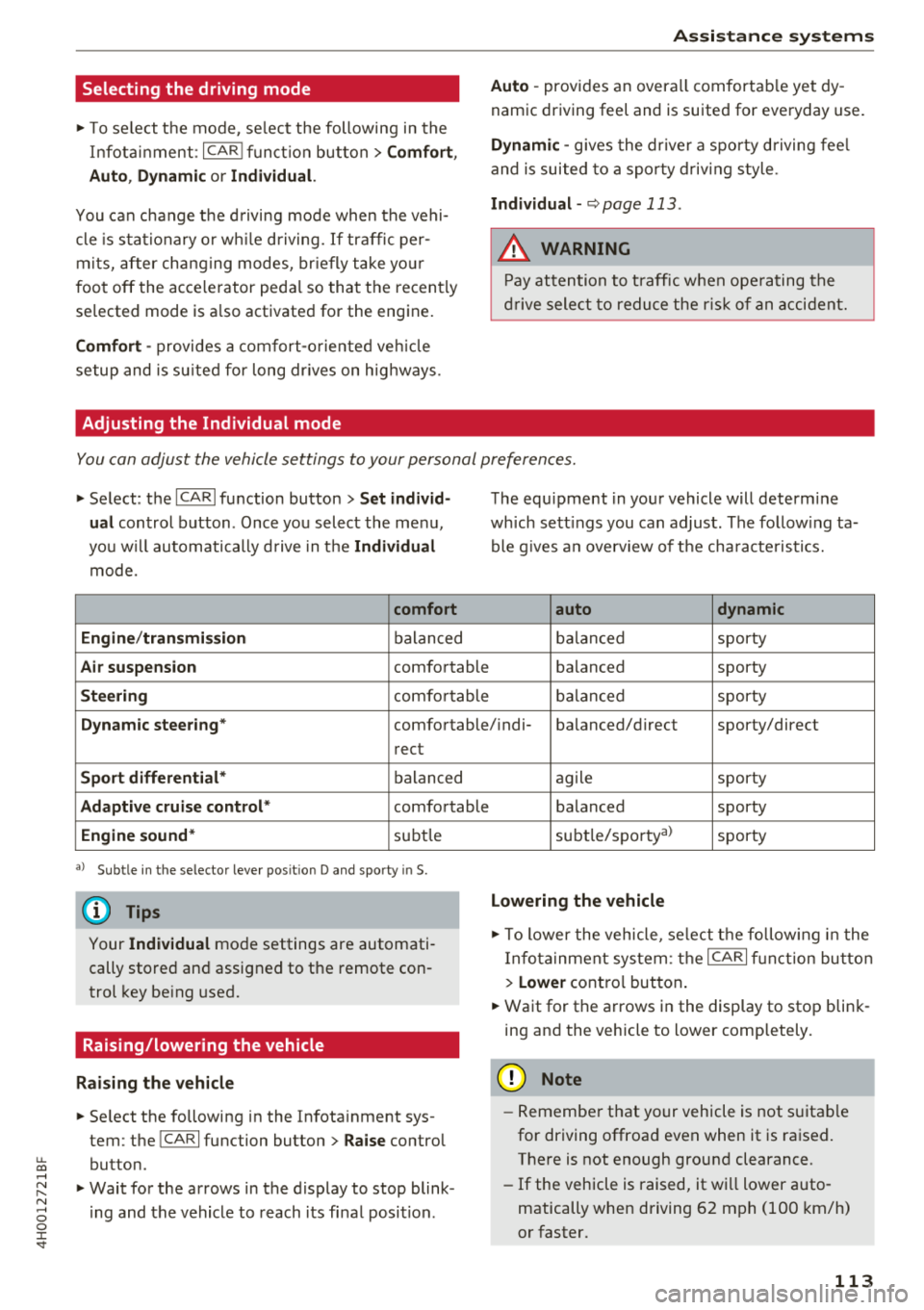
Adjusting the Individual mode
Ass istance systems
Auto -provides an overa ll comfortab le yet dy
namic driving feel and is suited for everyday use .
Dynamic -gives the dr ive r a spo rty d riving fee l
and is suited to a sporty driv ing style .
Individual -~page 113 .
A WARNING
Pay attention to t raff ic w hen ope rating the
dr ive sele ct to redu ce the r is k of a n accident.
-
You can adjust the vehicle settings to your personal preferences .
.,. Select : the !CA RI fu nction button > Set individ
ual
control button . Once you select the me nu,
you w ill automatically d rive in t he
Individual
mode.
comfort
Engine /transmission
balan ced
Air suspension comfortable
Steering co mfo rtable The equ
ipment in you r vehicle will determ ine
wh ich sett ings you can adjust . The follow ing ta
ble g ives a n overv iew of t he cha racte ristics.
auto dynamic
balan ced sporty
b alanced sporty
ba lan ced sporty
Dynamic steering * comfortable/ ind i- balanced/direc t sporty/direct
rect
Sport differential * balanced
Adaptive cruise control * comfortable
Engine sound* subtle
a> Sub tle in t he se lector leve r po sit io n D and sporty in S.
(D Tips
Your Individual mode settings are automati
cally stored an d assigned to the remote con
trol key be ing used.
Raising/lowering the vehicle
Raising the vehicle
.,. Se lect the following in the Infota inment sys
tem : the
!CAR! function button> Raise control
button .
.,. Wait for the arrows in the display to stop blink
i ng and the vehicle to reach its fi nal posit ion . ag
ile sporty
balanced sporty
subt le/spor ty al
sporty
Lowering the vehicle
.,. To lower the vehicle, se lect t he follow ing in the
I nfota inment system: the
ICAR! f u nct ion bu tto n
>
Lower cont ro l button .
.,. Wait for the a rrows i n the display to stop blink
ing and the veh icle to lower comp letely .
@ Note
-Remember t hat yo ur vehicle is not s uitab le
for driving offroa d eve n when it is ra ised.
There is not enough ground clearance.
- If the vehicle is raised, it wi ll lower auto
matically when driving 62 mph (100 km/h)
o r faster.
113
Page 129 of 356
u. co .... N
" N .... 0 0 :c '
Control (ESC)
Description
The ESC increases driving safety. It reduces the
risk of slipping and improves driving stability.
ESC detects critical situations such as when the
vehicle is oversteering and understeering or the
wheels are spinning. The vehicle is stabilized by
applying the brakes or reducing engine torque .
When the ESC engages,
the G1 indicator light
b links in the instrument cluster.
The following systems are integrated in the ESC:
Anti-lock braking system (ABS)
ABS prevents the whee ls from locking when brak
ing. The vehicle can still be steered even during
hard braking. Apply steady pressure to the brake
pedal. Do not pump the pedal. A pulsing in the
brake pedal indicates that the system is acting to
stabilize the vehicle .
Brake assist system
The brake assist system can decrease braking dis
tance. It increases braking power when the driver
presses the brake pedal quickly in emergency sit
uations . You must press and hold the brake pedal
until the dangerous situat ion is over . In veh icles
w ith adaptive cruise contro l*, the brake assist
system is more sensitive if the distance detected
to the vehicle dr iv in g ahead is too small. On
ve hicl es w ith activated and functioning night vi
sion assist*, the brake assist system can respond
more sensitively if there is a warning .
Anti-Slip Regulation (ASR)
ASR reduces engine power when the drive wheels
begin spinning and adapts the force to the road
conditions. This makes it easier to start, acceler
ate and drive up hills.
Electronic differential lock (EDL)
EDL applies the brakes to a wheel that starts
sp inn ing and transfers the drive power to the
other driving wheels. This functio n is not availa
ble at higher speeds.
Intelligent Technology
In extreme cases, EDL automatica lly switches off
to keep the brake on the braked whee l from over
heating. The vehicle is still working correct ly. ED L
will switch on again automatically when condi
tions have returned to normal.
Steering recommendation
T he ESC he lp s to stabilize the vehicle by changing
the steering torque .
In veh icles with dynamic steer ing*, ESC also
helps to stab ilize the steer ing in crit ica l situa
tions.
Selective wheel torque control
Selective wheel torque control is used when driv
in g on curves.
The front wheel on the inside of the curve or both
wheels on the inside of the curve are braked se
lectively as needed. This allows more precise driv
in g in curves . The applicable system may not acti
vate when dr iv in g in wet or snowy conditions .
Automatic post -collision braking system
Th e "automat ic post-collis ion braking system"
can help to reduce the risk of sliding and of addi
t iona l co llisions after an acc ident. If the airbag
control module detects a co llision above a certa in
vehicle speed, the veh icle is braked by the ESC.
The vehicle does not brake automatically if :
- the dr iver presses the acce lerator pedal, or
- the braking force generated by the pressed
brake pedal is greater than the braking force
that would be initiated by the system, or
- the ESC, the brake system or the vehicle electri
cal system are not functioning.
A WARNING
,--
- The ESC and its integrated systems cannot
overcome the lim its imposed by natural
p hys ical laws. This is especially important
on slippery or wet roads. If the systems be
g in acting to stabilize your vehicle, you
should immediately alter your speed to
match the road and traffic conditions. Do
not let the increased safety provided tempt
127
Page 130 of 356
Intelligent Technology
you into taking risks. T his could increase
your risk of a co llision.
- Please note the risk of a co llision increases
when driving fast, especially through curves
and on slippery or wet roads, and when driv
ing too close to objects ahead. The ESC and
its integrated systems cannot always pre
vent collisions - there is still a risk of acc i
dents!
- Press the accelerator pedal carefully when
acce lerating on even, slippery surfaces such
as ice and snow. The drive wheels can spin
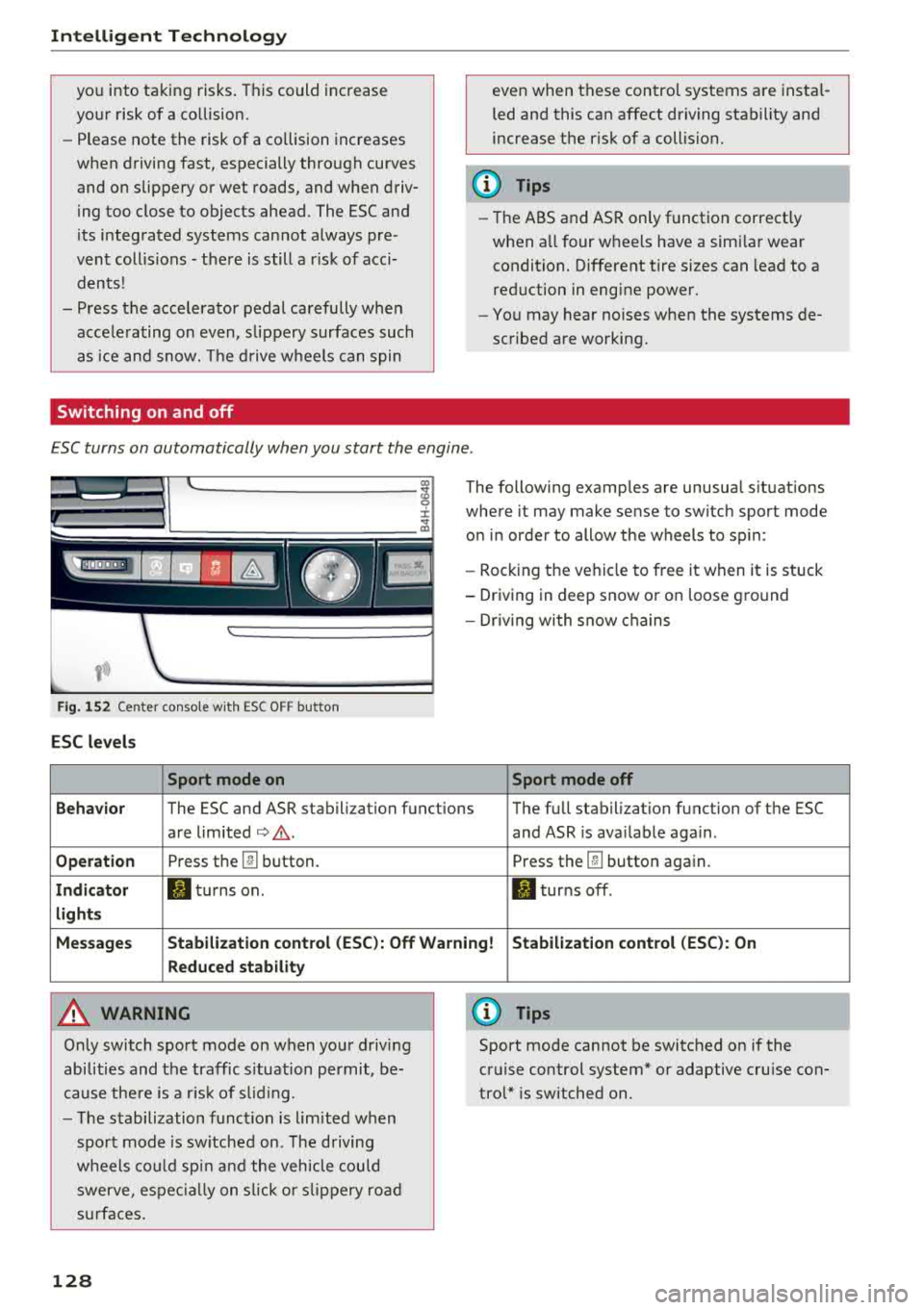
Switching on and off
even when these control systems are instal
led and this can affect driving stability and
increase the risk of a collision.
(D Tips
- Th e ABS and ASR only function correct ly
when a ll four wheels have a simi lar wear
condition. Different tire sizes can lead to a
reduction in engine power.
- You may hear noises when the systems de
scribed are working.
ESC turns on automatically when you start the engine .
Fig . 152 Center conso le wit h ESC O FF but ton
ESC levels
Sport mode on
The following examples are unusual situations
where it may make sense to switch sport mode
on in order to allow the wheels to sp in:
- Rocking the ve hicle to free it when it is stuck
- Driving in deep snow or on loose ground
- Dr iv in g with snow chains
Sport mode off
Behavior
The ESC and ASR stabilization functions The full stabilization function of the ESC
are limited
¢ .&. . and ASR is ava ilable aga in .
Operation Press th e @ button. Press the@button again.
Indicator II turns on. II turns off .
lights
Messages Stabilization control (ESC): Off Warning! Stabilization control (ESC): On
Reduced stability
A WARNING
Only switch sport mode on when your driving
abilities and the traffic s ituation permit, be
cause there is a risk of s liding.
- The stabilization function is l im ited when
sport mode is sw itched on. The driving
whee ls could spin and the veh icle could
swerve , espec ially on slic k or slippery road
s urfac es.
128
0) Tips
Sport mode cannot be switched on if the
cruise control system* or adaptive cruise con
trol* is switched on .
Page 343 of 356
A
A/C (automatic climate control) . . . . . . . . . . 70
Accessories . . . . . . . . . . . . . . . . . . . . . . . 61 , 338
Active lane assist (lane departure assist) . . 103
Cleaning the camera area . . . . . . . . . . . . . 307
Messages . . . . . . . . . . . . . . . . . . . . . . . . . . 104
Adapter cable (Audi music interface) . . . . . 186
Adaptive air suspension/sport . . . . . . . . . . . 111
Adaptive cruise control. . . . . . . . . . . . . . . . . . 95
Cleaning the sensors . . . . . . . . . . . . . . . . . 307
Messages . . . . . . . . . . . . . . . . . . . . . . . . . . 102
Adjusting the sound . . . . . . . . . . . . . . . . . . . 205
Adjusting the sound (tone) . . . . . . . . . . . . . 196
Adjusting the temperature (automatic climate
control system) . . . . . . . . . . . . . . . . . . . . . . . . 71
Adjusting the volume RSE . . . . . . . . . . . . . . . . . . . . . . . . . . . . . . . 195
Airbag . . . . . . . . . . . . . . . . . . . . . . . . . . . . . . 227
Airbag system . . . . . . . . . . . . . . . . . . . . 235, 245
Care .. .. .. .. ............... .. .. .. . 240
Children . . . . . . . . . . . . . . . . . . . . . . . . . . . 250
Child restraints . . . . . . . . . . . . . . . . . . . . . 251
Components (front a irbags) . . . . . . . . . . . 233
Danger of fitting a child seat on the front
passenger seat . . . . . . . . . . . . . . . . . . . . . . 228
Disposal . . . . . . . . . . . . . . . . . . . . . . . . . . . 240
Front airbags . . . . . . . . . . . . . . . . . . . . . . . 231
Important information . . . . . . . . . . . . . . . 227
Knee airbags . . . . . . . . . . . . . . . . . . . . . . . . 241
Monitoring . . . . . . . . . . . . . . . . . . . . . . . . . 237
PASSENGER A IR BAG OFF light . . . . . . . . . 237
Repairs . . . . . . . . . . . . . . . . . . . . . . . . . . . . 240
Safety instructions . . . . . . . . . . . . . . . . . . . 239
Side airbags . . . . . . . . . . . . . . . . . . . . . . . . 243
Side curtain airbags . . . . . . . . . . . . . . . . . . 246
We ight-sensing mat . . . . . . . . . . . . . . . . . 2Sl
Aircraft Transporting your vehicle . . . . . . . . . . . . . 330
Air distribution (automatic climate control) . 71
Air pressure (Tire Pressure Monitoring Sys-
tem) . . . . . . . . . . . . . . . . . . . . . . . . . . . . . . . 302
Air pressure (tires) . . . . . . . . . . . . . . . . . . . . 293
Air suspension . . . . . . . . . . . . . . . . . . . . . . . 111
u. ~ Alignment pin (changing the wheel) . . . . . . 312
N ~ All season tires . . . . . . . . . . . . . . . . . . . . . . . 298 ......
g Alternative route . . . . . . . . . . . . . . . . . . . . . 173
:c '
Anti-freeze
Windshield washer system . . . . . . . . . . . . 281
Anti- Lock Braking System (ABS) . . . . . . . . . 127
Anti-Slip Regulation (ASR) . . . . . . . . . . . . . . 127
Audi connect . . . . . . . . . . . . . . . . . . . . . . . . . 158
Data connection . . . . . . . . . . . . . . . . . . . . . 162
Data protection . . . . . . . . . . . . . . . . . . . . . 164
Services (overview) . . . . . . . . . . . . . . . . . . 160
Setup . . . . . . . . . . . . . . . . . . . . . . . . . . . . . 158
Audi music interface . . . . . . . . . . . . . . . . . . . 186
Adapter cable . . . . . . . . . . . . . . . . . . . . . . . 186
Connecting and disconnecting . . . . . . . . . 186
Screen settings . . . . . . . . . . . . . . . . . . . . . 191
Audio player
refer to Bluetooth . . . . . . . . . . . . . . . . . . . 184
Audio track (DVD) . . . . . . . . . . . . . . . . . . . . . 191
Audi Service R epair Manuals and Literature 336
AUTO Automatic climate control system . . . . . . . 70
Automatic headlights . . . . . . . . . . . . . . . . . 43
Auto Lock (central locking) . . . . . . . . . . . . . . 27
Automatic belt retractor . . . . . . . . . . . . . . . 222
Automat ic climate control . . . . . . . . . . . . . . . 69
Automatic traffic rerouting . . . . . . . . . . . . . 173
Automatic transmission (tiptronic) . . . . . . . . 83
Emerg ency mode . . . . . . . . . . . . . . . . . . . . . 87
Hill descent control . . . . . . . . . . . . . . . . . . . 86
Overboost . . . . . . . . . . . . . . . . . . . . . . . . . . . 87
Parking lock emergency release . . . . . . . . . 88
Automatic wipe/wash system . . . . . . . . . . . . SO
Auto Safety Hotline . . . . . . . . . . . . . . . . . . . 215
Average consumption . . . . . . . . . . . . . . . . . . . 12
Average speed . . . . . . . . . . . . . . . . . . . . . . . . 12
B
BACK button . . . . . . . . . . . . . . . . . . . . . . . . . 135
Balance (sound) . . . . . . . . . . . . . . . . . . . . . . 206
Belt tensioners . ..... ............. 217,225
Blended gasoline . . . . . . . . . . . . . . . . . . . . . 268
Blower (automatic climate control) . . . . . . . . 71
Bluetooth Audio player . . . . . . . . . . . . . . . . . . . . . . . . 184
Connecting a cell phone . . . . . . . . . . . . . . 147
Booster seats . . . . . . . . . . . . . . . . . . . . . . . . 2 5 7
Brake fluid Checking the brake fluid level . . . . . . . . . . 279
341