door lock AUDI A8 2018 User Guide
[x] Cancel search | Manufacturer: AUDI, Model Year: 2018, Model line: A8, Model: AUDI A8 2018Pages: 356, PDF Size: 54.71 MB
Page 37 of 356
lL t:0 ....
"' ......
"' .... 0 0 :c '
- Never leave your vehicle unattended espe
cially with the luggage compartment lid left
open . A child could crawl into the car
through the luggage compartment and pull
the lid shut, becoming trapped and unable
to get out . To reduce the risk of personal in
jury, never let children p lay in or around
you r vehicle . A lways keep the luggage com
partmen t lid as well as the vehicle doo rs
closed when not in use.
- Never close the l uggage compartment lid
ina ttentively or without checking first . Al
though the closing force of the l uggage
compartment lid is limited, you can still se
riously injure yourself or others.
- Always ensure that no one is within range of
the luggage compartment lid when it is
moving, in particular close to the hinges and
the upper and lower edges
-fingers or
hands can be pinched.
- Never try to interfere w ith the luggage com
partment lid or help it when it is being
opened or closed automatically .
(D Tips
- The settings in the Infotainment system de
termine if the luggage compartment lid can be opened us ing the handle
q page 32.
- When the vehicle is locked, the luggage
compartment lid can be unlocked separately by pressing the
l .::s l button on the remote
control key. The luggage compartment lid l ocks automatically when it is closed again .
- You can close the luggage compartment lid
us ing the remote control key (veh icles w ith
convenience key*) up to a d istance of ap
p rox imately 9 feet (3 m).
- The luggage compartment lid can be oper
ated manually if the veh icle battery is low.
It is necessary to use more force when doing
th is. Move the lid slowly to red uce the
amount of force needed.
Op eni ng and clos ing
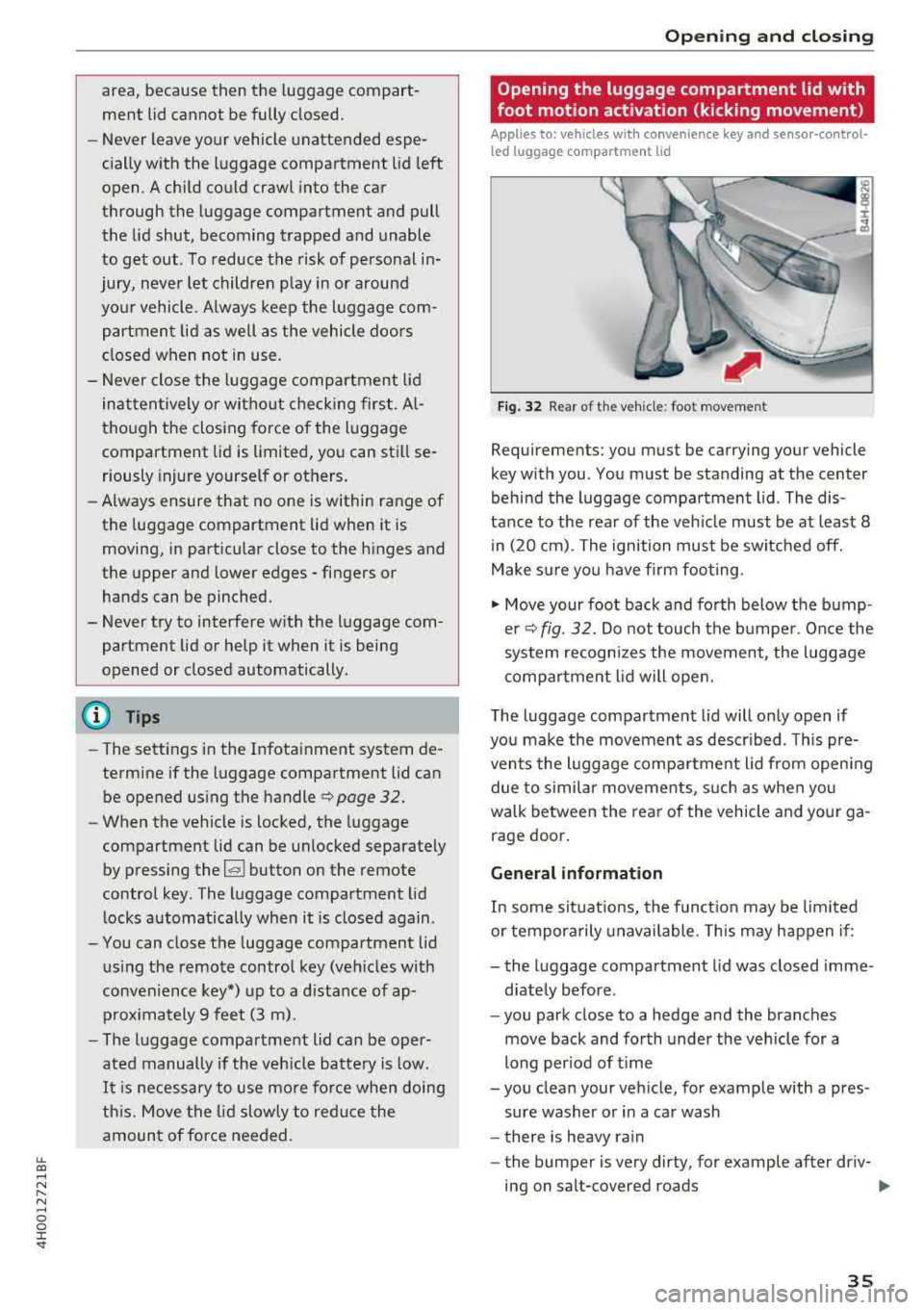
Opening the luggage compartment lid with
foot motion activation (kicking movement)
Applies to: vehicles with convenience key and sensor-cont rol
led luggage compartment lid
F ig. 32 Rear of the vehicle : foot movement
Requi rements : you must be carrying your veh icle
key with you . You must be standing at the center
behind the luggage compartme nt lid . The dis
tance to the rear of the veh icle must be at least 8
in (20 cm) . The ignition must be switched off.
Make s ure yo u have f irm footing .
.,. Move your foot back and forth below t he bump
er
q fig . 32 . Do not touch the bumpe r. Once the
system recogn izes the movement , the luggage
compa rtment l id will ope n.
T he luggage compartment lid will only open if
you make the movement as descr ibed . T h is pre
vents the luggage compa rtment lid from open ing
due to similar movements, such as when you
walk betwee n the rear of the vehicle and your ga
rage door .
General information
In some si tuations, the f unct ion may be lim ited
o r tempora rily unavailable . T his may happen if:
- the luggage compartment lid was closed imme
diately before .
- you park close to a hedge and the branches
move back and forth under the veh icle for a
long per iod of t i me
- you clean your veh icle, for example with a pres
sure washer or in a car wash
- there is heavy ra in
- the bumper is very dirty, for example after d riv-
ing on salt-covered roads
..,.
35
Page 38 of 356
Opening and closing
-there is interference to the radio signal from
the vehicle key, such as from cell phones or re
mote controls
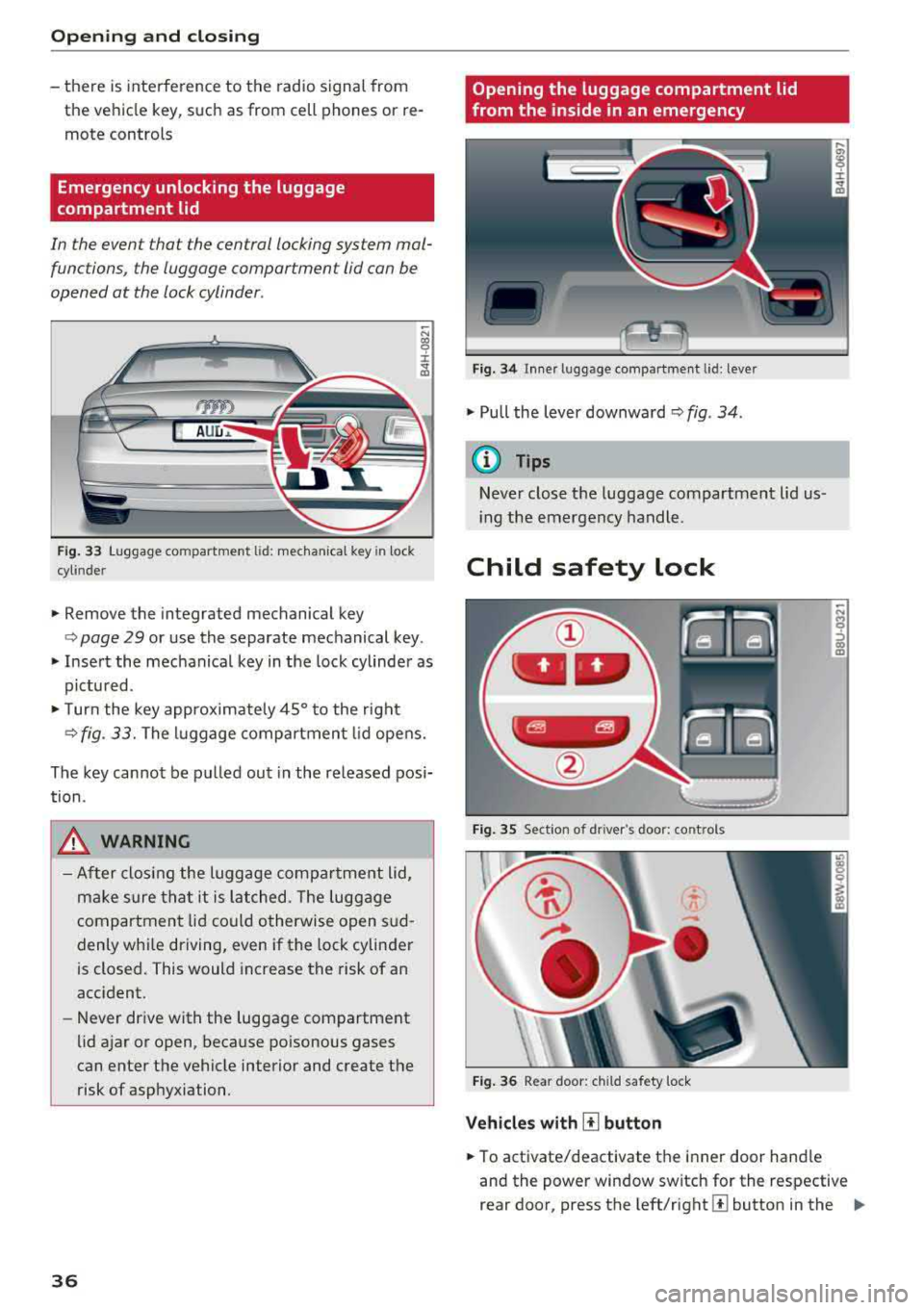
Emergency unlocking the luggage
compartment lid
In the event that the central locking system mal
functions , the luggage compartment lid can be
opened at the lock cylinder .
AUD.a.
Fig. 33 Luggage compartment lid: mechanica l key in lock
cyl inde r
.,. Remove the integrated mechanical key
-N CX) '9 ::c
"" "'
<=> page 29 or use the separate mechanical key.
" Insert the mechanical key in the lock cylinder as
pictu red.
"T urn the key approximate ly 45° to the right
<=> fig. 33. The luggage compartment lid opens.
The key cannot be pulled out in the released posi
tion .
_&. WARNING
-After closing the luggage compartment lid,
make sure that it is latched. The luggage
compartment lid could otherwise open s ud
denly whi le driving, even if the lock cylinder
is closed. This would increase the risk of an
acc ident.
- Never drive with the luggage compartment
lid ajar or open, because poisonous gases
can enter the vehicle interior and create the
risk of asphyxiation .
36
Opening the luggage compartment lid
from the inside in an emergency
Fig. 34 Inne r luggage compartment l id : lever
" Pull the lever downward c> fig . 34 .
@ Tips
Never close the luggage compartment lid us
i ng the emergency handle.
Child safety lock
Fig. 35 Section of dr iver 's doo r: co ntrols
Fig. 36 Rear door: child safety lock
Vehicles with [!] button
" To activate/deactivate the inner door hand le
-N
~ co
"'
and the power window switch for the respective
rear door, press the
l eft/right [±] button in the ..,,
Page 39 of 356

lL t:0 ....
"" ......
"" .... 0 0 :c '
the button turns on/blinks.
.,. To activate/deactivate the child safety lock on
both sides, you must press
the [±] buttons one
after the other.
Vehicles with ~ button
.,. To deactivate/activate the power window
switch in the rear doors, press the [@button in
the driver's
door @ c;, fig. 35. The indicator
light in the button turns on/blinks .
.,. To also deactivate/activate the inner door han
dle, open the respective rear door and turn the
key switch w ith the mechanical key in the direc
t ion of the arrow or opposite the d irection of
the arrow
¢fig. 36.
The follow ing funct ions are also turned off when
the child safety lock is act ivated :
- The buttons for the sunshade* in the rear win
dow .
- The buttons for the power sunshades* in the
side windows.
- The button for the front passenger seat ad just
ment* (for vehicles with
the[±] button when the
child safety lock is activated for the rear door
on the passenger's side).
.&_ WARNING
Always take the veh icle key with you when
leaving the vehicle, even for a short period of
time. This applies particularly when children
remain in the vehicle. Otherwise children
could start the engine or operate electrical
equipment (such as power windows), which
increases the risk of an accident.
-
Opening and closing
Power window
Controls
The driver can control all power windows.
Fig. 37 Section of driver 's doo r: controls
All power window switches are equipped with a
two -stage function:
Opening and closing the windows
CD N M 0
::> CD m
.,. To open or close the window completely, press
the switch down or pull the switch up brief ly to
the second level. The ope rat ion will stop if the
sw itch is pressed/pulled again.
.,. To select a position in between opened and
closed, press/p ull the switch to the first level
until the des ired window position is reached .
Power window switches
CD Left front door
@ Right front door
® Left rear door
@ Right rear door
.&_ WARNING ~
-Always take the vehicle key with you when
leaving the vehicle, even for a short period
of time. This applies particularly when chil
dren remain in the vehicle. Otherwise the
children could start the engine or operate
electrical equipment such as power win
dows, which increases the risk of injury. The
power windows continue to function until
the driver's door or front passenger's door
has been opened.
- Pay careful attention when closing the win
dows. Pinching could cause serious inj uries .
37
Page 40 of 356
Opening and clo sin g
- When locking the vehicle from outside, the
vehicle must be unoccupied since the win
dows can no longer be opened in an emer
gency .
(D Tips
-Using switches @ and@, the driver can a l
so operate the power sunshades* in the side
windows.
- After turning the ignition off you can still
open and close the windows for approxi mately 10 minutes . The power windows do
not switch off until the driver's door or front
passenger's door has been opened .
Correcting power window malfunctions
You can reactivate the one-touch up/down func
tion if it malfunctions .
• Pull the power window switch up until the win
dow is comp letely ra ised.
• Release the sw itch and pull it up again for at
least one second .
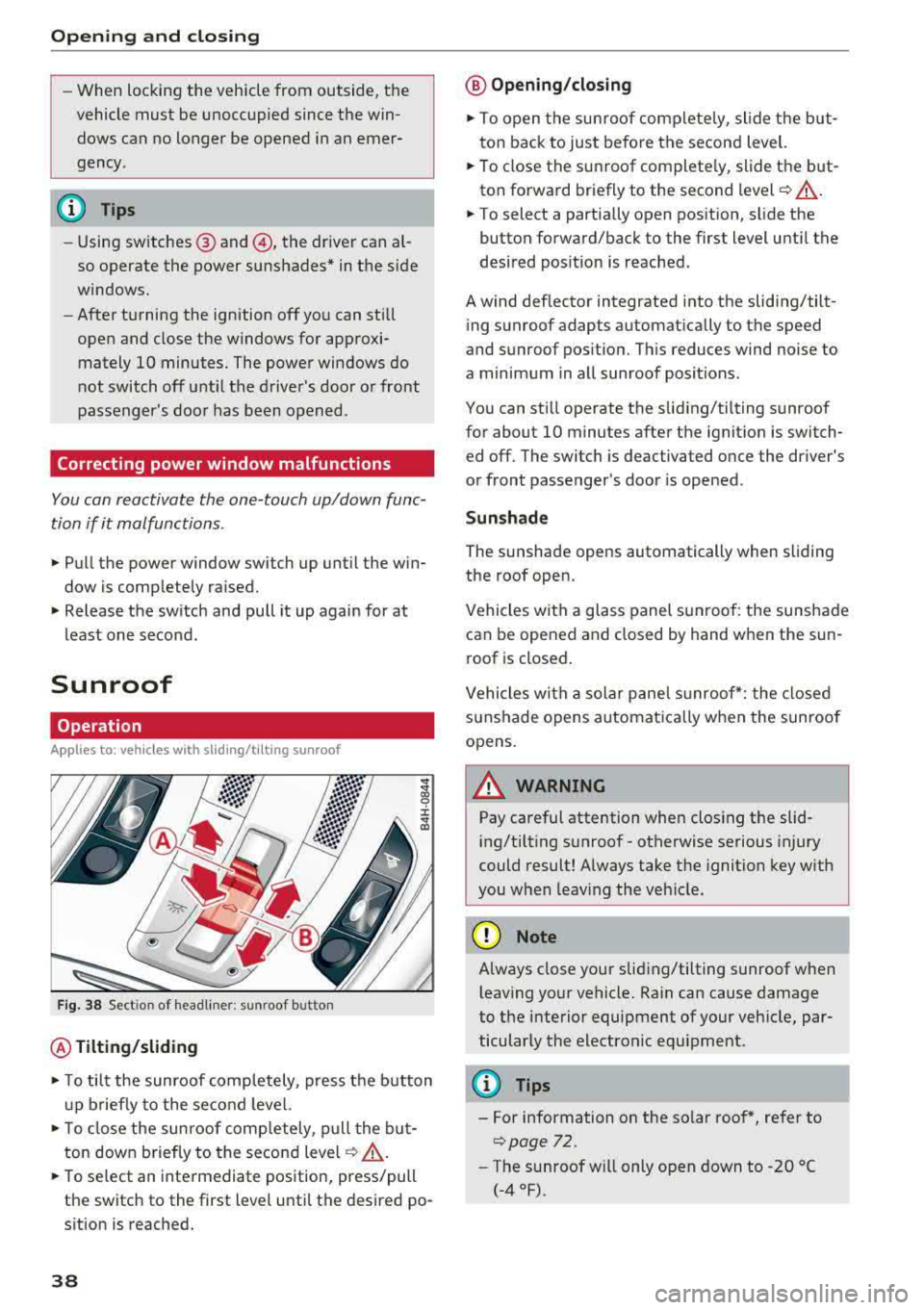
Sunroof
Operation
Applies to: vehicles with sliding/tilting sunroof
Fig . 38 Sect io n of headli ner: sunroof button
@ Tilting /sliding
• T o tilt the sunroof comp letely, press the button
u p briefly to the second level.
• T o close the sunroof comp letely, pull the but
ton down briefly to the second
leve l¢ ,&. .
• To se lect an intermediate position, press/pull
the switch to the first level until the desired po
sition is reached.
38
@ Op ening /closing
• To open the sunroof complete ly, slide the but
ton back to just before the second level.
• To close the s unroof complete ly, slide the b ut
ton forward briefly to the second level
c::> ,&. .
• To select a partially open position, slide the
bu tton forward/back to the first level until the
desired pos it ion is reached.
A wind def lector integrated into the sliding/tilt
ing sunroof adapts automatically to the speed
and sunroof pos ition. Th is reduces wind noise to
a minimum in all sunroof posit ions.
You can still operate the sliding/tilting sunroof
for about 10 minutes after the ignit ion is swi tch
ed off. The switch is deactiva ted once the driver's
or front passenger's door is opened .
Sunshad e
The sunshade opens automatically when sliding
the roof open.
Vehicles with a glass panel sunroof : the sunshade
can be opened and closed by hand when the sun
roof is closed.
Vehicles with a solar panel s unroof*: the closed
sunshade opens automatica lly when the sunroof
opens.
~ WARNING
Pay careful attention when clos ing the slid
ing/tilting sunroof - otherwise serious injury
could result! Always take the ignition key w ith
you when leav ing the veh icle.
(D Note
-
A lways close your sliding/tilting sunroof when
l eaving your vehicle. Rain can cause damage
to the interior equipment of your vehicle, par ticularly the electronic equ ipment .
(D Tips
- For information on the so lar roof *, refer to
¢ page 72 .
-The sunroof will only open down to -20 °C
(-4 °F).
Page 42 of 356
Opening and clo sin g
@ Tips
- The panorama roof will on ly open down to
·4°F (·20°).
- To prevent both roof segments from co llid ·
ing with one another, you do not need to
- tilt the rear roof segment if the front roof
segment is already open.
- close the front roof segment if the rear
roof segment is already tilted.
Opening/closing the sunshade
Applies to: vehicles w ith panorama glass roof
© Front sunshade
.,. To open the sunshade completely, slide the G;J
button back to the second level ¢ page 39,
fig. 39 .
.,. T o close the sunshade comp lete ly, sl ide the G;J
swi tch forward briefly to the second level.
.. To se lect a pa rtially open position, slide the l:c.i.l
button to the first level until the sunshade has
reached the desired position.
© Rear sunshade
.,. T o open the sunshade comp lete ly, press the~
button in the rear door briefly down to the sec
ond leve l¢
page 39, fig . 40.
.. To close the sunshade comp lete ly, pull the ~
button up to the second level ¢,& .
.,. To se lect a partially open position, press/pull
the
G;J button to the f irst level until the desired
pos ition is reached. Or
.. To ope rate the sunshade from the cockpit,
press the
I REAR MODEi b utton 9 page 39,
fig. 39.
You can now open/close the rear su n
shade using
th e~ button in the headliner.
A WARNING
Be careful when closing the panorama g lass
roof
-otherwise serious injury could result!
Switch off the ignition when exiting the vehi
cle.
40
Roof segments/sunshade emergency
closing
Applies to: vehicles with panorama glass roof
If the roof segment or s unshade detects an ob
j ect in its path when it is closing, it will open
again automatically . In this case, you can then
close it w ith the power emergency closing func
tion.
.. Withi n five seconds after the roof segment or
sunshade opens automatically, pull t he switch
until it closes.
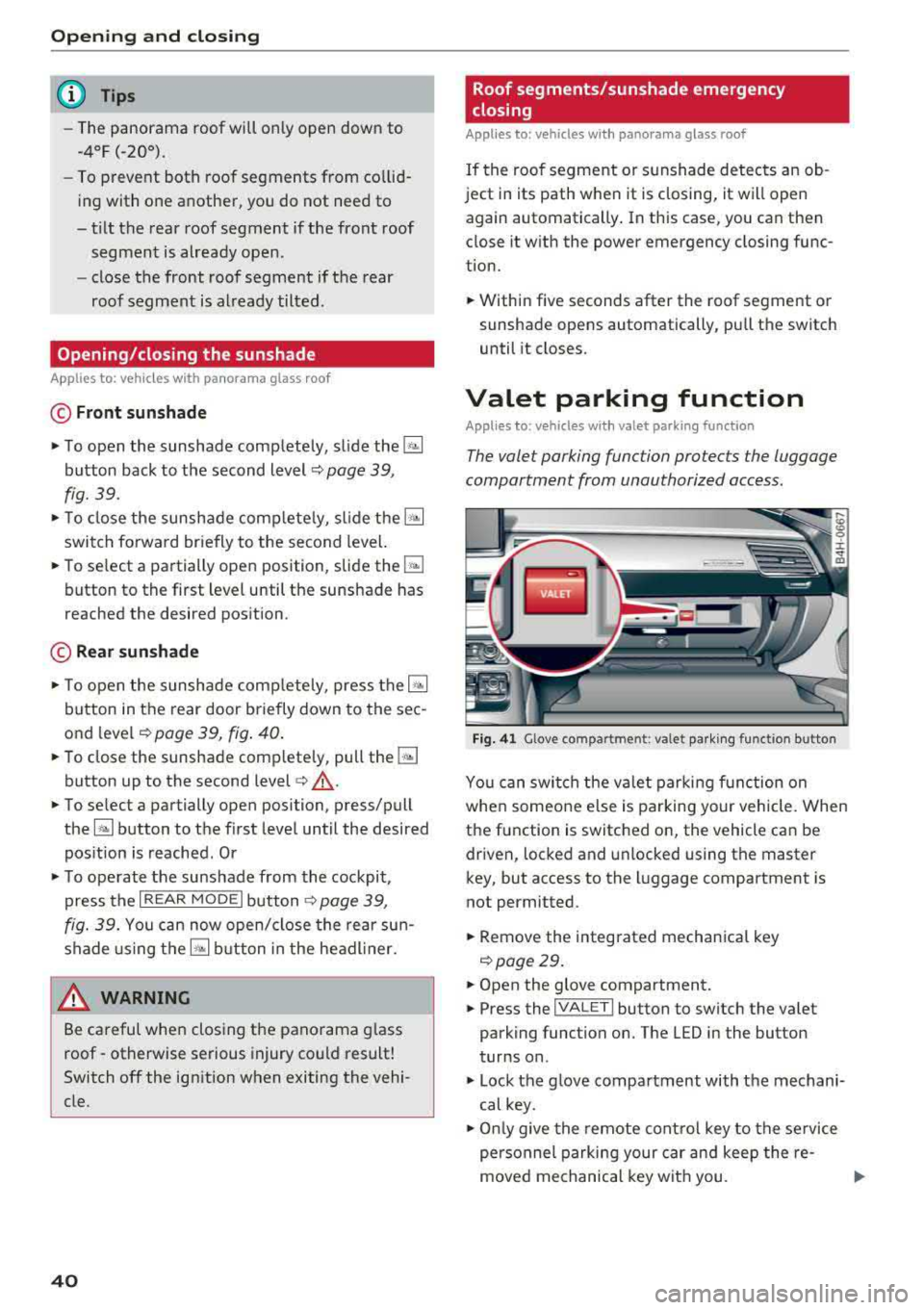
Valet parking function
Applies to: vehicles with valet parking function
The valet parking function protects the luggage
compartment from unauthorized access.
F ig. 4 1 Glove compartment: valet parking functio n button
You can switch the va let parking f unction on
whe n someo ne else is parking your vehicle. When
the function is switched on, the vehicle can be
driven, locked and unlocked using the master
key, but access to the luggage compartment is
not permitted.
.. Remove the integrated mechanical key
Qpoge 29 .
.. Open the glove compartment.
.,. Press the !VALET I button to switch the valet
parking function on. The LED in the button
t u rns on.
.,. Lock the glove compartment with the mechani
cal key .
.,. O nl y give the remote cont ro l key to the se rvice
personnel parking your car and keep the
re-
moved mechanical key wit h you. ..,.
Page 48 of 356
Lights and Vision
Coming home, Leaving home
The coming home function illuminates the area
outside the vehicle when you turn the ignition off
and open the driver's door. To turn the function
on, select
Lights when leaving car > On.
The leaving home illuminates the area outside
the vehicle when you unlock the vehicle. To turn
the function on, select
Lights when unlocking
car> On.
The coming home and leaving home functions
only operate when it is dark and the light switch
is in the
AUTO position.
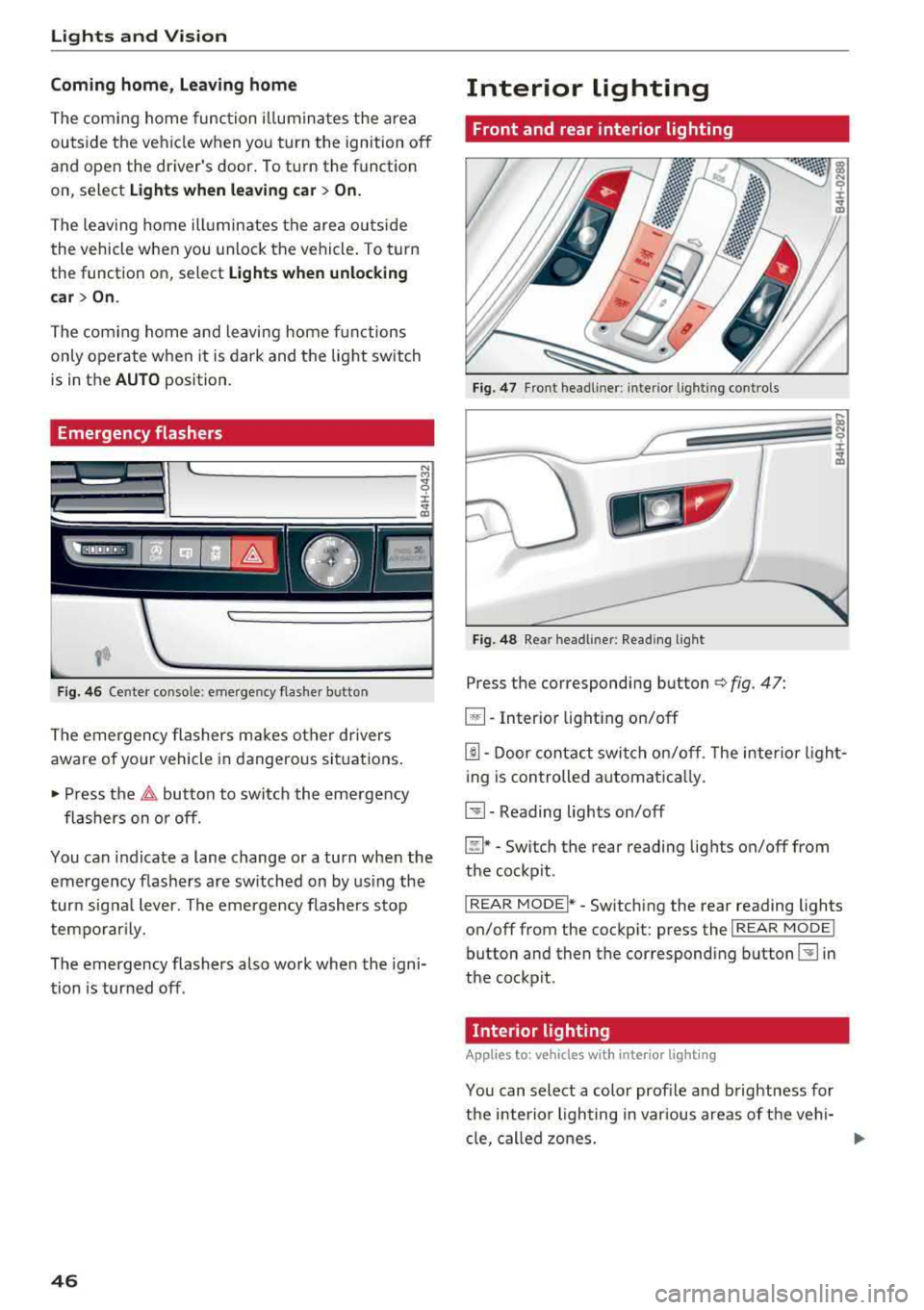
Emergency flashers
~ ~--·I
~ :cc-~--t
Fig. 46 Center console: emergency flasher button
The emergency flashers makes other drivers
aware of your vehicle in dangerous situations.
• Press the ~ button to switch the emergency
flashers on or off.
You can indicate a lane change or a turn when the
emergency flashers are switched on by using the
turn signal lever. The emergency flashers stop
temporarily.
The emergency flashers also work when the igni
tion is turned off.
46
Interior lighting
Front and rear interior lighting
Fig. 47 Front headliner: interio r light ing contro ls
Fig. 48 Rear headl iner : Reading light
Press the corresponding button ¢ fig. 47:
~ -Interior lighting on/off
[!J. Door contact switch on/off . The interior light
ing is controlled automatically.
~-Reading lights on/off
~* -Switch the rear reading lights on/off from
the cockpit.
I REAR MODEi* -Switching the rear reading lights
on/off from the cockpit: press the
I REAR MODE !
button and then the corresponding button~ in
the cockpit.
· Interior lighting
App lies to: vehicles wit h interior light ing
You can select a color profile and brightness for
the interior lighting in various areas of the vehi- cle, called zones.
ll>
Page 50 of 356
Lights and Vision
Q/P -Adjusting the left/right exterior mirror.
Move the knob in the desired direction.
4lll -Heats the mirror glass depending on the out
side temperature.
8 - Folds the exterior mirrors* . In the Infotain
ment system, you can select if the mirrors fold in
automatically when you lock the vehicle
¢page 32.
Front passenger's exterior mirror tilt
function*
To help you see the curb when back ing into a
parking space, the surface of the mirror tilts
slightly. For this to happen, the knob must be in
the position for the front passenger's exterior mirror.
You can adjust the tilted mirror surface by turn
ing the knob in the desired direction. When you
move out of reverse and into another gear, the
new mirror position is stored and assigned to the
key you are using.
The mirror goes back into its original position
once you drive forward faster than 9 mph
(15 km/h) or turn the ignition off .
A WARNING
Curved mirror surfaces (aspheric or convex*)
enlarge the field of vision. However, they
make objects in the mirror appear smaller
and farther away . You may estimate incor
rectly when you use these mirrors to gauge
your distance from the vehicles behind you
when changing lanes, which increases the risk
of an accident.
(D Note
- If the mirror housing was moved by outs ide
forces (such as an impact when maneuver
in g), you must use the power folding func
tion to fold the mirror all the way out. The
mirror housing must not be moved back in-
to place by hand because this would impair
the function of the m irror mechanism.
-If you wash the vehicle in an automatic car
wash, you must fold the exterior mirrors in
to reduce the risk of damage to the mirrors.
48
Never fold power fold ing exterior mirrors by
hand . Only fold them in and out using the
power controls.
(D Tips
-If the power adjusting function malfunc
tions, the glass in both mirrors can be ad
justed by pressing on the edge of it by hand.
-The exterior mirror settings are stored with
the memory function* ¢
page 59.
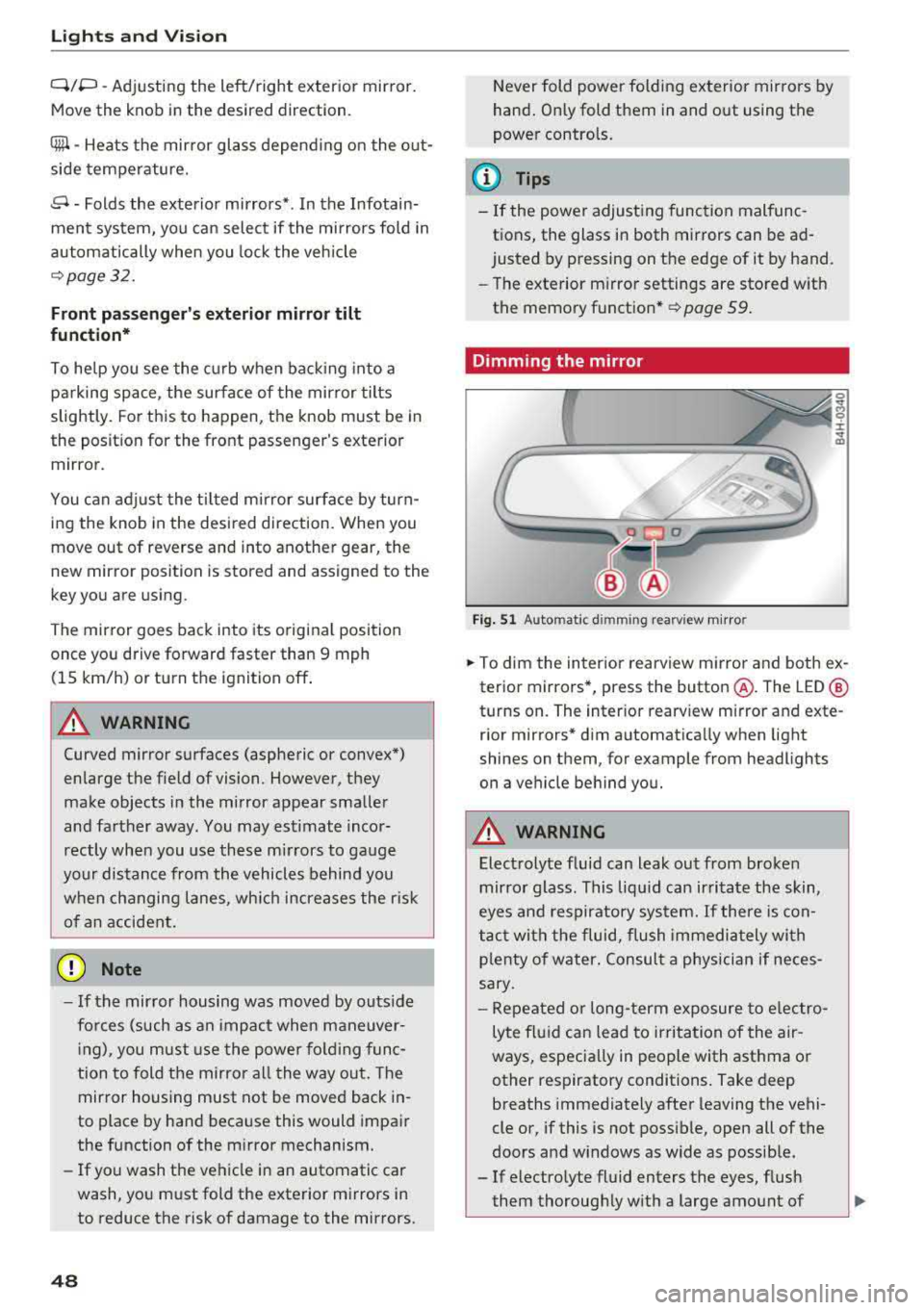
Dimming the mirror
Fig. 51 Automat ic d imming rearv iew m irro r
0
~ 0 :i: ~ m
.. To dim the interior rearview mirror and both ex
terior mirrors*, press the button @. The LED @
turns on. The interior rearview mirror and exte
rior mirrors* dim automatically when light
shines on them, for example from headlights
on a vehicle behind you.
A WARNING
Electrolyte fluid can leak out from broken
mirror glass. This liquid can irritate the skin,
eyes and respiratory system. If there is con
tact with the fluid, flush immediately with
p lenty of water . Consult a physician if neces
sary.
-
-Repeated or long-term exposure to electro
lyte fluid can lead to irritation of the air
ways, especially in people with asthma or
other respiratory conditions. Take deep
breaths immediately after leaving the vehi
cle or, if this is not possible, open all of the
doors and w indows as wide as possible.
-If electrolyte fluid enters the eyes, flush
them thoroughly with a large amount of
Page 59 of 356
lL t:0 ....
"' " "' .... 0 0 :c '
the left/right button @ unti l the leg support
reaches the desired position.
.,. To angle the leg support so that it is more up
right/more recl ined or to move it forward/back,
adjusting the front passenger's seat according
ly .
Adjust ing the f ront pa ssenge r's seat
.,. Make s ure that the front passenger's seat ad
justment is switched on in the Infotainment system
c:> page 58.
.,. To activate the front passenger's seat adjust
ment, press the button ®·
.,. To adjust the front passenger's seat forward/
back, press the butto n© forward/back.
.,. To move the front p assenger's seat up/down,
press the button © upward/downwa rd.
.,. To adjust the front passenger's seat back rest so
that is more upright/more reclined, press the
button ®forward/back.
.,. Applies to vehicles with reclining seat*: to ad
just the reclining/standard seat position, press and hold the button
@ /(D until the front pas
senger's seat reaches its end posit ion .
,&. WARNING
-The power seats can also be adjusted w hen
the igni tion is switched
o ff. For this reason,
children should never be left unattended in
the vehicle beca use they cou ld be injured.
-Be careful whe n adj usting the sea t. Unsu
pervised or c areless seat adjustment can
pinch fingers or hands ca using injur ies .
-Applies to vehicles with reclining seat* :
-Do not use the front passenger's seat for
seating when it is in the recl ining posit ion.
This inc reases the risk of ser ious injury or
death.
-Never adjust the reclining position when
the front passenger's seat is occupied .
This inc reases the risk of injury.
-Do not tilt the display if the driver's v iew
of the right exterio r mirror w ill be ob
s tructed .
-Make sure the area between the leg sup
port and the front passenger's seat back-
S eats and storag e
rest is clear before fo ld ing the leg support
in so that you are not p inched.
(D Tips
-T he massage function switches off auto
matically after approximate ly 10 minutes .
-If you cannot adjust the reclining seat* or
the front passenger's seat from the rear, it
is possib le that:
-the front passenger's seat memory func
tion is switched
off c:> page 59, or
-the child safety lock is switched on (the ~
button c:> page 3 7 or the r ight t button
c:> page 37 is tu rned on in the d river's
door), or
-the front passenger seat adj ustment is
switched
off in the Infota inment system
c:>page 58 .
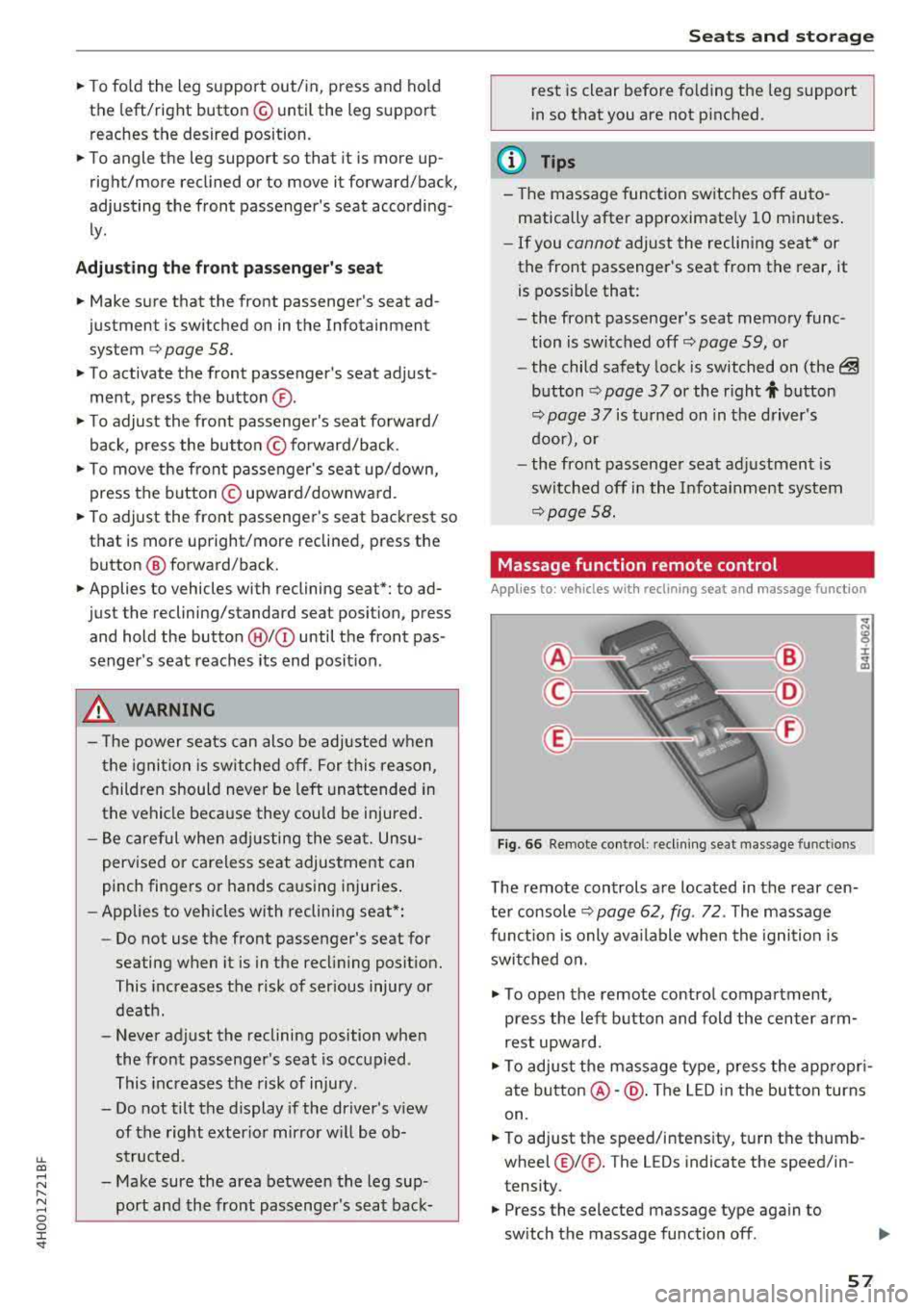
Massage function remote control
Appl ies to: vehicles wit h reclinin g seat an d massa ge function
Fig . 66 Remote control: recli ning seat massage funct ions
T he remote controls are located in the rear cen
te r console
c:> page 62, fig. 72 . The massage
func tion is only ava ilable when the igni tion is
swi tched on.
.,. To open the remote co ntro l compartment,
press the left b utton and fold the center arm
rest upwa rd.
.,. To adjus t the massage type, press the app ropr i
ate
button @-@ . The LED in the button turns
on.
.,. To adjust the speed/i ntens ity, tu rn the thumb
wheel@I® . The LEDs indicate the speed/in
tensity.
.,. Press the selected massage type again to
sw itch the massage function
off .
57
Page 60 of 356
Seats and stor age
Massage types
@ -Wave
@-Pulsating
© - Stretch
@-Lumbar
(D Tips
-The massage function switches off a uto
matically after approx imately 10 minutes.
- If you activate a massage type again, the
l ast selected intensity and speed w ill be
se
lected.
Comfort settings
A pp lies to: ve hicles w ith comfo rt seats in t he rea r
You con also apply several settings for the rear
using the Infotainment system in the cockpit .
.. Select in the MMI: I CAR j function button> Car
s y stem s
control but ton > Vehicle s etting s>
Seats > Rea r seat s.
Approa ch norma l position
-with this funct ion,
the o ute r rear seats and the front passenger's
seat are moved to the facto ry setting.
Ea sy se at entry -the Easy s eat entry makes it
possible to enter and exit the rea r seats comfort
ab ly. If the function is sw itched on, the rear seat
automatically moves all the way back when the
corresponding door is opened.
Pa ss e nge r seat adju stment * -if the funct ion is
sw itched on in the Infotainment system, the
front p assenger's seat can also be adjusted from
the rear seat using the
¢ page 56, fig. 64 but
tons.
The front passenger's seat cannot be adjusted, if
-the front passenger's seat memory function is
switched off
c:> page 59 .
-the~ button turns on in the driver's door
c:> poge 37 .
-The r ight l±l button turns on in vehicles with
power chi ld safety locks*
c:> poge 37 .
58
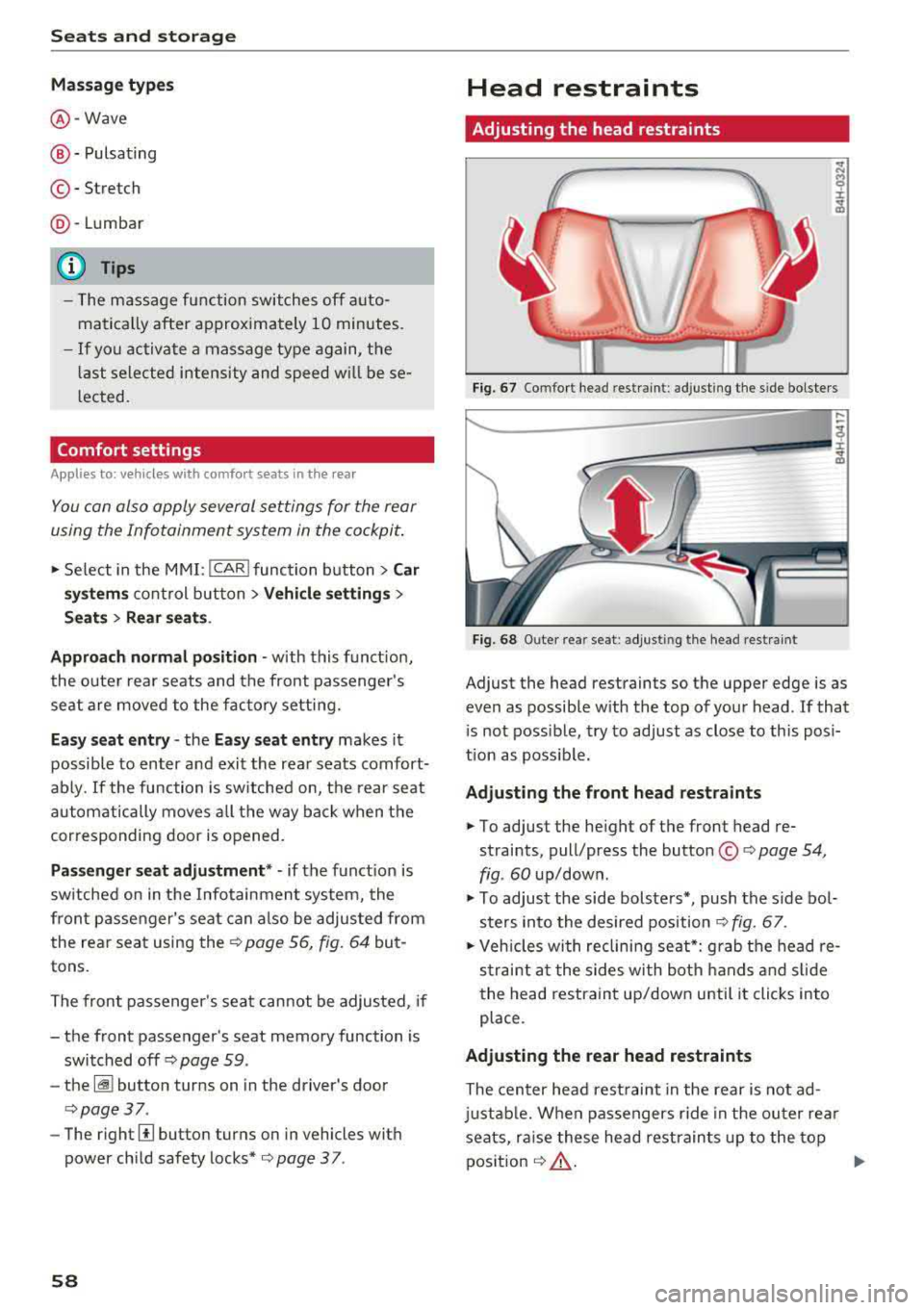
Head restraints
Adjusting the head restraints
Fig. 67 Comfort head restraint : adjusting the s ide bolsters
Fig. 68 Outer rea r seat : adjust ing the head restrain t
Adjust the head restraints so the upper edge is as
even as possible w ith the top of your head. If that
i s not possib le, try to adjust as close to th is posi
t ion as poss ible.
Adjusting the front head restraints
.. To adjust the he ight of the front head re
straints, pull/press the button ©
c:> page 54,
fig . 60
up/down.
.. To adjust the side bolste rs*, push the s ide bo l
s t ers in to the desired position
c:> fig . 67.
.. Vehicles with reclini ng seat*: grab the head re
s t rai nt a t the sides with both hands and s lide
the head restraint up/down unti l it clic ks into
place.
Adjusting the rear head restraints
The center head rest raint in the rear is not ad
just able. When passengers r ide in the outer rea r
seats, ra ise these head restraints up to the top
position
c:> ,&. . .,._
Page 61 of 356
u. co .... N
" N .... 0 0 :c '
sides with both hands and slide it upward unti l
you fee l it click into place.
~ To move the head restraint down, press the
button (small
arrow)¢ fig. 68 and slide the
head restraint downward.
A WARNING
Always read and follow the applicab le wa rn
ings
¢page 211.
Memory function
Description
Applies to: vehicles with memory function
-
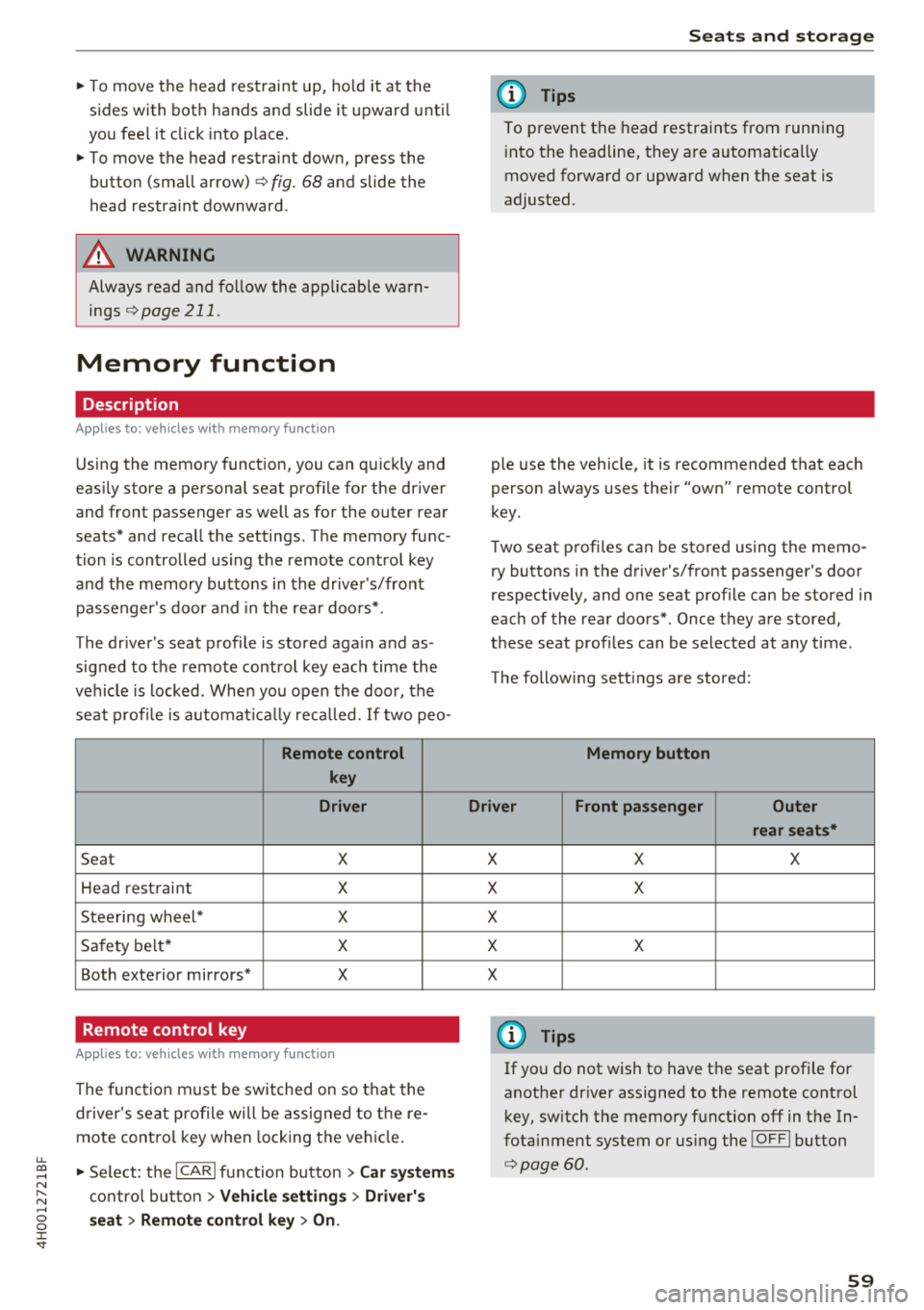
Using the memory function, you can quickly and
eas ily store a personal seat profile for the driver
and front passenger as well as for the outer rear
seats* and recall the settings. The memory func
tion is controlled us ing the remote control key
and the memory buttons in the drive r's/front
passenger's door and in the rea r doo rs*.
The driver's seat profile is stored again and as
signed to the remote control key each time the
ve hicle is locked. When you open the door, the
seat profi le is automat ica lly reca lled. If two pea-
Remote control
key
Driver
Seat X
Hea d rest raint X
Steering wheel* X
Sa fety belt* X
Both exterior mirrors* X
Remote control key
Applies to: vehicles with memory function
The functio n must be switched on so that the
d river's seat p rofile will be assig ned to t he re
mote cont rol key w hen locking the vehicle .
~ Select: the ICARI function button > Car systems
contro l bu tton > Vehicl e setting s > Driver' s
s eat > Remo te control ke y > On.
Seat s and sto rag e
(D Tips
To prevent the head restraints from running
i nto the headline, they are automatically
moved forward or upward when the seat is
adjusted.
ple use the vehicle, it is recommended that each
person always uses the ir "own" remote control
key.
T wo seat profiles can be stored using the memo
ry buttons in the driver's/front passenger's door
respectively, and one seat profile can be stored in
each of the rear doors*. Once they are stored,
these seat profiles can be selected at any time.
The following sett ings are stored:
Memory button
Driver Front passenger Outer rear seats*
X X X
X X
X X X
X
(D Tips
If yo u do not wish to have t he seat profi le for
another dr iver assigned to the remote cont rol
key, sw itch the memory function
off in the In
fotai nment system or using the
!O FF ! button
¢page 60.
59