fuel AUDI A8 2018 User Guide
[x] Cancel search | Manufacturer: AUDI, Model Year: 2018, Model line: A8, Model: AUDI A8 2018Pages: 356, PDF Size: 54.71 MB
Page 80 of 356
Driving
Shift to P, otherwise vehicle can roll away.
Doors do not lock if lever is not in
P.
This driver message appears fo r safety reasons if
the transmission has not been shifted to the P
position when you switch the ignition off. Move
the selector lever to the P position . Otherwise the
veh icle is not protected from ro lling and it cannot
be locked.
(I Key is not recognized. Hold back of key
against marked area. See owner's manual
If the i ndicator light turns on and this message
appears, there is a
malfunction ~ page 78.
Turn off ignition before leaving car
This message appears if the driver's door is
ope ned while the ignition is switched on . Always
sw itch off the ignition if you are leavi ng the vehi
cle .
Shift to P and turn off ignition before leav ing
car, otherwise vehicle can roll away
This message appears if the driver's door is
opened while the ignition is switched on and the
transmission has not been shifted to the P posi
tion . Shift the transm iss ion into the P posit ion
and turn off the ign ition if you are leaving the ve
h icle . Otherwise the vehicle could roll.
Starting the engine when there is a
malfunction
It may not be possible to start the engine under
certain circumstances, for example if the battery
in the vehicle key is drained, if interference is af
fected the key or if there is a system malfunc
tion .
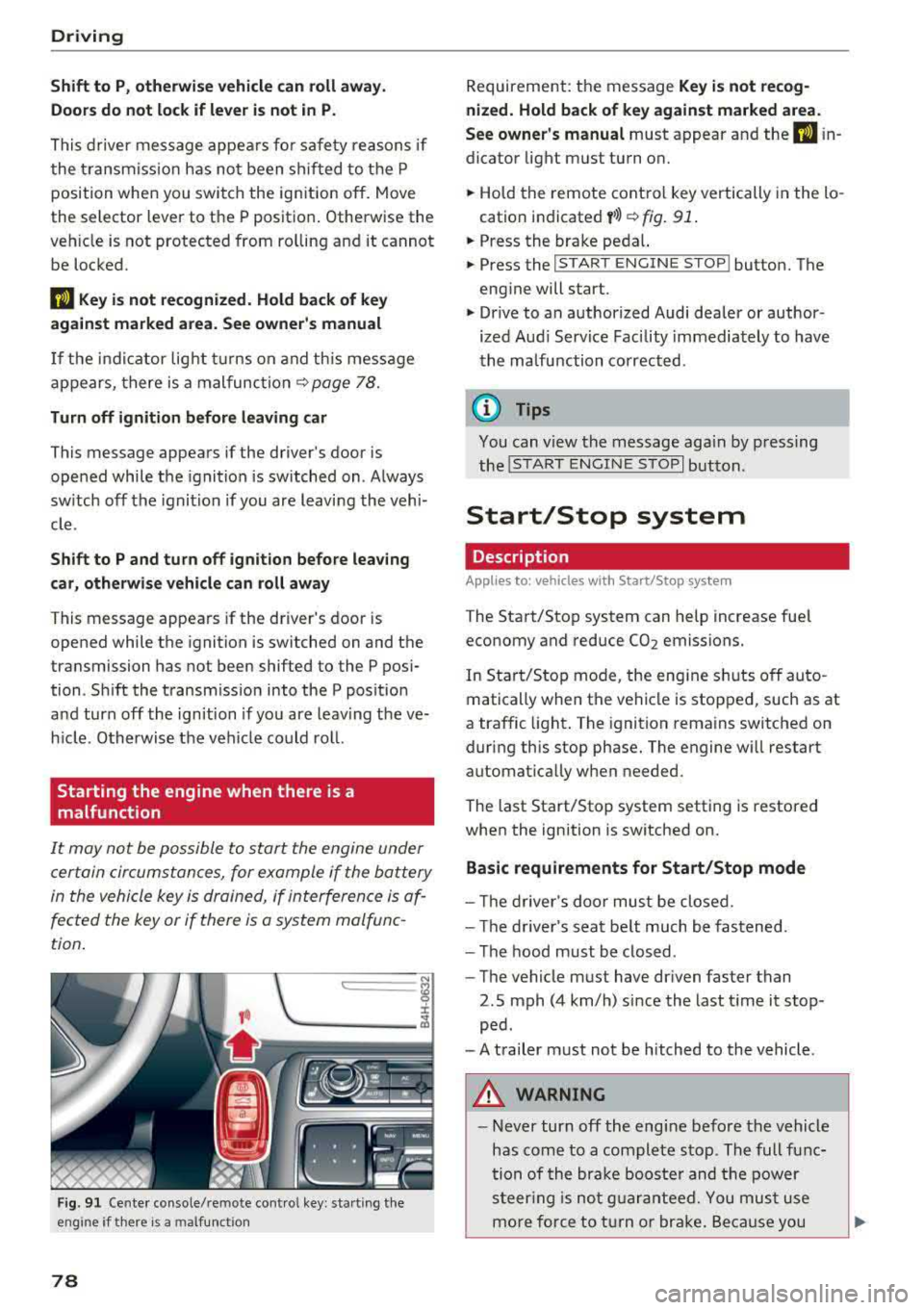
c:====== ~
~ _____ ___ ci5
Fig . 91 Cente r console/remote cont ro l key : sta rt ing the
eng ine
if t here is a malfunc tion
78
Requirement: the message Key is not recog
nized. Hold back of key against marked area .
See owner's manual
must appear and the (I i n
dicator light must turn on.
.,. Hold the remote control key vertically in the lo
cation indicated
y >l) ~ fig. 91 .
.,. Press the brake peda l.
.,. Press the I START ENGINE STOPI button. The
engine will start.
.,. Drive to an authorized Audi dealer or author
ized Aud i Serv ice Facility immediately to have
the malfunction corrected .
(0 Tips
You can v iew the message aga in by pressing
the
I S TAR T ENGINE STOP I button.
Start/Stop system
Description
Applies to: vehicles with Start/Stop syste m
The Start/Stop system can help increase fuel
economy and reduce CO2 emissions.
In Start/Stop mode, the eng ine s hut s off auto
matically when the vehicle is stopped, such as at
a traffic light . The ignition remains switched on
during this stop phase. The engine w ill restart
automat ically w hen needed.
The last Start/Stop system setting is restored
when the ignition is switched on.
Basic requirements for Start/Stop mode
- Th e driver's door must be closed.
- The driver's seat belt much be fastened.
- The hood must be closed .
- The vehicle must have dr iven faster than
2.5 mph (4 km/h) since the last t ime it stop
ped .
- A trailer must not be hitched to the vehicle .
A WARNING
-Never turn off the eng ine before the vehicle
has come to a complete stop . The full func
tion of the brake booster and the power
steering is not guaranteed. You must use
more force to turn or brake. Because you
Page 85 of 356
lL t:0 ....
"' ......
"' .... 0 0 :c '
place on all h ills (for example, if the ground
is slippery or icy).
- To reduce the risk of an accident, always
make sure the vehicle is situated safely
while stat ionary.
Automatic transmission
Introduction
The automat ic transmission is controlled e lec
tron ica lly. Power is transferred using a torque
converter.
The transm ission shifts up or down automat ically
depending on wh ich drive program is selected.
When a
mod erate driving s tyle is used, the
transmission selects the most e conomical d riving
mode. The t ransm iss ion upsh ifts at a lower RPM
and downshifts at a highe r RPM to imp rove fuel
efficiency.
The transm ission switches to a spor ty mode after
a kick-down or when the driver uses a
sp o rt y
driving style
c haracterized by quick accelerator
pedal movements, heavy acce leration, frequent
changes in speed and traveling at the maximum
speed.
If desired, the dr iver can also select the gears
manually (tiptronic mode)
c::> page 86.
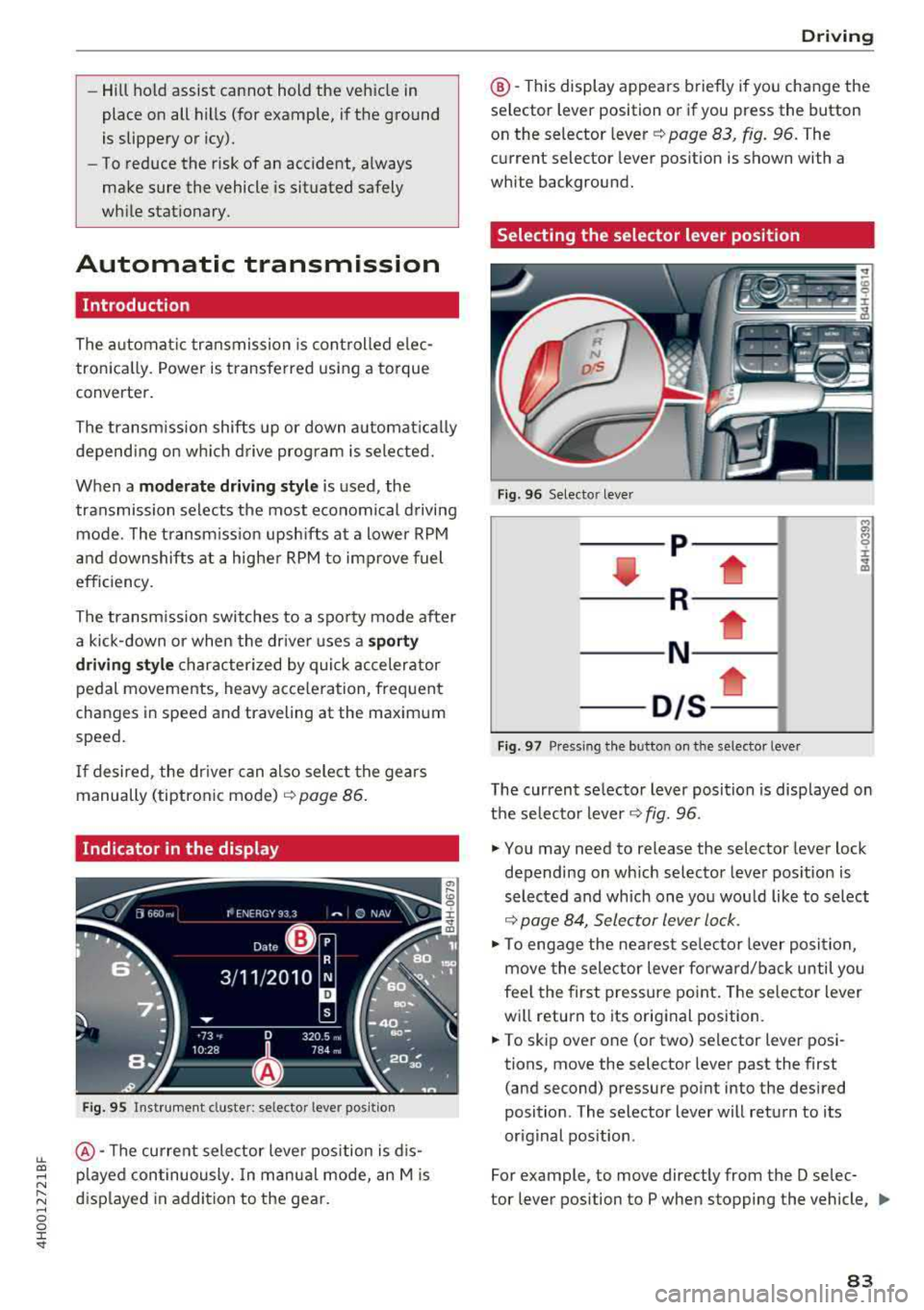
Indicator in the display
F ig . 95 Inst rument cluster: selector lever positio n
@ -The current selector leve r position is d is
p layed continuously. In manua l mode, an Mis
displayed in addition to the gear.
D rivi ng
@ -This display appea rs briefly if you change the
selector lever position or if you press the button
on the selector lever
c::> page 83, fig. 96. The
current selector lever position is shown with a
white background.
Selecting the selector lever position
F ig. 96 Selector lever
-- p- -
----R--- --1
----N--- -i;
-01s*
Fig. 97 Pressing the button on the selector leve r
The current selector lever posit ion is disp layed on
t h e selecto r lever
c::> fig. 96 .
.,. You may need to release the selector lever lock
depending on wh ich selector lever pos ition is
selected and which one you wou ld like to select
c::> page 84, Selector lever lock .
.,. To engage the nearest selector lever position,
move the selector lever forward/back until you
fee l the first pressure point. The selector lever
wi ll return to its original position .
.,. To skip over one (or two) selector lever posi
tions, move the selector lever past the first
(and second) pressure point into the desired
position . The selector lever will return to its
or ig inal position .
For example, to move directly from the D selec-
tor lever position to P when stopping the vehicle,
II>
83
Page 143 of 356
LL
"' .... N ,.._ N .... g :r st
• TELEPHONE
• NAVIGATION
• INFO
• RADIO
• MEDIA
• HELP
•
HELP VOICE RECOGNmON
• HELP TELEPHONE
• HELP NAVIGATION
• HELP MAP
• HELP INFO
•
HELP RADIO
• HELP MEDIA
TELE ~HONE
• ENTER NUMBER
• DIAL
• REPEAT
• CORRECTION
• DELETE NUMBER
• REDIAL
• CALL (XV)
(BUSINESS/ PRIVATE/ LANO LINE/ CELL)
NAVI GAT:ION
• ENTER ADDRESS
• ENTER COUNTRY
• ENTER ZIP CODE/ CITY
• ENTER STREET
• ENTER HOUSE NUMBER
• ENTER DOWNTOWN
• START/ CANCEL ROUTE GUIDANCE
• NAVIGATE TO
(XV)
• LAST DESTINATIONS
• FAVORITES
• HOME ADDRESS
• SHORT / FAST/ ECONOMY ROUTE
• DYNAMIC ROUTE ON/ OFF
• ROUTE UST
• VOICE GU I DANCE ON/ OFF
• ROUTE INFO ON/ OFF
• SCALE (XV) MILES / VAROS
• READ TRAFFIC REPORTS
RADIO
• SET STATION
• STATION (XY)
• SET FREQUENCY
• SET BAND
• FM/ AM/ SIRIUS
• STATION LIST
• READ STA
TYON LIST
• PRESETS
• READ PRESETS
• UPDATE STATION LIST
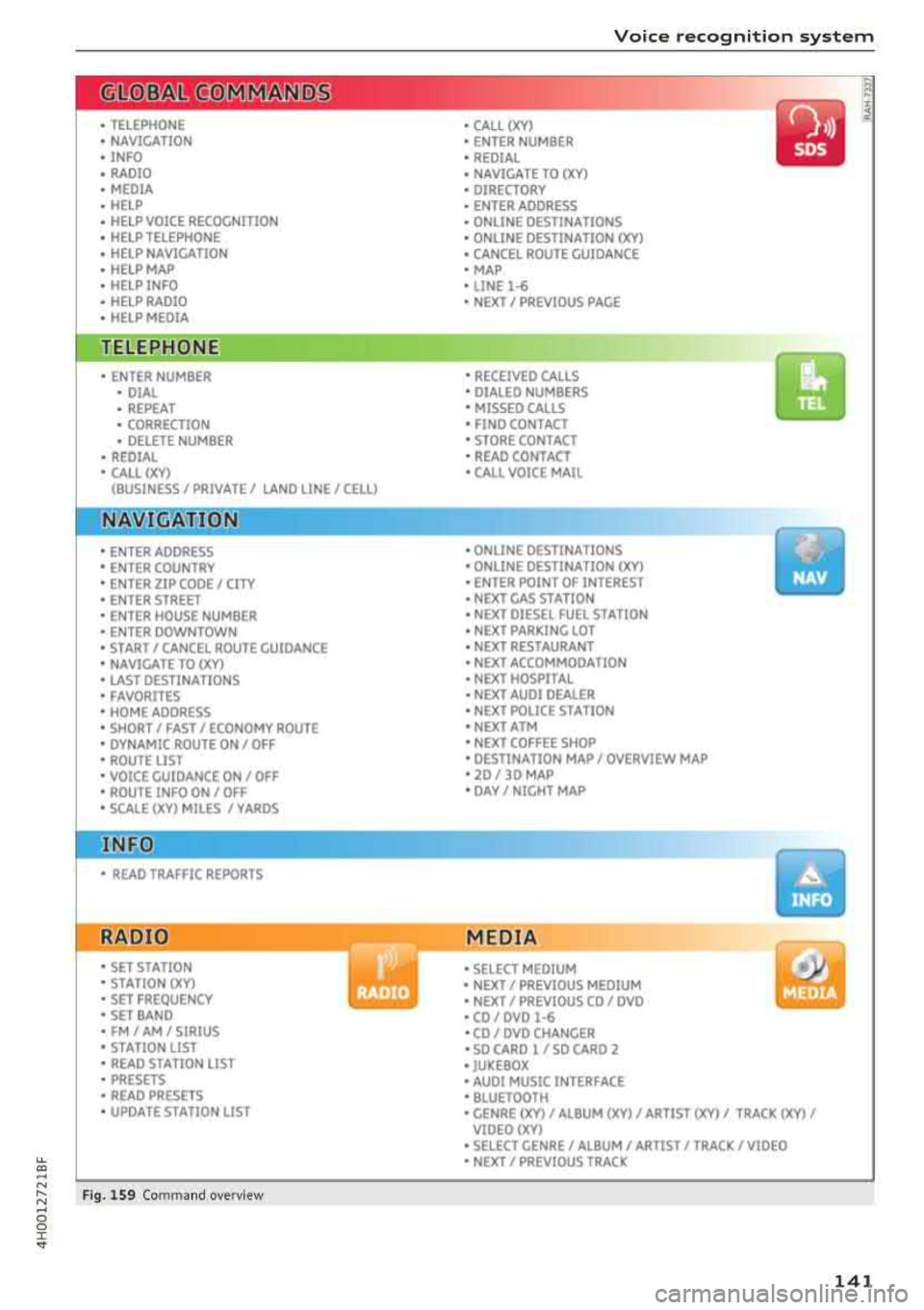
Fig. 1S9 Com mand o verv iew
Voice recognition system
• CALL (XV)
• ENTER NUMBER
• REDIAL
• NAVIGATE TO
(XV)
• DIRECTORY
• ENTER ADDRESS
• ONLINE DESTINATIONS
• ONLINE DESTINATION
(XV)
• CANCEL ROUTE GUIDANCE
• MAP
• LINE
1·6
• NEXT/ PREVIOUS PAGE
•
RECEIVED CALLS
• DIALED NUMBERS
• MISSED CAll5
• FINO CONTACT
• STORE CONTACT
• READ CONTACT
•
CALL VOICE MAIL
• ONLINE DESTINATIONS
• ONLINE DESTINATION (XV)
• ENTER POINT OF INTEREST
• NEXT GAS STATION
• NEXT DIESEL FUEL STATION
• NEXT PARKING LOT
• NEXT RESTAURANT
• NEXT ACCOMMOOA TION
• NEXT HOSPITAL
• NEXT AUDI DEALER
• NEXT POLICE ST A TION
• NEXT ATM
• NEXT COFFEE SHOP
• DESTINATION MAP/ OVERVIEW MAP
• 20 / 30 MAP
• DAY/ NIGHT MAP
MEDIA
• SELECT MEDIUM
• NEXT/ PREVIOUS MEDIUM
• NEXT/ PREVIOUS CO/ DVD
• CO/ DVD
1·6
•CO/ DVD CHANGER
• SO CARO l / SO CARO 2
• JUKEBOX
• AUDI MUSIC INTERFACE
• BLUETOOTH
y
• GENRE (XV)/ ALBUM (XV)/ ARTIST (XV)/ TRACK (XV)/
VIOEO()(Y)
• SELECT GENRE/ ALBUM/ ARTIST/ TRACK/ VIDEO
• NEXT/ PREVIOUS TRACK
141
Page 146 of 356
Voice recognition system Function
Correcting the phone number that
was entered
Displaying call lists
Calling the last number dialed
Listening to messages
(D Tips Say
:
Delete number
I Correction
Dialed numbers
I Accepted calls I Missed calls
Redial
Call voicemail
- Name tags can only be stored using the
voice recogni tion system.
- You can assign up to SO additional name
tags for address cards. -
Name tags can only be deleted using the
MMI control panel.
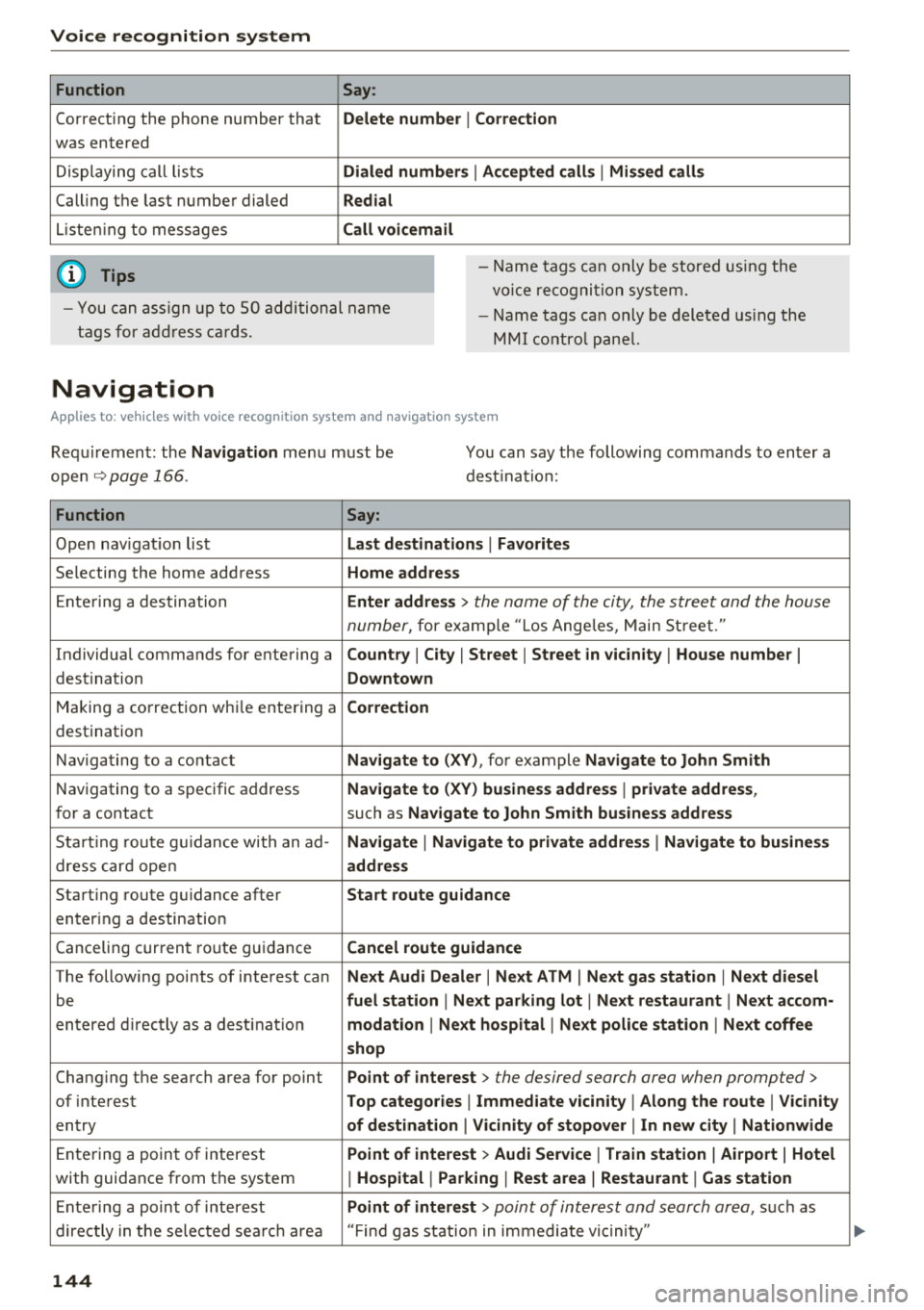
Navigation
Applies to: vehicles with voice recognition system and navigation system
Requirement: the Navigation menu must be
ope n
.!)page 166 .
You can say the following commands to enter a
dest ination:
Function Say:
Open navigation list Last destinations I Favorites
Selecting the home address Home address
Entering a destination Enter address > the name of the city, the street and the house
number,
for examp le "Los Angeles, Main Street."
Individual commands for entering a
Country I City I Street I Street in vicinity I House number I
destination Downtown
Making a correction while entering a Correction
destination
Navigating to a contact
Navigate to (XY), for example Navigate to John Smith
Navigating to a specific address Navigate to (XY) business address I private address,
for a contact such as Navigate to John Smith business address
Starting route guidance with an ad-Navigate I Navigate to private address I Navigate to business
dress card open address
Starting route guidance after Start route guidance
entering a destination
C anceling current route gu idance
Cancel route guidance
The following points of interest can Next Audi Dealer I Next ATM I Next gas station I Next diesel
be fuel station I Next parking lot I Next restaurant I Next accom-
entered directly as a destinat io n modation I Next hospital I Next police station I Next coffee
shop
Chang ing the search area for point Point of interest > the desired search area when prompted>
of interest Top categories I Immediate vicinity I Along the route I Vicinity
entry of destination I Vicinity of stopover I In new city I Nationwide
Entering a point of interest Point of interest > Audi Service I Train station I Airport I Hotel
with guidance from the system I Hospital I Parking I Rest area I Restaurant I Gas station
Ente ring a point of interest Point of interest > point of interest and search area, suc h as
directly in the selected search area "Find gas station in immediate vic inity"
144
Page 149 of 356
lL t:0 ....
'"" ......
'"" .... 0 0 :c '
A pp lies to: ve hicles with telep hone
To make phone coils in your vehicle using the
MMI, connect your cell phone to the MMI via
Bluetooth.
Hand sfre e
W ith this connection, you use the handsfree sys
tem and operate telephone f unctions throug h
the MMI. Phone ca lls are transmitted thro ugh
the antenna on yo ur ce ll phone.
A WARNING
- Med ica l experts warn that ce ll phones can
interfere w ith the function of pacemakers.
Always ma inta in a m inimum distance of
abou t 8 inches (20 cm) between the ce ll
phone antenna a nd the pacemake r.
- Do not carry the cell p hone i n a pocket di
rectly over the pacemaker when the phone
is switched on.
- Sw itch the cell phone off immediately if
you suspect it may be inte rfering with the
pacemaker.
- Do not use the voice recognition system
Q page 142 in emergencies because your
voice may change in stressful situations. It
may take longer to dial the number or the
system may not be able to dial it at all. Dial
the emergency numbe r manua lly.
- Switch your cell phone off in a reas where
there is a risk of an exp losion . These loca
t ions are not always clearly mar ked. This
may include gas stations, fuel and chemic al
storage f acilit ies or tra nspo rt vehi cles, or lo
cat io ns w here fuel vapors ( such as propane
o r gasoline vapor in vehicles or bui ld ings),
chemicals or large quantities of dust parti
cles (such as flour, sawd ust or metal) may
be present in the air. Th is also applies to all
other locations where you would normally
turn yo ur vehicle engine off.
- The demands of traffic require your full at
tent io n. Read a nd follow the guidelines pro
vided in
Qpoge 135 .
Telephone
(D Note
Always fo llow the information found in Q @ in
Wi-Fi hotspot on page 161.
@ Tips
The Bluetooth connection range is lim ited to
inside the vehicle . It can also be affected by
l ocal cond itions and interference with other
devices.
Setup
Connecting a cell phone using Bluetooth
Applies to: vehicles wi th telepho ne
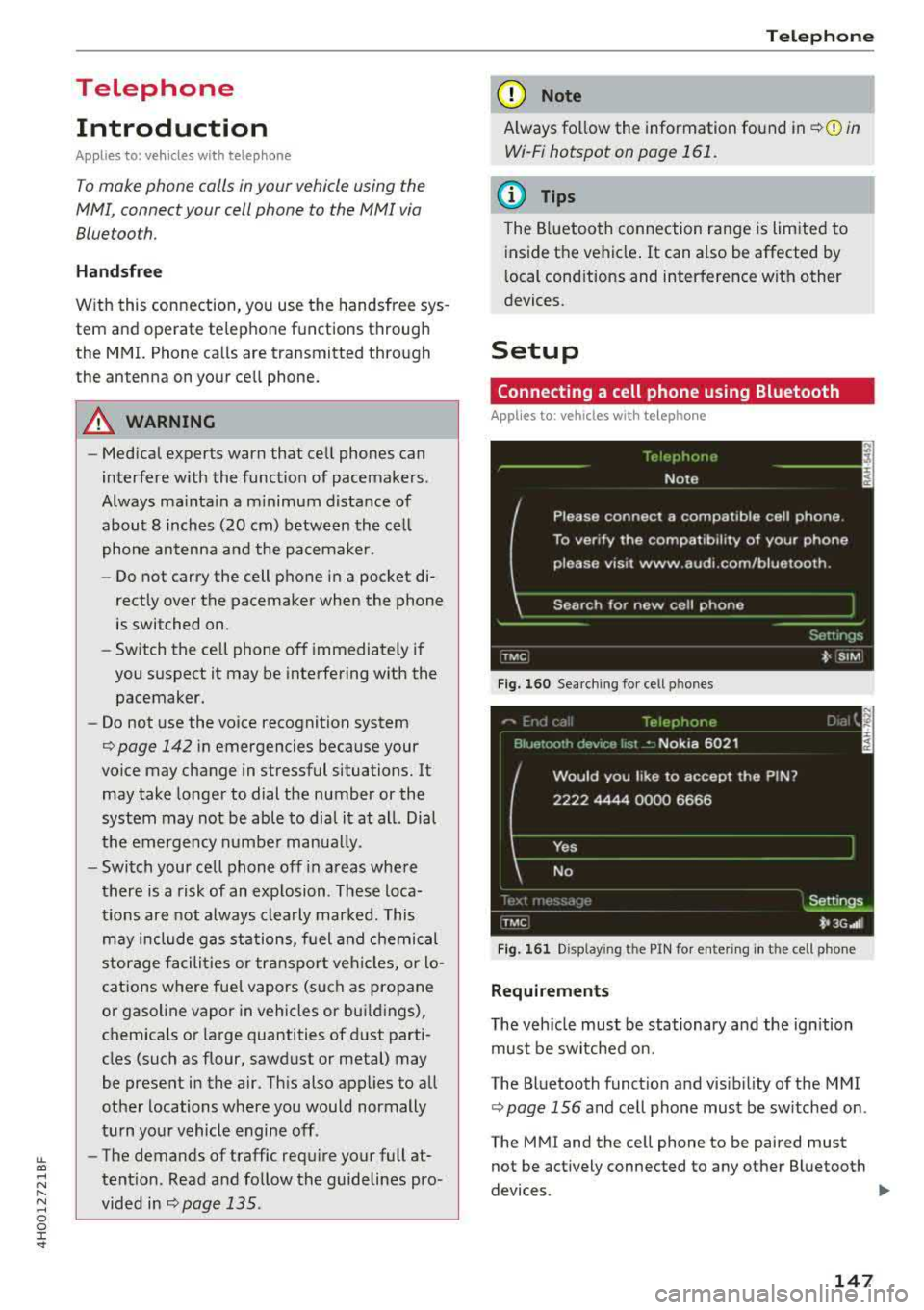
Fig . 1 60 Searc hin g fo r ce ll phones
Fig . 161 D isp lay ing t he PIN for ente rin g in th e cell phone
Requirements
T he vehicle must be stationary a nd the ign ition
must be switched on.
The Bluetooth funct io n and visib ili ty o f the MMI
Q page 156 and cell phone must be sw itched on .
The MMI and the cell phone to be paired must
not be act ively connected to any other B luetooth
devices .
..,.
147
Page 162 of 356
Audi connect
You can return to the previous page using the
I BACK ! button.
A WARNING
To red uce the risk of an accident, only use
Audi connect services when road and traffic
conditions perm it.
(D Tips
Some functions are only avai lab le when the
vehicle is stationary.
Overview of Audi
connect services
Basic functions
Applies to: vehicles with Audi connect
-
~ Se lect: the IMENU ! button> Audi connect > the
desired Audi connect service.
Depending on the selected Audi connect service,
you may need to set a search area first:
Setting the search area
- Immediate vicinity :
the desired information for
the area around your current locat ion is dis
played .
-Vicinity of destination/stopover : if you have
entered a nav igat ion destination, you can dis
play the desired information for the area
around the destination .
-In new city: you can ente r any city for which
you wou ld like to receive the desired informa
tion using the
M MI touch or the speller
¢page 138 .
Travel information
Applies to: vehicles with Audi connect
Information on attractions and travel tips in the
selected search area.
~ Se lect and confirm an attraction to display the
details.
160 Parking information
Applies
to: vehicles with Audi connect
Information on parking locations and fees in the
selected searc h area .
Fuel prices
Applies to: vehicles with Audi connect
Information on gas stations with the lowest fuel
prices for your vehicle in the selected search area .
Weather
Applies to: vehicles with Audi connect
Information on current weather conditions as
well as weather forecasts for the selected search
area (for examp le, at the
Destination ).
City events
Applies to: vehicles with Audi connect
Information on events in various categor ies in
the desired search area .
~ Select and confirm a category, such as Sports.
~ Select and confirm an event to display the de-
tails.
Messages
Applies to: vehicles with Audi connect
V iew the most current headlines in the MMI.
~ Select and confirm a headline.
Audi connect services in navigation
Applies to: vehicles with Audi connect
The following Audi connect serv ices are currently
available:
- Navigation with the
online map service and on
line Street
View ¢ page 172
-Point of interest search (POI) with voice oper
ation
(for examp le restaurants): p lan route
guidance using the
MMI control panel and the
voice recognition system
ca:> page 144 and desti
nation setup in your
MMI using your myAudi
account
¢ page 168. .,..
Page 208 of 356
System settings
sound di stribu tion)/ Driver (sound dis tribution
aime d towa rd the d river) or
All /Front /Rear.
- Surround level* :
you can a dju st the vo lume of
t h e sur round effect by tu rning the contro l
k no b.
-AudioPilot (dynamic road noise compensa
tion)* :
select and confirm Active /Inactive.
When t he f unct io n is act ive, the vo lume is auto
matically ad justed depending on t he leve l o f
noise ins ide the ve hicle.
- Sound focus * (adjusting the sound distribu
tion ):
select and confi rm All (symmet rical
sound d istr ibutio n)/ Movie (optima l so und dis
tribution fo r playing a
movie)/ Front/Rear .
- Volume balancing *:
the dynamic road noise
compensation ca n be ad justed by turning the
contro l knob.
@ Subwoofer* I @ Bass/ @Treble
You can a djust the Subwoofer *, Bass and Treble
sett ings by turning the contro l kno b. The
cha nged settings only apply fo r the aud io so urce
that is active at the t ime . This allows you to ad
jus t th e sound se tt in gs for eac h aud io so urce sep
ara tely.
® Balance/Fader (sound focus)
- Adjusting the sound distribution using the
MMI touch :
move your finger on the MMI t ouch
contro l pane l in the des ired d irec tion.
Adjusting the system
volume
.,. Se le ct: the IMENU ! butto n> Tone .
Navigation* control button
Voice guidance volume /Music volume during
nav. prompts:
vol ume o f navigation prompts
d ur ing ac tive ro ute g uidance . Mu sic volume dur
i n g nav iga tion prom pts mea ns tha t th e vol ume
of audio playb ack is te m porar ily lowered whe n
t he p arkin g sys tem or v oic e gu idance i s act ive.
Voice guidance: se e ¢page 175.
Voice guidance during call : see ¢ page 175.
206
Telephone* control button
Ringtone volume /Phone call volume :
you ca n
adjus t the sele cte d r ing tone vo lume or call vol
u me by tu rnin g the cont ro l knob. The
Phone call
volume
can on ly be adjusted durin g a call.
Systems control button
Speech dialog system volume :
you can adju st
th e vol ume o f th e ann ounc emen ts by tur ning the
contro l kno b.
MMI touch volume *: the vo lu m e of the MM I
tou ch pro mpts can be adjus ted by tur ning the
c on tro l k no b.
Other settings
.,. Sele ct: th e I M ENU I button > MMI setup contro l
bu tton.
Language
The language can be changed fo r the Info ta in
men t display, t he dr iver i nfo rm ation system dis
play, voice guid ance* and t he voice recogn itio n
sys te m* .
En glish, French and Spanish are ava ila bl e.
Measurement units
The following meas urement u nits ca n be set in
the Infotainment d isp lay a nd dr iver info rmat ion
system.
- Speed (mph o r km/ h)
- Distance (miles o r kilomete rs)
- Temperature (°For 0
( )
-Fuel consumption (l/l0 0km, mpg (US), mpg
(U K) or k m/l)
- Volume (lite rs, ga llons ( UK) o r gallo ns (US))
Speech dialog system
App lies to : vehicles wi th voice recog nitio n syste m
Display speech commands : th e d isplay of poss i
ble commands dur ing vo ice input can be switc h
ed
On or Off .
Short dialog :
prompts in a s horter format can be
switc hed
On or Off .
Input signal :
the beep input signa l dur ing a dia-
l og can be switc hed
On or Off. ..,.
Page 270 of 356
Checking and Filling
Checking and Filling
Gasoline
Fuel supply
Applies to: vehicles with gasoline engine
Using the right fuel helps keep the environment
clean and prevents engine damage .
Fuel recommendation
The fuel recommended for your vehicle is unlead
ed premium
grade gasoline . Audi recommends
using TOP TIER Detergent Gasoline with a mini
mum octane rating of91 AKI (95 RON). For more
information on TOP TIER Detergent Gasoline,
please go to the offic ial website
(www.toptiergas .com).
The recommended gasoline octane rat ing for
your engine can also be found on a label located
on the ins ide of the fuel filler flap. This rating
may be specified as AK I or RON .
Your veh icle may also be operated using unlead
ed regular gasoline with a minimum octane rat
ing of 87 AKl/91 RON . However, using 87 AKI/91
RON octane fuel w ill slightly reduce engine per
formance.
Use unleaded gasoline only. Unleaded gasoline
is available throughout the USA, Canada, and in
most European countries. We recommend that
you do not take your vehicle to areas or count ries
where un leaded gasoline may not be available.
For more information on refueling your vehicle,
see
~ page 269 .
Octane rating
Octane rating indicates a gasoline's ability to re
sist engine damaging "knock" caused by prema
ture ignit ion and detonation . T herefore, buy ing
the correct grade of gasoline is very important to
he lp prevent possible engine damage and a loss
of eng ine pe rformance.
Gasoline most commonly used in the United
States and Canada has the following octane rat
ings that can usually be found on the filler pump:
- Premium Grade: 91 - 96 AKI
268
-Regular Grade: 87 -90 AK I
Explanation of the abbreviations :
AKI =
Anti Knock Index = (R +M)/2 = (RON +MON)/
2
RON = Research Octane Number
MON= Motor Octane Number.
@ Note
- Do not us e any fuel with octane ratings low
er than 87 AKI or 91 RON otherwise expen
sive engine damage will occur .
- Do
not us e leaded gasoline. The use of lead
ed gasoline will severely damage your vehi
cle's catalytic converter and its ability to
contro l exhaust emissions .
Blended gasoline
Applies to: vehicles with gasoline engine
Use of gasoline containing alcohol or MTBE
(methyl tertiary butyl ether)
You may use unleaded gasoline blended with al
cohol or MTBE (commonly referred to as oxygen
ates) if the blended mixture meets the follow ing
criteria :
Blend of gasoline methanol (wood alcohol or
methyl alcohol)
-Anti -knock index must be 87 AKI or higher.
- Blend must contain no more than 3% metha-
nol.
- Blend must contain more than 2% co-solvents.
Blend of gasoline and ethanol (grain alcohol or
ethyl alcohol)
- Anti-knock index must be 87 AKI or h igher .
- Blend must not conta in more than 15% etha-
nol.
Blend of gasoline and MTBE
-Anti -knock index must be 87 AK I or h igher.
- Blend must not contain more th an 15% MTBE.
Seasonally adjusted gasoline
Many gasoline grades are blended to perform es
pecially well for winter or summer dr iv ing . Dur-
i ng seasonal change-over, we suggest that you
IJIJ,
Page 271 of 356
u. co .... N
" N .... 0 0 :c '
adjustment is more like ly to be made in time .
@ Note
-Methanol f uels whi ch do not meet these re
quirements may ca use corrosion and dam
age to plastic and rubber components in the
fuel system .
- Do not use fuels that fai l to meet the speci
fied criteria in this c hapter.
- If you are unable to determine whether or not a particular fue l blend meets the speci
fications, ask your service station or its fuel
supplier.
- Do not use fuel for which the contents can
not be identif ied.
- Fuel system damage and performance prob
l ems resulting from the use of fue ls differ
ent from those specif ied are not the respon
s ibility of Audi and are not covered under
the New Veh icle or the Emiss ion Control
System Warrant ies .
- If you experience a loss of fue l economy or
driveability and performance problems due
to the use of one of these fuel blends, we
r ecommend that you switch to unblended
fuel.
Gasoline additives
Applies to: vehicles with gasoline engine
A majo r concern among many auto manufactur
ers is carbon deposit build-up caused by the type
of gasoline you use.
A lthough gasoline grades d iffer from one manu
facturer to another, they have cer tain things in
common . A ll gasoline grades contain substances
that can cause deposits to collect on vita l engine
parts, such as fue l injectors and intake valves . A l
though most gasoline brands include additives to keep engine and fuel systems clean, they are not
equally effective.
Audi recommends using TOP TIER Detergent Gas
oline. For more informat ion on TOP TIER Deter
gent Gasoline, please go to the official website (www .toptiergas .com) .
Check ing and F illing
A fter an extended period of using inadequate
fuels, carbon deposit bui ld-ups can rob your en
gine of peak performance.
@ Note
Damage or ma lf u nction due to poor fue l qual
ity is not covered by the A udi New Vehicle
L imited Warranty .
Refueling
Fuel filler neck
The fue l filler neck is located on the rig ht rea r
s ide panel behind the fuel fille r flap .
If the power lock ing system should fa il, yo u can
st ill open the flap manually - fo r detailed instruc
tions see
~page 271.
You can find the fuel tank capacity of your vehicle
i n
~ page 334 .
The label on the inside of the fuel filler flap tells
you the correct fuel for your vehicle. For more in
format ion about fuel spec ificat ions, see
~ page 268 .
Your vehicle fuel tank has an onboard refuelling
vapor recovery system. T his feature helps to pre
vent fuel vapors from escaping from the tank and polluting the environment wh ile you refuel your
vehicle. In o rder to fill the tank proper ly w hile
prote ct ing t he env ironment, p lease follow t his
r ef uel ing p rocedure carefully.
& WARNING
= -
Unde r normal opera ting condi tions, neve r ca r
r y additional f uel containers in your car. Gas
canisters and other containers used to trans
port fue l can be dangerous. Such containers,
f u ll or empty, may leak and could cause a fire
i n a collision. If you must transport fuel to
use for your lawn mower, snow blower, etc.,
be ve ry ca refu l and always observe loca l a nd
state laws rega rding the use, transpo rta tion
a nd stor age of su ch f uel con tainers. Make cer
t ai n t he co nta iner meets indus try standards
(A NSI/AS TM F8S2 - 86) .
269
Page 272 of 356

Checking and Filling
(D Note
Never drive your vehicle until the fuel tank is
completely empty. The irregular supply of
fuel can cause m isfiring. Gasoline cou ld enter
the exhaust system and damage the catalyt ic
converter.
Fueling procedure
Fig. 252 Right re ar side of the vehicle: open ing the fue l
filler door
F ig. 253 Fue l filler doo r w it h attac hed fuel cap
The f uel fi ller door is unlocked or locked by the
central lock ing system.
Opening the fuel cap
• Presson the left s ide of the fuel filler door to
open
¢ fig . 252 .
• Unscrew the tank cap counterclockw ise.
• Place the cap from above on the open fue l filler
door
¢ fig. 253.
Clo sing th e fu el cap
• Screw the tank cap on to the r ight on the filler
neck until it cannot turn any farther .
• Close the fuel filler door and then press on the
left side until it latches.
270
Once the pump nozzle switches off, the fuel tank
is "full". Do not fill the tank more. Otherwise the
expans ion space in the tank w ill be filled.
The correct fuel type for your vehicle can be
fo und on a label located on the inside of the fuel
filler door . For additional information on fuel,
see ¢
pag e 268.
The fuel tank capacity of your veh icle is listed in
the
T echn ical Dat a section ¢ page 334.
To avo id fuel spilling or evaporat ing from the fuel
tank always close fue l cap prope rly and com
plete ly. An improper ly closed f uel fi ller cap may
also cause the M IL lamp ¢
page 25 to come on.
A WARNING
Not pay ing attention when fueling or han
dling fuel incorrectly can lead to fires, explo
sions or serious injur ies.
- Fue l ignites easily and can cause serious
burns and other injur ies.
-
- If you do not switch the engine off when fu
eling and/or do not insert the fuel nozzle
completely into the tank open ing, fuel can
leak out or run over. Leaked fuel can ignite
and start a fire .
- Do not use the telephone while fueling . The
electromagnetic rays can cause sparks,
which can ignite fuel vapors and start a fire .
- Do not sit in your vehicle wh ile fueling. If
you must make an exception and enter your
veh icle again while fueling, close the door
a nd touch metal to d ischa rge stat ic elect ric
ity before to uching the f uel no zz le. Static
e lec tricity ca n create spa rks, which ca n ig
n ite vapors when fueling.
- Do not smoke or have an open flame in the
a rea whe n fue lin g you r veh icle or filling a
fue l container because this increases the
risk of an explosion.
- F or your safety, carrying fuel containe rs in
your veh icle is not recommended . Whet her
fu ll or empty, the container can leak and
cause a fire in the event of an accident.
- If you must make an exception and trans
port a fuel container, note the fo llowing: