steering wheel AUDI A8 2018 User Guide
[x] Cancel search | Manufacturer: AUDI, Model Year: 2018, Model line: A8, Model: AUDI A8 2018Pages: 356, PDF Size: 54.71 MB
Page 77 of 356
lL t:0 ....
"" ......
"" .... 0 0 :c '
The engine drives the generator, wh ich generates
electricity; the fue l consumption also increases
with the demand for electricity. Therefore, switch
e lectrical equipment off when you no longer
need it. Examples of equipment that use a lot of
energy are air blowers at a high setting, the rear
window defogger and seat heating*.
CD Note
Do not leave engine idling unattended after
starting. If warning lights should come on to
ind icate improper operation, they would go
unheeded. Extended idling also produces
heat, wh ich could result in overheat ing or
other damage to the vehicle or other p roper-
ty.
CD Note
-Have your vehicle maintained properly and
i n accordance with the service recommenda
tions in your Warranty
& Ma intenance book
l et. Lack of proper maintenance as well as
i mproper use of the vehicle will impair the
function of the emission control system and
could lead to damage.
-Do not alter or remove any component of
the Emission Control System unless ap proved by the manufacturer.
-Do not alter or remove any device, such as
heat shie lds, switches, ignition wires,
valves, which are designed to protect your
vehicle's Emission Control System and other
important vehicle components .
@ Tips
The consumption estimates as published by
ENVIRONMENTAL PROTECTION AGENCY
(EPA) and Transport Canada may not corre
spond to your actual consumption on the
road, which will vary depending upon vehicle
load and speed, road and weather conditions
trip length, etc.
'
D rivi ng
Steering
Adjusting the steering wheel position
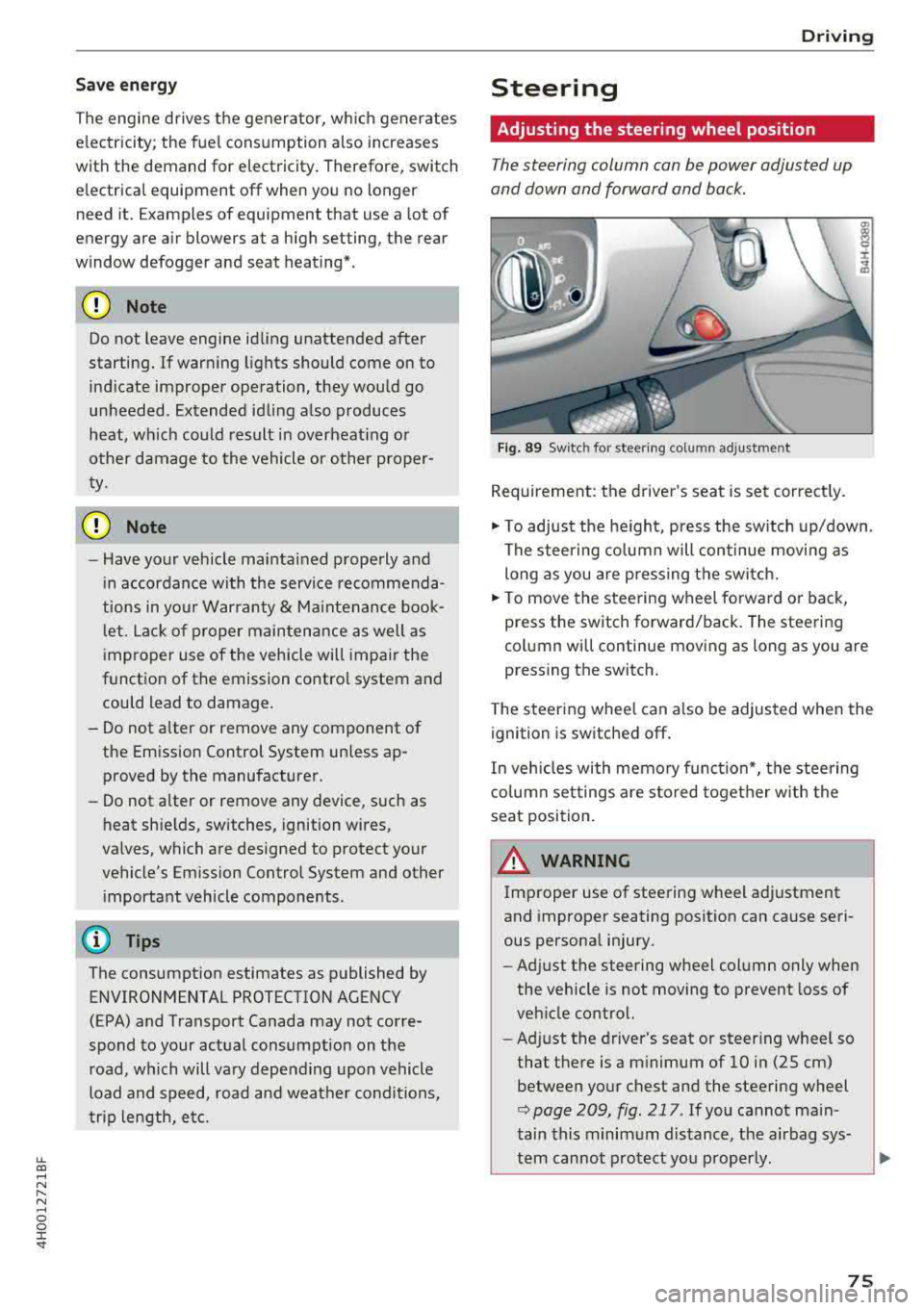
The steering column can be power adjusted up
and down and forward and back.
F ig . 89 Sw itc h for steering colu mn adjustment
Requirement: the driver's seat is set correct ly.
"' To adjust the he ight, press the sw itch up/down .
The steering co lumn will continue movi ng as
long as you are pressing the switch.
"' To move the steering wheel forwa rd or back,
press the switch forward/back. The steering
column will continue moving as long as you are
pressing the switch.
T he steering wheel can a lso be adjusted when the
ignition is switched off .
In veh icles with memory function*, the steering
co lumn settings are s to red toget her w ith the
seat position.
A WARNING
Improper use of steering wheel adjustment
and improper seating position can cause seri
ous personal injury.
- Adjust the steering wheel column only when
the vehicle is not moving to prevent loss of
veh icle control.
- Ad just the driver's seat or steer ing whee l so
that the re is a m inimum of 10 in (25 cm)
between your chest and the steering wheel
r::;, page 209, fig . 217 . If you cannot main
tain this minimum distance, the airbag sys-
tem cannot protect you p roperly.
~
75
Page 78 of 356
Driving
-If physica l limitations prevent you from sit
t ing 10 in (25 cm) or more from the steer
ing wheel, check with your authorized Audi
dealer to see if adaptive equ ipment is avail
able .
-If the steering wheel is aligned with your
face, the supp lemental driver's airbag can
not prov ide as m uch protection in an acci
dent. A lways make s ure that the steering
wheel is aligned w ith your che st.
-Always hold the steer ing whee l with your
hands a t the 9 o' clock and 3 o'clock pos i
t ions to reduce the ris k of person al injury if
the driver 's airbag deploys.
-Never hold the s teer ing whee l at the 1 2
o'clock pos it io n or w ith your ha nds inside
the steering wheel rim or on the steer ing
wheel hub . Holdi ng the steering whee l the
wrong way can cause serious injuries to the hands, arms and head i f the driver's airbag
deploys.
Entry assistance
Easy seat entry makes it easier to enter and exit
the vehicle by adjusting the steering column au
tomatically.
• In the Infotainment system, select the ! CARI
funct ion b utton > Car systems contro l button >
Vehicle settings > Seats > Drive r's seat > Easy
seat entry > On .
When easy seat entry is switched on, the stee ring
column goes back up into the park position when
the ignition is switched off. After entering the ve
h icle, the steering co lumn returns to the stored
position once the ignition is sw itched on .
76
Starting and stopping
the engine
Starting the engine
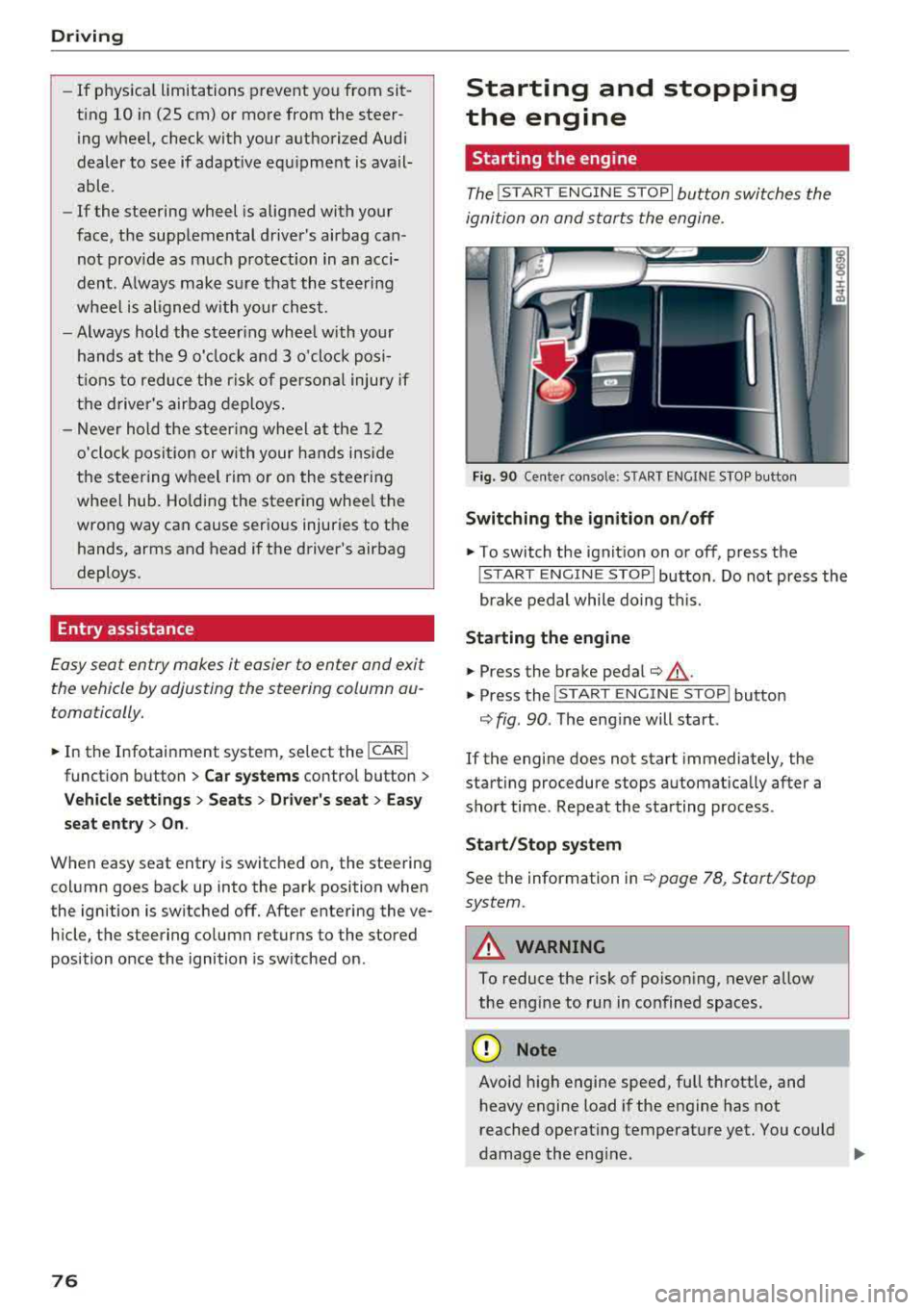
The ! START ENGINE S T OPI button switches the
ignition on and starts the engine.
Fi g. 90 Ce nter conso le: STAR T ENGINE S TOP but ton
Switching the ignition on /off
• To switch t he ign it ion on or off, press the
! S TAR T ENGINE STOPI button . Do not press the
brake pedal while do ing this.
St arting the engine
• Press the brake pedal¢ &_.
• Press the I START ENGINE STOP I button
¢ fig. 90 . The eng ine will start .
If the engine does not start immediately, the
start ing procedure stops automat ica lly after a
sho rt time . Repeat the sta rting process .
Start/Stop syst em
See the information in ¢ page 78, Start/Stop
system.
A WARNING
To reduce the risk of poison ing, never allow
the eng ine to run in co nfined spaces .
(D Note
Avoid high engine spee d, full throttle, and
h eavy engine load if the engine has not
reached operat ing temperat ure yet . You could
-
damage the eng ine. .,..
Page 81 of 356
lL t:0 ....
"' " "' .... 0 0 :c '
would, th is could lead to accidents and ser i
ous injuries .
- To reduce the risk of injuries, make sure that
the Start/Stop system is turned off when
working in the engine compartment
i=> page80 .
(D Note
Always switch the Start/Stop system off when
driving through water
i::> page 80.
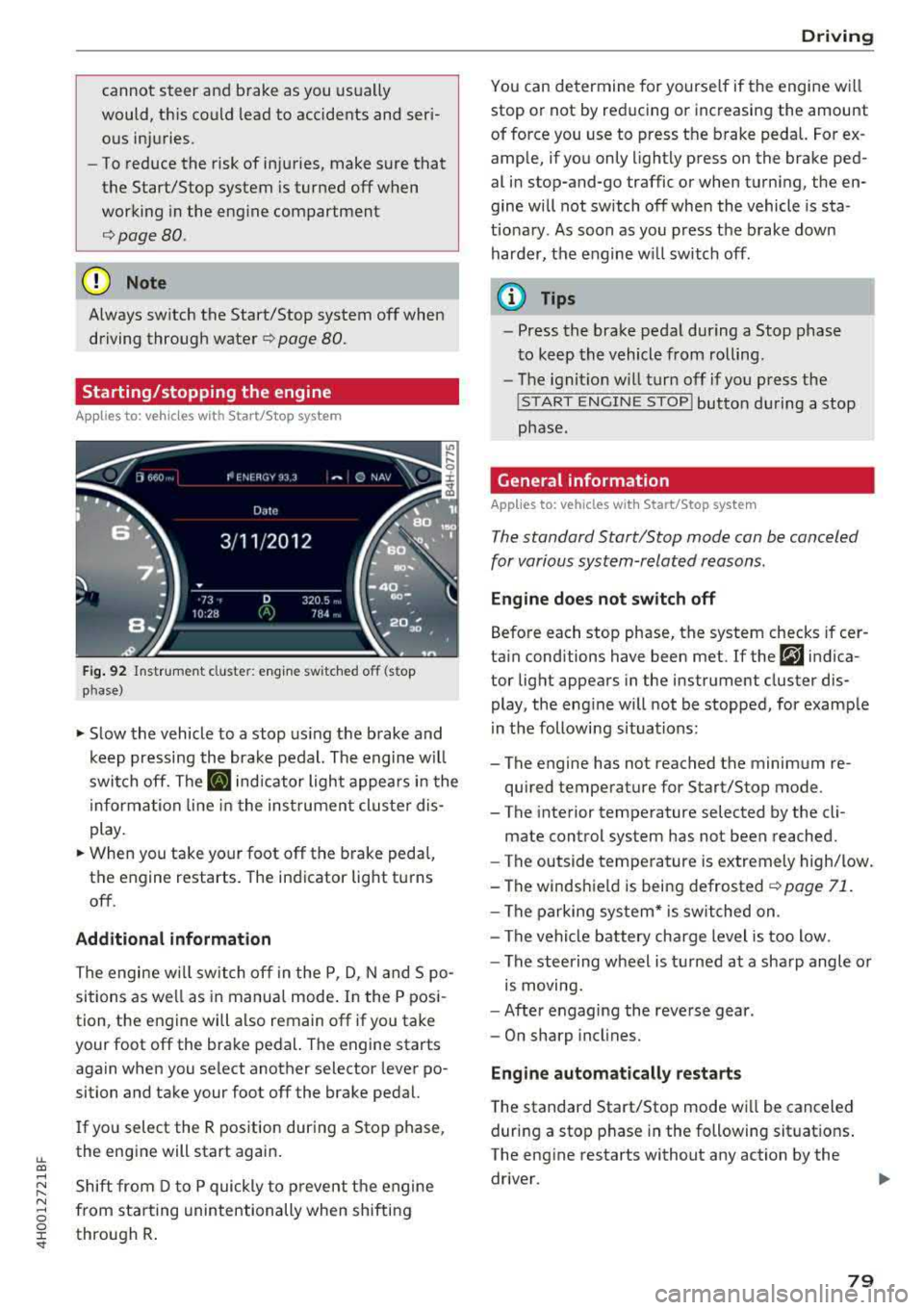
Starting/stopping the engine
App lies to: ve hicles with Start/Stop system
Fig. 92 Instrument cluste r: eng ine sw itched o ff (stop
p hase)
~ S low the vehicle to a stop us ing the brake and
keep pressing the brake pedal. The engine w il l
switch off. The
II indicator light appears in the
informa tion line in the instrument cluster dis
play.
~ When you take your foot off the brake peda l,
the engine restarts. The indicator lig ht turns
off .
Additional information
The engine w ill switch off in the P, D, N and S po
sitions as we ll as in manual mode . In the P posi
tion, the engine will also remain off if you take
your foot off the brake pedal. The engine starts
again when you se lect another selector lever po
sition and take your foot off the brake pedal.
I f you select the R pos ition during a Stop phase ,
the engine will start again.
Shift from D to P quickly to p revent the engine
from star ting unintentionally when shifting
through R .
Drivi ng
You can de termine for yourse lf if the engine w ill
stop or not by reducing or increasing the amount
of force you use to press the brake pedal. For ex
amp le, if you only lightly press on the brake ped
al in stop-and-go traffic or when turning, the en
gine will not switch off when the vehicle is sta
t io nary . As soon as you press the brake down
harder, the engine w ill switch off .
(D Tips
-Press the brake pedal during a Stop phase
t o keep the vehicle from rolling .
- The ignit ion w ill turn off if you press the
! S T ART ENGINE STOPI button du ring a stop
phase.
General information
Applies to: vehicles w ith Start/Stop system
The standard Start/Stop mode can be canceled
for various system-related reasons.
Eng ine doe s not switch off
Before each stop phase, the system checks if cer
tain conditions have been met . If the
r,J indica
tor light appears in the instrument cluster dis
play, the eng ine will not be stopped, for example
in the following situations:
- The engine has not reached the minimum re
quired temperature for Start/Stop mode.
- T he interior temperature selected by the cli-
mate control system has not been reached.
- The outside temperature is extremely high/low.
-The winds hie ld is being defrosted
~ page 71.
-The parking sys tem* is switched on .
- The vehicle battery cha rge level is too low .
- The steering wheel is tu rned at a sha rp angle or
is moving.
- After engaging the reve rse gear .
- On sharp incl ines.
Eng ine automatically restarts
T he standard Start/Stop mode wi ll be canceled
during a stop phase in the following situat ions .
The eng ine restarts without any action by the
driver .
79
Page 83 of 356
lL t:0 ....
"' ......
"' .... 0 0 :c '
parking brake
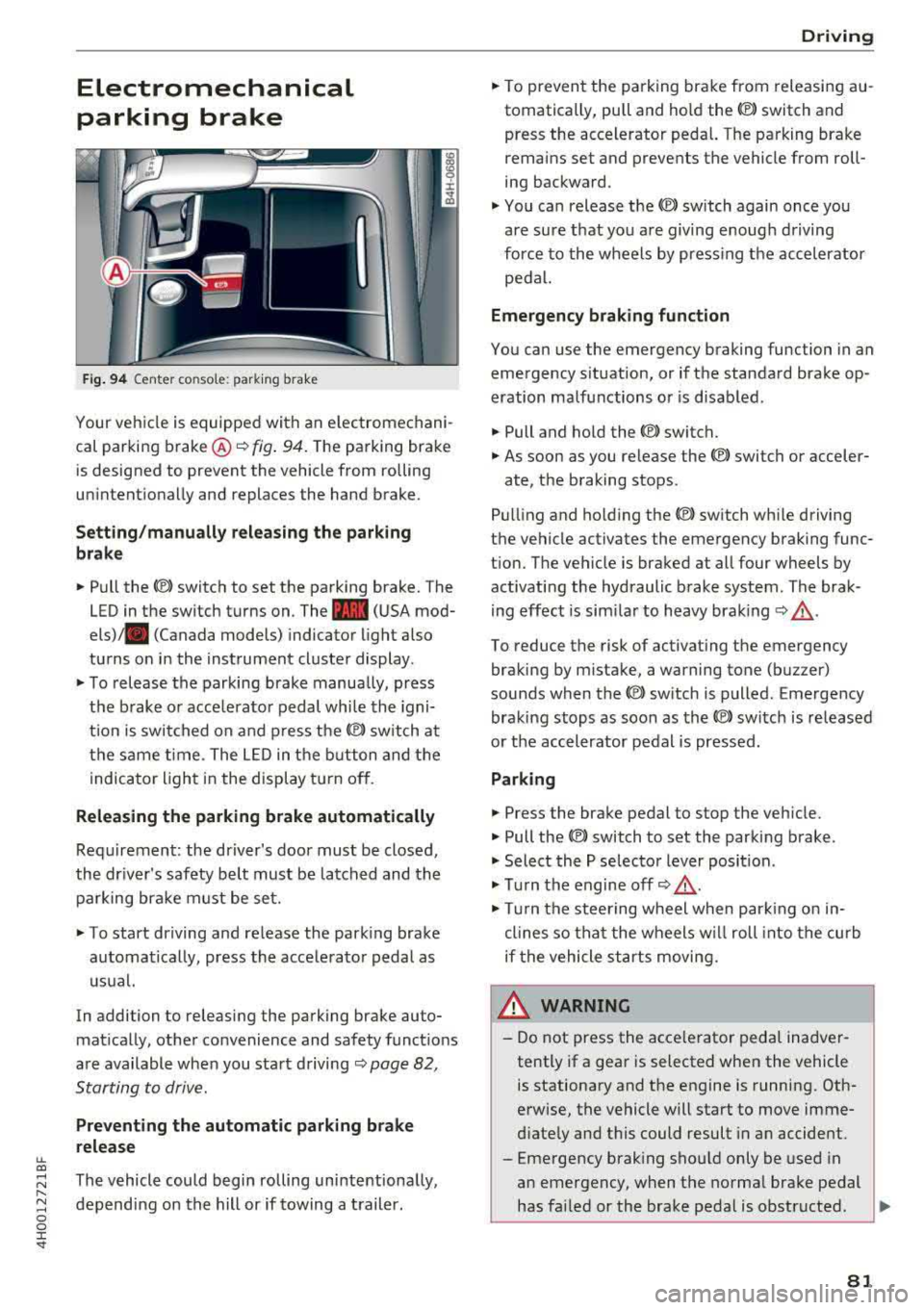
Fig. 94 Center console: parking brake
Your vehicle is equipped with an electromechani
cal parking brake ®
i=)fig. 94. The parking brake
is designed to prevent the vehicle from rolling
unintentionally and replaces the hand brake.
Setting/manually releasing the parking
brake
.. Pull the C®> switch to set the parking brake. The
LED in the switch turns on. The
-(USA mod
els) . (Canada models) indicator light also
turns on in the instrument cluster display.
.. To release the parking brake manua lly, press
the brake or acce lerator pedal while the igni
t ion is switched on and press
the(®) switch at
the same time. The LED in the button and the
indicator light in the display turn off.
Releasing the parking brake automatically
Requirement: the driver's door must be closed,
the driver's safety belt must be latched and the parking brake must be set.
.. To start driving and release the parking brake
automatically, press the accelerator pedal as
usual.
In addition to releasing the parking brake auto
matically, other convenience and safety functions
are available when you start driving
i=)page 82,
Starting to drive.
Preventing the automatic parking brake
release
The vehicle could begin rolling unintentionally,
depending on the hill or if towing a trailer.
Driving
.. To prevent the parking brake from releasing au
tomatically, pull and hold the<®> switch and press the accelerator pedal. The parking brake
remains set and prevents the vehicle from roll
ing backward .
.,. You can release the<®> switch again once you
are sure that you are giving enough driving
force to the wheels by pressing the accelerator
pedal.
Emergency braking function
You can use the emergency braking function in an
emergency situation, or if the standard brake op
eration malfunctions or is disabled.
.. Pull and hold the<®> switch.
.. As soon as you release the <®> switch or acceler-
ate, the braking stops.
Pulling and ho lding
the(®) switch while driving
the vehicle activates the emergency braking func
tion. The vehicle is braked at all four wheels by activating the hydraulic brake system. The brak
ing effect is similar to heavy braking
i=) ,& .
To reduce the risk of activating the emergency
braking by mistake, a warning tone (buzzer)
sounds when the
<®l switch is pulled. Emergency
braking stops as soon as
the© switch is released
or the accelerator pedal is pressed.
Parking
.. Press the brake pedal to stop the vehicle.
.. Pull the<®> switch to set the parking brake .
.,. Select the P selector lever position .
.,. Turn the engine off i=) ,&.
.,. Turn the steering wheel when parking on in
clines so that the wheels w ill roll into the curb
if the vehicle starts moving.
8_ WARNING
-Do not press the acce lerator pedal inadver
tently if a gear is selected when the vehicle
is stationary and the engine is running. Oth
erwise, the vehicle will start to move imme
diately and this could result in an accident.
-Eme rgency braking should only be used in
an emergency, when the normal brake pedal
has failed or the brake pedal is obstructed .
.,.
81
Page 105 of 356
u. co .... N
" N .... 0 0 :c '
l ected with the operating lever. For examp le, this
h appens if adaptive cruise contro l cannot start
driving automatically in stop-and-go traffic be
cause the driver has not fastened their safety belt .
Door open
The adap tive c ruise co ntro l system cannot sw itch
on w hen a door is open.
Stationary object ah ead
This message appears if you would like to switc h
adapt ive cruise control on and there is a station
ary object o r obstacle directly ahead of you r vehi
cle .
Audi active lane assist
(lane departure assist)
Description
Applies to: vehicles with Audi active lane assist
Active lane ass ist detects lane marker lines with
in the limits of the system us ing a came ra in t he
w indsh ie ld. If you are app roaching a de tected
l ane marker line and it appea rs likely t hat you
will leave the lane, the system wi ll warn you with
corrective steering. Yo u can override t his steering
at any time . If you pass over a line, the steer ing
wheel will v ibrate lightly. In order for this warn
i n g vibration to occur, it must f irst be sw itched
on in the Infotainment system . Active lane assist
i s ready for operation whe n the lane marke r line
i s detected on at least one s ide of the vehicle .
The system is designed for driv ing on express
ways and highways and therefore only activates
at speeds above approximate ly 40 mph (65 km/
h).
Applies to vehicles with side assist
If you activate a tur n signa l when active lane as
sist is ready and it class ifies a la ne cha nge as cr it
i cal because of ve hicles t raveli ng a longs ide you o r
approaching you, the re w ill be not iceab le correc
tive stee rin g short ly before you leave t he lane.
This will attempt to keep yo ur vehicle in t he lane.
A ss istance systems
Applies to vehicles w it h out side assist
T he system wi ll not warn yo u before c ross ing a
l ane marker line if you have activated the t urn
s ignal. In this case, it assumes that you are
changing lanes intentionally.
Appl ies to: vehicles with adaptive c ruise control
The co rrective steer ing is targeted based o n the
dr iv ing s itu ation . In add it ion to the lane mar ker
li nes, the system can al so t ake into accoun t other
objects s uch as gua rd rai ls. If they a re detected in
close proximity to t he vehicle, active lane assist
helps p reve nt the vehicle from driving too close
to them. The re is a lso pass ing ass istance. The
system does not provide any corrective steering if it detects that you are pass ing anot her vehicle .
A WARNING
-
-The system warns the drive r that the vehicle
is leaving the lane using corrective steering.
T he drive r is always responsible fo r keeping
the vehicle within the lane.
- T he system can assist the dr iver in keeping
the vehicle in the l ane, but it does not dr ive
by i tsel f. Always keep your hands on the
s teer ing whee l.
- Cor rec tive stee ring may not occur in cert ain
situa tions, such as during he avy b raking .
- T here may be cases whe re t he came ra does
not recogni ze all lane mar ker lines . Cor re c
tive steering can only take pla ce on the s ide
of the vehicle where lane marker lines are
detected.
- Other road structu res or objects could poss i
b ly be identified un intentionally as lane
marker lines. As a result, co rrective steering
may be unexpected or may not occ ur.
- The camera view can be rest ricted, for ex
ample by vehicles driving ahead or by ra in,
snow, heavy spray or light shining into the
camera. Th is can result in active lane ass ist
not detecting the lane marker lines o r de
tect ing them inco rrectly .
- Unde r ce rtain condit ions such as r uts in the
road, a ban ked roadway or crosswinds, the
correct ive steer ing alone may not be enough
to keep the vehicle in the middle of the lane.
~
103
Page 106 of 356
Ass is tance sy stem s
-For safety reasons, active lane assist must
not be used when there are poor road and/
or weather cond itions such as slippery
roads, fog, gravel, heavy rain, snow and the
potent ial for hydroplaning. Using act ive lane
assist under these conditions may increase
the risk of a crash .
Switching on/off
Applies to: veh icles with Audi active lane assist
•
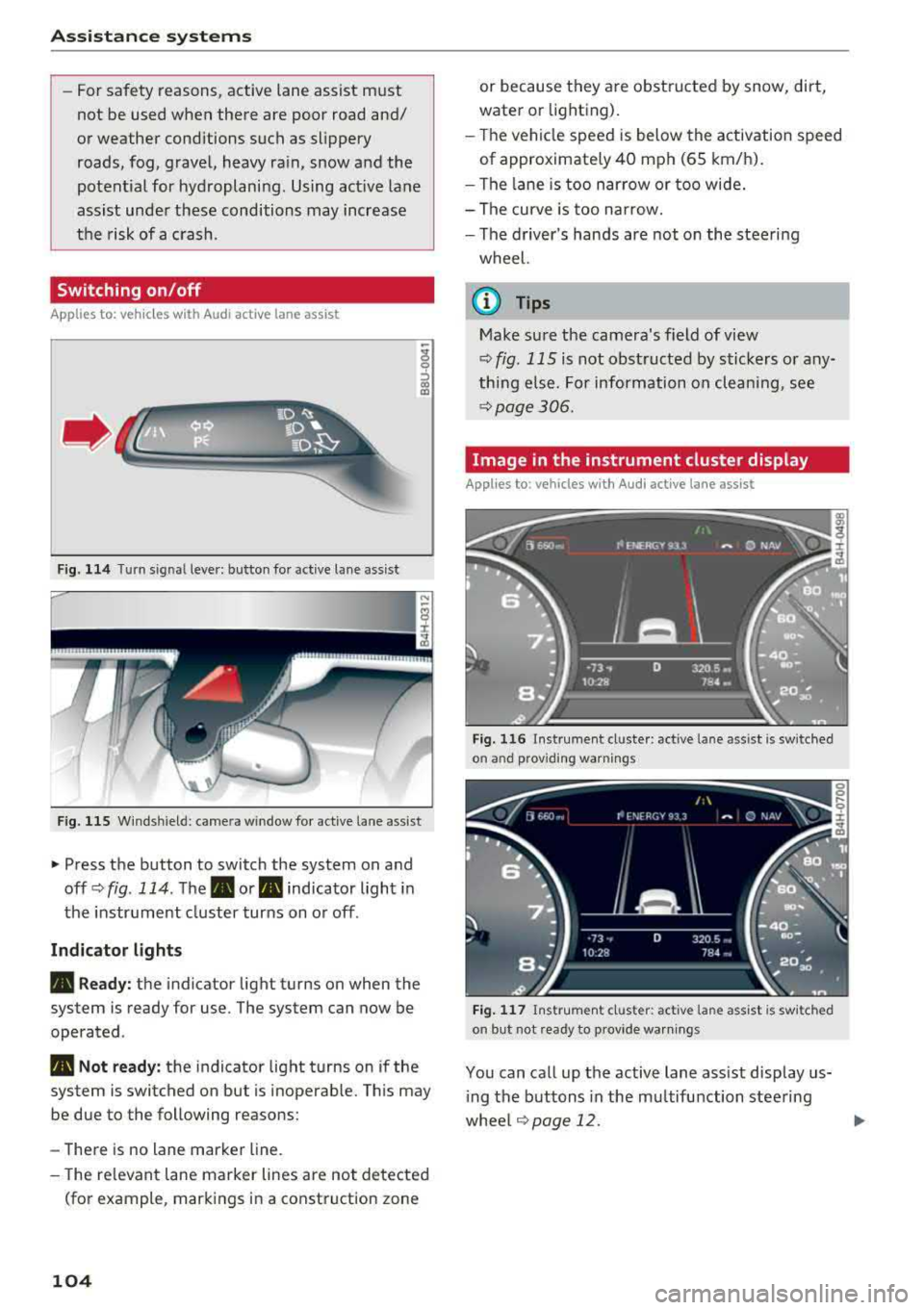
Fig. 114 Turn sig nal leve r: b utto n fo r active lane ass ist
F ig . 11 5 Wind sh iel d: came ra win d ow fo r active lane ass ist
"' Press the button to switch the system on and
off <=>
fig. 114 . The . or. indicator light in
the instr ument cluster turns on o r off .
Indicator light s
• Read y: the indicator light turns on when the
system is ready for use. The system can now be
operated .
• Not ready: the indicator light turns on if the
system is switched on but is inoperab le. Th is m ay
be due to the following reasons:
-There is no lane marker line.
- The re levant lane marker lines are not detected
(fo r example , mark ings in a construction zone
104
or because they are obstru cted by snow, dirt,
water or lighting).
- T he vehicle speed is below the activation speed
of approximate ly 40 mph (65 km/h).
- The lane is too narrow or too wide.
- The curve is too narrow.
- The d river's hands are not on the steering
wheel.
@ Tips
Make sure the camera's field of view
<=>
fig. 115 is not obst ructed by sticke rs or any
thing e lse. For information on cleaning, see
<=> page 306 .
Image in the instrument cluster display
Applies to: vehicles with Audi active lane assist
Fig. 11 6 Instrumen t cl uster: act ive la n e as sist is sw it ched
o n an d provid ing warn ings
Fig . 117 Ins trume nt cl ust er: act iv e l ane ass ist is sw it ched
on but not ready to p rov ide warn ings
You can call up the active lane ass ist display us
i ng the buttons in the mu ltifunction steering
whee l¢
page 12. .,..
Page 107 of 356
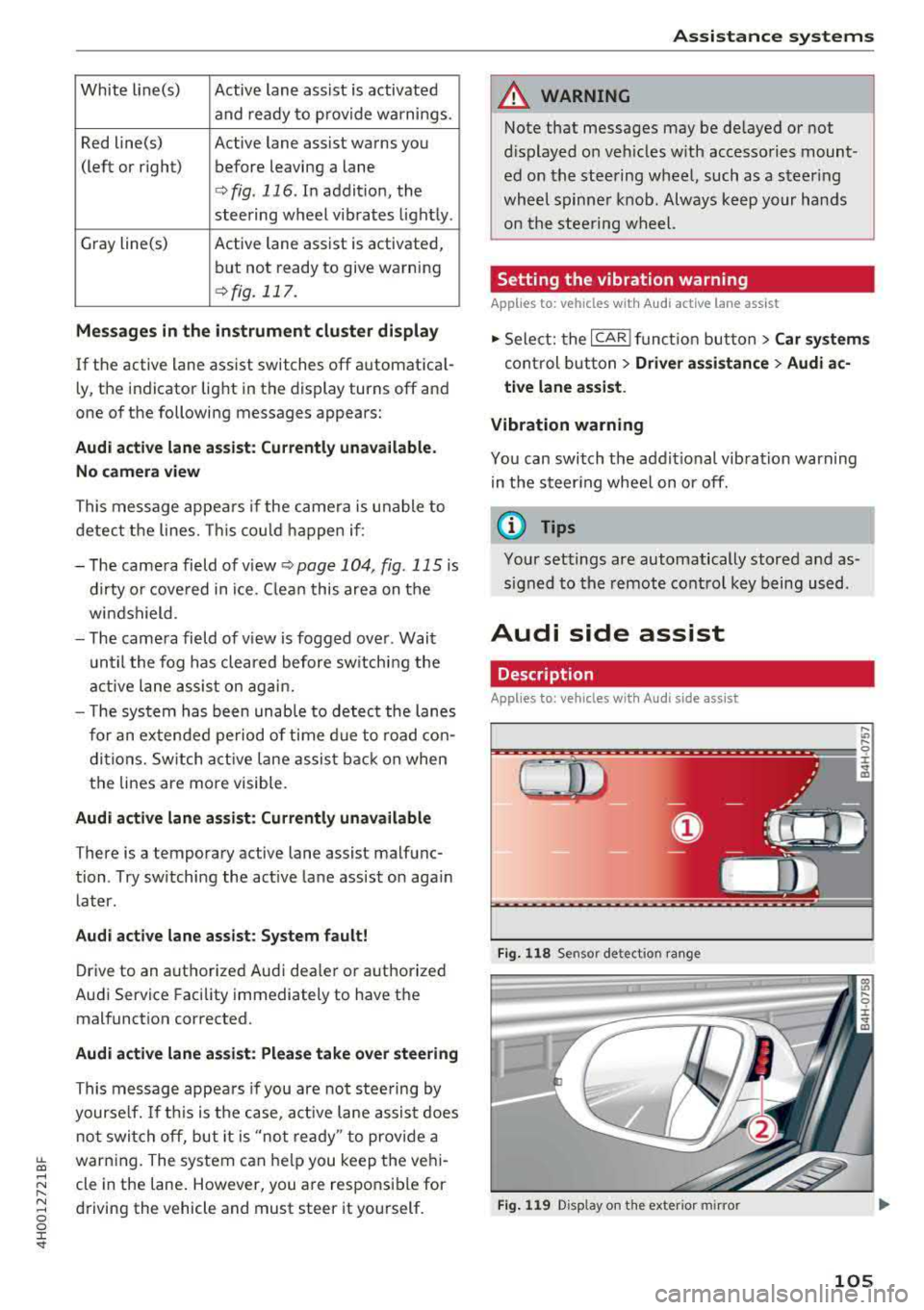
White line(s) Active lane assist is activated
and ready to provide warnings.
Red line(s) Active lane assist warns you
(left or right) before leaving a lane
¢ fig. 116. In addit ion, the
steering wheel vibrates light ly .
Gray line(s) Active lane assist is activated,
but not ready to give warning
¢ fig. 117.
Me ssages in the in strum ent clu ster di splay
If the active lane ass ist switches off automat ica l
l y, the indicator light in the display turns off and
one of the following messages appears:
Audi active lane a ssist: Cu rrentl y un available.
N o ca mera view
This message appea rs if the came ra is u nable to
detect the lines. This co uld happen if :
- The came ra field of v iew
<;;) page 104, fig. 115 is
dirty o r cove red in ice. C lean this area on the
wi ndshield .
- The came ra field of v iew is fogged over . Wait
u ntil the fog has cleared before sw itching the
active lane assis t on agai n.
- T he system has been unab le to detec t the lanes
for an extended period of time d ue to road con
di tions. Sw itch act ive lane assis t back on when
the lines are more visible.
Audi active lane a ssis t: Currently una vailabl e
There is a temporary active lane assist malfunc
tion . Try sw itch ing the active la ne assist on aga in
later.
Audi acti ve lane assist : Syste m f ault!
Drive to an authorized Audi dealer or a uthorized
Audi Service Facility immediately to have the
malfunct ion corrected.
Audi acti ve lane a ssis t: Pl ease take over steering
This message appea rs if you are not stee ring by
yourse lf. If th is is the case, act ive lane assis t does
not switch off, but it is
"not ready " to provide a
~ warn ing. The system can he lp you keep the veh i-...,
~ cle in the lane . However, you a re responsible for
~ driving the vehicle and must steer it yourself . 0 0 :c "
A WARNING
Note that messages may be de layed or not
d isplayed o n veh icles w ith accesso ries mount
ed on the stee ring wheel, such as a steer ing
whee l spinne r knob. Always keep your hands
on the s tee ring wheel.
Setting the vibration warning
App lies to : veh icles w ith Aud i act ive lane ass ist
11> Select: the ICAR I func tion but ton> C ar sy stem s
control b utt on > Driver assi stance > Audi a c
ti ve lane as sist .
Vibration warning
You can switch the addit io nal vibration warn ing
in the steer ing wheel on or off.
(D Tips
Your settings are automatically stored and as
s igned to the remote control key being used.
Audi side assist
Description
Applies to: vehicles w ith Audi s ide ass ist
Fi g. 1 18 Sensor detect ion ra n ge
F ig . 119 Disp lay on the exterio r m irror
,... .,,
9 ::c
"' co
105
Page 112 of 356
Assistance systems
critical, the system will direct your attention to
this :
- Pedestrians or wild animals are highlighted in
red and the corresponding
symbol . or.
turns on c::> fig. 125.
- There is also an audible signal.
The area classified as critical is based on the vehi
cle speed and the steering wheel angle. Pedes
trian and wild animal warning encourages you to pay more attention.
If the night vision assist image is replaced by an
other display (such as the on-board computer),
the
red . or. indicator light c::> fig. 126 will
appear if there is a pedestrian or wild animal
warning.
If the head-up display* is switched on and the
night vision assist content is activated, .
or.
will appear in the head-up display*.
Marking light*
To direct the driver's attention to a pedestrian,
the headlights can flash on the pedestrian three
times in a row when there is a pedestrian warn
ing.
This occurs at speeds above approximately 35 mph (60 km/h) if you are outside of illuminat
ed areas and no detected vehicles are shown . The
high beam assistant* controls the marking light*
c::> page 44, High beam assistant .
The marking light is not used for wild animals .
General information
Applies to: vehicles with night vision ass ist
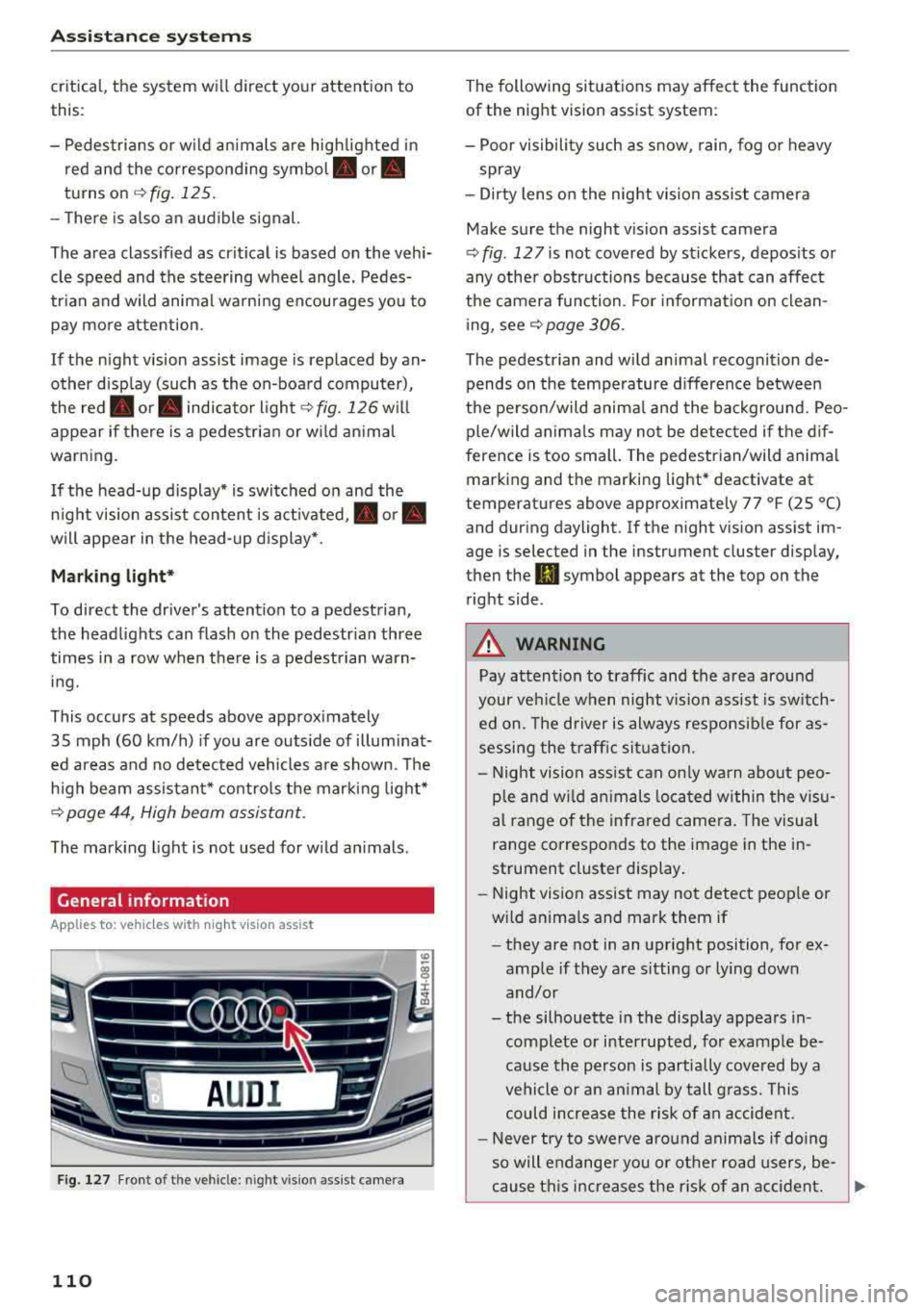
Fig. 127 F ront of th e vehicl e: nigh t visio n as sist c amer a
110
The following situations may affect the function
of the night vision assist system:
- Poor visibility such as snow , rain, fog or heavy
spray
- Dirty lens on the night vision assist camera
Make sure the night vision assist camera
c::> fig . 12 7 is not covered by stickers , deposits or
any other obstructions because that can affect
the camera function . For information on clean
ing, see
c::> page 306.
The pedestrian and wild animal recognition de
pends on the temperature difference between
the person/wild animal and the background. Peo
ple/wild animals may not be detected if the dif
ference is too small. The pedestrian/wild animal
marking and the marking light* deactivate at
temperatures above approximately 77 °F (25 °C)
and during daylight . If the night vision assist im
age is selected in the inst rument cluster display,
then the
II symbol appears a t the top on the
right side .
,& WARNING
,-
Pay attention to traffic and the area around
your vehicle when night vision assist is switch
ed on. The driver is always responsible for as
sessing the traffic situation.
- Night vision assist can only warn about peo
ple and wild animals located within the visu
al range of the infrared camera. The visual
range corresponds to the image in the in
strument cluster display .
- Night vision assist may not detect people or
wild animals and mark them if
- they are not in an upright position, for ex
ample if they are sitting or lying down
and/or
- the silhouette in the display appears in
complete or interrupted, for example be
cause the person is partially covered by a
vehicle or an animal by tall grass . This
could increase the risk of an accident.
- Never try to swerve around animals if doing
so will endanger you or other road users, be
cause this increases the risk of an accident.
Page 114 of 356
Ass is tanc e system s
In the sporty dynamic mode, the transmission
shifts at higher speed ranges.
Air su spen sion
The adaptive air suspension/adaptive air suspen
sion spo rt* is an e lectron ica lly contro lled a ir sus
pens ion and damping system . The adjustment
depends on the driving mode selected, steering movements, the driver's braking and accelera
tion , and as the road surface, vehicle speed and
load . A sporty sett ing is generally used in vehicles
with adap tive a ir suspension sport*.
The vehicle ground clearance depends on the mode se lected and the speed . When you are in
the auto or dynamic mode, the h ighway sett ing is
activated when you dr ive above 75 mph (120 km/
h) for more than 30 seconds . The ground clear
ance is increased automatically if the speed
drops below 44 mph (70 km/h) for more than 120 seconds .
Stee ring
The power steer ing adap ts . Indirect steer ing that
moves easily as in comfort mode is especially
suited to long drives on a h ighway . The dynam ic
mode p rovides spo rty , d irect steering.
Applies to: vehicles with dynamic steering
The steering ratio changes based on vehicle
speed in order to ma intain optimum steering ef
fort for the dr ive r at all times . This sets the steer
i n g to be less sensit ive at hig he r speeds in o rder
to p rovide imp roved vehicle contro l. At reduced
speeds, steer ing is more direct in order to keep
the steering effort as minima l as possib le when
the driv er is maneuvering the v ehicl e. At low and
average speeds, dynamic steering* addit ionally
provides more responsive steering performance.
Sport diff ere ntial *
As a component of the all wheel drive system (quattro)
¢ page 131, the sport differential dis
tributes the driving power to the rear axle de
pending on the situation. The distribution of
power va ries from balanced (comfort) to sporty
(dynamic) depending on the selec ted mode . The
goal is a high level of agility and ab il ity to accel
erate on curves . The ve hicle is very respons ive to
steer ing .
112 Corn
ering light *
The co rnering ligh t adapts the hig h beams to the
direction of the curve depending on the speed.
The pivoting action and the lighting also adapt to
the mode.
Adaptive cruise cont rol*
The be hav io r whe n accelerat ing ca n be adjusted
from comfortable to sporty, depending on the drive select mode. Adaptive cruise control also
responds to the driving behavior of the vehicle
ahead in a more cons ervative or sporty manner.
Engine sound *
The eng ine sound adapts to the c urrent mode
and can be subtle to spo rty.
{[» Note
- Make s ure there is enough clearance above
and be low the vehicle when pa rk ing . T he
heig ht of t he ve hicle can change on ce it is
parked d ue to temperature fluctuations,
changes to the load conditions and changes
to the driv ing modes, which can affect clear
ance .
- When transporting the vehicle on a car car
rier, train, ship or by other means, on ly tie
the vehicle down at the runn ing surface of
the tires, which is the outer c ircumference.
Securing the vehicle at the axle compo
nents, suspens ion struts o r tow ing eyes is
not pe rm itted because the p ressure i n the
air suspe nsion s truts ca n change d uring
t ra nspo rt. The vehi cle may not be secu red
sufficiently i f th i s happens.
(D Tips
- In some mo dels, the max imum ve hicle
speed can only be reached in t he auto and
dynamic modes.
- Th e S se lector lever posi tion a utomat ic all y
engages if the dynami c mode is selected.
- In ve hicl es tha t h ave dynam ic stee rin g*, op
erat ing no ise is he ard when sta rting o r stop
ping the engine . This does no t indi ca te a
prob lem.
Page 120 of 356
Parking syste m s
-For objects that do not touch the ground,
such as the bumper of a parked vehicle, a
trailer hitch or the rear of a truck. Do not
use the orientation lines in this case.
- If driven from a level surface onto an in
cline, or a downward slope.
- If driven toward protruding objects.
- If the vehicle is carrying too much load in
the rear.
- The accuracy of the orientation lines and
blue surfaces decreases when the vehicle is
raised/lowered
¢ page 111.
(D Note
-Always read and follow the applicable warn
ings
¢ (D in General information on
page 115.
- The orange -colored or ientation lines in the
Infotainment display show the vehicle path based on the steering wheel angle. The
front of the vehicle swings out more than
the rear of the veh icle. Maintain p lenty of
distance so that an exterior mirror or a cor ner of the veh icle does not co llide w ith any
obstacles.
Switching on/off
Ap plies to: ve hicles w ith rearview camera
Switching on
~ Sh ift i nto reverse, or
~ P ress the p, qA bu tton in the cente r console
¢ page 116, fig . 130. A sho rt confirmat io n
tone sounds and the LED in the but ton turns
on .
Switching between the rearview camera and
optical display
~ Press t he Graphic contro l but ton ®
¢ page 118, fig. 135 to see the optica l disp lay.
~ Press the Rear view contro l button to see the
rearview camera image.
Sw itch ing off
~ D rive faster than 6 mph (10 km/h), or
~ Press the p, qA bu tton, or
~ Switch the ignition off.
118
@ Tips
- The visua l display in the left part of the dis
play should he lp you detect the crit ica l vehi-
cle areas.
- You can change the vol ume and pitch of the
signals as well as the display¢
page 125.
Perpendicular parking
App lies to : vehicles wi th rearv iew camera
This view may be used when parking in a garage
or in
a parking space.
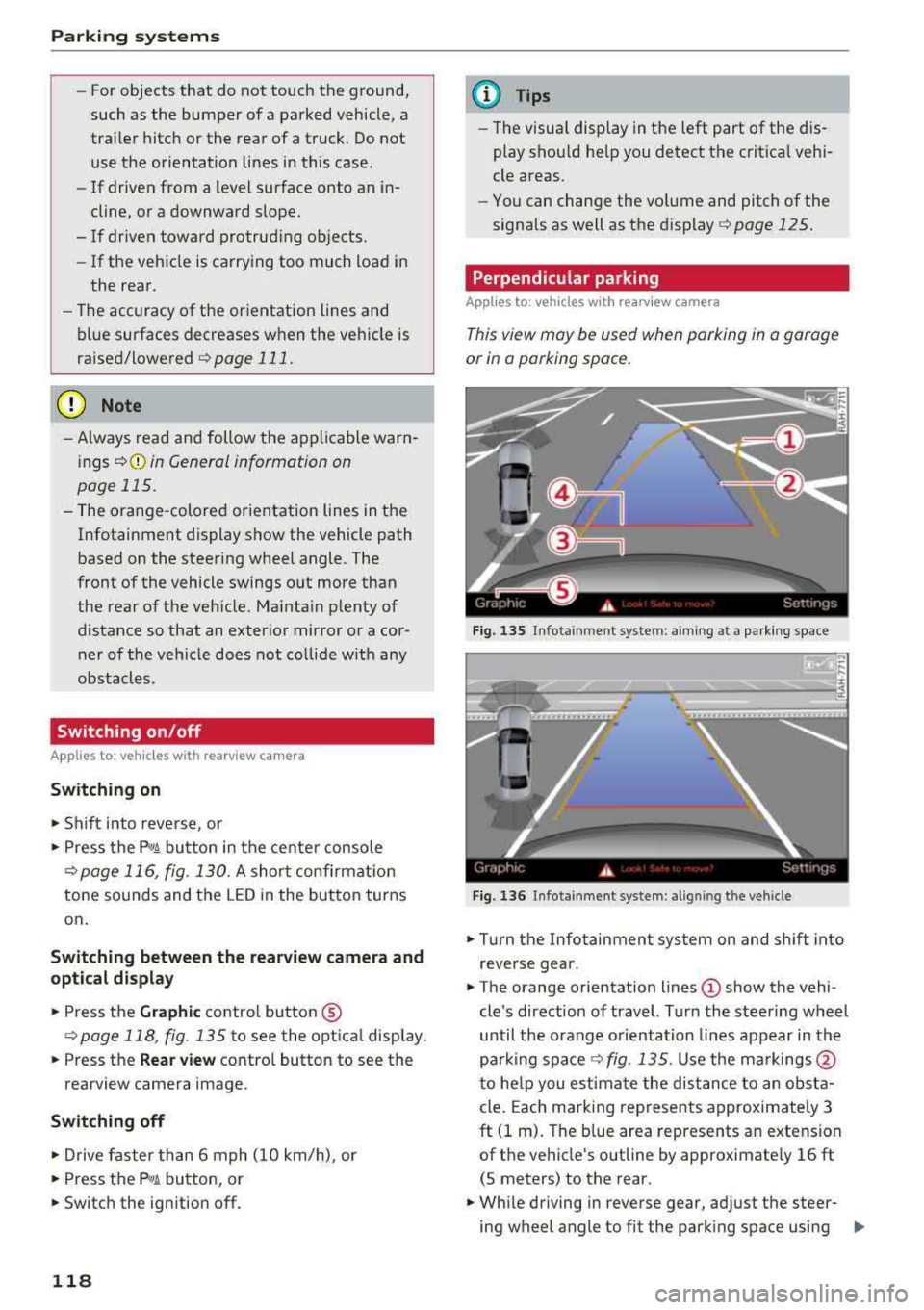
F ig. 13 S Infota inment system: aim ing at a pa rk in g space
Fig. 1 36 Infota inment system : alig ning the vehicle
~ Turn the Infotainment system on and shift into
reverse gear.
~ The orange orie ntation lines (!) show the vehi
cle 's direction of travel. Turn the steering wheel
until the orange o rientation lines appear in th e
parking
space ¢ fig. 135. Use the ma rkings @
t o he lp you estima te the dist ance to an obsta
cle . Each marking represents approximate ly 3
ft (1 m). The b lue area represents an extension
of the vehicle's outline by approximate ly 16 ft
(5 meters) to the rear.
~ Wh ile driving in reverse gear, ad just the steer-
ing wheel angle to fit the park ing space using
..,.