window AUDI A8 2018 User Guide
[x] Cancel search | Manufacturer: AUDI, Model Year: 2018, Model line: A8, Model: AUDI A8 2018Pages: 356, PDF Size: 54.71 MB
Page 67 of 356
lL t:0 ....
"" ......
"" .... 0 0 :c '
hooks, as they could cause personal injury in
a sudden stop.
CD Note
Objects on the rear shelf that rub against the
rear window can damage the rear window de
fogger wires.
@ Tips
- A vent slot is located between the shelf and
the rear window. Do not b lock the vent with
any items you may place on the rear window
shelf.
- Do not p lace bulky items on the rear window
shelf as they could restr ict or block the driv
er's vision in the rear view mirror.
Roof rack
A ppl ies to: ve hicles with roof rac k
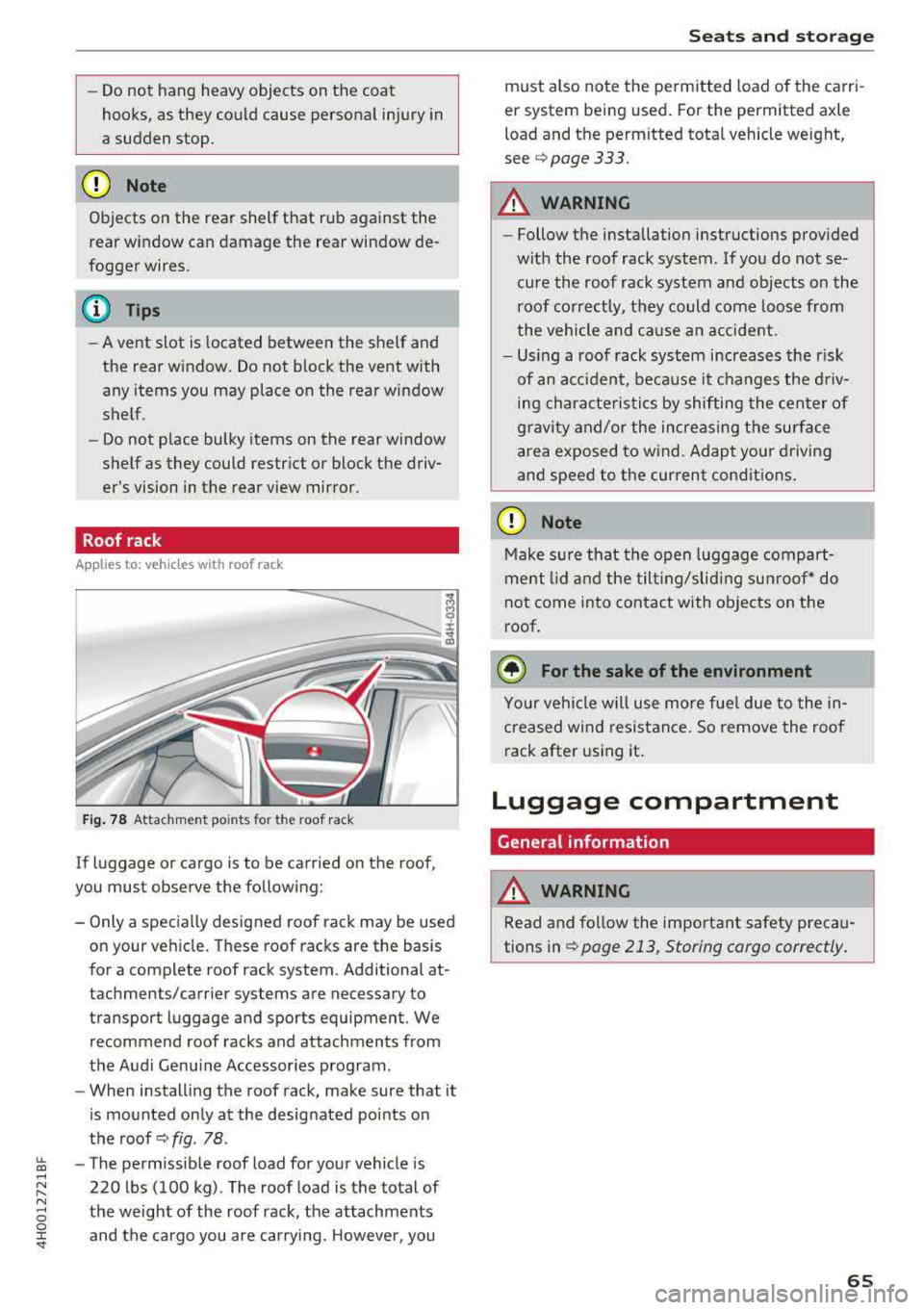
Fig . 78 Attachment po ints for the roof rack
If luggage or cargo is to be carried on the roof,
you must observe the following:
- Only a specially designed roof rack may be used
on your veh icle . These roof racks are the basis
for a complete roof rack system. Additional at
tachments/carrier systems are necessary to
transport luggage and sports equipment . We
recommend roof racks and attachments from
the Audi Genu ine Accessor ies program .
- When installing the roof rack, make sure that it
is mounted only at the designated points on
the roof
c::> fig . 78 .
-The permissible roof load for your vehicle is
220 lbs (100 kg) . The roof load is the total of
the weight of the roof rack, the attachments and the cargo you are carrying. However, you
S eats and storag e
must also note the pe rmitted load of the carri
er system being used . For the permitted axle
load and the permitted tota l vehicle weight,
see
Q page 333.
A WARNING
-Follow the installation instruct ions provided
wit h the roof rack system . If you do not se
cure the roof rack system and objects on the
roof correctly, they could come loose from
the vehicle and ca use a n accident.
- Using a roof rack system increases the r isk
of an acc iden t, because it changes the d riv
ing characte risti cs by shifting the center of
g ravi ty and/or the increasing the sur face
area exposed to wind. Adapt your driving
and speed to the current cond itions.
CD Note
Make su re that the open luggage compart
ment lid and the tilt ing/slid ing sun roof * do
not come into contact with objects on the
roof.
@ For the sake of the environment
Your vehicle will use more fue l due to the in
creased wind resistance. So remove the roof rack after using it .
Luggage compartment
General information
WARNING
Read and fo llow the important safety preca u
tions in
Q page 213, Storing cargo correctly .
65
Page 71 of 356
u. co .... N
" N .... 0 0 :c '
climate control
Description
The climate control system warms, cools and re
moves humidity from the air in the vehicle interi
or. It is the most effective when the windows and
sunroof* are closed. If there is a build-up of heat inside the vehicle, ventilation can help to speed
up the cooling process .
In all heating mode functions, except for defrost,
the blower only switches to a higher speed once
the engine coolant has reached a sufficient tem
perature .
Pollut ant filt er
The po llutant filter removes pollutants such as
dust and pollen from the air.
Ke y r eco gnition
The climate control settings are a utomatically
stored and assigned to the remote control key
that is in use .
A WARNING
Poor visibility can lead to accidents.
- For safer driving, keep all windows free of
ice, snow and fog .
- Become familiar as quickly as possible with
the correct use and function of the climate contro l system, especially with the defrost
ing and defogging function.
- When the temperature is below freezing,
only use the windshield washer system after
Warm and c old
the windshield has been warmed by the cli
mate control system. The washer fluid could
freeze on the windshield and impair visibili
ty .
@ Note
-If you suspect that the climate contro l sys
tem is damaged, switch the system off to
prevent further damage and have it checked
by an authorized Audi dealer or authorized
Aud i Serv ice Facility.
- Repa irs to the Aud i climate control system
require special technical knowledge and
special tools . See an authorized Aud i dealer
or authorized Audi Serv ice Fac ility .
@ For the s ake of the environment
Reducing the amount of fuel used also re
duces the amount of pollutants that enter the
a ir .
(D Tips
- To prevent interference with the heat ing
and cooling output and to prevent the win
dows from fogging over, the a ir intake in
fro nt of t he w indshie ld must be free of ice,
snow or leaves.
- Condensat ion from the coo ling system can
dr ip and form a pudd le of water under the
veh icle . T h is is no rma l and does not mean
there is a leak .
- Th e energy management system may tem
porarily switch off certain functions, suc h as
the seat heating* or rear window defogger .
T hese systems are avai lable again as soon
as the energy supply has been restored.
69
Page 72 of 356
Warm and cold
Operation
We recommend pressing the !AUTOI button and setting the temperature to 72 °F (22 °C) .
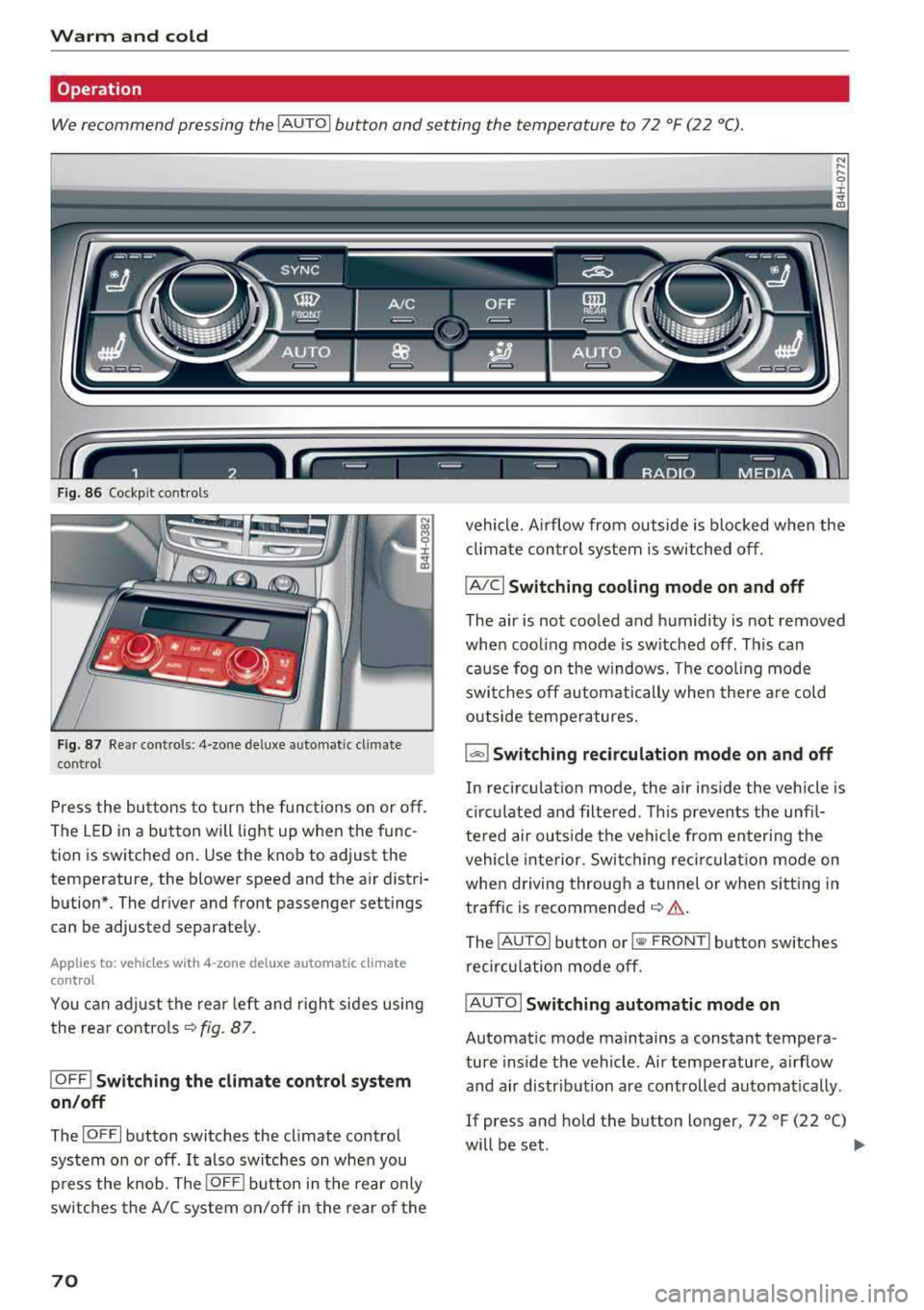
Fig . 8 6 Cockp it con trols
F ig . 87 Re ar contro ls: 4 -zone de lu xe auto matic cl imate
con tro l
Press the bu ttons to tur n the func tions on or off .
The LED in a button will light up when the func
tion is sw itched on. Use the knob to adjust the
temperature, the blower speed and the a ir distri
bution*. The driver and front passenger settings
can be adjusted separate ly.
Applies to: vehicles w ith 4-zone del uxe automatic climate
cont rol
You can adj ust the rea r left and r igh t sides using
the rea r contro ls
~ fig . 87.
IO FF ! Switching the climate control system
on /off
The IO FFI button switches the cl imate contro l
system on or off .
It also switches on whe n you
p ress the knob . The
!OFF I butto n in the rear only
sw itches the A/C system on/off in the rear of the
70
vehicle . A irflow from outside is blocked w hen the
cl imate control system is switched off.
IAIC I Switching cooling mode on and off
The air is not coo led and h umid ity is not removed
whe n coo ling mode is sw itched off . Th is can
ca use fog on the windows. The coo ling mode
swi tches off autom atically whe n there a re cold
outside temperatures.
l'-"" I Switching recirculation mode on and off
In recirculat ion mode , the air inside the vehicle is
c ir culated and filte red . Th is prevents the unfi l
te red air outs ide t he ve hicle from en teri ng the
vehicle inte rior. Switching reci rc u lat ion mode on
whe n driving throug h a t unnel or whe n sitting in
traffic is recommended
~ & .
The !AU TO I button o r I@ F RO NT I button switches
recircu lation mode off .
IAUTO I Switching automatic mode on
Automat ic mode maintains a constant tempera
ture inside the vehicle. Air temperature , a irflow
and air distrib ution are controlled automatica lly .
If press and hold the button longer, 72 °F (22 °C)
will be set .
.,,.
Page 73 of 356
Adjusting the temperature
Temperatures between 60 °F ( +16 ° C) and 84 °F
(+28 °C) can be set . Outside of this range,
LO or
HI will appear in the climate contro l system dis
p lay . At both of these settings, the climate con
trol system runs continuously at maximum cool
ing or heating power. There is no temperature
regulation.
~ Adjusting the amount of air
You can adjust the airf low manually to suit your
ne eds . The blower should always run at a low set
ting to prevent the windows from fogging and to
ensure a continuous exchange of air ins ide the
vehicle. To have the airflow regulated automat i
cally, press the
IAUTO I button.
~ Adjusting the air distribution
You can manually se lect the vents where the air
will flow. To have the a ir distribution regu lated
automatically, press the
IAUTO I button.
Ill/ lil* Adjusting seat heating/ventilation*
Pressing the button switches the seat heating/
venti lation on at the highest setting (level 3). The
LEDs indicate the temperature level. To reduce
the temperature, press the button aga in. To
sw itch the seat heating/ventilation off, press the
button repeatedly until the LED turns off.
After 10 minutes, the seat heating/ventilation
automatically switches from level 3 to level 2.
l
or cleared of condensation as quickly as possible.
The maximum amount of air flows main ly from
the vents below the windshield. Recirculation
mode switches off. The temperature shou ld be
set to approximately 72 °F (22 °().
The
IAUTOI button switches the defroster off .
IQil REAR I Switching the rear window defogger
on and off
The rear window defogger only operates when
~ the engine is running. It switches off automati-....
~ cally after 10 to 20 minutes, depending on the N
~ outside temperature. 0 :c '
To prevent the rear window defogger from
switching off automatica lly, press and hold the
loo REAR I button for more than three seconds .
This is stored until the ignition is switched off.
I SYNC! Synchronization*
When synchron ization is switched on, the set
tings for the driver's side are applied to the front
pass enge r's side (except for seat heating/venti la
tion*). The rear is also synchronized in vehicles
with the 4-zone deluxe automatic climate control
system*. Synchronization switches off if the set
t ings are adjusted on the front passenger's side
or in the rear*.
You can synchronize the sett ings in a row by
pressing and holding a knob. For example, to ap
ply the sett ings for the front passenger's side to
the driver's side, press and hold the knob on the
front passenger 's side.
Vents
You can open or close the center and rear vents in
the cockpit and the vents in the rear center con
sole and door pillars using the ridged thumb
wheels. The levers adjust the direction of the air
flow from the vents.
Residual heat
You can act ivate the residual heat function when
the ignition is switched off by pressing and hold
ing the
lj) button. The residual heat from the
coolant is used to heat the vehicle interior . T he
r esidua l heat function switches off automatically
after about 30 minutes .
_&. WARNING
-You should not use the recirculation mode
for an extended period of time since no
fresh air is drawn in. With the air-condition
ing switched off, the windows can fog up,
which increases the risk of an acc ident.
- Individuals with reduced sensitivity to pain
or temperature could develop burns when
using the seat heating function. To reduce
the r isk of injury, these individua ls should
not use seat heating .
71
Page 74 of 356
Warm and cold
(D Note
To avoid damage to the heating elements in
the seats, do not kneel on the seats or place
heavy loads on a small area of the seat.
Basic settings
The climate control system basic settings ore ac
cessed in the Infotainment system.
,.. Select: the ICARI function button > Car systems
control button > AC.
Rear seat settings*
When this function is selected, all settings for
the rear can be adjusted through the climate con
trol system in the cockpit. The climate control
system settings cannot be adjusted in the rear
seat at the same time. This function switches off
after a certain period of time or when one of the
dials in the cockpit is pressed.
Auto recirculation*
The sensit ivity level of the automatic recircula
tion mode can be set at various levels from
Off to
Sensitive. When recirculation mode 1~ 1 is switch
ed on, the air recirculation is controlled automat
ically. If the windows fog up, press the
I ® FRONT I
button.
Footwell temperature
You can adjust the footwell temperature so that
it is cooler or warmer .
Solar roof*
Parking ventilation is controlled automatically in
the
Auto setting.
When the ignition is switched off, solar-powered
parking ventilation may switch on, as long as
- there is sufficient sunlight,
- the outside temperature is not too low,
- the sunroof is closed or tilted and
-Auto (Infotainment system) is set
72
Steering wheel heating
Applies to: vehicles with steering wheel heating
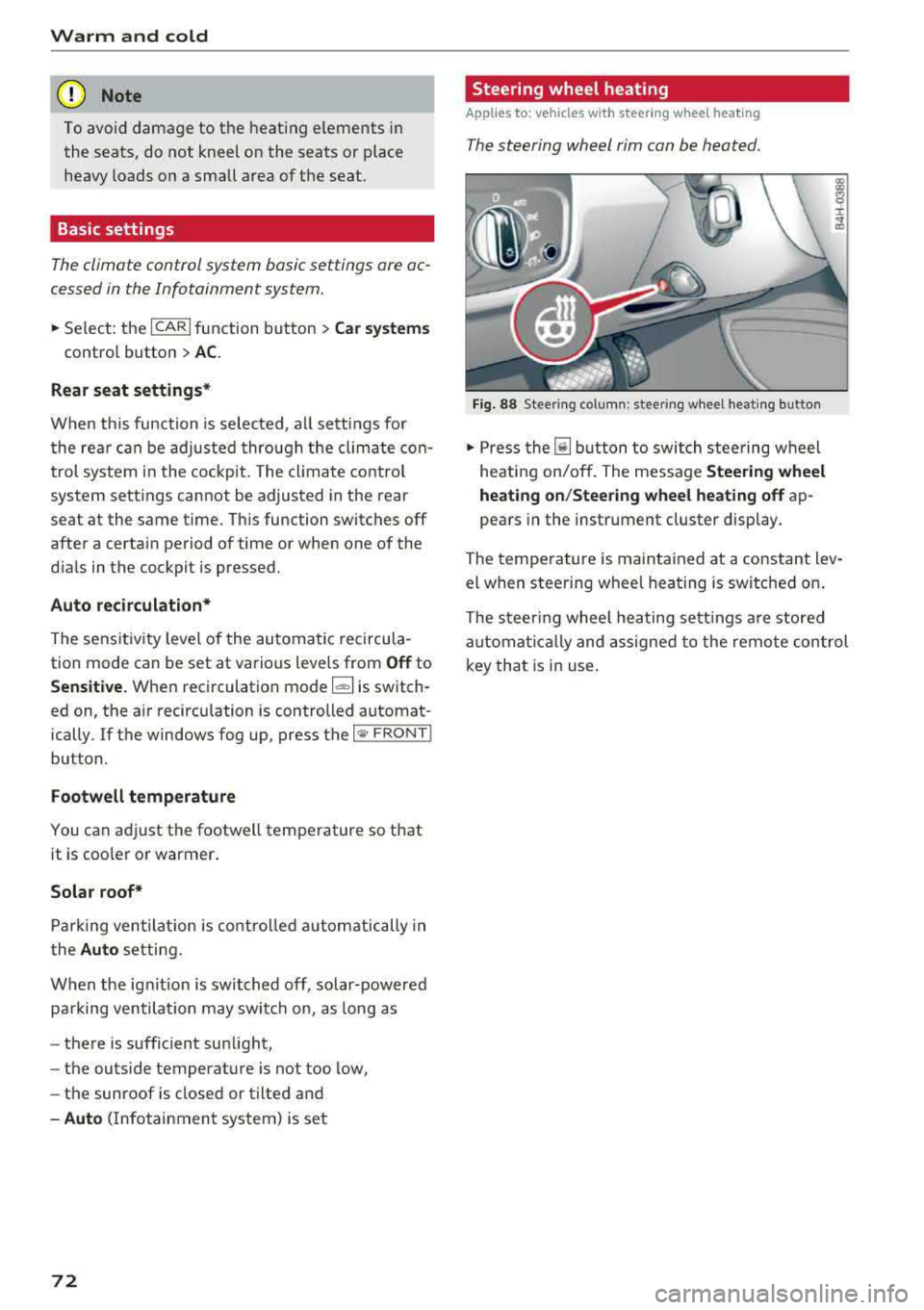
The steering wheel rim can be heated .
Fig. 88 Steering column: steering wheel heating button
,.. Press the [il button to switch steering wheel
heating on/off. The message
Steering wheel
heating on/Steering wheel heating off
ap
pears in the instrument cluster display.
The temperature is maintained at a constant lev
el when steering wheel heating is switched on.
The steering wheel heating settings are stored
automat ical ly and assigned to the remote control
key that is in use.
Page 77 of 356
lL t:0 ....
"" ......
"" .... 0 0 :c '
The engine drives the generator, wh ich generates
electricity; the fue l consumption also increases
with the demand for electricity. Therefore, switch
e lectrical equipment off when you no longer
need it. Examples of equipment that use a lot of
energy are air blowers at a high setting, the rear
window defogger and seat heating*.
CD Note
Do not leave engine idling unattended after
starting. If warning lights should come on to
ind icate improper operation, they would go
unheeded. Extended idling also produces
heat, wh ich could result in overheat ing or
other damage to the vehicle or other p roper-
ty.
CD Note
-Have your vehicle maintained properly and
i n accordance with the service recommenda
tions in your Warranty
& Ma intenance book
l et. Lack of proper maintenance as well as
i mproper use of the vehicle will impair the
function of the emission control system and
could lead to damage.
-Do not alter or remove any component of
the Emission Control System unless ap proved by the manufacturer.
-Do not alter or remove any device, such as
heat shie lds, switches, ignition wires,
valves, which are designed to protect your
vehicle's Emission Control System and other
important vehicle components .
@ Tips
The consumption estimates as published by
ENVIRONMENTAL PROTECTION AGENCY
(EPA) and Transport Canada may not corre
spond to your actual consumption on the
road, which will vary depending upon vehicle
load and speed, road and weather conditions
trip length, etc.
'
D rivi ng
Steering
Adjusting the steering wheel position
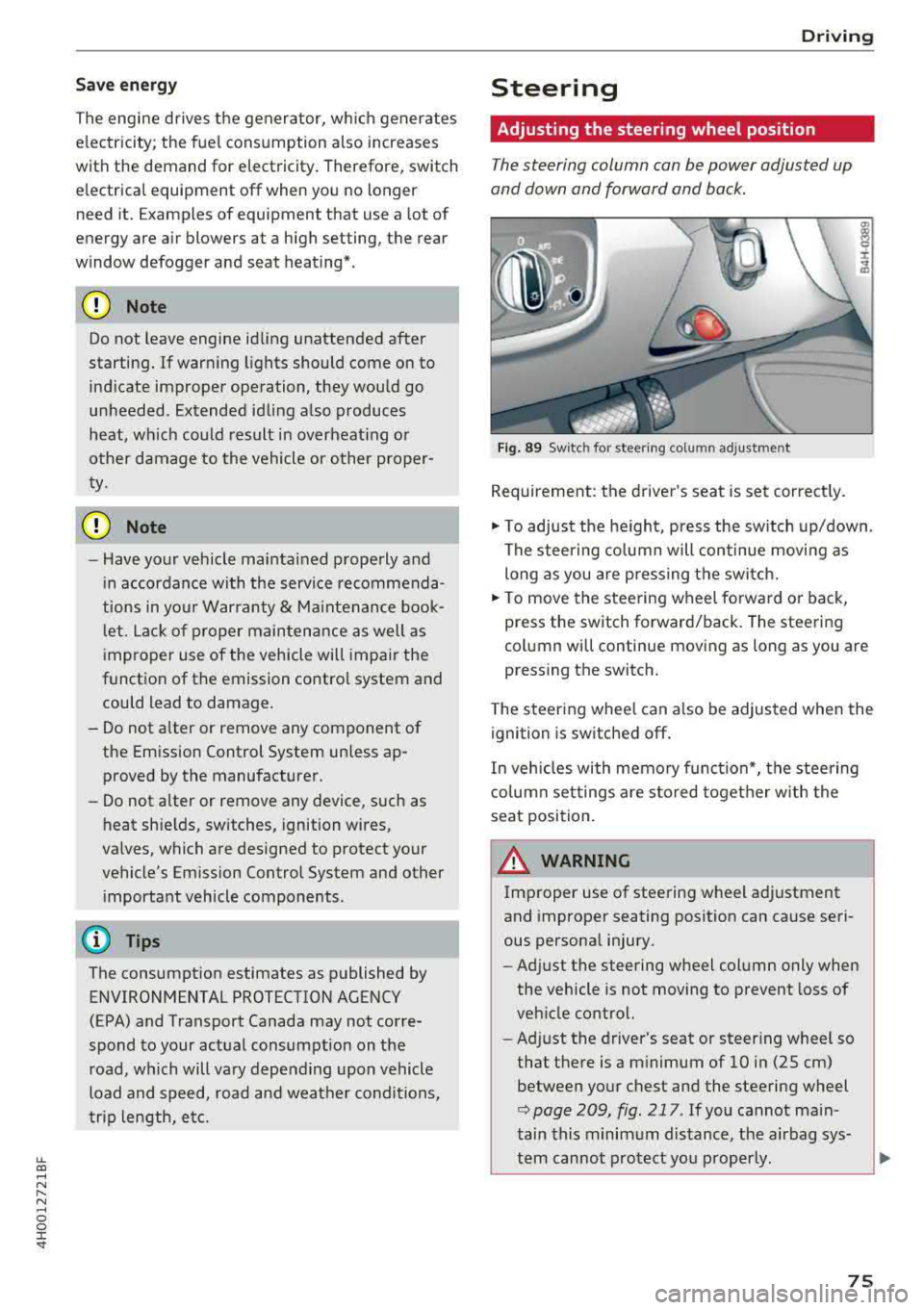
The steering column can be power adjusted up
and down and forward and back.
F ig . 89 Sw itc h for steering colu mn adjustment
Requirement: the driver's seat is set correct ly.
"' To adjust the he ight, press the sw itch up/down .
The steering co lumn will continue movi ng as
long as you are pressing the switch.
"' To move the steering wheel forwa rd or back,
press the switch forward/back. The steering
column will continue moving as long as you are
pressing the switch.
T he steering wheel can a lso be adjusted when the
ignition is switched off .
In veh icles with memory function*, the steering
co lumn settings are s to red toget her w ith the
seat position.
A WARNING
Improper use of steering wheel adjustment
and improper seating position can cause seri
ous personal injury.
- Adjust the steering wheel column only when
the vehicle is not moving to prevent loss of
veh icle control.
- Ad just the driver's seat or steer ing whee l so
that the re is a m inimum of 10 in (25 cm)
between your chest and the steering wheel
r::;, page 209, fig . 217 . If you cannot main
tain this minimum distance, the airbag sys-
tem cannot protect you p roperly.
~
75
Page 79 of 356
u. co .... N
" N .... 0 0 :c '
-Some noise after starting the engine is nor
mal and is no cause for concern.
- If you leave the vehicle with the ignition
switched on, the ignition will switch off af
ter a certain amount of time. Make sure that
electrical equipment such as the exterior
lights are switched off.
Stopping the engine
.,. Bring the vehicle to a full stop.
.,. Select the P or N selector lever position .
.. Press the I START ENGI NE STOPI button
~ page 76, fig. 90.
Steering lock
The steering locks when you turn the engine off
using the lSTART
ENGINE STOPlbutton and
open the driver's door. The locked steering helps
prevent vehicle theft.
Emergency off function
If it is absolutely necessary, the engine can also
be turned off while driving in the
R, Dor S selec
tor lever position at speeds below 6 mph (10 km/
h). To stop the engine, press and hold the
I START ENGINE STOPI button and also press the
brake pedal.
& WARNING
-Never turn off the engine before the vehicle
has come to a complete stop. The full func
tion of the brake booster and the power
steering is not guaranteed. You must use
more force to turn or brake. Because you
cannot steer and brake as you usually
would, this could lead to accidents and seri
ous injuries .
-Always take the key with you whenever you
leave your vehicle. Otherwise, the engine
cou ld be started or electrical equipment
such as the power windows could be operat
ed. This can lead to serious injury.
-For safety reasons, always park the vehicle
with the selector lever in the P position .
Driving
Otherwise, there is the risk that the vehicle
could roll unintentionally.
@ Note
If the engine has been under heavy load for
an extended period of time, heat builds up in
the engine compartment after the engine is
switched off and there is a risk of damaging
the engine. For this reason, let the engine run
at idle for approximately two minutes before
shutting it off .
(D Tips
For up to 10 minutes after stopping the en
gine, the radiator fan may turn on again auto
matically or it may continue to run (even if
the ignition is switched off) for the following
reasons :
- The coolant temperature is increasing due
to trapped heat.
- If the engine is warm and the engine com
partment also heats up from strong sun
light.
Messages in the instrument cluster display
Turn off ignition before leaving car
This message appears and a warning tone sounds
if you open the driver's door when the ignition is
switched on.
Press brake pedal to start engine
This message appears when you press the
I START ENGINE STOP ! button to start the engine
and do not press the brake pedal while doing so.
The engine can only be started when the brake pedal is pressed .
Ill Is key in the vehicle?
This indicator light turns on and this message ap
pears if the ignition key was removed from the
vehicle when the engine was running. If the igni
tion key is no longer in the vehicle, you cannot
switch on the ignition or start the engine once
you stop it. You also cannot lock the vehicle from
the outside .
.,.
77
Page 84 of 356
Drivin g
During emergency braking, your vehicle will
brake sim ilar to heavy brak ing. ESC and the
associated components (ABS, ASR, EDL)
cannot overcome the laws of physics . In cor
ners and when road or weather cond it ions
are bad, a full b rake applicat ion ca n cause
the vehicle to skid o r the rear end to swerve,
wh ic h increases the r is k of an accident.
- If the powe r supply fa ils, you cannot set the
par king b rake if it is re leased. In th is case,
par k the vehicle on level ground and secure
it by placing the selector lever in the P posi
tion . See an authorized Audi dea ler or a u
thorized Audi Service Facility for assistance .
- Always take the vehicle key with you when
leaving your vehicle, even fo r a short period
of time . This applies particular ly w hen ch il
dren rema in in the vehicle. Otherwise ch il
dren could start the engine, release the
park ing brake or operate electrical eq uip
ment such as powe r windows, which in
c reases the risk of an acc ident.
- No one sho uld rema in in the vehicle when it
is locked - especially ch ild ren. Locked doo rs
make it mo re diff icu lt fo r eme rgency wor k
ers to get into the vehicle, which puts lives
at r is k .
0) Tips
When stopping at a traffic s ignal or stopping
in c ity traffic, you can set the parking b rake
manually. The vehicle does no t have to be
he ld w it h t he br ake peda l. The parking b rake
elim ina tes the tendency to creep when a se
lecto r lever position is engaged . As soon as
you p ress t he accelerator pedal, the parking
brake releases automat ica lly and your vehicle
starts to move
c::, page 82.
(D Tips
- Occasiona l noises when the parking brake is
set and re leased a re normal and a re not a
cause for concer n.
- The park ing bra ke goes thro ugh a se lf-test
cycle at regular intervals when the ve hicle is
stopped. Any noises associated w ith this a re
normal.
82
- If there is a powe r fail ure, the par king b rake
wi ll not set if it is released, and it wi ll not
re lease if it is
set ~.&. . See an a uth orized
Audi dealer or author ized Audi Se rvice Fa
cility for assistance.
Starting to drive
Various convenience and safety f unct ions may be
available when the vehicle begins dr iving, de
pendi ng on vehicle equipment .
Starting on hills with th e pa rking brake set
Requirement: the driver's door must be closed
and the driver's safety belt must be fastened.
.,. To sta rt driving comfortably when on a h ill, set
the parking brake and begin driving as usu a l.
The braking force of the parking brake does not
release automatically unt il the whee ls build up
enoug h driving force.
Starting on hills with hill hold assist
Hill hold assis t makes it easier to start on hills.
Requireme nt: the d rive r's doo r must be closed
and t he engine must be runn ing.
.,. To activate h ill hold assist, press and hold the
brake pedal for several seco nds . The vehicle
m ust be in an uphill d irect io n of t ravel.
After re leas ing the brake pedal, the brak ing pow
er is maintained for a brief moment
c::, &. to pre
vent the veh icle from rolli ng back w hen starting.
Du ring this t ime, you can easily begin to move
yo ur vehicle.
_8. WARNING
Applies to: vehicles with hill hold assist
-If you do not beg in d riving immed iate ly or
the engine stalls after releasing the bra ke
pedal, your veh icle may beg in to roll back
ward. Press the brake pedal or set the park
ing brake immedia tely.
- The inte lligent technology of hill ho ld assist
cannot ove rcome the limitat ions imposed by
natural p hys ica l laws. The increased comfort
offe red by hill ho ld assist should not cause
you to t ake safety r is ks.
Page 135 of 356
u. co .... N
" N .... 0 0 :c '
that require large amounts of energy are tempo
rari ly scaled back or switched
off. Heating sys
tems in particular require a great deal of energy .
If you notice, for example, that the seat heating*
or rear window defogger is not working, then it
has been temporar ily reduced or switched
off .
These systems are available again as soon as the
e n ergy supp ly has been restored.
In addition, you may notice that the idle speed
has slightly increased. That is normal and no
cause for concern . By increasing the idling speed,
the add itiona l required e ne rgy w ill be generated
and the vehicle battery w ill be charged.
Notice about data
recorded by the Event
Data Recorder and
vehicle control modules
Event Data Recorder
This vehicle is equipped with an Event Data Re
corde r (EDR). The main purpose of an EDR is to
record, in certain crash or near crash-like situa
tions, such as an airbag deployment or hitting a
road obstacle, data that will assist in understand
ing how a vehicle 's systems performed. The EDR
is designed to record data re lated to vehicle dy
namics and safety systems for a short period of
time, typically 30 seconds or less. The EDR in this
vehicle is designed to record such data as :
- How various systems in your vehicle were oper
ating;
- Whether or not the driver and passenger safety
belts were buckled/fastened;
- How far (if at all) the driver was depressing the
acce lerator and/or brake pedal; and,
- How fast the vehicle was traveling.
These data can he lp prov ide a better understand
ing of the circumstances in which crashes and in
ju ries occur. NOTE: EDR data are recorded by your
vehicle only if a non-trivia l crash situation occurs;
no data are recorded by the EDR under normal
driving conditions and no personal data (e.g.,
name, gender, age, and crash location) are re
corded. However, other parties, such as law en-
Intelligent Technology
forcement, could combine the EDR data with the
type of personally identifying data routinely ac
quired during a crash investigation.
T o read data recorded by an EDR, special equip
ment is required, and access to the vehicle or the
EDR is needed. In addition to the vehicle manu
facturer, other parties, such as law enforcement,
that have the special equipment, can read the in
formation if they have access to the vehicle or the
EDR .
Some state laws restrict the retrieval or down
loading of data stored by ED Rs installed in a vehi
cle for the express purpose of retrieving data af
ter an accident or crash event without the own
er's consent .
Audi will not access the EDR and/or simi lar data
or give it to others -
- un less the vehicle owner (or lessee if the vehi
cle has been leased) agrees; or
- upon the official request by the police; or
- upon the order of a court of law o r a govern-
ment agency; or
- for the defense of a lawsuit through the judicial
discovery process.
- Aud i may also use the data for resea rch about
veh icle operation and safety performance or
provide the data to a third party for research
purposes without identifying the specific vehi
cle or information about the identity of its own
er or lessee and only after the recorded vehicle
data has been accessed.
Vehicle control modules
Your vehicle is also equipped with a number of
electronic control modules for various vehicle
systems, such as engine management, emission
control, airbags, and safety belts .
These electronic control modu les record data
during normal vehicle operation that may be
needed by trained technicians for diagnostic and
repair purposes. The recording capability of these
modules is limited to data (no sound is record
ed) . Only a small amount of data is actually re
corded over a very lim ited period of time, or stor
ed when a system fault is detected by a control
module . Some of the data stored may relate to
.,.
133
Page 144 of 356
Voice recognition s ystem
Voice recognition system
Operating
A pplies to: ve hicles w ith vo ice recognition system
You con operate many Infotainment functions
conveniently by speaking.
R equirement: the ignition and the MM I must be
switched
on <=> page 135, there must be no phone
call in progress and the parking system m ust not
be active .
~ Switching on : briefly press th e ~ button @
<=> page 11, fig. 7 on the multifunction steering
whee l* and say the desired command after the
Beep .
~ Sw itching off : press and hold the~ button.
Or: press any button on the MMI control panel.
~ Canceling : press the~ button a nd say a new
command.
Or: say the command Cancel.
Input assis tance
The system gu ides you through the input with
visual and audio feedback .
-Vi sual inpu t as sistan ce : after t urning on voice
recognition, a d isp lay with a select ion of possi
ble commands appears in the Infotainment dis
play . The command d isplay can be turned on or
off in the ma in menu using the
MMI setup con
trol button .
-Audio input a ssistance : to have the poss ible
comma nds read, turn the voice recogn ition sys
tem on and say
Help.
For the s ystem to understand you:
Speak clearly and dist inct ly at a normal volume.
Speak louder when driving faster.
Emphasize the words in the commands even ly
and do not leave long pauses.
Do not speak a command when t he voice recogni
tion system is making an anno uncement.
C lose t he doors, the windows a nd the sunroof* to
reduce bac kg round noise . Make s ure t hat passen
gers a re not speaking when yo u are giving a voice
command.
142
Do not d irect the air vents toward the hands -free
microp hone, which is on the roof headliner nea r
t h e front interior lights .
Only use the system from the dr ive r's seat be
ca use the hands -free microphone is directed to
ward that seat .
Additional settings
Additional settings, s uch as individual speech
training
based on yo ur voice, Display sp eech
command s
or the prompt volume , can be adjust
ed in the main menu using the
MMI setup con
tro l button
<=> page 206.
A WARNING
- Direct your full attention to dr iv ing. As the
driver, you have complete responsibility for
safety in traff ic. On ly use the functions in
such a way that you a lways maintain com
p lete co ntro l over your veh icle in all traff ic
situat ions.
- Do not use the voice recognition system in
emergencies beca use your voice may change
in st ressfu l situ at ions.
It may t ake longe r to
d ial t he number or th e sys tem m ay no t be
a bl e to d ial it a t all. Dia l th e emer gen cy
number manually.
© Tips
- Th e dia log pauses w hen the re is a n in com
ing pho ne call and will con tinue if you ig
nore the call. T he dialog en ds if yo u answer
t h e ca ll.
- Yo u ca n sele ct an i tem in the list using ei
ther the vo ice recognit ion sys tem o r the
cont ro l knob .
Command overview
information
App lies to: vehicles wit h voice recog nitio n syste m
The following overv iews describe the commands
that can be used to operate the MMI using the
vo ice recog nition system .
A lternative commands are separated by a
" I" , for
example, say:
Telephone I (or) Na vigation I (or)
R adio .