brake light AUDI A8 2018 Owner's Manual
[x] Cancel search | Manufacturer: AUDI, Model Year: 2018, Model line: A8, Model: AUDI A8 2018Pages: 356, PDF Size: 54.71 MB
Page 93 of 356
u. co .... N
" N .... 0 0 :c '
When driv ing with a trailer, activate the trailer
mode of the air suspension. Switch the air sus
pension trailer mode on when you are towing a
trailer . This will limit the regulation by the air
suspension while driving. Select in the MMI:
ICARI function button> (Car)* systems control
button >
Vehicle settings > Air susp.: towing >
On.
Coolant temperature
The coolant temperature gauge ¢ page 9 must
be observed carefully . The coolant temperature
can increase if you dr ive on long inclines in a low
gear at h igh engine speeds . Reduce your speed
i mmed iately if the LEDs in the top part of the dis
p lay turn on.
For more information about ind icator lights, re
fer
to . ¢ page 20.
A WARNING
Anyone not properly restrained in a moving
veh icle is at a much greater risk in an acci
de nt. Never let anyone ride in you r car who is
not properly wearing the restraints p rovided
by Audi.
Trailer towing
information
Important to know
-
Your ve hicle handles different ly when towing a
tra ile r because of the additiona l we ight and dif
ferent weight distribution . Safety, performance
and economy wi ll greatly depend on how careful
l y you load your trailer and operate your rig.
Before you actually tow your trailer, practice
turning, stopping and backing up in an area away
from traffic . Keep practicing until you have be
come comp letely familiar with the way your vehi
cle-trailer combination behaves and responds.
Backing up is difficult and requires practice .
Backing up with a trailer generally requires steer
ing action opposite to that when backing up your
vehicle without a trailer.
Trailer towing
Maintain a greater distance between your vehicle
and the one in front of you . You will need more
room to stop . To compensate for the trailer, you
will need a larger than normal turning radius.
When passing, remember that you cannot accel
erate as fast as you normally wou ld because of
the added load. Make sure you have enough room
to pass. After passing, allow p lenty of room for
your trailer before changing lanes again.
Avoid jerky starts, sharp turns or rapid lane
c h anges.
(D Tips
-Do not tow a trailer during the break-in peri
od of your ve hicle.
-If you tow a trailer, your Audi may require
more frequent maintenance due to the ex
tra load
¢ page 336 .
Parking on a slope
Do not park on a slope with a trailer. If it cannot
be avoided, do so only after doing the following:
When parking:
.,. App ly the foot brake.
.,. Have someone place chocks under both the ve
hicle and the trailer wheels .
.,. With chocks in place, slowly release the brakes
until the wheel chocks absorb the load .
.,. Tur n the whee ls towards the curb .
.,. Apply the parking brake .
.,. Select the P selector lever posit ion.
When restarting after parking:
.. App ly the foot brake .
.. Start the engine .
.,. Select the D selector lever position.
.,. Release the parking brake and slowly pull out
and away from the wheel chocks.
.,. Stop and have someone retrieve the wheel
chocks .
(D Tips
If you move the selector lever of the automat
i c transmission to P befo re applying the park-
in g brake and before blocking the wheels, you
.,_
91
Page 95 of 356
lL t:0 ....
"' ......
"' .... 0 0 :c '
The speed warning system helps you to stay un
der a specified maximum speed.
The speed warning system warns you if you are
exceeding the maximum speed that you have set.
A warning tone will sound as soon as your speed
exceeds the stored value slightly.
The. (USA models)/ . (Canada models) indi
cator light and a message appear in the instru
ment cluster display at the same time. The
•
• indicator light and the message turn off if the
speed falls back below the stored maximum
speed.
Setting a threshold is recommended if you would like to be reminded when you reach a certain
maximum speed. Situations where you may want
to do so include driving in a country with a gener
al speed limit or if there is a specified maximum
speed for winter tires.
Setting the warning threshold
The warning threshold is set in the Infotainment
system.
.. Select: I CARI function button > Car systems
contro l button > Driver assistance > Speed
warning.
(D Tips
Regardless of the speed warning system, you
should always monitor your speed using the
speedometer and make sure you are following
the legal speed limit.
Assistance systems
Cruise control system
Switching on
The cruise control system makes it possible to
drive at a constant speed starting at 20 mph (30
km/h).
0
f
®t
0
Fig. 102 Operating lever: cruise control system
g M 0 :i: ;A
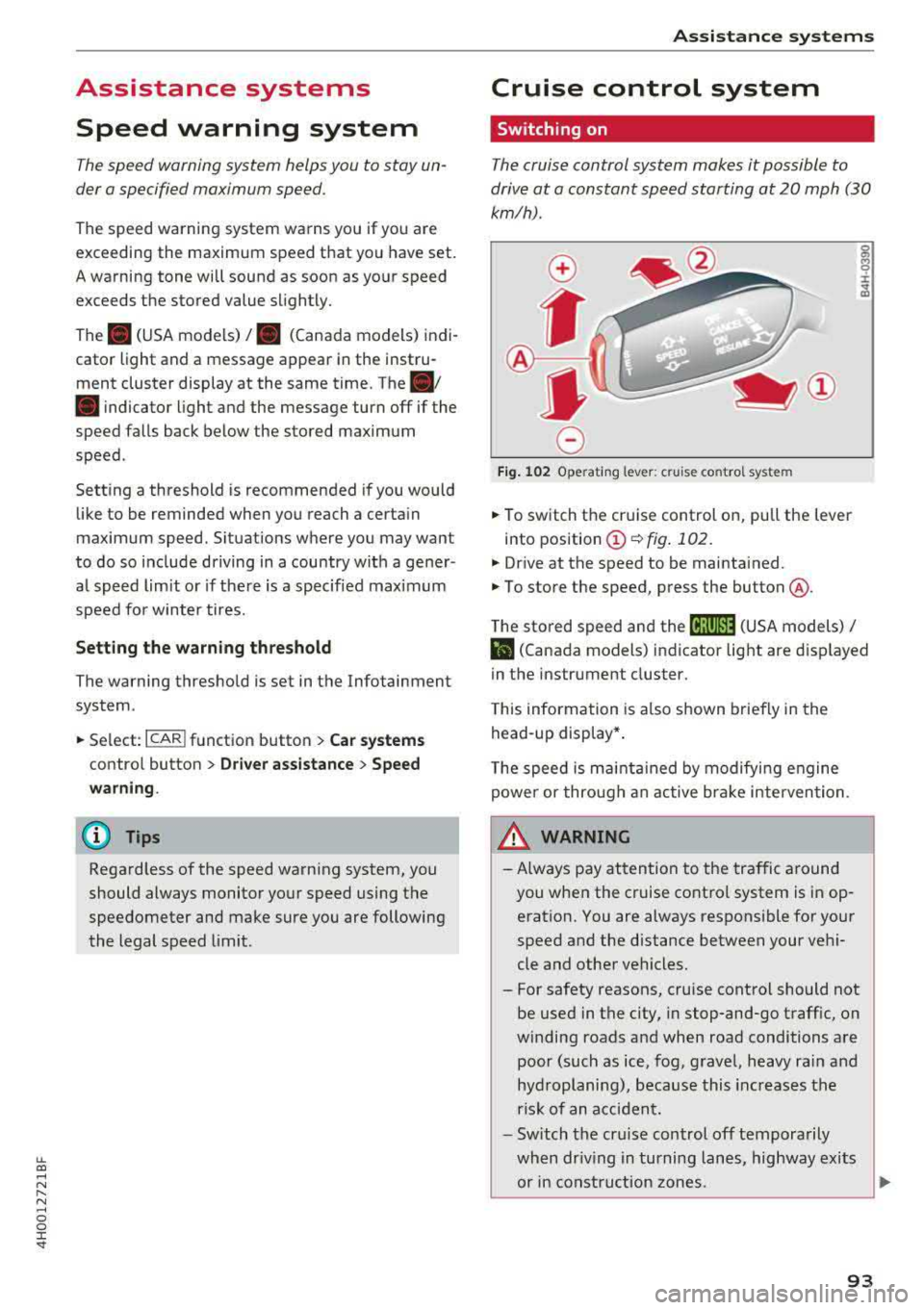
.. To switch the cruise control on, pull the lever
into position
(D ¢ fig. 102.
.. Drive at the speed to be maintained.
.. To store the speed, press the button @.
The stored speed and the
(ij;ji)M~ (USA models) /
l'I (Canada models) indicator light are displayed
in the instrument cluster.
This information is also shown briefly in the
head-up display* .
The speed is maintained by modifying engine
power or through an active brake intervention.
_.&. WARNING
-
-Always pay attention to the traffic around
you when the cruise control system is in op
eration. You are always responsible for your
speed and the distance between your vehi
cle and other vehicles.
-For safety reasons, cruise control should not
be used in the city, in stop-and-go traffic, on
winding roads and when road conditions are poor (such as ice, fog, gravel, heavy rain and
hydroplaning), because this increases the
risk of an accident.
-Switch the cruise control off temporarily
when driving in turning lanes, highway exits or in construction zones.
~
93
Page 96 of 356
Assistance systems
-Please note that unconsciously "resting"
your foot on the accelerator pedal prevents
the cruise control from braking. This is be
cause pressing the accelerator pedal over
rides the cruise control system.
- If a brake system malfunction such as over
heating occurs when the cruise control sys
tem is switched on, the braking function in
the system may be switched off. The rest of
the cruise control system funct ions remain
active as long as the
@;\IM~ (USA models) /
l'I (Canada models) indicator light is on.
(D Tips
The brake lights turn on when the brakes are
applied automatically.
Changing the speed
.,. To incr ease or decrease the speed in incre
ments, tap the lever toward
010 ¢ page 93,
fig . 102.
.. To increase or decrease the speed quickly, hold
the lever in the
0 10 direction until the de
s ir ed speed is displayed.
You can a lso press the accelerator pedal down to
increase your speed, for example if you want to
pass someone. The speed you set earlier w ill re
sume as soo n as you release the accelerator ped
al.
However, if you exceed your saved speed by 5
mph (10 km/h) for longer than 6 minutes, the
cru ise control system turns off temporarily.
The
green@;\1)~1~ (USA mode ls) !l'I (Canada mod
els) indicator light in the speedometer turns off
and the stored speed is maintained.
Preselecting a speed
You can pre-select your desired speed when the
vehicle is stationary.
.. Switch the ignition on .
.. Pull the lever into position (D i::> page 93,
fig. 102 .
.. To increase or decrease the speed, push the lev
er toward
0 10 .
94
.. To store the speed displayed, release the lever.
This function makes it possible , fo r example, to
save the speed you want before driving on the
highway. Once on the highway , activate the
cruise contro l by pulling the lever toward
(D.
Switching off
Deactivating temporarily
.. Press the brake pedal, or
.. Press the lever into position @(not clicked into
place)
¢ page 93, fig. 102, or
.. Dr ive for longer than 5 minutes faster than 5
mph (10 km/h) above the stored speed.
Switching off completely
.. Press the lever into position@(clicked into
place), or
.. Switch the ignition off .
The speed you stored will be maintained if the
cruise contro l has been switched off temporarily .
T o resume the stored speed, release the brake
pedal and pull the lever into position
(D.
Switching the ignition off will erase the stored
speed.
A WARNING
You sho uld only resume the stored speed if it
is not too high for existing traffic conditions.
Otherwise you can increase the risk of an acc i
dent.
Page 99 of 356
lL t:0 ....
"' ......
"' .... 0 0 :c '
Applies to: ve hicles with Audi adaptive cruise co ntro l
Fig. 105 Examp le: d riving into a curve
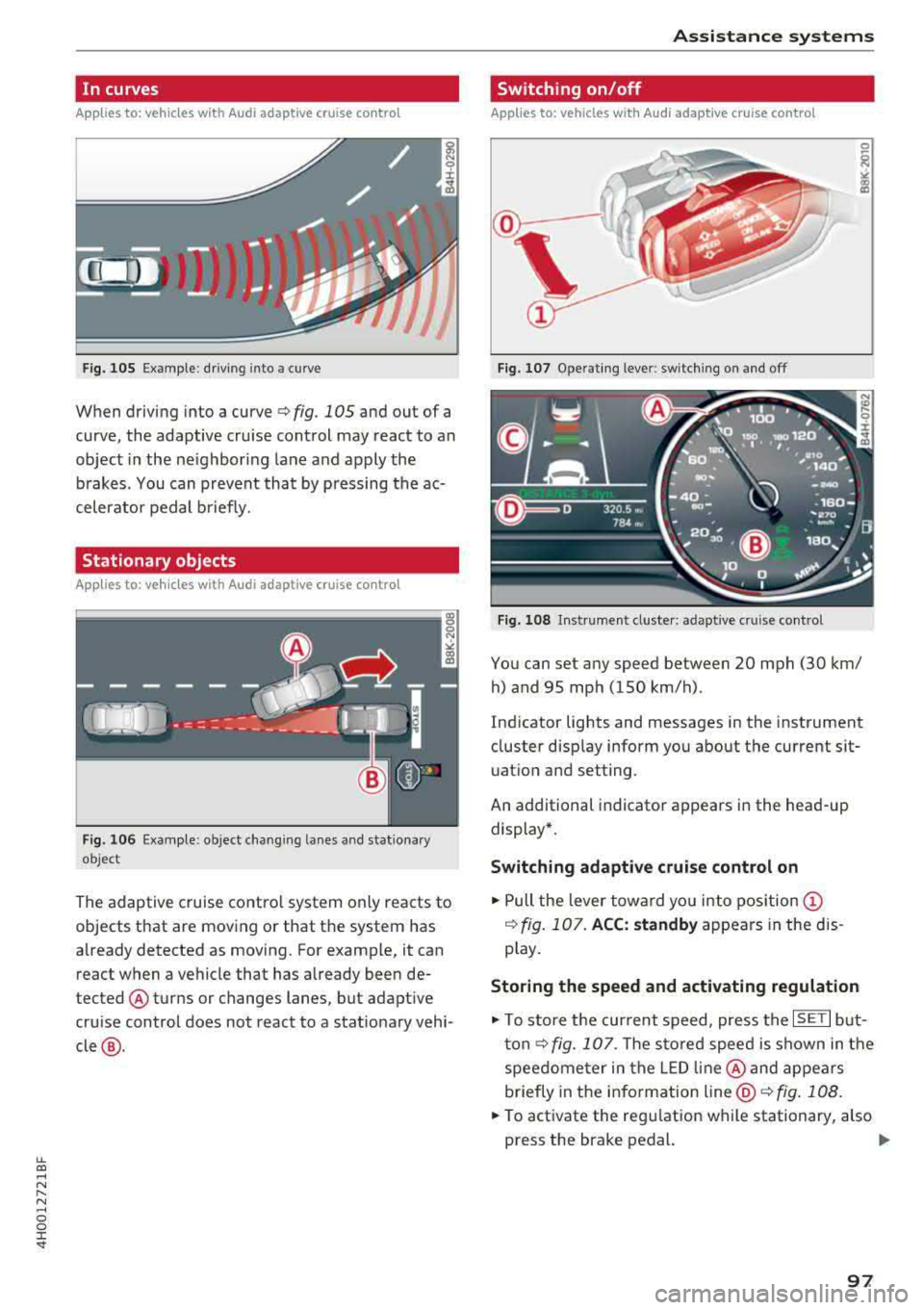
When driving into a curve <=> fig. 105 and out of a
curve, the adaptive cru ise control may react to an
object in the ne ighboring lane and apply the
b rakes. You can prevent that by pressing the ac
celerator pedal b riefly.
Stationary objects
A pp lies to: ve hicles with Audi adaptive cruise contro l
Fig. 1 06 Examp le : object chang ing lanes a nd stat iona ry
object
The adaptive cruise contro l system only reacts to
objects that are mov ing or that t he system has
already detected as moving. For example, it can react when a vehicle that has already been de
tected @turns or changes lanes, but adapt ive
cru ise control does not react to a stat ionary vehi
cle @.
Assi st a nce systems
Switching on/off
App lies to : vehicles wit h Audi ada ptive cr uise control
Fi g. 107 Ope rat ing lever: switch ing on and off
Fig . 108 In strume nt clus te r: adaptive cru ise control
You can set any speed between 20 mph (30 km/
h) and 95 mp h (150 km/h) .
Ind icator lights and messages in the instrument
cluster disp lay inform you about the current sit
uatio n and setting.
An additional indicator appears in the head-up display*.
Switching adaptive crui se control on
.,. Pull the lever towa rd yo u into pos ition (!)
<=> fig. 107. ACC: standb y appears in the d is
p lay.
Storing the speed and activating regulat ion
.,. To store the current speed, press the ISET I but
ton<=> fig. 107. T he sto red speed is shown in t he
speedome ter in the LED line @and appears
briefly in the info rmation
line @<=> fig. 108 .
... To act ivate the regulation wh ile stationary, also
press the brake pedal.
.,.
97
Page 100 of 356
Ass is tance sy stem s
Switch ing adaptive cruise control off
.,. Push the lever away from you into position @
until it clicks into place . The message
ACC: off
appears.
@ Indicator lights
It -adaptive cruise cont rol is switched on . No
objects a re detected ahead . T he stored speed is
main tained.
• -an object ahead was detected. The adaptive
cru ise control system regulates the speed and
d istance to the object ahead a nd accelerates/
b rakes a utomatically .
(ii-adaptive cruise control is switched on . An
object ahead was detec ted . Your vehicle rema ins
stopped and w ill not start dr iv ing a utomat ically .
•-The automatic braking is no t enough to
maintain a sufficient distance to an object ahead .
You must
i nte rvene ~ page 100, Driver interven
tion request.
© Instrument cluster display
If adaptive cruise control is not shown in the in
strument cluster display, you can call it up usi ng
the multifunction stee ring wheel b uttons
~ page 12.
Based on the graphics in the d isplay, you can de
termine if the system is ma inta ining a distance to
the object ahead and what that distance is .
No vehicl e -no object was detected ahead.
White vehicle -an ob ject was detected ahead.
Red vehicle -request for driver intervention
~ page 100 .
Both arrow s on the scale © indicate the distance
to the object ahead. No arrow appea rs when the
ve hicl e is o n an open road and there is no obje ct
ahead. If an object is de tected ahead, the arrow
moves on the scale.
The green zo ne on the scale indicates the sto re
d istance. For information o n chang ing the d is
tance, refer to
Q page 99 . If the distan ce se
lected is exceeded or not reached, the a rrow
moves into the red zone on the sca le .
98
A WARNING
If you press the !SET ! button when driving at
speeds below 20 mph (30 km/h), the veh icle
accelerates automatically up to 20 mph (30
km/h), wh ich is the minim um speed that can
be set .
(D Tips
-If you switch the ign it ion or the adaptive
cruise control sys tem off, the set speed is
erased fo r safety reasons .
-The electronic stabilization control (ESC)
and the an ti-slip-regulat ion (ASR) are auto
matically switc hed on when the adaptive
cruise cont rol is swi tched on.
Changing the speed
Applies to: vehicles with Audi adaptive cruise control
0
f
•
0
Fig. 10 9 Operat ing leve r: ch ang ing the speed
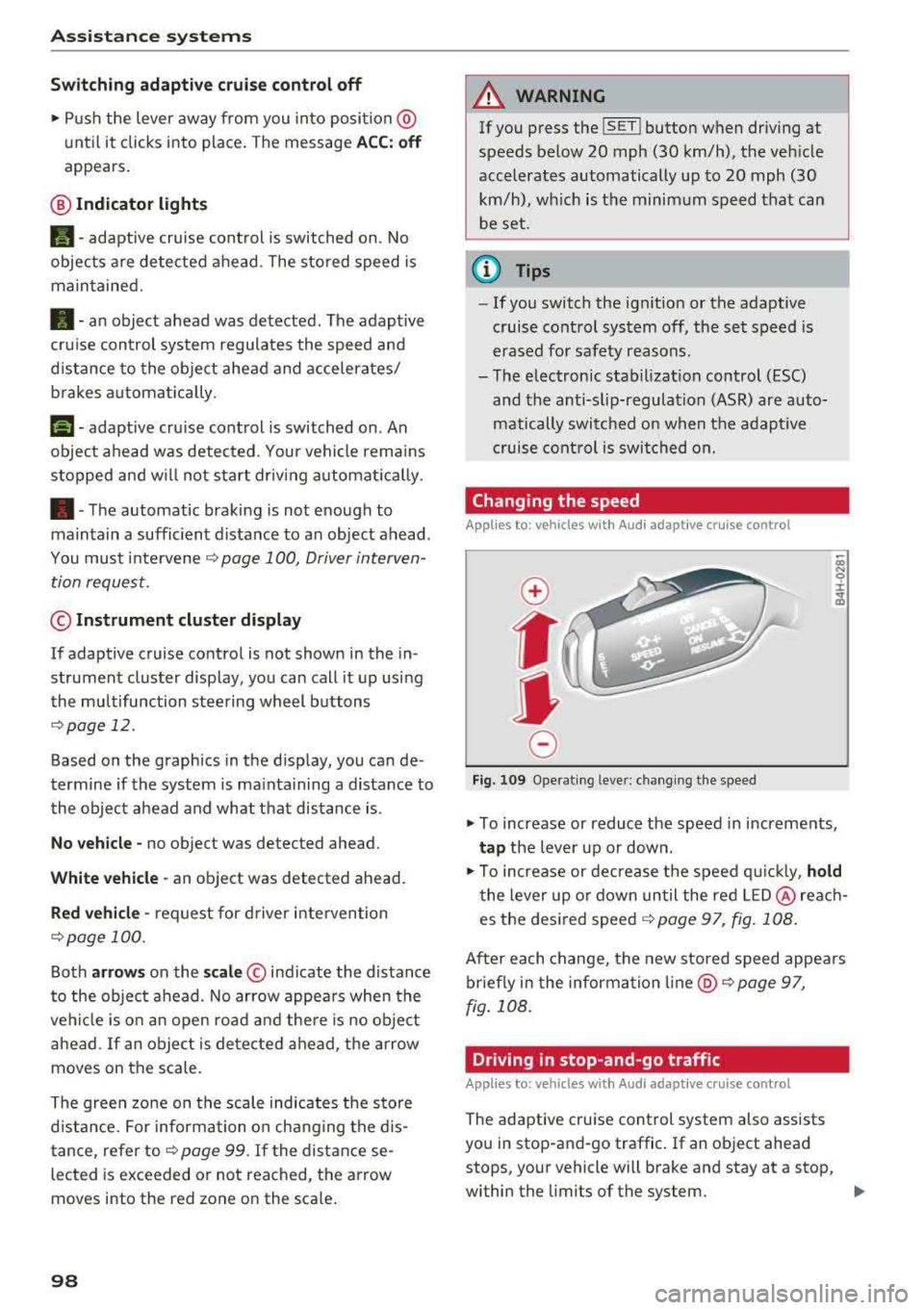
.,. To increase or reduce the speed in increments,
ta p the lever up or down .
.,. To increase or decrease t he speed q uickly, hold
t he lever up o r down un til the red LED @ reac h
es the desired
speed ~ page 97, fig. 108 .
After each change, the new stored speed appea rs
briefly in the information
li ne @ ~ page 97,
fig . 108 .
Driving in stop-and-go traffic
Applies to: vehicles with Audi adaptive cruise control
The adapt ive cru ise control system also assists
you in stop-and-go traffic . If an object ahead
stops, your vehicle will brake and stay at a stop,
within the limits of the system.
..
Page 102 of 356
Ass is tance sy stem s
~-~ ---Di sta nce 1: this setting corresponds
to a distance of 92 ft (28 m) when traveling at 62
mph (100 km/h), for example (time between: 1
second) .
~-- ~--Di stan ce 2: this setting corresponds
to a distance of 118
ft (36 m) when traveling at
62 mph (100 km/h), for example (time between:
1.3 seconds) .
~--- ~-Distance 3: this setting corresponds
to a distance of
164 ft (SO m) when traveling at
62 mph (100 km/h), for example (time between:
1.8 seconds) .
~--- -~ Distance 4 : This setting corresponds
to a distance of 210
ft (64 m) when traveling at
62 mph (100 km/h), (time d istance of 2.3 sec
onds).
A WARNING
Following other vehicles too closely increases
the risk of collisions and ser ious personal in
jury .
- Setting short distances to the traffic ahead
reduces the time and distance available to
br ing your vehicle to a safe stop and makes
it eve n mo re necessary to pay close atten
t ion to traffic.
- Always obey applicable traffic laws, use
good judgment, and select a safe following
distance fo r the traffic, road and weather
cond itio ns.
(D Tips
-Distance 3 is set automatically each time
you switch the ignit ion on.
-Your settings are automatically stored and
assigned to the remote control key being
used.
Selecting the driving mode
Applies to: vehicles with Audi adaptive cruise control
.. Se lect the des ired driving mode in dr ive se lect
¢ page 111 .
100
@ Tips
Your settings are automatically stored and as
signed to the remote contro l key being used.
Driver intervention request
Applies to: vehicles with Audi adaptive cruise control
Fig . 112 Instrument cluster : request for driver interven·
t ion
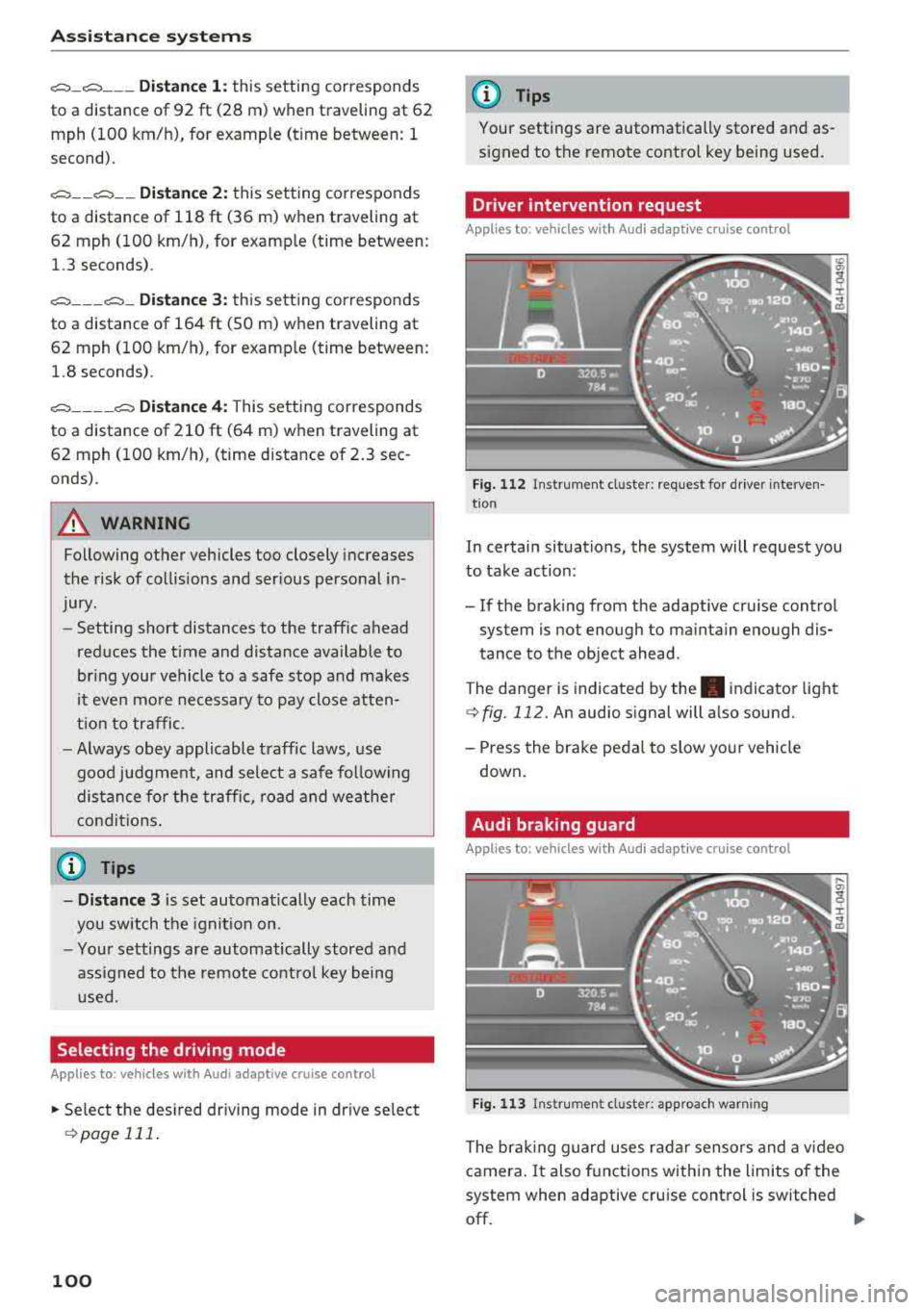
In certain situations, the system will request you
to take action:
- If the braking from the adaptive cru ise control
system is not enough to ma inta in enough dis
tance to the object ahead.
The danger is indicated by
the . indicator light
¢fig. 112. An audio signal will also sound.
- Press the brake peda l to slow yo ur vehicle
down .
Audi braking guard
Applies to: vehicles with Aud i adaptive cruise control
F ig . 113 In strume nt cl us ter: approach warning
The brak ing guard uses radar sensors and a video
camera .
It also functions within the limits of the
system when adaptive cru ise cont rol is switched
off.
IIJ,,
Page 103 of 356
u. co .... N
" N .... 0 0 :c '
When detected in time, the system can assess
dangerous sit uat ions where an object a head
brakes suddenly or if your own vehicle is traveling
at a high speed and approaching an object that is
mov ing more slowly. The brak ing guard does not
react if it cannot detect the situation.
The system advises you of various dangero us sit
uations :
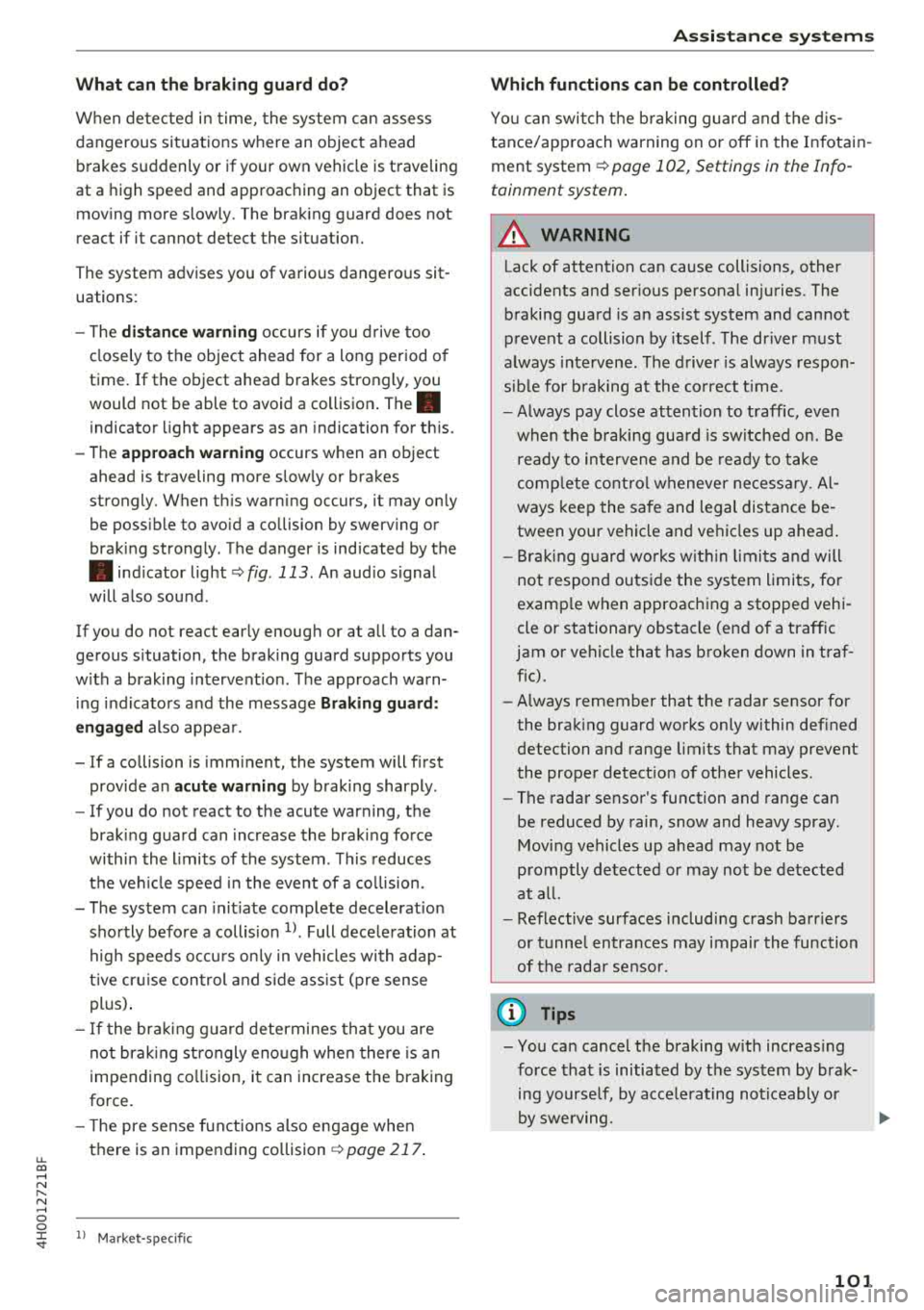
- T he
distan ce warning occurs if you d rive too
closely to the object ahead for a long period o f
time . If the object ahead brakes strongly, you
would not be able to avoid a collision .
The.
indicator light appears as an indication for th is.
- The
app roach wa rning occurs when an object
ahead is traveling more s low ly or brakes
strongly. When th is warning occurs, it may on ly
be poss ible to avoid a co llision by swerving or
braking strongly . The danger is indicated by the
• ind icator light ¢ fig . 113 . An aud io signal
will a lso sound .
If you do not react early enough or at a ll to a dan
ge rous situation, the braking guard suppo rts you
w ith a brak ing intervent ion . T he approach warn
i ng indicators and the message
Braking guard :
e ngaged
also appea r.
- If a co llision is imminent, the system will first
provide a n
acute warning by braking sharply .
- If you do not react to the acute warning, the
brak ing guard can increase the braking force
withi n the l imits of the system . This reduces
the vehicle speed in the event of a co llision.
- T he system can init iate complete decelerat io n
sho rtly befo re a collis ion
l) . Full dece le ration at
high speeds occu rs on ly in vehicles with adap
t ive cr uise con trol and s ide ass ist (pre sense
p lu s) .
-If the bra king g uard determines tha t you are
not brak ing st rongly eno ugh when there is an
impending co llision, i t can increase the brak ing
force.
- T he pre se nse f unctions also engage when
there is an impending collision
¢ page 217 .
ll Mark et-sp ecific
A ss istance systems
Which functions can be controlled?
Yo u can swi tch t he b raking guard and t he d is
tance/approach warning on or
off in the Infotain
ment system
¢ page 102, Settings in the Info
tainment system .
A WARNING
--
Lack of attention can cause collisions, other
accidents and ser ious personal in juries . The
braking guard is a n assist system and cannot
pr event a collision by itself . T he dr iver m ust
a lways inte rvene . The d river is always respon
sib le for b raking at the co rrect t ime .
- Always pay close atten tion to traffic, even
when the b raking gua rd is switched on. Be
ready to in tervene and be rea dy to take
comp lete co ntro l wheneve r ne cess ary. A l
ways keep the sa fe and legal distance be
tween your vehicle a nd ve hicl es up ahead .
- B raki ng g uard works w it hi n limi ts a nd will
not respond o uts ide the system limits, fo r
examp le when approac hing a stopped veh i
cle or stationary obstacle (end of a traff ic
jam or vehicle that has broken down in traf
fic).
- Always remember that the radar sensor for
the brak ing guard works only within def ined
detection and range limits that may prevent
the proper detect ion of other vehicles.
- The radar sensor's function and range can
be reduced by rain, snow and heavy spray.
Mov ing vehicles up ahead may not be
p romptly de tected or may no t be detected
at a ll.
- Reflective surfaces includi ng crash ba rriers
or tunne l entra nces may impair the function
of t he rad ar senso r.
(D Tips
- You can cancel the braking with increas ing
force tha t is initiated by t he sys tem by brak
ing yourse lf, by acce le ra ting not iceably or
by swe rving.
101
Page 129 of 356
u. co .... N
" N .... 0 0 :c '
Control (ESC)
Description
The ESC increases driving safety. It reduces the
risk of slipping and improves driving stability.
ESC detects critical situations such as when the
vehicle is oversteering and understeering or the
wheels are spinning. The vehicle is stabilized by
applying the brakes or reducing engine torque .
When the ESC engages,
the G1 indicator light
b links in the instrument cluster.
The following systems are integrated in the ESC:
Anti-lock braking system (ABS)
ABS prevents the whee ls from locking when brak
ing. The vehicle can still be steered even during
hard braking. Apply steady pressure to the brake
pedal. Do not pump the pedal. A pulsing in the
brake pedal indicates that the system is acting to
stabilize the vehicle .
Brake assist system
The brake assist system can decrease braking dis
tance. It increases braking power when the driver
presses the brake pedal quickly in emergency sit
uations . You must press and hold the brake pedal
until the dangerous situat ion is over . In veh icles
w ith adaptive cruise contro l*, the brake assist
system is more sensitive if the distance detected
to the vehicle dr iv in g ahead is too small. On
ve hicl es w ith activated and functioning night vi
sion assist*, the brake assist system can respond
more sensitively if there is a warning .
Anti-Slip Regulation (ASR)
ASR reduces engine power when the drive wheels
begin spinning and adapts the force to the road
conditions. This makes it easier to start, acceler
ate and drive up hills.
Electronic differential lock (EDL)
EDL applies the brakes to a wheel that starts
sp inn ing and transfers the drive power to the
other driving wheels. This functio n is not availa
ble at higher speeds.
Intelligent Technology
In extreme cases, EDL automatica lly switches off
to keep the brake on the braked whee l from over
heating. The vehicle is still working correct ly. ED L
will switch on again automatically when condi
tions have returned to normal.
Steering recommendation
T he ESC he lp s to stabilize the vehicle by changing
the steering torque .
In veh icles with dynamic steer ing*, ESC also
helps to stab ilize the steer ing in crit ica l situa
tions.
Selective wheel torque control
Selective wheel torque control is used when driv
in g on curves.
The front wheel on the inside of the curve or both
wheels on the inside of the curve are braked se
lectively as needed. This allows more precise driv
in g in curves . The applicable system may not acti
vate when dr iv in g in wet or snowy conditions .
Automatic post -collision braking system
Th e "automat ic post-collis ion braking system"
can help to reduce the risk of sliding and of addi
t iona l co llisions after an acc ident. If the airbag
control module detects a co llision above a certa in
vehicle speed, the veh icle is braked by the ESC.
The vehicle does not brake automatically if :
- the dr iver presses the acce lerator pedal, or
- the braking force generated by the pressed
brake pedal is greater than the braking force
that would be initiated by the system, or
- the ESC, the brake system or the vehicle electri
cal system are not functioning.
A WARNING
,--
- The ESC and its integrated systems cannot
overcome the lim its imposed by natural
p hys ical laws. This is especially important
on slippery or wet roads. If the systems be
g in acting to stabilize your vehicle, you
should immediately alter your speed to
match the road and traffic conditions. Do
not let the increased safety provided tempt
127
Page 131 of 356
u. co .... N
" N .... 0 0 :c '
New brake pads
New brake pads do no t ac hieve t heir f ull b raking
effect during the firs t 25 0 mi (4 00 km). They
must be "b roken
in" fi rst . The b rea k-in per io d can
be considerably longe r for vehicles with ce ram ic
brake roto rs*. However, yo u can compensate for
the slightly reduced br aking fo rce by p ressing
firm ly on the brake pedal. Avo id heavy braking
d uring the brea k-in period .
Wear
Brake pad wear depends largely on the way the
ve hicle is driven and on operat ing cond itions.
This is especially true if you are driving frequently
i n the c ity and on curves o r with a sporty driving
style .
Operating noise
Noises may occur when bra king depend ing on the
speed, braking force and outs ide cond itions s uch
as temperature and humidity .
Noises may become more appare nt at lowe r
speeds d ue to the nature of the mater ia ls in the
ceramic brake rotors*.
Effect of water and road salt
I n ce rtain s it u at ions, for ex ample a fter dr iving
throu gh water, in heavy ra in, afte r overnig ht con
densat io n or after washing your car, the bra king
effect can be red uced by moisture or ice on the
brake rotors and b ra ke pads. The brakes must be
"dr ied" fi rst w it h a few careful brake applica
tions .
At highe r speeds and with the windsh ie ld w ipers
turned on, the brake pads press aga inst the brake
rotors for a sho rt amount of time. T his action,
which is not felt by the d rive r, happens a t regular
in te rvals a nd ens ures a bette r reac tion time fo r
the bra kes in wet weat her.
The braking ef fect can also be reduced if you are
d riving on salted roads and you do not apply t he
b rakes fo r long pe riods of time . The laye r of sa lt
on the br ake ro to rs and pads must be wo rn off
fi rs t when the br akes are app lied.
Intelligent Technology
Du e to its s urface, the ceram ic b rake rotor * ab
sorbs moistu re in ce rtain s ituations. The refore,
t h ere w ill tempora rily be less brak ing fo rce t han
whe n the brakes are d ry . Yo u can compensate for
t hi s by press ing t he b rake pedal harder.
Corrosion
L eaving t he vehi cle pa rked fo r lo ng p eriods o f
time, low mileage and avoidin g heavy b raking
can contrib ute to corros ion on the b rake roto rs
and to dirty brake pads.
If you usu a lly avoid heavy bra king or if the re is
cor rosion prese nt, occasiona l heavy bra king at
high speeds is recommended to clean the b ra ke
r oto rs and pads
c:> ,& .
Brake system malfunction
If
you notice that the br ake pe dal trave l has sud
denly in crease d, then a brake circuit in the dua l
c ir cuit b rake system may have malfu nctioned .
Drive to an authorized A udi dealer or autho rized
Audi Se rvice Facility immed iate ly to have the
prob lem cor rected . On the way there, drive w ith
red uced speed and kee p in mind that you will
need a longer dis tance to stop an d you will need
to press the bra ke pe dal harder.
Low brake fluid level
When the bra ke fluid level is low, malfu nctions in
the b rake system may occur . T he b rake fl uid level
i s e lec tron ically moni to red .
Brake booster
The brake booster ampli fies t he p ress ure you ap
ply to the brake pedal. It on ly works w hen the en
gine is runn ing.
A WARNING
-
- Onl y app ly the brakes for the purpos e of
cleani ng the bra ke sys tem when road and
t raffic cond ition s permi t. You mu st not en
dan ger oth er r oad users . T hi s incr ea ses the
r isk of a n accid ent.
- N eve r let t he ve hicle roll wh ile th e e ngi ne is
st opp ed bec au se this incr eas es th e risk o f an
a ccide nt.
ll),
129
Page 132 of 356
Intellig ent T echn olo gy
- New brake pads do not achieve their full
braking effect during the first 250 mi
(400 km). They must be "broken in" first.
However, you can compensate for the
sl ightly reduced brak ing force by pressing
firmly on the brake pedal. Avoid heavy brak
i ng dur ing t he break- in per iod.
- Certa in weather and operat ing cond it ions
such as dr iv ing through water, driving in
heavy ra in or driving after washing your ve
hicle can impair the effectiveness of the
brakes . In the winter, ice may build up on
the brake pads, rotors and drums . Check
these components by braking carefu lly. Ap
plying the brakes carefully severa l times
dr ies the brakes and removes ice bu ild-up.
- The effic iency of the brakes can also be im
paired by driving for long stretches on roads
covered w ith salt w ithout using the brakes.
You can remove salt deposits from the brake rotors and pads by carefully applying
the b rakes severa l t imes .
- If the front spo iler is damaged or you install
another spoiler, make sure the front wheel
bra kes are vent ilated properly. Otherwise,
the brake system could ove rheat, w hich re
duces the ir effectiveness.
- Failure of a b rake circuit impa irs b raking
perfo rmance, which inc reases brak ing dis
tance . Avoid driving the vehicle and have it
towed it to the nearest authorized Audi
dealer or authorized Audi Service Facility .
- If the brake booster is not working, you will
have to press m uch harder on the brake
peda l to compensate for the lack of the
booster.
@ Note
- Never let the brakes " rub" by pressing the
pedal light ly when braking is not actually
necessary. This causes the brakes to over
heat and increases braking distance and
causes wear.
- Before driving downhill a long distance on a
steep hill, decrease your speed and select a l ower gear. This makes use of the engine
braking effect and relieves the brakes. If
130
you need to brake add itiona lly, brake in in
terva ls and not continuous ly .
(D Tips
- If the bra ke boos ter is not wor king, you
must press the brake peda l with much more
force than normal.
- If you retrof it your vehicle with a front spoi l
er, wheel covers or simi lar items, make sure
that the air flow to the front wheels is not interrupted. Otherwise the brake system
can become too hot.
Electromechanical
steering, dynamic
steering
The electromechonicol steering supports the
driver's steering movements.
Power steering adapts electronically based on
the vehicle speed .
Indicator lights and messages
• Do not drive vehi cle: S tee rin g defect ive
If this indicator light turns on and stays on and
th is message appears, the power steering may
have failed .
Stop the vehicle in a safe location as soon as pos
s ible. Do
not conti nue driving. See an authorized
Audi dealer or authorized Audi Service Fac il ity for
ass istance.
l;rfl St ee ring: System faul t You ca n cont inue
dr ivi ng
If the indicator light turns on and the message
appears, the steering wheel may be more diffi
cu lt to move or more sensitive than usual. The
steering wheel may also be at an angle when driv ing stra ight .
Drive slowly to an authorized Audi dea ler or au
thori zed Audi Serv ice Facility to have the mal
funct io n corrected.
'-r-ij Dynamic stee ring: Init ializing
If the indicato r light is blinking and this message
appears, dynamic steering* is being initialized.
IJ>-