lights AUDI A8 2018 Service Manual
[x] Cancel search | Manufacturer: AUDI, Model Year: 2018, Model line: A8, Model: AUDI A8 2018Pages: 356, PDF Size: 54.71 MB
Page 130 of 356
Intelligent Technology
you into taking risks. T his could increase
your risk of a co llision.
- Please note the risk of a co llision increases
when driving fast, especially through curves
and on slippery or wet roads, and when driv
ing too close to objects ahead. The ESC and
its integrated systems cannot always pre
vent collisions - there is still a risk of acc i
dents!
- Press the accelerator pedal carefully when
acce lerating on even, slippery surfaces such
as ice and snow. The drive wheels can spin
Switching on and off
even when these control systems are instal
led and this can affect driving stability and
increase the risk of a collision.
(D Tips
- Th e ABS and ASR only function correct ly
when a ll four wheels have a simi lar wear
condition. Different tire sizes can lead to a
reduction in engine power.
- You may hear noises when the systems de
scribed are working.
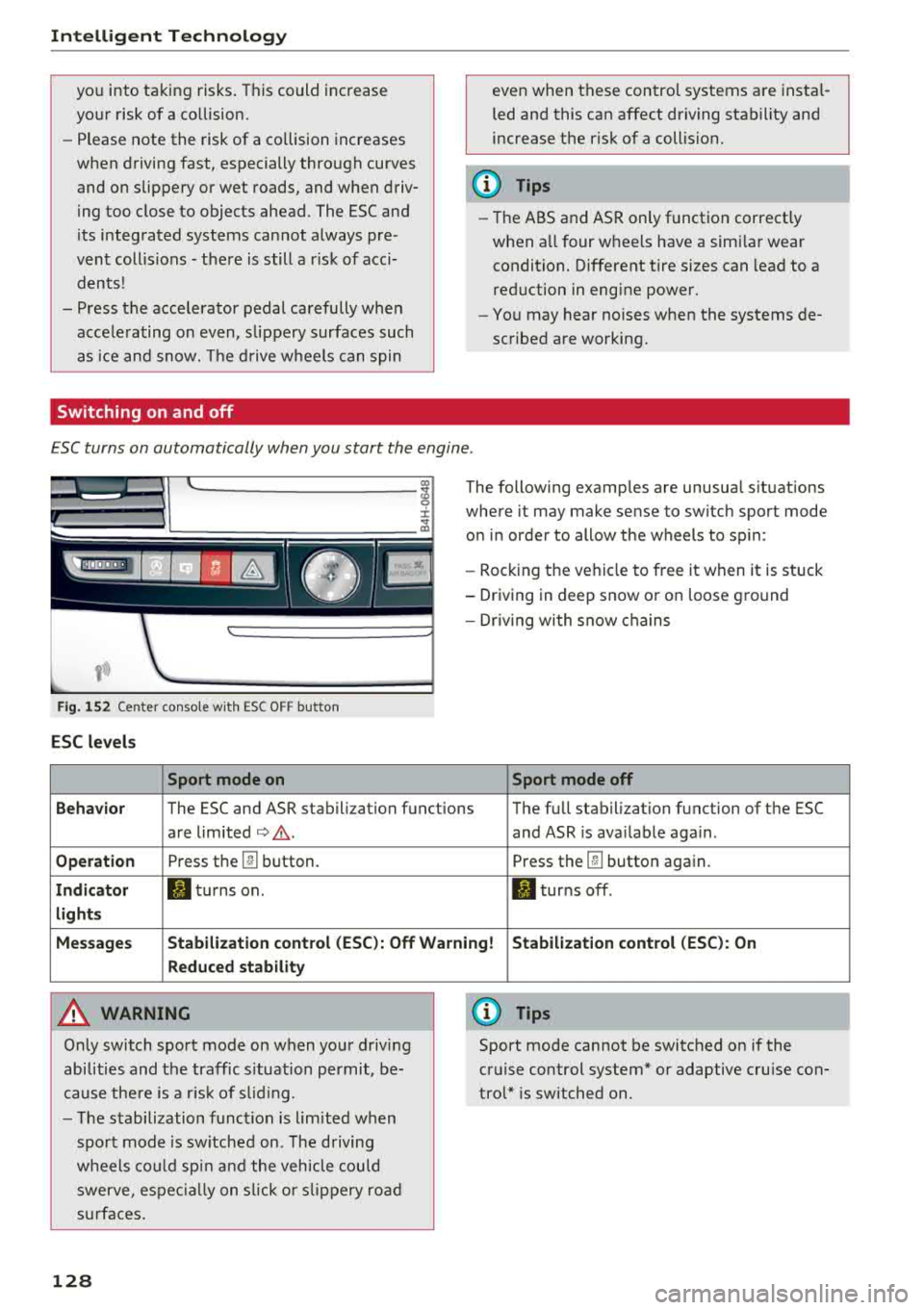
ESC turns on automatically when you start the engine .
Fig . 152 Center conso le wit h ESC O FF but ton
ESC levels
Sport mode on
The following examples are unusual situations
where it may make sense to switch sport mode
on in order to allow the wheels to sp in:
- Rocking the ve hicle to free it when it is stuck
- Driving in deep snow or on loose ground
- Dr iv in g with snow chains
Sport mode off
Behavior
The ESC and ASR stabilization functions The full stabilization function of the ESC
are limited
¢ .&. . and ASR is ava ilable aga in .
Operation Press th e @ button. Press the@button again.
Indicator II turns on. II turns off .
lights
Messages Stabilization control (ESC): Off Warning! Stabilization control (ESC): On
Reduced stability
A WARNING
Only switch sport mode on when your driving
abilities and the traffic s ituation permit, be
cause there is a risk of s liding.
- The stabilization function is l im ited when
sport mode is sw itched on. The driving
whee ls could spin and the veh icle could
swerve , espec ially on slic k or slippery road
s urfac es.
128
0) Tips
Sport mode cannot be switched on if the
cruise control system* or adaptive cruise con
trol* is switched on .
Page 132 of 356
Intellig ent T echn olo gy
- New brake pads do not achieve their full
braking effect during the first 250 mi
(400 km). They must be "broken in" first.
However, you can compensate for the
sl ightly reduced brak ing force by pressing
firmly on the brake pedal. Avoid heavy brak
i ng dur ing t he break- in per iod.
- Certa in weather and operat ing cond it ions
such as dr iv ing through water, driving in
heavy ra in or driving after washing your ve
hicle can impair the effectiveness of the
brakes . In the winter, ice may build up on
the brake pads, rotors and drums . Check
these components by braking carefu lly. Ap
plying the brakes carefully severa l times
dr ies the brakes and removes ice bu ild-up.
- The effic iency of the brakes can also be im
paired by driving for long stretches on roads
covered w ith salt w ithout using the brakes.
You can remove salt deposits from the brake rotors and pads by carefully applying
the b rakes severa l t imes .
- If the front spo iler is damaged or you install
another spoiler, make sure the front wheel
bra kes are vent ilated properly. Otherwise,
the brake system could ove rheat, w hich re
duces the ir effectiveness.
- Failure of a b rake circuit impa irs b raking
perfo rmance, which inc reases brak ing dis
tance . Avoid driving the vehicle and have it
towed it to the nearest authorized Audi
dealer or authorized Audi Service Facility .
- If the brake booster is not working, you will
have to press m uch harder on the brake
peda l to compensate for the lack of the
booster.
@ Note
- Never let the brakes " rub" by pressing the
pedal light ly when braking is not actually
necessary. This causes the brakes to over
heat and increases braking distance and
causes wear.
- Before driving downhill a long distance on a
steep hill, decrease your speed and select a l ower gear. This makes use of the engine
braking effect and relieves the brakes. If
130
you need to brake add itiona lly, brake in in
terva ls and not continuous ly .
(D Tips
- If the bra ke boos ter is not wor king, you
must press the brake peda l with much more
force than normal.
- If you retrof it your vehicle with a front spoi l
er, wheel covers or simi lar items, make sure
that the air flow to the front wheels is not interrupted. Otherwise the brake system
can become too hot.
Electromechanical
steering, dynamic
steering
The electromechonicol steering supports the
driver's steering movements.
Power steering adapts electronically based on
the vehicle speed .
Indicator lights and messages
• Do not drive vehi cle: S tee rin g defect ive
If this indicator light turns on and stays on and
th is message appears, the power steering may
have failed .
Stop the vehicle in a safe location as soon as pos
s ible. Do
not conti nue driving. See an authorized
Audi dealer or authorized Audi Service Fac il ity for
ass istance.
l;rfl St ee ring: System faul t You ca n cont inue
dr ivi ng
If the indicator light turns on and the message
appears, the steering wheel may be more diffi
cu lt to move or more sensitive than usual. The
steering wheel may also be at an angle when driv ing stra ight .
Drive slowly to an authorized Audi dea ler or au
thori zed Audi Serv ice Facility to have the mal
funct io n corrected.
'-r-ij Dynamic stee ring: Init ializing
If the indicato r light is blinking and this message
appears, dynamic steering* is being initialized.
IJ>-
Page 144 of 356
Voice recognition s ystem
Voice recognition system
Operating
A pplies to: ve hicles w ith vo ice recognition system
You con operate many Infotainment functions
conveniently by speaking.
R equirement: the ignition and the MM I must be
switched
on <=> page 135, there must be no phone
call in progress and the parking system m ust not
be active .
~ Switching on : briefly press th e ~ button @
<=> page 11, fig. 7 on the multifunction steering
whee l* and say the desired command after the
Beep .
~ Sw itching off : press and hold the~ button.
Or: press any button on the MMI control panel.
~ Canceling : press the~ button a nd say a new
command.
Or: say the command Cancel.
Input assis tance
The system gu ides you through the input with
visual and audio feedback .
-Vi sual inpu t as sistan ce : after t urning on voice
recognition, a d isp lay with a select ion of possi
ble commands appears in the Infotainment dis
play . The command d isplay can be turned on or
off in the ma in menu using the
MMI setup con
trol button .
-Audio input a ssistance : to have the poss ible
comma nds read, turn the voice recogn ition sys
tem on and say
Help.
For the s ystem to understand you:
Speak clearly and dist inct ly at a normal volume.
Speak louder when driving faster.
Emphasize the words in the commands even ly
and do not leave long pauses.
Do not speak a command when t he voice recogni
tion system is making an anno uncement.
C lose t he doors, the windows a nd the sunroof* to
reduce bac kg round noise . Make s ure t hat passen
gers a re not speaking when yo u are giving a voice
command.
142
Do not d irect the air vents toward the hands -free
microp hone, which is on the roof headliner nea r
t h e front interior lights .
Only use the system from the dr ive r's seat be
ca use the hands -free microphone is directed to
ward that seat .
Additional settings
Additional settings, s uch as individual speech
training
based on yo ur voice, Display sp eech
command s
or the prompt volume , can be adjust
ed in the main menu using the
MMI setup con
tro l button
<=> page 206.
A WARNING
- Direct your full attention to dr iv ing. As the
driver, you have complete responsibility for
safety in traff ic. On ly use the functions in
such a way that you a lways maintain com
p lete co ntro l over your veh icle in all traff ic
situat ions.
- Do not use the voice recognition system in
emergencies beca use your voice may change
in st ressfu l situ at ions.
It may t ake longe r to
d ial t he number or th e sys tem m ay no t be
a bl e to d ial it a t all. Dia l th e emer gen cy
number manually.
© Tips
- Th e dia log pauses w hen the re is a n in com
ing pho ne call and will con tinue if you ig
nore the call. T he dialog en ds if yo u answer
t h e ca ll.
- Yo u ca n sele ct an i tem in the list using ei
ther the vo ice recognit ion sys tem o r the
cont ro l knob .
Command overview
information
App lies to: vehicles wit h voice recog nitio n syste m
The following overv iews describe the commands
that can be used to operate the MMI using the
vo ice recog nition system .
A lternative commands are separated by a
" I" , for
example, say:
Telephone I (or) Na vigation I (or)
R adio .
Page 168 of 356
Navigation
Navigation
Opening navigation
Applies to: vehicles with navigation system
The navigation system directs you to your desti
nation , around traffic incidents and on alterna
tive routes, if desired .
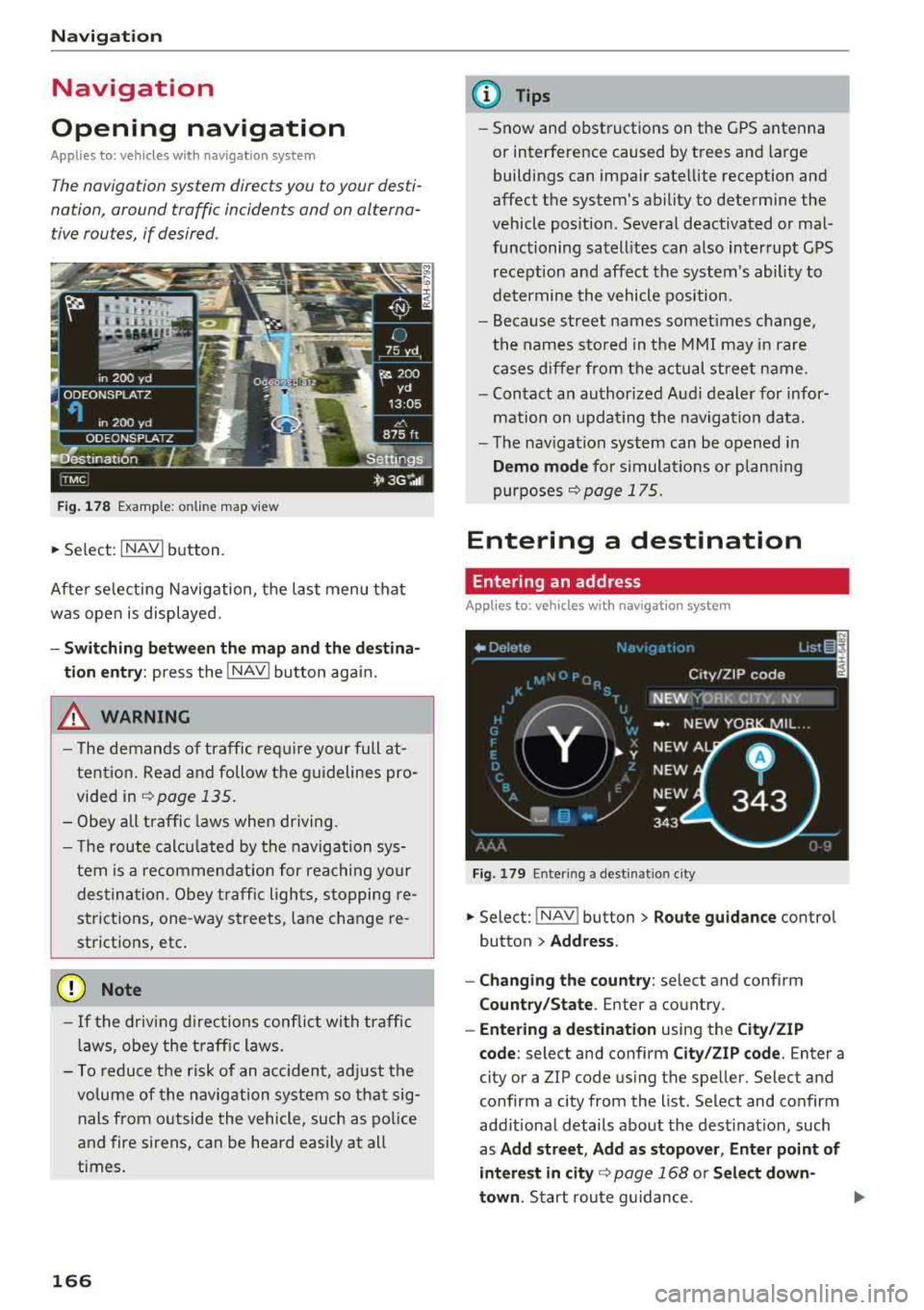
Fig. 178 Example: on lin e map v iew
.. Select : INAVI button.
After selecting Navigation, the last menu that
was ope n is displayed.
- Switching between the map and the destina
t ion entry:
press the !NAV ! button again.
,&. WARNING
-The demands of traffic require your full at
tention. Read and follow the guidelines pro
vided in
i=;,poge 135.
-Obey all traffic laws when driving.
- The route calcu lated by the navigation sys-
tem is a recommendat ion for reaching your
destination. Obey traffic lights, stopping re
strictions, one-way streets , lan e change re
strictions, etc.
@ Note
- If the driving directions conflict with traffic
laws, obey the traffic laws.
- To reduce the risk of an accident, adjust the
volume of the navigation system so that sig
nals from outside the vehicle, such as police
and fire sirens, can be heard easily at all
times.
166
.
@ Tips
- Snow and obstructions on the GPS antenna
or interference caused by trees and large
buildings can impair satellite reception and
affect the system's ability to determine the
vehicle position. Several deactivated or mal
functioning satellites can also interrupt GPS reception and affect the system's ability to
determine the vehicle position .
- Because street names somet imes change,
the names stored in the MMI may in rare
cases differ from the actual street name.
- Contact an authorized Audi dealer for infor
mation on updating the navigation data.
- The navigation system can be opened in
Demo mode for s imulations or plann ing
purposes
re;, page 175.
Entering a destination
Entering an address
Applies to : vehicles with navigat ion system
Fig . 179 En ter ing a destina tion city
.. Select: !NAV ! button > Route guidance contro l
button
> Address .
- Changing the country:
select and conf irm
Country/State . Enter a country .
- Entering a destination using the City/ZIP
code:
select and confirm City/ZIP code. Enter a
city or a ZIP code using the spe ller. Select and
confirm a city from the list. Select and confirm
add itional details about the dest ination, such
as
Add street , Add as stopover, Enter point of
interest in
city re;, page 168 or Select down
town .
Start route guidance.
Page 185 of 356
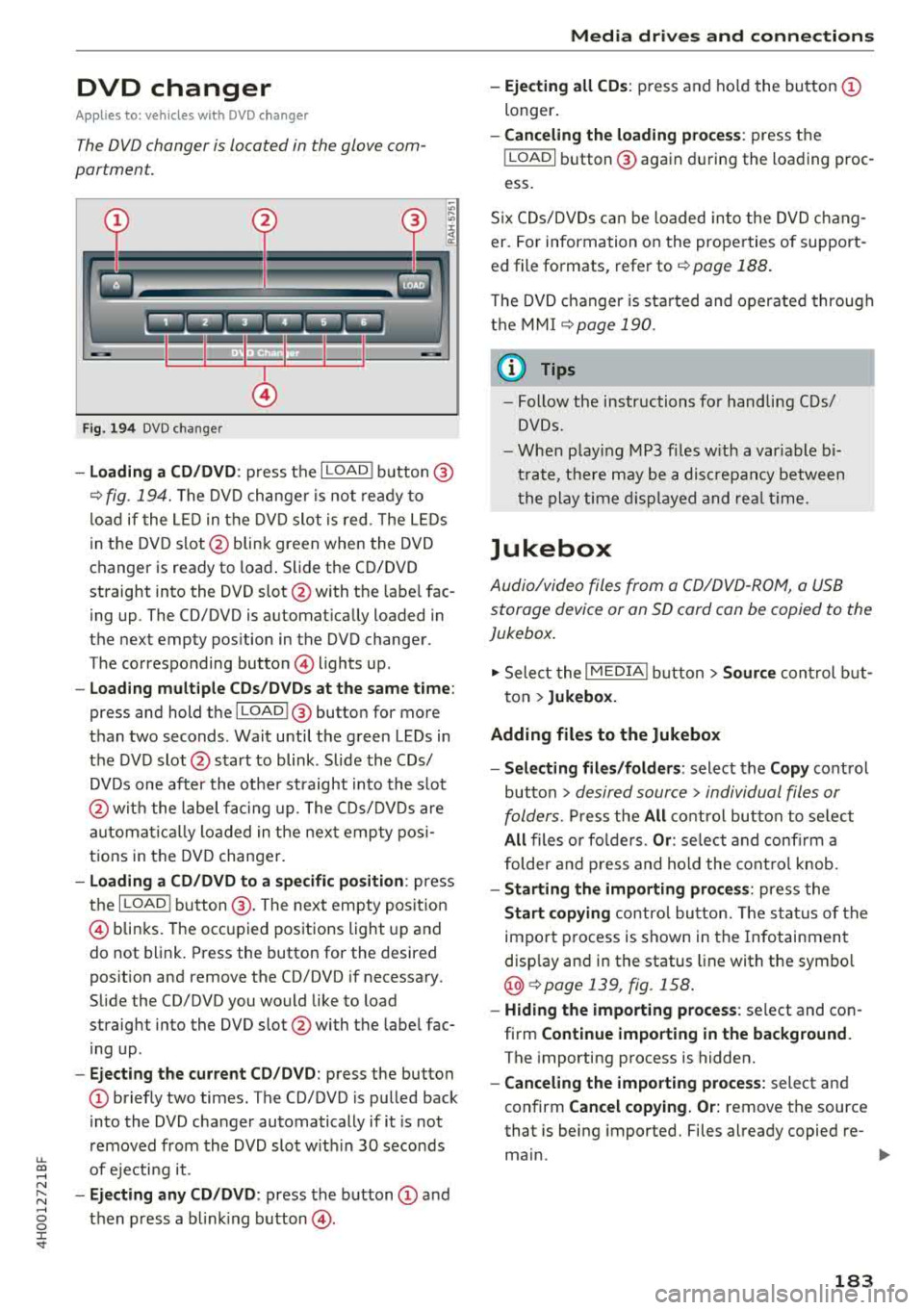
DVD changer
Applies to: vehicles wit h DVD changer
The DVD changer is located in the glove com
partment.
0
F ig. 194 DVD changer
-Loading a CD/DVD : press the I LOADI button @
¢ fig. 194. The DVD changer is not ready to
load if the LED in the DVD slot is red . T he LEDs
in the DVD slot @ blink green when the DVD
changer is ready to load . Slide the CD/DVD
straight into the DVD slot @with the labe l fac
ing up. The CD/DVD is automat ically loaded in
the next empty pos ition in the DVD changer .
The corresponding button © lights up .
-Load ing mult iple CDs/DVDs at the same time:
press and hold the I LOADl @button for more
than two seconds . Wait until the green LEDs in
the DVD slot@start to blink . Slide the CDs/
DVDs one after the othe r straight into the s lot
@ wit h the label facing up. The CDs/DVDs are
a ut omatica lly loaded in t he next empty posi
tions in the DVD changer.
-Loading a CD/DVD to a specific position: press
the I
L OAD ! button @. The next empty posit ion
© blinks. The occupied positions light up and
do not blink. Press the button for the desired
position and remove the CD/DVD if necessary.
Slide the CD/DVD you would like to load
straight into the DVD slot @with the label fac
ing up .
-Ejecting the current CD/DVD: press the button
CD briefly two times. The CD/DVD is pulled back
i nto the DVD changer automatically if it is not
removed from the DVD slot with in 30 seconds
u.
~ of ejecti ng it .
~ -Ejecting any CD/DVD : press the button CD and
~ then press a blinking button @. 0 :c '
-Ejecting all CDs : press and ho ld the button CD
longer .
-Canceling the loading process : press the
!LOAD! button @ again during the loading proc
ess.
Six CDs/DVDs can be loaded into the DVD chang
er. For information on the properties of support
ed file formats, refer to
¢ page 188.
T he DVD changer is sta rted and operated through
the MMI
¢ page 190.
@ Tips
-Follow the instructions for handling C Ds/
DVDs.
- When playing MP3 files with a variable bi
trate, there may be a disc repancy between
th e play time displayed and rea l time.
Jukebox
Audio/video files from a CD/DVD-ROM, a USB
storage device or an SD card can be copied to the
Jukebox.
.,. Select the I MEDIAi button> Source control but
ton >
Jukebox.
Adding files to the Jukebox
- Selecting files/folders :
select the Copy control
button
> desired source > individual files or
folders.
Press the All control button to select
All files or folders. Or : select and confirm a
folder and press and hold the control knob.
-Starting the importing process : press the
Start copying control button. The status of the
import process is shown in the Infotainment
disp lay and in the status line with the symbo l
@¢page 139, fig . 158.
-Hiding the importing process : select and con
firm
Continue importing in the background.
The importing process is hidden.
-Canceling the importing process: select and
confirm
Cancel copying. Or: remove the source
that is being imported. Files already copied re-
main.
IJI>-
183
Page 210 of 356
Drivin g saf ety
Driving safety
Basics
Safe driving habits
Please remember -safety first!
The individua l safety features of your vehicle can
work together as a system to help protect you
and your passengers in a wide range of accidents.
These features cannot work as a system if they
are not always correctly adjusted and correctly
used .
This chapter contains important informat ion,
tips, instruct ions and warn ings that you need to
read and observe for your own safety, the safety
of you r passengers and others . We have summar
ized here w hat you need to know about safety
be lts, a irbags, child restra ints as well as child
safety. Yo ur safety is for us
priority number 1. Al
ways observe the information and warnings in
this section -for your own safety as we ll as that
of your passengers.
The information in this section applies to all
model versions of your vehicle . Some of the fea
tures described in this sections may be standard
equipment on some models, or may be optional
equ ipment on others. If you are not sure, ask
your author ized Audi dealer.
A WARNING
- Always make sure that you follow the in
structions and heed the WARNINGS in th is
Manua l.
It is in your interest and in the in
te rest of your passengers .
-
-Always keep the complete Owner's Litera
tu re in you r A udi when you lend or se ll you r
vehicle so that this import ant information
will always be available to the d river and
passengers.
- Always keep the Owner 's lite rature h andy so
that you can find it easily if you have ques
tions .
208
Important things to do before driving
Safety is everybody's job! Vehicle and occupant
safety always depends on the informed and care
ful driver .
For your safety and the safety of your passen
gers,
bef ore dri ving alw ays:
.. Make sure that a ll lights and signals are operat
ing correctly .
.. Make sure that the tire pressure is correct.
.. Make sure that all windows are clean and afford
good vis ibility to the outs ide .
.. Sec ure all luggage and othe r items ca refully
¢ page 65, ¢page 63 .
.. Make sure tha t noth ing ca n interfere wi th the
peda ls .
.. Adjust front seat, head restraint and mirrors
correctly for your height.
.. Instruct passengers to adjust the head re
straints according to their he ight.
.. Make sure to use the right child restraint cor
rectly to protect
children ¢ page 249, Child
safety .
• Sit proper ly in yo ur seat a nd make sure t hat
your passenge rs do the same
¢ page 54, Seats
and storage.
.. Fasten your sa fety belt and wear it p roperly . Al
so instruct your passengers to fasten their safe
ty be lts properly
¢ page 219 .
What impairs driving safety?
Safe driving is directly related to the condition of
the vehicle, the driver as well as the driver's abili
ty to concentrate on the road without being dis
tracted.
The driver is responsib le for the safety of the ve
hicle and a ll of its occupants. If your ability to
drive is impa ired, safety risks for everybody in the
vehicle increase and you a lso become a hazard to
everyone else on the road
¢ _&. . Therefore:
.. Do not let yourse lf be distracted by passenge rs
or by using a cellular telephone .
.. NEVER drive when your driving ability is im
paired (by med ications, alcohol, drugs, etc .) .
.. Observe all traffic laws, rules of the road and
speed lim its and plain common sense .
.,.
Page 221 of 356
u. co .... N
" N .... 0 0 :c '
General information
Always wear safety belts!
Wearing safety belts correctly saves lives!
This chapter explains why safety be lts are neces
sary, how they work and how to adjust and wear
them correctly.
~ Read all the information that follows and heed
all of the instructions and WARNINGS.
A WARNING
Not wearing safety belts or wearing them im
properly increases the risk of serious personal
injury and death.
- Safety belts are the s ingle most effective
means ava ilable to reduce the risk of serious
injury and death in automobi le accidents.
For your protection and that of your passen
gers, always co rrect ly wea r safety be lts
w hen the veh icle is mov ing.
- Pregnant wome n, in ju red, o r physically im
paired persons mus t also use safety be lts.
Lik e al l vehicle oc cupan ts, they are mo re
li kely to be serio usly injured i f th ey do no t
wear safety be lts . The best way to protect a
fetus is to protect the mothe r -throug hout
the ent ire pregnancy.
Number of seats
Your Aud i has a total of five seating positions:
two in the front and three in t he rear. In some
veh icles, there are four seat ing positions: two in
the fro nt and two in the rear . Each seati ng posi
tion has a safety belt.
A WARNING
N ot we aring safety bel ts or wear ing them im
pro perly in cre ases the risk of ser io us pe rsonal
inju ry and dea th.
- Never st rap more th an one pe rso n, includ
ing sm all c hildr en, in to any be lt.
It is espe
c ially dangerous to place a safety belt over a
child sitting on your lap .
Safet y be lts
- Never let more peop le r ide in the vehicle
than there are safety be lts available.
- Be s ure everyone riding in the vehicle is
proper ly restrained w ith a separate safety
be lt or ch ild restraint.
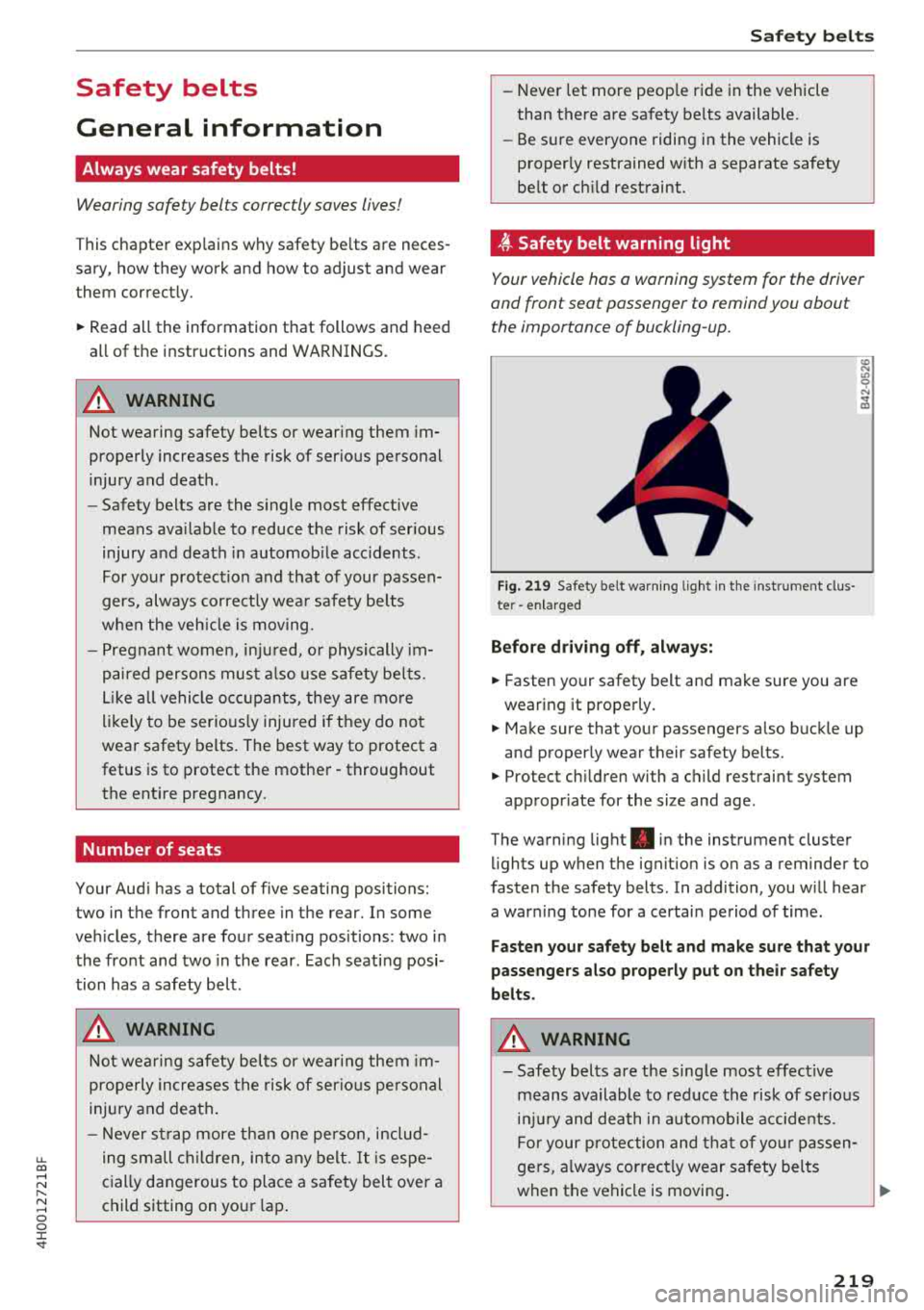
,ff. Safety belt warning light
Your vehicle has a warning system for the driver
and front seat passenger to remind you about
the importance of buckling-up.
F ig. 21 9 Safety belt warnin g lig ht in t he inst rument clus·
te r -en larged
Befor e dr ivi ng off , always :
~ Fasten your safety belt and make sure you are
wearing it properly.
~
~ Make sure that your passengers a lso buckle up
and properly wear their safety belts.
~ Protect ch ildren with a c hild restraint system
appropr iate for the size and age .
The warning lig ht . in the instrument cluster
lights up when the ignit ion is on as a reminder to
fasten the safety belts . In addition, you will hear
a war ning tone for a certai n period of time .
Fasten your safet y belt and make su re that your
passengers also properly put on their safety
b e lts .
A WARNING
-
-Safety bel ts are the sing le m ost effec tive
means available to red uce the risk of ser io u s
i njur y and death in a utomob ile accidents.
F or your p rotection and that of yo ur passen
ge rs, always correc tly wear safety bel ts
when the vehicle is moving .
~
219
Page 303 of 356
lL t:0 ....
"" ......
"" .... 0 0 :c '
malfunction indicator to indicate when the sys
tem is not operating properly. The TPMS mal
function indicator is combined with the low tire
pressure telltale. When the system detects a
malfunction, the telltale will flash for approxi
mately one minute and then remain cont inuously
illuminated . This sequence will continue upon
subsequent vehicle start-ups as long as the mal
function ex ists.
When the malfunction indicator is illuminated,
the system may not be ab le to detect or signal
low tire pressure as intended . TPM S malfunctions
may occur for a var iety of reasons, including the
installation of replacement or alternate tires or
wheels on the vehicle that prevent the TPMS
from functioning properly. Always check the
TPMS malfunction telltale after replacing one or
more tires or wheels on your vehicle to ensure
that the replacement or alternate tires and
wheels allow the TPMS to continue to function
properly.
If the Tire Pressure Monitoring System
indicator appears
Applies to: AS, 58
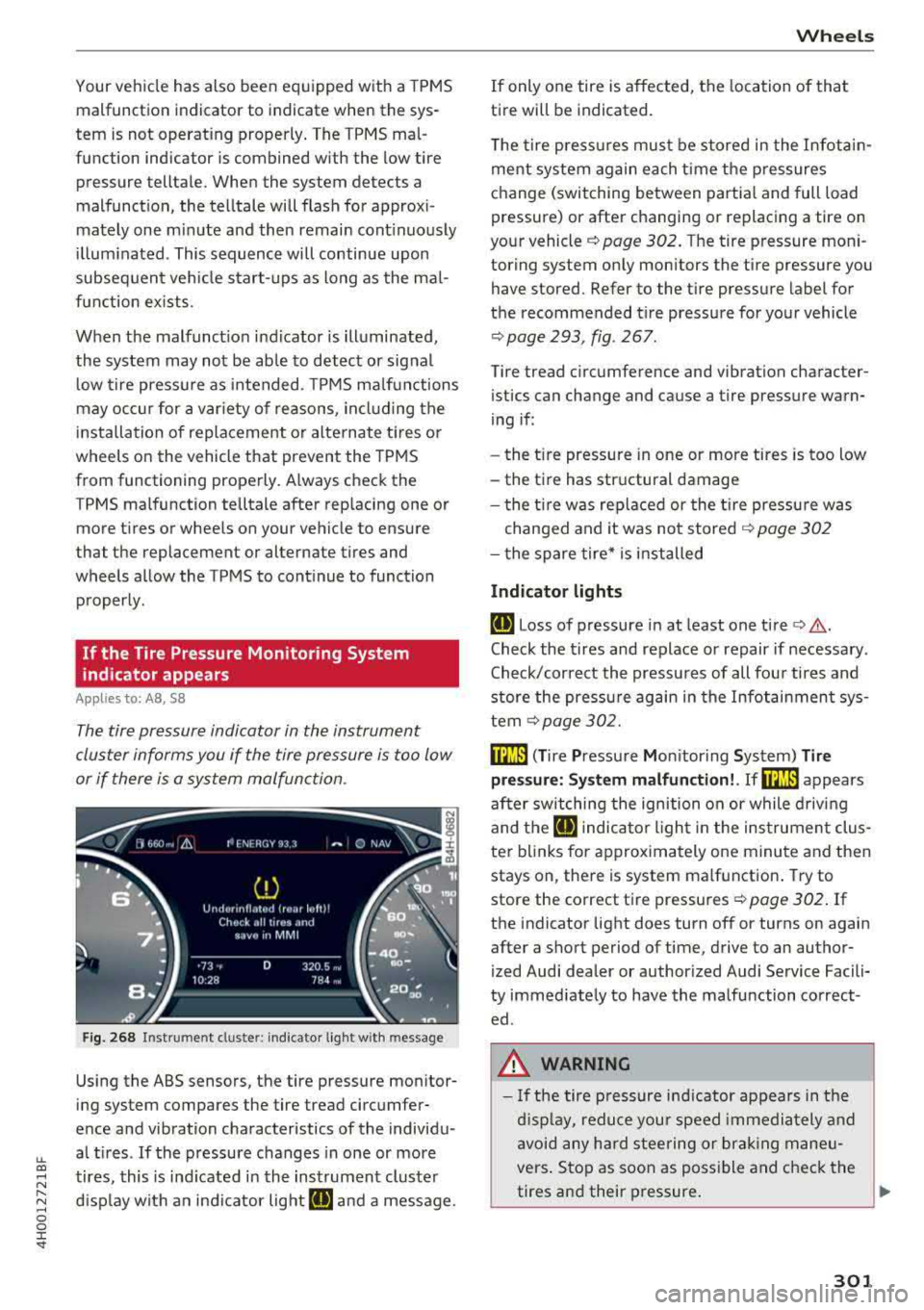
The tire pressure indicator in the instrument
cluster informs you if the tire pressure is too low
or if there is a system malfunction .
Fig. 268 Instrument clus ter: indicator light with message
Using the ABS sensors, the tire pressure monitor
ing system compares the tire tread circumfer
ence and vibration characteristics of the individu
al tires . If the pressure changes in one or more
tires, this is ind icated in the instrument cluster
display with an indicator light
ti] and a message .
Wheels
If only one tire is affected, the location of that
tire will be indicated.
The tire pressures must be stored in the Infotain
ment system again each time the pressures
change (switching between partial and full load
pressure) or after changing or replacing a tire on
your vehicle
c:> page 302. The tire pressure mon i
toring system only monitors the tire pressure you
have stored. Refer to the tire pressure label for
the recommended tire pressure for your vehicle
c:> page 293, fig . 267 .
Tire tread circumference and vibration character
istics can change and cause a tire pressure warn
ing if :
- the t ire pressure in one or more tires is too low
- the tire has structural damage
- the tire was replaced or the tire pressure was
changed and it was not stored
c:> page 302
- the spare tire* is installed
Indicator lights
ti] Loss of pressure in at least one tire c:> ,&..
Check the tires and replace or repair if necessary.
Check/correct the pressures of all four tires and
store the pressure again in the Infotainment sys
tem
c:>page 302.
mm ( T ire Pressure Monitor ing System) Tire
pressure: System malfunction!. Ifm:m appears
after switching the ignition on or while driving
and the
ti] indicator light in the instrument clus
ter blinks for approximately one minute and then
stays on, there is system malfunction. Try to
store the correct tire pressures
c:> page 302. If
the indicator light does turn off or turns on again
after a short period of time, drive to an author
ized Audi dealer or authorized Audi Service Facili
ty immediately to have the malfunction correct ed .
.&, WARNING
- If the tire pressure ind icator appears in the
display, reduce your speed immediately and
avoid any hard steering or braking maneu
vers. Stop as soon as possible and check the
tires and their pressure.
..,.
301
Page 306 of 356
Wheels
~ WARNING
Read and follow the important information
and notes ¢
page 303.
© Tips
The tire pressure or tem perature a re not di s
played in ada pta tion mode. Da shes --.-- a re
shown in place of the press ure and tempera
ture .
Tire pressure loss
Applies to: 58 plus
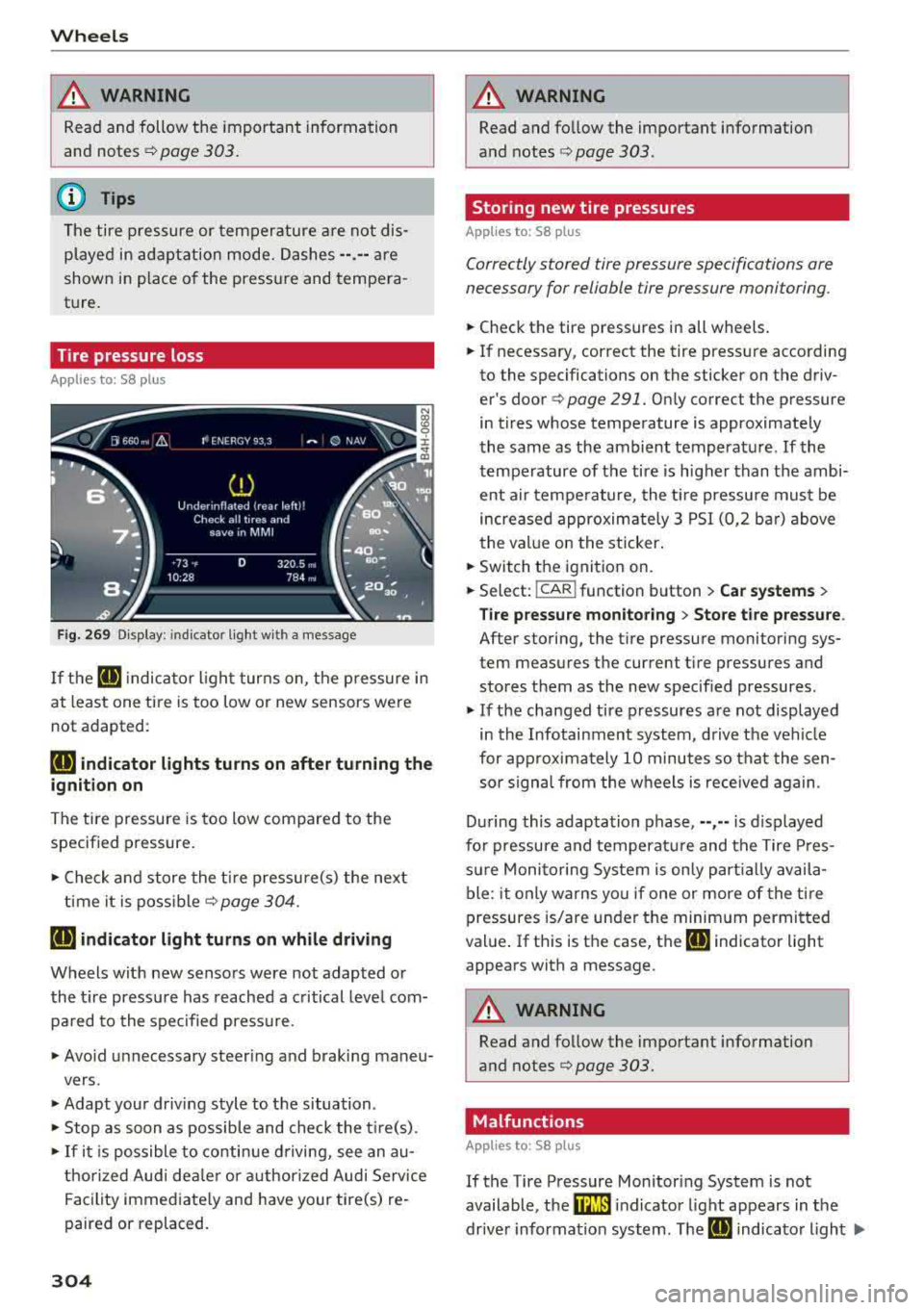
F ig. 269 D isp lay: ind icator light wi th a message
-
If the IE indica to r li ght turns on, the p ressure in
at least one ti re is too low or new sensors were
not adapted :
RE indicator lights turns on after turning the
ignition on
The tire pressure is too low compared to the
specif ied pressure .
.,. Check and store the t ire pressure(s) the next
ti me it is poss ible¢
page 304 .
RE indicator light turns on while driving
Wheels with new senso rs were not adapted or
the t ire pressu re has reached a c ritical leve l com
p ar ed to the specified press ure.
.,. Avo id unnecessary steering and braking maneu-
vers .
.,. Adapt you r d riving style to the situation .
.,. Stop as soon as possible and check the t ire(s) .
.,. If it i s po ssible to co nti nu e d riving, see an au-
t horized Audi dea le r or a uthorized Audi Service
Fa cility immed iate ly and have your tire(s) re
paired or replaced.
304
A WARNING
, -
Read and fo llow the important information
and notes
¢ page 303.
Storing new tire pressures
App lies to: 58 pl us
Correctly stored tire pressure specifications are
necessary for reliable tire pressure monitoring.
.,. Check the tire pressures in all wheels .
-
.,. If necessary , correct the tire press ure according
to the specifications on the sticker on the driv
er's doo r
q page 291. On ly co rrect t he pressure
in t ires whose tempe rature is appro ximate ly
the same as the ambient tempera ture. If the
tempe rature of the tire is higher than the ambi
ent air tempe rature, the t ire pressure must be
i n creased approxim ate ly 3 PSI (0 ,2 ba r) above
the val ue on the sticker .
.,. Switch the ignitio n on .
.,. Select: !CAR ! function button > Car systems >
Tire pressure mon itoring > Sto re tire pressure .
After storing, the t ire pressu re monitoring sys
tem measures t he current t ire pressures and
s to res them as the new specif ied pressures .
.,. If the changed tire p ressures are not displayed
in the Infotainment system, d riv e the veh icle
for approximately 10 minutes so that the sen so r signa l from the w heels is received again.
D ur ing this adapta tion phase, --,--is displayed
fo r pressure and temperat ure and t he Tire Pres
su re Moni toring Sys tem is on ly p arti all y av ail a
ble: it only warns yo u if one or more of the tire
pressures is/are under t he minim um permitted
val ue. If th is is the case, the
IE indicator light
appears with a message .
A WARNING
Read and follow the important information
and notes
q page 303.
Malfunctions
App lies to: 58 plus
-
If the Tire Pressure Mon itoring System is not
available, t he
mm indicato r light appears in the
dr ive r informa tion system . T he
IE indica to r light .,..
Page 309 of 356
u. co .... N
" N .... 0 0 :c '
-Only wash the vehicle when the ignition is
off and follow the instructions from the car
wash operator to reduce the risk of acci
dents.
-To reduce the risk of cuts, protect yourself
from sharp metal components when wash
ing the underbody or the inside of the wheel
housings.
-After washing the vehicle, the braking effect may be delayed due to moisture on the
brake rotors or ice in the winter . This in
creases the risk of an accident. The brakes
must be dried first with a few careful brake
applications.
@ Note
-If you wash the vehicle in an automatic car
wash, you must fold the exterior mirrors in
to reduce the risk of damage to the mirrors.
Power folding exterior mirrors* must only
be folded in and out using the power folding
function.
-To reduce the risk of paint damage, do not
wash the vehicle in direct sunlight.
-
Care and cleaning
-To reduce the risk of damage, do not wash
the power top with a pressure washer.
-To reduce the risk of damage to the surface,
do not use insect removing sponges, kitchen
sponges or similar items.
-Matte finish painted vehicle components:
-To reduce the risk of damage to the sur-
face, do not use polishing agents or hard
wax.
-Never use protective wax. It can destroy
the matte finish effect .
-Do not place any stickers or magnetic
signs on vehicle parts painted with matte
finish paint. The paint could be damaged
when the stickers or magnets are re
moved .
@ For the sake of the environment
Only wash the vehicle in facilities specially de
signed for that purpose . This will reduce the
risk of dirty water contaminated with oil from
entering the sewer system.
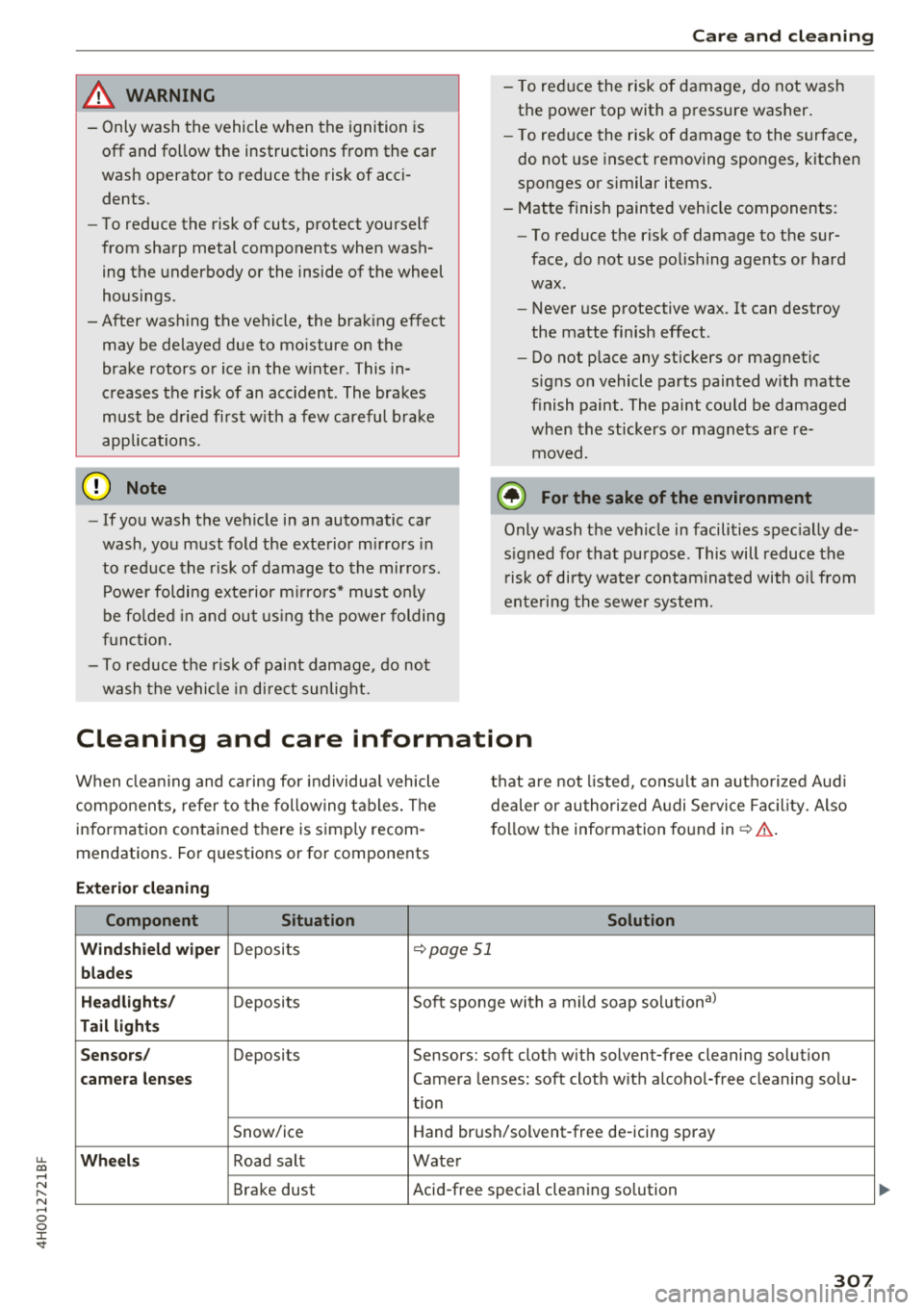
Cleaning and care information
When cleaning and caring for individual vehicle
components, refer to the following tables. The
information contained there is simply recom
mendations. For questions or for components that are
not listed, consult an authorized Audi
dealer or authorized Audi Service Facility. Also
follow the information found
in~.&. -
Exterior cleaning
Component Situation Solution
Windshield wiper
Deposits ~ page 51
blades
Headlights/
Deposits Soft sponge with a
mild soap solutiona)
Tail lights
Sensors/
Deposits Sensors: soft cloth with solvent-free cleaning solution
camera lenses Camera lenses: soft cloth with alcohol-free cleaning solu-
tion
Snow/ice Hand brush/solvent-free de-icing spray
Wheels Road salt Water
Brake dust Acid-free special cleaning solution
307
...