warning AUDI A8 2018 Service Manual
[x] Cancel search | Manufacturer: AUDI, Model Year: 2018, Model line: A8, Model: AUDI A8 2018Pages: 356, PDF Size: 54.71 MB
Page 69 of 356
u. co .... N
" N .... 0 0 :c '
of the bag*
r=:> fig. 83. There is a lso a securing
strap ® r=:> fig.
84 on the bag.
.,. To secu re the bag in the l uggage compartment,
engage the hooks into the rear tie -downs
r=:> fig. 83.
.. Tighten the strap on the bag to prevent the ob
jects in the bag from sliding around
r=;, fig. 84.
A WARNING
- The bag is only intended for transport ing
sk is and other light objects. To reduce the
risk of serious in juries, never transport
heavy o r sharp objects in the bag.
- After loading, the bag must be secured with
the strap.
- Make sure that all objects that you are
transport ing in the pass-through are secure.
T hey co uld slide a round and inc rease the
r isk of injur y w hen braking or dur ing an acc i
dent .
0) Tips
-Only fold the bag up if it is dry .
- When transport ing skis or snowboards,
t ighten the secur ing strap between the
b indings .
- Lay skis in the bag w ith the po ints facing
forwa rd and snowboards and sk i pole po ints
fac ing the rear.
Refrigerator
Introduction
A ppl ies to: ve hicles w ith re fri ge rato r
-
Clean the refrigerator before the first use r=;, table
on page 308.
You can on ly switch the refrigerator on, if :
- the temperature in the luggage compa rtme nt
is less t han 131 ° F (5 5 °C). If the refr igerator is
switched on, it will automatica lly switch off if
the temperature in the luggage compartment exceeds 131 ° F (55 °(). If the temperature
goes back below 131 ° F (55 °(), the refr igera
tor will automatically switch on again.
Seat s and sto rag e
-The charge level of the vehicle battery is suffi
cient. The refrigerator is automatica lly switch
ed off if the e lectr ica l system vo ltage falls be
low the spec ified min imum value. Th is prevents
the vehicle battery from discharging. The re
frigerator automatically switches back on if the
electrical system voltage increases aga in, for
examp le after starting the vehicle .
When the cooling function is working opt imally,
the cooling funct ion reaches 43° F (+6 °() and
the freez ing funct ion reaches 21 ° F (-6 °() . The
cooling temperature in the refrigerator also de
pends on the luggage compartment tempe ra
tu re . When the temperatu re in t he luggage com
partment is hig h, there may on ly be a limited
cooling effect.
A WARNING
= -
To avoid any injury risks to the passengers
caused by the refrigerator, the following safe
ty precautions must be followed:
- The maximum load capacity for the freezer
is 5.5 lbs (2.5 kg).
- Never overload the refrigerator. There
is a
risk of injury in the event of a co llision or
sudden braking.
- The refrigerator cover must always be
closed and locked whi le driving. The refr ig
erator contents could enter the vehicle inte
rior dur ing a coll is ion or sudden brak ing ma
neuver, wh ich increases the r isk of injury.
- Never store flammable fluids, gas contain
ers and similar objects in the refrigerator
due to the r isk of an explos ion . This also ap
plies to goods and products that can emit
volat ile or flammab le gases.
- At temperatu res of 32° F (0 °C) and lower
frozen liquid inside glass containe rs ca n
cause t he containe rs to b urst.
@ Note
,
- T he ve ntilation openings for the refrigerator
are at the rear panel tr im panel in the lug
gage compa rtme nt and must not be cov
ered.
67
Page 71 of 356
u. co .... N
" N .... 0 0 :c '
climate control
Description
The climate control system warms, cools and re
moves humidity from the air in the vehicle interi
or. It is the most effective when the windows and
sunroof* are closed. If there is a build-up of heat inside the vehicle, ventilation can help to speed
up the cooling process .
In all heating mode functions, except for defrost,
the blower only switches to a higher speed once
the engine coolant has reached a sufficient tem
perature .
Pollut ant filt er
The po llutant filter removes pollutants such as
dust and pollen from the air.
Ke y r eco gnition
The climate control settings are a utomatically
stored and assigned to the remote control key
that is in use .
A WARNING
Poor visibility can lead to accidents.
- For safer driving, keep all windows free of
ice, snow and fog .
- Become familiar as quickly as possible with
the correct use and function of the climate contro l system, especially with the defrost
ing and defogging function.
- When the temperature is below freezing,
only use the windshield washer system after
Warm and c old
the windshield has been warmed by the cli
mate control system. The washer fluid could
freeze on the windshield and impair visibili
ty .
@ Note
-If you suspect that the climate contro l sys
tem is damaged, switch the system off to
prevent further damage and have it checked
by an authorized Audi dealer or authorized
Aud i Serv ice Facility.
- Repa irs to the Aud i climate control system
require special technical knowledge and
special tools . See an authorized Aud i dealer
or authorized Audi Serv ice Fac ility .
@ For the s ake of the environment
Reducing the amount of fuel used also re
duces the amount of pollutants that enter the
a ir .
(D Tips
- To prevent interference with the heat ing
and cooling output and to prevent the win
dows from fogging over, the a ir intake in
fro nt of t he w indshie ld must be free of ice,
snow or leaves.
- Condensat ion from the coo ling system can
dr ip and form a pudd le of water under the
veh icle . T h is is no rma l and does not mean
there is a leak .
- Th e energy management system may tem
porarily switch off certain functions, suc h as
the seat heating* or rear window defogger .
T hese systems are avai lable again as soon
as the energy supply has been restored.
69
Page 73 of 356
Adjusting the temperature
Temperatures between 60 °F ( +16 ° C) and 84 °F
(+28 °C) can be set . Outside of this range,
LO or
HI will appear in the climate contro l system dis
p lay . At both of these settings, the climate con
trol system runs continuously at maximum cool
ing or heating power. There is no temperature
regulation.
~ Adjusting the amount of air
You can adjust the airf low manually to suit your
ne eds . The blower should always run at a low set
ting to prevent the windows from fogging and to
ensure a continuous exchange of air ins ide the
vehicle. To have the airflow regulated automat i
cally, press the
IAUTO I button.
~ Adjusting the air distribution
You can manually se lect the vents where the air
will flow. To have the a ir distribution regu lated
automatically, press the
IAUTO I button.
Ill/ lil* Adjusting seat heating/ventilation*
Pressing the button switches the seat heating/
venti lation on at the highest setting (level 3). The
LEDs indicate the temperature level. To reduce
the temperature, press the button aga in. To
sw itch the seat heating/ventilation off, press the
button repeatedly until the LED turns off.
After 10 minutes, the seat heating/ventilation
automatically switches from level 3 to level 2.
l
or cleared of condensation as quickly as possible.
The maximum amount of air flows main ly from
the vents below the windshield. Recirculation
mode switches off. The temperature shou ld be
set to approximately 72 °F (22 °().
The
IAUTOI button switches the defroster off .
IQil REAR I Switching the rear window defogger
on and off
The rear window defogger only operates when
~ the engine is running. It switches off automati-....
~ cally after 10 to 20 minutes, depending on the N
~ outside temperature. 0 :c '
To prevent the rear window defogger from
switching off automatica lly, press and hold the
loo REAR I button for more than three seconds .
This is stored until the ignition is switched off.
I SYNC! Synchronization*
When synchron ization is switched on, the set
tings for the driver's side are applied to the front
pass enge r's side (except for seat heating/venti la
tion*). The rear is also synchronized in vehicles
with the 4-zone deluxe automatic climate control
system*. Synchronization switches off if the set
t ings are adjusted on the front passenger's side
or in the rear*.
You can synchronize the sett ings in a row by
pressing and holding a knob. For example, to ap
ply the sett ings for the front passenger's side to
the driver's side, press and hold the knob on the
front passenger 's side.
Vents
You can open or close the center and rear vents in
the cockpit and the vents in the rear center con
sole and door pillars using the ridged thumb
wheels. The levers adjust the direction of the air
flow from the vents.
Residual heat
You can act ivate the residual heat function when
the ignition is switched off by pressing and hold
ing the
lj) button. The residual heat from the
coolant is used to heat the vehicle interior . T he
r esidua l heat function switches off automatically
after about 30 minutes .
_&. WARNING
-You should not use the recirculation mode
for an extended period of time since no
fresh air is drawn in. With the air-condition
ing switched off, the windows can fog up,
which increases the risk of an acc ident.
- Individuals with reduced sensitivity to pain
or temperature could develop burns when
using the seat heating function. To reduce
the r isk of injury, these individua ls should
not use seat heating .
71
Page 75 of 356
u. co .... N
" N .... 0 0 :c '
General information
Breaking in
A new veh icle must be broken in for the first
1,000 m iles ( 1,500 km). Do not dr ive at speeds
that will ex ceed 2/3 of the max imum perm itted
engine speed (RPM) for the first 600 miles
(1,000 km), and avoid full acceleration during
this period . You may gradually start increasing
the RPM and the speed between 600 miles (1,000 km) and 1,000 miles (1,500 km) .
During the first hours of use, the engine has a
h igher internal friction than later on when all
moving parts have settled into p lace with each
other.
How the vehicle is driven d uring the first 1,000
miles (1 ,500 km) also affects t he engine quality .
Drive at moderate engine speeds after the initial
break-in per iod, part icu larly when running a cold
engine . Th is will reduce eng ine wear and improve
the m ileage .
Do not drive at too
low of an engine speed (RPM).
Shift down if the engine stops running "smooth ly". Extremely high eng ine speeds are automati
cally reduced .
New tires
If your vehicle is running on new t ires, dr ive pa r
ticularly ca refu l for the first 350 miles (500 kilo
mete rs) after fi tting .
A WARNING
New tires tend to be s lippery and must also
be "broken -in" . Be sure to remember this dur
ing the first 350 miles (500 ki lometers).
Brake gently . Avo id following closely behind
other vehicles or other situations that might
require sudden, hard brak ing .
-
Driving
Reducing the risk of vehicle damage
(UJ) Note
When dr iv ing o n poor roads, by curbs and on
steep ramps, make sure that low -hanging
components such as the spoiler and exhaust
system do not come into contact with these
or they co uld be damaged. This espec ia lly ap
plies to vehicles w ith low ground clearance
and vehicles that are heav ily loaded.
Driving through water on roads
Note the following to reduce the risk of veh icle
damage when dr iving through wate r, fo r example
o n flooded roads:
- The water must not be any higher than the bot
tom of the veh icle body .
- Do not dr ive faster than walk ing speed .
A WARNING
-
After driv ing through water or mud, the effec
tiveness of the b rakes may be reduced due to
moisture o n the brake rotors and brake pads.
A few ca refu l bra ke app lications sho uld d ry
off the brakes and restore the fu ll braki ng ef
fect.
(UJ) Note
- Vehicle components such as t he e ng ine,
t ra nsmission, suspe nsion or elect rical sys
t em can be seve re ly damaged by driv ing
throug h water .
- Alw ays sw itch the Start/Stop system off
w hen driv ing th ro ugh water
q poge 78.
(D Tips
- Determine the depth before d riving throug h
wate r.
- Do not stop the vehicle, drive in reverse or
sw itch t he e ngine off when d riving through
wate r.
- Keep in mind that o ncom ing vehicles may
cr eate waves that raise the wa ter level and
m ak e it too deep for yo ur vehicle to drive
throug h safe ly.
73
Page 77 of 356
lL t:0 ....
"" ......
"" .... 0 0 :c '
The engine drives the generator, wh ich generates
electricity; the fue l consumption also increases
with the demand for electricity. Therefore, switch
e lectrical equipment off when you no longer
need it. Examples of equipment that use a lot of
energy are air blowers at a high setting, the rear
window defogger and seat heating*.
CD Note
Do not leave engine idling unattended after
starting. If warning lights should come on to
ind icate improper operation, they would go
unheeded. Extended idling also produces
heat, wh ich could result in overheat ing or
other damage to the vehicle or other p roper-
ty.
CD Note
-Have your vehicle maintained properly and
i n accordance with the service recommenda
tions in your Warranty
& Ma intenance book
l et. Lack of proper maintenance as well as
i mproper use of the vehicle will impair the
function of the emission control system and
could lead to damage.
-Do not alter or remove any component of
the Emission Control System unless ap proved by the manufacturer.
-Do not alter or remove any device, such as
heat shie lds, switches, ignition wires,
valves, which are designed to protect your
vehicle's Emission Control System and other
important vehicle components .
@ Tips
The consumption estimates as published by
ENVIRONMENTAL PROTECTION AGENCY
(EPA) and Transport Canada may not corre
spond to your actual consumption on the
road, which will vary depending upon vehicle
load and speed, road and weather conditions
trip length, etc.
'
D rivi ng
Steering
Adjusting the steering wheel position
The steering column can be power adjusted up
and down and forward and back.
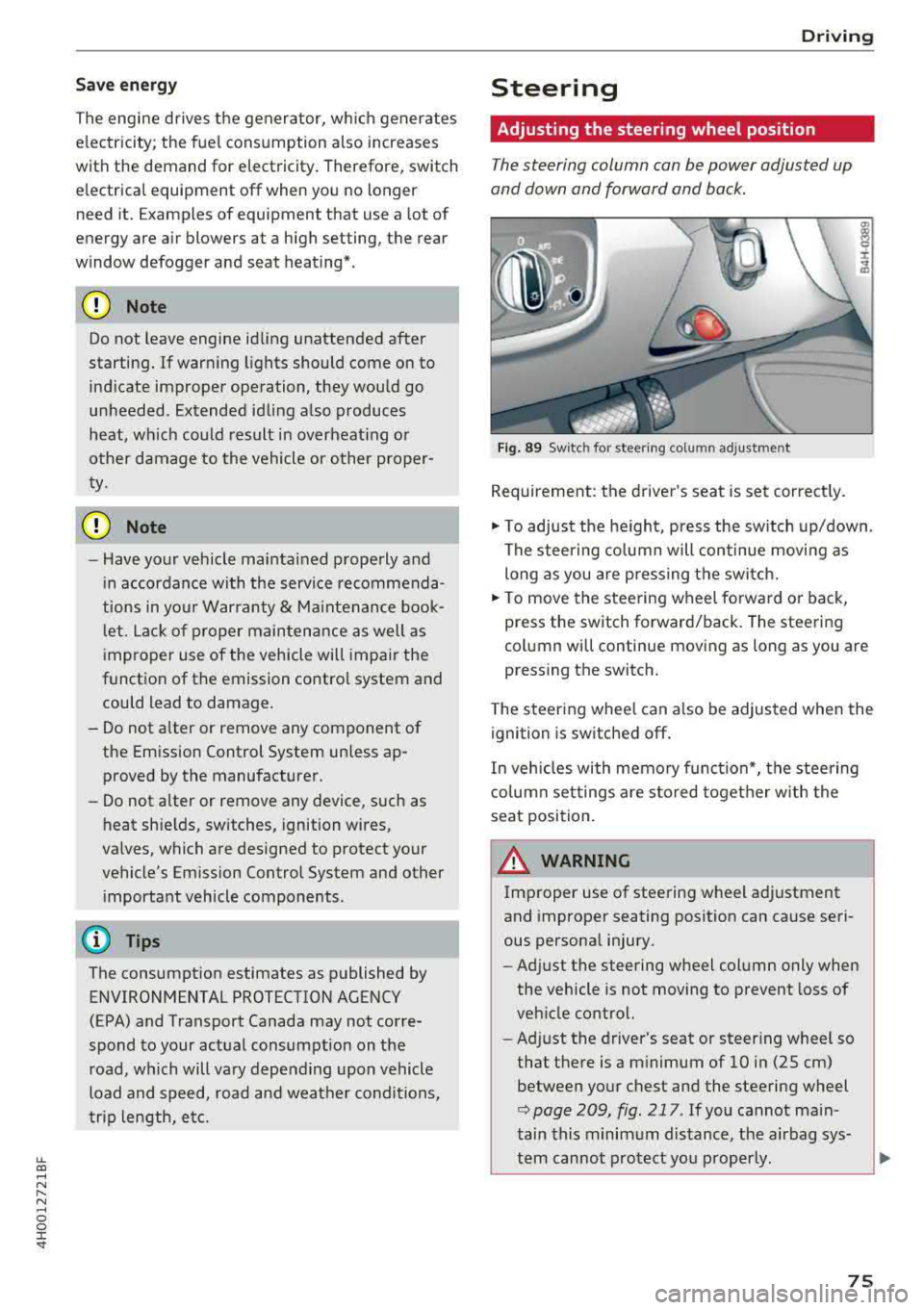
F ig . 89 Sw itc h for steering colu mn adjustment
Requirement: the driver's seat is set correct ly.
"' To adjust the he ight, press the sw itch up/down .
The steering co lumn will continue movi ng as
long as you are pressing the switch.
"' To move the steering wheel forwa rd or back,
press the switch forward/back. The steering
column will continue moving as long as you are
pressing the switch.
T he steering wheel can a lso be adjusted when the
ignition is switched off .
In veh icles with memory function*, the steering
co lumn settings are s to red toget her w ith the
seat position.
A WARNING
Improper use of steering wheel adjustment
and improper seating position can cause seri
ous personal injury.
- Adjust the steering wheel column only when
the vehicle is not moving to prevent loss of
veh icle control.
- Ad just the driver's seat or steer ing whee l so
that the re is a m inimum of 10 in (25 cm)
between your chest and the steering wheel
r::;, page 209, fig . 217 . If you cannot main
tain this minimum distance, the airbag sys-
tem cannot protect you p roperly.
~
75
Page 78 of 356
Driving
-If physica l limitations prevent you from sit
t ing 10 in (25 cm) or more from the steer
ing wheel, check with your authorized Audi
dealer to see if adaptive equ ipment is avail
able .
-If the steering wheel is aligned with your
face, the supp lemental driver's airbag can
not prov ide as m uch protection in an acci
dent. A lways make s ure that the steering
wheel is aligned w ith your che st.
-Always hold the steer ing whee l with your
hands a t the 9 o' clock and 3 o'clock pos i
t ions to reduce the ris k of person al injury if
the driver 's airbag deploys.
-Never hold the s teer ing whee l at the 1 2
o'clock pos it io n or w ith your ha nds inside
the steering wheel rim or on the steer ing
wheel hub . Holdi ng the steering whee l the
wrong way can cause serious injuries to the hands, arms and head i f the driver's airbag
deploys.
Entry assistance
Easy seat entry makes it easier to enter and exit
the vehicle by adjusting the steering column au
tomatically.
• In the Infotainment system, select the ! CARI
funct ion b utton > Car systems contro l button >
Vehicle settings > Seats > Drive r's seat > Easy
seat entry > On .
When easy seat entry is switched on, the stee ring
column goes back up into the park position when
the ignition is switched off. After entering the ve
h icle, the steering co lumn returns to the stored
position once the ignition is sw itched on .
76
Starting and stopping
the engine
Starting the engine
The ! START ENGINE S T OPI button switches the
ignition on and starts the engine.
Fi g. 90 Ce nter conso le: STAR T ENGINE S TOP but ton
Switching the ignition on /off
• To switch t he ign it ion on or off, press the
! S TAR T ENGINE STOPI button . Do not press the
brake pedal while do ing this.
St arting the engine
• Press the brake pedal¢ &_.
• Press the I START ENGINE STOP I button
¢ fig. 90 . The eng ine will start .
If the engine does not start immediately, the
start ing procedure stops automat ica lly after a
sho rt time . Repeat the sta rting process .
Start/Stop syst em
See the information in ¢ page 78, Start/Stop
system.
A WARNING
To reduce the risk of poison ing, never allow
the eng ine to run in co nfined spaces .
(D Note
Avoid high engine spee d, full throttle, and
h eavy engine load if the engine has not
reached operat ing temperat ure yet . You could
-
damage the eng ine. .,..
Page 79 of 356
u. co .... N
" N .... 0 0 :c '
-Some noise after starting the engine is nor
mal and is no cause for concern.
- If you leave the vehicle with the ignition
switched on, the ignition will switch off af
ter a certain amount of time. Make sure that
electrical equipment such as the exterior
lights are switched off.
Stopping the engine
.,. Bring the vehicle to a full stop.
.,. Select the P or N selector lever position .
.. Press the I START ENGI NE STOPI button
~ page 76, fig. 90.
Steering lock
The steering locks when you turn the engine off
using the lSTART
ENGINE STOPlbutton and
open the driver's door. The locked steering helps
prevent vehicle theft.
Emergency off function
If it is absolutely necessary, the engine can also
be turned off while driving in the
R, Dor S selec
tor lever position at speeds below 6 mph (10 km/
h). To stop the engine, press and hold the
I START ENGINE STOPI button and also press the
brake pedal.
& WARNING
-Never turn off the engine before the vehicle
has come to a complete stop. The full func
tion of the brake booster and the power
steering is not guaranteed. You must use
more force to turn or brake. Because you
cannot steer and brake as you usually
would, this could lead to accidents and seri
ous injuries .
-Always take the key with you whenever you
leave your vehicle. Otherwise, the engine
cou ld be started or electrical equipment
such as the power windows could be operat
ed. This can lead to serious injury.
-For safety reasons, always park the vehicle
with the selector lever in the P position .
Driving
Otherwise, there is the risk that the vehicle
could roll unintentionally.
@ Note
If the engine has been under heavy load for
an extended period of time, heat builds up in
the engine compartment after the engine is
switched off and there is a risk of damaging
the engine. For this reason, let the engine run
at idle for approximately two minutes before
shutting it off .
(D Tips
For up to 10 minutes after stopping the en
gine, the radiator fan may turn on again auto
matically or it may continue to run (even if
the ignition is switched off) for the following
reasons :
- The coolant temperature is increasing due
to trapped heat.
- If the engine is warm and the engine com
partment also heats up from strong sun
light.
Messages in the instrument cluster display
Turn off ignition before leaving car
This message appears and a warning tone sounds
if you open the driver's door when the ignition is
switched on.
Press brake pedal to start engine
This message appears when you press the
I START ENGINE STOP ! button to start the engine
and do not press the brake pedal while doing so.
The engine can only be started when the brake pedal is pressed .
Ill Is key in the vehicle?
This indicator light turns on and this message ap
pears if the ignition key was removed from the
vehicle when the engine was running. If the igni
tion key is no longer in the vehicle, you cannot
switch on the ignition or start the engine once
you stop it. You also cannot lock the vehicle from
the outside .
.,.
77
Page 80 of 356
Driving
Shift to P, otherwise vehicle can roll away.
Doors do not lock if lever is not in
P.
This driver message appears fo r safety reasons if
the transmission has not been shifted to the P
position when you switch the ignition off. Move
the selector lever to the P position . Otherwise the
veh icle is not protected from ro lling and it cannot
be locked.
(I Key is not recognized. Hold back of key
against marked area. See owner's manual
If the i ndicator light turns on and this message
appears, there is a
malfunction ~ page 78.
Turn off ignition before leaving car
This message appears if the driver's door is
ope ned while the ignition is switched on . Always
sw itch off the ignition if you are leavi ng the vehi
cle .
Shift to P and turn off ignition before leav ing
car, otherwise vehicle can roll away
This message appears if the driver's door is
opened while the ignition is switched on and the
transmission has not been shifted to the P posi
tion . Shift the transm iss ion into the P posit ion
and turn off the ign ition if you are leaving the ve
h icle . Otherwise the vehicle could roll.
Starting the engine when there is a
malfunction
It may not be possible to start the engine under
certain circumstances, for example if the battery
in the vehicle key is drained, if interference is af
fected the key or if there is a system malfunc
tion .
c:====== ~
~ _____ ___ ci5
Fig . 91 Cente r console/remote cont ro l key : sta rt ing the
eng ine
if t here is a malfunc tion
78
Requirement: the message Key is not recog
nized. Hold back of key against marked area .
See owner's manual
must appear and the (I i n
dicator light must turn on.
.,. Hold the remote control key vertically in the lo
cation indicated
y >l) ~ fig. 91 .
.,. Press the brake peda l.
.,. Press the I START ENGINE STOPI button. The
engine will start.
.,. Drive to an authorized Audi dealer or author
ized Aud i Serv ice Facility immediately to have
the malfunction corrected .
(0 Tips
You can v iew the message aga in by pressing
the
I S TAR T ENGINE STOP I button.
Start/Stop system
Description
Applies to: vehicles with Start/Stop syste m
The Start/Stop system can help increase fuel
economy and reduce CO2 emissions.
In Start/Stop mode, the eng ine s hut s off auto
matically when the vehicle is stopped, such as at
a traffic light . The ignition remains switched on
during this stop phase. The engine w ill restart
automat ically w hen needed.
The last Start/Stop system setting is restored
when the ignition is switched on.
Basic requirements for Start/Stop mode
- Th e driver's door must be closed.
- The driver's seat belt much be fastened.
- The hood must be closed .
- The vehicle must have dr iven faster than
2.5 mph (4 km/h) since the last t ime it stop
ped .
- A trailer must not be hitched to the vehicle .
A WARNING
-Never turn off the eng ine before the vehicle
has come to a complete stop . The full func
tion of the brake booster and the power
steering is not guaranteed. You must use
more force to turn or brake. Because you
Page 82 of 356
Driving
-The inter ior temperature differs from the tem
perature se lected in the A/C system.
-The windshield is being defrosted q page 71 .
-The brake pedal is pressed seve ral t imes in a
r ow.
-T he vehicle ba tte ry charge Leve l is too Low.
-Power consumption is high .
Ignition is switched off automatically
To prevent the veh icle battery from drain ing, the
ignit ion w ill switch off
automatically under the
following conditions:
-The vehicle has already been driven .
-The Start/Stop system has stopped the e ngine.
- T he driver's door is opened.
- T he dr iver's safety be lt is unb uckled.
- The brake pedal is not p ressed .
-The vehicle is stationary .
In this case, the activated low beam is replaced
by the parking Light. The parking Lights will
sw itch off after app roximately 30 minutes or
when you Lock the vehicle .
If the Start/Stop system has not turned off the
engine o r if you have sw itched the Start/Stop sys
tem off manually, the ignition will not be auto mat ically switched off and the engine w ill contin
ue to r un
q I!::::,. .
.&_ WARNING
To re duce the risk of poisoni ng, neve r allow
t he engine to r un in confined s paces.
(D Tips
If you select the D, N or S selector Lever posi
tion after shifting into reverse, the vehicle
m ust be driven faster than 6 mph (10 km/h)
in orde r for the engine to switch off again.
80
-
Manually switching the Start/Stop system
off/on
Appl ies to : vehicles wi th Start/Stop sys te m
If you do not wish to use th e system, you con
switch i t off manually.
------------ ~
:i:
~
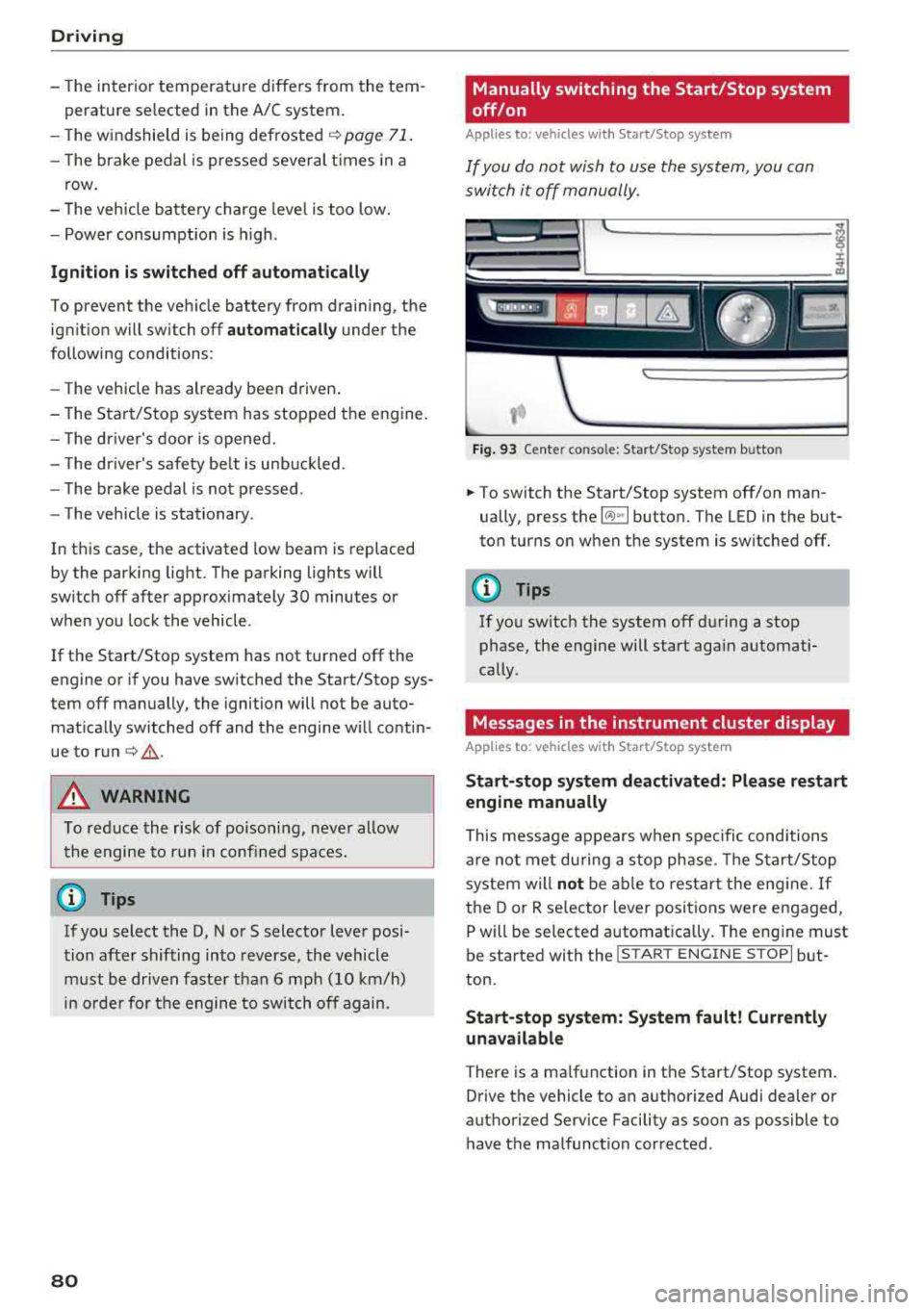
Fig . 93 Ce nte r conso le: Start/Stop system b utto n
.. To switch the Start/Stop system off/on man
ually, press the
l (A) ~I button. The LED in the but
ton turns on when the system is switched off.
(D Tips
If you switch the system off d uring a stop
phase, the engine will start aga in automati
cally .
Messages in the instrument cluster display
Applies to: vehicles wit h Start/Stop syste m
Start-stop system deactivated: Please restart
engine manually
This message appears w hen spec ific conditions
are not me t du ring a stop phase. The S tart/S top
system will
not b e abl e to re st art the eng ine. If
the D or R se lector Lever positions were engaged,
P will be selected a utomat ically . The eng ine must
be started with the
I START ENGI NE STOPI but
ton.
Start -stop system: System fault! Currently
unavailable
There is a ma lfunction in the Start/Stop system.
Drive the vehicle to an authorized Audi dea ler or
authorized Serv ice Facility as soon as possible to
have t he malfunction corrected .
Page 83 of 356
lL t:0 ....
"' ......
"' .... 0 0 :c '
parking brake
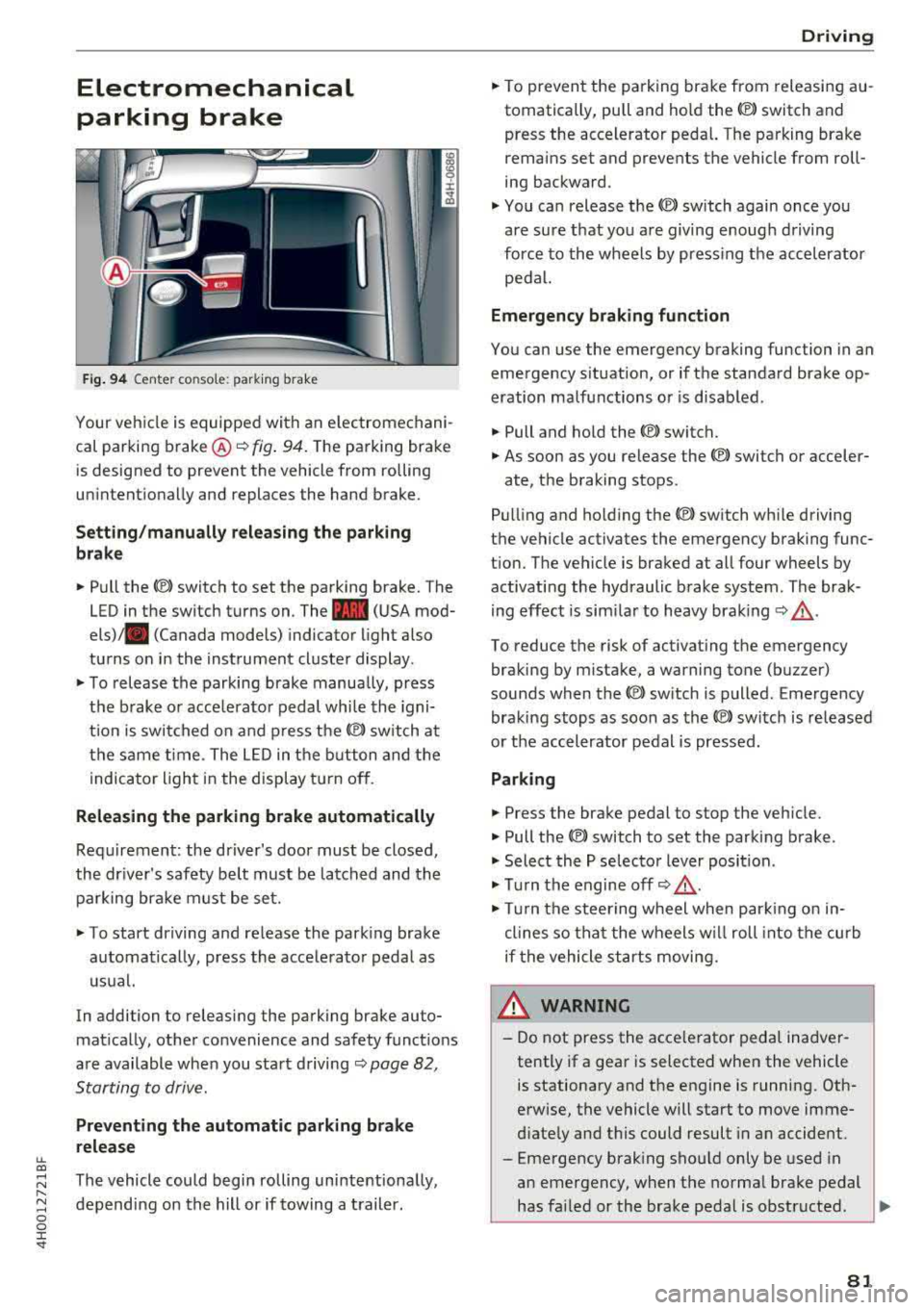
Fig. 94 Center console: parking brake
Your vehicle is equipped with an electromechani
cal parking brake ®
i=)fig. 94. The parking brake
is designed to prevent the vehicle from rolling
unintentionally and replaces the hand brake.
Setting/manually releasing the parking
brake
.. Pull the C®> switch to set the parking brake. The
LED in the switch turns on. The
-(USA mod
els) . (Canada models) indicator light also
turns on in the instrument cluster display.
.. To release the parking brake manua lly, press
the brake or acce lerator pedal while the igni
t ion is switched on and press
the(®) switch at
the same time. The LED in the button and the
indicator light in the display turn off.
Releasing the parking brake automatically
Requirement: the driver's door must be closed,
the driver's safety belt must be latched and the parking brake must be set.
.. To start driving and release the parking brake
automatically, press the accelerator pedal as
usual.
In addition to releasing the parking brake auto
matically, other convenience and safety functions
are available when you start driving
i=)page 82,
Starting to drive.
Preventing the automatic parking brake
release
The vehicle could begin rolling unintentionally,
depending on the hill or if towing a trailer.
Driving
.. To prevent the parking brake from releasing au
tomatically, pull and hold the<®> switch and press the accelerator pedal. The parking brake
remains set and prevents the vehicle from roll
ing backward .
.,. You can release the<®> switch again once you
are sure that you are giving enough driving
force to the wheels by pressing the accelerator
pedal.
Emergency braking function
You can use the emergency braking function in an
emergency situation, or if the standard brake op
eration malfunctions or is disabled.
.. Pull and hold the<®> switch.
.. As soon as you release the <®> switch or acceler-
ate, the braking stops.
Pulling and ho lding
the(®) switch while driving
the vehicle activates the emergency braking func
tion. The vehicle is braked at all four wheels by activating the hydraulic brake system. The brak
ing effect is similar to heavy braking
i=) ,& .
To reduce the risk of activating the emergency
braking by mistake, a warning tone (buzzer)
sounds when the
<®l switch is pulled. Emergency
braking stops as soon as
the© switch is released
or the accelerator pedal is pressed.
Parking
.. Press the brake pedal to stop the vehicle.
.. Pull the<®> switch to set the parking brake .
.,. Select the P selector lever position .
.,. Turn the engine off i=) ,&.
.,. Turn the steering wheel when parking on in
clines so that the wheels w ill roll into the curb
if the vehicle starts moving.
8_ WARNING
-Do not press the acce lerator pedal inadver
tently if a gear is selected when the vehicle
is stationary and the engine is running. Oth
erwise, the vehicle will start to move imme
diately and this could result in an accident.
-Eme rgency braking should only be used in
an emergency, when the normal brake pedal
has failed or the brake pedal is obstructed .
.,.
81