Rear seat AUDI A8 2020 User Guide
[x] Cancel search | Manufacturer: AUDI, Model Year: 2020, Model line: A8, Model: AUDI A8 2020Pages: 360, PDF Size: 95.38 MB
Page 37 of 360
4N0012721BD
Touch displays
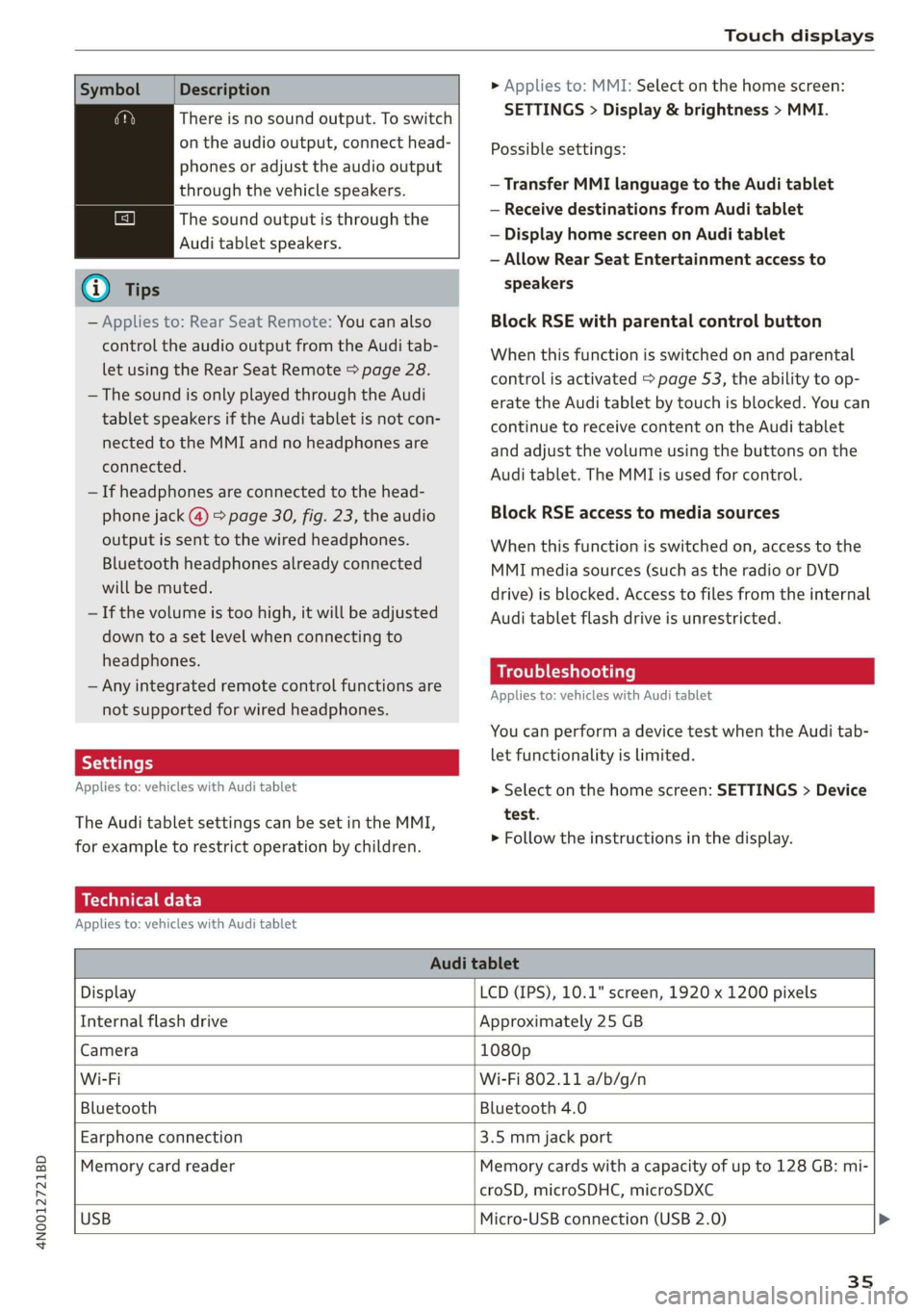
Symbol Description
There is no sound output. To switch
on the audio output, connect head-
phones or adjust the audio output
through the vehicle speakers.
The sound output is through the
Audi tablet speakers.
G) Tips
— Applies to: Rear Seat Remote: You can also
control the audio output from the Audi tab-
let using the Rear Seat Remote > page 28.
— The sound is only played through the Audi
tablet speakers if the Audi tablet is not con-
nected to the MMI and no headphones are
connected.
— If headphones are connected to the head-
phone jack (@) > page 30, fig. 23, the audio
output is sent to the wired headphones.
Bluetooth headphones already connected
will be muted.
— If the volume is too high, it will be adjusted
down to a set level when connecting to
headphones.
— Any integrated remote control functions are
not supported for wired headphones.
Applies to: vehicles with Audi tablet
The Audi tablet settings can be set in the MMI,
for example to restrict operation by children.
> Applies to: MMI: Select on the home screen:
SETTINGS > Display & brightness > MMI.
Possible settings:
— Transfer MMI language to the Audi tablet
— Receive destinations from Audi tablet
— Display home screen on Audi tablet
— Allow Rear Seat Entertainment access to
speakers
Block RSE with parental control button
When this function is switched on and parental
control is activated > page 53, the ability to op-
erate the Audi tablet by touch is blocked. You can
continue to receive content on the Audi tablet
and adjust the volume using the buttons on the
Audi tablet. The MMI is used for control.
Block RSE access to media sources
When this function is switched on, access to the
MMI media sources (such as the radio or DVD
drive) is blocked. Access to files from the internal
Audi tablet flash drive is unrestricted.
Troubleshooting
Applies to: vehicles with Audi tablet
You can perform a device test when the Audi tab-
let functionality is limited.
> Select on the home screen: SETTINGS > Device
test.
> Follow the instructions in the display.
Technical data
Applies to: vehicles with Audi tablet
Audi tablet
Display LCD (IPS), 10.1" screen, 1920 x 1200 pixels
Internal flash drive Approximately 25 GB
Camera 1080p
Wi-Fi Wi-Fi 802.11 a/b/g/n
Bluetooth Bluetooth 4.0
Earphone connection 3.5 mm jack port
Memory card reader Memory cards with a capacity of up to 128 GB: mi-
croSD, microSDHC, microSDXC
USB
Micro-USB connection (USB 2.0) >
35
Page 55 of 360
4N0012721BD
Opening and closing
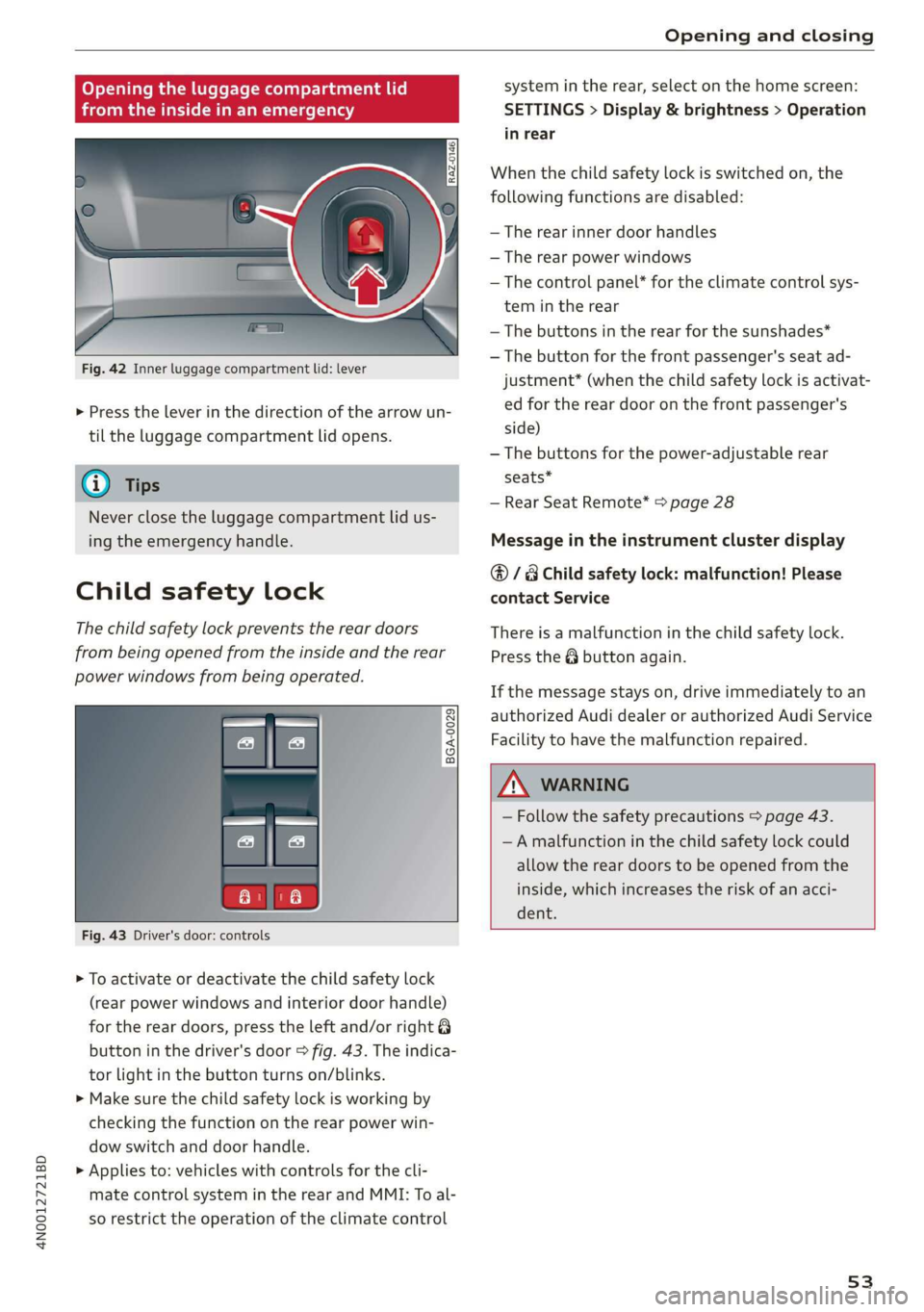
Opening the luggage compartment lid
baceemiasie(-M Uma tee (Tn
SI s
| ny a ee
Fig. 42 Inner luggage compartment lid: lever
> Press the lever in the direction of the arrow un-
til the luggage compartment lid opens.
Never close the luggage compartment lid us-
ing
the emergency handle.
Child safety lock
The child safety lock prevents the rear doors
from being opened from the inside and the rear
power windows from being operated.
BGA-0029
Fig. 43 Driver's door: controls
> To activate or deactivate the child safety lock
(rear power windows and interior door handle)
for the rear doors, press the left and/or right 8
button in the driver's door > fig. 43. The indica-
tor light in the button turns on/blinks.
> Make sure the child safety lock is working by
checking the function on the rear power win-
dow switch and door handle.
> Applies to: vehicles with controls for the cli-
mate control system in the rear and MMI: To al-
so restrict the operation of the climate control
system in the rear, select on the home screen:
SETTINGS > Display & brightness > Operation
in rear
When the child safety lock is switched on, the
following functions are disabled:
— The rear inner door handles
— The rear power windows
— The control panel* for the climate control sys-
tem in the rear
—The buttons in the rear for the sunshades*
—The button for the front passenger's seat ad-
justment* (when the child safety lock is activat-
ed for the rear door on the front passenger's
side)
—The buttons for the power-adjustable rear
seats”
— Rear Seat Remote* > page 28
Message in the instrument cluster display
@/ Child safety lock: malfunction! Please
contact Service
There is a malfunction in the child safety lock.
Press the button again.
If the message stays on, drive immediately to an
authorized Audi dealer or authorized Audi Service
Facility to have the malfunction repaired.
— Follow the safety precautions > page 43.
—A malfunction in the child safety lock could
allow the rear doors to be opened from the
inside, which increases the risk of an acci-
dent.
53
Page 56 of 360

Opening and closing
Power windows
Opening and closing windows and
sunshades
RAZ-0723
Fig. 44 Driver's door: power window switch
Power window switches:
@ Left front door
@® Right front door
@® Left rear door
@ Right rear door
Opening and closing the windows
The driver can control all power windows. All
power window switches are equipped with a two-
stage function:
> To open or close the window completely, press
the switch down or pull the switch up briefly to
the second level. The operation will stop if the
switch is pressed or pulled again.
> To select a position in between opened and
closed, press or pull the switch to the first level
until the desired window position is reached.
Opening and closing sunshades on the rear
side windows
Applies to: vehicles with sunshades on the rear side windows
Requirement: the window whose sunshade you
will operate must be closed.
> To close or open the sunshade from the driver's
seat, pull or press the & power window switch
for that window in the driver's door.
> To close or open the sunshade from the rear,
pull or press the & power window switch for
that window in the rear door. Or:
> Applies to: Rear Seat Remote: To close or open
the sunshade from the rear, select on the home
screen: Blinds.
54
Correcting a malfunction in the one-touch
up/down function
You can reactivate the one-touch up/down func-
tion if it malfunctions.
> Pull the power window switch up until the win-
dow is completely raised.
> Release the switch and pull it up again for at
least one second.
ZX WARNING
— Follow the safety precautions > page 43.
— Never close the windows or sunshades*
carelessly or in an uncontrolled manner, be-
cause this increases the risk of injury.
(i) Tips
— You can still open and close the windows for
several minutes after turning the ignition
off. The power window switch is not disa-
bled until the driver's door or front passeng-
er's door is opened.
— The power windows are equipped with pinch
protection. The automatic window may stop
closing and will open all the way again even
if no obstacle is detected. Pull the power
window switch up until the window is com-
pletely raised.
Convenience opening and closing
Applies to: vehicles with convenience key
Convenience opening or closing the windows
or panoramic glass roof*
You can set in the MMI if all windows or the roof*
should open or close all at once > page 44, Set-
ting the central locking system.
> Press and hold the @ or f button on the vehicle
key until all windows and the roof* have
reached the desired position > A\.
> Applies to: vehicles with convenience key:
Touch the sensor* on the door handle until all
of the windows and the roof* are closed. Do not
place your hand in the door handle when doing
this.
When all of the windows and the roof* are
closed, the turn signals will flash once.
Page 57 of 360
![AUDI A8 2020 User Guide 4N0012721BD
Opening and closing
Convenience opening and closing the
sunshade*
Applies to: vehicles with power blinds
You can open or close all of the sunshades at
once.
> Press and hold [2:]](/img/6/57606/w960_57606-56.png "AUDI A8 2020 User Guide 4N0012721BD
Opening and closing
Convenience opening and closing the
sunshade*
Applies to: vehicles with power blinds
You can open or close all of the sunshades at
once.
> Press and hold [2:]")
4N0012721BD
Opening and closing
Convenience opening and closing the
sunshade*
Applies to: vehicles with power blinds
You can open or close all of the sunshades at
once.
> Press and hold [2:] on the lower display. Or:
> Press and hold the [2:] button in the rear door.
Or:
> Applies to: Rear Seat Remote: Select on the
home screen: Blinds. Press on the picture of
the sunshade to operate it.
ZA WARNING
— Never close the windows or panoramic glass
roof* carelessly or in an uncontrolled man-
ner, because this increases the risk of injury.
— For security reasons, the windows and the
panoramic glass roof* can only be opened
and closed with the vehicle key at a maxi-
mum distance of approximately 6.5 feet
(2 m) from the vehicle. Always pay attention
when using the f button to close the win-
dows and the panoramic glass roof* so that
no one is pinched. The closing process will
stop immediately when the ff button is re-
leased.
Panoramic glass roof
Operating the panoramic glass roof and
coe) mee dar-Le(-)
Applies to: vehicles with panoramic glass roof and roof sun-
shade
Fig. 45 Headliner: panoramic glass roof and sunshade*
buttons
The control buttons are equipped with a two-
stage function. Depending on the equipment, it
RAZ-0027
may also be possible to operate the roof and the
roof sunshade from the rear.
When tilting or opening the roof, the roof sun-
shade will open partially or completely if the sun-
shade is closed.
Operating the front roof sunshade
Requirement: the roof must be closed.
> Opening and closing the sunshade: push the
2D switch in the headliner @) briefly toward
the rear or forward to the second level. Or:
Push or pull the &> switch in the rear briefly
downward or upward to the second level.
> Partially opening the sunshade: press the A>
switch to the first level until the sunshade
reaches the desired position. Or:
> Applies to: Rear Seat Remote: Open or close the
sunshade: select on the home screen: Blinds.
Press on the picture of the sunshade to operate
it.
Operating the rear roof sunshade*
> Opening and closing the sunshade: push the -&
switch in the headliner @) briefly forward or to-
ward the rear to the second level. Or:
> Push or pull the switch in the rear door
briefly downward or upward to the second lev-
el.
> Partially opening the sunshade: press the
switch to the first level until the sunshade
reaches the desired position. Or:
> Applies to: Rear Seat Remote: Select on the
home screen: Blinds. Press on the picture of
the sunshade to operate it.
Operating the roof from the cockpit
> Tilting the roof: press the A> switch in the
headliner briefly upward to the second level (@).
> Closing the tilted roof: pull the 2> switch
downward briefly to the second level.
> Opening the roof: slide the 2s switch back
briefly twice in a row to the second level @).
> Closing the roof: push the 2> switch forward
briefly to the second Level.
> Opening or closing partially: slide the A>
switch to the first level and hold it there until
the roof reaches the desired position.
55
Page 58 of 360

Opening and closing
Operating the roof from the rear*
> Tilting the roof: briefly press the > switch* in
the rear door downward once to the second lev-
el.
> Closing the tilted roof: pull the > switch* up-
ward briefly to the second Level.
> Opening the roof: press the 2S switch* in the
rear door downward again briefly to the second
level.
> Closing the roof: pull the 2> switch* upward
briefly to the second level.
> Opening partially: pull or press the 2> switch*
to the first level until the roof reaches the de-
sired position. Or:
> Applies to: Rear Seat Remote: Select on the
home screen: Blinds. Press on the picture of
the roof to operate it.
Quick opening and closing
You can also open or close the roof and front sun-
shade from the cockpit in one movement.
> Opening the roof and sunshade: slide the 2>
switch back briefly twice in a row to the second
level @).
> Closing the opened roof: push the 2S switch
forward briefly twice in a row to the second lev-
el.
Roof emergency closing
If an object is detected when closing, the roof
will open again automatically. In this case, you
can then close it with the power emergency clos-
ing function.
> Within five seconds after the sunroof opens au-
tomatically, pull the applicable button until the
roof is closed.
ZA\ WARNING
To reduce the risk of injury, always pay atten-
tion when closing the roof. Always switch the
ignition off and take the key with you when
leaving the vehicle.
)_ This function is not available in all countries.
56
C@) Note
Always close the roof when you leave the vehi-
cle and when there is precipitation to reduce
the risk of damage to the interior equipment,
particularly the electronic equipment.
Gi) Tips
— After switching off the ignition, the roof and
sunshades can still be operated for several
minutes as long as neither of the front
doors are opened.
— It is not possible to open the roof when
temperatures are too low.
Opening and closing the rear window
Tete
Applies to: vehicles with a sunshade on the rear window
The sunshade on the rear window can be operat-
ed both from the cockpit and from the rear seats.
Operating the sunshade on the rear window
> Applies to: MMI: Opening and closing the sun-
shade: Press [4] on the lower display. Or:
> Press the [2:] button briefly in the rear door. Or:
> Applies to: Rear Seat Remote: Select on the
home screen: Blinds. Press on the picture of
the rear window sunshade to operate it.
Valet parking
Applies to: vehicles with valet parking function
The valet parking function can protect the lug-
gage compartment from unauthorized access.
The [VALET] button for valet parking is in the
glove compartment.
You can switch the valet parking function on, for
example when someone else is parking your vehi-
cle ). The vehicle can be driven, locked, and un-
locked using the vehicle key, but access to the
luggage compartment is blocked.
> Remove the mechanical key > page 47.
> Press the [VALET] button in the glove compart-
ment. The LED in the button turns on if the
function is switched on.
Page 59 of 360
4N0012721BD
Opening and closing
> Lock the glove compartment with the mechani-
cal key.
> Give your vehicle key to the service personnel
who are parking your vehicle and keep the me-
chanical key.
The following buttons are deactivated when the
valet parking function is switched on:
— <3 button in the driver's door
— <3 or 4s button on the vehicle key
— Handle in the luggage compartment lid
If the valet parking function is switched on, a
message will appear every time the ignition is
switched on.
@ Tips
Please note that the luggage compartment
can still be accessed from the vehicle interior
in vehicles with fixed rear seat backrests or
ones that cannot be locked, even when the
valet parking function is switched on.
Garage door opener
Applies to: vehicles with garage door opener
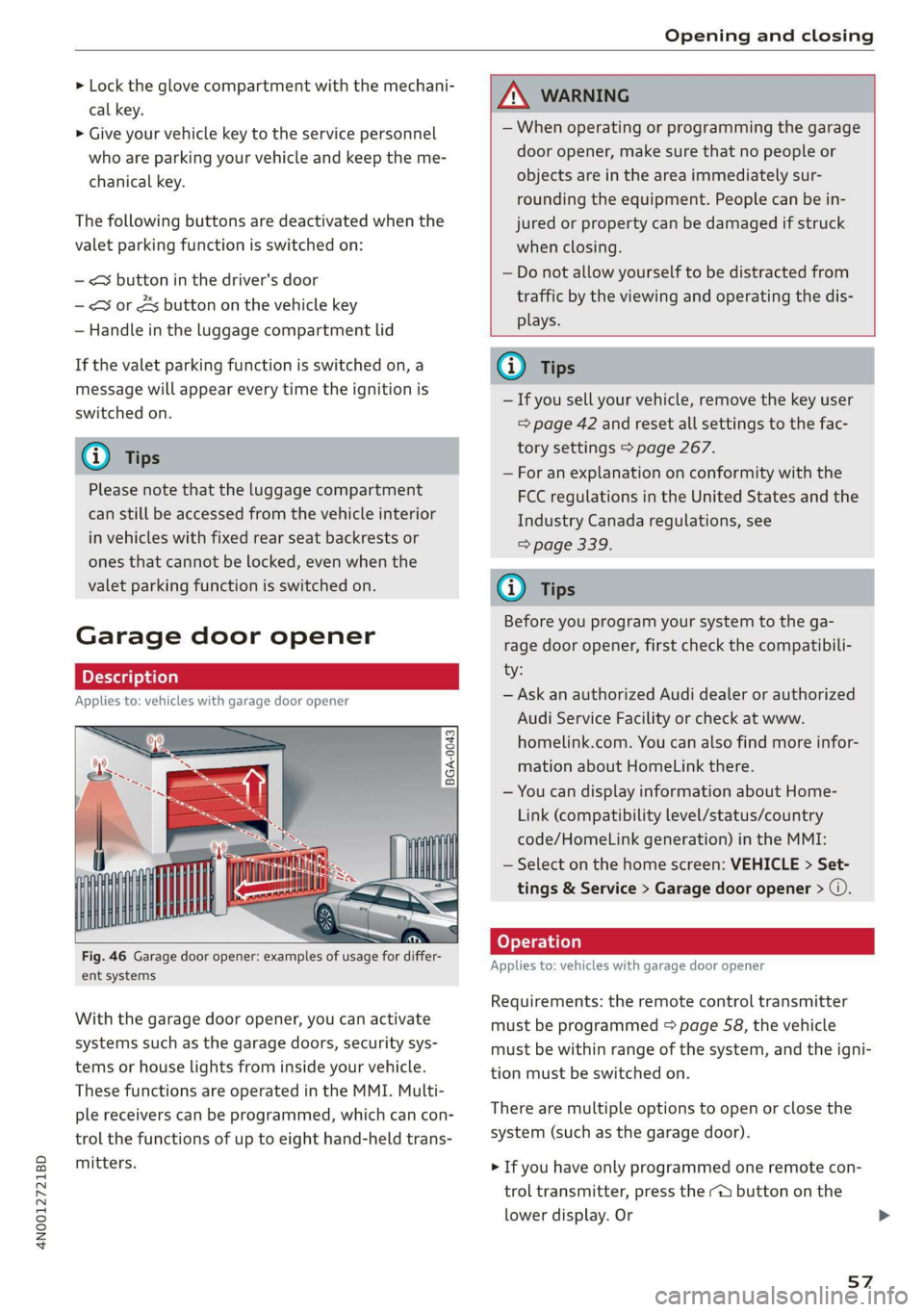
2 + S >
<
go EI
ent systems
With the garage door opener, you can activate
systems such as the garage doors, security sys-
tems or house lights from inside your vehicle.
These functions are operated in the MMI. Multi-
ple receivers can be programmed, which can con-
trol the functions of up to eight hand-held trans-
mitters.
ZX WARNING
— When operating or programming the garage
door opener, make sure that no people or
objects are in the area immediately sur-
rounding the equipment. People can be in-
jured or property can be damaged if struck
when closing.
— Do not allow yourself to be distracted from
traffic by the viewing and operating the dis-
plays.
G) Tips
— If you sell your vehicle, remove the key user
= page 42 and reset all settings to the fac-
tory settings > page 267.
— For an explanation on conformity with the
FCC regulations in the United States and the
Industry Canada regulations, see
> page 339.
G) Tips
Before you program your system to the ga-
rage door opener, first check the compatibili-
ty:
— Ask an authorized Audi dealer or authorized
Audi Service Facility or check at www.
homelink.com. You can also find more infor-
mation about HomeLink there.
— You can display information about Home-
Link (compatibility level/status/country
code/HomeLink generation) in the MMI:
— Select on the home screen: VEHICLE > Set-
tings & Service > Garage door opener > @.
Applies to: vehicles with garage door opener
Requirements: the remote control transmitter
must be programmed > page 58, the vehicle
must be within range of the system, and the igni-
tion must be switched on.
There are multiple options to open or close the
system (such as the garage door).
> If you have only programmed one remote con-
trol transmitter, press the ra button on the
lower
display. Or
57
Page 67 of 360

4N0012721BD
Lights and Vision
Interior lighting buttons
ax&* — Interior lighting on/off
a* - Rear interior lighting on/off
4 - Door contact switch on/off. The interior light-
ing is controlled automatically.
Touch-sensitive reading lights
> To turn a reading light on or off, touch the sur-
face @ briefly.
> To activate the manual dimming function,
touch the surface @) when the light is switched
off and keep touching it until the desired
brightness is reached.
Rear interior lighting
RAZ-0006
Fig. 52 Headliner: reading lights
Press the 2s* button to switch the rear interior
lighting on or off.
Touch-sensitive reading lights*
> To turn a reading light on or off, touch the sur-
face @ briefly.
> To activate the manual dimming function,
touch the surface @ when the light is switched
off and keep touching it until the desired
brightness is reached.
Matrix reading lights*
When the reading lights are switched on, you can
individually adjust the brightness, position, and
focus range.
> Applies to: Rear Seat Remote: Select on the
home screen: LIGHTS > Matrix lights > Individ-
ual.
Interior lighting
Applies to: vehicles with interior lighting
The ambient lighting turns on when the ignition
is switched on. The ambient lighting is deactivat-
ed when the light function is OFF.
You can adjust the interior lighting individually.
The settings depend on the vehicle equipment.
> Applies to: MMI: Select on the home screen:
VEHICLE > Light & Visibility > Interior light-
ing.
> Applies to: Rear Seat Remote: Select on the
home screen: LIGHTS > Interior lighting.
You can choose among predefined color profiles,
such as Maritime.
Additional settings and profiles:
— Brightness: you can adjust the brightness for
all of the interior lighting.
— Individual: you can adjust the brightness and
color of the interior lighting separately, divided
into contour and surface lighting.
— Drive select: the contour and surface lighting
color changes depending on the selected Audi
drive select* mode.
G) Tips
— Depending on vehicle equipment, when the
Drive select function is activated, the color
of the contour and surface lighting may
briefly change to red or blue when the inte-
rior temperature is manually increased or
decreased.
— Certain settings are stored automatically in
the active personal profile.
Display brightness
You can adjust the instrument and display illumi-
nation separately. The settings depend on the ve-
hicle equipment.
> Applies to: MMI: Select on the home screen:
SETTINGS > Display & brightness.
> Applies to: Rear Seat Remote: Select on the
home screen: SETTINGS > Device.
Possible settings in the MMI:
65
Page 68 of 360
Lights and Vision
— Cockpit dimming
— Head-up display
—MMI
— Virtual cockpit
Possible settings in the Rear Seat Remote:
— Brightness
— Dim display
Vision
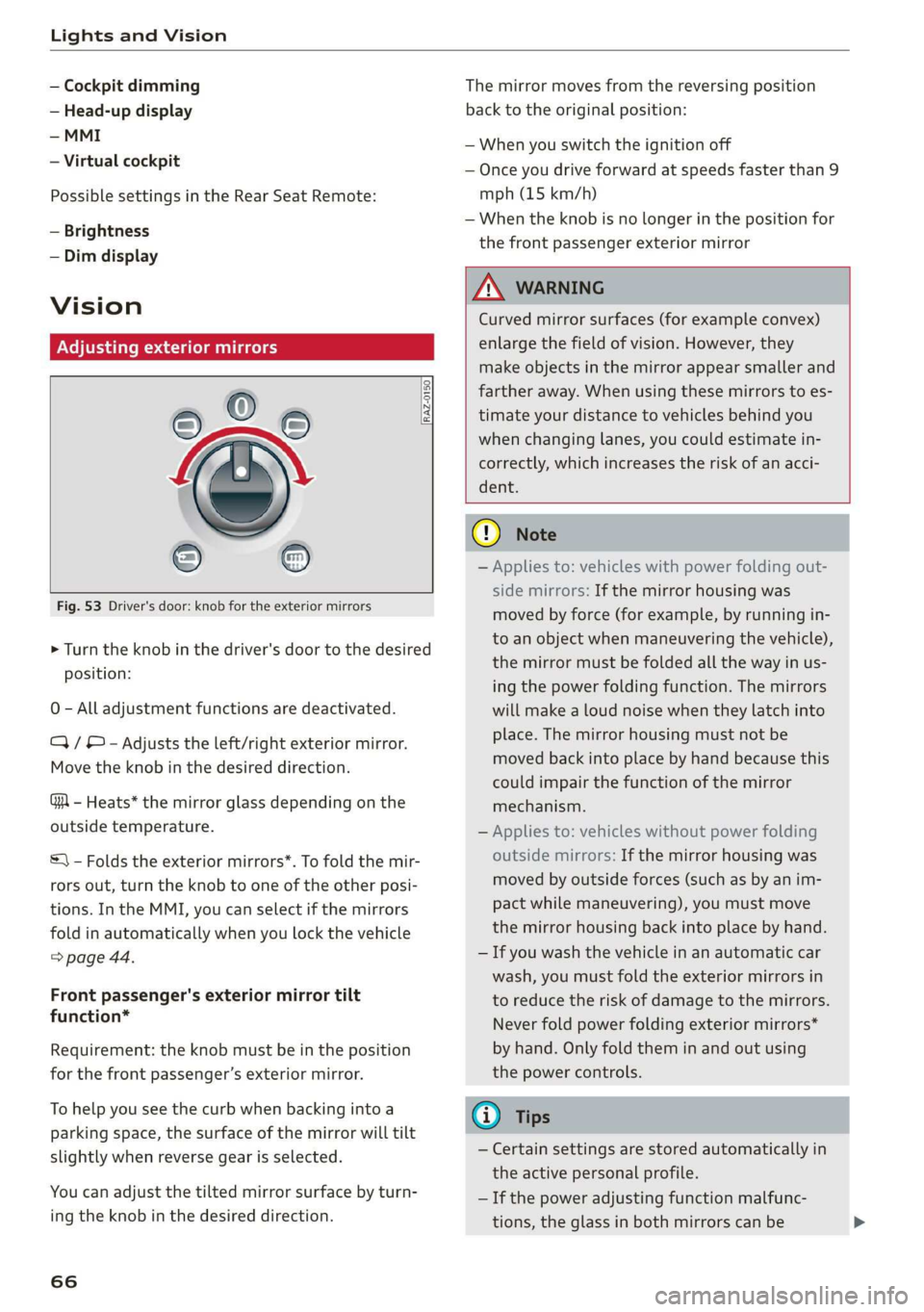
Adjusting exterior mirrors
Fig. 53 Driver's door: knob for the exterior mirrors
® ©
O
> Turn the knob in the driver's door to the desired
position:
0 - All adjustment functions are deactivated.
Q/ ® - Adjusts the left/right exterior mirror.
Move the knob in the desired direction.
GA - Heats* the mirror glass depending on the
outside temperature.
©) - Folds the exterior mirrors*. To fold the mir-
rors out, turn the knob to one of the other posi-
tions. In the MMI, you can select if the mirrors
fold in automatically when you lock the vehicle
> page 44.
Front passenger's exterior mirror tilt
function*
Requirement: the knob must be in the position
for the front passenger’s exterior mirror.
To help you see the curb when backing into a
parking space, the surface of the mirror will tilt
slightly when reverse gear is selected.
You can adjust the tilted mirror surface by turn-
ing the knob in the desired direction.
66
The mirror moves from the reversing position
back to the original position:
— When you switch the ignition off
— Once you drive forward at speeds faster than 9
mph (15 km/h)
— When the knob is no longer in the position for
the front passenger exterior mirror
ZX WARNING
Curved mirror surfaces (for example convex)
enlarge the field of vision. However, they
make objects in the mirror appear smaller and
farther away. When using these mirrors to es-
timate your distance to vehicles behind you
when changing lanes, you could estimate in-
correctly, which increases the risk of an acci-
dent.
@) Note
— Applies to: vehicles with power folding out-
side mirrors: If the mirror housing was
moved by force (for example, by running in-
to an object when maneuvering the vehicle),
the mirror must be folded all the way in us-
ing the power folding function. The mirrors
will make a loud noise when they latch into
place. The mirror housing must not be
moved back into place by hand because this
could impair the function of the mirror
mechanism.
— Applies to: vehicles without power folding
outside mirrors: If the mirror housing was
moved by outside forces (such as by an im-
pact while maneuvering), you must move
the mirror housing back into place by hand.
— If you wash the vehicle in an automatic car
wash, you must fold the exterior mirrors in
to reduce the risk of damage to the mirrors.
Never fold power folding exterior mirrors*
by hand. Only fold them in and out using
the power controls.
G) Tips
— Certain settings are stored automatically in
the active personal profile.
— If the power adjusting function malfunc-
tions, the glass in both mirrors can be
Page 74 of 360

Sitting correctly and safely
Sitting correctly and
safely
Correct passenger
seating position
General information
As the driver, you are responsible for making sure
every passenger is sitting correctly in their seat
and maintaining this seating position while driv-
ing. Make sure that:
— Every passenger in the vehicle has adjusted his
or her seat correctly > page 72
— The steering wheel is adjusted correctly
=> page 80
— The mirrors are adjusted so that there is a suffi-
cient view of the area around the vehicle
=> page 66
— Every passenger in the vehicle has his or her
head restraint adjusted correctly > page 81
— Every passenger in the vehicle has his or her
safety belt fastened correctly > page 82
— The activation status of the front passenger's
airbag is suitable for the passenger in the front
passenger's seat > page 89
— Children are secured in suitable child safety
seats that are secured to appropriate vehicle
seats > page 91. Read and observe the impor-
tant safety information pertaining to the use of
child safety seats on the front passenger's seat
= A in General information on page 91.
Examples of incorrect seating positions
Safety belts can only provide its optimal protec-
tion when they are routed correctly. Incorrect
seating positions significantly reduce the protec-
tive functions of the safety belts and increase the
risk of injury due to incorrect belt routing.
The following list includes examples of seating
positions that could be dangerous for all vehicle
occupants. This is not a complete list. The pur-
pose is to provide examples to increase your
awareness of the topic. The following points ap-
ply when the vehicle is in motion:
— Never stand inside the vehicle.
— Never stand on the seats.
72
— Never kneel on the seats.
— Never tilt your backrest too far back.
— Never lean against the instrument panel.
— Never lie down on the rear bench seat.
— Never sit only on the front section of the seat.
— Never sit sideways on the seat.
— Never lean against the window.
— Never place your feet out of the window.
— Never place your feet on the instrument panel.
— Never place your feet on the seat cushion.
— Never ride in the footwell.
— Never sit on the armrests.
— Never drive or ride in a seat without fastening
your safety belt.
— Never ride in the luggage compartment.
ZA WARNING
Incorrect seating positions, failure to wear a
safety belt, or being too close to an airbag in-
crease the risk of serious or fatal injury to ve-
hicle occupants, especially if the airbags de-
ploy and come into contact with occupants
who are not seated correctly. Note the impor-
tant information and warnings in the chapters
for the topics given above.
Gi) Tips
— Save your seat profile* > page 85. This al-
lows you to access your personal seat profile
quickly and easily at any time.
— If you or other vehicle passengers have
physical limitations that prevent sitting in a
correct position, modifications to the vehi-
cle may be necessary. For more information,
contact an authorized Audi dealer or author-
ized Audi Service Facility, or call Audi cus-
tomer support at 1-800-822-2834.
Front seats
General information
Make sure that:
— You can press the pedals down completely
while your legs are slightly bent
Page 75 of 360

4N0012721BD
Sitting correctly and safely
— The distance between your upper body and the
steering wheel or instrument panel is at least
10 inches (25 cm)
— The distance between your knees and the in-
strument panel is at least 4 inches (10 cm)
— Your thighs are lightly supported by the front
surface of the seat
— The backrest is in an upright position and your
back
is resting against it
— You have a sufficient view of the area around
the vehicle
— You have a clear view of the instrument cluster,
indicator lights, and the head-up display*
Seat settings menu: quick access
If you press on the image of the driver's or front
passenger's seat in the climate control system
menu & page 104, fig. 95 @, you will go directly
to the seat settings for that seat.
ZA WARNING
— If you are too close to the steering wheel or
instrument panel, the airbag system cannot
provide the optimal protection, which in-
creases the risk of injury and death.
—To reduce the risk of injury in the event of
sudden braking maneuvers or accidents,
never drive with the backrest reclined very
far. The airbag system and seat belts can on-
ly provide optimal protection when the back-
rest is in an upright position and the driver
is wearing the seat belt correctly. If the
backrest is angled back too far, the safety
belt can shift to soft areas of the body, such
as the stomach, which increases the risk of
injury.
—To reduce the risk of an accident, only adjust
the seats when the vehicle is stationary.
— Be careful when adjusting the seat. Lack of
control or attention when adjusting can re-
sult in injuries due to pinching to vehicle oc-
cupants both in the front seats and rear
seats.
— Never place objects in the driver's footwell.
Objects could shift and enter the area
around the pedals, which could prevent you
from using them. You would then be unable
to use the pedals if sudden driving or brak-
ing maneuvers were needed, which increas-
es the risk of an accident.
— Make sure that the floor mats are always se-
curely attached.
—To reduce the risk of an accident, never place
additional floor mats or other floor covers
over the installed floor mats, because this
reduces the pedal's range of motion and can
impair pedal operation.
—To reduce the risk of injury, never place your
feet on the instrument panel, out of the
window, or on the seat surfaces. This also
applies to passengers in the rear seats.
G) Tips
At the same time, only move the respective
seat using the controls.
Adjusting the front seats with buttons
You can adjust the basic settings using the but-
tons.
RAZ-0172
Fig. 60 Front seat: seat adjustment buttons
The settings depend on the vehicle equipment.
Adjusting the seat position
> To move the seat forward or backward, push
the button @ forward or backward.
> To adjust the seat upward or downward, push
the rear section of the button @ upward or
downward.
> To adjust the seat surface, press the front part
of the button @ upward or downward.
Adjusting the backrests
> To move the backrest forward or backward,
press the button (@) forward or backward.
73