Rear seat AUDI A8 2020 Owner's Manual
[x] Cancel search | Manufacturer: AUDI, Model Year: 2020, Model line: A8, Model: AUDI A8 2020Pages: 360, PDF Size: 95.38 MB
Page 76 of 360
Sitting correctly and safely
Adjusting the head restraints
> See > page 81
Adjusting the lumbar support
> To adjust the lumbar support, press the button
@ at the applicable location.
Massage function
Switch the massage function on or off @). Setting
the massage type and intensity > page 74.
Z\ WARNING
The power front seats can also be adjusted
when the ignition is switched off. To reduce
the risk of injury, children should never be left
unattended in the vehicle.
Adjusting the front seats in the MMI
You can adjust additional settings in the MMI.
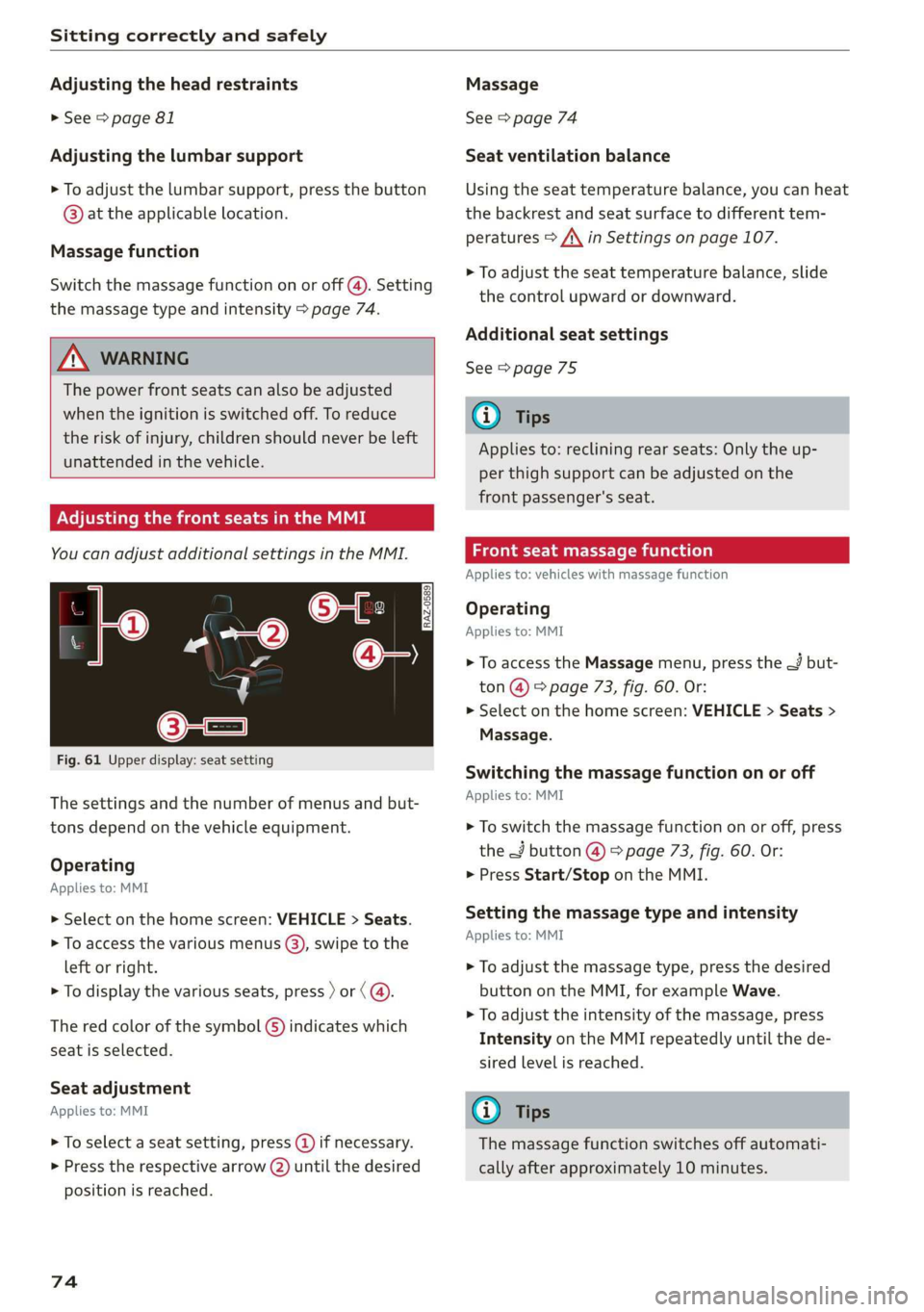
Fig. 61 Upper display: seat setting
The settings and the number of menus and but-
tons depend on the vehicle equipment.
Operating
Applies to: MMI
> Select on the home screen: VEHICLE > Seats.
> To access the various menus (3), swipe to the
left or right.
> To display the various seats, press ) or (@.
The red color of the symbol (S) indicates which
seat is selected.
Seat adjustment
Applies to: MMI
> To select a seat setting, press @) if necessary.
> Press the respective arrow (2) until the desired
position is reached.
74
Massage
See > page 74
Seat ventilation balance
Using the seat temperature balance, you can heat
the backrest and seat surface to different tem-
peratures > A\ in Settings on page 107.
> To adjust the seat temperature balance, slide
the control upward or downward.
Additional seat settings
See > page 75
G) Tips
Applies to: reclining rear seats: Only the up-
per thigh support can be adjusted on the
front passenger's seat.
Front seat massage function
Applies to: vehicles with massage function
Operating
Applies to: MMI
> To access the Massage menu, press the J but-
ton @ © page 73, fig. 60. Or:
> Select on the home screen: VEHICLE > Seats >
Massage.
Switching the massage function on or off
Applies to: MMI
> To switch the massage function on or off, press
the J button @ © page 73, fig. 60. Or:
> Press Start/Stop on the MMI.
Setting the massage type and intensity
Applies to: MMI
> To adjust the massage type, press the desired
button on the MMI, for example Wave.
> To adjust the intensity of the massage, press
Intensity on the MMI repeatedly until the de-
sired level is reached.
G) Tips
The massage function switches off automati-
cally after approximately 10 minutes.
Page 77 of 360
4N0012721BD
Sitting correctly and safely
Xe)
onal settings in the MMI
You can adjust additional settings and switch
functions on or off in the MMI.
> Applies to: MMI: Select on the home screen:
VEHICLE > Seats > Additional seat settings.
Depending on the vehicle equipment, the follow-
ing options may be available.
Reset seat position
You can adjust the position of the front passeng-
er’s seat to match the driver's seat. The rear
seats are set to a pre-defined position.
Driver seat entry assistance/Front passenger
seat entry assistance
Entry assistance makes it easier to enter or exit
the vehicle.
Rear seat entry assistance
If the function is switched on, the rear seat will
automatically move all the way back when the
door next to that seat is opened.
Passenger side rear seat adjustment
If the function is switched on, the front passeng-
er's seat can be adjusted from the rear seat
= page 77.
Rear seat upright/reclining position
You can set the upright/reclining position on the
MMI & A in Adjusting the comfort position on
page 79.
Adjusting the front passenger's seat from
tate lah terete
You can adjust the front passenger's side with the
driver's seat buttons.
Applies to: MMI:
> Select on the home screen: VEHICLE > Seats.
> To display the various seats, press ) or ¢.
> To switch on the function, press the 2/ button.
The lower edge of the button will turn red.
After you have switched on the function, you can
adjust the front passenger's seat using the driv-
er's seat buttons > page 73, fig. 60.
The function switches off automatically when
you exit the menu.
eae Ceri
Applies to: vehicles with a front center armrest
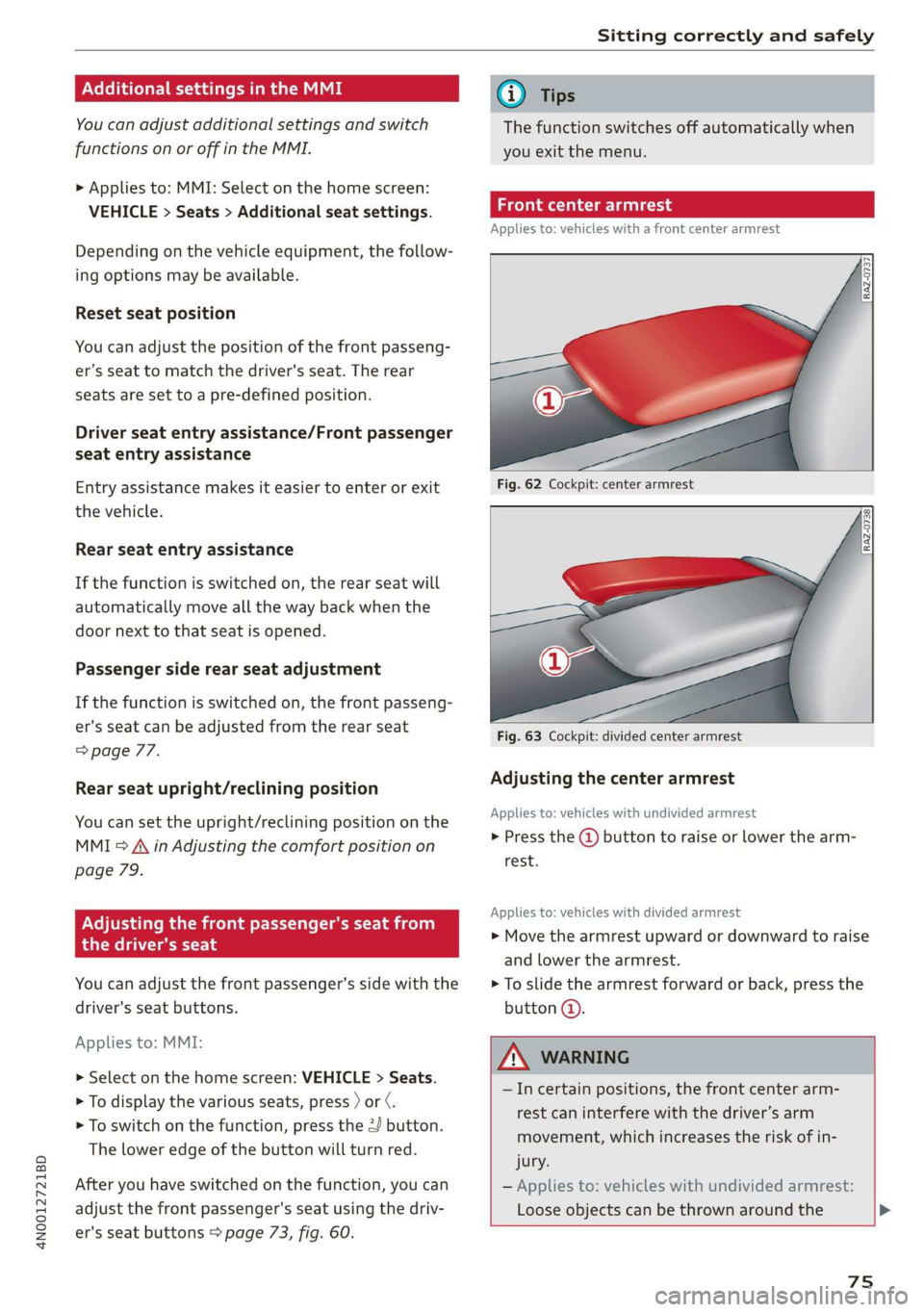
Fig. 62 Cockpit: center armrest
Fig. 63 Cockpit: divided center armrest
Adjusting the center armrest
Applies to: vehicles with undivided armrest
> Press the @ button to raise or lower the arm-
rest.
Applies to: vehicles with divided armrest
> Move the armrest upward or downward to raise
and lower the armrest.
> To slide the armrest forward or back, press the
button @.
ZA\ WARNING
—Incertain positions, the front center arm-
rest can interfere with the driver’s arm
movement, which increases the risk of in-
jury.
— Applies to: vehicles with undivided armrest:
Loose objects can be thrown around the
75
Page 78 of 360

Sitting correctly and safely
vehicle interior during sudden driving or
braking maneuvers, which increases the risk
of an accident. Store objects securely while
driving.
— Applies to: vehicles with front center airbag:
The center armrest must be closed while
driving. Otherwise, the protective function
of the front center airbag could be impaired
because it deploys from the driver's seat
backrest. This increases the risk of injury.
Rear seats
(ee eels)
Z\ WARNING
— The power seats can also be adjusted when
the ignition is switched off. To reduce the
risk of injury, children should never be left
unattended in the vehicle for this reason.
— Be careful when adjusting the seat. Unsu-
pervised or careless seat adjustment could
cause parts of the body to get pinched,
which increases the risk of injury.
C) Note
Before adjusting the seat position, you must
remove the retainers for the LATCH child safe-
ty seat restraint system, if installed.
G) Tips
At the same time, only move the respective
seat using the controls.
76
Adjusting seats with buttons
Applies to: vehicles with power adjustable rear seats
You can adjust the basic settings using the but-
tons.
©
S|
Ss x a
oo
Fig. 64 Rear center armrest/full-length center console:
seat adjustment buttons
The settings depend on the vehicle equipment.
Adjusting the lumbar support
> To adjust the curvature of the lumbar support,
press the left or right button @.
> To adjust the height of the lumbar support,
press the upper or lower button (@).
Adjusting the backrests
> To move the backrest forward or backward,
press the button (2) to the left or right.
Adjusting the head restraints
> See > page 81
Adjusting the seat position
> To adjust the seat forward or backward, press
the button @) to the left or right. The backrest
will automatically adjust with it.
>
To move the seat upward or downward, press
the button @) upward or downward.
Adjusting the front passenger's seat
See > page 77
Adjusting the comfort position
See > page 78
Page 79 of 360
4N0012721BD
Sitting correctly and safely
Adjusting seats with the Rear Seat Remote
Applies to: vehicles with Rear Seat Remote
You can adjust the rear seat using the Rear Seat
Remote.
al 3 |
S|
Ny ‘| cc
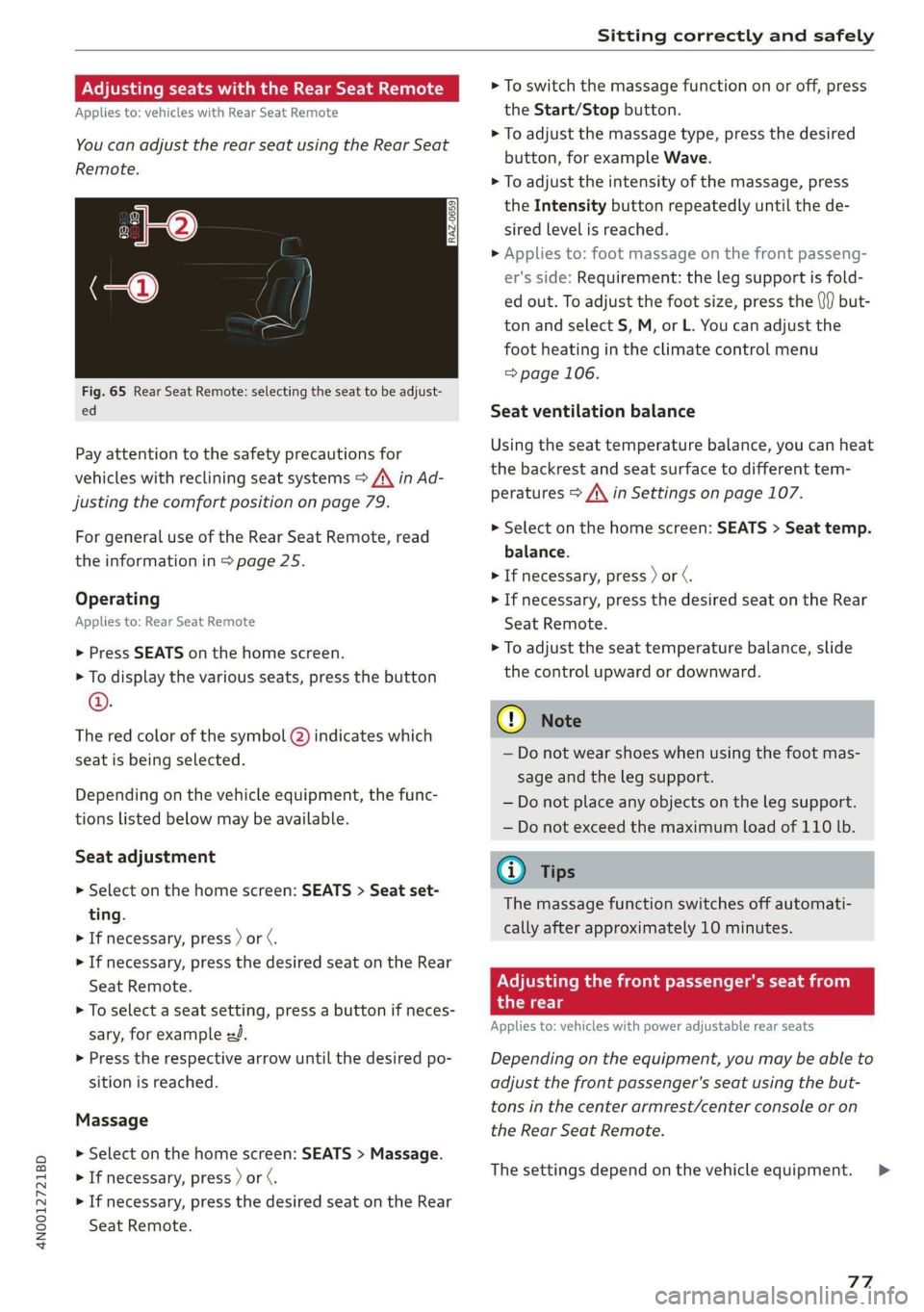
Fig. 65 Rear Seat Remote: selecting the seat to be adjust-
ed
Pay attention to the safety precautions for
vehicles with reclining seat systems > A\ in Ad-
justing the comfort position on page 79.
For
general use of the Rear Seat Remote, read
the information in > page 25.
Operating
Applies to: Rear Seat Remote
> Press SEATS on the home screen.
> To display the various seats, press the button
©.
The red color of the symbol @) indicates which
seat is being selected.
Depending on the vehicle equipment, the func-
tions listed below may be available.
Seat adjustment
> Select on the home screen: SEATS > Seat set-
ting.
> If necessary, press ) or ¢.
> If necessary, press the desired seat on the Rear
Seat Remote.
> To select a seat setting, press a button if neces-
sary, for example zd.
> Press the respective arrow until the desired po-
sition is reached.
Massage
> Select on the home screen: SEATS > Massage.
> If necessary, press ) or ¢.
> If necessary, press the desired seat on the Rear
Seat Remote.
> To switch the massage function on or off, press
the Start/Stop button.
> To adjust the massage type, press the desired
button, for example Wave.
> To adjust the intensity of the massage, press
the Intensity button repeatedly until the de-
sired level is reached.
> Applies to: foot massage on the front passeng-
er's side: Requirement: the leg support is fold-
ed out. To adjust the foot size, press the (}f) but-
ton and select S, M, or L. You can adjust the
foot
heating in the climate control menu
=> page 106.
Seat ventilation balance
Using the seat temperature balance, you can heat
the backrest and seat surface to different tem-
peratures > A\ in Settings on page 107.
> Select on the home screen: SEATS > Seat temp.
balance.
> If necessary, press ) or ¢.
> If necessary, press the desired seat on the Rear
Seat
Remote.
> To adjust the seat temperature balance, slide
the control upward or downward.
C@) Note
— Do not wear shoes when using the foot mas-
sage and the leg support.
— Do not place any objects on the leg support.
— Do not exceed the maximum load of 110 lb.
@ Tips
The massage function switches off automati-
cally after approximately 10 minutes.
Adjusting the front passenger's seat from
the rear
Applies to: vehicles with power adjustable rear seats
Depending on the equipment, you may be able to
adjust the front passenger's seat using the but-
tons in the center armrest/center console or on
the Rear Seat Remote.
The settings depend on the vehicle equipment. >
77
Page 80 of 360
Sitting correctly and safely
Requirements
> Read and follow the important safety precau-
tions about the reclining rear seats > /\ in Ad-
justing the comfort position on page 79.
> Make sure Passenger side rear seat adjustment
is switched on in the MMI > page 75.
> To activate the front passenger's seat adjust-
ment, press the button @)= page 76, fig. 64.
The LED in the button will turn on.
> Applies to: Rear Seat Remote: Press SEATS on
the Rear Seat Remote. Press the desired func-
tion and select the front passenger seat
=> page 77, fig. 65.
Adjusting the head restraints
See > page 81
Adjusting the Audi tablet
Applies to: reclining seat system with Audi tablet
See > page 31
Adjusting the backrests
> Applies to: buttons in the center console/center
armrest: Press the button (2) to the left or right
=> page 76, fig. 64.
> Applies to: Rear Seat Remote: Press the < but-
ton. Press the respective arrow until the desired
position is reached.
Adjusting the front passenger seat forward
or backward
> Applies to: buttons in the center armrest/
center console: Push the button @) > page 76,
fig. 64 to the left or right.
> Applies to: Rear Seat Remote: Press the J but-
ton. Press the respective arrow until the desired
position is reached.
Adjusting the front passenger seat upward
and downward
> Applies to: buttons in the center armrest/
center console: Press the button @) > page 76,
fig. 64 upward or downward.
> Applies to: Rear Seat Remote: Press the 2 but-
ton.
Press the respective arrow until the desired
position is reached.
78
Adjusting the leg support
Applies to: Reclining rear seat
Requirement: the reclining position must be se-
lected.
> Applies to: Rear Seat Remote: Press the 4 but-
ton to fold the leg support out or in. Press the
respective arrow until the desired position is
reached.
> To adjust the height or depth of the leg sup-
port, adjust the front passenger seat forward/
backward or upward/downward.
> To adjust the foot massage area, adjust the an-
gle of the front passenger seat backrest.
Z\ WARNING
Applies to: reclining seats: To reduce the risk
of injury, make sure the area between the leg
support and the front passenger's seat back-
rest is clear before folding in the leg support.
Gi) Tips
— If the settings cannot be applied from the
rear, then the child safety lock may be
switched on or the front passenger’s seat
adjustment for the rear seats may be
switched off in the MMI > page 75. If the
child safety lock is switched on, the @ but-
ton in the driver's door > page 53 turns on.
ONS mal -Mehlielam eth ela)
Applies to: vehicles with reclining/upright position or reclin-
ing seat system
Depending on the equipment, you may be able to
adjust the comfort position using the buttons in
the rear door or on the Rear Seat Remote.
Selecting the reclining position
> Applies to: buttons in the rear door for the re-
clining/upright position: To adjust the reclining
position, press the =% button until the seat has
reached its end position.
> Applies to: Rear Seat Remote: Select on the
home screen: SEATS > Seat setting.
> Press ) or ( until the x= or <4 symbol is dis-
played.
> Press &or~.
Page 81 of 360
4N0012721BD
Sitting correctly and safely
Selecting the upright position
> Applies to: buttons in the rear door for the re-
clining/upright position: To set the upright po-
sition, press the \& or J button until the seat
has reached its end position.
> Applies to: Rear Seat Remote: Select on the
home screen: SEATS > Seat setting.
> Press ) or until the & or J symbol is dis-
played.
> Press Kor J.
Reclining rear seat
Applies to: Reclining rear seat
In the reclining position, the front passenger
seat is moved forward, the head restraint on the
front passenger seat is folded forward, and the
backrest is tilted forward. Depending on the last
setting in the Rear Seat Remote, the leg support
may fold out and the Audi tablet may tilt for-
ward.
In the reclining position, you can adjust the Audi
tablet or the foot massage, for example
=> page 77.
In the upright position, the leg support is folded
in, the front passenger seat is moved back into
the original position, and the head restraint is
moved to the upright position > A\.
Z\ WARNING
Applies to: reclining rear seats:
— Due to the risk of fatal injury, the front pas-
senger's seat must not be used as a seat
when it is in the reclining position.
— Due to the risk of injury, never select the re-
clining position when the front passenger's
seat is occupied.
— Do not tilt the Audi tablet if the driver's view
of the right exterior mirror will be obstruct-
ed
@ Tips
— Applies to: reclining rear seats and Audi tab-
let: When adjusting the Audi tablet, make
sure the driver has a clear view of the exteri-
or mirrors. Make sure that the view of the
exterior mirror is not obstructed in the MMI.
Otherwise, the Audi tablet moves back to an
upright position.
— If the settings cannot be applied from the
rear, the child safety lock might be switched
on. If the child safety lock is switched on,
the 8 button in the driver's door > page 53
turns on.
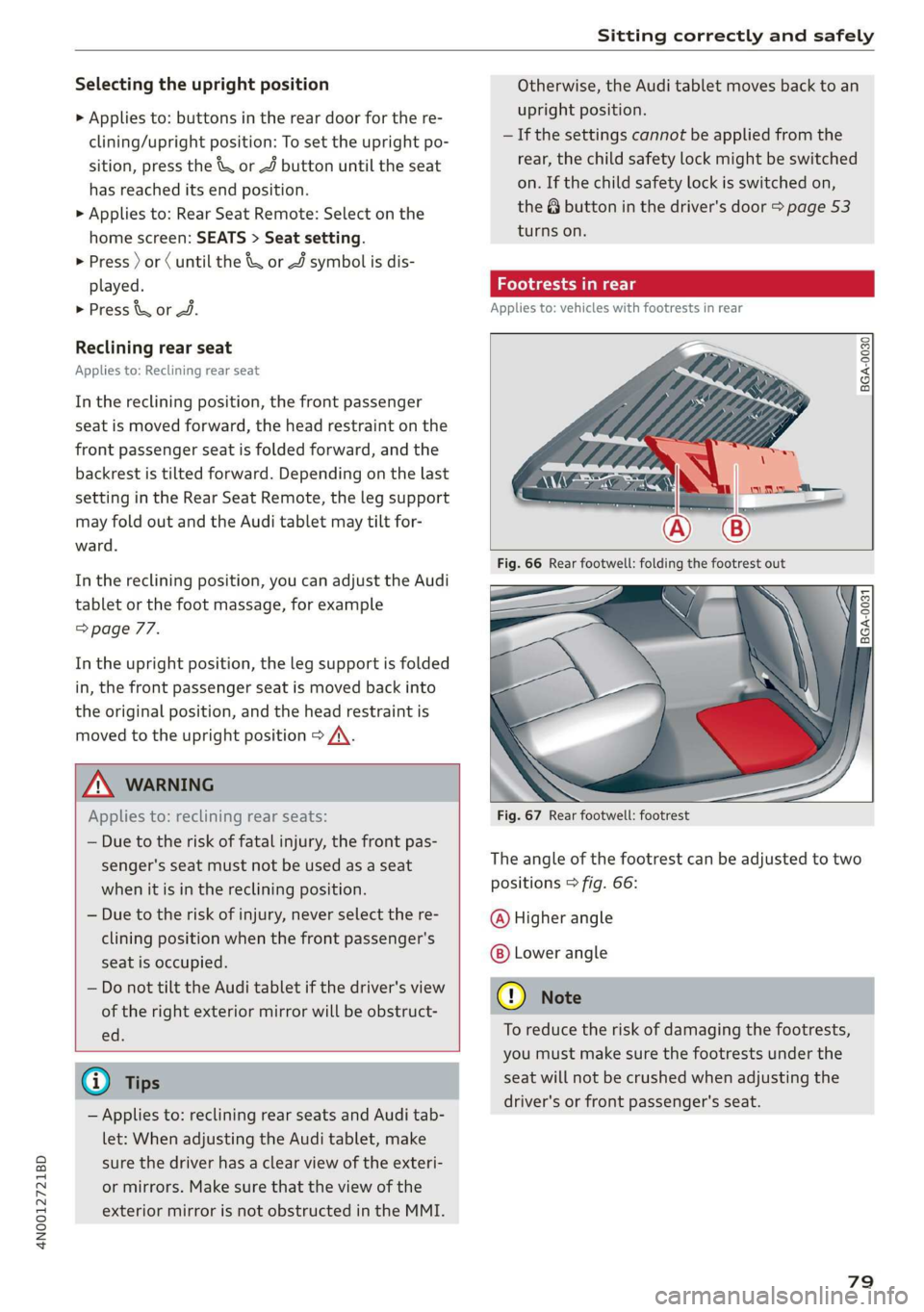
Footrests in rear
Applies to: vehicles with footrests in rear
BGA-0030
BGA-0031
Fig. 67 Rear footwell: footrest
The angle of the footrest can be adjusted to two
positions > fig. 66:
@ Higher angle
Lower angle
@) Note
To reduce the risk of damaging the footrests,
you must make sure the footrests under the
seat will not be crushed when adjusting the
driver's or front passenger's seat.
79
Page 82 of 360

Sitting correctly and safely
Full-Length center console
Applies to: vehicles with full-length center console
Fig. 68 Rear: full-length center console
The functions depend on the vehicle equipment.
@AC socket > page 97
@ 12 volt socket > page 97
@® Cup holder > page 98
@ Folding tray table page 99
© Rear Seat Remote holder > page 25
© Center armrest with storage compartment:
press the button on the center armrest and fold
the armrest upward.
Steering wheel
(ee eles)
Make sure that:
— The distance between your upper body and the
steering wheel is at least 10 in (25 cm)
— Your arms are bent slightly at the elbows
— You have a sufficient view of the area around
the vehicle and you have a clear view of the in-
strument cluster and head-up display*.
— You are always holding the steering wheel with
both hands on the outer edge at the sides (9:00
and 3:00 position) when driving
protection, which increases the risk of injury
or fatality.
— Never hold the steering wheel in the 12:00
position or in any other way, such as holding
the center of the steering wheel. Otherwise,
your arms, hands, and head could be injured
in the event that the driver's airbag deploys.
\, WARNING
—To reduce the risk of an accident, make sure
the steering wheel is adjusted correctly and
cannot be moved out of position before you
start to drive.
— If you are too close to the steering wheel,
the driver's airbag cannot provide optimal
80
Adjusting the steering wheel position
The steering wheel position can be adjusted elec-
trically
up/down and forward/back.
2
e S a
a
Fig. 69 Steering column: switch for adjusting the steering
wheel position
> To move the steering wheel upward or down-
ward, press the switch upward or downward.
> To move the steering wheel forward or back-
ward, press the switch forward or backward.
The steering wheel can also be adjusted when the
ignition is switched off.
In vehicles with memory function, the steering
column settings are stored together with the
seat position.
@ Tips
Entry assistance makes it easier to enter or
exit the vehicle by moving the steering wheel
= page 75, Driver seat entry assistance/
Front passenger seat entry assistance.
Page 83 of 360
4N0012721BD
Sitting correctly and safely
Head restraints
General information
Applies to: vehicles with adjustable head restraints
B4G-0454
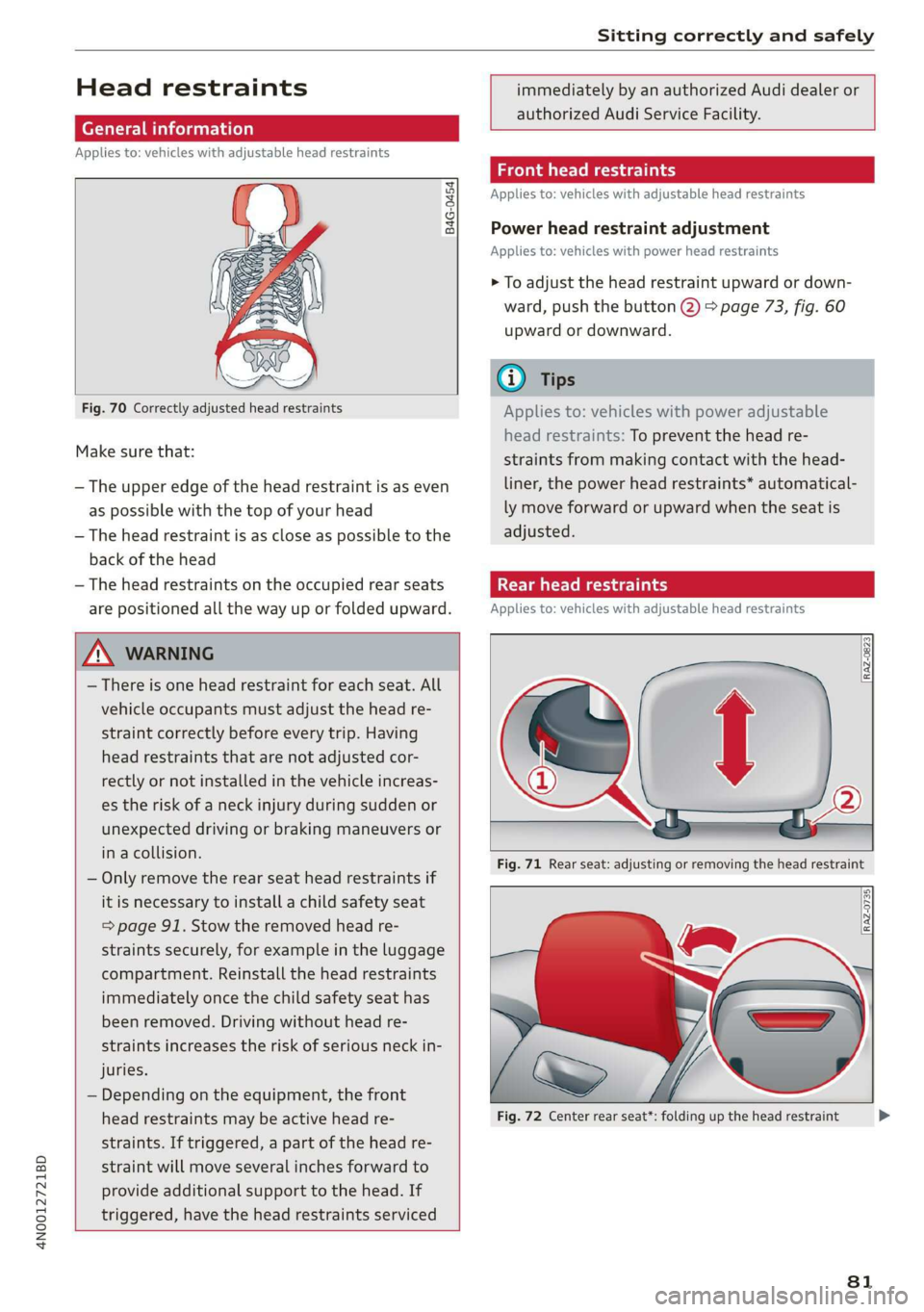
Fig. 70 Correctly adjusted head restraints
Make sure that:
— The upper edge of the head restraint is as even
as possible with the top of your head
— The head restraint is as close as possible to the
back of the head
— The head restraints on the occupied rear seats
are positioned all the way up or folded upward.
immediately by an authorized Audi dealer or
authorized Audi Service Facility.
Front head restraints
Applies to: vehicles with adjustable head restraints
Power head restraint adjustment
Applies to: vehicles with power head restraints
> To adjust the head restraint upward or down-
ward, push the button @) > page 73, fig. 60
upward or downward.
@) Tips
Applies to: vehicles with power adjustable
head restraints: To prevent the head re-
straints from making contact with the head-
liner, the power head restraints* automatical-
ly move forward or upward when the seat is
adjusted.
Taal eM ary
Applies to: vehicles with adjustable head restraints
Z\ WARNING
— There is one head restraint for each seat. All
vehicle occupants must adjust the head re-
straint correctly before every trip. Having
head restraints that are not adjusted cor-
rectly or not installed in the vehicle increas-
es the risk of a neck injury during sudden or
unexpected driving or braking maneuvers or
in a collision.
— Only remove the rear seat head restraints if
it
is necessary to install a child safety seat
= page 91. Stow the removed head re-
straints securely, for example in the luggage
compartment. Reinstall the head restraints
immediately once the child safety seat has
been removed. Driving without head re-
straints increases the risk of serious neck in-
juries.
— Depending on the equipment, the front
head restraints may be active head re-
straints. If triggered, a part of the head re-
straint will move several inches forward to
provide additional support to the head. If
triggered, have the head restraints serviced
Fig. 71 Rear seat: adjusting or removing the head restraint
Fig. 72 Center rear seat*: folding up the head restraint
81
>
Page 84 of 360

Sitting correctly and safely
Adjusting the outer head restraints
Applies to: vehicles with manual head restraints
> To adjust the head restraint upward, slide it un-
til it locks into place.
> To adjust the head restraint downward, press
the button @) and slide the head restraint. Re-
lease the button and slide the head restraint
farther until it locks into place.
Applies to: vehicles with power head restraints
> To adjust the head restraint upward or down-
ward, push the button 2) > page 76, fig. 64
forward or backward. Or:
> Applies to: Rear Seat Remote: To adjust the
head restraint upward or downward: select on
the home screen: Seats > Setting and press on
the picture of the head restraint for the respec-
tive seat. Press the up or down arrows until the
desired position is reached.
Adjusting the center head restraint
> Fold the head restraint upward until it clicks in-
to place > fig. 72.
> To fold the head restraint downward, press the
button on the back of the head restraint.
Removing the headrests
Applies to: vehicles with removable head restraints
> Move the head restraint upward all the way.
> Insert a suitable object, such as the the extend-
ed vehicle key or mechanical key, into the re-
lease point @ on the inside or outside of the
base.
> Press the button @) and pull the head restraint
out of the backrest > A\ in General informa-
tion on page 81.
Installing the headrests
Applies to: vehicles with removable head restraints
> Slide the posts on the head restraint down into
the guides until the posts click into place.
> Press the button @) and slide the head restraint
all the way down. It should not be possible to
remove the head restraint from the backrest
without pressing the button.
82
Safety belts
General information
Each seat is equipped with a three-point safety
belt. Safety belts that are worn correctly are the
most effective way to reduce the risk of serious or
fatal injuries in a collision. Therefore, wear your
safety belt correctly and make sure that all vehi-
cle passengers are also wearing their safety belts
correctly when the vehicle is moving.
Even though your vehicle is equipped with an air-
bag system, every vehicle passenger must still al-
ways wear the appropriate safety belt. In addi-
tion to their normal protective function, safety
belts also hold vehicle occupants in the correct
seating position in the event of a collision so that
the
airbags can deploy correctly and provide addi-
tional protection. Safety belts provide protection
during collisions when the airbags do not deploy
or if they have already deployed.
ZX WARNING
The risk of serious or fatal injury increases if
the safety belt is not fastened, if it is worn in-
correctly, or if it is damaged.
— All vehicle occupants, including the driver,
must fasten their safety belts correctly be-
fore every trip and must always keep their
safety belts fastened during the trip, regard-
less of whether the seat is equipped with an
airbag or not. This also applies to children
that are seated in a child safety seat that is
appropriate for their weight and age and
that is secured with a safety belt.
— In the event of a collision, vehicle occupants
that are not wearing safety belts could be
propelled through the vehicle interior and
collide with vehicle components, such as the
steering wheel, instrument panel, wind-
shield, or doors. In some situations, vehicle
occupants could also be ejected from the ve-
hicle. Vehicle occupants in the rear seats
who do not wear safety belts not only en-
danger themselves, but also other people in
the vehicle.
— Only one person may be fastened with a
safety belt at a time. Never secure more
Page 86 of 360

Sitting correctly and safely
then the safety belt's protective function
will be impaired in the event of an accident.
Make sure the safety belt is at the right
height and is routed correctly for the pas-
senger using it.
—A safety belt that is too loose may lead to in-
juries during an accident, because your body
will move farther forward due to kinetic en-
ergy and will be stopped abruptly by the
belt.
— Heavily bulky, loose clothing (for example, a
coat over a sports jacket) may prevent the
seat and safety belts from functioning cor-
rectly.
— Do not position the safety belt over hard or
breakable objects (such as glasses, pens,
etc.).
— The lap belt portion of the safety belt must
sit as low as possible on the lap of pregnant
women and lie flat under the belly.
@) Note
Make sure that there are no hook-and-loop
fasteners or sharp objects such as zippers or
rivets on clothing in the area where the safety
belt is worn. Otherwise, the safety belt could
be damaged.
ream Meet emt Lia All}
a _ ‘
2a,
Fig. 75 Belt buckle and belt latch
B4H-0462
84
|
B4H-0270
Fig. 76 Releasing the belt buckle from the belt latch
Follow the safety precautions > page 82.
Fastening the safety belt
> Pull the safety belt by the belt buckle evenly
across your chest and lap.
> Insert the belt buckle in the belt latch belong-
ing to the seat until it audibly engages
> fig. 75.
> Pull on the belt to make sure that the belt is se-
curely locked in the latch.
Unfastening the safety belt
> Press the red button on the belt latch > fig. 76.
The belt buckle will pop out.
> Guide the belt back by hand so that the safety
belt can roll up more easily.
Safety belt monitoring system
Ba - If the indicator light turns on or flashes, a
safety belt is not fastened or it has been unfas-
tened while the vehicle is in motion. Above cer-
tain speeds, additional warning tones will sound.
Depending on the equipment, the safety belts in
the rear may also be monitored using the follow-
ing indicator lights:
a} - If this indicator light turns on, the safety
belt for the corresponding rear seat is not fas-
tened.
EB - If this indicator light turns on, the safety
belt for the rear seat has been fastened.