seats AUDI A8 2020 User Guide
[x] Cancel search | Manufacturer: AUDI, Model Year: 2020, Model line: A8, Model: AUDI A8 2020Pages: 360, PDF Size: 95.38 MB
Page 77 of 360
4N0012721BD
Sitting correctly and safely
Xe)
onal settings in the MMI
You can adjust additional settings and switch
functions on or off in the MMI.
> Applies to: MMI: Select on the home screen:
VEHICLE > Seats > Additional seat settings.
Depending on the vehicle equipment, the follow-
ing options may be available.
Reset seat position
You can adjust the position of the front passeng-
er’s seat to match the driver's seat. The rear
seats are set to a pre-defined position.
Driver seat entry assistance/Front passenger
seat entry assistance
Entry assistance makes it easier to enter or exit
the vehicle.
Rear seat entry assistance
If the function is switched on, the rear seat will
automatically move all the way back when the
door next to that seat is opened.
Passenger side rear seat adjustment
If the function is switched on, the front passeng-
er's seat can be adjusted from the rear seat
= page 77.
Rear seat upright/reclining position
You can set the upright/reclining position on the
MMI & A in Adjusting the comfort position on
page 79.
Adjusting the front passenger's seat from
tate lah terete
You can adjust the front passenger's side with the
driver's seat buttons.
Applies to: MMI:
> Select on the home screen: VEHICLE > Seats.
> To display the various seats, press ) or ¢.
> To switch on the function, press the 2/ button.
The lower edge of the button will turn red.
After you have switched on the function, you can
adjust the front passenger's seat using the driv-
er's seat buttons > page 73, fig. 60.
The function switches off automatically when
you exit the menu.
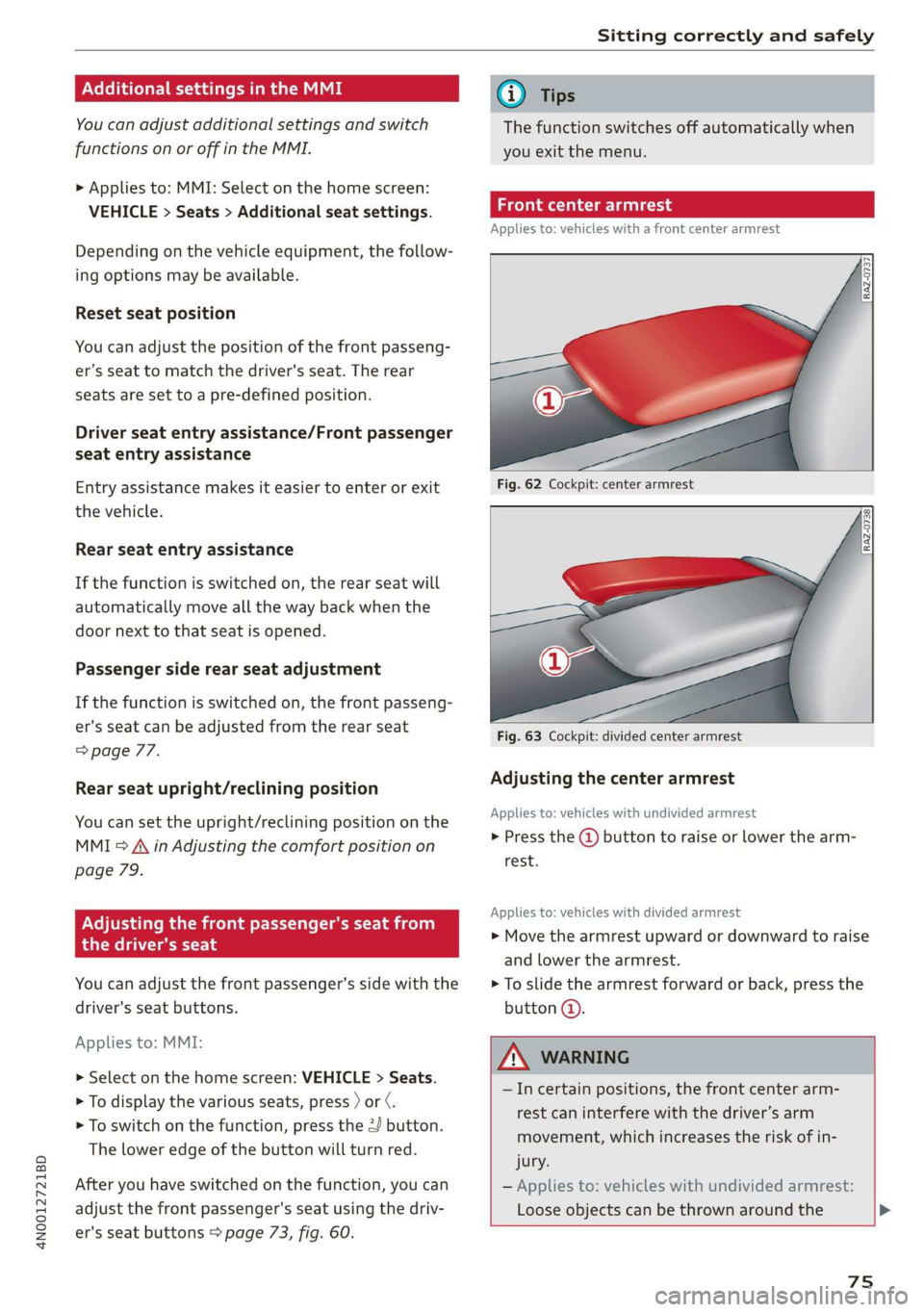
eae Ceri
Applies to: vehicles with a front center armrest
Fig. 62 Cockpit: center armrest
Fig. 63 Cockpit: divided center armrest
Adjusting the center armrest
Applies to: vehicles with undivided armrest
> Press the @ button to raise or lower the arm-
rest.
Applies to: vehicles with divided armrest
> Move the armrest upward or downward to raise
and lower the armrest.
> To slide the armrest forward or back, press the
button @.
ZA\ WARNING
—Incertain positions, the front center arm-
rest can interfere with the driver’s arm
movement, which increases the risk of in-
jury.
— Applies to: vehicles with undivided armrest:
Loose objects can be thrown around the
75
Page 78 of 360

Sitting correctly and safely
vehicle interior during sudden driving or
braking maneuvers, which increases the risk
of an accident. Store objects securely while
driving.
— Applies to: vehicles with front center airbag:
The center armrest must be closed while
driving. Otherwise, the protective function
of the front center airbag could be impaired
because it deploys from the driver's seat
backrest. This increases the risk of injury.
Rear seats
(ee eels)
Z\ WARNING
— The power seats can also be adjusted when
the ignition is switched off. To reduce the
risk of injury, children should never be left
unattended in the vehicle for this reason.
— Be careful when adjusting the seat. Unsu-
pervised or careless seat adjustment could
cause parts of the body to get pinched,
which increases the risk of injury.
C) Note
Before adjusting the seat position, you must
remove the retainers for the LATCH child safe-
ty seat restraint system, if installed.
G) Tips
At the same time, only move the respective
seat using the controls.
76
Adjusting seats with buttons
Applies to: vehicles with power adjustable rear seats
You can adjust the basic settings using the but-
tons.
©
S|
Ss x a
oo
Fig. 64 Rear center armrest/full-length center console:
seat adjustment buttons
The settings depend on the vehicle equipment.
Adjusting the lumbar support
> To adjust the curvature of the lumbar support,
press the left or right button @.
> To adjust the height of the lumbar support,
press the upper or lower button (@).
Adjusting the backrests
> To move the backrest forward or backward,
press the button (2) to the left or right.
Adjusting the head restraints
> See > page 81
Adjusting the seat position
> To adjust the seat forward or backward, press
the button @) to the left or right. The backrest
will automatically adjust with it.
>
To move the seat upward or downward, press
the button @) upward or downward.
Adjusting the front passenger's seat
See > page 77
Adjusting the comfort position
See > page 78
Page 79 of 360
4N0012721BD
Sitting correctly and safely
Adjusting seats with the Rear Seat Remote
Applies to: vehicles with Rear Seat Remote
You can adjust the rear seat using the Rear Seat
Remote.
al 3 |
S|
Ny ‘| cc
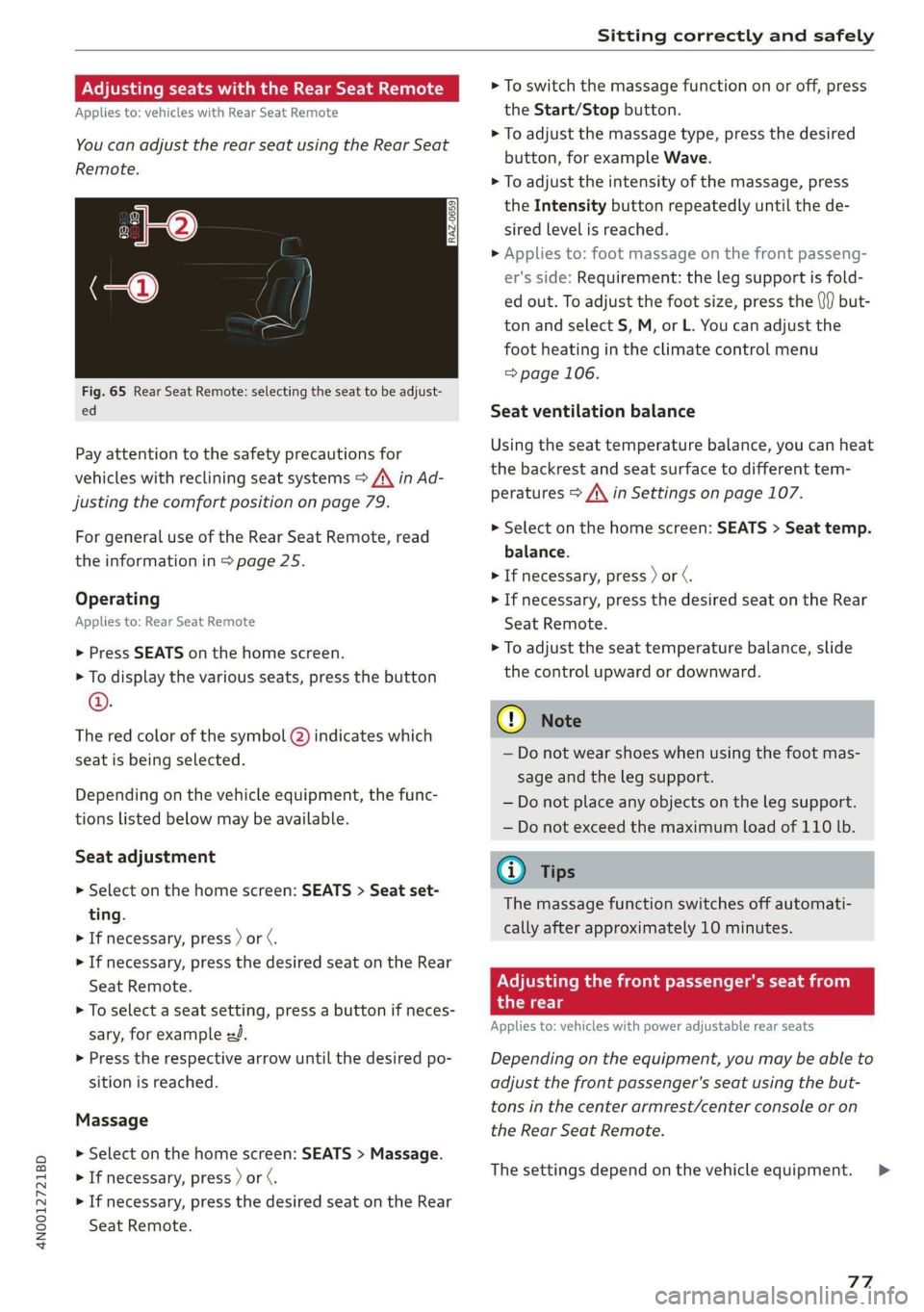
Fig. 65 Rear Seat Remote: selecting the seat to be adjust-
ed
Pay attention to the safety precautions for
vehicles with reclining seat systems > A\ in Ad-
justing the comfort position on page 79.
For
general use of the Rear Seat Remote, read
the information in > page 25.
Operating
Applies to: Rear Seat Remote
> Press SEATS on the home screen.
> To display the various seats, press the button
©.
The red color of the symbol @) indicates which
seat is being selected.
Depending on the vehicle equipment, the func-
tions listed below may be available.
Seat adjustment
> Select on the home screen: SEATS > Seat set-
ting.
> If necessary, press ) or ¢.
> If necessary, press the desired seat on the Rear
Seat Remote.
> To select a seat setting, press a button if neces-
sary, for example zd.
> Press the respective arrow until the desired po-
sition is reached.
Massage
> Select on the home screen: SEATS > Massage.
> If necessary, press ) or ¢.
> If necessary, press the desired seat on the Rear
Seat Remote.
> To switch the massage function on or off, press
the Start/Stop button.
> To adjust the massage type, press the desired
button, for example Wave.
> To adjust the intensity of the massage, press
the Intensity button repeatedly until the de-
sired level is reached.
> Applies to: foot massage on the front passeng-
er's side: Requirement: the leg support is fold-
ed out. To adjust the foot size, press the (}f) but-
ton and select S, M, or L. You can adjust the
foot
heating in the climate control menu
=> page 106.
Seat ventilation balance
Using the seat temperature balance, you can heat
the backrest and seat surface to different tem-
peratures > A\ in Settings on page 107.
> Select on the home screen: SEATS > Seat temp.
balance.
> If necessary, press ) or ¢.
> If necessary, press the desired seat on the Rear
Seat
Remote.
> To adjust the seat temperature balance, slide
the control upward or downward.
C@) Note
— Do not wear shoes when using the foot mas-
sage and the leg support.
— Do not place any objects on the leg support.
— Do not exceed the maximum load of 110 lb.
@ Tips
The massage function switches off automati-
cally after approximately 10 minutes.
Adjusting the front passenger's seat from
the rear
Applies to: vehicles with power adjustable rear seats
Depending on the equipment, you may be able to
adjust the front passenger's seat using the but-
tons in the center armrest/center console or on
the Rear Seat Remote.
The settings depend on the vehicle equipment. >
77
Page 80 of 360
Sitting correctly and safely
Requirements
> Read and follow the important safety precau-
tions about the reclining rear seats > /\ in Ad-
justing the comfort position on page 79.
> Make sure Passenger side rear seat adjustment
is switched on in the MMI > page 75.
> To activate the front passenger's seat adjust-
ment, press the button @)= page 76, fig. 64.
The LED in the button will turn on.
> Applies to: Rear Seat Remote: Press SEATS on
the Rear Seat Remote. Press the desired func-
tion and select the front passenger seat
=> page 77, fig. 65.
Adjusting the head restraints
See > page 81
Adjusting the Audi tablet
Applies to: reclining seat system with Audi tablet
See > page 31
Adjusting the backrests
> Applies to: buttons in the center console/center
armrest: Press the button (2) to the left or right
=> page 76, fig. 64.
> Applies to: Rear Seat Remote: Press the < but-
ton. Press the respective arrow until the desired
position is reached.
Adjusting the front passenger seat forward
or backward
> Applies to: buttons in the center armrest/
center console: Push the button @) > page 76,
fig. 64 to the left or right.
> Applies to: Rear Seat Remote: Press the J but-
ton. Press the respective arrow until the desired
position is reached.
Adjusting the front passenger seat upward
and downward
> Applies to: buttons in the center armrest/
center console: Press the button @) > page 76,
fig. 64 upward or downward.
> Applies to: Rear Seat Remote: Press the 2 but-
ton.
Press the respective arrow until the desired
position is reached.
78
Adjusting the leg support
Applies to: Reclining rear seat
Requirement: the reclining position must be se-
lected.
> Applies to: Rear Seat Remote: Press the 4 but-
ton to fold the leg support out or in. Press the
respective arrow until the desired position is
reached.
> To adjust the height or depth of the leg sup-
port, adjust the front passenger seat forward/
backward or upward/downward.
> To adjust the foot massage area, adjust the an-
gle of the front passenger seat backrest.
Z\ WARNING
Applies to: reclining seats: To reduce the risk
of injury, make sure the area between the leg
support and the front passenger's seat back-
rest is clear before folding in the leg support.
Gi) Tips
— If the settings cannot be applied from the
rear, then the child safety lock may be
switched on or the front passenger’s seat
adjustment for the rear seats may be
switched off in the MMI > page 75. If the
child safety lock is switched on, the @ but-
ton in the driver's door > page 53 turns on.
ONS mal -Mehlielam eth ela)
Applies to: vehicles with reclining/upright position or reclin-
ing seat system
Depending on the equipment, you may be able to
adjust the comfort position using the buttons in
the rear door or on the Rear Seat Remote.
Selecting the reclining position
> Applies to: buttons in the rear door for the re-
clining/upright position: To adjust the reclining
position, press the =% button until the seat has
reached its end position.
> Applies to: Rear Seat Remote: Select on the
home screen: SEATS > Seat setting.
> Press ) or ( until the x= or <4 symbol is dis-
played.
> Press &or~.
Page 81 of 360
4N0012721BD
Sitting correctly and safely
Selecting the upright position
> Applies to: buttons in the rear door for the re-
clining/upright position: To set the upright po-
sition, press the \& or J button until the seat
has reached its end position.
> Applies to: Rear Seat Remote: Select on the
home screen: SEATS > Seat setting.
> Press ) or until the & or J symbol is dis-
played.
> Press Kor J.
Reclining rear seat
Applies to: Reclining rear seat
In the reclining position, the front passenger
seat is moved forward, the head restraint on the
front passenger seat is folded forward, and the
backrest is tilted forward. Depending on the last
setting in the Rear Seat Remote, the leg support
may fold out and the Audi tablet may tilt for-
ward.
In the reclining position, you can adjust the Audi
tablet or the foot massage, for example
=> page 77.
In the upright position, the leg support is folded
in, the front passenger seat is moved back into
the original position, and the head restraint is
moved to the upright position > A\.
Z\ WARNING
Applies to: reclining rear seats:
— Due to the risk of fatal injury, the front pas-
senger's seat must not be used as a seat
when it is in the reclining position.
— Due to the risk of injury, never select the re-
clining position when the front passenger's
seat is occupied.
— Do not tilt the Audi tablet if the driver's view
of the right exterior mirror will be obstruct-
ed
@ Tips
— Applies to: reclining rear seats and Audi tab-
let: When adjusting the Audi tablet, make
sure the driver has a clear view of the exteri-
or mirrors. Make sure that the view of the
exterior mirror is not obstructed in the MMI.
Otherwise, the Audi tablet moves back to an
upright position.
— If the settings cannot be applied from the
rear, the child safety lock might be switched
on. If the child safety lock is switched on,
the 8 button in the driver's door > page 53
turns on.
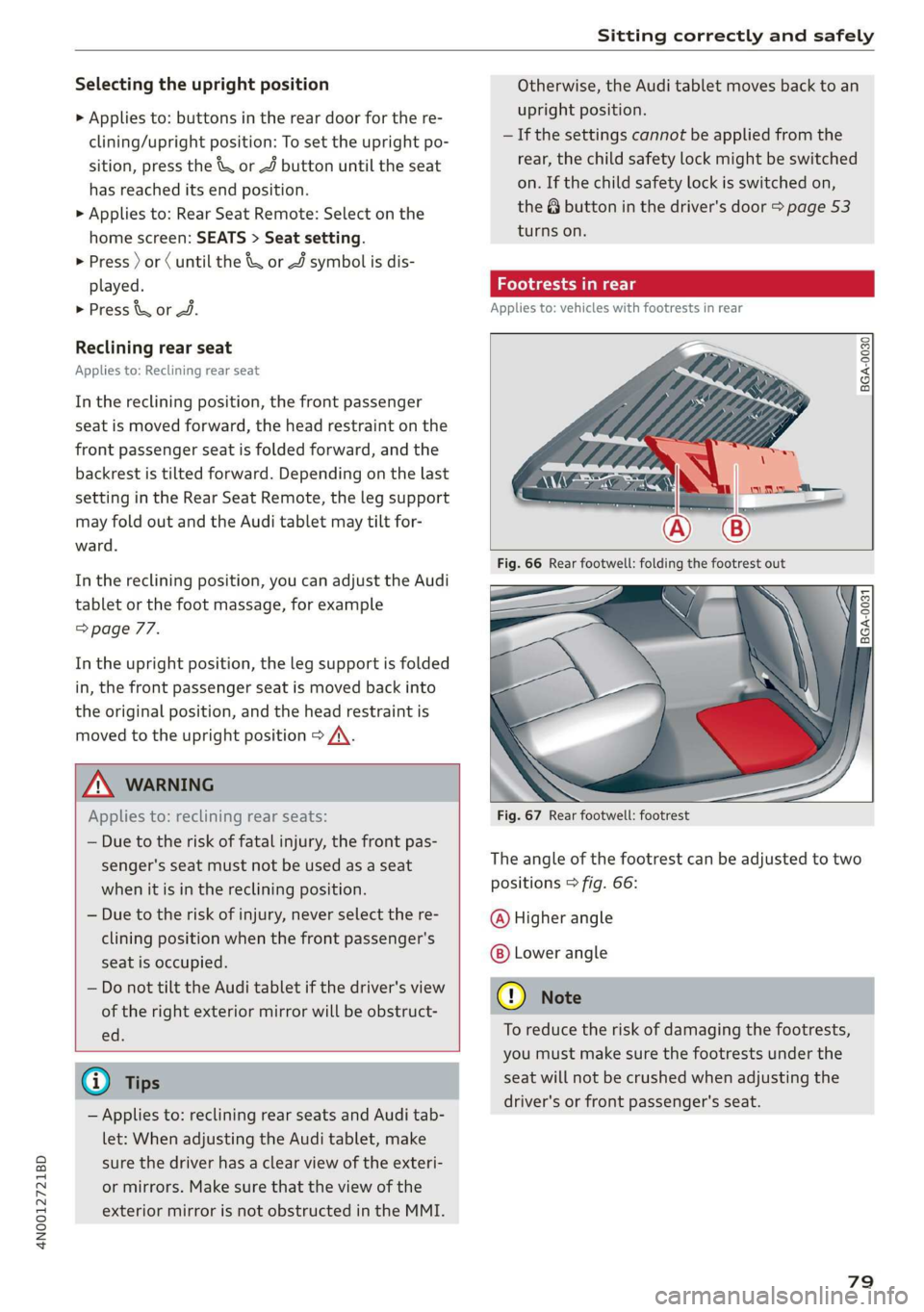
Footrests in rear
Applies to: vehicles with footrests in rear
BGA-0030
BGA-0031
Fig. 67 Rear footwell: footrest
The angle of the footrest can be adjusted to two
positions > fig. 66:
@ Higher angle
Lower angle
@) Note
To reduce the risk of damaging the footrests,
you must make sure the footrests under the
seat will not be crushed when adjusting the
driver's or front passenger's seat.
79
Page 83 of 360
4N0012721BD
Sitting correctly and safely
Head restraints
General information
Applies to: vehicles with adjustable head restraints
B4G-0454
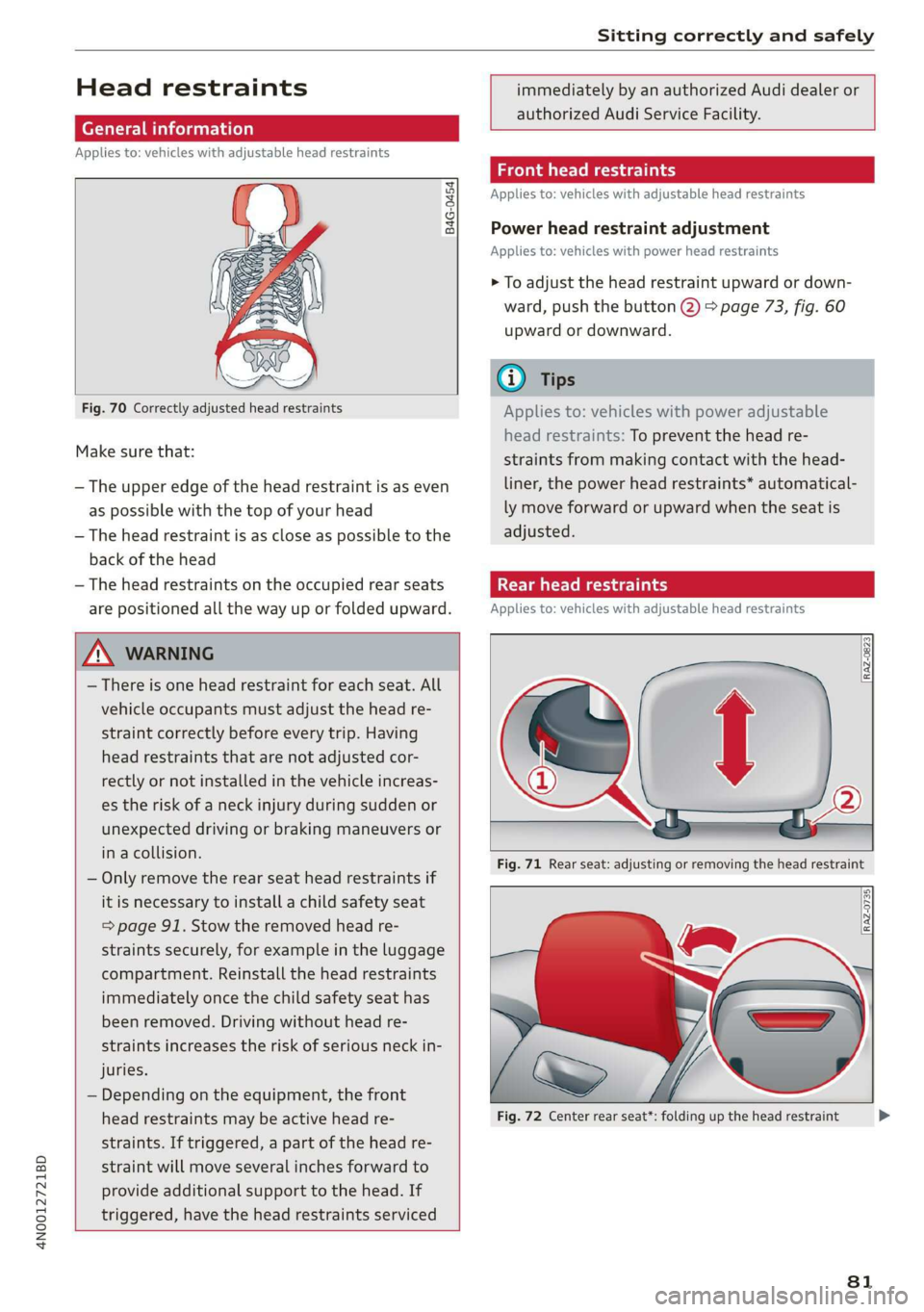
Fig. 70 Correctly adjusted head restraints
Make sure that:
— The upper edge of the head restraint is as even
as possible with the top of your head
— The head restraint is as close as possible to the
back of the head
— The head restraints on the occupied rear seats
are positioned all the way up or folded upward.
immediately by an authorized Audi dealer or
authorized Audi Service Facility.
Front head restraints
Applies to: vehicles with adjustable head restraints
Power head restraint adjustment
Applies to: vehicles with power head restraints
> To adjust the head restraint upward or down-
ward, push the button @) > page 73, fig. 60
upward or downward.
@) Tips
Applies to: vehicles with power adjustable
head restraints: To prevent the head re-
straints from making contact with the head-
liner, the power head restraints* automatical-
ly move forward or upward when the seat is
adjusted.
Taal eM ary
Applies to: vehicles with adjustable head restraints
Z\ WARNING
— There is one head restraint for each seat. All
vehicle occupants must adjust the head re-
straint correctly before every trip. Having
head restraints that are not adjusted cor-
rectly or not installed in the vehicle increas-
es the risk of a neck injury during sudden or
unexpected driving or braking maneuvers or
in a collision.
— Only remove the rear seat head restraints if
it
is necessary to install a child safety seat
= page 91. Stow the removed head re-
straints securely, for example in the luggage
compartment. Reinstall the head restraints
immediately once the child safety seat has
been removed. Driving without head re-
straints increases the risk of serious neck in-
juries.
— Depending on the equipment, the front
head restraints may be active head re-
straints. If triggered, a part of the head re-
straint will move several inches forward to
provide additional support to the head. If
triggered, have the head restraints serviced
Fig. 71 Rear seat: adjusting or removing the head restraint
Fig. 72 Center rear seat*: folding up the head restraint
81
>
Page 84 of 360

Sitting correctly and safely
Adjusting the outer head restraints
Applies to: vehicles with manual head restraints
> To adjust the head restraint upward, slide it un-
til it locks into place.
> To adjust the head restraint downward, press
the button @) and slide the head restraint. Re-
lease the button and slide the head restraint
farther until it locks into place.
Applies to: vehicles with power head restraints
> To adjust the head restraint upward or down-
ward, push the button 2) > page 76, fig. 64
forward or backward. Or:
> Applies to: Rear Seat Remote: To adjust the
head restraint upward or downward: select on
the home screen: Seats > Setting and press on
the picture of the head restraint for the respec-
tive seat. Press the up or down arrows until the
desired position is reached.
Adjusting the center head restraint
> Fold the head restraint upward until it clicks in-
to place > fig. 72.
> To fold the head restraint downward, press the
button on the back of the head restraint.
Removing the headrests
Applies to: vehicles with removable head restraints
> Move the head restraint upward all the way.
> Insert a suitable object, such as the the extend-
ed vehicle key or mechanical key, into the re-
lease point @ on the inside or outside of the
base.
> Press the button @) and pull the head restraint
out of the backrest > A\ in General informa-
tion on page 81.
Installing the headrests
Applies to: vehicles with removable head restraints
> Slide the posts on the head restraint down into
the guides until the posts click into place.
> Press the button @) and slide the head restraint
all the way down. It should not be possible to
remove the head restraint from the backrest
without pressing the button.
82
Safety belts
General information
Each seat is equipped with a three-point safety
belt. Safety belts that are worn correctly are the
most effective way to reduce the risk of serious or
fatal injuries in a collision. Therefore, wear your
safety belt correctly and make sure that all vehi-
cle passengers are also wearing their safety belts
correctly when the vehicle is moving.
Even though your vehicle is equipped with an air-
bag system, every vehicle passenger must still al-
ways wear the appropriate safety belt. In addi-
tion to their normal protective function, safety
belts also hold vehicle occupants in the correct
seating position in the event of a collision so that
the
airbags can deploy correctly and provide addi-
tional protection. Safety belts provide protection
during collisions when the airbags do not deploy
or if they have already deployed.
ZX WARNING
The risk of serious or fatal injury increases if
the safety belt is not fastened, if it is worn in-
correctly, or if it is damaged.
— All vehicle occupants, including the driver,
must fasten their safety belts correctly be-
fore every trip and must always keep their
safety belts fastened during the trip, regard-
less of whether the seat is equipped with an
airbag or not. This also applies to children
that are seated in a child safety seat that is
appropriate for their weight and age and
that is secured with a safety belt.
— In the event of a collision, vehicle occupants
that are not wearing safety belts could be
propelled through the vehicle interior and
collide with vehicle components, such as the
steering wheel, instrument panel, wind-
shield, or doors. In some situations, vehicle
occupants could also be ejected from the ve-
hicle. Vehicle occupants in the rear seats
who do not wear safety belts not only en-
danger themselves, but also other people in
the vehicle.
— Only one person may be fastened with a
safety belt at a time. Never secure more
Page 87 of 360

4N0012721BD
Sitting correctly and safely
Adjusting the height of the safety belt
B4G-0004)
Fig. 77 Belt height adjustment for the front seats - safety
belt relay
> To move the belt higher, slide the safety belt re-
lay @ upward.
> To move the belt lower, press the release but-
ton @ and slide the safety belt relay 2) down-
ward.
> To check if the safety belt relay is securely
locked in place, pull firmly on the belt.
@ Tips
You can also adjust the height of the front
seats to change the position of the safety
belts.
Additional safety belt functions
Belt retractor lock
The safety belts on the rear seats and on the
front passenger seat are equipped with a belt re-
tractor lock.
> If you secure a child safety seat with a safety
belt, the belt retractor lock on the safety belt
may need to be activated. Follow the instruc-
tions from the child safety seat manufacturer.
> When a vehicle passenger has fastened a safety
belt, the belt retractor lock should not be acti-
vated. If the belt retractor lock has been acti-
vated unexpectedly, deactivate it.
Deactivating or activating the belt retractor lock
=> page 94.
Safety belt retractor
The safety belts are equipped with an automatic
belt retractor. This automatic retractor allows the
safety belt to be pulled all the way out when the
belt is pulled slowly. However, the automatic re-
tractor locks during sudden braking maneuvers.
It also locks the belts when accelerating, driving
uphill, and driving around curves.
Belt force limiter
Safety belts with belt force limiters reduce the
force placed on the body by the safety belts dur-
ing a collision.
Safety belt pretensioners
Safety belts may be tightened with reversible
belt tensioners when you start driving and in cer-
tain driving situations. If the safety belt is too
loose, it will be tightened so that the belt will
rest closer to the body.
In some collisions, pyrotechnic belt tensioners
may secure the safety belts so that they cannot
loosen. This reduces forward movement by the
vehicle passengers.
ZA WARNING
The pyrotechnic system can only provide pro-
tection during one collision. If the pyrotechnic
belt tensioners deploy, the pretensioning sys-
tem must be replaced by an authorized Audi
dealer or authorized Audi Service Facility.
G) Tips
Smoke may be released when pyrotechnic belt
tensioners deploy. This is not a sign of a vehi-
cle fire.
Memory function
General information
Applies to: vehicles with memory function
With the memory function, you can save and call
up seat profiles using the memory buttons in the
door trim panel.
Depending on the equipment, it may be possible
to store the following settings:
— Driver's seat: seat, head restraint*, steering
wheel, exterior mirrors
— Front passenger's seat: seat, head restraint
8s
>
Page 88 of 360

Sitting correctly and safely
— Outer rear seats*: seat
Storing and recalling a seat profile
Applies to: vehicles with memory function
The memory function buttons are located in the
door trim panel.
Storing a seat profile
> Press the [SET] button. If the LED in the button
turns on, a seat profile can be stored.
> Push one of the numbered memory buttons. A
tone confirms that the settings were stored.
Accessing a seat profile
> When the a door is open and the ignition is
switched off, press the memory button once
briefly. The seat will be fully adjusted to the
settings in the seat profile.
> If the door is closed or the ignition is switched
on, press and hold the memory button until the
seat is fully adjusted to the settings in the seat
profile.
Z\ WARNING
—To reduce the risk of an accident, the seat
setting can only be recalled when the vehicle
is stationary.
— In an emergency, the recall process can be
canceled by pressing the seat adjustment
button on that seat.
@) Tips
Certain settings are stored automatically in
the active personal profile.
Airbag system
ZA\ WARNING
— If you have not fastened your safety belt,
you are in an incorrect seating position, or
you are too close to the airbag system, the
airbag system will not be able to protect
you. This increases the risk of serious or fa-
tal injuries. Make sure that every vehicle
passenger has his or her safety belt correctly
86
fastened and is sitting in a correct seating
position = page 72. This is necessary regard-
less of whether the seat is equipped with an
airbag or not.
Never place your feet on the instrument
panel, out of the window, or on the seat sur-
faces. To help ensure that the airbag system
can deploy correctly, never bend forward or
lean on the door or the side window. Other-
wise, serious and possibly fatal injuries can
occur if the airbags deploy.
People, animals, or objects between the
passengers and the airbag system can inter-
fere with the correct deployment of the air-
bag or can be thrown through the vehicle in-
terior, increasing the risk of serious or fatal
injuries. Make sure that nothing is located
between the vehicle occupants and the air-
bag system. Do not secure or transport any
objects within the deployment zone of the
airbag systems, especially on the steering
wheel, on the instrument panel, on the
doors, on the windows, in the footwell, or
on the rear shelf.
Never put stickers on the airbag system cov-
ers or cover them with any objects.
Only lightweight clothing should be hung
from the garment hooks in the vehicle. Do
not use clothes hangers to hang clothing.
The pockets of the clothing must not con-
tain any heavy, breakable, or sharp-edged
objects. This could impair the effectiveness
of the side curtain airbags.
You must not use seat or protective covers
that are not specifically approved for use on
Audi seats with side airbags. Since the side
airbags deploy from the seat backrest, such
covers could impair the protective function
of the side airbags.
Applies to: vehicles with front center airbag:
You must not use seat or protective covers
that are not specifically approved for use on
Audi seats with center airbags. The center
armrest must be closed while driving. Since
the front center airbag deploys from the
driver's seat backrest, such covers could im-
pair the protective function of the center air-
bag.
Page 91 of 360

4N0012721BD
Sitting correctly and safely
Each deployed airbag is filled with gas. When this
occurs, the airbag covers open and the airbags
unfold with great force into the deployment zone
within milliseconds. Inflated airbags reduce the
movement of passengers wearing safety belts in
the direction of the impact and thus help to re-
duce the risk of injury. They can help to protect
the head, upper body, and lap, for example. How-
ever, there is the possibility that airbag deploy-
ment can cause injuries.
The airbag system only works when the ignition
is turned on.
If you or other vehicle passengers have physical
limitations that prevent sitting in a correct posi-
tion, modifications to the vehicle may be neces-
sary. For more information, contact an author-
ized Audi dealer or authorized Audi Service Facili-
ty, or call Audi customer support at
1-800-822-2834.
@) Tips
The side curtain airbags in your vehicle have
ejection mitigation functions. This reduces
the risk of being ejected from the vehicle inte-
rior during an accident, especially in the event
of a vehicle rollover.
Advanced airbag system
Fig. 79 Headliner: indicator light to display the status of
the front passenger's airbag
The Advanced Airbag System in your vehicle has
been certified to comply with the requirements
of the United States Federal Motor Vehicle Safety
Standard (FMVSS) 208, as well as Canada Motor
Vehicle Safety Standard (CMVSS) 208 as applica-
ble at the time your vehicle was manufactured.
According to these requirements, the front Ad-
vanced Airbag System on the passenger’s side
has been certified for “suppression” for infants
approximately 12 months old and younger, and
for “low risk deployment” for children aged 3 to
6 years old (as defined in the standard).
The advanced airbag system will activate or deac-
tivate the front passenger's airbag based on the
occupancy of the seat. If a front airbag deploys
during an accident, the deployment force will
adapt to the passenger.
Components
The advanced airbag system consists of the fol-
lowing components:
— Front airbags in the steering wheel and in the
instrument panel on the front passenger's side:
these can protect the front passengers during
an accident
— Passenger occupant detection sensor in the
front passenger's seat: this detects if the front
passenger's seat is occupied (for example, by a
person or a small child in a child safety seat)
— Seat position sensors on the front seats: these
determine the distance between the seat and
the steering wheel or instrument panel
— Sensors in the front seat belt latch: these de-
tect if the safety belts are fastened
—The PASSENGER AIR BAG OFF ®; ON @
indicator light in the headliner:this indicates if
the front passenger's airbag is activated or de-
activated
- Ea indicator light in the instrument cluster:
this monitors the function of the Advanced Air-
bag System components to ensure they are
functioning correctly
How the components function together
The passenger occupant detection sensor in the
front passenger's seat detects if the front pas-
senger's seat is occupied. The passenger occu-
pant detection sensor measures the electrical ca-
pacity on the front passenger’s seat. The pas-
senger's airbag is activated or deactivated de-
pending on the electrical capacity that is meas-
ured.
The passenger's airbag is activated if:
89