airbag AUDI A8 2020 Owner's Manual
[x] Cancel search | Manufacturer: AUDI, Model Year: 2020, Model line: A8, Model: AUDI A8 2020Pages: 360, PDF Size: 95.38 MB
Page 96 of 360
Sitting correctly and safely
reach of the child > A\ in Securing child safety
seats with a safety belt on page 95.
> Secure the child safety seat according to the
child safety seat manufacturer instructions.
> Pull on the child safety seat to check if both
sides are engaged correctly in the LATCH an-
chors.
> If possible, also secure the child safety seat to
the respective top tether anchor on the seat
=>page 95.
Z\ WARNING
The LATCH anchors in the vehicle are only de-
signed for child safety seats with the LATCH
system. To reduce the risk of serious or fatal
injury, never secure other child restraint sys-
tems, belts, or objects to the anchors.
@ Tips
The LATCH anchors are designed for a total
weight (child and child safety seat combined)
up to 65 lbs (29 kg). If the total weight is
greater than this, the child safety seat must
be secured with the vehicle safety belt.
Securing child safety seats with a safety
Ptah
Follow the safety precautions > page 91. The
front passenger’s seat is a dangerous location for
a child, even with an advanced airbag system. If
exceptional circumstances require the child safe-
ty seat to be placed on the front passenger's
seat, then the front passenger's airbag must be
deactivated. Please note the important informa-
tion for this > page 92, Correct positioning for
children and > page 89, Advanced airbag sys-
tem.
Securing child safety seats
> Applies to: vehicles with power-adjustable rear
bench seat: If you secure a child safety seat on
the rear seat, move the rear seat all the way
back and downward and adjust the backrest to
be as upright as possible.
> Activate the child safety lock > page 53.
94
> If you secure a child safety seat to the rear seat,
secure any unused safety belts that are within
reach of the child > A\, > page 96.
> If you secure a child safety seat to the front
passenger's seat, adjust the front passenger's
seat to the highest position.
> Secure the child safety seat according to the
child safety seat manufacturer instructions.
> If necessary, activate the belt retractor lock
=> page 94, Activating the belt retractor lock.
> If the child safety seat is secured on the front
passenger's seat, adjust the front passenger's
seat backrest until it rests flat against the child
safety seat. Also make sure that the upper safe-
ty belt fixture is behind the child safety seat.
> If you secure a child safety seat on the rear
seat, also secure it to the correct top tether an-
chor if possible > page 95.
Activating the belt retractor lock
If you secure a child safety seat using the vehicle
safety belt, you must activate the belt retractor
lock. Follow the child safety seat manufacturer
instructions.
The
belt retractor lock prevents the safety belt
from becoming loose while driving, which could
result in the child safety seat no longer being ad-
equately secured.
>» Secure the child safety seat according to the
child safety seat manufacturer instructions.
While doing so, pull out the safety belt. Insert
the safety belt into the belt latch that belongs
to that seat until it audibly locks.
> Pull the upper belt out completely and then al-
low it to retract. You will hear a clicking sound
while the belt is retracting. It will not be possi-
ble to pull the safety belt out any farther.
> Push the child safety seat into the seat and al-
low the belt to retract more.
> Make sure that the child safety seat cannot
move more than 1 inch (2.5 cm).
Deactivating the belt retractor lock
> Unbuckle the safety belt from the belt latch.
> Remove the child safety seat according to the
manufacturer instructions.
> Allow the safety belt to retract completely. The
belt retractor lock is deactivated.
Page 97 of 360
4N0012721BD
Sitting correctly and safely
ZA WARNING
— A safety belt that is not locked by the belt
retractor lock or a locking device cannot se-
cure a child safety seat while driving or in
the event of an accident, which increases the
risk of fatal injury. Always make sure the
belt retractor lock on the safety belt is acti-
vated if the child safety seat manufacturer
instructions require it.
— Due to the risk of fatal injury, never place a
rear-facing child safety seat on the front
passenger's seat when the front passenger's
airbag is switched on.
— For the child safety seat to offer the maxi-
mum protection, it is especially important
to route the vehicle safety belt correctly. Al-
ways follow the instructions from the child
safety seat manufacturer for routing the
safety belt correctly. Incorrectly fastened
safety belts can cause injuries, even during
minor accidents.
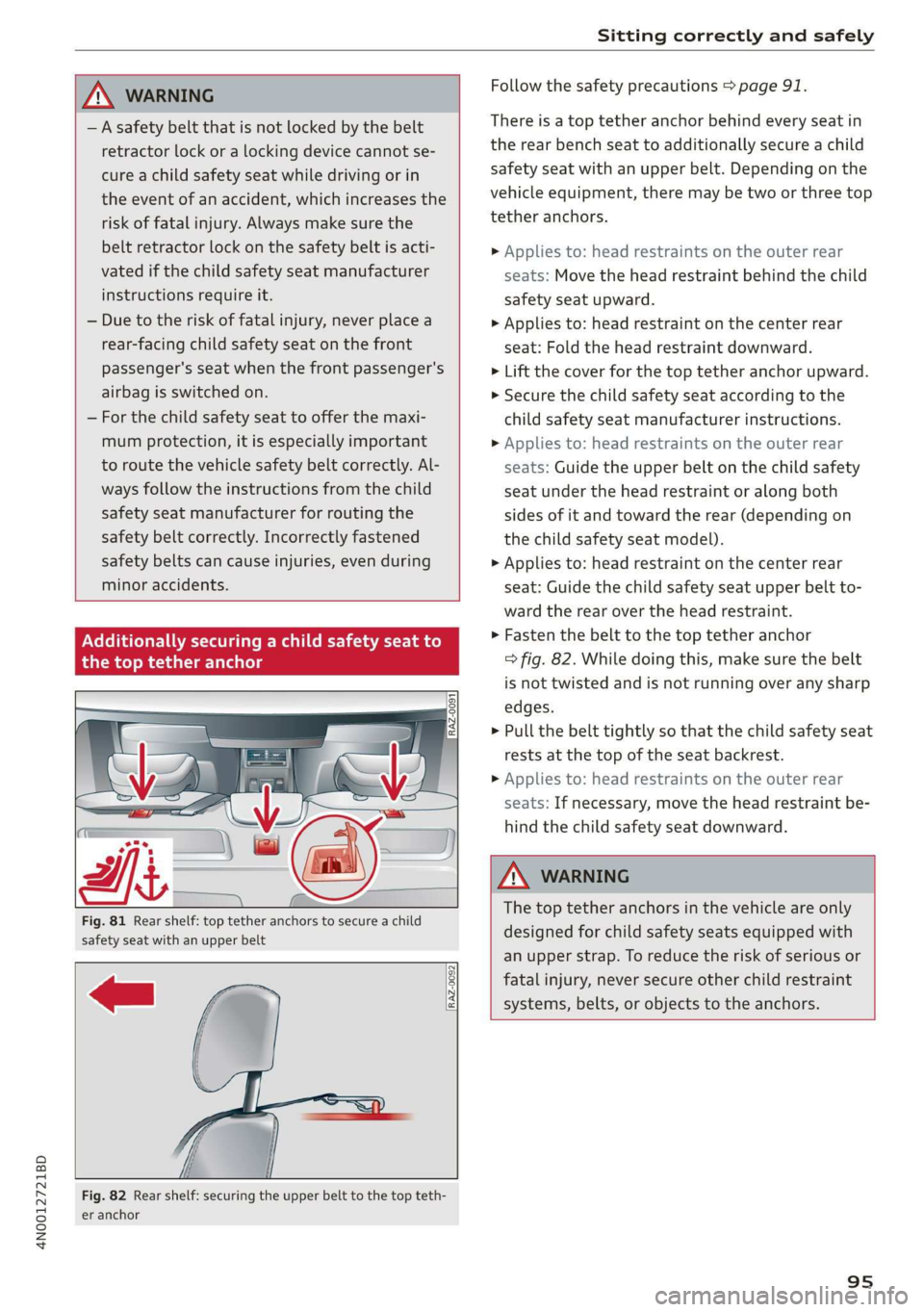
Ad
onally securing a child safety seat to
the top tether anchor
RAZ-0091
Follow the safety precautions > page 91.
There is a top tether anchor behind every seat in
the rear bench seat to additionally secure a child
safety seat with an upper belt. Depending on the
vehicle equipment, there may be two or three top
tether anchors.
> Applies to: head restraints on the outer rear
seats: Move the head restraint behind the child
safety seat upward.
> Applies to: head restraint on the center rear
seat: Fold the head restraint downward.
> Lift the cover for the top tether anchor upward.
> Secure the child safety seat according to the
child safety seat manufacturer instructions.
> Applies to: head restraints on the outer rear
seats: Guide the upper belt on the child safety
seat under the head restraint or along both
sides of it and toward the rear (depending on
the child safety seat model).
> Applies to: head restraint on the center rear
seat: Guide the child safety seat upper belt to-
ward the rear over the head restraint.
>» Fasten the belt to the top tether anchor
=> fig. 82. While doing this, make sure the belt
is not twisted and is not running over any sharp
edges.
> Pull the belt tightly so that the child safety seat
rests at the top of the seat backrest.
> Applies to: head restraints on the outer rear
seats: If necessary, move the head restraint be-
hind the child safety seat downward.
Fig. 81 Rear shelf: top tether anchors to secure a child
safety seat with an upper belt
RAZ-0092
Z\ WARNING
The top tether anchors in the vehicle are only
designed for child safety seats equipped with
an upper strap. To reduce the risk of serious or
fatal injury, never secure other child restraint
systems, belts, or objects to the anchors.
Fig. 82 Rear shelf: securing the upper belt to the top teth-
er anchor
95
Page 102 of 360
Stowing and using
— Holders for a notepad and a pen in the glove
compartment
— Storage compartments in the door trim panel
— Net in the front passenger's footwell
— Storage compartments under the center arm-
rest
— Compartments on the backrests of the front
seats
— Garment hooks in the rear
— Cell phone holder in the right rear door
— Bag hooks in the luggage compartment
— Net in luggage compartment
— Umbrella holder
> Stow heavy luggage as far forward in the lug-
gage compartment as possible.
> Use non-elastic cords attached to the tie-downs
to secure objects.
ZA WARNING
— To reduce the risk of injury, make sure all
storage compartments are always closed
while driving.
— Loose objects can be thrown around the ve-
hicle interior during sudden driving or brak-
ing maneuvers, which increases the risk of
an accident. Store objects securely while
driving.
— Only use the storage compartments in the
door trim panels to store small objects that
will not stick out of the compartment and
impair the function of the side airbags.
— Only lightweight clothing should be hung
from the garment hooks in the vehicle. Do
not use clothes hangers to hang clothing.
The pockets of the clothing must not con-
tain any heavy, breakable, or sharp-edged
objects. This could impair the effectiveness
of the side curtain airbags.
— Make sure your view toward the rear is not
blocked, for example by hanging clothing or
objects in the vehicle.
Luggage compartment
General information
All pieces of luggage or objects must be securely
fastened in the luggage compartment. Note the
following to maintain good vehicle handling:
> Distribute the load evenly in the luggage com-
partment.
100
ZX WARNING
— Loose objects can be thrown around the ve-
hicle interior during sudden driving or brak-
ing maneuvers, which increases the risk of
an accident. Always stow objects securely in
the luggage compartment and secure them
at the tie-downs. Use straps suitable for
heavy objects.
— If pieces of luggage or objects are secured
to the tie-downs with unsuitable or dam-
aged straps, this can increase the risk of in-
jury during braking maneuvers or accidents.
— When transporting heavy objects, the vehi-
cle characteristics will change due to the
shift in the center of gravity, which increases
the risk of an accident. You may need to
adapt your driving style and speed to the
current conditions.
— The cargo net is only strong enough to se-
cure light objects. Heavy objects are not ade-
quately secured. Attempting to secure heavy
objects increases the risk of injury.
— Never exceed the permitted axle and load
and vehicle weight > page 342.
— Never secure a child safety seat to the tie-
downs.
— Never leave your vehicle unattended, espe-
cially if the luggage compartment lid is
open. Children could enter the luggage com-
partment and close the luggage compart-
ment lid from the inside. This creates the
risk of fatal injury, since the children would
be locked in and may not be able to escape
by themselves.
— Do not allow children to play in or on the ve-
hicle. Close and lock the luggage compart-
ment lid as well as all other doors when you
leave the vehicle.
— Never transport passengers in the luggage
compartment. Every passenger must be cor-
rectly secured with the safety belts in the
vehicle > page 82.
Page 136 of 360
Driving dynamic
EDL will switch on again automatically when con-
ditions have returned to normal.
Power steering
The ESC can also support vehicle stability
through steering.
Selective wheel torque control
Selective wheel torque control is used when driv-
ing on curves. Braking is targeted toward the
wheels on the inside of the curve as needed. This
allows more precise driving in curves.
Automatic post-collision braking system
The automatic post-collision braking system can
help to reduce the risk of sliding and of addition-
al collisions after an accident. If the airbag con-
trol module detects a collision, the vehicle is
braked by the ESC.
The vehicle does not brake automatically if one of
the following occurs:
— The driver presses the accelerator pedal, or
— The braking force generated by the pressed
brake pedal is greater than the braking force
that
would be initiated by the system
— The ESC, the brake system, or the vehicle elec-
trical system is not functioning
Z\ WARNING
— The ESC and its integrated systems cannot
overcome the limits imposed by natural
physical laws. This is especially important on
slippery or wet roads. If the systems begin
acting to stabilize your vehicle, you should
immediately alter your speed to match the
road and traffic conditions. Do not let the in-
creased safety provided tempt you into tak-
ing risks. This could increase your risk of a
collision.
— Please note the risk of a collision increases
when driving fast, especially through curves
and on slippery or wet roads, and when driv-
ing too close to objects ahead. There is still
a risk of accidents because the ESC and its
integrated systems cannot always prevent
collisions.
134
— Accelerate carefully when driving on
smooth, slippery surfaces such as ice and
snow. The drive wheels can spin even when
these control systems are installed and this
can affect driving stability and increase the
risk of a collision.
@) Tips
— The ABS and ASR only function correctly
when all four wheels have a similar wear
condition. Different tire sizes can lead to a
reduction in engine power.
— You may hear noises when the systems de-
scribed are working.
The So button for controlling the ESC is located
in the center console, in front of the selector lev-
er.
The ESC is automatically switched on when the
ignition is switched on. It may make sense in
some situations to limit the ESC so that the
wheels can spin:
— Rocking the vehicle to free it when it is stuck
— Driving in deep snow, on unpaved ground, or
with snow chains
Limiting ESC (sport mode)
—To limit the ESC, press the oF button briefly.
The B indicator light turns on.
— To completely reactivate the ESC stabilization
function, press the button again. The indicator
light turns off.
Switching off ESC
— To switch off the ESC, press and hold the Sor
button for more than three seconds. The B
and Ea indicator lights turn on.
— To completely reactivate the ESC stabilization
function, press the button again. The indicator
lights turn off.
Z\ WARNING
- When the ESC is switched off or limited,
there will be no vehicle stabilization or it will
be limited. The driving wheels could spin >
Page 184 of 360

Driver assistance
camera may be covered. Clean the area in front of
the camera > page 156, fig. 118 and try to turn
on the systems again later.
If the malfunction remains, drive to an author-
ized Audi dealer or authorized Audi Service Facili-
ty immediately to have the malfunction correct-
ed.
Audi pre sense
Introduction
Applies to: vehicles with Audi pre sense
Within the limits of the system, the Audi pre
sense functions can initiate measures in certain
driving situations to protect the vehicle occu-
pants and other road users. Depending on the ve-
hicle equipment, various Audi pre sense systems
may
be installed:
— Audi pre sense basic can react during emergen-
cy and dangerous braking maneuvers and un-
stable driving situations (such as oversteering
or understeering).
— Audi pre sense front”) can detect an impending
frontal impact and react with warnings, braking
interventions, and preemptive safety measures
for the vehicle occupants.
— Audi pre sense rear monitors the rear traffic
behind your vehicle and can react to an impend-
ing rear impact.
— Audi pre sense side can detect an impending
side impact from cross-traffic and vehicles com-
ing from the side, and can initiate preemptive
safety measures.
— The swerve assist can assist during an evasive
maneuver recognized as critical with steering
movement and by braking individual wheels in-
dividually.
— The turn assist can detect vehicles in the oppo-
site lane and react with braking maneuvers.
D_ This is not available in some countries.
182
Audi pre sense preemptive safety measures
Applies to: vehicles with Audi pre sense
Depending on the vehicle speed and the vehicle
equipment, the following functions may be initi-
ated in certain situations:
— Visual and audio warnings
— Activation of the emergency flashers)
— Reversible tensioning of safety belts
— Closing the windows and panoramic glass roof
— Adjusting the seats
— Other preemptive safety measures by individual
systems
ZA WARNING
Follow the safety precautions and note the
limits of the assist systems, sensors, and
cameras > page 154.
(i) Tips
— Depending on the risk situation that is de-
tected and the selected Audi drive select*
mode, not all preemptive safety measures
may be initiated under certain circumstan-
ces. Certain functions can be adjusted or
skipped if necessary.
— Audi pre sense may be restricted or unavail-
able under certain circumstances, for exam-
ple if:
— There are passengers with unfastened
safety belts
— It has only been several seconds since the
ignition was switched on The ndicator
light turns on.
— When driving in reverse
— There is an airbag control module mal-
function
— System functions may not be available if
the ESC is limited or switched off, or if
there is a malfunction.
Page 225 of 360
4N0012721BD
Emergency call
Emergency call
Overview
Applies to: vehicles with emergency call function
An emergency call is a combination of data trans-
mission and a phone call. The data transmission
from your vehicle forwards important informa-
tion, such as the vehicle and position data, to the
emergency call center.
Depending on the country and the vehicle equip-
ment, the following functions may be available:
With the emergency call, you can call for help in
dangerous situations as quickly as possible. Use
this function when emergency help is needed
=> page 223.
— Audi connect emergency call (TPS emergency
call). This eCall system uses emergency call
centers operated by third party providers.
With online roadside assistance, you can request
assistance if there is a breakdown or a minor acci-
dent > page 224.
ZA WARNING
In areas with poor GPS reception or outside
the coverage range of the respective cell
phone service provider, some functions and/or
services may not be available, it may not be
possible to send or receive data, or functional-
ity may be limited.
@) Tips
You can find what data will be transferred at
www.audi.com.
Emergency call
Applies to: vehicles with emergency call function
The services are provided through a SIM card in-
stalled in the vehicle. Services are provided as-
suming that the cell phone network required for
the installed SIM card is functioning and availa-
ble for use. The available services set by Audi AG
are only available within the cell phone network
coverage area for the cell phone service provider
selected by Audi AG.
@) Tips
— The emergency call function cannot be deac-
tivated in the Infotainment system settings.
—The availability of the TPS emergency call is
limited to certain times.
—The costs for call and data connections for
TPS emergency calls is included in the price
of the services.
Applies to: vehicles with emergency call function
A TPS emergency call can be made manually or
automatically > page 223.
Making an emergency call
Applies to: vehicles with emergency call function
S S 3
=e x a a
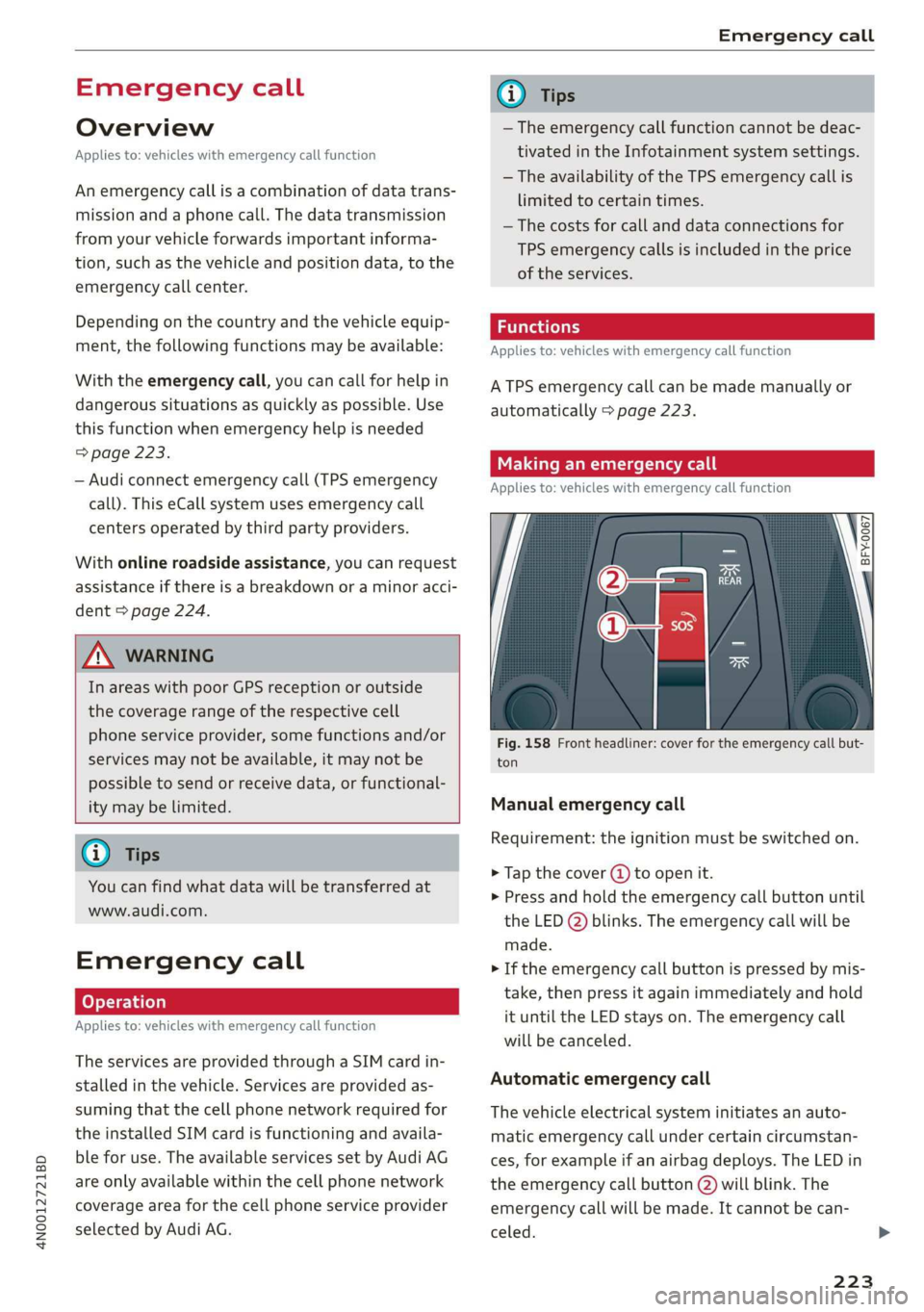
Fig. 158 Front headliner: cover for the emergency call but-
ton
Manual emergency call
Requirement: the ignition must be switched on.
> Tap the cover (4) to open it.
> Press and hold the emergency call button until
the LED (2) blinks. The emergency call will be
made.
> If the emergency call button is pressed by mis-
take, then press it again immediately and hold
it until the LED stays on. The emergency call
will be canceled.
Automatic emergency call
The vehicle electrical system initiates an auto-
matic emergency call under certain circumstan-
ces, for example if an airbag deploys. The LED in
the emergency call button @) will blink. The
emergency call will be made. It cannot be can-
celed.
223
Page 331 of 360
4N0012721BD
Fuses and bulbs
Windshield washer system/headlight
washer system
Right headlight electronics
Front seat heating
Right rear door control module
Sockets
Left front door control module
Parking heater
. | Equipment
Anti-theft alarm system
Engine control module
Horn
Parking brake
Gateway control module (diagnosis)
Interior headliner lights
Driver assist systems control module
Airbag control module
Electronic Stabilization Control (ESC), An-
ti-Lock Braking System (ABS)
12
Rear climate control unit, diagnostic con-
nector,
light/rain sensor
13) Climate control system
14 Right front door control module
15 Climate control system, body electronics
16 Brake system
13 | Radiator fan
14 | Engine control module
15 | Engine sensors
16 | Fuel pump
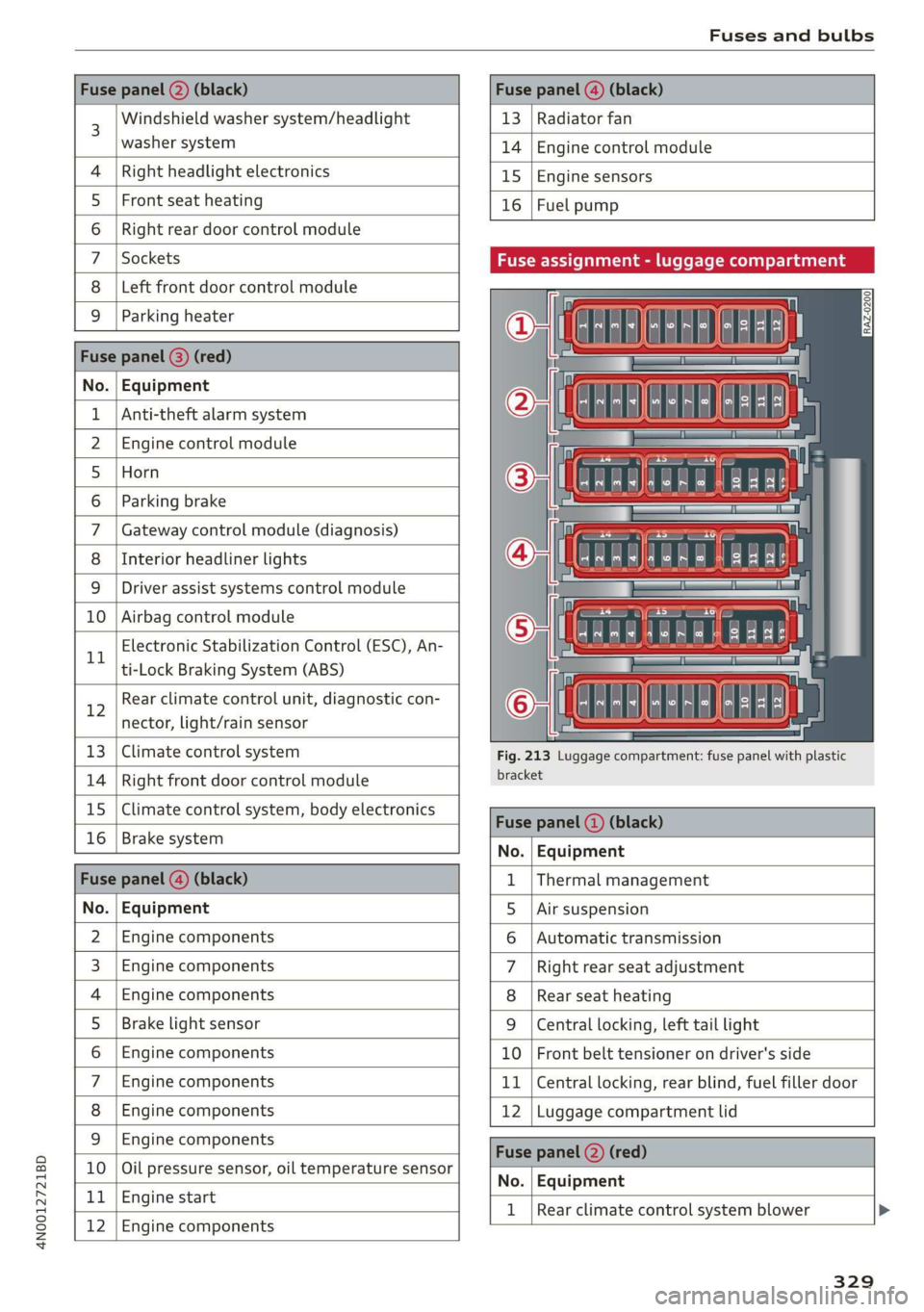
Fuse assignment - luggage compartment
Fig. 213 Luggage compartment: fuse panel with plastic
bracket
No. Equipment
Fus 1 |Thermal management
No. | Equipment 5 |Air suspension
2 |Engine components 6 |Automatic transmission
3 | Engine components 7 |Right rear seat adjustment
4 | Engine components 8 |Rear seat heating
5 | Brake light sensor 9 |Central locking, left tail light
6 |Engine components 10 | Front belt tensioner on driver's side
7 |Engine components 11 | Central locking, rear blind, fuel filler door
8 | Engine components 12 |Luggage compartment lid
9 | Engine components
10 | Oil pressure sensor, oil temperature sensor
bh BR Engine start
Bb N
Engine components
No. | Equipment
1 | Rear climate control system blower >
329
Page 334 of 360

Data privacy
Data privacy
Image recording
Surrounding area monitoring
Applies to: vehicles with surrounding area monitoring
Some vehicle functions require the vehicle’s path
to be detected and evaluated. This is done by
cameras installed permanently on the vehicle
that detect objects in the vehicle's surroundings
(such as obstacles or guard rails). The live images
from the cameras are transmitted to the applica-
ble control module.
The camera images are transferred to the respon-
sible control module for processing and may be
stored, depending on vehicle equipment. The
control
module analyzes the current camera im-
age using image evaluation software. This image
evaluation software detects anonymized techni-
cal measurements, such as distances to objects.
The control module evaluates these technical
measurements and makes it possible for the as-
sist systems to control the vehicle, if necessary.
Data memories
Vehicle control modules
rt 1 oO g|
= +
a
Fig. 214 Driver's side footwell: connection port for the On
Board Diagnostic System (OBD)
Your vehicle is equipped with electronic control
modules for various vehicle systems such as the
airbags. These vehicle control modules store data
while driving normally that is required by an au-
thorized Audi dealer or authorized Audi Service
Facility for diagnosis and repair purposes. Only
certain types of data are recorded for a very short
period of time if a control module has detected a
332
system event. No noises, conversations, or im-
ages will be recorded in the vehicle.
The data may include information such as the ve-
hicle speed, the direction of travel, and informa-
tion about the brake system, or also the behavior
of the restraint system in the event of an acci-
dent. The stored data can be exported and down-
loaded with special devices, which must be con-
nected directly to the vehicle.
On Board Diagnostic System (OBD)
There is a diagnostic connector socket in the driv-
er's side footwell to read out the various control
modules and the event data recorder. Data re-
garding the function and condition of the elec-
tronic control modules is stored in the event
memory. Only have an authorized Audi dealer or
authorized Audi Service Facility read out and de-
lete the event memory.
Z\ WARNING
— Incorrect use of the connection port for the
On Board Diagnostic System can cause mal-
functions, which can then result in accidents
and serious injuries.
— Only allow an authorized Audi dealer or au-
thorized Audi Service Facility to read out the
engine data.
(rune rie M-leelcel-1g
Event Data Recorder
This vehicle is equipped with an Event Data Re-
corder (EDR). The main purpose of an EDR is to
record, in certain crash or near crash-like situa-
tions,
such as an airbag deployment or hitting a
road obstacle, data that will assist in understand-
ing how a vehicle's system performed. The EDR is
designed to record data related to vehicle dynam-
ics and safety systems for a short period of time,
typically 30 seconds or less. The EDR in this vehi-
cle is designed to record such data as:
— How various systems in your vehicle were oper-
ating;
— Whether or not the driver and passenger safety
belts were buckled/fastened;
Page 339 of 360

4N0012721BD
Accessories and technical changes
Usually maintenance and repair work requires
special tools, measuring devices, and other
equipment that is available to trained vehicle
technicians in order to help ensure that your vehi-
cle and all of its systems operate correctly, relia-
bly, and safely. Performing work on the vehicle
incorrectly can impair the operation and reliabili-
ty of your vehicle and may void one or more of
your vehicle's warranties.
Technical Modifications
Interference with electronic components, their
software, the wiring, and data transfer may cause
malfunctions. Because of the way electronic com-
ponents are interconnected, such malfunctions
can also impair systems that are not directly in-
volved. This means that you risk both a substan-
tial reduction in the operational safety of your ve-
hicle and increased wear of vehicle components.
Some convenience functions, such as the conven-
ience turn signal function, individual door open-
ing function, and displays, can be reprogrammed
using special workshop equipment. If functions
are reprogrammed, the information and descrip-
tions about these functions in this Owner's Man-
ual may no longer apply to the changed func-
tions. Audi recommends that an authorized Audi
dealer or authorized Audi Service Facility perform
and verify any reprogramming procedures.
carry out the job and have the correct tech-
nical information and the correct tools.
— If you are uncertain about what to do, have
the work performed by an authorized Audi
dealer, an authorized Audi Service Facility,
or another qualified workshop. Serious per-
sonal injury may result from improperly per-
formed work.
ZA WARNING
Maintenance procedures, repairs, or technical
modifications that are performed incorrectly
increase the risk of an accident and can lead
to serious injuries.
ZA WARNING
The engine compartment of any motor vehicle
is a potentially dangerous area and can cause
serious personal injury.
— Always use extreme caution when doing any
work in the engine compartment. Always
follow commonly accepted safety practices
and use common sense. Never risk personal
injury.
— Never perform any work in the engine com-
partment unless you know exactly how to
@) Note
— Maintenance procedures, repairs or techni-
cal modifications that are performed incor-
rectly can cause damage to the vehicle, such
as corrosion.
— If emergency repairs must be performed,
take your vehicle to an authorized Audi deal-
er or authorized Audi Service Facility as soon
as possible.
— Audi is not liable for damage to the vehicle
resulting from failure to comply with these
guidelines.
@) For the sake of the environment
— Regular maintenance can help protect the
environment.
— Technical modifications to the vehicle can
have a negative impact on fuel consumption
and vehicle emissions.
(@) For the sake of the environment
Undeployed airbag modules and pretension-
ers are classified as Perchlorate Material -
special handling may apply, See www.dtsc.ca.
gov/hazardouswaste/perchlorate. When the
vehicle or parts of the restraint system includ-
ing airbag modules and safety belts with pre-
tensioners are scrapped, all applicable laws
and regulations must be observed. Your au-
thorized Audi dealer is familiar with these re-
quirements and we recommend that you have
your dealer perform this service for you.
G) Tips
Because of your vehicle's aluminum body de-
sign, all service and repair procedures affect-
ing the body should be performed by an au-
thorized Audi dealer or authorized Audi
337
Page 340 of 360

Accessories and technical changes
Service Facility, who will perform the work ac-
cording to Audi factory specifications. Only
Audi Genuine Parts are used when Audi ex-
perts perform repair or service procedures.
Failure to use Audi Genuine Parts or Audi Gen-
uine Accessories or performing repairs incor-
rectly may result in severe vehicle damage,
such as corrosion.
Accessories and parts
Consult with an authorized Audi dealer or author-
ized Audi Service Facility before purchasing ac-
cessories or replacement parts. We recommend
that you have your vehicle serviced by an author-
ized Audi dealer or authorized Audi Service Facili-
ty and that Audi Genuine Parts and Audi Genuine
Accessories are used.
Audi does not endorse the use of products and
accessories that it has not evaluated, even if the
product is approved by a certified testing agency
or government agency.
ZA WARNING
— Installing unapproved accessories or incor-
rect replacement parts can cause vehicle
damage and can increase the risk of an acci-
dent.
— Never attach accessories, such as telephone
holders or cup holders, to the airbag covers
or within the airbag deployment zone, be-
cause this increases the risk of injury if the
airbag deploys.
— Do not use a license plate bracket different
from the one installed by the factory in the
front of the vehicle, because it may impair
the function of some systems.
@) Note
A correctly-installed exterior antenna is re-
quired for operating radio equipment in the
vehicle. Otherwise, the increased electromag-
netic waves can cause malfunctions in the ve-
hicle. Observe the regulations in the country
where the vehicle is being operated and the
instructions from the radio equipment manu-
facturer.
338
Reporting Safety Defects
Applicable to U.S.A.
If you believe that your vehicle
has a defect which could cause a
crash or could cause injury or
death, you should immediately in-
form the National Highway Traffic
Safety Administration (NHTSA) in
addition to notifying
Audi of America, Inc.
2200 Ferdinand Porsche Drive
Herndon, VA 20171
If NHTSA receives similar com-
plaints, it may open an investiga-
tion, and if it finds that a safety
defect exists in a group of
vehicles, it may order a recall and
remedy campaign. However,
NHTSA cannot become involved in
individual problems between you,
your dealer, or Audi of America,
Inc.
To contact NHTSA, you may call
the Vehicle Safety Hotline toll-
free at 1-888-327-4236 (TTY: 1-
800-424-9153); go to http://
www.safercar.gov;