change wheel AUDI A8 2020 Owner's Manual
[x] Cancel search | Manufacturer: AUDI, Model Year: 2020, Model line: A8, Model: AUDI A8 2020Pages: 360, PDF Size: 95.38 MB
Page 310 of 360

Wheels
changing or replacing a tire on your vehicle
=> page 308. The tire pressure monitoring system
only monitors the tire pressure you have stored.
Refer to the tire pressure label for the recom-
mended tire pressure for your vehicle
=> page 299, fig. 192.
Tire tread circumference and vibration character-
istics can change and cause a tire pressure warn-
ing if:
— The tire pressure in one or more tires is too low
— The tires have structural damage
— The tire was replaced or the tire pressure was
changed and it was not stored > page 308
— Tires that are only partially used are replaced
with new tires
Indicator lights
® - Loss of pressure in at least one tire > A\.
Check the tires and replace or repair if necessary.
Check and correct the pressures of all four tires
and store the pressure again > page 308.
is (Tire Pressure Monitoring System) Tire pres-
sure: malfunction! See owner's manual. If fi
appears after switching the ignition on or while
driving and the @ indicator light in the instru-
ment cluster blinks for approximately one minute
and then stays on, there is system malfunction.
Try to store the correct tire pressures
= page 308. In some cases, you must drive for
several minutes after storing the pressures until
the indicator light turns off. If the indicator light
does turn off or turns on again after a short peri-
od of time, drive to an authorized Audi dealer or
authorized Audi Service Facility immediately to
have the malfunction corrected.
ZA WARNING
— If the tire pressure indicator appears in the
display, reduce your speed immediately and
avoid any hard steering or braking maneu-
vers. Stop as soon as possible and check the
tires and their pressure.
— The driver is responsible for maintaining the
correct tire pressure. You must check the
tire pressure regularly.
— Under certain conditions (such as a sporty
driving style, winter conditions, or unpaved
308
roads), the tire pressure monitoring system
indicator may be delayed.
@ Tips
—The tire pressure monitoring system can al-
so stop working when there is an ESC mal-
function.
— Using snow chains may result in a system
malfunction.
—The tire pressure monitoring system in your
Audi was calibrated with “Audi Original
Tires” > page 296. Using these tires is rec-
ommended.
Storing tire pressures
Applies to: vehicles with Tire Pressure Monitoring System
If the tire pressure changes or a tire is replaced,
it must be confirmed in the MMI.
> Before storing the tire pressures, make sure the
tire pressures in all four tires meet the speci-
fied values and are adapted to the load
=> page 299.
> Switch the ignition on.
> Applies to: MMI: Select on the home screen:
VEHICLE > Settings & Service > Tire pressure
monitoring > Store tire pressure > Yes, store
now.
@ Tips
Do not store the tire pressures if snow chains
are installed.
Page 321 of 360
4N0012721BD
Emergency assistance
Replacing wheels
You must complete the preparation before
changing a tire.
> Read and follow the important safety precau-
tions > page 316.
> Set the parking brake.
> Select the “P” position.
> When towing a trailer: disconnect the trailer
from your vehicle.
> Lay out the vehicle tool kit > page 316 and the
spare tire > page 322.
> Applies to: MMI: Select on the home screen:
VEHICLE > Settings & Service > Air suspen-
sion: wheel change.
> Switch the ignition off.
Z\ WARNING
The vehicle must also be secured to prevent it
from rolling when using the vehicle jack”. Use
suitable objects to block the front and back of
the wheel that is diagonal from the wheel
Removing the caps
with the flat tire.
B4L-1337
&
[
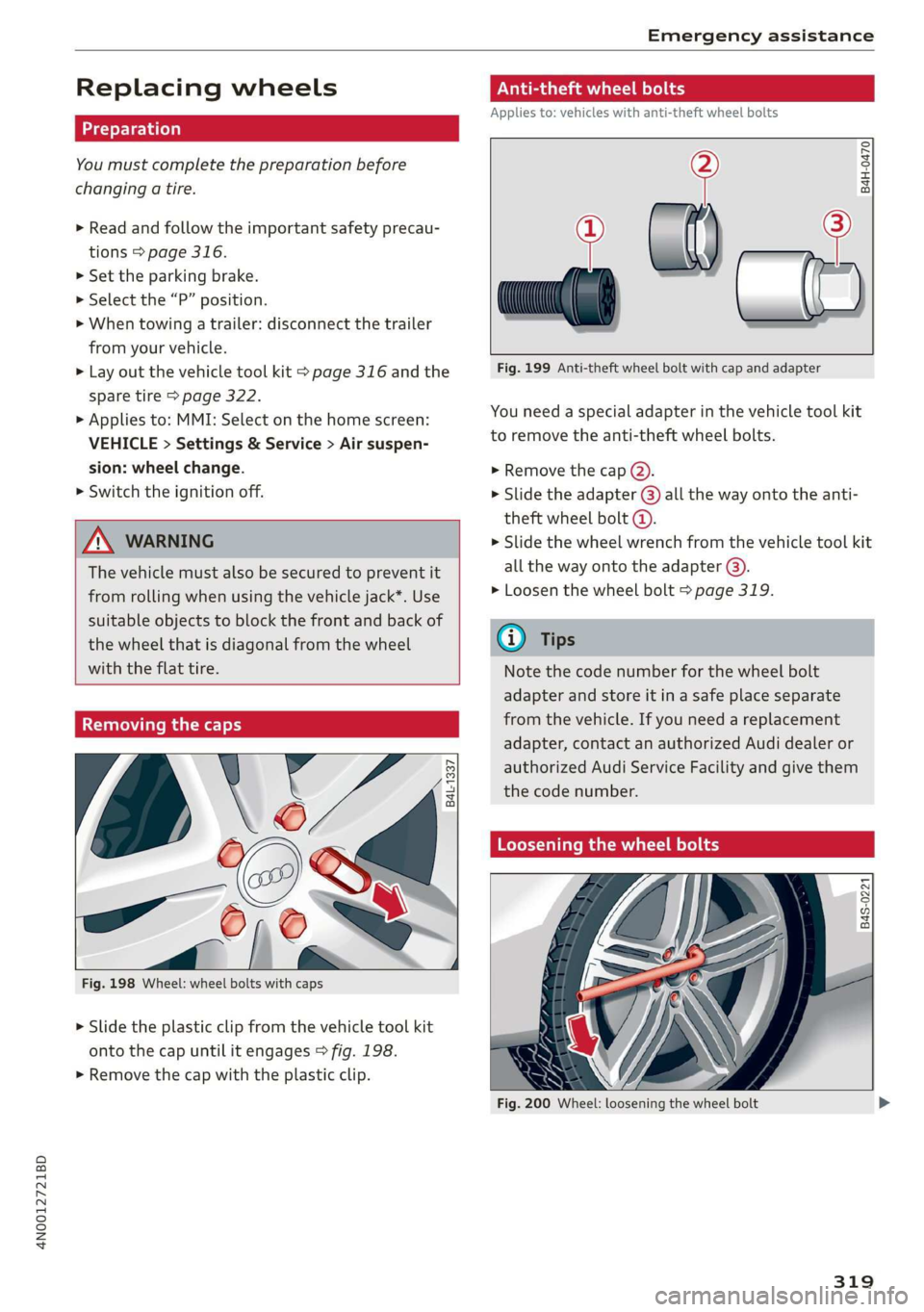
Fig. 198 Wheel: wheel bolts with caps
> Slide the plastic clip from the vehicle tool kit
onto the cap until it engages > fig. 198.
> Remove the cap with the plastic clip.
Anti-theft wheel bolts
Applies to: vehicles with anti-theft wheel bolts
i
> all
Fig. 199 Anti-theft wheel bolt with cap and adapter
B4H-0470
v
You need a special adapter in the vehicle tool kit
to remove the anti-theft wheel bolts.
>» Remove the cap @).
> Slide the adapter @) all the way onto the anti-
theft wheel bolt @.
» Slide the wheel wrench from the vehicle tool kit
all the way onto the adapter @).
> Loosen the wheel bolt > page 319.
@) Tips
Note the code number for the wheel bolt
adapter and store it in a safe place separate
from the vehicle. If you need a replacement
adapter, contact an authorized Audi dealer or
authorized Audi Service Facility and give them
the code number.
Loosening the wheel bolts
B4S-0221
Fig. 200 Wheel: loosening the wheel bolt
319
Page 322 of 360

Emergency assistance
>» Slide the wheel wrench from the vehicle tool kit
all the way onto the wheel bolt).
> Turn the wheel bolt approximately one turn to
the left. To achieve the required torque, hold
the end of the wheel wrench. If the wheel bolt
will not loosen, press carefully on the wheel
wrench with your foot. Hold onto the vehicle se-
curely while doing this and make sure your foot-
ing is stable.
ZA WARNING
To reduce the risk of an accident, only loosen
the wheel bolts gently one turn before raising
the vehicle with the vehicle jack*.
Raising the vehicle
Applies to: vehicles with vehicle jack
> Find the marking on the sill that is closest to
the tire that will be changed > fig. 201. Behind
the marking, there is a lifting point on the side
sill for the vehicle jack.
> Turn the vehicle jack located under the lifting
point on the sill to raise the jack until its arm @
=> fig. 202 is located under the designated plas-
tic mount.
> Align the vehicle jack so the arm (@) engages in
the designated Lifting point in the door sill and
the movable base (2) lies flat on the ground.
The base @) must be directly under the mount-
ing point @.
> Continue raising the vehicle jack until the wheel
lifts off the ground slightly.
RAZ-0257,
Fig. 202 Sill: positioning the vehicle jack
> Place the vehicle jack from the vehicle tool kit
ona firm surface. Use a flat, stable support if
necessary. On a slippery surface such as tile,
you should use a non-slip pad such as a rubber
mat > /A\.
D_ You need the matching adapter in order to loosen and
tighten anti-theft wheel bolts* > page 319.
320
Z\ WARNING
—To reduce the risk of injury, make sure no
one is in the vehicle before raising it.
— Make sure the vehicle jack is stable. The risk
of injury is increased when the ground is
slippery or soft, because the vehicle jack
could slide or sink.
— Only raise your vehicle with the vehicle jack
provided by the factory. If you use a vehicle
jack designed for another vehicle, your vehi-
cle could slip and cause injury.
— Position the vehicle jack only at the desig-
nated mounting points on the side sill and
align the jack. Otherwise, the vehicle jack
could slip and cause an injury if it does not
have sufficient hold on the vehicle.
—To reduce the risk of injury, do not raise any
other vehicles or other loads using the vehi-
cle jack provided by the factory.
— Changes in temperature or load can affect
the height of the vehicle.
— To reduce the risk of an accident, never start
the engine when the vehicle is raised.
—To reduce the risk of injury, no work should
be performed under the vehicle while it is
raised.
Page 348 of 360

Index
Demo mode
refer to Presentation mode............. 239
Destination onthe map................. 230
Details. « ence ox sens © 0 weenwe 0 seme © m omnoes 230
Determining correct load limit........... 303
Digital COMPASS swiss cs veces oo owas eS ee 70
Dime@nSiOnS's « « ssw » s sows x & awe ¥ o awe 3 341
Dimming the exterior mirrors............. 67
Dimming the rearview mirror............. 67
Directory
S@LUINGS cus s seve « & wen © x Bee & o ewe E 2d
also refer to ContactS.............0005 205
Display
Cleaning. .... 2... cee eee eee eee 312
Disposal... 02.0... c cece eee eee eee 336
DiStaMCO bwin
Doors
Child safety lock......... 0.0.0 eee eee 53
Door contact switch. ............0.0000. 64
Mechanically unlocking and locking....... 46
Power closing/closing aid............... 43
Driver information system................ 13
Drives
refer to Media.............000005 250, 255
Drive select
refer to Audi drive select............... 128
Drive systeM.... cece eee ee eee 118, 122
Audi GIVE SELECE’s see 2s came ye een ss 128
Driving down hills.............2--0000- 126
Driving program..............0005 114,178
Driving through water...............005 126
Driving time... .. 2... eee eee eee eee 16
Driving tips
Driving through water................. 126
EMiCienyCrivinig
« ews « « sews 4 x cows oo ew 124,
Uphilland downhill................... 126
Drivingup hills. + & seis 6 sre @ 6 aera & 0 sees 126
Dust filter
refer to Pollutant filter..............0. 108
DVD changer (media drives)............. 251
DVD drive (media drives) ............0.05 251
Dynamic all-wheel steering.............. 131
346
E
E-mail
Message options...........0eee evens 209
SOECIAGS secsses x wssne © ¥ owes +H emcunte 6 a oeeuone 209
SECON MOTO rien & anion a = amuev wo w mnsome 2 2 eI 119
EDL
refer to Electronic Differential Lock...... 133
EDR
Event Data Recorder...............0.. 332
Efficiency assist... 1... eee eee 167
Electricalisystenmiss « snes » seven 2 > eveano «2 284
Electric FAN ge wwe. + sswas + x sone 2 0 arate o seen 236
Electromechanical parking brake......... 124
Electronic Differential Lock.............. 133
Electronic immobilizer 2x: 2 s wes sy ewes 9 es 48
Electronic Stabilization Control........... 133
Embedded SIM card............000000ee 217
Emergency assist...........00-.00 eee ee 190
Emergency assistance..............000. 316
Emergency braking function............. 125
Emergencyi¢allscin oa miwew 6 wamen @ 0 ivacs 207, 223
Emergency flashersii: + woos « 2 wows as ween s 64
Emergency mode.............---0e eee 117
Emergency operation
DOOMSic + wens 2 6 wed 2 same ao wa ao wie Do 46
Fuel filler door............0 000000000 273
Luggage compartment lid............... 52
Panoramic glass roof................... 56
Emissions control system.............05 274
Energy CONSUMETSina + wasewa + neue oy Me eee 17
Energy flow display..............0000ee 119
Energy management................05 121
Energy recovery ..... 0.2... .e eee e eee ee 118
Engine
BréakiniGiins = xsay ¢ > scree % 5 coms 7 e Hees ee 118
GOOLENE «sess 3 a wee ox ese wo seme ¥ eaWoR 281
EMMeNnGeney SEOPLens » 0 wissen « 6 cesnnie s meses a 6 6 TL
Jump starting.....................0. 322
Start/StOpisysteM « ceo « 2 waves x s aus g es 121
Starting/stopping.................04. ary
Engine braking effect
refer to Recuperation..............005 118
Page 357 of 360
4N0012721BD
Index
tiptronic
refer to Manual shifting............... 115
Tire Mobility System (tire repair set)....... 316
TPES scones ao aires & =) eeeos * wyamenpa © eyewai fo © anon 289
Loose wheel warning...........0+eeeee 304
Low-profile tires ..........-.000e-e0ee 306
REPaiSOLS « eves © a cnesere © ewes a © nteabos © are 316
Replacing........... 0.0 cee eee eee eee 319
S@rvic@ lif@ws « « game < ¢ aims < xayeu sx Hens 298
TRE; PRESSURCL en. so cessas so sewers 6 wiemuea » wrens 299
Tire pressure monitoring system........ 307
Tire pressure table ...........-.e eee eee 300
Tire pressure (trailer mode)............ 151
Treadwear indicators.................. 298
Unidirectional: « sacs « s sees sx news x 291, 321
Uniform tire quality grading............ 306
Tires and wheels
Glossary of tire and loading terminology .. 292
Tires and vehicle load limits............ 301
Tool... 6. eee 316
Tooltips. .... 6... eee eee eee eee 20
Top tether anchor (securing the child safety
S@at) 0. cee eee eee tenes 95
Touch display
Adjusting feedback...............000 ee 20
Operating « = sess 2 x, sone 2 a wanes ¥ ramen a 6 ones 18
TOWING): 5 © sore 9 © seems 3 seson 9 oom © wanes 324
Towing LOOP ese: x ¢ saws se eee se ees 325, 326
Towing protection monitoring............. 46
TPMS
Tire pressure monitoring system........ 307
Traffic iffOrination = wes + 2 cos s naee & o ow 238
Traffic jam assist
refer to Adaptive cruise assist........... 170
Traffic light information................ 161
Traffic sign recognition..............004 159
Traffic SignScw: 2 y eens = x eens yo ees 5 v eee 162
Trailer mode
Air SUSPENSION ¢ sciiss » & caus 2 o cars 2 & ears 151
Trailer mode (navigation).............. 240
Trailer towing wis + 2 sce 2 2 sence oo eee » were 151
Tongue weight.........-....000- eens 1S,
Ufailer load = cesen s 2 enwm 9 4 ama oo mee eee 151,
TUTMASSISE sees ¢ 2 iain 3 See 8s Saee a Rees 185
Turn signals ........ cece eee ee eee eee 61
U
Unable to pass........... 2.000 e eee eee 178
Uniform tire quality grading............. 306
Unlocking and locking.............-..0-- 43
By remote control................00005 48
Using the lock cylinder................. 46
With the central locking switch.......... AS
With the convenience key............... 48
Update (software) ...............00000 267
Updating stations (radio).............04. 242
Upright positions, « « snscss 6 « cesses © # cosas » ¥ eave 78
USB
Adapter... ..... cece cee eee eee 202
USB
charging port............0...0 ee eee 97
USB stick
refer to Audi music interface....... 253,254
Using residual heat................00.. 107
V
Valet parking... ... 6. ccc eee e eee ee eee 56
Vanity maior esse = « anewese + ercuene w 9 vecton wo ane 67
Vehicle
Care/cleaning .......... ese e eee eee ee 309
DIM@NSIONS sex « yews 5 o een cs we R Ge 341
Udentificationdatarss + micas s inca ae essven 341
Out of service........... 0... 315
RaiSitiG): « asws = 5 eaves 3 ¢ Sanne 4 § GES Fs 320
SUNN Gian 5s wsstm 4 o wna 5 x omermee a 7 sosoee 9S Ld.
TWANSPONE crccsie « v evenem « onemeanse © mesens @ » 129, 136
Veiclercareran x 2 ocniss + soma « 4 emo © eons 309
Vehicle control services.............000. 218
Vehicle identification number............ 341
Vehicle jack’: « cess « x sews = x eres = x eee ee: 316
Lifflag pales. so seis 2 seem x 6 enema + wes 320
Tire change mode.............--..005 319
Vehicle key... 0.0... 0. ee eee ee eee ee 43,47
WeFIGleSOUMG inne « suesons oo sxanein ao winneas © w evans 120
Vehicle start system... .. 0.0... cece eee eee 122
Wehicle:tool:Kits. & cccvese so sess eo seman a 8 oniians 316
Ventilation: « s wives ss wens s ¢ wine s ¢ eas 5 104
VIEW bUttofiies x = seuws ¢ = erwe ¢ = Gems te eee 13
VOICetia Ils « = ucugy = x weuoe © ¢ meen ¢ 2 eee 8 a 206
Voice recognition system.............0... 38
Exterfialsecues « x sem 2 ana a a name & 5 meme & 39
Openatlings. « « scsi: « sewers © snemens w @ pcsue © 6 oo 38