door lock AUDI A8 2020 Owner's Manual
[x] Cancel search | Manufacturer: AUDI, Model Year: 2020, Model line: A8, Model: AUDI A8 2020Pages: 360, PDF Size: 95.38 MB
Page 68 of 360
Lights and Vision
— Cockpit dimming
— Head-up display
—MMI
— Virtual cockpit
Possible settings in the Rear Seat Remote:
— Brightness
— Dim display
Vision
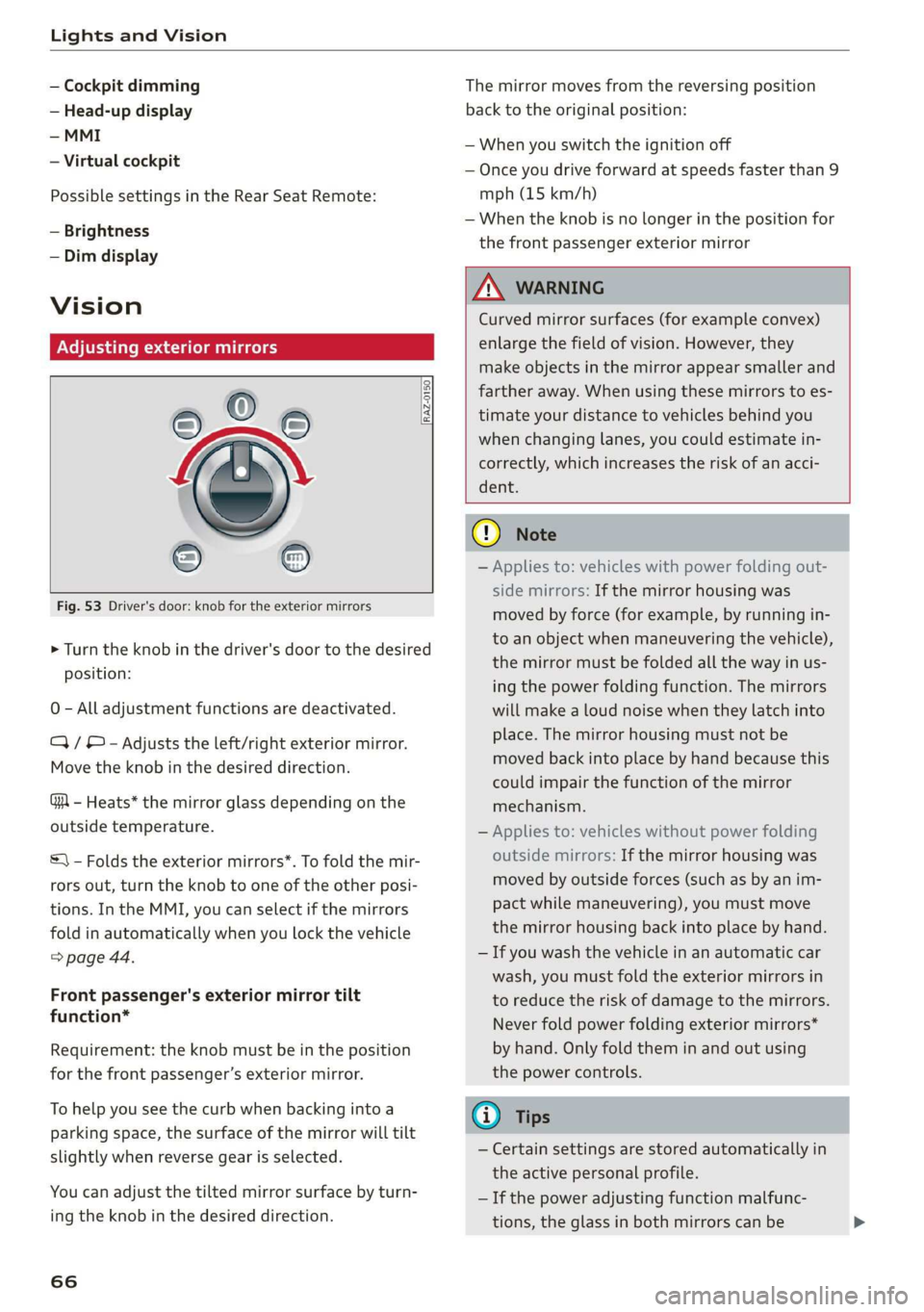
Adjusting exterior mirrors
Fig. 53 Driver's door: knob for the exterior mirrors
® ©
O
> Turn the knob in the driver's door to the desired
position:
0 - All adjustment functions are deactivated.
Q/ ® - Adjusts the left/right exterior mirror.
Move the knob in the desired direction.
GA - Heats* the mirror glass depending on the
outside temperature.
©) - Folds the exterior mirrors*. To fold the mir-
rors out, turn the knob to one of the other posi-
tions. In the MMI, you can select if the mirrors
fold in automatically when you lock the vehicle
> page 44.
Front passenger's exterior mirror tilt
function*
Requirement: the knob must be in the position
for the front passenger’s exterior mirror.
To help you see the curb when backing into a
parking space, the surface of the mirror will tilt
slightly when reverse gear is selected.
You can adjust the tilted mirror surface by turn-
ing the knob in the desired direction.
66
The mirror moves from the reversing position
back to the original position:
— When you switch the ignition off
— Once you drive forward at speeds faster than 9
mph (15 km/h)
— When the knob is no longer in the position for
the front passenger exterior mirror
ZX WARNING
Curved mirror surfaces (for example convex)
enlarge the field of vision. However, they
make objects in the mirror appear smaller and
farther away. When using these mirrors to es-
timate your distance to vehicles behind you
when changing lanes, you could estimate in-
correctly, which increases the risk of an acci-
dent.
@) Note
— Applies to: vehicles with power folding out-
side mirrors: If the mirror housing was
moved by force (for example, by running in-
to an object when maneuvering the vehicle),
the mirror must be folded all the way in us-
ing the power folding function. The mirrors
will make a loud noise when they latch into
place. The mirror housing must not be
moved back into place by hand because this
could impair the function of the mirror
mechanism.
— Applies to: vehicles without power folding
outside mirrors: If the mirror housing was
moved by outside forces (such as by an im-
pact while maneuvering), you must move
the mirror housing back into place by hand.
— If you wash the vehicle in an automatic car
wash, you must fold the exterior mirrors in
to reduce the risk of damage to the mirrors.
Never fold power folding exterior mirrors*
by hand. Only fold them in and out using
the power controls.
G) Tips
— Certain settings are stored automatically in
the active personal profile.
— If the power adjusting function malfunc-
tions, the glass in both mirrors can be
Page 80 of 360
Sitting correctly and safely
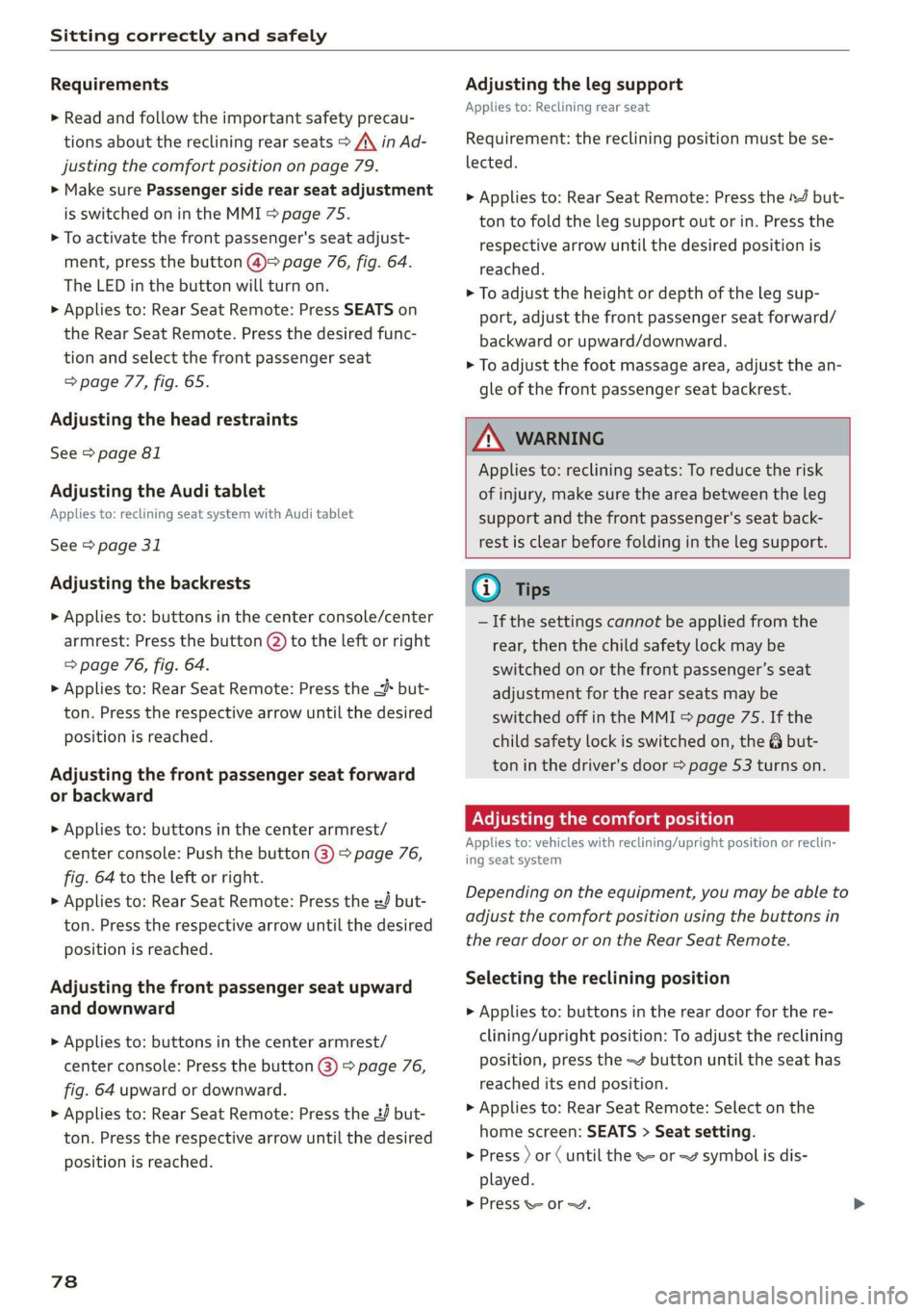
Requirements
> Read and follow the important safety precau-
tions about the reclining rear seats > /\ in Ad-
justing the comfort position on page 79.
> Make sure Passenger side rear seat adjustment
is switched on in the MMI > page 75.
> To activate the front passenger's seat adjust-
ment, press the button @)= page 76, fig. 64.
The LED in the button will turn on.
> Applies to: Rear Seat Remote: Press SEATS on
the Rear Seat Remote. Press the desired func-
tion and select the front passenger seat
=> page 77, fig. 65.
Adjusting the head restraints
See > page 81
Adjusting the Audi tablet
Applies to: reclining seat system with Audi tablet
See > page 31
Adjusting the backrests
> Applies to: buttons in the center console/center
armrest: Press the button (2) to the left or right
=> page 76, fig. 64.
> Applies to: Rear Seat Remote: Press the < but-
ton. Press the respective arrow until the desired
position is reached.
Adjusting the front passenger seat forward
or backward
> Applies to: buttons in the center armrest/
center console: Push the button @) > page 76,
fig. 64 to the left or right.
> Applies to: Rear Seat Remote: Press the J but-
ton. Press the respective arrow until the desired
position is reached.
Adjusting the front passenger seat upward
and downward
> Applies to: buttons in the center armrest/
center console: Press the button @) > page 76,
fig. 64 upward or downward.
> Applies to: Rear Seat Remote: Press the 2 but-
ton.
Press the respective arrow until the desired
position is reached.
78
Adjusting the leg support
Applies to: Reclining rear seat
Requirement: the reclining position must be se-
lected.
> Applies to: Rear Seat Remote: Press the 4 but-
ton to fold the leg support out or in. Press the
respective arrow until the desired position is
reached.
> To adjust the height or depth of the leg sup-
port, adjust the front passenger seat forward/
backward or upward/downward.
> To adjust the foot massage area, adjust the an-
gle of the front passenger seat backrest.
Z\ WARNING
Applies to: reclining seats: To reduce the risk
of injury, make sure the area between the leg
support and the front passenger's seat back-
rest is clear before folding in the leg support.
Gi) Tips
— If the settings cannot be applied from the
rear, then the child safety lock may be
switched on or the front passenger’s seat
adjustment for the rear seats may be
switched off in the MMI > page 75. If the
child safety lock is switched on, the @ but-
ton in the driver's door > page 53 turns on.
ONS mal -Mehlielam eth ela)
Applies to: vehicles with reclining/upright position or reclin-
ing seat system
Depending on the equipment, you may be able to
adjust the comfort position using the buttons in
the rear door or on the Rear Seat Remote.
Selecting the reclining position
> Applies to: buttons in the rear door for the re-
clining/upright position: To adjust the reclining
position, press the =% button until the seat has
reached its end position.
> Applies to: Rear Seat Remote: Select on the
home screen: SEATS > Seat setting.
> Press ) or ( until the x= or <4 symbol is dis-
played.
> Press &or~.
Page 81 of 360
4N0012721BD
Sitting correctly and safely
Selecting the upright position
> Applies to: buttons in the rear door for the re-
clining/upright position: To set the upright po-
sition, press the \& or J button until the seat
has reached its end position.
> Applies to: Rear Seat Remote: Select on the
home screen: SEATS > Seat setting.
> Press ) or until the & or J symbol is dis-
played.
> Press Kor J.
Reclining rear seat
Applies to: Reclining rear seat
In the reclining position, the front passenger
seat is moved forward, the head restraint on the
front passenger seat is folded forward, and the
backrest is tilted forward. Depending on the last
setting in the Rear Seat Remote, the leg support
may fold out and the Audi tablet may tilt for-
ward.
In the reclining position, you can adjust the Audi
tablet or the foot massage, for example
=> page 77.
In the upright position, the leg support is folded
in, the front passenger seat is moved back into
the original position, and the head restraint is
moved to the upright position > A\.
Z\ WARNING
Applies to: reclining rear seats:
— Due to the risk of fatal injury, the front pas-
senger's seat must not be used as a seat
when it is in the reclining position.
— Due to the risk of injury, never select the re-
clining position when the front passenger's
seat is occupied.
— Do not tilt the Audi tablet if the driver's view
of the right exterior mirror will be obstruct-
ed
@ Tips
— Applies to: reclining rear seats and Audi tab-
let: When adjusting the Audi tablet, make
sure the driver has a clear view of the exteri-
or mirrors. Make sure that the view of the
exterior mirror is not obstructed in the MMI.
Otherwise, the Audi tablet moves back to an
upright position.
— If the settings cannot be applied from the
rear, the child safety lock might be switched
on. If the child safety lock is switched on,
the 8 button in the driver's door > page 53
turns on.
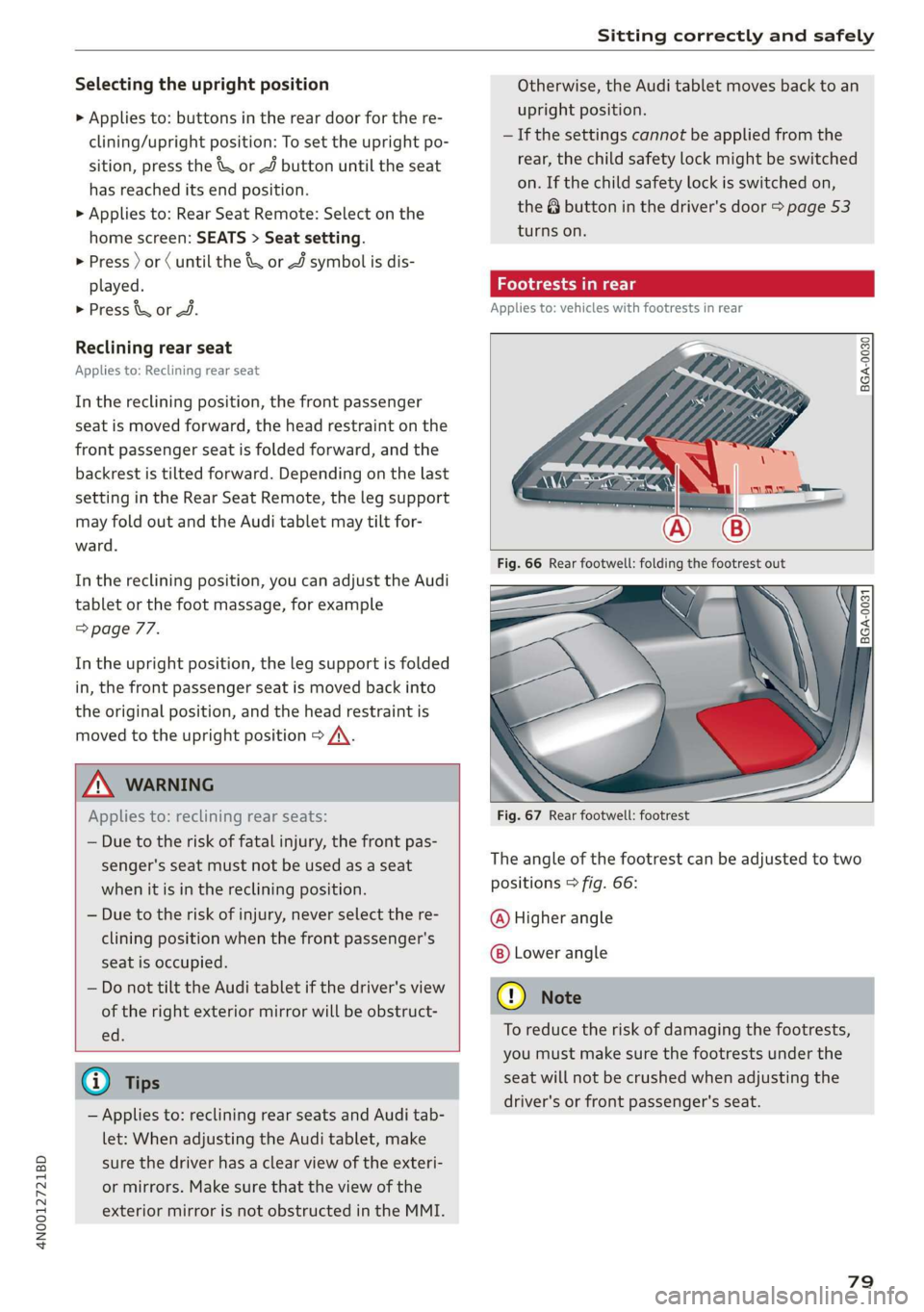
Footrests in rear
Applies to: vehicles with footrests in rear
BGA-0030
BGA-0031
Fig. 67 Rear footwell: footrest
The angle of the footrest can be adjusted to two
positions > fig. 66:
@ Higher angle
Lower angle
@) Note
To reduce the risk of damaging the footrests,
you must make sure the footrests under the
seat will not be crushed when adjusting the
driver's or front passenger's seat.
79
Page 84 of 360

Sitting correctly and safely
Adjusting the outer head restraints
Applies to: vehicles with manual head restraints
> To adjust the head restraint upward, slide it un-
til it locks into place.
> To adjust the head restraint downward, press
the button @) and slide the head restraint. Re-
lease the button and slide the head restraint
farther until it locks into place.
Applies to: vehicles with power head restraints
> To adjust the head restraint upward or down-
ward, push the button 2) > page 76, fig. 64
forward or backward. Or:
> Applies to: Rear Seat Remote: To adjust the
head restraint upward or downward: select on
the home screen: Seats > Setting and press on
the picture of the head restraint for the respec-
tive seat. Press the up or down arrows until the
desired position is reached.
Adjusting the center head restraint
> Fold the head restraint upward until it clicks in-
to place > fig. 72.
> To fold the head restraint downward, press the
button on the back of the head restraint.
Removing the headrests
Applies to: vehicles with removable head restraints
> Move the head restraint upward all the way.
> Insert a suitable object, such as the the extend-
ed vehicle key or mechanical key, into the re-
lease point @ on the inside or outside of the
base.
> Press the button @) and pull the head restraint
out of the backrest > A\ in General informa-
tion on page 81.
Installing the headrests
Applies to: vehicles with removable head restraints
> Slide the posts on the head restraint down into
the guides until the posts click into place.
> Press the button @) and slide the head restraint
all the way down. It should not be possible to
remove the head restraint from the backrest
without pressing the button.
82
Safety belts
General information
Each seat is equipped with a three-point safety
belt. Safety belts that are worn correctly are the
most effective way to reduce the risk of serious or
fatal injuries in a collision. Therefore, wear your
safety belt correctly and make sure that all vehi-
cle passengers are also wearing their safety belts
correctly when the vehicle is moving.
Even though your vehicle is equipped with an air-
bag system, every vehicle passenger must still al-
ways wear the appropriate safety belt. In addi-
tion to their normal protective function, safety
belts also hold vehicle occupants in the correct
seating position in the event of a collision so that
the
airbags can deploy correctly and provide addi-
tional protection. Safety belts provide protection
during collisions when the airbags do not deploy
or if they have already deployed.
ZX WARNING
The risk of serious or fatal injury increases if
the safety belt is not fastened, if it is worn in-
correctly, or if it is damaged.
— All vehicle occupants, including the driver,
must fasten their safety belts correctly be-
fore every trip and must always keep their
safety belts fastened during the trip, regard-
less of whether the seat is equipped with an
airbag or not. This also applies to children
that are seated in a child safety seat that is
appropriate for their weight and age and
that is secured with a safety belt.
— In the event of a collision, vehicle occupants
that are not wearing safety belts could be
propelled through the vehicle interior and
collide with vehicle components, such as the
steering wheel, instrument panel, wind-
shield, or doors. In some situations, vehicle
occupants could also be ejected from the ve-
hicle. Vehicle occupants in the rear seats
who do not wear safety belts not only en-
danger themselves, but also other people in
the vehicle.
— Only one person may be fastened with a
safety belt at a time. Never secure more
Page 87 of 360

4N0012721BD
Sitting correctly and safely
Adjusting the height of the safety belt
B4G-0004)
Fig. 77 Belt height adjustment for the front seats - safety
belt relay
> To move the belt higher, slide the safety belt re-
lay @ upward.
> To move the belt lower, press the release but-
ton @ and slide the safety belt relay 2) down-
ward.
> To check if the safety belt relay is securely
locked in place, pull firmly on the belt.
@ Tips
You can also adjust the height of the front
seats to change the position of the safety
belts.
Additional safety belt functions
Belt retractor lock
The safety belts on the rear seats and on the
front passenger seat are equipped with a belt re-
tractor lock.
> If you secure a child safety seat with a safety
belt, the belt retractor lock on the safety belt
may need to be activated. Follow the instruc-
tions from the child safety seat manufacturer.
> When a vehicle passenger has fastened a safety
belt, the belt retractor lock should not be acti-
vated. If the belt retractor lock has been acti-
vated unexpectedly, deactivate it.
Deactivating or activating the belt retractor lock
=> page 94.
Safety belt retractor
The safety belts are equipped with an automatic
belt retractor. This automatic retractor allows the
safety belt to be pulled all the way out when the
belt is pulled slowly. However, the automatic re-
tractor locks during sudden braking maneuvers.
It also locks the belts when accelerating, driving
uphill, and driving around curves.
Belt force limiter
Safety belts with belt force limiters reduce the
force placed on the body by the safety belts dur-
ing a collision.
Safety belt pretensioners
Safety belts may be tightened with reversible
belt tensioners when you start driving and in cer-
tain driving situations. If the safety belt is too
loose, it will be tightened so that the belt will
rest closer to the body.
In some collisions, pyrotechnic belt tensioners
may secure the safety belts so that they cannot
loosen. This reduces forward movement by the
vehicle passengers.
ZA WARNING
The pyrotechnic system can only provide pro-
tection during one collision. If the pyrotechnic
belt tensioners deploy, the pretensioning sys-
tem must be replaced by an authorized Audi
dealer or authorized Audi Service Facility.
G) Tips
Smoke may be released when pyrotechnic belt
tensioners deploy. This is not a sign of a vehi-
cle fire.
Memory function
General information
Applies to: vehicles with memory function
With the memory function, you can save and call
up seat profiles using the memory buttons in the
door trim panel.
Depending on the equipment, it may be possible
to store the following settings:
— Driver's seat: seat, head restraint*, steering
wheel, exterior mirrors
— Front passenger's seat: seat, head restraint
8s
>
Page 102 of 360
Stowing and using
— Holders for a notepad and a pen in the glove
compartment
— Storage compartments in the door trim panel
— Net in the front passenger's footwell
— Storage compartments under the center arm-
rest
— Compartments on the backrests of the front
seats
— Garment hooks in the rear
— Cell phone holder in the right rear door
— Bag hooks in the luggage compartment
— Net in luggage compartment
— Umbrella holder
> Stow heavy luggage as far forward in the lug-
gage compartment as possible.
> Use non-elastic cords attached to the tie-downs
to secure objects.
ZA WARNING
— To reduce the risk of injury, make sure all
storage compartments are always closed
while driving.
— Loose objects can be thrown around the ve-
hicle interior during sudden driving or brak-
ing maneuvers, which increases the risk of
an accident. Store objects securely while
driving.
— Only use the storage compartments in the
door trim panels to store small objects that
will not stick out of the compartment and
impair the function of the side airbags.
— Only lightweight clothing should be hung
from the garment hooks in the vehicle. Do
not use clothes hangers to hang clothing.
The pockets of the clothing must not con-
tain any heavy, breakable, or sharp-edged
objects. This could impair the effectiveness
of the side curtain airbags.
— Make sure your view toward the rear is not
blocked, for example by hanging clothing or
objects in the vehicle.
Luggage compartment
General information
All pieces of luggage or objects must be securely
fastened in the luggage compartment. Note the
following to maintain good vehicle handling:
> Distribute the load evenly in the luggage com-
partment.
100
ZX WARNING
— Loose objects can be thrown around the ve-
hicle interior during sudden driving or brak-
ing maneuvers, which increases the risk of
an accident. Always stow objects securely in
the luggage compartment and secure them
at the tie-downs. Use straps suitable for
heavy objects.
— If pieces of luggage or objects are secured
to the tie-downs with unsuitable or dam-
aged straps, this can increase the risk of in-
jury during braking maneuvers or accidents.
— When transporting heavy objects, the vehi-
cle characteristics will change due to the
shift in the center of gravity, which increases
the risk of an accident. You may need to
adapt your driving style and speed to the
current conditions.
— The cargo net is only strong enough to se-
cure light objects. Heavy objects are not ade-
quately secured. Attempting to secure heavy
objects increases the risk of injury.
— Never exceed the permitted axle and load
and vehicle weight > page 342.
— Never secure a child safety seat to the tie-
downs.
— Never leave your vehicle unattended, espe-
cially if the luggage compartment lid is
open. Children could enter the luggage com-
partment and close the luggage compart-
ment lid from the inside. This creates the
risk of fatal injury, since the children would
be locked in and may not be able to escape
by themselves.
— Do not allow children to play in or on the ve-
hicle. Close and lock the luggage compart-
ment lid as well as all other doors when you
leave the vehicle.
— Never transport passengers in the luggage
compartment. Every passenger must be cor-
rectly secured with the safety belts in the
vehicle > page 82.
Page 113 of 360
4N0012721BD
Driving
Driving
Starting the vehicle
Dye Tod f ola (ela)
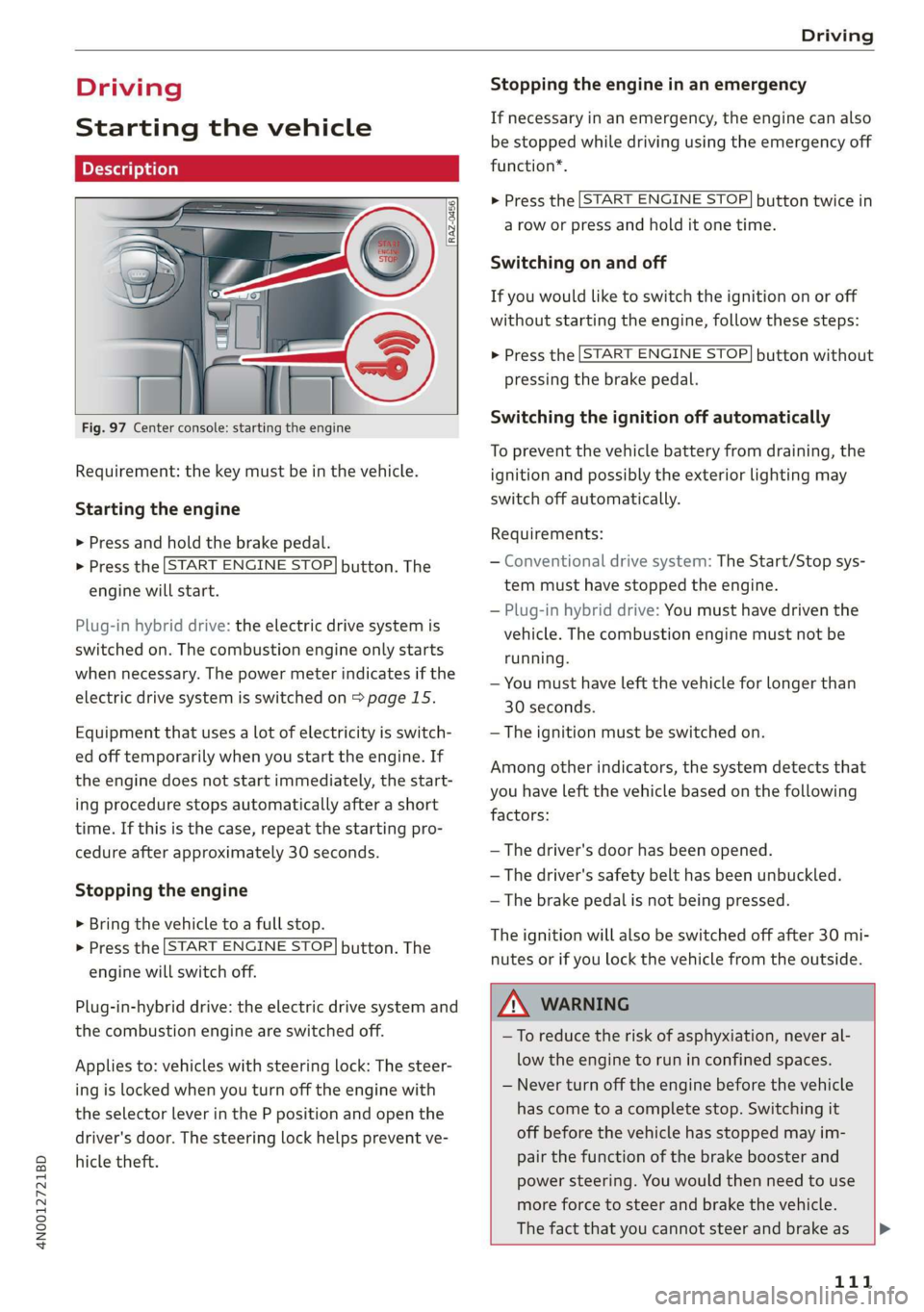
Fig. 97 Center console: starting the engine
Requirement: the key must be in the vehicle.
Starting the engine
> Press and hold the brake pedal.
> Press the [START ENGINE STOP] button. The
engine will start.
Plug-in hybrid drive: the electric drive system is
switched on. The combustion engine only starts
when necessary. The power meter indicates if the
electric drive system is switched on > page 15.
Equipment that uses a lot of electricity is switch-
ed off temporarily when you start the engine. If
the engine does not start immediately, the start-
ing procedure stops automatically after a short
time. If this is the case, repeat the starting pro-
cedure after approximately 30 seconds.
Stopping the engine
> Bring the vehicle to a full stop.
> Press the [START ENGINE STOP] button. The
engine will switch off.
Plug-in-hybrid drive: the electric drive system and
the combustion engine are switched off.
Applies to: vehicles with steering lock: The steer-
ing is locked when you turn off the engine with
the selector lever in the P position and open the
driver's door. The steering lock helps prevent ve-
hicle theft.
Stopping the engine in an emergency
If necessary in an emergency, the engine can also
be stopped while driving using the emergency off
function*.
> Press the [START ENGINE STOP] button twice in
a row or press and hold it one time.
Switching on and off
If you would like to switch the ignition on or off
without starting the engine, follow these steps:
> Press the [START ENGINE STOP] button without
pressing the brake pedal.
Switching the ignition off automatically
To prevent the vehicle battery from draining, the
ignition and possibly the exterior lighting may
switch off automatically.
Requirements:
— Conventional drive system: The Start/Stop sys-
tem must have stopped the engine.
— Plug-in hybrid drive: You must have driven the
vehicle. The combustion engine must not be
running.
— You must have left the vehicle for longer than
30 seconds.
— The ignition must be switched on.
Among other indicators, the system detects that
you have left the vehicle based on the following
factors:
— The driver's door has been opened.
— The driver's safety belt has been unbuckled.
— The brake pedal is not being pressed.
The ignition will also be switched off after 30 mi-
nutes or if you lock the vehicle from the outside.
ZA WARNING
—To reduce the risk of asphyxiation, never al-
low the engine to run in confined spaces.
— Never turn off the engine before the vehicle
has come to a complete stop. Switching it
off before the vehicle has stopped may im-
pair the function of the brake booster and
power steering. You would then need to use
more force to steer and brake the vehicle.
The fact that you cannot steer and brake as |P>
111
Page 115 of 360

4N0012721BD
Driving
prevents too much stress from being placed on
the locking mechanism.
ZA\ WARNING
— Always set the parking brake when leaving
your vehicle, even if for a short period of
time. If the parking brake is not set, the ve-
hicle could roll away, increasing the risk of
an accident.
— Do not leave your vehicle unattended while
the engine is running, because this increases
the risk of an accident.
— If the parking brake is set, it can release au-
tomatically when the accelerator pedal is
pressed. To reduce the risk of an accident,
do not inadvertently press the accelerator
pedal and always shift into “P” when the ve-
hicle is stopped.
— If you leave the vehicle, switch the ignition
off and take the key with you. This is espe-
cially important when leaving persons or an-
imals in the vehicle. Otherwise, the vehicle
could start unintentionally, the parking
brake could release, or electronic equipment
could activate, which increases the risk of an
accident.
— No persons or animals should be left in a
locked vehicle. Locked doors make it more
difficult for emergency workers to enter the
vehicle, which puts lives at risk.
— If you do not begin driving immediately af-
ter releasing the brake pedal, your vehicle
may begin to roll backward. Press the brake
pedal or set the parking brake immediately.
@) Note
If you have to stop on an incline, always press
the brake pedal to hold the vehicle in place to
reduce the risk of the vehicle rolling back-
ward. Do not try to hold the vehicle in place
by pressing and holding the accelerator pedal.
The transmission can overheat, which increas-
es the risk of damage.
Hill hold assist
If you take your foot off of the brake pedal when
driving on hills, the braking force will be held for
several seconds. At that time, you can start driv-
ing without the vehicle rolling backward.
Requirement: the driver's door must be closed,
the engine must be on, and the vehicle must be
traveling uphill.
> To activate hill hold assist, press and hold the
brake pedal for several seconds while the vehi-
cle is stationary.
Z\ WARNING
— If you do not begin driving immediately af-
ter releasing the brake pedal, your vehicle
may begin to roll backward. Press the brake
pedal or set the parking brake immediately.
— The hill hold assist cannot hold the vehicle
on inclines in every scenario (for example,
on slippery or icy ground).
Messages
Take over!
The vehicle cannot be held in place automatically.
Press the brake pedal to secure the vehicle from
rolling away unintentionally.
Gears and driving programs
Oo
@—*
RAZ-0410:
R
N
tt
D/S
7 NEI
Fig. 98 Center console: selector lever
The automatic transmission shifts automatically
depending on the selected gear and the current
driving style. When driving with a moderate driv-
ing style, upshifting early and downshifting late
will help to improve fuel economy. When driving
with a sporty driving style, the transmission per-
mits higher RPMs.
The gears are displayed next to the selector lever. >
113
Page 132 of 360
Driving dynamic
With Road ahead: level correction, you can ad-
just how much the vehicle will compensate for
bumps in the road. For this purpose, there is a
camera behind the windshield that detects the
road conditions and activates the active suspen-
sion when bumps are predicted. A colored cone in
the display indicates when this function is acti-
vated. This function may only have limited availa-
bility under certain conditions, for example,
when it is dark > page 155.
Applies to: vehicles with elevated entry
With the Elevated entry function, you can select
if the vehicle should be raised when a door is
opened in order to enter and exit the vehicle
more comfortably. The vehicle will lower again
slowly in the following situations:
— When starting from a stop
— When locking the vehicle
— When changing the Audi drive select* mode
— Approximately 10 seconds after all doors have
been closed
— After a certain period of time when the engine
is stopped and a door is open, in order to main-
tain the battery charge level.
This function may not be available under certain
conditions, for example if the ground is not level
or when the battery charge level is low. The func-
tion may also be deactivated temporarily after
the
vehicle is serviced using diagnostic equip-
ment, and it will only be available again once the
vehicle is driven a certain distance.
©) Note
When the elevated entry function is activated,
make sure there is sufficient space above and
below the vehicle. This particularly applies to
space under open doors and above roof struc-
tures. If you are unsure about the amount of
space, deactivate the elevated entry function
before exiting the vehicle to reduce the risk of
damage.
@ Tips
— If an open door touches the ground or be-
comes stuck, use the Raise > page 129
130
function in the MMI to raise the vehicle us-
ing the air suspension.
— When the curve tilting function is switched
on, the vehicle passengers will experience
less turning force when driving around
curves. This may influence the perception of
speed. Always adjust the speed to the driv-
ing situation.
Ground clearance
The vehicle height and clearance can be influ-
enced by the following factors:
— Change in temperature
— Change in load
— Change to the Audi drive select* mode
— Lifting and lowering via the air suspension*
— Automatic lifting and lowering using the Ele-
vated entry* function
ZA\ WARNING
To reduce the risk of injury, make sure no one
gets pinched when the vehicle level is chang-
ing, for example when cleaning the under-
body or the wheel housings.
C) Note
Always make sure there is enough clearance
above and below the vehicle. This is especially
important for entrances with height restric-
tions, for example, before driving into under-
ground garages. You could also scrape the
ground when driving over the edges of curbs
or on steep ramps, which could damage your
vehicle.
Messages
B Air suspension: malfunction! You may con-
tinue driving slowly at max. XX mph (km/h)
There is a malfunction. Driving stability may be
limited. Drive to an authorized Audi dealer or au-
thorized Audi Service Facility immediately. Do not
drive faster than the speed given in the message.
B Air suspension: malfunction! Safely stop ve-
hicle. Steering and ground clearance limited >
Page 141 of 360

4N0012721BD
High-voltage system
— IEC 61851 and IEC 62196 (Europe)
— SAE J1772 (North America, Japan)
— You can use your Audi charging system if
there is a household or industrial connec-
tion available at the charging station.
@ Tips
Applies to: Audi charging systems
— For an uninterrupted charging process, we
recommend only charging using sockets
that are connected to a separately protected
circuit.
— It is recommended to use Audi charging sys-
tems in the wall mount clip* during opera-
tion. If this is not possible, always position
Audi charging systems ona secure surface
during the charging process > A.
—To reduce the risk of overheating during op-
eration, do not place Audi charging systems
in direct sunlight for long periods of time. If
the control unit is overheated, the charging
process is automatically paused until the
temperature has lowered back within the
normal range.
Cee Tact)
Applies to: vehicles with plug-in hybrid drive
Fig. 106 Left rear side of the vehicle: opening the high-
voltage charging port door
RAZ-0835
Fig. 107 Charging unit: charging port and buttons/LED
Connecting the charging cable
If you charge your vehicle at a charging station,
the following sequence of steps may vary. Follow
the manufacturer guidelines and operating in-
structions for the charging station.
Requirement: the “P” gear must be selected, the
parking brake must be set, and drive ready mode
must have ended.
— If necessary, remove the charging cable from
the vehicle > page 144, Transport.
— Remove the cap from the charging cable if nec-
essary.
— First connect the charging cable to the power
supply, or remove it from the charging station.
— Unwind the charging cable completely.
— Unlock the vehicle.
— To open the charging port door, press on the
right
side of the door > fig. 106.
— Remove the cap from the vehicle charging port
and place it on the holder on the charging port
door.
— Plug the charging connector into the vehicle
charging port.
Starting to charge automatically (immediate
charging)
If charging is not delayed with a timer, the charg-
ing process will begin immediately. If necessary,
the charging station may need to be activated.
Follow the manufacturer guidelines and operat-
ing instructions for the charging station.
While charging
The charging display on the charging unit @) will
flash green while charging. It will pulse |} in the
instrument cluster. You can find the meaning of >
139