lane assist AUDI A8 2020 Owners Manual
[x] Cancel search | Manufacturer: AUDI, Model Year: 2020, Model line: A8, Model: AUDI A8 2020Pages: 360, PDF Size: 95.38 MB
Page 5 of 360
4N0012721BD
Table of contents
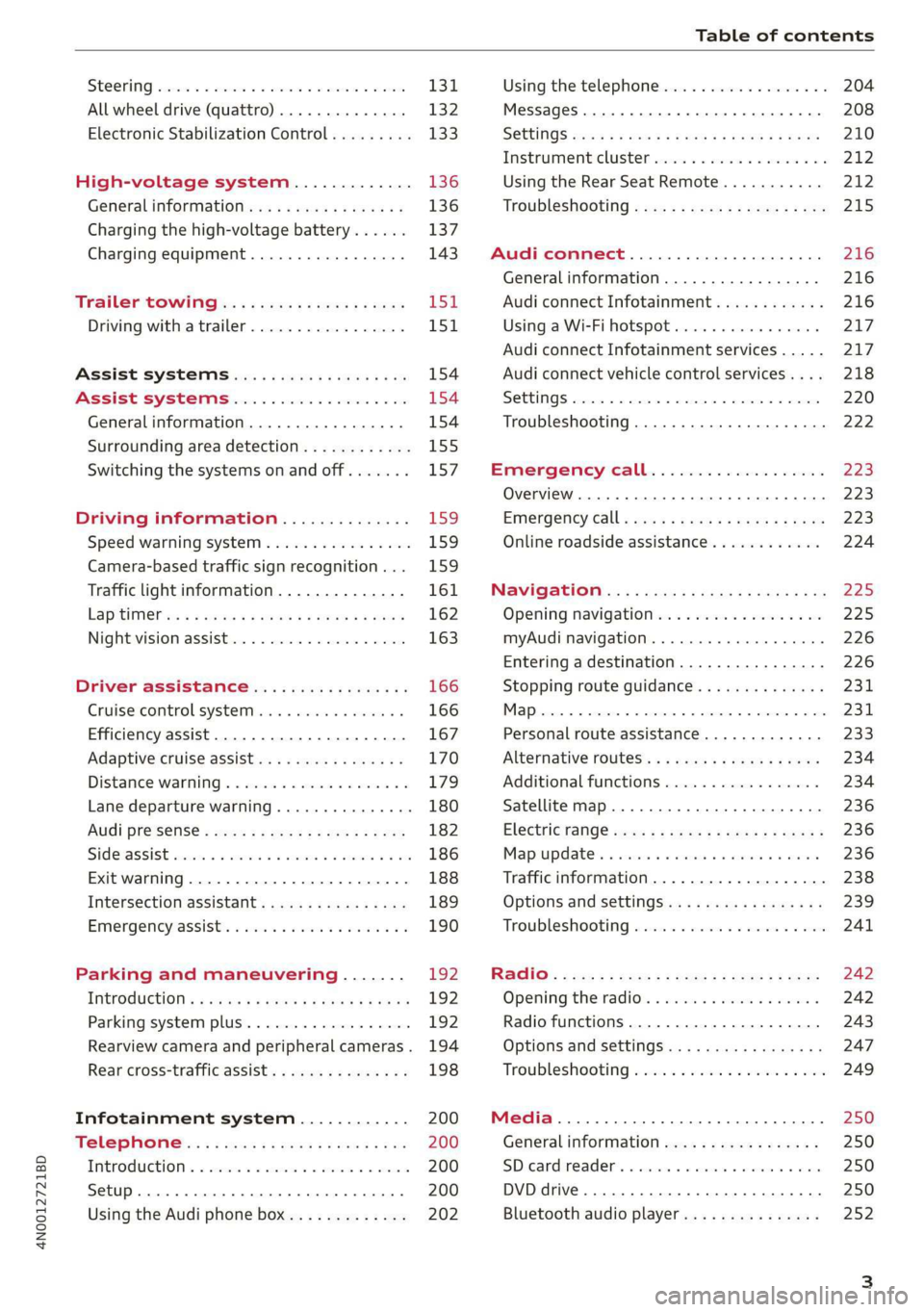
SEOOKING assess © & secwens + + anes ww ceawien Hewes 131
All wheel drive (quattro).............. 132
Electronic Stabilization Control......... 133
High-voltage system............. 136
General information...........0..5.5 136
Charging the high-voltage battery...... 137
Charging equipment................. 143
TANS COWINIG ss 5 & cews 4c ous ce ewe LSL
Driving with atrailer................. 151
Assist systems.................0. 154
Assist systems................... 154
Generalinformation................. 154
Surrounding area detection............ 155
Switching the systems on and off....... 157
Driving information.............. 159
Speed warning system................ 159
Camera-based traffic sign recognition... 159
Traffic light information.............. 161
LAP Mer as « 2 eons x = nevos ¢ 6 aus ¢ 8 em 162
Night vision assist..............-.04. 163
Driver assistance................. 166
Cruise control system.............0-5 166
Efficiency assist.............02--004. 167
Adaptive cruise assist............00-. 170
Distance Warning « « wse« 6 3 sone se eee oa LID:
Lane departure warning.............4. 180
Audi presense............-.22+--05- 182
Side@rassist esses: sv vows © v ememe © 2 suman 2 eae 186
Exit warning ...........-.....2.0000. 188
Intersection assistant................ 189
Emergeneyassists. «ican & wacen 3 3 woes ¥ 5 190
Parking and maneuvering....... 192
INEFODUCKION « » sey: x « caus 4 2 wasn 4 & Rees 192
Parking system plus...............00. 192
Rearview camera and peripheral cameras. 194
Rear cross-traffic assist... 2.2.2.0... 198
Infotainment system............ 200
TELEBNOMEs: 5 «ees & Cees 4 e oeew eee 200
IMtrOdUGEION « 2 asaces < a asomee x a wma Sewanee 200
Setup... eee eee ee eee 200
Using the Audi phone box............. 202
Using the telephone.................. 204
MessageS ... 0... cece cece eee eee 208
SOCtinGS eva 3 x espa o Kae 5s BER Bo ee 210
Instrument:cluster css vo evn ee ween eae 212
Using the Rear Seat Remote........... 212
Troubleshooting «<< <= eccn ss yews sp es 215
Audi connect..................0.. 216
Generalinformation................. 216
Audi connect Infotainment............ 216
Using a Wi-Fi hotspot................ 217
Audi connect Infotainment services..... 217
Audi connect vehicle control services.... 218
SCttINGS come
EMe@ngency CALL. « «ccc 6 i cs 6 vee « 223
Overview... ... 0. eee eee eee 223
Emergency Call « cas « wean s + gee os pee 223
Online roadside assistance............ 224
Navigation....................005- 225
Opening navigation.................. 225
myAudi navigation...............000% 226
Entering adestination................ 226
Stopping route guidance.............. 231
MapPinceins i + cxanees i ¥ scree © sammee @ =m ommeae #0 oe 2231.
Personal route assistance............. 233
Alternative routes...............000- 234
Additional functions................. 234
Satellite map......... 0... eee eee eee 236
Eleetric'rangeé acc sv sees 5 ¢ eee se Hews: 236
Mapiupdater, « sss + a cssmee + & nen «5 enaens 236
Traffic information................00- 238
Options aNd 'SEtNGS is « x see s x sews 4 vs 239
Troubleshooting wees «= wer = o wees ov eee 241
Ragios: sce ¢ = nae ¢ ¢ seuss 2 2 eeu 2 2 eee 242
Opening the radio...............000. 242
Radio functions.................0-4. 243
Options and settings...............0. 247
Troubleshooting esc 2 2 wee ts wie oo wee 249
Media............ cc eee eee 250
Generalinformation................. 250
SD card reader... ..... cc eee eee eee 250
DVD drive... 2... eee eee eee 250
Bluetooth audio player............... 252
Page 8 of 360
Quick access
Quick access
Cockpit
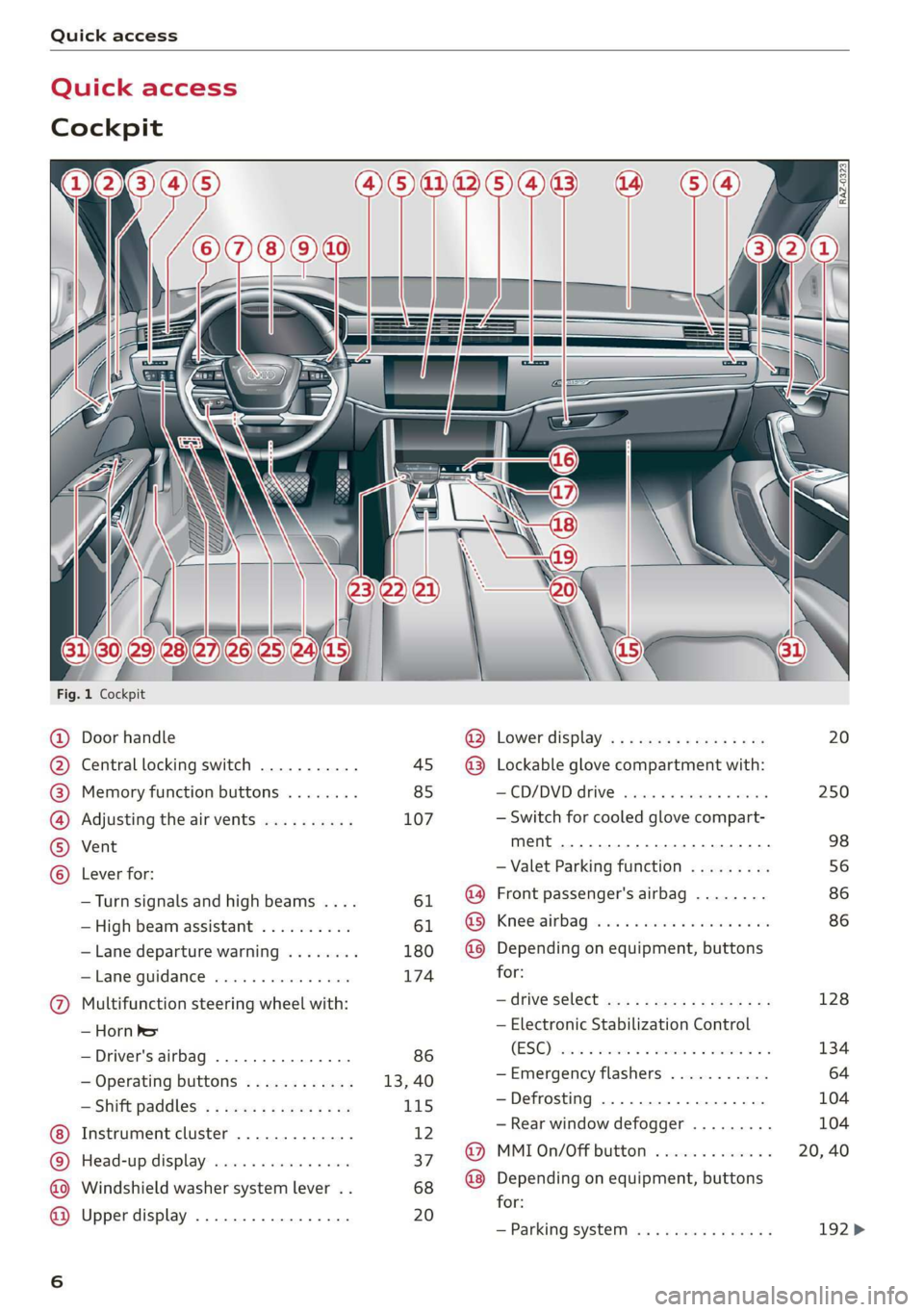
Fig. 1 Cockpit
@ @ @ @ © ©
9
OO©®@
Door handle
Central locking switch ...........
Memory function buttons ........
Adjusting the air vents ..........
Vent
Lever for:
—Turn signals and high beams ....
— High beam assistant ..........
— Lane departure warning ........
Lame Quidamee® ereisiss x + sieves 6 + von
Multifunction steering wheel with:
— Horn Per
— Driver's airbag ...............
— Operating buttons ............
— Shift paddles ................
Instrument cluster .............
Head-up display ...............
Windshield washer system lever ..
Upper display .................
@ Lower display .................
@® Lockable glove compartment with:
-—CD/DVD drive ................
— Switch for cooled glove compart-
ment ........... 0.0.2
— Valet Parking function .........
@ Front passenger's airbag ........
GS, Kneerairbag vaca. 2 ose a eecna + eae
@ Depending on equipment, buttons
for:
— drive Select mex ss meme cv eames oe
— Electronic Stabilization Control
(ESC), vise ce cseinen a cwcwnos ov comme ao
—Emergency flashers ...........
—Defrosting ..................
— Rear window defogger .........
@ MMI On/Off button .............
@ Depending on equipment, buttons
for:
— Parking system ...............
20
250
98
56
86 86
128
134
104
Page 10 of 360
Quick access
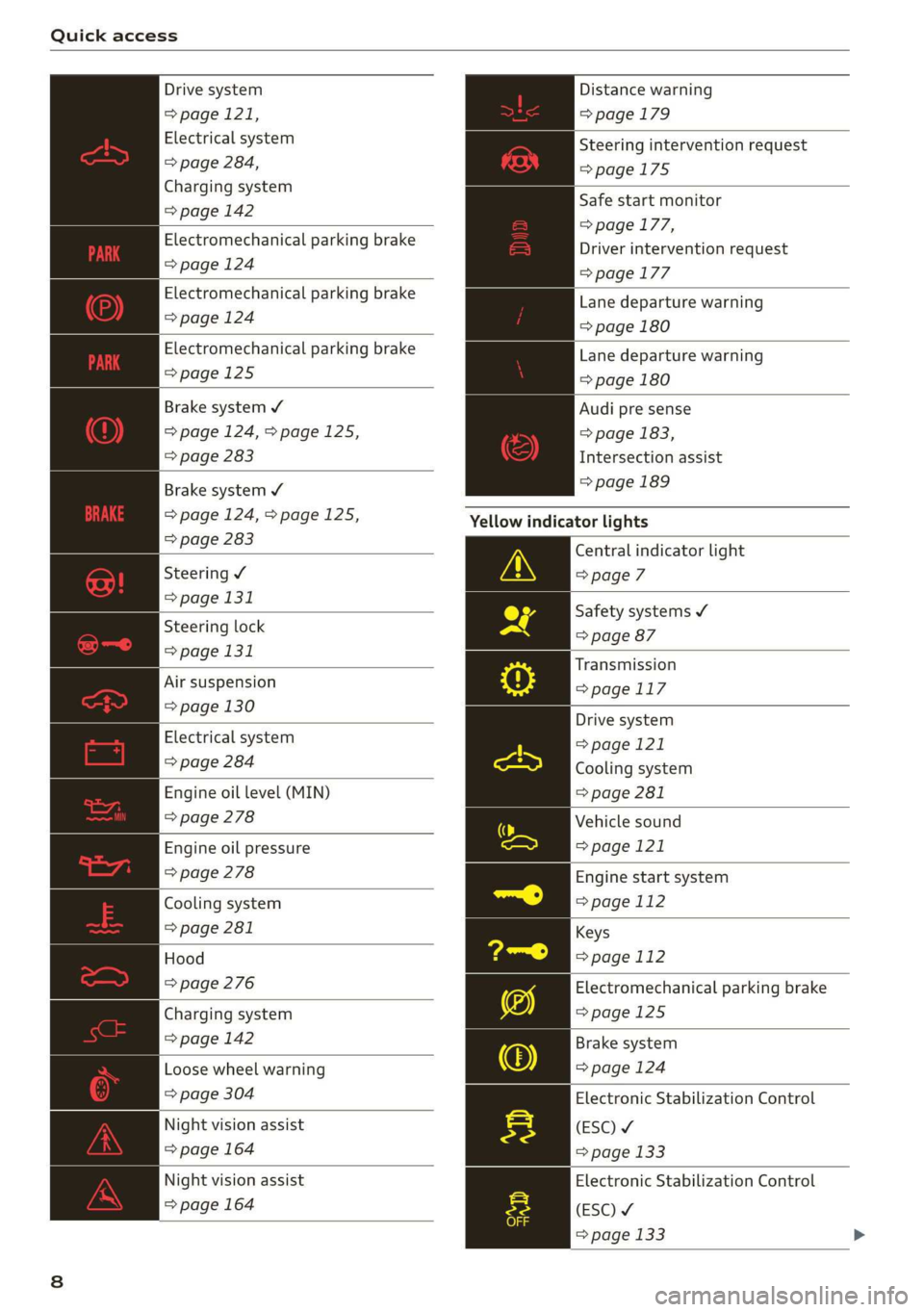
Drive system
=> page 121,
Electrical system
=> page 284,
Charging system
=> page 142
Electromechanical parking brake
=> page 124
Electromechanical parking brake
=>page 124
Electromechanical parking brake
=>page 125
Brake system ¥
=>page 124,>page 125,
=> page 283
Brake system ¥
=>page 124,>page 125,
=> page 283
Steering ¥
= page 131
Steering lock
=> page 131
Air suspension
=> page 130
Electrical system
=> page 284
Engine oil level (MIN)
=> page 278
Engine oil pressure
=> page 278
Cooling system
=> page 281
Hood
=> page 276
Charging system
=>page 142
Loose wheel warning
=> page 304
Night vision assist
=> page 164
Night vision assist
=> page 164
Distance warning
=> page 179
Steering intervention request
=>page 175
Safe start monitor
=> page 177,
Driver intervention request
=>page 177
Lane departure warning
=> page 180
Lane departure warning
=> page 180
Audi pre sense
=> page 183,
Intersection assist
=> page 189
Yellow indicator lights
Central indicator light
=> page 7
Safety systems ¥
=> page 87
Transmission
=>page 117
Drive system
=> page 121
Cooling system
=> page 281
Vehicle sound
>page 121
Engine start system
=>page 112
Keys
=> page 112
Electromechanical parking brake
>page 125
Brake system
=> page 124
Electronic Stabilization Control
(ESC) ¥
=> page 133
Electronic Stabilization Control
(ESC) ¥
=> page 133
Page 11 of 360
4N0012721BD
Quick access
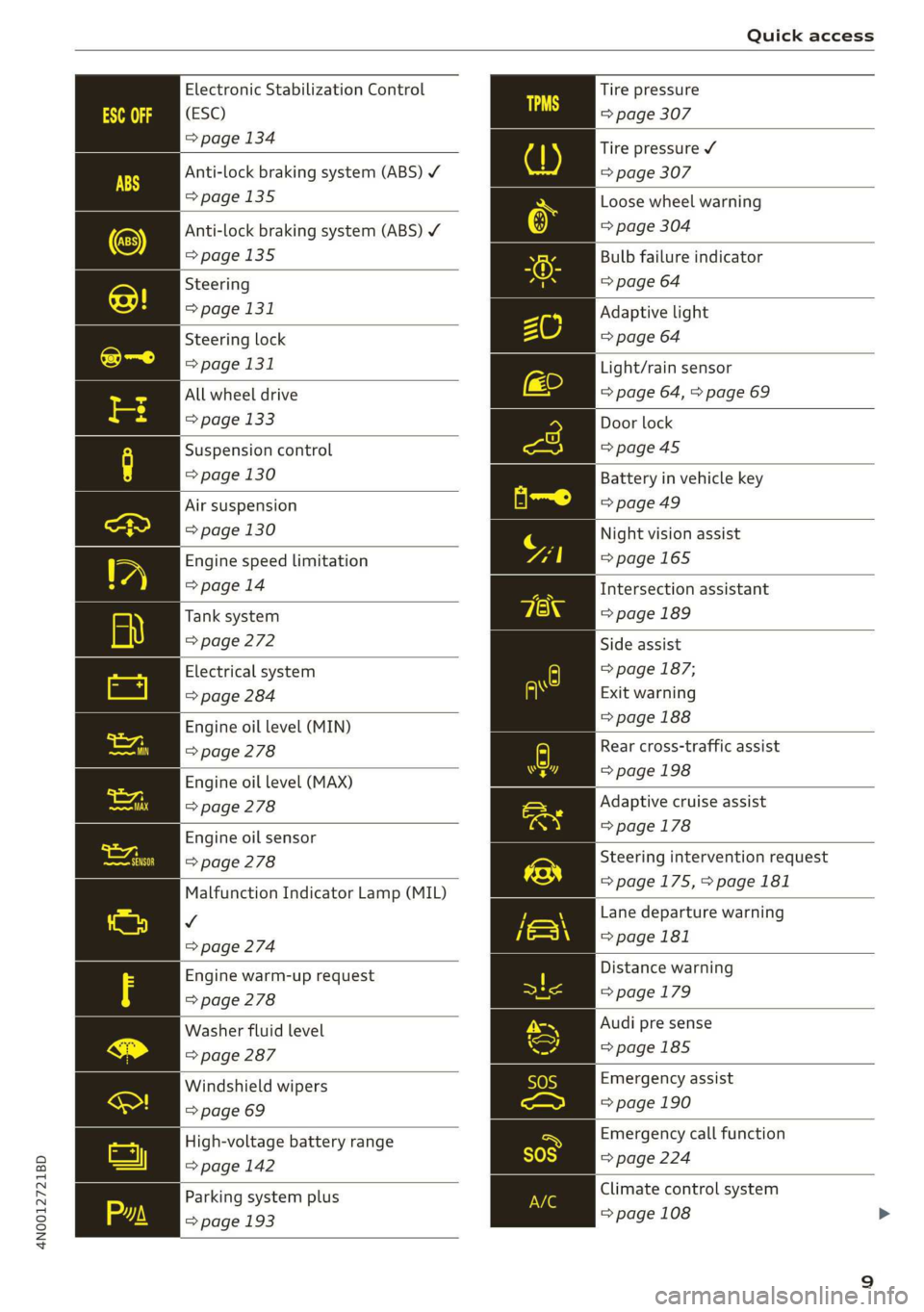
Electronic Stabilization Control
(ESC)
=> page 134
Anti-lock braking system (ABS) ¥
>page 135
Anti-lock braking system (ABS) ¥
=>page 135
Steering
=> page 131
Steering lock
=> page 131
All wheel drive
=> page 133
Suspension control
=> page 130
Air suspension
=> page 130
Engine speed limitation
=> page 14
Tank system
> page 272
Electrical system
=> page 284
Engine oil level (MIN)
> page 278
Engine oil level (MAX)
=> page 278
Engine oil sensor
> page 278
Malfunction Indicator Lamp (MIL)
v
=> page 274
Engine warm-up request
=> page 278
Washer fluid level
=> page 287
Windshield wipers
=> page 69
High-voltage battery range
=>page 142
Parking system plus
=> page 193
Tire pressure
=> page 307
Tire pressure ¥
=> page 307
Loose wheel warning
=> page 304
Bulb failure indicator
=> page 64
Adaptive light
=> page 64
Light/rain sensor
=> page 64, > page 69
Door lock
=>page 45
Battery in vehicle key
=>page 49
Night vision assist
=>page 165
Intersection assistant
=> page 189
Side assist
=> page 187;
Exit warning
=> page 188
Rear cross-traffic assist
=> page 198
Adaptive cruise assist
=> page 178
Steering intervention request
=>page 175,>page 181
Lane departure warning
=>page 181
Distance warning
= page 179
Audi pre sense
=>page 185
Emergency assist
= page 190
Emergency call function
=> page 224
Climate control system
=> page 108
Page 12 of 360
Quick access
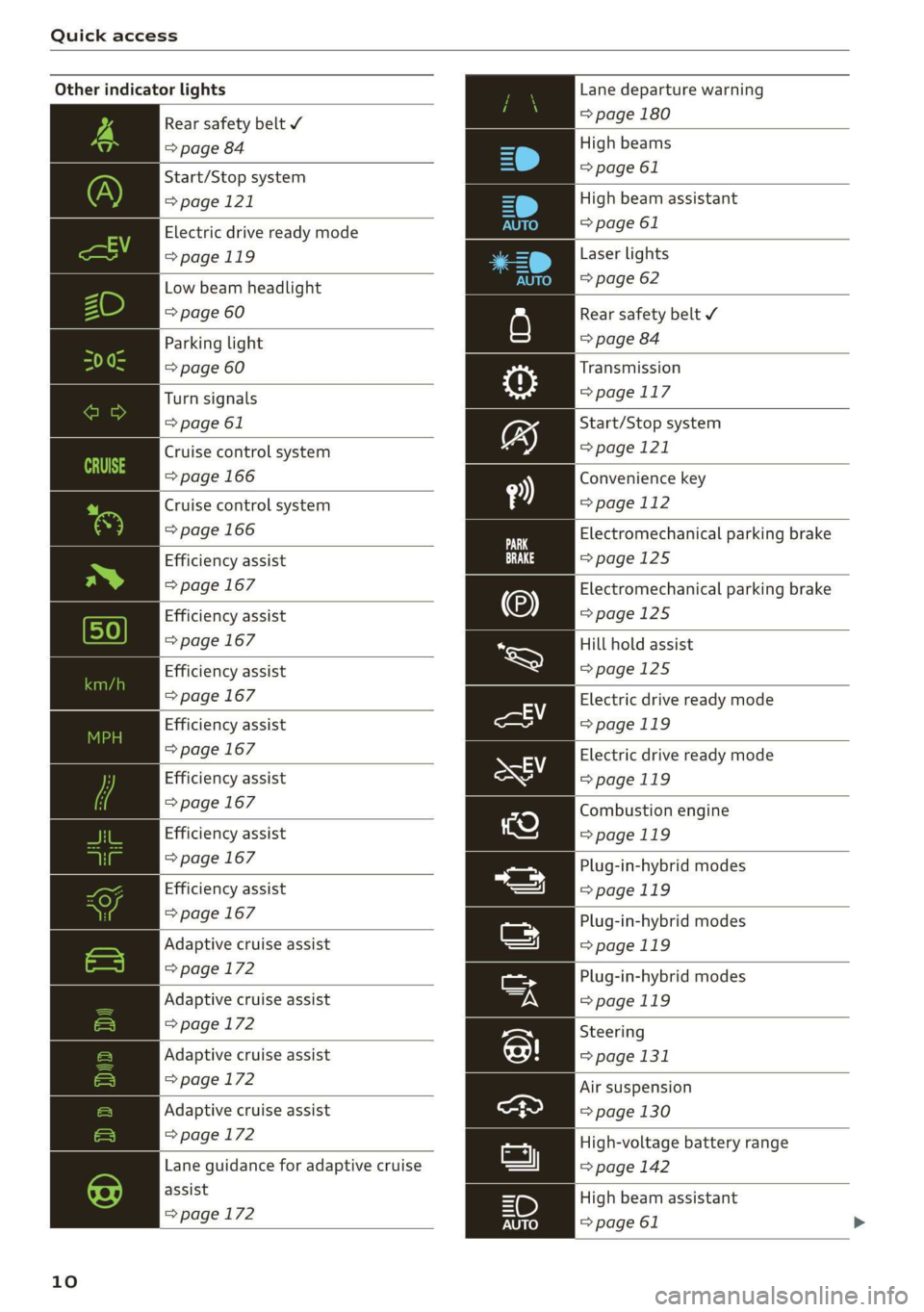
Other indicator lights
Rear safety belt Y
=> page 84
Start/Stop system
>page 121
Electric drive ready mode
>page 119
Low beam headlight
=> page 60
Parking light
=> page 60
Turn signals
=> page 61
Cruise control system
=> page 166
Cruise control system
=> page 166
Efficiency assist
=> page 167
Efficiency assist
=> page 167
Efficiency assist
=> page 167
Efficiency assist
=> page 167
Efficiency assist
> page 167
Efficiency assist
=> page 167
Efficiency assist
=> page 167
|
Adaptive cruise assist
=> page 172
Adaptive cruise assist
=>page 172
Adaptive cruise assist
=> page 172
Adaptive cruise assist
=>page 172
|
Lane guidance for adaptive cruise
assist
=> page 172
10
Lane departure warning
=> page 180
High beams
=> page 61
High beam assistant
=> page 61
Laser lights
=> page 62
Rear safety belt ¥
=> page 84
Transmission
=> page 117
Start/Stop system
=> page 121
Convenience key
=> page 112
Electromechanical parking brake
=>page 125
Electromechanical parking brake
=>page 125
Hill hold assist
=>page 125
Electric drive ready mode
=>page 119
Electric drive ready mode
>page 119
Combustion engine
=>page 119
Plug-in-hybrid modes
>page 119
Plug-in-hybrid modes
=>page 119
Plug-in-hybrid modes
=>page 119
Steering
=> page 131
Air suspension
=> page 130
High-voltage battery range
=> page 142
High beam assistant
=> page 61
Page 13 of 360
4N0012721BD
Quick access
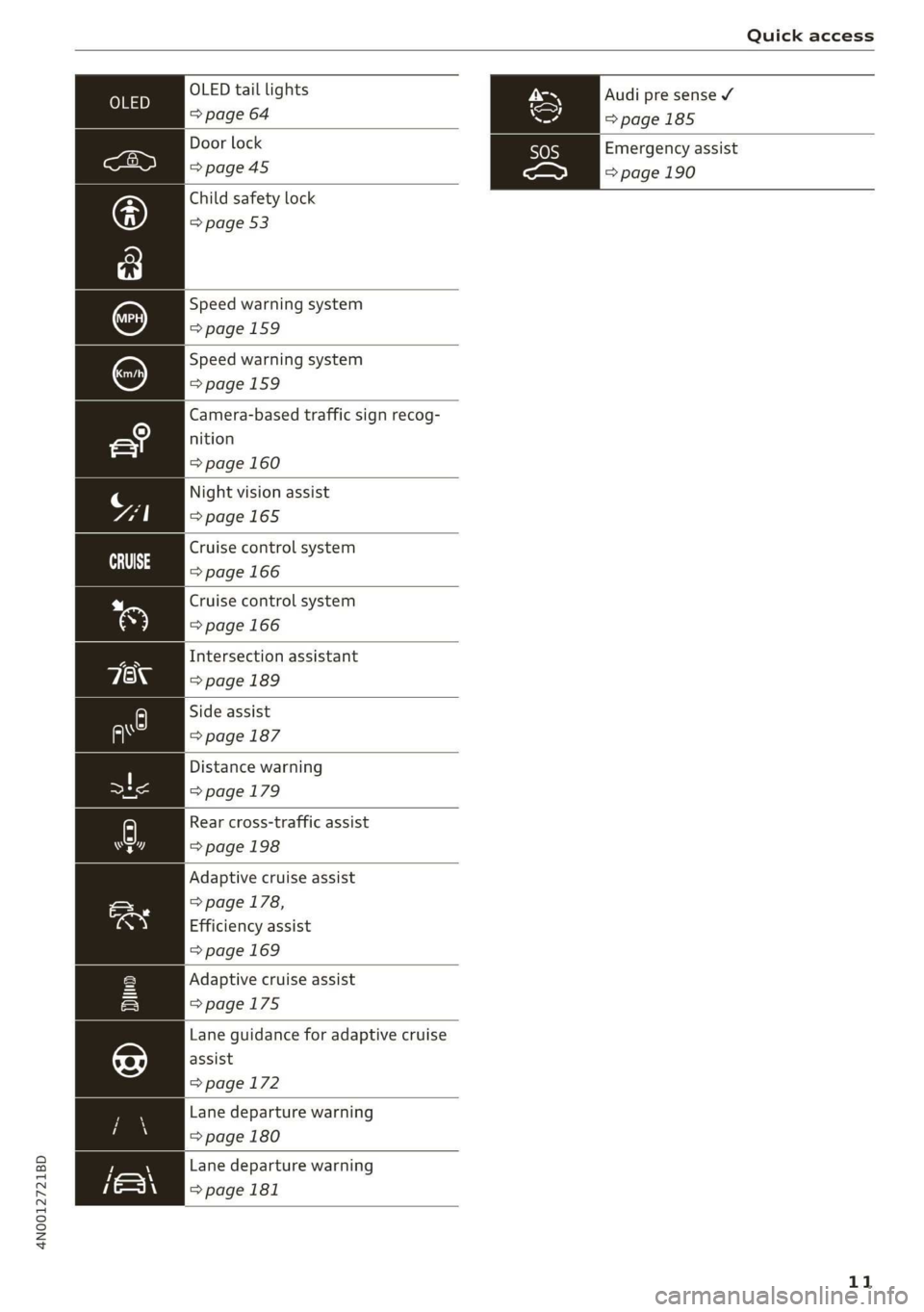
OLED tail lights
=> page 64
Door lock
> page 45
Child safety lock
=> page 53
Speed warning system
=>page 159
Speed warning system
=>page 159
Camera-based traffic sign recog-
nition
=> page 160
Night vision assist
>page 165
Cruise control system
=> page 166
Cruise control system
=> page 166
Intersection assistant
=> page 189
Side assist
=> page 187
Distance warning
=> page 179
A) Rear cross-traffic assist
here => page 198
Adaptive cruise assist
=> page 178,
Efficiency assist
=> page 169
Adaptive cruise assist
>page 175
Lane guidance for adaptive cruise
assist
=> page 172
Lane departure warning
=> page 180
Lane departure warning
=>page 181
Audi pre sense
=>page 185
Emergency assist
=> page 190
11
Page 66 of 360
Lights and Vision
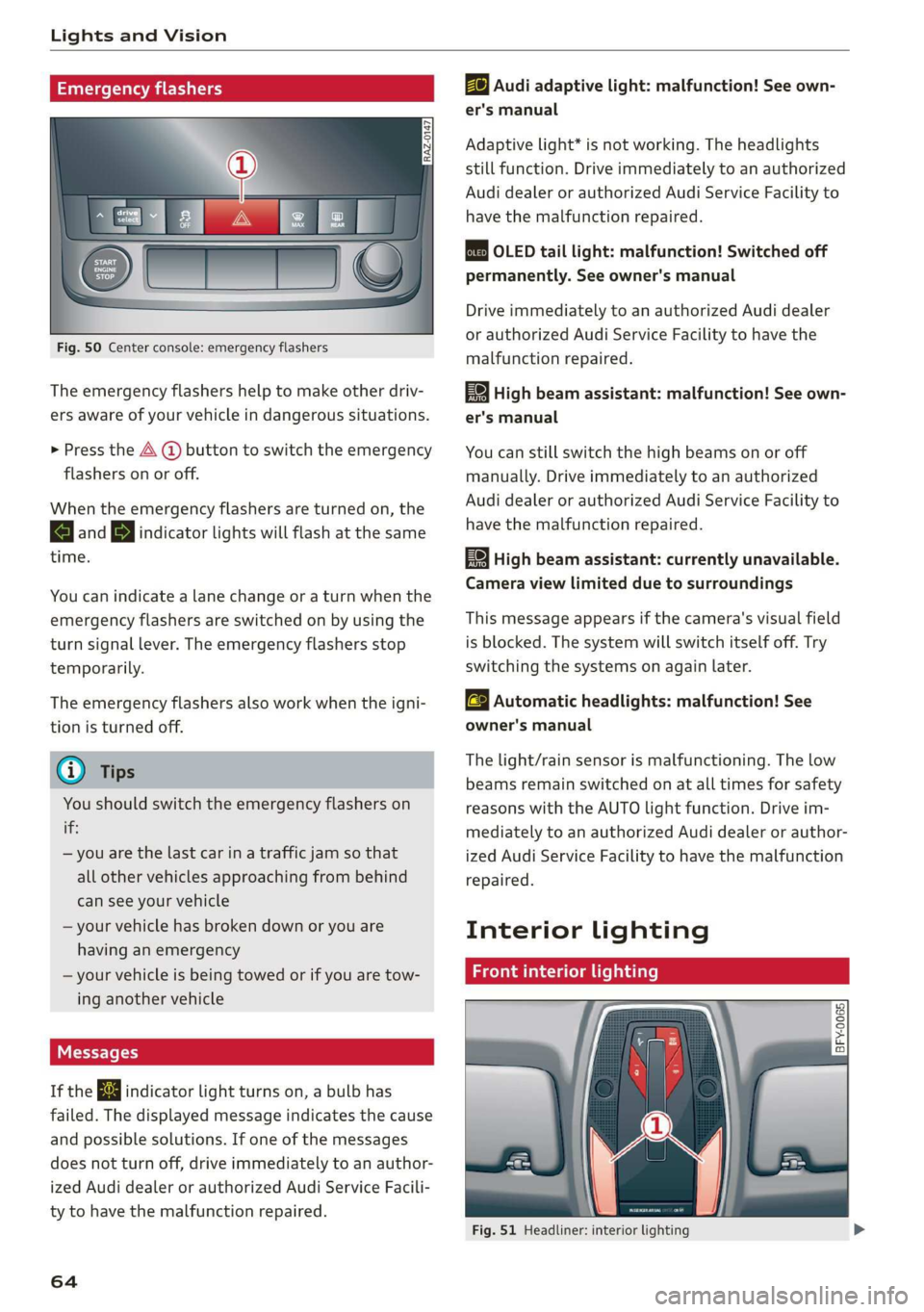
Emergency flashers
Fig. 50 Center console: emergency flashers
The emergency flashers help to make other driv-
ers aware of your vehicle in dangerous situations.
> Press the A button to switch the emergency
flashers on or off.
When the emergency flashers are turned on, the
a and B&B indicator lights will flash at the same
time.
You can indicate a lane change or a turn when the
emergency flashers are switched on by using the
turn signal lever. The emergency flashers stop
temporarily.
The emergency flashers also work when the igni-
tion is turned off.
@ Tips
You should switch the emergency flashers on
if:
— you are the last car in a traffic jam so that
all other vehicles approaching from behind
can see your vehicle
— your vehicle has broken down or you are
having an emergency
— your vehicle is being towed or if you are tow-
ing another vehicle
Messages
If the Ea indicator light turns on, a bulb has
failed. The displayed message indicates the cause
and possible solutions. If one of the messages
does not turn off, drive immediately to an author-
ized Audi dealer or authorized Audi Service Facili-
ty to have the malfunction repaired.
64
Bg) Audi adaptive light: malfunction! See own-
er's manual
Adaptive light* is not working. The headlights
still function. Drive immediately to an authorized
Audi dealer or authorized Audi Service Facility to
have the malfunction repaired.
oue0} OLED tail light: malfunction! Switched off
permanently. See owner's manual
Drive immediately to an authorized Audi dealer
or authorized Audi Service Facility to have the
malfunction repaired.
High beam assistant: malfunction! See own-
er's manual
You can still switch the high beams on or off
manually. Drive immediately to an authorized
Audi dealer or authorized Audi Service Facility to
have the malfunction repaired.
High beam assistant: currently unavailable.
Camera view limited due to surroundings
This message appears if the camera's visual field
is blocked. The system will switch itself off. Try
switching the systems on again later.
& Automatic headlights: malfunction! See
owner's manual
The light/rain sensor is malfunctioning. The low
beams remain switched on at all times for safety
reasons with the AUTO light function. Drive im-
mediately to an authorized Audi dealer or author-
ized Audi Service Facility to have the malfunction
repaired.
Interior lighting
Front interior lighting
2 8 S
© > a o
Fig.
51 Headliner: interior lighting
Page 134 of 360

Driving dynamic
& Steering: malfunction! Please stop vehicle.
Pay attention to distance at side
The rear axle steering may have failed. More
space on the road may be needed at the side of
the vehicle. Slow down immediately, and stop
your vehicle as soon as possible in a safe location
with enough space at the sides of the vehicle. Do
not continue driving. See an authorized Audi
dealer or authorized Audi Service Facility for as-
sistance.
BS Steering: malfunction! Please stop vehicle
There is a malfunction in the electronic steering
lock. You cannot turn the ignition on. Do not tow
your vehicle because it cannot be steered. See an
authorized Audi dealer or authorized Audi Service
Facility for assistance.
a Steering: malfunction! You can continue
driving
There is a malfunction. Steering may be more dif-
ficult or more sensitive. Adapt your driving style.
Have the steering system checked immediately
by an authorized Audi dealer or authorized Audi
Service Facility. Please note that the red indicator
light may turn on after restarting the engine. Do
not continue driving if it does.
a Steering: malfunction! Adapt driving style.
Larger turning radius
The rear axle steering may have failed. The vehi-
cle will have a larger turning radius, and the sta-
bility when driving around curves will be compa-
rable to a vehicle without rear axle steering. Drive
carefully to an authorized Audi dealer or author-
ized Audi Service Facility to have the malfunction
corrected.
BS Steering lock: malfunction! Please contact
Service
There is a malfunction in the electronic steering
lock. Drive immediately to an authorized Audi
dealer or authorized Audi Service Facility to have
the malfunction repaired.
Dynamic steering: correcting steering wheel
position
132
The steering is reinitializing. The steering wheel
will move easily after starting the vehicle. Reiniti-
alization might be necessary if the steering wheel
was moved while the engine was switched off.
The display turns off if the initialization was suc-
cessful.
Z\ WARNING
Do not tow your vehicle if there is a malfunc-
tion in the electronic steering lock because
this increases the risk of an accident.
@ Tips
— If there is a malfunction, the steering wheel
may be crooked when driving straight.
—Ifthe a or a indicator light only stays on
for a short time, you may continue driving.
ALL wheel drive (quattro)
Applies to: vehicles with all wheel drive
The all-wheel drive system distributes the driving
power variably to the front and rear axle to im-
prove the driving characteristics. It works togeth-
er with selective wheel torque control, which can
activate when driving through curves
> page 134.
The all-wheel drive system is designed for high
engine power. Your vehicle is exceptionally pow-
erful and has excellent driving characteristics
both under normal driving conditions and on
snow and ice. Always read and follow safety pre-
cautions > A\.
Z\ WARNING
— Even in vehicles with all wheel drive, you
should adapt your driving style to the cur-
rent road and traffic conditions to reduce
the risk of an accident.
— The braking ability of your vehicle is limited
to the traction of the wheels. In this way, it
is not different from a two wheel drive vehi-
cle. Do not drive too fast because this in-
creases the risk of an accident.
— Note that on wet streets, the front wheels
can “hydroplane” if driving at speeds that >
Page 156 of 360
Assist systems
Assist systems
General information
Safety precautions
ZA WARNING
— As the driver, you are always completely re-
sponsible for all driving tasks. The assist
systems cannot replace the driver's atten-
tion. Give your full attention to driving the
vehicle, and be ready to intervene in the
traffic situation at all times.
— Activate the assist systems only if the sur-
rounding conditions permit it. Always adapt
your driving style to the current visual,
weather, road, and traffic conditions.
— Loose objects can be thrown around the ve-
hicle interior during sudden driving or brak-
ing maneuvers, which increases the risk of
an accident. Store objects securely while
driving.
— For the assist systems to be able to react
correctly, the function of the sensors and
cameras must not be restricted. Note the in-
formation on sensors and cameras
=> page 155.
@ Tips
— Pay attention to applicable local regulations
relating to driving tasks, leaving space for
emergency vehicles, vehicle distance, speed,
parking location, wheel placement, etc. The
driver is always responsible for following
the laws that are applicable in the location
where the vehicle is being operated.
— You can cancel a steering or braking inter-
vention by the system, by braking or accel-
erating noticeably, steering, or deactivating
the respective assist system.
— Always check the assist systems settings be-
fore driving. The settings could have been
changed, for example, by other drivers or if
another personal profile was used.
154
System limitations
ZA\ WARNING
— The use of an assist system cannot over-
come the natural laws of physics. A collision
cannot be prevented in certain circumstan-
ces.
— Warnings, messages, or indicator lights may
not be displayed or initiated on time or cor-
rectly, for example, if vehicles are approach-
ing very fast.
— Corrective interventions by the assist sys-
tems, such as steering or braking interven-
tions, may not be sufficient or they may not
occur. Always be ready to intervene.
G) Tips
— Due to the system limitations when detect-
ing the surrounding area, the systems may
warn or intervene unexpectedly or too late
in certain situations. The assist systems may
also interpret a driving maneuver incorrectly
and then warn the driver unexpectedly.
— The systems may not function as expected
in unusual driving situations, such as driving
offroad, on unpaved roads, on loose ground,
on inclines, or on grooves in the road.
— The systems may not function correctly in
unclear traffic situations, such as turning
lanes, exit ramps, construction zones, rises
or dips that obstruct visibility, intersections,
toll stations, or city traffic.
— The detection of the surrounding area can
be limited, for example by vehicles driving
ahead or by rain, snow, heavy spray, or light
shining into the camera.
— If accessories have been mounted on the
steering wheel, the ability for the steering
systems to react may be limited.
Page 157 of 360
4N0012721BD
Assist systems
Surrounding area
detection
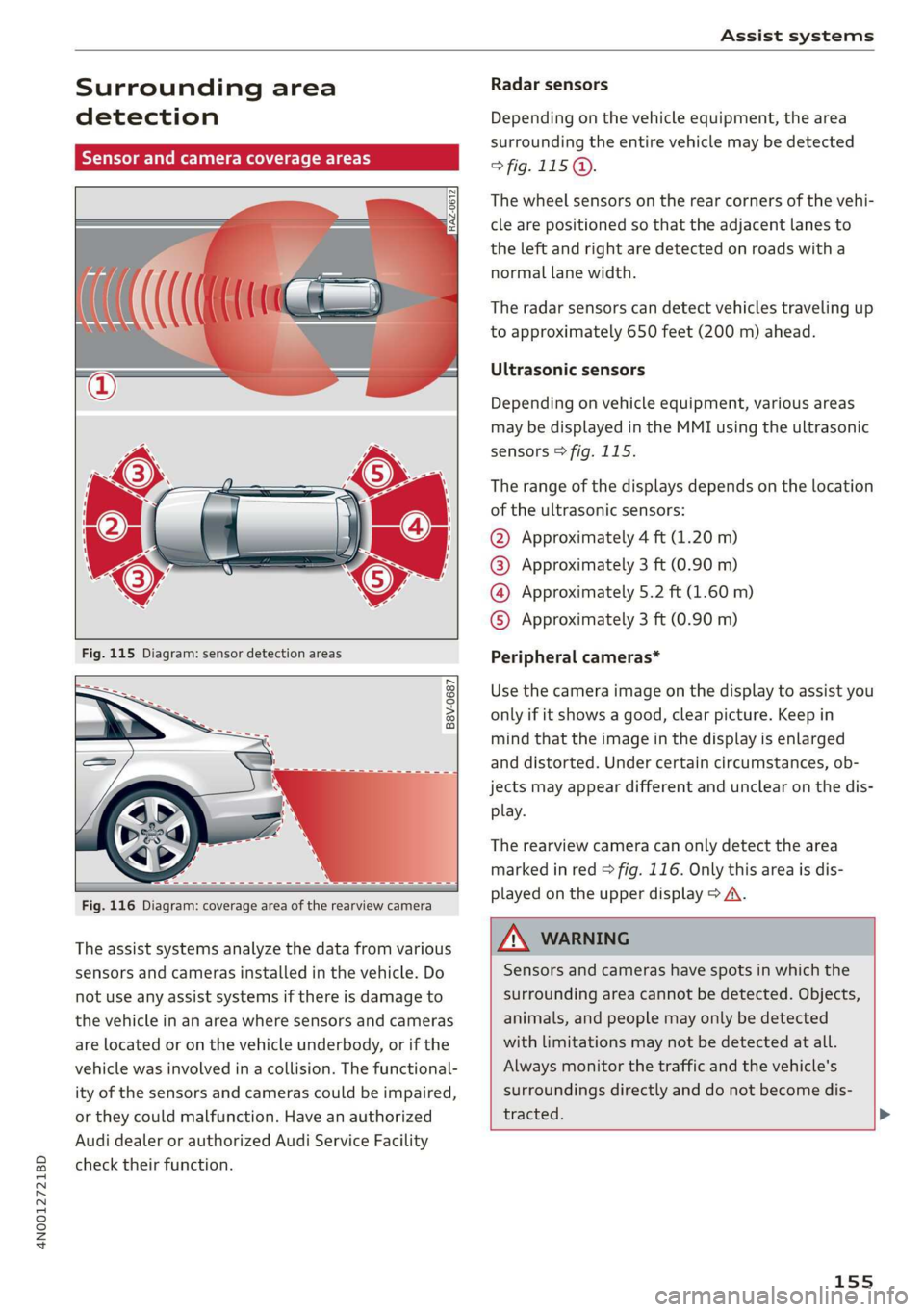
Sensor and camera coverage areas
RAZ-0612
B8V-0687
Fig. 116 Diagram: coverage area of the rearview camera
The assist systems analyze the data from various
sensors and cameras installed in the vehicle. Do
not use any assist systems if there is damage to
the vehicle in an area where sensors and cameras
are located or on the vehicle underbody, or if the
vehicle was involved in a collision. The functional-
ity of the sensors and cameras could be impaired,
or they could malfunction. Have an authorized
Audi dealer or authorized Audi Service Facility
check their function.
Radar sensors
Depending on the vehicle equipment, the area
surrounding the entire vehicle may be detected
> fig. 115 ©.
The wheel sensors on the rear corners of the vehi-
cle are positioned so that the adjacent lanes to
the left and right are detected on roads with a
normal lane width.
The radar sensors can detect vehicles traveling up
to approximately 650 feet (200 m) ahead.
Ultrasonic sensors
Depending on vehicle equipment, various areas
may be displayed in the MMI using the ultrasonic
sensors > fig. 115.
The range of the displays depends on the location
of the ultrasonic sensors:
@® Approximately 4 ft (1.20 m)
@® Approximately 3 ft (0.90 m)
@® Approximately 5.2 ft (1.60 m)
© Approximately 3 ft (0.90 m)
Peripheral cameras*
Use the camera image on the display to assist you
only if it shows a good, clear picture. Keep in
mind that the image in the display is enlarged
and distorted. Under certain circumstances, ob-
jects may appear different and unclear on the dis-
play.
The rearview camera can only detect the area
marked in red > fig. 116. Only this area is dis-
played on the upper display > A\.
Z\ WARNING
Sensors and cameras have spots in which the
surrounding area cannot be detected. Objects,
animals, and people may only be detected
with limitations may not be detected at all.
Always monitor the traffic and the vehicle's
surroundings directly and do not become dis-
tracted. >
155