battery AUDI A8 2020 Owners Manual
[x] Cancel search | Manufacturer: AUDI, Model Year: 2020, Model line: A8, Model: AUDI A8 2020Pages: 360, PDF Size: 95.38 MB
Page 5 of 360
4N0012721BD
Table of contents
SEOOKING assess © & secwens + + anes ww ceawien Hewes 131
All wheel drive (quattro).............. 132
Electronic Stabilization Control......... 133
High-voltage system............. 136
General information...........0..5.5 136
Charging the high-voltage battery...... 137
Charging equipment................. 143
TANS COWINIG ss 5 & cews 4c ous ce ewe LSL
Driving with atrailer................. 151
Assist systems.................0. 154
Assist systems................... 154
Generalinformation................. 154
Surrounding area detection............ 155
Switching the systems on and off....... 157
Driving information.............. 159
Speed warning system................ 159
Camera-based traffic sign recognition... 159
Traffic light information.............. 161
LAP Mer as « 2 eons x = nevos ¢ 6 aus ¢ 8 em 162
Night vision assist..............-.04. 163
Driver assistance................. 166
Cruise control system.............0-5 166
Efficiency assist.............02--004. 167
Adaptive cruise assist............00-. 170
Distance Warning « « wse« 6 3 sone se eee oa LID:
Lane departure warning.............4. 180
Audi presense............-.22+--05- 182
Side@rassist esses: sv vows © v ememe © 2 suman 2 eae 186
Exit warning ...........-.....2.0000. 188
Intersection assistant................ 189
Emergeneyassists. «ican & wacen 3 3 woes ¥ 5 190
Parking and maneuvering....... 192
INEFODUCKION « » sey: x « caus 4 2 wasn 4 & Rees 192
Parking system plus...............00. 192
Rearview camera and peripheral cameras. 194
Rear cross-traffic assist... 2.2.2.0... 198
Infotainment system............ 200
TELEBNOMEs: 5 «ees & Cees 4 e oeew eee 200
IMtrOdUGEION « 2 asaces < a asomee x a wma Sewanee 200
Setup... eee eee ee eee 200
Using the Audi phone box............. 202
Using the telephone.................. 204
MessageS ... 0... cece cece eee eee 208
SOCtinGS eva 3 x espa o Kae 5s BER Bo ee 210
Instrument:cluster css vo evn ee ween eae 212
Using the Rear Seat Remote........... 212
Troubleshooting «<< <= eccn ss yews sp es 215
Audi connect..................0.. 216
Generalinformation................. 216
Audi connect Infotainment............ 216
Using a Wi-Fi hotspot................ 217
Audi connect Infotainment services..... 217
Audi connect vehicle control services.... 218
SCttINGS come
EMe@ngency CALL. « «ccc 6 i cs 6 vee « 223
Overview... ... 0. eee eee eee 223
Emergency Call « cas « wean s + gee os pee 223
Online roadside assistance............ 224
Navigation....................005- 225
Opening navigation.................. 225
myAudi navigation...............000% 226
Entering adestination................ 226
Stopping route guidance.............. 231
MapPinceins i + cxanees i ¥ scree © sammee @ =m ommeae #0 oe 2231.
Personal route assistance............. 233
Alternative routes...............000- 234
Additional functions................. 234
Satellite map......... 0... eee eee eee 236
Eleetric'rangeé acc sv sees 5 ¢ eee se Hews: 236
Mapiupdater, « sss + a cssmee + & nen «5 enaens 236
Traffic information................00- 238
Options aNd 'SEtNGS is « x see s x sews 4 vs 239
Troubleshooting wees «= wer = o wees ov eee 241
Ragios: sce ¢ = nae ¢ ¢ seuss 2 2 eeu 2 2 eee 242
Opening the radio...............000. 242
Radio functions.................0-4. 243
Options and settings...............0. 247
Troubleshooting esc 2 2 wee ts wie oo wee 249
Media............ cc eee eee 250
Generalinformation................. 250
SD card reader... ..... cc eee eee eee 250
DVD drive... 2... eee eee eee 250
Bluetooth audio player............... 252
Page 6 of 360
Table of contents
Online media « « cscs x « asco sw eves vw aves 252
Amazon Alexa...... cece eee ee 253
Multimedia connections.............. 253
Playing media’. « 2 ssw x 2 wei 2 o oem 2 8 oe 255
Options and settings...............6. 259
Supported media and file formats...... 261
Troubleshooting sic s 6 caine x « eve «owe 263
Audi smartphone interface...... 264
SQlUD © nsws 2 o eee ys eee os Hew ee Heresy 264
Troubleshooting..............0e0 eee 265
Additional settings.............. 266
System SettingS'. » 6 secie ss sews vc owe ee 266
Connected devices.................-. 268
Legal inforttiation’s < ses + < emus s ¢ sano 3 269
Maintenance and Care........... 270
Checking and Filling............. 270
FuUCliic oe aren a 2 sani & ¥ mimi @ wane Wo ame8e 270
Refueling..............0 cece eee eee 271
Emissions control system............. 274
Engine compartment................. 274
EMGIMeLOI Le. sussnce « » svaxace we ws snntate © & oxetinse # 4.6 277
Cooling systeM...........00 2-0 ee eee 281
Brake: fluids « ¢ sas ¢ ¢ eae = ¢ wens 5 ¢ cares 283
Electrical system. ............02-000. 284
Battery... 0.2... cece cee eee ee 284
Windshield washer system...........- 287
Service interval display............... 287
Whe ets ares ys ams i 2 ewe ¢ x masa 2 eae 289
Wheelsiand Tittes « sscis +o soins «0 senses 0 0 289
Tire pressure monitoring system....... 307
Care and cleaning................ 309
General information................. 309
Carwashes « sans 3 < aan a5 Ween 2b eee eS 309
Cleaning and care information......... 310
Taking your vehicle out of service....... 315
Troubleshooting................. 316
Emergency assistance........... 316
Generalinformation................. 316
EQuIPMENt eens « x cows o ween 3 e cies & 316
Tire MOBILEY-KIE wsscoe oo sressie ae emcosie wo sees 316
Replacing wheels................-00. 319
Space-saving spare tire............... 322
JUIMIPESTANEING 5 x exces ow canes @ a someees vo eee 322
TOWING... cece eee 324
Fuses and bulbs.................. 327
Fuses... 00... ccc eee eee eee 327
BUILDS sss s ¢ ware 5% Soom 5 2 cores Bee gee 330
Customer information........... 332
Data privacy...............00.0 eee 332
Image recording.............eee eee 332
Dataamemoniess. « o swscs s 2 wean a arene « 2 6 332
Transmitted information.............. 333
Accessories and technical
CHANGe|S.... 1... eee eee 336
Warranty’: « = sce « = seme us cemes § g eee e 336
Audi Literature Shop...............4. 336
Driving in other countries 336
Maintenance, repairs, and technical
MOGITICATIONS « sesso: os soni & 4 menace 4 & omer 336
Accessories and parts..............-. 338
Reporting Safety Defects.............. 338
Declaration of compliance for
telecommunications equipment and
electronic systems............---00005 339
Fechnnicalidata... . 6 ccsen ss ess oe meee 341
Identification data................... 341
Nehicle data ac»: » s seus «2 sews gy aes ge 341
INdeX. 16. ees 343
Page 11 of 360
4N0012721BD
Quick access
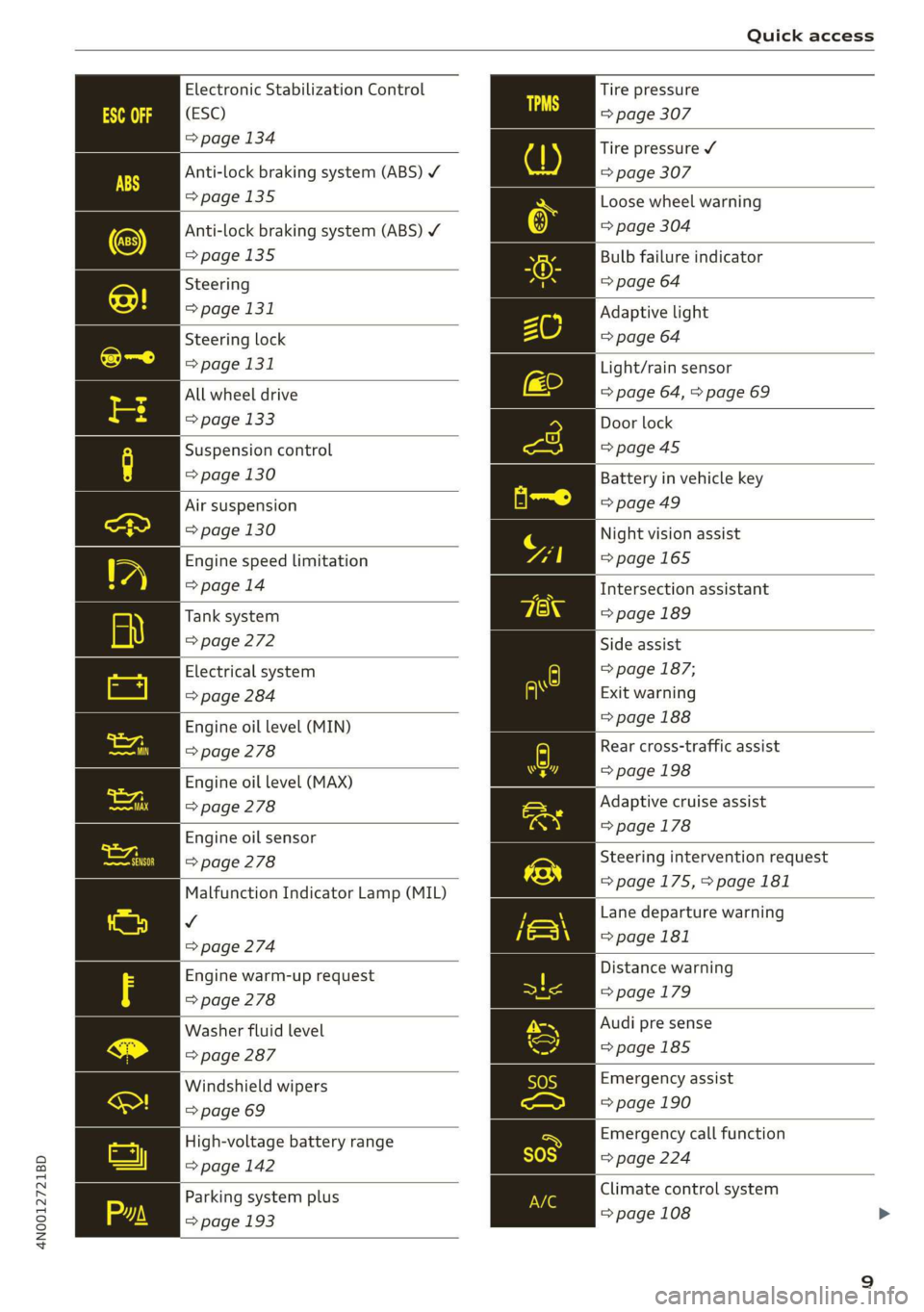
Electronic Stabilization Control
(ESC)
=> page 134
Anti-lock braking system (ABS) ¥
>page 135
Anti-lock braking system (ABS) ¥
=>page 135
Steering
=> page 131
Steering lock
=> page 131
All wheel drive
=> page 133
Suspension control
=> page 130
Air suspension
=> page 130
Engine speed limitation
=> page 14
Tank system
> page 272
Electrical system
=> page 284
Engine oil level (MIN)
> page 278
Engine oil level (MAX)
=> page 278
Engine oil sensor
> page 278
Malfunction Indicator Lamp (MIL)
v
=> page 274
Engine warm-up request
=> page 278
Washer fluid level
=> page 287
Windshield wipers
=> page 69
High-voltage battery range
=>page 142
Parking system plus
=> page 193
Tire pressure
=> page 307
Tire pressure ¥
=> page 307
Loose wheel warning
=> page 304
Bulb failure indicator
=> page 64
Adaptive light
=> page 64
Light/rain sensor
=> page 64, > page 69
Door lock
=>page 45
Battery in vehicle key
=>page 49
Night vision assist
=>page 165
Intersection assistant
=> page 189
Side assist
=> page 187;
Exit warning
=> page 188
Rear cross-traffic assist
=> page 198
Adaptive cruise assist
=> page 178
Steering intervention request
=>page 175,>page 181
Lane departure warning
=>page 181
Distance warning
= page 179
Audi pre sense
=>page 185
Emergency assist
= page 190
Emergency call function
=> page 224
Climate control system
=> page 108
Page 12 of 360
Quick access
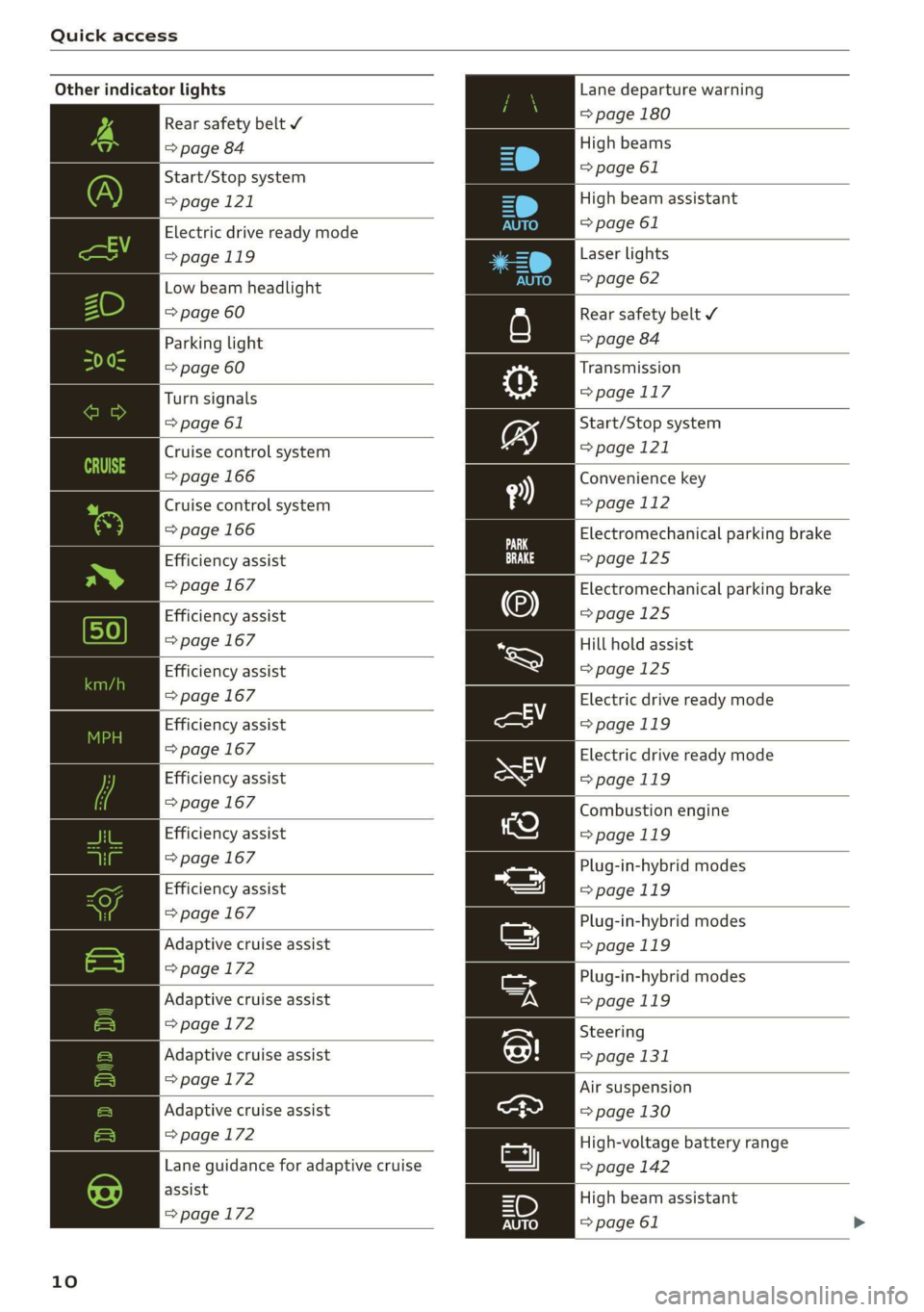
Other indicator lights
Rear safety belt Y
=> page 84
Start/Stop system
>page 121
Electric drive ready mode
>page 119
Low beam headlight
=> page 60
Parking light
=> page 60
Turn signals
=> page 61
Cruise control system
=> page 166
Cruise control system
=> page 166
Efficiency assist
=> page 167
Efficiency assist
=> page 167
Efficiency assist
=> page 167
Efficiency assist
=> page 167
Efficiency assist
> page 167
Efficiency assist
=> page 167
Efficiency assist
=> page 167
|
Adaptive cruise assist
=> page 172
Adaptive cruise assist
=>page 172
Adaptive cruise assist
=> page 172
Adaptive cruise assist
=>page 172
|
Lane guidance for adaptive cruise
assist
=> page 172
10
Lane departure warning
=> page 180
High beams
=> page 61
High beam assistant
=> page 61
Laser lights
=> page 62
Rear safety belt ¥
=> page 84
Transmission
=> page 117
Start/Stop system
=> page 121
Convenience key
=> page 112
Electromechanical parking brake
=>page 125
Electromechanical parking brake
=>page 125
Hill hold assist
=>page 125
Electric drive ready mode
=>page 119
Electric drive ready mode
>page 119
Combustion engine
=>page 119
Plug-in-hybrid modes
>page 119
Plug-in-hybrid modes
=>page 119
Plug-in-hybrid modes
=>page 119
Steering
=> page 131
Air suspension
=> page 130
High-voltage battery range
=> page 142
High beam assistant
=> page 61
Page 14 of 360
Instrument cluster
Instrument cluster
cH) Olas
aE
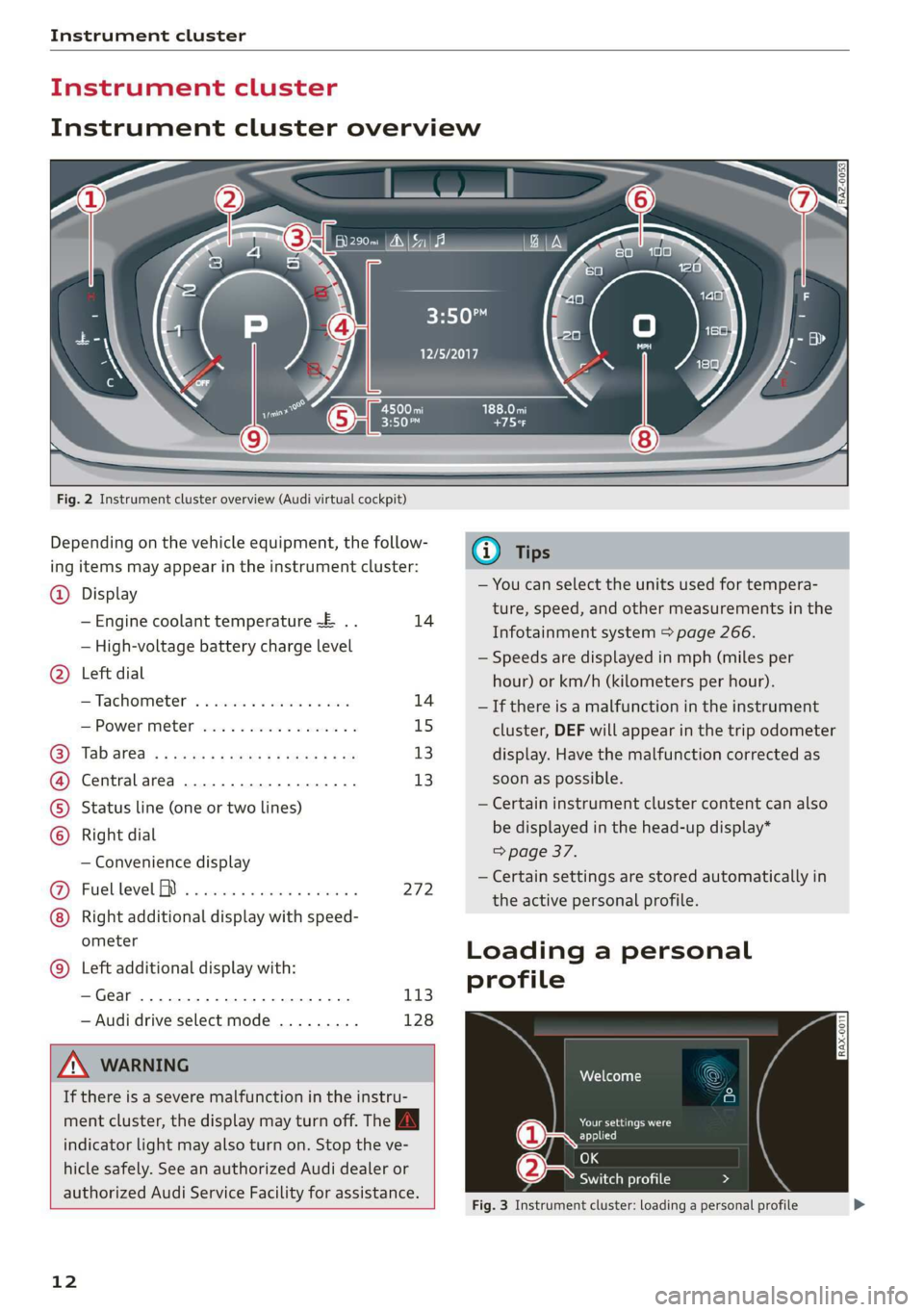
Fig. 2 Instrument cluster overview (Audi virtual cockpit)
Depending on the vehicle equipment, the follow-
ing items may appear in the instrument cluster:
@) Display
— Engine coolant temperature ~E .. 14
— High-voltage battery charge level
Left
dial
—Tachometer ........ 000s eee 14
POWER MCLE cose so cece oo cesuene ¥ & 15
Tab ated « < neues « + sees 2 eas be 13
Central area ..............02.0. 13
Status line (one or two lines)
Right dial
— Convenience display
Fuellevel IY ...... 2... eee eee 272
Right additional display with speed-
ometer
Left additional display with:
—Gear ...... 0... eee eee 113
— Audi drive select mode ......... 128
Z\ WARNING
If there is a severe malfunction in the instru
ment cluster, the display may turn off. The
indicator
light may also turn on. Stop the ve-
hicle safely. See an authorized Audi dealer or
authorized Audi Service Facility for assistance.
12
@ Tips
— You can select the units used for tempera-
ture, speed, and other measurements in the
Infotainment system > page 266.
— Speeds are displayed in mph (miles per
hour) or km/h (kilometers per hour).
— If there is a malfunction in the instrument
cluster, DEF will appear in the trip odometer
display. Have the malfunction corrected as
soon as possible.
— Certain instrument cluster content can also
be displayed in the head-up display*
=> page 37.
— Certain settings are stored automatically in
the active personal profile.
Loading a personal
profile
Nel Ceto dna}
me Gasca ard
(1 re ests)
e-: - Switch profile
Fig. 3 Instrument cluster: loading a personal profile
Page 28 of 360
![AUDI A8 2020 Owners Manual Touch displays
Lea TN]
Applies to: vehicles with Rear Seat Remote
Lt
=.
S
Fig. 19 Rear Seat Remote: overview
[RAH-9143]
@ Microphone
@ Volume button (decrease/mute)
@® Volu](/img/6/57606/w960_57606-27.png "AUDI A8 2020 Owners Manual Touch displays
Lea TN]
Applies to: vehicles with Rear Seat Remote
Lt
=.
S
Fig. 19 Rear Seat Remote: overview
[RAH-9143]
@ Microphone
@ Volume button (decrease/mute)
@® Volu")
Touch displays
Lea TN]
Applies to: vehicles with Rear Seat Remote
Lt
=.
S
Fig. 19 Rear Seat Remote: overview
[RAH-9143]
@ Microphone
@ Volume button (decrease/mute)
@® Volume button (increase)
@ Speaker
©) Display
Using the holder
Applies to: vehicles with Rear Seat Remote
[RAH-9144)
Fig. 20 Rear center armrest/full-length center console:
Rear Seat Remote holder
Depending on the equipment, the Rear Seat Re-
mote may be located in the rear center armrest
or on the full-length center console.
Removing the Rear Seat Remote
> To release the Rear Seat Remote, press the A
button @.
26
>» Remove the Rear Seat Remote from the holder
using both hands > A\ in Introduction on
page 25.
Securing the Rear Seat Remote
> Hold the Rear Seat Remote in both hands so
that the volume buttons @) and @) > page 26,
fig. 19 face upward.
> Carefully press the Rear Seat Remote toward
the holder until the Rear Seat Remote locks in-
to place.
Charging the battery
Applies to: vehicles with Rear Seat Remote
Requirement: the ignition must be switched on.
> To charge the battery, secure the Rear Seat Re-
mote in the holder > page 26. The battery will
charge automatically.
@) Note
The Rear Seat Remote battery is permanently
installed and may only be replaced by an au-
thorized Audi dealer or authorized Audi Serv-
ice Facility. If the battery replacement is not
done correctly, it may cause malfunctions and
increase the risk of damaging the Rear Seat
Remote.
@ Tips
— Batteries have a limited service life. If the
operating time decreases significantly, the
battery should be replaced. Contact an au-
thorized Audi dealer or authorized Audi
Service Facility if you need a new battery.
— The Rear Seat Remote is equipped with an
intelligent battery management system to
provide a long battery service life. There-
fore, the battery may not be charged to its
full capacity, especially when temperatures
are high or low.
Page 30 of 360
Touch displays
Adjusting media playback
Applies to: vehicles with Rear Seat Remote
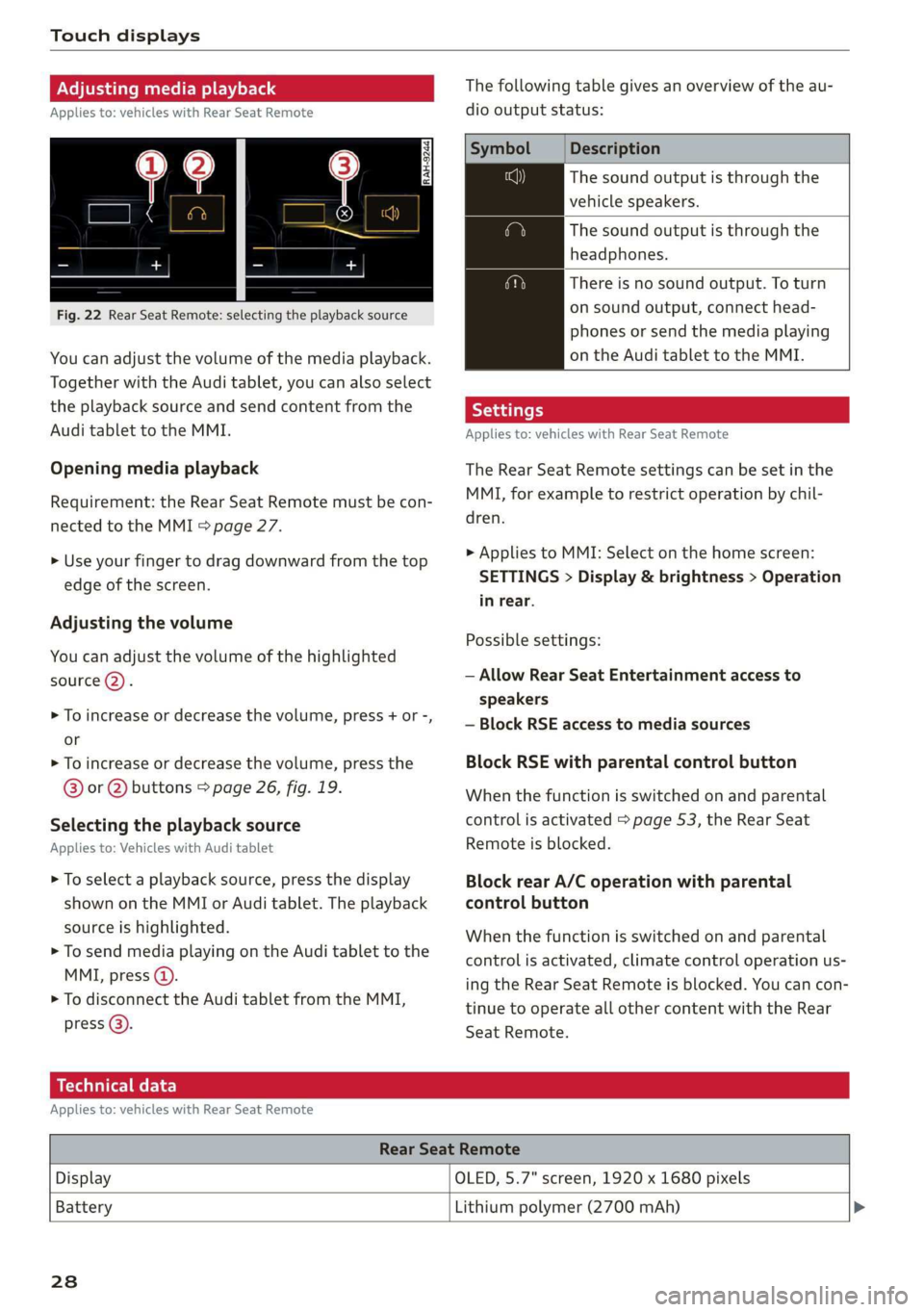
Fig. 22 Rear Seat Remote: selecting the playback source
You can adjust the volume of the media playback.
Together with the Audi tablet, you can also select
the playback source and send content from the
Audi tablet to the MMI.
Opening media playback
Requirement: the Rear Seat Remote must be con-
nected to the MMI > page 27.
> Use your finger to drag downward from the top
edge of the screen.
Adjusting the volume
You can adjust the volume of the highlighted
source (2).
>» To increase or decrease the volume, press + or -,
or
> To increase or decrease the volume, press the
@® or @ buttons > page 26, fig. 19.
Selecting the playback source
Applies to: Vehicles with Audi tablet
> To select a playback source, press the display
shown on the MMI or Audi tablet. The playback
source is highlighted.
> To send media playing on the Audi tablet to the
MMI, press @).
> To disconnect the Audi tablet from the MMI,
press @).
The following table gives an overview of the au-
dio output status:
Description
The sound output is through the
vehicle speakers.
The sound output is through the
headphones.
There is no sound output. To turn
on sound output, connect head-
phones or send the media playing
on the Audi tablet to the MMI.
Applies to: vehicles with Rear Seat Remote
The Rear Seat Remote settings can be set in the
MMI, for example to restrict operation by chil-
dren.
> Applies to MMI: Select on the home screen:
SETTINGS > Display & brightness > Operation
in rear.
Possible settings:
— Allow Rear Seat Entertainment access to
speakers
— Block RSE access to media sources
Block RSE with parental control button
When the function is switched on and parental
control is activated > page 53, the Rear Seat
Remote is blocked.
Block rear A/C operation with parental
control button
When the function is switched on and parental
control is activated, climate control operation us-
ing the Rear Seat Remote is blocked. You can con-
tinue to operate all other content with the Rear
Seat
Remote.
Technical data
Applies to: vehicles with Rear Seat Remote
Rear Seat Remote
Display OLED, 5.7" screen, 1920 x 1680 pixels
Battery
Lithium polymer (2700 mAh) >
238
Page 34 of 360
Touch displays
@) Note
— Only use microSD cards (0.43 in x 0.59 in
(11 mmx 15 mm)). If a card of a different
size is inserted in the card reader instead of
a microSD card, do not under any circum-
stances remove this card yourself due to the
risk of card reader damage. Contact an au-
thorized Audi dealer or authorized Audi
Service Facility.
— There is a risk of damaging the Audi tablet if
you use an SD card adapter, because vibra-
tions can cause the microSD card to fall out
of the adapter while driving.
Charging the battery
Applies to: vehicles with Audi tablet
Requirement: the ignition must be switched on.
> To charge the battery, secure the Audi tablet in
the holder > page 30. The battery will charge
automatically. The charge level is shown in the
status display 2) > page 33, fig. 28.
©) Note
The Audi tablet battery is permanently instal-
led and may only be replaced by an authorized
Audi dealer or authorized Audi Service Facili-
ty. If the battery replacement is not done cor-
rectly, it may cause malfunctions and increase
the risk of damaging the Audi tablet.
G) Tips
— Batteries have a limited service life. If the
operating time decreases significantly, the
battery should be replaced. Contact an au-
thorized Audi dealer or authorized Audi
Service Facility if you need to have the bat-
tery replaced.
— The Audi tablet is equipped with an intelli-
gent battery management system to pro-
32
vide a long battery service life. Therefore,
the battery may not be charged to its full
capacity, especially when temperatures are
high or low.
Se mate mele) (alee Rol
Applies to: vehicles with Audi tablet
You can turn the Audi tablet on and off manually.
If the Audi tablet is not used for a certain
amount of time, the screensaver or standby
mode activates.
Turning on or off manually
> To turn the Audi tablet on, press and hold the
> page 30, fig. 23 button (@ briefly.
> To turn the Audi tablet off, press and hold the
= page 30, fig. 23 button @ until a menu ap-
pears. Press () Switch off.
Turning on from standby mode
> Press the button @) & page 30, fig. 23.
Hiding the screensaver
Requirement: the Audi tablet must be in the
holder.
> Touch the display at any location %) > page 30,
fig. 23.
Gi) Tips
— The MMI switches off automatically if the
engine is not running and the vehicle bat-
tery is low. If the Audi tablet is in the hold-
er, it will also switch off.
—If the MMI, the MMI Wi-Fi hotspot, or the
Audi tablet Wi-Fi is turned off, only the non-
vehicle applications and functions will be
available.
— For some services, it may be necessary to
set up an account with the respective serv-
ice provider before use.
Page 35 of 360
4N0012721BD
Touch displays
Menus and symbols
Applies to: vehicles with Audi tablet
emsa || | cea
Rats ® SETTINGS
Cy
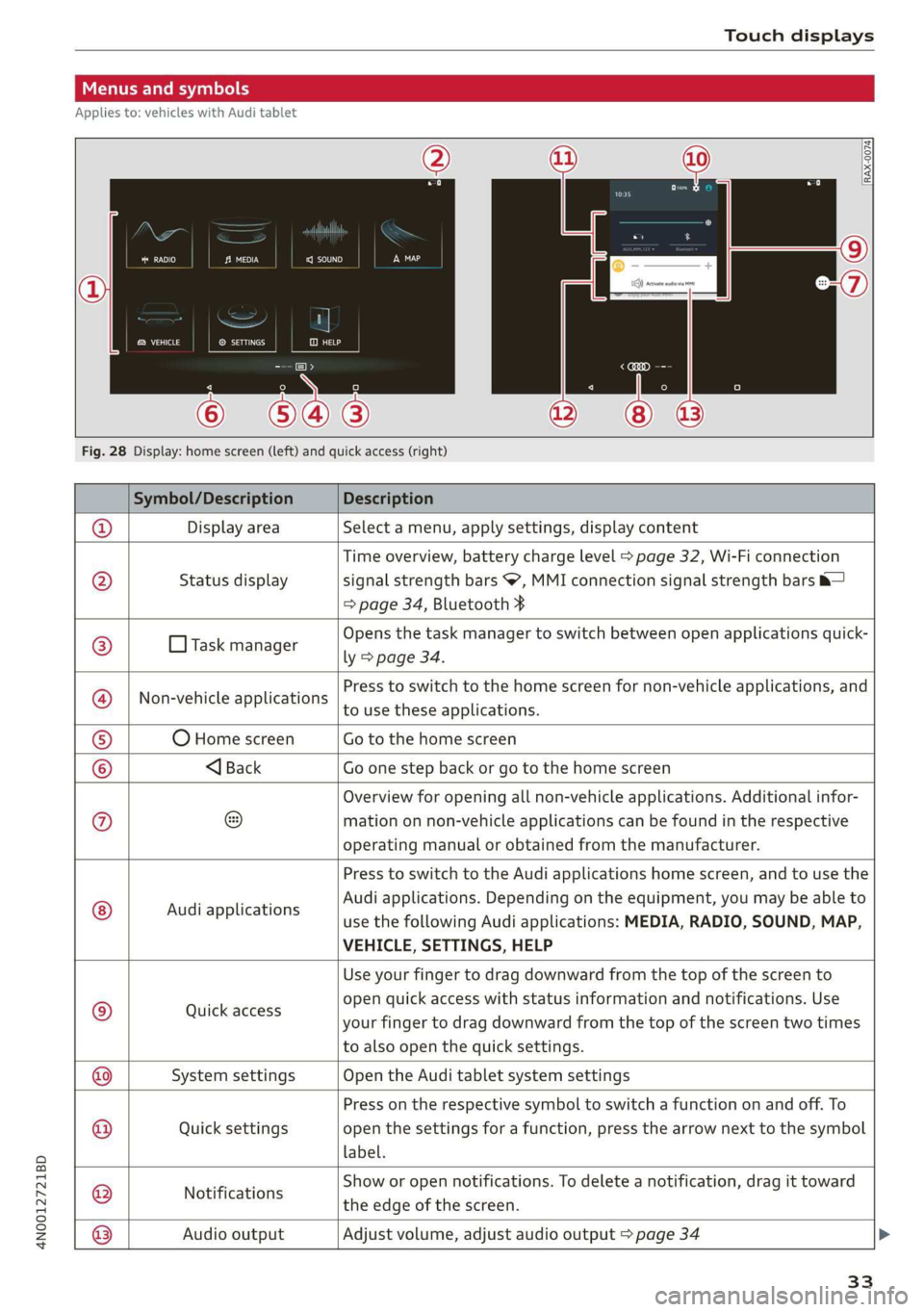
Fig. 28 Display: home screen (left) and quick access (right)
Symbol/Description Description
Display area Select a menu, apply settings, display content
Status display
Time overview, battery charge level > page 32, Wi-Fi connection
signal strength bars , MMI connection signal strength bars &—
=> page 34, Bluetooth ¥
O Task manager
Opens the task manager to switch between open applications quick-
ly > page 34.
Non-vehicle applications
Press to switch to the home screen for non-vehicle applications, and
to use these applications.
O Home screen Go to the home screen
®@
Ef
©|e|
©
|}
<1 Back Go one step back or go to the home screen
Overview for opening all non-vehicle applications. Additional infor-
mation on non-vehicle applications can be found in the respective
operating manual or obtained from the manufacturer.
© Audi applications
Press to switch to the Audi applications home screen, and to use the
Audi applications. Depending on the equipment, you may be able to
use the following Audi applications: MEDIA, RADIO, SOUND, MAP,
VEHICLE, SETTINGS, HELP
Quick access
Use your finger to drag downward from the top of the screen to
open quick access with status information and notifications. Use
your finger to drag downward from the top of the screen two times
to also open the quick settings.
@|
©
System settings Open the Audi tablet system settings
Quick settings
Press on the respective symbol to switch a function on and off. To
open the settings for a function, press the arrow next to the symbol
label.
Notifications
Show or open notifications. To delete a notification, drag it toward
the edge of the screen.
@|O|]
©
Audio output
Adjust volume, adjust audio output > page 34
33
Page 38 of 360
Touch displays
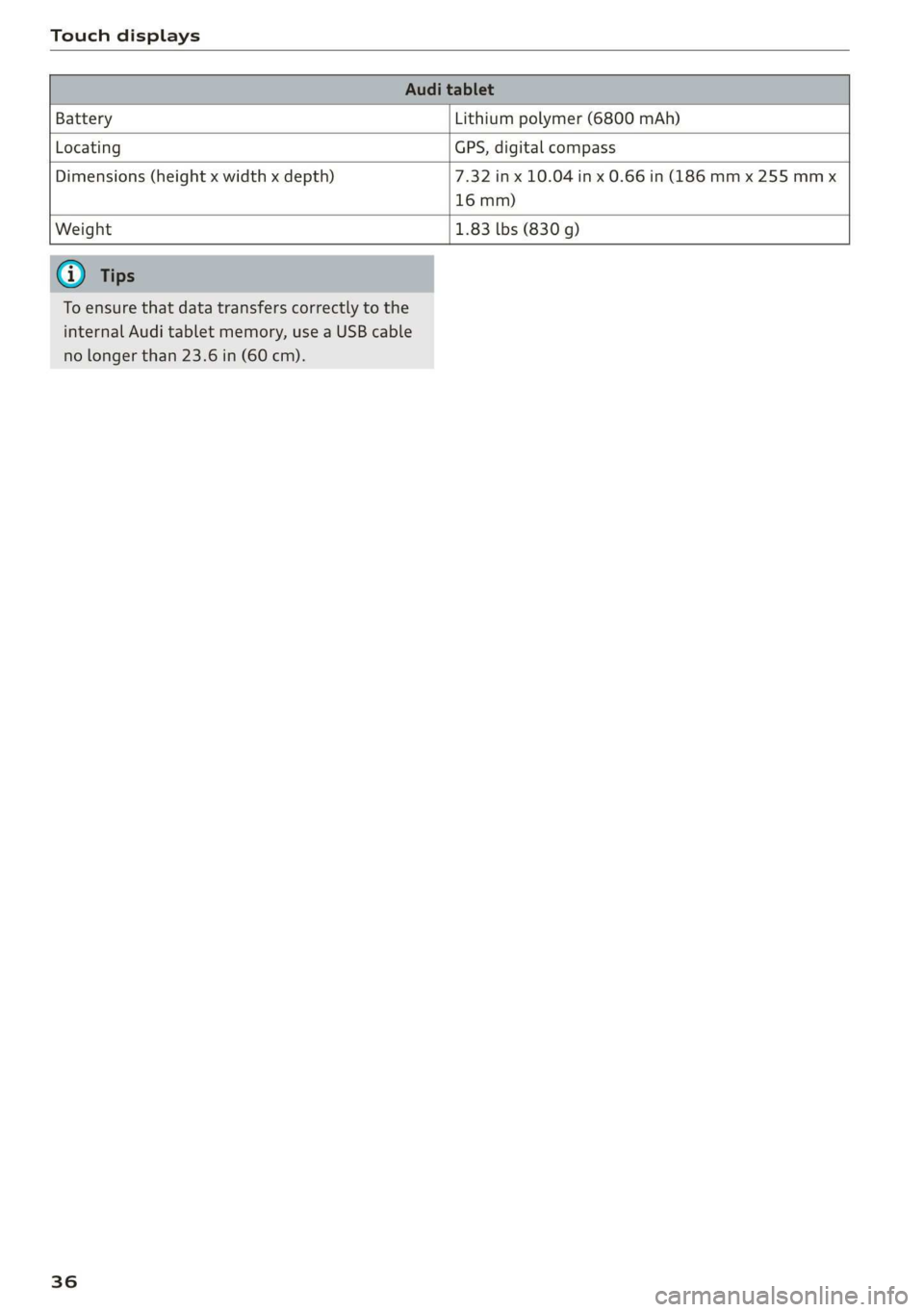
Battery Lithium polymer (6800 mAh)
Locating GPS, digital compass
Dimensions (height x width x depth) 7.32 in x 10.04 in x 0.66 in (186 mm x 255 mm x
16 mm)
Weight 1.83 Lbs (830 g)
To ensure that data transfers correctly to the
internal Audi tablet memory, use a USB cable
no longer than 23.6 in (60 cm).
36