wheel AUDI A8 2021 Owners Manual
[x] Cancel search | Manufacturer: AUDI, Model Year: 2021, Model line: A8, Model: AUDI A8 2021Pages: 362, PDF Size: 99.29 MB
Page 314 of 362
Care and cleaning
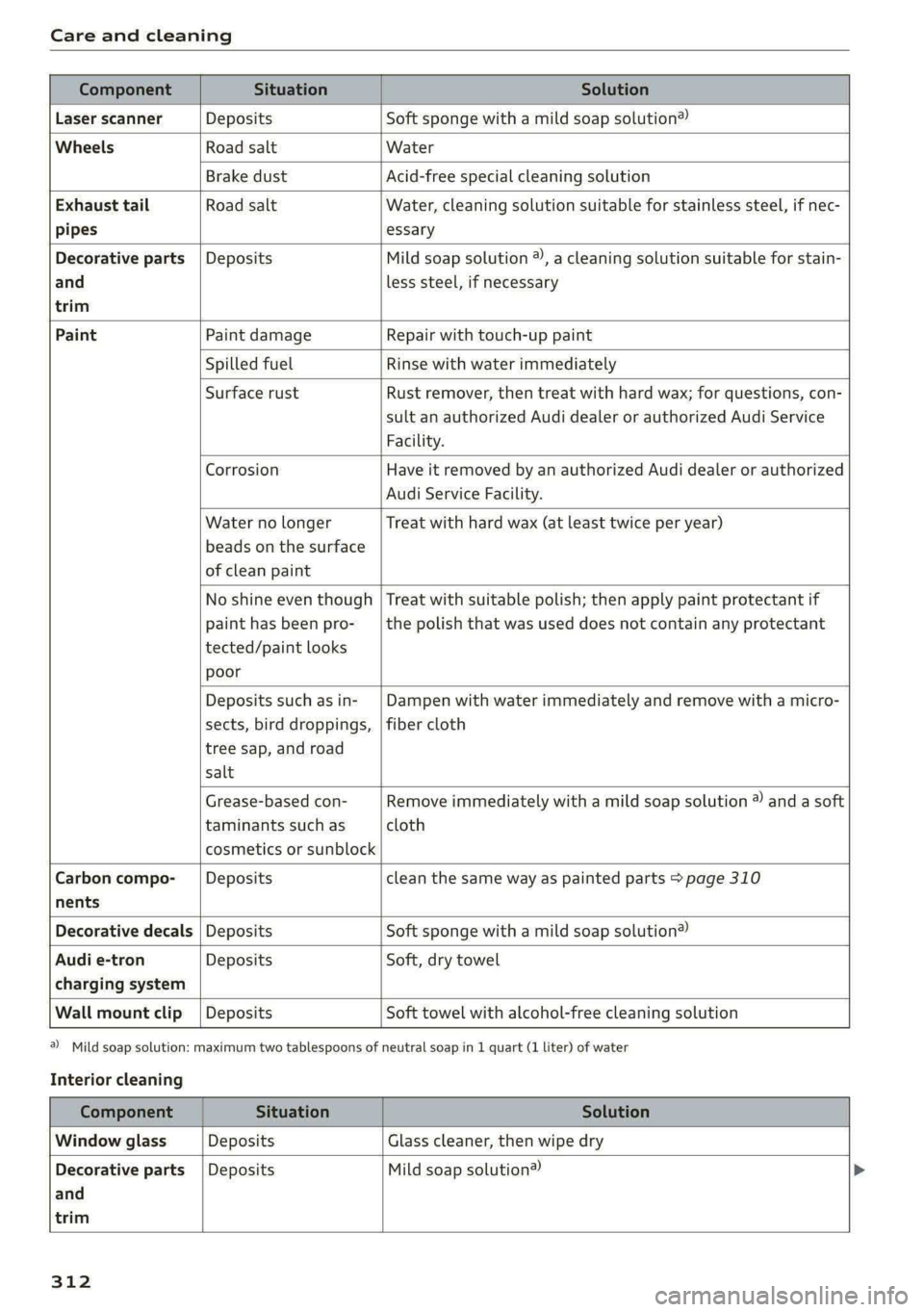
Component Situation Solution
Laser scanner Deposits Soft sponge with a mild soap solution®
Wheels Road salt Water
Brake dust Acid-free special cleaning solution
Exhaust tail Road salt Water, cleaning solution suitable for stainless steel, if nec-
pipes essary
Decorative parts | Deposits Mild soap solution ®, a cleaning solution suitable for stain-
and
trim
less steel, if necessary
Paint Paint damage Repair with touch-up paint
Spilled fuel Rinse with water immediately
Surface rust Rust remover, then treat with hard wax; for questions, con-
sult an authorized Audi dealer or authorized Audi Service
Facility.
Corrosion Have it removed by an authorized Audi dealer or authorized
Audi Service Facility.
Water no longer
beads on the surface
of clean paint
Treat with hard wax (at least twice per year)
No shine even though
paint has been pro-
tected/paint looks
poor
Treat with suitable polish; then apply paint protectant if
the polish that was used does not contain any protectant
Deposits such as in-
sects, bird droppings,
tree sap, and road
salt
Dampen with water immediately and remove with a micro-
fiber cloth
Grease-based con-
taminants such as
cosmetics or sunblock
Remove immediately with a mild soap solution ® and a soft
cloth
Carbon compo-__| Deposits clean the same way as painted parts > page 310
nents
Decorative decals | Deposits Soft sponge with a mild soap solution®
Audi e-tron Deposits Soft, dry towel
charging system
Wall mount clip | Deposits Soft towel with alcohol-free cleaning solution
a) Mild soap solution: maximum two tablespoons of
Interior cleaning
neutral soap in 1 quart (1 liter) of water
Component Situation Solution
Window glass Deposits Glass cleaner, then wipe dry
Decorative parts {Deposits Mild soap solution®
and
trim
312
Page 316 of 362
Care and cleaning
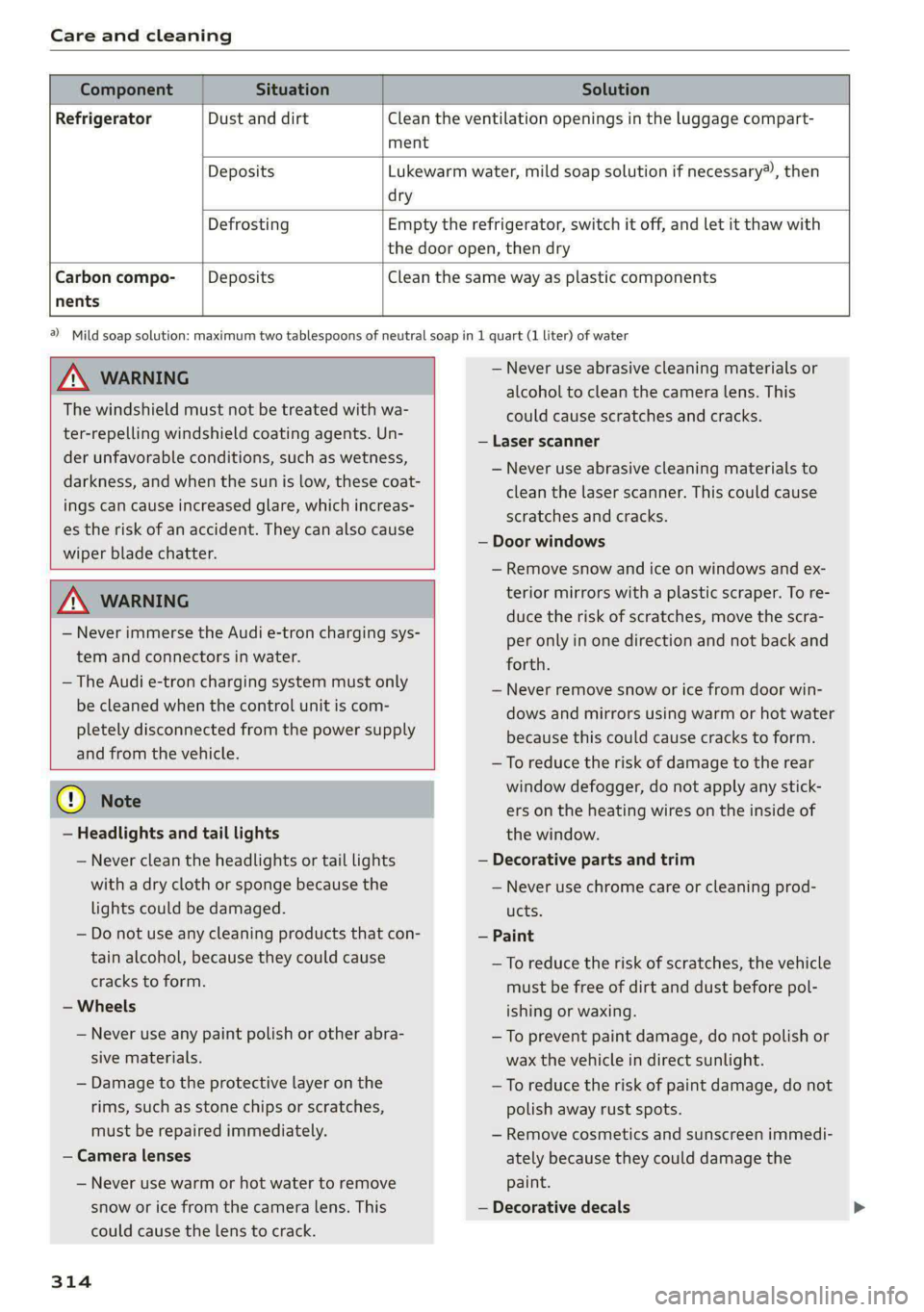
Component Situation Solution
Refrigerator Dust and dirt Clean the ventilation openings in the luggage compart-
ment
Deposits Lukewarm water, mild soap solution if necessary), then
dry
Defrosting Empty the refrigerator, switch it off, and let it thaw with
the door open, then dry
Carbon compo- Deposits Clean the same way as plastic components
nents
ZA\ WARNING
The windshield must not be treated with wa-
ter-repelling windshield coating agents. Un-
der unfavorable conditions, such as wetness,
darkness, and when the sun is low, these coat-
ings can cause increased glare, which increas-
es the risk of an accident. They can also cause
wiper blade chatter.
ZA\ WARNING
— Never immerse the Audi e-tron charging sys-
tem and connectors in water.
— The Audi e-tron charging system must only
be cleaned when the control unit is com-
pletely disconnected from the power supply
and from the vehicle.
@) Note
— Headlights and tail lights
— Never clean the headlights or tail lights
with a dry cloth or sponge because the
lights could be damaged.
— Do not use any cleaning products that con-
tain alcohol, because they could cause
cracks to form.
— Wheels
— Never use any paint polish or other abra-
sive materials.
— Damage to the protective layer on the
rims, such as stone chips or scratches,
must be repaired immediately.
— Camera lenses
— Never use warm or hot water to remove
snow or ice from the camera lens. This
could cause the lens to crack.
314
2) Mild soap solution: maximum two tablespoons of neutral soap in 1 quart (1 liter) of water
— Never use abrasive cleaning materials or
alcohol to clean the camera lens. This
could cause scratches and cracks.
— Laser scanner
— Never use abrasive cleaning materials to
clean the laser scanner. This could cause
scratches and cracks.
— Door windows
— Remove snow and ice on windows and ex-
terior mirrors with a plastic scraper. To re-
duce the risk of scratches, move the scra-
per only in one direction and not back and
forth.
— Never remove snow or ice from door win-
dows and mirrors using warm or hot water
because this could cause cracks to form.
—To reduce the risk of damage to the rear
window defogger, do not apply any stick-
ers on the heating wires on the inside of
the window.
— Decorative parts and trim
— Never use chrome care or cleaning prod-
ucts.
— Paint
— To reduce the risk of scratches, the vehicle
must be free of dirt and dust before pol-
ishing or waxing.
— To prevent paint damage, do not polish or
wax the vehicle in direct sunlight.
—To reduce the risk of paint damage, do not
polish away rust spots.
— Remove cosmetics and sunscreen immedi-
ately because they could damage the
paint.
— Decorative decals
Page 321 of 362
4N0012721BF
Emergency assistance
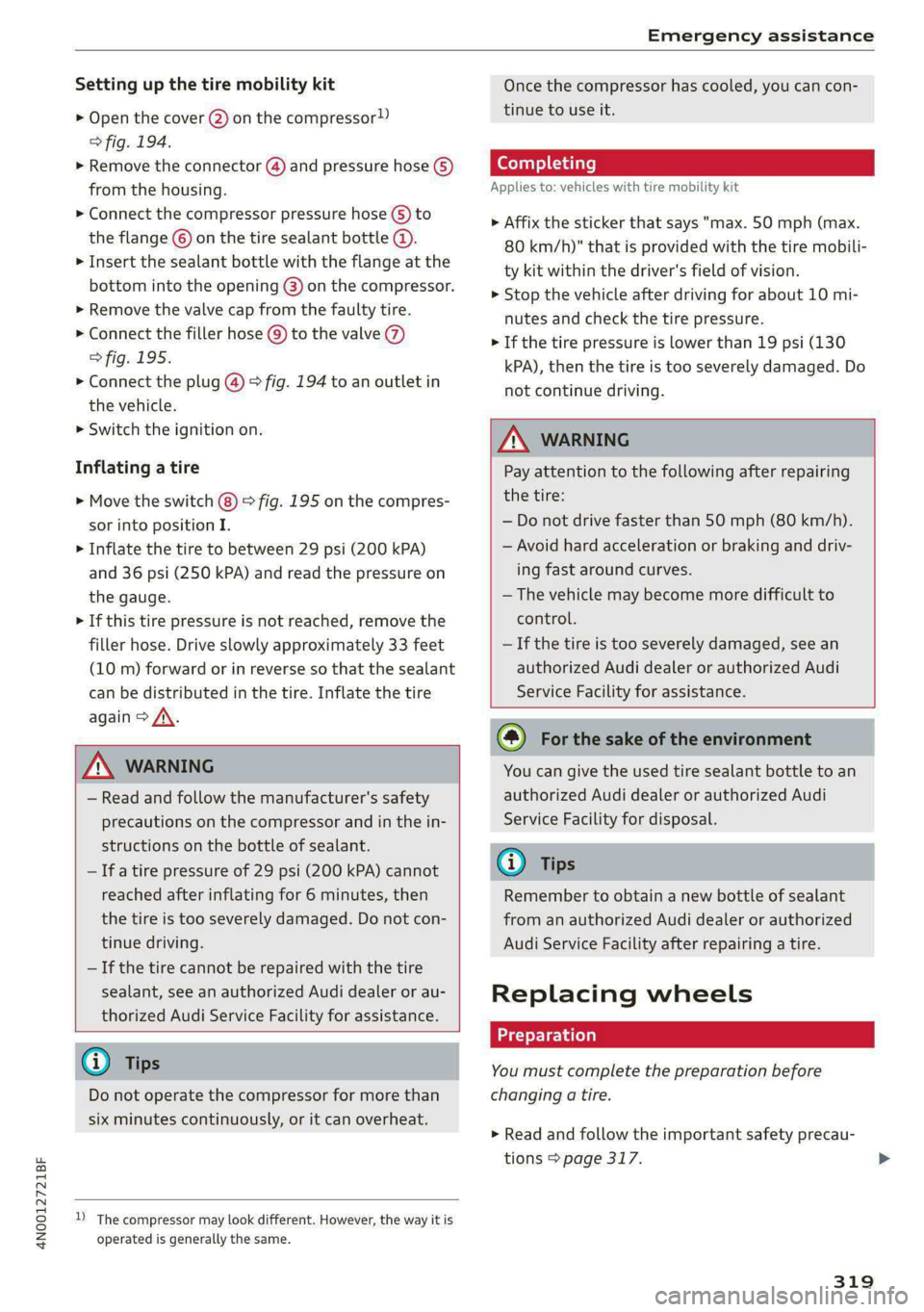
Setting up the tire mobility kit
> Open the cover @) on the compressor!)
> fig. 194.
> Remove the connector () and pressure hose (5)
from the housing.
> Connect the compressor pressure hose © to
the flange © on the tire sealant bottle @).
> Insert the sealant bottle with the flange at the
bottom into the opening @) on the compressor.
> Remove the valve cap from the faulty tire.
> Connect the filler hose @) to the valve (7)
> fig. 195.
> Connect the plug @) © fig. 194 to an outlet in
the vehicle.
> Switch the ignition on.
Inflating a tire
> Move the switch (8) > fig. 195 on the compres-
sor into position I.
> Inflate the tire to between 29 psi (200 kPA)
and 36 psi (250 kPA) and read the pressure on
the gauge.
> If this tire pressure is not reached, remove the
filler hose. Drive slowly approximately 33 feet
(10 m) forward or in reverse so that the sealant
can be distributed in the tire. Inflate the tire
again > A\.
ZA WARNING
— Read and follow the manufacturer's safety
precautions on the compressor and in the in-
structions on the bottle of sealant.
—Ifatire pressure of 29 psi (200 kPA) cannot
reached after inflating for 6 minutes, then
the tire is too severely damaged. Do not con-
tinue driving.
— If the tire cannot be repaired with the tire
sealant, see an authorized Audi dealer or au-
thorized Audi Service Facility for assistance.
@ Tips
Do not operate the compressor for more than
six minutes continuously, or it can overheat.
2) The compressor may look different. However, the way it is
operated is generally the same.
Once the compressor has cooled, you can con-
tinue to use it.
Completing
Applies to: vehicles with tire mobility kit
> Affix the sticker that says "max. 50 mph (max.
80 km/h)" that is provided with the tire mobili-
ty kit within the driver's field of vision.
> Stop the vehicle after driving for about 10 mi-
nutes and check the tire pressure.
> If the tire pressure is lower than 19 psi (130
kPA), then the tire is too severely damaged. Do
not continue driving.
ZA\ WARNING
Pay attention to the following after repairing
the tire:
— Do not drive faster than 50 mph (80 km/h).
— Avoid hard acceleration or braking and driv-
ing fast around curves.
— The vehicle may become more difficult to
control.
—If the tire is too severely damaged, see an
authorized Audi dealer or authorized Audi
Service Facility for assistance.
©) For the sake of the environment
You can give the used tire sealant bottle to an
authorized Audi dealer or authorized Audi
Service Facility for disposal.
@) Tips
Remember to obtain a new bottle of sealant
from an authorized Audi dealer or authorized
Audi Service Facility after repairing a tire.
Replacing wheels
You must complete the preparation before
changing a tire.
> Read and follow the important safety precau-
tions > page 317.
319
Page 322 of 362

Emergency assistance
> Set the parking brake.
> Select the “P” position.
>» When towing a trailer: disconnect the trailer
from your vehicle.
> Lay out the vehicle tool kit > page 317 and the
spare tire > page 323.
» Applies to MMI: Select on the home screen: VE-
HICLE > Settings & Service > Air suspension:
wheel change.
> Switch the ignition off.
ZA\ WARNING
The vehicle must also be secured to prevent it
from rolling when using the vehicle jack”. Use
suitable objects to block the front and back of
the wheel that is diagonal from the wheel
with the flat tire.
Removing the caps
nb oD i)
ail z a
Ve
ae)
é
Fig. 196 Wheel: wheel bolts with caps
> Slide the plastic clip from the vehicle tool kit
onto the cap until it engages > fig. 196.
> Remove the cap with the plastic clip.
320
Tada more) bed
Applies to: vehicles with anti-theft wheel bolts
B4H-0470
Fig. 197 Anti-theft wheel bolt with cap and adapter
You need a special adapter in the vehicle tool kit
to remove the anti-theft wheel bolts.
> Remove the cap @).
> Slide the adapter @) all the way onto the anti-
theft wheel bolt @.
> Slide the wheel wrench* from the vehicle tool
kit all the way onto the adapter @).
> Loosen the wheel bolt > page 320.
@ Tips
Note the code number for the wheel bolt
adapter and store it in a safe place separate
from the vehicle. If you need a replacement
adapter, contact an authorized Audi dealer or
authorized Audi Service Facility and give them
the code number.
Loosening the wheel bolts
B4S-0221
Fig. 198 Wheel: loosening the wheel bolts
Page 323 of 362

4N0012721BF
Emergency assistance
> Slide the wheel wrench* from the vehicle tool
kit all the way onto the wheel bolt).
> Turn the wheel bolt approximately one turn to
the left. To achieve the required torque, hold
the end of the wheel wrench*. If the wheel bolt
will not loosen, press carefully on the wheel
wrench* with your foot. Hold onto the vehicle
securely while doing this and make sure your
footing is stable.
Z\ WARNING
To reduce the risk of an accident, only loosen
the wheel bolts gently one turn before raising
the vehicle with the vehicle jack*.
Raising the vehicle
Applies to: vehicles with vehicle jack
RAZ-0257,
Fig. 200 Sill: positioning the vehicle jack
> Place the vehicle jack from the vehicle tool kit
ona firm surface. Use a flat, stable support if
necessary. On a slippery surface such as tile,
you should use a non-slip pad such as a rubber
mat > /\.
D_ You need the matching adapter in order to loosen and
tighten anti-theft wheel bolts* > page 320.
> Find the marking on the sill that is closest to
the tire that will be changed > fig. 199. Behind
the marking, there is a lifting point on the side
sill for the vehicle jack.
> Turn the vehicle jack located under the lifting
point on the sill to raise the jack until its arm @
=> fig. 200 is located under the designated plas-
tic mount.
> Align the vehicle jack so the arm (@) engages in
the designated lifting point in the door sill and
the movable base (2) lies flat on the ground.
The base @) must be directly under the mount-
ing point @.
> Continue raising the vehicle jack until the wheel
lifts off the ground slightly.
Z\ WARNING
—To reduce the risk of injury, make sure no
one is in the vehicle before raising it.
— Make sure the vehicle jack is stable. The risk
of injury is increased when the ground is
slippery or soft, because the vehicle jack
could slide or sink.
— Only raise your vehicle with the vehicle jack
provided by the factory. If you use a vehicle
jack designed for another vehicle, your vehi-
cle could slip and cause injury.
— Position the vehicle jack only at the desig-
nated mounting points on the side sill and
align the jack. Otherwise, the vehicle jack
could slip and cause an injury if it does not
have sufficient hold on the vehicle.
—To reduce the risk of injury, do not raise any
other vehicles or other loads using the vehi-
cle jack provided by the factory.
— Changes in temperature or load can affect
the height of the vehicle.
— To reduce the risk of an accident, never start
the engine when the vehicle is raised.
—To reduce the risk of injury, no work should
be performed under the vehicle while it is
raised.
321
Page 324 of 362

Emergency assistance
@® Note
Do not lift the vehicle by the sill. Position the
vehicle jack only at the designated mounting
points on the side sill. Otherwise, your vehicle
could be damaged.
Removing and installing a wheel
@ &
= x
oO oO
B8K-1477
Fig. 202 Wheel: alignment pin in the top hole
Removing a wheel
> Remove the top wheel bolt completely using
the hex socket in the screwdriver handle from
the vehicle tool kit > fig. 201 and place it ona
clean surface.
> Then install the alignment pin from the vehicle
tool kit by hand in the empty wheel bolt hole
> fig. 202”.
> Remove the rest of the wheel bolts.
> Remove the wheel >(). The alignment pin re-
mains in the hole while doing this.
D Applies to: vehicles with ceramic brake rotors*: Use a sec-
ond alignment pin* from the vehicle tool kit for the lowest
hole according to the steps described for the first align-
ment pin.
322
Installing a wheel
Read the directions on S page 322 when instal-
ling unidirectional tires.
> Slide the wheel on over the alignment pin >@.
> Install the wheel bolts and tighten them gently
using the hex socket.
> Remove the alignment pin and tighten the re-
maining wheel bolt.
> Carefully lower the vehicle using the vehicle
jack*.
> Tighten the wheel bolts in a diagonal pattern
using the wheel wrench*.
The wheel bolts must be clean and loosen and
tighten easily. Check the contact surfaces for the
wheel and hub. Contaminants on these surfaces
must be removed before installing the wheel.
ZA\ WARNING
— Read and follow the important information
and notes under > page 296.
— Never use the hex socket in the screwdriver
handle to tighten the wheel bolts. Using the
hex
socket will not achieve the required
tightening torque, which increases the risk
of an accident.
@) Note
When removing or installing the wheel, the
rim could hit the brake rotor and damage the
rotor. Work carefully and have a second per-
son help you.
Ue lieraeCelar | mae}
A unidirectional tire profile is identified by arrows
on the tire sidewall that point in the running di-
rection. You must always maintain the specified
running direction. This is necessary to ensure the
tire's optimal performance in regard to adhesion,
running noise, and friction, and to reduce the risk
of hydroplaning.
Page 325 of 362

4N0012721BF
Emergency assistance
To benefit fully from the advantages of the uni-
directional tire design, you should replace faulty
tires as soon as possible and restore the correct
running direction on all of the tires.
> Reinstall the caps on the wheel bolts if necessa-
ry.
> Store the vehicle tool kit in its designated
place.
> If the removed wheel does not fit in the spare
wheel well, store it securely in the luggage
compartment > page 97.
> Check the tire pressure on the installed wheel
as soon as possible.
> Correct the tire pressure and store it in the MMI
=> page 308.
> The wheel bolt tightening specification must be
90 ft lbs (120 Nm). Have it checked as soon as
possible with a torque wrench. Drive carefully
until then.
> Have the faulty wheel replaced as quickly as
possible.
Space-saving spare tire
Applies to: vehicles with space-saving spare tire (compact
spare tire)
The spare tire is intended for short-term use only.
Have the damaged tire checked and replaced if
necessary by an authorized Audi dealer or author-
ized Audi Service Facility as soon as possible.
There are some restrictions on the use of the
compact spare tire. The compact spare tire has
been designed specifically for your type of vehi-
cle. Do not replace it with the spare tire from an-
other type of vehicle.
The compact spare tire is located in the luggage
compartment under the cargo floor cover
=> page 317.
The tire pressure must be adjusted to a specified
value listed on the tire pressure sticker
=> page 299, fig. 190.
Snow chains
For technical reasons, the use of snow chains on
the compact spare tire is not permitted.
If you have to drive with snow chains and a front
tire fails, mount the spare tire in place of a rear
tire. Install the snow chains on the rear tire that
you removed, and install that in place of the
front tire that failed.
ZA WARNING
— After installing a spare tire, the tire pressure
must be checked as soon as possible.
— Do not drive faster than 50 mph (80 km/h)
with a compact spare tire. Driving faster
than that increases the risk of an accident.
— To reduce the risk of an accident, avoid hard
acceleration or braking and driving fast
around curves with the compact spare tire.
— To reduce the risk of an accident, never drive
with more than one compact spare tire.
— Normal summer or winter tires must not be
mounted on the compact spare wheel rim.
Jump starting
You should only perform the steps that follow if
you have the necessary tools and technical ex-
pertise.
If the engine does not start because the vehicle
battery is drained, you can jump start your vehi-
cle using another vehicle. Jump start cables are
needed to do this.
Both vehicle batteries must have 12 V nominal
voltage. The voltage capacity (Ah) of the vehicle
battery that is giving power must not be less
than the capacity of the drained vehicle battery.
Jump start cable
Only use a jump start cable with a large enough
diameter. Note the manufacturer's specifica-
tions.
Only use a jump start cable with insulated termi-
nal clamps.
Positive cable - usually red.
Negative cable - usually black.
323
Page 328 of 362

Emergency assistance
bar is not available. Use a towing cable made of
synthetic elastic cable similar elastic material.
ZA WARNING
— Towing highly increases the risk of an acci-
dent, for example from colliding with the
towing vehicle.
— To reduce the risk of an accident, do not al-
low anyone to remain inside the vehicle
when it is being transported by a tow truck
or a special transporter.
@) Note
— If normal towing is not possible, for exam-
ple if the transmission is faulty or if the
towing distance is greater than 30 miles
(50 km), then transport the vehicle on a
special carrier.
— If the vehicle is towed by a tow truck at the
axle that is not permitted, this can cause se-
vere damage to the transmission.
— The vehicle must not be tow started for
technical reasons.
@) Tips
— If the power supply is interrupted, then it
will not be possible to move the selector
lever out of the "P" position. The parking
lock must be released using the emergency
release before towing the vehicle
=> page 112.
— Switch Audi pre sense* off > page 181 when
loading the vehicle onto a vehicle carrier,
train, ship, or other type of transportation,
or when towing the vehicle. This can prevent
an undesired intervention from the pre
sense* system.
— Follow the local legal regulations for tow-
ing.
Read and follow the important information under
=> page 325.
326
Preparations
> Only secure the towing cable or tow bar at the
designated towing loops > page 327,
=> page 327.
> Make sure the towing cable is not twisted. Oth-
erwise it could disconnect from the towing loop
while towing.
> Switch the emergency flashers on in both
vehicles > page 61. However, do not do this if it
prohibited by law.
Towing vehicle (front)
> Only start to drive when the towing cable is
taut.
> Press the brake pedal very carefully.
> Avoid sudden braking or driving maneuvers.
Vehicle being towed (rear)
> Make sure the ignition is switched on so that
the steering wheel is not locked and so that you
can use the turn signals, the horn, and the
windshield wipers if needed > A\.
> Switching it off before the vehicle has stopped
may impair the function of the brake booster
and power steering. You would then need to
use more force to steer and brake the vehicle.
> Release the parking brake > page 121.
> Select the “N” selector lever position.
> Make sure the towing cable is always taut.
ZA\ WARNING
— Never tow a vehicle using a tow bar or tow-
ing cable if the vehicle does not have electri-
cal power.
— If the vehicle runs out of power while it is
being towed, stop towing the vehicle imme-
diately and consult an authorized Audi deal-
er or qualified repair facility.
Page 332 of 362

Fuses and bulbs
Fuse assignment - left side of cockpit
RAZ-0202
Fig. 210 Left side of the cockpit: fuse panel with plastic
clip
Fig. 211 Left side of the luggage compartment: fuse panel
with plastic clip
2 | Engine components 10 | Volume control
3 | Engine components 11 | Light switch, switch panels
4 |Engine components 12 | Steering column electronics
5 | Brake light sensor 14 | MMI Infotainment system control module
6 | Engine components 15 |Steering column adjustment
7 |Engine components 16 | Steering wheel heating
8 | Engine components
9 | Engine components ae ft side of the luggage
10 | Oil pressure sensor, oil temperature sensor (eelar|PEINE Ee
11 | Engine components g
12 | Engine components
13 | Engine cooling
14 | Engine control module, fuel injectors
15 | Engine sensors
16 | Fuel pump
330
No. Equipment No. | Equipment
Climate control system, interior air sensor 1_| Thermal management
2 | Audi phone box 5 |Air suspension/suspension control
Climate control system, fragrance system, 6 |Automatic transmission control module
3 particulate matter sensor 7 |Right rear seat adjustment
4 |Head-up display 8 | Rear seat heating
S_ |Audi music interface, USB input 9 |
Left tail light
6 |Instrument panel 10 | Front belt tensioner on driver's side
7 | Steering column lock
8 |Upper/lower display
9 |Instrument cluster
Page 347 of 362

4N0012721BF
Index
A
A/C cooling mode............ eee eee eee
A/C system refrigerant oil...............
Accelerator pedal.............2--00000-
also refer to Accelerator pedal..........
ACCESSOFICS 2. eee
Active lane assist
refer to Lane departure warning.........
refer to Lane guidance................
Active SuSpenSiOt es ¢ « ccs so ewe ss eewe ss
Adaptive cruise assist................04.
Cleaning the sensors.............0 0005
Adaptive cruise control
Predictive control..............000005
Adaptive speed assist
refer to Adaptive cruise assist..........
Adjusting the air distribution............
Adjusting the brightness.................
Adjusting the sound.................005
Adjusting the temperature..............
Adjusting the vents.................05.
Adjusting the volume..............00-00-
Adjusting the volume (announcements) ... .
Adjusting the welcome sound............
Airbag system... 2... ee eee eee
Air suspension..............00 000-00 ee
Alarm system
refer to Anti-theft alarm system..........
Alignment pin (changing the wheel).......
All-weather lights...............-.00000.
Allseasontires...............00 eee eee
All wheel drive
refer to quattro... .... eee eee eee
Amazon Alexa integration
Media playback.................00005
QPerating « « ses so secs oo moms 9 wa & ¥ BRE
AMI
refer to Audi music interface...........
Android Auto
refer to Audi smartphone interface......
Anti-lock braking system............0065
Anti-Slip Regulation.................05.
Antietheftalarmr system siccs oe owes oc cna «
Anti-theft wheel bolts..................
Apple CarPlay
refer to Audi smartphone interface...... 261
Aspect ratio
NidGO verse < ¢ seven & 5 seaRE ze SeHER Fo Bee 255; 257
ASR
refer to Anti-Slip Regulation............ 129
Audi adaptive light...............-..000- 58
Audi connect
MEFEPTONCONNECE: « «esses oo wesc ow xem ¥ v0 222
AUGIGriVe’SelECt ios: « « suas > gemy 2 x seme gee 124
Audi e-tron compact charging system..... 140
Adjusting the charging power level...... 140
Changing or attaching the power cable... 145
SECUCINGls » 5 seme ¢ 9 same < a eR Eee EOE ne 145
Status and malfunction indicators....... 141
Audi musiciintertace sas ss iwes se gee ay oo 252
UGGS iexsy: a 2 wares & & gee & 2 eR Ee ER 253
Audi phone BOX eis 5 y omnes 5 3 eas «8 ews 211
Audi presense........ 0.00 e cee eee eee 178
MGSSAGES saws + & cmer 9 ¢ cemes 9 o ews 8 9 ee 182
Audi pre sense front.............eeeeeee 179
Audi side assist
refer to Side assist............-.00000. 182
Audi smartphone interface.............. 261
Legaliinformationi. . soe. s + scars se cesses ¥ 266
Audi virtual cockpit
refer to Instrument cluster.............. 12
AUTO
Automatic headlights.................. 58
Climate control system..............5- 101
Auto Lock (central locking) ............... 41
Automatic climate control system
refer to Climate control system......... 100
Automatic luggage compartment lid.... 49,50
Automatic transmission...............- 109
Parking lock emergency release......... 112
Automatic wipe/wash system............. 66
Auxiliary climate control................ 104
Average consumption.................-- 16
Average speed ..... 0... cece ccc eee renee 16
B
Bag hooks........ 0... eee eee eee eee 97
Band
refer to Frequency band............... 242
345