instrument cluster AUDI A8 2021 User Guide
[x] Cancel search | Manufacturer: AUDI, Model Year: 2021, Model line: A8, Model: AUDI A8 2021Pages: 362, PDF Size: 99.29 MB
Page 60 of 362

Lights and Vision
Lights and Vision
Exterior lighting
Switching the lights on and off
Fig. 42 Instrument panel: light button module
@ Light switch &
Press and hold @ until the desired light function
is selected. The selected function is displayed
briefly in the instrument cluster. When switching
on the ignition, the AUTO light function is auto-
matically selected.
— AUTO - The automatic headlights adapt to the
surrounding brightness automatically. The day-
time running lights* will automatically turn on.
In vehicles for certain markets, you can switch
the automatic daytime running lights* on and
off in the MMI.
— 20 - You can switch the low beam headlights on
manually once the ignition is switched on.
— 3 - You can switch the parking lights on at
speeds below 20 mph (32 km/h).
— USA models: OFF - You can switch off all light
functions at speeds under 6 mph (10 km/h).
— Canada models: OFF - You can switch off all
light functions when the ignition is switched off
while the vehicle is stationary.
When the low beam headlights or parking lights
are switched on, the respective Ba or EB indica-
tor light appears in the instrument cluster.
@ All-weather lights 2
The headlights automatically adjust so that there
will be less glare, for example when the road sur-
face is wet.
58
@ Rear fog lights %
To reduce glare for traffic behind your vehicle, the
rear fog lights should only be turned on in ac-
cordance with the legal regulations in the coun-
try where you are operating the vehicle.
Automatic headlight range control
Your vehicle is equipped with automatic head-
light range control. It reduces glare for oncoming
traffic if the vehicle load changes. The headlight
range adjusts automatically.
Audi adaptive light
Applies to: vehicles with Audi adaptive light
Audi adaptive light provides better visibility when
driving in the dark. The lights are adapted to the
road conditions based on speed, such as when
driving on expressways, rural roads, at intersec-
tions, and around curves. The adaptive light only
functions when the automatic headlights are ac-
tivated.
ZA WARNING
— Observe the safety precautions and note the
limits of the assist systems, sensors, and
cameras > page 150.
— Automatic headlights are only intended to
assist the driver. The driver is still responsi-
ble for controlling the headlights and may
need to switch them on and off manually
depending on light and visibility conditions.
For example, fog cannot be detected by the
light sensors. So always switch on the low
beams ZO under these weather conditions
and when driving in the dark.
@ Tips
— If the vehicle battery has been discharging
for a while, the parking light may switch off
automatically. Avoid using the parking
lights for several hours.
— When using lighting equipment, the driver
is responsible for adhering to any local ap-
plicable regulations while driving and when
parking the vehicle.
— Only the front headlights turn on when the
daytime running lights are switched on*. In >
Page 61 of 362

4N0012721BF
Lights and Vision
vehicles in certain markets, the tail lights
will also turn on.
—In cool or damp weather, the inside of the
headlights, turn signals, and tail lights can
fog
over due to the temperature difference
between the inside and outside. They will
clear shortly after switching them on. This
does not affect the service life of the light-
ing.
— When the parking lights are switched on
and the ignition is switched off, the 200} sym-
bol appears in the light switch module.
Turn signal and high beam lever
BFV-0012
Fig. 43 Lever: switching on the turn signal and high beams
The lever operates the turn signals, the high
beams and the headlight flasher.
Turn signals (>>
The turn signal will activate when you move the
lever into a turn signal position while the ignition
is switched on. The respective a or B indicator
light flashes.
@ Right turn signal
@ Left turn signal
The turn signal blinks three times if you tap the
lever (convenience turn signal).
If an indicator light blinks twice as fast as usual,
a turn signal bulb has failed. Carefully drive to an
authorized Audi dealer or authorized Audi Service
Facility immediately to have the malfunction cor-
rected.
High beams =O and headlight flasher
> Move the lever to the corresponding position:
@) High beams on (vehicles with high beam assis-
tant”) > page 59
@ High beams off or headlight flasher
The
=| indicator light in the instrument cluster
will turn on.
Z\ WARNING
High beams can cause glare for other drivers,
which increases the risk of an accident. For
this reason, only use the high beams or the
headlight flasher when they will not create
glare for other drivers.
High beam assistant
Applies to: vehicles with high beam assistant
The high beam assistant automatically turns the
high beams on or off depending on the surround-
ing conditions.
A camera on the rearview mirror mount can de-
tect light sources from other road users. The high
beams switch on or off automatically depending
on the position of vehicles driving ahead and on-
coming vehicles, the vehicle speed as well as oth-
er environmental factors and traffic conditions.
Activating high beam assistant
Requirement: the AUTO light function must be
selected and the high beam assistant must be
switched on in the MMI > page 61.
> To activate the high beam assistant, tap the
lever forward @) > page 59, fig. 43. The fa in-
dicator light will appear in the instrument clus-
ter display and the high beams will be switched
on or off automatically. The Ed indicator light
will turn on if the high beams are switched on.
Activating and deactivating the high beam
head lights manually
If the high beams did not switch on or off as ex-
pected, you may switch them on or off manually
instead:
> To activate the high beams manually, tap the
lever
forward 3) > page 59, fig. 43. The =0] in-
dicator light will turn on.
59
>
Page 73 of 362

4N0012721BF
Sitting correctly and safely
— The distance between your upper body and the
steering wheel or instrument panel is at least
10 inches (25 cm)
— The distance between your knees and the in-
strument panel is at least 4 inches (10 cm)
— Your thighs are lightly supported by the front
surface of the seat
— The backrest is in an upright position and your
back
is resting against it
— You have a sufficient view of the area around
the vehicle
— You have a clear view of the instrument cluster,
indicator lights, and the head-up display*
Seat settings menu: quick access
If you press on the image of the driver's or front
passenger's seat in the climate control system
menu & page 100, fig. 89 @, you will go directly
to the seat settings for that seat.
ZA WARNING
— If you are too close to the steering wheel or
instrument panel, the airbag system cannot
provide the optimal protection, which in-
creases the risk of injury and death.
—To reduce the risk of injury in the event of
sudden braking maneuvers or accidents,
never drive with the backrest reclined very
far. The airbag system and seat belts can on-
ly provide optimal protection when the back-
rest is in an upright position and the driver
is wearing the seat belt correctly. If the
backrest is angled back too far, the safety
belt can shift to soft areas of the body, such
as the stomach, which increases the risk of
injury.
—To reduce the risk of an accident, only adjust
the seats when the vehicle is stationary.
— Be careful when adjusting the seat. Lack of
control or attention when adjusting can re-
sult in injuries due to pinching to vehicle oc-
cupants both in the front seats and rear
seats.
— Never place objects in the driver's footwell.
Objects could shift and enter the area
around the pedals, which could prevent you
from using them. You would then be unable
to use the pedals if sudden driving or brak-
ing maneuvers were needed, which increas-
es the risk of an accident.
— Make sure that the floor mats are always se-
curely attached.
—To reduce the risk of an accident, never place
additional floor mats or other floor covers
over the installed floor mats, because this
reduces the pedal's range of motion and can
impair pedal operation.
—To reduce the risk of injury, never place your
feet on the instrument panel, out of the
window, or on the seat surfaces. This also
applies to passengers in the rear seats.
G) Tips
At the same time, only move the respective
seat using the controls.
Pete ma Rice ee Lm m el ace) y
RAZ-0172
%
Fig. 55 Front seat: seat adjustment buttons
You can adjust the basic settings using the but-
tons.
The settings depend on the vehicle equipment.
Adjusting the seat position
> To move the seat forward or backward, push
the button @ forward or backward.
> To adjust the seat upward or downward, push
the rear section of the button @ upward or
downward.
> To adjust the seat surface, press the front part
of the button @) upward or downward.
Adjusting the backrests
> To move the backrest forward or backward,
press the button @) forward or backward.
71
Page 87 of 362
4N0012721BF
Sitting correctly and safely
@) Tips
If you are transporting children in the vehicle,
read the information and follow the safety
precautions > page 88.
Safety systems monitoring
The Ea indicator light in the instrument cluster
monitors the safety systems such as the airbags
(including the control modules, sensor, and wir-
ing) and the belt tensioners. It turns on when you
switch the ignition on and turns off after several
seconds.
py-TYdg fo) a
If the indicator light does not turn on when the
ignition is switched on, does not turn off after
several seconds, or turns on or flashes while driv-
ing, there may be a malfunction in one of the
safety systems. Drive to an authorized Audi deal-
er or authorized Audi Service Facility immediately
to have the malfunction corrected.
ZA WARNING
Have the malfunction in the safety systems in-
spected immediately. Otherwise, there is a
risk that the systems may not activate during
an accident, which increases the risk of seri-
ous or fatal injury.
RAZ.0089)
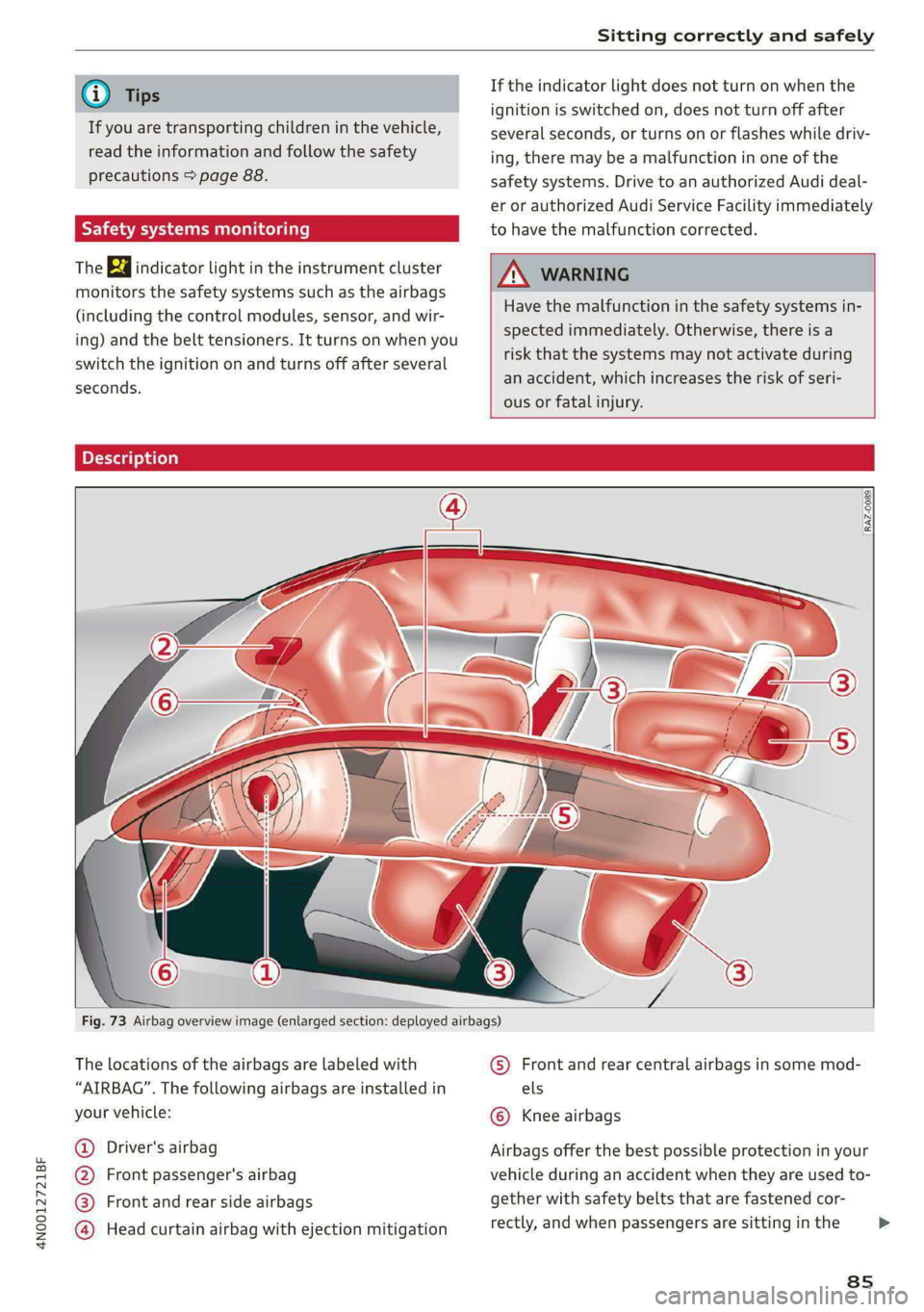
The locations of the airbags are labeled with
“AIRBAG”. The following airbags are installed in
your vehicle:
@ Driver's airbag
@ Front passenger's airbag
@® Front and rear side airbags
@ Head curtain airbag with ejection mitigation
Fig. 73 Airbag overview image (enlarged section: deployed airbags)
© Front and rear central airbags in some mod-
els
© Knee airbags
Airbags offer the best possible protection in your
vehicle during an accident when they are used to-
gether with safety belts that are fastened cor-
rectly, and when passengers are sitting in the
8s
Page 89 of 362
4N0012721BF
Sitting correctly and safely
these can protect the front passengers during
an accident
— Passenger occupant detection sensor in the
front
passenger's seat: this detects if the front
passenger's seat is occupied (for example, by a
person or a small child in a child safety seat)
— Seat position sensors on the front seats: these
determine the distance between the seat and
the steering wheel or instrument panel
— Sensors in the front seat belt latch: these de-
tect if the safety belts are fastened
— PASSENGER AIR BAG OFF 8; ON @ indi-
cator light in the headliner:this indicates if the
front passenger's airbag is activated or deacti-
vated
-Ba indicator light in the instrument cluster:
this monitors the function of the Advanced Air-
bag System components to ensure they are
functioning correctly
How the components function together
The passenger occupant detection sensor in the
front passenger's seat detects if the front pas-
senger's seat is occupied. The passenger occu-
pant detection sensor measures the electrical ca-
pacity on the front passenger’s seat. The pas-
senger's airbag is activated or deactivated de-
pending on the electrical capacity that is meas-
ured.
The passenger's airbag is activated if:
— The electrical capacity is higher than the
threshold stored in the control module
— The electrical capacity is the same as or greater
than the electrical capacity of a typical adult
The passenger's airbag is deactivated if:
— The electrical capacity is lower than the thresh-
old stored in the control module
— The electrical capacity is the same as or less
than the electrical capacity of a typical one-
year-old child in a child safety seat that has
been used for certification in accordance with
FMVSS 208
If the front passenger's airbag is activated, the
PASSENGER AIR BAG ON @ indicator light
will turn on. If the front passenger's airbag is de-
activated, the PASSENGER AIR BAG OFF #;
indicator light will turn on.
The deployment force of the front airbags adapts
based on whether or not the safety belt is used
and the distance between the seat and the steer-
ing wheel/instrument panel. For example, if a
person is too close to the front airbag, the front
airbag will deploy with less force to help reduce
the risk of injury.
Meaning of PASSENGER AIR BAG OFF 3%; ON
® indicator light
When the ignition is switched on, the system de-
tects whether the front passenger's seat is occu-
pied. PASSENGER AIR BAG OFF #; ON @
will turn on for several seconds during this proc-
ess. Then it will indicate whether the front pas-
senger's airbag is activated or deactivated.
— PASSENGER AIR BAG OFF ®;: the front
passenger's airbag is deactivated and will not
deploy in the event of an accident.
— PASSENGER AIR BAG ON ®: the front pas-
senger's airbag is activated and could deploy in
the event of an accident.
If a change to the occupancy status of the front
passenger's seat is detected
PASSENGER AIR BAG OFF , ON @ will
flash for several seconds and will then display the
status of the front passenger's airbag.
Always make sure the indicator light corresponds
to the occupancy of the front passenger's seat.
— An adult or individual of similar size in the
front passenger's seat: the front passenger's
airbag must be activated, therefore
PASSENGER AIR BAG ON @ must remain
turned on.
— An individual of smaller size (for example, an
adolescent or small adult) in the front pas-
senger's seat: the front passenger's airbag
must be activated, so
PASSENGER AIR BAG ON @ must stay on.
— Child in a child safety seat on the front pas-
senger's seat: the front passenger's airbag
must be deactivated, so
PASSENGER AIR BAG OFF #; must stay on. >
87
Page 112 of 362

Driving
— D (Drive)
Selecting a gear
Requirement: the ignition must be switched on.
— Bring the vehicle to a full stop and press the
brake pedal.
— Press the release button @ on the selector lev-
er.
—To select the nearest gear, move the selector
lever forward or back until you feel the first
pressure point.
—To skip a gear (for example, move from “D” to
“R”), move the selector lever past the pressure
point in the desired direction.
— The label next to the selector lever for the se-
lected gear will light up.
“N” (Neutral) gear
In the “N” gear, power is not transmitted to the
driving wheels. Use the “N” gear in a car wash
(with conveyor belts), for example.
If you unintentionally select “N” while driving
(faster than 1 mph (2 km/h)), you can also shift
back to “D” without pressing the brake pedal.
For safety reasons, the vehicle cannot be locked
when the transmission is in the "N” gear.
“Pp” (Park) gear
Requirement: the ignition must be switched on.
The vehicle is secured from rolling away by the
parking lock when in the “P” gear.
— Bring the vehicle to a full stop and press the
brake pedal.
— Press the “P” button (2) on the selector lever.
— The “P” next to the selector lever will light up.
“P” engages automatically if you switch the en-
gine off while the “D” or “R” gear is selected. If
you switch the engine off in “N”, “P” will engage
automatically after approximately 30 minutes.
If you want to switch to another gear from “P”,
the engine must be running.
If you cannot shift out of “P”, for example be-
cause the vehicle has no power, you may need to
use the emergency release for the parking lock
=> page 112.
110
Selecting the driving program
Various driving programs can be selected when in
the “D” gear. The programs influence when the
transmission shifts and how the accelerator ped-
al responds.
The selected driving program is displayed in the
instrument cluster.
—D (Drive): normal driving mode
—S (Sport): sporty driving mode
If you select the Dynamic mode in Audi drive se-
lect*, the “S” driving program will be activated.
When the ignition is switched off, the driving pro-
gram may be reset to “D”.
To switch between the current driving program
and “S”, push the selector lever toward the rear.
Plug-in hybrid drive system: Not all plug-in hy-
brid modes are available in the “S” driving pro-
gram. The driving program or plug-in hybrid
mode will be automatically adjusted if it is not
compatible with an operation.
ZA\ WARNING
— Before you start driving, check if the label
for the desired selector lever position next
to the selector lever is lit up.
— Secure the vehicle against rolling before ex:
iting the vehicle > page 108.
— Power is still transmitted to the wheels
when the engine is running at idle. To pre-
vent the vehicle from “creeping”, you must
keep your foot on the brake in all selector
lever positions (except "P" and "N") when
the engine is running.
— To reduce the risk of an accident, do not
press the accelerator pedal when changing
gears if the vehicle is stationary and the en-
gine is running.
— Never select the “R" or "P” gears while driv-
ing. Doing so could cause an accident.
— The vehicle can roll even if the ignition is
switched off.
G) Tips
If you shift between “D” and “R” within one
second, you do not need to press the brake >
Page 118 of 362

Driving
— Green: recuperation
@ Tips
The energy flow display can also be displayed
in the instrument cluster under the vehicle
functions tab.
e monitor
Applies to: vehicles with plug-in hybrid drive
RAX-0139 Doe cc ae ar 1)
Ire
Pl) 18 5)
Fig. 98 Range monitor
You can display the projected range of the vehi-
cle.
» Applies to: MMI: Select on the home screen:
VEHICLE > Vehicle data.
> You may need to scroll down to the Range
monitor display.
@ Range potential (value)
@ Range potential (graphic)
@®) Total range (graphic)
@ Total range (value)
© Electric range (value)
Range potential: the value indicates an addition-
al amount of distance that can be gained by turn-
ing off certain convenience functions. The con-
venience functions with high energy usage are
listed on the display.
@) Tips
— The range can also be displayed in the in-
strument cluster in the on-board computer.
— The range that is indicated is based on the
previous and predicted consumption values.
For example, these can be affected if con-
venience functions are turned on.
116
Statistics
Applies to: vehicles with plug-in hybrid drive
You can display statistics about the trips traveled
using electric power and those using fuel. The
values are taken from the short-term memory
and long-term memory of the on-board comput-
er.
> Select on the home screen: VEHICLE > Vehicle
data.
> If necessary, scroll to the e-tron short-term
statistics or e-tron long-term statistics.
Vehicle sound
Applies to: vehicles with plug-in hybrid drive
The electric drive system generates considerably
less noise than a combustion engine. An artificial
engine sound is generated when driving electri-
cally so that the vehicle can be heard from the
outside when driving. The vehicle sound auto-
matically fades out at higher speeds when the
sounds from the tires and wind start increasing.
ZA\ WARNING
Other road users may not be able to defini-
tively hear electric vehicles when they are
driving. This increases the risk of an accident
particularly when driving in areas with little
traffic, when maneuvering, or when driving in
reverse.
aaitt lala MV dieolalaat ile] Umea late lig
driving
Your driving style greatly influences the amount
of fuel and energy consumed, the environmental
impact, and the wear on the engine, brakes, and
tires. Note the following information for efficient
and environmentally-conscious driving:
— Turn off electrical equipment that is not need-
ed, for example seat heating*.
— Anticipate upcoming traffic situations while
driving to avoid unnecessary acceleration and
braking.
— Avoid driving at high speeds.
Page 119 of 362

4N0012721BF
Driving
— Avoid adding extra weight to the vehicle if pos-
sible, for example by not leaving roof racks or
bike racks installed when they are not needed.
— Make sure the tire pressure is correct.
— Have maintenance performed regularly on the
vehicle.
— Do not let the engine run while the vehicle
parked.
— Do not drive with winter tires during the summ-
er.
— Use the Start/Stop system.
— Utilize the engine braking effect.
— Avoid driving short distances when possible.
@) Tips
The amount of noise produced by the vehicle
can increase significantly when driving with a
sporty style. Show respect to others around
you and the environment with the way you op-
erate your vehicle, especially at night.
eh Me lele 4
Your vehicle is equipped with an intelligent ener-
gy management system for distributing electrici-
ty. This significantly improves the starting ability
and increases the vehicle battery life.
@ Tips
— If you drive short distances frequently, the
vehicle battery may not charge enough
while driving. As a result, convenience func-
tions for electrical equipment may be tem-
porarily unavailable.
— The vehicle battery will gradually drain if
the vehicle is not driven for long periods of
time, or if electrical equipment is used
when the engine is not running. To ensure
that the vehicle can still be started, the
electrical equipment will be limited or
switched off.
Messages
B Drive system: malfunction! Safely stop vehi-
cle
There is a malfunction in the drive system. The
brake booster and the power steering may stop
working. Stop the vehicle immediately or as soon
as possible and do not continue driving. Secure
the vehicle against rolling before exiting the vehi-
cle > page 108. Have the problem corrected by
an authorized Audi dealer or authorized Audi
Service Facility.
B Drive system: malfunction! Please contact
Service
There is a malfunction in the drive system. Drive
slowly to an authorized Audi dealer or authorized
Audi Service Facility to have the malfunction cor-
rected.
B Vehicle sound: malfunction! Pedestrians
cannot hear vehicle. Please contact Service
There is a malfunction in the vehicle sound func-
tion. Drive extremely carefully, since other road
users may not be able to hear your electric vehi-
cle. Drive to an authorized Audi dealer or author-
ized Audi Service Facility immediately to have the
malfunction corrected.
Other indicator lights
rg turns on, vehicle performance is limited,
for example because the combustion engine may
not be available. Also note the additional instruc-
tions in the instrument cluster.
Start/Stop system
Applies to: vehicles with Start/Stop system
The Start/Stop system can help increase fuel
economy and reduce CO2 emissions.
In Start/Stop mode, the engine shuts off auto-
matically when stopped, for example at a traffic
light. If certain conditions are met, the engine
may stop before the vehicle has come to a com-
plete stop. If you press the accelerator pedal
when this happens, the engine will start and driv-
ing power will be transmitted.
The ignition and important assist systems such
as the brake booster will remain available during
the Stop phase. The engine will restart automati-
cally when needed.
117
>
Page 120 of 362

Driving
The Start/Stop system is automatically activated
once
the ignition is switched on.
Switching the Start/Stop system off and on
The & button is located above the selector lever
in the center console. The LED in the button turns
on when the function is switched off.
> Press & to switch the system on or off.
If you switch the system off during a Stop phase,
the engine will start again automatically.
Basic requirements
— The driver's door and hood must be closed.
—"P","N", or "D" must be engaged.
— The steering wheel must not be turned far in ei-
ther direction.
— The vehicle must have driven faster than 2 mph
(3 km/h) since the last time it stopped.
— The vehicle is not in trailer mode.
® Note
Always switch the Start/Stop system off when
driving through water > page 118.
G) Tips
— Depending on the driving situation, the en-
gine may already stop when coasting before
the vehicle has come to a complete stop.
— If you select the "D" position after shifting
into reverse, the vehicle must be driven fast-
er than 6 mph (10 km/h) in order for the
Start/Stop system to become active again.
This makes it possible to maneuver without
stopping the engine.
Stopping and starting the engine
Applies to: vehicles with Start/Stop system
> Press and hold the brake pedal until the vehicle
has stopped. The @ indicator light appears in
the instrument cluster once the engine stops
automatically.
> The engine starts again when you remove your
foot from the brake pedal. The indicator light
turns off.
If the parking brake is set, the engine will only
start again when the accelerator pedal is pressed.
118
G) Tips
— Press the brake pedal during a Stop phase
to keep the vehicle from rolling.
— The ignition will turn off if you press the
START ENGINE STOP] button during a Stop
phase.
— If you leave the vehicle briefly during a Stop
phase and then enter again, the driver's
door must be closed and the safety belt
must be fastened in order for the engine to
be able to restart.
— You can control if the engine will stop or not
by reducing or increasing the amount of
force you use to press the brake pedal. For
example, if you only lightly press on the
brake pedal in stop-and-go traffic or when
turning, the engine will not switch off when
the vehicle is stationary. If you press the
brake pedal harder, the engine will switch
off.
Starting and stopping the engine automat-
rely
Applies to: vehicles with Start/Stop system
The system checks if certain conditions are met
before and during the Stop phase, and deter-
mines if the engine stops and how long it re-
mains stopped. For example, if power usage is
high, the engine will not be stopped. Along with
other conditions, the following factors influence
the automatic engine start or stop:
— Environmental conditions (slopes, inclines, ele-
vation, temperature)
— Battery (charge status, temperature, power us-
age)
— Engine temperature
— Assist systems
— Driving behavior
Depending on the engine, the indicator light
may appear if the engine is not stopped.
Applies to: vehicles with Start/Stop system
Drive system: please start the vehicle manually >
Page 136 of 362
High-voltage system
G) Tips
Applies to: Audi charging systems
— For an uninterrupted charging process, we
recommend only charging using sockets
that are connected to a separately protected
circuit.
— It is recommended to use Audi charging sys-
tems in the wall mount clip* during opera-
tion. If this is not possible, always position
Audi charging systems ona secure surface
during the charging process > A\.
—To reduce the risk of overheating during op-
eration, do not place Audi charging systems
in direct sunlight for long periods of time. If
the control unit is overheated, the charging
Process is automatically paused until the
temperature has lowered back within the
normal range.
Charging
Applies to: vehicles with plug-in hybrid drive
RAZ-0834
ss
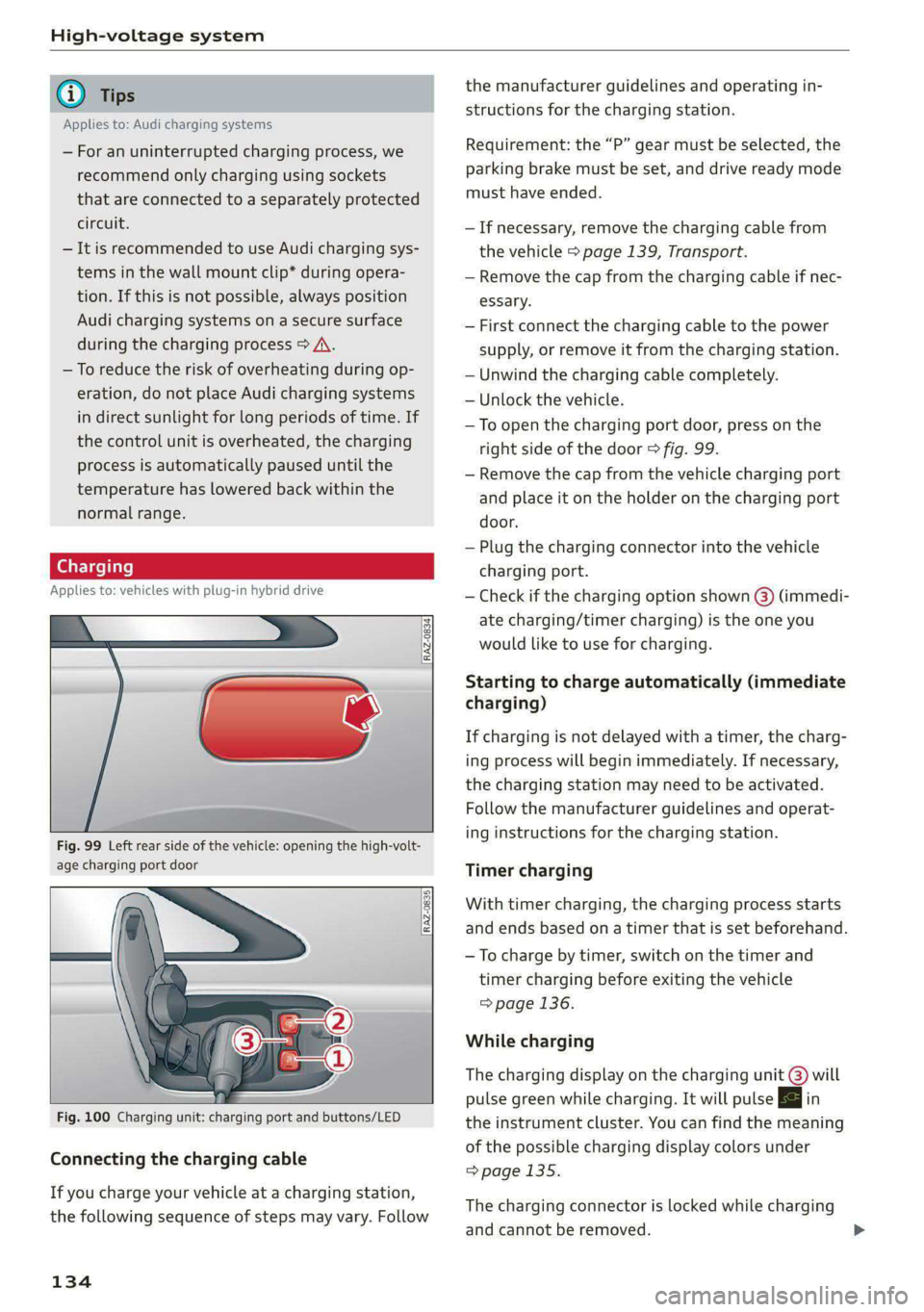
Fig. 99 Left rear side of the vehicle: opening the high-volt-
age charging port door
RAZ-0835
Fig. 100 Charging unit: charging port and buttons/LED
Connecting the charging cable
If you charge your vehicle at a charging station,
the following sequence of steps may vary. Follow
134
the manufacturer guidelines and operating in-
structions for the charging station.
Requirement: the “P” gear must be selected, the
parking brake must be set, and drive ready mode
must have ended.
—If necessary, remove the charging cable from
the vehicle > page 139, Transport.
— Remove the cap from the charging cable if nec-
essary.
— First connect the charging cable to the power
supply, or remove it from the charging station.
— Unwind the charging cable completely.
— Unlock the vehicle.
—To open the charging port door, press on the
right
side of the door > fig. 99.
— Remove the cap from the vehicle charging port
and place it on the holder on the charging port
door.
— Plug the charging connector into the vehicle
charging port.
— Check if the charging option shown @) (immedi-
ate charging/timer charging) is the one you
would like to use for charging.
Starting to charge automatically (immediate
charging)
If charging is not delayed with a timer, the charg-
ing process will begin immediately. If necessary,
the charging station may need to be activated.
Follow the manufacturer guidelines and operat-
ing instructions for the charging station.
Timer charging
With timer charging, the charging process starts
and ends based on a timer that is set beforehand.
— To charge by timer, switch on the timer and
timer charging before exiting the vehicle
=> page 136.
While charging
The charging display on the charging unit @) will
pulse green while charging. It will pulse |} in
the instrument cluster. You can find the meaning
of the possible charging display colors under
> page 135.
The charging connector is locked while charging
and cannot be removed.