instrument cluster AUDI A8 2021 Workshop Manual
[x] Cancel search | Manufacturer: AUDI, Model Year: 2021, Model line: A8, Model: AUDI A8 2021Pages: 362, PDF Size: 99.29 MB
Page 287 of 362

4N0012721BF
Checking and Filling
should only be performed by an authorized Audi
dealer or authorized Audi Service Facility > A\.
Multiple batteries with different technologies
may be installed in your vehicle:
— Vehicle battery (for example, for starting the
engine, basic power supply) > page 285, 12
Volt vehicle battery or > page 286, Other bat-
tery types
— Auxiliary battery (for example, for recuperation
or optional equipment) > page 286, Other bat-
tery types
— Plug-in hybrid drive: High-voltage battery (for
example, for electric driving) > page 131, In-
troduction.
Not running the vehicle for long periods of
time
The battery will gradually drain if the vehicle
does not run for long periods of time. To ensure
that the vehicle can still be started, the electrical
equipment will be limited or switched off. Some
convenience functions, such as interior lighting
or power seat adjustment, may not be available
under certain circumstances. The convenience
functions will be available again when you start
the
engine.
Even when electrical equipment is switched off,
the equipment can still drain the battery if the
vehicle is not driven for long periods of time.
Deep draining results in a chemical reaction that
destroys the inside of the battery. The battery
must be charged every month to prevent this
= page 286. Contact an authorized Audi dealer or
authorized Audi Service Facility for more infor-
mation.
Winter operation
Cold weather places an especially high load on
the 12 Volt vehicle battery. Have the battery
checked by an authorized Audi dealer or author-
ized Audi Service Facility before cold weather be-
gins.
this, all work must be performed only by an
authorized Audi dealer or authorized Audi
Service Facility.
— Never connect a charging cable or jump
start cable directly to the 12 Volt vehicle
battery. Only use the connections in the en-
gine compartment > page 286.
Z\ WARNING
California Proposition 65 Warning:
— Battery posts, terminals and related acces-
sories contain lead and lead compounds,
chemicals known to the State of California
to cause cancer and reproductive harms.
Wash hands after handling.
@) Note
— If the vehicle will be parked for long periods
of time, protect the battery against the cold
so that it will not be destroyed by “freezing”
=> page 286, Charging the 12 Volt vehicle
battery.
— There are electrical components under the
cargo floor behind a trim panel that warm
up during operation. To reduce the risk of
the components overheating, do not store
objects such as blankets under the cargo
floor. If the components overheat, they will
switch off temporarily. This will be indicated
by a message that will be displayed in the
instrument cluster until the temperature re-
turns to normal.
12 Volt vehicle battery
Explanation of warnings:
Always wear eye protection.
Battery acid is highly corrosive. Always
wear protective gloves and eye protection.
Fire, sparks, open flame, and smoking are
forbidden.
Z\ WARNING
— All work on the battery or electrical system
in your vehicle can result in injuries, chemi-
cal burns, accidents, or burns. Because of
A highly explosive mixture of gases can
form when charging batteries. >
@
>
©
285
Page 289 of 362
4N0012721BF
Checking and Filling
> Close the cover on the positive terminal.
> Close the hood > page 276.
ZA WARNING
— Never connect a charging cable or jump
start cable directly to the 12 Volt vehicle
battery. Only use the connections in the en-
gine compartment > page 286.
— A highly explosive mixture of gases can form
when charging batteries. Only charge the
battery in well-ventilated areas.
— A drained battery can freeze at tempera-
tures around 32 °F (0 °C). Do not charge or
use a frozen or thawed battery. If ice forms,
the battery housing can crack and battery
electrolyte can leak out, which increases the
risk of an explosion and chemical burns.
Contact an authorized Audi dealer or author-
ized Audi Service Facility for more informa-
tion.
— Do not connect or disconnect the charging
cable while charging because this increases
the risk of an explosion.
@) Tips
Read all of the manufacturer's instructions
for the charger before charging the battery.
Windshield washer
system
B4M-0135)
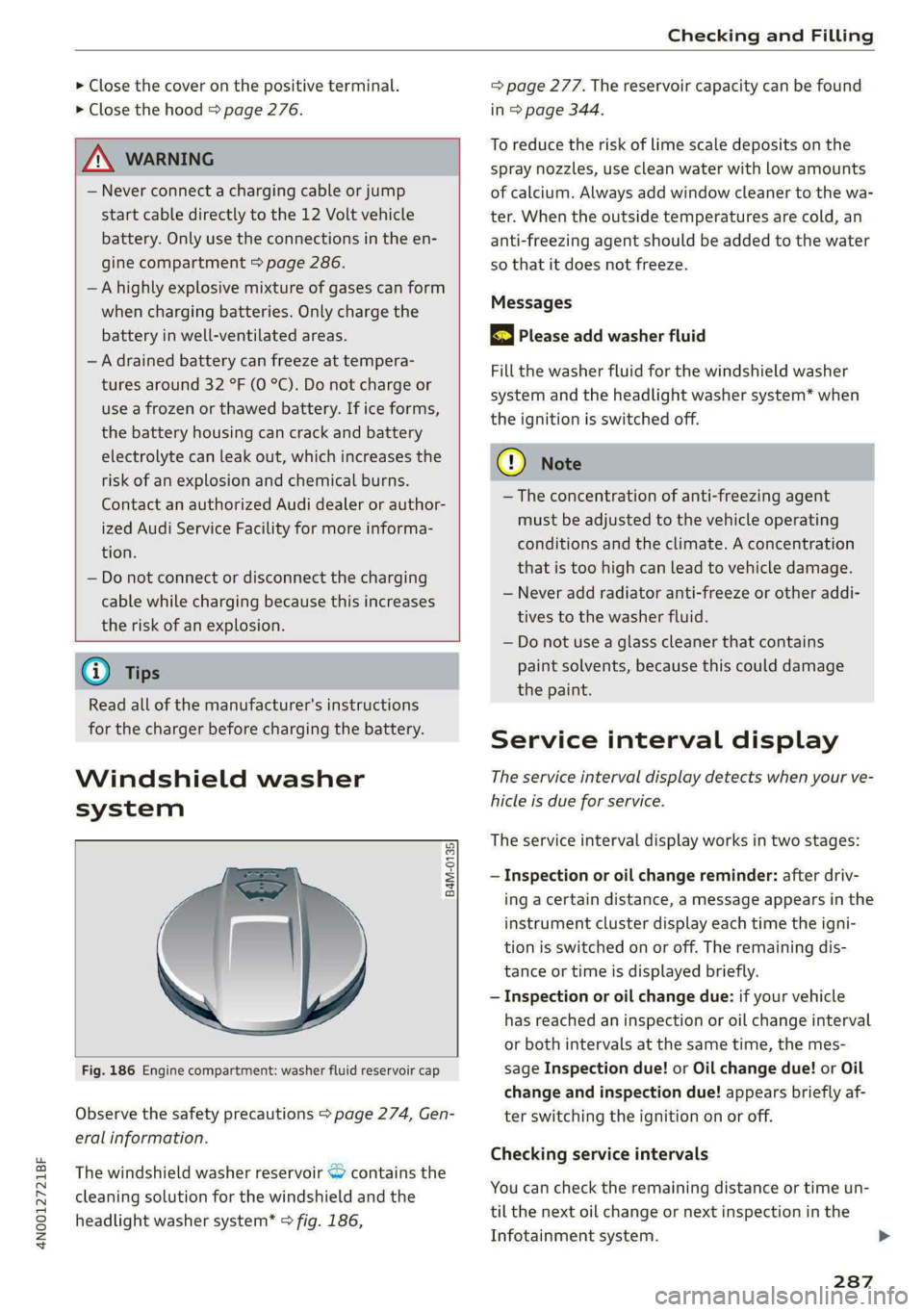
Fig. 186 Engine compartment: washer fluid reservoir cap
Observe the safety precautions > page 274, Gen-
eral information.
The windshield washer reservoir <> contains the
cleaning solution for the windshield and the
headlight washer system* > fig. 186,
= page 277. The reservoir capacity can be found
in > page 344.
To reduce the risk of lime scale deposits on the
spray nozzles, use clean water with low amounts
of calcium. Always add window cleaner to the wa-
ter. When the outside temperatures are cold, an
anti-freezing agent should be added to the water
so that it does not freeze.
Messages
|} Please add washer fluid
Fill the washer fluid for the windshield washer
system and the headlight washer system* when
the ignition is switched off.
CG) Note
—The concentration of anti-freezing agent
must be adjusted to the vehicle operating
conditions and the climate. A concentration
that is too high can lead to vehicle damage.
— Never add radiator anti-freeze or other addi-
tives to the washer fluid.
— Do not use a glass cleaner that contains
paint solvents, because this could damage
the paint.
Service interval display
The service interval display detects when your ve-
hicle is due for service.
The service interval display works in two stages:
— Inspection or oil change reminder: after driv-
ing a certain distance, a message appears in the
instrument cluster display each time the igni-
tion is switched on or off. The remaining dis-
tance or time is displayed briefly.
— Inspection or oil change due: if your vehicle
has reached an inspection or oil change interval
or both intervals at the same time, the mes-
sage Inspection due! or Oil change due! or Oil
change and inspection due! appears briefly af-
ter switching the ignition on or off.
Checking service intervals
You can check the remaining distance or time un-
til the next oil change or next inspection in the
Infotainment system.
287
Page 306 of 362

Wheels
be five 150 lbs. passengers in
your vehicle, the amount of
available cargo and luggage
load capacity is 650 lbs.
(1400-750 (5 x 150) = 650
lbs.)
5. Determine the combined
weight of luggage and cargo
being loaded on the vehicle.
That weight may not safely ex-
ceed the available cargo and
luggage load capacity calculat-
ed in Step 4.
6. If your vehicle will be towing a
trailer, load from your trailer
will be transferred to your vehi-
cle. Consult this manual to de-
termine how this reduces the
available cargo and luggage
load capacity of your vehicle.
>Check the tire sidewall
(=> page 290, fig. 187) to deter-
mine the designated load rating
for a specific tire.
Wheel bolts and rims
Wheel bolts
Wheel bolts must be clean and loosen/tighten
easily.
Rims
Rims with a bolted rim ring* or with bolted wheel
covers* consist of multiple pieces. These compo-
nents were bolted together using special bolts
and a special procedure. You must not repair or
disassemble them > A\.
304
ZA WARNING
Wheel bolts that are tightened or repaired in-
correctly can become loose and result in loss
of vehicle control, which increases the risk of
an accident. For the correct tightening specifi-
cation, see > page 323, Finishing.
— Always keep the wheel bolts and the threads
in the wheel hub clean and free of grease.
— Only use wheel bolts that fit the rim.
— Always have damaged rims repaired by an
authorized Audi dealer or authorized Audi
Service Facility. Never repair or disassemble
rims yourself, because this increases the risk
of an accident.
Loose wheel warning
Applies to: vehicles with loose wheel warning
Within the limits of the system, the loose wheel
warning in the instrument cluster warns you if
one or more wheels are loose.
Using the ABS sensors, the loose wheel warning
system compares the vibration characteristics of
the individual tires. If one or more wheels are
loose, it will be indicated in the instrument clus-
ter display with the fi indicator light and a mes-
sage. If only one wheel is affected, the location
of that wheel will be indicated.
Messages
fi Wheel bolts loose. Please safely stop the ve-
hicle and check all wheel bolts!
Loose wheel warning for at least one wheel > A\.
Check the wheel bolts on all wheels with the
wheel wrench (vehicle tool kit). Have the tighten-
ing specification checked as soon as possible with
a torque wrench. Drive carefully until then. For
the correct tightening specification, see
=> page 323, Finishing.
fl Wheel assessment active. Please continue
driving carefully
After this message appears and you have checked
the wheel bolts, the assessment phase begins
when the vehicle is in motion. This may take sev-
eral minutes.
Page 310 of 362

Wheels
If the tire pressure monitoring indicator
appears
Applies to: vehicles with Tire Pressure Monitoring System in-
dicator
The tire pressure indicator in the instrument
cluster informs you if the tire pressure is too low
or if there is a system malfunction.
Using the ABS sensors, the tire pressure monitor-
ing system compares the tire tread circumference
and vibration characteristics of the individual
tires. If the pressure changes in one or more
tires, this is indicated in the instrument cluster
display with an indicator light (J and a message.
If only one tire is affected, the location of that
tire will be indicated.
The tire pressures must be stored again each
time you change the pressures (switching be-
tween partial and full load pressure) or after
changing or replacing a tire on your vehicle
= page 308. The tire pressure monitoring system
only monitors the tire pressure you have stored.
Refer to the tire pressure label for the recom-
mended tire pressure for your vehicle
=> page 299, fig. 190.
Tire tread circumference and vibration character-
istics can change and cause a tire pressure warn-
ing if:
— The tire pressure in one or more tires is too low
— The tires have structural damage
— The tire was replaced or the tire pressure was
changed and it was not stored > page 308
— Tires that are only partially used are replaced
with new tires
Indicator lights
If the @ indicator light turns on, there is a loss
of pressure in at least one tire .> A\ Check the
tires and replace or repair if necessary. Check and
correct
the pressures of all four tires and store
the pressure again > page 308.
ia Tire pressure: malfunction! See owner's
manual
if io appears after switching the ignition on or
while driving and the @ indicator light in the in-
strument cluster blinks for approximately one
308
minute and then stays on, there is system mal-
function. Try to store the correct tire pressures
= page 308. In some cases, you must drive for
several minutes after storing the pressures until
the indicator light turns off. If the indicator light
does turn off or turns on again after a short peri-
od of time, drive to an authorized Audi dealer or
authorized Audi Service Facility immediately to
have the malfunction corrected.
Z\ WARNING
— If the tire pressure indicator appears in the
display, reduce your speed immediately and
avoid any hard steering or braking maneu-
vers. Stop as soon as possible and check the
tires and their pressure.
— The driver is responsible for maintaining the
correct tire pressure. You must check the
tire pressure regularly.
— Under certain conditions (such as a sporty
driving style, winter conditions, or unpaved
roads), the tire pressure monitoring system
indicator may be delayed.
G) Tips
—The tire pressure monitoring system can al-
so stop working when there is an ESC mal-
function.
— Using snow chains may result in a system
malfunction.
—The tire pressure monitoring system in your
Audi was calibrated with “Audi Original
Tires” > page 296. Audi recommends using
these tires.
Storing tire pressures
Applies to: vehicles with Tire Pressure Monitoring System in-
dicator
If the tire pressure changes or a tire is replaced,
it must be confirmed in the MMI.
> Before storing the tire pressures, make sure the
tire pressures in all four tires meet the speci-
fied values and are adapted to the load
> page 299.
> Switch the ignition on.
>» Applies to MMI: Select on the home screen: VE-
HICLE > Settings & Service > Tire pressure >
Page 315 of 362
4N0012721BF
Care and cleaning
Component Situation Solution
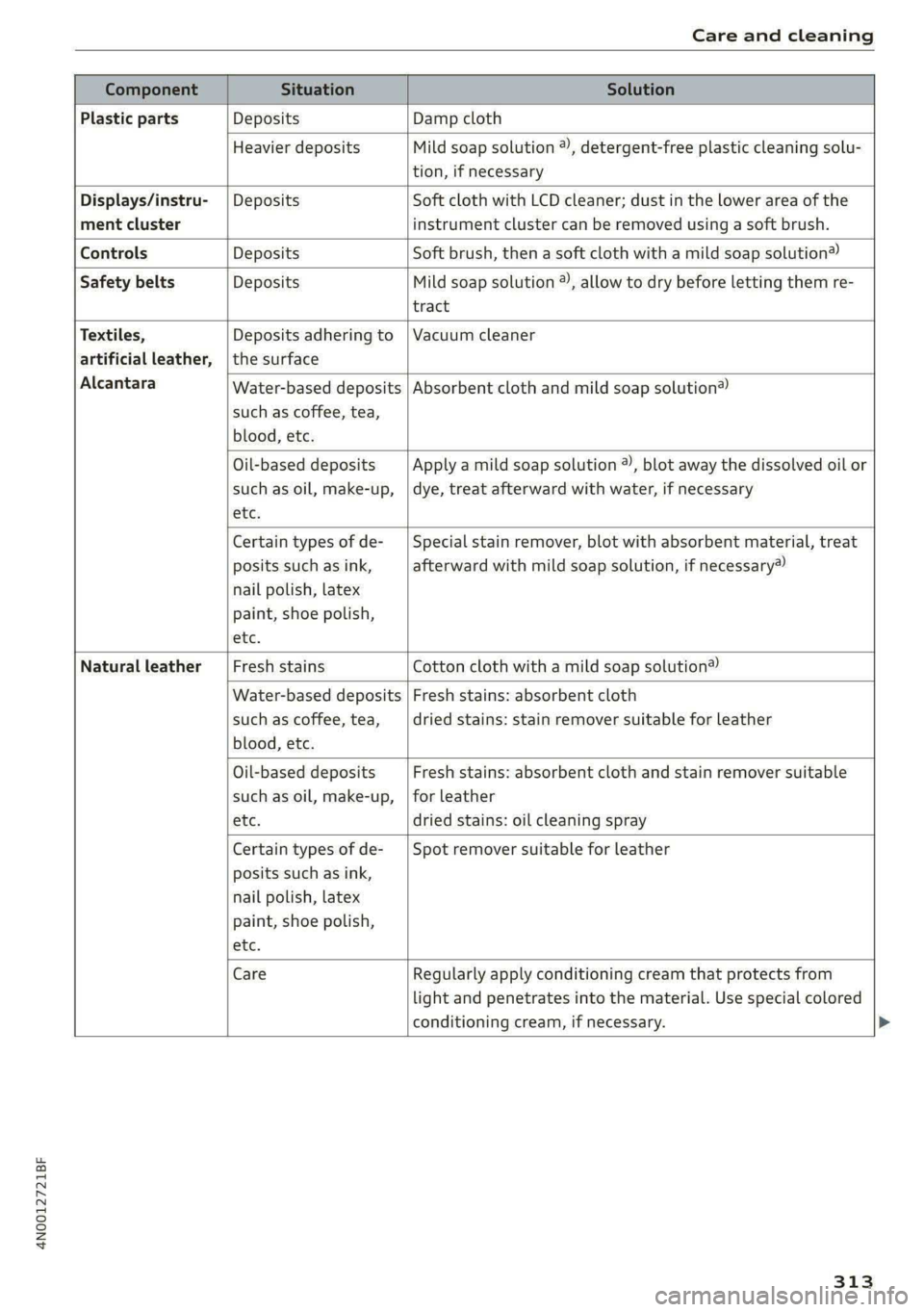
Plastic parts Deposits Damp cloth
Heavier deposits Mild soap solution ®), detergent-free plastic cleaning solu-
tion, if necessary
Displays/instru- | Deposits Soft cloth with LCD cleaner; dust in the lower area of the
ment cluster instrument cluster can be removed using a soft brush.
Controls Deposits Soft brush, then a soft cloth with a mild soap solution®)
Safety belts Deposits Mild soap solution ), allow to dry before letting them re-
tract
Textiles, Deposits adhering to | Vacuum cleaner
artificial leather, |the surface
Alcantara Water-based deposits
such as coffee, tea,
blood, etc.
Absorbent cloth and mild soap solution®
Oil-based deposits
such as oil, make-up,
etc.
Apply a mild soap solution ®), blot away the dissolved oil or
dye, treat afterward with water, if necessary
Certain types of de-
posits such as ink,
nail polish, latex
paint, shoe polish,
etc.
Special stain remover, blot with absorbent material, treat
afterward with mild soap solution, if necessary)
Natural leather Fresh stains Cotton cloth with a mild soap solution®
Water-based deposits
such as coffee, tea,
blood, etc.
Fresh stains: absorbent cloth
dried stains: stain remover suitable for leather
Oil-based deposits
such as oil, make-up,
etc.
Fresh stains: absorbent cloth and stain remover suitable
for leather
dried stains: oil cleaning spray
Certain types of de-
posits such as ink,
nail polish, latex
paint, shoe polish,
etc.
Spot remover suitable for leather
Care
Regularly apply conditioning cream that protects from
light and penetrates into the material. Use special colored
conditioning cream, if necessary.
313
Page 317 of 362
4N0012721BF
Care and cleaning
—To reduce the risk of damage, do not use
any rough powder or abrasive cleaning
products.
—To reduce the risk of damage, do not pol-
ish decorative decals that have a matte or
printed finish.
— Due to the risk of damage, do not use an
ice scraper to remove snow and ice on win-
dows with decorative decals on them.
— Displays and instrument cluster
— Make sure that the display and instrument
cluster are switched off and have cooled
down before cleaning. To switch off the
upper and lower display, select on the
MMI home screen: SETTINGS > Display &
brightness > MMI > Screen cleaning.
— Displays, the instrument cluster, and the
trim surrounding it must not be cleaned
with dry cleaning methods because they
could become scratched.
— Make sure no fluids enter the spaces be-
tween the instrument cluster and the
trim, because that could cause damage.
— Controls
— Make sure that no fluids enter the con-
trols, because this could cause damage.
— Safety belts
— Do not remove the safety belts to clean
them.
— Never clean safety belts or their compo-
nents with chemicals or with corrosive flu-
ids or solvents and never allow sharp ob-
jects to come into contact with the safety
belts. This could cause damage to the belt
webbing.
— If there is damage to the webbing, the
connections, the retractors, or the buck-
les, have them replaced by an authorized
Audi dealer or authorized Audi Service Fa-
cility.
— Textiles, artificial leather, and Alcantara
— Never treat artificial leather or Alcantara
with leather care products, solvents, floor
polish, shoe polish, spot remover, or simi-
lar products.
— Have a cleaning specialist remove stub-
born stains to reduce the risk of damage.
— Never use steam cleaners, brushes, hard
sponges, etc. when cleaning.
— Do not turn on the seat heating* to dry
the seat.
— Objects with sharp edges, such as zippers
or rivets on clothing or belts, can cause
damage to the surface.
— Open hook and loop fasteners, for exam-
ple on clothing, can damage seat covers.
Make sure hook and loop fasteners are
closed.
— Natural leather
— Never treat leather with solvents, floor
polish, shoe polish, spot remover or simi-
lar products.
— Objects with sharp edges, such as zippers
or rivets on clothing or belts, can cause
damage to the surface.
— Never use steam cleaners, brushes, hard
sponges, etc. when cleaning.
— Do not turn on the seat heating* to dry
the seat.
— To help prevent the leather from fading,
do not leave the vehicle in direct sunlight
for long periods of time. If leaving the ve-
hicle parked for long periods of time, you
should cover the leather to protect it from
direct sunlight.
— Refrigerator
— Do not try to speed up the defrosting
process by applying heat.
—To help prevent health risks or damage to
the refrigerator, do not use any abrasive
cleaners, solvents, wax, or strongly scent-
ed or aggressive cleaning products.
— Do not clean the refrigerator with rough
cleaning tools such as steel wool.
— Wall mount clip
— Do not us any abrasive cleaning products
or any that contain alcohol, because these
increase the risk of discoloration.
@) Tips
— Insects are easier to remove from paint that
has been freshly waxed.
— Regular waxing can prevent rust spots from
forming.
315
Page 332 of 362

Fuses and bulbs
Fuse assignment - left side of cockpit
RAZ-0202
Fig. 210 Left side of the cockpit: fuse panel with plastic
clip
Fig. 211 Left side of the luggage compartment: fuse panel
with plastic clip
2 | Engine components 10 | Volume control
3 | Engine components 11 | Light switch, switch panels
4 |Engine components 12 | Steering column electronics
5 | Brake light sensor 14 | MMI Infotainment system control module
6 | Engine components 15 |Steering column adjustment
7 |Engine components 16 | Steering wheel heating
8 | Engine components
9 | Engine components ae ft side of the luggage
10 | Oil pressure sensor, oil temperature sensor (eelar|PEINE Ee
11 | Engine components g
12 | Engine components
13 | Engine cooling
14 | Engine control module, fuel injectors
15 | Engine sensors
16 | Fuel pump
330
No. Equipment No. | Equipment
Climate control system, interior air sensor 1_| Thermal management
2 | Audi phone box 5 |Air suspension/suspension control
Climate control system, fragrance system, 6 |Automatic transmission control module
3 particulate matter sensor 7 |Right rear seat adjustment
4 |Head-up display 8 | Rear seat heating
S_ |Audi music interface, USB input 9 |
Left tail light
6 |Instrument panel 10 | Front belt tensioner on driver's side
7 | Steering column lock
8 |Upper/lower display
9 |Instrument cluster
Page 347 of 362

4N0012721BF
Index
A
A/C cooling mode............ eee eee eee
A/C system refrigerant oil...............
Accelerator pedal.............2--00000-
also refer to Accelerator pedal..........
ACCESSOFICS 2. eee
Active lane assist
refer to Lane departure warning.........
refer to Lane guidance................
Active SuSpenSiOt es ¢ « ccs so ewe ss eewe ss
Adaptive cruise assist................04.
Cleaning the sensors.............0 0005
Adaptive cruise control
Predictive control..............000005
Adaptive speed assist
refer to Adaptive cruise assist..........
Adjusting the air distribution............
Adjusting the brightness.................
Adjusting the sound.................005
Adjusting the temperature..............
Adjusting the vents.................05.
Adjusting the volume..............00-00-
Adjusting the volume (announcements) ... .
Adjusting the welcome sound............
Airbag system... 2... ee eee eee
Air suspension..............00 000-00 ee
Alarm system
refer to Anti-theft alarm system..........
Alignment pin (changing the wheel).......
All-weather lights...............-.00000.
Allseasontires...............00 eee eee
All wheel drive
refer to quattro... .... eee eee eee
Amazon Alexa integration
Media playback.................00005
QPerating « « ses so secs oo moms 9 wa & ¥ BRE
AMI
refer to Audi music interface...........
Android Auto
refer to Audi smartphone interface......
Anti-lock braking system............0065
Anti-Slip Regulation.................05.
Antietheftalarmr system siccs oe owes oc cna «
Anti-theft wheel bolts..................
Apple CarPlay
refer to Audi smartphone interface...... 261
Aspect ratio
NidGO verse < ¢ seven & 5 seaRE ze SeHER Fo Bee 255; 257
ASR
refer to Anti-Slip Regulation............ 129
Audi adaptive light...............-..000- 58
Audi connect
MEFEPTONCONNECE: « «esses oo wesc ow xem ¥ v0 222
AUGIGriVe’SelECt ios: « « suas > gemy 2 x seme gee 124
Audi e-tron compact charging system..... 140
Adjusting the charging power level...... 140
Changing or attaching the power cable... 145
SECUCINGls » 5 seme ¢ 9 same < a eR Eee EOE ne 145
Status and malfunction indicators....... 141
Audi musiciintertace sas ss iwes se gee ay oo 252
UGGS iexsy: a 2 wares & & gee & 2 eR Ee ER 253
Audi phone BOX eis 5 y omnes 5 3 eas «8 ews 211
Audi presense........ 0.00 e cee eee eee 178
MGSSAGES saws + & cmer 9 ¢ cemes 9 o ews 8 9 ee 182
Audi pre sense front.............eeeeeee 179
Audi side assist
refer to Side assist............-.00000. 182
Audi smartphone interface.............. 261
Legaliinformationi. . soe. s + scars se cesses ¥ 266
Audi virtual cockpit
refer to Instrument cluster.............. 12
AUTO
Automatic headlights.................. 58
Climate control system..............5- 101
Auto Lock (central locking) ............... 41
Automatic climate control system
refer to Climate control system......... 100
Automatic luggage compartment lid.... 49,50
Automatic transmission...............- 109
Parking lock emergency release......... 112
Automatic wipe/wash system............. 66
Auxiliary climate control................ 104
Average consumption.................-- 16
Average speed ..... 0... cece ccc eee renee 16
B
Bag hooks........ 0... eee eee eee eee 97
Band
refer to Frequency band............... 242
345
Page 349 of 362

4N0012721BF
Index
Cleaning carbon components........ 312, 314
Cleaning control « sisi + wee x x deere se mane 313
Cleaning decorative parts andtrim........ 312
Cleaning exhaust tail pipes.............. 312
Cleaning plastic parts.................. 313
Cleaning textiles..................000, 313
Climate control system..............00. 100
Climate control system controls in the rear
Child Safety \OCKicw: ¢ : nee 5 2 cones ¥ 2 owen gy 51
Closing
Automatic luggage compartment lid...... 49
Convenience Closingtos « a sss « sazene w © enuvee 53
HOOd .. 0... cece eee 276
Luggage compartment lid............... 49
Luggage compartment lid with foot motion . 50
Panoramic glass roof................... 53
Rear window sunshade...............-. 55
Sunshades(roof)' « seissies wo sense ow amnion oo oyeu 53
Sunshade (windows). ...........5250005 52
WINGOWS = say = : wees ss eam ¢ tees a ee 52
Closing aid (power closing doors).......... 41
Coasting .... 0.0.6.0 cece eee eee eee 114
Cockpit dimming..............0ee eee eee 63
Cockpit (overview) ......... 0. cee eee ee eee 6
ColoreOdetin. « a sas + « cnewere + rises w ¥ aveanee wo 343
COMBUSHONCNGING cscs: ss wees se ewes oe wa 114
Combustion engine startup.............. 112
Comfort auxiliary climate control......... 105
Comfort:entty © sees ¢ seems sv een cv ewe ve 125
Coming home/Leaving home
refer to Entry/exit lighting «cis. eecs es vs 61
Compact Spare tire = sexs sy sews « ¢ ees g x os 323
GOMmpartiietits's « : wowy = : mews 2 : eeees 2 2 ee 95
Compass inthe mirror............-...0-- 68
Compliance ........ 0... eee eee eee eee 341
Conference call...............-.-.2.20005 217
Configuration wizard.............0...00- 20
COMMC Cina +o auveara wo wivaens ao aweiie a awa oa ae 222
Data plans...... 2... eee eee eee ee 225
Data Privaey'ss: s & seis s ¢ aces s ences se mee 336
Emergency:¢alll. sscsscx 2 cane # een + waver « 227
Infotainment
Infotainment services. ............0005 223
Online roadside assistance............. 228
Vehicle control services............200- 224
Connected devices
Device overvieW......... 0.00. cece eee 265
Connections
referto Media............eeeeeee 250, 253
Consumer information...............005 338
Consumption
Reducing ; = ess < sex ¢ s ween e x see «ee 116
Consumption (uel) « « was « asses os say & se 16
Contacts
IMPOFtlNG sews 2 « wees 2 aoe 2 BORE & e Gow 219
Updating inthe MMI...............06 219
also refer to Directory................. 216
Convenience key..........-..0 eee eee eee 41
CONVENIENCE CLOSING iss & same a 2 Hace § x HOR 53
also refer to Vehicle key..............0. 45
Convenience opening and closing
SUMSHAGE cmwsces wa ceowems «x amernte mo meneME aw one 53
Windows or panoramic glass roof........ 53
Coolant temperature display.............. 14
Cooled glove compartment............... 95
Gooling MMO eke... cesses + wenn as aineins ow te 101
Cooling system
Adding
coolant ............00 ee eee eee 282
Checking the coolant level.............- 282
GOOLANE cessawe se sevens eo seo ow oumORI wa aeRO 281
Cornering lights: « » eaves x s wewe a e mews 2 s pew 58
Cross traffic assist (intersection assistant) .. 185
Cruise Control’ system: « s wm sv esex s oes 163
Cup
holders. ...... 00... cee eee eee eee 95
Current consumption..................0. 16
Curve tilting function.................0. 125
D
Data module
Serial number (IMEI) .................. 219
Data plans........ 0... eee eee eee eee 225
Data Privacy. ... 00... cee cece eee 336
DAES ccaseus so anzee 0 0 emecen 4m cnneeis a memati © sxetone 16
Setting............ 0.0.2 263
Daytime running lights.................. 58
Declaration of compliance............... 341
DEF (instrument cluster)...............0. 12
Demo mode
refer to Presentation mode............. 240
Destination onthe map................. 233
347
Page 352 of 362

Index
Glossary of tire and loading terminology... 292
Glove compartment ........0. 0c cece scene 97
Cooled... 62... eee eee 95
Valet parking’: + exes « ¥ cans & ¢ Sees + ¥ eevee 2 55
Gross Axle Weight Rating (GAWR)........ 344
Gross Vehicle Weight Rating (GVWR) ...... 344
GVWR
refer to Gross Vehicle Weight
Rating (GVWR) « sees © 2 sorves 2 0 ssamewe « a aes 344
H
Handset
refer to Rear Seat Remote............... 26
Hamdstreeis « snscsa: x x srawaws a x sams tv aceon wx one 210
HandsiFree Profiles. «ssw oo amin ss mmm © 210
Head-up display
TAGJUSTIAG scsi «6 sxsvews «a anexsen on amma 6 suszens wo 33
Adjusting the brightness................ 63
QOPErSLING’s + aces 3 = news 3 2 mom § ede + Ee 33
Headlight range control...............00. 58
Headlights
Cleaning’: « ¢ saws = ¢ sews oy eeew ee ees ene 311
Headlight range control................ 58
Washer system... .. 0... eee eee eee eee 66
Washer system (filling washer fluid) ..... 287
Head restraints
IACJUStIN Gans s cuecem @ 3 owen « 8 wee 6 oreHeR 79
Removing and installing................ 79
Heated rear Window occ. cee eee eee 102
Heated steering wheel.............00005 104
FO atingpasies ao svsise « & smwene © & anaes @ Hanae @ 0 6 100
HFP
refer to Hands Free Profile............. 209
High-voltage battery...............008- 131
Audi e-tron compact charging system.... 140
CharginiGee: « s eves = x sees + o eee eg 131, 134
Charging display on the vehicle......... 135
Charging equipment.................. 138
Charging methods.................... 131
Charging ports on the vehicle........... 131
Charging time.......... 2... eee eee 132
Connecting the charging cable.......... 134
Messages while driving................ 137
Not running for long periods of time..... 133
Opening the charging port door......... 134
Quick:eharging sec = 2 sews 2s eves vs wens we 131
350
Setting the timer’. « « esses v6 meee ve meee vs 136
Transporting charging equipment....... 139
High-voltage system............-...00-. 131
High beams
High beam assistant............00e00u 59
Highway lights..................-.0000s 58
Hill descent control.............0 2200s 122
Hill.holdiassisty. w:cesice x ecesese w = syersim oo avoir 109
Home
refer to Home address.............005 236
Home address............ 000-00 e eee 236
HomeLink
refer to Garage door opener............. 55
Home screen... 1... 0. cece eee eee eee ee 19
HOM... eee ete teens 6
Hotspot
refer to Wi-Fi...........0.- 00 eee eee 225
I
Ignition
Switching on and off...............0-. 107
Imbalance (wheels)..................-- 298
Immobilizer
refer to Electronic immobilizer........... 45
Indicator lights: : see: ss eens sy ores x copes se 7
Inspection interval............-.00--00. 287
Instrument cluster...............-0000-5 12
Adjusting the layout................0.. 13
Cleaning iwi: © swine ¥ o cwenie 2 weve wo 2 een « © 313
Engine code... .. 2... eee eee eee 267
FailUr@lve s = eee 2 x mown a = Beers ee ee x eee 12
Onsboard:computen « sss x x wari so swans oa 16
Operating......... 00. c cece eee ee eee 13
Service interval display...............- 287
Software information................. 267
Switching tabs.................0000005 13
SWitchintg CHE VIEW ass + ans 4 s ees xo Ra 13
Vehicle functions « « sivas < siren oo mewn 6 9 oe 16
Version information...............00- 267
Instrument illumination................. 63
Integrated assistance................0.. 20
Integrated Toll Module................. 161
Intelligent search
NaVvigatlotincs + weseuire + exaueas wo avassos i # eae 231
Interference-Causing Equipment Standard
(ICES) 2... eee eee 342