radio AUDI A8 2021 Owner's Manual
[x] Cancel search | Manufacturer: AUDI, Model Year: 2021, Model line: A8, Model: AUDI A8 2021Pages: 362, PDF Size: 99.29 MB
Page 251 of 362
4N0012721BF
Radio
Troubleshooting
The information that follows lists some trouble-
shooting options. They depend on the equip-
ment.
A station is no longer displayed in the sta- | Store the station as a preset in advance. Access the pre-
tion list. sets using the presets list > page 245.
Online radio: no playback from online ra-_ | Check if a data plan has been purchased for the applicable
dio. country and it is available > page 225.
249
Page 255 of 362
4N0012721BF
Media
Never leave mobile devices in the vehicle in
extremely high or low temperatures.
@ Tips
— Always follow the information found in
=> page 94.
— When you switch the ignition off, the USB
ports are still supplied with power until the
energy management intervenes.
— Do not use an additional adapter cable or
USB extension cable to connect mobile devi-
ces to the Audi music interface that already
have a cable or that must be connected with
a USB adapter cable (> page 252, fig. 172).
Using an additional adapter or US extension
cable may impair functionality.
— Functionality is not guaranteed for mobile
devices that do not conform to the USB 2.0
specification.
— USB hubs are not supported.
— Video playback through the Audi music in-
terface is not supported on Apple devices
and MTP devices (such as smartphones).
— iPod touch or iPhone malfunctions also af-
fect the operation of the MMI. Reset your
mobile device in these situations.
— Audi recommends updating the iPod touch
or iPhone software to the latest version. Re-
fer to your mobile device owner's manual
for more information.
— The USB adapter on the Audi music inter-
face will support iPod touch or iPhone devi-
ces from the 5th generation or newer with
the lightning connector.
—Aselection of supported devices can be
found in the database for tested mobile de-
vices at www.audi.com/mp3.
Playing media
The following sources can be selected depending
on the vehicle equipment:
— Amazon Alexa > page 251.
— USB device > page 252.
— DVD © page 251.
— External device: you can connect external devi-
ces via Bluetooth and use the Bluetooth audio
player > page 251, or you can connect an exter-
nal device directly to the Audi music interface
=> page 252.
Accessing media
Playing media files using the MMI
> Applies to: MMI: Select on the home screen:
MEDIA > Source > a source. Depending on the
connected device, the symbol for a source may
change. The device name may be displayed (for
example: myPhone).
> Select a track from the categories in the media
center > page 254.
Playing media files using the multifunction
steering wheel
Requirement: a media source must contain me-
dia files > page 253.
> Select the radio/media tab in the instrument
cluster.
> Turn the left thumbwheel to display the play-
list.
> To switch to a different source, press the
button.
> To select a media file or a source, turn and
press the left thumbwheel.
> To switch between radio and media, select in
the instrument cluster: the LE] button > Switch
to radio/Switch to media.
Playing media files using the Rear Seat
Remote
Applies to: vehicles with Rear Seat Remote
Requirement: the Rear Seat Remote must be con-
nected to the MMI > page 28.
> Applies to: Rear Seat Remote: Press MEDIA on
the home screen.
Operation of the available media functions with
the Rear Seat Remote is very similar to operation
in the MMI > page 255.
Z\ WARNING
Observe the safety precautions > page 26,
Rear Seat Remote. >
253
Page 256 of 362
— For safety reasons, the video image is only
displayed when the vehicle is stationary. On-
ly the sound from the video plays while driv-
ing.
— Applies to: multifunction steering wheel:
Depending on the selected function, opera-
tion through the MMI may be required.
Sone
fe
S| x Ea ee
Fig. 173 Upper display: media center
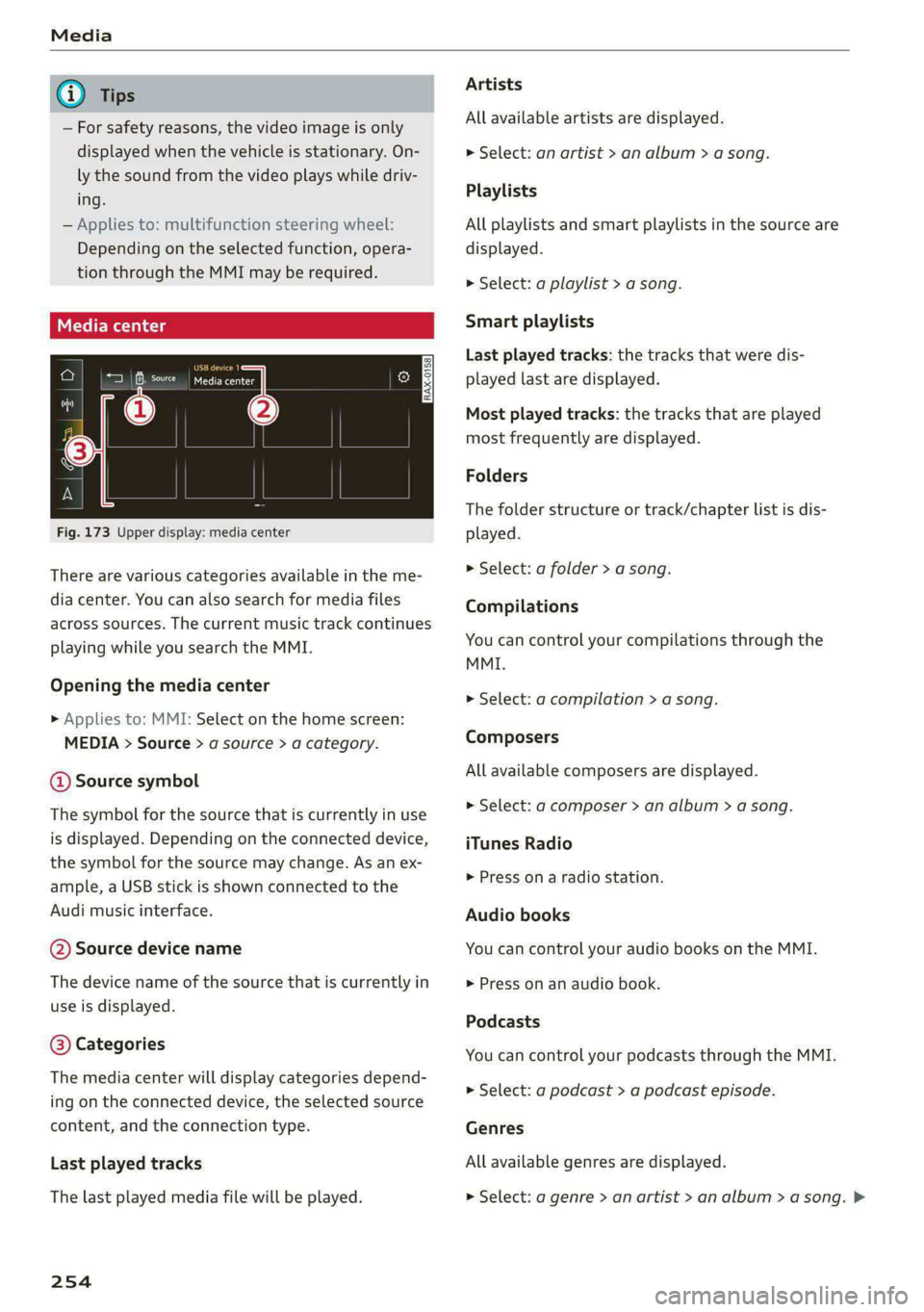
There are various categories available in the me-
dia center. You can also search for media files
across sources. The current music track continues
playing while you search the MMI.
Opening the media center
> Applies to: MMI: Select on the home screen:
MEDIA > Source > a source > a category.
@ Source symbol
The symbol for the source that is currently in use
is displayed. Depending on the connected device,
the symbol for the source may change. As an ex-
ample, a USB stick is shown connected to the
Audi music interface.
@ Source device name
The device name of the source that is currently in
use is displayed.
@ Categories
The media center will display categories depend-
ing on the connected device, the selected source
content, and the connection type.
Last played tracks
The last played media file will be played.
254
Artists
All available artists are displayed.
> Select: an artist > an album > a song.
Playlists
All playlists and smart playlists in the source are
displayed.
> Select: a playlist > a song.
Smart playlists
Last played tracks: the tracks that were dis-
played last are displayed.
Most played tracks: the tracks that are played
most frequently are displayed.
Folders
The folder structure or track/chapter list is dis-
played.
> Select: a folder > a song.
Compilations
You can control your compilations through the
MMI.
> Select: a compilation > a song.
Composers
All available composers are displayed.
> Select: ad composer > an album > a song.
iTunes Radio
> Press on a radio station.
Audio books
You can control your audio books on the MMI.
» Press on an audio book.
Podcasts
You can control your podcasts through the MMI.
> Select: a podcast > a podcast episode.
Genres
All available genres are displayed.
> Select: a genre > an artist > an album > a song. >
Page 257 of 362
4N0012721BF
Media
Videos section >@ in General information on
All available video files are displayed. page 222.
> Press on a video. @) Tips
Tracks — Only the categories supported by the medi-
Allavailable track displayed um are available.
ewe soon ebiayet — For safety reasons, the video image is only
>» Press on a track. displayed when the vehicle is stationary. On-
ly the sound from the video plays while driv-
Albums ing
All available albums are displayed. — When synchronizing a portable device with
Cloud services, playlists may display incor-
rectly
in the MMI. Use the media center in
0 Note the eo
— Applies to: iPod touch/iPhone: Note the in-
formation about the Audi music interface
and the supported devices > page 252.
> Select: an album > a track.
Applies to: vehicles with Audi connect Infotainment
— Cloud services and the iTunes radio category
always require an Internet connection.
— Read the information about Audi connect,
and be sure to note the connectivity costs
Media functions
[RAX-0037
Rica
The Rock Band
Ca
The Rock Band
The big B
Colca rar
On
ole ar)
nr
@
Fig. 174 Upper display: left side: playback view, right side: playlist
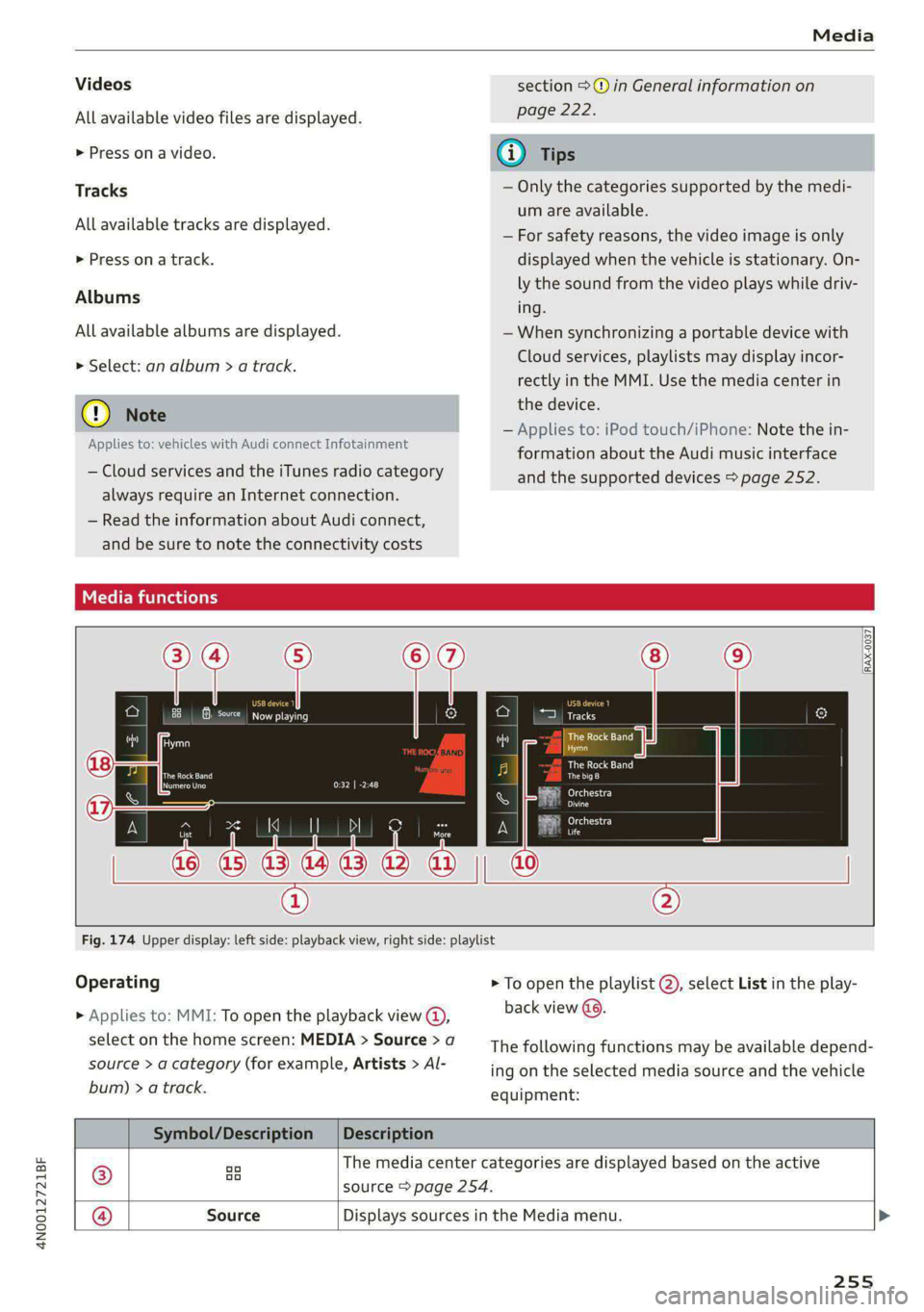
Operating > To open the playlist @, select List in the play-
> Applies to: MMI: To open the playback view @), back view @©)
select on the home screen: MEDIA > Source > a
source > a category (for example, Artists > Al-
bum) > a track.
The following functions may be available depend-
ing on the selected media source and the vehicle
equipment:
Symbol/Description | Description
® we The media center categories are displayed based on the active
* source > page 254.
@ Source Displays sources in the Media menu. >
255
Page 270 of 362

Additional information
Additional information
Brands and licenses
This manual does not contain any symbols, such
as ® or ™, to identify trademarks or registered
trademarks. However, the absence of these sym-
bols does not constitute a waiver of any rights as-
sociated with these names.
Apple, iPhone, iPod touch, Apple CarPlay, Light-
ning, and iTunes Radio are trademarks of Apple
Inc.
10S is a trademark or, in the USA and other coun-
tries, a registered trademark of Cisco and is used
under license.
Other product and manufacturer names may be
trademarks of their respective owners.
268
Page 273 of 362
4N0012721BF
Checking and Filling
Fueling procedure
RAZ-0013
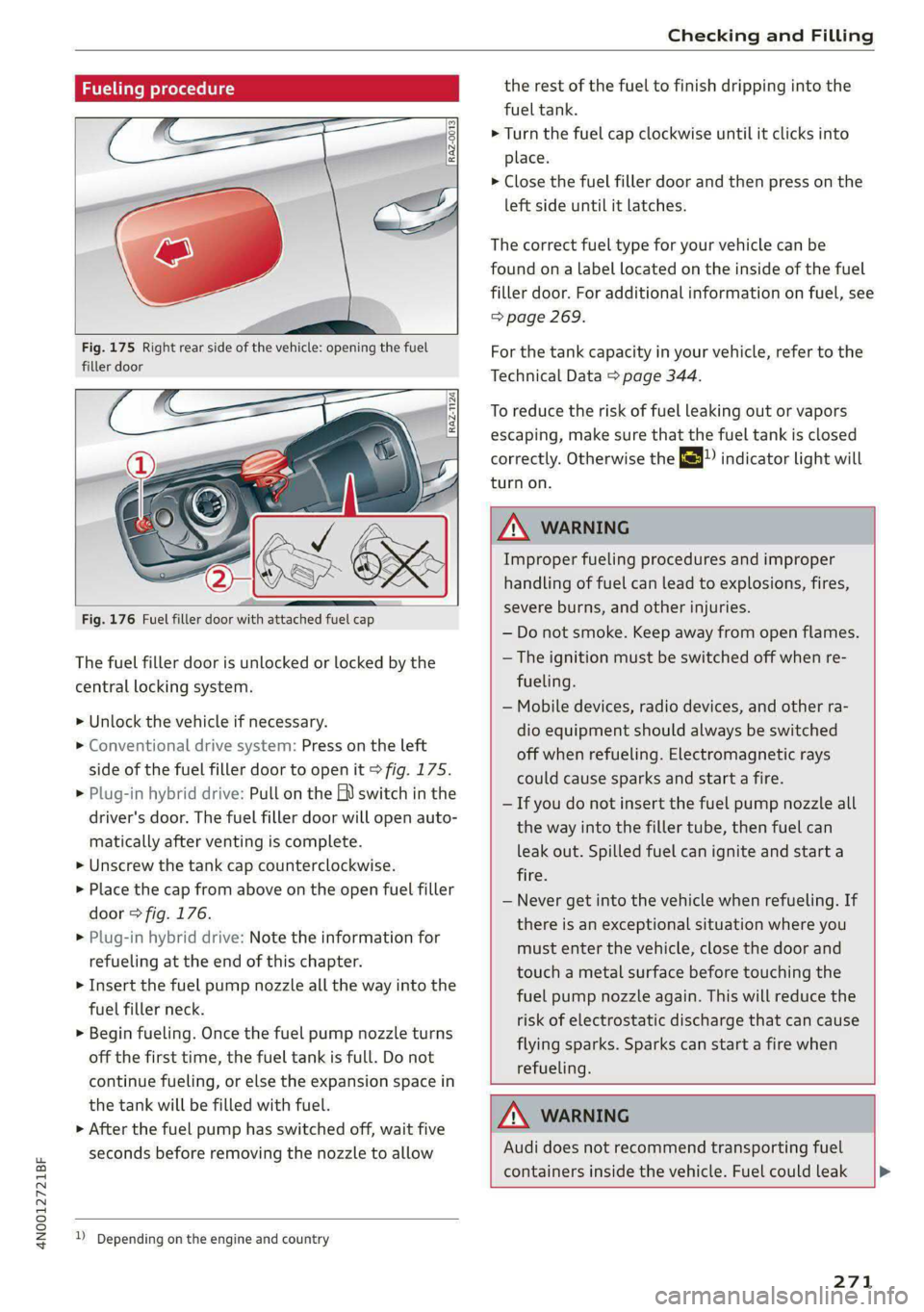
Fig. 175 Right rear side of the vehicle: opening the fuel
filler door
[RAZ-1124
Fig. 176 Fuel filler door with attached fuel cap
The fuel filler door is unlocked or locked by the
central locking system.
>» Unlock the vehicle if necessary.
> Conventional drive system: Press on the left
side of the fuel filler door to open it > fig. 175.
> Plug-in hybrid drive: Pull on the EV switch in the
driver's door. The fuel filler door will open auto-
matically after venting is complete.
> Unscrew the tank cap counterclockwise.
> Place the cap from above on the open fuel filler
door > fig. 176.
> Plug-in hybrid drive: Note the information for
refueling at the end of this chapter.
> Insert the fuel pump nozzle all the way into the
fuel filler neck.
> Begin fueling. Once the fuel pump nozzle turns
off the first time, the fuel tank is full. Do not
continue fueling, or else the expansion space in
the tank will be filled with fuel.
> After the fuel pump has switched off, wait five
seconds before removing the nozzle to allow
1) Depending on the engine and country
the rest of the fuel to finish dripping into the
fuel tank.
> Turn the fuel cap clockwise until it clicks into
place.
> Close the fuel filler door and then press on the
left side until it latches.
The correct fuel type for your vehicle can be
found ona label located on the inside of the fuel
filler door. For additional information on fuel, see
=> page 269.
For the tank capacity in your vehicle, refer to the
Technical Data > page 344.
To reduce the risk of fuel leaking out or vapors
escaping, make sure that the fuel tank is closed
correctly. Otherwise the ES indicator light will
turn on.
Z\ WARNING
Improper fueling procedures and improper
handling of fuel can lead to explosions, fires,
severe burns, and other injuries.
— Do not smoke. Keep away from open flames.
— The ignition must be switched off when re-
fueling.
— Mobile devices, radio devices, and other ra-
dio equipment should always be switched
off when refueling. Electromagnetic rays
could cause sparks and start a fire.
— If you do not insert the fuel pump nozzle all
the way into the filler tube, then fuel can
leak out. Spilled fuel can ignite and start a
fire.
— Never get into the vehicle when refueling. If
there is an exceptional situation where you
must enter the vehicle, close the door and
touch a metal surface before touching the
fuel pump nozzle again. This will reduce the
risk of electrostatic discharge that can cause
flying sparks. Sparks can start a fire when
refueling.
Z\ WARNING
Audi does not recommend transporting fuel
containers inside the vehicle. Fuel could leak
271
Page 294 of 362

Wheels
Glossary of tire and loading
terminology
Accessory weight
means the combined weight (in
excess of those standard items
which may be replaced) of auto-
matic transmission, power steer-
ing, power brakes, power win-
dows, power seats, radio, and
heater, to the extent that these
items are available as factory-in-
stalled equipment (whether in-
stalled or not).
Aspect ratio
means the ratio of the height to
the width of the tire in percent.
Numbers of 55 or lower indicate a
low sidewall for improved steer-
ing response and better overall
handling on dry pavement.
Bead
means the part of the tire that is
made of steel wires, wrapped or
reinforced by ply cords and that is
shaped to fit the rim.
Bead separation
means a breakdown of the bond
between components in the bead.
292
Cord
means the strands forming the
plies in the tire.
Cold tire inflation pressure
means the tire pressure recom-
mended by the vehicle manufac-
turer for a tire of a designated
size that has not been driven for
more than a couple of miles (kilo-
meters) at low speeds in the three
hour period before the tire pres-
sure is measured or adjusted.
Curb weight
means the weight of a motor ve-
hicle with standard equipment in-
cluding the maximum capacity of
fuel, oil, and coolant, air condi-
tioning and additional weight of
optional equipment.
Extra load tire
means a tire designed to operate
at higher loads and at higher in-
flation pressures than the corre-
sponding standard tire. Extra load
tires may be identified as “XL”,
“xl”, “EXTRA LOAD”, or “RF” on
the sidewall.
Page 320 of 362
Emergency assistance
Using the ti
Applies to: vehicles with tire mobility kit
B8U-0100
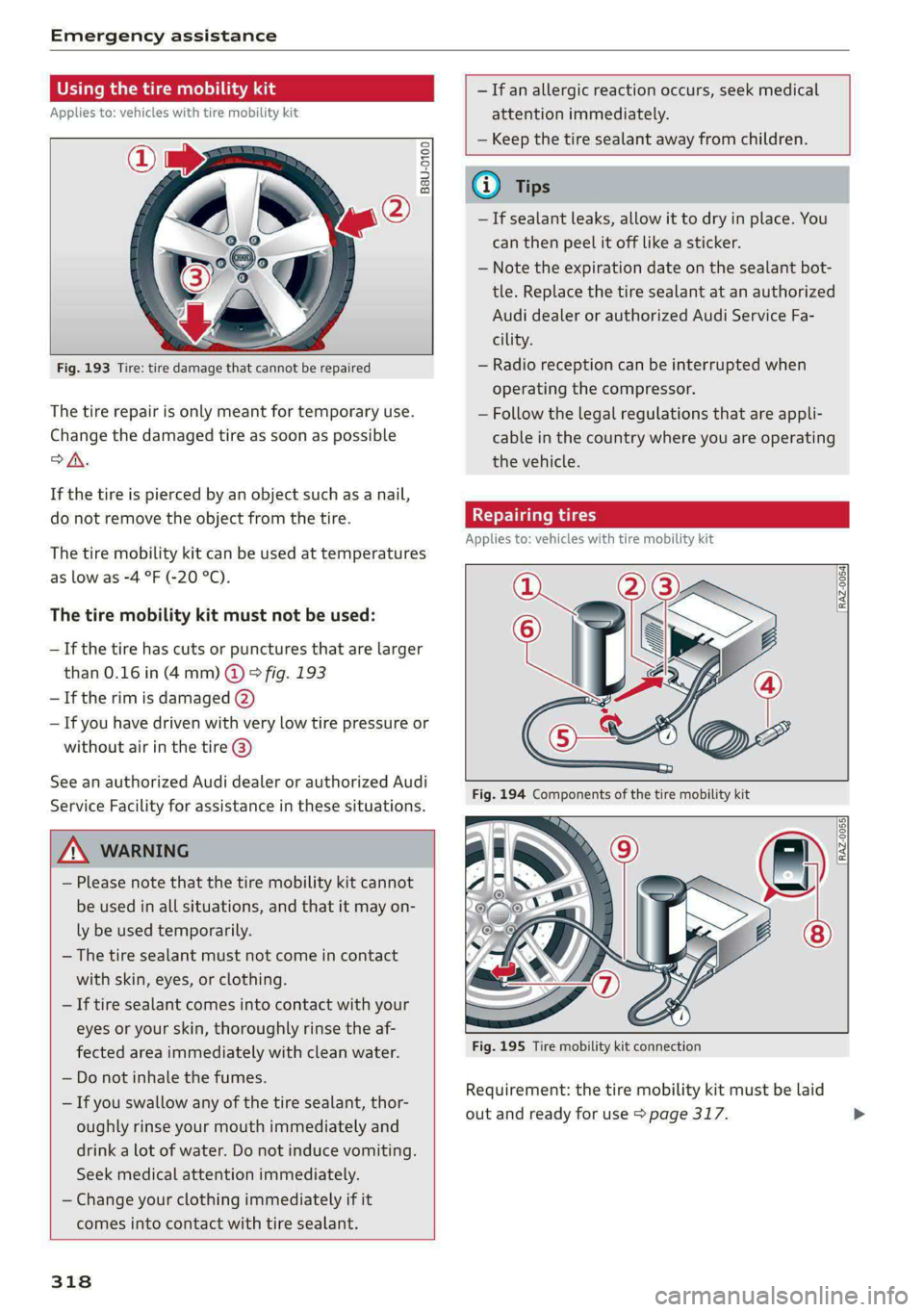
Fig. 193 Tire: tire damage that cannot be repaired
The tire repair is only meant for temporary use.
Change the damaged tire as soon as possible
oA.
If the tire is pierced by an object such as a nail,
do not remove the object from the tire.
The tire mobility kit can be used at temperatures
as low as -4 °F (-20 °C).
The tire mobility kit must not be used:
—If the tire has cuts or punctures that are larger
than 0.16 in (4mm) @ & fig. 193
— If the rim is damaged (2)
— If you have driven with very low tire pressure or
without air in the tire @)
See an authorized Audi dealer or authorized Audi
Service Facility for assistance in these situations.
Z\ WARNING
— Please note that the tire mobility kit cannot
be used in all situations, and that it may on-
ly be used temporarily.
— The tire sealant must not come in contact
with skin, eyes, or clothing.
— If tire sealant comes into contact with your
eyes or your skin, thoroughly rinse the af-
fected area immediately with clean water.
— Do not inhale the fumes.
— If you swallow any of the tire sealant, thor-
oughly rinse your mouth immediately and
drink a lot of water. Do not induce vomiting.
Seek medical attention immediately.
— Change your clothing immediately if it
comes into contact with tire sealant.
— If an allergic reaction occurs, seek medical
attention immediately.
— Keep the tire sealant away from children.
@) Tips
— If sealant leaks, allow it to dry in place. You
can then peel it off like a sticker.
— Note the expiration date on the sealant bot-
tle. Replace the tire sealant at an authorized
Audi dealer or authorized Audi Service Fa-
cility.
— Radio reception can be interrupted when
operating the compressor.
— Follow the legal regulations that are appli-
cable in the country where you are operating
the vehicle.
Repairing tires
Applies to: vehicles with tire mobility kit
RAZ-0054]
[RAZ-0055}
318
Fig. 195 Tire mobility kit connection
Requirement: the tire mobility kit must be laid
out and ready for use > page 317.
Page 333 of 362

4N0012721BF
Fuses and bulbs
Fuse panel () (black) Fuse panel @) (brown)
Luggage compartment lid central locking, 15 |Left rear seat adjustment
11 | fuel filler door, sunshade, luggage com- Front belt tensioner on front passenger's
partment cover 16 side
12 | Luggage compartment lid control module
— Fuse panel (4) (black)
Fuse panel (2) (red) No. | Equipment
No. | Equipment Seat ventilation, rear seat heating, rear-
1 | Rear climate control system blower 1 |view mirror, refrigerator, diagnostic con-
2 | Exterior antenna nection
3 | Exhaust treatment, sound actuator 2 | Gateway control module (communication)
4 |Rear climate control system control panel 3 [Sound actuator
5 | Right trailer hitch light 4 |Transmission heating valve
6 |Trailer hitch positioning motor 5 |Engine start, electric drive
7 |Trailer hitch release 7 |Active accelerator pedal
8 | Left trailer hitch light 8 | Night vision assist, active suspension
9 |Trailer hitch socket 9 _|Adaptive cruise assist
10 |Allroad sport differential 1 Intersection assistant, driver assist sys-
11 | Exhaust treatment tems, radar systems, camera systems
12 |48 V drivetrain generator 2 || Exteriorsoundigenerator
13 | USB input
Fuse panel (3) (brown) 14 [Right headlight
No. | Equipment 15 |Left headlight
1 |Driver assistance systems control module :
2 |Rear Audi phone box Fuse panel () (red)
3 | Rear seat adjustment No:.| Equipment
4 |Side assist 1 | Active suspension
5 |Sereensinthe rear 2 |Service disconnect switch
6 |Tire pressure monitoring system 3_|Refrigerator
7 [Emergency call system 4 | Electric drive system
Auxiliary heating radio receiver, tank mod- 5 |/Brake-system
8 ule 6 | High-voltage battery water pump
9 | Automatic transmission selector lever 7 |Auxiliary climate control
0 TV tuner, data exchange and telematics 8 |Climate control system compressor
control module 9 |Auxiliary battery control module
rT Convenience access and start authoriza- 10 | High-voltage battery
tion control module 11 | High-voltage charger
12 | Garage door opener 14 | Thermal management
13 | Rearview camera, peripheral cameras 15 | Thermomanagement control module
Convenience system control module, right -
14 | Vil light Fuse panel 6) (white)
No. | Equipment
1 |Rear center armrest heating
331
Page 342 of 362
Accessories and technical changes
@) Tips
Because of your vehicle's aluminum body de-
sign, all service and repair procedures affect-
ing the body should be performed by an au-
thorized Audi dealer or authorized Audi Serv-
ice Facility, who will perform the work accord-
ing to Audi factory specifications. Only Audi
Genuine Parts are used when Audi experts
perform repair or service procedures. Failure
to use Audi Genuine Parts or Audi Genuine Ac-
cessories or performing repairs incorrectly
may result in severe vehicle damage, such as
corrosion.
Accessories and parts
Consult with an authorized Audi dealer or author-
ized Audi Service Facility before purchasing ac-
cessories or replacement parts. Audi recom-
mends having your vehicle serviced by an author-
ized Audi dealer or authorized Audi Service Facili-
ty and using Audi Genuine Parts and Audi Genu-
ine Accessories.
Audi does not endorse the use of products and
accessories that it has not evaluated, even if the
product is approved by a certified testing agency
or government agency.
ZA WARNING
— Installing unapproved accessories or incor-
rect replacement parts can cause vehicle
damage and can increase the risk of an acci-
dent.
— Never attach accessories, such as telephone
holders or cup holders, to the airbag covers
or within the airbag deployment zone, be-
cause this increases the risk of injury if the
airbag deploys.
— On vehicles that have factory-installed li-
cense plate brackets on the front of the ve-
hicle, the brackets may only be replaced
with ones that are the same size and made
of the same material. Do not install any li-
cense plate brackets on the front of vehicles
that do not have factory-installed brackets.
Otherwise, the function of the system could
be impaired.
340
@) Note
A correctly-installed exterior antenna is re-
quired for operating radio equipment in the
vehicle. Otherwise, the increased electromag-
netic waves can cause malfunctions in the ve-
hicle. Observe the regulations in the country
where the vehicle is being operated and the
instructions from the radio equipment manu-
facturer.
Reporting Safety Defects
Applicable to U.S.A.
If you believe that your vehicle
has a defect which could cause a
crash or could cause injury or
death, you should immediately in-
form the National Highway Traffic
Safety Administration (NHTSA) in
addition to notifying
Audi of America, Inc.
2200 Ferdinand Porsche Drive
Herndon, VA 20171
If NHTSA receives similar com-
plaints, it may open an investiga-
tion, and if it finds that a safety
defect exists in a group of
vehicles, it may order a recall and
remedy campaign. However,
NHTSA cannot become involved in
individual problems between you,
your dealer, or Audi of America,
Inc.