lock AUDI A8 2021 Owners Manual
[x] Cancel search | Manufacturer: AUDI, Model Year: 2021, Model line: A8, Model: AUDI A8 2021Pages: 362, PDF Size: 99.29 MB
Page 4 of 362
Table of contents
About this Owner's Manual......
SUMIMAry: < = exe : eens: Seen cs sens
QutckeaeCe ssh: «i esis se ois a eaves @
Cockpit. ...... 0... eee eee eee eee
Indicator lights overview...........4..
Display and operation...........
Instrument cluster...............
Instrument cluster overview...........
Operating. ecccuse w+ were oo wens oo ayes 9 ¥
Adjusting the display.................
Coolant temperature display...........
Tachometer’ series i ewe so snes ¥ & ome
Power meter...............0 00000005
QUOOMEtEr as + 2 ame < gas = papas s ¥ HERS &
Outside temperature display...........
Engine oil temperature indicator.......
Boost indicator’: 2 2c« «= sesa ¢ x sews «x 2x8
Vehicle functions « seis ss emis ee mes ee
Touch displays....................
General touch display operation........
Multi Media Interface................
Rear Seat Remote...............2...
Screens (NPCs « s wees s eae se wee as ee
Head-up display..................
Descriptionis: ss gem = x eames ¢ eee ge eee
Voice recognition system........
General information.................
DeSeriptionis = ssssas « « wens s + eres « + aes
External voice operation..............
Global functions.................
Additional function buttons...........
Starting and driving.............
Personalization..................
Luggage compartment lid.............
Child safety lock.............0...000.
POWEr WIKdOWS 6: «oxen se aes ye eee
NOD
OO
12 12 12
13
13
14 14
15
15
15
15
16
16
18 18
20
26
29
33 33
34 34
34
35
3F 37 38 38 38
Al 41 45
48
51
52
Panoramic glass roof................. 53
Valet parking............... 0c eee eee 55
Garage door opener.........60..e sees 55
Lights and Vision................. 58
Exterior lighting « sce ss ees se eea se ees 58
Interior lighting wiv «= ssw 2 6 ese = 3 ese 62
ViSION. 0. ee eee eee 64
Windshield wipers............-..00-- 66
Digitalcomipass’s ss gos « s wasn x & were 8 3 68
Sitting correctly and safely...... 70
Correct passenger seating position...... 70
FROMUSOAES!, «areas ao axoniva 5 & aumeane wa savers 70
Rear seats... 2... eee 74
SECeriig WHEEL su: s x wou 4 x naaee ee ee 77
Head restraintsisn: «+ cscs vo asceine vo wen ws 78
Safety belts........ 0.0... cee eee eee 80
Memory function..............-.000+ 83
Aitbag System sms: «+ suscens oe sowie «5 voeusic 84
Child safety seats................000- 88
Storage and convenience........ 94
POWEPrSOUICES wece ae ete ee ore ne 94
Cup holders..............00--0 eee ee 95
Storage and compartments............ 95
Luggage compartment............... 97
Roof rack... eee eee 99
WWarmitanGicolediics «6 scien «6 eve 6 6 on 100
Climate control system............... 100
Steering
wheel heating.............-. 104
Auxiliary climate control.............- 104
Fluids in the A/C system.............. 105
BXRIMIIG)). 5 sccces 6 ase wo moms 3 o OOM 8 Ho 107
Starting the vehicle.................. 107
When driving.......-..e0ceeeee sees 108
Drive SYStC Mises oo scene +o em oo omen oo 114
Start/Stop system............00 0 eee 117
Brakes... 2.0.0... eee eee ee eee eee 119
Electromechanical parking brake....... 121
Special driving situations.............. 122
Driving dynamic.................. 124
Audi driverselectis « was «+ cine 2 6 navies a 0 124
Suspension..............0 0.02.0 000. 125
StCGKitig + scm ss caus a e seen se Sees 4 eee 127
Page 8 of 362
Quick access
Quick access
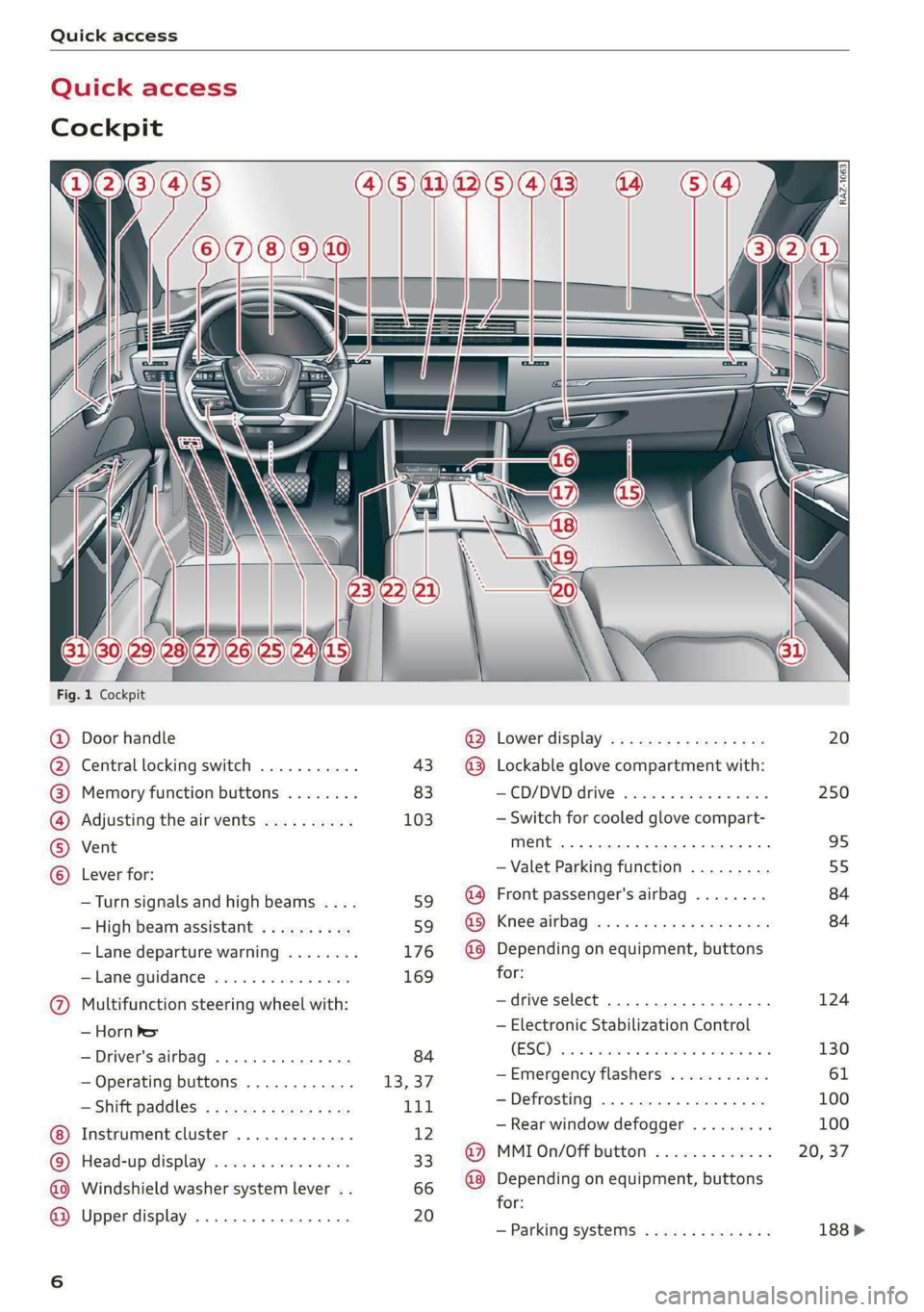
Cockpit
QOOOCOLO
©
OO©®@
Fig. 1 Cockpit
Door handle
Central locking switch ...........
Memory function buttons ........
Adjusting the air vents ..........
Vent
Lever for:
—Turn signals and high beams ....
— High beam assistant ..........
— Lane departure warning ........
—Lane guidance ...............
Multifunction steering wheel with:
— Horn ber
— Driver's airbag .............0.
— Operating buttons ............
— Shift paddles; « « ses « s veau 2 ew
Instrument cluster .............
Head-up display ...............
Windshield washer system lever ..
Upper display .................
cay Lower display, « s «sma ss wean soe
@ Lockable glove compartment with:
CD/DVD drive seas ss eae oo cae
— Switch for cooled glove compart-
ment ........ 00. eee eee eee ee
— Valet Parking function .........
@ Front passenger's airbag ........
@ Knee airbag ...................
@ Depending on equipment, buttons
for:
—drive select ..................
— Electronic Stabilization Control
(ESC) sisi s meron se awn a a one @ we
—Emergency flashers ...........
—Defrosting ..................
— Rear window defogger .........
@ MMI On/Off button .............
@ Depending on equipment, buttons
for:
— Parking systems ..............
3 S|
ns < |
20
250
95
55
84
84
124
130
100
Page 9 of 362
4N0012721BF
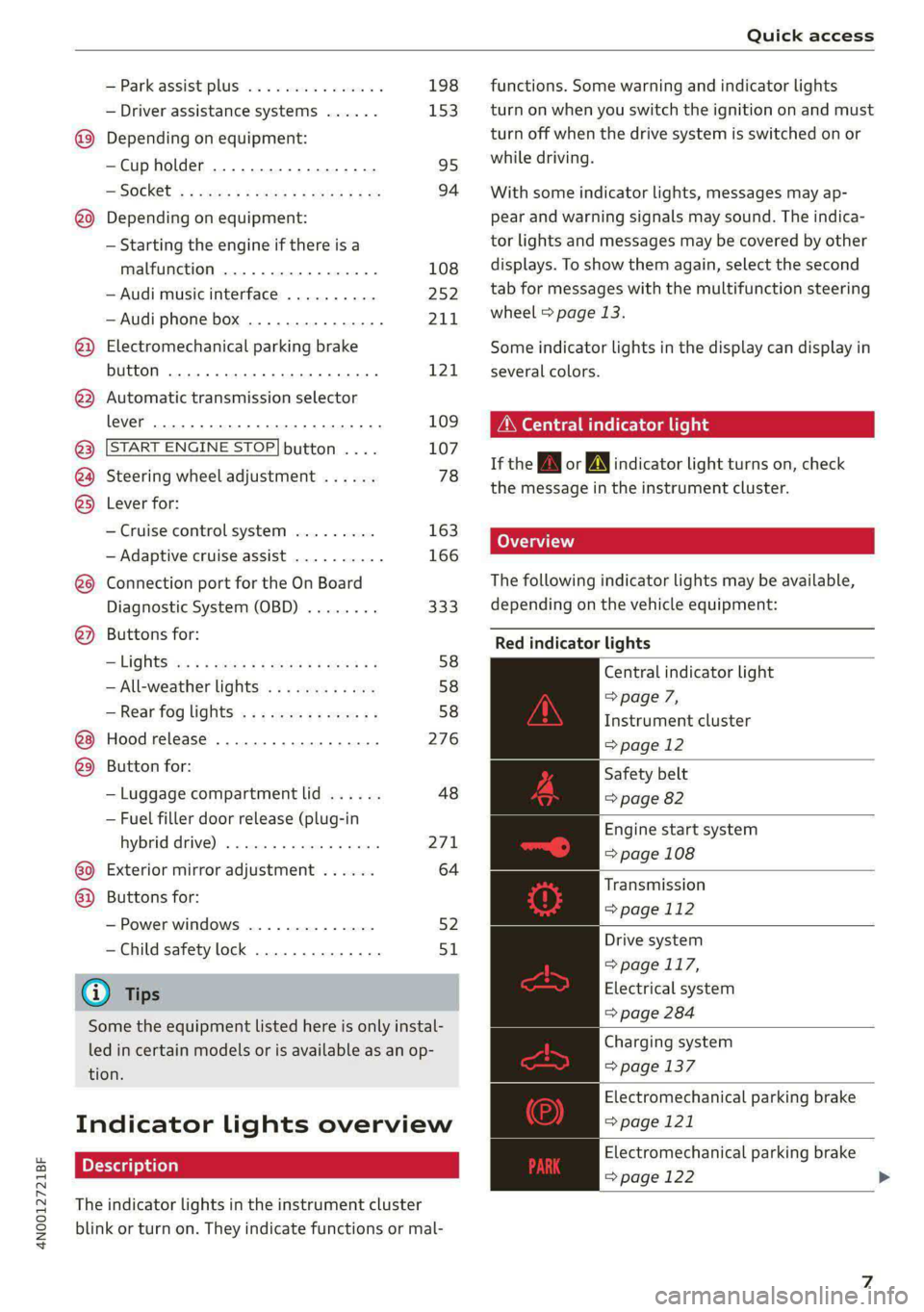
Quick access
—Park assist plus ............... 198
— Driver assistance systems ...... 153
@_ Depending on equipment:
—Cup holder ..............00.. 95
—SOCkEt: ss seas ¢ 5 cease go eR Fe ee 94
@0) Depending on equipment:
— Starting the engine if there is a
malfunction ................. 108
— Audi music interface .......... 252
—Audi phone box ............... 211
@) Electromechanical parking brake
button 2... 6... cece ee ee eee ee 121
@ Automatic transmission selector
lever... 2... cece eee eee eee ee 109
@ [START ENGINE STOP] button .... 107
@4 Steering wheel adjustment ...... 78
@5) Lever for:
— Cruise control system ......... 163
— Adaptive cruise assist .......... 166
@8 Connection port for the On Board
Diagnostic System (OBD) ........ 333
@) Buttons for:
> LIQHtS sc ss sees ¢ 2 wees 3s ewes G 58
—All-weather lights ............ 58
— Rear fog lights ............... 58
Hood release .............0.00. 276
@9) Button for:
— Luggage compartment lid ...... 48
— Fuel filler door release (plug-in
hybrid drive) ............0.00. 27
60 Exterior mirror adjustment ...... 64
@2 Buttons for:
— Power windows .............. 52
—Child safety lock .............. 51
@) Tips
Some the equipment listed here is only instal-
led in certain models or is available as an op-
tion.
Indicator lights overview
The indicator lights in the instrument cluster
blink or turn on. They indicate functions or mal-
functions. Some warning and indicator lights
turn on when you switch the ignition on and must
turn off when the drive system is switched on or
while driving.
With some indicator lights, messages may ap-
pear and warning signals may sound. The indica-
tor lights and messages may be covered by other
displays. To show them again, select the second
tab for messages with the multifunction steering
wheel & page 13.
Some indicator lights in the display can display in
several colors.
ONC eae sh
If the A or A indicator light turns on, check
the message in the instrument cluster.
The following indicator lights may be available,
depending on the vehicle equipment:
Red indicator lights
Central indicator light
=> page 7,
Instrument cluster
=> page 12
Safety belt
=> page 82
Engine start system
=> page 108
Transmission
=> page 112
Drive system
=> page 117,
Electrical system
=> page 284
Charging system
=> page 137
Electromechanical parking brake
=> page 121
Electromechanical parking brake
=> page 122
Page 10 of 362
Quick access
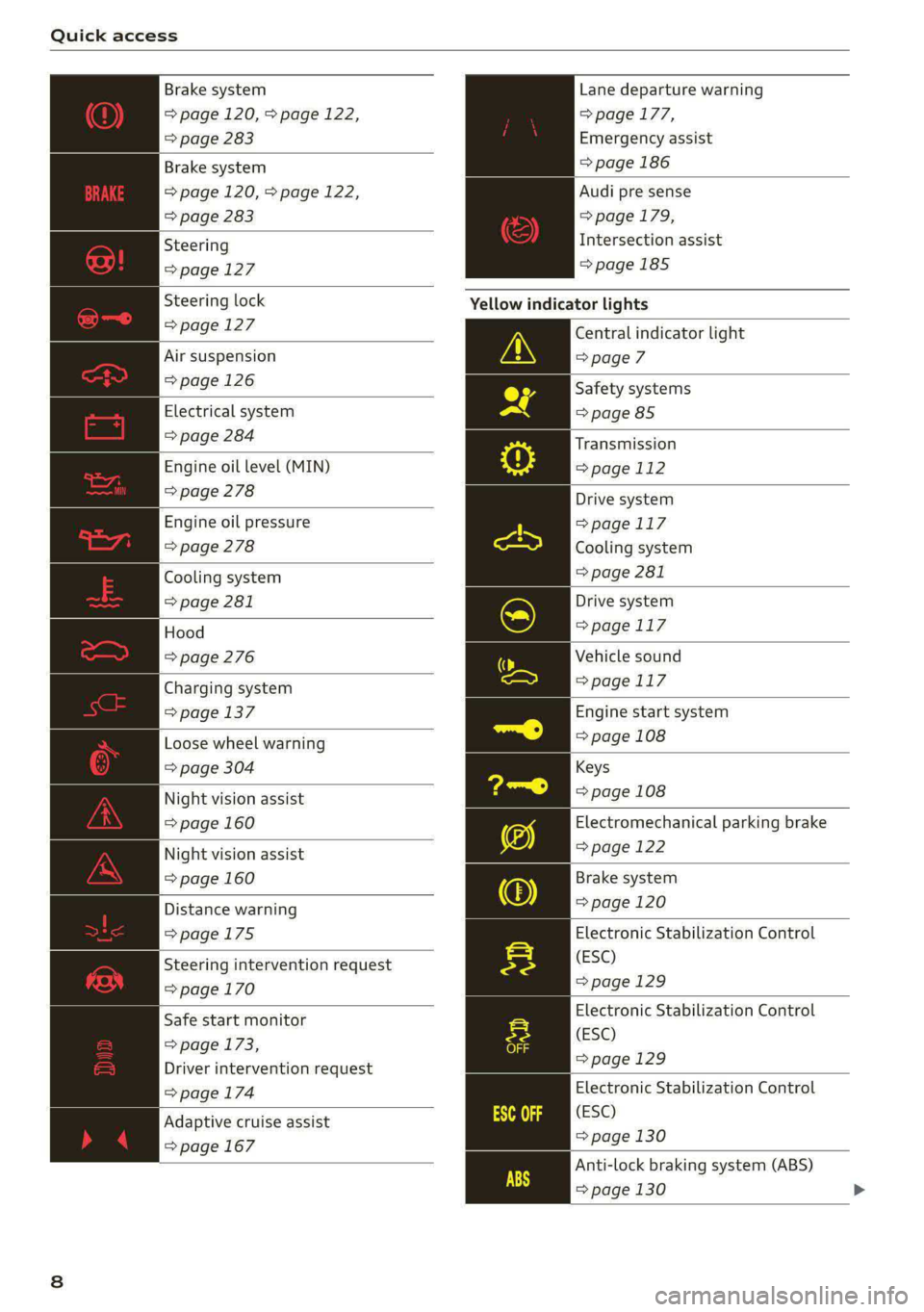
Brake system
=> page 120, > page 122,
=> page 283
Lane departure warning
=> page 177,
Emergency assist
Brake system => page 186
=> page 120, > page 122,
=> page 283
Audi pre sense
=> page 179,
Intersection assist
=>page 185
Steering
=>page 127
Steering lock Yellow indicator lights
= page 127 Central indicator light
Air suspension > page 7
= page 126 Safety systems
Electrical system => page 85
=> page 284
Engine oil level (MIN)
=> page 278
Transmission
=>page 112
Drive system
=>page 117
Cooling system
> page 281
Engine oil pressure
=> page 278
Cooling system
=> page 281
Hood
=> page 276
Drive system
=>page 117
Vehicle sound
Charging system => page 117
= page 137 Engine start system
Loose wheel warning => page 108
=> page 304 Keys
Night vision assist => page 108
=> page 160 Electromechanical parking brake
Night vision assist => page 122
=> page 160 Brake system
Distance warning => page 120
=>page 175 Electronic Stabilization Control
(ESC)
=> page 129
Steering intervention request
=>page 170
Electronic Stabilization Control
(ESC)
=>page 129
Safe start monitor
=> page 173,
Driver intervention request
=> page 174 Electronic Stabilization Control
(ESC)
=> page 130
Anti-lock braking system (ABS)
=> page 130 >
Adaptive cruise assist
=> page 167
Page 11 of 362
4N0012721BF
Quick access
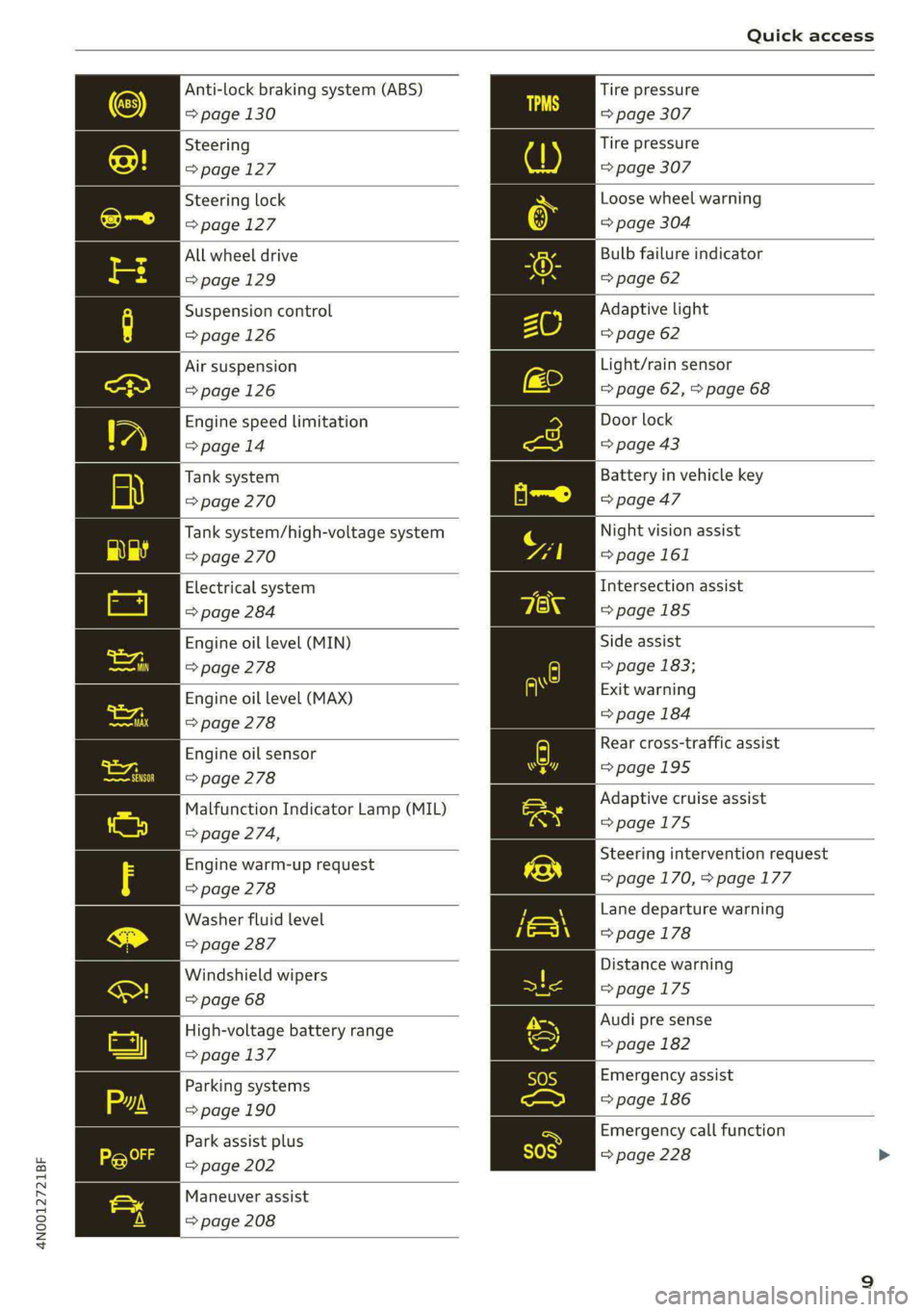
Anti-lock braking system (ABS)
=> page 130
Steering
=>page 127
Steering lock
=>page 127
All wheel drive
=>page 129
Suspension control
=>page 126
Air suspension
=> page 126
Engine speed limitation
>page 14
Tank system
=> page 270
Tank system/high-voltage system
=> page 270
Electrical system
> page 284
Engine oil level (MIN)
> page 278
Engine oil level (MAX)
=> page 278
Engine oil sensor
> page 278
Malfunction Indicator Lamp (MIL)
=> page 274,
Engine warm-up request
> page 278
Washer fluid level
=> page 287
Windshield wipers
=> page 68
High-voltage battery range
=> page 137
Parking systems
=> page 190
Park assist plus
=> page 202
Maneuver assist
=> page 208
Tire pressure
=> page 307
Tire pressure
=> page 307
Loose wheel warning
=> page 304
Bulb failure indicator
=> page 62
Adaptive light
=> page 62
Light/rain sensor
=> page 62, > page 68
Door lock
=> page 43
Battery in vehicle key
=> page 47
Night vision assist
=> page 161
Intersection assist
=> page 185
Side assist
=> page 183;
Exit warning
=> page 184
Rear cross-traffic assist
=>page 195
Adaptive cruise assist
=>page 175
Steering intervention request
=>page 170, > page 177
Lane departure warning
=> page 178
Distance warning
=>page 175
Audi pre sense
=> page 182
Emergency assist
=> page 186
Emergency call function
=> page 228
Page 13 of 362

4N0012721BF
Quick access
High beam assistant
=>page 59
OLED tail lights
=> page 62
Door lock
=> page 43
Child safety lock
=> page 51
Speed warning system
=>page 155
Speed warning system
>page 155
Camera-based traffic sign recog-
nition
=>page 156
Night vision assist
=> page 161
Cruise control system
=> page 163
Cruise control system
=> page 163
Intersection assist
>page 185
Side assist
> page 183
Distance warning
>page 175
A) Rear cross-traffic assist
here =>page 195
Adaptive cruise assist
=>page 175,
Efficiency assist
=>page 171
Adaptive cruise assist
LR © page 167
Adaptive cruise assist
=>page 172
Lane departure warning
=>page 177
Lane departure warning
=> page 178
Audi pre sense
=> page 182
Emergency assist
=> page 186
11
Page 29 of 362
4N0012721BF
Touch displays
— The system complies with United States FCC
regulations and ISED regulations
=> page 341.
Applies to: vehicles with Rear Seat Remote
a
=.
S
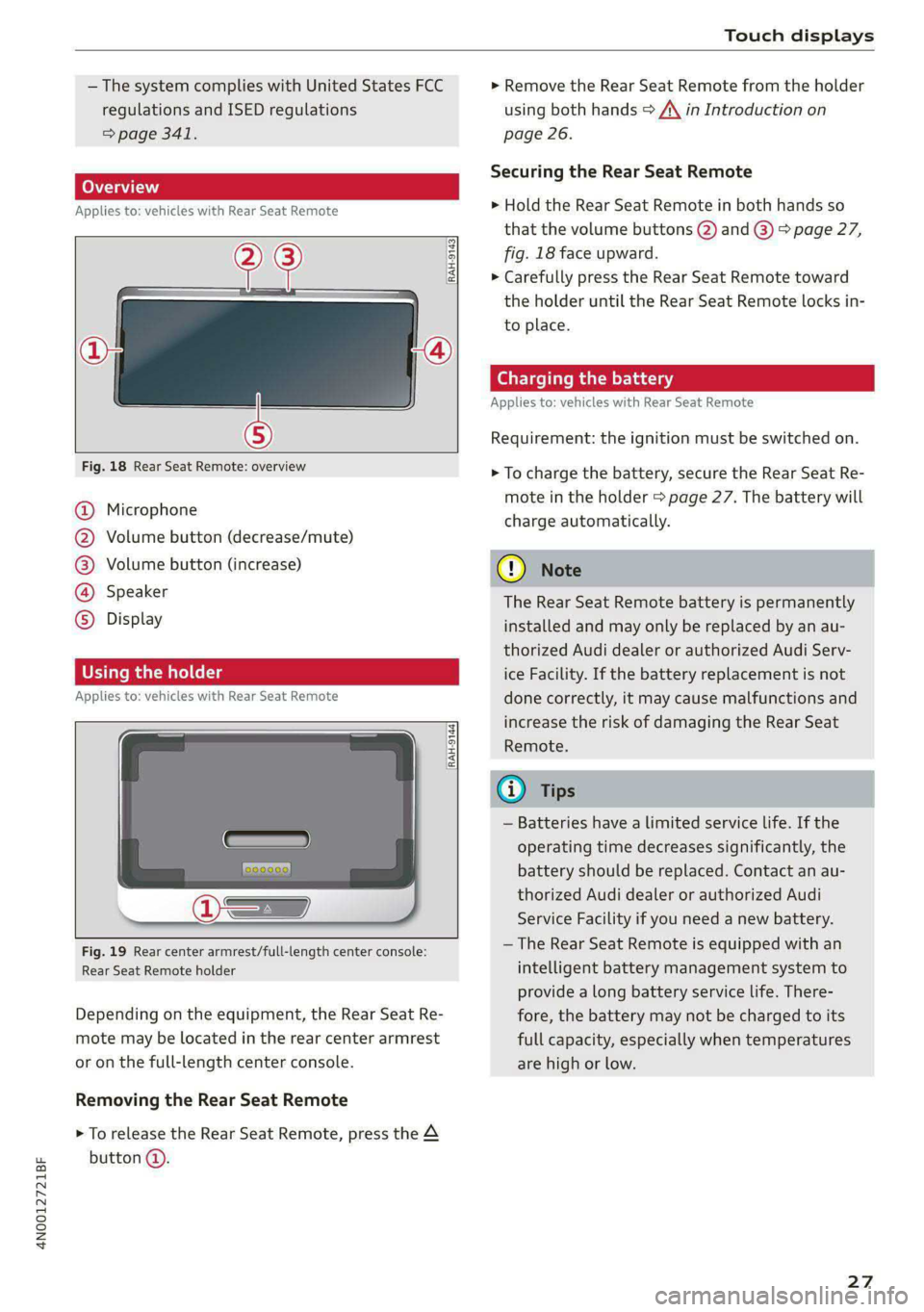
Fig. 18 Rear Seat Remote: overview
a] g
| = <
ic
@ Microphone
@ Volume button (decrease/mute)
@®) Volume button (increase)
@ Speaker
©) Display
Using the holder
Applies to: vehicles with Rear Seat Remote
[RAH-9144)
Fig. 19 Rear center armrest/full-length center console:
Rear Seat Remote holder
Depending on the equipment, the Rear Seat Re-
mote may be located in the rear center armrest
or on the full-length center console.
Removing the Rear Seat Remote
> To release the Rear Seat Remote, press the A
button @.
> Remove the Rear Seat Remote from the holder
using both hands > A\ in Introduction on
page 26.
Securing the Rear Seat Remote
> Hold the Rear Seat Remote in both hands so
that the volume buttons @) and @) > page 27,
fig. 18 face upward.
> Carefully press the Rear Seat Remote toward
the holder until the Rear Seat Remote locks in-
to place.
Charging the battery
Applies to: vehicles with Rear Seat Remote
Requirement: the ignition must be switched on.
> To charge the battery, secure the Rear Seat Re-
mote in the holder > page 27. The battery will
charge automatically.
G) Note
The Rear Seat Remote battery is permanently
installed and may only be replaced by an au-
thorized Audi dealer or authorized Audi Serv-
ice Facility. If the battery replacement is not
done correctly, it may cause malfunctions and
increase the risk of damaging the Rear Seat
Remote.
@) Tips
— Batteries have a limited service life. If the
operating time decreases significantly, the
battery should be replaced. Contact an au-
thorized Audi dealer or authorized Audi
Service Facility if you need a new battery.
— The Rear Seat Remote is equipped with an
intelligent battery management system to
provide a long battery service life. There-
fore, the battery may not be charged to its
full capacity, especially when temperatures
are high or low.
27
Page 31 of 362
4N0012721BF
Touch displays
» Applies to MMI: Select on the home screen:
SETTINGS > Display & brightness > Operation
in rear.
Possible settings:
Block Rear Seat Remote with parental
control button
When the function is switched on and parental
control is activated > page 51, the Rear Seat
Remote is blocked.
Block rear A/C oper. with parental ctrl.
button
When the function is switched on and parental
control is activated, climate control operation us-
ing the Rear Seat Remote is blocked. You can con-
tinue to operate all other content with the Rear
Seat Remote.
Technical data
Applies to: vehicles with Rear Seat Remote
Rear Seat Remote
Display OLED, 5.7" screen, 1920 x 1680 pixels
Battery Lithium polymer (2700 mAh)
Dimensions (height x width x depth) 3.39 in x 6.38 in x 0.43 in (86 mm x 162 mmx
11mm)
Weight
0.58 lbs (261 g)
Screens in rear)
Introduction
Applies to: vehicles with screens in rear
Using screens in the rear, you can play multime-
dia content in the rear seats of your vehicle. The
screens are controlled either using the touch dis-
play or the applicable app on your mobile device,
depending on the context.
ZA WARNING
—As the driver, do not allow usage of the
screens in the rear to distract you from driv-
ing, as this could increase the risk of an acci-
dent. For example, do not reach behind you
while driving to operate the screens in the
rear.
— Children in rear-facing child safety seats in
the rear: remove the screens in the rear
from the backrests on the front seats to re-
duce the risk of injury. Read the instructions
in the chapter > page 88.
2) At the time this manual was printed, screens in the rear
were equipment in development. Your vehicle may not be
equipped with screens in the rear.
— The screens in the rear can only be operated
when the vehicle is stationary or when they
are securely positioned in the designated
holders in the vehicle. Like all loose objects,
they could be thrown through the vehicle
and cause serious injuries in a collision. If
the screens in the rear are not in the desig-
nated holders, they must always be securely
stowed while driving.
— Do not use any wireless devices on the front
seats within range of the airbags while driv-
ing. Also read the warnings in the chapter
> page 84.
CG) Note
— Read the information about Audi connect,
and be sure to note the connectivity costs
section >@ in General information on
page 222.
— Protect the screens in the rear from pro-
longed exposure to direct sunlight.
29
Page 32 of 362
Opening and closing
the vehicle from the outside for a brief time
>©.
ZA\ WARNING
Observe the safety precautions > page 29.
ZA\ WARNING
Applies to: vehicles with power closing function
—To reduce the risk of injury, make sure that
the area where the door is closing is clear
during the closing process.
— The closing process can be stopped at any
time by pulling on the outer or inner door
handle.
@) Note
The following applies when locking the vehi-
cle:
— If the vehicle key that was last used is de-
tected inside the passenger compartment,
then the vehicle cannot be locked from the
outside using the sensor. Take the vehicle
key with you and lock the vehicle again. Oth-
erwise, the vehicle will not be protected
against unauthorized access.
— If you try to lock the vehicle using the but-
ton on the vehicle key while the front pas-
senger's or rear door is open, and you acci-
dentally place the vehicle key inside the pas-
senger compartment and close the door,
the vehicle will lock at first. But if the key-
less system detects a vehicle key inside the
vehicle after it Locks, then the vehicle will
unlock again. The turn signals will flash sev-
eral times to indicate this. If you do not
open the vehicle to remove the vehicle key
within a brief period, then the vehicle will
lock automatically. This prevents the vehicle
from being left unlocked for long periods of
time. The vehicle key will then be locked in-
side the vehicle.
— If the luggage compartment lid closes and
the system detects that the last vehicle key
that was used is inside the luggage com-
partment, then the luggage compartment
lid will open again. The turn signals will
flash several times to indicate this. The
doors will lock. Always take the vehicle key
30
with you, or unauthorized persons may be
able to enter the vehicle.
G) Tips
— Do not leave valuables unattended in the ve-
hicle. A locked vehicle is not a safe!
—The LED in the driver's door rail blinks when
you lock the vehicle. If the LED turns on for
approximately 30 seconds after locking,
there is a malfunction in the central locking
system. Have the problem corrected by an
authorized Audi dealer or authorized Audi
Service Facility.
Setting the central locking system
You can adjust the central locking system to your
preferences. The settings depend on the vehicle
equipment.
> Applies to: MMI: Select on the home screen:
VEHICLE > Settings & Service > Central lock-
ing.
Door unlocking
—If you select All, all doors and the luggage
compartment lid will be unlocked when unlock-
ing the vehicle.
— If you select Driver's door, only the driver's
door will be unlocked. To unlock all doors and
the luggage compartment lid, press the (9 but-
ton on the vehicle key twice. In vehicles with a
convenience key*, only the driver's door will un-
lock when you pull the driver's door handle. If
you pull another door handle, the entire vehicle
will be unlocked.
The entire vehicle will always be locked when you
press the & button.
Long press to open windows
You can select if all windows and the panoramic
glass roof* should open using the vehicle key
=> page 40, Convenience opening and closing. If
you press and hold the f@ button on the vehicle
key, all of the windows and the panoramic glass
roof* will close.
Page 33 of 362
4N0012721BF
Touch displays
Displaying content without the app
> To share content using screen mirroring, use
the function on your mobile device and select
the desired screen in the rear.
> To share content via HDMI, connect the play-
back device to the screen using the HDMI cable
and select HMI on the screen.
Audio playback
Sound can be played through the vehicle speak-
ers or in headphones. Wired and wireless head-
phones can be connected.
> To play sound through the vehicle speakers,
press &&.
> To use wired headphones, use the headphone
jack@®.
> To use wireless headphones, press } and select
the desired Bluetooth headphones.
Integrated Help
You can find more information and assistance in
the integrated Help content.
> Press the button @) 9 page 30, fig. 21.
> Press @ for integrated Help.
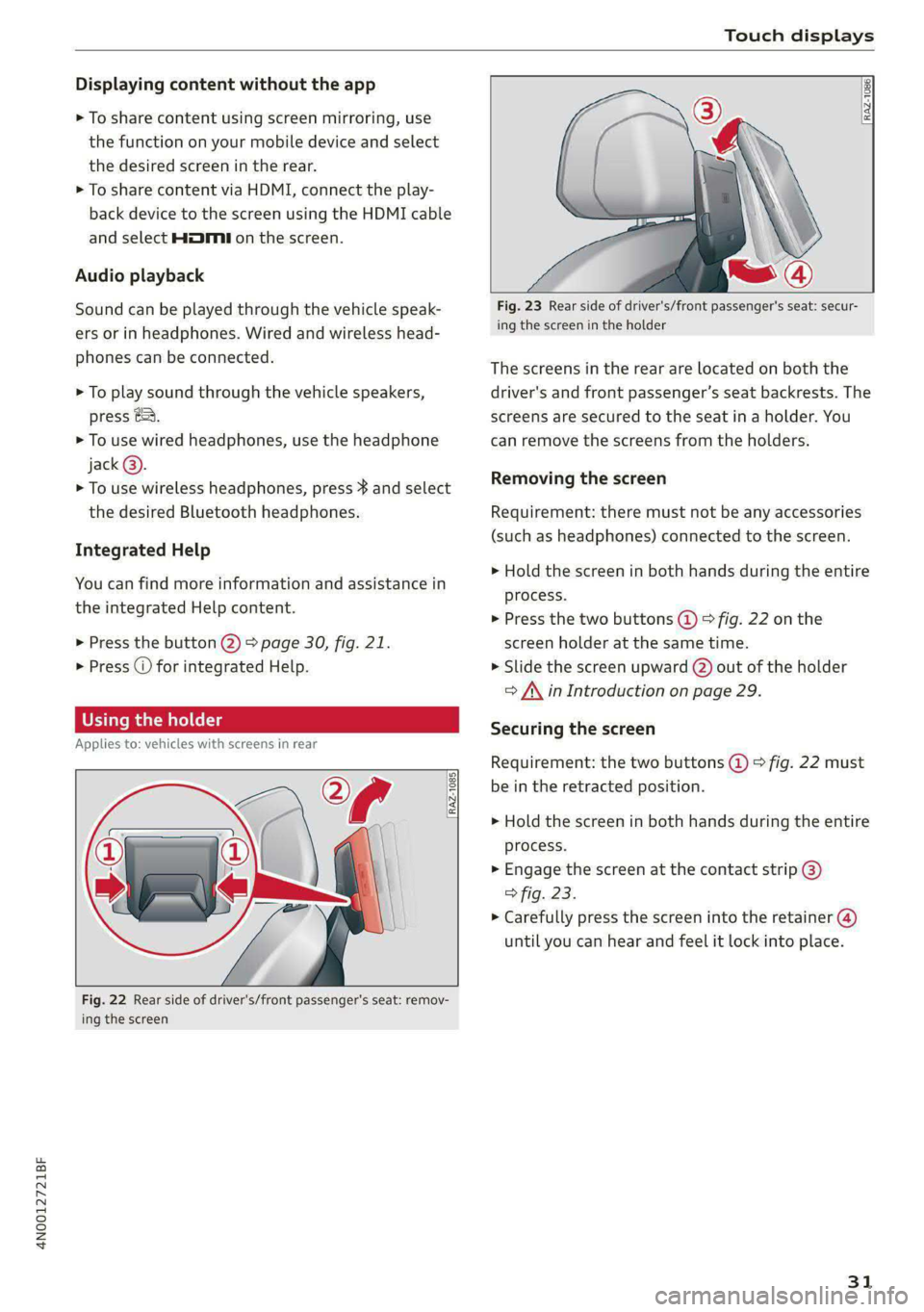
Using the holder
Applies to: vehicles with screens in rear
RAZ-1085}
ap
[i
Fig. 22 Rear side of driver's/front passenger's seat: remov-
ing the screen
RAZ-1086,
Fig. 23 Rear side of driver's/front passenger's seat: secur-
ing the screen in the holder
The screens in the rear are located on both the
driver's and front passenger’s seat backrests. The
screens are secured to the seat in a holder. You
can remove the screens from the holders.
Removing the screen
Requirement: there must not be any accessories
(such as headphones) connected to the screen.
> Hold the screen in both hands during the entire
process.
> Press the two buttons (@) > fig. 22 on the
screen holder at the same time.
> Slide the screen upward (2) out of the holder
> A\ in Introduction on page 29.
Securing the screen
Requirement: the two buttons @ © fig. 22 must
be in the retracted position.
> Hold the screen in both hands during the entire
process.
» Engage the screen at the contact strip @)
> fig. 23.
> Carefully press the screen into the retainer (@)
until you can hear and feel it lock into place.
31